
- Revision History
- Overview
- Feature Summary
- Industries Framework Common
- Launch Experience
-
- Launch Experience
-
- Define Constraint Rules
- Use Offer Comparison
- Define Common Business Configurations
- Use Search Tags for Improved Offer Discovery
- Use Audit Trails and Logs for Product Offers
- View References Among Entities
- Define Renewal Terms
- Use Price Override Adjustment on Atomic and Bundle Offers
- Use Time Limited Discount on Bundle Adjustments
- Define Cross Product Discount
- Integrate Launch with Siebel CRM
- Use Installment Plans with Supported Durations Ranges
- Introduce New Types of Product Offers
-
- Launch Experience
This document will continue to evolve as existing sections change and new information is added. All updates appear in the following table:
| Date | Module | Feature | Notes |
|---|---|---|---|
| 16 SEP 2022 | Created initial document. |
 HAVE AN IDEA?
We’re here and we’re listening. If you have a suggestion on how to make our cloud services even better then go ahead and tell us. There are several ways to submit your ideas, for example, through the Ideas Lab on Oracle Customer Connect. Wherever you see this icon after the feature name it means we delivered one of your ideas.
GIVE US FEEDBACK
We welcome your comments and suggestions to improve the content. Please send us your feedback at oracle_fusion_applications_help_ww_grp@oracle.com.
DISCLAIMER
The information contained in this document may include statements about Oracle’s product development plans. Many factors can materially affect Oracle’s product development plans and the nature and timing of future product releases. Accordingly, this Information is provided to you solely for information only, is not a commitment to deliver any material, code, or functionality, and should not be relied upon in making purchasing decisions. The development, release, and timing of any features or functionality described remains at the sole discretion of Oracle.
This information may not be incorporated into any contractual agreement with Oracle or its subsidiaries or affiliates. Oracle specifically disclaims any liability with respect to this information. Refer to the Legal Notices and Terms of Use for further information.
Column Definitions:
Report = New or modified, Oracle-delivered, ready to run reports.
UI or Process-Based: Small Scale = These UI or process-based features are typically comprised of minor field, validation, or program changes. Therefore, the potential impact to users is minimal.
UI or Process-Based: Larger Scale* = These UI or process-based features have more complex designs. Therefore, the potential impact to users is higher.
Features Delivered Disabled = Action is needed BEFORE these features can be used by END USERS. These features are delivered disabled and you choose if and when to enable them. For example, a) new or expanded BI subject areas need to first be incorporated into reports, b) Integration is required to utilize new web services, or c) features must be assigned to user roles before they can be accessed.
| Ready for Use by End Users Reports plus Small Scale UI or Process-Based new features will have minimal user impact after an update. Therefore, customer acceptance testing should focus on the Larger Scale UI or Process-Based* new features. |
Customer Must Take Action before Use by End Users Not disruptive as action is required to make these features ready to use. As you selectively choose to leverage, you set your test and roll out timing. |
|||||
|---|---|---|---|---|---|---|
| Feature |
Report |
UI or |
UI or |
|
||
CX Industries Framework serves as a platform for seamless integration of applications. You can use this platform to integrate your application with other Oracle applications and third-party applications, which includes cloud services and on-premise systems. In addition, you can leverage data from various sources, use TM Forum Open APIs and REST APIs to configure and extend tailored experiences.
CX Industries Framework supports both synchronous and asynchronous interactions between the integrated applications. It hosts all the TM Forum Open APIs on Oracle Cloud Infrastructure API Gateway to secure and optimize the API interactions. It also ensures high availability and resiliency by using the Oracle Cloud Infrastructure Load Balancing service.
Import Framework Configurations from Older Versions
You can import a configuration that was exported from an older version of DX4C.
Reuse any configuration that was built on an older DX4C instance. Instead of redoing all configuration from scratch, simply import and build upon it. In the process, this also allows migration of configuration from the old format to the new format by exporting the imported configuration.
Steps to Enable
You don't need to do anything to enable this feature.
Role And Privileges
- DX4C_System_Administrator
- DX4C_System_Configuration_Viewer
- DX4C_TMF_Specialist
When you import a configuration, it overrides the existing configuration and merges any non-existing configuration artifacts.
You can do continuous development and testing of the configurations across multiple workspaces. You can configure different features in multiple workspaces simultaneously and then merge these configurations to the production workspace. You can also reuse of existing configuration from other projects and demo workspaces.
Steps to Enable
You don't need to do anything to enable this feature.
Role And Privileges
- DX4C_System_Administrator
- DX4C_System_Configuration_Viewer
- DX4C_TMF_Specialist
CX Industry Framework allows tenants and system integrators to extend Industry applications. The Framework enables you to add new attributes, value constraints, and business logic, thereby letting you extend connected experiences.
- All extensibility in DX4C Adapters are upgrade-safe
- Extensibility support includes:
- Out-of-the-box Oracle Extensions for Industry Solutions like DX4C and CX4U
- After-market extensions by tenants or system integrators
- Business logic extensions by adding other API calls of spoke system
Steps to Enable
You don't need to do anything to enable this feature.
Role And Privileges
- DX4C_System_Administrator
- DX4C_System_Configuration_Viewer
- DX4C_TMF_Specialist
You can now manage constraint rules as a separate top-level resource. You use constraint rules to do the following:
- Define the relationship between components within a bundle
- Specify the relationship between characteristics of a specification when processing an order
Here are the templates available for constraint rules:
- Requires
- Requires (Mutual)
- Exclude
- Constrain Attribute Expressions
- Constrain Attribute Value
- Constrain Relationship Quantity
For example, a computer is a bundled offering with components (atomic) wherein not all of the components may be compatible with each other. A specific model of monitor or keyboard may work only with some CPUs and not with others. If you have many different computers that use the same keyboard, you must write separate constraints for each computer to specify which CPU is compatible with which keyboard. You will need to do this for each computer because you can apply constraints only within the pertinent bundle.
The following figure shows the creation of a constraint rule

The business benefit of this feature is the ability to define constraint rules for service and commercial bundles and define the relationship between components within a bundle.
Steps to Enable
You don't need to do anything to enable this feature.
Role And Privileges
- Communications Catalog Product Manager
You can now compare two different product offers or two versions of the same offer using offer comparison.
The following figure shows how you compare two packages
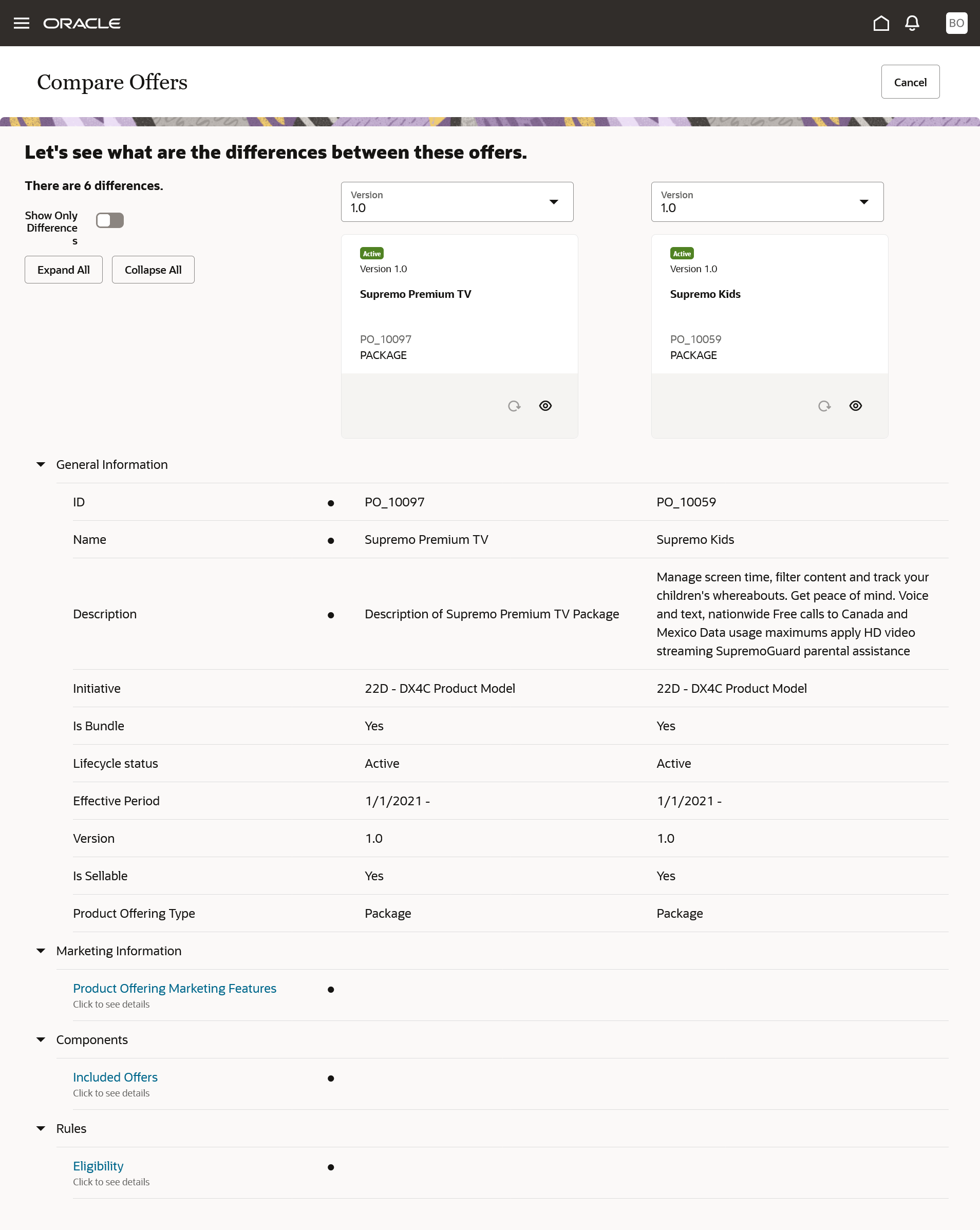
Package Comparison
The business benefit of this feature is comparing offers and/or its version is one of the most basic and meaningful core capabilities for a catalog application. The intent of comparing offers or its versions is not just to generate a differences report but to allow the user to
- Clone the offer of interest
- Revert to the version of the offer
Steps to Enable
You don't need to do anything to enable this feature.
Role And Privileges
- Communications Catalog Product Manager
Define Common Business Configurations
You can now centrally configure and manage business configurations across your enterprise. Here are some of the business configuration parameters that you can set up:
- Account type
- Pricelist type
- Channels
- Market segments
- Geographical hierarchy, including country, province, state, city, and postal code for various geography types
- Eligibility rule entities for parameters, operators, and values
As a communications service provider, you can use this feature to configure a business that spans multiple DX4C offerings. You can provide a differentiated customer on-boarding experience, and centrally introduce and manage your business setups across all DX4C instances, regardless of their adaption phase. It reduces your configuration efforts, increases DX4C deployment agility, and provides a consistent experience across your enterprise offerings that are not limited to DX4C offerings.
Steps to Enable
Review the REST service definition in REST APIs for Launch Experience, Doc ID 2725039.1, on My Oracle Support.
Role And Privileges
- Communications Catalog Administrator
Use Search Tags for Improved Offer Discovery
Previously, you could only search offers by their name, which reduced the usefulness of the search capability. You can now enhance the search capability by tagging offers with keywords to improve their discovery. You can use keywords that suggest an offer's type, specialty, domain, and other characteristics that make the offers easily searchable. For example, you can tag a package with keywords such as a 4G, 5G, or Prepaid to Postpaid Migration. Searchable tags allow users to discover the type of offers that interest them.
The following figure shows how you configure search tags on an offer.
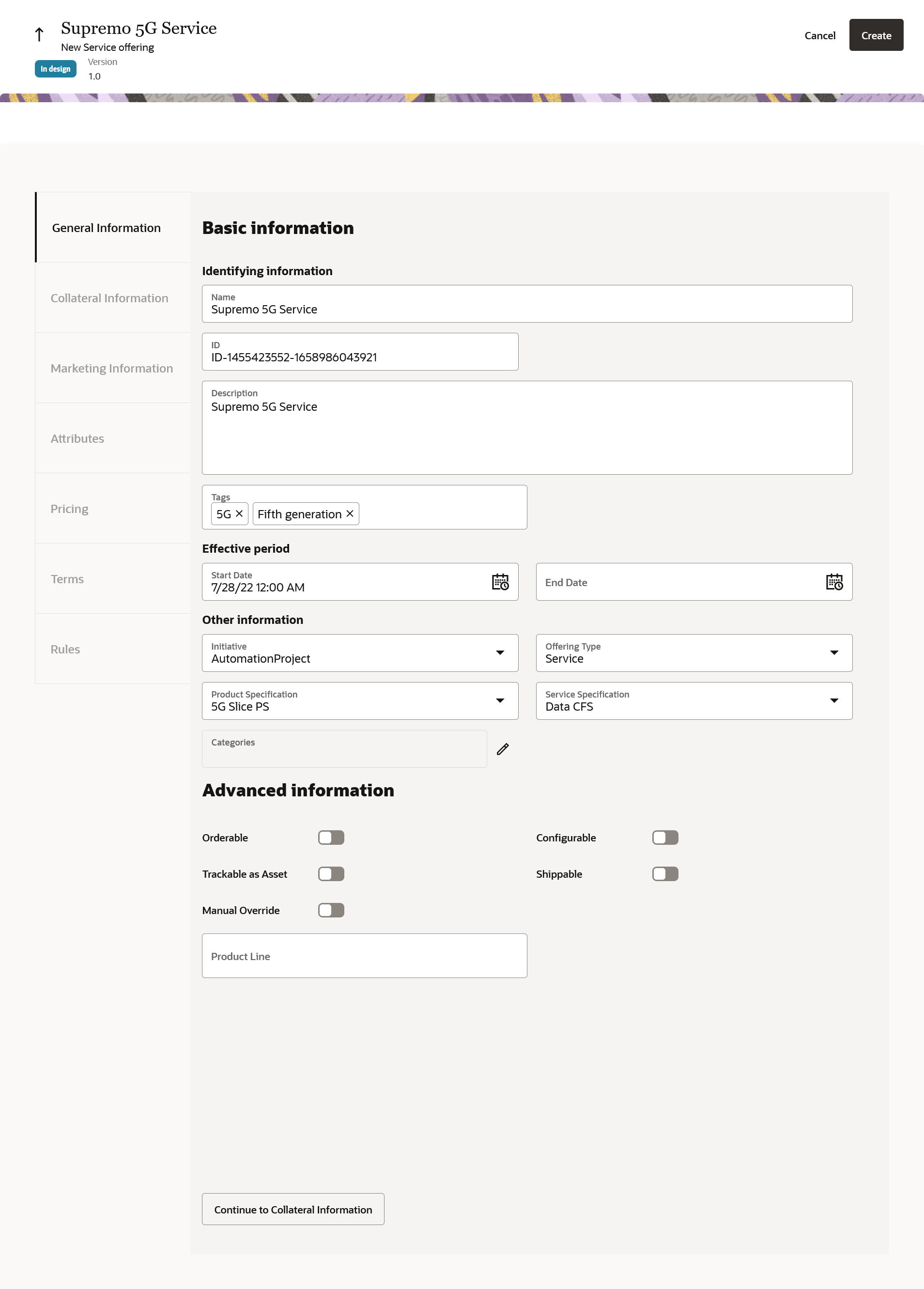
Tagging an offer with keywords that could be used to discover offers by their type, specialty or domain is a powerful way to discover offers. This amplifies the power of search in addition to the search capability that we provide today. The need to have keywords on the offers to be relevant to what users are searching for so they have a better chance of finding your content among the results improves the user experience.
Steps to Enable
You don't need to do anything to enable this feature.
Tips And Considerations
- Add the required tags to the ORA_ATC_SEARCH_TAGS lookup code.
Role And Privileges
- Communications Catalog Product Manager
Use Audit Trails and Logs for Product Offers
You can now enable and capture audit information on product offerings. By enabling auditing on product offers, you can specify and capture detailed historical information about the changes made to the offers. The audit log captures details like the date and time of an action taken, the changes made to the product offer, and the identity of the person making the changes. Audit logs are also downloadable.
The following figure shows the audit configuration of product offerings.
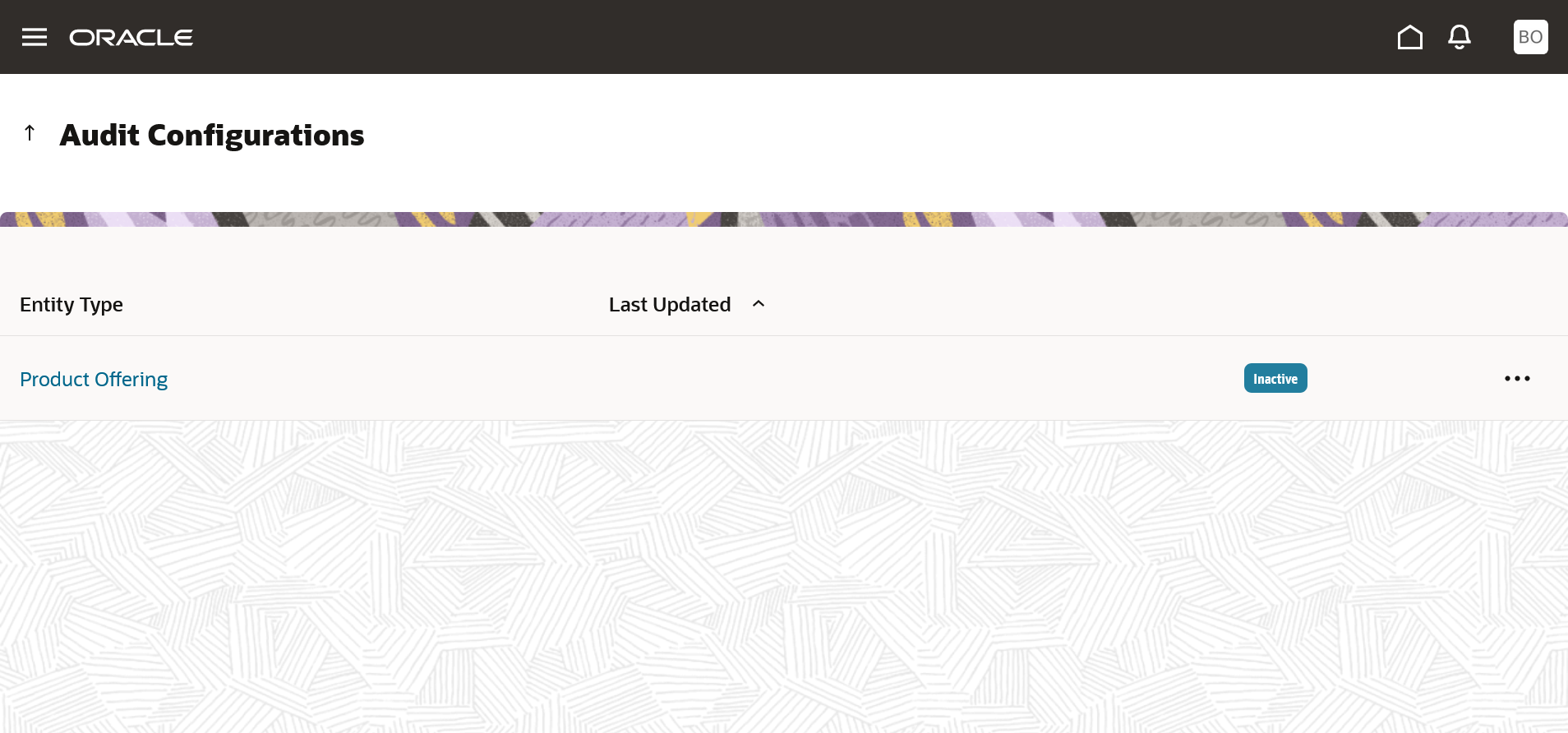
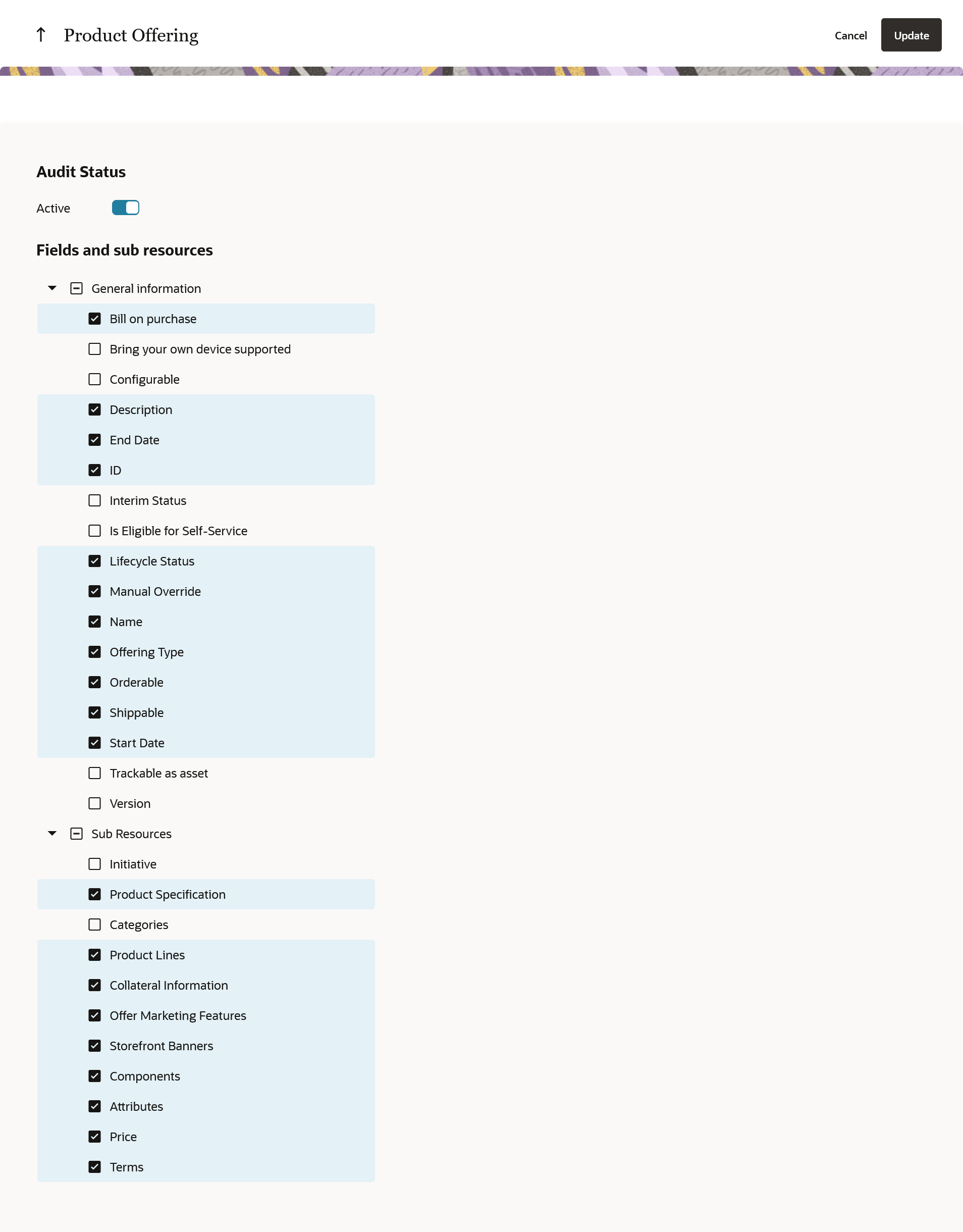
Audit Configuration for Product Offering
Audit logs enable you to identify the changes made to an offer by users' actions like create, update, delete, export, import, publish, setup and configuration.
Steps to Enable
You don't need to do anything to enable this feature.
Role And Privileges
- Communications Catalog administrator
View References Among Entities
You can now view the list of entities referencing other entities to assess the possible impact of a change to a referenced entity. The entities include product offering, price resource, service specification, custom profile specification, price list, product line, catalog or category, and return checklist.
The following figure shows the typical entities listed for a product line
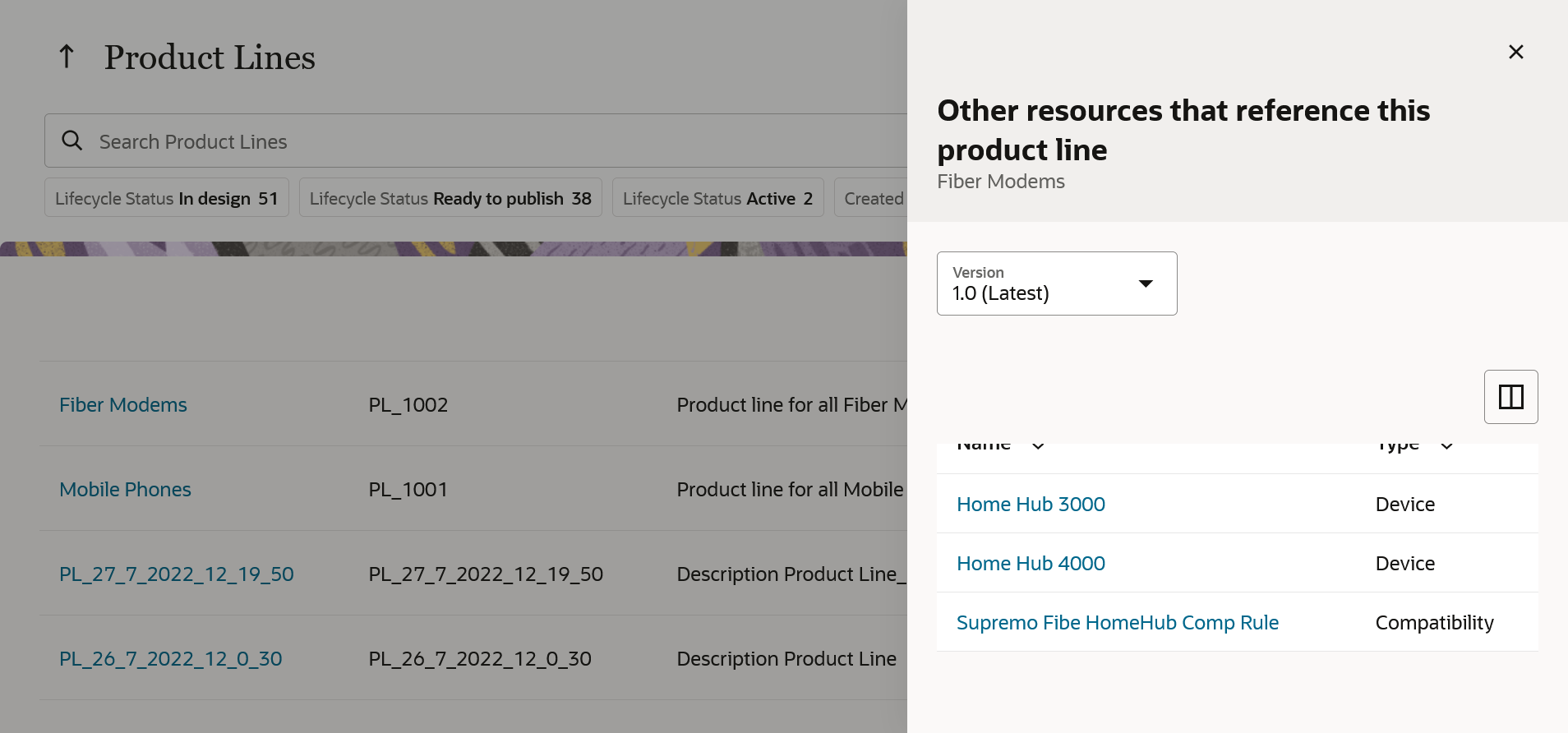
Entity References for a Product Line
Provides a view of the references if any about the entity being revised, cloned, or deleted.
Steps to Enable
You don't need to do anything to enable this feature.
Role And Privileges
- Communications Catalog Product Manager
- Communications Technical Specialist
You can now define renewal terms on a product offering using renewal term templates to handle subscriber contract renewals.
The following figure shows how you create the renewal term template and then use it in the offering terms tab.
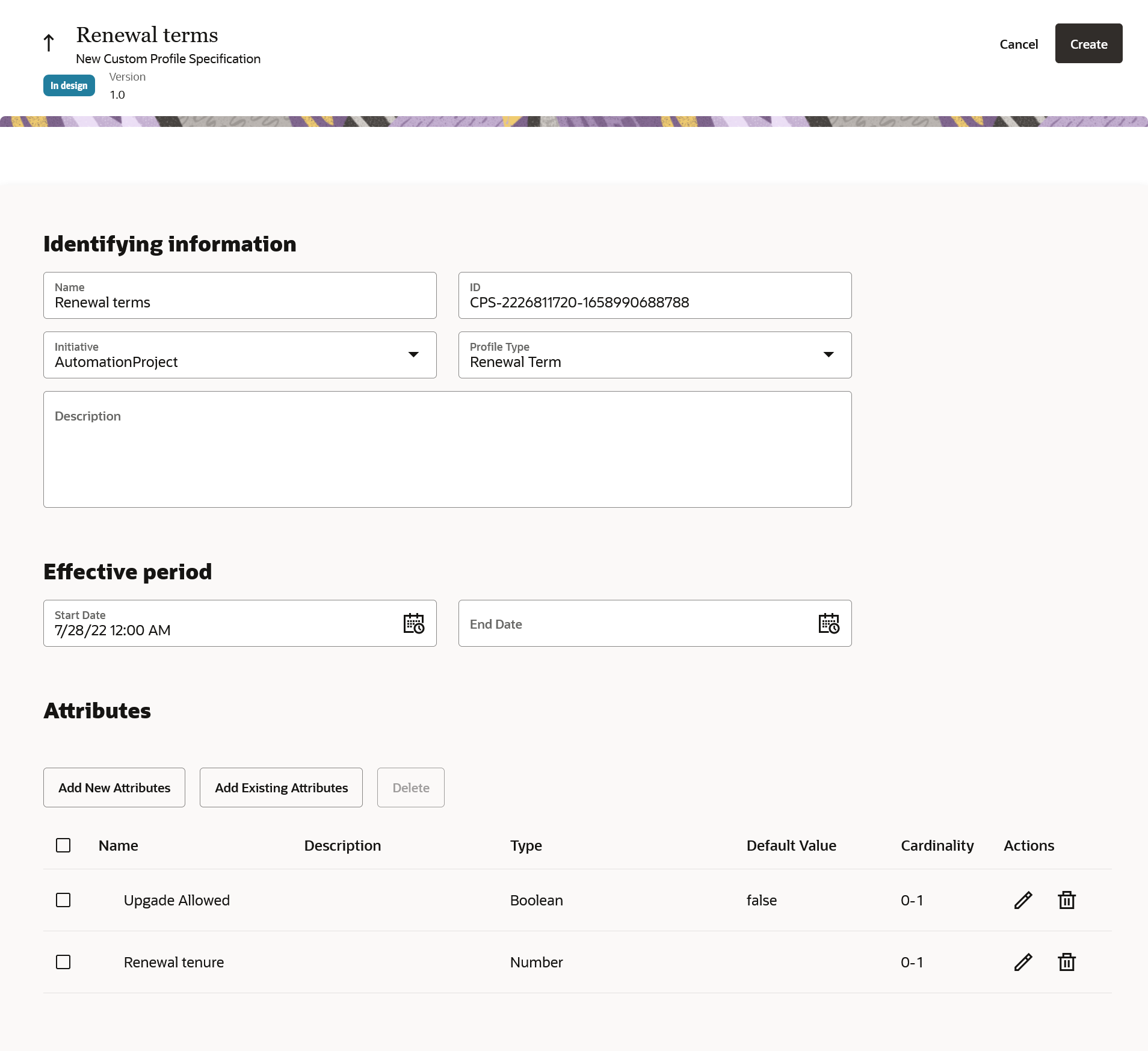
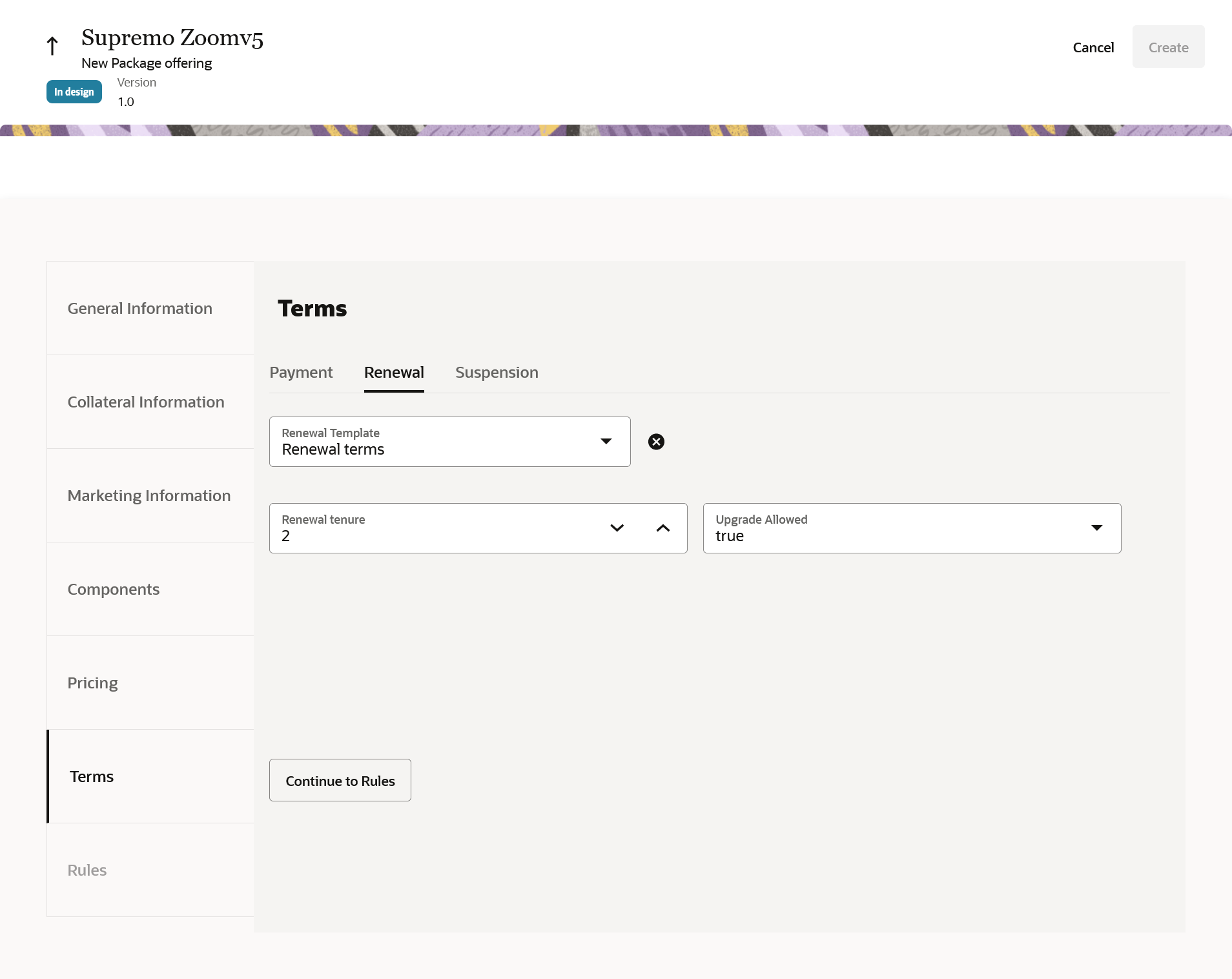
Enables you to define the renewal terms that are applicable to the subscribers at the time of expiration of their service contracts.
Steps to Enable
You don't need to do anything to enable this feature.
Role And Privileges
- Communications Catalog Product Manager
Use Price Override Adjustment on Atomic and Bundle Offers
You can now use adjustment of type price override on the components of a bundled or simple product offering. For example: In a Supremo Zoom package, you could override the Supremo wireless bundle price from USD 1000 to USD 900.
The following figure shows a price override adjustment for a one-time fee.
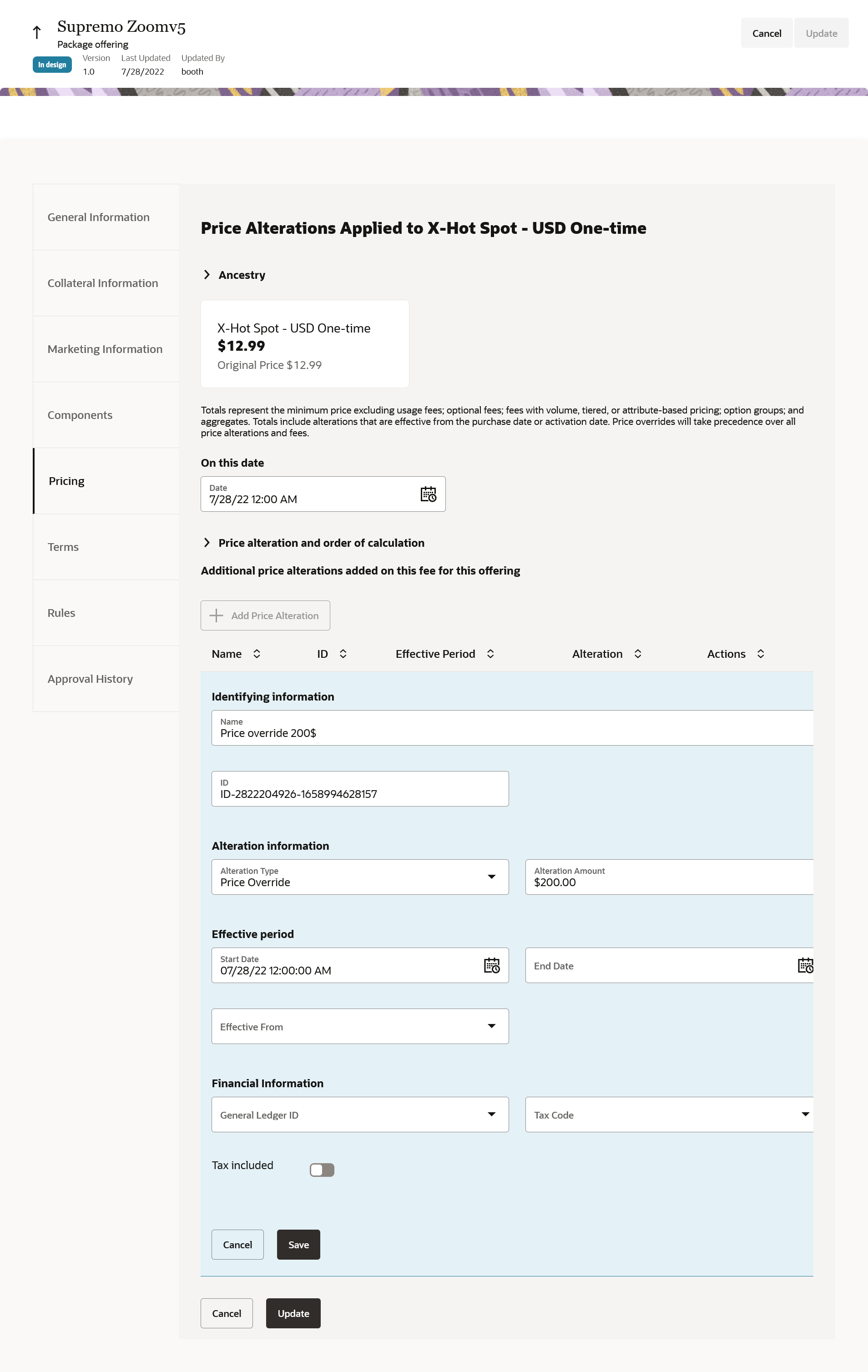
The business benefit of this feature is you would now be able to override the price of a component in a package and make your offer lucrative without proliferating offers.
Steps to Enable
You don't need to do anything to enable this feature.
Role And Privileges
- Communications Catalog Product Manager
Use Time Limited Discount on Bundle Adjustments
You can now use time-limited adjustment at the component-level or fee-level of a bundled offer. Time-limited adjustment enables you to provide bundle-level adjustment for a limited time relative to the purchase date of the offering.
For example: Let's say a package called Supremo Zoom has a monthly subscription fee of USD 10000 and the time-limited adjustment of 10% is applicable to this package for the first 3 months. A customer purchasing this package will pay USD 9000 for the first 3 months at 10% discount and then the standard fee of USD 10000 will be applicable from the fourth month onward.
The following figure shows how you can configure a time-limited discount on a package component.
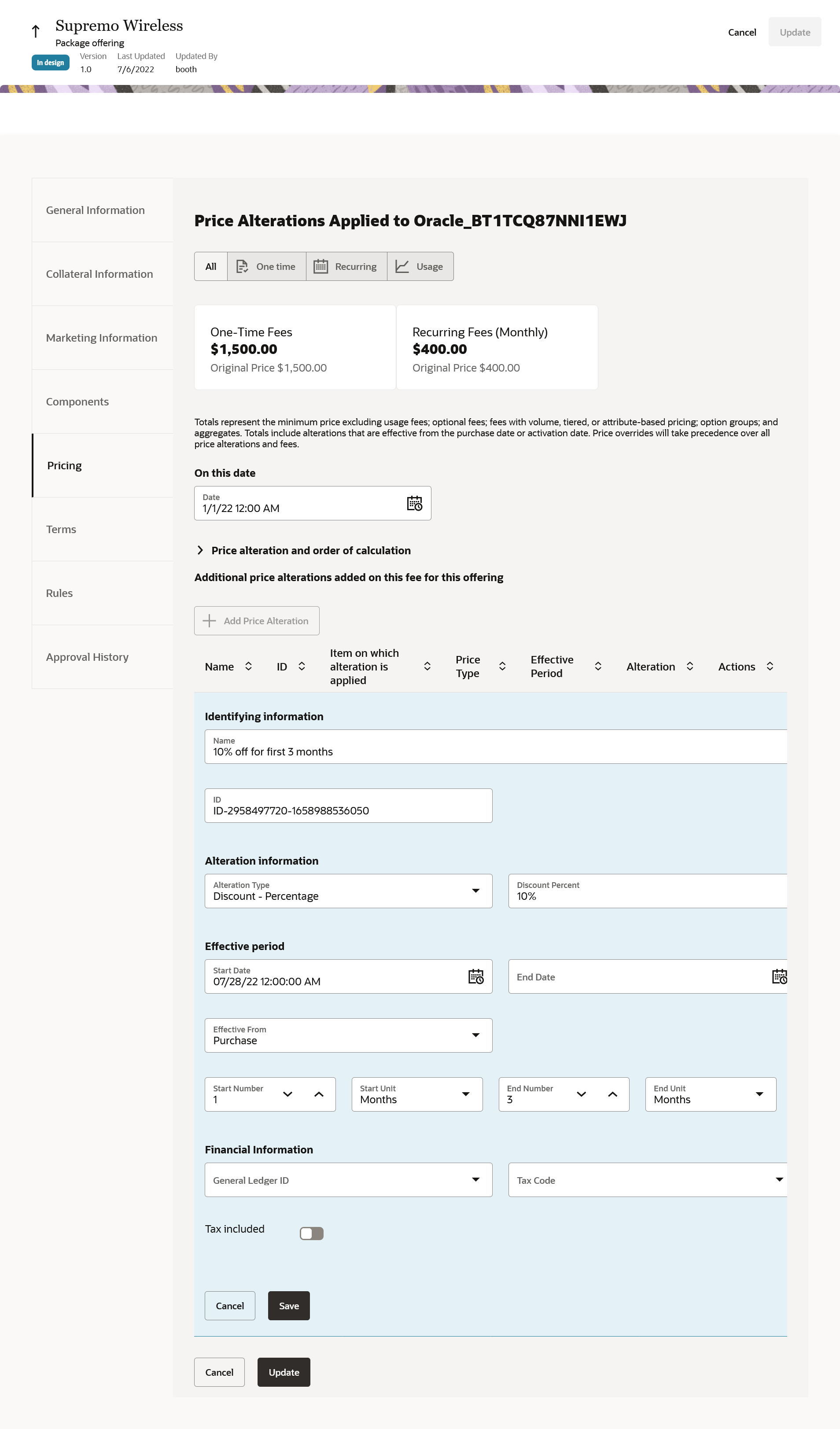
Time Limited Discount
Enables communications service providers to provide bundle-level relative discounts with the ability to price differently over date ranges.
Steps to Enable
You don't need to do anything to enable this feature.
Role And Privileges
- Communications Catalog Product Manager
You can now define and manage cross-product discounts. You use cross-product discounts to model aggregate discounts or mutually exclusive discounts on promotional offers. Examples: Buy 2 and Get 10% Off, or Buy 3 and Get 500$ off.
The following figure shows the creation of the cross-product discount.
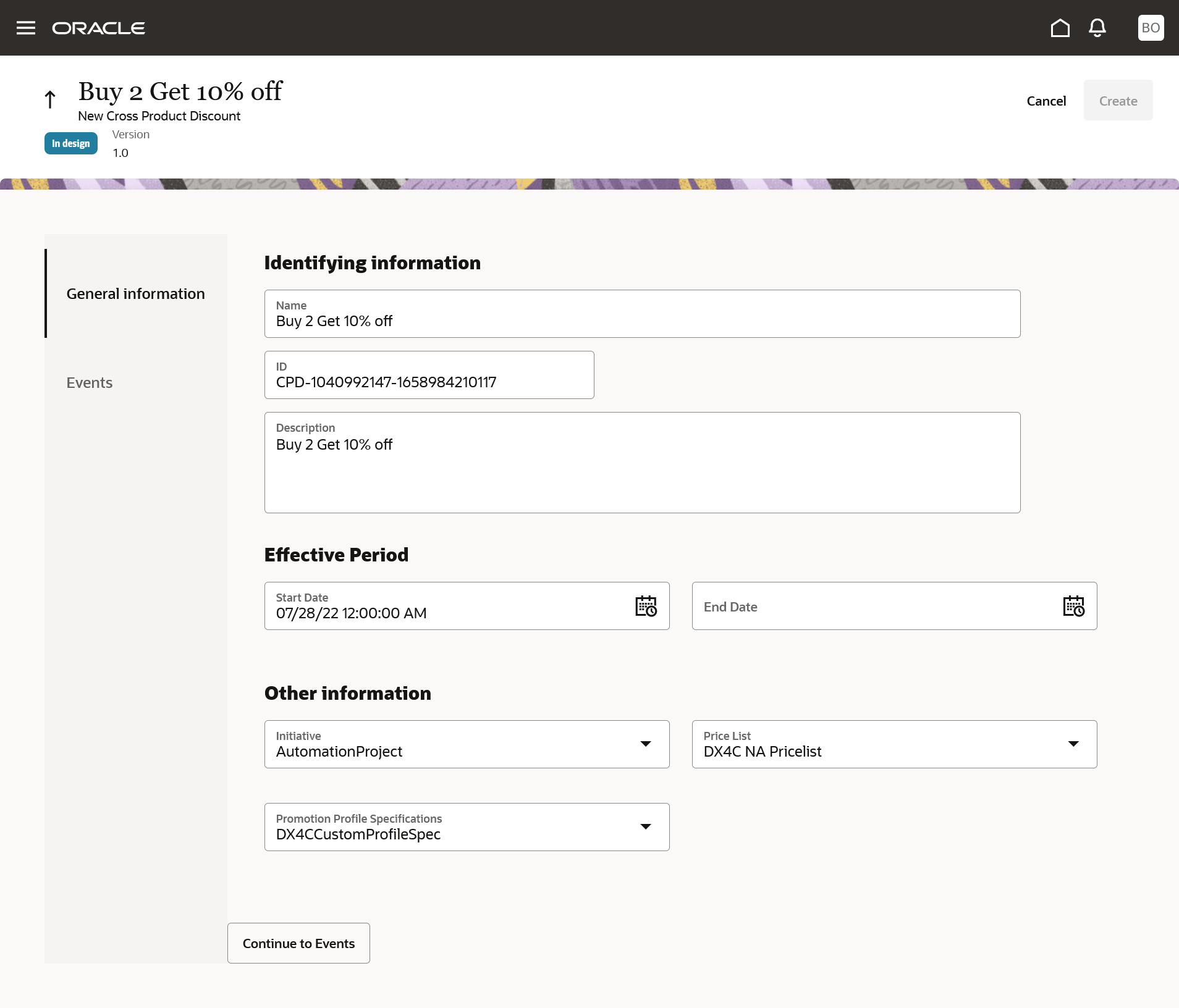
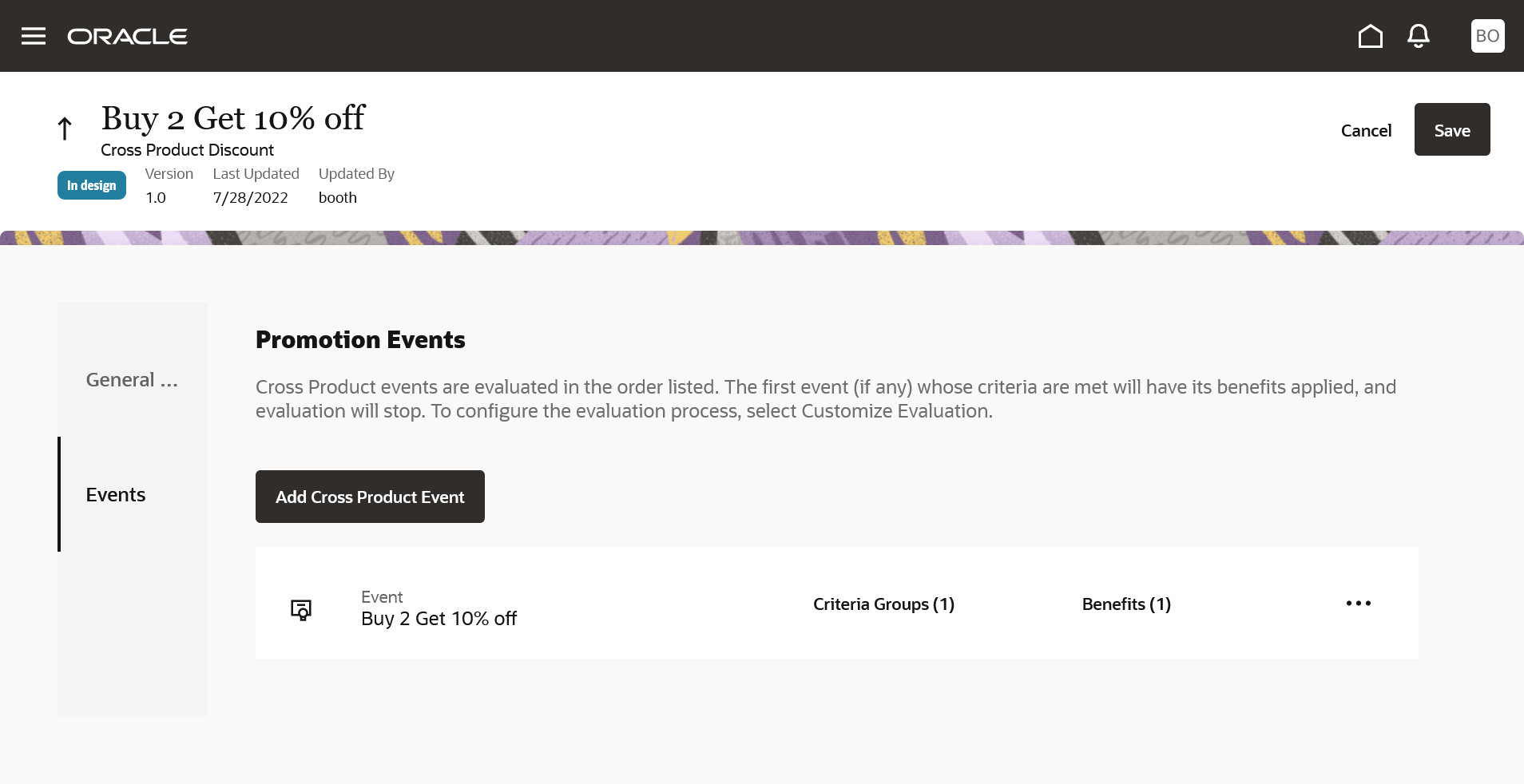
Cross Product Discount
Enables you to apply aggregate discounts and mutually exclusive discounts at runtime across bundles, packages, or both that are already in the cart.
Steps to Enable
You don't need to do anything to enable this feature.
Role And Privileges
- Communications Catalog Product Manager
- Communication Marketing Manager
Integrate Launch with Siebel CRM
You can integrate the Launch application with Siebel CRM to migrate and publish these modeling constructs:
- Constraint rules
- Promotion price overrides
- Promotion commitment terms overrides
- Discount matrices
- Attribute-based adjustments
The following figure shows the Override Commitment Term menu using which you can override the commitment terms of a package:
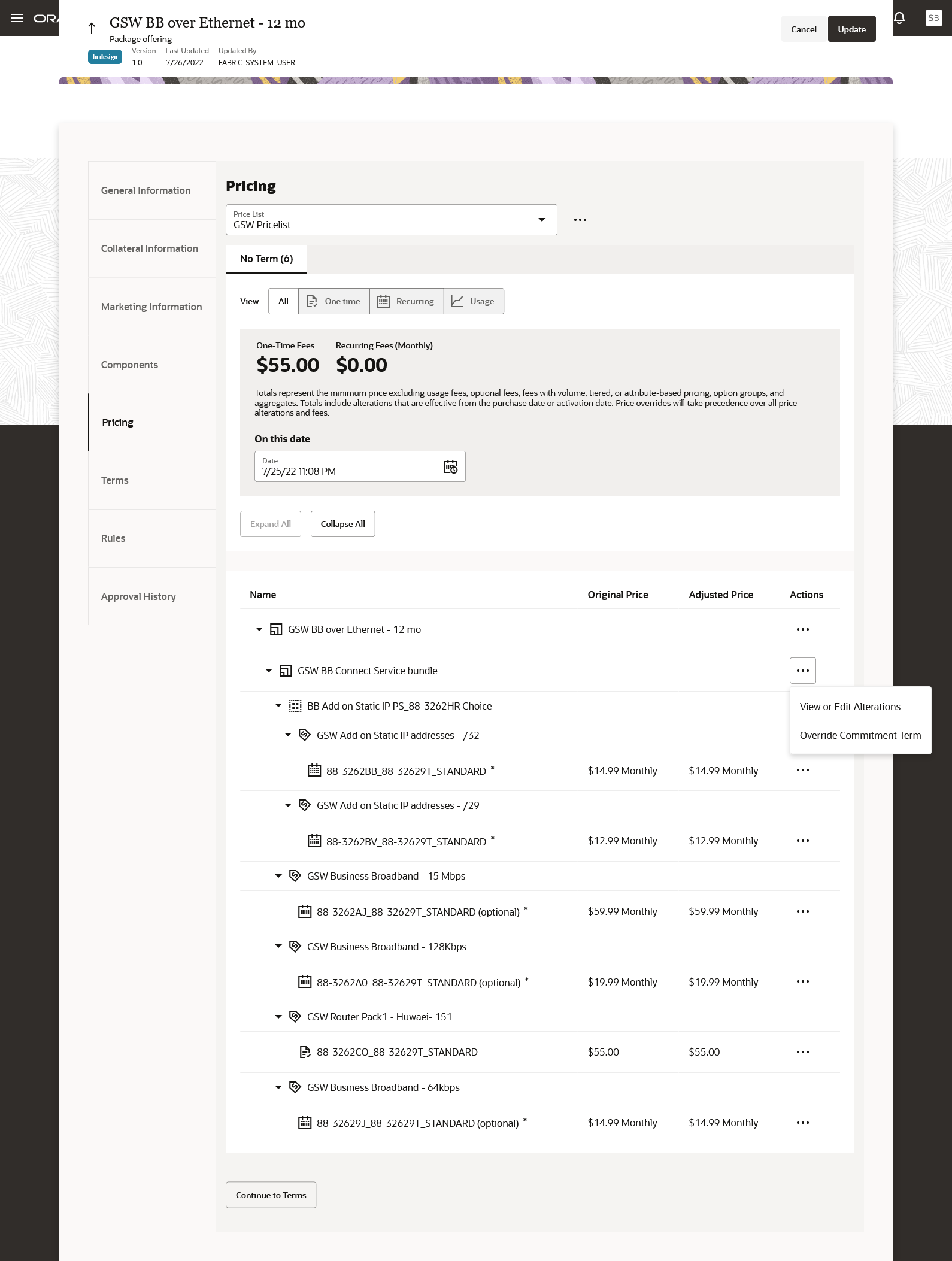
The following figure shows how you can create Constraint rules and publish to Siebel:
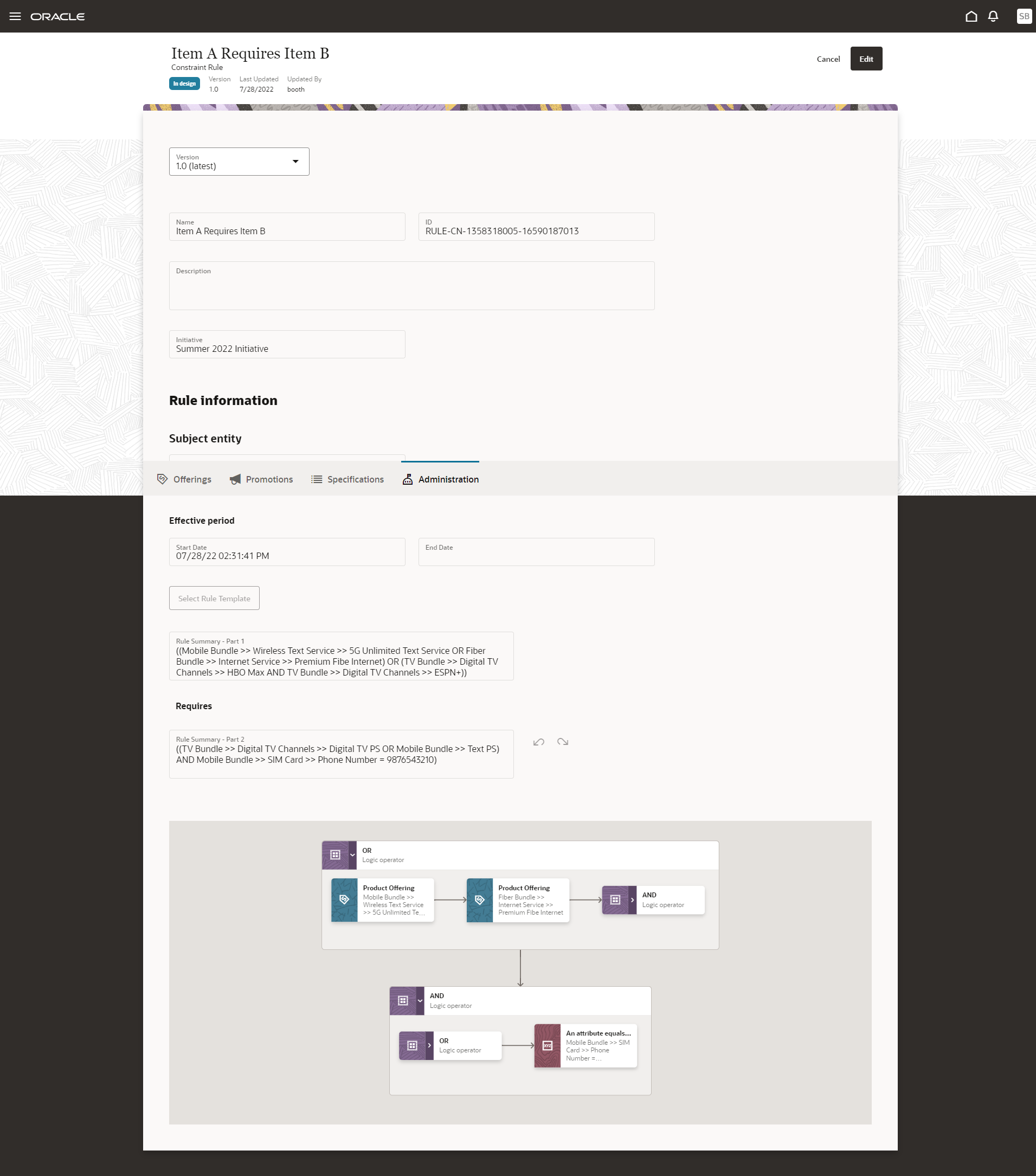
Enables you to integrate various entities between Launch and Siebel CRM by mapping the catalog data constructs between the two applications.
Steps to Enable
Requires integration with Siebel CRM. For more information, see Integrate Launch with Siebel CRM, Doc ID 2826909.1, on My Oracle Support.
Role And Privileges
- Communications Catalog Administrator
Use Installment Plans with Supported Durations Ranges
When you define an installment plan with a specific range of duration, your customers have the flexibility to opt for any tenure within that range.
For example, let's say an installment plan with a range of 6 to 12 months is priced USD 2100 and requires a down payment of USD 100. Here the customer can choose the tenure of say 8 months and the payment of USD 250 (2100-100/8) will be determined at runtime.
The following figure shows how you can create an installment plan.
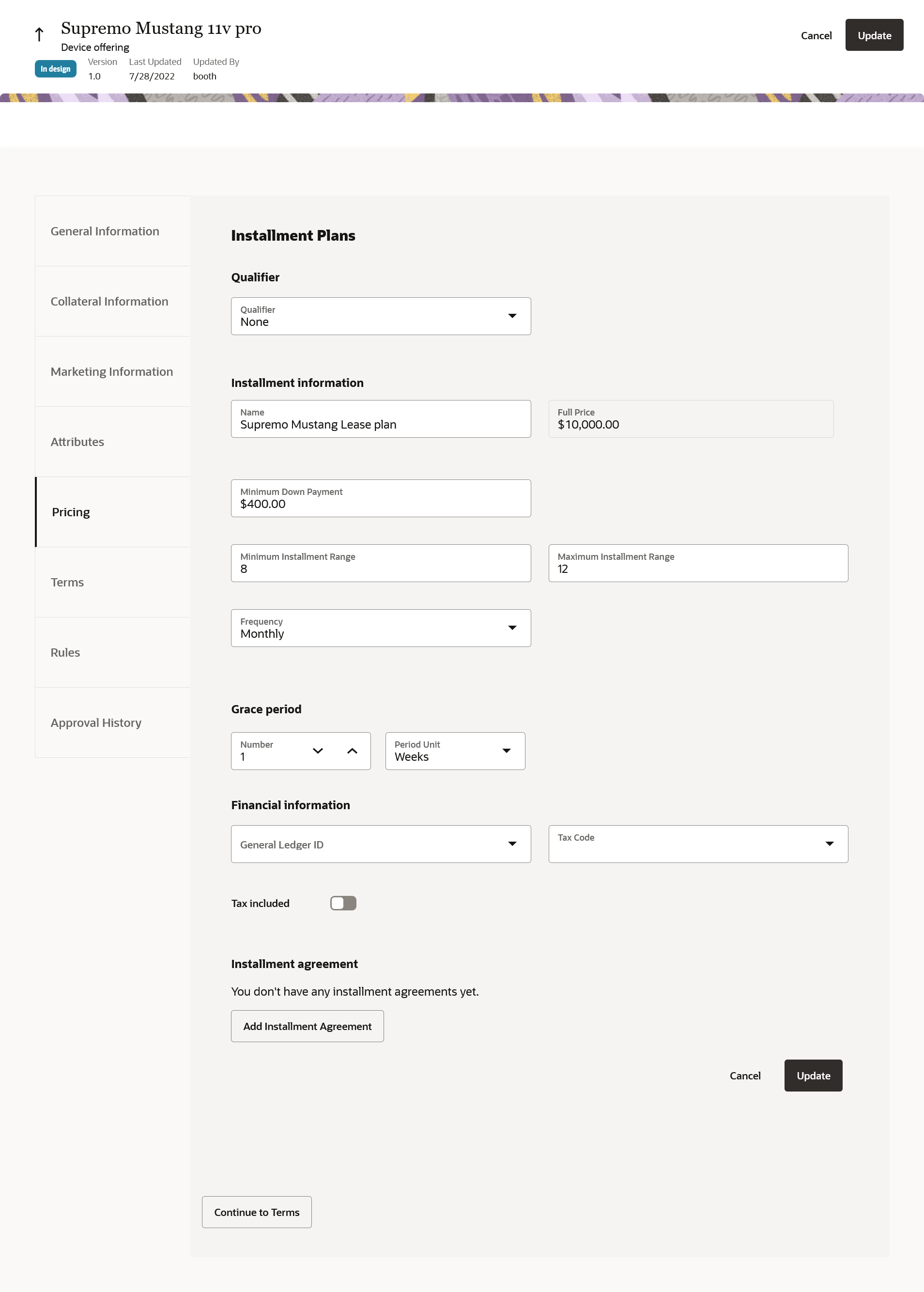
Installment Plan
You can model an installment plan with a range based on different types of creditworthiness or other profile parameters of a subscriber.
Steps to Enable
You don't need to do anything to enable this feature.
Role And Privileges
- Communications Catalog Product Manager
Introduce New Types of Product Offers
You can now create a new offer type called Others to model an offer without attributing a type.
For example, communications service providers who have Siebel CRM define the installation charges, activation charges, and discount charges as product definitions. This definition doesn't fit into any of the Launch Offer classifications but it is part of the bundle or promotions. In such cases, CSPs can use the offer type of Others.
The following figure shows how you can create a simple product offering of type others.
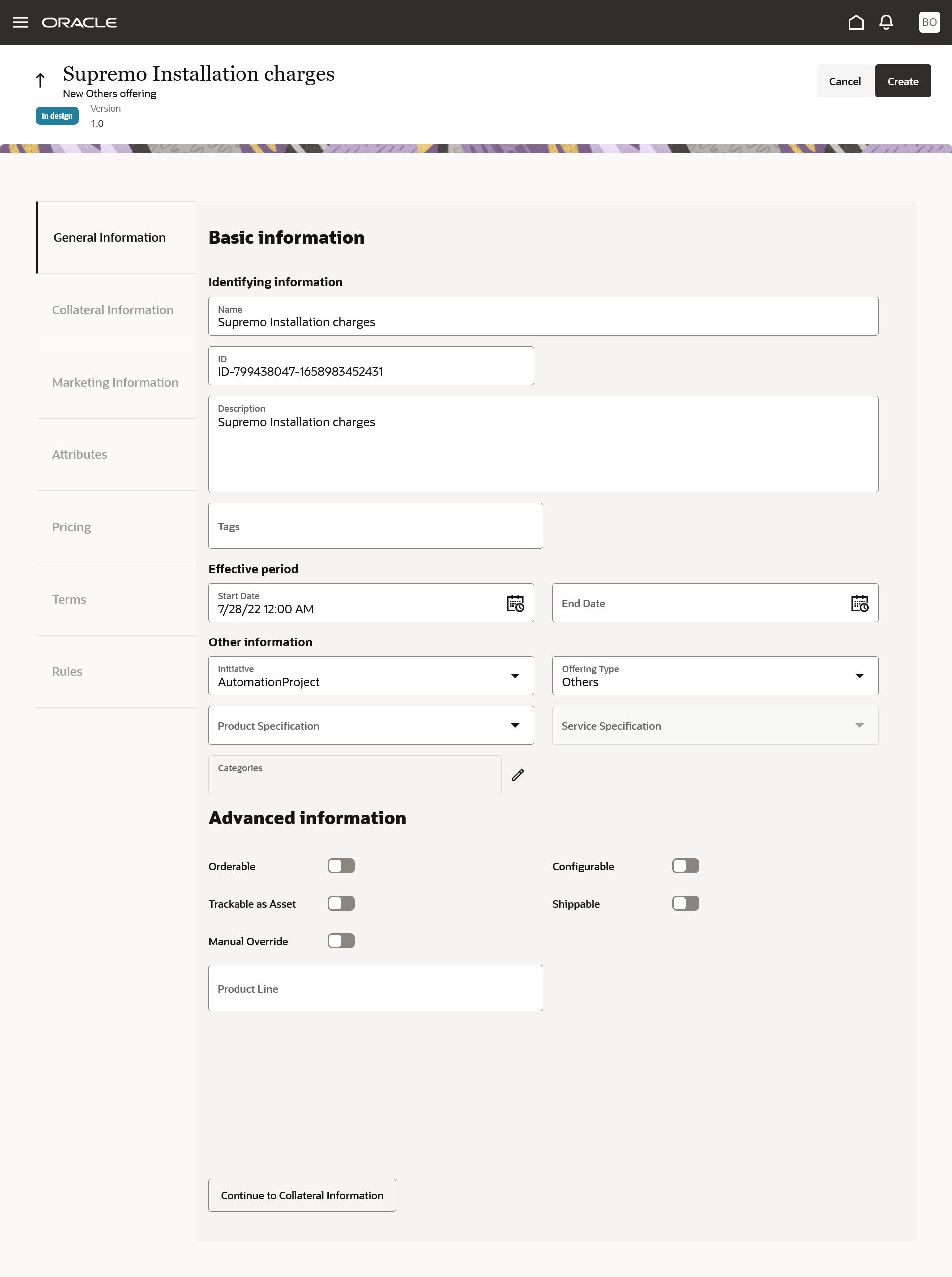
Simple Product Offering
Enables CSPs to model offerings without any type attribution while providing the ability to migrate and manage such definitions.
Steps to Enable
You don't need to do anything to enable this feature.
Tips And Considerations
Add Others attribution in the lookup ORA_ATC_PRDUT_TYPE.
Role And Privileges
- Communications Catalog Product Manager