
- Revision History
- Overview
- Feature Summary
- Industries Framework Common
- Launch Experience
-
- Launch Experience
-
- Set Up Bundle Level Price
- Uptake of TMF 671 v4 Promotion Changes
- Re-use of Alterations on Promotions Benefits
- Support of Tax Percentage for Tax Service Provider
- Introduction of Commercial Name for Product Offering
- Enhance Balance Element to Include Numeric Code
- Support of Additional Properties for Compatibility Rules
- Integrate Launch with Oracle Billing Revenue Management
-
- Launch Experience
This document will continue to evolve as existing sections change and new information is added. All updates appear in the following table:
| Date | Module | Feature | Notes |
|---|---|---|---|
| 10 JAN 2024 | Industries Framework Common | CXIF Landing Page | Updated document. Revised feature information. |
| 15 SEP 2023 | Created initial document. |
 HAVE AN IDEA?
We’re here and we’re listening. If you have a suggestion on how to make our cloud services even better then go ahead and tell us. There are several ways to submit your ideas, for example, through the Ideas Lab on Oracle Customer Connect. Wherever you see this icon after the feature name it means we delivered one of your ideas.
GIVE US FEEDBACK
We welcome your comments and suggestions to improve the content. Please send us your feedback at oracle_fusion_applications_help_ww_grp@oracle.com.
DISCLAIMER
The information contained in this document may include statements about Oracle’s product development plans. Many factors can materially affect Oracle’s product development plans and the nature and timing of future product releases. Accordingly, this Information is provided to you solely for information only, is not a commitment to deliver any material, code, or functionality, and should not be relied upon in making purchasing decisions. The development, release, and timing of any features or functionality described remains at the sole discretion of Oracle.
This information may not be incorporated into any contractual agreement with Oracle or its subsidiaries or affiliates. Oracle specifically disclaims any liability with respect to this information. Refer to the Legal Notices and Terms of Use for further information.
Column Definitions:
Report = New or modified, Oracle-delivered, ready to run reports.
UI or Process-Based: Small Scale = These UI or process-based features are typically comprised of minor field, validation, or program changes. Therefore, the potential impact to users is minimal.
UI or Process-Based: Larger Scale* = These UI or process-based features have more complex designs. Therefore, the potential impact to users is higher.
Features Delivered Disabled = Action is needed BEFORE these features can be used by END USERS. These features are delivered disabled and you choose if and when to enable them. For example, a) new or expanded BI subject areas need to first be incorporated into reports, b) Integration is required to utilize new web services, or c) features must be assigned to user roles before they can be accessed.
| Ready for Use by End Users Reports plus Small Scale UI or Process-Based new features will have minimal user impact after an update. Therefore, customer acceptance testing should focus on the Larger Scale UI or Process-Based* new features. |
Customer Must Take Action before Use by End Users Not disruptive as action is required to make these features ready to use. As you selectively choose to leverage, you set your test and roll out timing. |
|||||
|---|---|---|---|---|---|---|
| Feature |
Report |
UI or |
UI or |
|
||
CX Industries Framework serves as a platform for seamless integration of applications. You can use this platform to integrate your application with other Oracle applications and third-party applications, which includes cloud services and on-premise systems. In addition, you can leverage data from various sources, use TM Forum Open APIs and REST APIs to configure and extend tailored experiences.
CX Industries Framework supports both synchronous and asynchronous interactions between the integrated applications. It hosts all the TM Forum Open APIs on Oracle Cloud Infrastructure API Gateway to secure and optimize the API interactions. It also ensures high availability and resiliency by using the Oracle Cloud Infrastructure Load Balancing service.
Circuit Breaker for CXIF Microservices
Circuit breaking is a software design pattern used in microservice architecture to prevent cascading failures and improve system resilience. The idea behind circuit breaking is to detect and stop requests to a service that is failing or is likely to fail.
Benefits of implementing circuit breaking:
- Improved resilience: By detecting and preventing requests to failing services, circuit breaking helps to prevent cascading failures and improve the overall resilience of the system.
- Faster failure detection: Circuit breaking allows for the rapid detection of service failures, reducing the time it takes to detect and respond to issues.
- Increased stability: By blocking requests to failing services, circuit breaking helps to reduce the load on other services and improve the stability of the overall system.
- Better resource utilization: By reducing the load on failing services, circuit breaking helps to improve resource utilization and reduce the costs associated with running a large-scale microservice architecture.
Overall, circuit breaking is an important technique for improving the reliability and resilience of microservice architecture, and is an important aspect of a robust, scalable microservices system.
Steps to Enable
You don't need to do anything to enable this feature.
Generic Adapter for Documents Management
CX Industry Solutions now delivers a generic adapter to store artifacts in a content management system.
By default, the new Document Management Adapter is configured to store artifacts (document, attachments, images, etc.) in Oracle Content Management System. This adapter is configurable & extendible to work with any after-market content management system of the Tenant's choosing.
Steps to Enable
You don't need to do anything to enable this feature.
CX Industry Framework provides a Home Page for DX4C and CX4U Tenant administrators to login and access the application that they are entitled to manage.
The Landing Application URL is a single access URL, https://<CXIF_API_GW_URL>/apps/landingpage
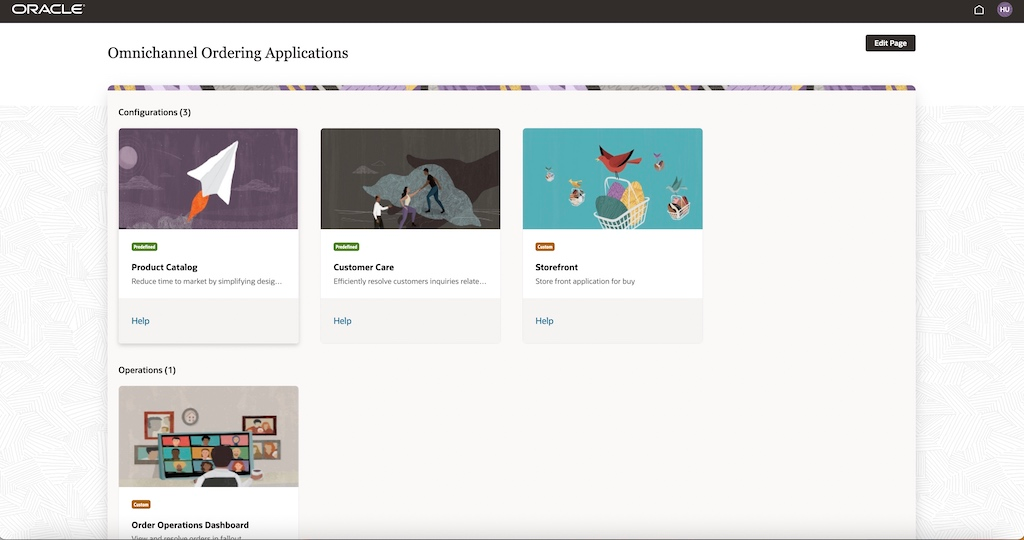
Landing Page Screen
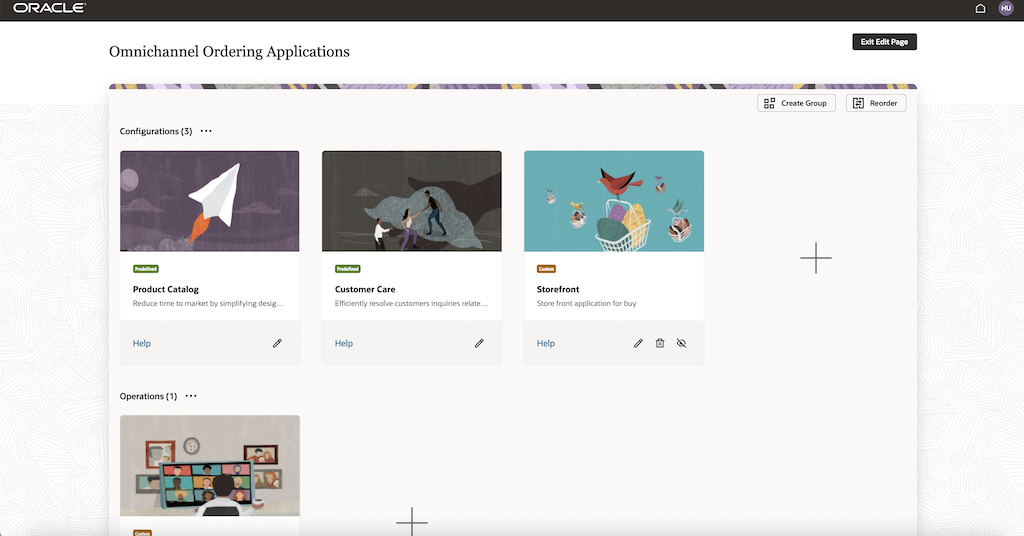
Admin Managing the Groups and App Cards
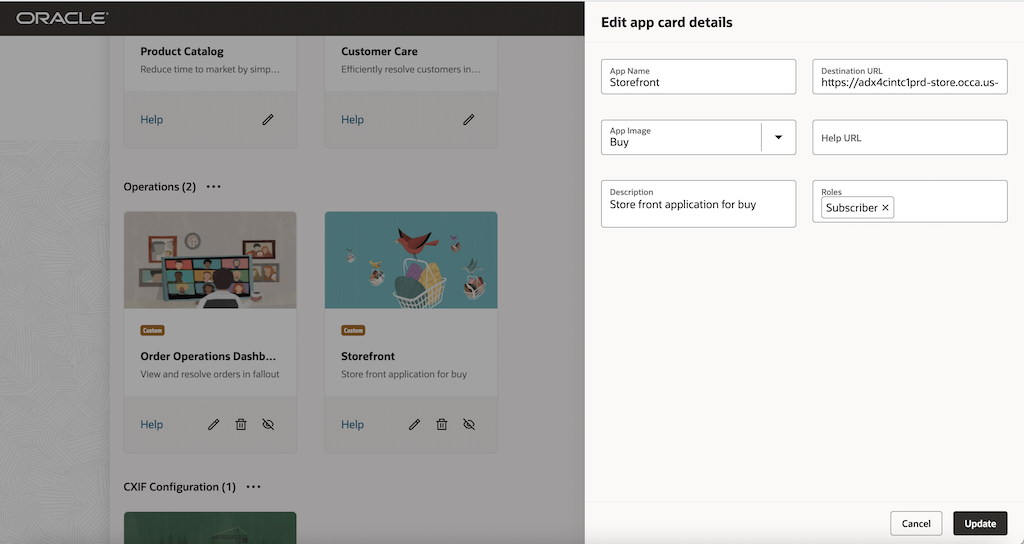
Editing App Card
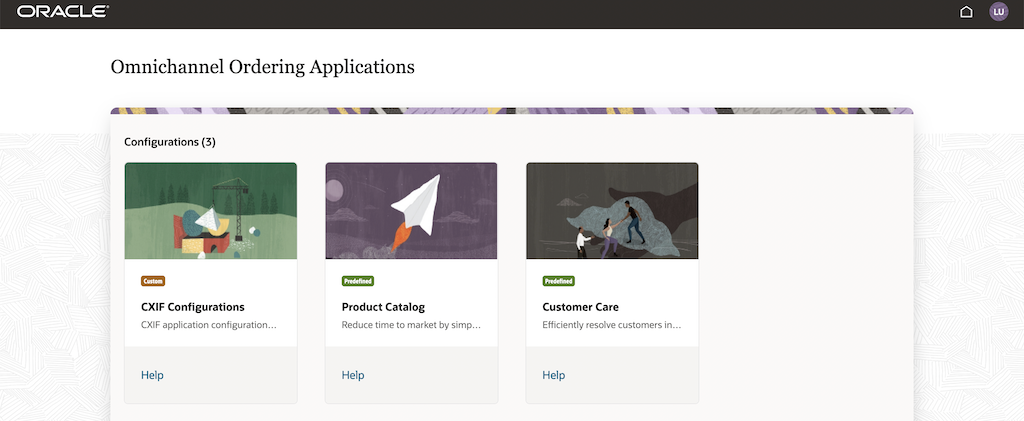
Landing Page for User
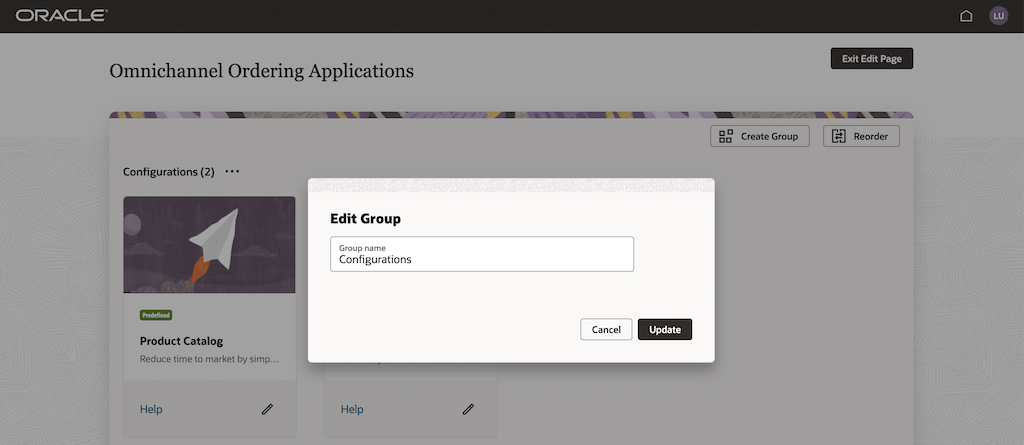
Edit Group
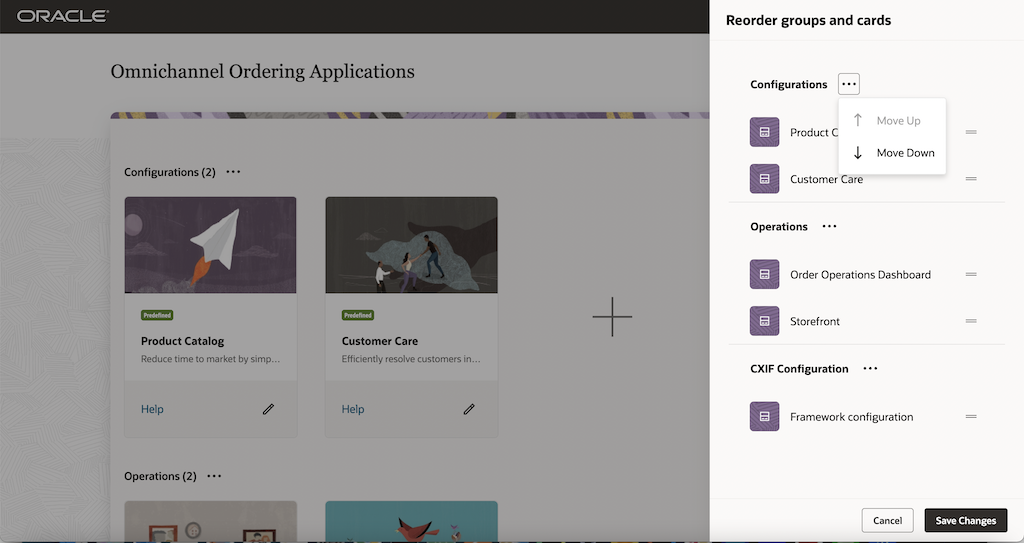
Arrange Cards
The CX Industry Framework Landing Page is a single access URL, shared with tenants once the provisioning is complete. Tenant administrators can create, manage, and group new application cards in the landing page and manage the provisioned application cards. This feature enables the customer to group the activities based on the business needs in the environment. We can make use of the cards to provide access to applications, key tasks, tutorials, and related information. Set the availability of cards on a page depending on the role.
Steps to Enable
You don't need to do anything to enable this feature.
Tips And Considerations
Supported Browsers
The following are the Supported Browsers for the Landing Page:
- Google Chrome
- Mozilla Firefox
Access Requirements
Fabric IDCS role for Tenant Administrator :
The tenant administrator requires IDCS role CXIF_LANDINGPAGE_TENANT_ADMIN which is preseeded. This role enables the Tenant administrator to manage the landing page cards and groups.
Landing Page requires default user to be created as a Prerequisites:
- Configure Single Sign-On
Configure Fabric IDCS as Oracle Identity Cloud Service (idP) and FA IDM as Fusion Applications (sp)
Refer Oracle Fusion Applications Release 13 documentation section Configure Single Sign-On for configuring SSO.
- Configure Provisioning and Synchronization
Refer Configure Provisioning and Synchronization section in the Oracle Fusion Applications Release 13 documentation
- Configure an FA User
A new FA user with username LANDINGPAGE_FA_USER is required for landing page .
To create a new user with username LANDINGPAGE_FA_USER > Navigate to FA Home page , for ex https://fusovmsmc36-fa-ext.us.oracle.com/ Then navigate to Tools > Security Console > Create New user account with the details in screenshot below.
User Name : LANDINGPAGE_FA_USER
Role Code : ORA_FND_IT_SECURITY_MANAGER_JOB

Known Limitation:
While initial provisioning of DX4C with Customer Care and Product Catalog, the predefined cards for 'Customer Care' ( CareX) and 'Product Catalog' (LaunchX) applications gets preseeded in to landing page. In case if these 2 applications are provisioned after the initial provisioning of DX4C , those cards won't get preseeded and are not available in Landing page. The Tenant Administrator will have to create those application cards manually.
Tenant Administrator can create a new group and add new card for 'Customer Care' and 'Product Catalog' by using the below details.
Customer Care:
| Information |
Details |
|---|---|
| Name of the Application |
Customer Care |
| Description of the Application |
Efficiently resolve customers inquiries related to billing, payments, and account receivables. |
| Image to represent the Application |
Care |
| URL |
<FA_BASE_URL>/fscmUI/redwood/atcagentcare sample url : https://fuscdrmsmc168-fa-ext.us.oracle.com/fscmUI/redwood/atcagentcare |
| Application Roles needed by the application |
|
| Help Link |
https://docs.oracle.com/en/cloud/saas/industries/care.html |
Product Catalog :
| Information |
Details |
|---|---|
| Name of the UX Application |
Product Catalog |
| Description of the Application |
Reduce time to market by simplifying design, launch, and lifecycle management of offers. |
| Image to represent the Application |
Launch |
| URL |
<FA_BASE_URL>/fscmUI/redwood/atcproductcatalog/atcproductcatalog sample url : https://fuscdrmsmc168-fa-ext.us.oracle.com/fscmUI/redwood/atcproductcatalog/atcproductcatalog |
| Application Roles needed by the application |
· ORA_ATC_COMMUNICATIONS_TECHNICAL_SPECIALIST_JOB · ORA_ATC_COMMUNICATIONS_CATALOG_ADMINISTRATOR_JOB · ORA_ATC_COMMUNICATIONS_MARKETING_MANAGER_JOB · ORA_ATC_COMMUNICATIONS_CATALOG_PRODUCT_MANAGER_JOB · ORA_ATC_COMMUNICATIONS_CATALOG_VIEWER_JOB |
| Help Link |
https://docs.oracle.com/en/cloud/saas/industries/launch.html |
You can now set up pricing for one time and recurring charges at bundle level for a service bundle, commercial bundle and package offering. This is an alternative approach to setting up pricing.
Example : The Internet Fiber 600 package consists of Internet FTTH commercial bundle and simple offerings Premium broadband and Extensors. You can now set up a package price of 999 $ for Internet Fiber 600 package. The individual components don't carry the price. Only optional components carry the price.
The following figure shows how you configure bundle price for a package
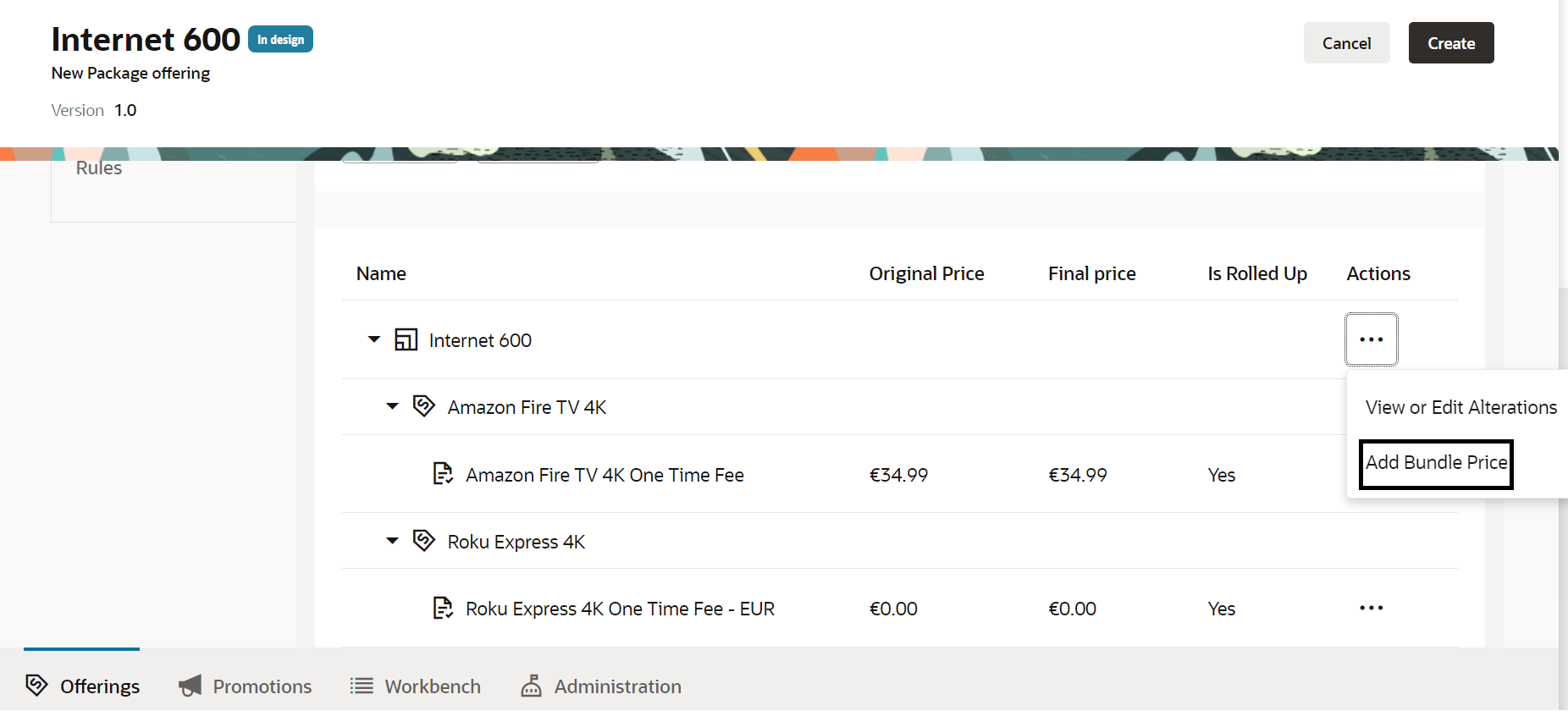
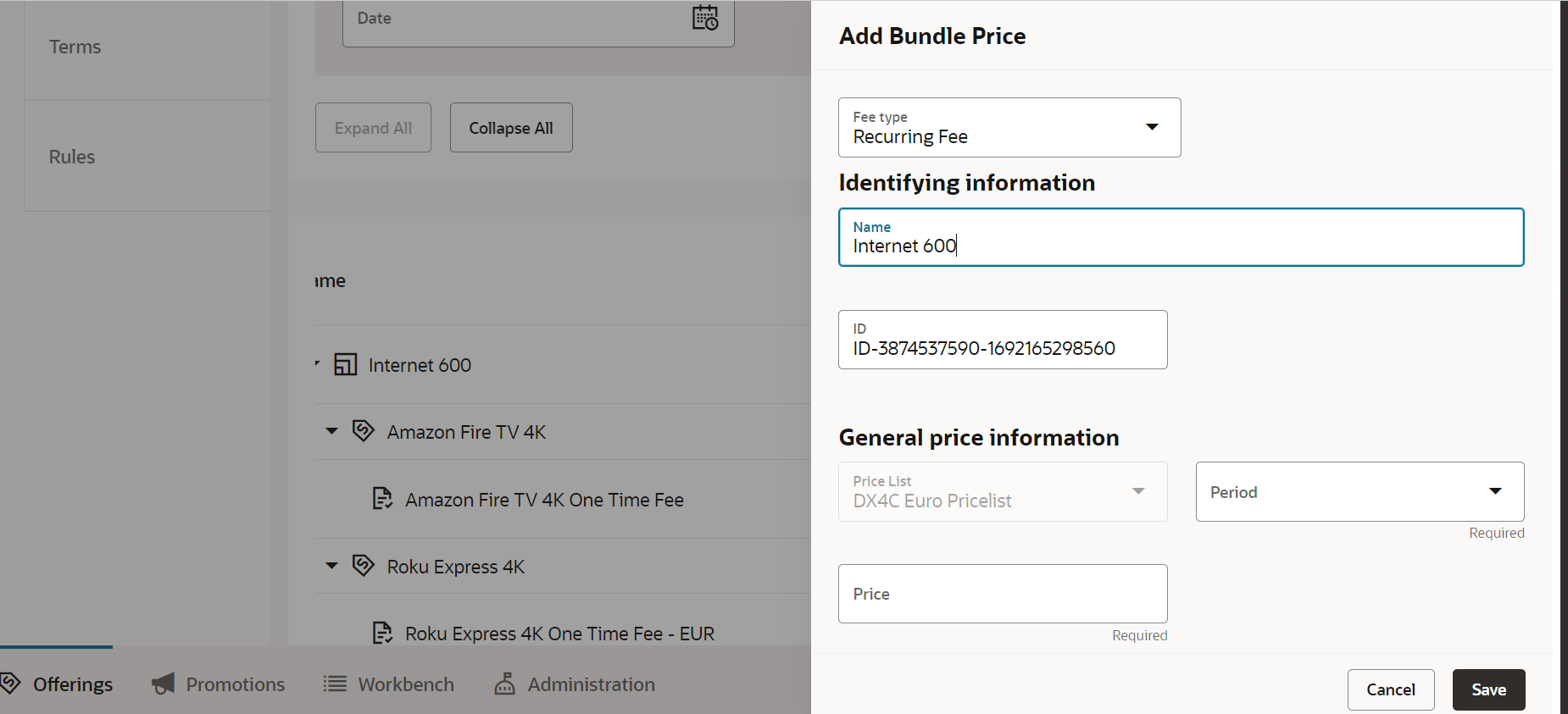
The business benefit of this is that it provides an alternative approach to setting up pricing at package level or bundle level.
Steps to Enable
You don't need to do anything to enable this feature.
Access Requirements
- Communications Product Manager
Uptake of TMF 671 v4 Promotion Changes
Uptake of TMF671 open API v4 specification for promotions and benefits and deprecating its v2 version from Launch application.
The business benefit of this feature is the latest uptake of TMF671 open API v4 specification
Steps to Enable
You don't need to do anything to enable this feature.
Access Requirements
- Communications Product Manager
Re-use of Alterations on Promotions Benefits
You can now reuse the existing price alterations on promotions benefits and cross product discounts to avoid price proliferation.
Example: Supremo Lite More promotion has a 10% discount benefit which is a reused alteration.
The following figure shows how you choose and configure the existing price alterations on promotions.
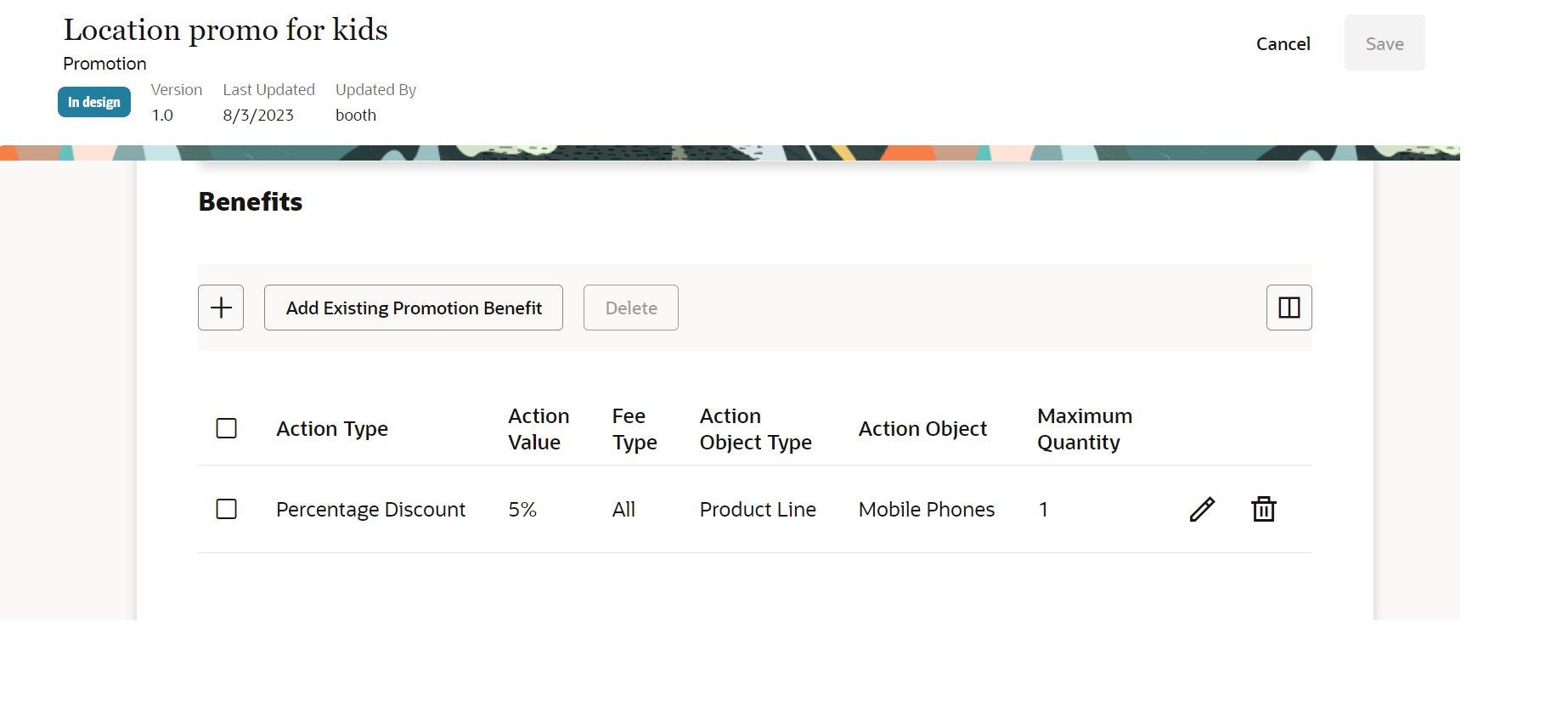
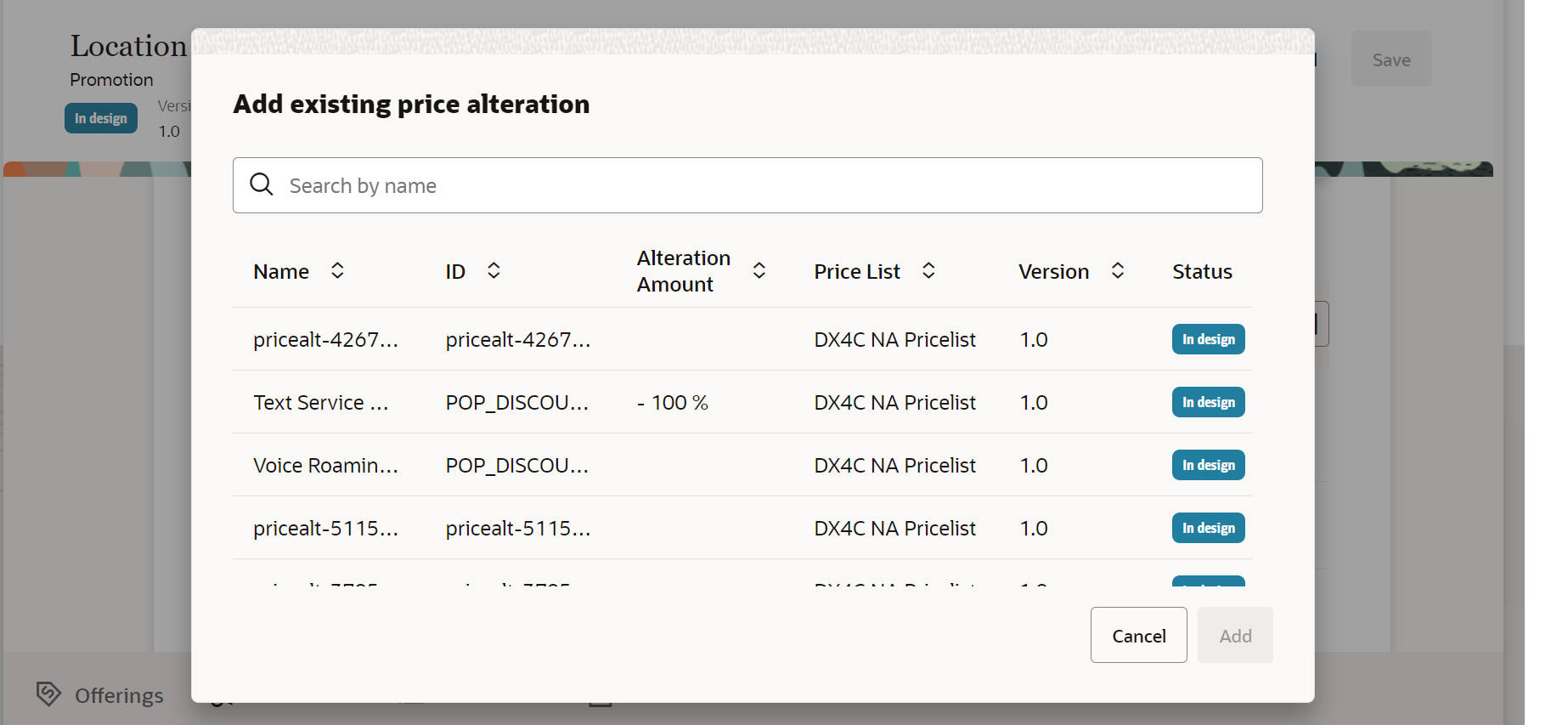
The business benefit of this feature is by re using alterations the proliferation of the same is prevented.
Steps to Enable
You don't need to do anything to enable this feature.
Access Requirements
- Communications Catalog Product Manager
Support of Tax Percentage for Tax Service Provider
You can now optionally configure the tax percentage for your tax codes in the tax service provider entity. This can be used by run time systems to compute taxes on the final price.
The business benefit of this feature is to provide flexibility to associate tax percentage to tax codes should they choose to do so. This allows the runtime order capture system to consume the list price of an offer, apply various discounts and then tax percentage to arrive at the final price.
Steps to Enable
You don't need to do anything to enable this feature.
Access Requirements
- Communications Catalog Administrator
Introduction of Commercial Name for Product Offering
You can now optionally configure the commercial name for a product offering in addition to the given name.
The following shows the creation of product offering with a commercial name.
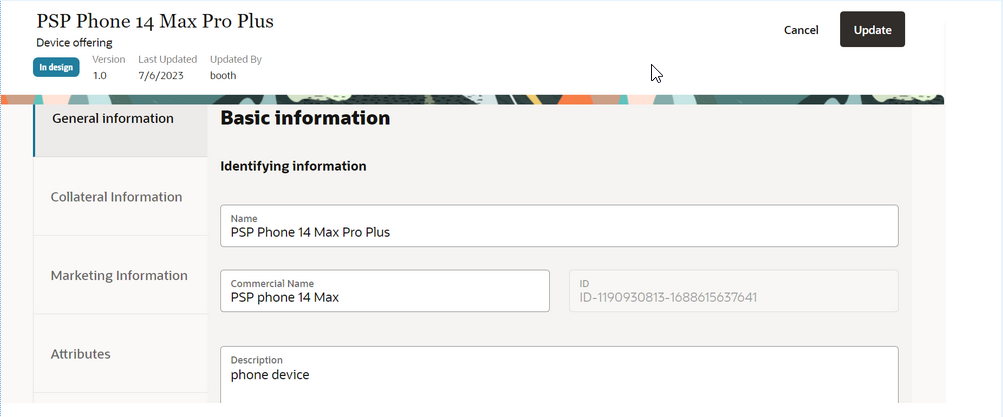
The business benefit of this feature is that it allows you to provide an alternative commercial name for a product offering.
Steps to Enable
You don't need to do anything to enable this feature.
Access Requirements
- Communications Catalog Product Manager
Enhance Balance Element to Include Numeric Code
You can now setup a unique numeric code for a balance element through REST API operations. This will be an ISO 4217 numeric code for currency and a normal code for non-currency balance elements.
Example - Free Minutes non-currency balance element can have numeric code as 10000017. For currency balance element USD this will be 840.
The business benefit of this feature is it allows you to additionally setup the numeric codes for currency and non-currency balance elements to be used by the downstream systems.
Steps to Enable
Review the REST service definition in REST APIs for Launch Experience, Doc ID 2725039.1, on My Oracle Support.
Access Requirements
- Communications Catalog Administrator
Support of Additional Properties for Compatibility Rules
You can now define compatibility rules with subject entity leaf level components with the target entity leaf level components. Additionally, you can setup scope for the rule.
Example: The compatibility rule Supremo Fiber Hobe Hub Comp Rule 2 for Mobile bundle package offering's leaf level node Sim Card with the target entities leaf level component.
The following figure shows the setting up of subject entity path on a compatibility rule:
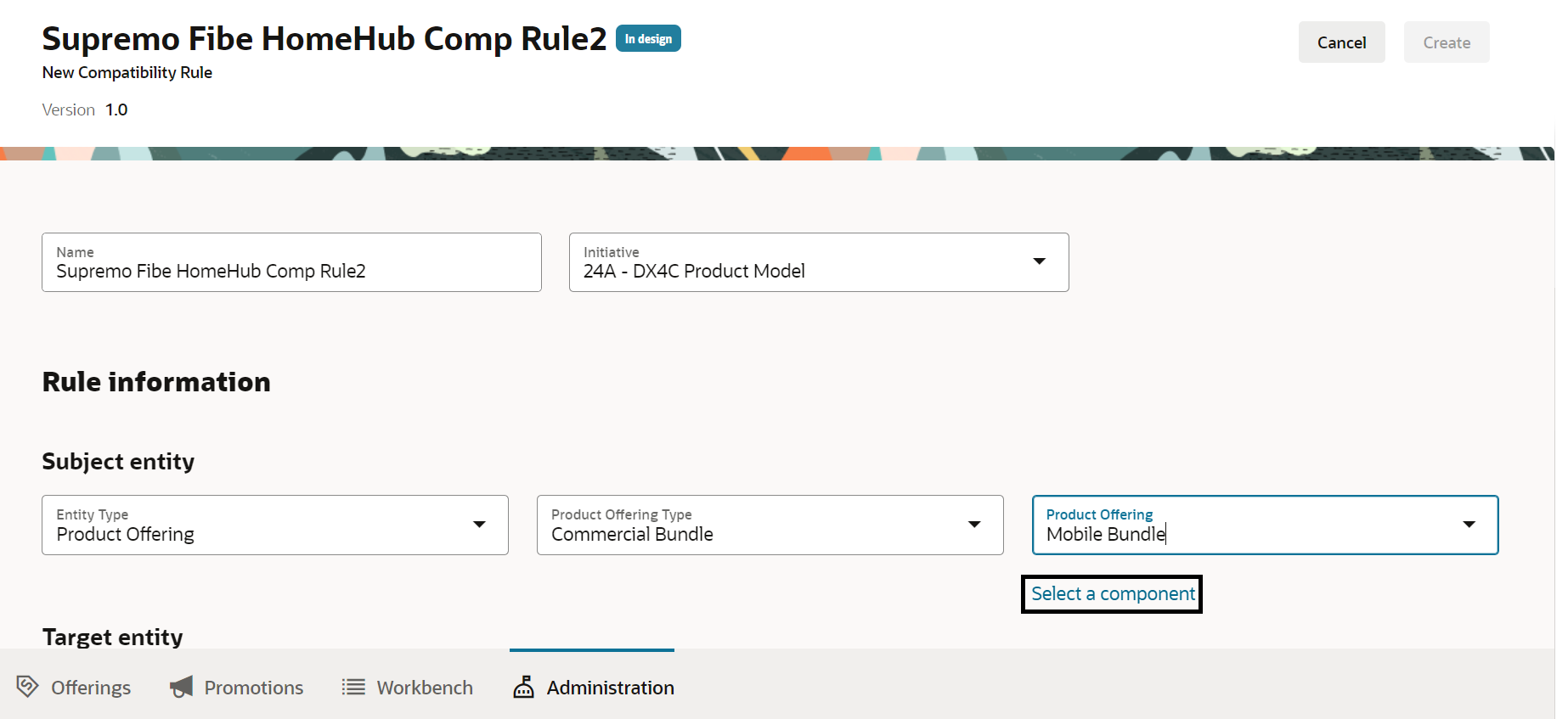
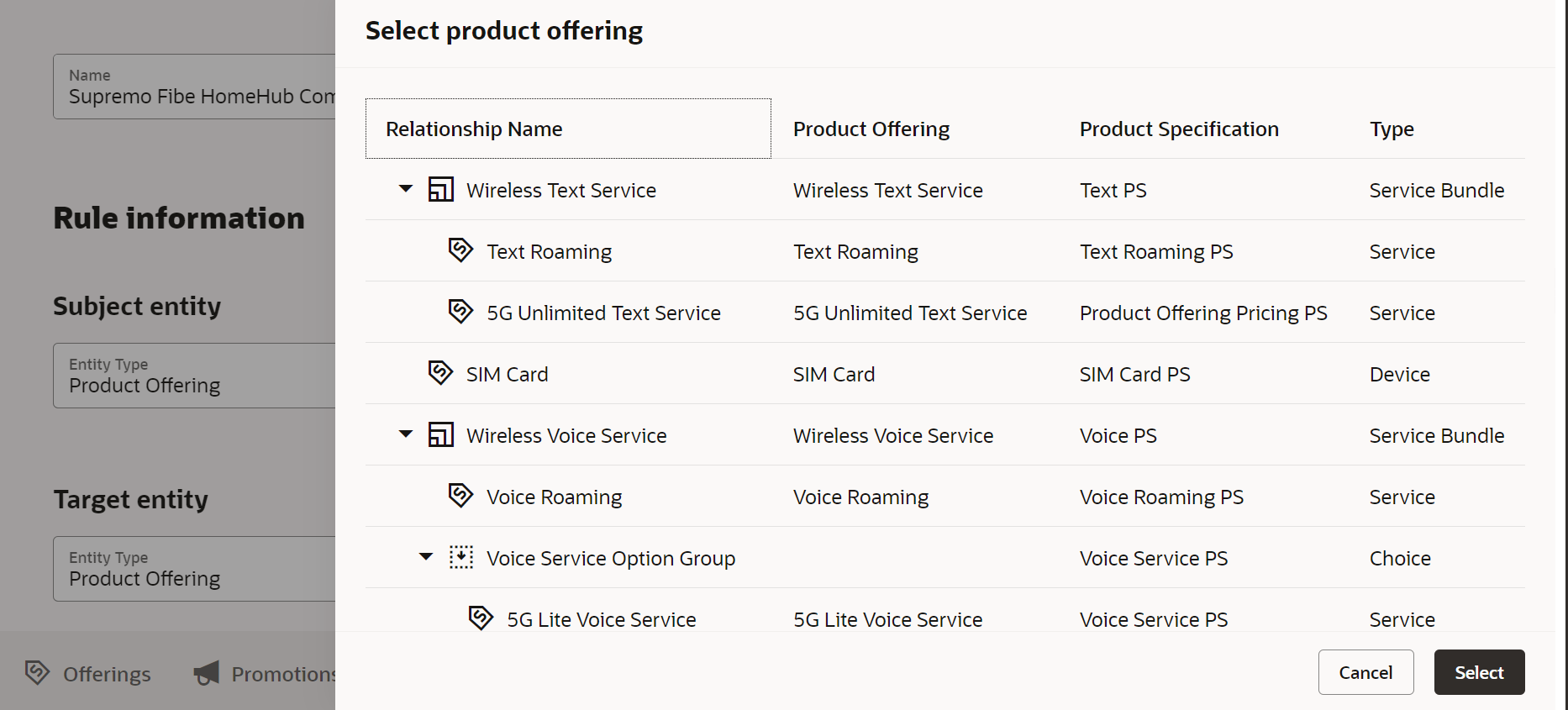
The business benefit of this feature is that Siebel customers can now model Compatibility rule for leaf level components of a Customized product with its scope.
Steps to Enable
You don't need to do anything to enable this feature.
Access Requirements
- Communications Catalog Administrator
Integrate Launch with Oracle Billing Revenue Management
You can integrate the Launch application with Oracle Billing Revenue Management via Pricing Design Center. You can use this integration to publish the below modeling constructs to equivalent PDC constructs of a charge offer and discount offer:
- Simple product offering with one-time fees.
- Simple product offering with recurring fees.
- Simple product offering with one-time, recurring and usage fees.
- Simple product offering with one-time, recurring fees along with one-time, recurring fixed or percentage discount.
- Simple product offering with usage fee and usage discount.
- Simple product offering with one-time and recurring tiered pricing.
- Simple product offering with usage tiered or volume fees.
- Simple product offering with discount validity.
- Simple product offering with fees and one time, recurring, usage tiered or volume discounts.
- Product life cycle stages from in design, in test, active, launched, revise, retire and obsolete for the above flows.
This integration works with BRM's Elastic Charging engine as the rating engine.
The business benefit of this feature is that it allows mastering the Catalog definitions entities in the Launch application and publishing these to Oracle Billing Revenue Management.
Steps to Enable
Requires integration with Oracle PDC/BR 12 PS8 + Patch 35361657. For more information, see Integrate Launch with PDC/BRM, Doc ID 2826909.1, on My Oracle Support.
Tips And Considerations
For more information, see Integrate Launch with PDC/BRM, Doc ID 2826909.1, on My Oracle Support.
Access Requirements
- Communications Catalog Administrator