- Revision History
- Overview
- Feature Summary
- Launch Experience
-
- Launch Experience
-
- Pricing Strategy Based on Zoning
- Pricing Strategy Based on Adjustment Trigger Condition
- Pricing Strategy Based on Multiple Allowances
- Allowance Consumption Model
- Bulk Update for Product Offering
- Bulk Approvals for Offers
- Additional Productized Publishing to Oracle Billing Revenue Management
- Entity Profile Enhancements for Handling Non-Seeded Product Offering type
-
- Launch Experience
Update 24B
Revision History
This document will continue to evolve as existing sections change and new information is added. All updates appear in the following table:
| Date | Module | Feature | Notes |
|---|---|---|---|
| 01 MAR 2024 | Created initial document. |
Overview
 HAVE AN IDEA?
We’re here and we’re listening. If you have a suggestion on how to make our cloud services even better then go ahead and tell us. There are several ways to submit your ideas, for example, through the Ideas Lab on Oracle Customer Connect. Wherever you see this icon after the feature name it means we delivered one of your ideas.
GIVE US FEEDBACK
We welcome your comments and suggestions to improve the content. Please send us your feedback at oracle_fusion_applications_help_ww_grp@oracle.com.
DISCLAIMER
The information contained in this document may include statements about Oracle’s product development plans. Many factors can materially affect Oracle’s product development plans and the nature and timing of future product releases. Accordingly, this Information is provided to you solely for information only, is not a commitment to deliver any material, code, or functionality, and should not be relied upon in making purchasing decisions. The development, release, and timing of any features or functionality described remains at the sole discretion of Oracle.
This information may not be incorporated into any contractual agreement with Oracle or its subsidiaries or affiliates. Oracle specifically disclaims any liability with respect to this information. Refer to the Legal Notices and Terms of Use for further information.
Feature Summary
Column Definitions:
Features Delivered Enabled
Report = New or modified, Oracle-delivered, ready to run reports.
UI or Process-Based: Small Scale = These UI or process-based features are typically comprised of minor field, validation, or program changes. Therefore, the potential impact to users is minimal.
UI or Process-Based: Larger Scale* = These UI or process-based features have more complex designs. Therefore, the potential impact to users is higher.
Features Delivered Disabled = Action is needed BEFORE these features can be used by END USERS. These features are delivered disabled and you choose if and when to enable them. For example, a) new or expanded BI subject areas need to first be incorporated into reports, b) Integration is required to utilize new web services, or c) features must be assigned to user roles before they can be accessed.
| Ready for Use by End Users Reports plus Small Scale UI or Process-Based new features will have minimal user impact after an update. Therefore, customer acceptance testing should focus on the Larger Scale UI or Process-Based* new features. |
Action is Needed BEFORE Use by End Users Not disruptive as action is required to make these features ready to use. As you selectively choose to leverage, you set your test and roll out timing. |
|||||
|---|---|---|---|---|---|---|
| Feature |
Report |
UI or |
UI or |
|
||
Additional Productized Publishing to Oracle Billing Revenue Management |
||||||
Entity Profile Enhancements for Handling Non-Seeded Product Offering type |
||||||
Launch Experience
Launch Experience
Pricing Strategy Based on Zoning
You can now model usage price plans of simple atomic offerings based on value map zone model with attribute based pricing.
A value map is a hierarchical structure that associates zone names with values that apply to a single event attribute, such as an area code, an IP address, or a broadband bit rate. A value map can have multiple nested zones.
You use value maps in attribute based pricing to group event attribute values into manageable categories. For example, to apply the same charge to all calls made from the San Francisco Bay Area to Los Angeles, you might use a California Area Codes value map that includes the following zones:
- Northern California
- San Francisco Bay Area
- 408
- 415
- 510
- 650
- 707
- San Francisco Bay Area
- Southern California
- Los Angeles
- 213
- 323
- Los Angeles
Instead of creating attribute based rules for all possible combinations of those area codes, you associate the California Area Codes value map with the attribute based pricing and then create only one rule in which San Francisco Bay Area is the origin call value and Los Angeles is the destination call value.
The following figure shows attribute based pricing using value map
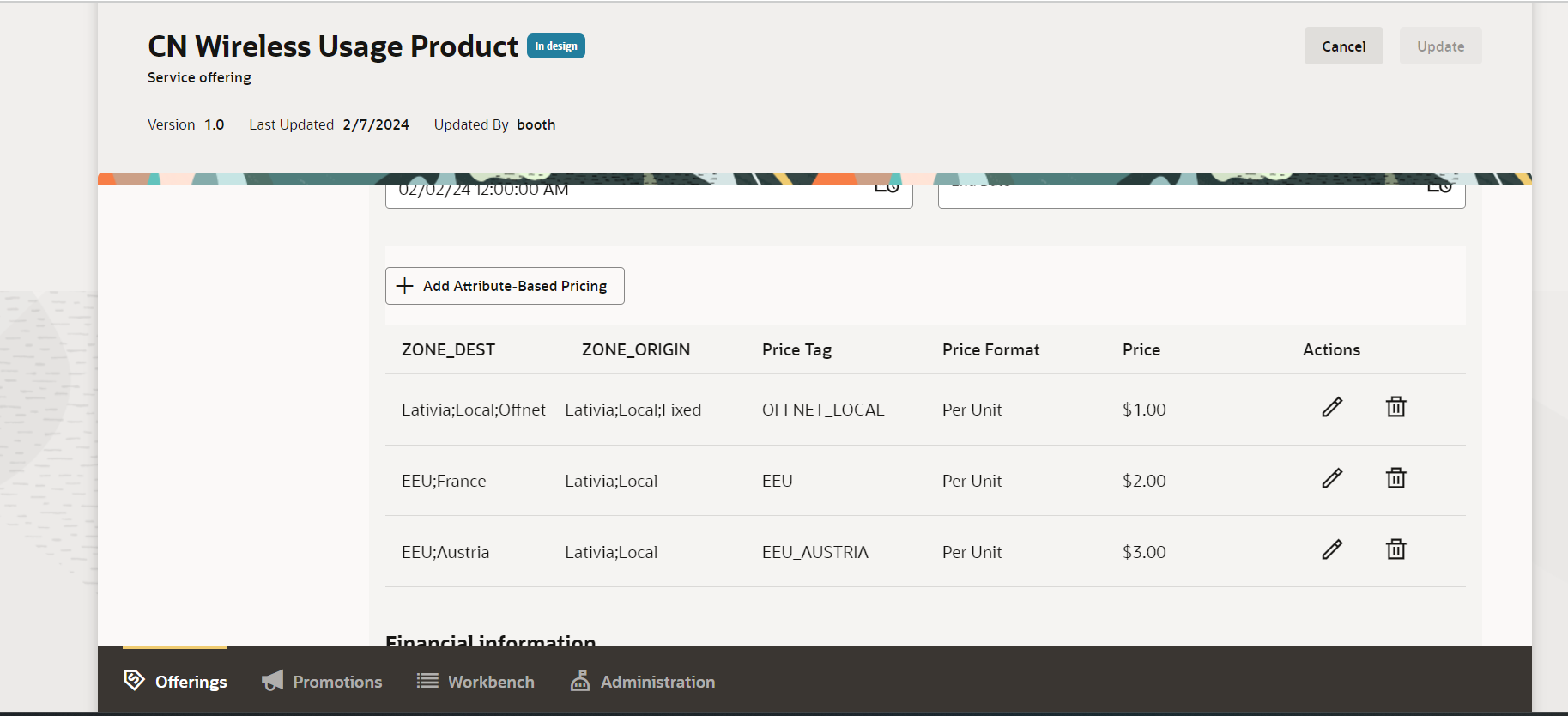
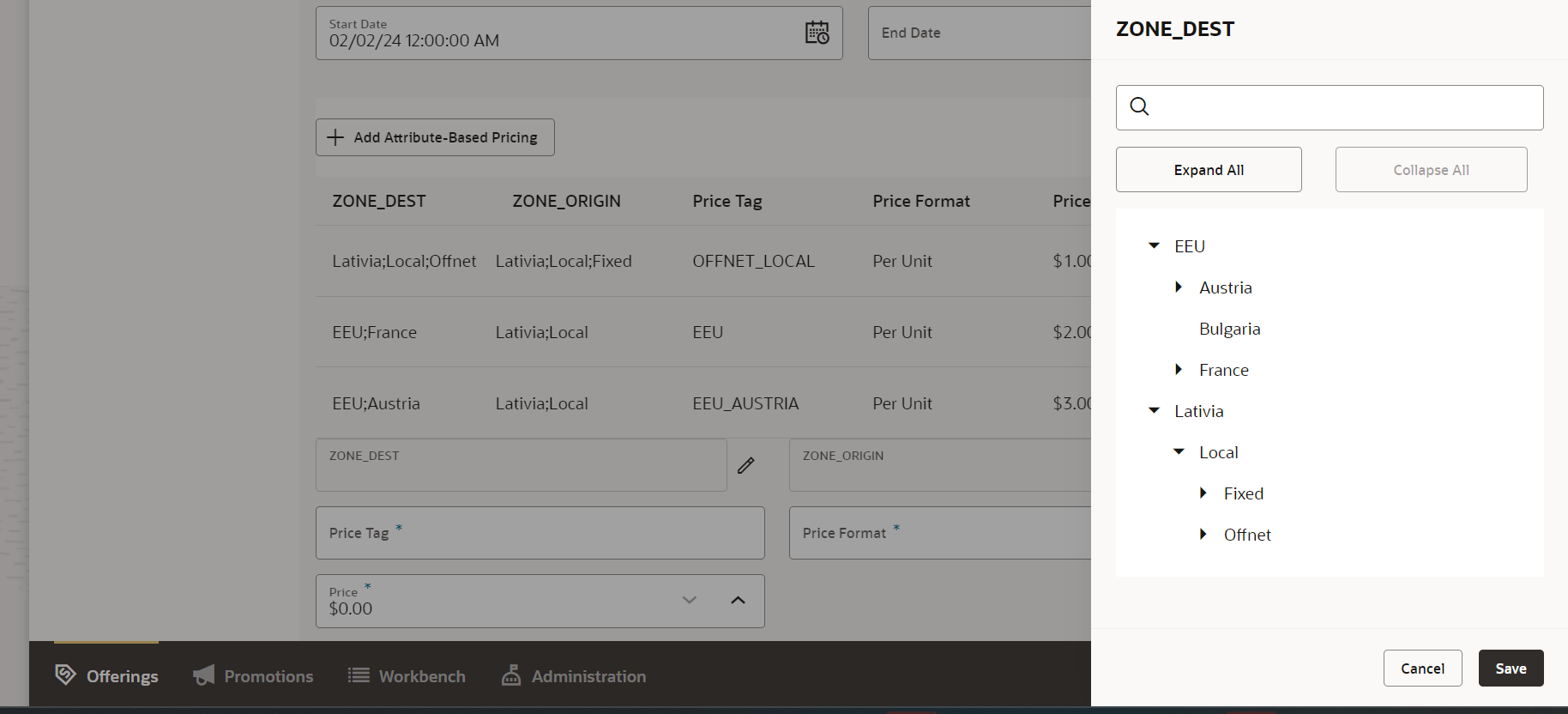
The business benefit of this feature is you can use zoning to price your atomic offering usages.
Steps to Enable
You don't need to do anything to enable this feature.
Tips And Considerations
The value map needs to be created via REST API as a prerequisite for it to be used in the atomic offer attribute based pricing. Refer to the REST API documentation for more information.
Access Requirements
- Communications Catalog Product Manager
- Communications Catalog Administrator
Pricing Strategy Based on Adjustment Trigger Condition
You can now limit when adjustments are applied based on trigger conditions. These conditions will determine as to when a discount needs to apply.
A trigger condition consists of the following items:
-
Name or expression: Name or expression of the characteristic you want to compare.
-
Operator: Specifies how the result of the name is compare with a value. Valid operators are greater than, greater than or equal to, less than, less than or equal to, equal to, and not equal to, in list.
-
Value: Specifies the value to compare with the result of the expression.
Sample trigger condition characteristics :
-
TotalCharge: Specifies the total charge of an event.
-
TotalQuantity: Specifies the total quantity in an event, such as the number of minutes talked or megabytes downloaded.
- BalanceOfResource[ALLOWANCE_NAME] : Balance of the allowance resource function used to check the available entitlement for allowance consumption.
-
Price Tag - Specifies the tag to be used as a condition for an adjustment.
A trigger filter condition can includes multiple conditions, all conditions must be met for the discount to be applied.
Example : 50% off if the monthly charge is greater than 500$ ,you could configure the following adjustment trigger condition:
- Name: TotalCharge (the total charge of the event)
- Operator: Is greater than
- Value: 500
The following figure shows the trigger condition configured on the atomic offer pricing
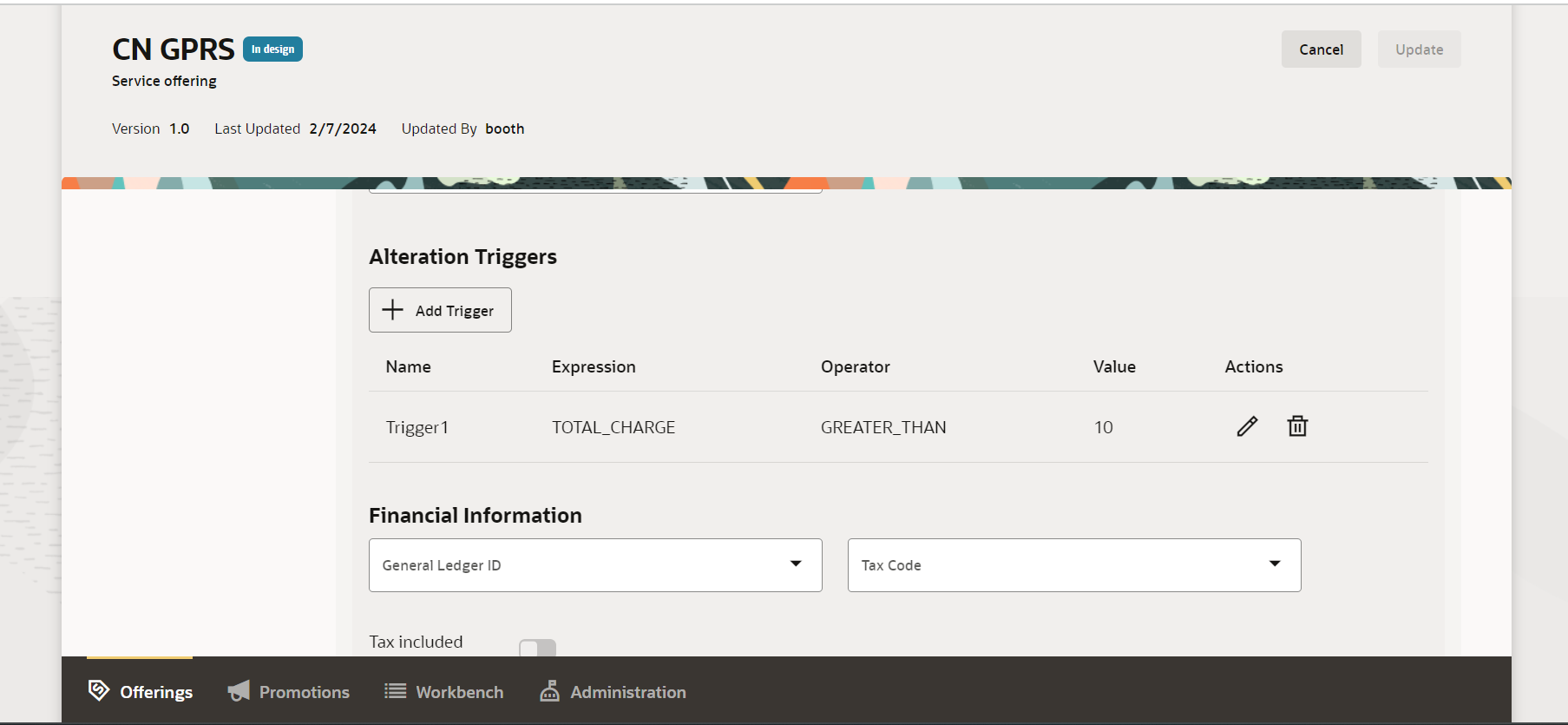
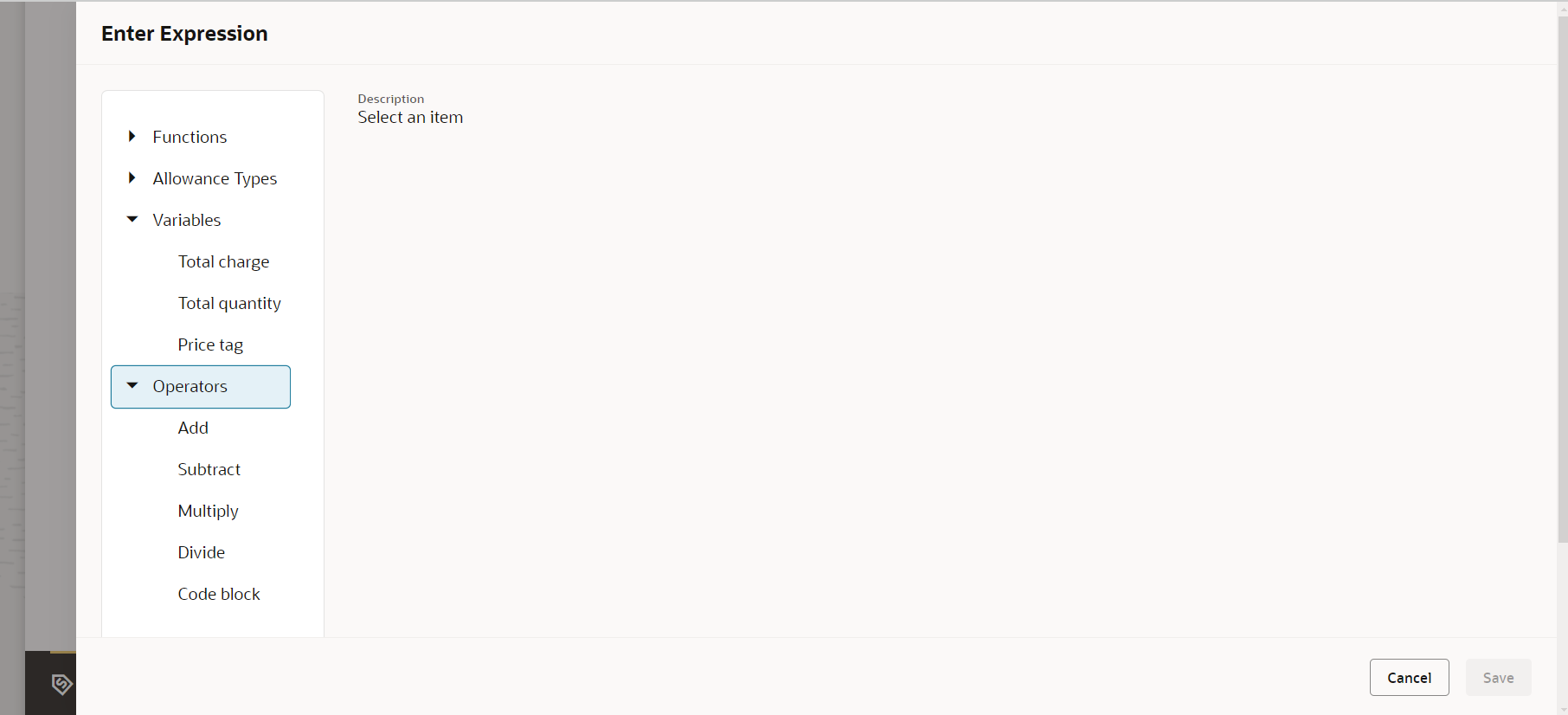
The business benefit of this feature is you can limit when adjustments are applied based on trigger conditions.
Steps to Enable
You don't need to do anything to enable this feature.
Access Requirements
- Communications Catalog Product Manager
- Communications Catalog Administrator
Pricing Strategy Based on Multiple Allowances
You should now be able to setup multiple allowance entitlement for a given fee. This is in addition to one allowance that you can create today
Example : For 100$ Monthly fee the following allowances needs to be configurable
- 500 Minutes National Calls towards Mobile (same target Network) 1 Month validity
- 100 Minutes National Calls towards Mobile (different target Network) 10 days validity
- 200 Minutes National Calls towards Fixed Destinations
- 50 Minutes International Calls
The following image shows the configuration of multiple allowances on a simple offering :
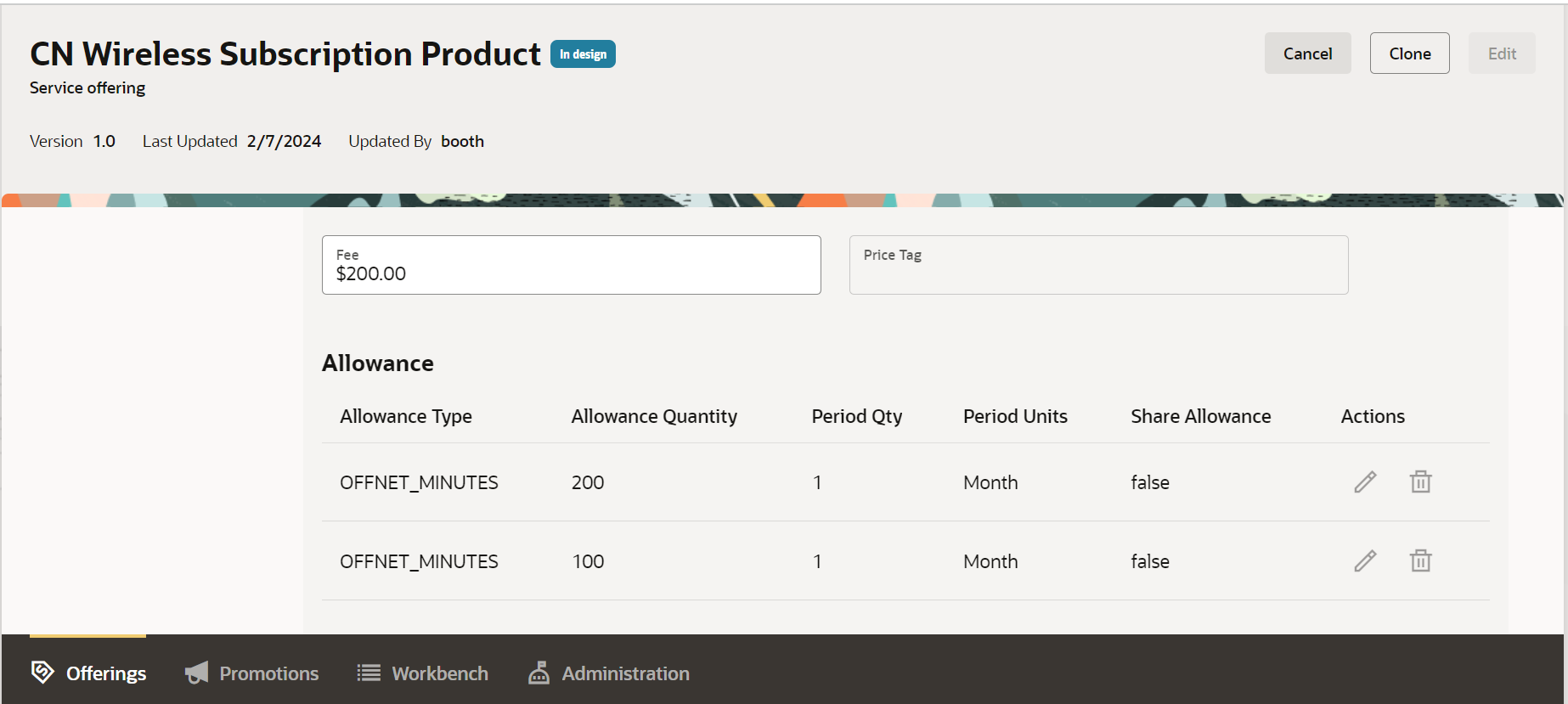
The business benefit of this feature is the ability to setup multiple allowances for a single fee.
Steps to Enable
You don't need to do anything to enable this feature.
Access Requirements
- Communications Catalog Product Manager
- Communications Catalog Administrator
Allowance Consumption Model
You should now be able to model the allowance based consumption discount for simple product offering when configuring multiple allowances. Allowance consumption discount help you consume the allowances first and once exhausted lets you charge customers a fee for it .
The consumption model would have a usage fee configured where you charge for the usage and then have a discount configured which checks if there is an allowance balance in the subscriber account then use that and credit back the monetary part. If there is no allowance balance, then the customer is debited or charged a fee.
Example : Monthly recurring subscription fee grants 100 off network minutes allowance valid for 1 month and 50 on network minutes valid for one month. Usage fee is configured to use attribute based pricing using value map zoning.
Attribute based pricing with zoning configuration
| USAGESPEC.CALL_ORIGIN | USAGESPEC.CALL_DEST | Price | Price Tag |
| Local.Onnet | Local.Offnet | 0.1 | OFFNET |
| Local.Onnet | Local.Fixed | 0.2 | FIXED |
| Local.Onnet | Local.Onnet | 0.1 | ONNET |
Configure the adjustments for the usage fee for each of the configured allowance as follows :
- Setup the trigger condition as Balance[ONNET_MIN] > 0 and PriceTag == ONNET
- Setup 2 discounts impacts
- Impact: Credit Balance Element: US Dollar Amount: 100.00 percent of charge
- Impact: Debit Balance Element: ONNET_MIN Amount: 1 for every 1 of quantity
The following figure shows the configuration of multiple allowances and consumption model.
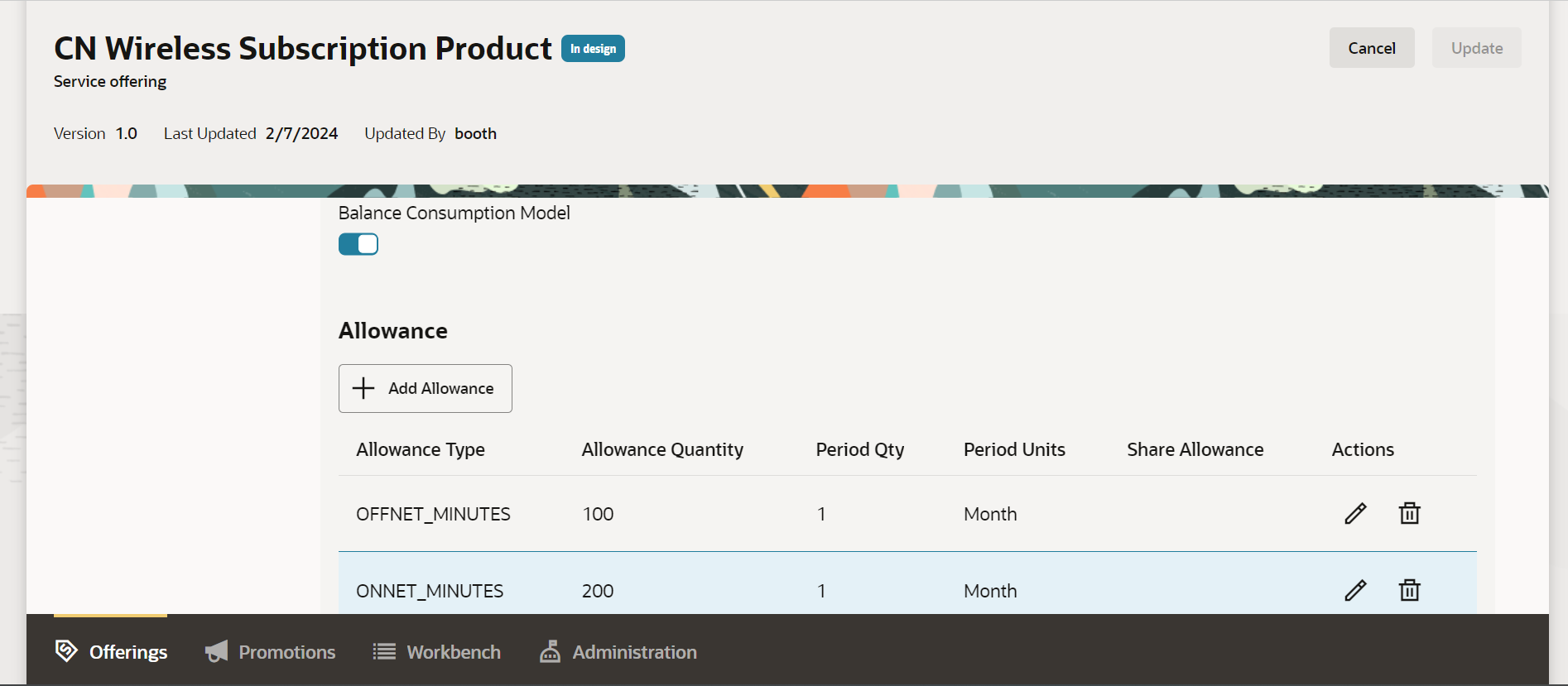
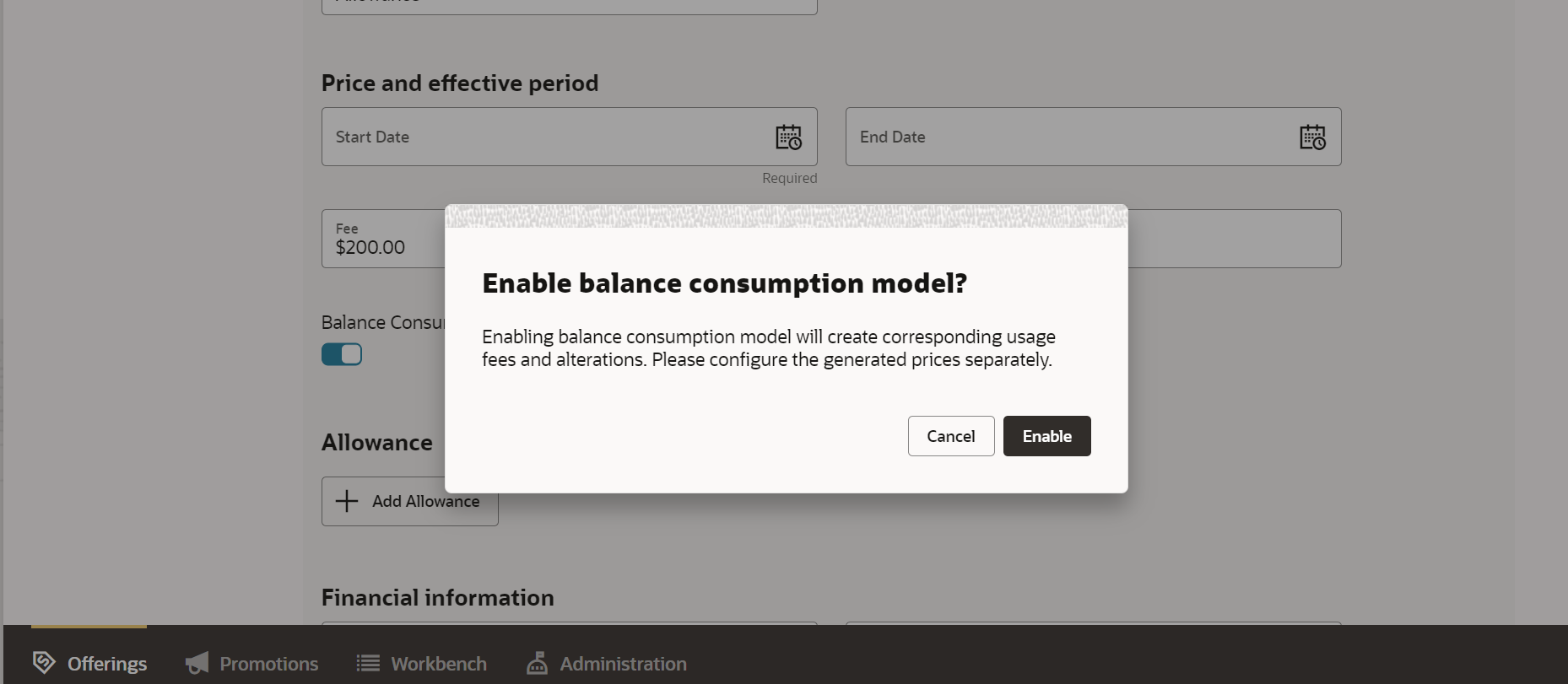
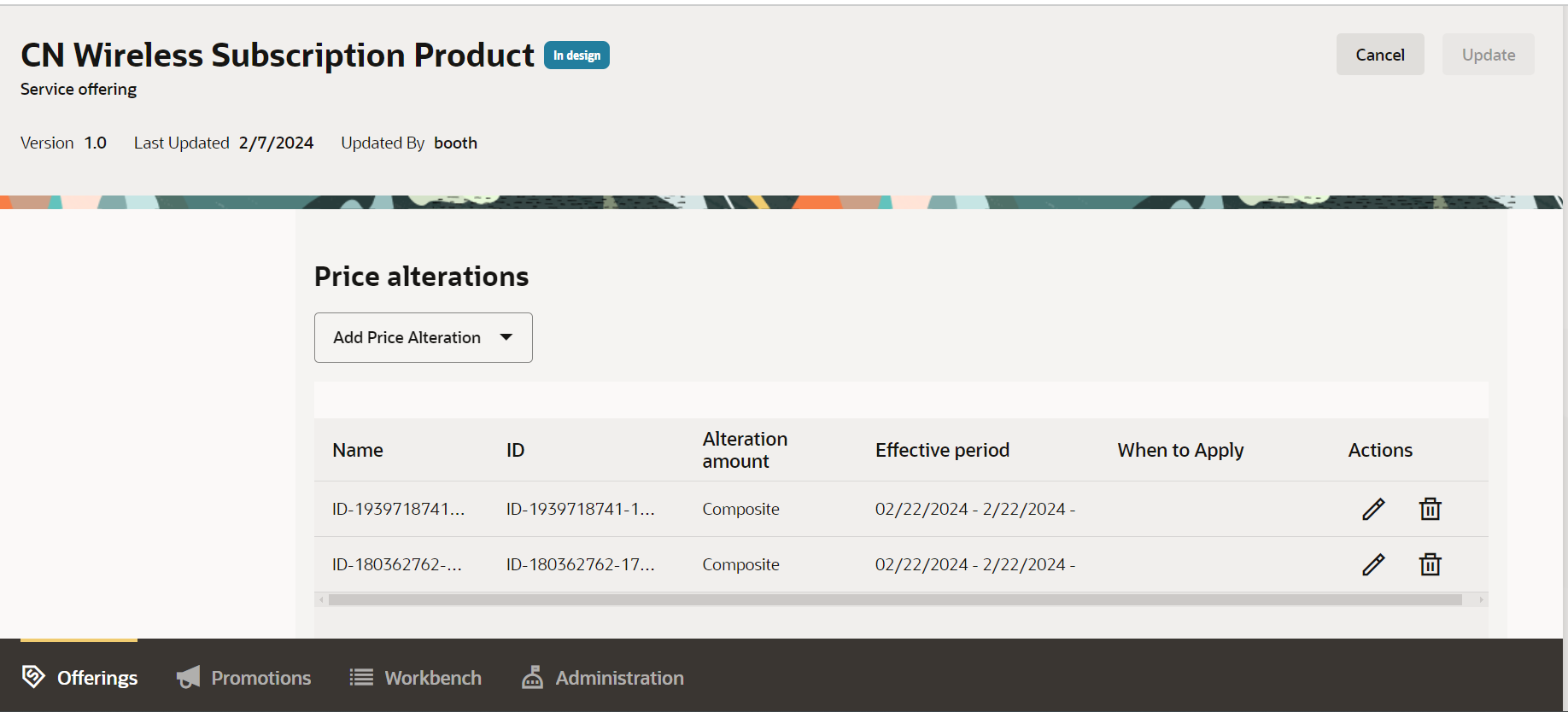
The business benefit of this feature is it allows you to configure the consumption of multiple allowances required by a charging engine.
Steps to Enable
You don't need to do anything to enable this feature.
Access Requirements
- Communications Catalog Product Manager
- Communications Catalog Administrator
Bulk Update for Product Offering
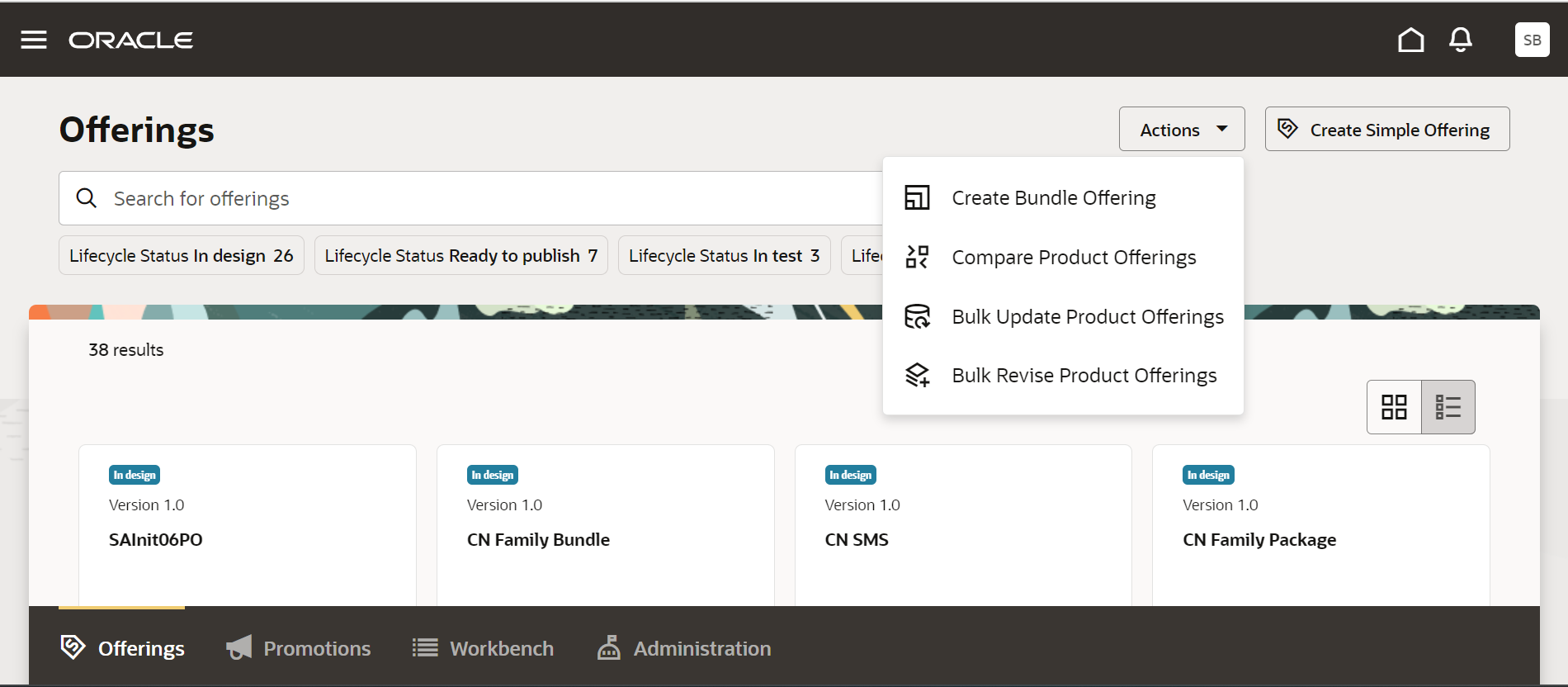
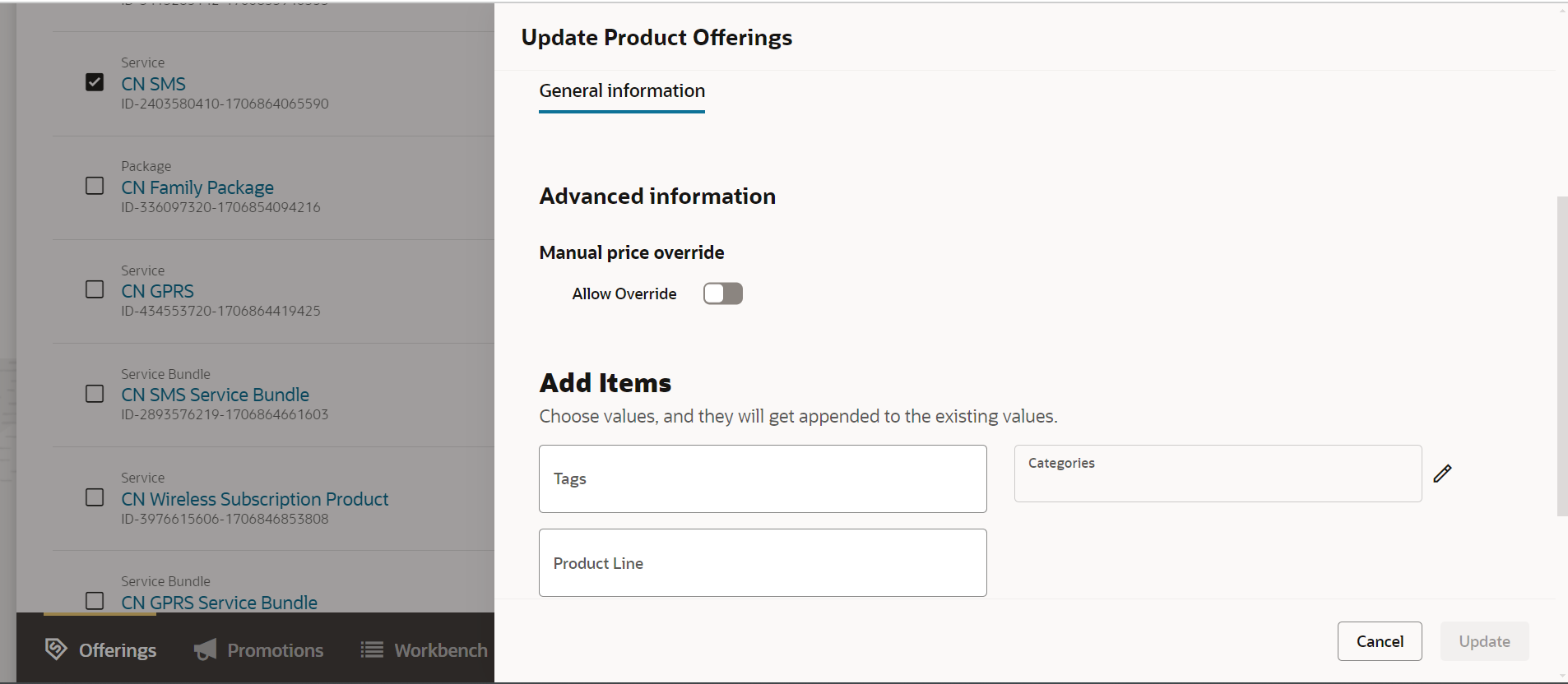
You can now perform bulk actions on offerings starting with mass update on the first class properties of Product Offers such as description, effective start date, effective end date, track as asset, search tags, override and other similar flags, categories, product line, terms etc. In addition, you can perform bulk actions on Product offering associations such as adding or removing a Product Line or Category.
There are two flavors of performing bulk update action on product offerings based on their lifecycle status:
- Bulk update product offerings - Update offerings that are part of the same initiative and are in design status.
- Bulk revise product offerings - Update product offerings that are in the Launched status by revising the offerings
Example : Mass update on vPhone series device with new effective period and new category. You should now be able to query for offers that are in "Launched" state with type=Device, name starting with "vPhone 14" and be able to click on "Update Product Offerings" in the Actions control . You should be able to select 10 of the 15 devices and click on "Update" button and be able to modify the below characteristics:
- Effective Start Date
- Add new category ""vPhone old generation line"
- Remove existing product line "accessory
The following figure shows the bulk update on product offerings
The business benefit of this feature is you would be able to perform bulk update on product offerings that reduces the overall time to market.
Steps to Enable
You don't need to do anything to enable this feature.
Access Requirements
- Communications Catalog Product Manager
- Communications Catalog Administrator
Bulk Approvals for Offers
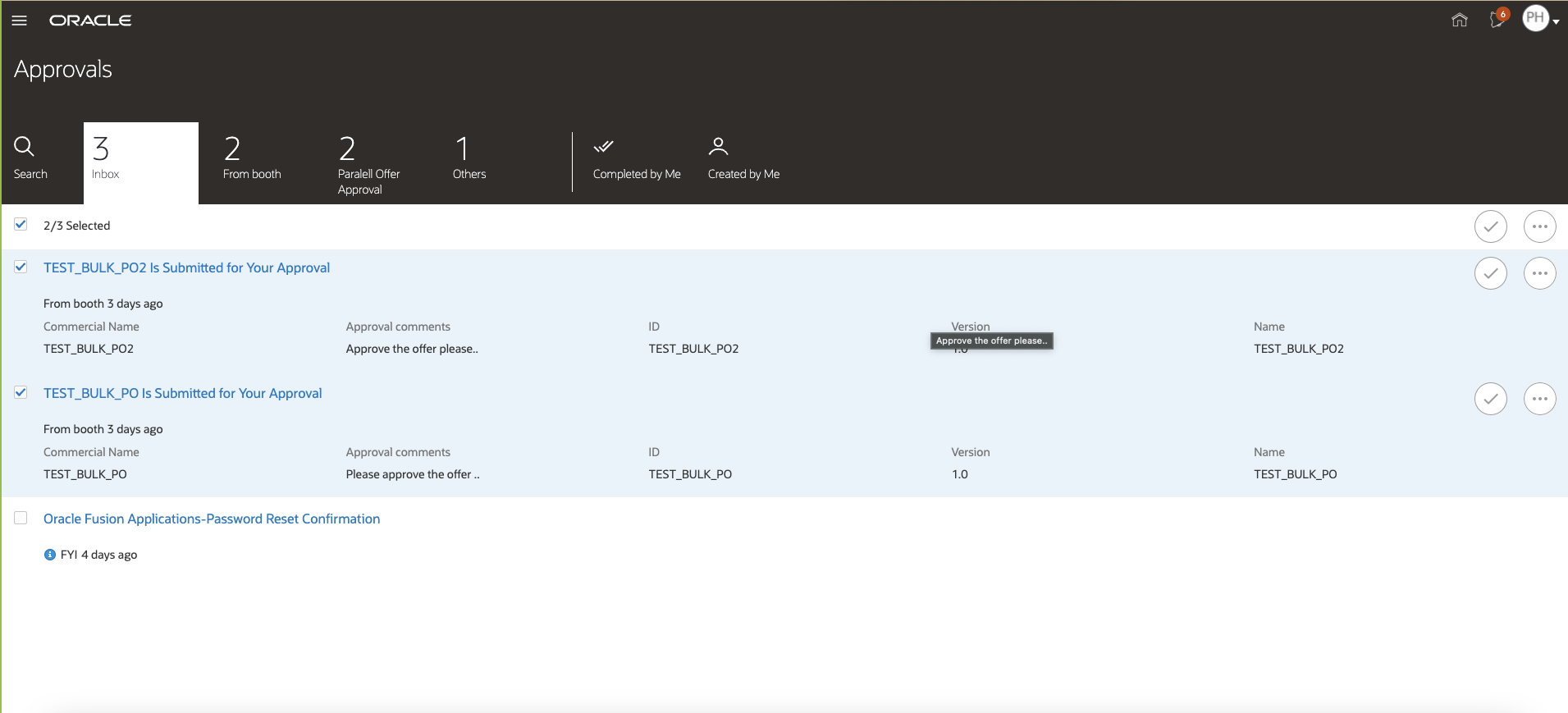
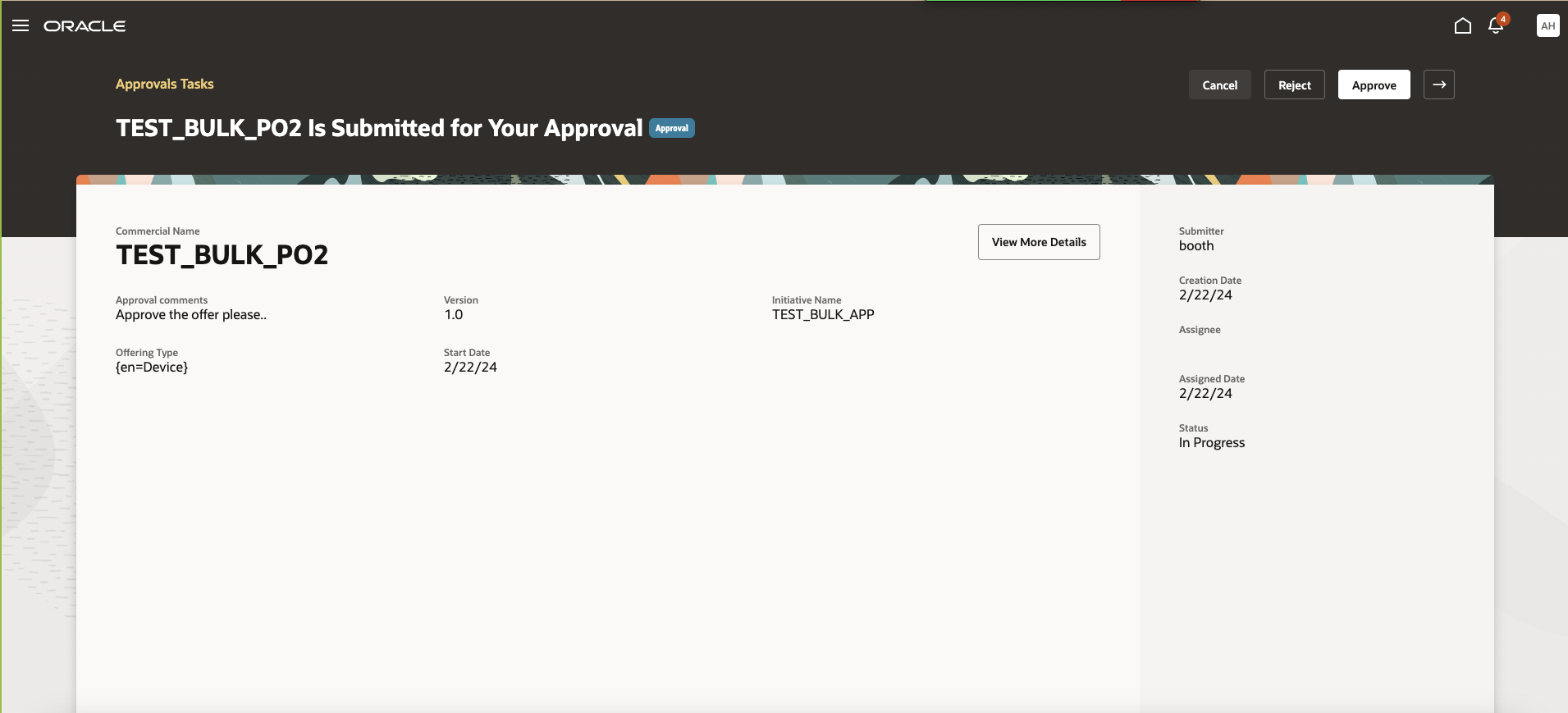
You can now perform bulk approvals or rejections for offer designs when offer approval workflow is enabled.
Example : Wireless offer, Wireless zoom offer, vPhone offer, and other ten offers have gone in for approval to Lisa and Ray. Now Lisa and Ray can approve or reject the offers in bulk.
The following figure shows bulk approval on offerings with the new work list view when the profile option ORA_FND_APPROVALS is set to No.
Bulk approval details
The business benefit of this feature is that you can now perform bulk approvals on offers.
Steps to Enable
You don't need to do anything to enable this feature.
Key Resources
- Enable the following profile options
- FND_APPROVAL_OSCS to enable approval tasks to be integrated into Oracle Search Cloud Service and with site value set to Yes.
- ORA_FND_APPROVALS to enable the user interaction that is optimized for finding and acting on approvals. The value of site should be set to No for Worklist and Yes for Approval application.
Access Requirements
- Communications Catalog Product Manager
- Communications Catalog Administrator
Additional Productized Publishing to Oracle Billing Revenue Management
You can integrate the Launch application with Oracle Billing Revenue Management via Pricing Design Center to publish the below modeling constructs which transforms to PDC equivalent constructs.
Additional supported use cases are:
- Packages (there is no support for nested bundles and commercial bundles, rules, bundle adjustments, aggregations).
- Service bundles (there is no support for nested bundles, rules, bundle adjustments).
- Simple product offerings with multiple allowances
- Simple product offerings with pricing based on zoning
- Simple product offerings with allowance consumption model
- Simple product offerings with triggers for price adjustments
- Charging term support for attribute based pricing, volume/tiered pricing, discounts.
- Simple product offering of type devices and accessories
- Simple product offering with attribute based adjustments
This integration works with BRM's Elastic Charging engine as the rating engine.
The business benefit of this feature is that it allows mastering the Catalog definitions entities in the Launch application with automated publishing to Oracle Billing Revenue Management.
Steps to Enable
Requires integration with Oracle PDC/BRM 12 PS8 + Patch 35361657. For more information, see Integrate Launch with PDC/BRM, Doc ID 2826909.1, on My Oracle Support.
Tips And Considerations
For more information, see Integrate Launch with PDC/BRM, Doc ID 2826909.1, on My Oracle Support.
Access Requirements
- Communications Catalog Product Manager
- Communications Catalog Administrator
Entity Profile Enhancements for Handling Non-Seeded Product Offering type
Today Launch application has seeded Product Offering types to distinguish between bundle offers (Package, Commercial and Service) and simple atomic offers (Device, Accessory and Service). Also you would be able to introduce additional types based on the business needs. This is a critical capability to promote a least disruptive uptake of Launch into a CSP ecosystem. The flip side to this feature is that it gets treated at par with the seeded offer types. Example: Non seeded type product offers would be available to be picked up in the bundle configuration and it would participate in price roll-ups etc.
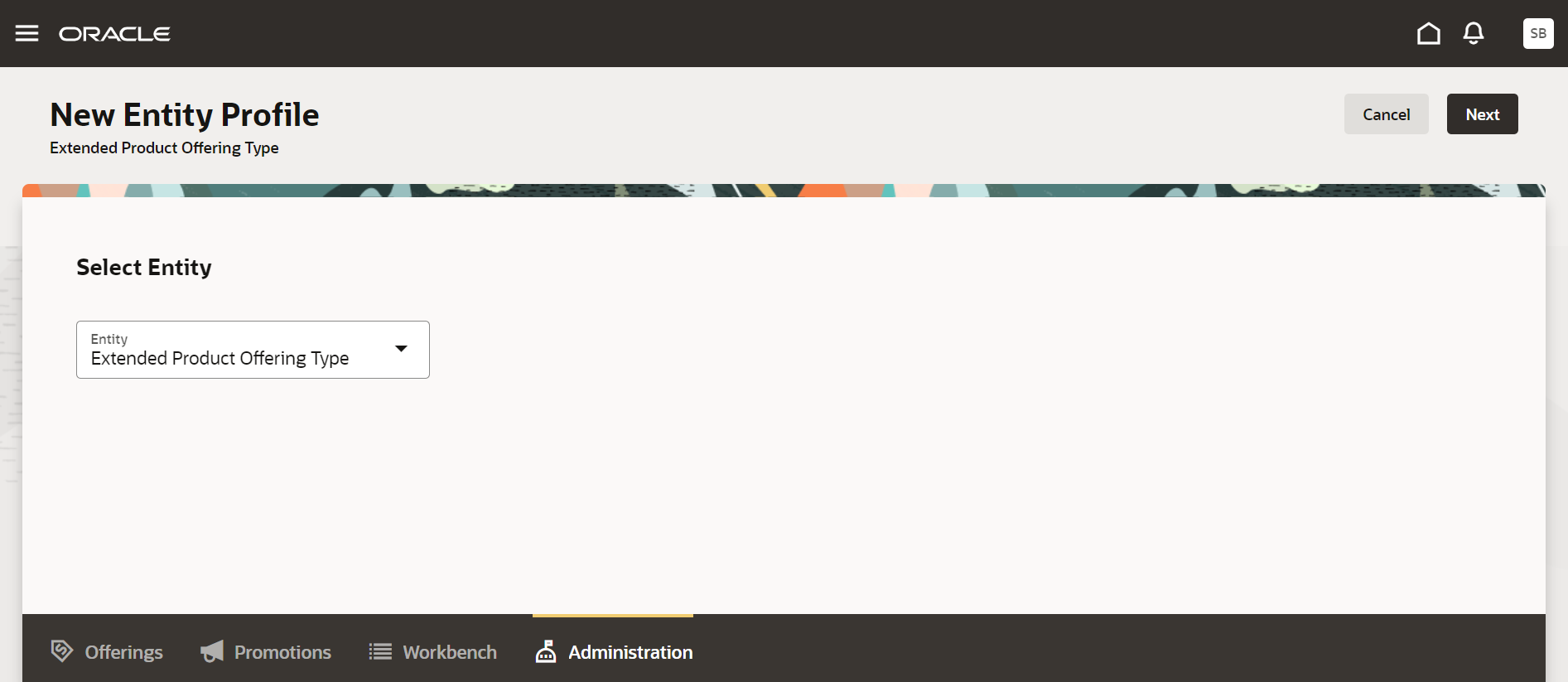
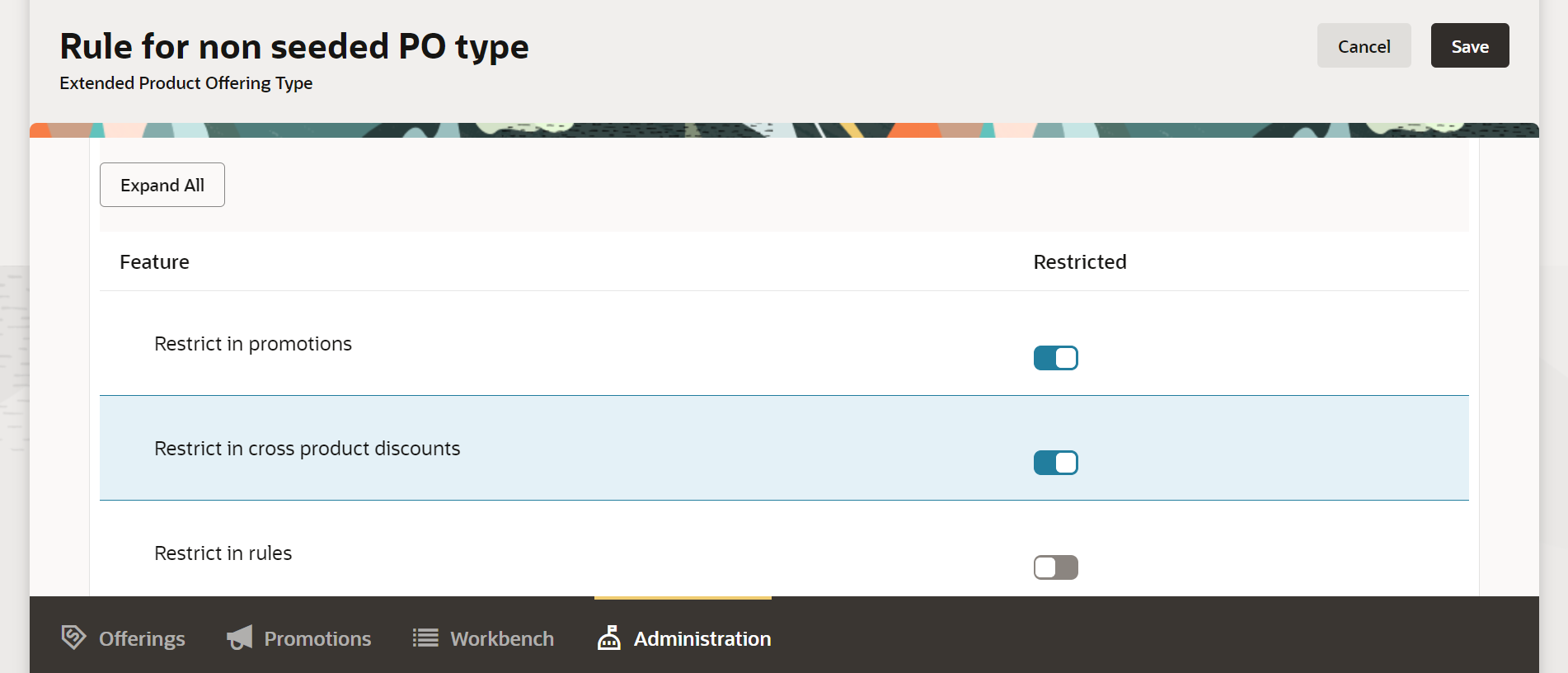
You would now be able to introduce additional offer types without having a negative impact to other capabilities of the application. This is achieved through entity profile configuration for non seeded offer types. You should now be able to configure these restrictions on the non seeded offer types :
- Ability for a customer to define the participation of extended offer type in price rollups.
- Ability for a customer to define the participation of extended offer type in bundle configuration.
- Ability for a customer to define the participation of extended offer type in Promotion benefits configuration.
- Ability for a customer to define the participation of extended offer type in product rules configuration.
The following figure shows the entity profile configuration for non seeded product offering type
The business benefit of this feature is you would now be able to introduce additional offer types without having a negative impact to other capabilities of the application by setting up restrictions for the same.
Steps to Enable
You don't need to do anything to enable this feature.
Access Requirements
- Communications Catalog Administrator