
This document will continue to evolve as existing sections change and new information is added. All updates appear in the following table:
| Date | Product | Feature | Notes |
|---|---|---|---|
| 19 MAR 2021 | Created initial document. |
Oracle Customer Experience Cloud for Consumer Goods provides a comprehensive solution for managing retail execution and trade promotion processes. The retail execution management solution enables sales administrators and managers to set up and manage the product catalog, assortments, price books, routes, store visit appointments, store visit tasks, and other data required for retail execution processes. The consumer goods mobile application enables sales representatives to complete merchandising and direct store delivery tasks in the offline mode. With the trade promotion management solution, marketing and account managers can set up trade budgets and funds, create trade promotions, measure promotion performance, and settle claims and deductions.
This document outlines the information you need to know about new or improved functionality in this update, and describes any tasks you might need to perform for the update. Each section includes a brief description of the feature, the steps you need to take to enable or begin using the feature, any tips or considerations that you should keep in mind, and the resources available to help you.
Give Us Feedback
We welcome your comments and suggestions to improve the content. Please send us your feedback at SALESCLOUD-PRODEX_WW@ORACLE.COM.
Column Definitions:
Report = New or modified, Oracle-delivered, ready to run reports.
UI or Process-Based: Small Scale = These UI or process-based features are typically comprised of minor field, validation, or program changes. Therefore, the potential impact to users is minimal.
UI or Process-Based: Larger Scale* = These UI or process-based features have more complex designs. Therefore, the potential impact to users is higher.
Features Delivered Disabled = Action is needed BEFORE these features can be used by END USERS. These features are delivered disabled and you choose if and when to enable them. For example, a) new or expanded BI subject areas need to first be incorporated into reports, b) Integration is required to utilize new web services, or c) features must be assigned to user roles before they can be accessed.
| Ready for Use by End Users Reports plus Small Scale UI or Process-Based new features will have minimal user impact after an update. Therefore, customer acceptance testing should focus on the Larger Scale UI or Process-Based* new features. |
Customer Must Take Action before Use by End Users Not disruptive as action is required to make these features ready to use. As you selectively choose to leverage, you set your test and roll out timing. |
|||||
|---|---|---|---|---|---|---|
| Feature |
Report |
UI or |
UI or |
|
||
Enable Incremental Publish and Updates of Objective KPIs After Initial Publish |
||||||
Enhance Store Visit Task Scheduling to Support Account Task Exclusion |
||||||
Enable Incremental Publish and Updates of Objective KPIs After Initial Publish
After you publish initial KPIs, you can manage them at an individual account level. As an administrator, you can modify, add, or remove KPIs after the initial publish. Now the update functionality for KPI publishing is available in the following scenarios:
-
A new account is available for the objective that hasn’t received any KPIs and all appropriately marked KPIs will be published to the account.
-
A new objective KPI exists since the last publish and this KPI will be published without republishing other objective KPIs to the account. The same KPI should not be duplicated at account.
-
An objective KPI is updated since the last publish. This KPI will be republished but overrides only the account KPI values when the account KPI is in draft status.
The business benefit of this feature is that it enables central management, publishing, and updating of Account KPIs in companies and ensures consistent goal setting across the organization. It provides enhanced publishing capability in support of KPIs updated as part of the process.
Steps to Enable
You don't need to do anything to enable this feature.
Tips And Considerations
This extended publishing capability is applicable only to KPIs that are marked as relevant for account.
Key Resources
Role Information
- Marketing Manager
- Account Manager
Enhance Store Visit Task Scheduling to Support Account Task Exclusion
You can mark individual account tasks as excluded from the scheduling process during the store visit task scheduling.
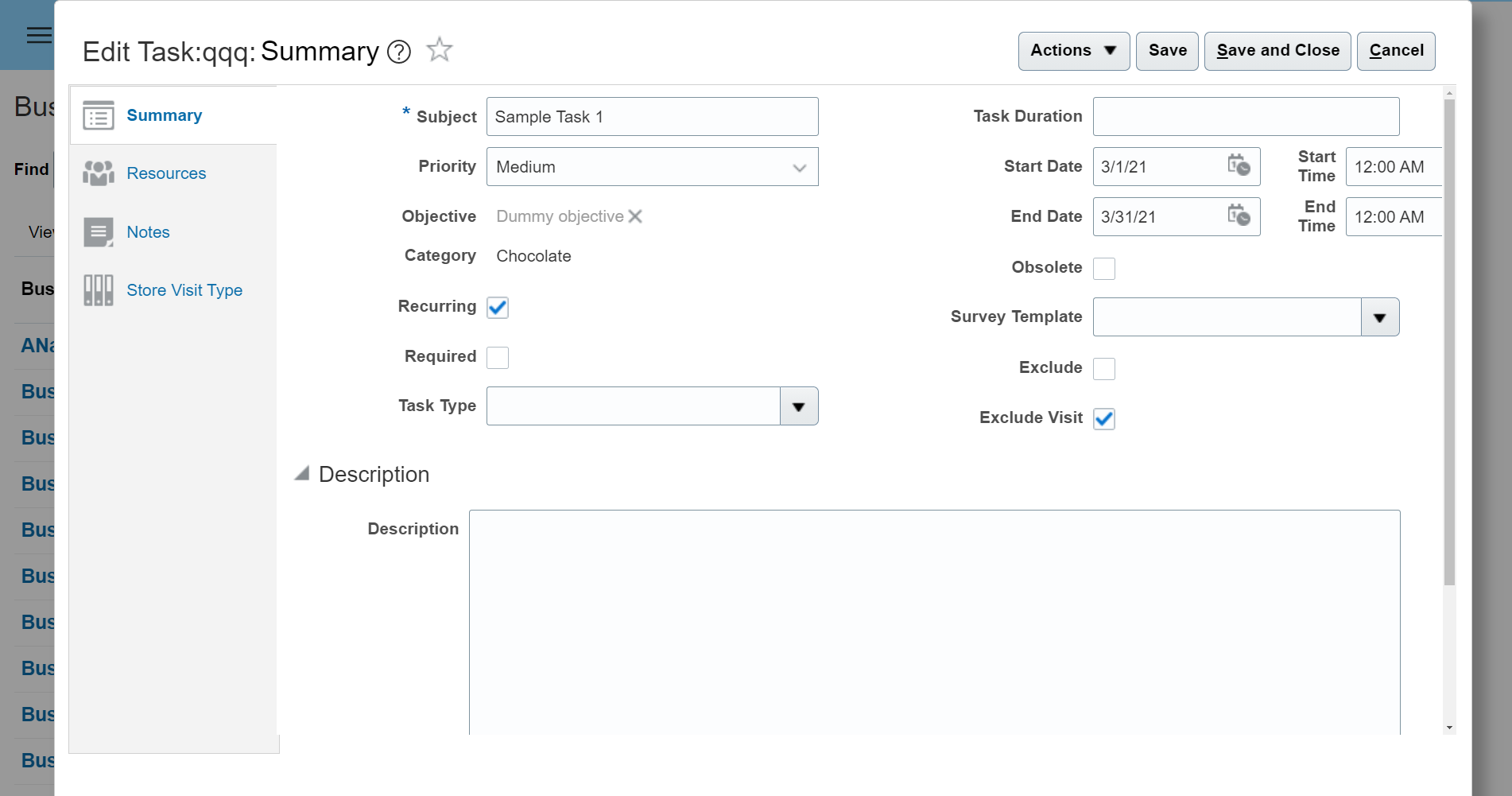
Exclude Visit Check Box on Tasks
The business benefit of this feature is that it provides an ability to mark individual account tasks as excluded from scheduling provides distinction between:
- Tasks that should be used by the store visit task scheduling process, which automatically groups account tasks into retail execution calls for execution through the mobile application.
- Tasks that should remain with account for handling beyond the standard retail execution call process.
Steps to Enable
Existing customers should add the Exclude Visit check box to their Account Task layouts.
Tips And Considerations
- Scheduling store visit tasks is dependent on the scheduled processes.
- Ensure that this scheduled process is running if you want the application to dynamically schedule account tasks to your appointments.
- These account tasks may have been published from either contracts or objectives.
- Review the Using Consumer Goods guide for more information on publishing tasks from these process areas.
Key Resources
Role Information
- Account Manager
Enable Default Unit of Measure for Assortment Lines
You can select a default unit of measure for each line in an assortment in addition to the ability to use alternate units of measure. The default unit of measure that you select is used in mobile shopping cart lines. You have the option to select an alternate unit of measure on the shopping cart line.
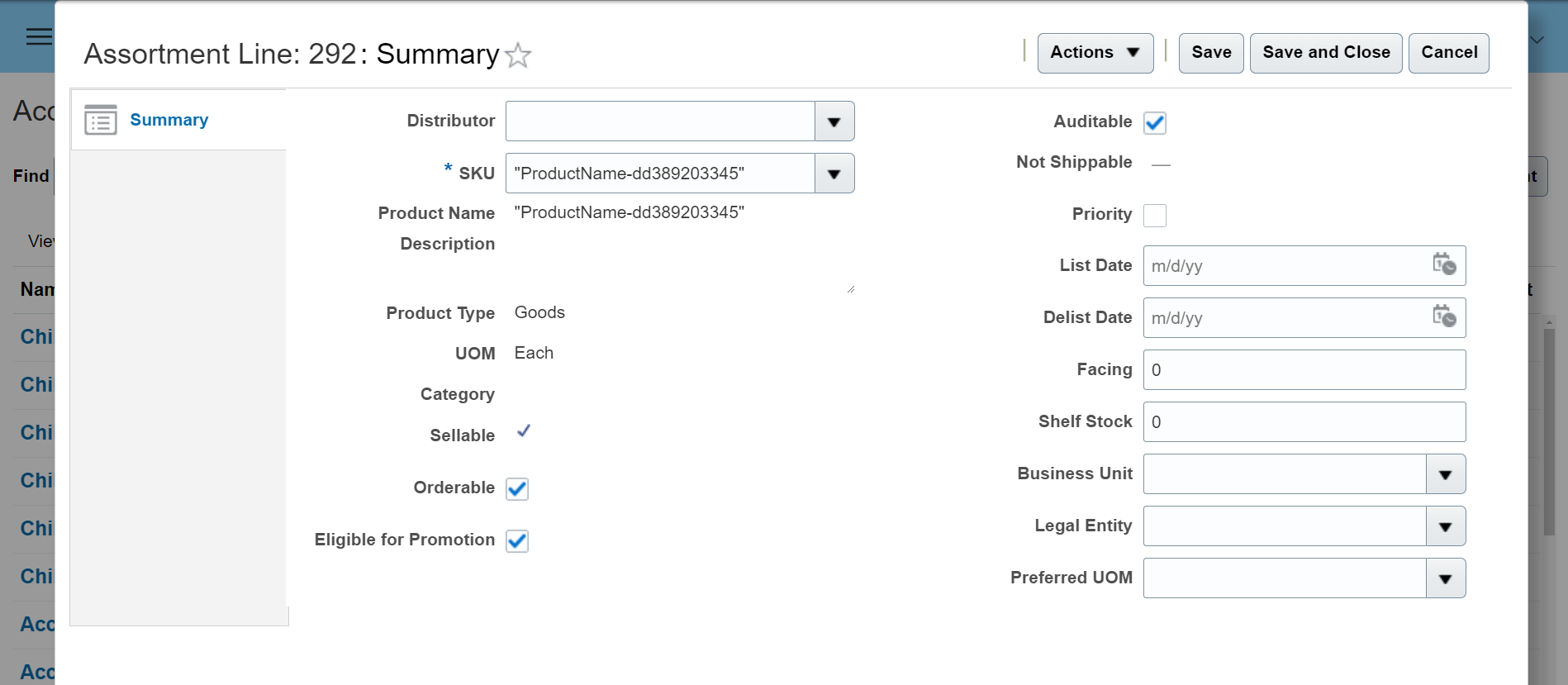
Alternate UOM on Assortment Line
The business benefit of this feature is that it simplifies order entry by enabling a default unit of measure. It ensures that you need to change the unit of measure only when varying from the expected standard for that assortment.
Steps to Enable
Add the default unit of measure field to assortment line layouts.
Key Resources
Role Information
- Account Manager
- Sales Representative