
This document will continue to evolve as existing sections change and new information is added. All updates appear in the following table:
| Date | Product | Feature | Notes |
|---|---|---|---|
| 17 JUN 2022 | Created initial document. |
 HAVE AN IDEA?
We’re here and we’re listening. If you have a suggestion on how to make our cloud services even better then go ahead and tell us. There are several ways to submit your ideas, for example, through the Ideas Lab on Oracle Customer Connect. Wherever you see this icon after the feature name it means we delivered one of your ideas.
GIVE US FEEDBACK
We welcome your comments and suggestions to improve the content. Please send us your feedback at oracle_fusion_applications_help_ww_grp@oracle.com.
DISCLAIMER
The information contained in this document may include statements about Oracle’s product development plans. Many factors can materially affect Oracle’s product development plans and the nature and timing of future product releases. Accordingly, this Information is provided to you solely for information only, is not a commitment to deliver any material, code, or functionality, and should not be relied upon in making purchasing decisions. The development, release, and timing of any features or functionality described remains at the sole discretion of Oracle.
This information may not be incorporated into any contractual agreement with Oracle or its subsidiaries or affiliates. Oracle specifically disclaims any liability with respect to this information. Refer to the Legal Notices and Terms of Use for further information.
Column Definitions:
Report = New or modified, Oracle-delivered, ready to run reports.
UI or Process-Based: Small Scale = These UI or process-based features are typically comprised of minor field, validation, or program changes. Therefore, the potential impact to users is minimal.
UI or Process-Based: Larger Scale* = These UI or process-based features have more complex designs. Therefore, the potential impact to users is higher.
Features Delivered Disabled = Action is needed BEFORE these features can be used by END USERS. These features are delivered disabled and you choose if and when to enable them. For example, a) new or expanded BI subject areas need to first be incorporated into reports, b) Integration is required to utilize new web services, or c) features must be assigned to user roles before they can be accessed.
| Ready for Use by End Users Reports plus Small Scale UI or Process-Based new features will have minimal user impact after an update. Therefore, customer acceptance testing should focus on the Larger Scale UI or Process-Based* new features. |
Customer Must Take Action before Use by End Users Not disruptive as action is required to make these features ready to use. As you selectively choose to leverage, you set your test and roll out timing. |
|||||
|---|---|---|---|---|---|---|
| Feature |
Report |
UI or |
UI or |
|
||
Improved Progress Tracking for Advanced Control Model and Control Analysis |
||||||
Transactional Business Intelligence for Risk Management
If you've created action links for any of the following object types, they'll no longer work: Create Risk, Create Control, Create Process, Create Issue, Create Remediation Plan.
Future references to these deep links will require fewer parameters to be passed.
Steps to Enable
If you've created action links for any of the following object types, replace them with these streamlined links:
| Object Type | Deep-Link URL |
| Create Risk | https://<server_url>/fscmUI/faces/deeplink?objType=CREATE_RISK_OBJECT |
| Create Control | https://<server_url>/fscmUI/faces/deeplink?objType=CREATE_CONTROL_OBJECT |
| Create Process | https://<server_url>/fscmUI/faces/deeplink?objType=CREATE_PROCESS_OBJECT |
| Create Issue | https://<server_url>/fscmUI/faces/deeplink?objType=CREATE_ISSUE_OBJECT |
| Create Remediation Plan | https://<server_url>/fscmUI/faces/deeplink?objType=CREATE_REMED_PLAN |
Key Resources
- See Creating Analytics for Risk Management, Link Analyses to Applications section for more information on setting up deep-link URLs.
Reports Now Cover Additional Deep Drills
The Risk Management Cloud - Compliance Real Time and Risk Management Cloud - Assessment Results Real Time subject areas offer deep link URLs to the following: Issue, Remediation Plan, Risk Analysis, and Risk Evaluation. These deep links allow you to view or edit specific records by passing parameters.
The following Financial Reporting Compliance OTBI deep links are now supported:
- Edit Issue
- Edit Remediation Plan
- View Risk Analysis
- Edit Risk Analysis
- View Risk Evaluation
- Edit Risk Evaluation
The following are the new action links:
| Object Type | Deep-Link URL |
|---|---|
| Edit Issue | https://<server_url>/fscmUI/faces/deeplink?objType=EDIT_ISSUE_OBJECT&objKey=ObjectKey=@{1} |
| Edit Remediation Plan |
https://<server_url>/fscmUI/faces/deeplink?objType=EDIT_REMED_PLAN&objKey=ObjectKey=@{1} |
| View Risk Analysis |
https://<server_url>/fscmUI/faces/deeplink?objType=VIEW_RISKANALYSIS_OBJECT&objKey=ObjectKey=@{1};RiskAnalysisId=@{2} |
| Edit Risk Analysis |
https://<server_url>/fscmUI/faces/deeplink?objType=EDIT_RISKANALYSIS_OBJECT&objKey=ObjectKey=@{1};RiskAnalysisId=@{2} |
| View Risk Evaluation |
https://<server_url>/fscmUI/faces/deeplink?objType=VIEW_RISKEVALUATION_OBJECT&RiskId=@{1};RiskEvaluationId=@{2} |
| Edit Risk Evaluation |
https://<server_url>/fscmUI/faces/deeplink?objType=EDIT_RISKEVALUATION_OBJECT&RiskId=@{1};RiskEvaluationId=@{2} |
For example, the first URL in the table navigates to the Edit Issue page. (Note, the user must have the corresponding authorization.)
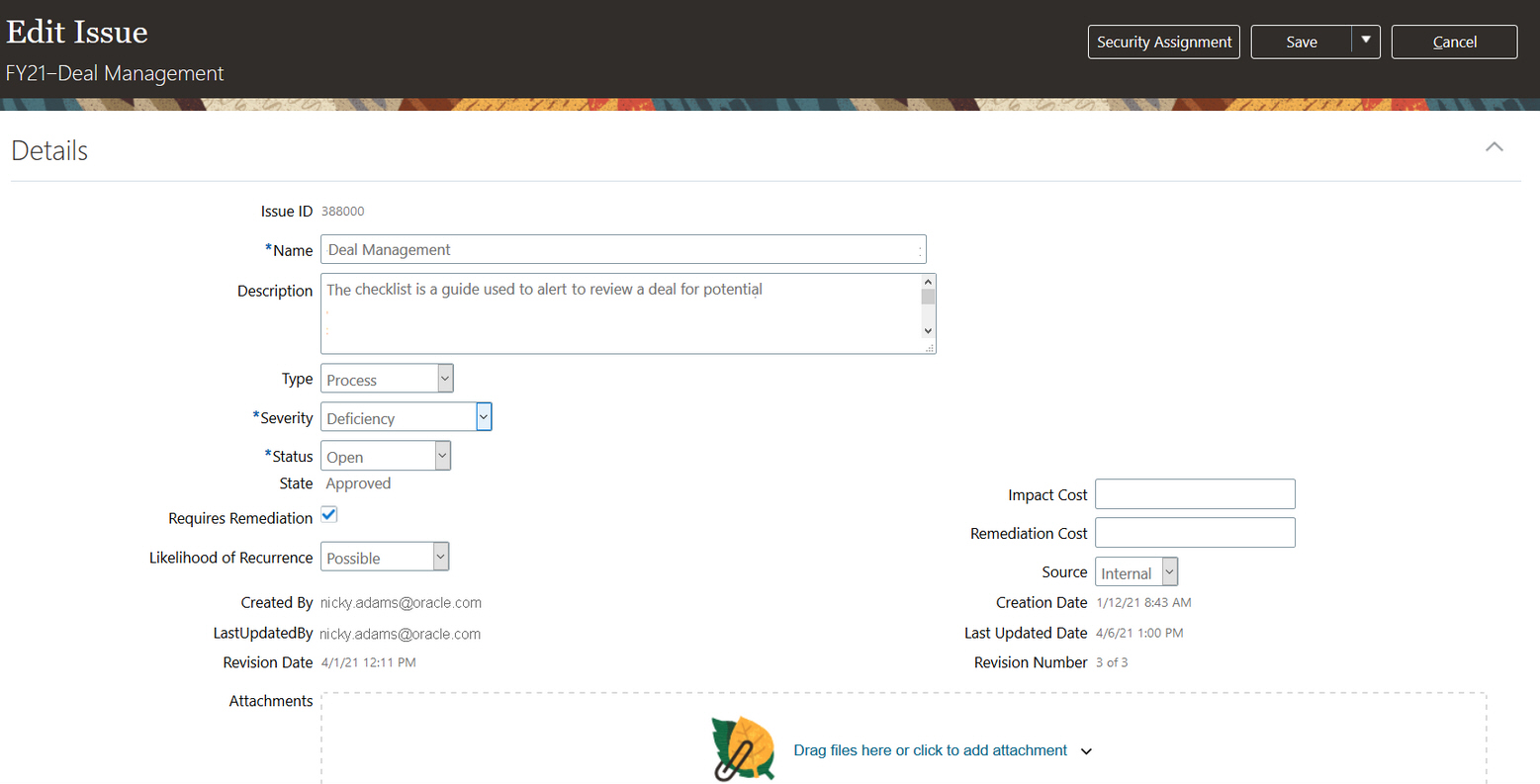
Example of an Edit Issue Record UI Page
A user reviewing an OTBI analysis may decide to update an issue, remediation plan, risk analysis, or risk evaluation. When deep links are implemented, this becomes a quick process: The user can simply drill to results and edit with a couple of clicks.
Steps to Enable
You don't need to do anything to enable this feature.
Key Resources
- See Creating Analytics for Risk Management, Link Analyses to Applications section for more information on setting up deep-link URLs.
Subject Areas Now Cover Attachments
For the Risk Management Cloud - Compliance Real Time and Risk Management Cloud - Assessment Results Real Time subject areas, new dimensions are added so that you can include URL and attachment names in the reports you create. These new dimensions are related to controls, control test plans, risks, assessment details, and assessment result details.
Also for the Risk Management Cloud - Advanced Access Controls Real Time and Risk Management Cloud - Advanced Financial Controls Real Time subject areas, new dimensions are added so that you can include URL and attachment names in the reports you create. These new dimensions are related to controls.
The following are the new dimensions, metrics, and attributes that have been added for each specific object:
Risk Management Cloud - Compliance Real Time
- Assessment Details > Assessment Attachments
- Control Details > Control Attachments
- Control Details > Control Test Plans > Control Test Plan Attachments
- Risk Details > Risk Attachments
Risk Management Cloud - Assessment Results Real Time
- Assessment Details > Assessment Attachments
- Assessment Results > Assessment Result Details > Assessment Result Attachments
- Control Details > Control Attachments
- Assessment Results > Control Test Plan Results > Control Test Plan Result Attachments
- Risk Details > Risk Attachments
Risk Management Cloud - Advanced Access Controls Real Time
- Advanced Control Details > Advanced Control Attachments
Risk Management Cloud - Advanced Financial Controls Real Time
- Advanced Control Details > Advanced Control Attachments
Each dimension contains the following attributes:
- Attached By
- Attached Date
- File Name or URL
- Type
New Metrics - Count of Attachments
- Assessment Details > Attachments > Facts - Assessments
- Assessment Results > Attachments > Facts - Assessment Results
- Control Details > Attachments > Facts - Controls
- Risks > Attachments > Facts - Risks
- Advanced Control Details > Attachments > Facts - Advanced Control Results
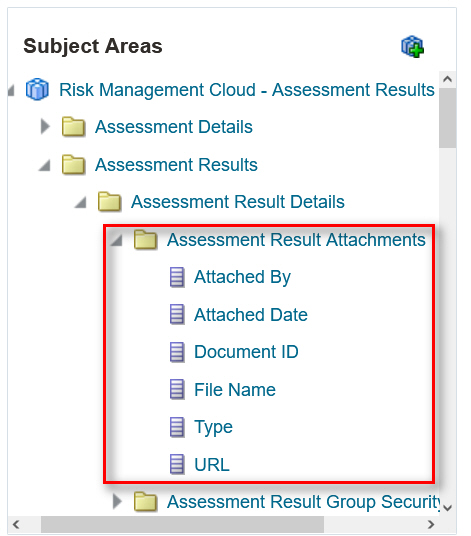
Example of an Attachment Dimension
Often attachments are associated to records. Now the user can view the who, when, and type for attachments in an OTBI report. If the attachment is a URL, the user can quickly drill in, rather than navigate back to the application.
Steps to Enable
You don't need to do anything to enable this feature.
Tips And Considerations
Attachments that are URLs can be formatted such that they are hyperlinks. Attachments that are files can have deep links to the objects where the actual attachments can be opened.
Improved Progress Tracking for Advanced Control Model and Control Analysis
When you monitor the progress of a model- or control-analysis job, the percentage complete is more accurate and is updated every minute.
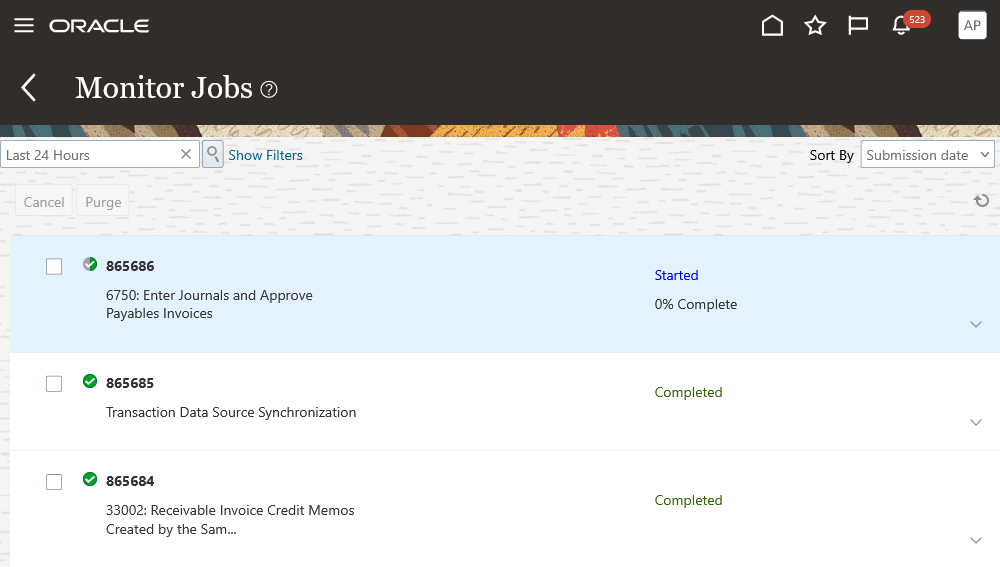
Monitor Jobs Control/Model Analysis Progress
Especially with longer running jobs, seeing the percentage complete is a good way to track where the job is. Having more accuracy will help prevent confusion over whether a job is stuck and not progressing.
Steps to Enable
You don't need to do anything to enable this feature.
Security Updates to External Auditor Job Role
The External Auditor predefined job role was updated to include two existing roles. These roles were introduced in earlier releases to support subject areas for models in Advanced Controls. The added roles include Advanced Financial Control Models Transaction Analysis and Advanced Access Control Model Transaction Analysis.
The External Auditor job is responsible for auditing advanced access and transaction controls. The additional security for reporting against models aligns with this responsibility.
Steps to Enable
You don't need to do anything to enable this feature.
Role Information
Two duty roles for reporting on models in OTBI have been added to the predefined External Auditor job role. If you've customized that job role, you need to add the duties to it. If you use predefined job roles, you don't need to make any changes.
| Duty Role Name | Technical Duty Role Name | Corresponding Subject Area |
|---|---|---|
| Advanced Access Control Model Transaction Analysis Duty |
FBI_ADVANCED_ACCESS_CONTROL_MODEL_ |
Risk Management Cloud - Advanced Access Models Real Time |
| Advanced Financial Control Models Transaction Analysis Duty |
FBI_ADVANCED_FINANCIAL_CONTROL_ |
Risk Management Cloud - Advanced Financial Models Real Time |
A new Settings for Email Alerts and Notifications tab, located in Setup and Administration, enables you to exercise granular control over the objects for which email alerts and notifications are, or are not, system-generated. This new tab replaces the Email Alerts feature in the Configuration Options tab, which has been deprecated.
The new feature also permits global suppression of all emails and notifications. It's a quick way to put a temporary hold on these notices without impacting the object-level settings. Users with the appropriate privilege can update these settings to Suppress emails, Suppress notifications, or both. When both attributes are selected, all emails and notifications are suppressed across all Risk Management applications.
The default configuration is to allow all email alerts and notifications to be sent. You can modify the default settings as needed across business areas and objects.
Business Areas:
- Access Certifications
- Advanced Controls
- Financial Reporting Compliance
- Risk Management (Common)
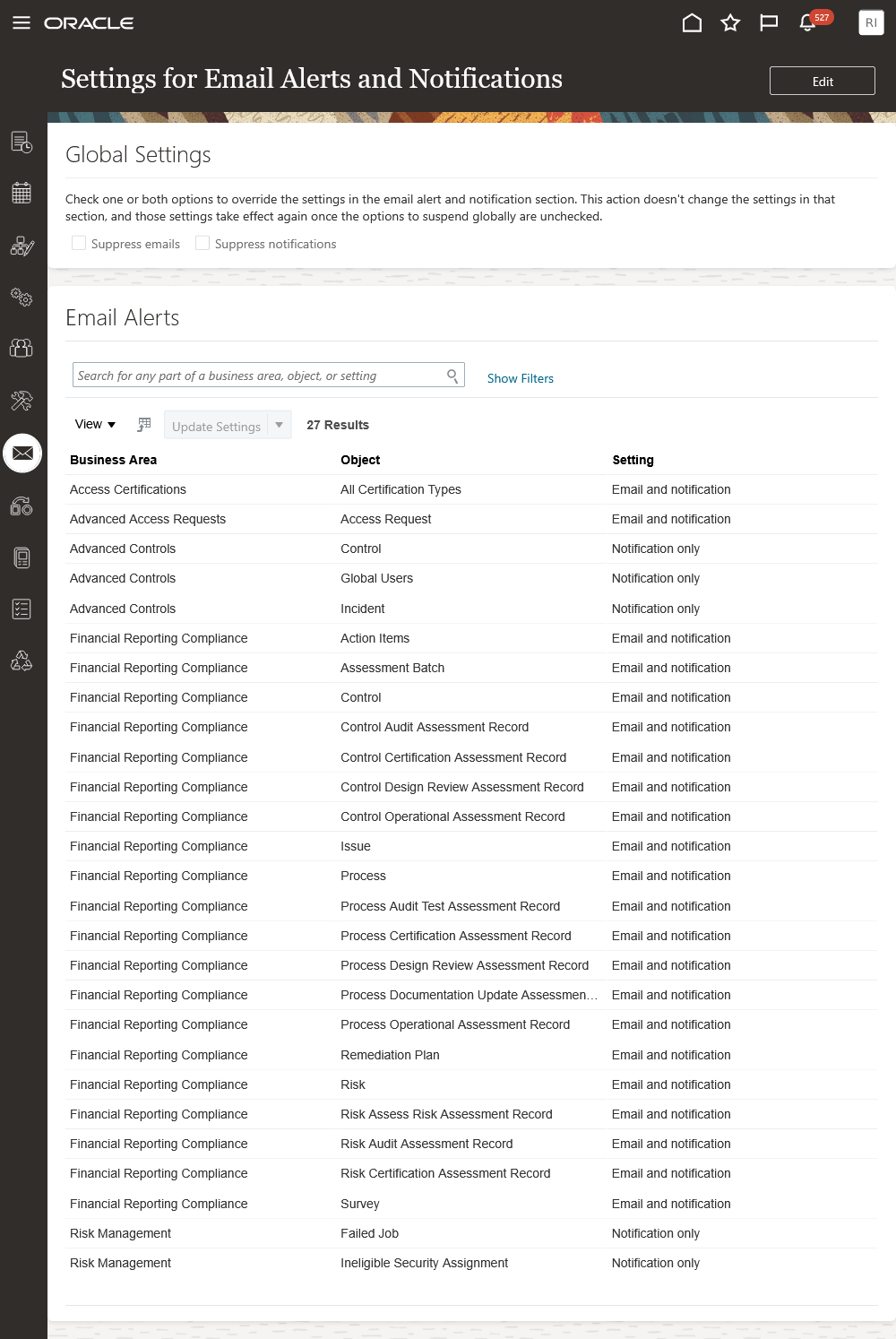
New Notification Configuration Page
In addition, the feature set includes the following updates:
- Track who has changed the settings, as defined in Manage Audit Policies.
- Enable the customer to export all notification event triggers.
- Removal of existing email configurations from the Configuration Options page.
- The configuration settings don't impact reminder notifications in Financial Reporting Compliance.
The new Settings for Email Alerts and Notifications feature enables organizations to manage which email and notifications are sent and their delivery format (notification or email alert). The configuration options enable the organization to manage email and notifications holistically or at the level of specific application objects.
Steps to Enable
You don't need to do anything to enable this feature.
Tips And Considerations
The global suppression of emails and notifications is intended primarily for use in development and test environments, where typically application communications aren't desired. In very infrequent cases, when a large update is made to the production environment, a temporary shut-off of all communications may be desirable.
Financial Reporting Compliance email reminders are not impacted due to the implementation of this feature. If a user takes the explicit action to send an email reminder to a group of users, the email will be sent regardless of the configuration setting.
Role Information
The feature is enabled by two new privileges inherited by the Risk Management Administrator duty role, which is part of the Risk Administrator job role. If you've customized your roles, you need to add the privileges to the duty role. If you use predefined roles, you don't need to make any changes.
| Privilege Name |
Technical Privilege Name |
Description |
|---|---|---|
| View Email Alert and Notification Settings |
GTG_VIEW_EMAIL_ALERT_AND_ |
Allows for viewing configurations for email alerts, notifications, and global settings. |
| Edit Email Alert and Notification Settings |
GTG_EDIT_EMAIL_ALERT_AND_ |
Allows for editing configurations for email alerts, notifications, and global settings. |
Financial Reporting Compliance
Financial Reporting Compliance
Survey Questions Support Carriage Returns
When you create survey questions, you may need to include carriage returns to better communicate the thought and intent of the question. Now the carriage returns included in a question definition are maintained when the question appears in a survey.
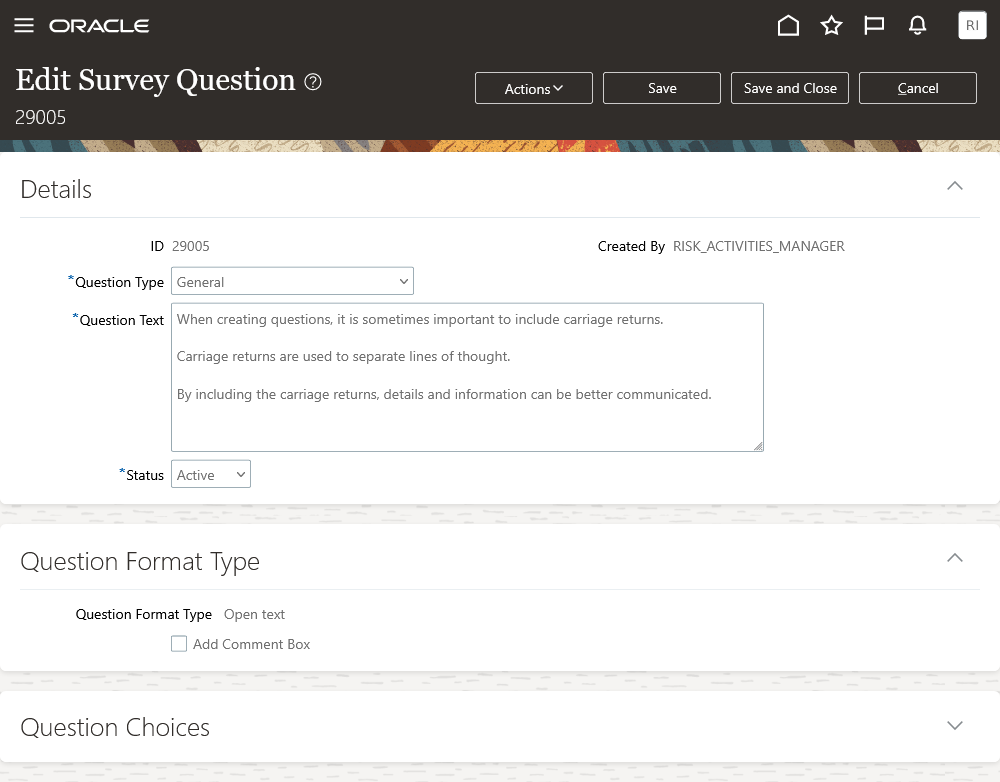
Question Definition With Carriage Returns
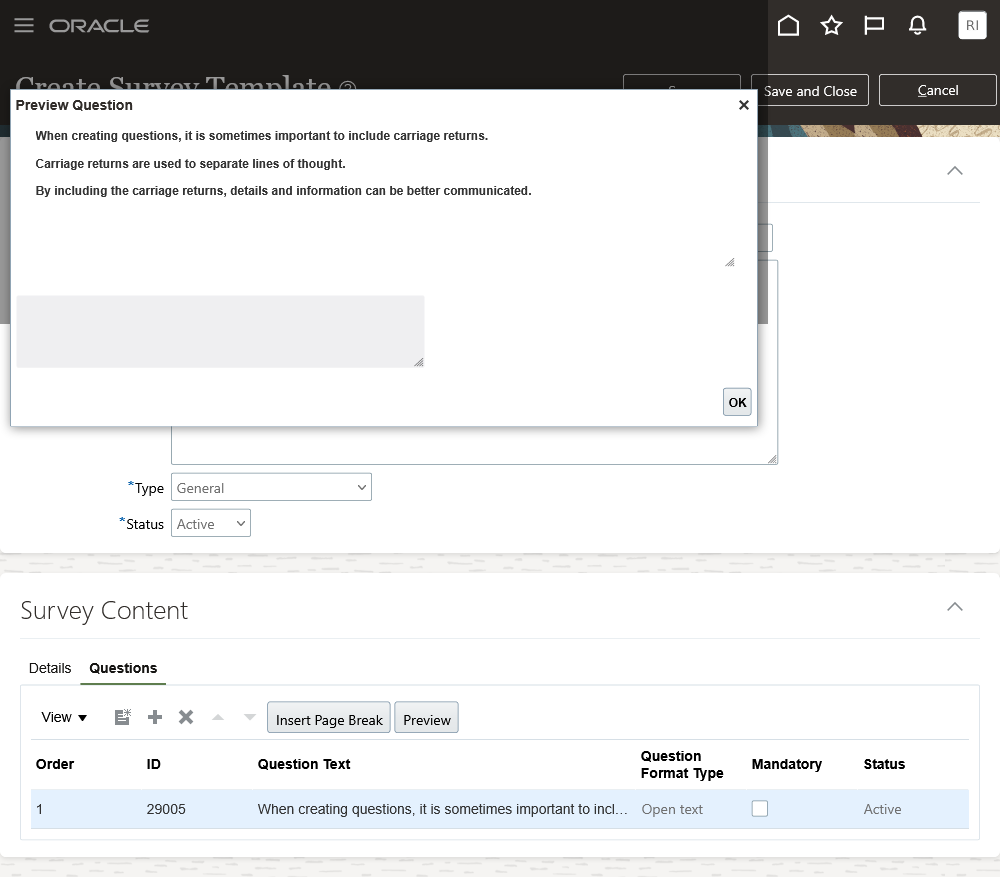
Question with Carriage Returns in Preview Mode
The question text can be very long or have a list of details as part of the question. Carriage returns allow for enhanced formatting when the question is rendered for the end user.
Steps to Enable
You don't need to do anything to enable this feature.
Tips And Considerations
During the process of creating the survey questions, leverage the Preview action to view how the question will appear within a survey. This will allow you to make additional changes when needed.
Ability to Import Issue Records
You can now migrate legacy issue records during the initial implementation of Financial Reporting Compliance. In addition, you can incrementally import issue records to existing object records.
The import template has a new issue-specific worksheet, called "Issue," to enable the entry of issue-record details. The Issue worksheet remains blank as you generate the import template, no matter whether you select the With Data or Without Data option. This means the template doesn't export documented issue records.
As part of the record for each issue you import, you must identify a single origin record, so that the issue record is mapped to the appropriate object record. The import template supports the ability to import new origin records and related issue records at the same time. For this scenario the user who initiates the import becomes the default issue record owner. This business rule is consistent with all new records being imported into the application.
When new issue records are incrementally imported, the data-migration process validates whether an issue validator or issue owner has been assigned to the object record the issue is being associated to. The following are the ORIGIN_OBJECT_TYPE_CODE values:
- GRC_PROCESS
- GRC_RISK
- GRC_CONTROL
Prior to implementation of Financial Reporting and Compliance, there are documented issue records that need to be imported as part of you legacy data, along with their relationships to other records. Support for the import of issue records streamlines data migration into the application.
Steps to Enable
You don't need to do anything to enable this feature.
Tips And Considerations
Financial Reporting and Compliance data migration order of execution for the sheets are the following:
- Perspectives
- Control
- Risk
- Process
- Issues
Monitor Jobs UX has been updated to include the count of imported issues.
The user who is importing the data doesn't have to have the privilege as an issue owner nor issue validator.
A Copy of an Assessment Batch Now Includes Attachments
In the past, a copy of an assessment batch didn't include attachments to the original batch. Now, attachments associated with the original batch are included with its copy as well.
To streamline assessment administration, you may copy an assessment batch when its scoping criteria are the same as those of a batch you want to create. Attachments associated with the original batch often include information pertaining to the batch you're initiating. These attachments are now included, ensuring that all aspects of the original batch definition are copied.
Steps to Enable
You don't need to do anything to enable this feature.
Update to Assessment Batch User Groups
The owner of an assessment user group can now add assessors to the group, which will have the ability to complete an associated survey. In addition the newly added assessors receive the standard assessment batch notifications.
While an assessment batch is active it's not uncommon for the need to modify the assessor assignment. Newly added assessors that are either part of a user group or individually associated will be notified of the new task assignment and be able to complete assessment in its entirety.
Steps to Enable
You don't need to do anything to enable this feature.