
This document will continue to evolve as existing sections change and new information is added. All updates appear in the following table:
| Date | Module | Feature | Notes |
|---|---|---|---|
| 16 DEC 2022 | Created initial document. |
 HAVE AN IDEA?
We’re here and we’re listening. If you have a suggestion on how to make our cloud services even better then go ahead and tell us. There are several ways to submit your ideas, for example, through the Ideas Lab on Oracle Customer Connect. Wherever you see this icon after the feature name it means we delivered one of your ideas.
GIVE US FEEDBACK
We welcome your comments and suggestions to improve the content. Please send us your feedback at oracle_fusion_applications_help_ww_grp@oracle.com.
DISCLAIMER
The information contained in this document may include statements about Oracle’s product development plans. Many factors can materially affect Oracle’s product development plans and the nature and timing of future product releases. Accordingly, this Information is provided to you solely for information only, is not a commitment to deliver any material, code, or functionality, and should not be relied upon in making purchasing decisions. The development, release, and timing of any features or functionality described remains at the sole discretion of Oracle.
This information may not be incorporated into any contractual agreement with Oracle or its subsidiaries or affiliates. Oracle specifically disclaims any liability with respect to this information. Refer to the Legal Notices and Terms of Use for further information.
Column Definitions:
Report = New or modified, Oracle-delivered, ready to run reports.
UI or Process-Based: Small Scale = These UI or process-based features are typically comprised of minor field, validation, or program changes. Therefore, the potential impact to users is minimal.
UI or Process-Based: Larger Scale* = These UI or process-based features have more complex designs. Therefore, the potential impact to users is higher.
Features Delivered Disabled = Action is needed BEFORE these features can be used by END USERS. These features are delivered disabled and you choose if and when to enable them. For example, a) new or expanded BI subject areas need to first be incorporated into reports, b) Integration is required to utilize new web services, or c) features must be assigned to user roles before they can be accessed.
| Ready for Use by End Users Reports plus Small Scale UI or Process-Based new features will have minimal user impact after an update. Therefore, customer acceptance testing should focus on the Larger Scale UI or Process-Based* new features. |
Customer Must Take Action before Use by End Users Not disruptive as action is required to make these features ready to use. As you selectively choose to leverage, you set your test and roll out timing. |
|||||
|---|---|---|---|---|---|---|
| Feature |
Report |
UI or |
UI or |
|
||
New Fact Folder Relationships Between Existing Dimension Folders |
||||||
Selection of Perspective Hierarchies for Assessment Batches Is Refined |
||||||
You can create additional lookup values for predefined lookup codes in Risk Management > Setup and Administration > Lookups. When you create a new value, the combination of the lookup value and code must be unique.
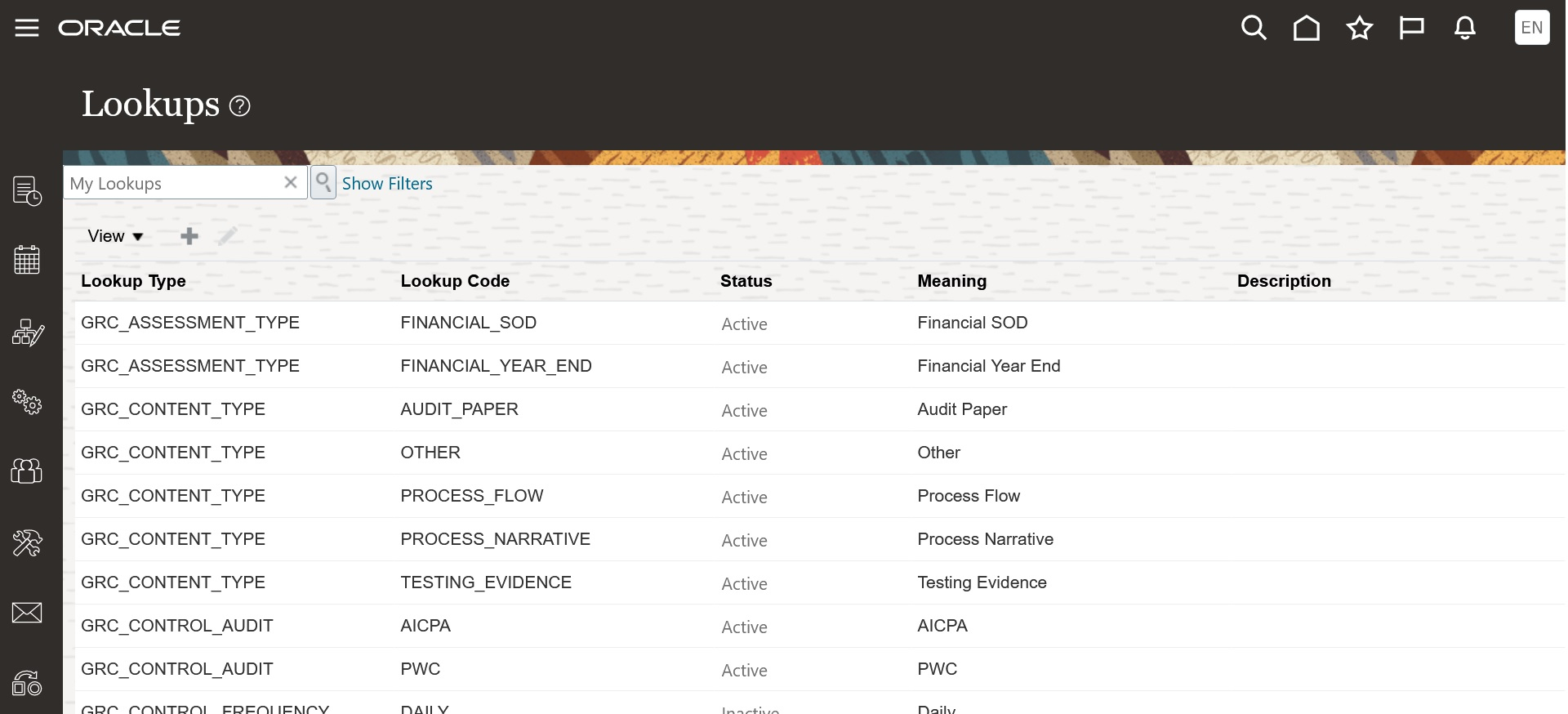
Example of the Risk Management > Setup and Administration > Lookups.
The secondary header for the Risk Management > Setup and Administration > Configuration Options has been updated to Configure Module Objects.
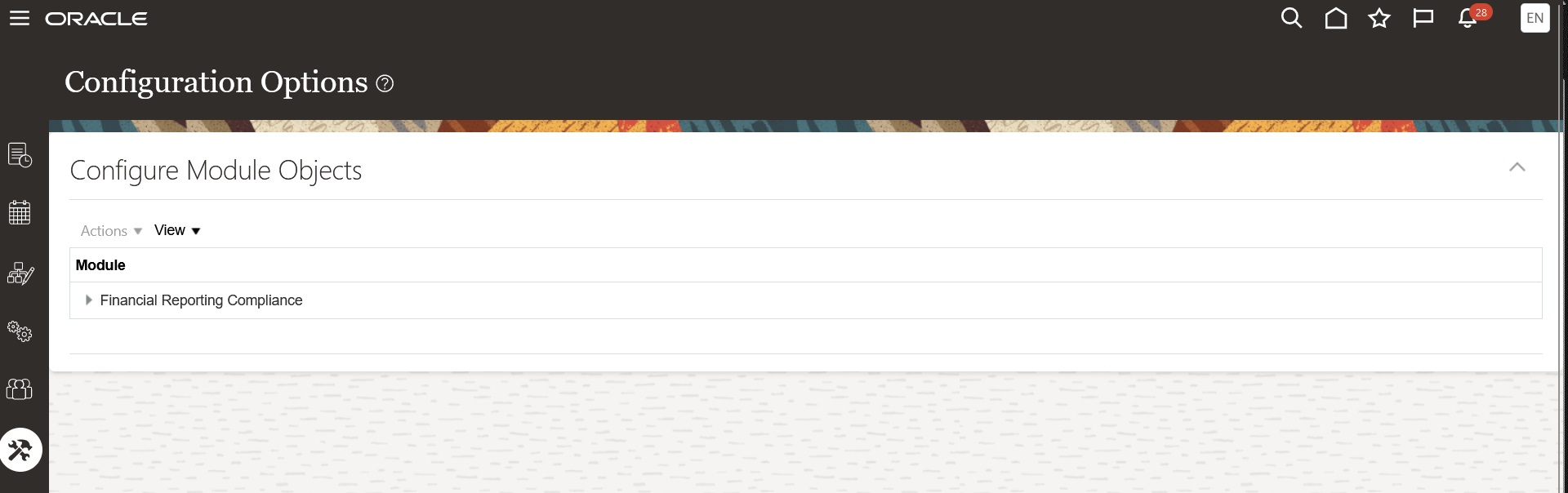
An Example of the Configuration Objects Layout
Because administrators can no longer use the same values in multiple lookup code and value combinations, a possibility for creating confusion for end users is eliminated. The clarification of the secondary header in the Configuration Options page decreases the likelihood of misinterpretation.
Steps to Enable
You don't need to do anything to enable this feature.
Transactional Business Intelligence for Risk Management
New Dimension Control Assessment Result Details Available
A new dimension is now available in Risk Management Cloud - Compliance Real Time: Control Details > Control Assessment Result Details. The following attributes are included:
- Assessment Result State
- Completion Date
- Response
- Result ID
- Result Summary
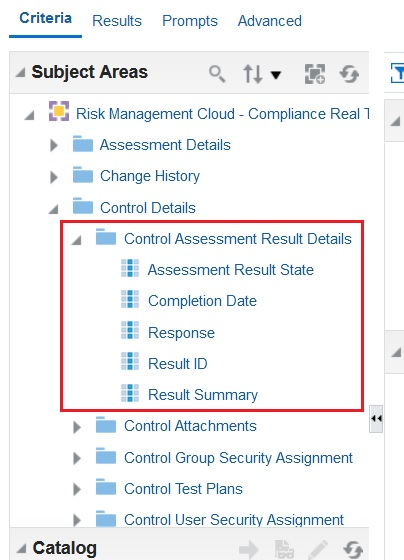
View of the Risk Management Cloud - Compliance Real Time > Controls > Control Assessment Result Details
Internal control is a process, effected by an entity's board of directors, management, and other personnel, designed to provide reasonable assurance: That information is reliable, accurate, and timely. The addition of the Control Assessment Result Details enables customers to quickly build a time period-based analysis to render control records that haven't been assessed versus those that have been assessed.
Steps to Enable
You don't need to do anything to enable this feature.
Tips And Considerations
To enhance the overall performance of an analysis with assessment results, the following SQL should be applied:
Navigation: OTBI > Analysis > Advanced SQL Clauses > Prefix
SET VARIABLE OBIS_ORACLEDB_HINTS_FOR_TOP_SELECT='OPT_PARAM
(''_complex_view_merging'',''false'')
OPT_PARAM(''_optimizer_skip_scan_enabled'',''false'')
OPT_PARAM(''_push_join_predicate'',''false'')
OPT_PARAM(''_optimizer_push_pred_cost_based'',''false'')
GATHER_PLAN_STATISTICS MONITOR';
Before applying the above SQL copy and paste into an application to remove unnecessary characters (for example Notes) and then apply to your analysis.
New Fact Folder Relationships Between Existing Dimension Folders
The default fact for a subject area determines the join to be used when you combine dimensions. To override that default fact, you add facts. For example, you may use the Compliance Real Time subject area to create an analysis that includes Process Name and Perspective. To see perspective values assigned to processes, you need to add a metric from the Process fact; otherwise, control perspectives appear.
The following relationships have been applied to Risk Management Cloud Compliance Real Time and Assessment Results Real Time subject areas.
Facts - Assessment Results
- Control Test Plans
- Inaccessible Records and Worklists
Facts - Controls
- Assessment Results Details
- Process Details
- Survey Details
Facts - Issue
- Control Test Plan Results
Facts - Process
- Assessment Results Details
- Control Details
- Control Stratification
- Control Test Plan Results
- Survey Details
Facts - Risk
- Assessment Results Details
- Control Test Plan Results
- Control Test Plans
- Process Details
- Survey Details
Facts - Remediation
- Control Test Plan Results
- Perspective
- Treatment Plans
Facts - Survey
- Assessment Result Attachments
- Assessment Results Details
- Control Test Plan Results
- Inaccessible Records and Worklists
The addition of fact relationships further enhances your real-time insight into your data. By understanding data patterns, you can be alerted to key events or anomalies.
Steps to Enable
You don't need to do anything to enable this feature.
Financial Reporting Compliance
Financial Reporting Compliance
Record ID Is Displayed and Available for Search
The following object records have a unique ID field known as Record ID. The Record ID is system-generated and can't be edited or deleted. It's generated every time a new record is inserted into the application.
- Process
- Risk
- Control
- Control Test Plans (4 total)
- Assessment Result Record
- Issue
- Remediation Plan
- Action Item (attribute was Action ID and updated to Record ID)
The Record ID is rendered within the object's manage page, edit page, and view page. By default the Record ID isn't rendered in the manage page table; however, you can easily add the column to the view and save it there. You can also use the Record ID to search for defined records.
A Record ID is an additional identifier that marks that particular record as unique from every other record. It allows the defined record to be referenced without confusion or unintentional overwriting of other records.
Steps to Enable
You don't need to do anything to enable this feature.
The layout of Detail forms and Additional Information panels is improved for records of the following objects. Changes have been made in the create, edit, and view modes.
- Assessment Records
- Controls
- Control Test Plans
- Issues
- Remediation Plans
The focus of these enhancements was on anticipating what the user needs to document, arranging the order in which labels appear, and ensuring consistency across object records.
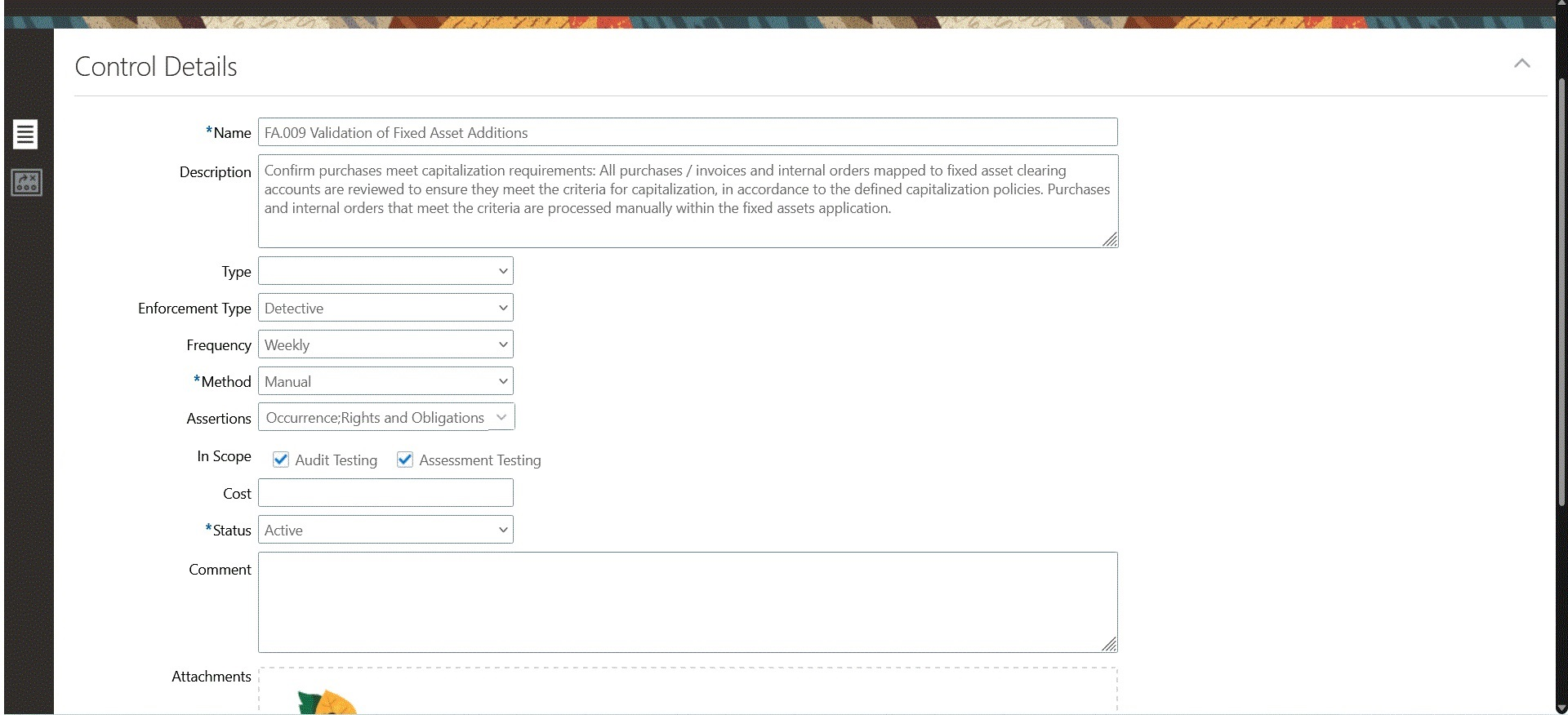
An Example of the Create Control Layout
The Perspectives > Perspectives Hierarchies > Perspective shuttle headers have been updated to Perspective Hierarchy and Perspective Items.
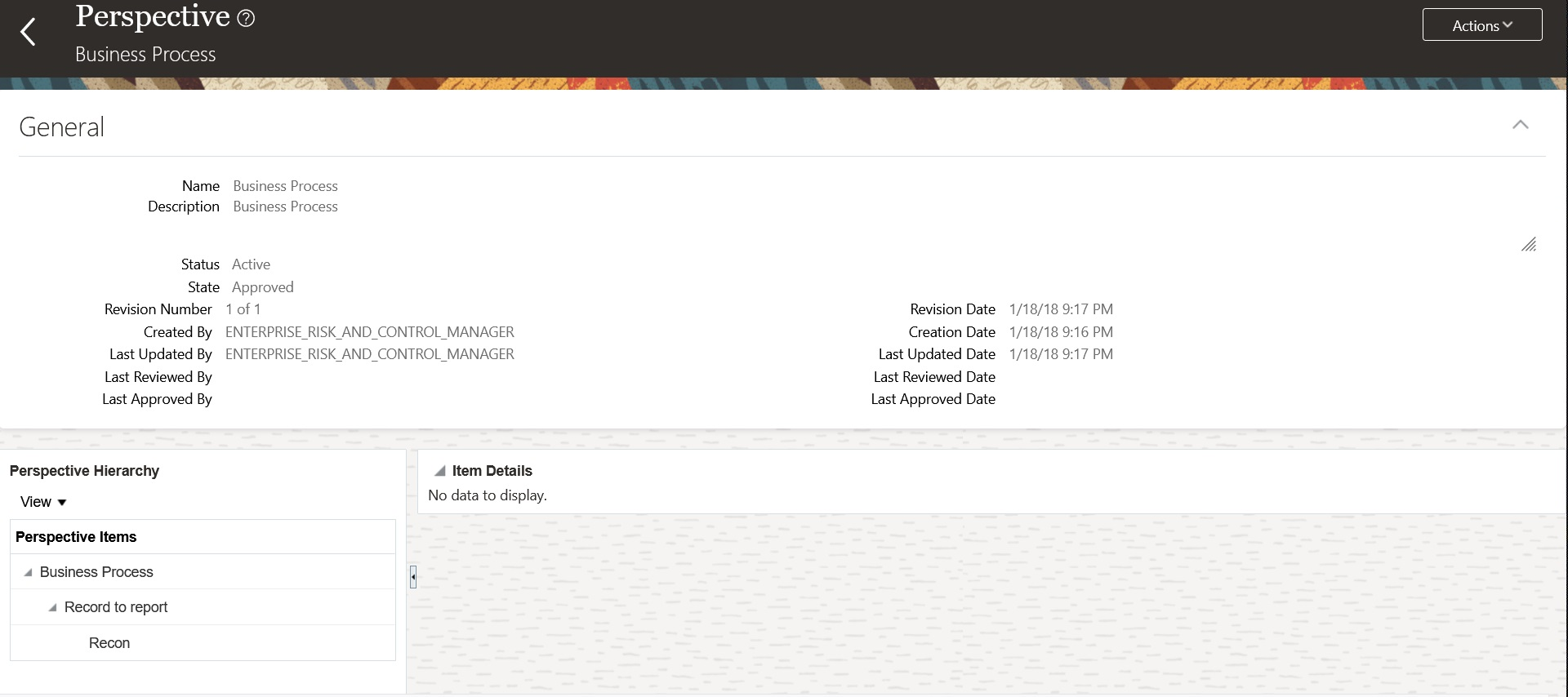
An Example of the View Perspective Definition Layout
A better muticolumn-layout experience decreases the likelihood of misinterpretation. Users will be less likely to skip required fields, input data into the wrong fields, or simply abandon forms entirely.
Steps to Enable
You don't need to do anything to enable this feature.
Selection of Perspective Hierarchies for Assessment Batches Is Refined
While initiating an assessment batch, you can select perspective values as filters; the batch can then include only object records assigned those values. In the Assessment Batch Scoping guided process, the Perspective Selection step now presents only perspective hierarchies mapped to the type of object you're assessing (Process, Risk, or Control).
You're now prevented from selecting perspective hierarchies and values that aren't relevant to the assessment batch you're scoping.
Steps to Enable
You don't need to do anything to enable this feature.
Support of Rich HTML in Survey Instructions
While creating a survey template, users often include instructions to assist the survey participants. Within the Survey Content section, the ability to apply rich HTML to the instructions included in the Survey Content area has been enhanced. Users can now add strike-through, and font color. Rich HTML provides appearance tools to adjust text size and style, such as italics or bold text. In addition, you can include formatting to the instructions, such as bullet lists, and align text to suit your messaging goals. You can also apply formatting adjustments to emphasize important parts of your instructions.
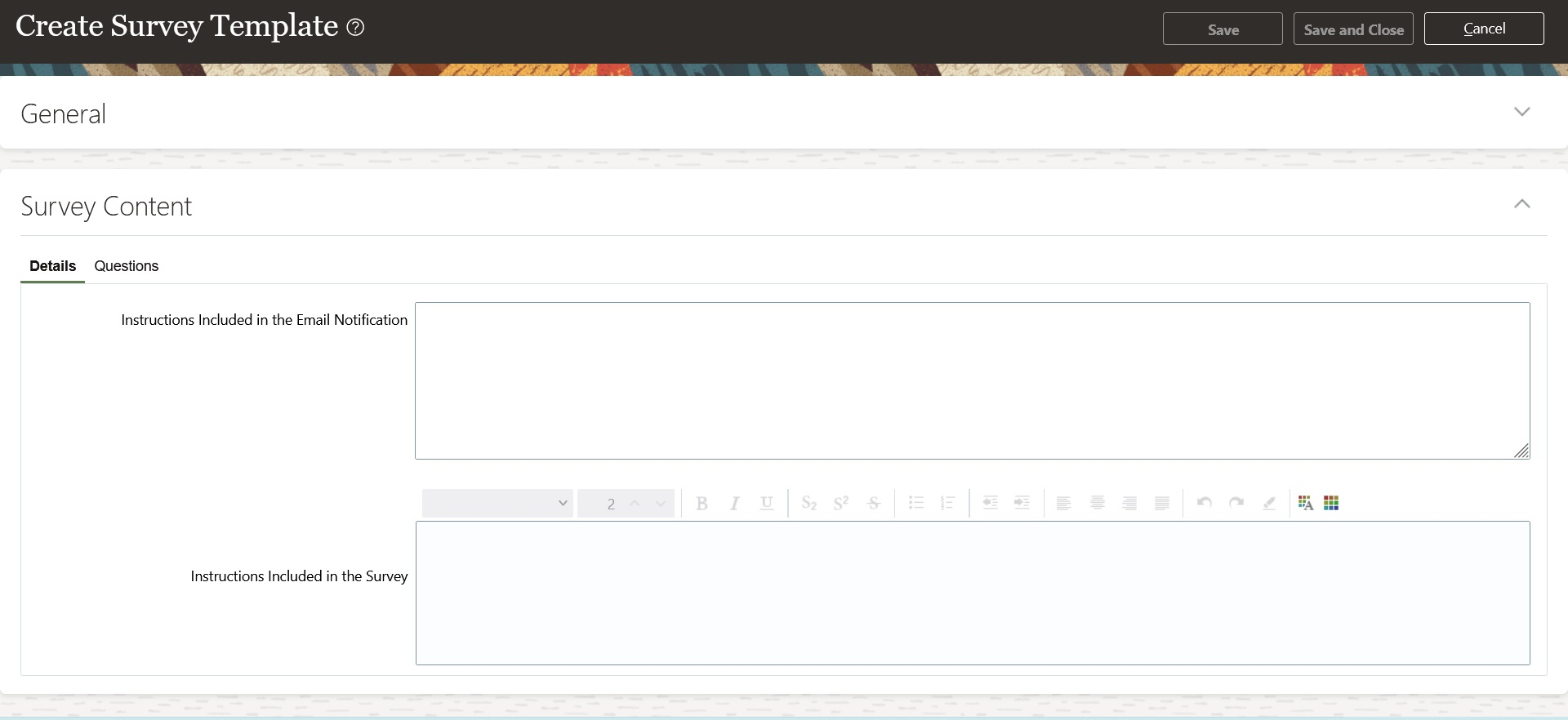
An Example of Create Survey Template Page
Rich HTML in the survey instructions allows you to apply a range of styles and features that can make the instructions more engaging to your survey participants.
Steps to Enable
You don't need to do anything to enable this feature.
Tips And Considerations
To ensure proper technical-security protocols, hyperlinks within the survey instruction will not be supported. When a hyperlink is needed, the URL will be rendered as text and the end user can copy and paste the URL within a browser window.
You can define control type values in the Lookups feature of Setup and Administration, and then assign the values to controls as you create or edit them. In the Controls search page, you can now search for control records by type. But this capability is not available by default. You have to configure it: click Show Filters > Add, and select Object Type. Then enter a search-parameter value in the Object Type field.
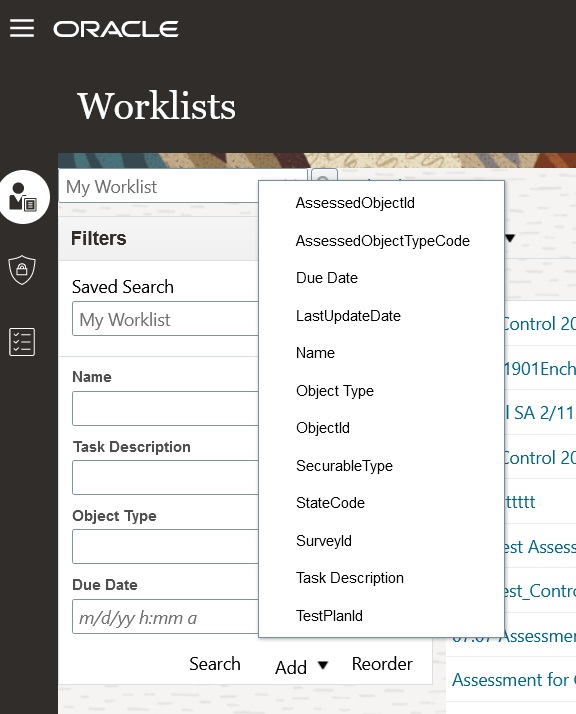
An Example of Show Filters
The ability to add control Object Type further optimizes the search results.
Steps to Enable
You don't need to do anything to enable this feature.