
This document will continue to evolve as existing sections change and new information is added. All updates appear in the following table:
| Date | Module | Feature | Notes |
|---|---|---|---|
| 17 MAR 2023 | Created initial document. |
 HAVE AN IDEA?
We’re here and we’re listening. If you have a suggestion on how to make our cloud services even better then go ahead and tell us. There are several ways to submit your ideas, for example, through the Ideas Lab on Oracle Customer Connect. Wherever you see this icon after the feature name it means we delivered one of your ideas.
GIVE US FEEDBACK
We welcome your comments and suggestions to improve the content. Please send us your feedback at oracle_fusion_applications_help_ww_grp@oracle.com.
DISCLAIMER
The information contained in this document may include statements about Oracle’s product development plans. Many factors can materially affect Oracle’s product development plans and the nature and timing of future product releases. Accordingly, this Information is provided to you solely for information only, is not a commitment to deliver any material, code, or functionality, and should not be relied upon in making purchasing decisions. The development, release, and timing of any features or functionality described remains at the sole discretion of Oracle.
This information may not be incorporated into any contractual agreement with Oracle or its subsidiaries or affiliates. Oracle specifically disclaims any liability with respect to this information. Refer to the Legal Notices and Terms of Use for further information.
Column Definitions:
Report = New or modified, Oracle-delivered, ready to run reports.
UI or Process-Based: Small Scale = These UI or process-based features are typically comprised of minor field, validation, or program changes. Therefore, the potential impact to users is minimal.
UI or Process-Based: Larger Scale* = These UI or process-based features have more complex designs. Therefore, the potential impact to users is higher.
Features Delivered Disabled = Action is needed BEFORE these features can be used by END USERS. These features are delivered disabled and you choose if and when to enable them. For example, a) new or expanded BI subject areas need to first be incorporated into reports, b) Integration is required to utilize new web services, or c) features must be assigned to user roles before they can be accessed.
| Ready for Use by End Users Reports plus Small Scale UI or Process-Based new features will have minimal user impact after an update. Therefore, customer acceptance testing should focus on the Larger Scale UI or Process-Based* new features. |
Customer Must Take Action before Use by End Users Not disruptive as action is required to make these features ready to use. As you selectively choose to leverage, you set your test and roll out timing. |
|||||
|---|---|---|---|---|---|---|
| Feature |
Report |
UI or |
UI or |
|
||
Updates to Monitor Jobs and Job Schedules
A few updates have been made to the Monitor Jobs and Scheduling pages.
- The Global User Synchronization job is now listed in the Scheduling page by default. It can also still be scheduled from the Global User page.

Seeded Oracle Jobs
- In the Monitor Jobs page, a flag is added to allow for automatic refreshing every 10 seconds. You can turn this off by unchecking the box. You can also refresh the page manually.
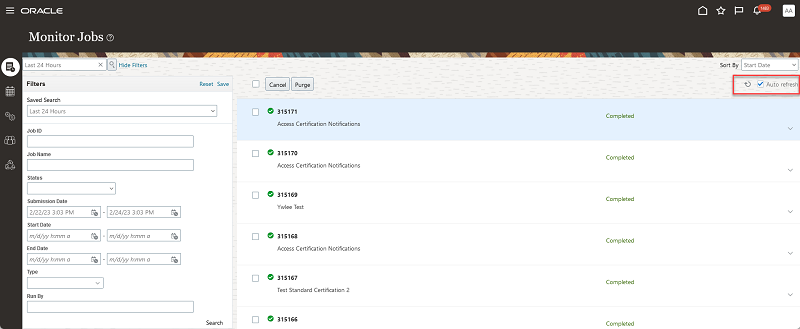
Jobs Page Refresh
- Sorting capabilities are updated on the Monitor Jobs page. A new Start Date option was added as the default. It's based on the date:timestamp value.
- There are improvements to the ability to cancel pending jobs and purge job history:
- You can multi-select pending jobs to cancel them.
- You can multi-select jobs to purge from the job history.
- You can select or deselect all jobs.
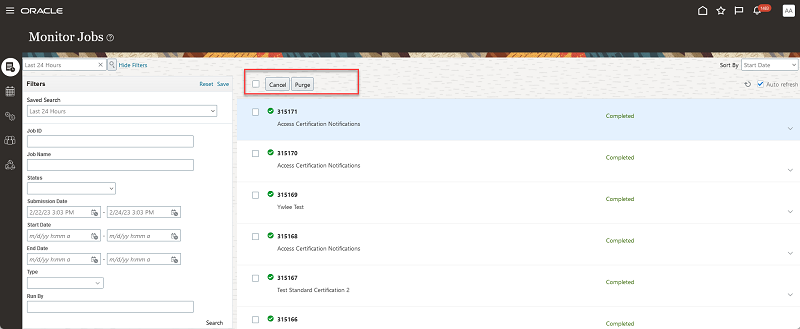
Multi-Select
- A transaction data sync report can be exported in XLSX format. It contains the count of records by business object included in the transaction data sync job.
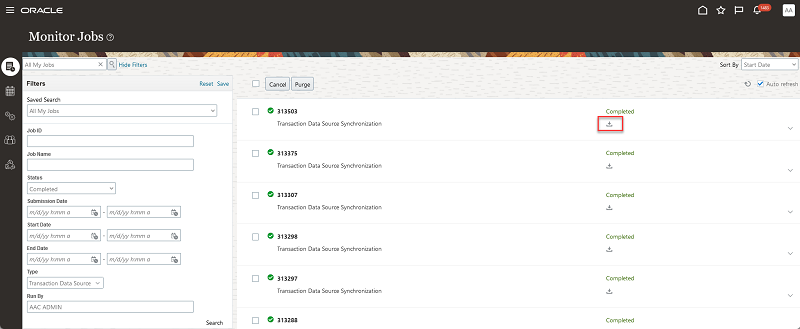
Transaction Data Sync Export
- Messaging is improved for the transaction data sync job. Depending on the timing in which the transaction data sync job was run related to the prior run, no data may have been added or updated. If so, this message is displayed: "There were no new or updated records."
These updates improve the usability of managing and monitoring jobs that have run, are currently running, or have been or will be scheduled to run.
Steps to Enable
You don't need to do anything to enable this feature.
Transactional Business Intelligence for Risk Management
Subject Areas Now Cover Attachments
For the Risk Management Cloud - Compliance Real Time and Risk Management Cloud - Assessment Results Real Time subject areas, new dimensions are added so that you can include URL and attachment names in the reports you create. These new dimensions are related to processes, issues, remediation plans, and surveys.
The following are the new dimensions, metrics, and attributes that have been added for each specific object:
Risk Management Cloud - Compliance Real Time
- Process Details > Process Attachments
- Issue Details > Issue Attachments
- Remediation > Remediation Plan Details > Remediation Plan Attachments
Risk Management Cloud - Assessment Results Real Time
- Process Details > Process Attachments
- Issue Details > Issue Attachments
- Remediation > Remediation Plan Details > Remediation Plan Attachments
- Survey > Survey Details > Survey Attachments
Each dimension contains the following attributes:
- Attached By
- Attached Date
- File Name or URL
- Type
Often attachments are associated to records. Now the user can view the who, when, and type for attachments in an OTBI report. If the attachment is a URL, the user can quickly drill in, rather than navigate back to the application.
Steps to Enable
You don't need to do anything to enable this feature.
Tips And Considerations
Attachments that are URLs can be formatted such that they are hyperlinks. Attachments that are files can have deep links to the objects where the actual attachments can be opened.
Financial Reporting Compliance
Financial Reporting Compliance
Rich Text Enabled for Manual Email Reminders
Manual email reminders can be sent to users who have not completed their tasks. These emails now support rich-text format, thereby allowing users to add many types of markups and formatting features, such as font sizes, colors, underlines, strike-throughs, italics, and bolding.
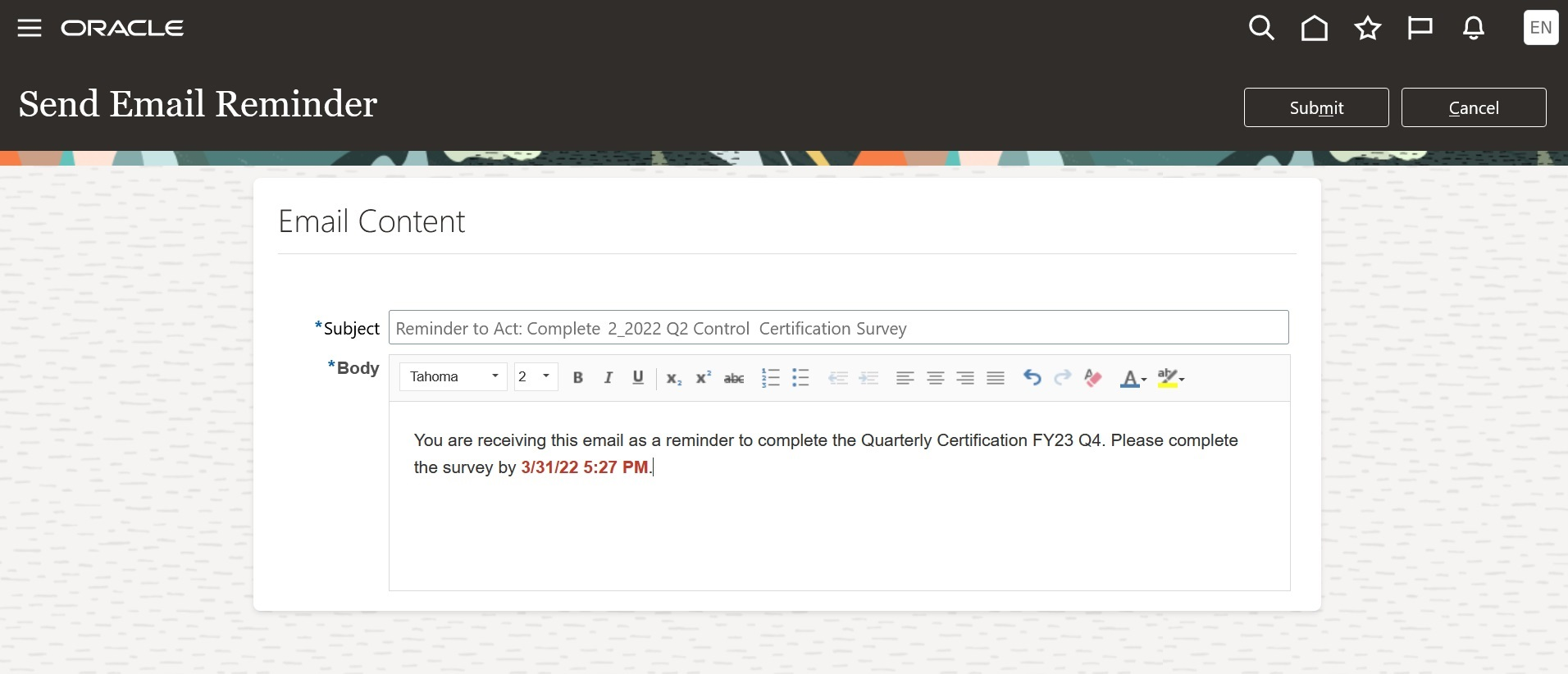
Example of a Manual Email Reminder
Rich HTML in email templates increases user engagement pertaining to the tasks they are being asked to complete.
Steps to Enable
You don't need to do anything to enable this feature.
Support for Flexfields in Treatment Plans
A descriptive flexfield is now available for use with risk treatment plans. You can create up to 70 flexfield "segments," each of which can hold values unique to your requirements. These include 40 text-string segments, 20 numeric segments, and 10 date segments. Each segment you create appears as a field in an Additional Information section of the record of a treatment plan.
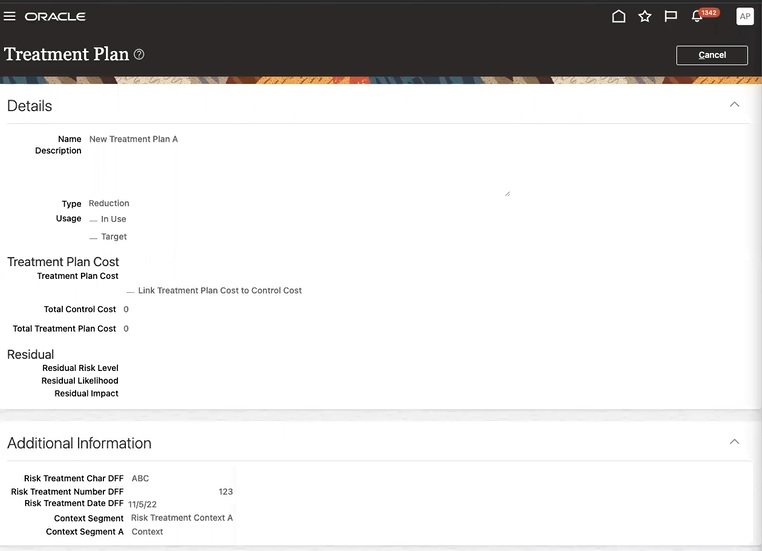
Example of flexfield segments in a treatment plan
The treatment-plan flexfield includes these advantages: You can customize your application to conform to your current business practices for your risk treatment plans, customize your application to capture data it would not otherwise track, rely on your application to validate the values, customize data fields to meet your business needs without programming, and combine values that you enter in intelligent fields.
Steps to Enable
To use the descriptive flexfield to store details unique to treatment plans, you must configure flexfield segments. See the Configure Flexfield Segments topic in the Implementing Risk Management guide.
Improvements to Risk Analysis and Context Models
As you create or edit a risk, the drop downs for the context and analysis models will display only active models.
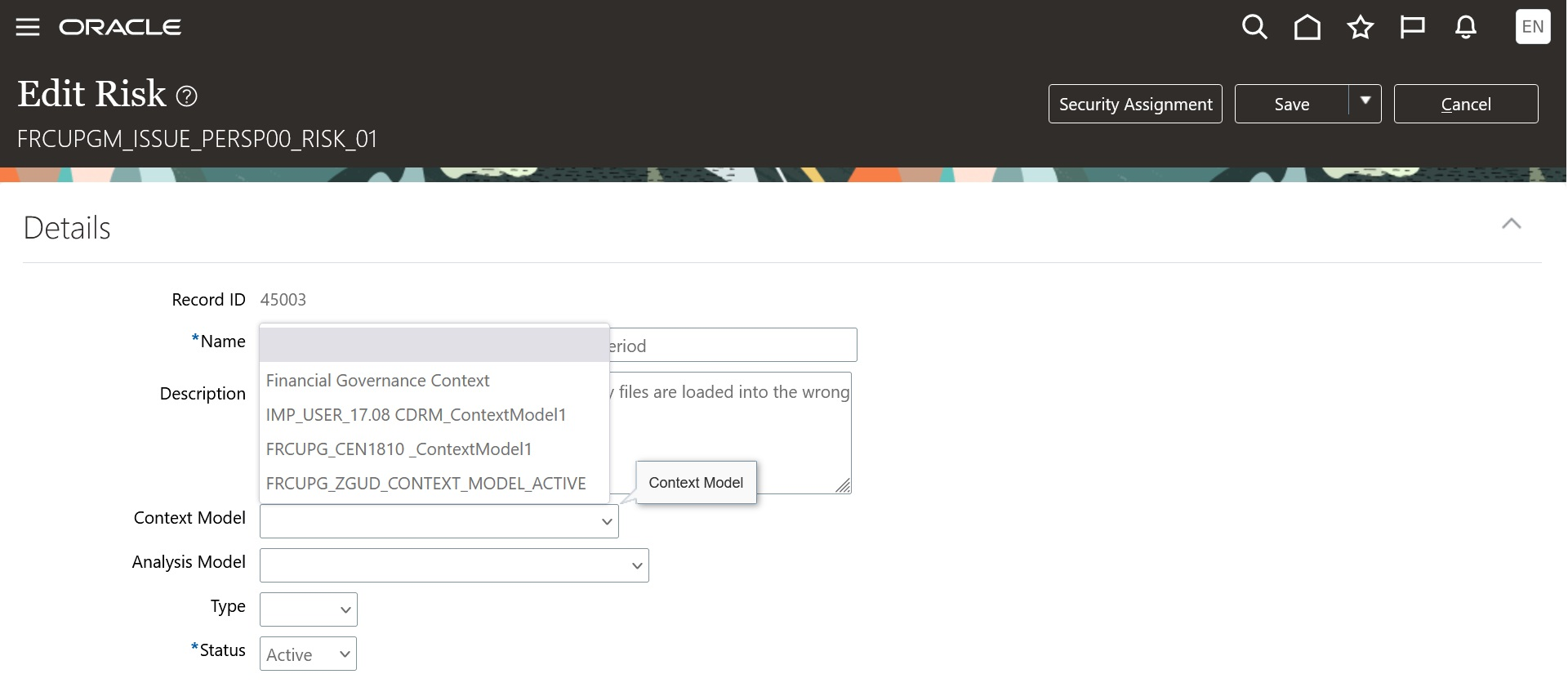
Example of Editing a Risk Record
To streamline the creation or edit of a risk record, the user can view and associate only active models.
Steps to Enable
You don't need to do anything to enable this feature.
Improvements to Risk Likelihood and Impact Models
Impact and likelihood models, which are components of risk analysis, consist of labels that correspond to numeric values. While defining these models, you can now apply a description to each of the labels.
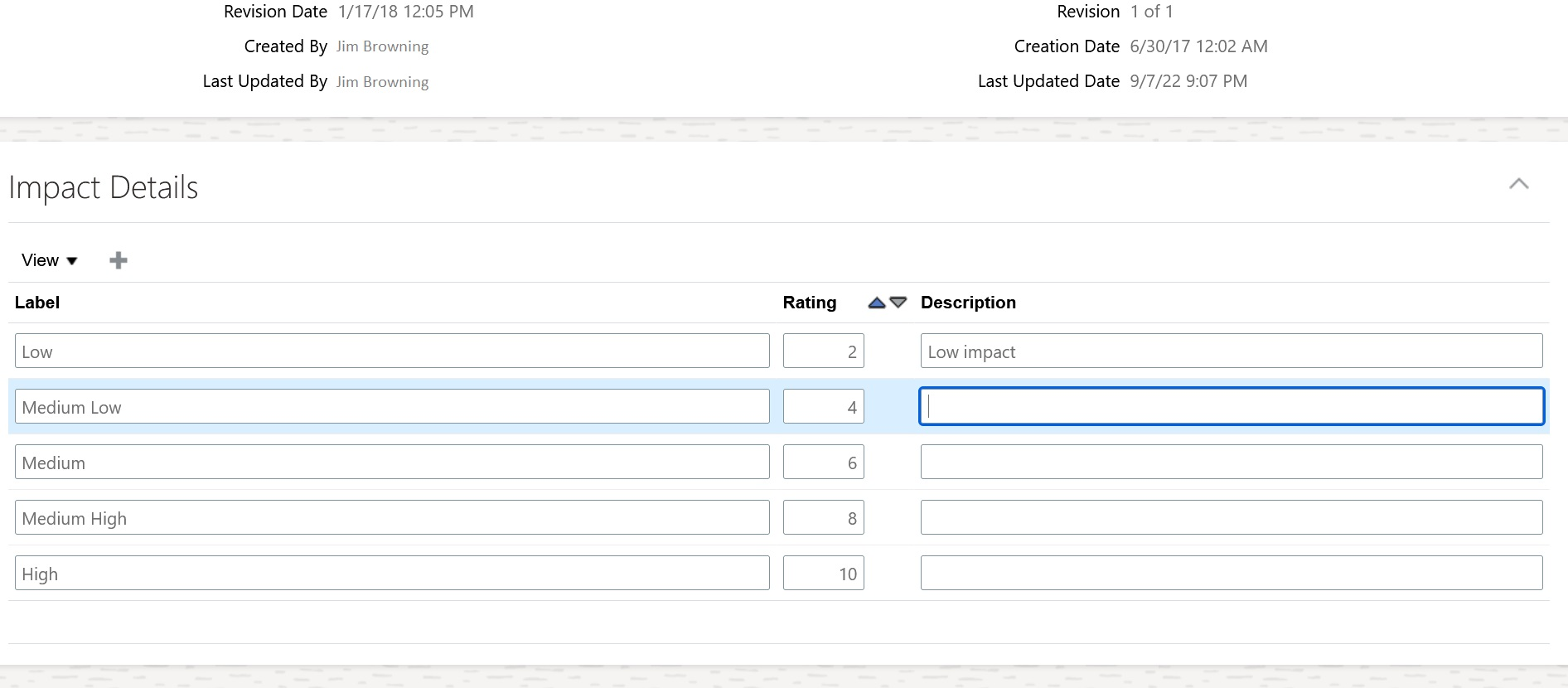
Example of the Impact Details
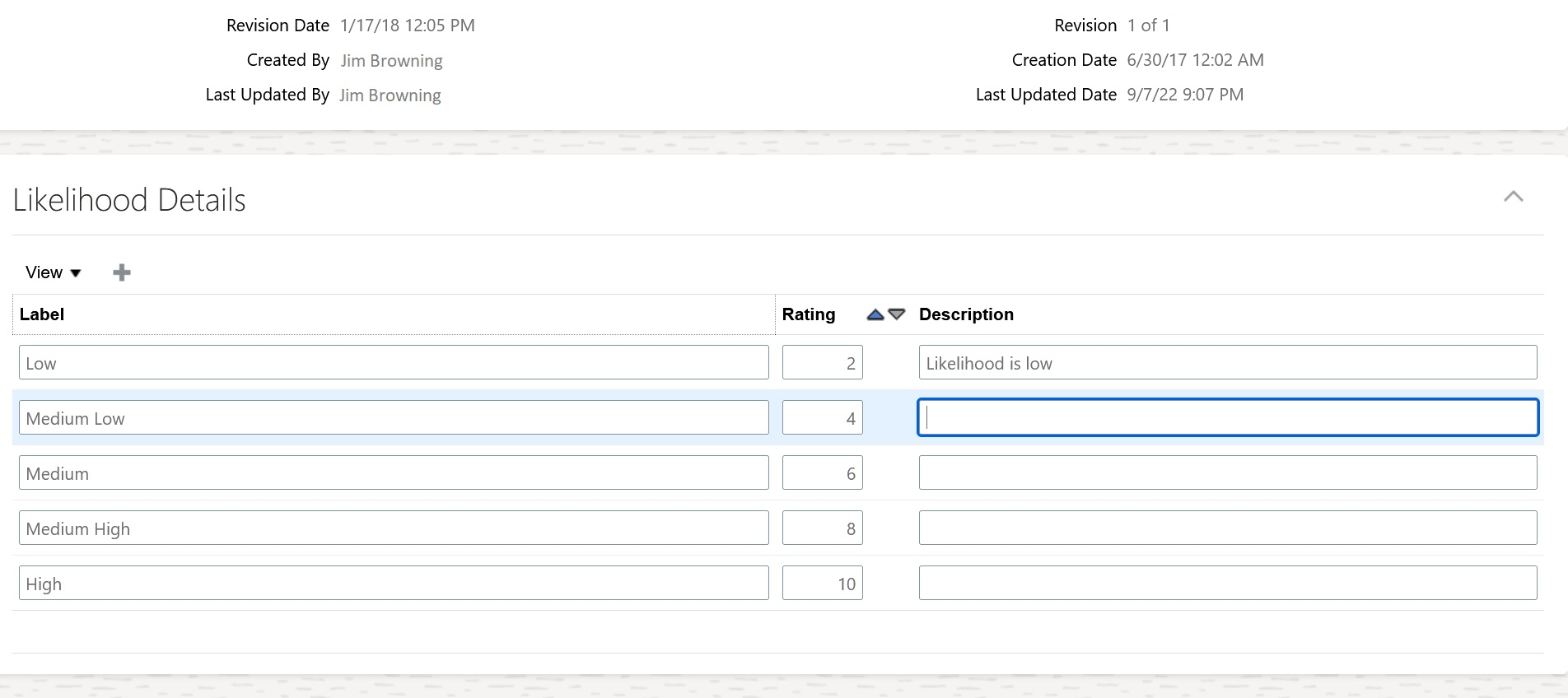
Example of the Likelihood Details
The impact and likelihood details represent the probability of random variable realizations conditional on particular values of the statistical parameters. The addition of description enables the user to articulate the intent of each rating.
Steps to Enable
You don't need to do anything to enable this feature.
You can associate advanced controls to defined process, risk, and control records. To view these relationships the user navigates to the record's definition UX page and selects the last tab; Advanced Controls. The Advanced Controls tab within the record definition page has been updated to display the appropriate header 'Advanced Controls'.

Example of the Advanced Controls Tab
The clarification of the UX page header in the Advanced Controls page decreases the likelihood of misinterpretation.
Steps to Enable
You don't need to do anything to enable this feature.
Improvement to Assessment Notifications
The emails for the Financial Reporting Compliance Assessments feature have been updated. When more than four emails would have been previously generated, they are now consolidated into a single email for less notification noise.
There are several key benefits to this enhancement:
- Refreshed and consistent layout
- More pertinent information
- A direct link to the page where the action can be performed
- Consolidation of emails when applicable to reduce email volume noise
Steps to Enable
You don't need to do anything to enable this feature.