
- Revision History
- Overview
- Feature Summary
- Human Resources Help Desk
-
- HR Help Desk
-
- Adaptive Intelligence for Service - Help Desk Request Classification
- Help Desk in the Redwood Experience is Available Upon Request
- SR Lifecycle Analysis for HR and Internal Help Desk
- Define a Primary Contact as a Recipient for Notifications to Employees
- Customize Your Help Desk Resolution Workflow to Your Unique Needs
- Easily Transfer Help Desk Requests
- Mark Your Availability for Help Desk Request Routing
- View any Employee Profile from a Help Desk Request
-
- HR Help Desk
November Maintenance Pack for 22D
This document will continue to evolve as existing sections change and new information is added. All updates appear in the following table:
| Date | Module | Feature | Notes |
|---|---|---|---|
| 28 OCT 2022 | Created initial document. |
 HAVE AN IDEA?
We’re here and we’re listening. If you have a suggestion on how to make our cloud services even better then go ahead and tell us. There are several ways to submit your ideas, for example, through the Ideas Lab on Oracle Customer Connect. Wherever you see this icon after the feature name it means we delivered one of your ideas.
GIVE US FEEDBACK
We welcome your comments and suggestions to improve the content. Please send us your feedback at oracle_fusion_applications_help_ww_grp@oracle.com.
DISCLAIMER
The information contained in this document may include statements about Oracle’s product development plans. Many factors can materially affect Oracle’s product development plans and the nature and timing of future product releases. Accordingly, this Information is provided to you solely for information only, is not a commitment to deliver any material, code, or functionality, and should not be relied upon in making purchasing decisions. The development, release, and timing of any features or functionality described remains at the sole discretion of Oracle.
This information may not be incorporated into any contractual agreement with Oracle or its subsidiaries or affiliates. Oracle specifically disclaims any liability with respect to this information. Refer to the Legal Notices and Terms of Use for further information.
Column Definitions:
Report = New or modified, Oracle-delivered, ready to run reports.
UI or Process-Based: Small Scale = These UI or process-based features are typically comprised of minor field, validation, or program changes. Therefore, the potential impact to users is minimal.
UI or Process-Based: Larger Scale* = These UI or process-based features have more complex designs. Therefore, the potential impact to users is higher.
Features Delivered Disabled = Action is needed BEFORE these features can be used by END USERS. These features are delivered disabled and you choose if and when to enable them. For example, a) new or expanded BI subject areas need to first be incorporated into reports, b) Integration is required to utilize new web services, or c) features must be assigned to user roles before they can be accessed.
| Ready for Use by End Users Reports plus Small Scale UI or Process-Based new features will have minimal user impact after an update. Therefore, customer acceptance testing should focus on the Larger Scale UI or Process-Based* new features. |
Customer Must Take Action before Use by End Users Not disruptive as action is required to make these features ready to use. As you selectively choose to leverage, you set your test and roll out timing. |
|||||
|---|---|---|---|---|---|---|
| Feature |
Report |
UI or |
UI or |
|
||
Adaptive Intelligence for Service - Help Desk Request Classification |
||||||
Help Desk in the Redwood Experience is Available Upon Request |
||||||
Define a Primary Contact as a Recipient for Notifications to Employees |
||||||
Customize Your Help Desk Resolution Workflow to Your Unique Needs |
||||||
Adaptive Intelligence for Service - Help Desk Request Classification
SR Classification uses machine learning to predict and label your email-created HR and internal help desk requests with the correct service category and product. Your agents don't need to spend time anymore reading through service emails to decide what category to which a request belongs or the product it maps to. With the right category and product automatically stamped at the time of creation, the request is assigned to the correct queue and agent, avoiding subsequent queue/agent transfers and the attendant delays in resolution. As you keep using the feature, the system trains itself to get progressively better, resulting in improved prediction accuracy and the resultant exponential benefits.
Improved help desk request routing efficiency and accuracy, better agent experience and reduction in resolution times are some of the more obvious benefits of this feature
Steps to Enable
Use the Opt In UI to enable this feature. For instructions, refer to the Optional Uptake of New Features section of this document.
Offering: Help Desk
You need to opt-in to use the feature.
Tips And Considerations
- Use the promo code provided in the 'Implementing Service Center Guide' book to enable the feature in
- Email Classification is available with both Classic and Redwood user experience
Key Resources
- For additional information see the Implementing Help Desk Guide
Role And Privileges
HR Help Desk Administrator
Internal Help Desk Administrator
Help Desk in the Redwood Experience is Available Upon Request
Oracle's new Help Desk in the Redwood user experience is now available upon request. Inspired by Oracle's new Redwood design language and built upon the Visual Builder Studio application development environment, the Help Desk in the Redwood Experience is a secure, modern solution to better serve the needs of your employees. The Help Desk enables you to provide service to internal employees to answer questions, lend assistance with an employee task or resolve an issue for an employee. This quarter's Readiness document summarizes just a few of the many features available to employees and help desk agents through Help Desk in the Redwood Experience.
Help Desk in the Redwood Experience allows an organization to provide service to internal employees to answer questions, lend assistance with an employee task or resolve an issue for an employee. The comprehensive solution supports all steps of the help desk lifecycle including:
-
The My Help page, a prebuilt set of pages within the Fusion Application that allows an employee to search knowledge and submit help desk requests. Employees can submit help desk requests about an issue or question, which is then routed and assigned to help desk resources for review and resolution. Employees can also engage with the Help Desk through the Digital Assistant embedded in Fusion applications through the prebuilt skills for knowledge and help desk requests.
-
A prebuilt Help Desk Agent page to review, respond to and resolve requests. The Agent page includes two distinct views, one for HR Help Desk Requests and another for Internal Help Desk Requests, ensuring a secure separation of sensitive HR issues from other types of issues.
-
Knowledge Management enables the help desk support team to publish documents (such as FAQs and policies) to employees through a variety of interfaces including the My Help page, the Digital Assistant, and the Help Desk agent page.

My Help UI for Employee Self-Service
The Help Desk in the Redwood Experience enables organizations to better serve their employees efficiently, effectively, safely, and proactively.
Secure, Intuitive Interactions with Employees
- Safe, easy access from any device through the responsive pages
- Access help in context of a Fusion task leveraging the embedded Digital Assistant
- Find answers quickly through knowledgebase search and simple self-submission interface
- Secure communications through popular communication channels
Smart, Actionable User Experience for Help Desk Agents
- Guided workflows through easy-to-configure action plans
- Quick navigation into common HR tasks
- Efficient, proactive assistance with next-best actions and internal collaboration
Productive, Flexible solution for Sponsors, Administrators and Developers
- Modern user experience that is easily tailored using Visual Builder Studio, a flexible, open, low-code design tool
- Robust and extensible data model
- Automated workflows with the option to use seamlessly integrated best-in-class process automation
Steps to Enable
You don't need to do anything to enable this feature.
Tips And Considerations
Help Desk in the Redwood Experience is available to licensed Help Desk customers upon request. Contact your Customer Success Manager, Center of Excellence sponsor, or Account Executive for details.
Key Resources
- For more information about Help Desk in the Redwood Experience see the Implementing Help Desk and Using Help Desk guides in the Help Center.
SR Lifecycle Analysis for HR and Internal Help Desk
This feature lets you analyze the delays during a help desk request's lifecycle from the time it is created until it's resolved. This analysis lets you identify the factors that contribute to the overall resolution time. You can analyze causes of inefficiencies such as SR latency in queues and agents, wrong queue or resource assignments, and so on. The feature includes the following components
- Infolets that quickly identify wait times for teams and queues
- Best practice pre-built OTBI reports in the BI Catalog
- New OTBI subject areas with industry standard metrics for building custom reporting:
- Help Desk - HR Service Request Lifecycle
- Help Desk - Internal Service Request Lifecycle
By providing visibility to inefficiencies in dispositioning of Help Desk requests, lifecycle analysis helps managers take corrective action before issues snowball into crises.
Steps to Enable
Leverage new subject area(s) by adding to existing reports or using in new reports. For details about creating and editing reports, see the Creating and Administering Analytics and Reports book (available from the Oracle Help Center > your apps service area of interest > Books > Administration).
No additional steps needed to enable this feature
Tips And Considerations
You must enable Audit Log on the Internal Service Request object and HR Service Request object to capture the data changes.
Key Resources
For additional information see the following guides in the Oracle Help Center:
- Administering Oracle Transactional Business Intelligence
- Subject Areas for Transactional Business Intelligence
Role And Privileges
HR Help Desk Administrator
Internal Help Desk Administrator
Define a Primary Contact as a Recipient for Notifications to Employees
In the case of an HR Help Desk request or an internal service request, the primary point of contact on a service request is an employee. This feature lets users define the primary point of contact as a recipient of a notification (defined using Notification Preferences Manager) when a change has been made to the associated help desk request.
As an employee, after I've submitted a request for assistance, I'll receive notifications about important updates on my issue.
Steps to Enable
You don't need to do anything to enable this feature.
Tips And Considerations
When defining notifications through Notification Preferences Manager, the ability to define the primary contact as the recipient for a notification is only available when you select the object of HR Help Desk Request or Internal Service Request. Notifications of this type don't support the ability to enable users to "follow" a service request.
Role And Privileges
In order to define a primary point of contact as a recipient for a notification, you must have the correct privileges to access the Notification Preferences Manager under the Tools menu.
Customize Your Help Desk Resolution Workflow to Your Unique Needs
Using Visual Builder Studio, you can extend the application to change the Resolution section in Edit page to include specialized fields or remove unneeded fields.
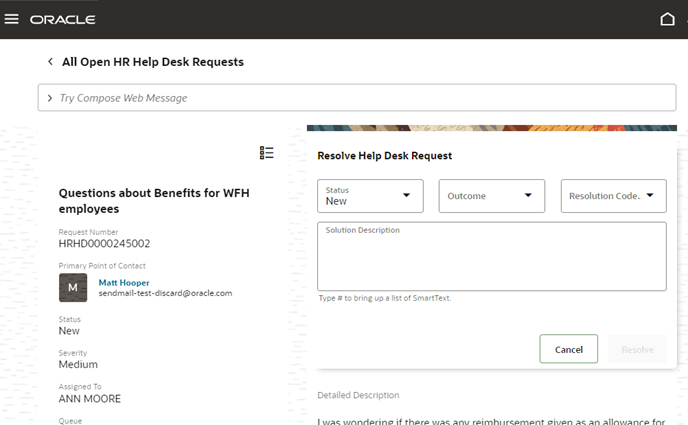
This extensibility feature allows you to tailor the information you capture during resolution to your organization's unique process.
Steps to Enable
You don't need to do anything to enable this feature.
Tips And Considerations
This feature is part of the Help Desk in the Redwood Experience, available to licensed Help Desk customers upon request. Contact your Customer Success Manager, Center of Excellence sponsor, or Account Executive for details.
Key Resources
- For more information about Help Desk in the Redwood Experience see the Implementing Help Desk and Using Help Desk guides in the Help Center.
Easily Transfer Help Desk Requests
Help Desk agents can now easily transfer service requests to load-balance their workloads, including assignment to a member of the current queue, to a specific person, or to another queue.

The Transfer Service Request action provides an intuitive experience that captures relevant information from the agent including transfer reason and supporting notes, ensuring the new service requests owner has meaningful context to successfully manage the request.
Steps to Enable
You don't need to do anything to enable this feature.
Tips And Considerations
Transfer Service Request is part of the Help Desk in the Redwood Experience, available to licensed Help Desk customers upon request. Contact your Customer Success Manager, Center of Excellence sponsor, or Account Executive for details.
Key Resources
- For more information about Help Desk in the Redwood Experience see the Implementing Help Desk and Using Help Desk guides in the Help Center.
Mark Your Availability for Help Desk Request Routing
It is now possible for a Help Desk agent to mark themselves as ‘available’ within the Redwood Help Desk UI, which then allow help desk requests in the user's queues to be assigned to them. A new control appears on the right hand side of the Help Desk Request pages that allow agents to set their availability on and off.
Help Desk agents now have explicit control over when they are available to be assigned new requests.
Steps to Enable
You don't need to do anything to enable this feature.
Tips And Considerations
Availability is part of the Help Desk in the Redwood Experience, available to licensed Help Desk customers upon request. Contact your Customer Success Manager, Center of Excellence sponsor, or Account Executive for details.
Key Resources
- For more information about Help Desk in the Redwood Experience see the Implementing Help Desk and Using Help Desk guides in the Help Center.
Role And Privileges
Help Desk Agent
View any Employee Profile from a Help Desk Request
Agents now can see every employee contact's information from Oracle HCM based in the context of the help desk request. (Prior to 22D, the only employee for which HCM navigator was enabled was for the primary point of contact.) To improve productivity, all employees added as contacts now have an HCM navigator link similar to the summary page.
Better usability for Help Desk agents to see contact information for any employee involved in the Help Desk request
Steps to Enable
You don't need to do anything to enable this feature.
Tips And Considerations
This feature is part of the Help Desk in the Redwood Experience, available to licensed Help Desk customers upon request. Contact your Customer Success Manager, Center of Excellence sponsor, or Account Executive for details.
Key Resources
- For more information about Help Desk in the Redwood Experience see the Implementing Help Desk and Using Help Desk guides in the Help Center.