
- Revision History
- Overview
- Optional Uptake of New Features (Opt In)
- Feature Summary
-
- Manufacturing
- Quality Management
-
- Assign User Roles as Mandatory or Optional Workflow Approvers
- Prevent Deletion of Quality Issue or Quality Action Types That Are in Use
- Remove Approve and Reject Buttons on Approval of a Quality Issue or Action
- See Meaningful Names Within the Actions List in Application Composer
- View Name, User Name, and Email When You Search for Users
-
February Maintenance Pack for 19D
This document will continue to evolve as existing sections change and new information is added. All updates appear in the following table:
| Date | Feature | Notes |
|---|---|---|
| 28 FEB 2020 | Created initial document. |
This guide outlines the information you need to know about new or improved functionality in this update.
DISCLAIMER
The information contained in this document may include statements about Oracle’s product development plans. Many factors can materially affect Oracle’s product development plans and the nature and timing of future product releases. Accordingly, this Information is provided to you solely for information only, is not a commitment to deliver any material, code, or functionality, and should not be relied upon in making purchasing decisions. The development, release, and timing of any features or functionality described remains at the sole discretion of Oracle.
This information may not be incorporated into any contractual agreement with Oracle or its subsidiaries or affiliates. Oracle specifically disclaims any liability with respect to this information. Refer to the Legal Notices and Terms of Use for further information.
Column Definitions:
Features Delivered Enabled
Report = New or modified, Oracle-delivered, ready to run reports.
UI or Process-Based: Small Scale = These UI or process-based features are typically comprised of minor field, validation, or program changes. Therefore, the potential impact to users is minimal.
UI or Process-Based: Larger Scale* = These UI or process-based features have more complex designs. Therefore, the potential impact to users is higher.
Features Delivered Disabled = Action is needed BEFORE these features can be used by END USERS. These features are delivered disabled and you choose if and when to enable them. For example, a) new or expanded BI subject areas need to first be incorporated into reports, b) Integration is required to utilize new web services, or c) features must be assigned to user roles before they can be accessed.
| Ready for Use by End Users Reports plus Small Scale UI or Process-Based new features will have minimal user impact after an update. Therefore, customer acceptance testing should focus on the Larger Scale UI or Process-Based* new features. |
Action is Needed BEFORE Use by End Users Not disruptive as action is required to make these features ready to use. As you selectively choose to leverage, you set your test and roll out timing. |
|||||
|---|---|---|---|---|---|---|
| Feature |
Report |
UI or |
UI or |
|
||
Upload Manufacturing Work Definition and Work Definition Operation Attachments Using a SOAP Service |
||||||
Upload Manufacturing Work Definition and Work Definition Operation Attachments Using a SOAP Service
Manufacturers who migrate from or integrate with an external application require an efficient way to associate specific attachments with a work definition. For example, work instructions can be captured as an attachment file, text, or URL to provide key additional information for producing an item or performing a specific operation.
Currently, the tools for uploading or downloading work definitions, such as REST services, file-based data import (FBDI), and Application Development Framework Desktop Integration (ADFdi), do not allow you to include attachments when processing work definitions.
With this update, you can use the ERP Object Attachment SOAP service to perform the automatic, mass upload of attachments for discrete and process manufacturing work definitions. You can specify the input parameters for the payload of this service to upload attachments to existing work definitions at the header or operation levels.
By using a service-based approach to upload manufacturing work definition and work definition operation attachments, the initial data load from an external source system or ongoing updates to work definitions can be streamlined into Oracle Manufacturing Cloud.
Steps to Enable
To get started, refer to the SOAP service definition provided in the Oracle Financials Cloud SOAP Web Services for Financials guide, available from the Oracle Help Center.
- Chapter: Business Object Services
- Section: ERP Object Attachment Service
Here are the specifics for uptaking the ERP Object Attachment SOAP service for the manufacturing business entities, work definition and work definition operation.
Request Payload
Here's a table with request payload information.
| Element Name | Type | Description |
|---|---|---|
| entityName |
String | Valid business entity names are: WORK_DEFINITION, WORK_DEFINITON_OPERATION. |
| categoryName |
String | Document Category Name associated with the business entity. |
| allowDuplicate |
String | Whether duplicate is allowed. Valid values are: Yes, No. |
| attachmentRows |
List of elements, each containing the details of the attachment to upload. The details include the user keys, attachment type, and title. |
attachmentRows Attributes for Work Definition Header
Here's a table with attachmentRows Attributes for Work Definition Header information.
| Attribute Name | Type | Description |
|---|---|---|
| UserKeyA |
String | Organization Code. |
| UserKeyB |
String | Item Number. |
| UserKeyC |
String | Work Definition Internal Name. |
| UserKeyD |
String | Keep this key with value #NULL. |
| UserKeyE |
String | Keep this key with value #NULL. |
| AttachmentType |
String | Valid values are: FILE, TEXT, URL. |
| Title | String | The title of the attachment. |
| Content | String | The following is an example. Your content may be different. URL: https://www.google.com Text: Use Lathe L123. File: Encode the source data to a Base64 string (Base64 encoding). |
attachmentRows Attributes for Work Definition Operation
Here's a table with attachmentRows Attributes for Work Definition Operation information.
| Attribute Name | Type | Description |
|---|---|---|
| UserKeyA |
String | Organization Code. |
| UserKeyB |
String | Item Number. |
| UserKeyC |
String | Work Definition Internal Name. |
| UserKeyD |
String | Version Number. |
| UserKeyE |
String | Operation Sequence Number. |
| AttachmentType |
String | Valid values are: FILE, TEXT, URL. |
| Title | String | The title of the attachment. |
| Content | String | The following is an example. Your content may be different. URL: https://www.google.com Text: Use Lathe L123. File: Encode the source data to a Base64 string (Base64 encoding). |
Sample Payload for Work Definition Header
<soapenv:Envelope xmlns:soapenv="http://schemas.xmlsoap.org/soap/envelope/" xmlns:typ="http://xmlns.oracle.com/apps/financials/commonModules/shared/model/erpIntegrationService/types/" xmlns:erp="http://xmlns.oracle.com/apps/financials/commonModules/shared/model/erpIntegrationService/">
<soapenv:Header/>
<soapenv:Body>
<typ:uploadAttachment>
<typ:entityName>WORK_DEFINITION</typ:entityName>
<typ:categoryName>MISC</typ:categoryName>
<typ:allowDuplicate>Yes</typ:allowDuplicate>
<!--Zero or more repetitions:-->
<typ:attachmentRows>
<!--Optional:-->
<erp:UserKeyA>M1</erp:UserKeyA>
<!--Optional:-->
<erp:UserKeyB>AS54888</erp:UserKeyB>
<!--Optional:-->
<erp:UserKeyC>ORA_MAIN</erp:UserKeyC>
<!--Optional:-->
<erp:UserKeyD>?</erp:UserKeyD>
<!--Optional:-->
<erp:UserKeyE>?</erp:UserKeyE>
<!--Optional:-->
<erp:AttachmentType>TEXT</erp:AttachmentType>
<!--Optional:-->
<erp:Title>File1</erp:Title>
<!--Optional:-->
<erp:Content>Use Lathe L123.</erp:Content>
</typ:attachmentRows>
</typ:uploadAttachment>
</soapenv:Body>
</soapenv:Envelope>
Sample Payload for Work Definition Operation
<soapenv:Envelope xmlns:soapenv="http://schemas.xmlsoap.org/soap/envelope/" xmlns:typ="http://xmlns.oracle.com/apps/financials/commonModules/shared/model/erpIntegrationService/types/" xmlns:erp="http://xmlns.oracle.com/apps/financials/commonModules/shared/model/erpIntegrationService/">
<soapenv:Header/>
<soapenv:Body>
<typ:uploadAttachment>
<typ:entityName>WORK_DEFINITION_OPERATION</typ:entityName>
<typ:categoryName>MISC</typ:categoryName>
<typ:allowDuplicate>Yes</typ:allowDuplicate>
<!--Zero or more repetitions:-->
<typ:attachmentRows>
<!--Optional:-->
<erp:UserKeyA>M1</erp:UserKeyA>
<!--Optional:-->
<erp:UserKeyB>AS54888</erp:UserKeyB>
<!--Optional:-->
<erp:UserKeyC>ORA_MAIN</erp:UserKeyC>
<!--Optional:-->
<erp:UserKeyD>1</erp:UserKeyD>
<!--Optional:-->
<erp:UserKeyE>10</erp:UserKeyE>
<!--Optional:-->
<erp:AttachmentType>TEXT</erp:AttachmentType>
<!--Optional:-->
<erp:Title>Att001</erp:Title>
<!--Optional:-->
<erp:Content>Use Lathe L123.</erp:Content>
</typ:attachmentRows>
</typ:uploadAttachment>
</soapenv:Body>
</soapenv:Envelope>
Tips And Considerations
The content for attachment of type FILE must be provided in the Base64 encoding.
Role Information
- Privilege Name and Code:
- FSCM Load Interface Administration (ORA_FUN_FSCM_LOAD_INTERFACE_ADMIN_DUTY)
- Manage Work Definitions (WIS_MANAGE_WORK_DEFINITIONS_PRIV)
- Job Role Name and Code:
- Manufacturing Engineer (ORA_WIS_MANUFACTURING_ENGINEER_JOB)
This document will continue to evolve as existing sections change and new information is added. All updates appear in the following table:
| Date | Feature | Notes |
|---|---|---|
| 20 SEP 2019 | Created initial document. |
This guide outlines the information you need to know about new or improved functionality in this update, and describes any tasks you might need to perform for the update. Each section includes a brief description of the feature, the steps you need to take to enable or begin using the feature, any tips or considerations that you should keep in mind, and the resources available to help you.
SECURITY AND NEW FEATURES
The Role section of each feature identifies the security privilege and job role required to use the feature. If feature setup is required, then the Application Implementation Consultant job role is required to perform the setup, unless otherwise indicated. (If a feature doesn't include a Role section, then no security changes are required to use the feature.)
If you have created job roles, then you can use this information to add new privileges to those roles as needed.
GIVE US FEEDBACK
We welcome your comments and suggestions to improve the content. Please send us your feedback at oracle_fusion_applications_help_ww_grp@oracle.com.
Optional Uptake of New Features (Opt In)
Oracle Cloud Applications delivers new updates every quarter. This means every three months you'll receive new functionality to help you efficiently and effectively manage your business. Some features are delivered Enabled meaning they are immediately available to end users. Other features are delivered Disabled meaning you have to take action to make available. Features delivered Disabled can be activated for end users in a couple of ways:
Access the Opt In page from the New Features Work Area
- Click the Navigator, and then click New Features (under the My Enterprise heading)
- On the New Features page, select the offering that includes new features you’d like to review
- Click Go to Opt In for any feature you want to opt in
- On the Edit Features page, select the Enable option for the feature, and then click Done
or... Access the Opt In page from the Setup and Maintenance Work Area
- Click the Navigator, and then click Setup and Maintenance
- On the Setup page, select your offering, and then click Change Feature Opt In
- On the Opt In page, click the Edit Features icon for any area that includes features you want to opt in
- On the Edit Features page, select the Enable option for any feature you want to opt in to. If the Enable column includes an Edit icon instead of a check box, then click the icon, select your feature options, and click Save and Close.
- Click Done.
Opt In Expiration
Occasionally, features delivered Disabled via Opt In may auto enable in a future update. This is known as an Opt In Expiration. If your cloud service has any Opt In Expirations you will see a related tab in this document. Click on that tab to see when the feature was originally delivered Disabled, and when the Opt In will expire, potentially auto enabling the feature. You can also click here to see features with Opt In Expirations across all Oracle Cloud Applications.
Column Definitions:
Report = New or modified, Oracle-delivered, ready to run reports.
UI or Process-Based: Small Scale = These UI or process-based features are typically comprised of minor field, validation, or program changes. Therefore, the potential impact to users is minimal.
UI or Process-Based: Larger Scale* = These UI or process-based features have more complex designs. Therefore, the potential impact to users is higher.
Features Delivered Disabled = Action is needed BEFORE these features can be used by END USERS. These features are delivered disabled and you choose if and when to enable them. For example, a) new or expanded BI subject areas need to first be incorporated into reports, b) Integration is required to utilize new web services, or c) features must be assigned to user roles before they can be accessed.
| Ready for Use by End Users Reports plus Small Scale UI or Process-Based new features will have minimal user impact after an update. Therefore, customer acceptance testing should focus on the Larger Scale UI or Process-Based* new features. |
Customer Must Take Action before Use by End Users Not disruptive as action is required to make these features ready to use. As you selectively choose to leverage, you set your test and roll out timing. |
|||||
|---|---|---|---|---|---|---|
| Feature |
Report |
UI or |
UI or |
|
||
Include Postprocessing Lead Time in Cumulative Lead Time Calculations |
||||||
Integrate and Extend Product Genealogy Capabilities Using REST Services |
||||||
Assign User Roles as Mandatory or Optional Workflow Approvers |
||||||
Prevent Deletion of Quality Issue or Quality Action Types That Are in Use |
||||||
Remove Approve and Reject Buttons on Approval of a Quality Issue or Action |
||||||
See Meaningful Names Within the Actions List in Application Composer |
||||||
Include Postprocessing Lead Time in Cumulative Lead Time Calculations
Delays can occur between the end of a manufacturing process and the availability of an end item for shipping, or a component for subsequent assembly. For example, some items must pass quality control inspections, while others take time to cool or cure.
With this update, you can now set up postprocessing lead time for all make items in the item definition. Once you set up the postprocessing lead time, Oracle Manufacturing Cloud will add this postprocessing lead time when calculating cumulative manufacturing lead time and cumulative total lead time, for all the make items.
- For subassemblies, postprocessing lead time starts when the make process is complete and ends when the supply can be consumed to make its parent item.
- For end items, postprocessing lead time starts when the final assembly completes and ends when the item can be shipped.
Watch a Demo
Steps to Enable
You don't need to do anything to enable this feature.
Tips And Considerations
Postprocessing lead time should be used to model the lead time of activities performed after manufacturing operations are completed but before it is available for shipping or the next stage of manufacturing.
Key Resources
Role Information
This feature is governed by existing privilege and role.
- Privilege Name and Code:
- Calculate Manufacturing Lead Times (WIS_CALCULATE_MANUFACTURING_LEAD_TIMES_PRIV)
- Job Role Name and Code:
- Manufacturing Engineer (ORA_WIS_MANUFACTURING_ENGINEER_JOB)
Integrate and Extend Product Genealogy Capabilities Using REST Services
This update provides REST web services that support and simplify integration with external systems for genealogy data. Genealogy data comes from various transactions related to genealogy objects, such as lot and serial-controlled products and materials, and their parent-child relationships. External genealogy data can come from integrations with suppliers, contract manufacturing, outside processing, third party logistics, and warehouse management. Supported genealogy transactions include inventory transactions, work order operation transactions, work order material transactions, and work order output transactions.
Manage Genealogy Relationships Using a REST Service
Use the Genealogy Relationships REST service to do the following:
- Create and remove genealogy relationships
- Get genealogy relationships
With the Genealogy Relationships REST service, you can complete the full genealogy records throughout the product life cycle that is tracked in internal and external systems.
In addition, you can use the Genealogy Relationships REST service in conjunction with the Genealogy Object REST service to import genealogy objects, transactions, and relationships.
Steps to Enable
Review the REST service definition in the REST API guides, available from the Oracle Help Center > your apps service area of interest > REST API. If you're new to Oracle's REST services you may want to begin with the Quick Start section.
Role Information
To use this feature, the following privileges or roles are required:
- Privilege Name and Code:
- Get Product Genealogy by Service (CSE_GET_PRODUCT_GENEALOGY_BY_SERVICE_PRIV)
- Manage Product Genealogy by Service (CSE_MANAGE_PRODUCT_GENEALOGY_BY_SERVICE_PRIV)
- Job Role Name and Code:
- Asset Administrator (ORA_CSE_ASSET_ADMINISTRATOR_JOB)
Manage Genealogy Objects Using a REST Service
Use the Genealogy Objects REST service to do the following:
- Create and update genealogy objects
- Create the genealogy transactions
- Get genealogy objects
- Get genealogy transactions
With the Genealogy Objects REST service, you can complete the full genealogy records throughout the product life cycle that is tracked in internal and external systems.
In addition, you can use the Genealogy Objects REST service in conjunction with the Genealogy Relationships REST service to import genealogy objects, transactions, and relationships.
Steps to Enable
Review the REST service definition in the REST API guides, available from the Oracle Help Center > your apps service area of interest > REST API. If you're new to Oracle's REST services you may want to begin with the Quick Start section.
Role Information
To use this feature, the following privileges or roles are required:
- Privilege Name and Code:
- Get Product Genealogy by Service (CSE_GET_PRODUCT_GENEALOGY_BY_SERVICE_PRIV)
- Manage Product Genealogy by Service (CSE_MANAGE_PRODUCT_GENEALOGY_BY_SERVICE_PRIV)
- Job Role Name and Code:
- Asset Administrator (ORA_CSE_ASSET_ADMINISTRATOR_JOB)
Assign User Roles as Mandatory or Optional Workflow Approvers
Use roles to add multiple users as approvers to your quality workflow quickly and efficiently. You can now add user roles as approvers instead of individual users. When you submit the quality issue or action for approval, the user roles are automatically expanded to reveal the full list of approvers, and duplicate approvers are resolved to a single approver.
With this update, you can also assign a user role as a mandatory or optional approver.
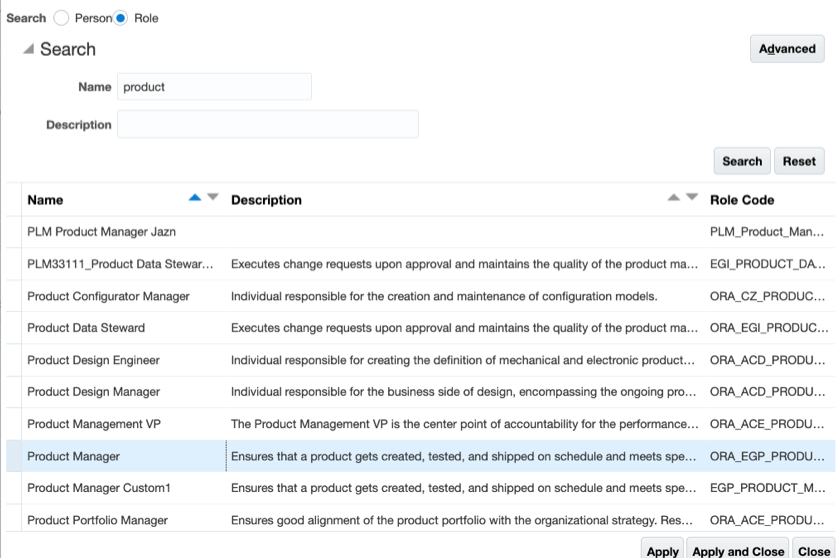
Searching for Roles
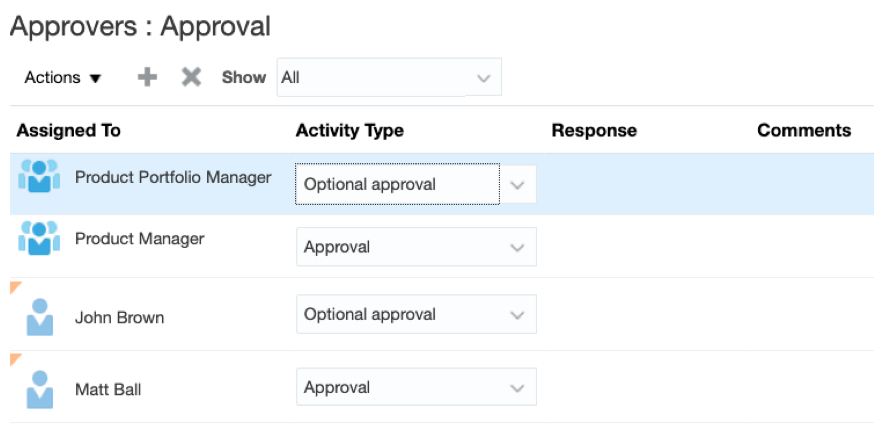
Roles Assigned as Mandatory and Optional Approvers on the Approvers List
Steps to Enable
You don't need to do anything to enable this feature.
Tips And Considerations
To assign roles as approvers, the roles must be already created in the Security Console.
Key Resources
Prevent Deletion of Quality Issue or Quality Action Types That Are in Use
Prevent the deletion of quality types that are in use with tighter checks across all issues and actions. Error messages warn you if the quality issue or action type is currently in use so that you can prevent accidental deletion and inconsistencies across issues and actions.
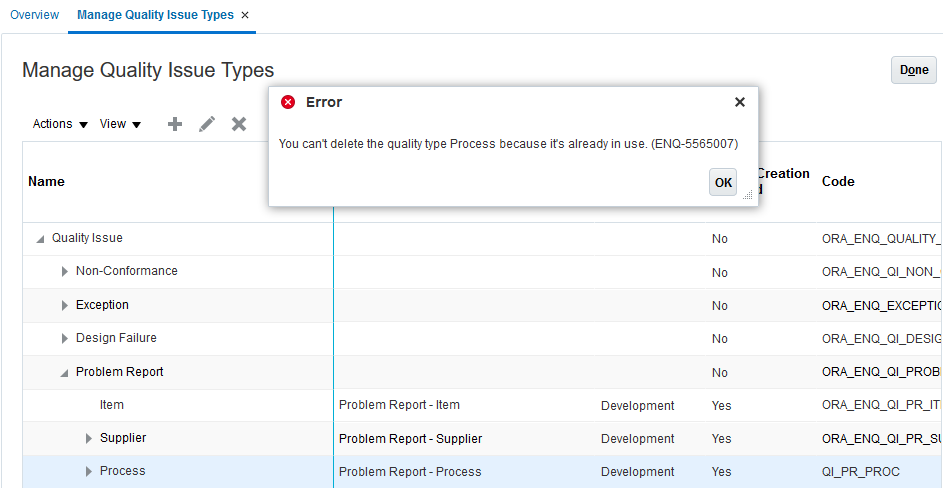
Error Message to Prevent Deletion of Quality Types in Use
Watch a Demo
Steps to Enable
You don't need to do anything to enable this feature.
Key Resources
Remove Approve and Reject Buttons on Approval of a Quality Issue or Action
Eliminate confusion about whether a user has already approved a quality object or not. With this update, the Approve and Reject buttons are removed from the user interface once a quality issue or quality action has been approved or rejected.
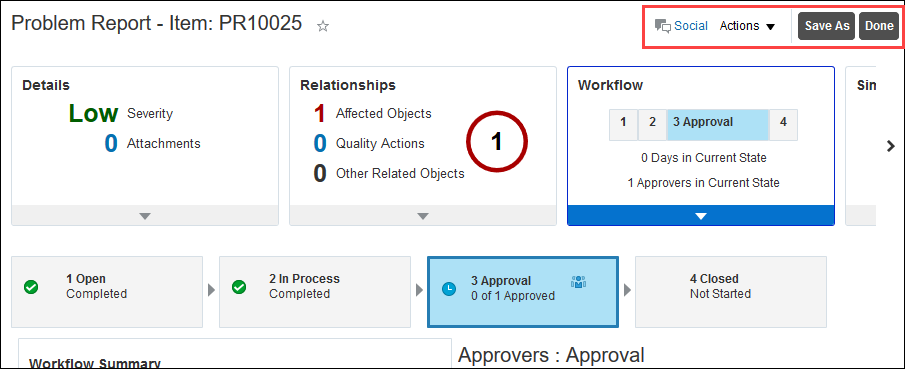
User Interface Without Approve and Reject Buttons
Steps to Enable
You don't need to do anything to enable this feature.
Key Resources
See Meaningful Names Within the Actions List in Application Composer
See descriptive, self-explanatory names within the Actions list in Application Composer when you design quality issue and quality action objects. You can easily identify the purpose of each action in the menu.
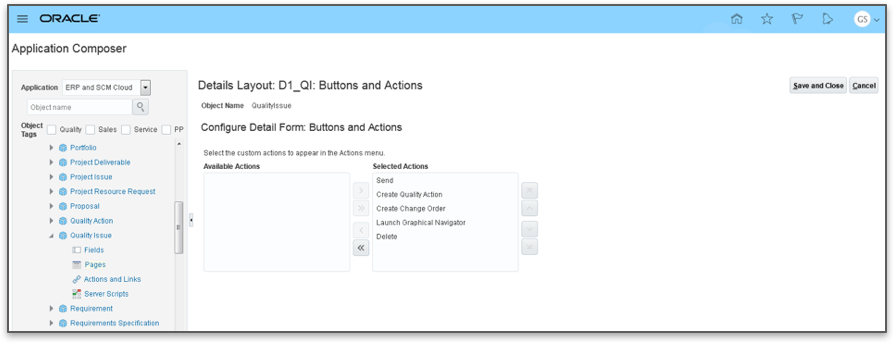
Action Names in Application Composer
Watch a Demo
Steps to Enable
Leverage Application Composer to expose and adjust page layout and attributes. To learn more about extending your application using Applications Composer, visit Oracle Help Center > your apps service area of interest > Books > Configuration and Extension.
Key Resources
View Name, User Name, and Email When You Search for Users
View additional columns such as Name, User Name, and Email in the search results when you add users to the Security tab or as Approvers to a workflow for quality issues and actions. When you search for a role, the role code is also visible in the search results. You can easily find and add the right users and roles to the Security tab and for workflow approvals.
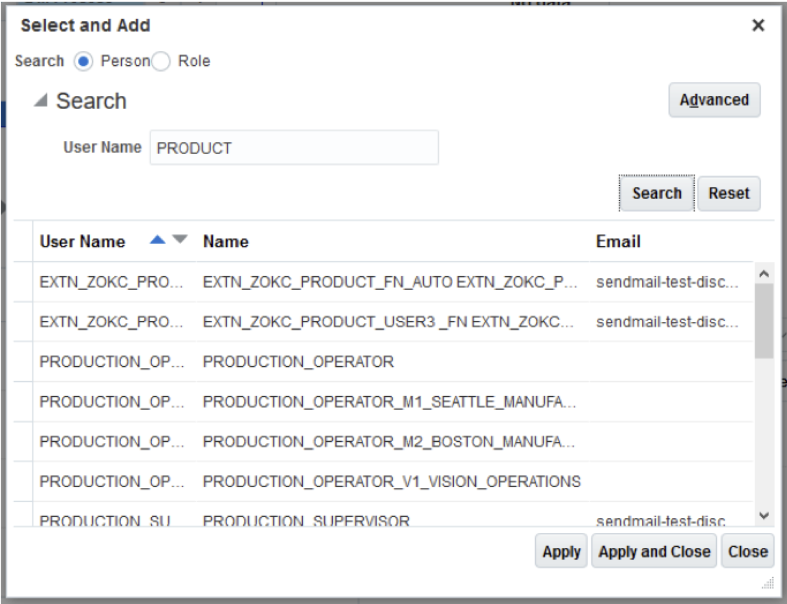
User Search
Steps to Enable
You don't need to do anything to enable this feature.
Key Resources