
This document will continue to evolve as existing sections change and new information is added. All updates appear in the following table:
| Date | Feature | Notes |
|---|---|---|
| 20 MAR 2020 | Created initial document. |
This guide outlines the information you need to know about new or improved functionality in this update, and describes any tasks you might need to perform for the update. Each section includes a brief description of the feature, the steps you need to take to enable or begin using the feature, any tips or considerations that you should keep in mind, and the resources available to help you.
Security and New Features
The Role section of each feature identifies the security privilege and job role required to use the feature. If feature setup is required, then the Application Implementation Consultant job role is required to perform the setup, unless otherwise indicated. (If a feature doesn't include a Role section, then no security changes are required to use the feature.)
If you have created job roles, then you can use this information to add new privileges to those roles as needed.
Give Us Feedback
We welcome your comments and suggestions to improve the content. Please send us your feedback at oracle_fusion_applications_help_ww_grp@oracle.com.
Optional Uptake of New Features (Opt In)
Oracle Cloud Applications delivers new updates every quarter. This means every three months you'll receive new functionality to help you efficiently and effectively manage your business. Some features are delivered Enabled meaning they are immediately available to end users. Other features are delivered Disabled meaning you have to take action to make available. Features delivered Disabled can be activated for end users by stepping through the following instructions:
Access the Opt In page from the New Features Work Area
- Click the Navigator, and then click New Features (under the My Enterprise heading)
- On the New Features page, select the offering that includes new features you’d like to review
- Click Go to Opt In for any feature you want to opt in
- On the Edit Features page, select the Enable option for the feature, and then click Done
Opt In Expiration
Occasionally, features delivered Disabled via Opt In may be enabled automatically in a future update. This is known as an Opt In Expiration. If your cloud service has any Opt In Expirations you will see a related tab in this document. Click on that tab to see when the feature was originally delivered Disabled, and when the Opt In will expire, potentially automatically enabling the feature. You can also click here to see features with Opt In Expirations across all Oracle Cloud Applications.
Column Definitions:
Features Delivered Enabled
Report = New or modified, Oracle-delivered, ready to run reports.
UI or Process-Based: Small Scale = These UI or process-based features are typically comprised of minor field, validation, or program changes. Therefore, the potential impact to users is minimal.
UI or Process-Based: Larger Scale* = These UI or process-based features have more complex designs. Therefore, the potential impact to users is higher.
Features Delivered Disabled = Action is needed BEFORE these features can be used by END USERS. These features are delivered disabled and you choose if and when to enable them. For example, a) new or expanded BI subject areas need to first be incorporated into reports, b) Integration is required to utilize new web services, or c) features must be assigned to user roles before they can be accessed.
| Ready for Use by End Users Reports plus Small Scale UI or Process-Based new features will have minimal user impact after an update. Therefore, customer acceptance testing should focus on the Larger Scale UI or Process-Based* new features. |
Action is Needed BEFORE Use by End Users Not disruptive as action is required to make these features ready to use. As you selectively choose to leverage, you set your test and roll out timing. |
|||||
|---|---|---|---|---|---|---|
| Feature |
Report |
UI or |
UI or |
|
||
Copy Connected Items and Services with Expanded Configuration REST Service |
||||||
Copy Connected Items and Services with Expanded Configuration REST Service
In order capture systems, you can copy a single configuration as a post-configuration event. Use the Configurations REST resource to copy connected items and services when copying a configuration.
Steps to Enable
Review the REST service definition in the REST API guides, available from the Oracle Help Center > your apps service area of interest > REST API. If you're new to Oracle's REST services you may want to begin with the Quick Start section.
Key Resources
- Oracle Supply Chain Management Cloud: Modeling Configurations for SCM guide, available on the Oracle Help Center.
Price Connected Items and Services in a Configuration
Display the price for connected items or services in the configurator running summary and configuration summary. Connected items and services are displayed as root-level lines in the configuration summary. The price for the connected items and services is included in the total net price for the configuration.

Configuration Summary with Connected Items
Steps to Enable
You don't need to do anything to enable this feature.
Key Resources
- Oracle Supply Chain Management Cloud: Modeling Configurations for SCM guide, available on the Oracle Help Center.
Optimize Configuration Validation During Order Submission
To optimize performance during order submission and validation, configuration validation will run only when required for models that are based solely on their item structure definitions defined within the Product Information Management work area.
Steps to Enable
You don't need to do anything to enable this feature.
Key Resources
- Oracle Supply Chain Management Cloud: Modeling Configurations for SCM guide, available on the Oracle Help Center.
Role Information
- Job Role and Code:
- Order Entry Specialist (ORA_FOM_ORDER_ENTRY_SPECIALIST_JOB)
Extract Sourcing Rules and Assignment Sets
You may want to replicate data from your supply chain planning cloud instance to another instance or application without manually reentering data, especially because manual entry is error-prone. For example, you might want to replicate the sourcing rules in your supply chain planning cloud production instance in a reporting system or your test instance.
With this update, you can extract the data for assignment sets and associated sourcing rules into a comma-delimited values (CSV) file format. The generated file is in the standard file-based data import (FBDI) file format that you can then use to upload to other systems.
Steps to Enable
You don't need to do anything to enable this feature.
Key Resources
Role Information
Users assigned to the following job role will automatically be able to use this feature and no special privileges are required:
- Order Promising Manager (ORA_MSC_ORDER_PROMISING_MANAGER_JOB)
Import or Update a Large Number of Price Lists
Use file-based data import to import or update a large number of price lists. Create, append, or update price list headers, access sets, items, charges, rules that reference attributes, and descriptive flexfield data. View and correct data validation errors that occur during import.
Let's take an example: assume you maintain pricing data in a source system that resides outside of Oracle Pricing Cloud. You need to periodically import price lists through data files into Pricing. You prefer to use an automated process that accepts your pricing data files, validates them, and imports your data in Oracle Pricing Cloud. With the new Price List Import feature, you can save time and work more efficiently. It's a high-performing and dependable way to migrate your price list data into Pricing.
Here's what you should do:
- Manage data for one or more price lists in a single batch. You can reuse your batch during a subsequent import.
- Create and update price list entities.
- Headers and Access sets
- Items
- Charges
- Matrix Adjustments
- Flexfields
- Use output files and error logs to examine details about the number of records imported, records that are in error, and to get suggestions on how to fix errors.
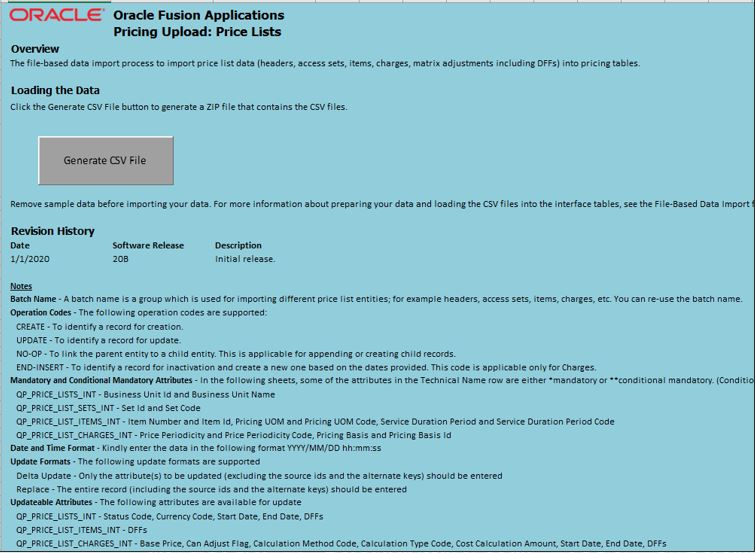
Here's how you import a batch:
- Use an Excel template to prepare your data and upload it into interface files on the Oracle server.
- Use a scheduled process to import your data from interface files into the Oracle database.
- Use the Pricing Administration work area to verify your import.

Watch a Demo
Steps to Enable
You don't need to do anything to enable this feature.
Tips And Considerations
- Use an FBDI (file-based-data import) template. Its an Excel workbook that contains worksheets you can use to enter data.
- Headers
- Access Sets
- Items
- Charges
- Matrix Dimensions
- Matrix Rules
- Each worksheet represents an interface table.
- Open the Headers worksheet, then enter a name of your choice in the Batch Name column. The template uses the value you enter to uniquely identify the entire data set you're importing. You will select this Batch Name when you run the Import Price Lists Batch scheduled process.
- Set the Operation Code on each worksheet in the template.
- CREATE - For creating new records
- UPDATE - For updating existing records
- NO-OP - For linking parent and child entity records
- END-INSERT - For end dating an existing charge and creating a new one (Applicable only for charges)
- Run the scheduled processes, then examine the output files for the child processes and the parent process. The output lists the number of records processed according to entity for each of the interface statuses.
- Imported
- Error
- Validated
- ;New
If an error occurs, then examine the error message in the output files.
NOTE:
Use the new import feature to update price list data that you created through different channels, such as in the Pricing Administration work area, ADF Desktop Integration, REST API, or while file-based data import. For charges and matrix rules, use the External System Reference ID to identify them for updates.
If you make a mistake during the import process, your data is incorrect, or the scheduled process doesn't finish successfully, then cancel the scheduled process, and submit the process again using the Resubmit option.
Data in your date fields must be in UTC (Coordinated Universal Time) or the server time zone. Don't use any other format or time zone.
Key Resources
- Oracle Supply Chain Management Cloud: File-Based Data Import for Oracle Supply Chain Management Cloud, available on the Oracle Help Center.
Role Information
- Job Roles:
- Pricing Administrator
- Pricing Manager
- Pricing Analyst
Manage Pricing Strategies Using a REST Service
Use web services with Oracle Pricing Cloud to set up and simplify an integration with a system that resides outside of Oracle Fusion, such as your order capture system or some other price management and administration system.
Use the Pricing Strategies REST service to manage the pricing strategy header and the assignment of segment price lists and discount lists to pricing strategy. Use it to streamline how you manage your pricing strategy, including automating how you maintain and assign segment price lists and discount lists.
Steps to Enable
Review the REST service definition in the REST API guides, available from the Oracle Help Center > your apps service area of interest > REST API. If you're new to Oracle's REST services you may want to begin with the Quick Start section.
Tips And Considerations
For example, use a JSON (JavaScript Object Notation) input payload to provide the basic data you need to assign a segment price list to a pricing strategy.
{
"PriceListName": "Corporate Segment Price List",
"AssociationStartDate": "2015-12-03T02:56:00+00:00",
"AssociationEndDate": null
}
Key Resources
- If you're using REST services with your Oracle Cloud implementation for the first time, then follow the instructions in the Quick Start section of the REST API for Oracle Supply Chain Management Cloud guide, available on the Oracle Help Center.
Role Information
- ORA_QP_PRICING_MANAGER_JOB (Pricing Manager)
- ORA_QP_PRICING_ADMINISTRATOR_JOB (Pricing Administrator)
- ORA_QP_PRICING_ANALYST_JOB (Pricing Analyst)