
- Revision History
- Overview
- Optional Uptake of New Features (Opt In)
- Feature Summary
-
- Order Management
- Channel Revenue Management
- Supplier Channel Management
-
- Manage Supplier Programs
- Manage Supplier Trade Profiles
- Apply Supplier Programs to Sales Orders
- Create Accruals Based on Sales Orders
- Create Manual Accrual Adjustments
- View Checkbook for Suppliers
- View Checkbook for Supplier Programs
- Generate Supplier Claims
- Review Supplier Claims
- Close Settled Claims
- Account for Channel Accruals and Claims
- Manage User Statuses for Programs and Claims
- Manage Program Types
- Manage Accrual Adjustment Types and Reasons
- Manage Claim Types and Reasons
- Manage Claim Sources
- Configurator
- Global Order Promising
- IMPORTANT Actions and Considerations
This document will continue to evolve as existing sections change and new information is added. All updates appear in the following table:
| Date | Product | Feature | Notes |
|---|---|---|---|
| 19 JUN 2020 | Created initial document. |
This guide outlines the information you need to know about new or improved functionality in this update, and describes any tasks you might need to perform for the update. Each section includes a brief description of the feature, the steps you need to take to enable or begin using the feature, any tips or considerations that you should keep in mind, and the resources available to help you.
Security and New Features
The Role section of each feature identifies the security privilege and job role required to use the feature. If feature setup is required, then the Application Implementation Consultant job role is required to perform the setup, unless otherwise indicated. (If a feature doesn't include a Role section, then no security changes are required to use the feature.)
If you have created job roles, then you can use this information to add new privileges to those roles as needed. For details about how to compare your configured job roles to predefined job roles and add security artifacts to your configured job roles, see the Security Console and Roles and Role Assignments chapters in the Oracle SCM Cloud: Securing SCM guide on the Oracle Help Center.
Give Us Feedback
We welcome your comments and suggestions to improve the content. Please send us your feedback at oracle_fusion_applications_help_ww_grp@oracle.com.
Optional Uptake of New Features (Opt In)
Oracle Cloud Applications delivers new updates every quarter. This means every three months you'll receive new functionality to help you efficiently and effectively manage your business. Some features are delivered Enabled meaning they are immediately available to end users. Other features are delivered Disabled meaning you have to take action to make available. Features delivered Disabled can be activated for end users by stepping through the following instructions using the following privileges:
- Review Applications Offering (ASM_REVIEW_APPLICATIONS_OFFERINGS_PRIV)
- Configure Oracle Fusion Applications Offering (ASM_CONFIGURE_OFFERING_PRIV)
Here’s how you opt in to new features:
- Click Navigator > My Enterprise > New Features.
- On the Features Overview page, select your offering to review new features specific to it. Or, you can leave the default selection All Enabled Offerings to review new features for all offerings.
- On the New Features tab, review the new features and check the opt-in status of the feature in the Enabled column. If a feature has already been enabled, you will see a check mark. Otherwise, you will see an icon to enable the feature.
- Click the icon in the Enabled column and complete the steps to enable the feature.
In some cases, you might want to opt in to a feature that's not listed in the New Features work area. Here's how to opt in:
- Click Navigator > My Enterprise > Offerings.
- On the Offerings page, select your offering, and then click Opt In Features.
- On the Opt In page, click the Edit Features (pencil) icon for the offering, or for the functional area that includes your feature.
- On the Edit Features page, complete the steps to enable the feature.
For more information and detailed instructions on opting in to new features for your offering, see Offering Configuration.
Opt In Expiration
Occasionally, features delivered Disabled via Opt In may be enabled automatically in a future update. This is known as an Opt In Expiration. If your cloud service has any Opt In Expirations you will see a related tab in this document. Click on that tab to see when the feature was originally delivered Disabled, and when the Opt In will expire, potentially automatically enabling the feature. You can also click here to see features with Opt In Expirations across all Oracle Cloud Applications.
Column Definitions:
Features Delivered Enabled
Report = New or modified, Oracle-delivered, ready to run reports.
UI or Process-Based: Small Scale = These UI or process-based features are typically comprised of minor field, validation, or program changes. Therefore, the potential impact to users is minimal.
UI or Process-Based: Larger Scale* = These UI or process-based features have more complex designs. Therefore, the potential impact to users is higher.
Features Delivered Disabled = Action is needed BEFORE these features can be used by END USERS. These features are delivered disabled and you choose if and when to enable them. For example, a) new or expanded BI subject areas need to first be incorporated into reports, b) Integration is required to utilize new web services, or c) features must be assigned to user roles before they can be accessed.
| Ready for Use by End Users Reports plus Small Scale UI or Process-Based new features will have minimal user impact after an update. Therefore, customer acceptance testing should focus on the Larger Scale UI or Process-Based* new features. |
Action is Needed BEFORE Use by End Users Not disruptive as action is required to make these features ready to use. As you selectively choose to leverage, you set your test and roll out timing. |
|||||
|---|---|---|---|---|---|---|
| Feature |
Report |
UI or |
UI or |
|
||
Integrate Revenue Management with Order Management and Supply Chain Cost Management |
||||||
Optimize Validation During Order Import and Submission for Configurator Models |
||||||
Integrate Revenue Management with Order Management and Supply Chain Cost Management
Automate revenue recognition to address IFRS 15 and ASC 606 for sales orders from Order Management that represent contracts with customers. Recognize associated cost of goods sold in Supply Chain Cost Management in proportion to the revenue recognized in Revenue Management.
You can now automate your revenue and cost of goods sold (COGS) recognition process using the new integration between Revenue Management, Order Management and Cost Management, based on your policies reflecting the new ASC 606 and IFRS 15 accounting standards. Integrated data includes sales orders, fulfillment data, cost of goods sold, and sales invoices.
BUSINESS BENEFIT HIGHLIGHTS
- Address IFRS 15 and ASC 606 by applying the five-step model:
- Identify revenue accounting contracts as early as sales order documents submission time. Revenue Management automatically identifies accounting contracts, performance obligations, and their valuations at inception (Steps 1-2).
- Provide insight into the expected consideration from the sale of goods and services to customers at contract inception. Revenue Management automatically calculates the transaction price by the sum of the selling prices, and allocates the transaction price to each performance obligation based on the relative standalone selling prices of each distinct good or service promised in the contract (Steps 3-4).
- Recognize revenue upon successful transfer of goods and services to the customers. Revenue Management records satisfaction events and recognizes the revenue accordingly at one point in time or over time (Step 5).
- Manage changes throughout the sales order life cycle, such as revisions to the order quantity or selling price, as well as return orders. Revenue Management automatically modifies the accounting contracts to reflect the order changes and reallocates the new transaction price to the performance obligations.
- Draw down contract asset balance by billed amount. Under IFRS 15 and ASC 606, an entity has a contract asset, which is a right to consideration from the customer, when the entity satisfies a performance obligation. Revenue Management applies the billing lines generated in Receivables to the accounting contracts and offsets the corresponding contract asset balance.
- Synchronize COGS recognition with recognized revenue. Cost Management accurately recognizes the associated COGS in the same period and the same proportion to the revenue recognized in Revenue Management.
- Perform comprehensive gross margin analysis. Cost Management provides complete revenue and COGS information to perform detailed gross margin analysis.
DATA FLOW

Sales Order and Accounting Contract Creation
Order Management interfaces sales order transactions and order fulfillment information to:
- Revenue Management for revenue processing
- Cost Management for cost of goods sold processing
- Receivables for invoice processing
The Extract Sales Orders for Revenue Management process uploads sales orders, return orders, order revisions, and fulfillment information to Revenue Management. You can schedule this process to run once or at regular intervals.
Using user configurable rules, Revenue Management identifies the accounting contracts and their performance obligations. One accounting contract may contain one or more sales orders from various source systems. Conversely, one sales order with multiple order lines may result in one or more accounting contracts. Each sales order line becomes a promised detail line in Revenue Management.
Order Fulfillment and Revenue Recognition
When an order line is shipped, fulfilled, or successfully transferred to the customer, Order Management relays the fulfillment information, such as the fulfilled quantity, amount, and date, which enables Revenue Management to record the satisfaction events and recognize revenue accordingly. Order Management supports multiple shipments of an order line. These multiple shipments are referred to as system splits of an order line. Revenue Management maintains the presentation of multiple shipment order lines. One order line in Order Management corresponds to one promised detail line in Revenue Management.
For service orders, Revenue Management automatically recognizes revenue over the service duration based on the satisfaction plan assigned. Satisfaction plans are user definable in Revenue Management and assigned to the order lines as revenue scheduling rules. The default satisfaction plan uses the daily rate in revenue calculation.
Order Fulfillment and Receivables Recognition
Typically, Order Management immediately transfers fulfilled sales order lines to Receivables. With this integration, Receivables generates invoices that debit the Receivables account and credit the Revenue Clearing account.
When you apply invoices to the revenue accounting contracts using the Import Billing Data from Receivables process, Revenue Management debits the Revenue Clearing account and credits the Contract Asset account. This step is a reclassification from conditional to unconditional right to receive the consideration from the customers. When the contract is fully satisfied and paid for, the revenue clearing account nets to a zero balance.
Order Revision and Contract Modification
Prior to sales order fulfillment, you may need to revise orders once or multiple times. Order revision includes updates to the selling price or ordered quantity, which may result in an increased or decreased transaction price. Revenue Management automatically revises the corresponding accounting contracts to reflect the order changes.
After order fulfillment, you must use Return Material Authorization (RMA) functionality in Order Management to revise an order. RMA includes partial or full shipment return, price reduction, or early termination of subscription services with recurring billing. Revenue Management automatically processes the RMA as a contract modification.
Revenue and COGS Matching
When revenue has been accounted for, Revenue Management relays the revenue information to Cost Management to recognize the COGS in the same period and in the same proportion as the revenue recognized in Revenue Management. In addition, the revenue and the COGS information available enables entities to perform detailed gross margin analysis in Cost Management.
Examples:
Below are examples of typical order flows for goods and services and the corresponding revenue and COGS recognition events.
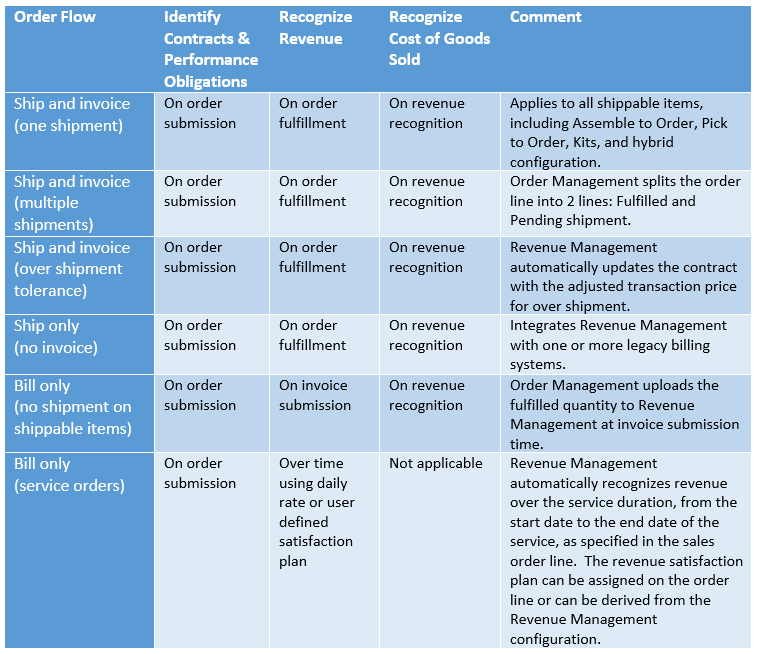
Let us look at an example of a bundle deal. This sales transaction is recorded in Order Management as two orders with the same purchase order number that identify them as one contract. With this integration, the two orders are grouped into one accounting contract, and the COGS recognition is matched to the revenue recognized.
Order Management Sales Orders
Sales orders submitted and fulfilled:
- Order#511575 with purchase order number PO_Demo_E2E_0010
- Order#511576 with purchase order number PO_Demo_E2E_0010

Revenue Management Accounting Contract
One contract with three performance obligations; transaction amount is allocated to each performance obligation relative to their standalone selling prices. The Promised Details tab displays order and revenue details.
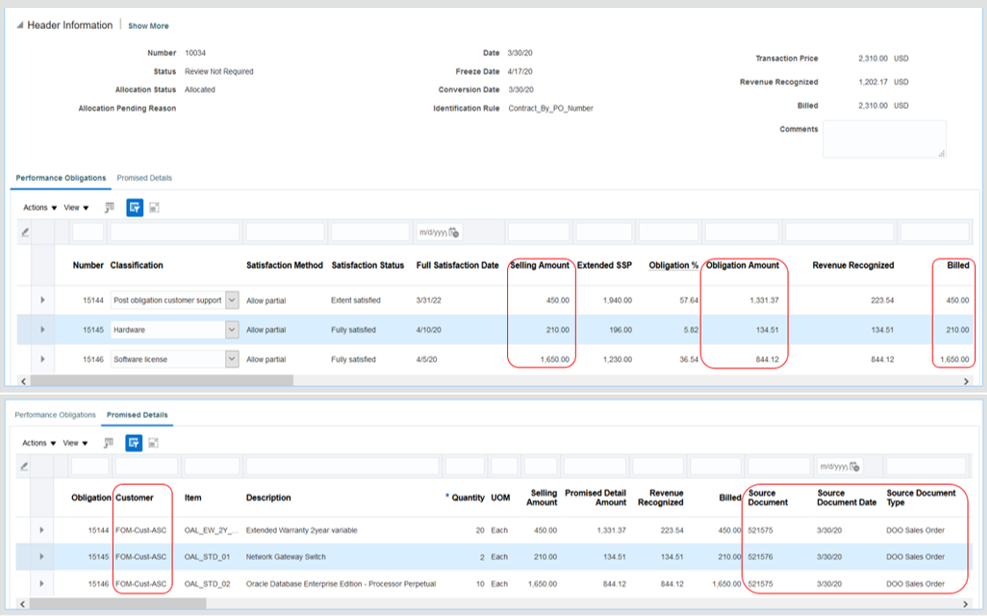
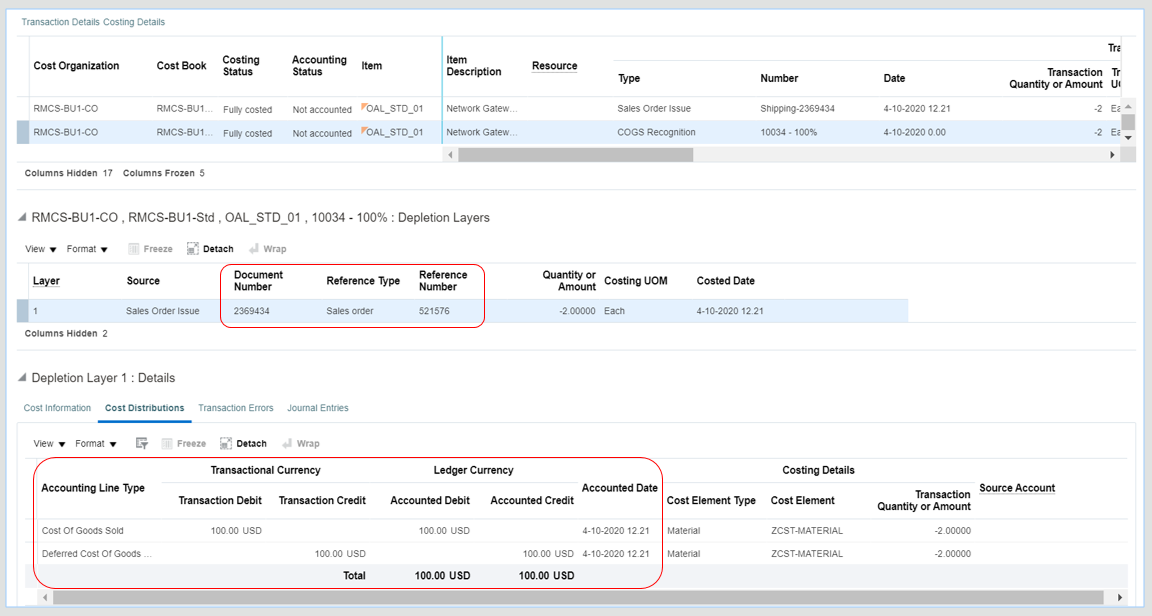
Cost Management Cost Accounting
The Cost Distributions tab displays the movement from deferred COGS to recognized COGS.
CONFIGURATION
Below are the required and optional steps to use this feature. Refer to each product’s documentation for product configuration.
Order Management
The following step is optional:
- Configure extensible flexfields for additional attributes to identify contracts or performance obligations:
- Order header context: Revenue_Management_Information_Header
- Order line context: Revenue_Management_Information_Line
Revenue Management
The following steps are required:
- Define the lookup code VRM_COSTING_INTEGRATION under the lookup type ORA_AR_FEATURES in the Manage Receivables Lookups page.
- Configure Revenue Management System Options:
- Assign the Extraction Start Date for the Source Document Type DOO Sales Order.
- Assign the currency conversion type. The currency conversion type assigned to the order line takes precedence over the default system option value.
- Assign contract accounts.
- Assign review and exemption thresholds.
- Assign the IFRS 15 and ASC 606 adoption period.
- Define pricing dimension structures for standalone selling prices according to the entity’s pricing policy for sales order items.
- Configure rules to group sales order lines into accounting contracts and distinct performance obligations.
- Grant the Extract Sales Orders for Revenue Management privilege to allow users to extract Order Management data for revenue processing.
Cost Management
No required or optional step to enable this integration.
Steps to Enable
You don't need to do anything to enable this feature. You can use the feature by following the steps detailed in the Configuration section.
Tips And Considerations
- Order Management sales transactions extract data:
- Orders submitted on or after the Extraction Start Date are processed in Revenue Management:
- The first data extract may have historical sales transactions submitted up to 90 days prior to the current date.
- All orders, except Transfer Orders and Internal Orders, are processed in Revenue Management.
- Only the primary charge for an item is included in the data extract.
- Service items should have start and end dates at submission.
- You can fix missing service start and end dates directly in Revenue Management.
- For subscription services with recurring billing, there is no support to reduce the price or quantity using RMA functionality.
- Transfer Orders and Internal Orders that are invoiceable will continue to be processed in Receivables and will not be uploaded to Revenue Management.
- When the Quantity to Invoice for Overshipment system option is set to Shipped Quantity, an over-shipment results in an increase to the transaction price. Consequently, the accounting contract is modified to update the fulfilled quantity and the transaction price.
- Orders submitted on or after the Extraction Start Date are processed in Revenue Management:
- Extract Sales Orders for Revenue Management program parameters:
- Required: Business Unit.
- Consider creating one job set for each ledger; each job set should cover all the business units within the ledger. Schedule this job to run daily.
- Optional: Batch Size, Number of Processes.
- Required: Business Unit.
- Revenue Management revenue processing:
- This integration is applicable to the DOO Sales Order document type only.
- Cost Management revenue information:
- The adoption date defined in Revenue Management determines the source of revenue information.
- On or after the adoption date, Revenue Management is the source of revenue information.
- Before the adoption date, Receivables is the source of the revenue information.
- Only final accounted revenue is transferred to Cost Management.
- Receivables continues to provide revenue information for intercompany transactions.
- Gross margin calculation uses intercompany revenue information.
- COGS recognition calculation doesn’t include intercompany revenue.
- The adoption date defined in Revenue Management determines the source of revenue information.
Key Resources
- Related topic: What’s New for Match Cost of Goods Sold to Revenue Recorded in Oracle Revenue Management Cloud Service (https://www.oracle.com/webfolder/technetwork/tutorials/tutorial/cloud/r13/wn/inv/releases/20C/20C-inventory-wn.htm#F13216).
Role Information
- New privilege: Extract Sales Orders for Revenue Management.
- Users must have this privilege to run the Extract Sales Orders for Revenue Management process.
- The following job roles inherit the Extract Sales Orders for Revenue Management privilege:
- Revenue Management job role: Revenue Analyst
- Revenue Management job role: Revenue Manager
- Order Management job role: Order Manager
- Cost Management job role: Cost Accountant
Supplier Channel Management creates and administers supplier trade programs, optimizing the execution and impact of programs and promotions across the demand chain.
Manage supplier programs to define the rules of a channel agreement between you and your suppliers. You create the supplier program from a program type, which acts as a template for the program. You can define supplier terms including the supplier, the target market, product eligibility as well as the discounts provided. Supported discounts include new cost, percentage, or amount-based rebates.

Oracle Channel Revenue Management Cloud
Supplier Ship and Debit is the process by which a distributor ships goods at a lower than usual price to the customer and debits the supplier for the additional discount from the acquisition price. The additional discount is claimed from the supplier.
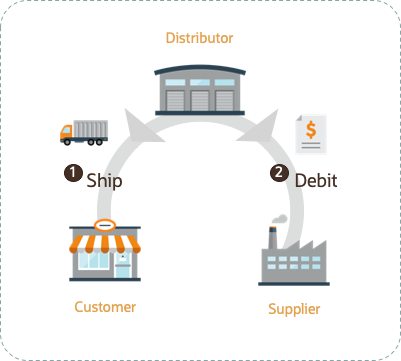
Introducing Oracle Channel Revenue Management Cloud

Supplier Ship and Debit Flow
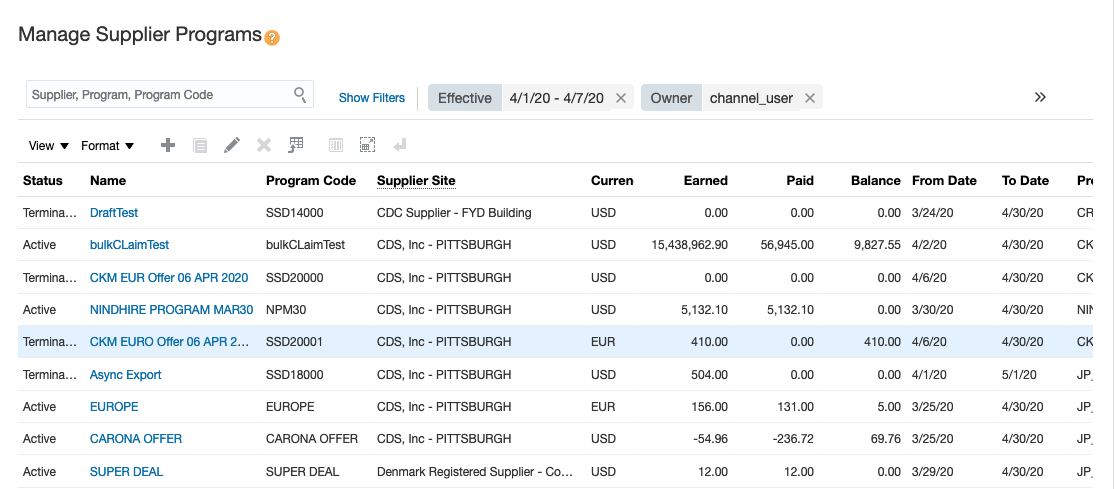
Manage Supplier Programs
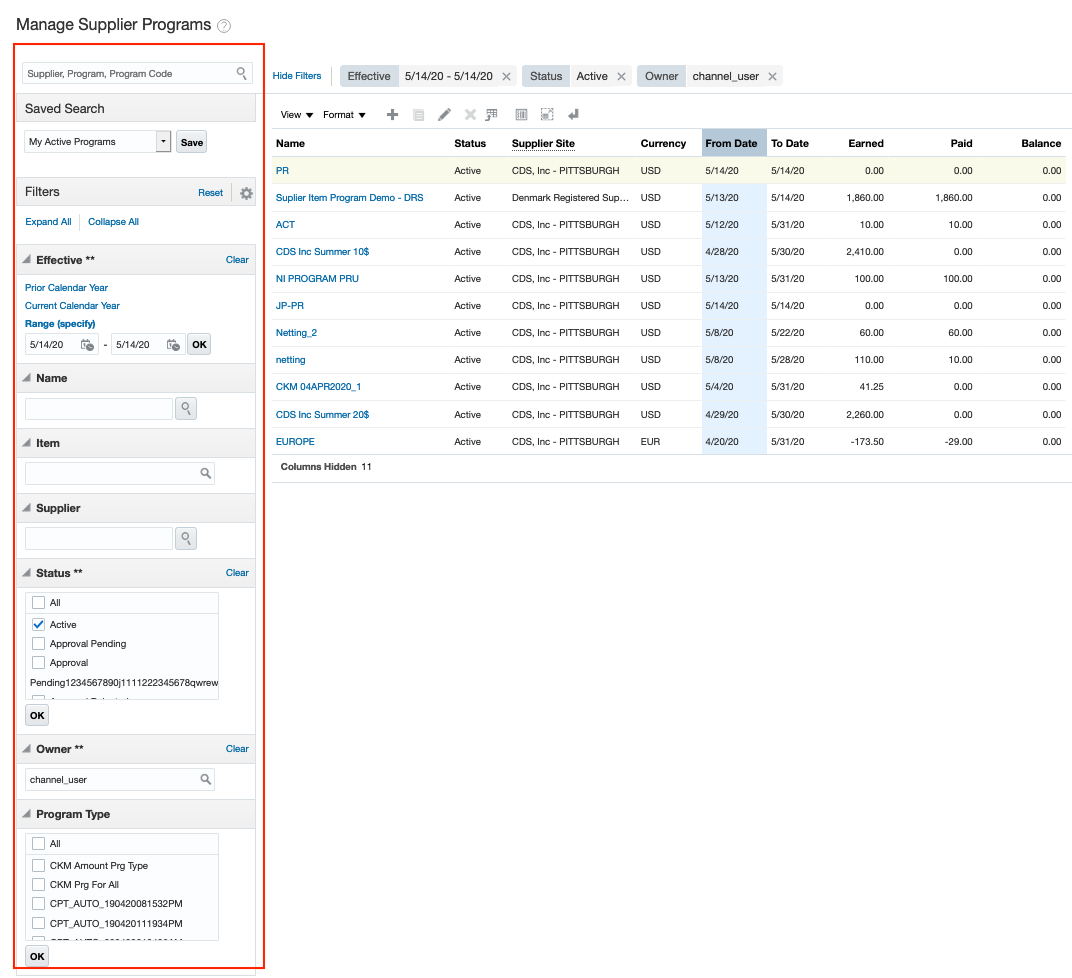
Search for Programs
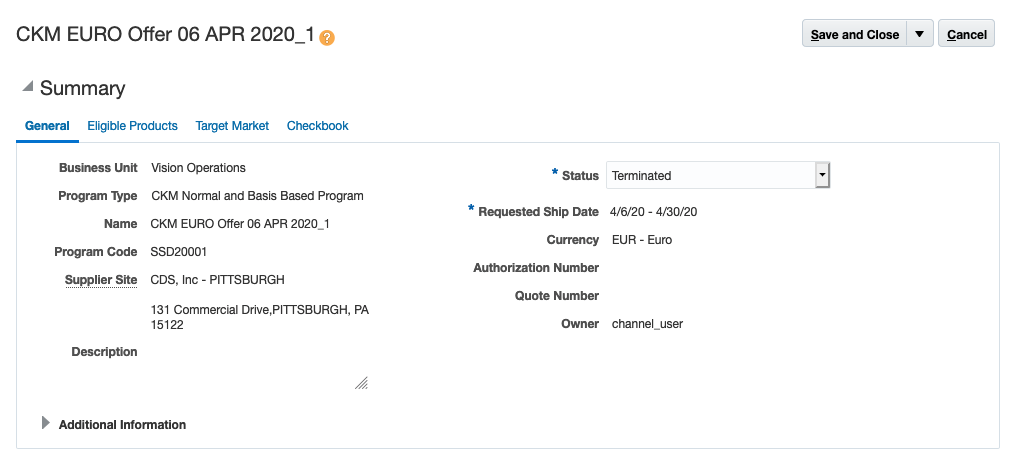
General Program Details
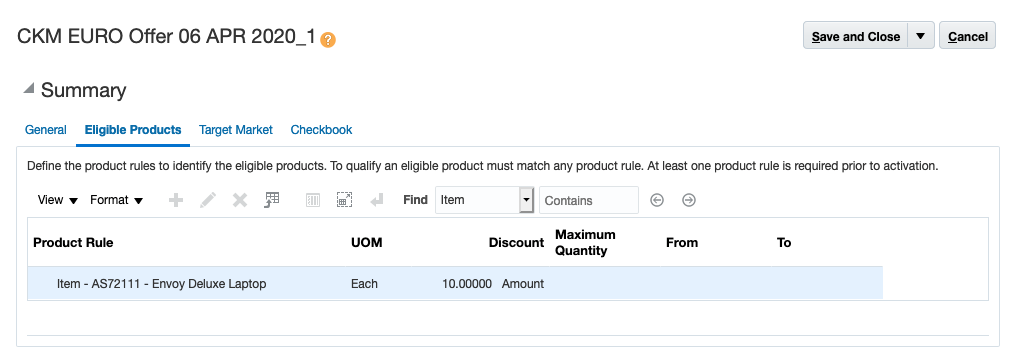
Eligible Product Rules of a Program
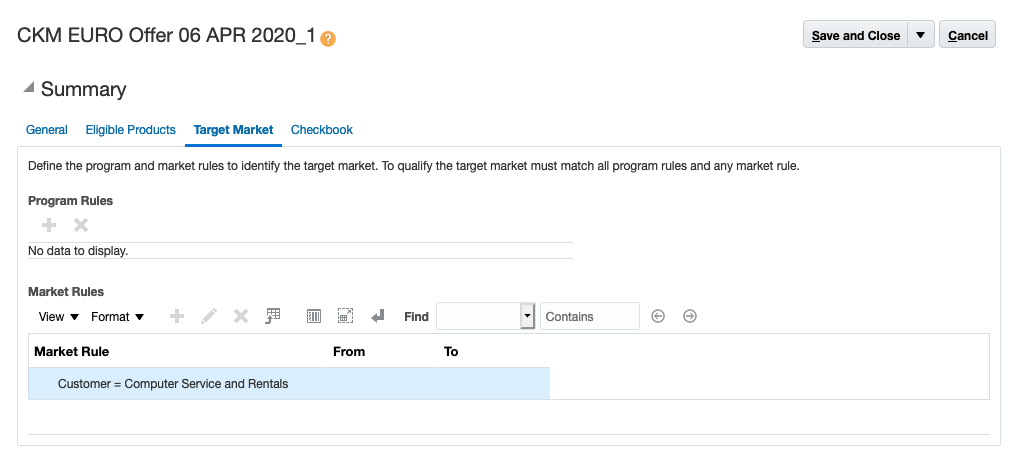
Target Market Rules of a Program
There is a complementary REST service, Order Management/Channel Claims to get the details of supplier claims.
Steps to Enable
Use the Opt In UI to enable this feature. For instructions, refer to the Optional Uptake of New Features section of this document.
Offering: Order Management
When you opt in to use this feature, you must opt in to the functional area named: Channel Revenue Management. Opting into this functional area enables all of the Channel Revenue Management features described here.
Additional Steps:
- Configure User Statuses for Programs.
- Configure Program Types.
Key Resources
- Oracle SCM Cloud: Introduction to Supplier Channel Management, available on Oracle Cloud Readiness for Order Management
- Watch Apply Supplier Programs To Sales Orders Readiness Training
- Oracle SCM Cloud: Using Oracle Channel Revenue Management Cloud, available on the Oracle Help Center
- Oracle SCM Cloud: Implementing Oracle Channel Revenue Management Cloud, available on the Oracle Help Center
- Oracle SCM Cloud: REST API for Oracle SCM Cloud, available on the Oracle Help Center
Role Information
To use the UI for this feature, the following privileges or job roles are required:
- Privilege and Code:
- Manage Supplier Programs (CJM_MANAGE_SUPPLIER_PROGRAMS_PRIV)
- Job Role Name and Code:
- Supplier Channel Manager (ORA_CJM_SUPPLIER_CHANNEL_MANAGER)
To use the REST service for this feature, the following privileges or job roles are required:
- Privilege and Code:
- Manage Channel Programs using REST Service (CJM_MANAGE_CHANNEL_PROGRAMS_REST_SERVICE_PRIV)
- Job Role Name and Code:
- Supplier Channel Manager (ORA_CJM_SUPPLIER_CHANNEL_MANAGER)
Manage Supplier Trade Profiles
Supplier trade profiles can record your supplier's preferences for processing their programs, and claims. You can capture supplier preferences at the supplier site level and manage the supplier programs and the claims processes accordingly, most important of which is a mechanism to assign claims.
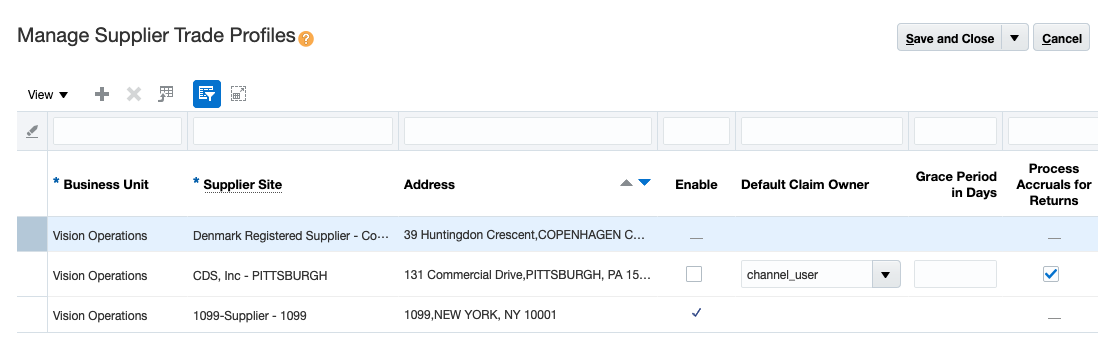
Supplier Trade Profiles
Supplier trade profiles are optional. You can assign claims by setting a default claim owner for a supplier site. You can define a grace period in days at the conclusion of a program. In this case after the program ends, you can still attempt accruals within a grace period that you control with this profile. You can also choose whether you want to process claims for returns.
There is a complementary REST service, Order Management/Supplier Trade Profiles to manage supplier preferences and attributes.
Steps to Enable
Use the Opt In UI to enable this feature. For instructions, refer to the Optional Uptake of New Features section of this document.
Offering: Order Management
When you opt in to use this feature, you must opt in to the functional area named: Channel Revenue Management. Opting into this functional area enables all of the Channel Revenue Management features described here.
Key Resources
- Oracle SCM Cloud: Introduction to Supplier Channel Management, available on Oracle Cloud Readiness for Order Management
- Oracle SCM Cloud: Using Oracle Channel Revenue Management Cloud, available on the Oracle Help Center
- Oracle SCM Cloud: Implementing Oracle Channel Revenue Management Cloud, available on the Oracle Help Center
- Oracle SCM Cloud: REST API for Oracle SCM Cloud, available on the Oracle Help Center
Role Information
To use the UI for this feature, the following privileges or job roles are required:
- Privilege and Code:
- Manage Supplier Trade Profiles (CJM_MANAGE_SUPPLIER_TRADE_PROFILES_PRIV)
- Job Role Name and Code:
- Supplier Channel Manager (ORA_CJM_SUPPLIER_CHANNEL_MANAGER)
To use the REST service for this feature, the following privileges or job roles are required:
- Privilege and Code:
- Manage Supplier Trade Profile using REST Service (CJM_MANAGE_SUPPLIER_TRADE_PROFILE_REST_SERVICE_PRIV)
- Job Role Name and Code:
- Supplier Channel Manager (ORA_CJM_SUPPLIER_CHANNEL_MANAGER)
Apply Supplier Programs to Sales Orders
Apply supplier programs to sales orders in Order Management according to the terms of the agreement with the supplier. Supplier programs are automatically applied to eligible sales order lines, or you can manually add them to the sales order line. The resulting accruals are calculated and included in the price breakdown on the sales order line.
DETAILS:
Common throughout many industries, a distributor requests a special price in competitive opportunities. In these special price agreements, distributors ship the orders to customers and issue debit memos to suppliers for the agreed discount. These supplier programs are defined in the Channel Revenue Management Cloud and are applied automatically to eligible sales order lines. After shipping, distributors can claim these incentives from their suppliers.
Functional Process Flow
- The process starts with the program definition in Channel Revenue Management where appropriate discount types and price terms are setup.
- During the ordering process, Order Management calls Channel Revenue Management to apply eligible automatic supplier programs. Optionally, users can apply or decline programs manually if their roles allow it. Pricing calculates the accruals and returns them as charge components for each supplier program.
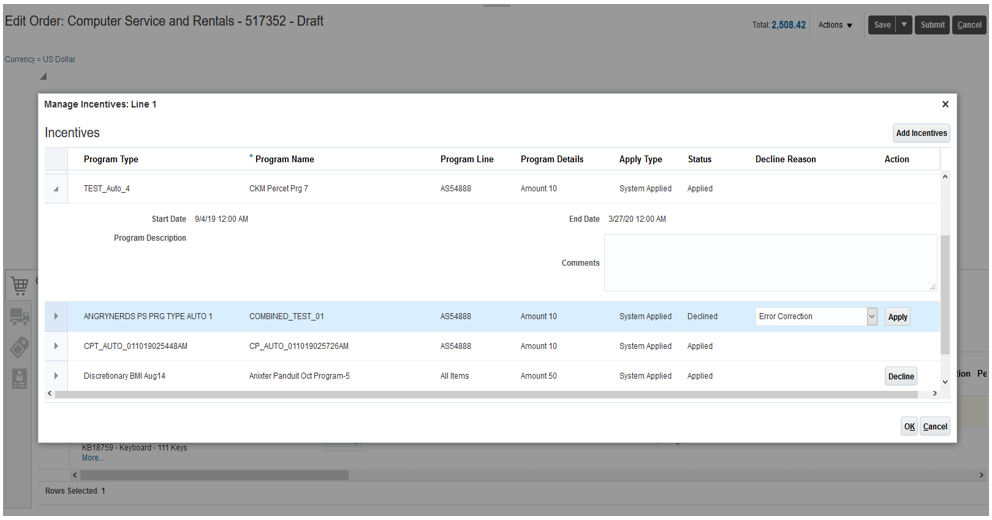
New Dialog to View and Manage Incentives on Sales Order Line
After the order is fulfilled, Channel Revenue Management creates accruals from the order. Claims are then generated and processed.
You can use the REST service Order Management/Context Services/Program Eligibility to get the list of qualifying channel programs based on the date effectivity, customer and product eligibility rules.
Steps to Enable
Use the Opt In UI to enable this feature. For instructions, refer to the Optional Uptake of New Features section of this document.
Offering: Order Management
When you opt in to use this feature, you must opt in to the functional area named: Channel Revenue Management. Opting into this functional area enables all of the Channel Revenue Management features described here.
Manage Price Elements: You can now see a new predefined price element Accrual of element type Accrual. Any price elements you create must be of type Price or Cost.
Manage Pricing Bases: To support percentage or new cost based accrual programs, you need to define an accrual basis accordingly. This type of accrual basis can be defined against a Price or a Cost price element.
Promote All Pricing Algorithms: You need to promote all your pricing algorithms to enable this functionality in pricing execution. Use the Manage Algorithms task in Pricing Administration, and use the Promote All action. For more information, particulary if you have algorithm extensions, review "Promote Pricing Algorithms Into the Current Release" in the Administration chapter of the Oracle SCM Cloud: Administering Pricing guide on the Oracle Help Center .
Manage Pricing Messages: You maysee some new predefined messages for supplier accruals that are returned when a supplier program is applied to a sales order line. These messages are visible in the Price Breakdown UI in Order Management.
Tips And Considerations
- You can't import incentives via web-service or file-based import of sales orders
- Automatic programs are applied on orders created via import channels and services.
- You can't view accruals in Totals user interface.
- Line-level accruals are visible in Price Breakdown UI.
- You can't copy order with Freeze Price option, if the source order has incentives.
Key Resources
- Oracle SCM Cloud: Using Order Management and Implementing Order Management, available on the Oracle Help Center.
- Oracle SCM Cloud: Administering Pricing guide, available on the Oracle Help Center.
- Oracle SCM Cloud: Using Oracle Channel Revenue Management Cloud, available on the Oracle Help Center
- Oracle SCM Cloud: Implementing Oracle Channel Revenue Management Cloud, available on the Oracle Help Center
Role Information
To use this feature, the following roles are required:
- Order Manager
- Order Entry Specialist
- Pricing Manager
- Pricing Administrator
- Pricing Analyst
Create Accruals Based on Sales Orders
Create accruals from incentive amounts on eligible sales orders in Order Management. The Create Accruals process takes the accrual charge lines from invoiced sales orders and creates the channel transactions that are then fed into Channel Revenue Management.
Create accruals based on sales orders is a scheduled process that tracks earned accruals viewable from within the program checkbook and supplier checkbook.
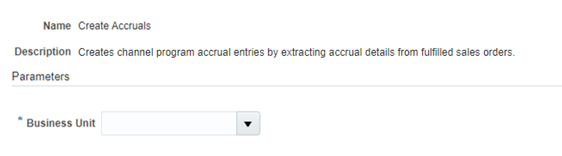
Scheduled Process - Create Accruals
Steps to Enable
Use the Opt In UI to enable this feature. For instructions, refer to the Optional Uptake of New Features section of this document.
Offering: Order Management
When you opt in to use this feature, you must opt in to the functional area named: Channel Revenue Management. Opting into this functional area enables all of the Channel Revenue Management features described here.
Tips And Considerations
Minimally, you should schedule this process on a daily basis, so that your checkbook is updated daily. Schedule it more frequently if you need more timely updates.
Key Resources
- Oracle SCM Cloud: Using Oracle Channel Revenue Management Cloud, available on the Oracle Help Center
- Oracle SCM Cloud: Implementing Oracle Channel Revenue Management Cloud, available on the Oracle Help Center
Role Information
To use the Create Accruals scheduled process, the following privileges or job roles are required:
- Privilege and Code:
- Create Accruals (CJM_CREATE_ACCRUALS_PRIV)
- Job Role Name and Code:
- Supply Chain Application Administrator (ORA_RCS_SUPPLY_CHAIN_APPLICATION_ADMINISTRATOR)
Create Manual Accrual Adjustments
Create manual accrual adjustments to correct missed accruals or to reverse invalid accruals. You can view and search manual adjustments, and export adjustments to Microsoft Excel.
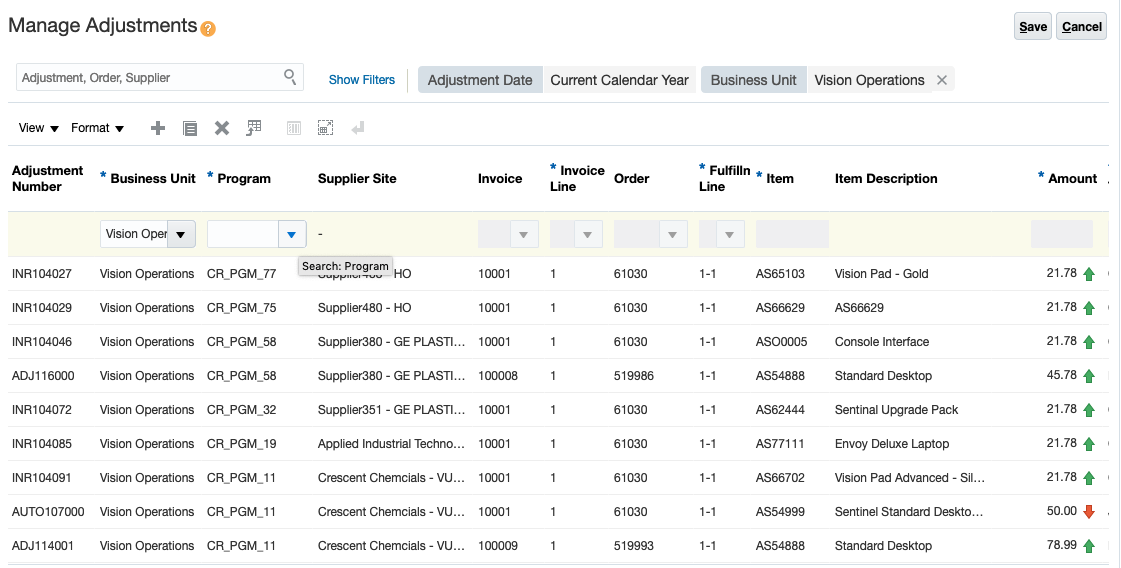
Create Adjustments
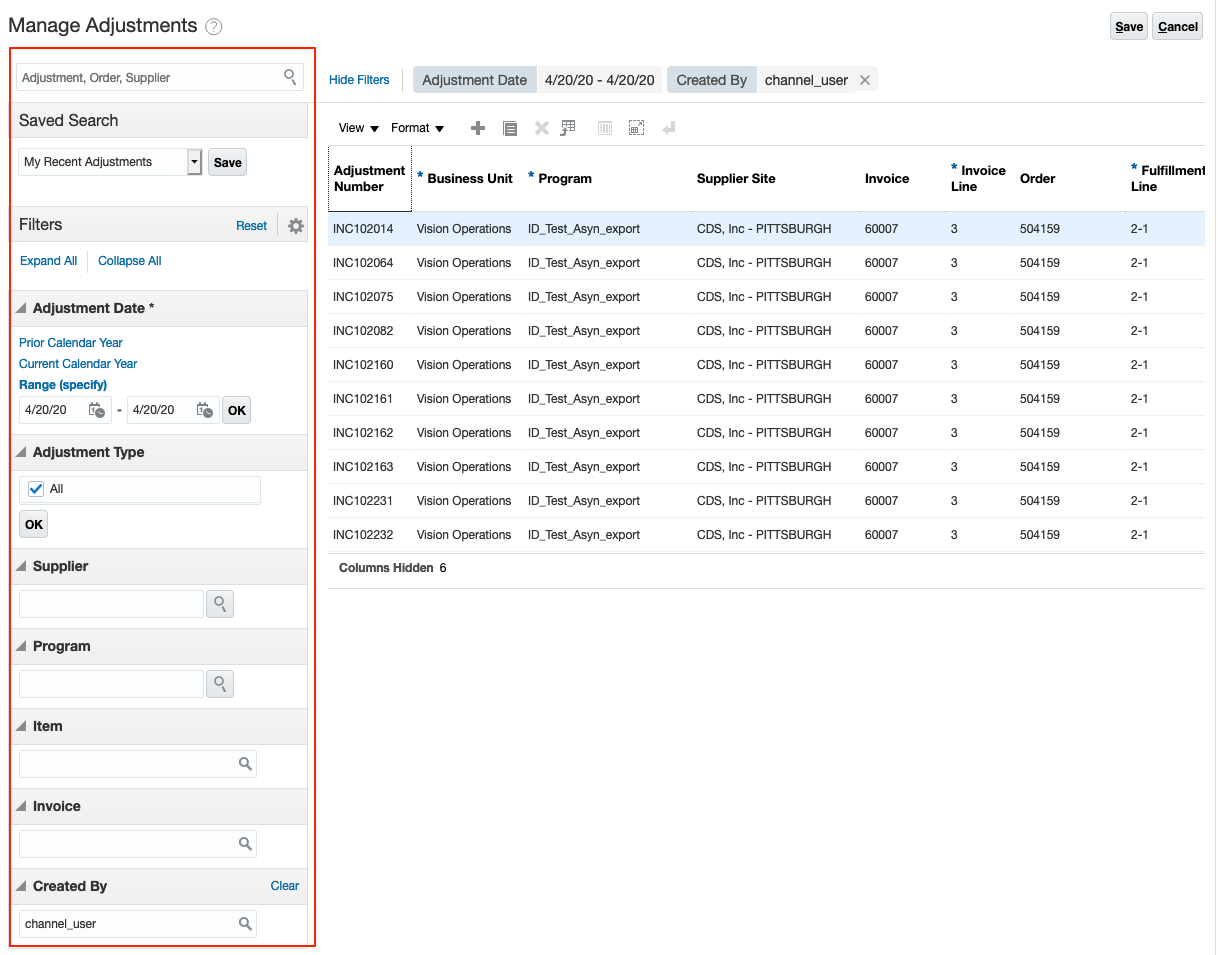
Search for Adjustments
There is a complementary REST service, Order Management/Channel Manual Adjustments to manage manual accrual adjustments.
Steps to Enable
Use the Opt In UI to enable this feature. For instructions, refer to the Optional Uptake of New Features section of this document.
Offering: Order Management
When you opt in to use this feature, you must opt in to the functional area named: Channel Revenue Management. Opting into this functional area enables all of the Channel Revenue Management features described here.
Additional Steps:
- Manage Adjustment Types and Reasons: You must configure adjustment types and reasons for downstream analytics and whether the adjustment type increases or decreases earned accruals.
Tips And Considerations
Once created, adjustments cannot be edited or deleted. To nullify an adjustment, you must create a reversal adjustment.
Key Resources
- Oracle SCM Cloud: Using Oracle Channel Revenue Management Cloud, available on the Oracle Help Center
- Oracle SCM Cloud: Implementing Oracle Channel Revenue Management Cloud, available on the Oracle Help Center
- Oracle SCM Cloud: REST API for Oracle SCM Cloud, available on the Oracle Help Center
Role Information
To use the UI for this feature, the following privileges or job roles are required:
- Privilege and Code:
- Manage Supplier Manual Adjustments (CJM_MANAGE_SUPPLIER_MANUAL_ADJUSTMENT_PRIV)
- Job Role Name and Code:
- Supplier Channel Manager (ORA_CJM_SUPPLIER_CHANNEL_MANAGER)
To use the REST service for this feature, the following privileges or job roles are required:
- Privilege and Code:
- Manage Manual Adjustments using REST Service (CJM_MANAGE_MANUAL_ADJUSTMENT_REST_SERVICE_PRIV)
- Job Role Name and Code:
- Supplier Channel Manager (ORA_CJM_SUPPLIER_CHANNEL_MANAGER)
View the financial status and performance of your supplier programs summarized by business unit, supplier, supplier site, or a supplier program. In the supplier checkbook, you can view money earned, paid, and the balances available for supplier payment. For example, the suppliers who contributed the largest channel discounts and the suppliers who owe you the most money.
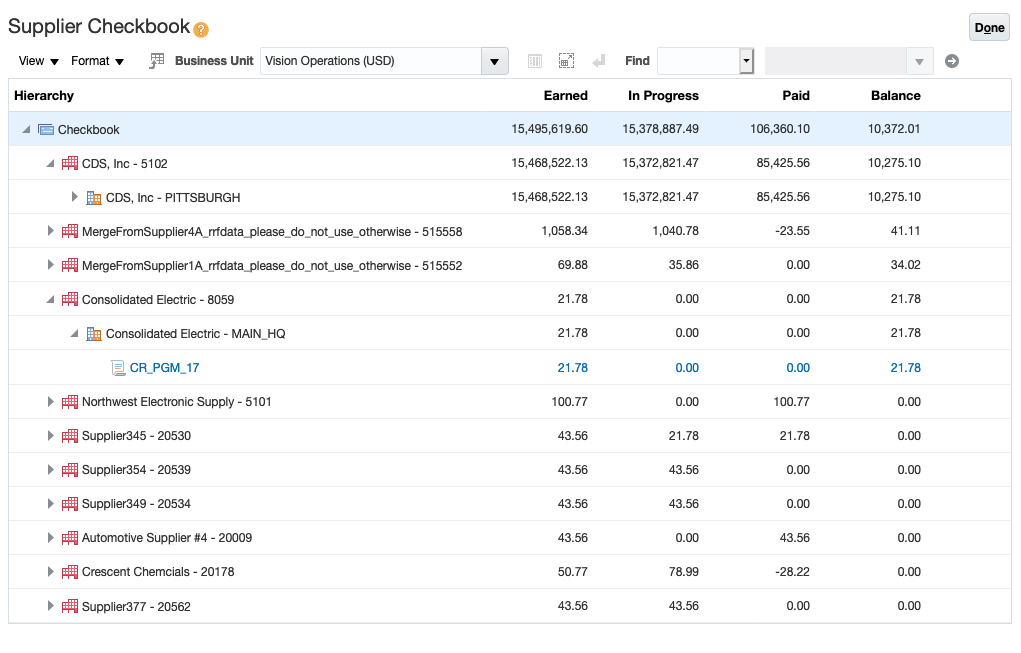
Supplier Checkbook
For a person in a CFO role, it is critical to constantly understand their financial situation in channels, as it directly affects their operating cash flow. To do so, the CFO will need to review the supplier checkbook to understand how much monies are available to be collected this month and from which suppliers.
From the supplier checkbook, you can drill down to the program checkbook and get insight into individual accruals and claims belonging to a single program. Checkbook is a tab within the program. From the Earned Accruals subtab, you can search across earned accruals and also see available accruals. From the Claims subtab, you can see the claims that are in progress and those that have been paid.
Steps to Enable
Use the Opt In UI to enable this feature. For instructions, refer to the Optional Uptake of New Features section of this document.
Offering: Order Management
When you opt in to use this feature, you must opt in to the functional area named: Channel Revenue Management. Opting into this functional area enables all of the Channel Revenue Management features described here.
Key Resources
- Oracle SCM Cloud: Using Oracle Channel Revenue Management Cloud, available on the Oracle Help Center
- Oracle SCM Cloud: Implementing Oracle Channel Revenue Management Cloud, available on the Oracle Help Center
Role Information
To use the UI for this feature, the following privileges or job roles are required:
- Privilege and Code:
- View Supplier Checkbook (CJM_VIEW_SUPPLIER_CHECKBOOK_PRIV)
- Job Role Name and Code:
- Supplier Channel Manager (ORA_CJM_SUPPLIER_CHANNEL_MANAGER)
View Checkbook for Supplier Programs
View the financial status and performance of supplier programs. In the program checkbook you can view money earned, paid, and the balance available to be collected under the supplier program. You can also view items, sales orders, and invoice details from earned accruals and the claims related to a supplier program.
The Program Checkbook is a tab within the program. From the Earned Accruals subtab, you can view and manage your earned accruals. You can also see the available accruals, which are available to be claimed.
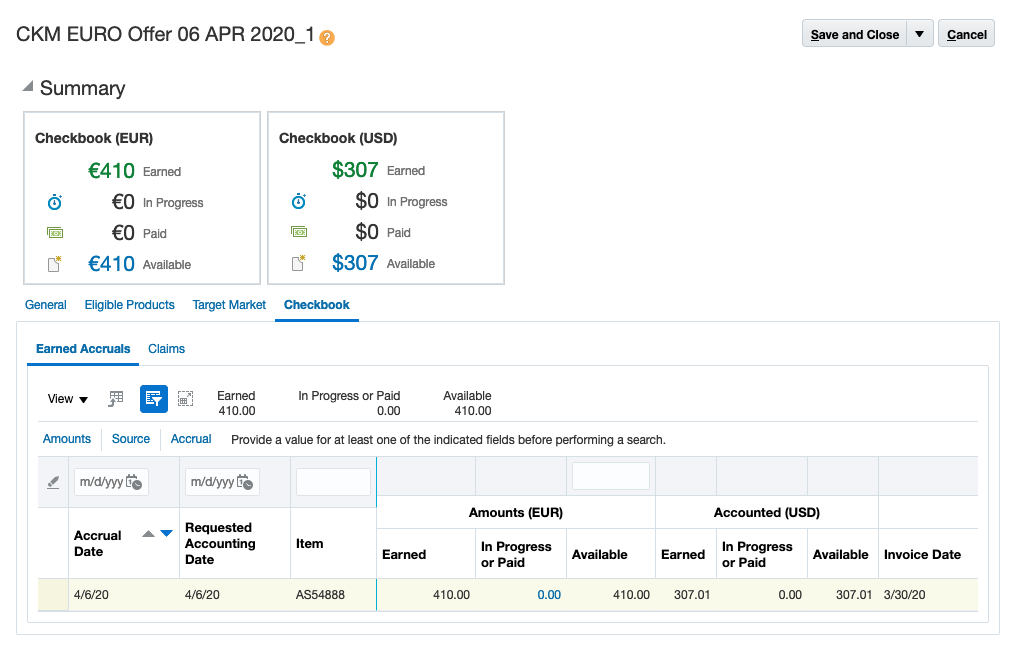
Available Accruals from Program Checkbook
From the Claims subtab, you can see the claims that are in progress, or have already been paid.
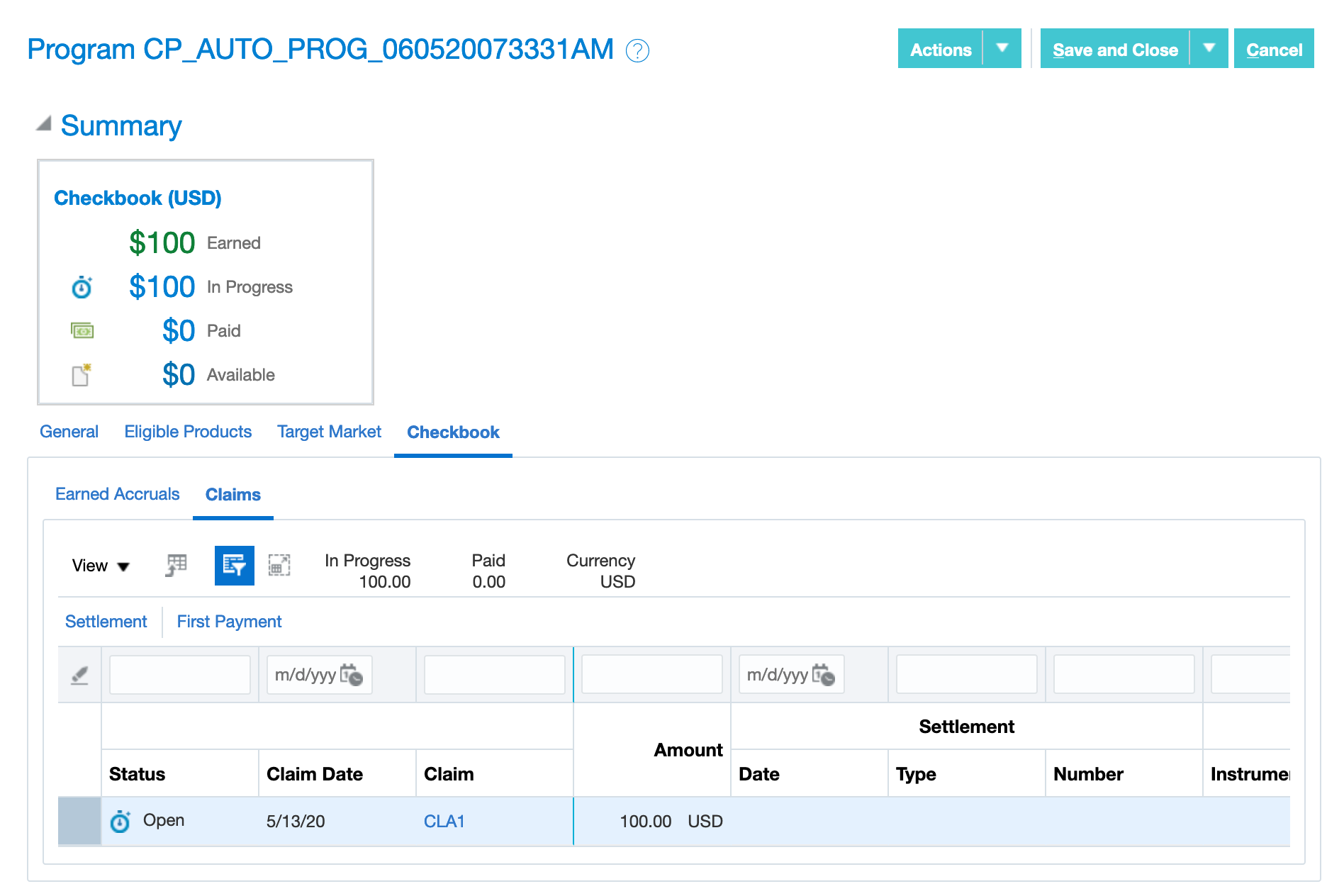
Claims from Program Checkbook
Steps to Enable
Use the Opt In UI to enable this feature. For instructions, refer to the Optional Uptake of New Features section of this document.
Offering: Order Management
When you opt in to use this feature, you must opt in to the functional area named: Channel Revenue Management. Opting into this functional area enables all of the Channel Revenue Management features described here.
- Activate the supplier program before the checkbook tab for a given program is displayed.
Key Resources
- Oracle SCM Cloud: Using Oracle Channel Revenue Management Cloud, available on the Oracle Help Center
- Oracle SCM Cloud: Implementing Oracle Channel Revenue Management Cloud, available on the Oracle Help Center
Role Information
To use the UI for this feature, the following privileges or job roles are required:
- Privilege and Code:
- Manage Supplier Programs (CJM_MANAGE_SUPPLIER_PROGRAMS_PRIV)
- Job Role Name and Code:
- Supplier Channel Manager (ORA_CJM_SUPPLIER_CHANNEL_MANAGER)
Generate supplier claims based on the available accruals to collect the payment for earned supplier incentives. The Generate Supplier Claims process creates supplier claims and puts them in either Open or Settlement Pending status. You can use the parameters of this process to filter the available supplier accruals for inclusion in a claim.
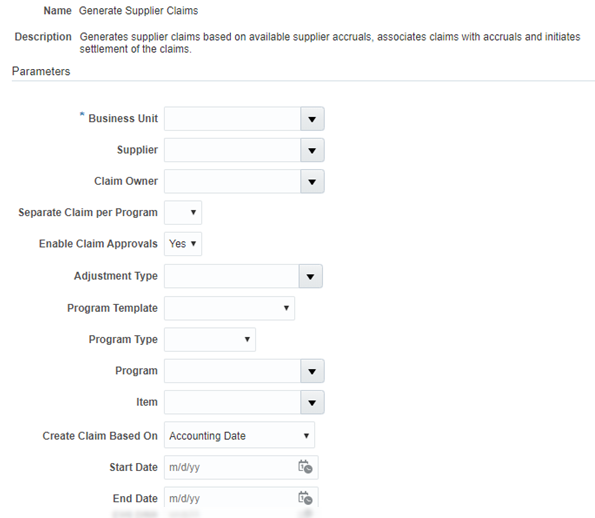
Scheduled Process - Generate Supplier Claims
You have control over how the claims are generated:
- By Business Unit
- By Supplier
- By the granularity of claims: either 1 claim per program or 1 claim per business unit and supplier
- By Adjustment Type
- By Program Type
- By Program
- By Item, and
- By date range based on accrual date, or by date range based on requested accounting date. The latter allows you to create a claim for March accruals even if they include manual adjustments created in April for March transactions.
Steps to Enable
Use the Opt In UI to enable this feature. For instructions, refer to the Optional Uptake of New Features section of this document.
Offering: Order Management
When you opt in to use this feature, you must opt in to the functional area named: Channel Revenue Management. Opting into this functional area enables all of the Channel Revenue Management features described here.
- Configure claim sources.
- Configure claim types.
- Configure claim reasons.
- Configure user statuses for claims.
Tips And Considerations
After the shipment of supplier ship and debit program related inventory, the accrual is earned and can be claimed by the distributor. Supplier claims are systematically generated from invoiced accruals via a scheduled process, either with or without internal claim review and approvals, as appropriate in your company. This is based on the process parameter Enable Claims Approval. The Generate Supplier Claims process creates supplier claims and puts them in either Open status if internal approval is required, or Settlement Pending status if internal approval is not required.
Key Resources
- Oracle SCM Cloud: Using Oracle Channel Revenue Management Cloud, available on the Oracle Help Center
- Oracle SCM Cloud: Implementing Oracle Channel Revenue Management Cloud, available on the Oracle Help Center
- Oracle SCM Cloud: REST API for Oracle SCM Cloud, available on the Oracle Help Center
Role Information
To use the Generate Supplier Claims scheduled process, the following privileges or job roles are required:
- Privilege and Code:
- Generate Supplier Claims (CJM_GENERATE_SUPPLIER_CLAIMS_PRIV)
- Job Role Name and Code:
- Supply Chain Application Administrator (ORA_RCS_SUPPLY_CHAIN_APPLICATION_ADMINISTRATOR)
Review supplier claims before submitting for supplier payment. You can remove or reverse accruals, or both, prior to marking the claim as approved. After you approve the claim, you can send it to Payables for supplier payment.
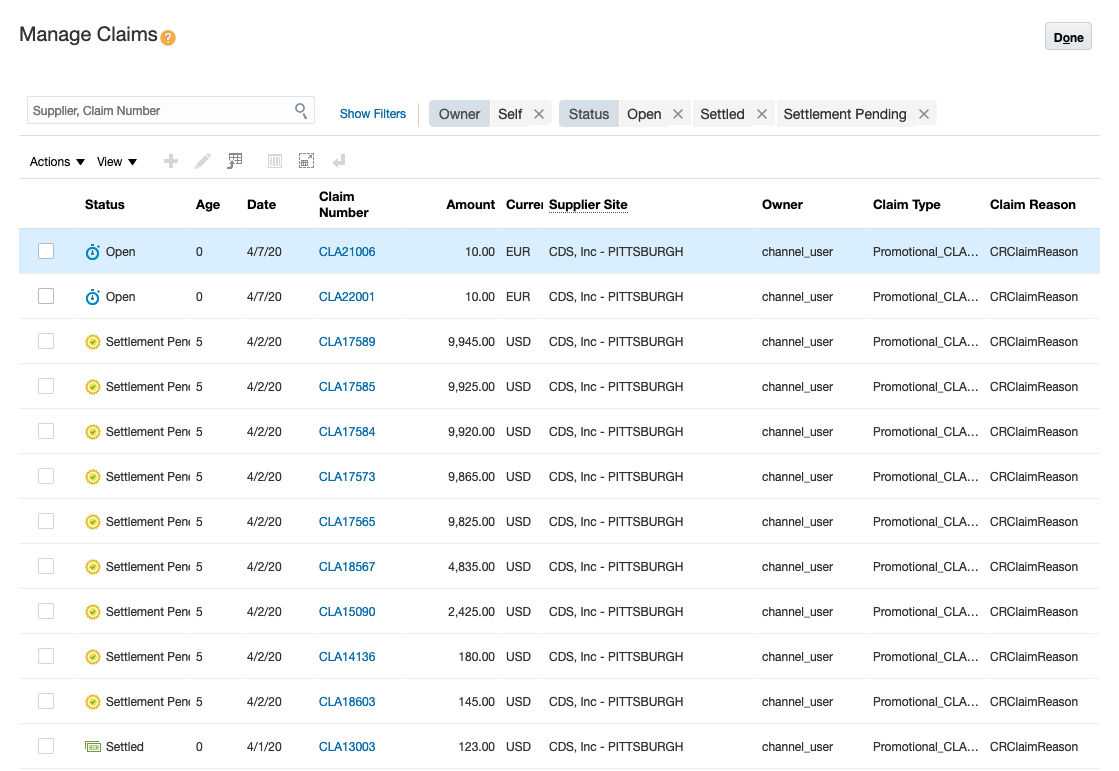
Manage Claims
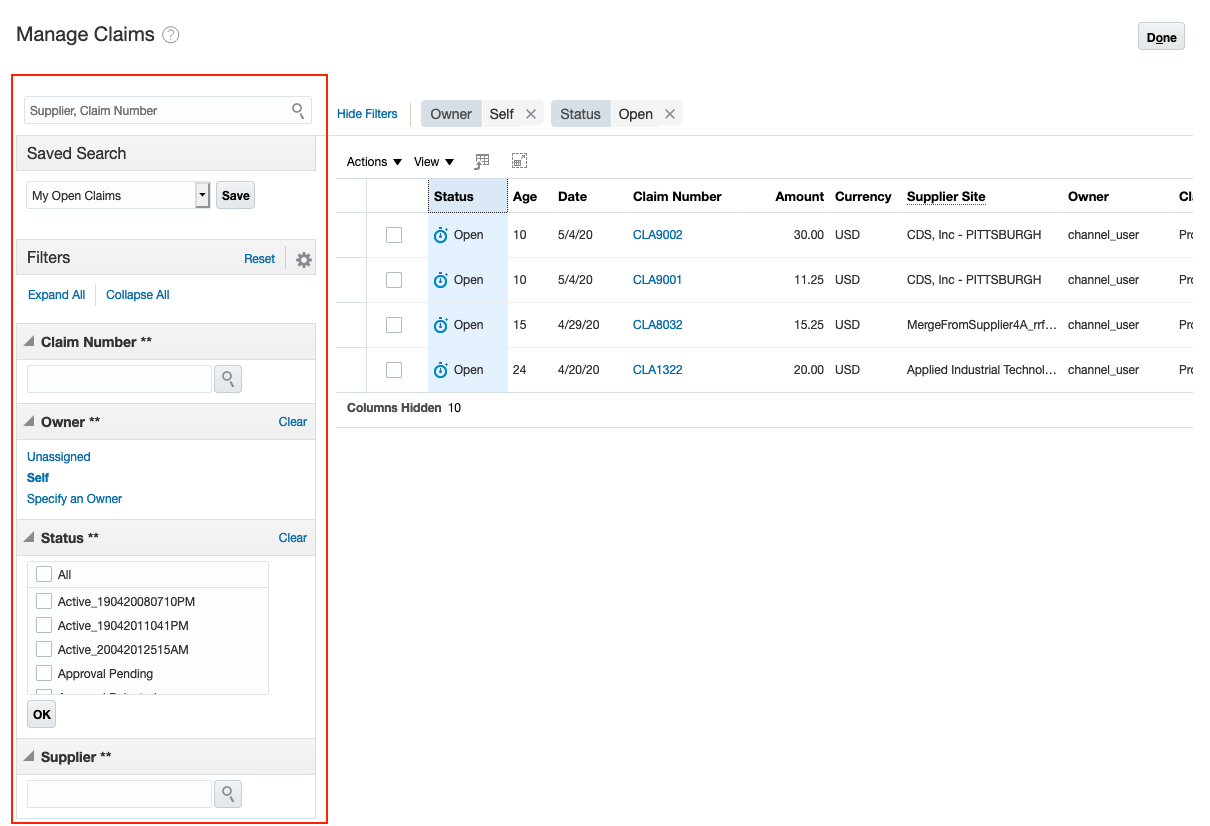
Search for Claims
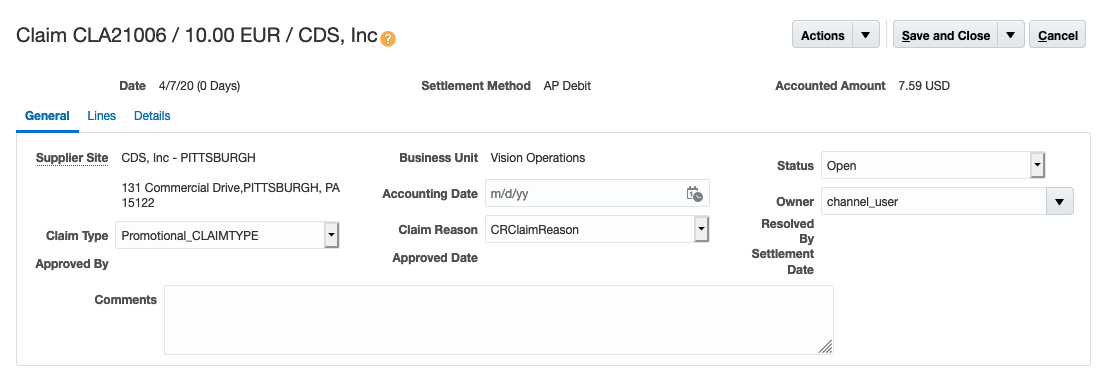
General Details of a Claim
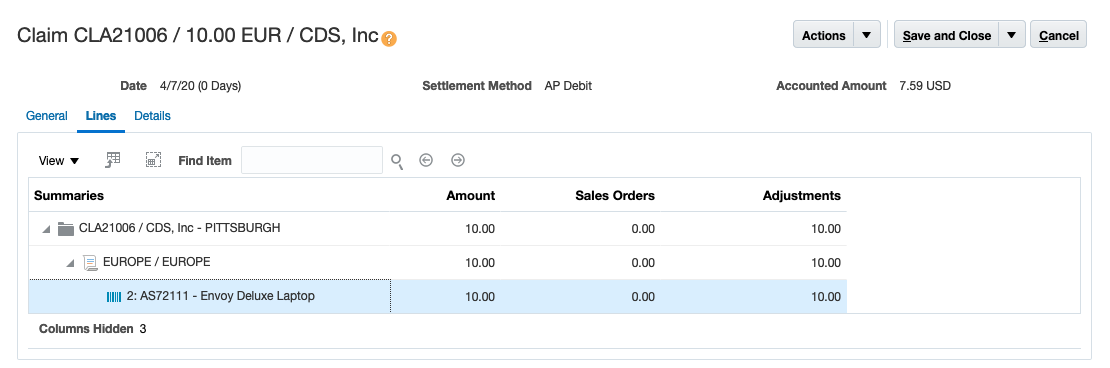
Lines of a Claim
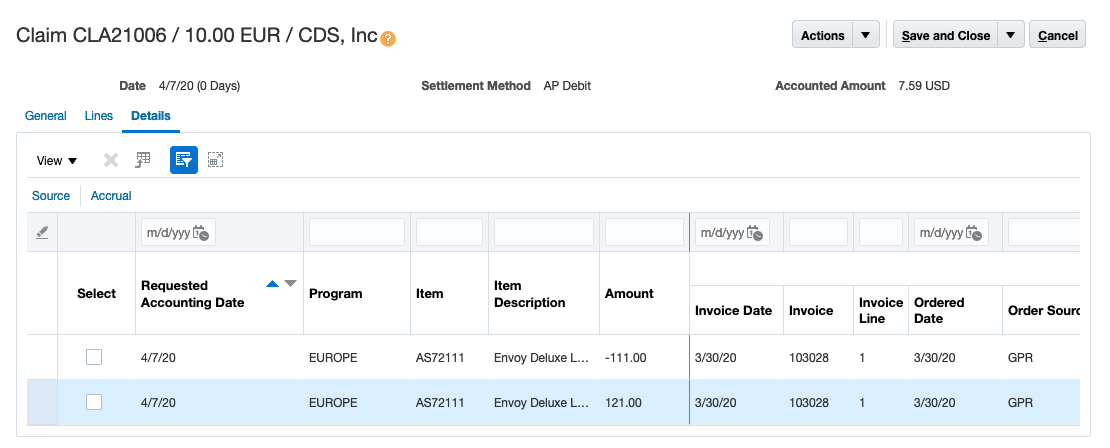
Accruals Associated to a Claim
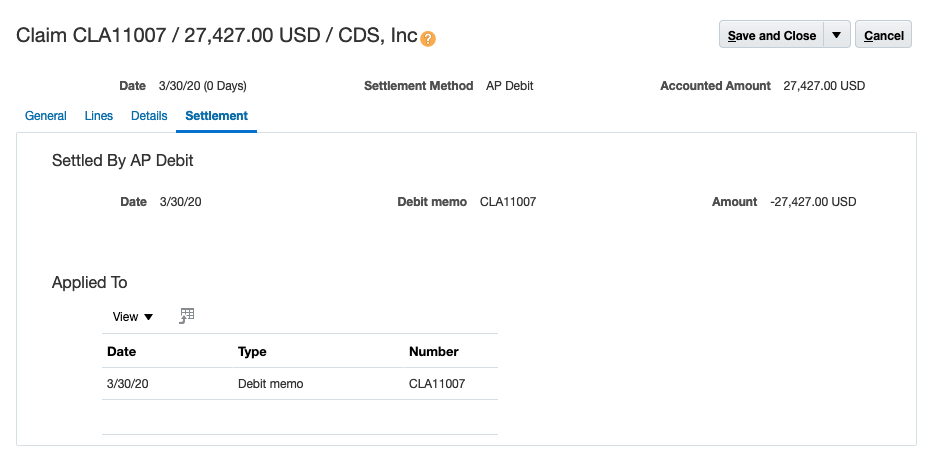
Settlement of a Claim
Steps to Enable
Use the Opt In UI to enable this feature. For instructions, refer to the Optional Uptake of New Features section of this document.
Offering: Order Management
When you opt in to use this feature, you must opt in to the functional area named: Channel Revenue Management. Opting into this functional area enables all of the Channel Revenue Management features described here.
- Generate claims with the parameter Enable for Approval as Yes, so an analyst can review and submit the claim.
Tips And Considerations
Claims needing approval will require an analyst to review the claim. The choice to enable approval is defined as part of the scheduled process, Generate Supplier Claims.
Each claim has an owner that can be assigned. This is the person responsible for a claim, typically assigned by their supervisor. The claim owner reviews the subtotals by program + item in the Lines tab. You can also go to the Details tab to see the supporting accruals. These represent the proof to your supplier that the claim is accurate and valid.
For various business reasons (if there was a specific invoice that had in-transit shipping issues for instance), you can remove specific accruals from a claim. If a program was incorrectly activated, you can remove those accruals and also generate the reversal adjustments.
After reviewing the claim, you can submit it for approval. Once approved, the claim is sent to Payables for settlement via a debit memo or invoice. If the analyst also has the claim approval privilege then the submitted claim is immediately approved. Once approved, accounting events are also raised to relieve claim accruals.
Key Resources
- Oracle SCM Cloud: Using Oracle Channel Revenue Management Cloud, available on the Oracle Help Center
- Oracle SCM Cloud: Implementing Oracle Channel Revenue Management Cloud, available on the Oracle Help Center
Role Information
To use the UI for this feature, the following privileges or job roles are required:
- Privilege and Code:
- Manage Supplier Claims (CJM_MANAGE_SUPPLIER_CLAIMS_PRIV)
- Job Role Name and Code:
- Supplier Channel Manager (ORA_CJM_SUPPLIER_CHANNEL_MANAGER)
To use the REST service for this feature, the following privileges or job roles are required:
- Privilege and Code:
- Manage Channel Claims using GET REST Service (CJM_MANAGE_CHANNEL_CLAIM_REST_SERVICE_PRIV)
- Job Role Name and Code:
- Supplier Channel Manager (ORA_CJM_SUPPLIER_CHANNEL_MANAGER)
Close all settled claims which have been invoiced and fully paid in Payables. The Close Settled Claims process retrieves the channel transactions created in Payables after a claim settlement, an update, or a closure. It then updates the settlement documents with the debit memo details or the invoice details, and closes the claim.
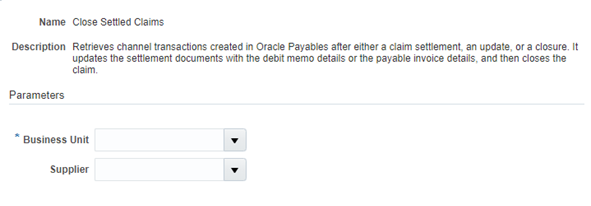
Scheduled Process - Close Settled Claims
Steps to Enable
Use the Opt In UI to enable this feature. For instructions, refer to the Optional Uptake of New Features section of this document.
Offering: Order Management
When you opt in to use this feature, you must opt in to the functional area named: Channel Revenue Management. Opting into this functional area enables all of the Channel Revenue Management features described here.
Tips And Considerations
Claims in Settlement Pending status raises accounting events for accounting to relieve accruals, the next time you schedule the Create Accounting process.
Minimally, you should schedule this process on a daily basis so your checkbook is updated daily. Schedule it more frequently if you need more timely updates.
Users of this scheduled process should be assigned Data Security access via Business Units.
Key Resources
- Oracle SCM Cloud: Using Oracle Channel Revenue Management Cloud, available on the Oracle Help Center
- Oracle SCM Cloud: Implementing Oracle Channel Revenue Management Cloud, available on the Oracle Help Center
Role Information
To use the Close Settled Claims scheduled process, the following privileges or job roles are required:
- Privilege and Code:
- Close Settled Claims (CJM_CLOSE_SETTLED_CLAIMS_PRIV)
- Job Role Name and Code:
- Supply Chain Application Administrator (ORA_RCS_SUPPLY_CHAIN_APPLICATION_ADMINISTRATOR)
Account for Channel Accruals and Claims
Automate accounting for accruals, adjustments, and claims using Subledger Accounting. You can configure Subledger Accounting rules to use the values of the sources assigned to the accounting attributes and the accounting rules to create the subledger journal entries for accruals, adjustments, and claims. These entries are then posted to the general ledger.
Functionally, channel accounting is two sets of journal entries.
- Upon shipment and invoicing to a customer, the accrual is eligible to be earned. We debit the accrual asset account and credit the income or discount on cost of goods sold account.
- Upon reaching the Settlement Pending status of a claim, its' accruals are eligible to be relieved. We debit the Payables clearing account and credit the accrual asset account.
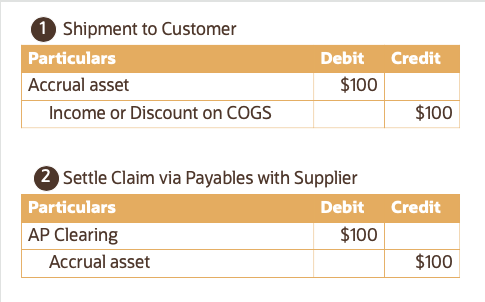
Journal Entries for Supplier Ship and Debit
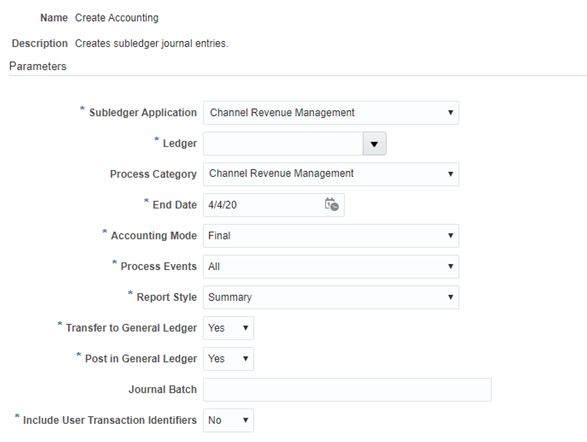
Scheduled Process - Create Accounting
Steps to Enable
Use the Opt In UI to enable this feature. For instructions, refer to the Optional Uptake of New Features section of this document.
Offering: Order Management
When you opt in to use this feature, you must opt in to the functional area named: Channel Revenue Management. Opting into this functional area enables all of the Channel Revenue Management features described here.
- Configure rules-based accounting in Financials cloud, leveraging the Channel Revenue Management process events.
Tips And Considerations
This leverages the same Create Accounting scheduled process leveraged by other cloud applications, but for Channel events. Channel Revenue Management is registered as a new Subledger Application, a new Process Category, and a new set of Process Events.
If a channel event cannot be posted because the accounting period is closed, you can run the Sweep Channel Transaction Accounting Events scheduled process. This updates the accounting date of unaccounted channel transactions or unaccounted claim events to an open period or future-enterable period.
Key Resources
- For the Create Accounting scheduled process, refer to the Create Accounting chapter in the Oracle Financials Cloud: Using Subledger Accounting guide.
- Oracle SCM Cloud: Using Oracle Channel Revenue Management Cloud, available on the Oracle Help Center
- Oracle SCM Cloud: Implementing Oracle Channel Revenue Management Cloud, available on the Oracle Help Center
Role Information
To use the Sweep Channel Transaction Accounting Events scheduled process, the following privileges or job roles are required:
- Privilege and Code:
- Sweep Channel Transaction Accounting Events (CJM_SWEEP_CHANNEL_TRANSACTION_ACCOUNTING_EVENTS_PRIV)
- Job Role Name and Code:
- Supply Chain Application Administrator (ORA_RCS_SUPPLY_CHAIN_APPLICATION_ADMINISTRATOR)
Manage User Statuses for Programs and Claims
Configure and manage your program and claim statuses based on your business processes. Claims and programs have predefined statuses based on each stage in the business process, and you can create user-defined statuses based on additional business needs.
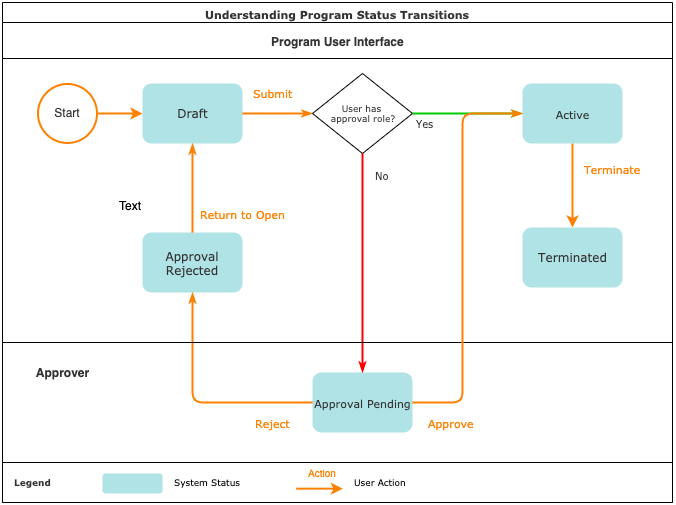
Understanding Program Status Transitions

Understanding Claim Status Transitions
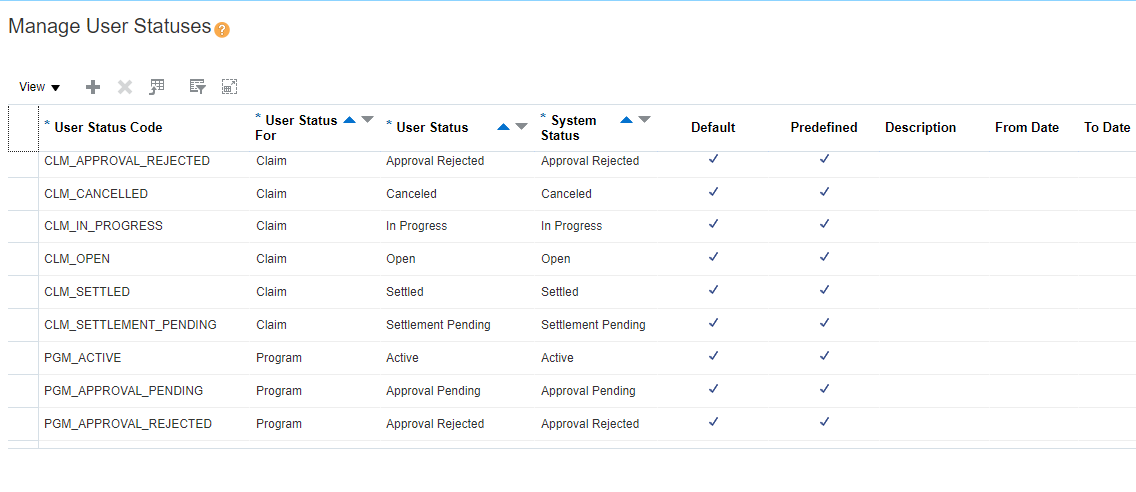
Manage User Statuses
There is a complementary REST service, Order Management/Channel User Statuses to manage user statuses for programs and claims.
Steps to Enable
Use the Opt In UI to enable this feature. For instructions, refer to the Optional Uptake of New Features section of this document.
Offering: Order Management
When you opt in to use this feature, you must opt in to the functional area named: Channel Revenue Management. Opting into this functional area enables all of the Channel Revenue Management features described here.
Tips And Considerations
This user interface is used to configure both claim statuses and program statuses. You can distinguish between them using the attribute User Status For.
Configure and manage your program and claim statuses based on your business processes as needed. We start you off with a predefined status for each system status. Please make sure you minimally update the description to your own, and change the user status name if necessary. Then you can create new statuses based on additional business needs.
Important:
-
Ensure there should always be one default users status for each system status.
-
Ensure no gaps exist in your date effectivity.
-
Status transitions will fail if there is a gap for any date where no default user status exists, for each system status.
Key Resources
- Oracle SCM Cloud: Using Oracle Channel Revenue Management Cloud, available on the Oracle Help Center
- Oracle SCM Cloud: Implementing Oracle Channel Revenue Management Cloud, available on the Oracle Help Center
- Oracle SCM Cloud: REST API for Oracle SCM Cloud, available on the Oracle Help Center
Role Information
To use the UI for this feature, the following privileges or job roles are required:
- Privilege and Code:
- Manage Channel User Statuses (CJM_MANAGE_CHANNEL_USER_STATUSES_PRIV)
- Job Role Name and Code:
- Supply Chain Application Administrator (ORA_RCS_SUPPLY_CHAIN_APPLICATION_ADMINISTRATOR)
To use the REST service for this feature, the following privileges or job roles are required:
- Privilege and Code:
- Manage Channel Administration using REST Service (CJM_MANAGE_CHANNEL_ADMINISTRATION_REST_SERVICE_PRIV)
- Job Role Name and Code:
- Supply Chain Application Administrator (ORA_RCS_SUPPLY_CHAIN_APPLICATION_ADMINISTRATOR)
Before you can create supplier programs, you need to setup program types. Program types provide control on how a type of supplier program is created, applied and processed. You can then organize supplier programs into different types, each with their own rule structure and set of business processes.
For Supplier Ship and Debit programs, you can use Program Types to define:
- Program code numbering
- Whether programs are qualified based on Requested Ship Date or Order Date on the sales order line.
- Applicable market and program qualifiers
- Pricing Cloud integration settings
- Order Management Cloud integration settings (whether it can be manually applied or declinable by order taker)
- Optional defaulting during program creation.
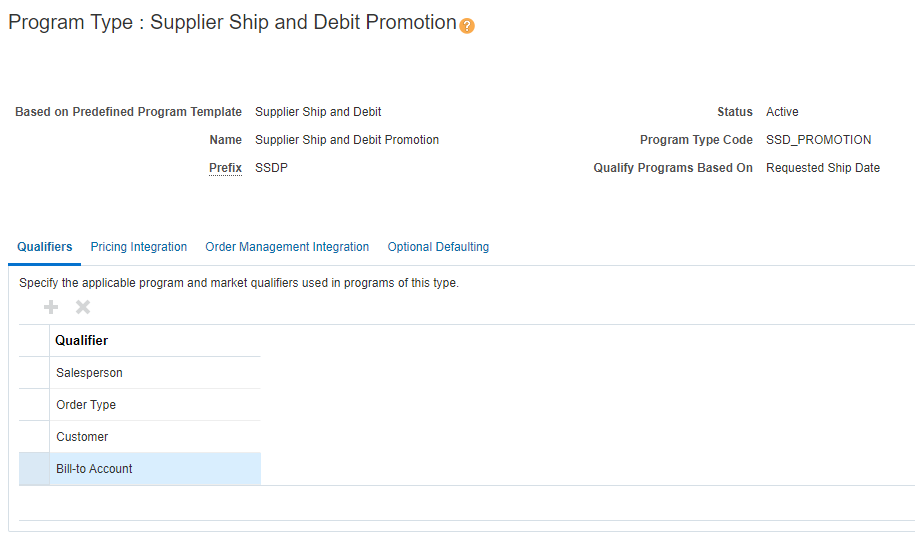
Manage Program Types - Qualifiers
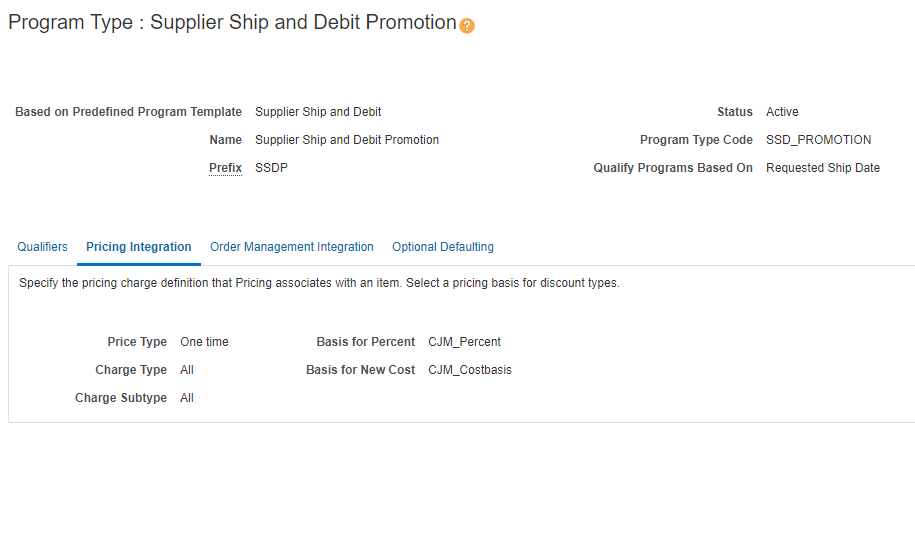
Manage Program Types - Pricing Integration
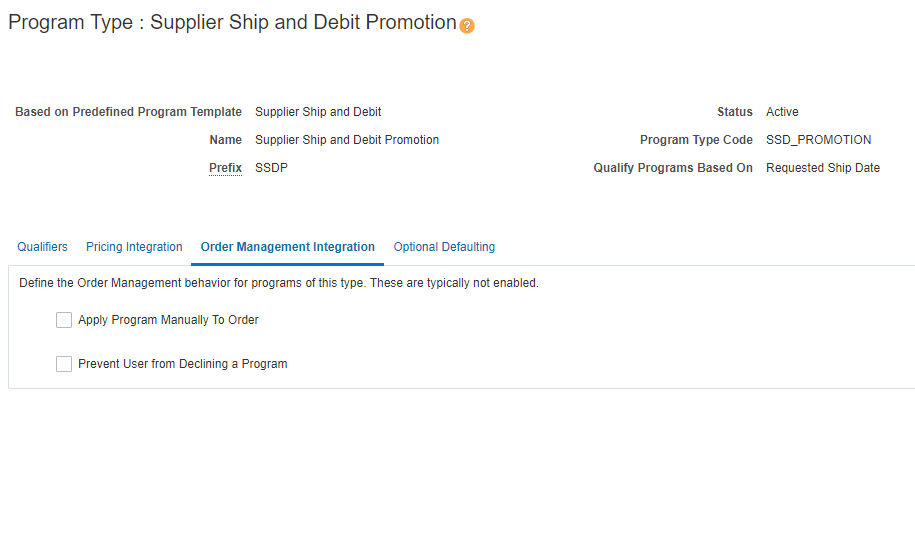
Manage Program Types - Order Management Integration
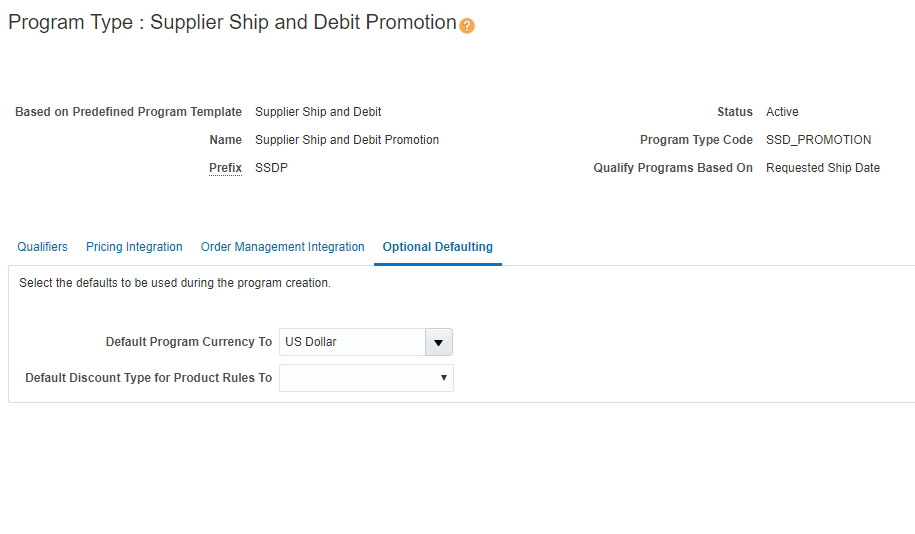
Manage Program Types - Optional Defaulting
There is a complementary REST service, Order Management/Channel Program Types to manage program types.
Steps to Enable
Use the Opt In UI to enable this feature. For instructions, refer to the Optional Uptake of New Features section of this document.
Offering: Order Management
When you opt in to use this feature, you must opt in to the functional area named: Channel Revenue Management. Opting into this functional area enables all of the Channel Revenue Management features described here.
ADDITIONAL STEPS:
Qualifiers
-
The predefined qualifiers Customer, Bill-to Account, Order Type, and Salesperson can be used in Program and Market eligibility rules. Use the Item qualifier in the Product rule to qualify the eligible product.
Pricing
- Manage Price Elements: You can now see a new predefined price element Accrual of element type Accrual. Any price elements you create must be of type Price or Cost.
- Manage Pricing Bases: To support percentage or new cost based accrual programs, you need to define an accrual basis accordingly. This type of accrual basis can be defined against a Price or Cost type element.
Tips And Considerations
When you consider what a program type is, you are trying to model different types of programs from the viewpoint of the business. A program type typically has a different set of business process guidelines associated with them. Don't get too granular with them. This can manifest itself as whether or not a type of program can be manually applied or declined by customer service representatives, because the large majority of your supplier programs should be automatically applied, and not declinable.
You’ll need different program types if you’re using different pricing bases for percent and new cost.
Key Resources
- Oracle SCM Cloud: Using Oracle Channel Revenue Management Cloud, available on the Oracle Help Center
- Oracle SCM Cloud: Implementing Oracle Channel Revenue Management Cloud, available on the Oracle Help Center
- Oracle SCM Cloud: REST API for Oracle SCM Cloud, available on the Oracle Help Center
Role Information
To use the UI for this feature, the following privileges or job roles are required:
- Privilege and Code:
- Manage Channel Program Types (CJM_MANAGE_CHANNEL_PROGRAM_TYPES_PRIV)
- Job Role Name and Code:
- Supply Chain Application Administrator (ORA_RCS_SUPPLY_CHAIN_APPLICATION_ADMINISTRATOR)
To use the REST service for this feature, the following privileges or job roles are required:
- Privilege and Code:
- Manage Channel Program Types using REST Service (CJM_MANAGE_CHANNEL_PROGRAM_TYPE_REST_SERVICE_PRIV)
- Job Role Name and Code:
- Supply Chain Application Administrator (ORA_RCS_SUPPLY_CHAIN_APPLICATION_ADMINISTRATOR)
Manage Accrual Adjustment Types and Reasons
Manage adjustment types and reasons to categorize accrual adjustments. You can use adjustment types to determine whether an adjustment increases or decreases the checkbook. You can use adjustment types and reasons to analyze accrual adjustments and identify possible business process improvements.
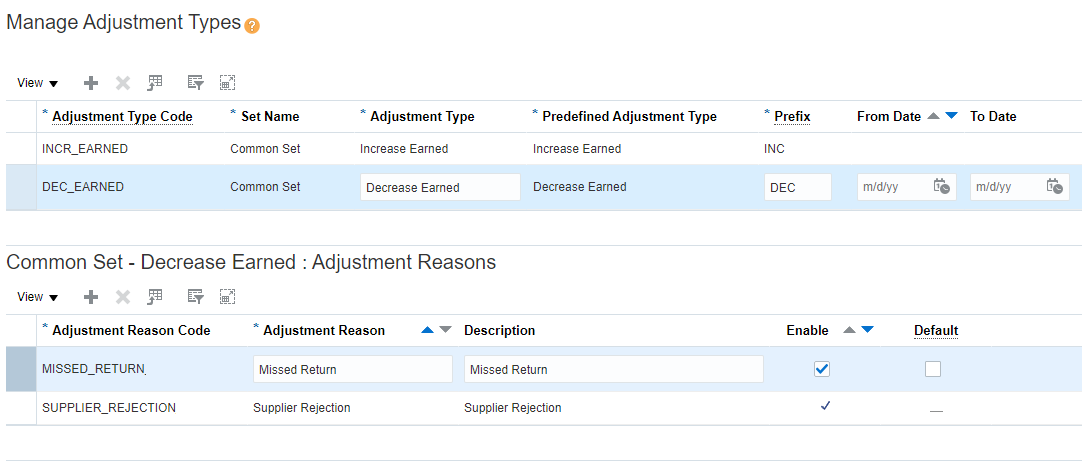
Manage Adjustment Types and Reasons
There is a complementary REST service, Order Management/Channel Adjustment Types to manage adjustment types and reasons.
Steps to Enable
Use the Opt In UI to enable this feature. For instructions, refer to the Optional Uptake of New Features section of this document.
Offering: Order Management
When you opt in to use this feature, you must opt in to the functional area named: Channel Revenue Management. Opting into this functional area enables all of the Channel Revenue Management features described here.
Tips And Considerations
Adjustment types and reasons are entirely customer configurable. Adjustment types can’t both increase and decrease earned accruals. They are directional in nature. You must keep note of this while defining them. Common adjustment reasons are Supplier Rejections, which would decrease earned accruals. Missed Accruals would usually mean an increase of earned accruals.
Key Resources
- Oracle SCM Cloud: Using Oracle Channel Revenue Management Cloud, available on the Oracle Help Center
- Oracle SCM Cloud: Implementing Oracle Channel Revenue Management Cloud, available on the Oracle Help Center
- Oracle SCM Cloud: REST API for Oracle SCM Cloud, available on the Oracle Help Center
Role Information
To use the UI for this feature, the following privileges or job roles are required:
- Privilege and Code:
- Manage Channel Adjustment Types (CJM_MANAGE_CHANNEL_ADJUSTMENT_TYPES_PRIV)
- Job Role Name and Code:
- Supply Chain Application Administrator (ORA_RCS_SUPPLY_CHAIN_APPLICATION_ADMINISTRATOR)
To use the REST service for this feature, the following privileges or job roles are required:
- Privilege and Code:
- Manage Channel Administration using REST Service (CJM_MANAGE_CHANNEL_ADMINISTRATION_REST_SERVICE_PRIV)
- Job Role Name and Code:
- Supply Chain Application Administrator (ORA_RCS_SUPPLY_CHAIN_APPLICATION_ADMINISTRATOR)
Manage Claim Types and Reasons
Manage claim types and reasons to categorize claims. You can use claim types and reasons to analyze claims and identify business process improvements.
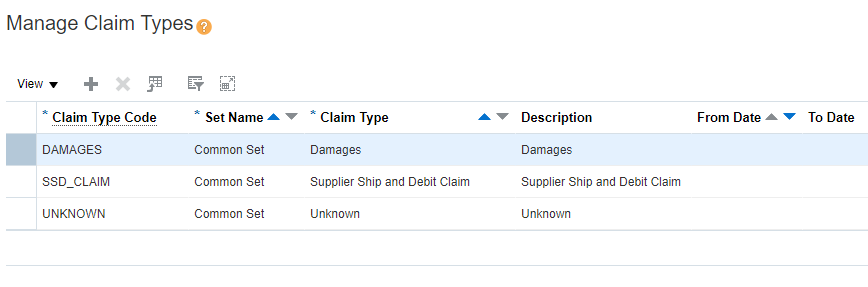
Manage Claim Types
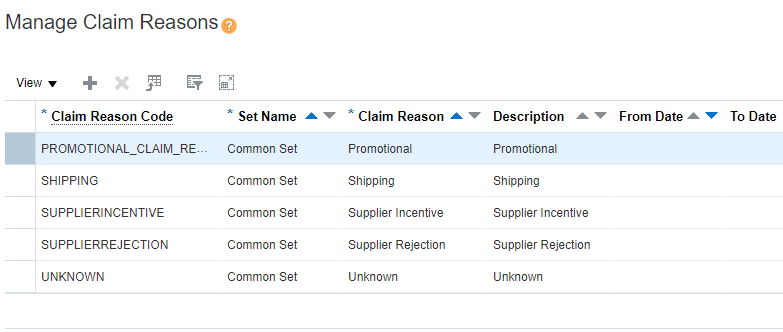
Manage Claim Reasons
There are complementary REST services, Order Management/Channel Claim Types to manage claim types.and Order Management/Channel Claim Reasons to manage claim reasons.
Steps to Enable
Use the Opt In UI to enable this feature. For instructions, refer to the Optional Uptake of New Features section of this document.
Offering: Order Management
When you opt in to use this feature, you must opt in to the functional area named: Channel Revenue Management. Opting into this functional area enables all of the Channel Revenue Management features described here.
Tips And Considerations
Claim types and reasons are entirely customer configurable and independent of each other.
Configure claim reasons to categorize the root cause of claims. Think about segmenting claims reasons that are preventable versus non-preventable. This will empower actionable downstream analytics when you analyze claim reasons and the value associated to these claims.
Key Resources
- Oracle SCM Cloud: Using Oracle Channel Revenue Management Cloud, available on the Oracle Help Center
- Oracle SCM Cloud: Implementing Oracle Channel Revenue Management Cloud, available on the Oracle Help Center
- Oracle SCM Cloud: REST API for Oracle SCM Cloud, available on the Oracle Help Center
Role Information
To use the Manage Claim Types UI, the following privileges or job roles are required:
- Privilege and Code:
- Manage Channel Claim Types (CJM_MANAGE_CHANNEL_CLAIM_TYPES_PRIV)
- Job Role Name and Code:
- Supply Chain Application Administrator (ORA_RCS_SUPPLY_CHAIN_APPLICATION_ADMINISTRATOR)
To use the Manage Claim Types REST service, the following privileges or job roles are required:
- Privilege and Code:
- Manage Channel Administration using REST Service (CJM_MANAGE_CHANNEL_ADMINISTRATION_REST_SERVICE_PRIV)
- Job Role Name and Code:
- Supply Chain Application Administrator (ORA_RCS_SUPPLY_CHAIN_APPLICATION_ADMINISTRATOR)
To use the Manage Claim Reasons UI, the following privileges or job roles are required:
- Privilege and Code:
- Manage Channel Claim Reasons (CJM_MANAGE_CHANNEL_CLAIM_REASONS_PRIV)
- Job Role Name and Code:
- Supply Chain Application Administrator (ORA_RCS_SUPPLY_CHAIN_APPLICATION_ADMINISTRATOR)
To use the Manage Claim Reasons REST service, the following privileges or job roles are required:
- Privilege and Code:
- Manage Channel Administration using REST Service (CJM_MANAGE_CHANNEL_ADMINISTRATION_REST_SERVICE_PRIV)
- Job Role Name and Code:
- Supply Chain Application Administrator (ORA_RCS_SUPPLY_CHAIN_APPLICATION_ADMINISTRATOR)
Manage claim sources based on the business flow from which a claim is sourced. You can associate the applicable settlement methods to use when a claim is interfaced to Financials Cloud to collect or pay.
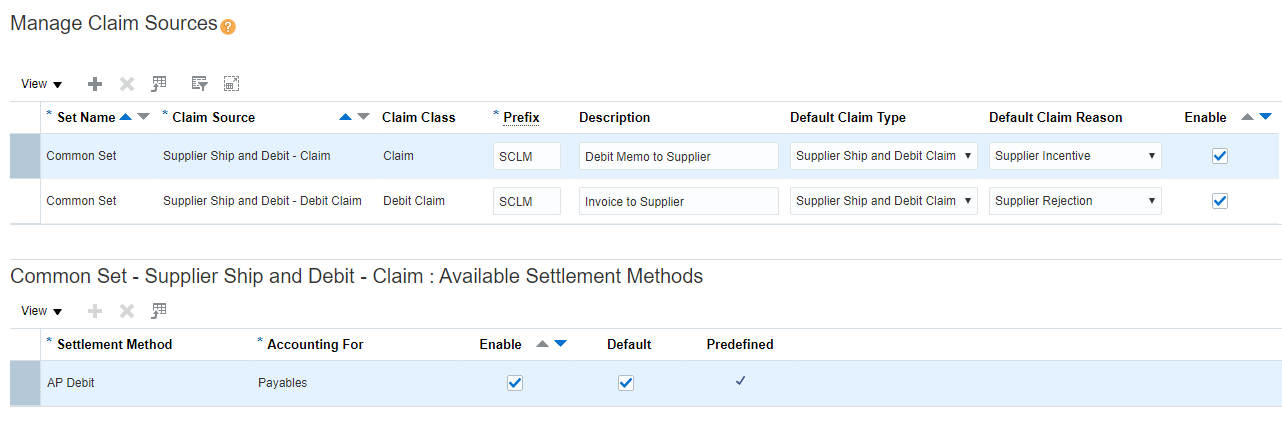
Manage Claim Sources and Settlement Methods
There is a complementary REST service, Order Management/Channel Claim Sources to manage the claim sources and settlement methods.
Steps to Enable
Use the Opt In UI to enable this feature. For instructions, refer to the Optional Uptake of New Features section of this document.
Offering: Order Management
When you opt in to use this feature, you must opt in to the functional area named: Channel Revenue Management. Opting into this functional area enables all of the Channel Revenue Management features described here.
Key Resources
- Oracle SCM Cloud: Using Oracle Channel Revenue Management Cloud, available on the Oracle Help Center
- Oracle SCM Cloud: Implementing Oracle Channel Revenue Management Cloud, available on the Oracle Help Center
- Oracle SCM Cloud: REST API for Oracle SCM Cloud, available on the Oracle Help Center
Role Information
To use the UI for this feature, the following privileges or job roles are required:
- Privilege and Code:
- Manage Channel Claim Sources (CJM_MANAGE_CHANNEL_CLAIM_SOURCES_PRIV)
- Job Role Name and Code:
- Supply Chain Application Administrator (ORA_RCS_SUPPLY_CHAIN_APPLICATION_ADMINISTRATOR)
To use the REST service for this feature, the following privileges or job roles are required:
- Privilege and Code:
- Manage Channel Administration using REST Service (CJM_MANAGE_CHANNEL_ADMINISTRATION_REST_SERVICE_PRIV)
- Job Role Name and Code:
- Supply Chain Application Administrator (ORA_RCS_SUPPLY_CHAIN_APPLICATION_ADMINISTRATOR)
Optionally Disable Configurator Model Pricing
Control pricing calls for configurations, using an Oracle Order Management Cloud system parameter. The default behavior is to always call pricing in a configuration session, to price all configurator model nodes. Optionally, you can chose to turn off pricing in a configuration session for all configurations.
To turn off pricing in Configurator:
- In the Setup and Maintenance work area, use the Manage Order Management Parameters task:
- Offering: Order Management
- Functional Area: Orders
- Task: Manage Order Management Parameters
- Select the parameter Pricing in Configurator.
- Select the value Never for the parameter.
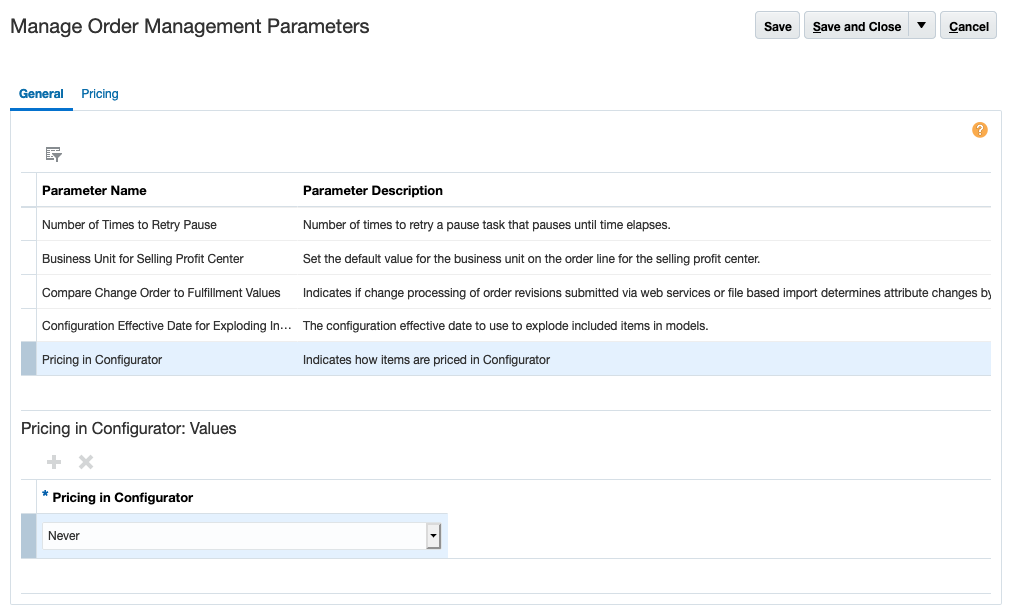
Pricing in Configurator Parameter
Steps to Enable
You don't need to do anything to enable this feature.
Key Resources
- Oracle SCM Cloud Modeling Configurations for SCM guide, available on the Oracle Help Center.
Optimize User Interface Controls for Large Option Classes
Generate a user interface which optimizes user interface controls for large option classes. User interface template maps default to item selection tables for option classes with greater than 25 items. Item Selection Table Templates allow you to scroll to or search for items within the option class.
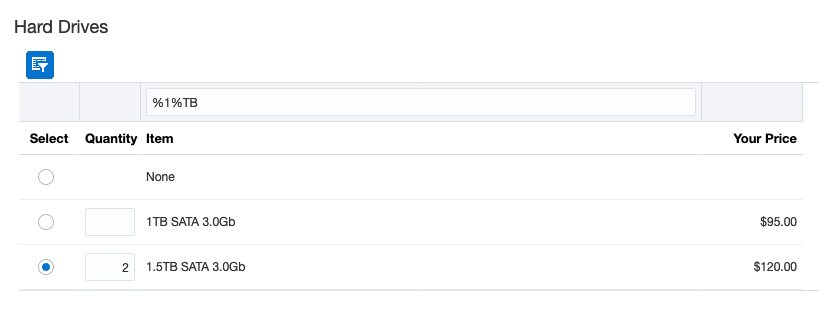
Item Selection Table with Header, Single-Select
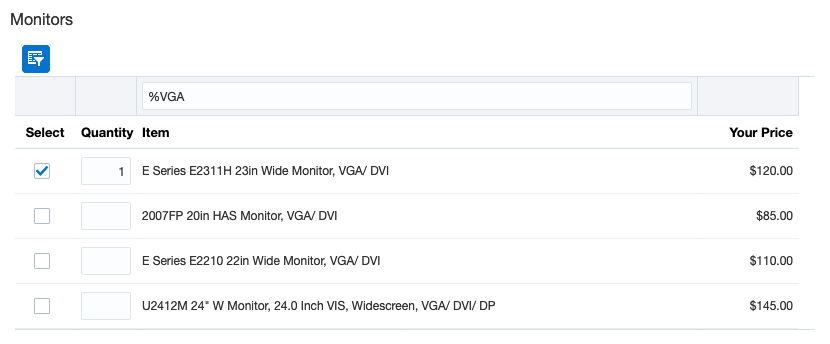
Item Selection Table with Header, Multi-Select
Steps to Enable
You don't need to do anything to enable this feature.
Key Resources
- Watch Optimize User Interface Controls for Large Option Classes Readiness Training
- Oracle SCM Cloud Modeling Configurations for SCM guide, available on the Oracle Help Center.
Optimize Validation During Order Import and Submission for Configurator Models
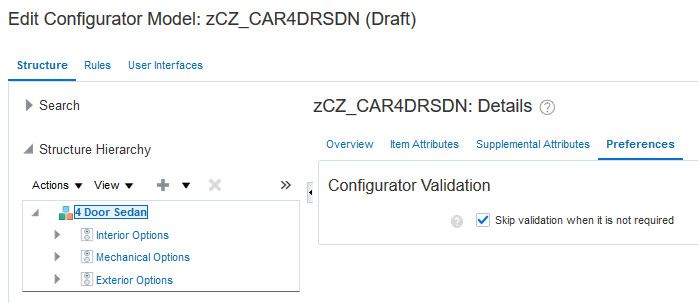
Skip configuration validation when it's not required, to optimize performance during order import, submission, and validation for configurator models. Validation of a configuration may not be required if the model definition hasn't changed since the configuration was last saved or validated. Configurator models are those defined within the Configurator Models work area that add supplemental structure, rules and UIs to imported snapshots.
Steps to Enable
To skip validation when it's not required for a particular configurator model:
- Edit the draft model.
- Select the root mode node on the Structure tab.
- From the Preferences sub-tab, select the option to Skip validation when it is not required.
Tips And Considerations
If a configurator model contains extension rules that make external calls that modify the configuration, or that are affected by any external factors that may modify configuration validation behavior, then you should not set that model to skip validation.
Key Resources
- Oracle SCM Cloud Modeling Configurations for SCM guide, available on the Oracle Help Center.
Report Real-Time Supply Availability Using a REST Service
Since its initial release, Global Order Promising has provided an interactive report that shows the remaining supply for items over time. This report illustrates the actual or planned quantity available after deducting any amount that Global Order Promising has already committed to other orders. This information can be helpful for diagnosing availability problems or identifying how different order quantities for an item might affect the availability date for future orders. With this update, you can access this report using the Available Supplies REST service.
Steps to Enable
Review the REST service definition in the REST API guides, available from the Oracle Help Center > your apps service area of interest > REST API. If you're new to Oracle's REST services you may want to begin with the Quick Start section.
Tips And Considerations
Time-phased available-to-promise (ATP) supply information is returned by this report. Capable-to-promise supply is not returned.
Resource availability and supplier capacity information are not returned by this report.
Key Resources
Role Information
Users assigned to the following job role will automatically be able to use this feature and no special privileges are required:
- Order Promising Manager (ORA_MSC_ORDER_PROMISING_MANAGER_JOB)
IMPORTANT Actions and Considerations
This section includes details about additional changes in this update that might change the way your products work.
BUGS FIXED
Return Lines Can't Be Part of a Shipment Set
Starting with update 20C, you can't create a return line that’s part of a shipment set. Make sure the attribute values that you set in the Order Management work area or send through the order import service, the Sales Orders for Order Hub resource in REST API, or file-based data import don’t specify a return line that’s part of a shipment set.
Bug reference: 30223515