
- Revision History
- Overview
- Pre-Update and Post-Update Tasks
- Optional Uptake of New Features (Opt In)
- Feature Summary
- Supply Chain Orchestration
-
- Supply Chain Orchestration
-
- Use REST API to Process Supply Request Lines that Pass Validation
- Use the Supply Chain Orchestration Work Area to Synchronize Supply Documents
- Use Your Own Group Codes to Manage Purchase Requests in Buyer Planning
- Extend Supply Chain Orchestration's Integration with Inventory Management
- Prevent Duplicate Supply Requests for Back-to-Back Sales Orders
- View Manual Reservations for Your Back-to-Back Sales Orders
- Use High-Volume Order Processing with Supply Chain Orchestration for Configured Items
-
- Supply Chain Orchestration
- Collaboration Messaging Framework
- Order Management
- IMPORTANT Actions and Considerations
This document will continue to evolve as existing sections change and new information is added. All updates appear in the following table:
| Date | Module | Feature | Notes |
|---|---|---|---|
| 15 NOV 2023 | Supply Chain Orchestration | Use Your Own Group Codes to Manage Purchase Requests in Buyer Planning | Updated document. Revised feature description. |
| 06 OCT 2023 | IMPORTANT Actions and Considerations | Updated document. Added details about Oracle Pricing algorithms. | |
| 19 SEP 2023 | IMPORTANT Actions and Considerations | Updated document. Added details about requirements to import prepriced orders. | |
| 08 SEP 2023 | IMPORTANT Actions and Considerations | Updated document. Added details about changes to Oracle Pricing algorithms. | |
| 08 SEP 2023 | Order Management | Use REST API to Apply and Release Holds | Updated document. Revised feature description. |
| 14 JUL 2023 | Order Management | Import and Fulfill Large Volumes of Sales Orders | Updated document. Revised the Steps to Enable details. |
| 21 JUN 2023 | Order Management | Selected Order Management Bug Fixes in This Update | Updated document. Added a bug fix. |
| 08 JUN 2023 | Order Management | Import and Fulfill Large Volumes of Sales Orders | Updated document. Revised the Tips and Considerations details. |
| 02 JUN 2023 | Created initial document. |
 HAVE AN IDEA?
We’re here and we’re listening. If you have a suggestion on how to make our cloud services even better then go ahead and tell us. There are several ways to submit your ideas, for example, through the Ideas Lab on Oracle Customer Connect. Wherever you see this icon after the feature name it means we delivered one of your ideas.
GIVE US FEEDBACK
We welcome your comments and suggestions to improve the content. Please send us your feedback at oracle_fusion_applications_help_ww_grp@oracle.com.
DISCLAIMER
The information contained in this document may include statements about Oracle’s product development plans. Many factors can materially affect Oracle’s product development plans and the nature and timing of future product releases. Accordingly, this Information is provided to you solely for information only, is not a commitment to deliver any material, code, or functionality, and should not be relied upon in making purchasing decisions. The development, release, and timing of any features or functionality described remains at the sole discretion of Oracle.
This information may not be incorporated into any contractual agreement with Oracle or its subsidiaries or affiliates. Oracle specifically disclaims any liability with respect to this information. Refer to the Legal Notices and Terms of Use for further information.
Pre-Update and Post-Update Tasks
Depending on the features you're using in your Cloud applications, you may be required to perform certain steps immediately before or after your quarterly update. For details of these pre-update and post-update steps and the product areas that are affected, refer to Oracle Fusion Cloud SCM: Performing Your Quarterly Update (doc ID 2337485.1) on My Oracle Support.
Optional Uptake of New Features (Opt In)
Oracle Cloud Applications delivers new updates every quarter. This means every three months you'll receive new functionality to help you efficiently and effectively manage your business. Some features are delivered Enabled meaning they are immediately available to end users. Other features are delivered Disabled meaning you have to take action to make available. Features delivered Disabled can be activated for end users by stepping through the following instructions using the following privileges:
- Review Applications Offering (ASM_REVIEW_APPLICATIONS_OFFERINGS_PRIV)
- Configure Oracle Fusion Applications Offering (ASM_CONFIGURE_OFFERING_PRIV)
Here’s how you opt in to new features:
- Click Navigator > My Enterprise > New Features.
- On the Features Overview page, select your offering to review new features specific to it. Or, you can leave the default selection All Enabled Offerings to review new features for all offerings.
- On the New Features tab, review the new features and check the opt-in status of the feature in the Enabled column. If a feature has already been enabled, you will see a check mark. Otherwise, you will see an icon to enable the feature.
- Click the icon in the Enabled column and complete the steps to enable the feature.
In some cases, you might want to opt in to a feature that's not listed in the New Features work area. Here's how to opt in:
- Click Navigator > My Enterprise > Offerings.
- On the Offerings page, select your offering, and then click Opt In Features.
- On the Opt In page, click the Edit Features (pencil) icon for the offering, or for the functional area that includes your feature.
- On the Edit Features page, complete the steps to enable the feature.
For more information and detailed instructions on opting in to new features for your offering, see Configure Offerings.
Opt In Expiration
Occasionally, features delivered Disabled via Opt In may be enabled automatically in a future update. This is known as an Opt In Expiration. If your cloud service has any Opt In Expirations you will see a related tab in this document. Click on that tab to see when the feature was originally delivered Disabled, and when the Opt In will expire, potentially automatically enabling the feature. You can also click here to see features with Opt In Expirations across all Oracle Cloud Applications.
Column Definitions:
Report = New or modified, Oracle-delivered, ready to run reports.
UI or Process-Based: Small Scale = These UI or process-based features are typically comprised of minor field, validation, or program changes. Therefore, the potential impact to users is minimal.
UI or Process-Based: Larger Scale* = These UI or process-based features have more complex designs. Therefore, the potential impact to users is higher.
Features Delivered Disabled = Action is needed BEFORE these features can be used by END USERS. These features are delivered disabled and you choose if and when to enable them. For example, a) new or expanded BI subject areas need to first be incorporated into reports, b) Integration is required to utilize new web services, or c) features must be assigned to user roles before they can be accessed.
Use REST API to Process Supply Request Lines that Pass Validation
Use the Create Supply Request REST API to process supply request lines that pass validation. If your supply request includes more than one supply request line, and if you set the AllowPartialRequestFlag attribute to Y in your REST API payload, then REST API will process the lines that pass validation. It won't process the lines that don't pass validation and mark them in error. If you set AllowPartialRequestFlag to N, and if any line in the supply request doesn't pass validation, then REST API will reject all lines in the request, including the ones that do pass validation. The default value for AllowPartialRequestFlag is N.
Use this feature to process the supply request lines that pass validation when your supply request includes more than one supply request line.
Steps to Enable
You don't need to do anything to enable this feature.
Key Resources
- See Use REST API to Manage Supply Chain Orchestration and Using Supply Chain Orchestration on Oracle Help Center.
Access Requirements
You have a couple of options for giving people access to this feature, depending on whether you're assigning them predefined job roles or your own configured job roles.
- Users who are assigned any of these predefined job roles can access this feature:
- Supply Chain Operations Manager (ORA_DOS_SUPPLY_CHAIN_OPERATIONS_MANAGER_JOB)
- Users who are assigned a configured job role that contains these privileges can access this feature:
- Process Supply Order Interface (DOS_PROCESS_SUPPLY_ORDER_INTERFACE_PRIV)
- View Supply Orders (DOS_VIEW_SUPPLY_ORDERS_PRIV)
- Manage Supply Request Exceptions (DOS_MANAGE_SUPPLY_REQUEST_EXCEPTIONS_PRIV)
- View Supply Order Exceptions and Status (DOS_VIEW_SUPPLY_ORDER_EXCEPTIONS_AND_STATUS_PRIV)
If you're maintaining your own job roles, no new privileges were introduced to support this feature.
Use the Supply Chain Orchestration Work Area to Synchronize Supply Documents
Use the Supply Chain Orchestration work area to synchronize supply documents between Oracle Supply Chain Orchestration and Oracle Procurement. Use this feature in your outside processing flow when Supply Chain Orchestration can't record a purchase requisition or purchase order because of a technical failure.
Keep your data up to date so Supply Chain Orchestration has the latest purchasing details and can accurately orchestrate supply for your sales orders.
Steps to Enable
Use the Opt In UI to enable this feature. For instructions, refer to the Optional Uptake of New Features section of this document.
Offering: Manufacturing and Supply Chain Materials Management No Longer Optional From: Update 24A
Tips And Considerations
Synchronize your purchase requisitions and purchase orders:
- Go to the Supply Orchestration work area, then click Tasks > Manage Supply Lines.
- On the Manage Supply Lines page, click a link in the Supply Order Number column, such as 300100083428746.
- On the Supply Order Details page, click Actions > Synchronize Supply Documents.
Supply Chain Orchestration will synchronize data for your purchase requisitions and purchase orders between Supply Chain Orchestration and Procurement.
Key Resources
- See Using Supply Chain Orchestration and Supply Chain Orchestration on Oracle Help Center.
Access Requirements
You have a couple of options for giving people access to this feature, depending on whether you're assigning them predefined job roles or your own configured job roles.
- Users who are assigned any of these predefined job roles can access this feature:
- Supply Chain Operations Manager (ORA_DOS_SUPPLY_CHAIN_OPERATIONS_MANAGER_JOB)
- Users who are assigned a configured job role that contains these privileges can access this feature:
- Process Supply Order Interface (DOS_PROCESS_SUPPLY_ORDER_INTERFACE_PRIV)
- View Supply Orders (DOS_VIEW_SUPPLY_ORDERS_PRIV)
- Manage Supply Request Exceptions (DOS_MANAGE_SUPPLY_REQUEST_EXCEPTIONS_PRIV)
- View Supply Order Exceptions and Status (DOS_VIEW_SUPPLY_ORDER_EXCEPTIONS_AND_STATUS_PRIV)
- Synchronize Supply Document (DOS_SYNC_SUPPLY_DOCS)
Use Your Own Group Codes to Manage Purchase Requests in Buyer Planning
Use your own group codes to manage purchase requests in the Buyer Planning work area, which is available as part of Oracle Fusion Cloud Supply Chain Planning starting in update 23D. You can already use predefined codes such as Buyer, Category, Item, Location, Supplier, and None. This new feature allows buyer planners to create their own group code, and then use it to organize purchase requests into a group and take advantage of price breaks, order minimums, and so on. Oracle Supply Chain Orchestration will send the group code for each purchase request to Oracle Fusion Cloud Procurement. Oracle Procurement will group these purchase requests into purchase requisitions according to the value in the Group Code attribute.
Use this feature to group purchase requests to take advantage of price breaks, order minimums and other constraints.
Steps to Enable
You don't need to do anything to enable this feature.
Key Resources
- See Using Supply Chain Orchestration and Supply Chain Orchestration on Oracle Help Center.
Access Requirements
You have a couple of options for giving people access to this feature, depending on whether you're assigning them predefined job roles or your own configured job roles.
- Users who are assigned any of these predefined job roles can access this feature:
- Supply Chain Operations Manager (ORA_DOS_SUPPLY_CHAIN_OPERATIONS_MANAGER_JOB)
- Users who are assigned a configured job role that contains these privileges can access this feature:
- Process Supply Order Interface (DOS_PROCESS_SUPPLY_ORDER_INTERFACE_PRIV)
- View Supply Orders (DOS_VIEW_SUPPLY_ORDERS_PRIV)
- Manage Supply Request Exceptions (DOS_MANAGE_SUPPLY_REQUEST_EXCEPTIONS_PRIV)
- View Supply Order Exceptions and Status (DOS_VIEW_SUPPLY_ORDER_EXCEPTIONS_AND_STATUS_PRIV)
If you're maintaining your own job roles, no new privileges were introduced to support this feature.
Extend Supply Chain Orchestration's Integration with Inventory Management
Oracle Supply Chain Orchestration allows you to create service mappings to integrate with Oracle Inventory Management starting in update 23B. This feature extends that capability. You can include a change entity and other attributes when you map attributes between Supply Chain Orchestration and your inventory management system. Here are the new attributes that you can map:
- SourceOrganizationId
- SourceSubinventoryCode
- DestinationLocationId
- ItemRevision
- FreightCarrierId
- ModeOfTransportLookup
- ServiceLevelLookup
- ShipmentPriorityLookup
- FirmFlag
- RepriceFlag
- AllowItemSubstitutionFlag
Use service mappings to tailor how you process the change that happens in your supply chain during order fulfillment. You can now use service mappings to integrate with inventory, procurement, or manufacturing.
Steps to Enable
You don't need to do anything to enable this feature.
Tips And Considerations
- This is an enhancement to an existing opt-in feature that is always optional.
- Make sure your integration can satisfy the validations that Inventory Management applies. Your request payload might be fine, but Inventory Management might not accept the request.
- Make sure the objects that you reference in your integration algorithm exist, especially when you query for more than one request line. If you reference an object that doesn't exist at runtime, you might encounter an error.
- If you encounter an error, fix it, then use the Supply Chain Orchestration work area to resubmit your request.
Access Requirements
Use these predefined privileges to set up this feature:
- Manage DOS Service Mappings
- Manage DOS Algorithms
- Administer Sandbox
- View Modified Data, so you can view the runtime results
Prevent Duplicate Supply Requests for Back-to-Back Sales Orders
Prevent Oracle Supply Chain Orchestration from creating excess supply when a communication problem happens. Sometimes there's a disruption that prevents Oracle Order Management from sending a supply request to Supply Chain Orchestration. The disruption might never get resolved and orchestration never receives the request, or receive it only after a long delay. If Order Management doesn't receive a reply from Supply Chain Orchestration after a specific amount time, then Order Management might resend a create, update, or cancel request, and this makes it difficult for Supply Chain Orchestration to interpret how to handle the resent request.
Use this feature to prevent Supply Chain Orchestration from creating duplicate supply requests for the same demand when there's a communication problem between Order Management and Supply Chain Orchestration.
Steps to Enable
You don't need to do anything to enable this feature.
Access Requirements
The feature is available to any privilege that can create and submit a sales order.
View Manual Reservations for Your Back-to-Back Sales Orders
You might need to manually create a reservation when Oracle Supply Chain Orchestration can't create enough supply to meet Oracle Order Management's demand. You can view these reservations in the Supply Orchestration work area:
- View details about each reservation that you create manually in a back-to-back flow for your sales order.
- View the work orders, purchase requests, and transfer orders that create supply for these reservations.
- Click a link that takes you to the work order, purchase request, or transfer order.
- View the current state of the supply lines and tracking lines for each manual reservation.
- View an icon on each supply line and tracking line to quickly determine whether you're using it for a manual reservation.
- The Supply Orchestration work area displays a manual reservation only when supply doesn't meet the requested quantity.

Get a picture of the supply that's allocated to the sales order outside of automated processing.
Steps to Enable
Use the Opt In UI to enable this feature. For instructions, refer to the Optional Uptake of New Features section of this document.
Offering: Manufacturing and Supply Chain Materials Management No Longer Optional From: Update 24A
Tips And Considerations
- Supply Chain Orchestration doesn't modify a manual reservation for a demand change that it receives from Order Management. Any necessary changes must be done manually.
- The quantity for the work order, purchase request, or transfer order might be different from the reservation's quantity or the quantity on the supply or tracking line because other requests might also use the work order, purchase request, or transfer order.
Access Requirements
The feature is available to any privilege that can create and submit a sales order.
Use High-Volume Order Processing with Supply Chain Orchestration for Configured Items
Use High-Volume Order Processing with Supply Chain Orchestration to orchestrate the supply that you need to fulfill configured items when you have a high volume of sales orders to process.
Improve performance when you need to orchestrate fulfillment for sales orders that have a lot of configured items, or your configured items are large and complex and have many child components.
Steps to Enable
You don't need to do anything to enable this feature.
Access Requirements
The feature is available to any privilege that can create and submit a sales order with configured items.
Collaboration Messaging Framework
Collaboration Messaging Framework
Define the File Extension for Your B2B Messages Delivered by Email or an Oracle Content Repository
You can specify a B2B message file extension for the email and file export delivery methods. The extension you specify is used for B2B messages delivered by email or messages retrieved from an Oracle content repository by your trading partner.
To specify a file extension:
- In the Collaboration Messaging work area, click Manage B2B Trading Partners or Manage Collaboration Messaging Service Providers in the Tasks panel tab.
- Search for the trading partner or user-defined service provider associated with the delivery method.
- Select a trading partner or user-defined service provider, and then select Actions > Edit.
- On the Edit Trading Partner page, select the Delivery Methods tab to add a new delivery method type of Email or File Export and specify the file extension. You can also add a file extension for existing delivery methods of these types.
- Enter up to four characters in the File Extension field. B2B messages will have the file extension you entered. If you don’t enter a file extension, the .zip default is used.

Email Delivery Method
You can send B2B messages to trading partners by email without triggering corporate firewall rules that strip zipped email attachments.
NOTE: This feature was also made available in the April monthly update of 23B.
Steps to Enable
You don't need to do anything to enable this feature.
Tips And Considerations
The file extension you enter doesn’t change the file compression method. The file remains a Zip compressed file, but with the file extension you entered. Your trading partner will need to change the extension back to .zip to extract B2B messages upon receipt.
Key Resources
- Configuring and Managing B2B Messaging for Oracle Applications Cloud guide available on the Oracle Help Center.
Access Requirements
Users who are assigned a configured job role that contains these privileges can access this feature:
- Manage B2B Trading Partners (CMK_B2B_TRADING_PARTNERS_PRIV)
- Manage Service Provider (CMK_MANAGE_SERVICE_PROVIDER_PRIV)
These privileges were available prior to this update.
Retransmit Unsuccessful B2B Messaging-Enabled Purchase Orders
You can get a list of untransmitted purchase orders and either retransmit them in bulk or download the list for further review. To generate the list, use the new Retransmit Purchase Orders dialog box on the Manage Collaboration Messaging History page. You invoke the new dialog box by clicking on a warning icon or from the Actions menu on that page.
You'll see a warning icon on the Manage Collaboration Messaging History page if there are purchase orders that B2B message transmission wasn't initiated for when you select one of these document types:
- Purchase Order - Outbound
- Purchase Order Change - Outbound
- Purchase Order Cancellation - Outbound
When you click the warning icon, a warning message appears.

Retransmit Warning Icon and Message
If you click Yes, the Retransmit Purchase Orders dialog box appears. Or you can select Actions > Retransmit on the Manage Collaboration Messaging History page to invoke the dialog box.

Retransmit Purchase Orders Dialog Box
The From Date and Orders to Retransmit fields are required. The other fields are optional.
The Orders to Retransmit field includes these options:
| Menu Option |
Explanation |
|---|---|
| Orders for which B2B transmission wasn't initiated |
Retransmits all untransmitted purchase orders, including prior untransmitted versions |
| Orders with the B2B messaging status of Terminated |
Retransmits purchase orders that have a status of Terminated |
| All |
Retransmits all untransmitted purchase orders and those with a status of Terminated |
Click Search on Retransmit Purchase Orders dialog box to see the number of orders found. You can download the list of purchase orders found or initiate retransmission of the orders.
To set the minimum time an order can be in process before you can terminate processing:
-
In the Setup and Maintenance work area, go to the Manage Collaboration Messaging Configuration task in the Manufacturing and Supply Chain Materials Management offering.
-
Enter a value in the Minimum In-Process Duration field on the General Setup tab of the Manage Collaboration Messaging Configuration page. The value you enter determines the minimum time an order can be in process before you can terminate it. The default value is 60 minutes.
The Terminate Processing option is available on the Actions menu.
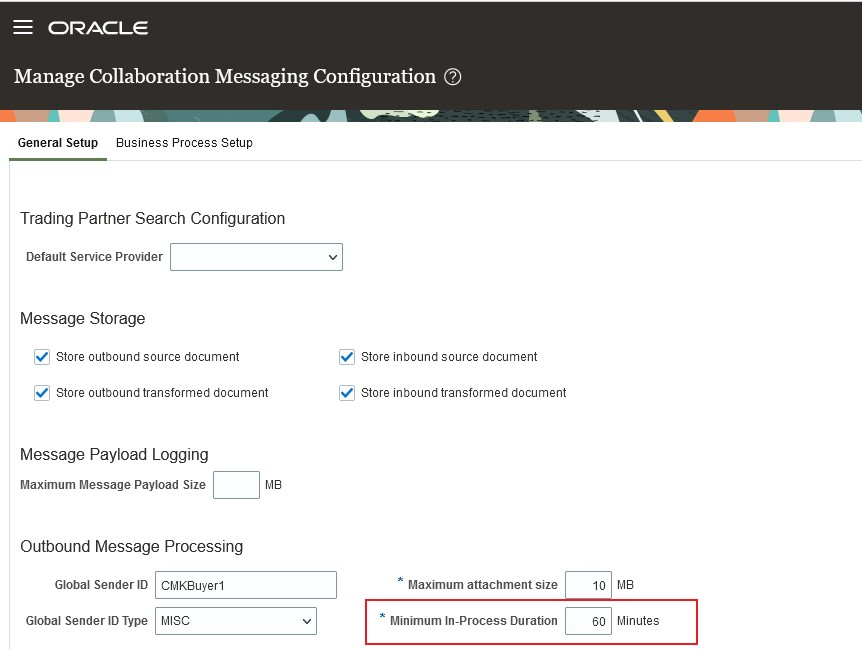
Minimum In-Process Duration
NOTE: This feature was also made available in the May monthly update of 23B.
You can now review untransmitted purchase orders with the option to transmit them in bulk. This feature reduces any potential interruption of B2B message exchange with your suppliers.
Steps to Enable
You don't need to do anything to enable this feature.
Key Resources
- Configuring and Managing B2B Messaging for Oracle Applications Cloud guide available on the Oracle Help Center.
Access Requirements
Users who are assigned a configured job role that contains these privileges can access this feature:
- Manage Collaboration Messaging Configuration (CMK_MANAGE_COLLAB_MESG_CONFIG_PRIV)
- Manage Collaboration Messaging History (CMK_COLLAB_MESG_HISTORY_PRIV)
- Extensible Data Model Used for Electronic Messaging Profile (PO_ELECTRONIC_COMM_DATA_MODEL)
- These privileges were available prior to this update.
Specify the Sender's Email Address for Outbound B2B Messages
You can configure an email address for the sender of your B2B documents instead of using the application-generated one. And you can monitor the inbox of the email address you configured for replies.
Your trading partners can add the sender email address to their approved list of emails to ensure continued communication.
NOTE: This feature was also made available in the April monthly update of 23B.
Steps to Enable
In Setup and Maintenance, select the Manage Collaboration Messaging Configuration task.
- In the Setup and Maintenance work area, go to the Manage Collaboration Messaging Configuration task in the Manufacturing and Supply Chain Materials Management offering.
- Select the Business Process Setup tab on the Manage Collaboration Messaging Configuration page.
- In the Collaboration Business Process section, select the business process that includes the document you want to transmit using the new sender email address you configured.
- In the Configure Collaboration Documents section, select the outbound document.

Business Process and Outbound Document Selection
- Click the Configure Additional Details button and enter the sender's email address in the dialog box. This email address is used as the sender for all outbound B2B messages associated with the selected document.

Configure Additional Details Dialog Box
Tips And Considerations
For best practices on email security, refer to the Configure Email Security documentation available on the Oracle Help Center.
Key Resources
- Configuring and Managing B2B Messaging for Oracle Applications Cloud guide available on the Oracle Help Center.
Access Requirements
Users who are assigned a configured job role that contains this privilege can access this feature:
- Manage Collaboration Messaging Configuration (CMK_MANAGE_COLLAB_MESG_CONFIG_PRIV)
This privilege was available prior to this update.
Import and Fulfill Large Volumes of Sales Orders
Improve the performance of your order to cash flow when you need to import and fulfill a large number of sales orders, including orders that have a wide range of order lines.
Use this feature so you can:
- Pick, release, and confirm shipment for a large volume of sales orders. Reduce the need to manually move the shipped order line to the next step.
- Invoice a large volume of sales order together as a group so that you can reduce delays in getting paid from invoices.
- Use an updated version of the Import Sales Order scheduled process to improve performance and reduce the time it takes to import a large volume of sales orders.
- Use updated pricing algorithms to efficiently price your sales orders.
- Use Global Order Promising with Order Management to efficiently promise and fulfill a large volume of sales order.
- Allows your business to receive, import, and fulfill a large volume of sales orders.
- Minimizes the need for an Order Manager to manually intervene and take corrective action on the sales order.
Steps to Enable
Use the Opt In UI to enable this feature. For instructions, refer to the Optional Uptake of New Features section of this document.
Offering: Order Management
You can't opt out of the Import and Fulfill Large Volumes of Sales Order feature after you opt in. After you opt in, you're committed to using the feature.
After you opt in to the Import and Fulfill Large Volumes of Sales Order feature, set up the Process Responses from Order Fulfillment scheduled process so that it runs on a schedule.
Tips And Considerations
Order Import
- You can't create a customer during import. If you need to create a customer, then you must use Customer Management to do it during your set up.
- You can't use a pretransformation rule, transformation rule, or posttransformation rule on a sales order that you import.
- Use the order management extension to set default values for attributes on a sales order or to add an order line to your sales order.
- We recommend that you specify the orchestration process on the order line in you import payload. Don't use an assign and launch rule to do this.
Pricing
- You need to use the latest pricing algorithms. Do the Pre-Update and Post-Update steps that are described in the Pricing section of Oracle Fusion Cloud SCM: Performing Your Quarterly Update.
Scheduling
- We recommend that you enable the High Volume Order Promising feature in Global Order Promising.
Shipment
Here's how shipping works when you use this feature:
- You successfully ship the order line.
- Oracle Shipping runs the Manage Shipment Interface scheduled process to add shipment details to an interface table, and then runs the Process Responses from Order Fulfillment scheduled process.
- Process Responses from Order Fulfillment sends the shipment details that are in the interface tables to Order Management.
- The Manage Shipment Interface scheduled process runs the Process Responses from Order Fulfillment scheduled process. This flow doesn't run the Send Shipment Advice scheduled process to reduce the total number of scheduled processes that are running.
- If the scheduled process can't process a shipment from the interface table, and if Oracle Shipping already pick released and confirmed the shipment, then the order line in Order Management will have an error message.
Invoice
Here's how it works.
- You successfully bill the order line.
- The Notify Feeder System of Receivables Transactions scheduled process adds billing details to the interface table, then runs the Process Responses from Order Fulfillment scheduled process.
- Process Responses from Order Fulfillment sends billing data from the interface tables to Order Management.
- The Import Receivables Transactions Using AutoInvoice scheduled process creates invoices in Oracle Receivables from sales order data, and then runs the Notify Feeder System of Receivables Transactions only one time. This is done to reduce the total number of scheduled processes that are running.
- If the scheduled process can't process a billing from the interface table, and if Oracle Receivables already billed the order, then the order line in Order Management will have an error message.
Orchestration Process
- We recommend that you use the predefined DOO_ScheduleShipInvoice orchestration process. Use it to efficiently schedule your sales orders, reliably ship orders from your warehouse, and create invoices for the items that you ship to your customer.
- You can no longer override the fulfillment line status in your orchestration process after you ship or bill the line. Order Management will set the status to Shipped or Billed, and you can't change that value.
- You can no longer add a parallel step or a subprocess step to your orchestration process.
What Happens if There's an Error During Order Fulfillment?
- If the Process Responses from Order Fulfillment scheduled process can't successfully process the shipment or billing data in the interface table, then it marks each record that it can't process with an error.
- This might happen for a variety of reasons, such as the fulfillment line in Order Management isn't in a wait state so it can't process the shipment response, the scheduled process processes more than one shipment or billing detail for the same line in quick succession, the server is slow and times out, and so on.
- To fix this problem, set up Process Responses from Order Fulfillment so it runs on a schedule at regular intervals. Sometimes problems resolve themselves. Running it again might just resolve the problem. You can also run it manually while troubleshooting. If you do, set these parameters.
- Task Type. For example, if you select Shipment, then the scheduled process will process data for each shipment line that Oracle Shipping has picked, released, and confirmed.
- Record Set. Set it to Process Records That Failed.
Access Requirements
Make sure whatever role you use has the DOO_PROCESS_FULFILLMENT_RESPONSE_PRIV privilege. You need it to run the Process Fulfillment Response scheduled process.
Use REST API to Apply and Release Holds
Use the applyHold action and the releaseHold action on the Sales Orders For Order Hub REST API to apply and release holds on sales orders and fulfillment lines. You can improve performance and reliability when you apply and release a hold through any channel, including the Order Management work area, REST API, or a web service. Enable the FOM_NEW_HOLDS_PROCESSING profile and you will notice a significant improvement even if you don't use REST API.
Use the salesOrdersForOrderHub REST API to:
-
Apply and release holds on the order header entity and the fulfillment line entity in your REST API payload.
-
Specify the order line in your payload. Order Management applies or releases the hold on the fulfillment lines for the order line. It doesn't apply or release the hold on the order line.
-
Apply and release a hold on a draft or submitted sales order.
-
Apply and release holds on one or more sales orders in a single payload.
-
Release a hold that you applied on the order header or fulfillment line through some other channel, such as through the View Order Page or a fulfillment view in the Order Management work area, or or an order header hold that you applied through a SOAP service.
Steps to Enable
Review the REST service definition in the REST API guides to leverage (available from the Oracle Help Center > your apps service area of interest > APIs & Schema). If you are new to Oracle's REST services you may want to begin with the Quick Start section.
To use this feature, you must enable the FOM_NEW_HOLDS_PROCESSING profile option:
- Go to the Setup and Maintenance work area, then go to the task.
- Offering: Order Management
- Functional Area: Orders
- Task: Manage Administrator Profile Values
-
Set the value of the FOM_NEW_HOLDS_PROCESSING profile to Yes.
Tips And Considerations
-
Order Management will process a hold request only when the orchestration process that's processing the order line is on a wait step. If the orchestration process isn't on a wait step, then Order Management will reject the hold request.
-
You can't apply a hold when you create a new sales order. You can apply a hold only on a draft order or a submitted order that already exists in Order Management.
-
If you apply a hold on an order line through a SOAP service, then you can't use REST API to release it.
Key Resources
- See the Use REST API to Apply and Release Holds topic on Oracle Help Center for important implementation details.
- Go to REST API for Oracle Supply Chain Management Cloud, then expand Order Management > Sales Orders for Order Hub.
Access Requirements
Users who are assigned a configured job role that contains these privileges can access this feature to apply a hold:
- Create Sales Orders Using REST Services (FOM_SALES_ORDER_REST_POST_PRIV)
- Manage Orchestration Order Modification (DOO_MANAGE_ORCHESTRATION_ORDER_MODIFICATION_PRIV)
- Apply Holds (FOM_APPLY_UPDATE_HOLDS_PRIV)
Users who are assigned a configured job role that contains these privileges can access this feature to release a hold:
- Create Sales Orders Using REST Services (FOM_SALES_ORDER_REST_POST_PRIV)
- Manage Orchestration Order Modification (DOO_MANAGE_ORCHESTRATION_ORDER_MODIFICATION_PRIV)
- Release Holds (FOM_RELEASE_HOLDS_PRIV)
This Create Sales Orders Using REST Services privilege was available prior to this update. The Apply Holds and Release Holds privileges are new in this update.
Selected Order Management Bug Fixes in This Update
This update includes some bug fixes that can change the way Oracle Order Management works. This isn't a full list of all the bug fixes in this update. This list includes the bug fixes that can cause a noticeable change in application behavior.
Use Order Header Total Type and Line Charge Type in Approval Rules
Before update 23C, you couldn't use the Order Header Total Type attribute or the Line Charge Type attribute as part of a condition in an approval rule. Starting in update 23C, now you can. Assume you need to assign a sales order to a supervisor to review and approve when the total net price is greater than a specific amount. You can set up an approval rule to do this:
If the Order Header Total Type attribute is equal to Total Net Price and the Order Total Amount attribute is greater than 1 million, then assign to supervisors.
For example:

For details, see Overview of Using Business Rules With Order Management.
Oracle reference: 31657015
Remove Redundant Connectors from Trigger Points
Before update 23C, you could use the Manage Business Event Trigger Points page in the Setup and Maintenance work area to add these predefined connectors to a trigger point:
- Fusion-Shipment
- Fusion-Reservation
- Fusion-Invoice
- Fusion-Return
- DOO_BUSINESS_EVENT_NOTIFICATION
- DOO_Fusion-Procurement
- DOO_Fusion-Supply
- DOO_Fusion-InsallBase
- DOO_Fusion-Subscription
Oracle Applications already use these predefined connectors. You don't need to manually add them. If you did manually add one of them to a trigger point, then you created redundant processing, the event failed, and the failures added up over time. The Recover Errors scheduled process attempted to recover them, and that resulted in degraded performance.
After update 23C, we removed these predefined connectors from the pick list that you see when you select the Connector Name attribute, so you can no longer add them on the Manage Business Event Trigger Points page. The update will also remove any of these predefined connectors that you added in an earlier release. You don't need to take any other actions to implement this improvement.
For details about trigger points, see Overview of Sending Notifications from Order Management to Other Systems.
Oracle reference: 34981109
Use More Lookups in Your REST API Payloads
Before update 23C, these lookup types had their REST Access Secured attribute set to Secure:
- DOO_ADJUSTMENT_TYPE
- DOO_HLD_RELEASE_REASON
- DOO_JEOPARDY_PRIORITY_CODE
- DOO_LEAD_TIME_UOM
- DOO_LINE_CATEGORY
- DOO_MSG_REQUEST_FUNCTION
- DOO_RETURN_REASON
- DOO_SCHEDULE_REASON
- DOO_SUBSTITUTION_REASON
- ORA_DOO_BILLING_FREQUENCY_CODE
- ORA_DOO_BILLING_PLAN_TYPE_CODE
- ORA_DOO_DEMAND_CLASS
- ORA_DOO_LINE_TYPES
- ORA_DOO_ORDER_TYPES
- ORA_DOO_RETURN_LINE_TYPES
- ORA_DOO_SUPPLY_STATUS_CODE
- ORA_DOO_TP_STATUS
- ORA_DOO_TRADE_COMPLIANCE_TYPE
- ORA_DOO_TRADE_CONTROL_CODE
- ORA_DOO_VALIDATION_RESULT
- ORA_FOM_ADJUSTMENT_REASON_CODE
- ORA_FOM_AUTHORIZATION_STATUS
- ORA_FOM_INCENT_DECLINE_REASON
- ORA_FOM_INCENTIVE_STATUS
- ORA_FOM_INCENTIVE_SUB_TYPES
- ORA_FOM_INCENTIVE_TYPES
- ORA_FOM_PAYMENT_METHOD
- ORA_FOM_USER_APPLIED_INCENTIVE
If you wanted to reference one of them in your REST API payload, you first needed to have your security administrator assign a security policy for the lookup type to a role and assign that role.
Starting in update 23C, these lookup types have their REST Access Secured attribute set to Authenticated, which means you only need the authenticated role to access them. If you already have the authenticated role, then you don't need to contact your security administrator to access them.
For details, see Manage Lookups in Order Management.
Oracle reference: 34992630
Steps to Enable
You don't need to do anything to enable this feature.
View Channel Programs and Claims Across Business Units
Search and view channel programs and claims across business units, and filter by business unit. Default the business unit when creating channel programs and claims based on the Default Business Unit profile option, or when viewing the customer checkbook.

Customer Programs Across Business Units
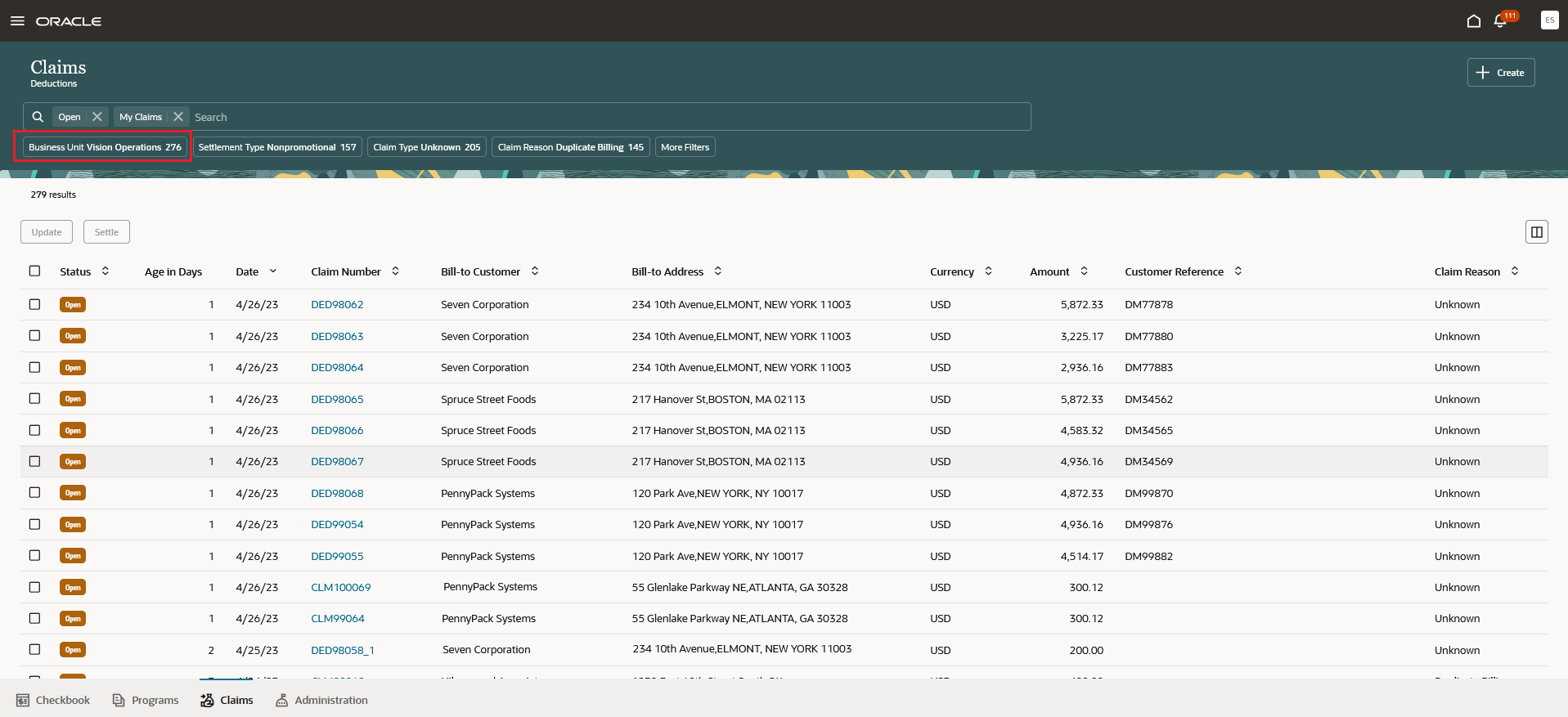
Customer Claims Across Business Units
Improves the productivity of users with access to more than one business unit.
Steps to Enable
Use the Opt In UI to enable this feature. For instructions, refer to the Optional Uptake of New Features section of this document.
Offering: Order Management
If you have already implemented Customer Claims in Redwood, then:
- Run the scheduled process ESS job to create index definition and perform initial ingest to OSCS, for the claim index, fa-fscm-customerclaim.
If you haven't implemented Customer Claims in Redwood, then refer to the Roadmap for Setting Up Deductions and Settlement chapter in the implementation guide, Implementing Channel Revenue Management.
If you have already implemented Customer Programs, then:
- Run the scheduled process ESS job to create index definition and perform initial ingest to OSCS, for the program index, fa-cjm-customer-programs.
If you haven't implemented Customer Programs, then refer to the Roadmap for Setting Up Customer Promotions chapter in the implementation guide, Implementing Channel Revenue Management.
Tips And Considerations
Fusion: How to Specify Default Business Unit For a User in Fusion Payables (Doc ID 1380204.1)
Key Resources
- For more information on Channel Revenue Management, refer to the Oracle Cloud Readiness content for Order Management.
- For more information on the Channel Revenue Management Integration with Receivables, refer to the Oracle Cloud Readiness content for Financials.
- Oracle SCM Cloud: Using Oracle Channel Revenue Management Cloud, available on the Oracle Help Center.
- Oracle SCM Cloud: Implementing Oracle Channel Revenue Management Cloud, available on the Oracle Help Center.
- Oracle SCM Cloud: REST API for Oracle SCM Cloud, available on the Oracle Help Center.
Access Requirements
Users who are assigned a configured job role that contains these privileges can access this feature:
- Manage Customer Programs (CJM_MANAGE_CUSTOMER_PROGRAMS_PRIV)
- Manage Customer Claims (CJM_MANAGE_CUSTOMER_CLAIMS_PRIV)
- Create Customer Claims (CJM_CREATE_CUSTOMER_CLAIMS_PRIV)
- View Customer Checkbook (CJM_VIEW_CUSTOMER_CHECKBOOK_PRIV)
These privileges were available prior to this update.
Add Notes for Customer Programs and Claims in Redwood Pages
Use this feature to add notes capturing additional information about customer programs and claims in the Redwood user interface.
Capture findings from claim investigations. Capture program negotiations, internal discussions, and any decisions for future reference.

Notes in Customer Program
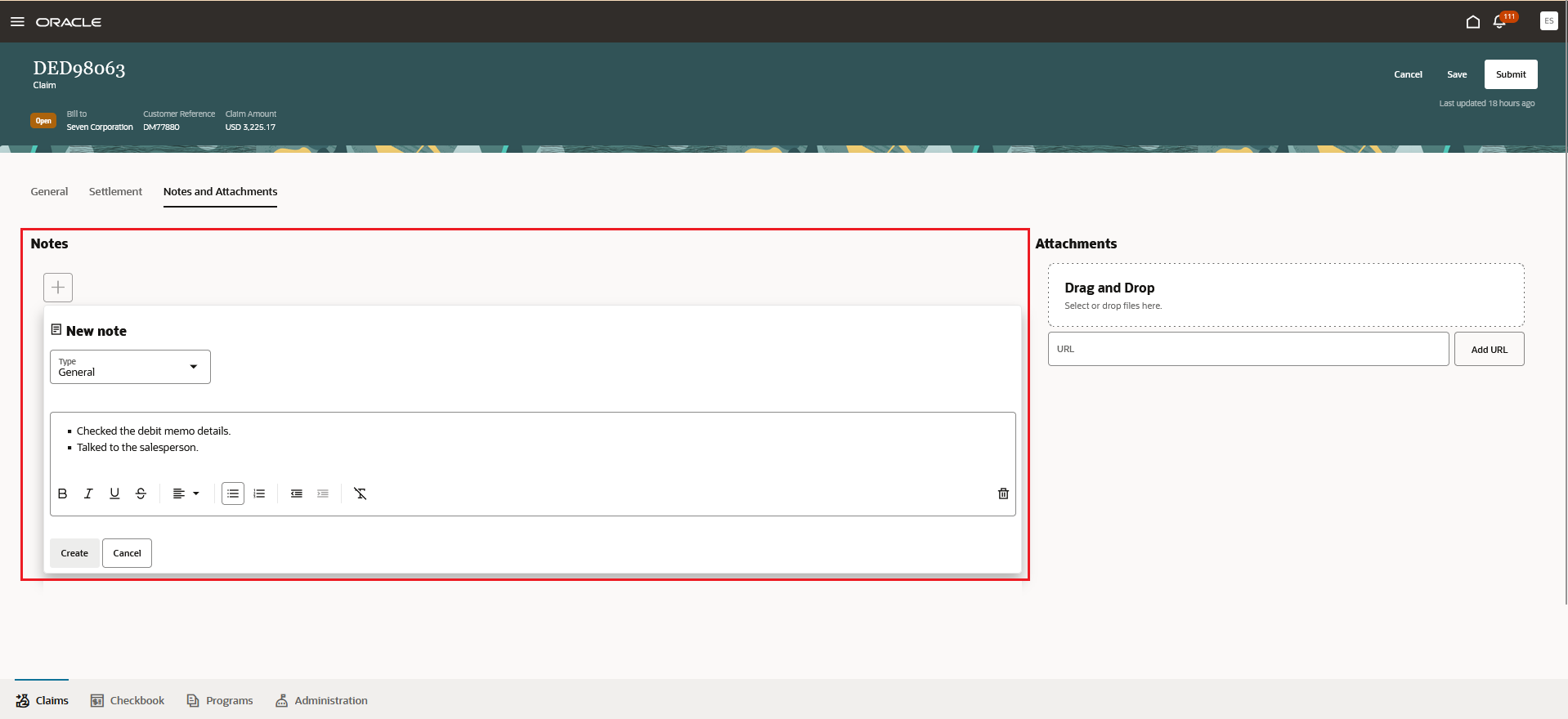
Notes in Customer Claim
Improves productivity in recalling prior activity regarding a channel program or claim.
Steps to Enable
Use the Opt In UI to enable this feature. For instructions, refer to the Optional Uptake of New Features section of this document.
Offering: Order Management
If you have already implemented Customer Claims in Redwood, then you don't need to do anything to enable this feature.
If you haven't implemented Customer Claims in Redwood, then refer to the Roadmap for Setting Up Deductions and Settlement chapter in the implementation guide, Implementing Channel Revenue Management.
If you have already implemented Customer Programs, then you don't need to do anything to enable this feature.
If you haven't implemented Customer Programs, then refer to the Roadmap for Setting Up Customer Promotions chapter in the implementation guide, Implementing Channel Revenue Management.
Tips And Considerations
The following features are not supported in the new Redwood Rich Text Format component, if you have previously created Notes using ADF:
- Colors,
- Fonts,
- Search by author, note, and create date range,
- Saved searches,
- Filtering by type and date buckets. For example, All/Today/Since yesterday/Last 7 days/Last 30 days.
Key Resources
- For more information on Channel Revenue Management, refer to the Oracle Cloud Readiness content for Order Management.
- For more information on the Channel Revenue Management Integration with Receivables, refer to the Oracle Cloud Readiness content for Financials.
- Oracle SCM Cloud: Using Oracle Channel Revenue Management Cloud, available on the Oracle Help Center.
- Oracle SCM Cloud: Implementing Oracle Channel Revenue Management Cloud, available on the Oracle Help Center.
- Oracle SCM Cloud: REST API for Oracle SCM Cloud, available on the Oracle Help Center.
Access Requirements
Users who are assigned a configured job role that contains these privileges can access this feature:
- Manage Customer Programs (CJM_MANAGE_CUSTOMER_PROGRAMS_PRIV)
- Manage Customer Claims (CJM_MANAGE_CUSTOMER_CLAIMS_PRIV)
- View Only Activity (ZMM_VIEW_ONLY_ACTIVITY_PRIV)
These privileges were available prior to this update.
Creates and administers customer trade programs, which optimizes the execution and impact of programs and promotions across the supply chain.
Specify an Alternate Beneficiary for a Customer Accrual
When creating a customer rebate program, you can specify an alternate beneficiary to whom the accrued earnings will be paid. The beneficiary can be different from the eligible customer on the sales transaction. Use this feature to model situations, for example royalty payments, where the payout party is different from the customer on the sales transaction.
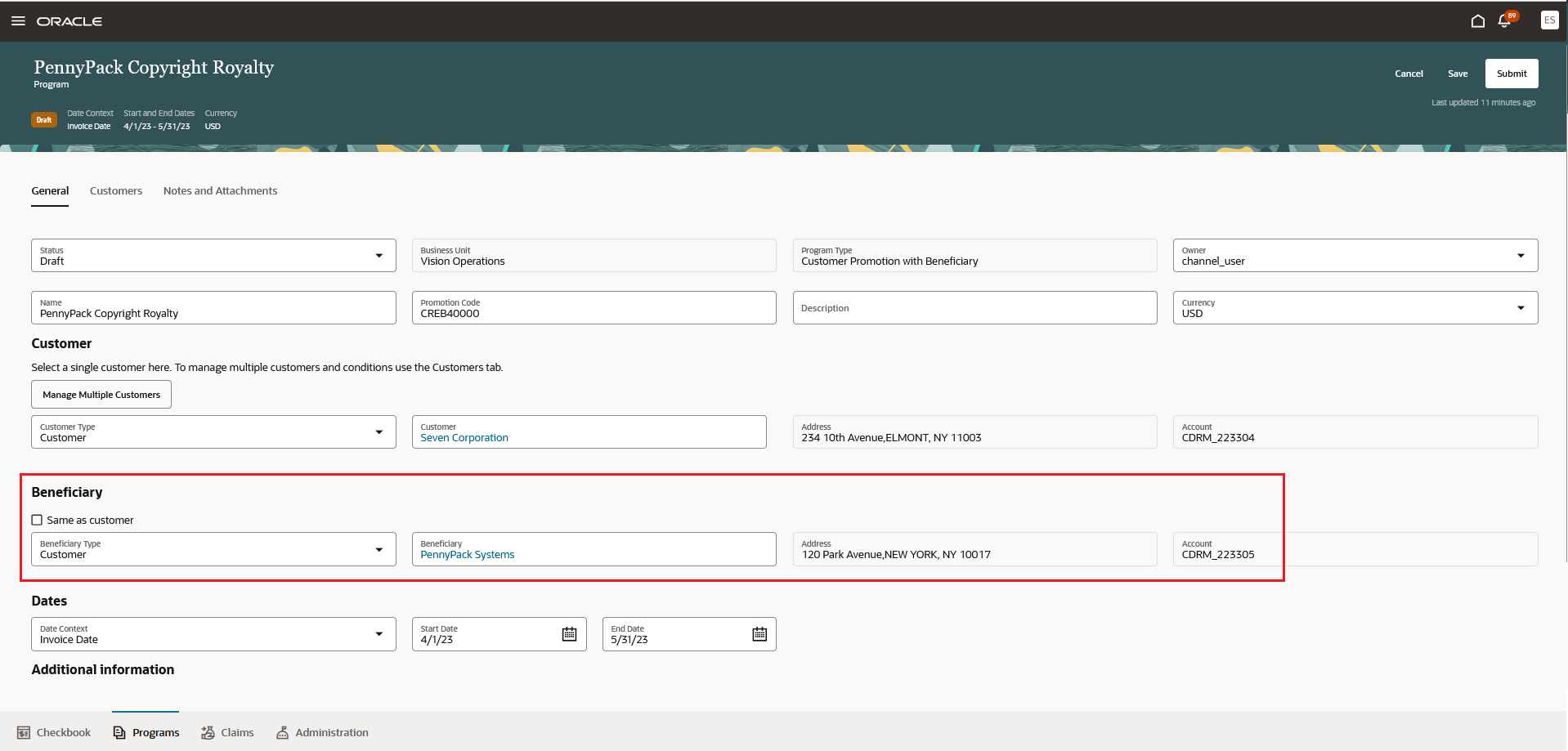
Beneficiary on Customer Program
Ability to define and pay royalties.
Steps to Enable
Use the Opt In UI to enable this feature. For instructions, refer to the Optional Uptake of New Features section of this document.
Offering: Order Management
If you have already implemented Customer Programs, then you don't need to do anything to enable this feature.
If you haven't implemented Customer Programs, then refer to the Roadmap for Setting Up Customer Promotions chapter in the implementation guide, Implementing Channel Revenue Management.
Tips And Considerations
You must create an alternate beneficiary as a customer account in Fusion Financials.
Key Resources
- For more information on Channel Revenue Management, refer to the Oracle Cloud Readiness content for Order Management.
- For more information on the Channel Revenue Management Integration with Receivables, refer to the Oracle Cloud Readiness content for Financials.
- Oracle SCM Cloud: Using Oracle Channel Revenue Management Cloud, available on the Oracle Help Center.
- Oracle SCM Cloud: Implementing Oracle Channel Revenue Management Cloud, available on the Oracle Help Center.
- Oracle SCM Cloud: REST API for Oracle SCM Cloud, available on the Oracle Help Center.
Access Requirements
Users who are assigned a configured job role that contains this privilege can access this feature:
- Manage Customer Programs (CJM_MANAGE_CUSTOMER_PROGRAMS_PRIV)
This privilege was available prior to this update.
Improve Usability of Program Pages
Users with the View Customer Programs privilege will see the Customer Channel Management icon on the Fusion home page.
Additionally, the Program page has been enhanced to:
- Streamline creation of a program to a single page.
- Display timestamp, as contextual information in the page header, upon saving the program.
- Display an acknowledgment message, that disappears without user intervention, upon submitting, updating, or terminating programs.
Improves the usability of program pages.
Steps to Enable
Use the Opt In UI to enable this feature. For instructions, refer to the Optional Uptake of New Features section of this document.
Offering: Order Management
If you have already implemented Customer Programs, then you don't need to do anything to enable this feature.
If you have not implemented Customer Programs, then refer to the Roadmap for Setting Up Customer Promotions chapter in the implementation guide, Implementing Channel Revenue Management.
Tips And Considerations
Note: The Deductions and Settlement icon and the Customer Channel Management icon is visible for users having the Manage Customer Claims privilege and the View Customer Programs privilege.
Key Resources
- For more information on Channel Revenue Management, refer to the Oracle Cloud Readiness content for Order Management.
- For more information on the Channel Revenue Management Integration with Receivables, refer to the Oracle Cloud Readiness content for Financials.
- Oracle SCM Cloud: Using Oracle Channel Revenue Management Cloud, available on the Oracle Help Center.
- Oracle SCM Cloud: Implementing Oracle Channel Revenue Management Cloud, available on the Oracle Help Center.
- Oracle SCM Cloud: REST API for Oracle SCM Cloud, available on the Oracle Help Center.
Access Requirements
Users who are assigned a configured job role that contains these privileges can access this feature:
- Manage Customer Programs (CJM_MANAGE_CUSTOMER_PROGRAMS_PRIV)
- View Customer Programs (CJM_VIEW_CUSTOMER_PROGRAMS_PRIV)
These privileges were available prior to this update.
Provides research, administration, analysis, and settlement functionalities to quickly resolve deductions and settle claims, improving customer relationships and overall financial performance.
Update and Settle Multiple Claims Using Redwood Pages
Use this feature to quickly and efficiently manage multiple deductions in the Redwood user interface. Select and update multiple open claims, deductions, and overpayments at a time. Resolve and settle multiple related open deductions and manual claims simultaneously.

Mass Update to Reassign Claims
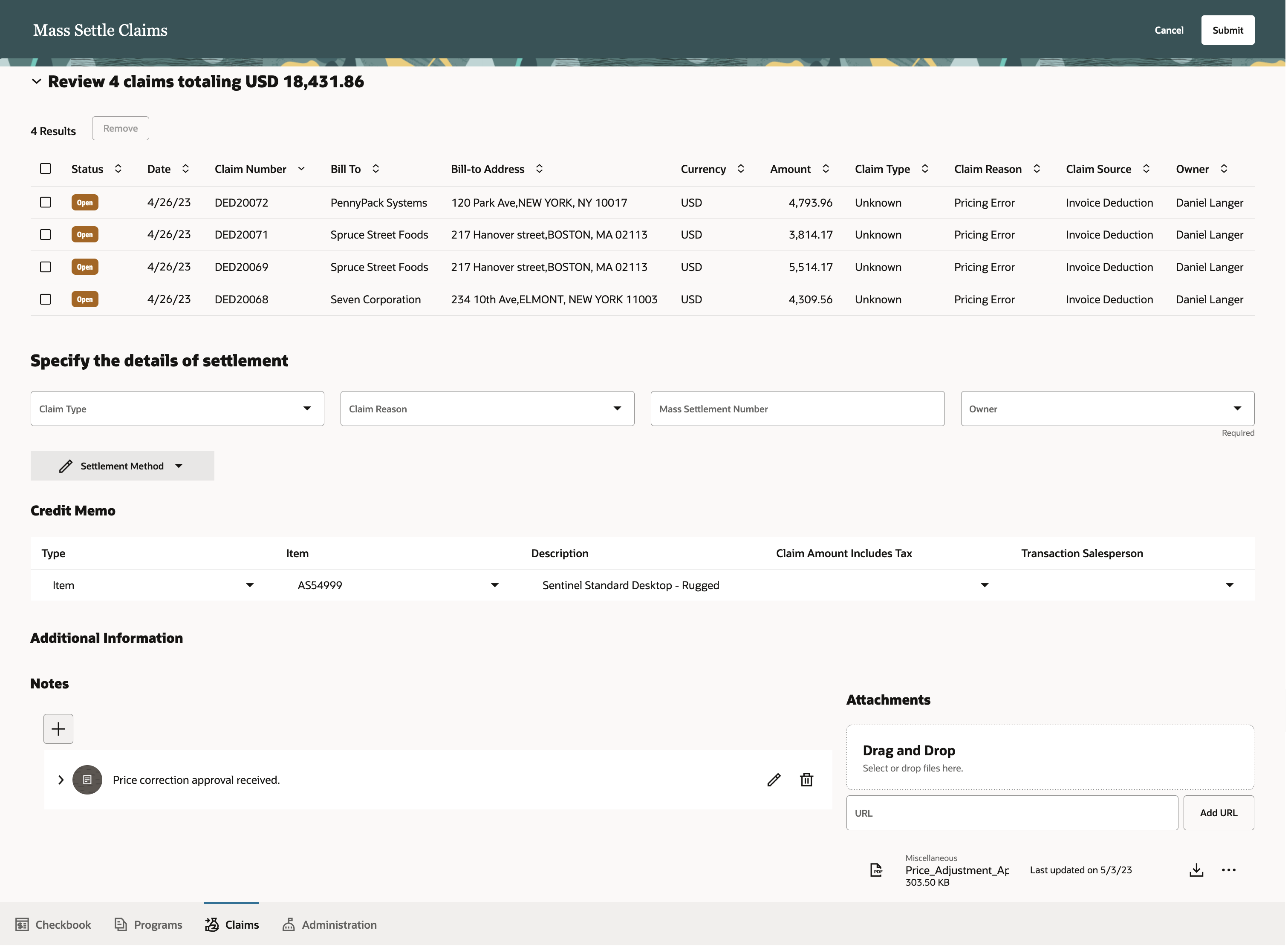
Mass Settle for Pricing Error
Improves claim analyst productivity for:
- Efficient update of multiple claims like reassigning claim owners.
- Efficient settlement of issues across multiple claims like pricing errors.
Steps to Enable
Use the Opt In UI to enable this feature. For instructions, refer to the Optional Uptake of New Features section of this document.
Offering: Order Management
If you have already implemented Customer Claims in Redwood, then you don't need to do anything to enable this feature.
If you haven't implemented Customer Claims in Redwood, then refer to the Roadmap for Setting Up Deductions and Settlement chapter in the implementation guide, Implementing Channel Revenue Management.
Tips And Considerations
We support a maximum of 1000 claims in a single mass update or settle action. If you have more than 1000 claims, then you will need to process them in another mass update or settle action.
If the claim analyst needs to mass settle a large number of claims, it is advisable that they have the approval privilege. Otherwise, each claim that's part of the mass settlement will need to be approved individually. This is usually a task for a supervisor.
Key Resources
- For more information on Channel Revenue Management, refer to the Oracle Cloud Readiness content for Order Management.
- For more information on the Channel Revenue Management Integration with Receivables, refer to the Oracle Cloud Readiness content for Financials.
- Oracle SCM Cloud: Using Oracle Channel Revenue Management Cloud, available on the Oracle Help Center.
- Oracle SCM Cloud: Implementing Oracle Channel Revenue Management Cloud, available on the Oracle Help Center.
- Oracle SCM Cloud: REST API for Oracle SCM Cloud, available on the Oracle Help Center.
Access Requirements
Users who are assigned a configured job role that contains these privileges can access this feature:
- Manage Customer Claims (CJM_MANAGE_CUSTOMER_CLAIMS_PRIV)
- View Only Activity (ZMM_VIEW_ONLY_ACTIVITY_PRIV)
These privileges were available prior to this update.
Improve Usability of Claim Pages in Redwood
The Claim page usability has been enhanced to:
- Ensure that the Owner list of values is consistent with the program pages.
- Drill down to related invoices, Receivables settlement transactions, and child claims.
- Display the Customer Reference attribute instead of Ship-to Customer attribute as contextual information in the page header.
- Remove Remaining Amount and display Settled Amount, as the contextual information in the page header, when the claim is in Approval Pending, Approval Rejected, Settlement Pending, Settled, or Netting In Progress status.
- Display timestamp in the page header upon saving the claim.
- Display an acknowledgment message, that disappears without user intervention, upon canceling, submitting, approving, rejecting, returning to open, or updating claims.
- Move the Cancel Claim action into the Actions Menu, to avoid confusion with the Cancel button.
Improves the usability of claim pages in Redwood.
Steps to Enable
Use the Opt In UI to enable this feature. For instructions, refer to the Optional Uptake of New Features section of this document.
Offering: Order Management
If you have already implemented Customer Claims in Redwood, then you don't need to do anything to enable this feature.
If you haven't implemented Customer Claims in Redwood, then refer to the Roadmap for Setting Up Deductions and Settlement chapter in the implementation guide, Implementing Channel Revenue Management.
Key Resources
- For more information on Channel Revenue Management, refer to the Oracle Cloud Readiness content for Order Management.
- For more information on the Channel Revenue Management Integration with Receivables, refer to the Oracle Cloud Readiness content for Financials.
- Oracle SCM Cloud: Using Oracle Channel Revenue Management Cloud, available on the Oracle Help Center.
- Oracle SCM Cloud: Implementing Oracle Channel Revenue Management Cloud, available on the Oracle Help Center.
- Oracle SCM Cloud: REST API for Oracle SCM Cloud, available on the Oracle Help Center.
Access Requirements
Users who are assigned a configured job role that contains these privileges can access this feature:
- Manage Customer Claims (CJM_MANAGE_CUSTOMER_CLAIMS_PRIV)
- Create Customer Claims (CJM_CREATE_CUSTOMER_CLAIMS_PRIV)
- View Customer Claims (CJM_VIEW_CUSTOMER_CLAIMS_PRIV)
These privileges were available prior to this update.
Temporarily Reserve Supply in Your Source System While Shopping or Quoting
Use the SalesOrdersforOrderHub REST API with source promising to reserve supply for an item while your customer shops or while your sales representative works on a sales quote. Your customer submits their order, and then Oracle Global Order Promising will convert the reservation into scheduled supply in your source system. If your customer abandons the cart or if your sales representative cancels the quote, then you can remove the reservation to make the supply available to other shoppers in your source system.
Improve the accuracy of your promising results and avoid over promising supply. Integrate your eCommerce and quote workflows with Oracle applications so you can move an order from a shopping cart or quote in your source system into a sales order in Oracle Order Management.
Steps to Enable
Use the Opt In UI to enable this feature. For instructions, refer to the Optional Uptake of New Features section of this document.
Offering: Supply Chain Planning
Tips And Considerations
- You must opt into the Temporarily Reserve Supply While Shopping or Quoting feature. If you’ve already opted into this parent feature, then you don’t have to opt in again.
-
You must specify an expiration date for your shopping cart in your eCommerce application. If the cart expires, then your application must send a request to Global Order Promising to cancel the sales order and release supply.
- You must use the DemandSourceLineReference attribute in the SalesOrdersforOrderHub REST API, or the Demand Source Line Reference attribute in file-based data import (FBDI). For details, see Use FBDI and REST API to Import a Bunch of Sales Orders.
- You can't use this feature with assemble-to-order or pick-to-order configured items or with kits. To do this, use database promising instead. For details, see Temporarily Reserve Supply While Shopping or Quoting feature in Database Promising.
Key Resources
Access Requirements
-
Schedule Fulfillment Line
Honor Decimal Precision for Unit of Measure Conversions
In some industries, it’s necessary to maintain various unit of measure (UOM) conversion rates at a very high level of precision. The profile option MSC_QUANTITY_DECIMAL_PRECISION is currently used to specify the level of precision required for various planning processes and is honored for planning calculations. With this update, the precision specified will be honored on various display pages as well.

Example: The preceding image shows the MSC_QUANTITY_DECIMAL_PRECISION profile parameter with a value of 5 decimal points. The following image shows the UOM measure on the Plan Inputs page displayed in the decimal precision specified in the profile value.

Steps to Enable
You don't need to do anything to enable this feature.
Multilevel Allocation In Order Promising
Allocation rules help you honor commitments and distribute high-demand items more fairly by ensuring that a specified quantity or percentage of supply is available to meet demand. When you’re opted in to this feature, enhanced supply allocation rules that use a hierarchy of attribute-based nodes to balance the allocation of supply across your network are enabled. Child allocations share supply allocated to the parent node when needed.
After you opt in to the feature named High-Volume Order Promising, opt in to the feature named Multilevel Order Promising. Then you can use the feature described in this section.
Use File-Based Data Import to Upload Allocation Amounts
Use file-based data import (FBDI) to manage the supply that you allocate according to quantity. You can now use FBDI or REST API to update your allocation values, or to integrate them with some other external source.
Use FBDI to efficiently upload your allocation quantities in weekly buckets. If you allocate according to quantity, then you can use FBDI to reduce the time and effort you need to maintain that allocation.
Steps to Enable
Use the Opt In UI to enable this feature. For instructions, refer to the Optional Uptake of New Features section of this document.
Offering: Supply Chain Planning
You must opt into these features:
- High-Volume Order Promising
- Multilevel Allocation in Order Promising
If you already opted into these features, then you don’t have to opt in again.
Tips And Considerations
- Use the Order Promising work area or FBDI to create a rule that allocates according to quantity. Specify the allocation nodes, the rank for each node, stealing protection percentage, and so on. Do this before you upload your allocation quantities. For details, see Get Supply from Your Parents.
- Use the new Supply Allocation Quantities tab in FBDI's ScpPlanningAllocationRulesImportTemplate.xlsm file to upload the allocation quantities for your weekly bucket.
Key Resources
Access Requirements
- Manage Allocation Attributes
- Manage Planning Allocation Rule
- View Planning Allocation Rule
Order promising is a critical business process that must scale with demand and continue to operate even if hardware failures occur. Recent changes to Oracle Fusion Cloud Global Order Promising provide a scale-out architecture for availability checking and scheduling requests across a horizontal grid, enhancing capacity and resilience. The new architecture also reduces operational overhead, making supply and reference data updates immediately available, and eliminating the need to refresh/restart the order promising server.
Migration to the new architecture is continuing over several updates. Starting in update 24A, the C++-based order promising solution will be retired, and all order promising in Oracle Fusion Cloud will be performed using the high-volume order promising solution. You can transition to the new solution at any time by opting in to the High-Volume Order Promising feature. If you use capable to promise or allocated order promising, you must complete some setups before you make this transition. For details, see this Oracle Cloud Customer Connect Event: SCM – Prepare for the Next Generation of Global Order Promising.
After you opt in to the feature named High-Volume Order Promising, you can use the features described in this section.
Schedule Options on More Than One Level of an Assemble to Order Item
Get more detailed capable-to-promise calculations and more accurate promise dates for complex assemble-to-order items. If your item has subassemblies at more than one level, each subassembly might have different optional components and alternative configurations. You can now include the resource requirements for the options that your customer selects at each level when you schedule shipment or delivery.
Improve the quality of your promising results. Promising will apply resource constraints, such as calendars, availability, and so on when it promises an assemble-to-order item. It applies the constraint according to the configure option that your customer selects for each option dependent resource at run time.
Steps to Enable
Use the Opt In UI to enable this feature. For instructions, refer to the Optional Uptake of New Features section of this document.
Offering: Supply Chain Planning
Tips And Considerations
- This feature is part of high-volume order promising, so you must opt into the High-Volume Order Promising feature. If you’ve already opted into this parent feature, then you don’t have to opt in again.
- If you use file-based data import, then you must make sure the operation sequence number is unique for each option dependent operation. You can't use the same number with an operation that isn't option dependent.
Key Resources
Access Requirements
-
Schedule Fulfillment Line
Manage Supply At the End of the Promising Horizon
If Oracle Order Promising can’t find supply to meet demand by the end of the promising horizon, then you can specify whether to return an error. Use this feature when you plan to discontinue an item or when you can no longer find a way to buy, make, or transfer more supply. Promising will continue to schedule order lines at the end of the horizon when it can’t find supply for items that you regularly replenish.
Reduce promising complexity and make results easier to understand. You can now set up Promising so it assumes supply is infinitely availability at the end of horizon, or so it assumes no supply is available at the end of horizon.
Steps to Enable
Use the Opt In UI to enable this feature. For instructions, refer to the Optional Uptake of New Features section of this document.
Offering: Supply Chain Planning
Tips And Considerations
This feature is part of high-volume order promising, so you must opt into the High-Volume Order Promising feature. If you’ve already opted into this parent feature, then you don’t have to opt in again.
To specify what supply is available, go to the Order Promising work area, click Tasks > Order Promising Options, then set the Supply at End of Horizon attribute to one of these values:
- Assume Supply is Infinitely Available
- Assume no Supply is Available
Access Requirements
IMPORTANT Actions and Considerations
Replaced and Removed Features
From time to time, Oracle replaces existing Cloud service features with new features, or removes existing features. Replaced features may be put on a path to removal. As a best practice, you should use the newer version of a replaced feature as soon as the newer version is available.
This section identifies the features in this Cloud service that have been replaced or will be removed.
| Module | Removed Feature | Target Removal | Replacement Feature | Replaced In | Additional Information |
|---|---|---|---|---|---|
| Pricing | Price Request SOAP service | 23D | Document Prices REST API | 19A | No additional enhancements have been made to the Price Request SOAP service since update 19A. Until the SOAP service is removed in 23D, it will continue to work, but you should migrate to the Document Prices REST API at your earliest convenience. For details about the Document Prices REST API, refer to the REST API for Oracle Fusion Cloud SCM documentation, available on the Oracle Help Center. |
| Global Order Promising | Memory resident, C++-based order promising |
24A | High-volume order promising |
23A | Starting in update 24A, the C++-based order promising solution will be retired, and all order promising in Oracle Fusion Cloud will be performed using the high-volume order promising solution. You can transition to the new solution at any time by opting in to the High-Volume Order Promising feature. If you use capable to promise or allocated order promising, you must complete some setups before you make this transition. For details, see this Oracle Cloud Customer Connect Event: SCM – Prepare for the Next Generation of Global Order Promising. |
| Global Order Promising | Available Supplies REST API Order Promises REST API |
25C | Global Order Promises REST API | 20D | No additional enhancements will be made to the Available Supplies and Order Promises REST services. The services will continue to work until they're removed in 25C, but you should move to the replacement Global Order Promises service at your earliest convenience. The Global Order Promises REST service provides more comprehensive access to order promising features, including availability checking, allocation rules, order scheduling, and supply information. It also delivers higher performance. For details about the Global Order Promises service, see REST API for Oracle Fusion Cloud SCM, available on the Oracle Help Center. |
Changes to File-Based Data Import (FBDI) Templates
Some Supply Chain Planning FBDI templates have changed in this update. For details of the specific changes, refer to the Instructions tab of these FBDI templates:
- Planning Allocation Rules (ScpPlanningAllocationRulesImportTemplate.xlsm)
- ERP Integration Service Parameters (ScpErpIntegrationServiceParamsImportTemplate.xlsm)
- Bill of Resources (ScpBillOfResourcesImportTemplate.xlsm)
You can find the latest templates in the Supply Chain Planning section of Oracle Fusion Cloud SCM: File-Based Data Import (FBDI) for SCM, available on the Oracle Help Center.
Changes to Pricing Algorithms
Some algorithms in Oracle Pricing have changed in this update, and the changes may require you to take action. For details, see note 2968693.1 and note 2975137.1 on My Oracle Support.
In addition, refer to the topic Promote Pricing Algorithms into the Current Release in Oracle Fusion Cloud SCM: Administering Pricing on the Oracle Help Center. Oracle recommends that you review and promote algorithms in every quarterly update.
Importing Prepriced Orders: Actions Required
Due to changes in Pricing algorithms in update 23C, you must include the following pricing-related attributes when you import prepriced sales orders into Oracle Order Management:
- Charge Currency Unit Price
- Charge Currency Extended Amount
- Header Currency Unit Price
- Header Currency Extended Amount
You order import may fail if you don't include those attributes when you import your prepriced orders.
If you're importing sales orders that have recurring charges, then you must include the following pricing attributes:
- Charge Currency Duration Extended Amount (FBDI attribute: Duration Charge Total)
- Header Currency Duration Extended Amount (FBDI attribute: Duration Header Total)
After you update to 23C, you should test, verify, and, if necessary, update your existing integration to make sure all the mandatory pricing values are passed into Order Management.