

This document will continue to evolve as existing sections change and new information is added. All updates appear in the following table:
| Date | Update Version | Notes |
|---|---|---|
| 21 SEP 2018 | Update 18C | Delivered new features in update 18C. |
| 20 APR 2018 | Update 18B | Delivered new features in update 18B. |
| 19 JAN 2018 | Update 18A | Delivered new features in update 18A. |
This document will continue to evolve as existing sections change and new information is added. All updates appear in the following table:
| Date | Feature | Notes |
|---|---|---|
| 21 SEP 2018 | Created initial document. |
This guide outlines the information you need to know about new or improved functionality in this update, and describes any tasks you might need to perform for the update. Each section includes a brief description of the feature, the steps you need to take to enable or begin using the feature, any tips or considerations that you should keep in mind, and the resources available to help you.
Give Us Feedback
We welcome your comments and suggestions to improve the content. Please send us your feedback at oracle_fusion_applications_help_ww_grp@oracle.com.
Column Definitions:
Report = New or modified, Oracle-delivered, ready to run reports.
UI or Process-Based: Small Scale = These UI or process-based features are typically comprised of minor field, validation, or program changes. Therefore, the potential impact to users is minimal.
UI or Process-Based: Larger Scale* = These UI or process-based features have more complex designs. Therefore, the potential impact to users is higher.
Opt In Only = These features are made available for use via Opt In. No additional setup steps are required.
Opt In, Plus Additional Steps Required = To use these features you must first Opt In, then perform additional setup steps.
Steps Required (No Opt In) = Setup steps must be performed before these features can be used. For example, new or expanded BI subject areas need to first be incorporated into reports. Integration is required to utilize new web services.
| New Features Delivered Ready to Use Reports plus Small Scale UI or Process-Based new features will have minimal user impact after an update. Therefore, customer acceptance testing should focus on the Larger Scale UI or Process-Based* new features. |
New Features That Customer Must Take Action to Use (Delivered Disabled) Not disruptive as action is required to make these features ready to use. As you selectively choose to leverage, you set your test and roll out timing. |
|||||
|---|---|---|---|---|---|---|
| Feature |
Report |
UI or |
UI or |
Customer Action: |
Customer Action: |
Customer Action: |
 |
||||||
|
||||||
|
||||||
|
||||||
|
||||||
|
||||||
|
||||||
|
||||||
Delivered Model Content for Oracle Fusion Applications Audit |
|
|||||
|
||||||
|
||||||
|
||||||
|
||||||
|
||||||
|
||||||
|
||||||
|
||||||
|
||||||
|
||||||
|
||||||
|
||||||
|
||||||
|
||||||
|
||||||
|
||||||
Oracle Risk Management consists of three products: Oracle Fusion Financial Reporting Compliance documents your policies for identifying and resolving risk in your financial processes. Oracle Advanced Access Controls detects risk inherent in the access granted to users of business applications. Oracle Advanced Financial Controls uncovers risk exhibited by transactions completed on business applications. Advanced Financial Controls and Advanced Access Controls belong to a module called Advanced Controls Management.
Advanced Access Controls includes a new Access Certification set of features. It enables an organization to perform periodic reviews to determine whether job roles are assigned appropriately to users.
Monitor Jobs – Page Enhancements
The Monitor Jobs page tracks the status of all jobs submitted across Risk Management applications. This page has been simplified.
By default, it lists jobs submitted in the last twenty-four hours by the person who is currently logged on. Each row provides summary information about a job: an identifying number as well as its name and status. Use the Expand icon in the row to view additional details about the job.
Users can:
- Sort the list of jobs by job ID number, name, status, or submission date.
- Create searches — sets of filtering options — and save searches for reuse.
- Select the status of a job to view details around it, including record counts. Examples of counts include new, updated, and total values for each business object affected by a transaction synchronization job, or the numbers of newly generated and updated incidents for a control-analysis job.
- Download exported files and reports, by clicking a Download icon in the rows for jobs that create these items.
Below is an example in which a row is expanded. We can see who ran the report and how long the job took to run.

Monitor Jobs
Often a job status is a hyperlink that leads to additional information. For example, below are details of a completed business object import job. These details allow us to verify that record counts match what we expected from our import file.
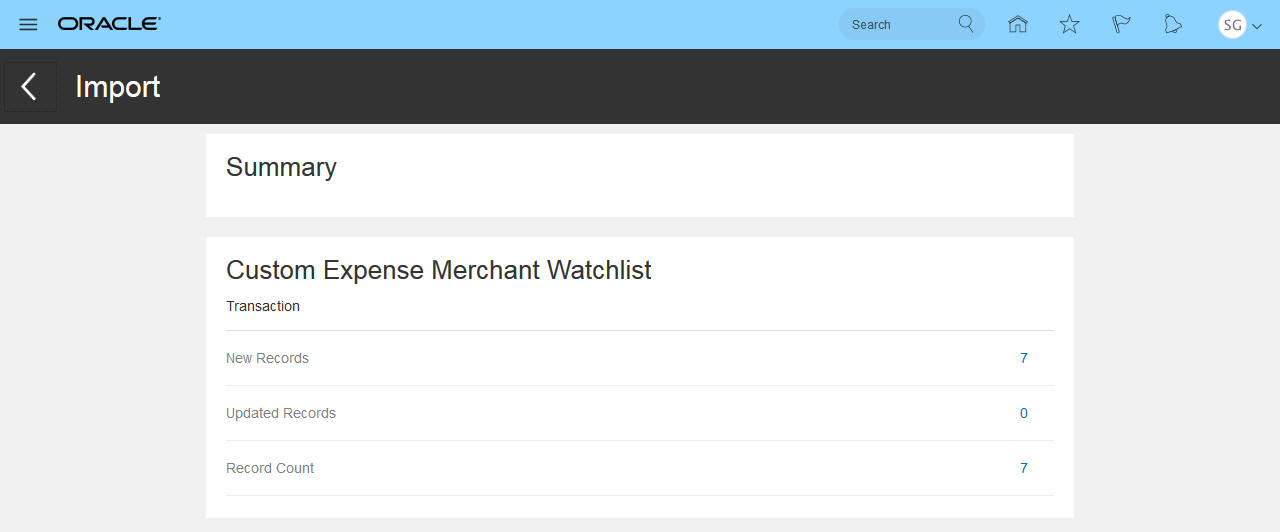
Monitor Job Completed Summary
Better messaging has been incorporated to help correct failed jobs. Below is an example of a business object that failed to import with the exact reason why.
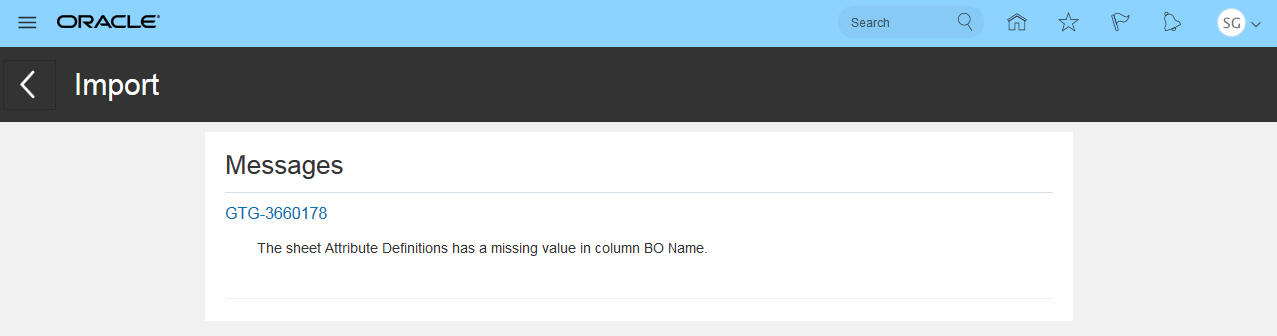
Monitor Jobs Failed Messages
Steps to Enable
No steps are required to enable this feature.
Key Resources
- For more information on Monitor Jobs, see the “Jobs and Scheduling" chapter in Risk Management Cloud Implementing Risk Management.
Changes from Related Links to Page Tabs
In the Setup and Administration work area of Risk Management Tools, navigation has changed. In earlier versions, links to Setup and Administration pages were contained in a Related Links panel tab on the right side of the page. This panel tab is replaced by a set of fixed tabs that run vertically along the left side of the work area.
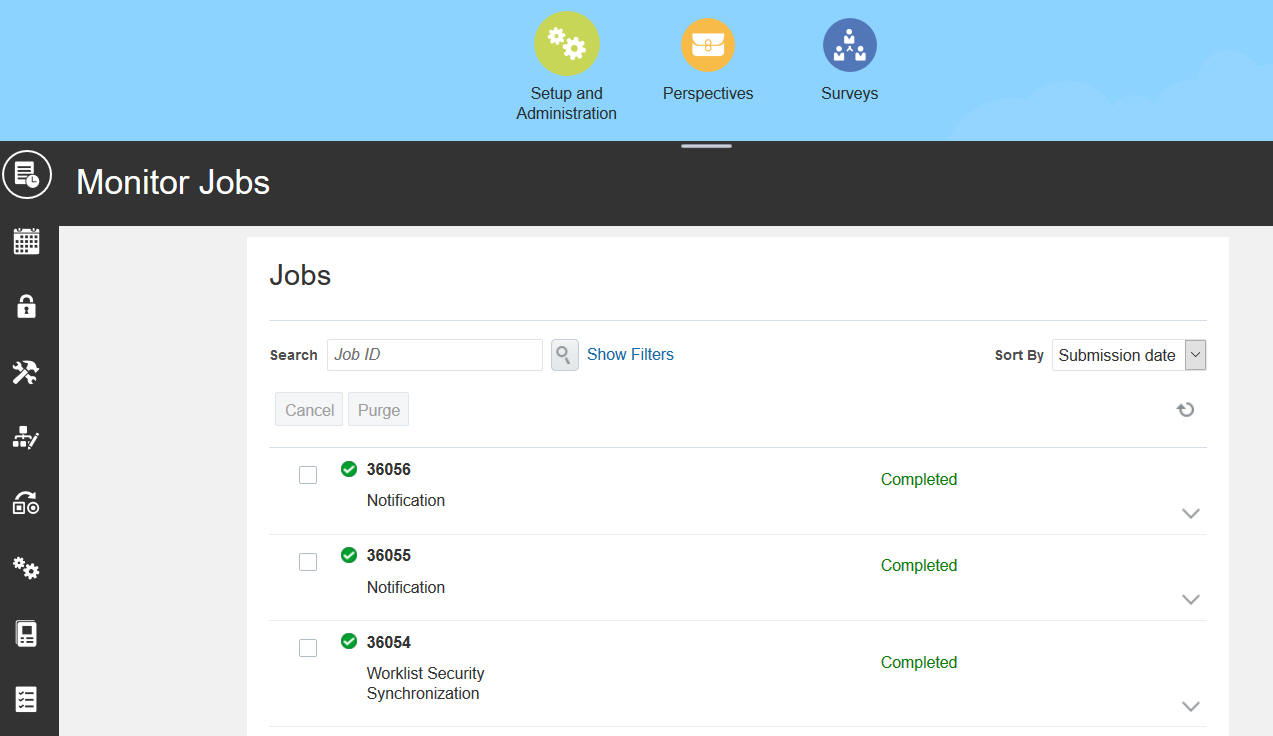
Setup and Administration Tabs
Steps to Enable
No steps are required to enable this feature.
Key Resources
- For more information see Implementing Risk Management in the Oracle Risk Management Cloud library of the Oracle Help Center.
Performance Configurations for Applications
You can modify settings that improve performance by reducing the number of records involved in data-intensive operations. These settings apply to the Advanced Controls Management module. They include:
- Access Performance Configuration. For Advanced Access Controls, set the number of records an access model can return. The default value is 5,000. You can set the value lower, but not higher. The limit applies only to results returned by access models, not to control incidents. Optionally, allow the record limit to be overridden on a model-by-model basis.
- Transaction Performance Configuration. For Advanced Financial Controls, data synchronization of Transaction business objects operates only on records created or updated on or after a date you specify. This date is required and the data-synchronization jobs fail if no date is set.
- Audit Performance Configuration. For Advanced Financial Controls, data synchronization for Audit business objects operates only on records created or updated on or after a date you specify. This date is required, and is distinct from the cutoff date you set for the synchronization of Transaction business objects.
You can access the following configuration options via Setup and Administration > Application Configurations > General Maintenance.
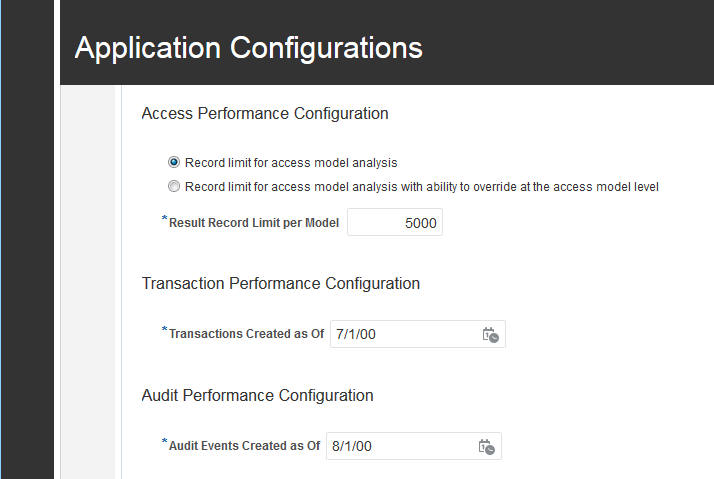
Application Configuration - Performance Configuration Options
Steps to Enable
No steps are required to enable this feature.
Tips And Considerations
It's important for the Risk Management administrator to closely manage the amount of data that is either synchronized or returned.
- Access Performance Configuration. It's impossible to know how many result records an access model will return when you first run it. In some situations, the volume can be so significant as to materially impact performance. This configuration limits the number of records the model can return. If the full 5,000 limit is retained, this should be sufficient to perform initial analysis and remediation activities before you convert the model into a control.
- Transaction Performance Configuration. In many development or test environments, large volumes of data may exist for testing purposes. You should limit this to 1 to 2 months' worth of data if at all possible. In many cases that amount is sufficient to validate the model logic, which is the primary goal in these environments In production environments, the focus should be on analyzing current data, and so last 3 to 6 months' worth of data should be sufficient.
- Audit Performance Configuration. Even though the Audit business objects are used within Advanced Financial Controls, this is a separate configuration. This is because the volume of data for audited configuration and operational data should be minimal and therefore the period of data can be greater. .
Key Resources
- For more information about configurations, see "Risk Management Administration" chapter of Risk Management Cloud Implementing Risk Management.
Perspective Values Can be Renamed
For a perspective hierarchy, the underlying names of values in the hierarchy can be renamed. However, the perspective hierarchy cannot be renamed.
Steps to Enable
No steps are required to enable this feature.
Key Resources
- For more information about perspectives, see "Perspective Management" chapter of Risk Management Cloud Implementing Risk Management.
Financial Reporting Compliance
Changes to Assessment Tabs and Related Links
In each of the Process, Risk, and Control work areas, a new tab enables users to manage assessment transactions for the object type in view. Users can perform any of the actions their roles permit: complete, view, review, or approve assessments; view approvals; and create issues for assessments.
.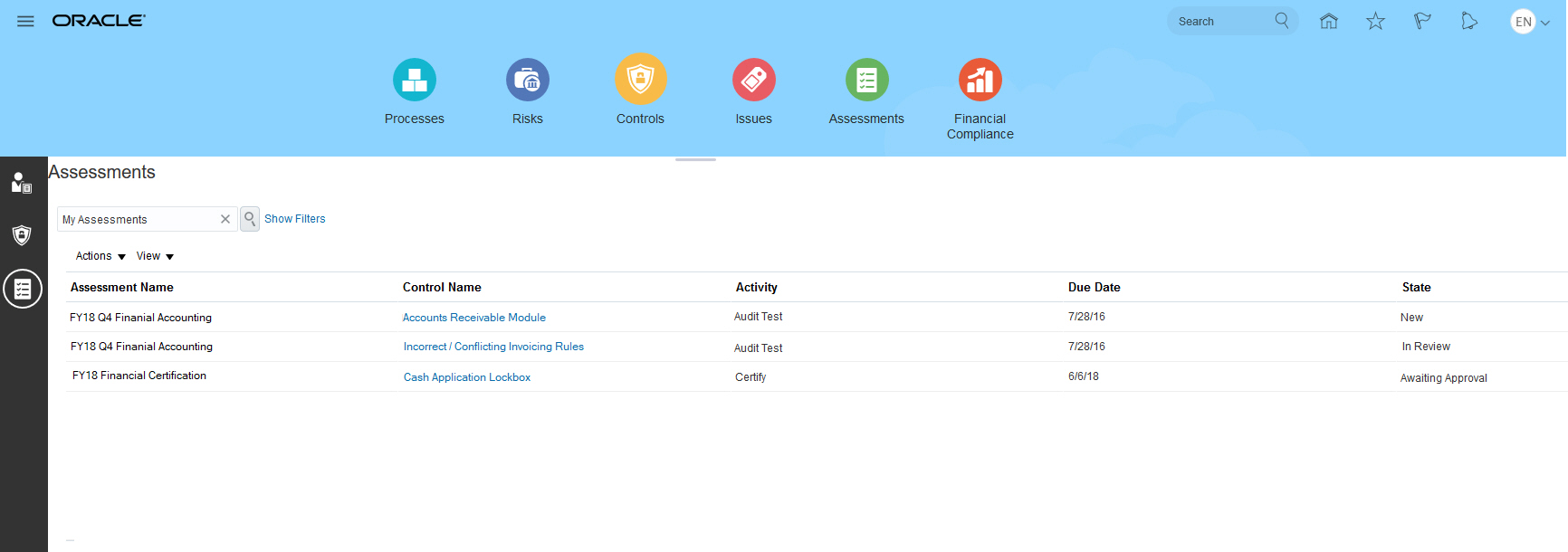
Controls Assessment Tab
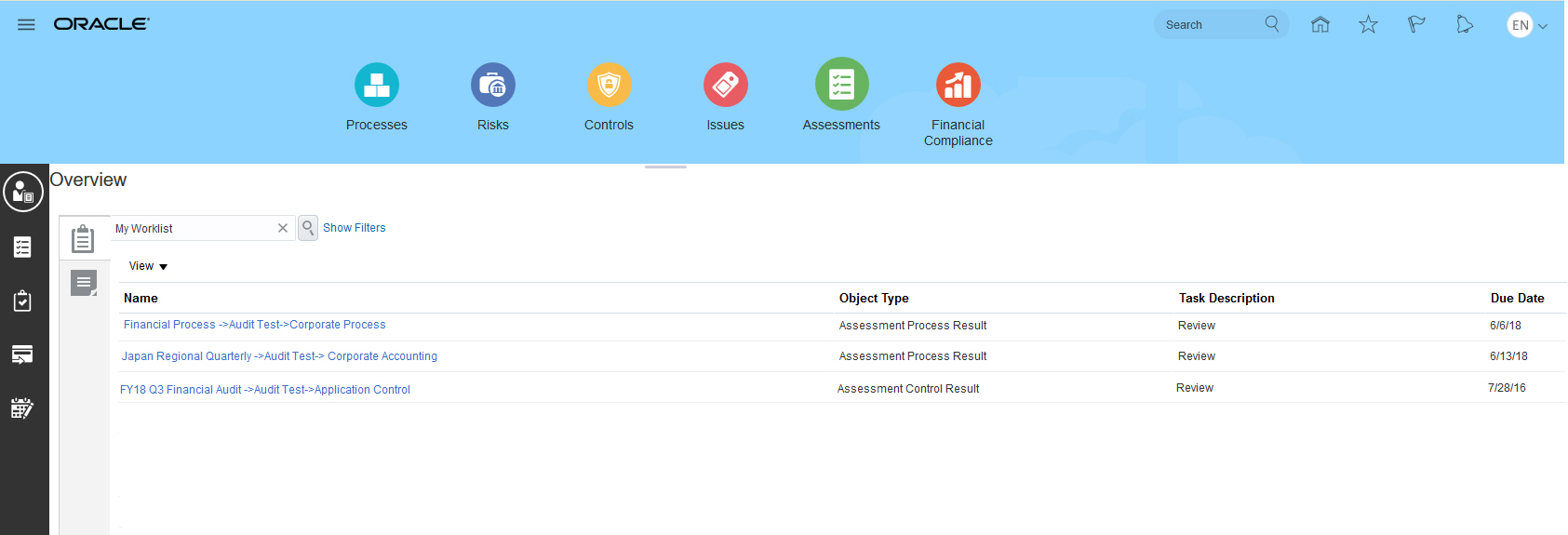
In the Assessment Management work area, features supporting the management of batch assessments are now available from tabs located in the landing page of the work area. They are no longer available from a Related Links panel tab.
Assessments
The person who creates a template can now associate it with only one object record type (process, risk, or control) and one assessment activity type. The object record type determines which activity types are available.

Assessment Templates
Steps to Enable
No steps are required to enable this feature.
Key Resources
- For more information on working with assessments, see the "Assessing Objects" chapter of Risk Management Cloud Using Financial Reporting Compliance.
Changes to Security for Assessment Records
Data-level security for batch assessments has been updated. Users can secure assessment transactions separately from the object record being assessed. The implementation is similar to data-level security as implemented for the core objects (processes, risks, and controls). This feature enables users to document an object record once and separately secure its assessment transactions. This applies to the ability to view, assess, review, and approve the assessment transaction.
When object records are not associated to perspective values, any user whose roles grant assessment privileges can access assessment transactions for those objects. In this case there is no data-level security. Legacy assessments are not impacted by the update. For those assessments, security operates as it was designed for prior releases. This new feature applies only to batch assessments. Impromptu assessment security works as it has in prior releases.
You develop batch assessments from plans. The page to create an assessment plan now includes a Perspective Selection and Assignment Criteria region. The first thing it does is enable you to set criteria to select objects for inclusion in assessments. Objects must be assigned the perspectives you select in this region. Or, a No Perspective option, which is selected by default, enables you to select records of objects that are not associated to any perspective values.
Second, it also defines data-level security for assessment transactions.
-
If you clear the No Perspective option, you may then select perspective values for the plan. An Include Duplicate Records option becomes available. If you select it, and if an object is associated to multiple perspective values, multiple assessment records are generated, one for the pairing of that object to each perspective value.
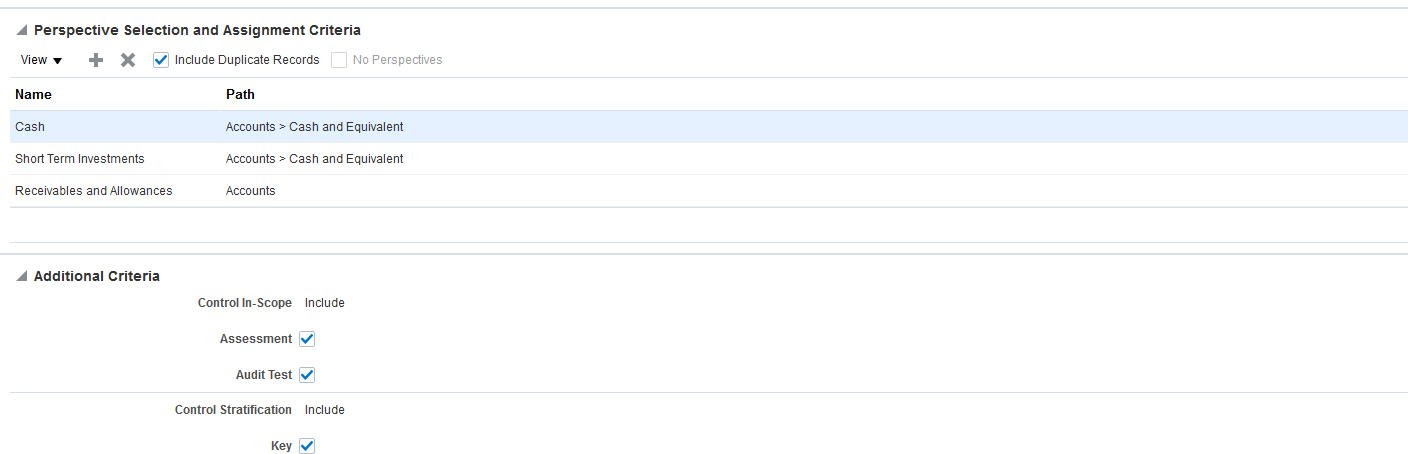
Assessment Plan and Initiating a Batch Assessment - Perspective Selection and Assignment Criteria to Include Duplicate Records
- But if you clear the Include Duplicate Records option, a single assessment record associates that object to all perspective values.
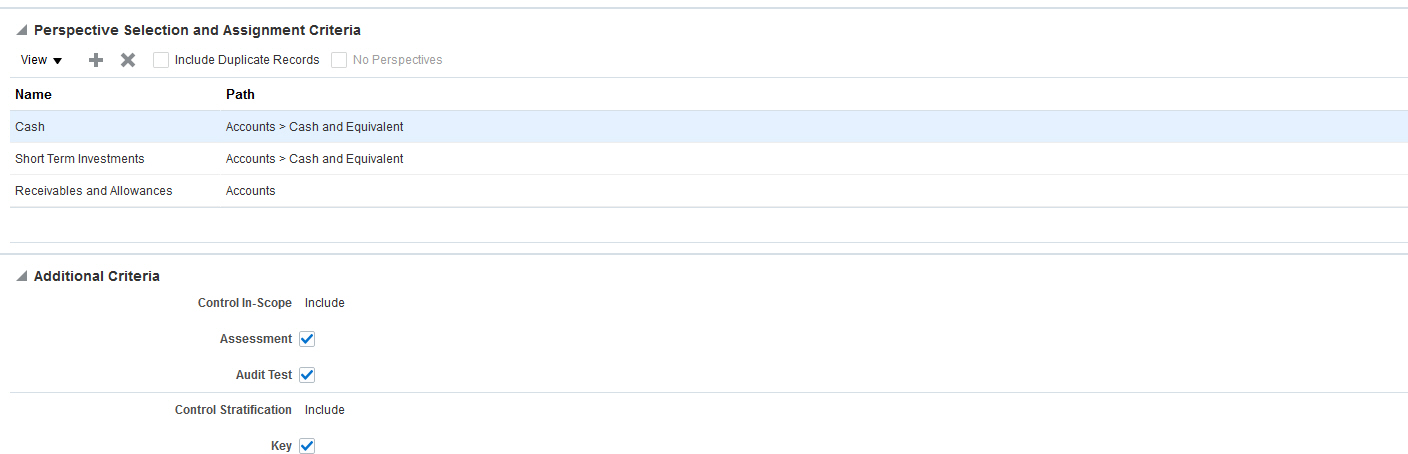
Initiating a Batch Assessment - Perspective Selection and Assignment Criteria for a Single Instance per Record
For example, you select the following perspective values in the Perspective Selection and Assignment Criteria: Cash, Short Term Investments, and Receivables and Allowances. The record to be assessed is Control Record 1, which is associated to perspective values Cash, Short Term Investments, and Receivables and Allowances.
INCLUDE DUPLICATE RECORDS HAS BEEN SELECTED
For each unique instance of the object record to a perspective value, the application creates an assessment transaction.
| Object Record Name to be Assessed | Data Level Security Mapping |
|---|---|
| Control Record 1 | Cash |
| Control Record 1 | Short Term Investments |
| Control Record 1 | Receivables and Allowances |
INCLUDE DUPLICATE RECORDS HAS BEEN DE-SELECTED
The record has a single assessment transaction, which is associated to all three perspective values.
| Object Record Name to be Assessed | Data Level Security Mapping |
|---|---|
| Control Record 1 | Cash, Short Term Investments, Receivables and Allowances |
Steps to Enable
For existing implementations to continue to function as-is, a new data security policy for assessment workflow must be created and associated to the respective assessment job roles.
At a minimum, the perspectives used to secure the objects being assessed (either control, risk, or process) must be included in this new data security policy. It's recommended that the perspective filter in this data security policy specify the top node of these perspectives, and use the Includes Children condition. If this is not done, the end user will not be able to initiate a batch assessment, since there will be no available actors.
If the ability to be more granular in the security assignment for assessments is desired, new data security policies also need to be created However, for this to be enabled, the specific perspective values will need to be defined as part of the perspective filter in each policy as it is for any other secured record in Financial Reporting Compliance. For as many new data security policies created, new job roles will also be required for them to be mapped to.
For example, prior to your next quarterly audit assessment you have a documented control called Accounts Payable Invoice Validation. It is secured by the San Francisco perspective value; the root node of its perspective hierarchy is Region. To continue to perform assessments as-is, you must create a data security policy that includes Control Audit Assessor Data Security Policy and define a perspective filter to associate the data level security:
- Object = Perspective
- Attribute = Region
- Condition = Includes Children
- Value = Region
Once the data security policy has been created, it must be associated to appropriate job roles. For example, you may have a customer-defined role Control Audit Assessor Job Role, which includes the needed assessor privileges. You would associate the newly created data security policy within Risk Management Tools Security Configuration to the job role. This enables you to leverage assessments as you would have done in prior releases. If you want to apply granular security for assessment transactions, as it is implemented for the other core object types, you must define the necessary data security policies and associate those to the corresponding job roles for each assessment activity type, by assessment actor/s.
Any time security updates are made in the Security Console, you must run the User and Role Security Synchronization and Worklist Security Synchronization jobs in Risk Management.
Tips And Considerations
- Consider using a single perspective to define the assessment transaction security.
- When defining the Perspective Selection and Assignment Criteria, the application is using OR and AND conditions. Therefore, when you Add perspective values and select multiple perspective values you will have a different result when you distantly click 'Add' a row for each perspective value that is being applied.
Key Resources
- For more information on working with assessments, see the "Assessing Objects" chapter of Risk Management Cloud Using Financial Reporting Compliance.
Role Information
For each object record there are specific privileges and data security polices corresponding to the assessment activity types available for the object record. In order for users to access the assessment transactions the user will need the privilege and customer defined data security policy.
For example to define the data security policies needed for a control audit assessment, the following data security policies would be applicable:
- Control Audit Assessor Data Security Policy
- Control Audit Assessment Reviewer Data Security Policy
- Control Audit Assessment Approver Data Security Policy
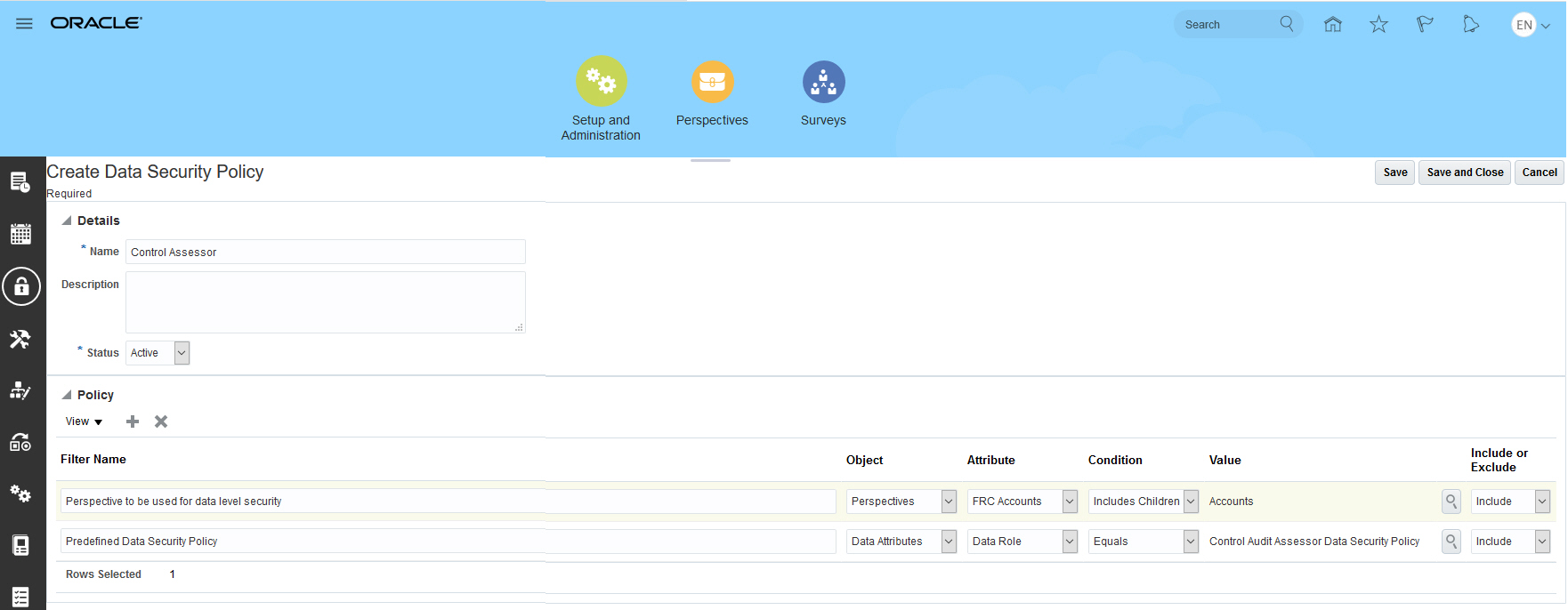
Example of Customer Defined Data Security Policy
Any time security updates are made in the Security Console, you must run the User and Role Security Synchronization and Worklist Security Synchronization jobs in Risk Management.
Control Test Plan Modifications
You now manage control test plans and steps within a single new test plan tab located within the control record view. You can view each test plan by its assessment activity type. When a test plan has not been defined for a specific assessment activity type, the section for that type displays only the header, allowing you to know which types have been defined. To edit a test plan, you must edit the control record.
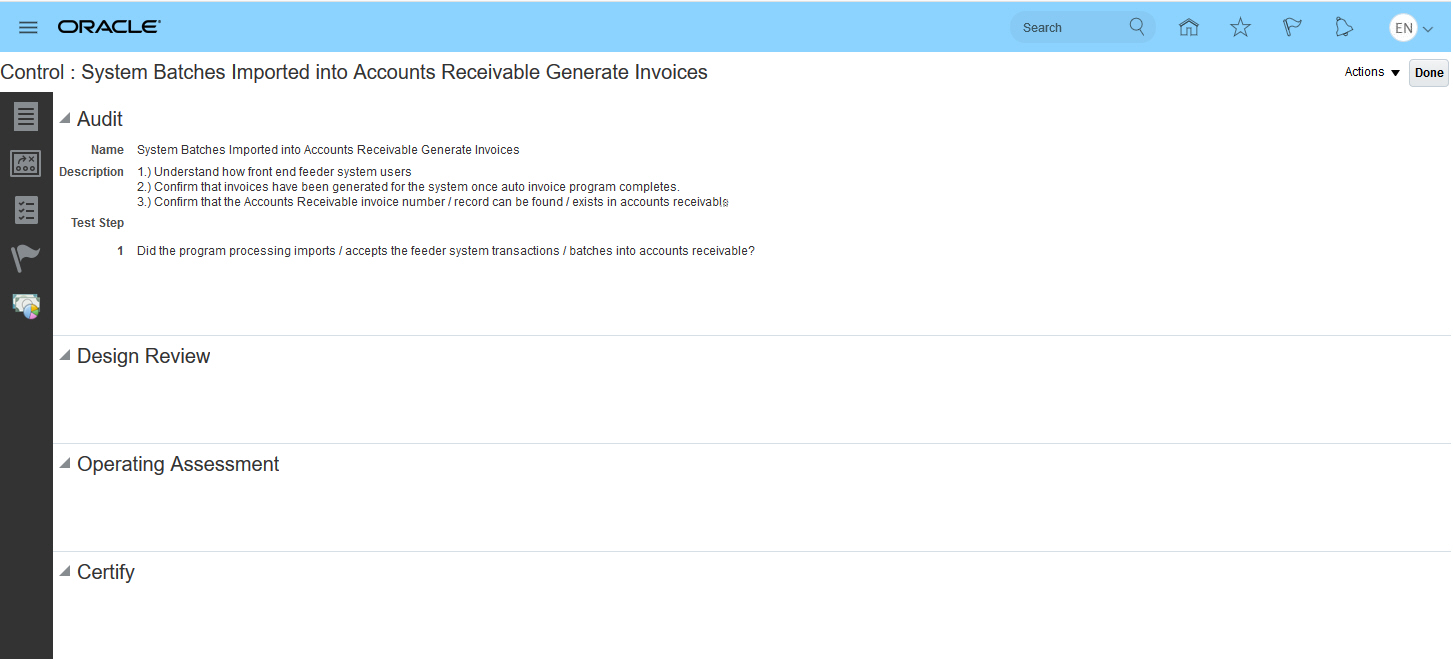
View Control Record Test Plan
To define a new control record, you define and save the control record and then navigate to the test plan tab to define the plan. Click the pencil icon within the section for assessment activity type for which you wish to define a plan.
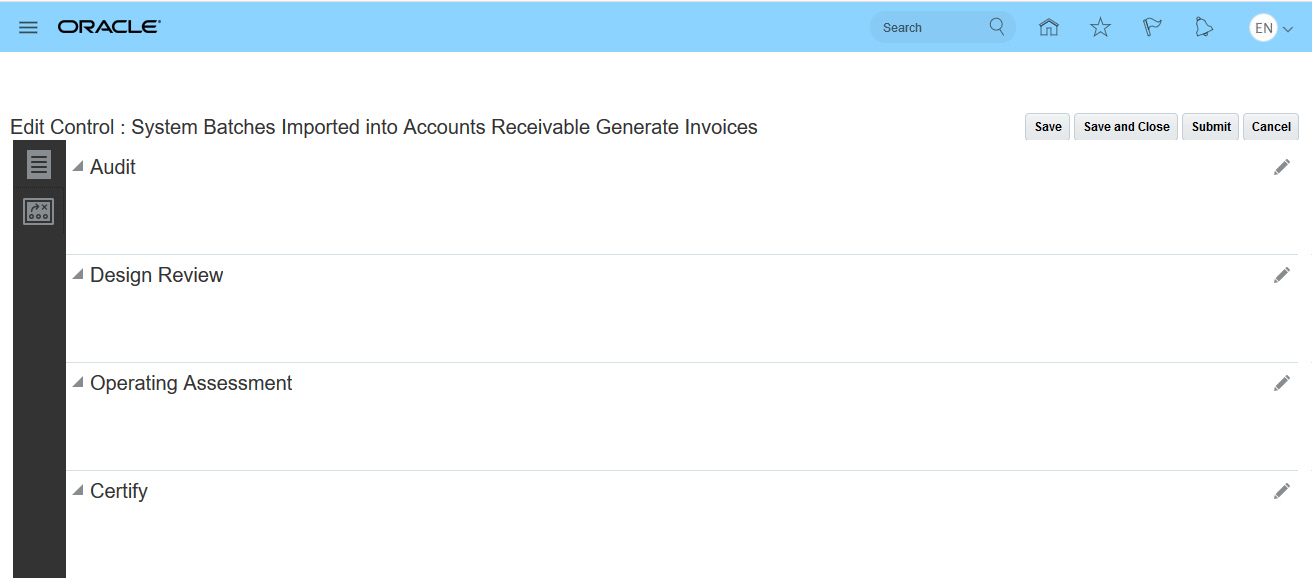
Edit Control Record Test Plan
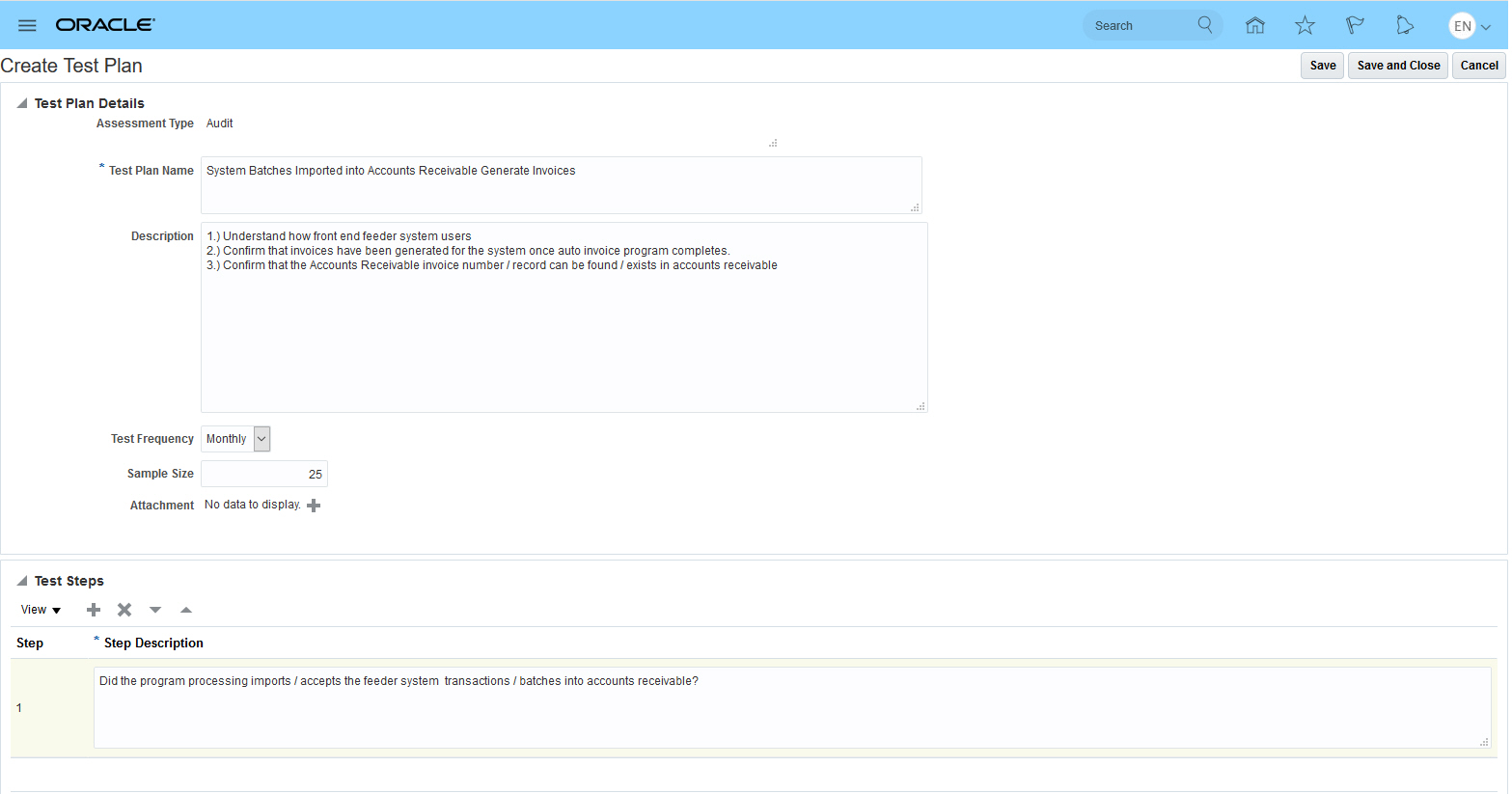
Edit Test Plan
Steps to Enable
Test plans no longer include test instructions. If you have existing test plans that include instructions, review the instruction data and, if it is needed, incorporate it into test steps.
Key Resources
- For more information on working with test plans, see the "Managing Controls" chapter of Risk Management Cloud Using Financial Reporting Compliance.
Updates to Survey Status and End Date
Surveys accommodate greater flexibility in handling end dates, and status values have been updated to reflect that flexibility.
- A new status, Closed to Responses, identifies that the end date has been reached.
- The Closed to Responses status allows the end date to be changed. The Closed status, on the other hand, does not allow the end date to be updated.
- The Close Survey button initiates a hard close. It prevents further updates to the survey.
Steps to Enable
No steps are required to enable this feature.
Key Resources
- For more information on surveys, see the "Conducting Surveys" chapter of Oracle Risk Management Cloud Using Financial Reporting Compliance.
Delivered Model Content for Oracle Fusion Applications Audit
Advanced Financial Controls introduces new business objects that correspond to audit-level information you configure under Manage Audit Policies in Oracle Fusion Applications. New models are delivered that use these business objects from various application audit areas.
Steps to Enable
No advance setup is required for you to create transaction audit models. However:
- You must review audit-level information configured under Manage Audit Policies in Oracle Fusion Applications. Create models that use audit business objects in Advanced Financial Controls only after the corresponding information is enabled and configured under Manage Audit Policies.
- A Risk Management administrator must set the Audit Performance Configuration date option under Application Configurations in Risk Management Tools. This option improves performance by eliminating older data from data-synchronization jobs. This date is required and the data-synchronization jobs fail if no date is set.
- Finally, you must run data synchronization, which refreshes the data analyzed by models and controls.
Tips And Considerations
Before using new delivered model content, review the readme to identify models that match requirements for your organization. The readme is available with the new model import file. Once you identify models appropriate for you, import, review, and modify them in your test environment. Importing all available models is not recommended. Some may source audit data from products you have not enabled. Moreover, models may contain user-defined objects that create data set controls that cannot be deleted, only inactivated.
Key Resources
- To download Oracle’s delivered model content files for import into your instance, refer to My Oracle Support, Oracle Delivered Content for Advanced Financial Controls (MOS ID 2350138.1). Locate and download the available Patch ID for Advanced Financial Controls content for release 13, update 18C.
- For more information about importing models, see the "Introducing Oracle Advanced Financial Controls" chapter of Risk Management Cloud Using Advanced Financial Controls.
Delivered Model Content for Enterprise Resource Planning
Oracle delivers new models for financial application areas. These models are supported by new business objects.
Steps to Enable
No advance setup is required for you to create transaction models. However, you must run a data-synchronization process, which refreshes the data analyzed by models and controls. Moreover, an administrator must set the Transaction Performance Configuration date option. It improves performance by eliminating older data from data-synchronization jobs. This date is required, and the data-synchronization jobs fail if no date is set.
Tips And Considerations
Before using new delivered model content, review the readme to identify models that match requirements for your organization. The readme is available with the new model import file. Once you identify models appropriate for you, import, review, and modify them in your test environment. Importing all available models is not recommended. Some may source data from products you have not enabled. Moreover, models may contain user-defined objects that create data set controls that cannot be deleted, only inactivated.
Key Resources
- To download Oracle’s delivered model content files for import into your instance, refer to My Oracle Support, Oracle Delivered Content for Advanced Financial Controls (MOS ID 2350138.1). Locate and download the available Patch ID for Advanced Financial Controls content for release 13, update 18C.
- For more information about importing models, see the "Introducing Oracle Advanced Financial Controls" chapter of Risk Management Cloud Using Advanced Financial Controls.
Delivered Model Content for Human Capital Management
Oracle delivers new models for the Human Capital Management application. These models are supported by new business objects.
Steps to Enable
No advance setup is required for you to create transaction models. However, you must run a data-synchronization process, which refreshes the data analyzed by models and controls. Moreover, an administrator must set the Transaction Performance Configuration date option. It improves performance by eliminating older data from data-synchronization jobs. This date is required, and the data-synchronization jobs fail if no date is set.
Tips And Considerations
Before using new delivered model content, review the readme to identify models that match requirements for your organization. The readme is available with the new model import file. Once you identify models appropriate for you, import, review, and modify them in your test environment. Importing all available models is not recommended. Some may source data from products you do not use. Moreover, models may contain user-defined objects that create data set controls that cannot be deleted, only inactivated.
Key Resources
- To download Oracle’s delivered model content files for import into your instance, refer to My Oracle Support, Oracle Delivered Content for Advanced Financial Controls (MOS ID 2350138.1). Locate and download the available Patch ID for Advanced Financial Controls content for release 13, update 18C.
- For more information about importing models, see the "Introducing Oracle Advanced Financial Controls" chapter of Risk Management Cloud Using Advanced Financial Controls.
Contextual Control and Incident Extract Reports Removed
Two contextual reports have been removed, but are still available as embedded reports in the Advanced Controls Reports work area.
- The Control Detail Extract report is no longer available as a contextual report in the toolbar under the Controls page. Alternatively, use Business Intelligence for Risk Management for reporting.
- The Transaction Incident Details Extract report is no longer available as a contextual report in the toolbar of the Results page that displays incidents generated by a specific control. Alternatively, use the Export to Excel option in toolbar. Or, use Business Intelligence for Risk Management for reporting.
Steps to Enable
No steps are required to enable this feature.
Tips And Considerations
Reports are easy to create in Business Intelligence (OTBI). Here is an example of a report that lists controls. You would use the Advanced Financial Controls Real Time subject area to create it quickly. From that subject area, you may add as many detail dimensions as you wish. These might include the name of the control, its creation date, last updated date, or other details.
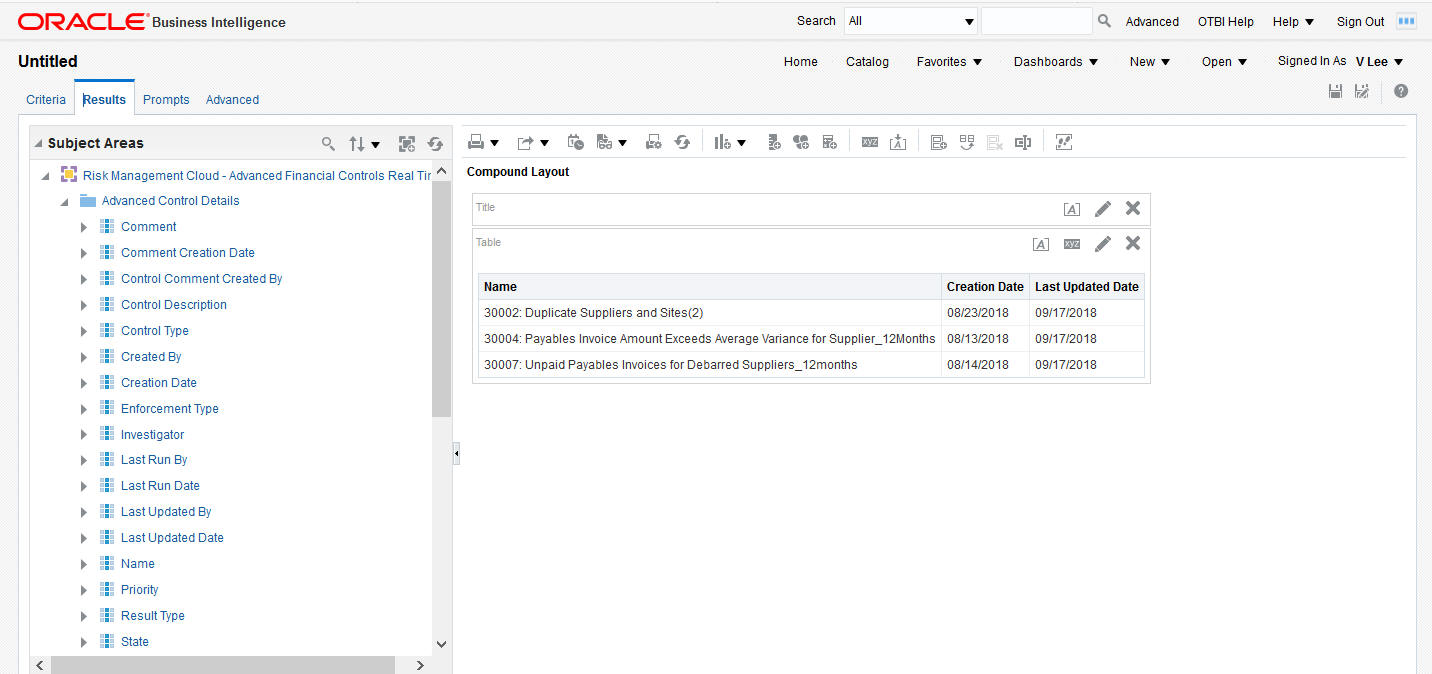
Control Detail Extract in OTBI
An alternative to using OTBI is to run the existing embedded Control Detail Extract report by navigating to Advanced Controls Management > Advanced Controls Reports. Below is an example of the Control Detail Extract report.

Embedded Control Detail Extract
For incident details extraction under the Results tab, you can continue to use the Export to Excel option in the toolbar. Identify the data to be included in the exported file by using filter and column display options for the result details of a selected control. Select the Export to Excel option in the toolbar to open your file or save it. Alternatively, you can also create an OTBI report for your transaction incidents.
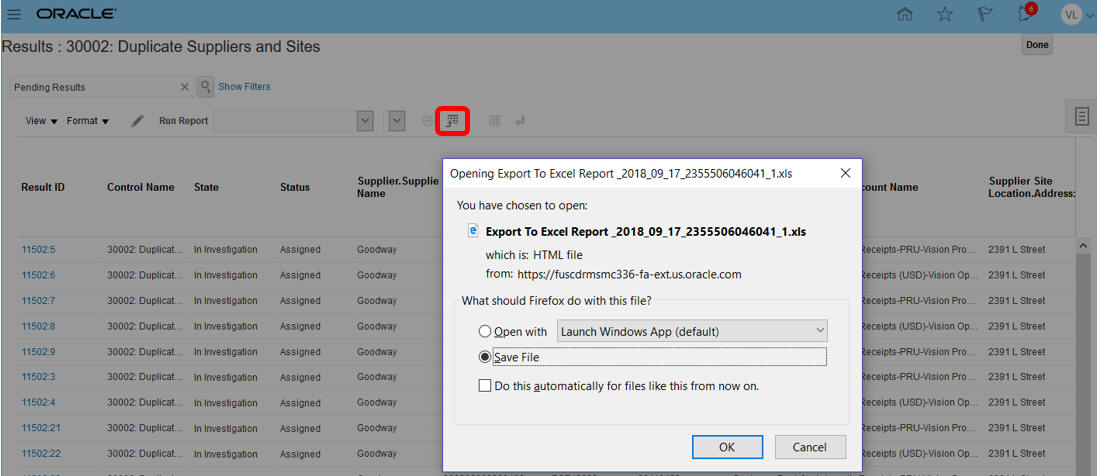
Incident Details Extract - Export to Excel Option
Key Resources
- For information on creating OTBI reporting instruments, see Risk Management Cloud Creating Analytics and Reports for Risk Management.
Copy Cell Value in Results and Controls
Copy a cell value (or Ctrl + C) from model results, controls, or incident results to the clipboard so that you can paste to other documents.
Steps to Enable
No steps are required to enable this feature.
Tips And Considerations
Having the option to copy and paste a value streamlines tasks like adding comments to an incident result. For example, you can copy an Invoice Number to paste it as comment, or into a text editor so you can search on the source transaction record for additional analysis. Copy and paste multiple values into a text editor to elaborate on related records that require research.
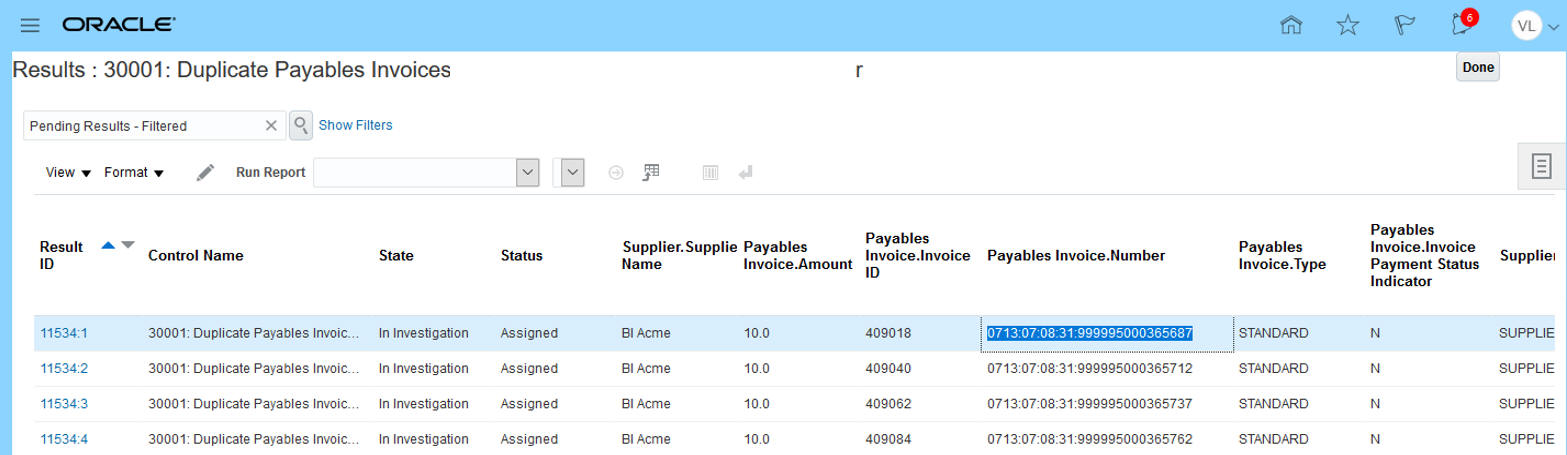
Copy a Value
With the values copied, you can can edit the incident, adding a comment by pasting the information as part of the remediation action.
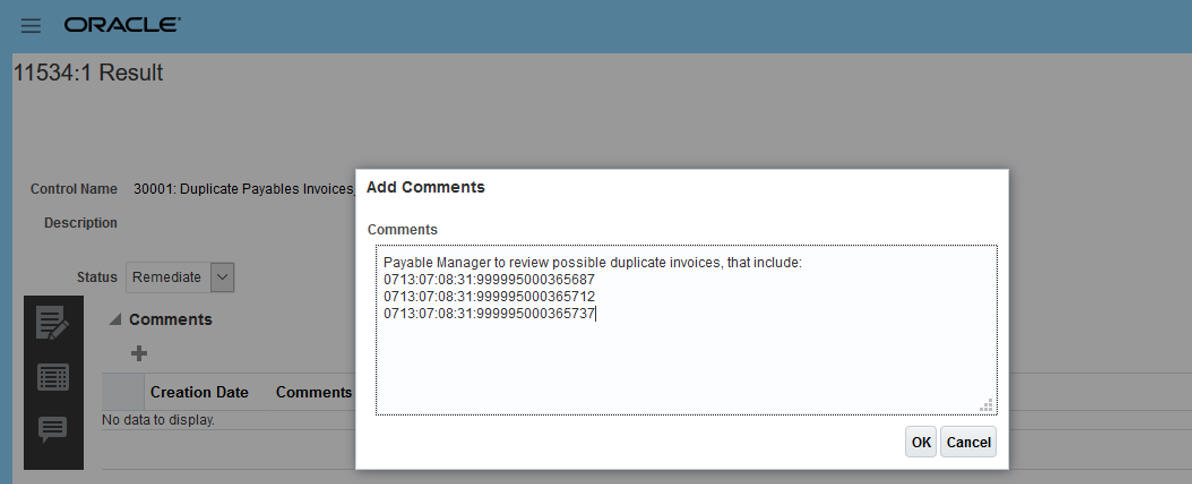
Paste a Value
New Conflicts Within a Single Role Option for Model Results
A check box called Conflicts within a single role, previously available in the page that displays access incidents generated by an individual access control, is now available in the page that displays results for a model. It filters the list of results to include only those in which the assignment of a single role grants rights to access points the model defines as conflicting.

Conflicts Within a Single Role Check Box
Steps to Enable
No steps are required to enable this feature.
Tips And Considerations
You can use this feature to begin the remediation of intra-role violations before converting the model into a control.
Key Resources
- For more information about model results, see the "Managing Models" chapter of Risk Management Cloud Using Advanced Access Controls. For more information about incident results, see the "Managing Results" chapter of that guide.
Access Visualization Enhancements
When resolving incidents, you may create graphic visualizations of paths by which users gain access to conflicting points. Enhancements have been made to access visualization.
- Instead of displaying U, R, and P, the legend for an access visualization now displays User, Role, and Privilege.
- The visualization shows the unique code associated to an access point when you hover your cursor over the node representing that access point in a visualization.

Visualization
Steps to Enable
No steps are required to enable this feature.
Key Resources
- For more information on access visualizations, see the "Managing Visualizations and Simulations" chapter of Risk Management Cloud Using Advanced Access Controls.
Access Simulation Enhancements
When resolving incidents, use simulations to preview the effects of steps you may take to resolve access conflicts. Enhancements have been made to access simulations.
- Create a simulation based on the results of a control visualization.
- Create a simulation across multiple control results. To do so, create the simulation from scratch, rather than from a visualization. That's because a visualization necessarily focuses on results generated by a single control.
- Create remediation steps by interacting with a visualization graph.
- View the number of conflicts that would be cleaned up if the remediation steps were executed in the Security Console.
- Generate a pdf of the remediation plan.
As you analyze access incidents, you may determine some role structures need to be redefined. Maybe a role would cause segregation of duties conflicts if given to a user. As you view incident details, you ask questions such as these: What would happen if I removed duty A from duty B? How many conflicts would that clean up? How many users would that affect? Would it affect more roles than just the role I'm currently analyzing? You can create a simulation to answer these types of questions.
You may do so directly from the visualization of a set of incidents; just click the Create Simulation button in the visualization. Each simulation consists of remediation steps. Each of these steps hypothesizes the removal of an access point from a role hierarchy. When you create a simulation from a visualization, you can create a remediation step by clicking an arrow connecting the access point you want to remove from its parent in its role hierarchy, then selecting a Remove option.
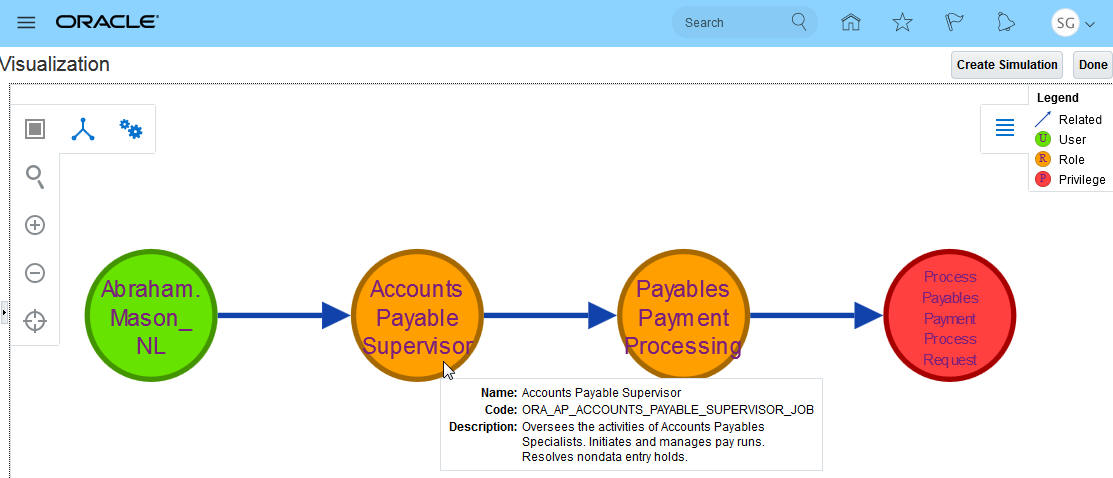
Create Simulation from Visualization
In the Create Access Simulation page, you can name the simulation and continue to add remediation steps. You can run the simulation to view the number of conflicts that would be cleaned up if the remediation steps were executed in the Security Console. You can also generate a pdf of the remediation plan.
.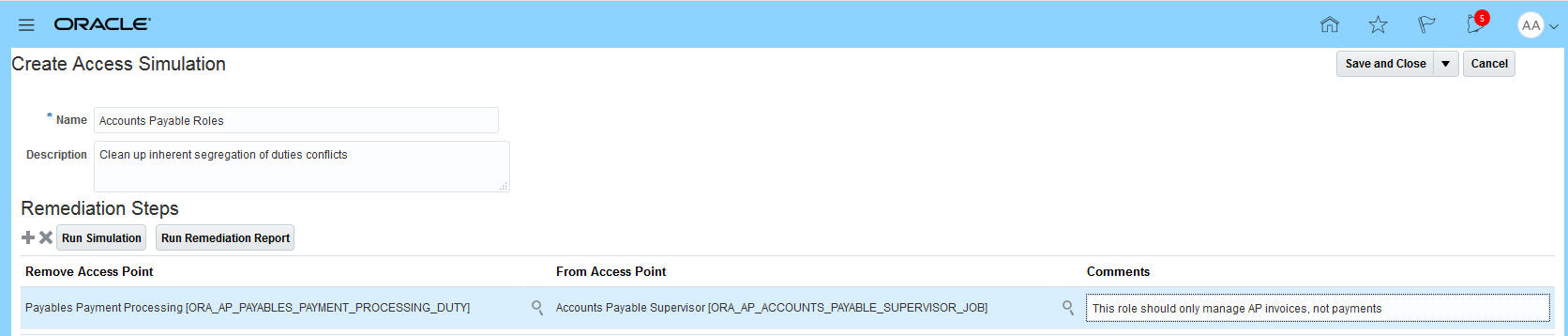
Create Access Simulation
Steps to Enable
No steps are required to enable this feature.
Tips And Considerations
The quickest way to get simulation results is to create it from a visualization. This is because the simulation job is based on only one control. If you need to base your simulation across multiple controls, you must create it from the Access Simulations page directly.
Key Resources
- For more information about creating simulations, see the "Managing Visualizations and Simulations" chapter of Risk Management Cloud Using Advanced Access Controls.
Create User-Defined Access Point Limitation
The Create User-Defined Access Point page limits the display of access points to 500 so that search results return immediately.
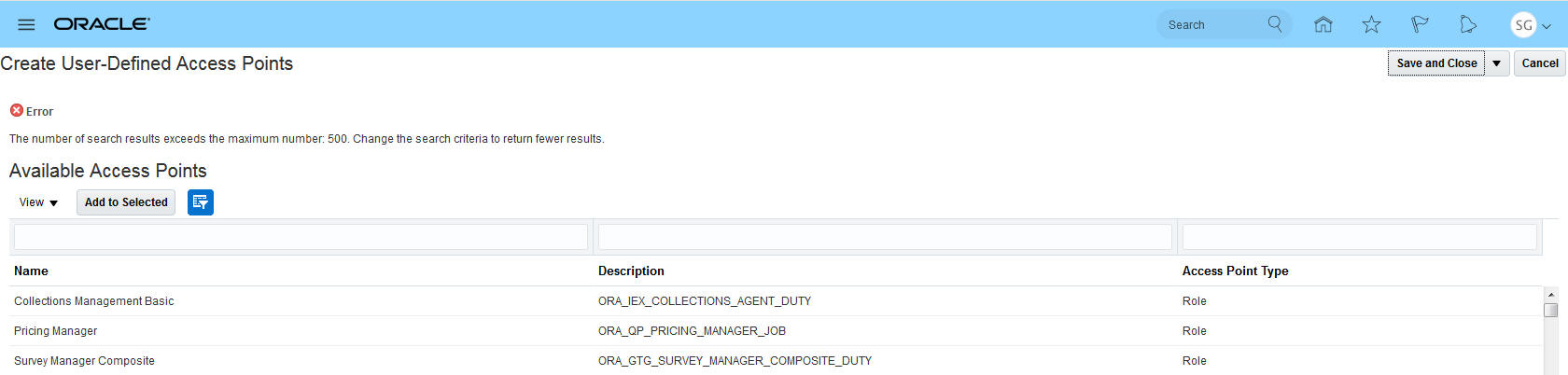
User-Defined Access Point Search
When creating a user-defined access point, you already have an idea of the access path you want to create. For example, you may be looking for an access point that has to do with Journals, and so you filter for that. Notice after adding the filters to restrict the number of records returned the error message no longer shows.
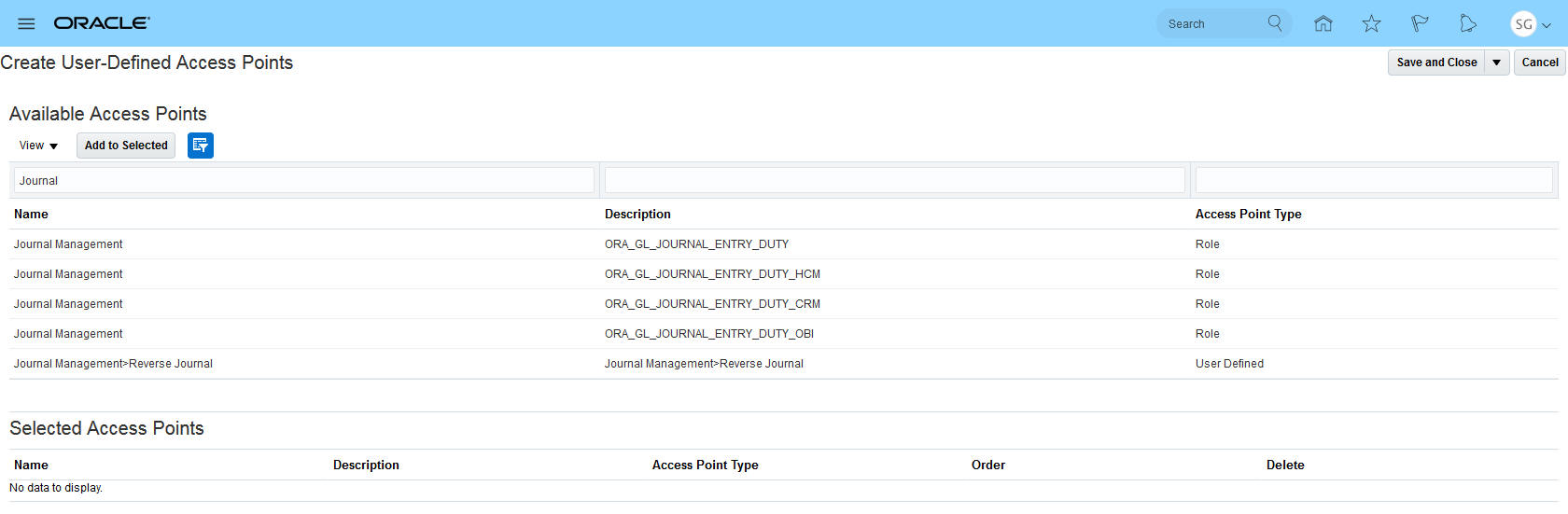
User-Defined Access Point Search with Filters
Steps to Enable
No steps are required to enable this feature.
Key Resources
- For more information about user-defined access points, see the "Managing Model and Control Elements" chapter of Risk Management Cloud Using Advanced Access Controls.
Contextual Control and Incident Extract Reports Removed
Two contextual reports have been removed, but are still available as embedded reports in the Advanced Controls Reports work area.
- The Control Detail Extract report is no longer available as a contextual report in the toolbar under the Controls page. Alternatively, use Business Intelligence for Risk Management for reporting.
- The Access Incident Details Extract report is no longer available as a contextual report in the toolbar of the Results page that displays incidents generated by a specific control. Alternatively, use the Export to Excel option in toolbar. Or, use Business Intelligence for Risk Management for reporting.
Steps to Enable
No steps are required to enable this feature.
Tips And Considerations
Reports are easy to create in Business Intelligence (OTBI). Here is an example of a report that lists controls. You would use the Advanced Access Controls Real Time subject area to create it quickly. From that subject area, you may add as many detail dimensions as you wish. These might include the name of the control, priority, last run date, or other details.
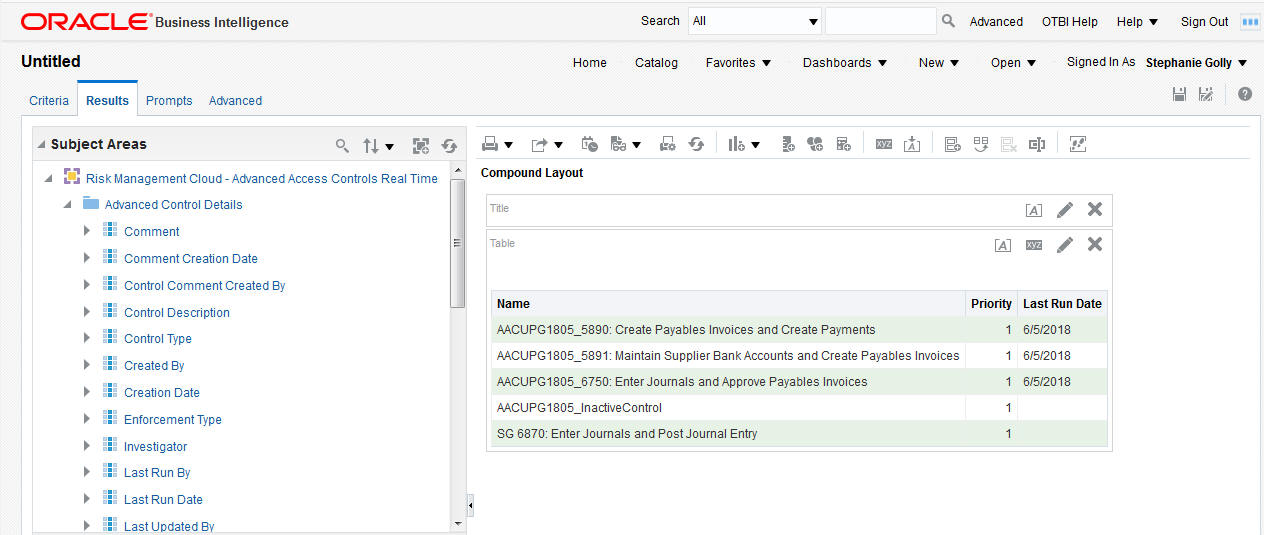
Control Detail Extract in OTBI
An alternative to using OTBI is to run the existing embedded Control Detail Extract report by navigating to Advanced Controls Management > Advanced Controls Reports. Below is an example of the Control Detail Extract report.

Embedded Control Detail Extract
You don't have to extract your access incidents to a spreadsheet to analyze or pivot your results anymore. Instead, use OTBI to quickly create reports that allow you to see who has access to conflicts and how. You can focus in on an individual user, as shown below, and easily see there are two issues here. 1) Mason has access to create a payables invoice through the Accounts Payable Supervisor role and manage payables payments through the Accounts Payable Manager role. Should he have both roles? 2) Accounts Payable Supervisor role inherently has conflicting access. That role should be restructured.

Access Incident Details Report
You might want to start thinking about how the role structure needs to be cleaned up. To do that, add the Incident Information attribute to view the entire path that allows the user to get to the conflicting access.
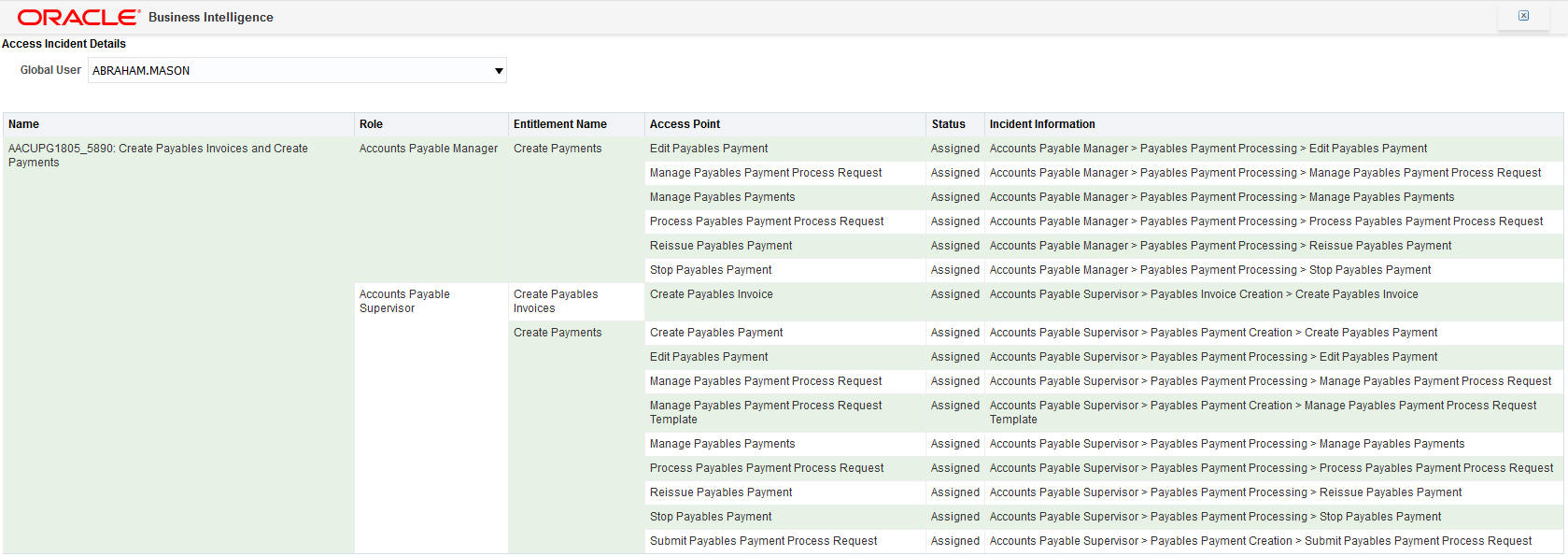
Access Incident Details Report - with Incident Information
Key Resources
- For information on creating OTBI reporting instruments, see Risk Management Cloud Creating Analytics and Reports for Risk Management.
Copy Cell Value in Results and Controls
Copy a cell value (or Ctrl + C) from model results, controls, or incident results to the clipboard so that you can paste to other documents.
Steps to Enable
No steps are required to enable this feature.
Tips And Considerations
Having the option to copy and paste a value streamlines tasks like adding comments to a incident result. For example, now you can copy role information that needs to be modified from the incident information field and more easily create a remediation action.
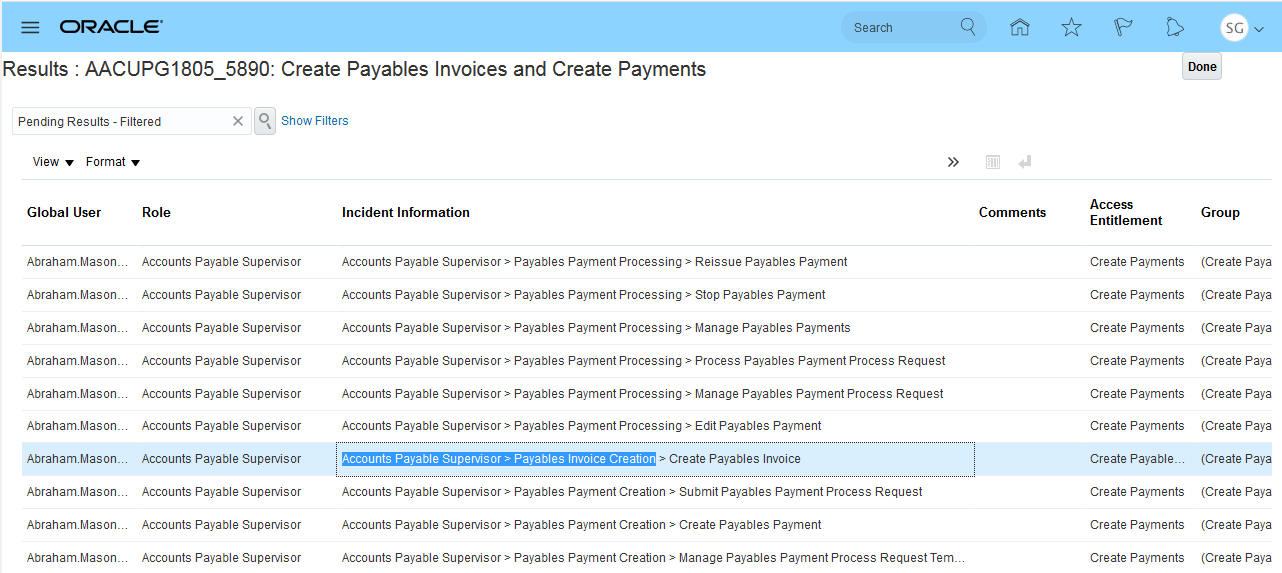
Copy a Value
With the values you need in my clipboard, you can edit the incident, add a comment, and use pasted values as a remediation action.

Paste a Value
Oracle Access Certification enables your organization to perform periodic reviews to determine whether job roles are assigned appropriately to users.
Access Certification users work at three levels. The first level begins with an Access Certification administrator initiating a certification. This includes defining its details, including the scope of the roles being certified and the assignment of those roles to owners and auditors who are responsible for carrying out the certification.
When given the proper security, the administrator will see the Access Certifications icon on the home page.
Access Certifications Navigation Icon
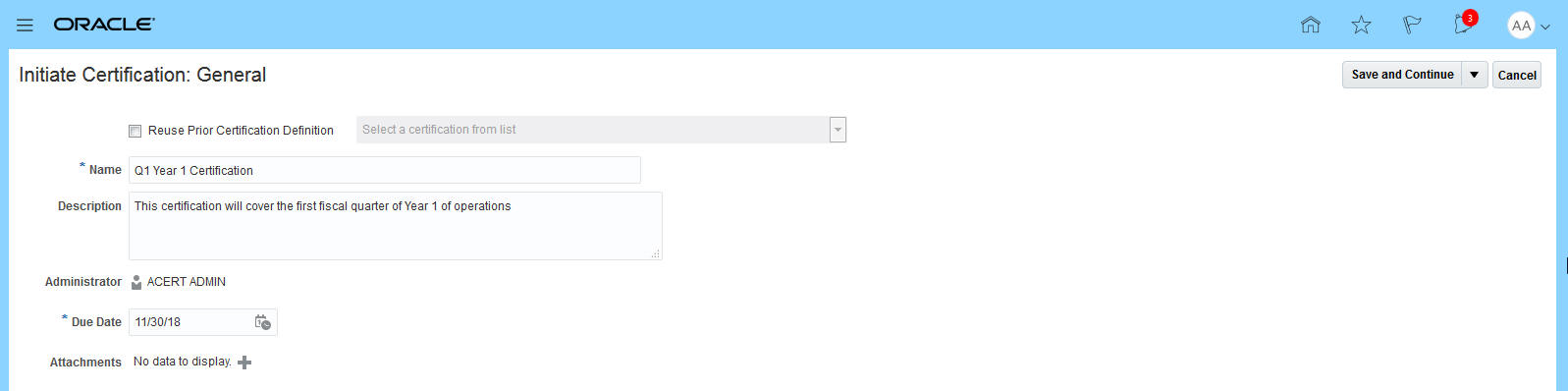
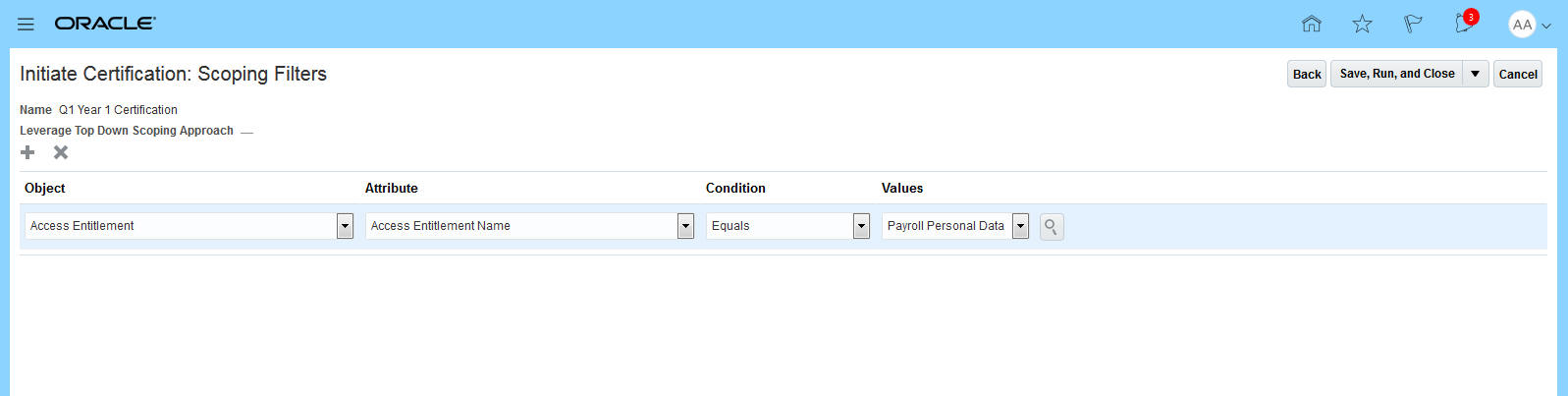
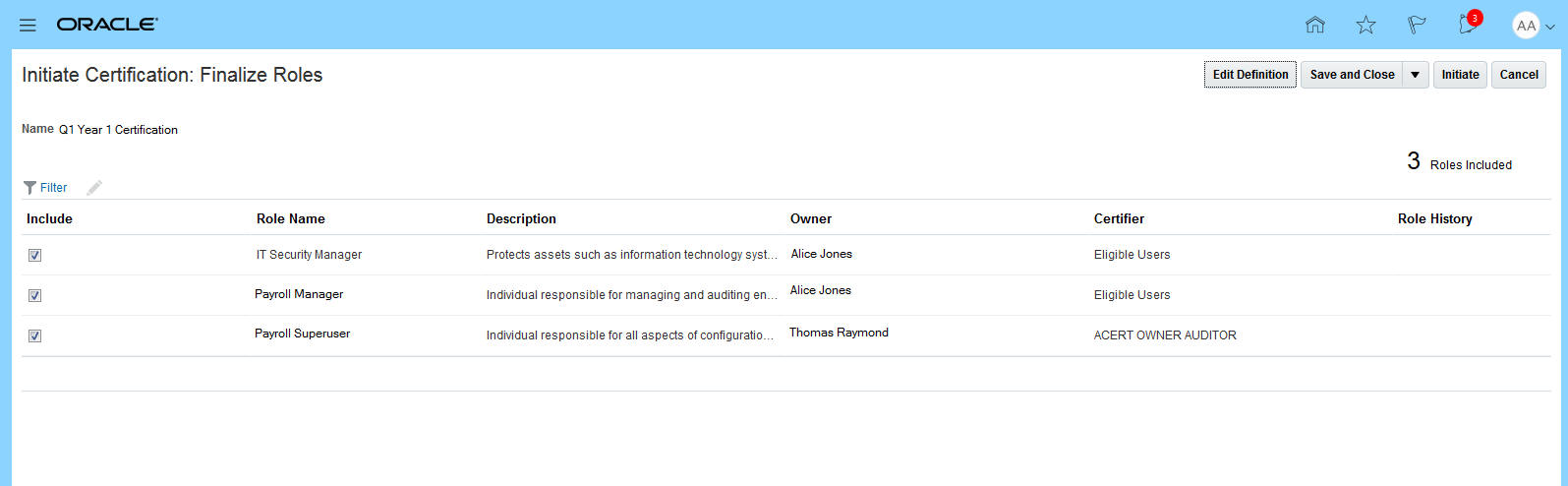
Once in the application the administrator can initiate a new certification by performing four steps:
- Provide the general information about the certification
- Provide the scoping criteria
- Finalize the roles by manually selecting the roles generated from the scoping and then by assigning users to be owners and auditors of the selected roles
- Once that has been completed, the administrator can initiate the certification.
Steps to Enable
To enable this functionality,
- A user must be assigned a job role that contains at least the Access Certification Administrator Duty role.
- Once this is done, the necessary security synchronization jobs must be run.
- The user should see the Access Certification icon on the home page.
Tips And Considerations
To initially test out the functionality for Access Certification, the seeded User Access Certification Manager job role should be assigned. This will give the user access to perform all the activities from administrator to owner to auditor.
Key Resources
- For more information about creating a certification, see "Initiating a Certification" chapter of Risk Management Cloud Using Access Certification.
Role Information
- User Access Certification Manager job role is seeded and inherits four duties for Access Certification. These seeded duties can be granted to users based on their required role.
Oracle Access Certification enables your organization to perform periodic reviews to determine whether job roles are assigned appropriately to users.
Access Certification users work at three levels. The second level is Access Certification owner, who is granted responsibility for a set of the roles included in a certification. These roles are also assigned to one or more auditors, and the owner reviews the progress and the work of those auditors.
When given the proper security, the owner sees the Access Certification icon on the home page.
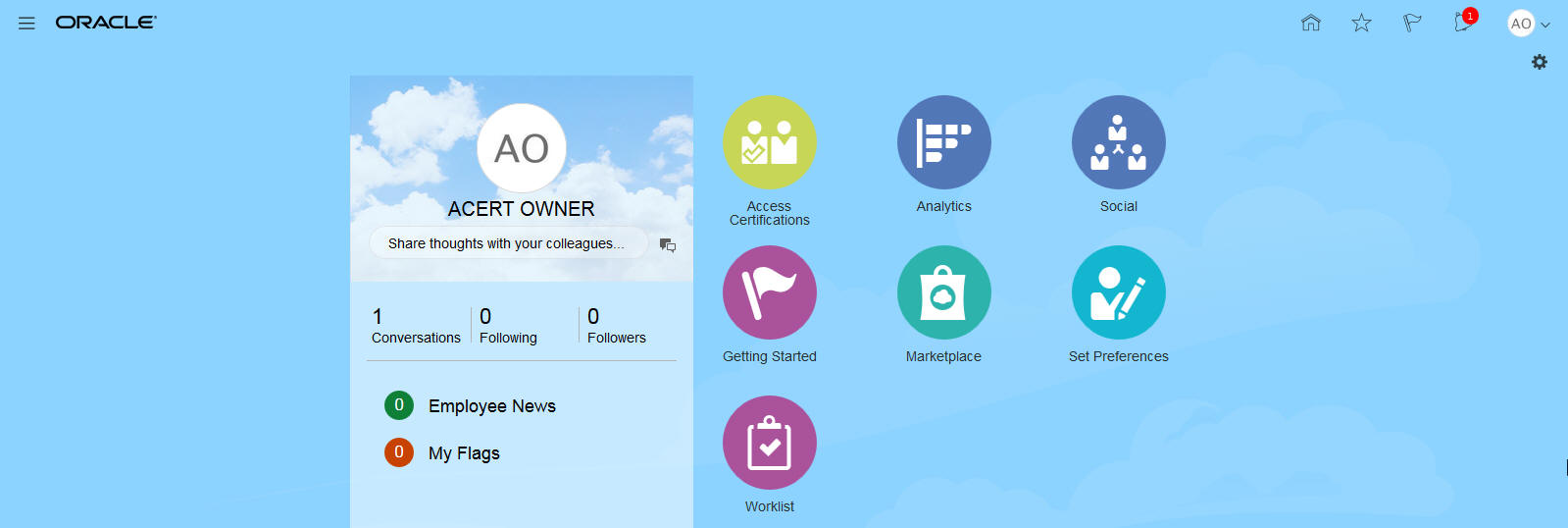
Owner Access Certification Icon
An Access Certifications page lists all certifications to which an owner is assigned. In it, the owner can select one of the certifications and open an Owner Overview page for it.
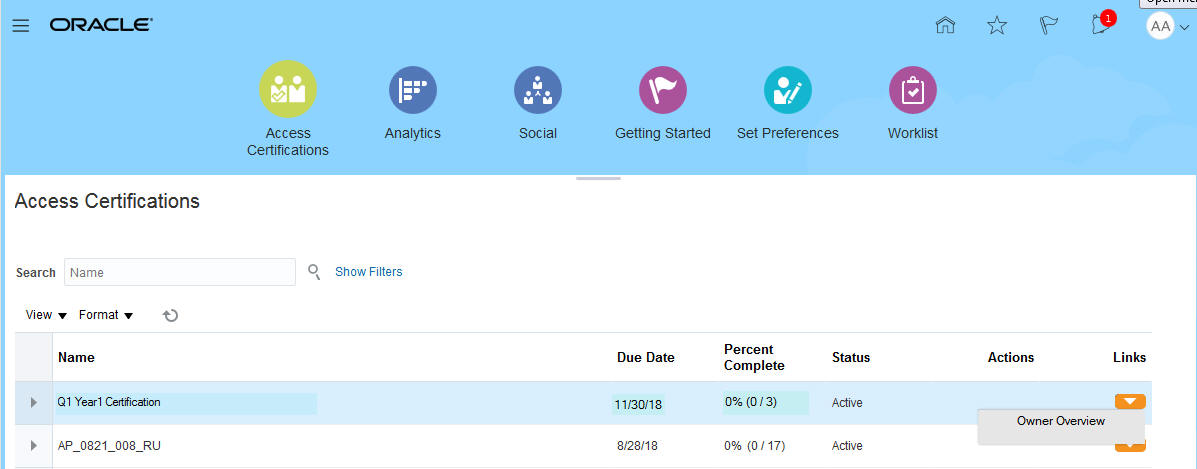
Navigation to the Owner Overview
From the Owner Overview, the owner can see and manage the progress of the auditors working on their roles.
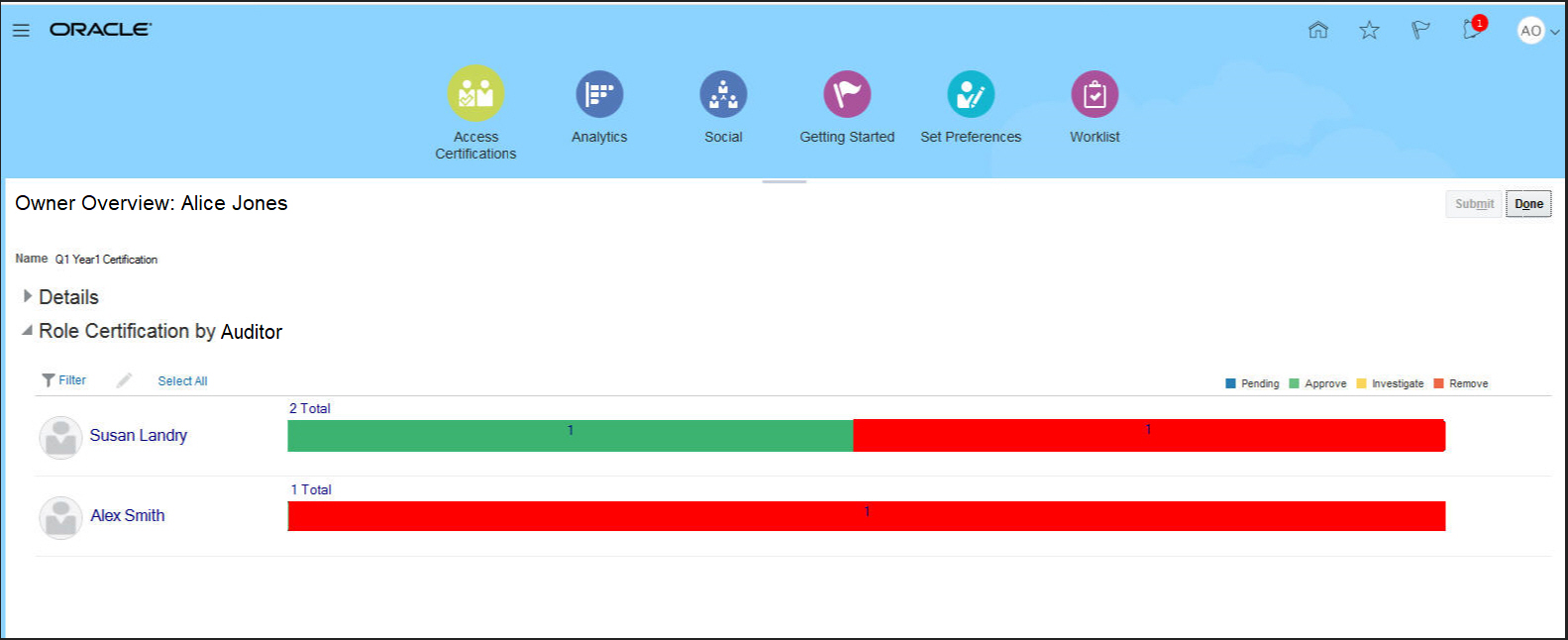
Owner Overview Page
Steps to Enable
To enable this functionality:
- A user must be assigned a job role that contains at least the Access Certification Owner Duty role.
- Once this is done, the necessary security synchronization jobs must be run.
- The user should see the Access Certification icon on the home page.
Tips And Considerations
To initially test out the functionality for Access Certification, the seeded User Access Certification Manager job role should be assigned. This will give the user access to perform all the activities from administrator to owner to auditor.
Key Resources
- For more information about creating a certification, see the "Certifying Roles" chapter of Risk Management Cloud Using Access Certification.
Role Information
- User Access Certification Manager job role is seeded and inherits four duties for Access Certification. These seeded duties can be granted to users based on their required role.
Oracle Access Certification enables your organization to perform periodic reviews to determine whether job roles are assigned appropriately to users.
Access Certification users work at three levels. The third level is Access Certification auditor, who is responsible for performing the actual certification of a set of role and user combinations.
When given the proper security, the auditor sees the Access Certification icon on the home page.
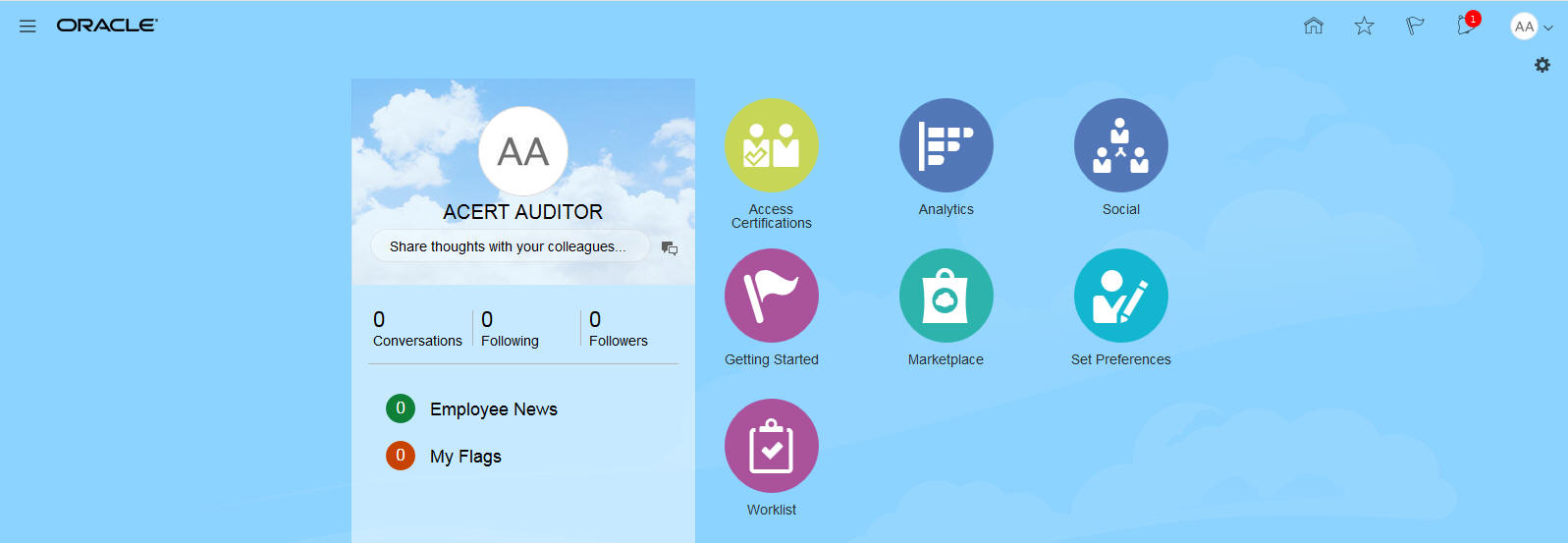
Access Certification Icon
Once in the Access Certification product, the auditor can select the worksheet.
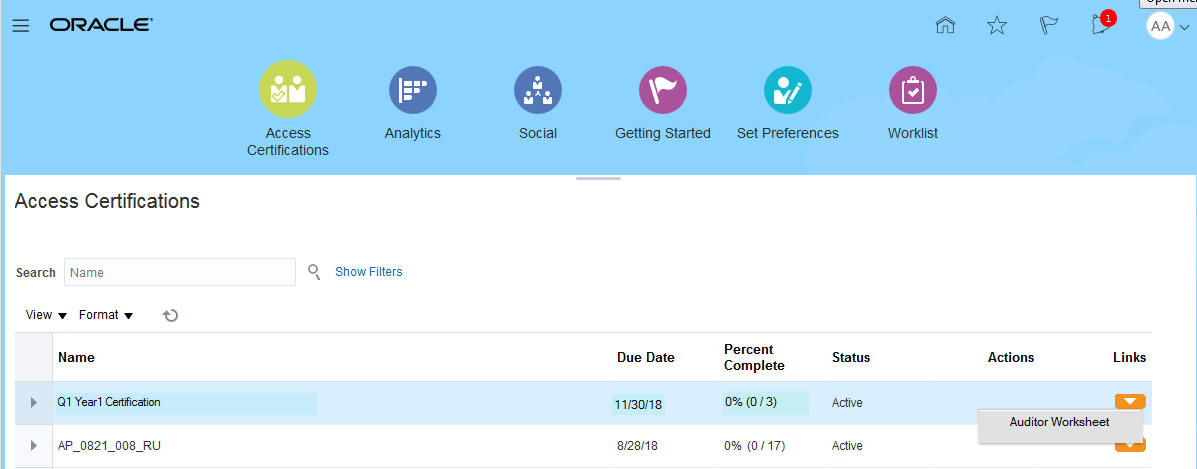
Access to Worksheet
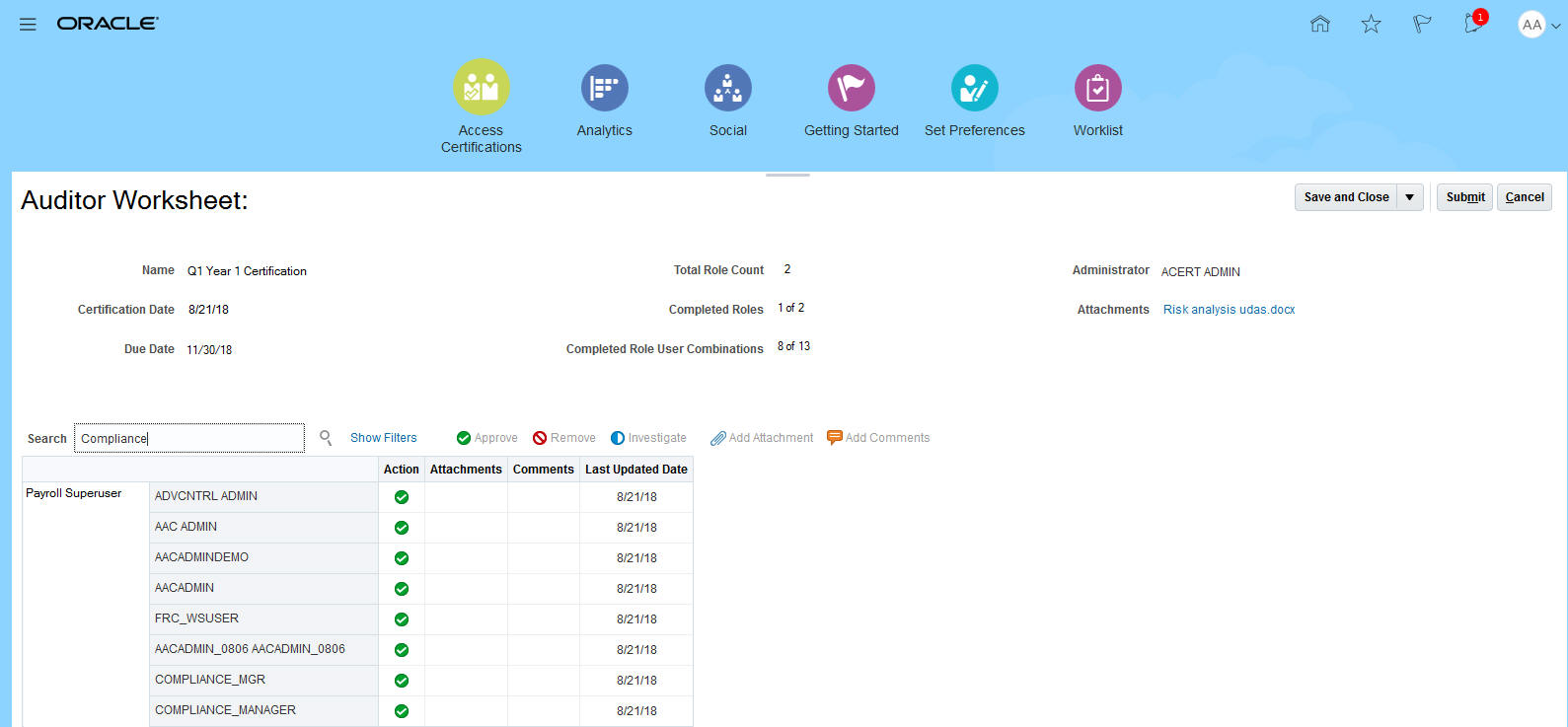
When in the worksheet, the auditor can record access validation actions.
 .
.
Auditor Worksheet
When these actions are saved, the progress is reflected in the Overview pages for the owner and administrator.
Steps to Enable
To enable this functionality:
- A user must be assigned a job role that contains at least the Access Certification Auditor Duty role.
- Once this is done the necessary security synchronization jobs must be run.
- The user should see the Access Certification icon on their home page.
Tips And Considerations
To initially test out the functionality for Access Certification, the seeded User Access Certification Manager job role should be assigned. This will give the user access to perform all the activities from administrator to owner to auditor.
Key Resources
- For more information about creating a certification, see "Certifying Roles" chapter of Risk Management Cloud Using Access Certification.
Role Information
- User Access Certification Manager job role is seeded and inherits four duties for Access Certification. These seeded duties can be granted to users based on their required role.
Access Certification makes use of these tools:
- An Access Certification Synchronization job updates user administrator, owner, and certifier assignments, including notifications. This occurs daily, and the schedule should not be modified.
- Build analyses, dashboards, and reports using the predefined Access Certification Real Time subject area.
Steps to Enable
No steps are required to enable this feature.
Role Information
- User Access Certification Manager job role is seeded and inherits four duties for Access Certification. These seeded duties can be granted to users based on their required role.
Transactional Business Intelligence for Risk Management
New Risk Management Administration Reports
New administration reports are available under the Risk Management catalog and can be run for Financial Reporting Compliance, Advanced Financial Controls, and Advanced Access Controls.
- Change History report provides information on changes recorded in revision history for objects under the different product areas.
- Inaccessible Records and Worklists report provides information on records and worklist items that are no longer accessible by any application user.
- Unassigned Perspective Values report provides information around perspective hierarchies and values that are not assigned to any object.
To run any of these reports, navigate to Business Intelligence > Catalog > Shared Folders > Risk Management and then the respective product folder you are interested in such as Advanced Financial Controls. Select the Administration folder to view the available reports.
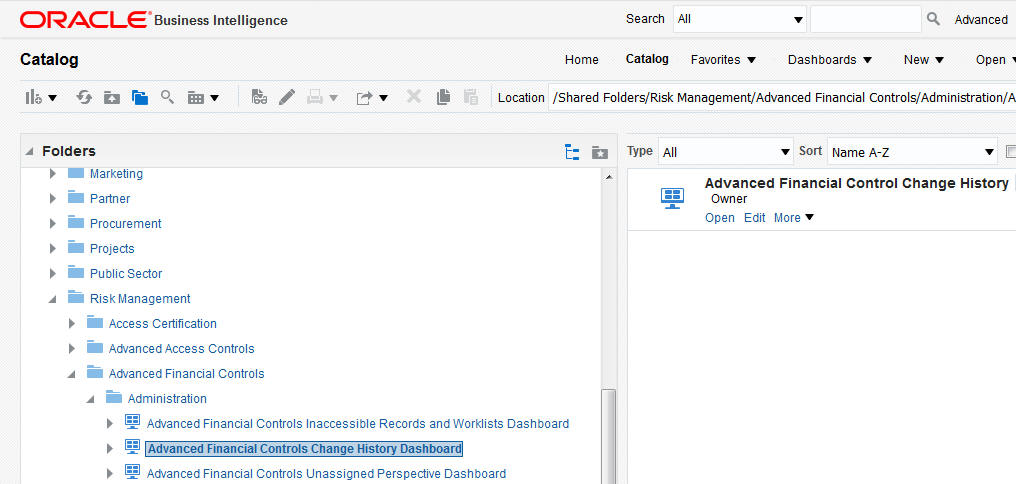
Administration Reports
The change history report shows the old and new value for a record. For example, an Advanced Control incident result status changed from assigned to remediate for result ID 12040:1 on 6/5/2018.

Change History
The Inaccessible Records report will show the records that are not accessible by anyone. In the example below, no user has a data security policy that will allow view access to records associated to Auto Perspective > Auto Perspective Root. A system administrator must create a data security policy that has access to this perspective. At that point the user granted access can go change the perspective associated to the record if needed.
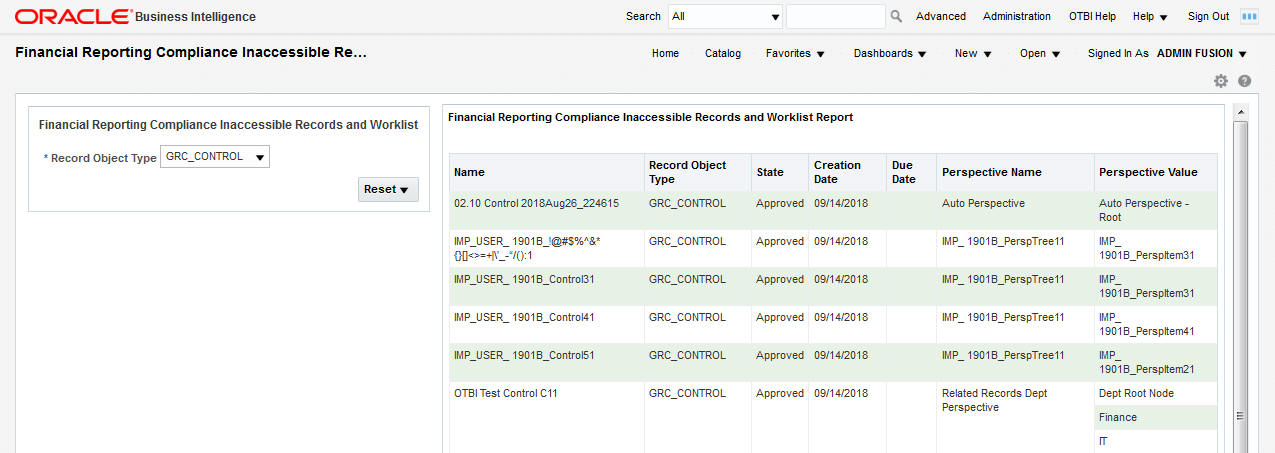
Inaccessible Records and Worklists
The Unassigned Perspective Values report shows perspectives that have not been assigned to any records. This may bring visibility to perspective values that should be assigned, but were overlooked, or it may prompt the business to inactivate perspectives that are not used.
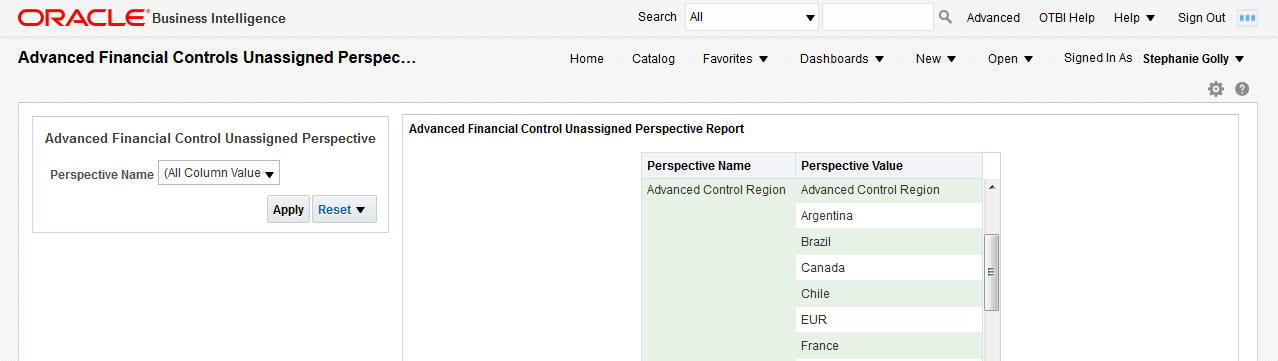
Unassigned Perspective Values
Steps to Enable
A synchronization program must be run to gather real-time information pertaining to the Change History, Inaccessible Records, and Unassigned Perspective Values reports. By default, this job is scheduled to run every Sunday. To change the scheduled frequency or to run the program on demand, navigate to Risk Management Tools > Setup and Administration > Scheduling.
Key Resources
- For more information see Oracle Risk Management Cloud Creating Analytics and Reports in the Risk Management library of the Oracle Help Center.
Subject Area for Access Certification
Access Certification delivers one subject area that allows creation of analyses based on Access Certification data. The subject area is Risk Management Cloud Services – Access Certification Real Time.

Risk Management Cloud - Access Certification Real Time Subject Area
The subject area provides details related to certifications in Oracle Access Certification. These details include the administrators, owners, and certifiers involved, and the actions taken by each. Most organizations perform access certifications on a quarterly basis. They review the users that have access to key job roles to determine if that access is appropriate. Dimensions in this subject area allow reporting and analysis related to certification results such as the user-role combinations that have been reviewed, and whether they were approved or removed. The person who views an analysis or report based on this subject area can only see records they can also access in the Access Certification application.

Access Certification Details Folder
Several predefined metrics are delivered for creating role trending reports such as the count of approved or removed unique user-to-job-role combinations. Quarterly summary reports can be created by certification to show the duration of time it took to complete a certification, percentage of user-role combinations approved versus removed, and so on.

Access Certification Facts Folder
Steps to Enable
The predefined User Access Certification Manager job role has the required duty to access the Risk Management Access Certification subject area. If you want to enable reporting for job roles you create, be sure to grant them the Access Certification Transaction Analysis Duty.
REPORT SYNCHRONIZATION
The most up-to-date data is reflected in the Access Certification subject area after the Access Certification Synchronization job runs. This occurs daily, and the schedule should not be modified.
Key Resources
- For more information see Oracle Risk Management Cloud Creating Analytics and Reports in the Risk Management library of the Oracle Help Center.
Role Information
- Access Certification Transaction Analysis Duty (predefined in User Access Certification Manager job role).
This document will continue to evolve as existing sections change and new information is added. All updates appear in the following table:
| Date | Feature | Notes |
|---|---|---|
| 20 APR 2018 | Created initial document. |
This guide outlines the information you need to know about new or improved functionality in this update, and describes any tasks you might need to perform for the update. Each section includes a brief description of the feature, the steps you need to take to enable or begin using the feature, any tips or considerations that you should keep in mind, and the resources available to help you.
Customers Upgrading from Release 12
If you're upgrading from Release 12 to Release 13, then you should review all of the release readiness content for Release 13 (updates 17B - 17D, as well as, updates 18A - 18B) to learn about all of the features available in release 13.
Give Us Feedback
We welcome your comments and suggestions to improve the content. Please send us your feedback at oracle_fusion_applications_help_ww_grp@oracle.com.
| Action Required to Enable Feature |
|||||
|---|---|---|---|---|---|
| Feature |
None (Automatically Available) |
Enable via Opt In UI Only |
Enable via Opt In UI Plus Additional Steps |
Not Enabled via Opt In UI but Setup Required |
Issue Service Request |
|
|||||
|
|||||
|
|||||
|
|||||
|
|||||
|
|||||
|
|||||
|
|||||
|
|||||
|
|||||
|
|||||
|
|||||
|
|||||
|
|||||
Oracle Risk Management consists of three products: Oracle Fusion Financial Reporting Compliance documents your policies for identifying and resolving risk in your financial processes. Oracle Advanced Access Controls detects risk inherent in the access granted to users of business applications. Oracle Advanced Financial Controls uncovers risk exhibited by transactions completed on business applications.
Advanced Financial Controls and Advanced Access Controls, which belong to a module called Advanced Controls Management, were newly introduced in release 13, update 18A.
Queued Jobs Canceled After Upgrade
During an upgrade, previously queued jobs are canceled automatically. Existing job schedules remain in place.
Steps to Enable
No steps are required to enable this feature.
Financial Reporting Compliance
Descriptive Flexfields for Financial Reporting Compliance
You can create descriptive flexfields for use in the pages to create, edit, and manage objects in Financial Reporting Compliance. These objects include Process, Risk, Control, Assessment, Remediation Plan, and Issue. A descriptive flexfield is a user-defined entity that adds to the information you can record for each instance of the object it applies to. Each flexfield consists of segments, which may appear as individual fields or may be concatenated into a single field in a Financial Reporting Compliance page. Each segment may be configured to appear in any circumstance, or only in defined contexts.
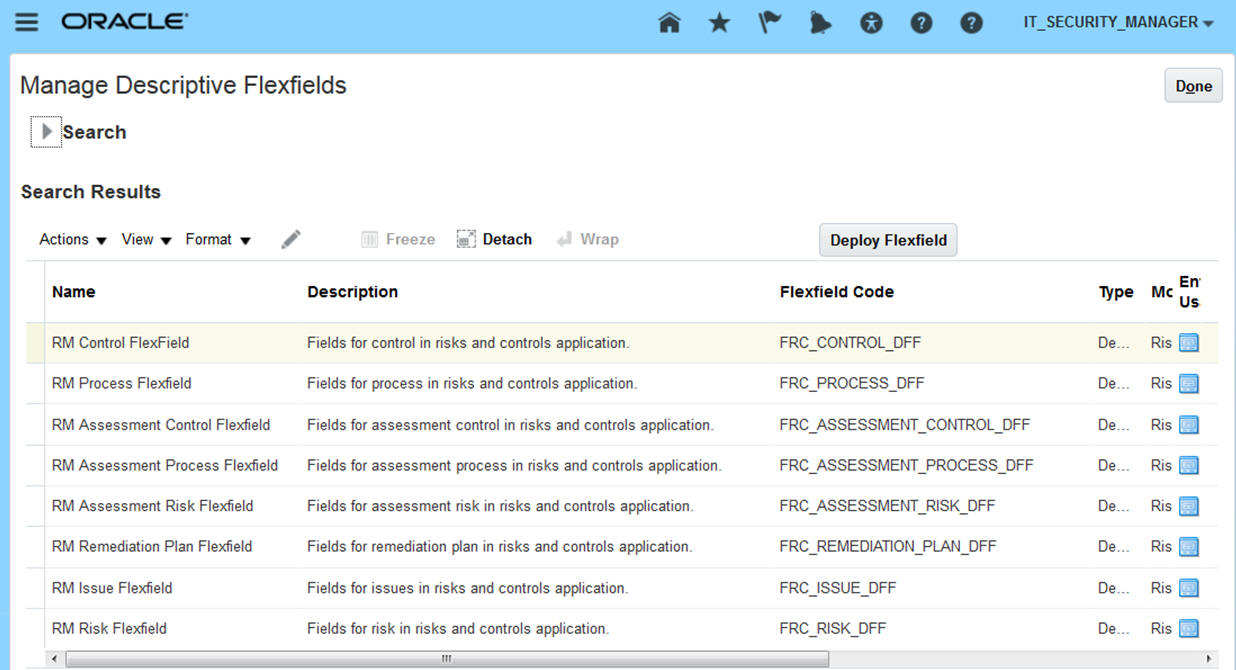
Manage Descriptive Flexfields for Financial Compliance Reporting
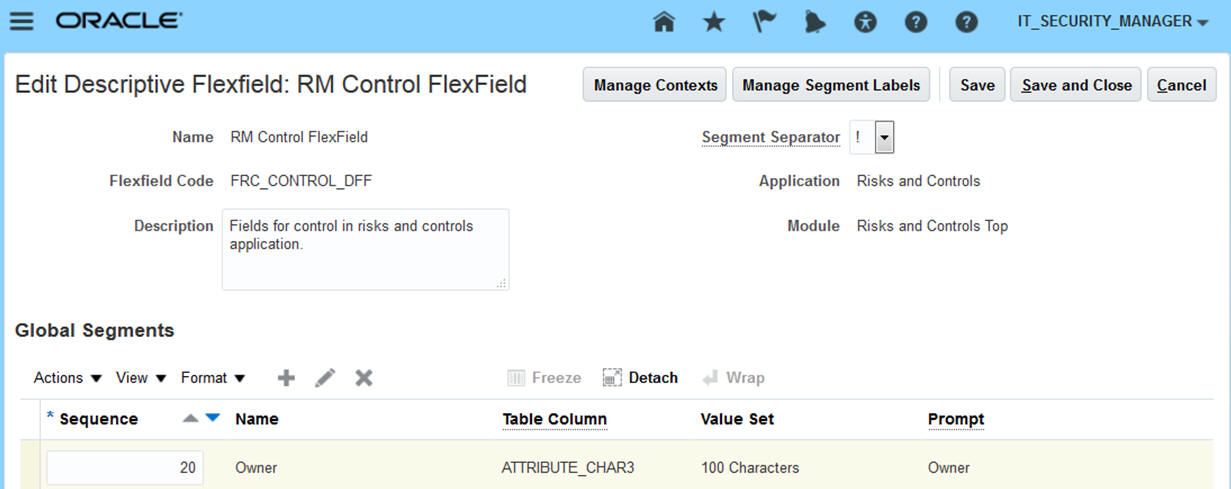
Manage a Descriptive Flexfield for Financial Compliance Reporting
Flexfields are located in a region labeled "Additional Information" in the pages to create, edit, or view the definition of an object. This region appears, however, only if flexfields are defined for the object. If not, the region is hidden.
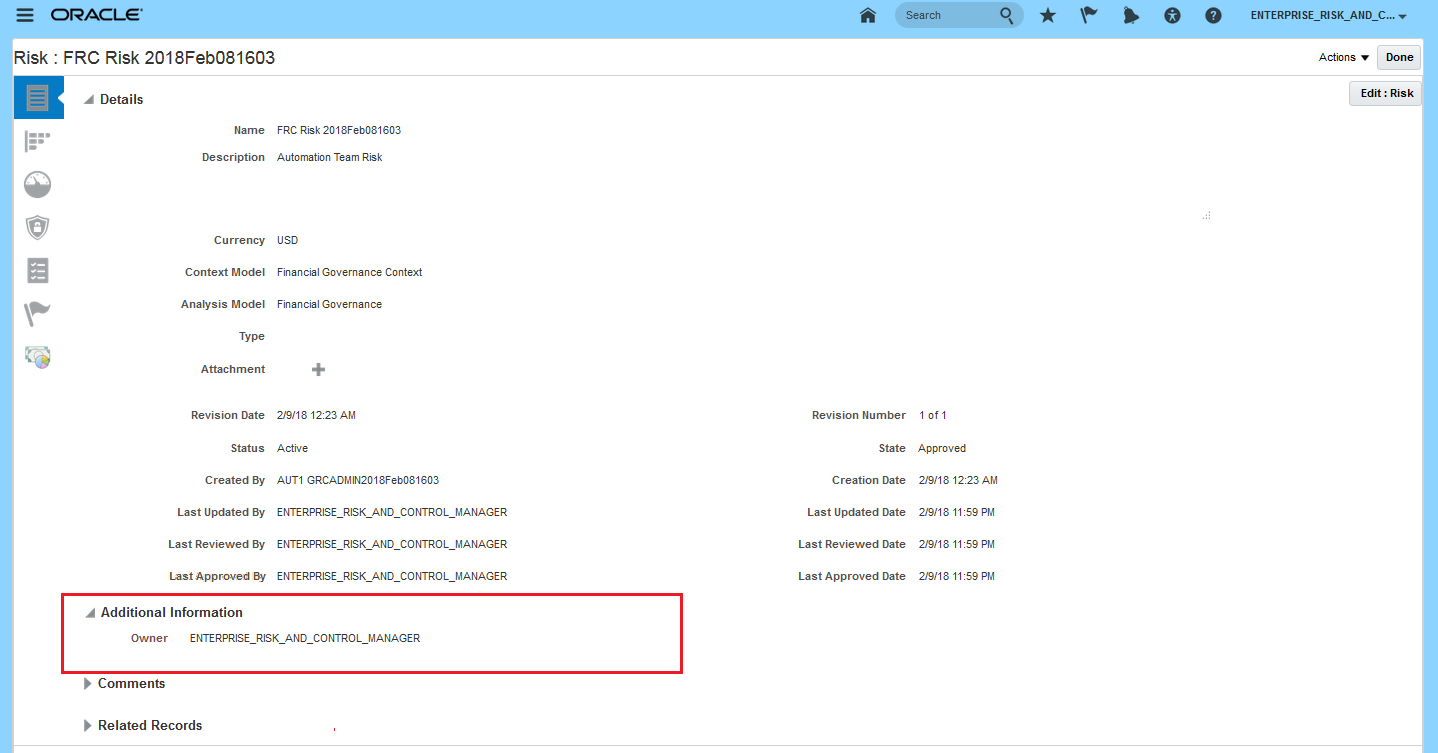
Descriptive Flexfield Located Under Additional Information
Steps to Enable
To place flexfields in Financial Reporting Compliance pages, an administrator uses the Manage Descriptive Flexfields option in the Setup and Maintenance work area.
Tips And Considerations
Of three flexfield types, only descriptive flexfields are available in Financial Reporting Compliance. Extensible and key flexfields are not available.
Key Resources
- For more information see Configuring and Extending Applications in the Risk Management library of the Oracle Help Center.
Role Information
The System Administrator Composite duty grants the access required to administer descriptive flexfields. Any time security updates are made in the Security Console, you must run the User and Role Security Synchronization and Worklist Security Synchronization jobs in Risk Management.
Manage Assessment Refresh Icon
In Financial Reporting Compliance, users can assess risks, controls, and processes. Within the Assessments work area, a Manage Assessment page now includes a refresh icon. Assessments may be initiated in batches, and the record of an assessment batch appears in the Manage Assessment page only after a background job has run. The refresh feature enables users to display the record of newly initiated assessment batches on demand. For each record, the Manage Assessment page displays a graphic indicator of progress toward completion. The refresh feature also updates these indicators.
Steps to Enable
No steps are required to enable this feature.
Model Definition – New Pattern Filters
A model consists of filters that select records exhibiting risk. A new type of filter, called a pattern filter, performs statistical analysis. To create such a filter, you select a pattern (a statistical function) from a predefined set: Mean, Benford, Clustering, Anomaly Detection, Absolute Deviation, Pareto, Normalize, and Lexical Tokenization. You also select one or more attributes of business objects whose values are subject to analysis by the pattern. A given model uses only one pattern; controls do not use patterns.
A typical pattern transaction model returns both graphic and tabular results. The graph depicts the statistical pattern generated by the model, and the table displays data represented in the graph. The Normalize and Lexical Tokenization patterns are exceptions; a model containing either generates only tabular results.
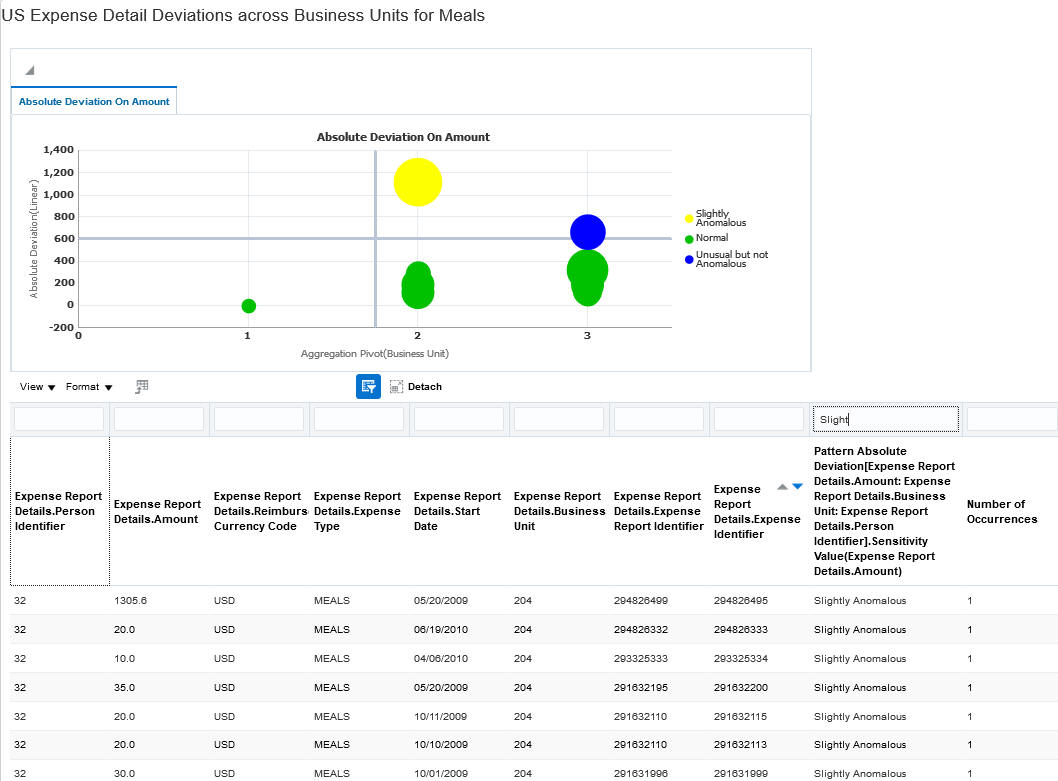
Absolute Deviation Pattern - Model Results in Advanced Financial Controls

Benford Pattern - Model Results in Advanced Financial Controls
Steps to Enable
No steps are required to enable this feature.
Tips And Considerations
Patterns that return graphic results are for use only in models, not in controls. Pattern graphs depict a contrast between transactions that are suspect and those that are not. Therefore, results required to produce these graphs necessarily include records of transactions that are not suspect along with those that are. So if a control were to use one of these patterns, large numbers of its incidents would be false positives. Only two patterns are appropriate for use in controls: Normalize and Lexical Tokenization.
Key Resources
- For more information about using patterns in models, see the Managing Models chapter of Risk Management Cloud Using Advanced Financial Controls.
User-Defined Objects Run Automatically
A transaction control that generates incidents may analyze data provided by a user-defined object. That object is created by another control, known as a “dataset” control. As you configure the details for an incident control that cites a user-defined object, you may select a new check box that causes its dataset control to run automatically each time, and immediately before, the incident control runs.
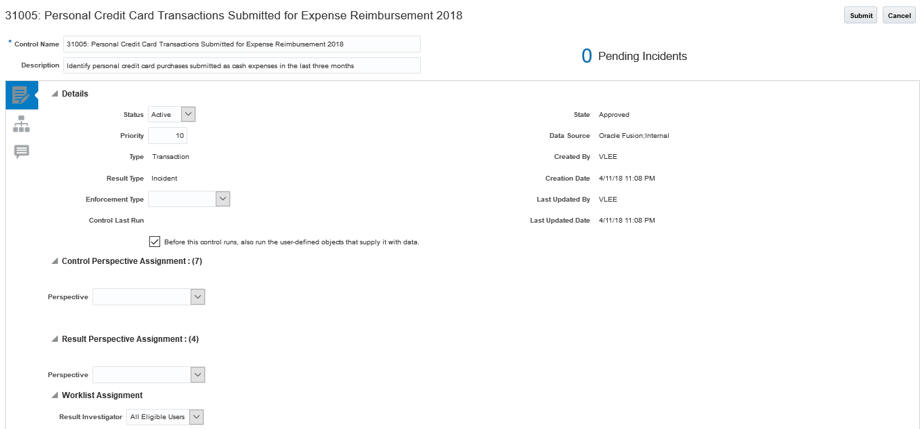
Control using a User-Defined Object in Advanced Financial Controls
Steps to Enable
Edit an existing incident control that cites a user-defined object. In its Details region, check “Before this control runs, also run the user-defined objects that supply it with data.”
Tips And Considerations
If you select this option, control-analysis jobs may run longer. That’s because you are running not only an incident control, but also the related dataset controls that update data for the incident control.
Key Resources
For more information about controls, see the Managing Advanced Controls chapter of Risk Management Cloud Using Advanced Financial Controls.
User-Defined Object Automatically Created
In earlier versions, the creation of a user-defined object involved not only the creation of its dataset control, but also some additional configuration. Now, when you create a dataset control, its user-defined object is created and added to the business-object library automatically.
Steps to Enable
No steps are required to enable this feature.
Tips And Considerations
A user-defined object has the same name as the control it's based on. You cannot change the object's name. As you create a dataset control, ensure that its name is meaningful as the name of an object a user would select while creating a model.
Key Resources
- For more information about user-defined objects, see the Managing User-Defined Objects chapter of Risk Management Cloud Using Advanced Financial Controls.
Delivered Model Content for Enterprise Resource Planning
Oracle delivers four new models for the expense business area. These models use existing business objects.
Steps to Enable
No advance setup is required for you to create transaction models. However, you must run a data synchronization process for models to be able to return results. Moreover, an administrator may set a performance option that affects how models run.
Key Resources
To download Oracle’s delivered model content files for import into your instance, refer to My Oracle Support, Oracle Delivered Content for Advanced Financial Controls (MOS ID 2350138.1). Locate and download the available Advanced Financial Controls content for expenses. The package for release 13, update 18B is Advanced Financial Controls – Expense Models Package 2.xml.
Delivered Model Content for Human Capital Management
Oracle delivers five new models for the Human Capital Management application. These models are supported by new business objects: Employee Job Assignment, Payroll Definition, Payroll Transactions, Personal Payment Method, Salary, and Time Card.
Steps to Enable
No advance setup is required for you to create transaction models. However, you must run a data synchronization process for models to be able to return results. Moreover, an administrator may set a performance option that affects how models run.
Key Resources
To download Oracle’s delivered model content files for import into your instance, refer to My Oracle Support, Oracle Delivered Content for Advanced Financial Controls (MOS ID 2350138.1). Locate and download the available Advanced Financial Controls content for expenses. The package for release 13, update 18B is Advanced Financial Controls – Human Capital Management Models Package 1.xml.
New business objects available for use in models include Roles and General Ledger Daily Rates.
Steps to Enable
No steps are required to enable this feature.
Delivered Model Content for Enterprise Resource Planning
Oracle delivers four new models that detect segregation-of-duties conflicts in Enterprise Resource Planning applications.
Steps to Enable
No steps are required to enable this feature.
Key Resources
To download Oracle’s delivered model content files for import into your instance, refer to My Oracle Support, Oracle Delivered Content for Advanced Access Controls (MOS ID 2350139.1). Locate and download the available Advanced Access Controls content for segregation of duties. The package for release 13, update 18B is Advanced Access Controls – Models Package 2.xml.
Delivered Model Content for Human Capital Management
Oracle delivers 34 new models that detect segregation-of-duties conflicts in Human Capital Management applications.
Steps to Enable
No steps are required to enable this feature.
Key Resources
To download Oracle’s delivered model content files for import into your instance, refer to My Oracle Support, Oracle Delivered Content for Advanced Access Controls (MOS ID 2350139.1). Locate and download the available Advanced Access Controls content for segregation of duties. The package for release 13, update 18B is Advanced Access Controls – Human Capital Management Models Package 1.xml.
Transactional Business Intelligence for Risk Management
Financial Reporting Compliance
Financial Reporting Compliance provides two predefined subject areas, Risk Management Cloud – Assessment Results Real Time and Risk Management Cloud – Compliance Real Time. From these, you can build analyses, dashboards, and reports for Financial Reporting Compliance.
- Both subject areas add attributes to the Assessment Details and Control Details dimension folders. Assessment Details adds assessment ID. Control Details adds control ID.
- The Compliance Real Time subject area adds a dimension folder called Remediation Plan Details. It provides reporting on remediation plan ID.
Steps to Enable
No steps are required to enable this feature.
Subject Area for Advanced Financial Controls
Advanced Financial Controls delivers one subject area that allows creation of analyses based on Advanced Financial Controls data. This subject area is Risk Management Cloud - Advanced Financial Controls Real Time.
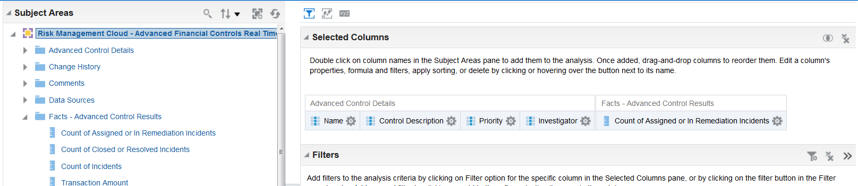
Risk Management Cloud – Advanced Financial Controls Real Time Subject Area
The subject area provides summarized information related to records of controls configured in Oracle Advanced Financial Controls, and of results returned by those controls. Dimensions in this subject area allow reporting and analysis related to controls and results. The person who views an analysis or report based on this subject area sees records associated with perspective values matching those specified in his or her security configuration.

Risk Management Cloud – Advanced Financial Controls Real Time Subject Area - Duplicate Invoice Report Example
Steps to Enable
The predefined Enterprise Risk and Control Manager as well as the Application Control Manager job roles have the required duty to access the Risk Management subject areas. If you want to enable reporting for job roles you create, be sure to grant them the Advanced Financial Control Transaction Analysis Duty.
Users viewing analyses created from this subject area can see only data they have access to, as granted in Risk Management through data security policies. For example, suppose two controls exist, one associated to a US perspective value and the other to a Canada perspective value. A user's data security policies enable him to view only records with US perspective values in the application. That user would also be able to see only records associated to the US control in an analysis.
REPORT SYNCHRONIZATION
A synchronization program must be run to gather real-time information pertaining to perspective and security assignments. By default, this job is scheduled to run every Sunday. To change the scheduled frequency or to run the program on demand, navigate to Risk Management Tools > Setup and Administration > Scheduling.
Key Resources
- For more information see Oracle Risk Management Cloud Creating Analytics and Reports in the Risk Management library of the Oracle Help Center.
Subject Area for Advanced Access Controls
Advanced Access Controls delivers one subject area that allows creation of analyses based on Advanced Access Controls data. This subject area is Risk Management Cloud - Advanced Access Controls Real Time.
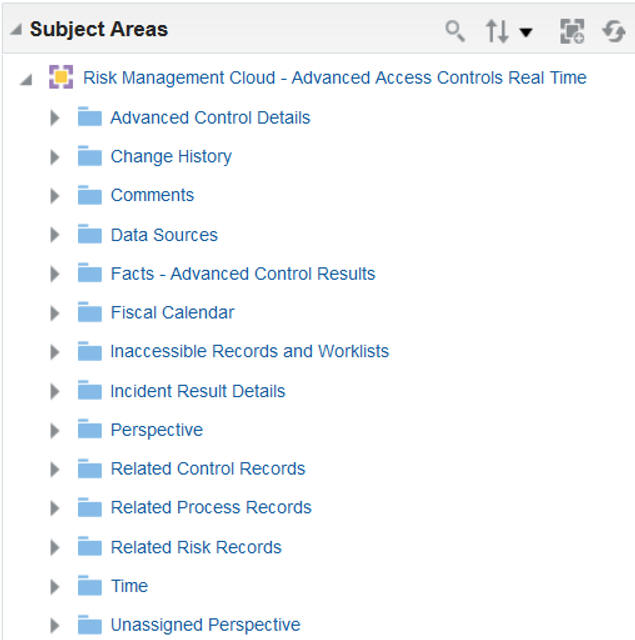
Risk Management Cloud – Advanced Access Controls Real Time Subject Area
The subject area provides summarized information related to records of controls configured in Oracle Advanced Access Controls, and of results returned by those controls. Dimensions in this subject area allow reporting and analysis related to controls and results. The person who views an analysis or report based on this subject area sees records associated with perspective values matching those specified in his or her security configuration.

Risk Management Cloud – Advanced Access Controls Real Time Subject Area – Conflict Report Example
Steps to Enable
The predefined Enterprise Risk and Control Manager as well as the Application Access Auditor job roles have the required duty to access the Risk Management subject areas. If you want to enable reporting for job roles you create, be sure to grant them the Advanced Access Control Transaction Analysis Duty.
Users viewing analyses created from this subject area can see only data they have access to, as granted in Risk Management through data security policies. For example, suppose two controls exist, one associated to a US perspective value and the other to a Canada perspective value. A user's data security policies enable him to view only records with US perspective values in the application. That user would also be able to see only records associated to the US control in an analysis.
REPORT SYNCHRONIZATION
A synchronization program must be run to gather real-time information pertaining to perspective and security assignments. By default, this job is scheduled to run every Sunday. To change the scheduled frequency or to run the program on demand, navigate to Risk Management Tools > Setup and Administration > Scheduling.
Key Resources
- For more information see Oracle Risk Management Cloud Creating Analytics and Reports in the Risk Management library of the Oracle Help Center.
This document will continue to evolve as existing sections change and new information is added. All updates appear in the following table:
| Date | Feature | Notes |
|---|---|---|
| 19 JAN 2018 | Created initial document. |
This guide outlines the information you need to know about new or improved functionality in this update, and describes any tasks you might need to perform for the update. Each section includes a brief description of the feature, the steps you need to take to enable or begin using the feature, any tips or considerations that you should keep in mind, and the resources available to help you.
Customers Upgrading from Release 12
If you're upgrading from Release 12 to Release 13, then you should review all of the release readiness content for Release 13 (updates 17B - 17D, as well as, updates 18A - 18B) to learn about all of the features available in release 13.
Give Us Feedback
We welcome your comments and suggestions to improve the content. Please send us your feedback at oracle_fusion_applications_help_ww_grp@oracle.com.
| Action Required to Enable Feature |
|||||
|---|---|---|---|---|---|
| Feature |
None (Automatically Available) |
Enable via Opt In UI Only |
Enable via Opt In UI Plus Additional Steps |
Not Enabled via Opt In UI but Setup Required |
Issue Service Request |
|
|||||
|
|||||
|
|||||
|
|||||
|
|||||
|
|||||
|
|||||
|
|||||
|
|||||
|
|||||
|
|||||
|
|||||
|
|||||
|
|||||
|
|||||
|
|||||
Oracle Risk Management consists of three products: Oracle Fusion Financial Reporting Compliance documents your policies for identifying and resolving risk in your financial processes. Oracle Advanced Access Controls detects risk inherent in the access granted to users of business applications. Oracle Advanced Financial Controls uncovers risk exhibited by transactions completed on business applications.
Advanced Financial Controls and Advanced Access Controls, which belong to a module called Advanced Controls Management, are newly introduced in release 13, update 18A.
Oracle Advanced Financial Controls implements models and controls that evaluate expense and procure-to-pay transactions for fraud, error, or other risk. You can:
- Create models, or import predefined models that embody best practices. The models establish risk logic.
- Deploy models as controls to detect risk incidents and assign them to users.
- Investigate and remediate transaction incidents identified by controls.
- Secure and report on financial controls and incidents.
Advanced Financial Controls makes its introductory appearance among Cloud applications in release 13, update 18A, so in a sense, everything about it is new. Here, however, are some highlights.
You can import key models developed by Oracle, you can copy these models and revise the copies, or you can create new models from scratch that define aspects of transaction risk. Elements of a model include:
- Header information. This comprises not only a name and description, but also a “data source” — typically, the Oracle Cloud instance subject to analysis by the model.
- Business objects. These supply data for analysis. Each is, in effect, a set of related data fields pertaining to procure-to-pay or expense processes in your Oracle Cloud instance. (An individual field within a business object is known as an “attribute.”) Oracle delivers business objects with Advanced Financial Controls.
- Filters. These establish the model’s risk logic. Each defines an aspect of risk, then selects transactions that satisfy its definition. A combination of these filters defines a complete risk; each filter evaluates records returned by filters that precede it. There are two filter types:
- A standard filter determines whether an attribute of a business object satisfies a condition. For example, one may state that Payment Amount (an attribute of the Payment business object) is greater than $500 (a condition involving a constant value).
- A function filter organizes attribute values into groups, applies a calculation to each group, and determines whether each calculated value satisfies a condition. For example, a function filter may group banking records by account, calculate the average transfer amount for each account, and find averages that exceed a threshold.
- Result attributes. These are attributes for which the model, when it runs, returns values for each risky transaction it finds.
Each time you run a model, new results replace any existing results, so that you can test risk logic before deploying it in a control. Models also enable auditors to assess the risk inherent in a system at a given moment.

Edit Model Page for Advanced Financial Controls
Steps to Enable
No advance setup is required for you to create transaction models. However, you must run a data synchronization process for models to be able to return results. Moreover, an administrator may set a performance option that affects how models run.
Tips And Considerations
Before running any models, consider setting one option that may optimize Advanced Financial Controls performance.
- Enable Date Limit for Transaction Synchronization: Synchronization is a process that updates data for business objects used in your models. This performance option causes synchronization of a certain, volatile type of business object to operate only on transaction records created or updated after a date you specify.
Key Resources
- To download Oracle’s delivered model content files for import into your instance, refer to My Oracle Support, Oracle Delivered Content for Advanced Financial Controls (MOS ID 2350138.1). Locate and download the available Advanced Financial Controls content for expenses and procure-to-pay. Packages available for release 13, update 18A include:
- Advanced Financial Controls-Procure-to-Pay Models Package 1.xml
- Advanced Financial Controls-Expense Models Package 1.xml
- Advanced Financial Controls-31008 Imported Object Package 1.xml
- For more information about models, see the Managing Models chapter of Risk Management Cloud Using Advanced Financial Controls.
- For more information on configuration options, see the “Performance Configuration: Explained” topic in Risk Management Cloud Implementing Risk Management.
- For more information on data synchronization, see the “Synchronizing Data: Explained” topic in Risk Management Cloud Implementing Risk Management.
Role Information
The Transaction Model Manager duty grants the user all the necessary access to manage transaction models. Any time security updates are made in the Security Console, you must run the User and Role Security Synchronization and Worklist Security Synchronization jobs in Risk Management.
Base transaction controls on models; each control inherits its model’s risk logic. The control can serve either of two purposes: An “incident” control defines transaction risk and generates incidents — permanent records of control violations. The control also identifies users, known as “result investigators,” who are responsible for resolving incidents generated by the control. A “dataset” control returns a set of data for a “user-defined object,” which you can use in a model or control as if it were a business object.
In either case, you add information that enables users to apply the control. This includes a priority, status, comments, and whether the control is to generate incidents or a dataset. You also designate users who can access the control itself and who can securely investigate incidents. Unlike model results, incidents remain available to be reviewed and resolved no matter how often the control is run.
You can run a control on demand, or you can schedule the control to run regularly.

Controls Management Page Lists the Active Controls Created
You can relate transaction controls to processes, risks, or controls defined in Financial Reporting Compliance. The incidents created from the control can be displayed in object-management pages in that application.
Steps to Enable
Controls require no advance setup. However, an administrator must configure Financial Reporting Compliance if you want it to display related incidents in its object-management pages. Ensure that a Result option is set to its Show value in Configure Module Objects pages of Risk Management Tools. There is one page for each of the process, risk, and control objects. You would need to select the Show value for each object for which you want to display related incidents, independently of the others.
Tips And Considerations
As you create controls, select only models that have been fully tested and refined. Although you can update other control values, you cannot change a control’s risk logic or result attributes.
Configuring the display of related incidents in Financial Reporting Compliance is an early implementation decision. Once you start to enter operational data for any of the process, risk, or control objects in Financial Reporting Compliance, you cannot change the configuration established for that object.
When this configuration is complete, you assign Financial Reporting Compliance objects to controls, then run control analysis to generate incidents. Each Financial Reporting Compliance object then displays incidents generated by the control to which it has been assigned.
Key Resources
- For more information about controls, see the Managing Advanced Controls chapter of Risk Management Cloud Using Advanced Financial Controls. This chapter also contains the topic "Relating Controls to Financial Reporting Compliance Objects."
- For more information on configuring the Result option, refer to the “Module Options: Explained” topic in Risk Management Cloud Implementing Risk Management.
Role Information
The Transaction Control Manager duty grants the user all the necessary access to manage transaction controls. Any time security updates are made in the Security Console, you must run the User and Role Security Synchronization and Worklist Security Synchronization jobs in Risk Management.
Incident Remediation Activities
Remediation activities include reviewing, analyzing, and updating the status of each incident generated by a transaction control. These actions are restricted to users designated by the control as result investigators. Outside of Advanced Financial Controls, investigators may also recommend transaction adjustments or preventive actions to resolve incidents.
Each incident represents a suspect transaction — one that has met the risk criteria defined in the control, but may or may not constitute an actual violation. It consists of a value for each of the result attributes selected for the model on which the control was based.
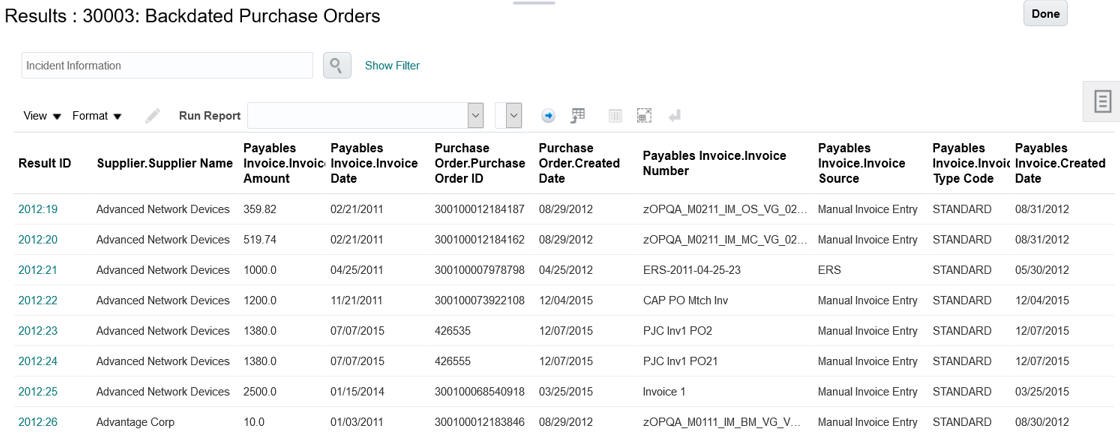
Incidents Generated for a Specific Control
A control may designate more than one result investigator, and each receives a worklist that includes pending incidents generated by the control. You can set up e-mail alerts to notify investigators about new worklists or the creation of new controls.
Steps to Enable
No setup is required for you to work with incidents in Advanced Financial Controls.
Key Resources
- For more information about incident remediation, see the Managing Results chapter of Risk Management Cloud Using Advanced Financial Controls.
Role Information
The Transaction Incident Results Manager duty grants the user all the necessary access to manage incident results. Any time security updates are made in the Security Console, you must run the User and Role Security Synchronization and Worklist Security Synchronization jobs in Risk Management.
Advanced Financial Controls makes use of these tools:
- Data sources supply the data analyzed by models and controls. Each business object is associated with a data source, and makes data from that source available. For most business objects, the data source is the business application subject to analysis by models and controls. However, other sources may include imported data files and the Advanced Financial Controls application itself.
- Performance configuration enables you to limit the number of transactions subject to a process called data synchronization. This process keeps transaction data current by copying it regularly from data sources to Advanced Financial Controls.
- Perspectives are sets of related, hierarchically organized values. Each represents a context in which models, controls, and incidents exist. You can relate individual perspective values to individual objects, thus cataloging them by organization, region, or any other concept your company finds meaningful. Perspective values also play a part in securing the application.
- Global user configuration assigns an ID to each person who uses business applications subject to models and controls. An individual’s global user ID correlates to potentially varying IDs a user may have for business-application accounts. Although global user configuration applies principally to access analysis, it applies also to transaction models and controls that incorporate a User business object.
- Reports enable you to extract application data for analysis and distribution.
Steps to Enable
No steps are required to enable this feature.
Key Resources
- For more information on data sources, refer to the “Data Sources: Explained” topic in Risk Management Cloud Implementing Risk Management.
- For more information on configuration options, see the “Performance Configuration: Explained” topic in Risk Management Cloud Implementing Risk Management.
- For more information about perspectives, see the Perspective Management chapter of Risk Management Cloud Implementing Risk Management.
- For more information on configuring global users, refer to the “Global Users: Explained” topic in Risk Management Cloud Implementing Risk Management.
- For more information about reports, see the Managing Reports chapter of Risk Management Cloud Using Advanced Financial Controls.
Role Information
- The Application Control Manager job has the access necessary to perform these supporting activities, except for perspectives.
- The Perspective Manager Composite duty gives the user configuration access to perspectives.
- Any time security updates are made in the Security Console, you must run the User and Role Security Synchronization and Worklist Security Synchronization jobs in Risk Management.
Oracle Advanced Access Controls implements models and controls that enforce segregation of duties in your applications. You can:
- Create models, or import predefined models that embody best practices. The models establish access risk logic.
- Deploy models as controls to detect access incidents and assign them to users.
- Investigate and remediate access incidents identified by controls.
- Secure and report on access controls and incidents.
Advanced Access Controls makes its introductory appearance among Cloud applications in release 13, update 18A, so in a sense, everything about it is new. Here, however, are some highlights.
You can import key models developed by Oracle, you can copy these models and revise the copies, or you can create new models from scratch that define aspects of user access risk. Elements of a model include:
- Header information. This comprises not only a name and description, but also a “data source” — typically, the Oracle Cloud instance subject to analysis by the model.
- Business objects. These provide access data for analysis by models. Oracle delivers business objects with Advanced Access Controls.
- Filters. These establish the model’s risk logic. Each model consists of one or more filters that specify individually risky access points or dangerous combinations, and return users assigned those points.
Each time you run a model, new results replace any existing results, so that you can test risk logic before deploying it in a control. Models also enable auditors to assess the risk inherent in a system at a given moment.
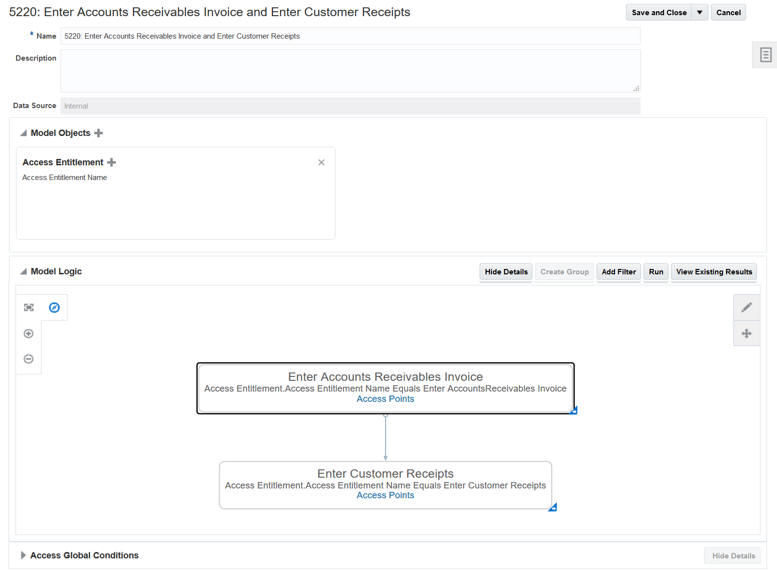
Edit Model Page for Advanced Access Controls
Steps to Enable
An administrator must select a set of attributes that define global users, and then run a global user synchronization job. This procedure assigns an ID to each person who uses application subject to access models and controls. The ID correlates to potentially varying IDs the person may have for business-application accounts.
Key Resources
- To download Oracle’s delivered model content files for import into your instance, refer to My Oracle Support, Oracle Delivered Content for Advanced Access Controls (MOS ID 2350139.1). Locate and download the available Advanced Access Controls content for segregation of duties. Packages available for release 13, update 18A include:
- Advanced Access Controls - Models Package 1.xml
- For more information about models, see the Managing Models chapter of Risk Management Cloud Using Advanced Access Controls.
- For more information on configuration options, see Risk Management Cloud Using Advanced Access Controls.
Role Information
The Access Model Manager duty grants the user all the necessary access to manage access models. Any time security updates are made in the Security Console, you must run the User and Role Security Synchronization and Worklist Security Synchronization jobs in Risk Management.
Base access controls on models; each control inherits its model’s risk logic. The control can serve either of two purposes: An “incident” control defines access risk and generates incidents — permanent records of control violations. The control also identifies users, known as “result investigators,” who are responsible for resolving incidents generated by the control. A “dataset” control returns a set of data for a “user-defined object,” which you can use in a transaction model or control as if it were a business object.
In either case, you add information that enables users to apply the control. This includes a priority, status, comments, and whether the control is to generate incidents or a dataset. You also designate users who can access the control itself and who can securely investigate incidents. Unlike model results, incidents remain available to be reviewed and resolved no matter how often the control is run.
You can run a control on demand, or you can schedule the control to run regularly.
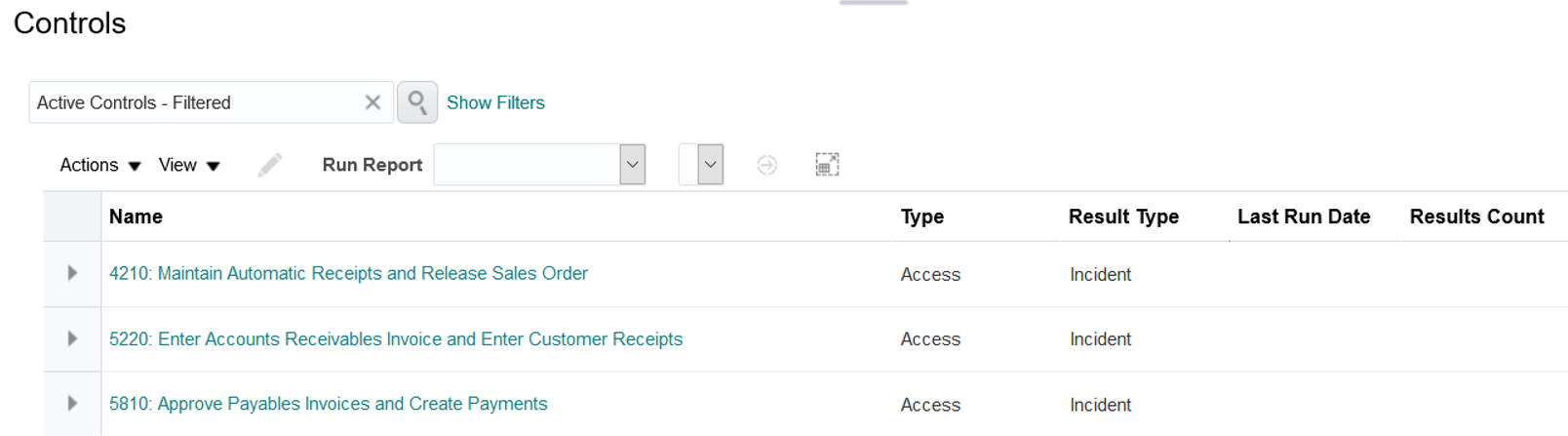
Controls Management Page Lists the Active Controls Created
You can relate access controls to processes, risks, or controls defined in Financial Reporting Compliance. The incidents created from the control can be displayed in object-management pages in that application.
Steps to Enable
Controls require no advance setup. However, an administrator must configure Financial Reporting Compliance if you want it to display related incidents in its object-management pages. Ensure that a Result option is set to its Show value in Configure Module Objects pages of Risk Management Tools. There is one page for each of the process, risk, and control objects. You would need to select the Show value for each object for which you want to display related incidents, independently of the others.
Tips And Considerations
As you create controls, select only models that have been fully tested and refined. Although you can update other control values, you cannot change a control’s risk logic.
Configuring the display of related incidents in Financial Reporting Compliance is an early implementation decision. Once you start to enter operational data for any of the process, risk, or control objects in Financial Reporting Compliance, you cannot change the configuration established for that object.
When this configuration is complete, you assign Financial Reporting Compliance objects to controls, then run control analysis to generate incidents. Each Financial Reporting Compliance object then displays incidents generated by the control to which it has been assigned.
Key Resources
- For more information about controls, see the Managing Advanced Controls chapter of Risk Management Cloud Using Advanced Access Controls. This chapter also contains the topic "Relating Controls to Financial Reporting Compliance Objects."
- For more information on configuring the Result option, refer to the “Module Options: Explained” topic in Risk Management Cloud Implementing Risk Management.
Role Information
The Access Control Manager duty grants the user all the necessary access to manage access controls. Any time security updates are made in the Security Console, you must run the User and Role Security Synchronization and Worklist Security Synchronization jobs in Risk Management.
Incident Remediation Activities
Remediation activities include reviewing, analyzing, and updating the status of incidents generated by access controls. Each incident is a record of a user assigned an access point that a control defines as risky, either individually or because it conflicts with another access point. These actions are restricted to users designated by the control as result investigators. Outside of Advanced Access Controls, investigators may also recommend adjustments or preventive actions to resolve incidents.
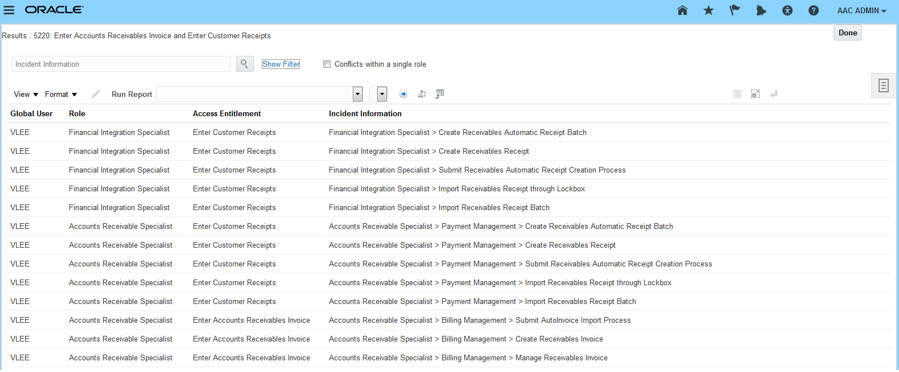
Incidents Generated for a Specific Control
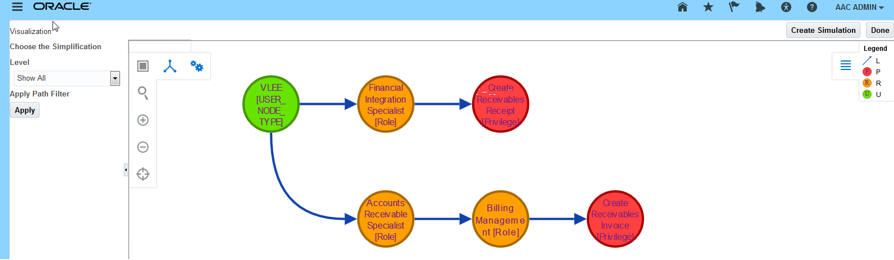
Visualization Generated for a Group of Incidents
A control may designate more than one result investigator, and each receives a worklist that includes pending incidents generated by the control. You can set up e-mail alerts to notify investigators about new worklists or the creation of new controls.
Steps to Enable
No setup is required for you to work with incidents in Advanced Access Controls.
Key Resources
- For more information about incident remediation, see the Managing Results chapter of Risk Management Cloud Using Advanced Access Controls.
Role Information
The Access Incident Results Manager duty grants the user all the necessary access to manage incident results. Any time security updates are made in the Security Console, you must run the User and Role Security Synchronization and Worklist Security Synchronization jobs in Risk Management.
Advanced Access Controls makes use of these tools:
- Conditions define exemptions from access analysis. A model, and a control developed from the model, may contain condition filters. These apply specifically to the model or control. A global condition is a set of condition filters that apply to all models and controls.
- Entitlements are sets of related access points. A filter in an access model or control may specify an entitlement rather than an individual access point. If so, the filter returns users assigned any of the access points in the entitlement.
- Visualizations and simulations aid in resolving access incidents. A visualization is a graphic depiction of paths by which users gain access to conflicting access points. A simulation previews the effects of steps taken to resolve access conflicts. These items may be related to one another: a simulation can focus on the resolution of conflicts involving access points depicted in a visualization.
- Perspectives are sets of related, hierarchically organized values. Each represents a context in which models, controls, and incidents exist. You can relate individual perspective values to individual objects, thus cataloging them by organization, region, or any other concept your company finds meaningful. Perspective values also play a part in securing the application.
- Global user configuration assigns an ID to each person who uses business applications subject to models and controls. An individual’s global user ID correlates to potentially varying IDs a user may have for business-application accounts. Although global user configuration applies principally to access analysis, it applies also to transaction models and controls that incorporate a User business object.
- Reports enable you to extract application data for analysis and distribution.
Steps to Enable
No steps are required to enable this feature.
Key Resources
- For more information on conditions and entitlements, see the Managing Model and Control Elements chapter of Risk Management Cloud Using Advanced Access Controls.
- For more information on visualizations and simulations, see the Managing Visualizations and Simulations chapter of Risk Management Cloud Using Advanced Access Controls.
- For more information about perspectives, see the Perspective Management chapter of Risk Management Cloud Implementing Risk Management.
- For more information on configuring global users, see Risk Management Cloud Using Advanced Access Controls.
- For more information about reports, see the Managing Reports chapter of Risk Management Cloud Using Advanced Access Controls.
Role Information
- The Application Access Auditor job has the access necessary to perform these supporting activities, except for perspectives.
- The Perspective Manager Composite duty gives the user configuration access to perspectives.
- Any time security updates are made in the Security Console, you must run the User and Role Security Synchronization and Worklist Security Synchronization jobs in Risk Management.
Transactional Business Intelligence for Risk Management
Financial Reporting Compliance
Risk Management Cloud provides two predefined subject areas, Risk Management Cloud — Assessment Results Real Time and Risk Management Cloud — Compliance Real Time. From these, you can build analyses, dashboards, and reports for Financial Reporting Compliance. These subject areas are updated.
Both subject areas add a dimension folder called Fiscal Calendar. It provides reporting against fiscal calendar attributes such as date, day, period, quarter, and year. Fiscal Calendar is anchored on the created-by dates.
Steps to Enable
No steps are required to enable this feature.
The Compliance Real Time subject area adds a dimension folder called Issue Details. It provides reporting on issue details such as dates, users, originator, status, object type, and remediation information, among other issue-related attributes.
Steps to Enable
No steps are required to enable this feature.
New Remediation Plan Details Folder
The Compliance Real Time subject area adds a dimension folder called Remediation Plan Details. It provides reporting on remediation plan details such as dates, users, progress, priority, remediation plan information, and related attributes.
Steps to Enable
No steps are required to enable this feature.
Risk Details Folder Enhancements
Both subject areas include a Risk Details dimension folder. It offers new attributes for reviewer and approval dates, users, currency, type, and state.
Steps to Enable
No steps are required to enable this feature.
Control Details Folder Enhancements
Both subject areas include a Control Details dimension folder. It offers new attributes for reviewer and approval dates, users, cost, currency, and comments.
Steps to Enable
No steps are required to enable this feature.
Assessment Results Folder Enhancements
The Assessment Results Real Time subject area includes an Assessment Results dimension folder, which in turn includes Assessment Results Details and Control Test Plan Result Details subfolders. These offer new attributes. Assessment results include data, user, and status attributes. Control test plan results include information around instructions, plans, and steps.
Steps to Enable
No steps are required to enable this feature.
Perspective Folder Enhancements
The Compliance Real Time subject area includes a Perspective dimension folder. It offers new attributes for level status and revision number.
Steps to Enable
No steps are required to enable this feature.
Assessment Details Folder Enhancement
Both subject areas include an Assessment Details dimension folder. It offers a new attribute, Assessment Plan Description.
Steps to Enable
No steps are required to enable this feature.
---

Copyright © 2018, Oracle and/or its affiliates. All rights reserved.
This document is provided for information purposes only, and the contents hereof are subject to change without notice.This document is not warranted to be error-free, nor subject to any other warranties or conditions, whether expressed orally or implied in law, including implied warranties and conditions of merchantability or fitness for a particular purpose. We specifically disclaim any liability with respect to this document, and no contractual obligations are formed either directly or indirectly by this document. This document may not be reproduced or transmitted in any form or by any means, electronic or mechanical, for any purpose, without our prior written permission.
Oracle and Java are registered trademarks of Oracle and/or its affiliates. Other names may be trademarks of their respective owners.
Intel and Intel Xeon are trademarks or registered trademarks of Intel Corporation.All SPARC trademarks are used under license and are trademarks or registered trademarks of SPARC International, Inc. AMD, Opteron, the AMD logo, and the AMD Opteron logo are trademarks or registered trademarks of Advanced Micro Devices. UNIX is a registered trademark of The Open Group.
