

This document will continue to evolve as existing sections change and new information is added. All updates appear in the following table:
| Date | Update Version | Notes |
|---|---|---|
| 20 OCT 2017 | Update 17D | Delivered new features in update 17D. |
| 01 SEP 2017 | Update 17C | Delivered new features in update 17C. |
| 21 APR 2017 | Update 17B | Delivered new features in update 17B. |
This document will continue to evolve as existing sections change and new information is added. All updates appear in the following table:
| Date | Feature | Notes |
|---|---|---|
| 20 OCT 2017 | Created initial document. |
This guide outlines the information you need to know about new or improved functionality in this update, and describes any tasks you might need to perform for the update. Each section includes a brief description of the feature, the steps you need to take to enable or begin using the feature, any tips or considerations that you should keep in mind, and the resources available to help you.
Security and New Features
The Role section of each feature in this guide identifies the security privilege and job role required to use the feature. If feature setup is required, then the Application Implementation Consultant job role is required to perform the setup unless otherwise indicated.
If you have created custom job roles, then you can use this information to add new privileges to those roles as needed.
GIVE US FEEDBACK
We welcome your comments and suggestions to improve the content. Please send us your feedback at oracle_fusion_applications_help_ww_grp@oracle.com.
Optional Uptake of New Features (Opt In)
We continue to add many new features to the Oracle Cloud Applications, and for some features, you can take advantage of new functionality at a pace that suits you by “opting in” to the feature when you’re ready. You can opt in to a feature in two ways: by using the New Features work area, or by using the Setup and Maintenance work area.
To opt in using the New Features work area:
- Click the Navigator, and then click New Features (under the My Enterprise heading).
- On the New Features page, select the offering that includes new features you’d like to review.
- Click Opt In for any feature that you want to opt in to.
- On the Edit Features page, select the Enable option for the feature, and then click Done.
To opt in using the Setup and Maintenance work area:
- Click the Navigator, and then click Setup and Maintenance.
- On the Setup page, select your offering, and then click Change Feature Opt In.
- On the Opt In page, click the Edit Features icon.
- On the Edit Features page, select the Enable option for any feature you want to opt in to. If the Enable column includes an Edit icon instead of a check box, then click the icon, select your feature options, and click Save and Close.
- Click Done.
This section gives you information to help you plan, deploy, and validate your update. We make frequent additions to this document, so don’t forget to check back and get the latest information before your update starts.
| Action Required to Enable Feature |
|||||
|---|---|---|---|---|---|
| Feature |
None (Automatically Available) |
Enable via Opt In UI Only |
Enable via Opt In UI Plus Additional Steps |
Not Enabled via Opt In UI but Setup Required |
Issue Service Request |
Dynamically Add Items to Rule Impact Analysis Based on a Criterion |
 |
||||
|
|||||
Increase Productivity with Optimized User Interface for Rule Impact Analysis |
|
||||
Ensure Data Quality With Native Matching, Standardization, and Categorization Capabilities |
|
||||
Use Expanded Options for Importing Item, Item Revision, and Trading Partner Item Attachments |
|
||||
|
|||||
|
|||||
|
|||||
|
|||||
|
|||||
|
|||||
Restrictions to Lifecycle Changes When Updating Change Order Scheduled Effective Dates |
|
||||
|
|||||
|
|||||
Enterprise Quality Visibility: Product Management to Quality Management |
|
||||
Enable Inline Electronic Records and Electronic Signatures for Quality Inspection Disposition |
|
||||
|
|||||
Simplified, Standardized Page Layout for Innovation Management |
|
||||
Invoke OTBI Folders Directly From a Panel Drawer From All Innovation Management Objects |
|
||||
Dynamically Add Items to Rule Impact Analysis Based on a Criterion
You can now run rule impact analysis on items that have been dynamically added based on a criterion. You can define a search parameter and add the saved search into the scope of the impact analysis. This allows items that meet the search criterion to be dynamically added to the scope and included the next time the rule impact analysis runs.
The following screen capture illustrates the feature and its benefits.
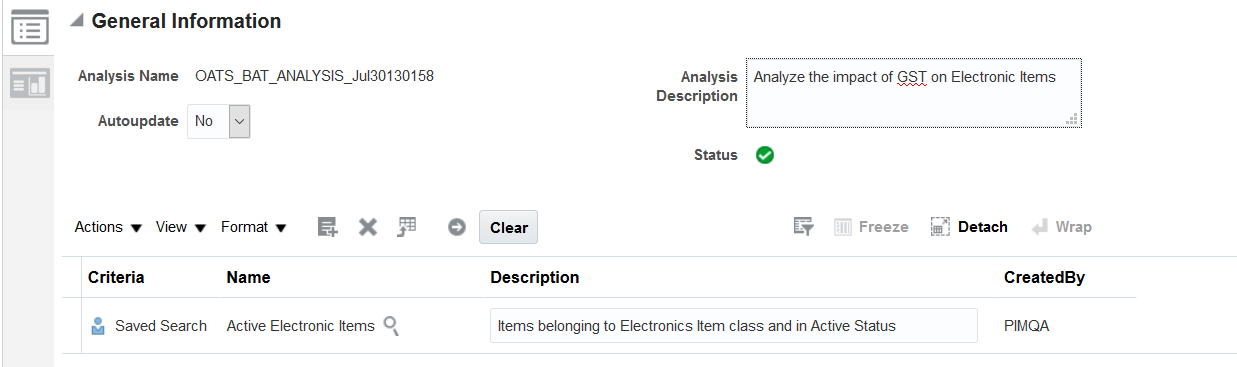
Dynamic Criteria in Scope
Steps to Enable
No steps are required to enable this feature.
Tips And Considerations
You can use customization feature to create a saved search and add it to scope if you want the saved search criteria to be available to all the users.
Role Information
- Job role name and code: Product Data Steward (ORA_EGI_DATA_STEWARD_JOB)
- Privilege name and code: Import Item (EGP_IMPORT_ITEM_PRIV)
- Privilege name and code: Manage Item (EGP_MANAGE_ITEM_PRIV)
Prior to this release, a rule impact analysis could only be created and submitted manually by a data steward. This meant your data stewards needed to proactively anticipate the frequency of business rule changes and manually submit the rule impact analysis to identify impacted items. This introduced unnecessary manual work and diminished productivity.
With this release, you can now schedule a rule impact analysis to run automatically based on a frequency of your choice. After creating your analysis, you can now click on Schedule which allows you to specify parameters including the analysis name, frequency, and notification details. Once the schedule has been set, the rule impact analysis runs based on the frequency specified and includes items that are added to the scope either manually or dynamically through a criteria.
The ability to dynamically add items into a scope based on a criterion combined with the feature to schedule a rule impact analysis provides you with the capability to completely automate the process of analyzing the impact of your latest business rules on item data. This means your data stewards can now focus on analyzing and acting on the analysis results presented to them in the Rules Impact Analysis Infolet as well as in the Edit Impact Analysis page. This contributes to better productivity and enhanced information stewardship.
The following screen capture illustrates the feature and its benefits.
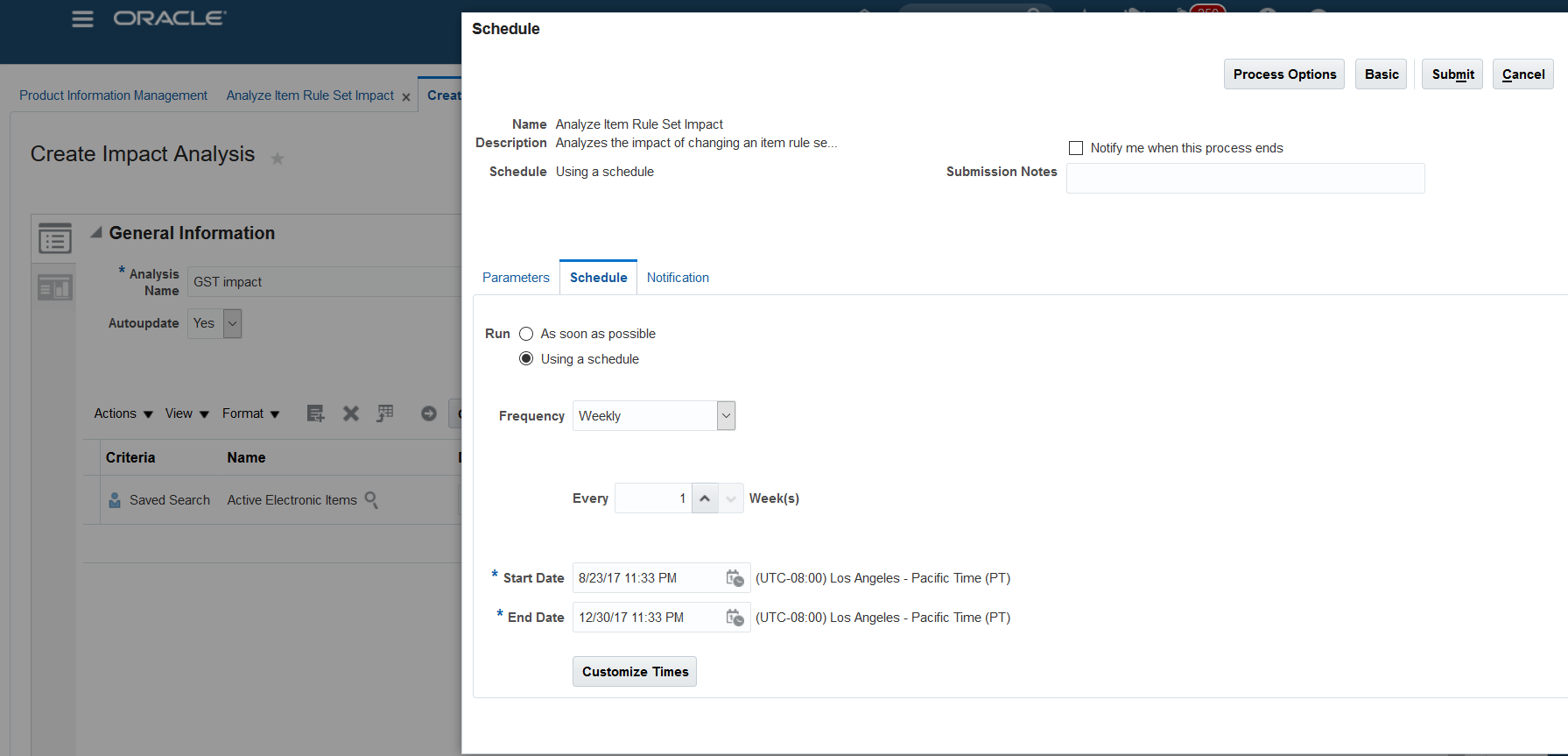
Scheduling Analysis
Steps to Enable
No steps are required to enable this feature.
Role Information
- Job role name and code: Product Data Steward (ORA_EGI_DATA_STEWARD_JOB)
- Privilege name and code: Import Item (EGP_IMPORT_ITEM_PRIV)
- Privilege name and code: Manage Item (EGP_MANAGE_ITEM_PRIV)
Increase Productivity with Optimized User Interface for Rule Impact Analysis
A simple, analytics driven and visual user interface is critical for information stewardship. Data stewards need the ability to quickly identify product data issues, their respective severity and the specific business rules that were violated so they can remediate them promptly and accurately.
This release introduces a brand new and optimized user interface for Rule Impact Analysis to enable data stewards perform data governance and data quality checks more efficiently. The following highlights some of the key user interface improvements:
- Item Rule Set Impact Analysis List Page: This page now contains a list of all the analysis defined in the system with the ability to filter the analysis using different criteria including Analysis Name, Analysis Description, Submission Date and Created By. Each analysis now has a visual summary of the last submission date, submission status, import status as well as the number of impacted and non-impacted items directly on this page. It also shows a circular picture of the individual who submitted the analysis if it exists in HCM. Otherwise, the first and last initials of the individual are shown. Data stewards can also submit or schedule an analysis directly from this page.
- Edit Impact Analysis Page: This page shows the details of an individual analysis. When drilling down to this page, you are now presented with information tiles that summarize the impact analysis results. The 'Impact' Infolet allows you to filter the analysis results by the number of items that are impacted or non-impacted by the latest business rules. The 'Rule Type' Infolet allows you to filter the results based on the number of items that have been impacted by a Validation or Assignment rule type. Finally, the 'Actionable' Infolet allows you to filter the results based on the number of items that are ready for import or need correction prior to import. In addition to these Infolets, you also have the ability to filter the results using more granular criteria including specific rule names, assignment types and severity.
These improvements ensure your data stewards have a visual and optimized user interface to quickly identify, isolate and remediate data quality issues. This contributes to user productivity and superior information stewardship that keep your data clean, validated and compliant with your latest business rules.
The following screen capture illustrates the feature and its benefits: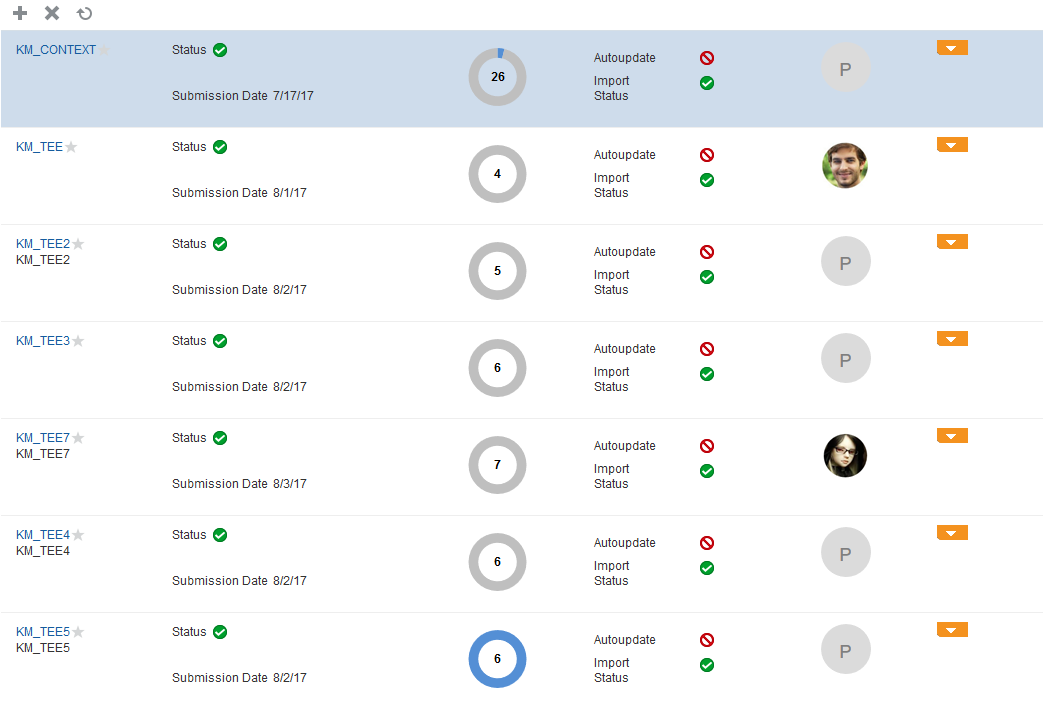
Improved User Interface
Steps to Enable
No steps are required to enable this feature.
Role Information
- Job role name and code: Product Data Steward (ORA_EGI_DATA_STEWARD_JOB)
- Privilege Name and code: Import Item (EGP_IMPORT_ITEM_PRIV)
- Privilege Name and code: Manage Item (EGP_MANAGE_ITEM_PRIV)
Ensure Data Quality With Native Matching, Standardization, and Categorization Capabilities
Establishing reliable data quality is one of the fundamental components of managing product data to ensure clean, standardized and accurate product data that drives tangible business transformation across your enterprise processes including your supply chain, ERP, and commerce initiatives. Three of the most fundamental components of data quality are matching, standardization and categorization of products. Matching capabilities are required to identify and eliminate potential duplicates; standardization capabilities enforce attribute values are consistently represented across products, channels and systems; while appropriate categorization ensures products can be accurately identified, consumed and reported on.
In previous releases, Product Hub Cloud relied on Enterprise Data Quality for Product (EDQP) to address matching requirements while providing native capabilities for standardization and auto-categorization of products via item business rules. This introduced end-user complexity and a technology dependency that can only be simplified by offering these core data quality functions natively in Product Hub Cloud.
With this release, you now have the ability to configure item matching criteria natively in Product Hub Cloud without the use of Enterprise Data Quality for Product (EDQP), thereby completing the three main core functions of product data quality natively in the application. In the Item Class setup user interface, you can now designate the attributes that you want to participate in matching. When creating items in the UI or importing them from an external system, any matches found based on your configured criteria, a Global Trade Item Number (GTIN) or Trading Partner Item Number (e.g. Manufacturer Part Number) are flagged as matches or potential duplicates so your business users can take the appropriate course of action.
The data quality results user interface is now re-purposed to show the following including the matching results:
- Categorization: Automatic categorization of products based on a user defined criteria defined in item business rules
- Standardization: Automatic standardization of attribute values as a result of an assignment item business rule that can also return a standardized value from a custom object defined in Application Composer
- Matching: A list of matches that have been identified as a result of your configured criteria, Global Trade Item Number (GTIN) or Trading Partner Item Number.
With these enhancements, you can now address your core data quality requirements natively in Product Hub Cloud without any purpose-built data quality application including Enterprise Data Quality for Product (EDQP). This means you can achieve high quality product data that you can confidently share across your enterprise without the cost, training and integrations required with an external data quality application.
The following screen capture illustrates the feature and its benefits.
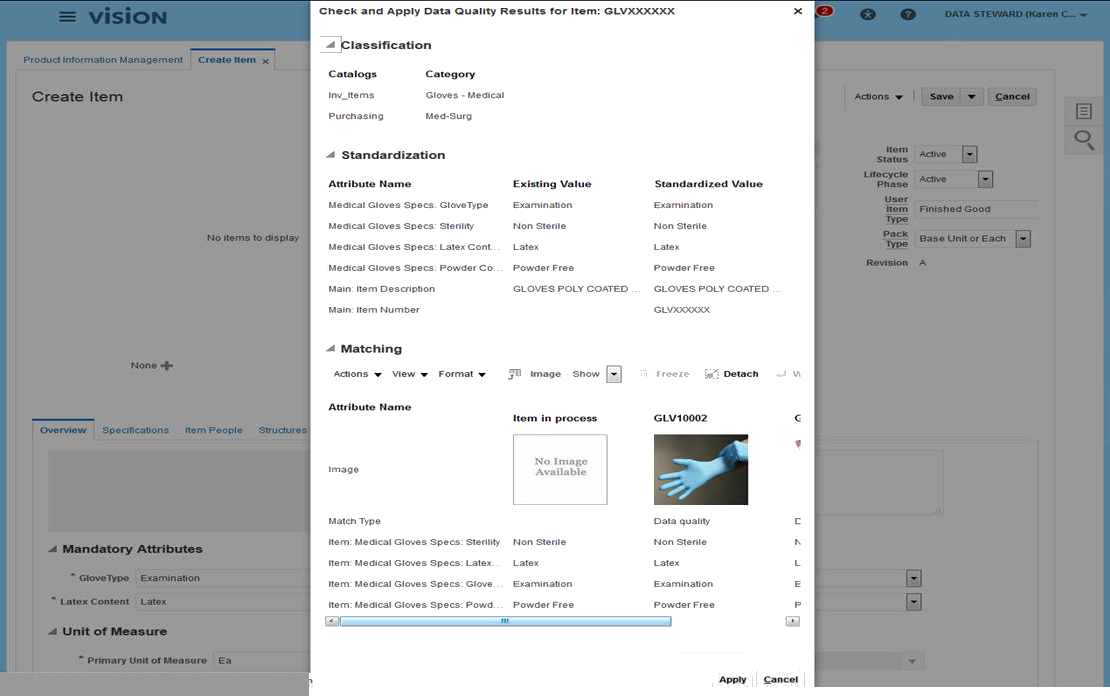
Data Quality Analysis
Steps to Enable
No steps are required to enable this feature.
Role Information
- Privilege Name and Code: Check Item Data Quality (EGI_CHECK_ITEM_DATA_QUALITY_PRIV)
- Job Role Name and Code: Product Data Steward (ORA_EGI_PRODUCT_DATA_STEWARD_JOB)
Use Expanded Options for Importing Item, Item Revision, and Trading Partner Item Attachments
Oracle Product Hub Cloud provides various ways of on-boarding product data into the application like the import maps,file-based data import, and web services. This release continues to expand on the product data elements that can be imported as well as achieve parity between the different ways of importing data.
You can load item attachments in the Product Hub using a web service. You can also import item revision and trading partner item attachments through import maps,file-based data import, and web services. Now attachments of type Repository File Folder and Descriptive Flex Fields can also be imported.
The expansion of product data elements that can be imported in various ways supports your integration requirements, whether they are done in bulk as a batch process or in near real-time via web services. This facilitates on-boarding critical product data from external systems and reduces your integration costs.
Steps to Enable
No steps are required to enable this feature.
Role Information
- Privilege Name and Code: Manage Item Batch (EGI_MANAGE_ITEM_BATCH) and Manage Item Import Map (EGI_MANAGE_ITEM_IMPORT_MAP)
- Job Role Name and Code: Product Data Steward (ORA_EGI_PRODUCT_DATA_STEWARD_JOB)
Generate OTBI Reports for Product Development
The creation of reports to analyze data and make sound business decisions is key to any efficient and successful supply chain management. Whether you need to minimize risk by looking for potential part substitutes or establishing competitive costed BOMs to drive down product costs, reports generated within your enterprise product records will have the most accurate and timely information.
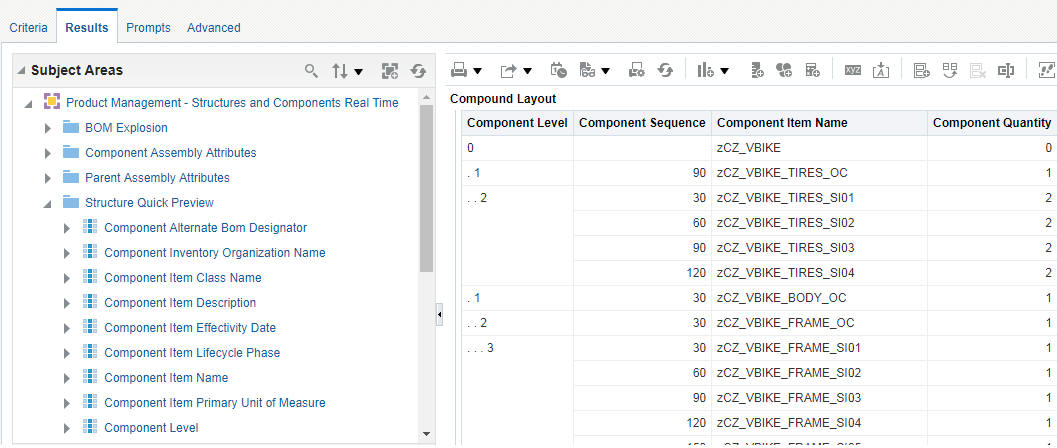
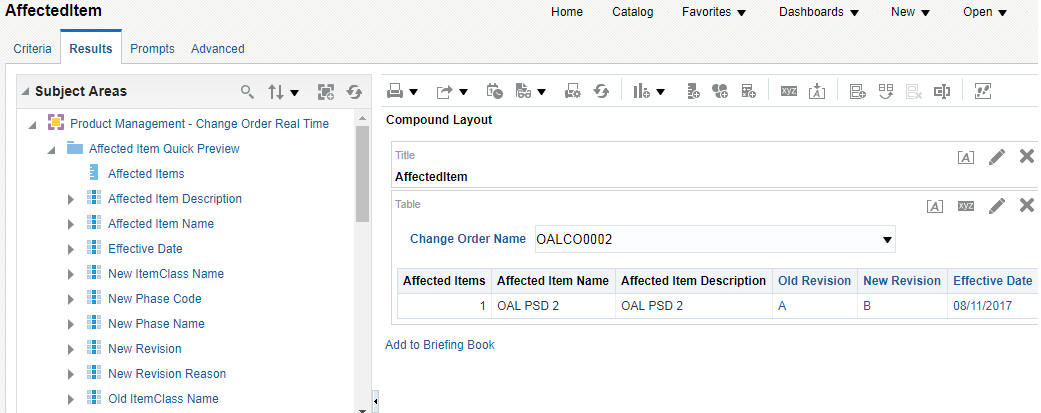
With this release, you can create analysis to get the multi-evel structure and where used information using the Structures and Components, and Where-Used Subject Areas. Based on the items you give as input, a scheduled process automatically populates these subject areas. Also, the Change Order Subject Area has now been enhanced to include the Affected Item Analysis.
Having access to easily digestible product details should equip your organization with the tools needed to analyze items and structures and compare BOMs to make good business decisions for the profitability of your products.
Structure analysis:
Where-Used analysis:

Affected Item analysis:
Steps to Enable
No steps are required to enable this feature.
Tips And Considerations
Before you use the Subject Areas, you must run the following Scheduled Processes to refresh the content within these Subject Areas.
| Subject Area | Scheduled Process |
|---|---|
| Structures and Components | Expand Structure for Business Intelligence |
| Where-Used | Item Where Used for Business Intelligence |
In the Structures and Components Subject Area , you may use the columns under 'the Structure Quick Preview' folder to create a quick analysis. Similarly, in the Where Used Subject Area, you may use the 'Where Used Quick Preview' for a quick analysis.
Product lifecycle management can be a very time-sensitive activity. Whether you are introducing a new product or managing a product through numerous iterations, the efficiency and accuracy of your change management process is critical for successful management of your products from the initial release through completion. Additionally, you must ensure your resources are always adding the value they were hired for.
With this release, you will experience an improvement in the creation process for change orders with the ability to use the clipboard to copy multiple items, add an affected item from the search pop-up, and remove items directly in the redline structure.
You can now assign a User Group (role) as ad hoc approvers and observers. Also, when a change order goes through the approval process, notifications are sent to the relevant approvers. Approvers can now view the comments entered by the previous approvers.
Efficient, accurate, documented and auditable change processes ensure a company that it's product lifecycle management practices are solid and the risk of mismanagement is mitigated. The accelerated pace in change order creation and approval provides your organization with the competitive advantage to realize quality improvements, product cost reductions and supply risk mitigation as quickly and easily as possible.
The following screen captures illustrate the feature and its benefits.
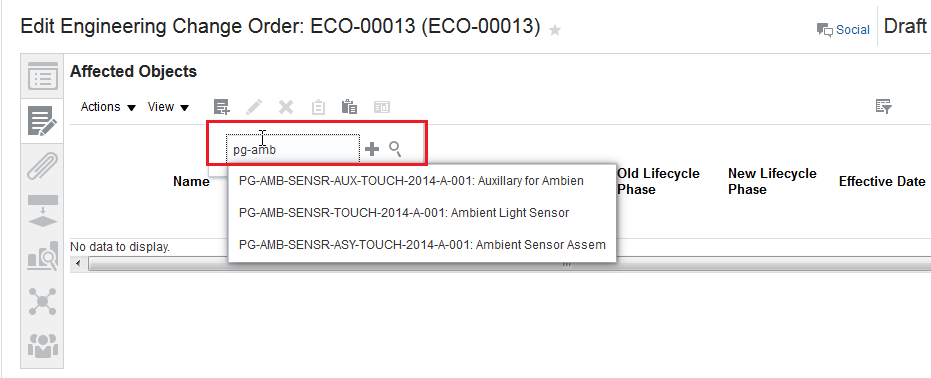
Add Affected Items Using Type-Ahead Search
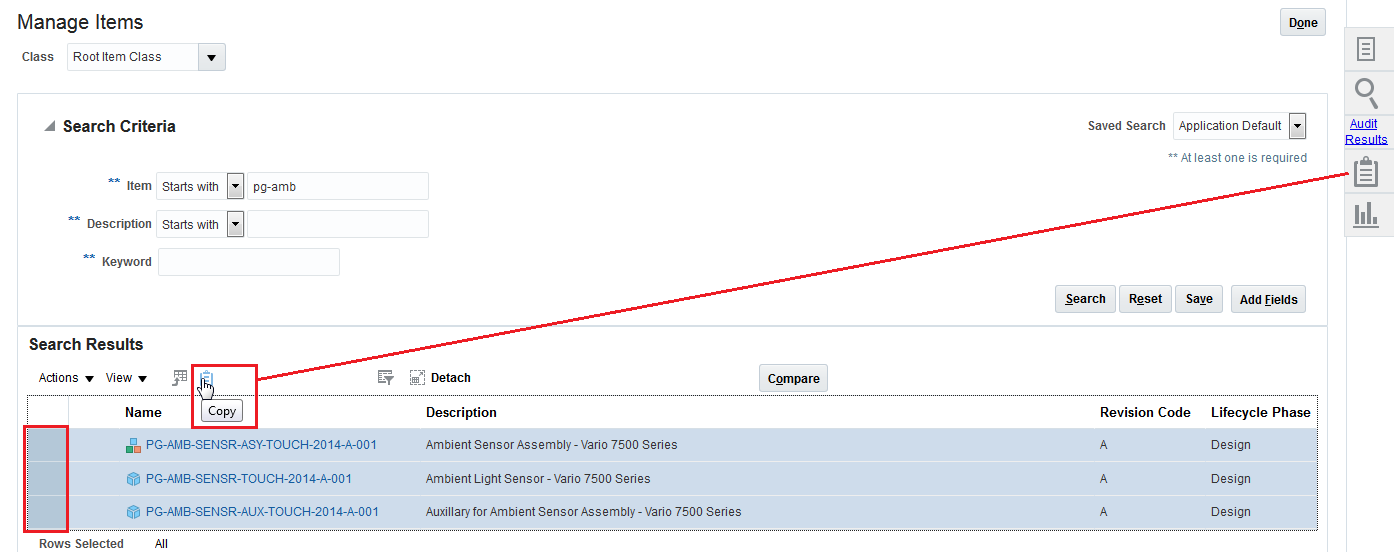
Copy Multiple Items to the Clipboard
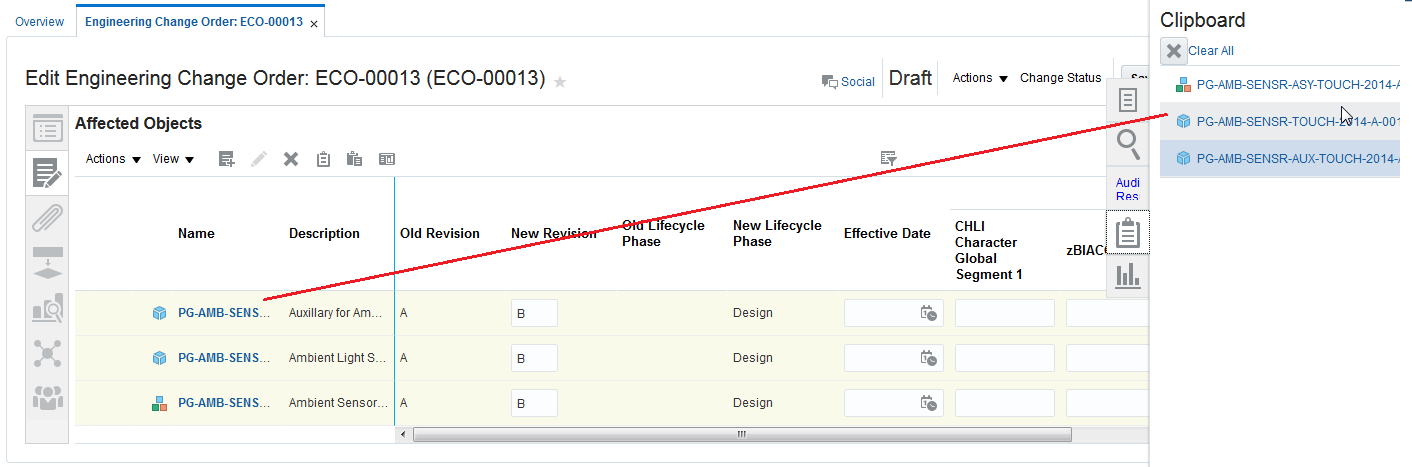
Drag and Drop From the Clipboard to Affected Items
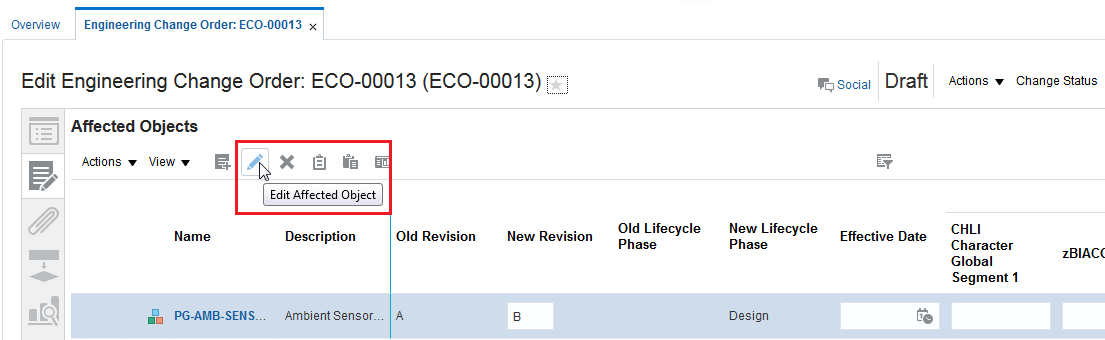
Select Structure to Edit
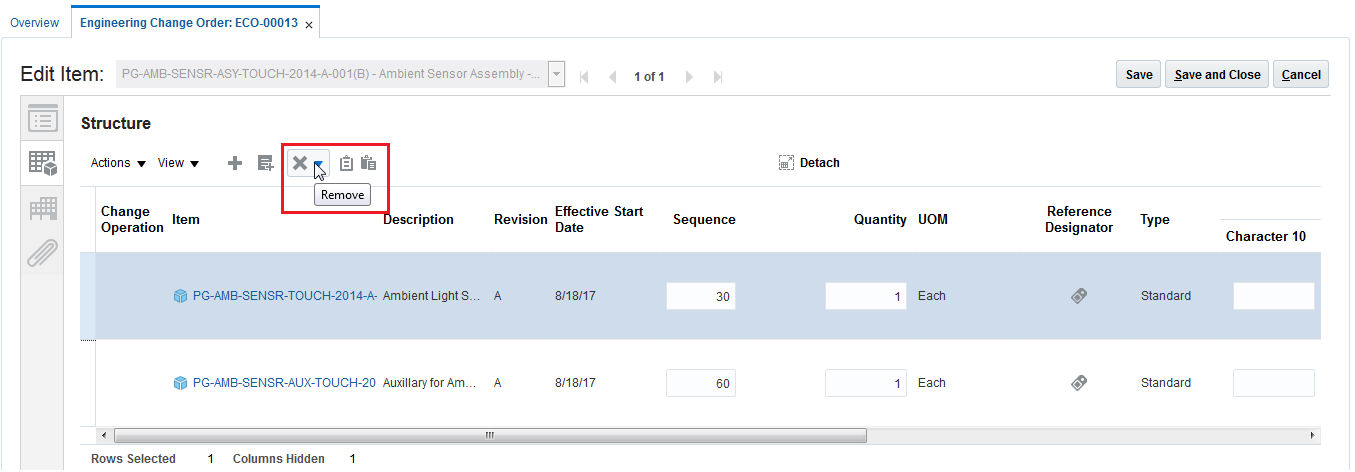
Redline Remove Objects
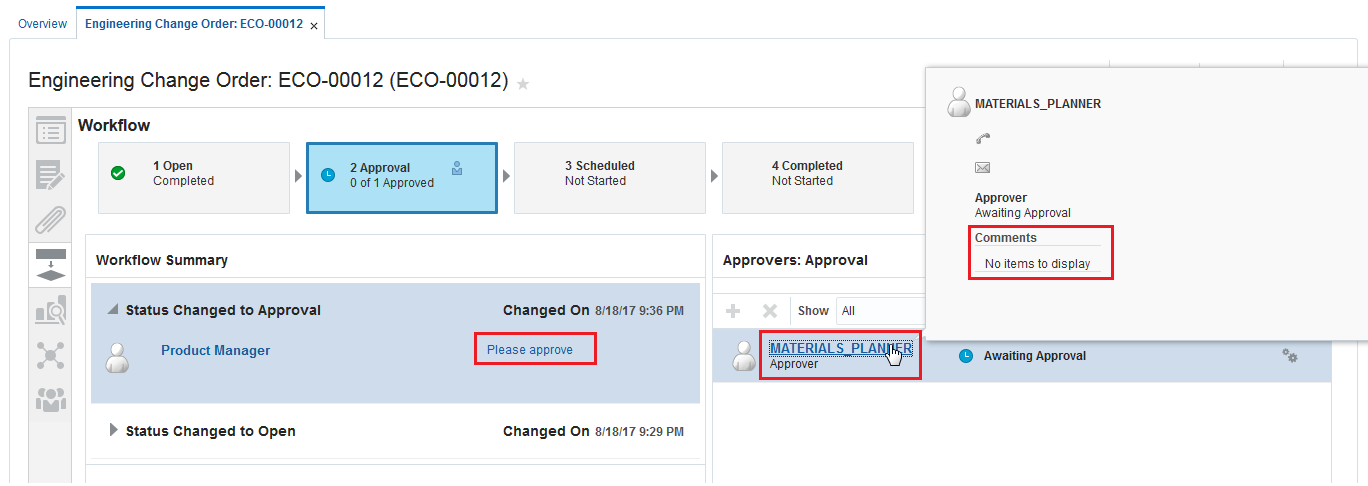
Assign User Group (Role) as Ad-Hoc Approver and View Comments
Steps to Enable
No steps are required to enable this feature.
Use Improved Search and Navigation
The product data becomes more meaningful when the information is easily available to the users.
Oracle Product Development Cloud now supports quick search on objects using a new Search panel drawer with a selection drop-down for Product Development objects: items, documents, change orders, manufacturer parts, and manufacturers. This filtering, available in the search criteria, streamlines search performance and returns only those results that are relevant to the filter selection.
This new search option enables you to quickly search and easily retrieve information.
The following screen capture illustrates the feature and its benefits.
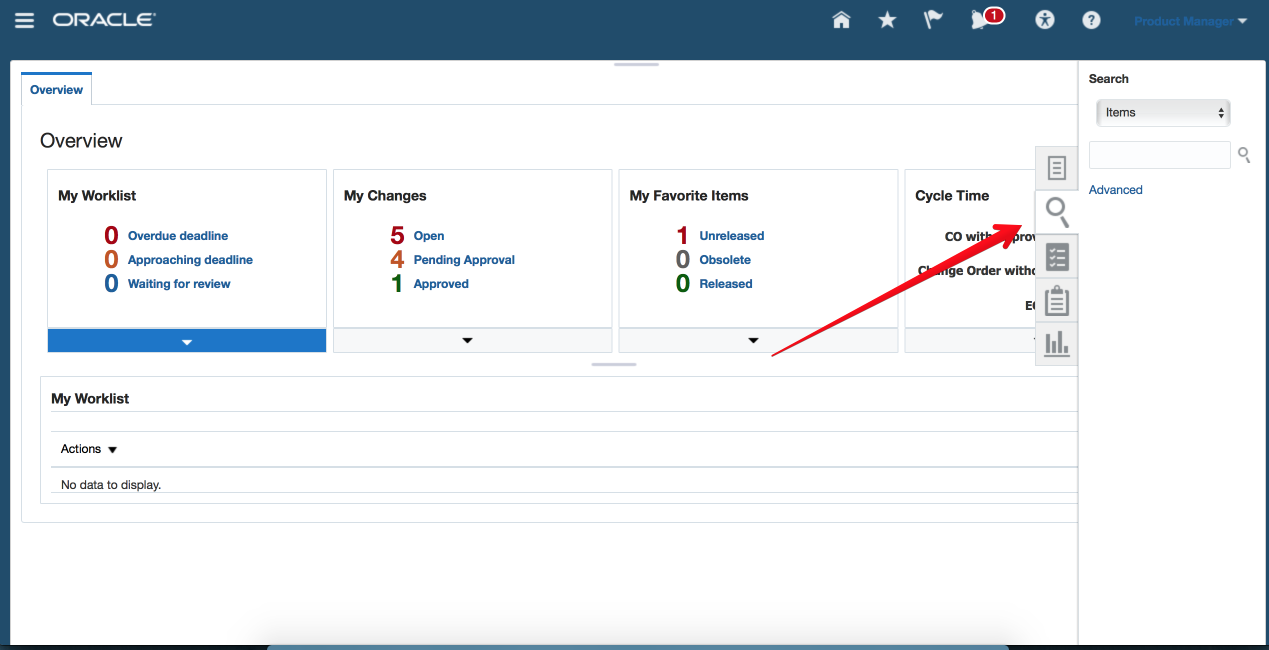
Quick Search
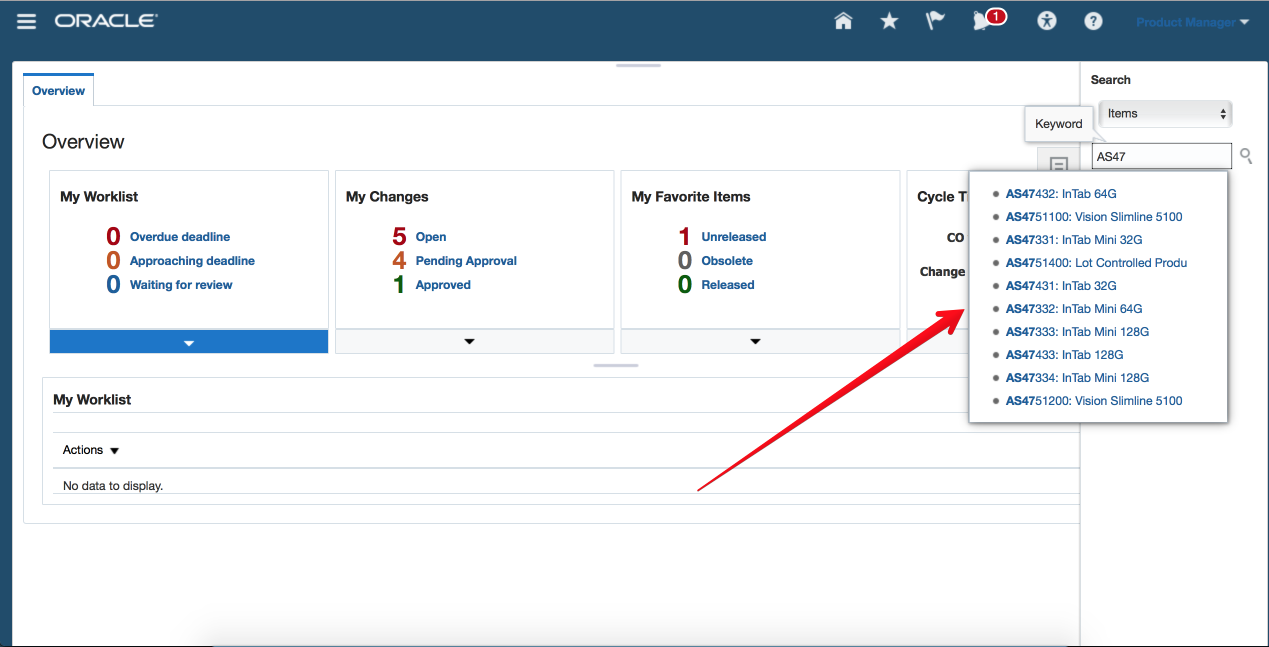
Type Ahead Search
Steps to Enable
No steps are required to enable this feature.
Allow Controlled Access to Suppliers
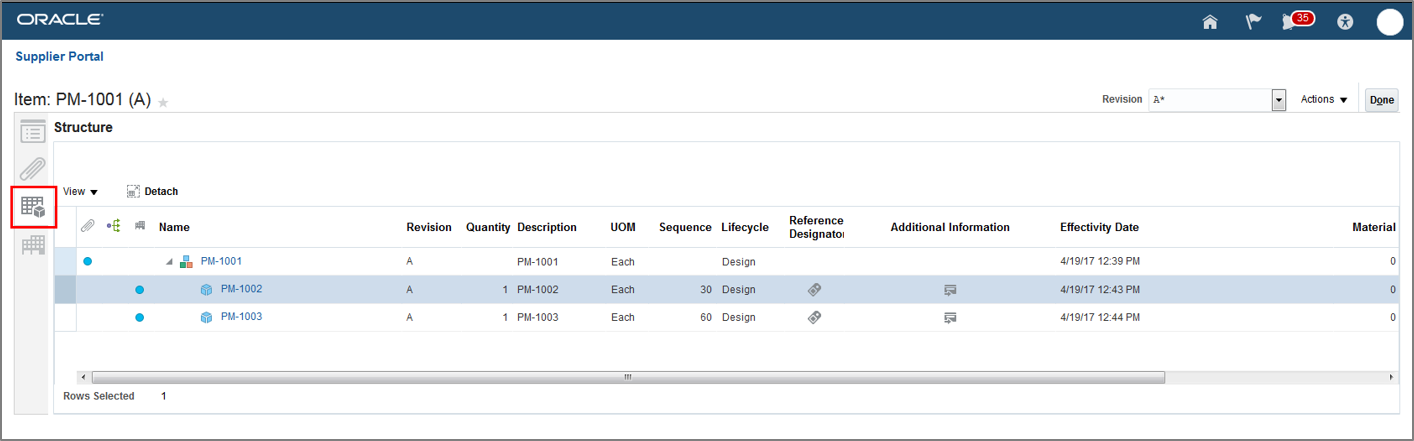
You can assign give access permissions to the required supplier users that you want to collaborate with, for Item Classes, Items, and Change Orders to the supplier user with whom you want to collaborate. This is achieved by naming all users specifically on the Item People tab of an Item (either derived from the Item Class or directly per item) and the Change Order Security list found on a Change Order. If users are not mentioned on those security lists, everyone internally has access to those items and change orders, but the suppliers from the supplier portal cannot to see that information.
After security is setup, and access is specifically granted to the specified suppliers to the item classes, items, and change orders. Supplier users can search Items from the Supplier Portal. The "Products" category in the panel drawer provides access to the subsection "Items" and further to the item search page. Once supplier users find the required item, they can view the Item and its details from the Portal. They can also download the Item Structure Report from the supplier portal. In addition, they can download the Item BOM attachments to a zip file.
In addition to items, supplier users can now also search for change orders. Supplier users may view a change order and its details, and create and download a change report from the supplier portal. Supplier users will also see the most recently created change orders by default. They can download all the redlined attachments (zip) on a change order.
Having a direct link between you and your suppliers for streamlined product lifecycle management practices helps you alleviate miscommunication. It also ensures that your supply chain has the right information to mitigate any possible negative impacts.
The following screen capture illustrates the feature and its benefits.
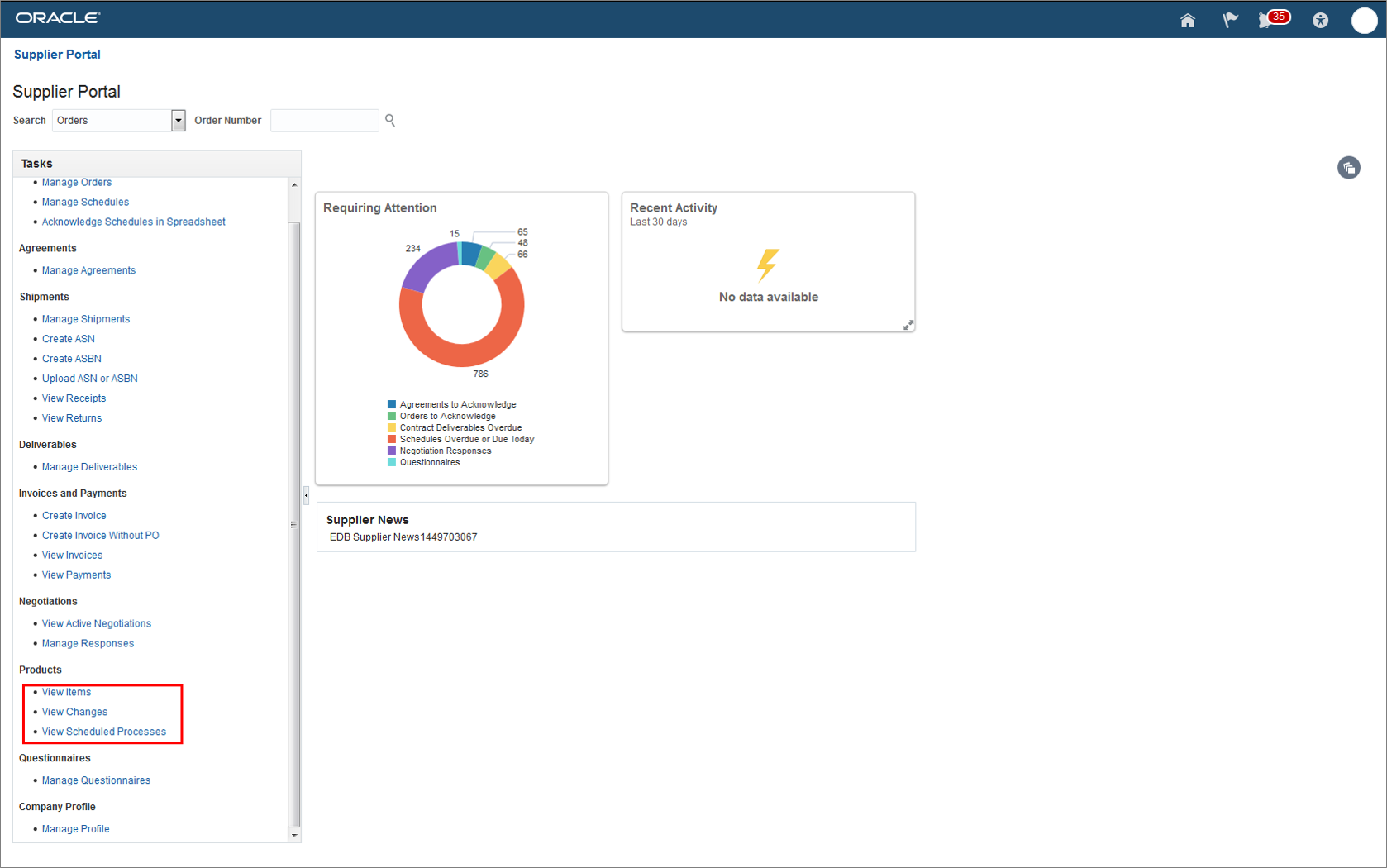
New PLM Tasks
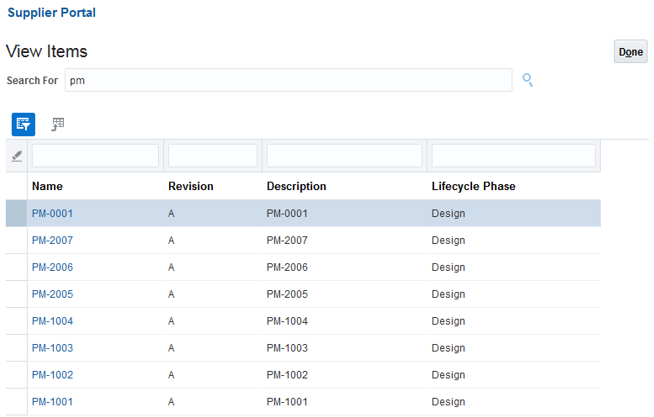
View Items
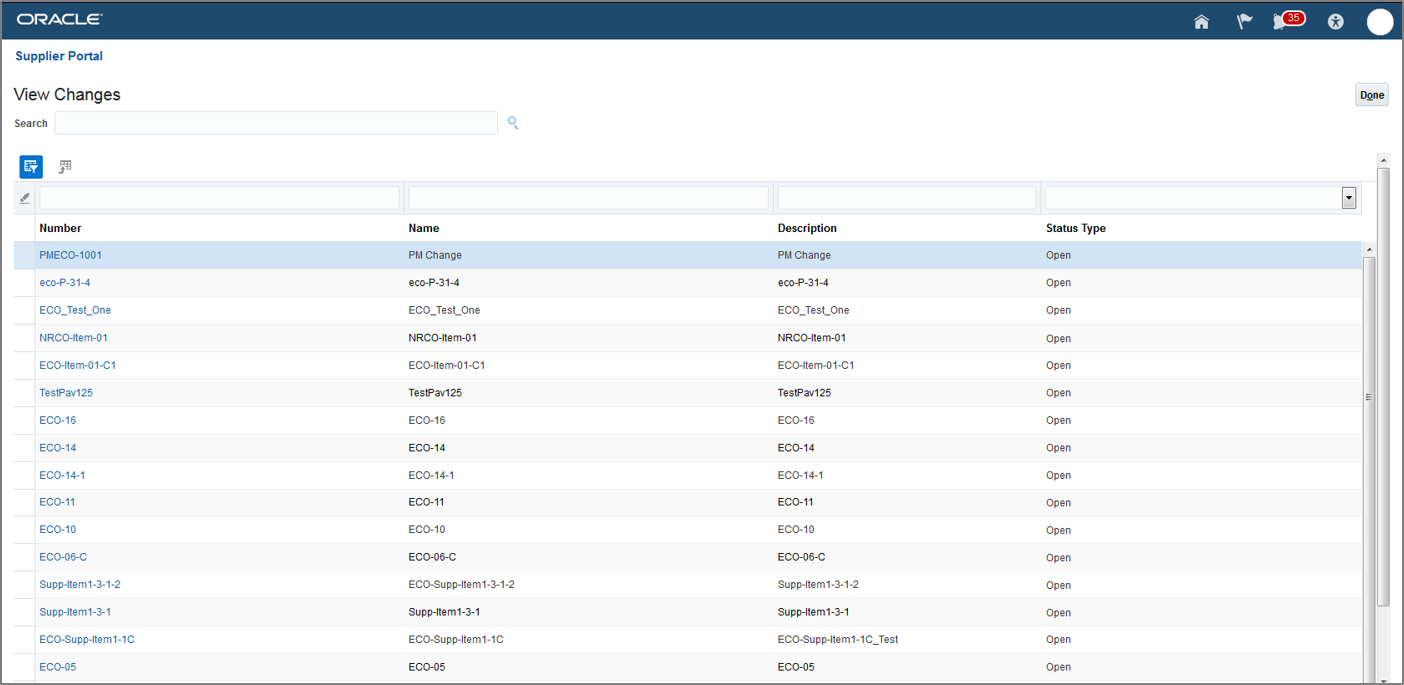
View Changes
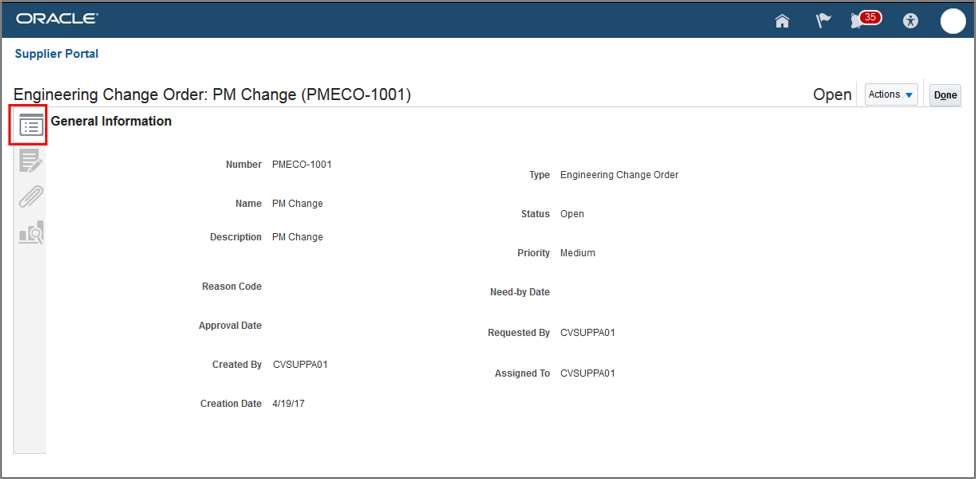
View Change Order
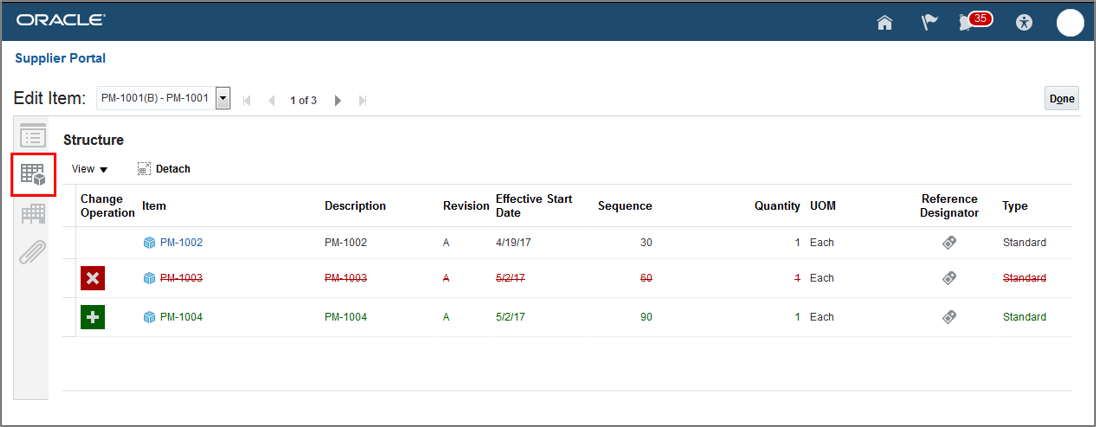
View Item Structure Changes
Steps to Enable
You must set up a supplier user in the system before you can use this feature.
Tips And Considerations
From the Setup and Maintenance work area, an administrator user must specify the users who can have access to items via the supplier portal or the internal application. You can specify the users in the Item Class People list or Item People List or Change Order Security.
If no users are specified, then all internal users can see the items and change orders. However, you must explicitly give access to the supplier users to allow them view the items and change orders, as their name is on the security list.
Role Information
Supplier Product Design Engineer
- ACA_VIEW_SUPPLIER_CHANGE_ORDERS_PRIV
- ACA_VIEW_SUPPLIER_ITEMS_PRIV
Reuse Information to Build Item Structure
You can use the clipboard to multi-select and copy pertinent information to an item or a structure. In addition, the item structure export and import now allows you to capture a structure in a spreadsheet format, manipulate the data, and then import that same spreadsheet back into the Product Hub to build a new item structure. Both Product Development and Product Hub can use the same spreadsheet for import as they do for exporting.
View the updated component information as it automatically refreshes when modified. Review differences between BOM revisions of items, as the new and old revisions are now visible on the same page. Also, as you can view the items being added to a structure in real time, it eliminates the need to toggle between screens and receive automatic confirmation about the item being added to a structure.
Keep your resources focused on the content that comprises an item structure, not just the creation of a BOM. The easier it is for an engineer to build a BOM, the easier it will be to focus on product requirements and functionality.
The following screen capture illustrates the feature and its benefits.
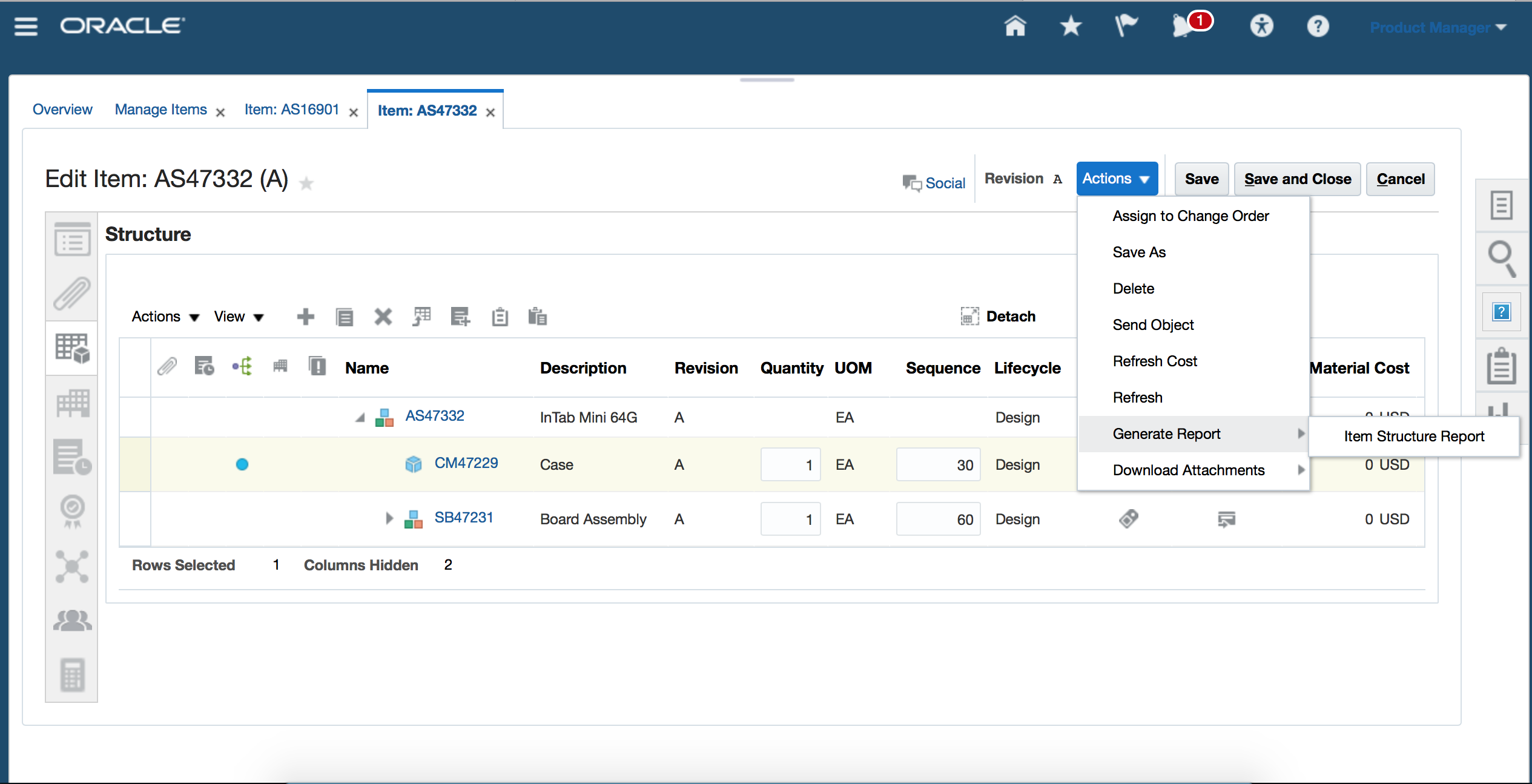
Structure Report
Steps to Enable
No steps are required to enable this feature.
Have you ever had the need to keep a change order "hidden" from certain internal or external users? In addition to securing a change order from unwanted or unauthorized updates, you may also have the need to secure the change order from being visible to certain user(s) within the larger organization. Previously this level of security was not available in Product Development Cloud.
You can allow visibility to a change order by granting only the view privilege without providing full access. This level of access is common in a supply chain where an external manufacturing model is used. Your external manufacturing partner will see the change order and all line items which they have been granted access to through a combination of change security and item security.
This ability to lock down or provide visibility to change orders at will provides your organization the additional security and confidence in allowing access to the targeted areas of your Enterprise Product Data Record. Having the ability to share just enough information ensures the most efficient and secure environment to run your business.
The following screen capture illustrates the feature and its benefits.
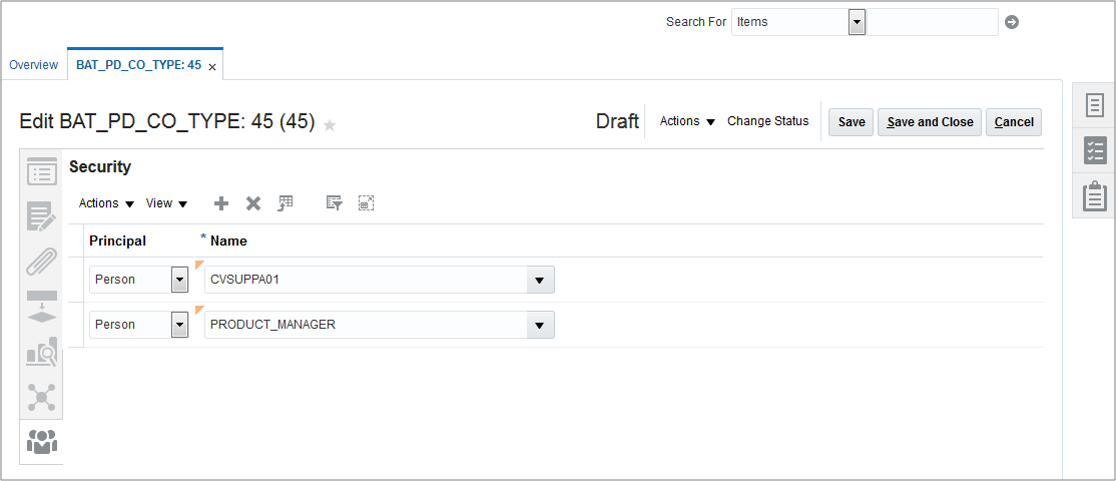
Steps to Enable
No steps are required to enable this feature.
Restrictions to Lifecycle Changes When Updating Change Order Scheduled Effective Dates
You can reschedule the change order’s effective dates to control the inventory obsolescence and manage fluctuations in demand compared to the forecast. Today, within Product Hub, you can change the start date of an item as long as the date is in future. With this capability comes the need for constraints to avoid negative impact to other engineering and supply chain processes.
With this release there are additional restrictions and criteria in place to eliminate any negative downstream effects of changes to the implementation dates and lifecycle phase changes. These restrictions and criteria include: 1. You cannot modify the Effective Date for Items in Design Lifecycle Phase in the product development via a change order. 2. The life cycle phase of child items is not automatically promoted when the parent item (assembly) is being promoted. Instead, you should use a second change order to promote the child's life cycle phase before promoting the parent assembly level lifecycle phase.
Product lifecycle management requires flexibility as well as governance and discipline. These are not mutually exclusive behaviors. Product Development Cloud provides you the opportunity to manage your product changes and lifecycle progression with a means that best suits your business, and a governance methodology required for best in class lifecycle management practices.
The following screen capture illustrates the feature and its benefits.
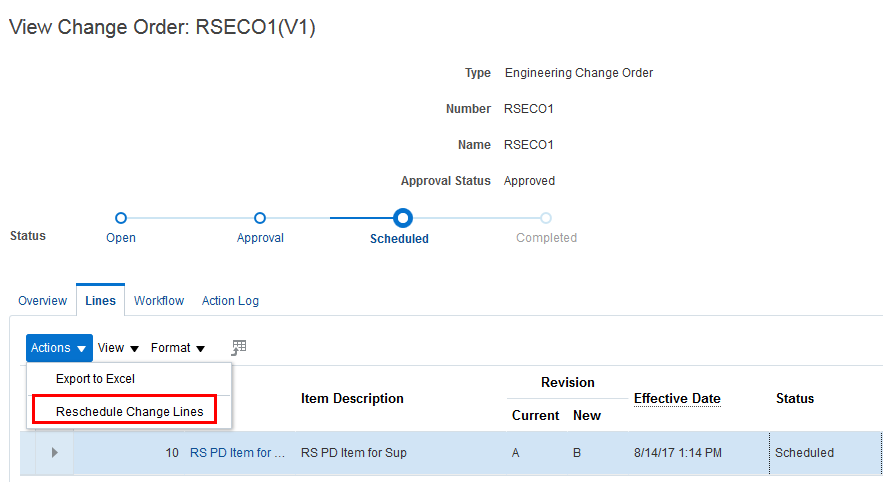
Reschedule Change Lines
Steps to Enable
You must set up key roles and privileges need to be set up.
Role Information
Associate the following privilege to the role
-
EGO_RESCHEDULE_ITEM_CHANGE_ORDER_PRIV
Create Integrations with Your Computer-Aided Design Systems
Oracle Product Development Cloud customers can create integrations with their computer-aided design (CAD) systems. This integration would allow Items, Bill Of Materials and Change Orders to be managed in the Product Development Cloud Application while the CAD Designs & data could continue to be managed in their on premise CAD product data management (PDM) systems.
To support this integration, new Change web services are now available. Web services for Items and Structures have already been available in prior releases. With these services, you can now be able to develop integrations between Product Development and Agile Engineering Collaboration, other on premise CAD PDM systems or cloud based CAD systems.
Steps to Enable
No steps are required to enable this feature.
Tips And Considerations
Use appropriate web services while deploying this feature
Key Resources
Web services documents from Agile 9 software are required, where it is outlined as to which specific versions of the Agile Software will work with these web services.
Enterprise Integration for Quality Issues
People focused on quality require gathering quality events from various sources throughout the enterprise and consolidating the information into a central repository. This allows all quality professionals to manage issues using standard quality management practices, simplify analysis, and ensure that the enterprise is able to effectively manage the risks they face every day.
REST services for quality issues allow you to integrate your enterprise applications with Quality Management Cloud to:
- Create quality issues.
- Populate standard attributes such as: Name, description, type dates, etc.
- Identify affected items.
- Add attachments related to the quality event.
- Searching for existing quality issues
- Managing data for existing issues.
Implementing REST services for quality issues allows you and your organization to realize the true potential of enterprise quality management and will help you to create a safe, effective, and efficient quality program.
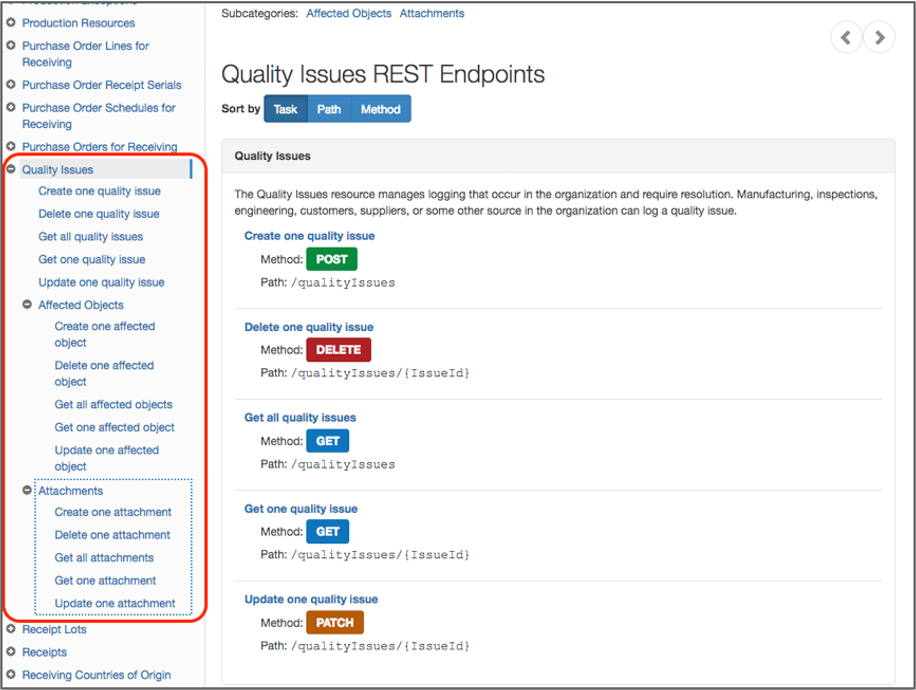
Quality Issue Documentation
Steps to Enable
No steps are required to enable this feature.
Key Resources
Additional documentation related to all SCM rest services:
Enterprise Quality Visibility: Product Management to Quality Management
People focused on innovation want to design the highest quality product. In order to achieve this goal people need visibility to high quality parts and components and they need to be warned of potential quality problems before products are released to commercialization.
You can now view quality issues and corrective actions impacting a given item using a new tab. This feature enables a user to:
- See a warning of quality problems from the structure screen for a given input item.
- For the given item, click on a tab to view the quality issues and corrective actions impacting the structure.
- Click on any of the issues and/or corrective actions to gather more information or to participate in resolving the quality event.
By closely linking quality with design your organization your organization will be able to proactively build higher quality products and avoid deferring problems to later product life cycle phases.
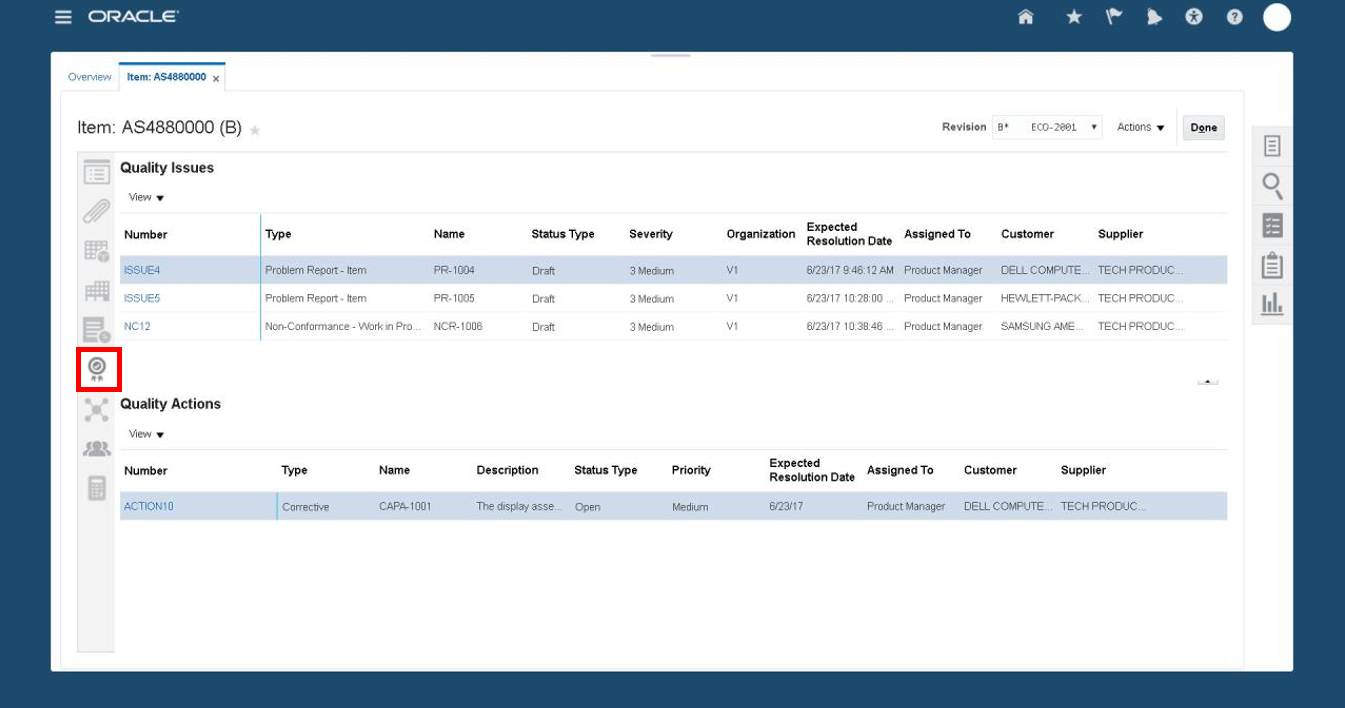
Product Development Item
Steps to Enable
No steps are required to enable this feature.
Enable Inline Electronic Records and Electronic Signatures for Quality Inspection Disposition
Companies in regulated industries must keep detailed records of all information pertaining to the manufacture of their products including quality in accordance with the United States Food and Drug Administration (FDA) regulation on electronic records and signatures called 21 Code of Federal Regulations (CFR) Part 11. Oracle E-Signatures and E-Records is a configurable framework for securely capturing, storing, retrieving and printing electronic records and signatures.
The inspection disposition event in quality supports the creation of an electronic record and inline capture of an electronic signature. If the initiator is also an approver, the initiator's signature is captured in the inline signature page. Notifications are sent to subsequent approvers to capture the remaining signatures. The new or updated transaction data is held in a pending status until all approvals are complete.
- Quality inspection disposition (once all inspection results are entered) for the following inspection types:
- Receiving
- Work in Process
- Inventory
- Resource
The electronic records created are stored in a secured document repository and cannot be modified or deleted. You can search the electronic records based on the transactional information displayed in the electronic record heading in order to retrieve and print an electronic record.
The following is a screenshot of inline electronic signature capture as initiated when you submit a quality inspection disposition transaction:
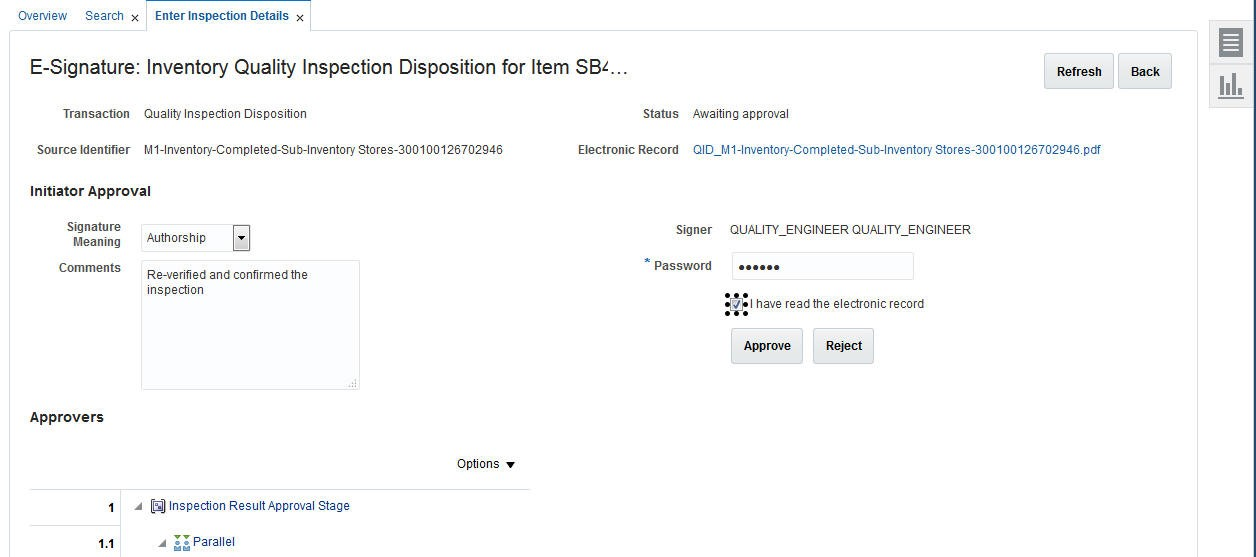
Initiation of Electronic Signature Capture for a Quality Inspection Disposition Transaction
The following is a screenshot of how you can search for an electronic record and retrieve it in the new Electronic Records work area:
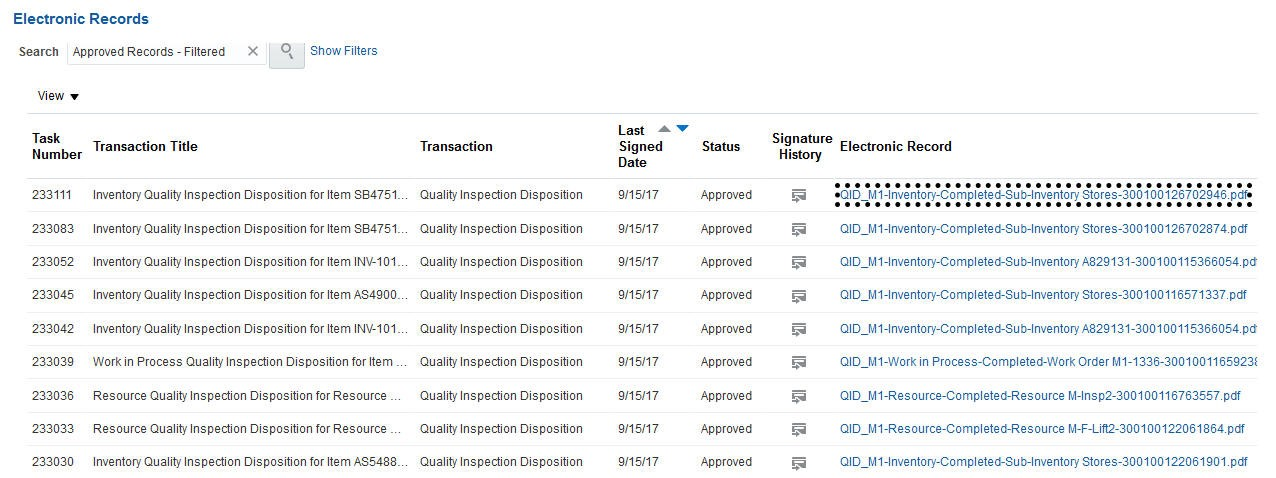
Search and Retrieval of an Electronic Record
Steps to Enable
You must opt in to and enable the Capture Electronic Records and Electronic Signatures for SCM Transactions feature. For instructions, refer to the Optional Uptake of New Features section of this document.
To enable e-records and capture electronic signatures for quality management, you must determine and configure electronic signatures for each inventory organization using the Configure E-Signature Preferences task in the Setup and Maintenance work area.
Once you enable electronic signatures for a transaction, you can also define configurable business process rules in Oracle Business Process Management using the Manage Task Configurations for Supply Chain Management, and the Manage Approval Groups tasks in the Setup and Maintenance work area to determine the approvers for each transaction.
Role Information
To configure electronic signature preferences and set up approval rules for the Quality Inspection Disposition transaction:
- Privilege Name and Code: Determine Transactions Requiring Electronic Signature (EDR_DETERMINE_ESIGNATURES_TRANSACTIONS_PRIV)
- Job Role Name and Code: Supply Chain Application Administrator (ORA_RCS_SUPPLY_CHAIN_APPLICATION_ADMINISTRATOR_JOB)
To initiate the e-records and e-signatures process after creating or updating a Quality Inspection Disposition transaction:
- Privilege Name and Code: Add Electronic Signatures (EDR_ADD_ESIGNATURES_TRANSACTIONS_PRIV)
- Job Role Name and Code: Quality Engineer (ORA_ENQ_QUALITY_ENGINEER_JOB)
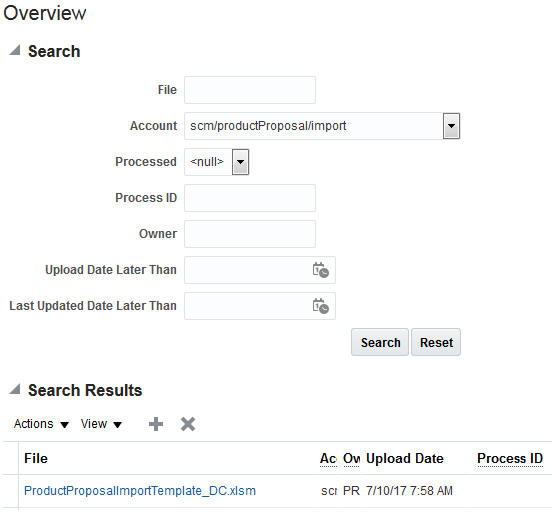
It is common to have innovation assets housed in legacy systems with files capturing prior proposals or business cases. Traditional methods to move data to new environments often include manual entry which is tedious and prone to error. These techniques work well for a small amount of data but impractical larger datasets.
Innovation Management Cloud's data loader capabilities have been extended to include the import of proposal data into Innovation Management by leveraging out of the box templates that you can easily initiate from the Navigator "File Import and Export".
Bulk Loader eliminates manual data transfer into Innovation Management enabling a large amount of data to be more effectively, accurately and efficiently uploaded so you can respond to your markets more quickly.
Bulk Uploads are facilitated using a Spreadsheet:
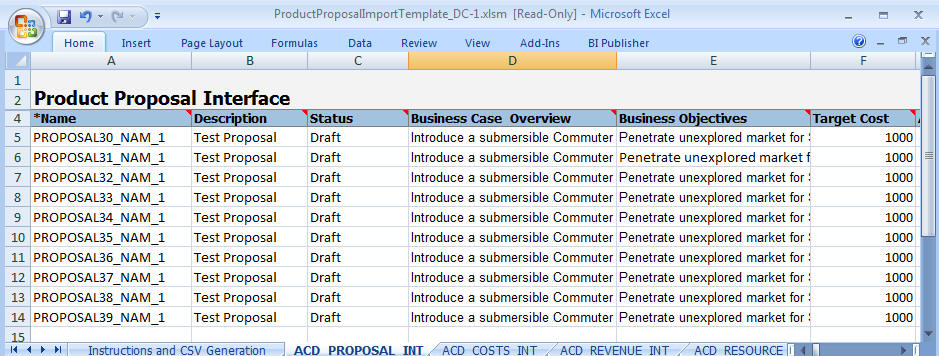
Steps to Enable
No steps are required to enable this feature.
Tips And Considerations
You can obtain the Import Templates for Innovation Management from the Navigator > File Import and Export. Similarly, you can upload the filled-in Spreadsheets from the same location.
Select the following values for Account:
- Ideas: scm/Idea/Import
- Requirements Specification:scm/requirement/Import
- Concepts:scm/productConcepts/Import
- Proposals: scm/productProposal/Import
Simplified, Standardized Page Layout for Innovation Management
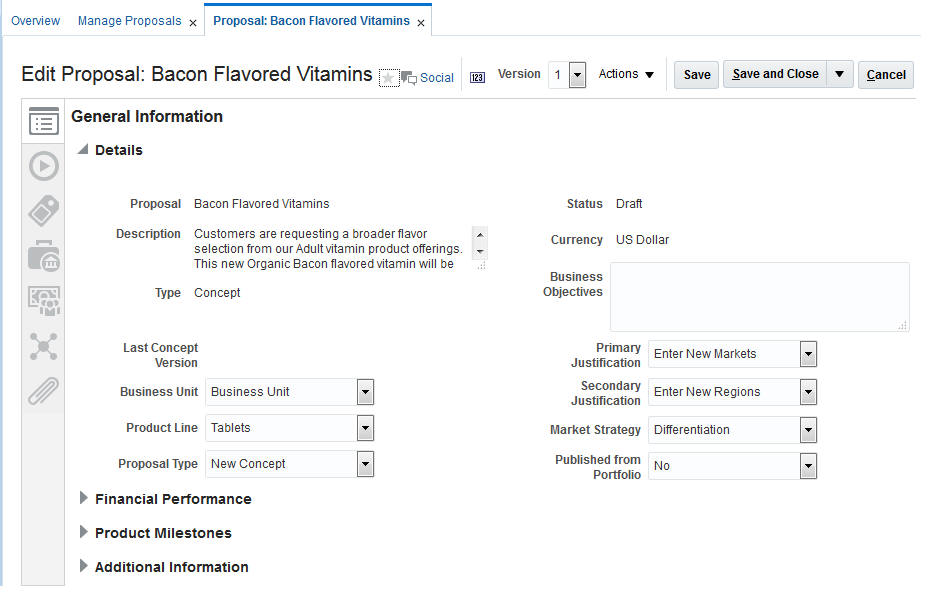
Innovation Management page layout is standardized and simplified through the use of side tabs, with each object enabling data to be organized as General Information, Relationships, Attachments, Relationships Summary, and Analysis.
Standardizing the page layout across objects removes complexity and provides users with a consistent interface for entering data or accessing relevant information as required.
The following screen capture illustrates the feature and its benefits.
Steps to Enable
No steps are required to enable this feature.
Invoke OTBI Folders Directly From a Panel Drawer From All Innovation Management Objects
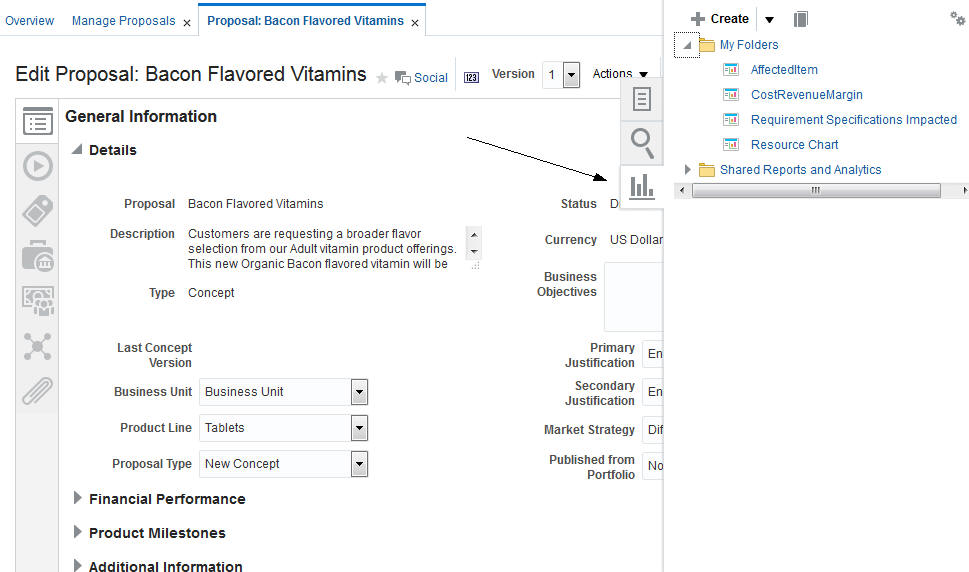
In this release, we have provided the ability to extend the reporting for Innovation Management objects through access using a new fly-out panel drawer which can be found in the following locations in Innovation Management:
1. Ideas
2. Concepts and Proposals
3. Portfolio
With this new capability, users have the ability to view reporting for any or all related "Innovation to Commercialization" and "Projects" processes or other preferred custom analytics. With readily available, additive analytics, your users will be armed with the latest data to make the right decisions during gate reviews and other problem resolutions.
Clicking on the icon shown below invokes the fly-out panel that provides access to the OTBI Folders:
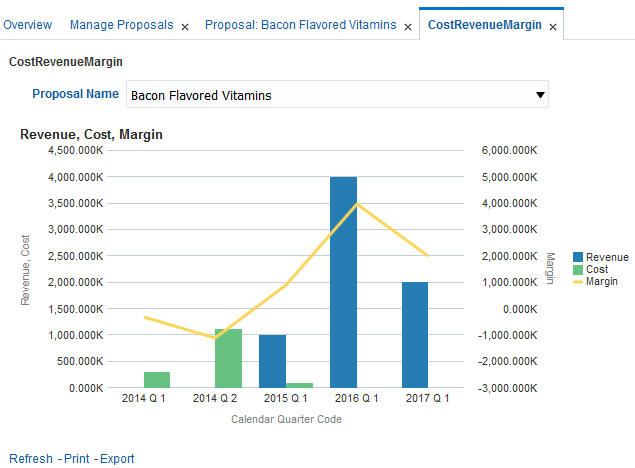
Any pre-built analysis available in the OTBI folder can be executed, which will open up in a dynamic tab:
Steps to Enable
No steps are required to enable this feature.
Tips And Considerations
You can use 'Edit Settings' to create a short cut to analytics in the Shared Folders:
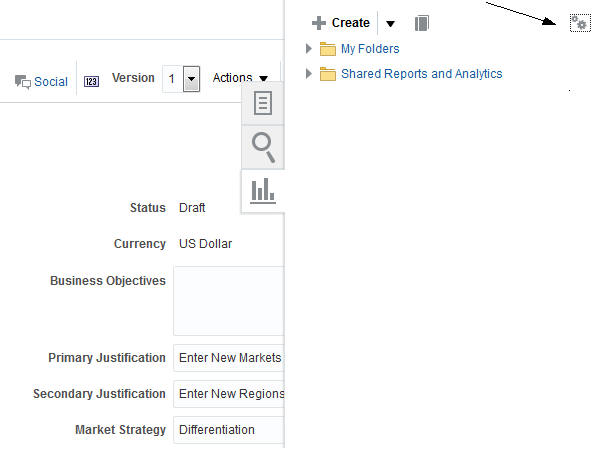
You can map several analytics in this screen:
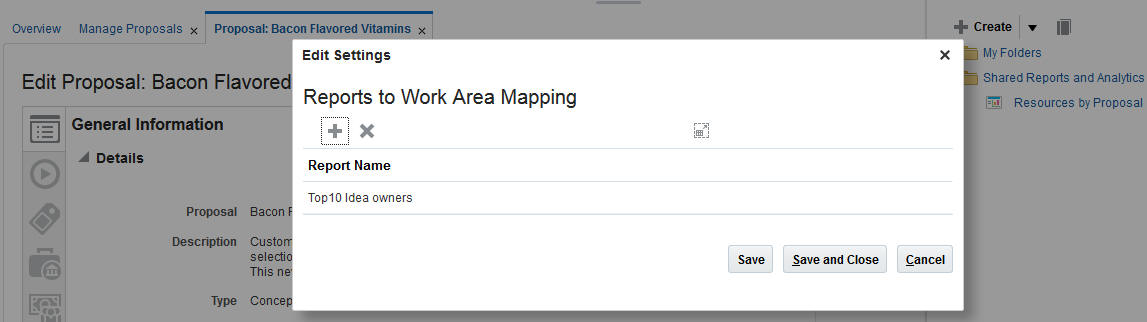
This document will continue to evolve as existing sections change and new information is added. All updates appear in the following table:
| Date | Feature | Notes |
|---|---|---|
| 01 SEP 2017 | Created initial document. |
This guide outlines the information you need to know about new or improved functionality in this update, and describes any tasks you might need to perform for the update. Each section includes a brief description of the feature, the steps you need to take to enable or begin using the feature, any tips or considerations that you should keep in mind, and the resources available to help you.
SECURITY & NEW FEATURES
If your system has modified security structures, you may need to advise your security administrator of new features you would like to take advantage of.
GIVE US FEEDBACK
We welcome your comments and suggestions to improve the content. Please send us your feedback at oracle_fusion_applications_help_ww_grp@oracle.com.
Optional Uptake of New Features (Opt In)
We continue to add many new features to Oracle Cloud Applications and we now give you the option to take advantage of new functionality at a pace that suits you. The ‘New Features UI’ is available to you from your cloud homepage, where you can make your choices and do any configuration necessary.
This section gives you information to help you plan, deploy, and validate your update. We make frequent additions to this document, so don’t forget to check back and get the latest information before your update starts.
| Action Required to Enable Feature |
||||
|---|---|---|---|---|
| Feature |
Automatically Available |
End User Action Required |
Administrator Action Required |
Oracle Service Request Required |
|
||||
|
||||
|
||||
|
||||
Modify Data in Proposals and Concepts Leveraging Excel Tables |
|
|||
|
||||
Enable Development Isolation and Streamlined Transfer to Production |
|
|||
Manage Security Through Item People (Secure Item Cost, Approved Manufacturer List and Attachments) |
|
|||
|
||||
|
||||
|
||||
|
||||
|
||||
|
||||
|
||||
|
||||
|
||||
|
||||
|
||||
Increase Productivity with a New Page for Managing Trading Partner Items |
|
|||
|
||||
|
||||
|
||||
|
||||
Include Images and Additional Attributes for Real-Time Analysis and Reports |
|
|||
Compare Versions of Proposals and Concepts for Key Metrics
Once an idea progresses beyond the initial selection phase, it transitions into the discovery process of developing the business case and creation and analysis of preliminary concepts. Through the progression, when new details are uncovered, keeping track of revisions against original expected cost, schedule, benefits, and plan of record expectations becomes cumbersome and quite challenging. The struggle to compare different sets of data sometimes results in incomplete or partial review of information. This increases the risk of incomplete comprehension and likelihood of failure to make all the right corrections.
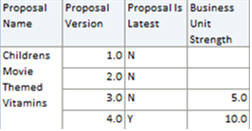
To address these challenges, Version is supported in the transactional business reporting subject areas of Proposals and Concepts.
Central to Innovation strategic planning is the evaluation and containment of risk and your ability to deliver against stated business objectives such as cost, margin, and schedules. Having the ability to measure delta changes across new revisions of financial and non-financial metrics provides tighter control for both business and process owners to ask and answer questions in real-time converting, insight into a proactive response.
The following screen capture illustrates the feature and its benefits
Steps to Enable
No steps are required to enable this feature.
Tips And Considerations
Version attributes in the Product Proposals Subject Area:
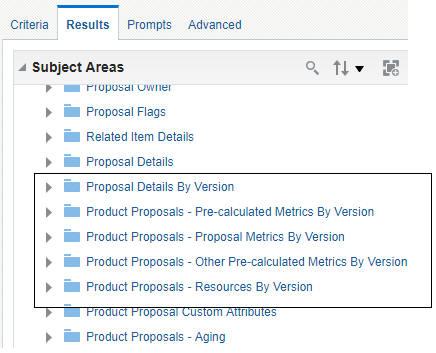
Product Proposals Subject Area
Addition of Portfolio Dimension in Proposal Subject Area
Leveraged optimally, innovation becomes a shared value across the enterprise and utilized across multiple scenarios of new products. As knowledge splinters across different scenarios and portfolios, it is difficult to maintain consolidated, enterprise level visibility of all expectations and measure change impact. This release exposes the Portfolio Dimension within the Proposal Subject Area providing greater visibility to all Portfolio scenarios where a specific proposal is included. Greater insight into the “where used” of a proposal across all portfolio scenarios provides bigger picture visibility and an ability to identify duplication and measure impact of change.
The following screen capture illustrates the feature and its benefits:
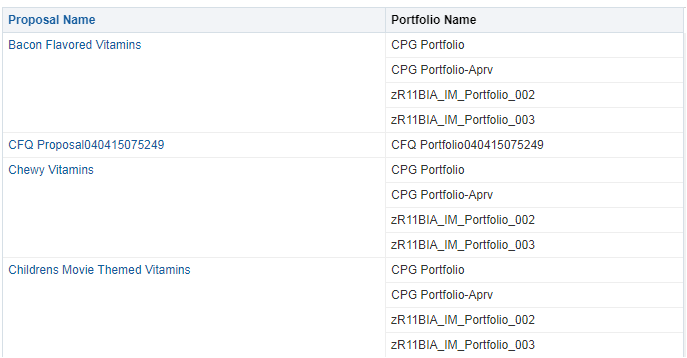
Sample Report with Portfolio Dimension
Steps to Enable
No steps are required to enable this feature.
Tips And Considerations
Portfolio attributes are under Portfolio Details Folder:
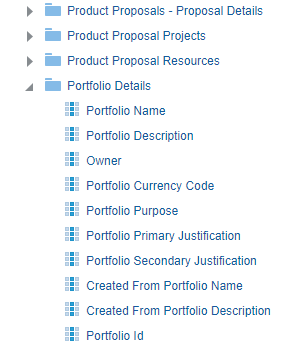
Portfolio Details Folder
Measure User Contributions to the Innovation Funnel
Increasing user adoption to participate in the generation and collaboration of new ideas and innovations may seem easy, but it is not. Without the ability to identify and recognize top innovative employees you may run the risk of complacency across the various organizations. This release conforms to the dimension of Innovation ‘Posted by” users with users in HCM Cloud subject area providing you the ability to identify top innovation ideation contributors. These new insights analyze contributions by employee, the organization that they belong to and their corresponding Business Units with metrics that can be included in each employee’s record and their manager’s dashboard. These metrics provide opportunities for managers to better understand and recognize employees or organizations providing the most value to the innovation funnel, for employees to track their contributions and the business to proliferate adoption by the top performing teams to the rest of the organization.
The following screen capture illustrates the feature and its benefits.
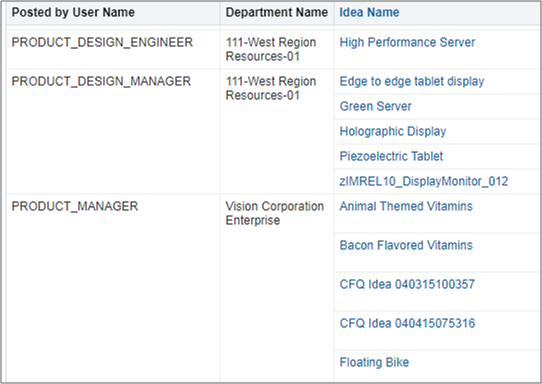
Sample Report
Steps to Enable
No steps are required to enable this feature.
Tips And Considerations
The new attributes are located under 'Posted By User Details' in the Ideas Real Time Subject Area:
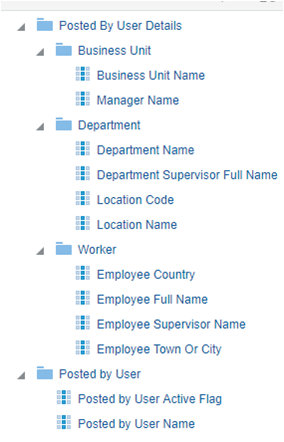
Ideas Real Time Subject Area
Navigate from Projects to the Latest Version of Proposal
The Innovation Management Proposal captures the objectives, schedules, financial justification, expected costs and resources. A Project is the delivery vehicle for managing and delivering ideas through a phase gate process and is the system of record for the actual schedule, resources and costs. Maintaining visibility across both processes to proactively identify and respond to project cost or resource overruns jeopardizing the business case value reduces the risk of missed time to market, lower margin or return on investment.
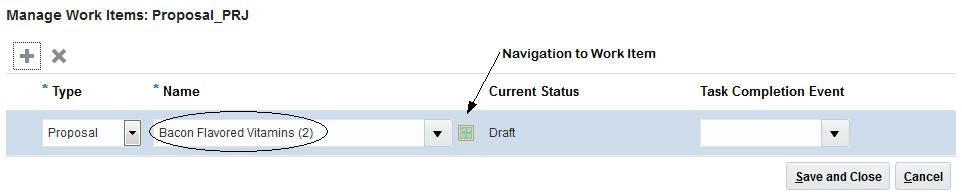
With this release, Project Owners can quickly navigate from a Project to the latest version of a Proposal when added as a Work Item ensuring synchronization across objectives, targets and delivery schedules.
As a Project owner, having quick access to the latest revision of the business case, schedules, assumptions and expected cost and resources, ensures the best utilization of constrained resources to focus on the greatest growth opportunities. Access to both Project and Proposal data in real-time enables a mutual understanding across product and project owners of key business metrics, to watch for unexpected circumstances and prompts better execution of decisions based on that information.
The following screen captures illustrate the feature and its benefits.
Screenshot 1: The Work Item-Proposal is in version 1.The Work Item link will navigate the user to Version 1 of the Proposal

Screenshot 2: A new version of the Proposal is available and the same has been associated with the Project Task automatically. The link takes the User to version 2 of the Proposal, i,e the latest version
Steps to Enable
No steps are required to enable this feature
Tips And Considerations
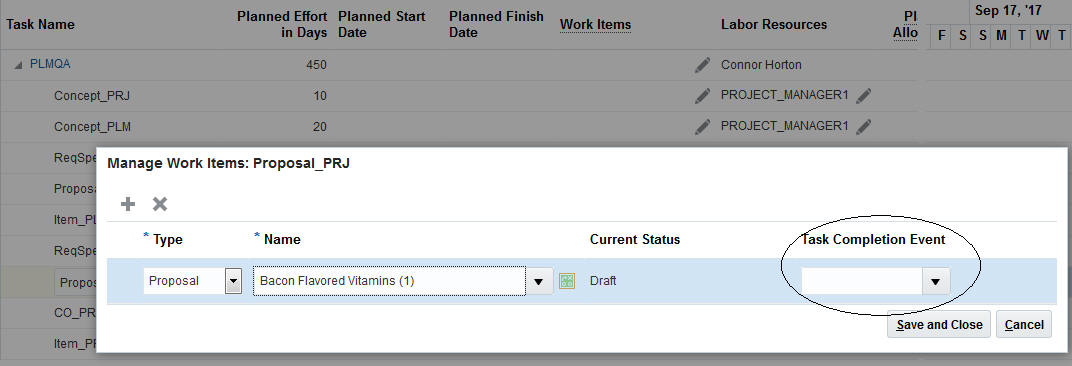
This functionality is applicable only when the Task Completion Event has not been set as shown in the screenshot below:
Modify Data in Proposals and Concepts Leveraging Excel Tables
The Innovation conceptual phase is an on-going, active process of discovery and reaction as innovations take on the definition that will deliver the expected value of targeted consumers. Discussions and work often occur offline, leading to data synchronization and lost data challenges. This release enables desktop integration with Excel spreadsheets to work offline, manage large volumes of updates or access data from other web applications for concepts, proposals and the ideas customer list.
With key resources often dispersed, the continuous nature of innovating in the modern enterprise drives new pressures to capture user updates at any time, from any location.
In this release:
- Concepts: During design definition and review sessions, new product teams can export components.
- Proposals:Business owners can export the cost, revenue and resource tabbed data, modify and then re-import edits.
Integrated spreadsheets allow users to access and edit critical business data offline -- Engineers meeting with a supplier capture insights into component specifications attribution or a Product Manager in discussions with the Sales Manager captures the number of forecasted unit sales. Through a seamless integration with Innovation Management’s security and business logic infrastructure, users are able to edit their data without a live connection to the network. Once reconnected, data can be imported and becomes visible to all stakeholders for analysis.
Steps to Enable
In the Navigator, go to 'Download Desktop Integration' to download the plug-in.
Key Resources
- Please review 'Desktop Integration for Excel' section in the Oracle Applications Cloud Using Common Features guide.
Optimized User Interface for Product Lifecycle Management
A consistent user experience is a critical function of any product lifecycle management solution. Furthermore, extending that consistency throughout the new product introduction process and supply chain management processes delivers an experience resulting in large productivity gains and adoptability.
With this release, you will be able to access all tasks related to creating Items, Change Orders, Change Requests, Manufacturers and Manufacturer Part Numbers from the Tasks panel itself. The Tasks panel will also provide you with additional tasks to navigate to advanced search functions for Items, Change Orders, Manufacturers, and Manufacturer Part Numbers. These tasks include Manage Items, Manage Change Orders, Manage Change Requests, Manage Manufacturers, and Manage Manufacturer Part Numbers where you will be able to perform a search and view the search results. The Tasks panel is compressed from your view by default and can be invoked by clicking on the Tasks icon in the side panel. Additionally, a Reports and Analytics tab has been added to access Business Intelligence reports directly from the work area. The keyword search is also now accessible through its own side tab and can be invoked by clicking on the Search side panel icon. Additionally, the Item Details page has been further optimized to access more real estate by removing the information tiles. You will now access all details pertaining to an item through the side tabs providing a bigger vertical real estate to review the relevant details for a given side tab, for example, attributes or attachments.
This improved user interface brings consistency, saves valuable user interface real estate as well as improves the general productivity for the user. This will speed up search, creation and maintenance of your items, documents, BOMs and Engineering Change Orders.
Steps to Enable
No steps are required to enable this feature.
Enable Development Isolation and Streamlined Transfer to Production
As part of the New Product Development process, items may be in a preliminary state where engineers are working with various early iterations. For these items starting downstream commercialization and supply chain operational processes may be pre-mature and may cause wastage of critical resources and non-value added work. Specifically since some of these preliminary items may never be released beyond the engineering phase. For these items, starting downstream commercialization and supply chain operational processes may be pre-mature and may result in inefficient resource utilization and non-value added work. In addition, some of these preliminary items may never be released beyond the engineering phase. Today, all development items and versions (including preliminary ones) in the approved status are visible to all downstream operational users, irrespective of the lifecycle phase they are in. They are also available to the SCM tools (like planning, order management, and manufacturing), even if they are not ready to be shared, commercialized, or acted on. .
In this release, for items that require the New Item Request (NIR) workflow, the workflow triggers only when the item moves to the pre-production lifecycle phase through a change order. Additionally, items created in the Product Development Cloud are visible in the Product Hub work area. However, the key data elements for Bills of Material, Approved Manufacturer List and Revision Attachments will not be visible in Product Hub Cloud unless the item’s lifecycle phase is pre-production or production. This ensures that the operational aspects of the item such as component operational attributes will only be editable when the item reaches the pre-production lifecycle phase.
This provides the necessary isolation that the development team needs to freely experiment with multiple design options/revisions. Once the designs are final, they can expose or promote the best options/revisions to the Operations team. This ensures a controlled handoff between development and operations. Also, supply chain operations can be notified that a development item is ready for commercialization.
The following screen capture illustrates the feature and its benefits.
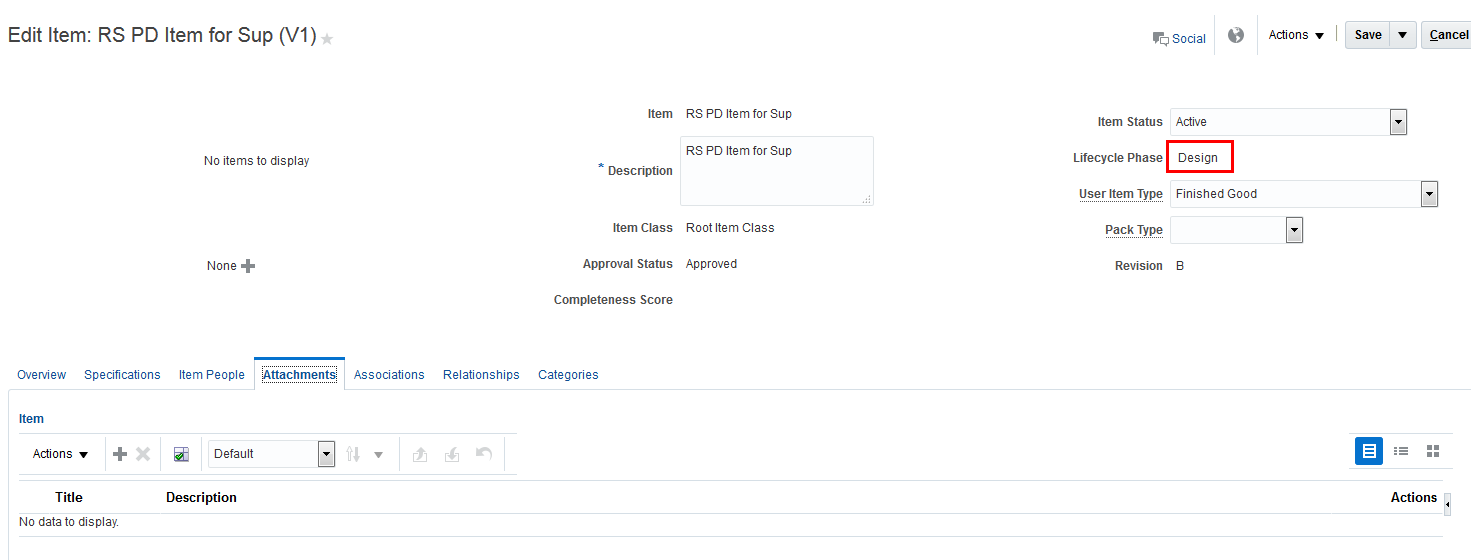
Engineering Item in Design Lifecycle Phase
NOTE: This feature was also made available in a quarterly update of Release 12.
Steps to Enable
No steps are required to enable this feature.
Tips And Considerations
For the system to trigger New Item Request for an Item Class that has New Item Request enabled, the Number Generation method for the New Item Request Type must be Sequence Generated.
Manage Security Through Item People (Secure Item Cost, Approved Manufacturer List and Attachments)
An item may have data and informational elements that must be secured to prevent unauthorized access. This ensures protection of the intellectual property associated with the product design and confidential documents. High security is critical in scenarios where a product is outsourced for design and/or manufacturing with information such as bills of material, documents, manufacturer part numbers and attachments that are shared with external team members. The current security model only secures access to items, item attributes, and item structures. This level of security is not enough for internal and external collaboration of manufacturer part number (MPN) data that may contain a product’s intellectual property.
With this release, you can set security and access permissions at all levels of the product definition, including the item, item attributes, item attachments, MPN, and MPN attachments. You can provide data level security for each MPN by assigning access by role privilege. For example, if you access an item’s approved manufacturer list (AML), but do not have access permissions for a manufacturer part number in the AML, you will not see that MPN.
This improved security enables full protection of a product’s intellectual property. It ensures internal and external security levels required for designing and manufacturing and sourcing collaboration.
Steps to Enable
No steps are required to enable this feature.
It is important for users of a product record to be able to export item structures in a format conducive to sorting and manipulating to share the appropriate story or set of data for a vast set of stakeholders. With this export capability, you would also expect to dial-in the level and types of information to include in the item structure export.
In this release you are able to export item structures into an excel file for spreadsheet manipulation of the data set. The content you wish to export includes the descriptive flex fields as well as extensible flex fields and AML as selectable options. Also in this release, you may create templates for the information you wish to include in your item structure export. This is a one-time template creation that may be utilized every time you export an item structure or only for specific export activities. Multiple templates may be created and a user specified default may be identified. The item structure export capability is also available from the Product Hub UI so you can export details of the primary structure in the master organization as well as child organizations.
Customizing your item structure exports enables your organization to effectively capture relevant information for all stakeholders. Being able to easily manipulate the item structure data provides a user with the means to turn requests from stakeholders into quick results with very few clicks and minimal time. This enables faster analysis and decision making as required.
The following screen capture illustrates the feature and its benefits.
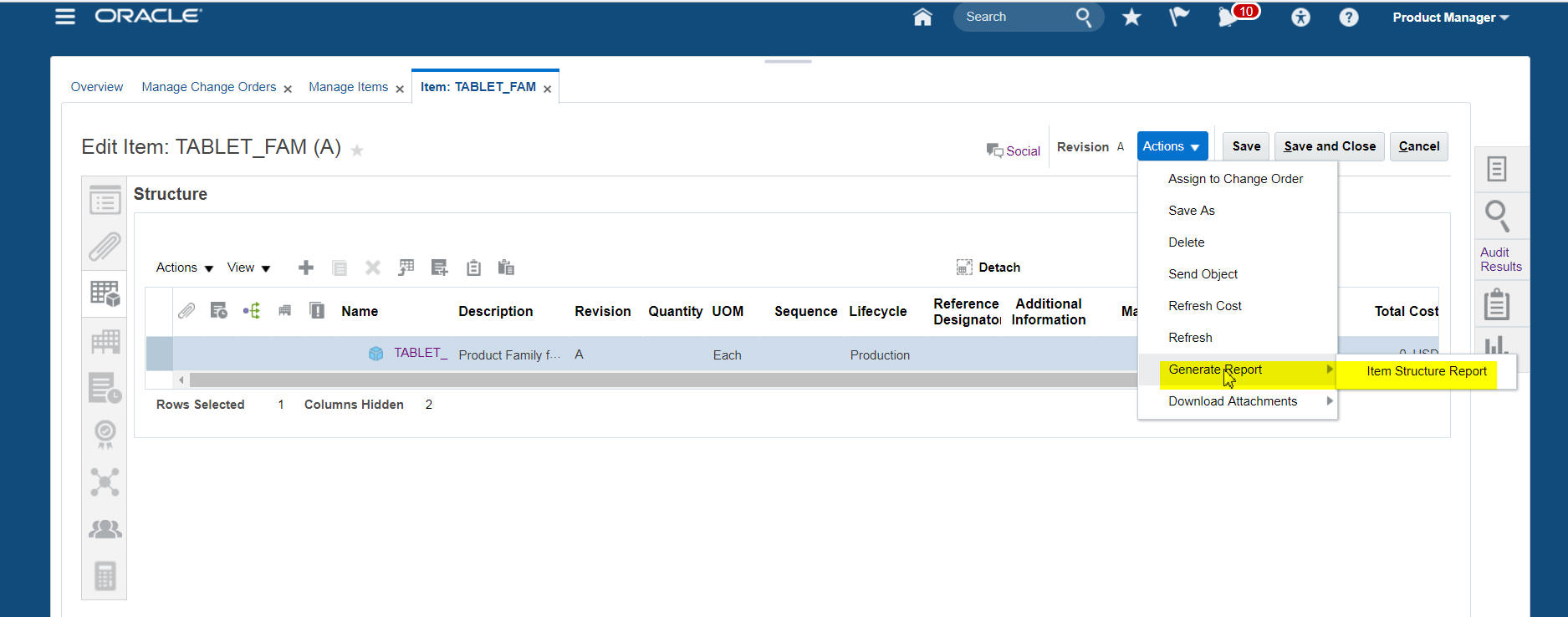
Item Structure Export Action
Steps to Enable
No steps are required to enable this feature.
Download of Item Attachments Across an Item Structure
In addition to exporting an item structure with all of the structure and item information, it can be just as important for users to retrieve and download the attachments that are associated with the items and documents within that item structure. These attachments in addition to the items and their attributes must be available to users for download.
With this release, all attachments in the item structure can be downloaded to a zip file for review and sharing. Attachments will be easy to view from the zip file and will not require your users to go into the item structure and grab each file individually. Of course, if only one or a few attachments are required, users may go into the item and download the attachments individually but when an all inclusive need or large number of attachments is needed, downloading all attachments via a zip file is simple.
Easy access to the content of attachments and source files is required for users to have a complete picture of the item structures in your system. This will provide the assurance needed to share information or make decisions based upon a complete set of data.
The following screen capture illustrates the feature and its benefits:
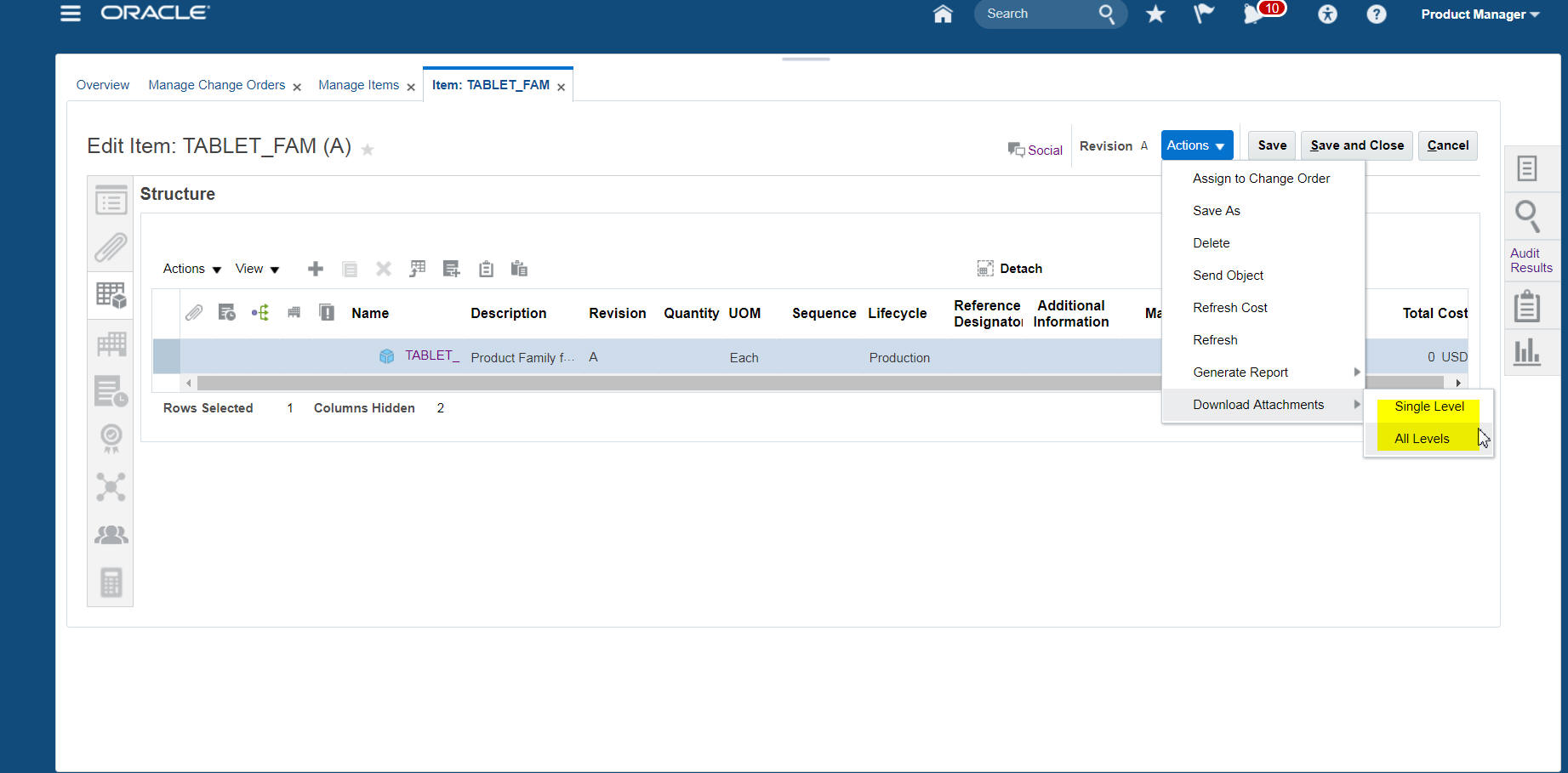
Download Attachment Action
Steps to Enable
No steps are required to enable this feature.
When creating item structures, users will want the most efficient way possible to find or create items and add them to the structure. Complex item structures may contain thousands of parts and more simple item structures may contain just a few items. Either way, time to create that structure is a measurement of the efficiency of users and their applications.
With this release, there are efficiency improvements for creating item structures. Searching for items with a basic search or an advanced search ensures that your organization will reuse parts rather than proliferate part numbers in your organization. Being able to add those parts directly to the structure with a single click from a search result enables users to build those structures more quickly than before. In addition to search and add, users may also create child items right within the structure tab of an item. A child item can be created and added to an item structure simultaneously. Opposed to create, save and add, users are able to create, save, add and be given the option to create another, all from a single pop-up window. Items can be created at level one of a structure or anywhere down the structure hierarchy as long as it is created below its parent.
Your organization deserves features to enhance and streamline the item structure building tasks. Your already constrained resources will be able to improve the speed at which item structures are created and thwart the proliferation of parts that can burden any business.
Steps to Enable
No steps are required to enable this feature.
Documents are critical pieces of information required to augment product design as you progress through the development process. These documents play a major role in the definition of a product. The PLM system provides a focused and simple way to classify, create, and manage documents throughout the product lifecycle. Some examples of document items include placement drawings, assembly drawings, schematics, rework instructions, specifications, and other reference material.
Previously, document support was limited to attachments to an item. Documents could not be associated with other elements nor could they be independently managed and aligned with lifecycle, change management, metadata, document hierarchies, or assigned to several items.
In this release, a simplified user experience is now available for document control that allows you to model a document as its own “document object” independent of an item. This document object can be used to classify, create, view, markup, checkout and check in documents. Additionally, you will be able to search and discover documents based upon keywords or other parameters to quickly and easily share or recall information.
These document objects are in fact modeled internally as a specific item type and so may participate in similar ways as “regular” items. For example, they may be included in an item structure. The decision as to whether to store a given document as an attachment to an item (e.g. additional item specifications), as a document object (e.g. assembly or test requirements), or as an item which is in fact a document (e.g. a publishable manual) will be driven by the particular needs of the business process.
The efficient and effective management of documents provides a company with the ability to optimize product development cycles and minimize risk of mismatches between critical documents and an evolving design. Maintaining a design engineer’s focus on design activities rather than document management is the best use of critical resources.
NOTE: This feature was also made available in a quarterly update of Release 12.
Steps to Enable
No steps are required to enable this feature.
Tips And Considerations
Base document class needs to be configured in PD for the document management features to work.
Manage Attachments for Items and Documents
Item and document attachments such as spreadsheets, drawings or design specification documents can change versions several times in the lifecycle of a product or with other changes in the engineering or supply chain eco system. The inability of users to associate a specific version or use a version attachment policy makes it difficult to track the file version levels that are applicable to a product.
In addition to the creation of the document object, you will be able to associate a specific version of an attachment (on the document object or on the item) or automatically pick up the most current version of an attachment. Streamlined file attachment steps are also made available to minimize user clicks and minimize the navigation steps of moving back and forth from attachment and item structure screens. Attachments can be retrieved from your desktop or shared folders, and can be checked-in (or checked-out) with visibility and traceability.
NOTE: This feature was also made available in a quarterly update of Release 12.
Steps to Enable
No steps are required to enable this feature.
Today, form, fit, function changes and non-form, fit, function changes require issuing of a new revision as part of the change order implementation. This limitation forces creation of new revisions even when certain changes do not require any. With the current change types, users do not have the flexibility to control revision policies or data elements that are specific for a given change type. This leads to a rigid change implementation process and non-value added data proliferation that is difficult to administer.
In this release, new configurable change types allow users to determine the correct behavior dependent on the type of change and its position in the lifecycle. Users may choose to enable one or more of the following pre-defined, internal change types and create their own custom change types based on these internal change types:
- Engineering Change Order (ECO): Allows implementing changes to item attributes, bills of material, approved manufacturer list (AML) and attachments. The use of this change type mandates an increment to the item revision. This change type will be initiated in the Product Development Cloud application.
- Non-Revision Change Order (NRCO): Allows implementing changes to item attributes, bills of material, approved manufacturer list (AML) and attachments where change policies do not require a new item revision. Therefore, the use of this change type will not increment the item revision. This change type will be initiated in the Product Development Cloud application.
- Engineering Change Request (ECR): Allows the capture of a change request from internal team members to request or gain consensus on a change prior to proceeding to the creation of an engineering change order.
- Commercialization Change Order (CCO): Allows changes to item attributes (extended and operational attributes), bills of material including multi-organization specific attribute and item structure changes, packaging hierarchies, and item-supplier associations. This change type will allow item revision or non-item revision changes. This change type will be initiated in the Product Hub Cloud application.
The change type framework now provides the flexibility for users to model changes through all phases of the lifecycle. It also allows enforcement of change control and revision policies that are required for compliance to configuration management standards and best practices throughout the Innovation to Commercialization process.
NOTE: This feature, with the exception of Engineering Change Request (ECR), was also made available in a quarterly update of Release 12.
Steps to Enable
No steps are required to enable this feature.
Change Management Security Through Change People
OEMs need to collaborate with their external manufacturing partners (contract manufacturers) for item or document changes. Today, it is common for items and products to be designed and/or manufactured by multiple external suppliers. These suppliers often compete for the same business and visibility to certain engineering change content must be kept secure. This change security must be easy to administer to allow a change analyst to configure and manage security on a given change order and change request.
With this release, the change analyst/assignee upon creation of a change order will be able to add internal and external users as ‘Change People’ that will have access to the change order. Internal users should also be able to see which internal or external users have been given this access. If an internal user or external user has not been explicitly added to a change, that user will not have access or visibility to the change.
Fundamentally, the concept of change security is that; if no user or role/group is added to secure the change order or change request, all internal users are able to view and manage the change from within the application. In order to control change security, changes must have users or user groups added to the ‘Security’ section of the change order, along with applying item data security as required.
NOTE: Item People will continue to govern Item Security. Hence, the visibility of affected objects and their redlines will depend on the access provided on them.
The following screen capture illustrates the feature and its benefits:
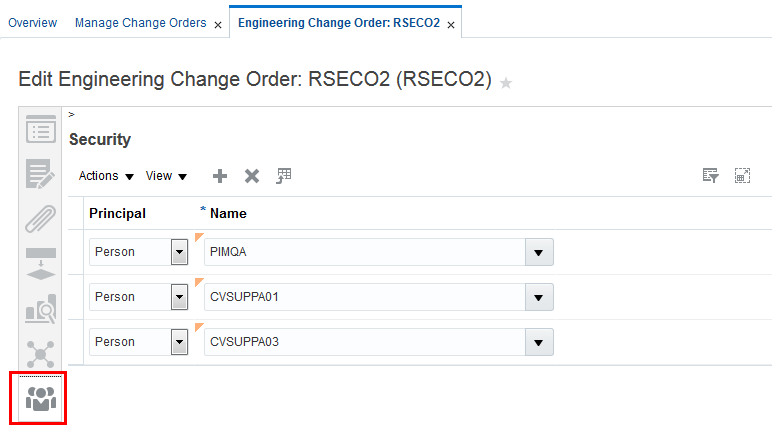
Security for Change Order
Steps to Enable
No steps are required to enable this feature.
Tips And Considerations
- As soon as a user or role is added to the change order security, it becomes private.
- A change analyst has to add *self* as soon has someone is added to the change order.
- If all internal users are to have access to the change order then a role should be created that includes all internal users and this role added to the change order.
Change Order Navigation and Efficiency Improvements
Change orders and change management are core to Product Lifecycle Management (PLM). The ability to assess where a change is in its workflow, understand the items affected and the impact of a change, and see what changes are in process for a given item are core requirements to the management of items through their lifecycle.
With this release, users will experience improvements to the navigation of change orders and the items affected by those change orders. With the additions to the side tab of a change order view, users will have single click access to the impact analysis, the affected items and the position of the change within its workflow. In the same manner, when looking at an item, users will have single click access to see what changes may be in process for that item or where that item may be affected by another change.
In addition to navigation and information access improvements, the overall efficiency of creating and routing change orders has also improved with this release. Key areas for change management are the approval and observation processes and the routing of the change to the proper stakeholders. In this release, users are able to add ad-hoc approvers and observers for a change including the autosuggest capability when adding those ad-hoc stakeholders. Also, when stakeholders are notified of a change, they will be able to see any of the comments made by the user as he or she routes the change.
Other change management efficiency improvements in this release include enhancements to redlining features and the user-interface by adding the capability to redline reference designators in the change table itself and to display those redlines. Also, the bulk edit feature is now in the table view versus the more cumbersome list view for the change.
These improvements to change order navigation and efficiency provide users with a better change management tool to meet the demands of fast-paced lifecycle management. Your organization will benefit from all enhancements to change management navigation, routing and efficiency.
The following screen captures illustrate the feature and its benefits.
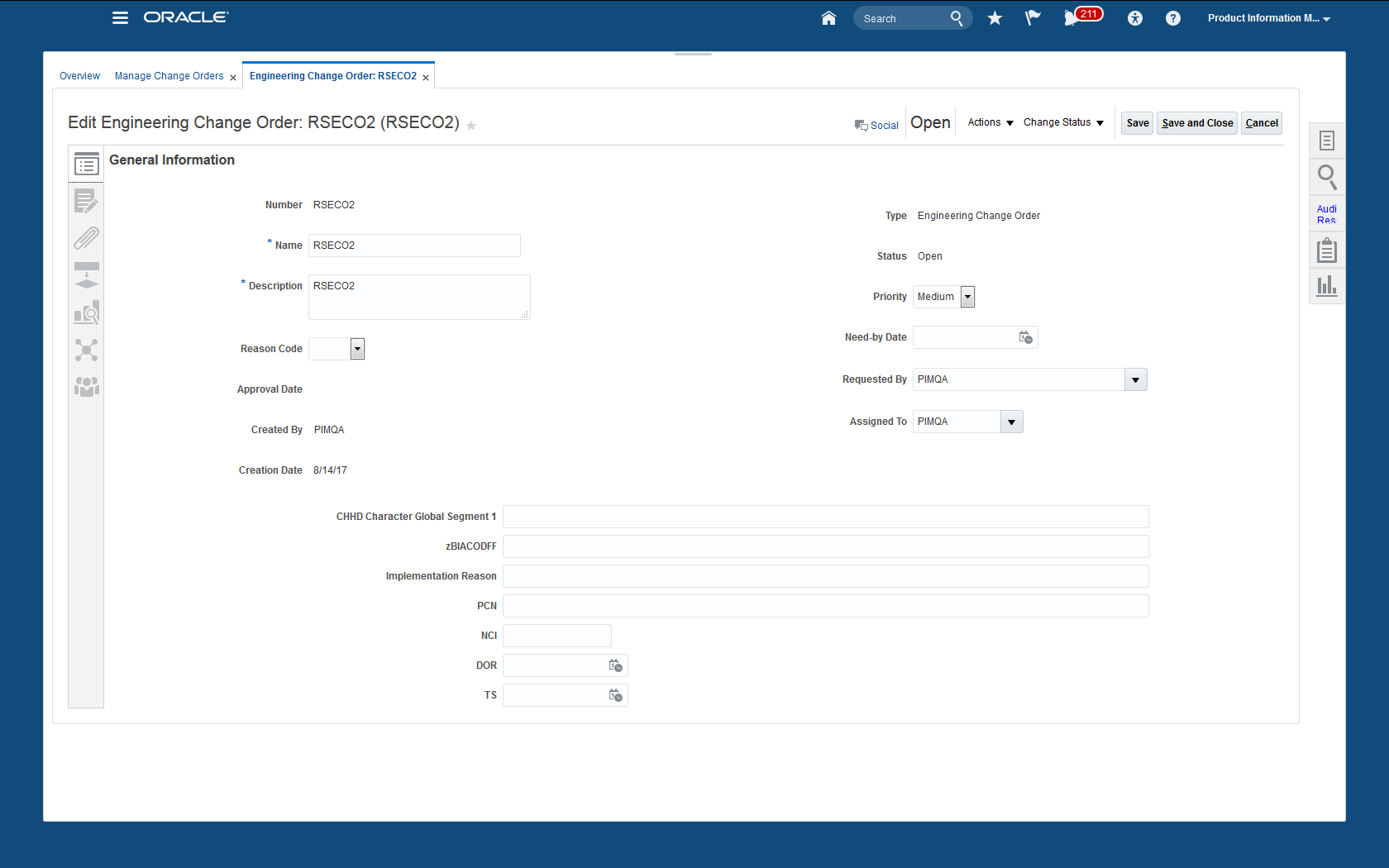
Improved UI Experience
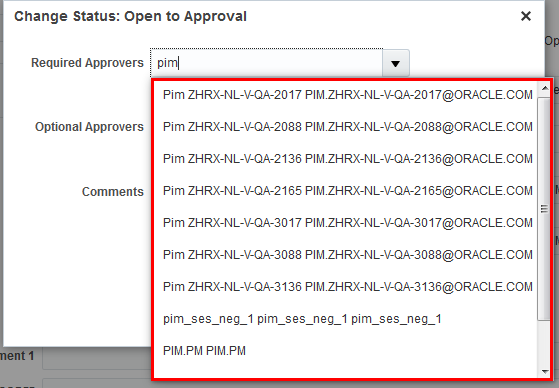
Autosuggest Approver and Optional Approvers
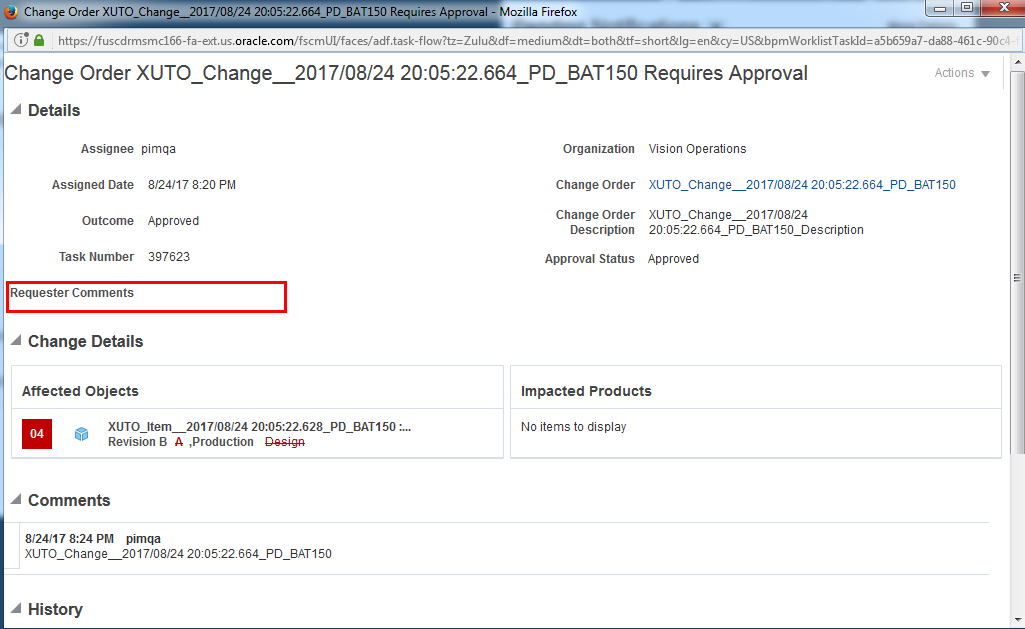
View Requester Comments
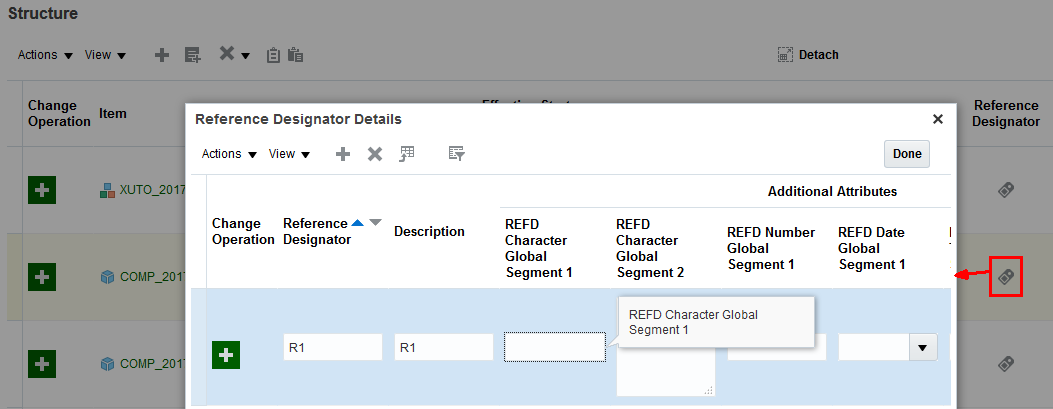
Table Edit Reference Designators
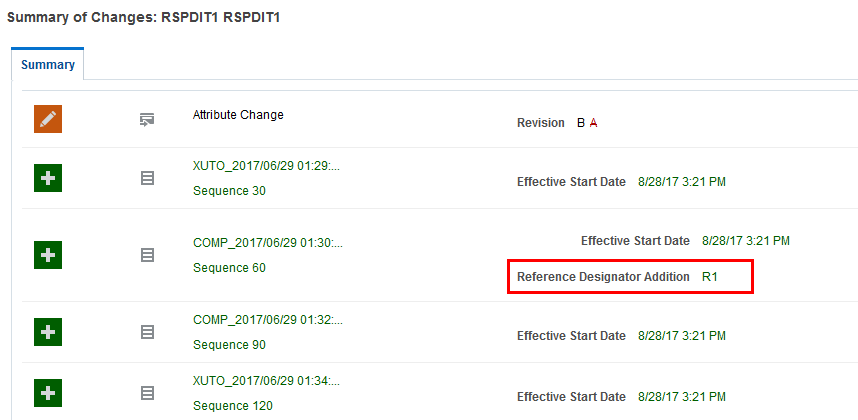
View Reference Designator Changes
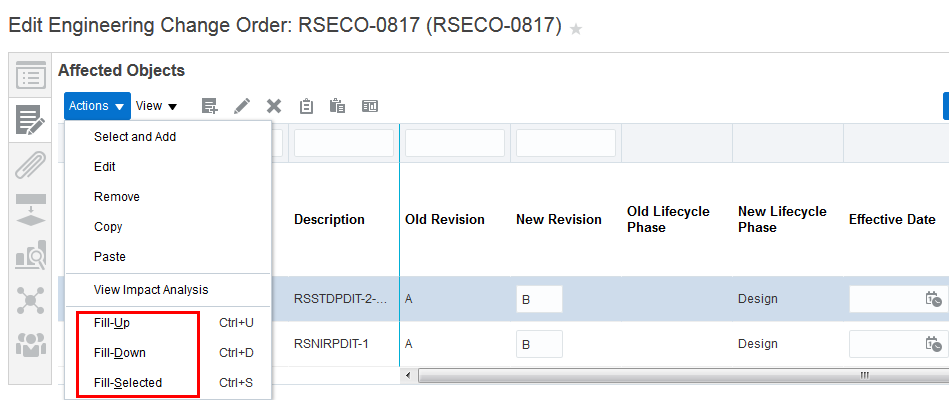
Bulk Edit on the Table View
Steps to Enable
No steps are required to enable this feature.
Download of Attachments Associated with a Change Order
In addition to reviewing the impact to items and item structures through a change order, it is essential for users to review and download the attachments that are associated with the change. More than likely, the change is reflected within the attachments, either updates to specifications, changes to materials, or updates to assembly instructions.
With this release, all attachments that have been updated via a change order can be downloaded to a zip file for review. Attachments will be easy to view from the zip file and will not require your users to go into the change and grab each file individually. Of course, if only one or a few attachments are required for review users may go into the change order and download the changed attachment.
Easy access to the content of attachments and source files is required for users to have a complete picture of the change order and its impact to items in your system. This will provide the assurance needed to share information or make approval decisions based upon a complete set of data.
The following screen capture illustrates the feature and its benefits:
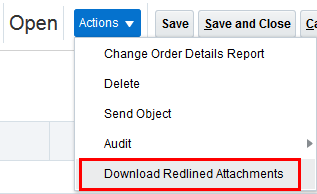
Download Redlined Attachments
Steps to Enable
No steps are required to enable this feature.
As companies transition to Oracle PLM Cloud or PLM Cloud customers acquire new companies, it is important to provide an inclusive methodology for importing data for their new Enterprise Product Record. Critical to lifecycle management are the change orders that have governed the progression of items and BOMs though their lifecycle.
In this release, PLM administrators will be able to migrate change order headers and change lines to Cloud using Webservices. Thus, migration includes both standard and descriptive flex-field attributes. Additionally, all attachments of a change order can now be migrated to Cloud.
This migration capability will ensure the quality of the Product Record and its change management data for new adopters of PLM Cloud but just as important is the ability to migrate this same data from any new sources of product information as a result of mergers and acquisitions or geographical rollouts of PLM Cloud.
Steps to Enable
No steps are required to enable this feature.
Key Resources
- Published web services document.
Streamlined Transfer to Production From Product Development
As part of the new product development process in Oracle Product Development Cloud, items may be in a preliminary state where engineers are working with various early iterations. In previous releases, these development items and versions (including preliminary ones) were automatically visible in Oracle Product Hub Cloud and other supply chain applications irrespective of their lifecycle phase. This caused confusion in downstream systems and wasted critical resources on managing the commercialization of products that potentially may never be in production.
In this release, items created in Product Development and are still in the design lifecycle phase will not have their Bills of Material, Approved Manufacturer List and Revision Attachments visible in Product Hub unless the lifecycle phase progresses to pre-production or production. This ensures key data elements and intellectual property are protected during the product development process.
Once the items move from design to pre-production or production, they can go through a guided commercialization process in Product Hub. For items that require the new item request workflow, the workflow triggers only when the item moves to the preproduction or production lifecycle phase through a change order.
This provides the necessary isolation that the development team needs to freely experiment with multiple design options/revisions. After the designs are final, they can expose or promote the best options/revisions to other business divisions including manufacturing and supply chain. This ensures a streamlined handoff between development and operations for an efficient design to commercialization process.
NOTE: This feature was also made available in a quarterly update of Release 12.
Steps to Enable
No steps are required to enable this feature.
Increase Productivity with a New Page for Managing Trading Partner Items
Oracle Product Hub Cloud provides you with the ability to maintain formal relationship between your internal items and their corresponding trading partner item identifiers. Trading partner items include Supplier Items, Manufacturer Part Numbers, Competitor Items and Customer Items. Maintaining a formal trading partner item relationship is integral to discover and transact your items in the context of how your trading partners identify them, and is key to efficient trading partner collaboration.
With this release, the “manage trading partners” and “manage trading partner items” tasks are combined into one. Furthermore, the following usability improvements have been made to improve trading partner item maintenance:
- List Search with Autosuggest: The ‘Manage Trading Partner Items’ page is now replaced with a List Search page and is augmented with autosuggest search functionality. Trading partner items, trading partners, and related items can all be indexed for search. When typing in a string in the Search field, the autosuggest capability automatically suggests applicable results grouped by recent Search Terms, Saved Searches, Trading Partners, and Trading Partner Items.
- Table and Card View: This release introduces two views to look at results of your trading partner item search. You now have the ability to toggle between a list and card view and quickly identify the trading partner items you are looking for.
- Quick Access to Common Actions: Trading Partner Items now have icons for attachments, relationships and social collaboration directly in the Search Results page so you can quickly navigate to the relevant section of the trading partner item page to perform the required actions. If you do not select any of these icons and click on the row instead, a panel draws from the right where you can see the details of the selected trading partner item and perform edits without losing your context.
With the usability improvements introduced in this release, you now have a modern user interface to enhance productivity while managing your trading partner items. The following screen capture illustrates the feature and its benefits:
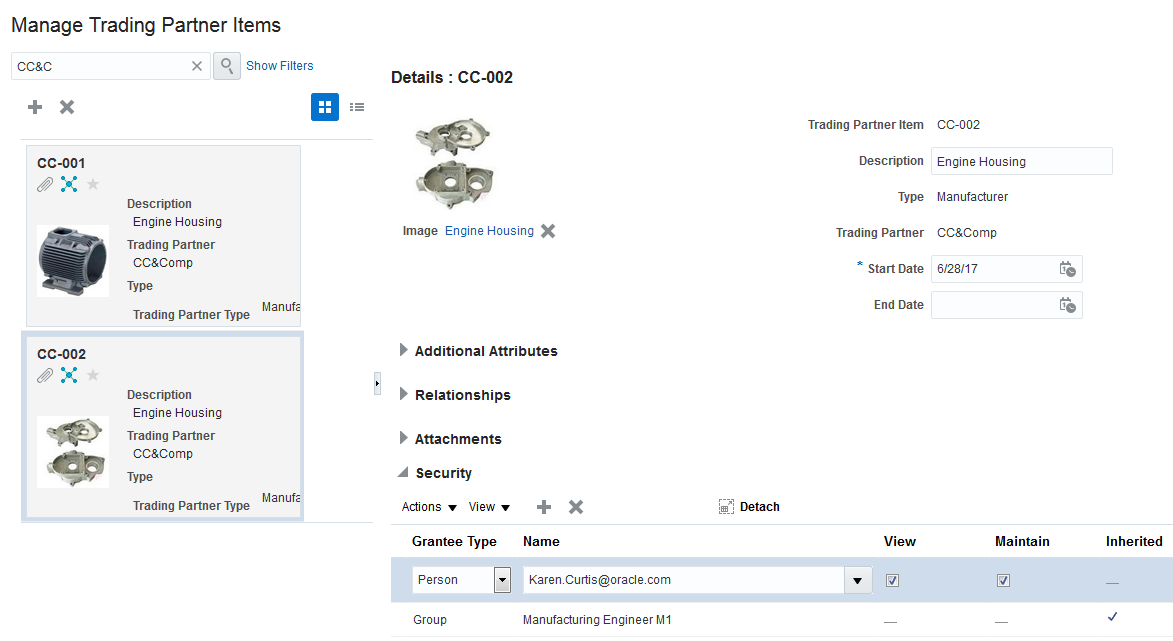
Manage the Trading Partner Items in the Manage Trading Partner Items
Steps to Enable
No steps are required to enable this feature.
When managing the end-to-end design to commercialization process, you need the ability to control how changes are managed based on the lifecycle of a product. For example, you may want all form, fit, function changes in the design phase to go through a Change Order that enforces a new revision. On the other hand, you may want changes to a marketing description to go through a Change Order that does not require incrementing the revision. Without the ability to systematically enforce these types of change and revision policies, this becomes a manual and error prone process that leads to costly breakdowns between engineering and operations divisions.
In this release, new configurable change types allow users to determine the correct behavior dependent on the type of change and its position in the lifecycle. Users may choose to enable one or more of the following pre-defined, internal change types and create their own custom change types based on these internal change types. For Product Hub Cloud users, change management via Change Orders is conducted via the Commercialization Change Order (CCO) type.
- Engineering Change Order (ECO): Allows implementing changes to item attributes, bills of material, approved manufacturer list (AML) and attachments. The use of this change type mandates an increment to the item revision. This change type will be initiated in the Product Development Cloud application.
- Non-Revision Change Order (NRCO): Allows implementing changes to item attributes, bills of material, approved manufacturer list (AML) and attachments where change policies do not require a new item revision. Therefore, the use of this change type will not increment the item revision. This change type will be initiated in the Product Development Cloud application.
- Engineering Change Request (ECR): Allows the capture of a change request from internal team members to request or gain consensus on a change prior to proceeding to the creation of an engineering change order. This change type will be initiated in the Product Development Cloud application.
- Commercialization Change Order (CCO): Allows changes to item attributes (extended and operational attributes), bills of material including multi-organization specific attribute and BOM changes, packaging hierarchies, and item-supplier associations. This change type will allow item revision or non-item revision changes. This change type will be initiated in the Product Hub Cloud application.
The change type framework now provides the flexibility for users to model changes through all phases of the lifecycle. It also allows enforcement of change control and revision policies that are required for compliance to configuration management standards and best practices throughout the Innovation to Commercialization process.
NOTE: This feature, with the exception of Engineering Change Request (ECR), was also made available in a quarterly update of Release 12.
Steps to Enable
No steps are required to enable this feature.
Update Change Order Effectivity Dates
Change Orders can be scheduled for implementation on a future effective date or implement immediately upon approval of the change order. In a scenario where a future effectivity date is required, the change order is placed in a “Scheduled” state once approvals are completed and it remains in that state until the effectivity date is reached. Prior to this release, once in a scheduled state, edits to the change order were prohibited so that approved changes were honored, including the scheduled effectivity date. However, dynamic business conditions in the supply chain may dictate the need to update an effectivity date of a scheduled change to optimize the use-up of existing material or to accelerate a cut-in due to a quality issue.
With this release, you are now able to modify the effectivity date of a change order that is in a “Scheduled” state. If needed, you are also able to cancel or demote a change. While this allows the effectivity to be updated, additional governance is required for securing who can perform these edits. With this release, a privilege has been added allowing specific roles such as change coordinators or the control board members to update the change order effectivity.
This feature provides the flexibility to respond to dynamic conditions in your supply chain. As a result, you may realize an improvement to overall change cycle processing times and the minimization of rework. Visibility into the supply chain operational information allows you to make better decisions as you process changes and iterations to already-released items.
Steps to Enable
No steps are required to enable this feature.
Security must protect all components of a product’s definition including trading partner items. Prior to this release, there was no data security on trading partner items which meant key information on Manufacturer Part Numbers and other trading partner items was freely accessible to all internal and external users. This prevented your ability to secure critical information of an item and hindered safe collaboration within and beyond the enterprise.
With this release, you have the ability to secure all types of trading partner items including Manufacturer Part Numbers, Supplier Items, Customer Items and Competitor Items. All trading partner items are public by default until data security is enabled explicitly for a trading partner. You have the ability to secure trading partner items at the trading partner level (e.g. user A has View privileges for all MPNs of Manufacturer A) or for a specific trading partner item (e.g. user B has View privileges for MPN-1 but not for MPN-2 of Manufacturer A).
This improved security enables full protection of a product’s intellectual property (IP) stored for a trading partner item. It provides the means to set both internal and external security levels to safely facilitate design, manufacturing, sourcing and collaboration needs.
The following screen capture illustrates the feature and its benefits:
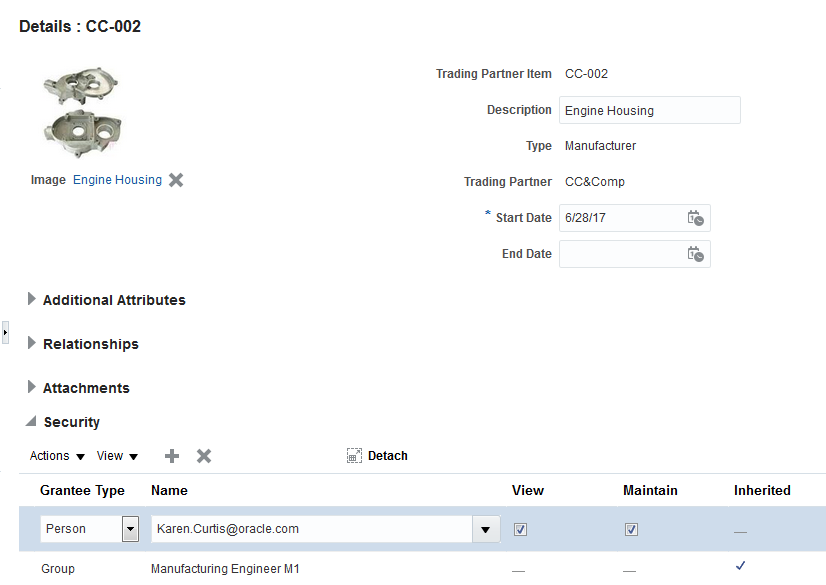
Manage the Data Security for Trading Partners Items
Steps to Enable
No steps are required to enable this feature.
Tips And Considerations
Data security for trading partner items is enabled at the trading partner level and applies to all trading partner items created for the trading partner items. Additional data security can be added at the trading partner item level.
Analyze Supplier Products Uploaded Using Product Hub Portal
Oracle Transactional Business Intelligence (OTBI) provides a powerful tool for your business users to perform real-time analysis on product data. Prior to this release, Oracle Product Hub had exposed various product data entities grouped under logical subject areas so you can perform ad-hoc analysis and generate reports. The content exposed in these subject areas was primarily data that is in production and did not include staged records that are uploaded by suppliers through the Product Hub Portal. This limited your ability to gain valuable insight into the nature and quality of supplier provided product data.
With this release, new subject areas are introduced in OTBI that are focused on the Product Hub Portal and allow you to perform analysis on supplier staged records across various dimensions. Using this capability, you are now able to gain valuable insight into your supplier provided product records including the following:
- Number of products Created, Rejected, Requiring Correction, Imported per supplier (per day / per week / per month/ per quarter / per year / per period)
- Percentage of products Created, Rejected, Requiring Correction, Imported per supplier (per day / per week / per month/ per quarter / per year / per period)
- Average correction time per supplier
- Average new item introduction cycle time (i.e. time between supplier product submission date/time and corresponding master item record create date/time)
- Number of products per category per supplier
- Number of products uploads per supplier
- Number of products without attachments per supplier
These are just examples of various types of ad-hoc OTBI analysis and reports you can write leveraging the subject areas introduced in this release. With this capability, you can better track supplier performance for providing reliable data, accelerate error correction and new item introduction cycle times and improve overall trading partner collaboration.
Steps to Enable
No steps are required to enable this feature.
Include Images and Additional Attributes for Real-Time Analysis and Reports
Oracle Product Hub exposes various entities of product data to Oracle Transactional Business Intelligence (OTBI) so you can perform real-time analysis and generate reports. Some of these entities include operational and user defined attributes, item structures, relationships, trading partner items and catalog categories. While most operational attributes are exposed to OTBI, the list was missing some relevant attributes which limited your ability to perform a more comprehensive analysis on product data. Furthermore, product images were also missing from OTBI which prevented the inclusion of images in real-time analysis and reports.
With this release, the list of operational attributes and other product entities exposed to OTBI has been expanded to include the following:
- Item Revision Attributes: This includes Basic Revision attributes (e.g. Revision Code, Description, Revision Reason, etc), Item Revision Descriptive Flex Fields and Item Revision Extensible Flex Fields
- Seeded Attributes: This includes additional seeded attributes and flags including Default Shipping Organization, Enable Contract Coverage, Minimum License Quantity, Service Request, Track in Install Base, Web Status, Formatted Description, and Completeness Score
- Catalog Category Descriptive Flex Fields: This provides the ability to show the descriptive flex field value next to the category value in OTBI reports. For example, you can capture alternate description of your categories in a descriptive flex field and show that alongside your category names in your report
- Product Images: This provides you with the ability to include product images when performing real-time analysis on your products or generating reports that are shared with your business stakeholders
With the expansion of product data entities covered in OTBI, you can now perform comprehensive analysis, generate richer real-time reports, and gain deeper product data insights that drive business value.
The following screen capture illustrates the feature and its benefits:
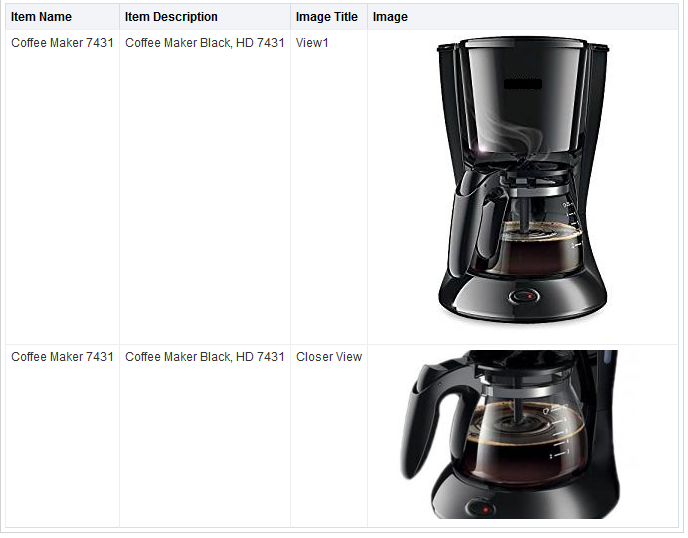
OTBI Analysis Shows Product Images
Steps to Enable
To view the product images, first you need to specify the web center host url in the profile option EGP_UCM_URL, as a one-time setup.
This document will continue to evolve as existing sections change and new information is added. All updates appear in the following table:
| Date | Feature | Notes |
|---|---|---|
| 21 APR 2017 | Created initial document. |
This guide outlines the information you need to know about new or improved functionality in this update, and describes any tasks you might need to perform for the update. Each section includes a brief description of the feature, the steps you need to take to enable or begin using the feature, any tips or considerations that you should keep in mind, and the resources available to help you.
Security & New Features
If your system has modified security structures, you may need to advise your security administrator of new features you would like to take advantage of. Appendix A provides details of the security attributes needed to employ the new features after you have decided to implement them.
GIVE US FEEDBACK
We welcome your comments and suggestions to improve the content. Please send us your feedback at oracle_fusion_applications_help_ww_grp@oracle.com.
Optional Uptake of New Features (Opt In)
We continue to add many new features to Oracle Cloud Applications and we now give you the option to take advantage of new functionality at a pace that suits you. The ‘New Features UI’ is available to you from your cloud homepage, where you can make your choices and do any configuration necessary.
This section gives you information to help you plan, deploy, and validate your update. We make frequent additions to this document, so don’t forget to check back and get the latest information before your update starts.
In today’s competitive business environment, it’s critical for your organization to deliver products that offer a differentiated set of capabilities, drive superior customer experience, provide a high return on innovation, and maintain a high level of quality. Bringing such profitable products to market requires that you excel at all phases of the product introduction process, from identifying high-value ideas, to developing those ideas into the correct products, and commercializing those products effectively in your sales channels. Oracle is unique in providing a complete product lifecycle management solution from ideas through development to commercialization, together with comprehensive product master data management, all based on a single, integrated product record, and delivered in the cloud. This combination will transform your fragmented product development processes into information-driven, integrated, and collaborative, product value chains. The products that are foundational to your innovation to commercialization process are:
- Innovation Management. Build an innovation pipeline fueled by a steady stream of high-value ideas, which results in profitable offerings.
- Product Development. Manage and coordinate product data and processes so that you can design and develop high-value products.
- Product Hub. Rapidly commercialize products that use centralized product information for manufacturing, marketing, and sales across global manufacturing sites, sales channels, and trading partners.
- Quality Management. Enable quality visibility, collaboration, and execution through quality control and closed-loop management techniques spanning the supply chain.
A successful innovation to commercialization business process relies on your ability to aggregate, analyze, and act upon key insights that drive timely and reliable business decisions. You need highly visual, analytically driven, and timely information at the forefront of the applications you use every day. This release introduces a revamped home experience page and work area landing pages that provide visual, insightful, and actionable information for your entire innovation to commercialization business process.
Analytic-Driven Infolets on the Home Page and Work Area Landing Pages
The new home experience and application work area pages provide modern user interface components called infolets. An infolet is a self-contained, interactive container that helps you quickly visualize high-level information, review relevant details, and proceed to action. Because infolets are role-based, you see only what is relevant to your specific role. Progressive disclosure of details is available to you by expanding or inverting the infolet as needed. You can also rearrange the layout of your infolets or hide the ones that you do not need.
Infolets are available to you at two levels:
- Home experience infolet page: This page exists at the same level as your springboard page (where you access your application icons). You can click the page controls (indicated by dots at the top-center of the home page) to access a set of logically grouped infolets aggregated from multiple application work areas.
If you have all the relevant roles, you are able to view infolets on the home experience infolet page that aggregate critical information for your entire source-to-settle business process.
The following screen capture illustrates the feature and its benefits.
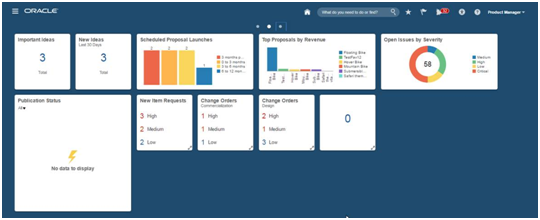
- Infolet-based landing pages: An infolet-based work area landing page contains infolets specific to a single product work area. You can access a work area page by clicking an icon button on the springboard, an icon button in the springboard strip, a work area name in the Navigator, or an infolet on a home experience infolet page.
The redesigned work area landing pages present information quickly and clearly to draw your attention to actionable content, which is key to your productivity. Infolet-based work area landing pages have easy-to-read analytic tiles that users can rearrange and configure to meet personalized needs. The tiles also provide additional metrics and improved usability. This design allows all users to monitor the part of the operation that best meets their own role or interest.
The following screen capture illustrates the feature and its benefits.
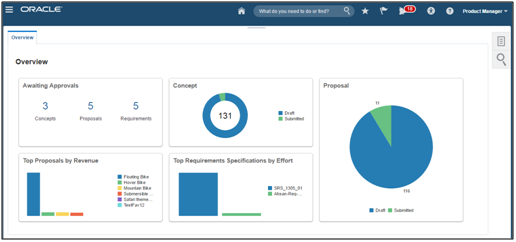
Where applicable, infolets pertinent to individual infolet landing pages of application work areas are covered in their respective sections of this document.
The following list summarizes the infolets grouped in the Home Experience infolet page for the Innovation to Commercialization process.
INNOVATION MANAGEMENT INFOLETS:
- Important Ideas. This infolet shows the number of ideas you currently have marked as favorites. One click takes you to the expanded view of your favorite ideas, enabling you to track their respective collaboration, enrichment, and progress.
- New Ideas. Last 30 days. Input into the Innovation funnel comes from many different sources. This infolet shows the number of ideas introduced in the past 30 days. One click provides a list view of all new ideas input directly or imported, which you can then filter further using basic search or advanced search functionality. This gives you quick access to the content of most interest.
- Top Proposals by Revenue. Leveraging proposals marked as favorites, this bar chart provides insight into the top five proposals summarized by revenue. One click delivers the detail of the selected proposal for further analysis.
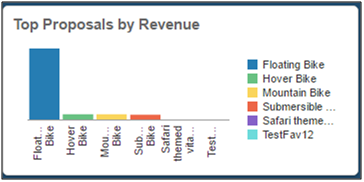
- Scheduled Proposal Launches. Managing scheduled proposal launches becomes a critical, key performance indicator to ensure proposals are all on schedule and to ensure that the Innovation funnel has a steady stream of good proposals. The Schedule Proposal Launches bar chart displays the count of approved proposals with launch dates in bands of Less than 3 Months Past Due, 0-3 Months, More than 3-6 Months and 6-12 months. Clicking on the band of interest navigates to the search result that contains the proposals represented by the bar.
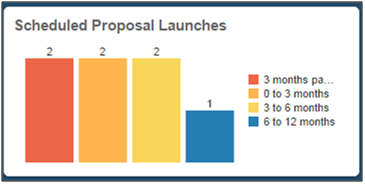
PRODUCT DEVELOPMENT INFOLETS:
- Change Orders (Design). Front view shows the count of open change orders assigned to you broken down by priority (high, medium, low). These change orders are applicable to the Design and Development phases, which means they are initated from the Product Development work area and allow you to manage and govern changes in the Design phase of your products. When you expand this infolet, you can see the count of your change orders based on when they are due. The due dates are derived from the need-by date indicated on the change orders, and have five values: Due Today, Due This Week, Due in 2 Weeks, No Need-by Date, and Past Due. In the expanded view of the infolet, you can filter the results based on the priority of the change orders. This infolet allows you to proactively identify open change orders based on their need-by date and take timely action to meet the demands of your business.
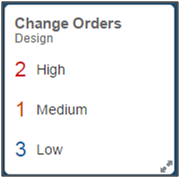
PRODUCT HUB INFOLETS:
- New Item Requests. Front view shows the count of open new item requests assigned to you broken down by priority (high, medium, low). When you expand this infolet, you can see the count of your new item requests based on when they are due. The due dates are derived from the need-by date indicated on the new item requests, and have five values: Due Today, Due This Week, Due in 2 Weeks, No Need-by Date, and Past Due. In the expanded view of the infolet, you can filter the results based on the priority of the new item requests. This infolet allows you to proactively identify your open new item requests based on their need-by date and progress them through the workflow in a timely manner.
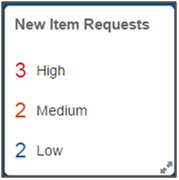
- Imported Items. Front view shows the count of items in the In Progress, Error or Completed status across your item batches. With this information you can see a quick summary of the import status of items that have been on-boarded from your various data sources. When you expand the infolet you have the ability to view the import status of items for a specific item batch by selecting the corresponding item bach name from the drop down list. A drill down from this infolet takes you to the relevant Item Batch page so you can review, remediate, or import the item records accordingly.
- Publication Status. Provides a summary count of items, item classes, catalogs, and digital assets that you have published either manually or as part of a scheduled process. You can filter the results for a given target system by picking the corresponding name from the drop-down list. A drill down from the infolet takes you to the Manage Item Batches page with a filtered set of the publication batches that were created during the publication process.
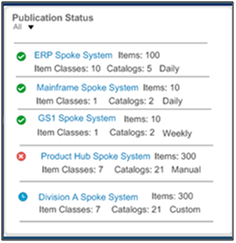
- Change Orders (Commercialization). Front view shows the count of open change orders assigned to you broken down by priority (high, medium, low). These change orders are applicable to the Commercilization phase, which means they are initated from the Product Hub work area and allow you to manage and govern changes in the commercialzation phase of your products. When you expand this infolet, you can see the count of your change orders based on when they are due. The due dates are derived from the need-by date indicated on the change orders, and have five values: Due Today, Due This Week, Due in 2 Weeks, No Need-by Date, and Past Due. In the expanded view of the infolet, you have the ability to filter the results based on the priority of the change orders. This infolet allows you to proactively identify open change orders based on their need-by date and take timely action to meet the demands of your business. This infolet is hidden by default and can easily be made visible using the Configuration icon at the top right corner of the Home page.
- Item Completeness. The completeness score for an item is calculated based on an assignment rule you define in Oracle Product Hub Cloud. The front view of this infolet shows the average completeness score, as a percentage, for the items you have marked as favorites. When you expand this infolet, you are presented with a pie chart with each slice of the pie representaing a completness range (for example, 0-20%) and the respective number of your favorite items in that range. In this expanded view, you can also narrow down the results for a specific item class by selecting the relevant tiem class from the drop down list at the top left corner of the infolet. A drill-down from this infolet takes you to the Manage Items page with only a filtered set of the items that belong in the completeness range that you have selected. From this page, you can either go to an individual item to edit it, or initaite a mass update process to make your items complete. This infolet is hidden by default and can easily be made visible using the Configuration icon at the top right corner of the Home page.
QUALITY MANAGEMENT INFOLETS:
- Open Issues by Severity. Provides a quick view of the quality issues that affect the enterprise. Issues are organized by severity so that you can focus on resolving the critical issues first. To quickly research and action the issues, simply select a given level of severity to drill down to Quality Management‘s filtered search results, roll up your sleeves, and get to work.
Steps to Enable
No steps are required to enable this feature.
Oracle Innovation Management Cloud enables your company to increase revenue growth and drive a competitive advantage through a systematic and sustainable approach to capturing, selecting, and investing in the right ideas and product concepts. By striking the right balance between control and openness, Innovation Management provides you with insight into the business outcome of each potential innovation, while at the same time facilitating the creative power of your people. Financial impact analysis and strategic fit visibility can then guide key portfolio decision makers to the best investments to commercialize in alignment with strategic aspirations.
New capabilities in this release enhance your ability to visualize, analyze innovation data, and modernize the user experience to increase productivity. Highlights include:
- New home experience and concept overview pages with actionable insights across innovation processes
- Enhanced requirements management capabilities that improve traceability, visibility, and change control.
Visualize, analyze, and Access Innovation Data
Access to real-time data enables quicker understanding of key business metrics, to watch for the known, expected, and unexpected circumstances, and prompts better execution of decisions based on that information. With this release, new and enriched actionable insights support key innovation processes.
Increase Productivity with Visual Concept Work Area Landing Page
Analyzing large sets of data captured throughout the innovation processes becomes critical when continuously reviewing, determining, and directing priorities. Struggling to make sense of the data, sometimes reviewing only a subset of information, increases the risk of narrower comprehension, wasted time and effort, and the potential to miss an opportunity for correction.
To address these challenges, several new capabilities are available in this release. In addition to the infolets exposed in the home experience infolet page, Innovation Management also has the following infolets for the Concepts work area landing page that provide insight into the status, actions, and analysis of proposals, requirements specifications, and concepts. The infolets include:
- My Approvals. Summarizes the number of proposals, concepts, and requirement specifications awaiting your approval. You can drill down to filtered search results for further exploration and actioning of your approvals.
- Awaiting Approvals. Summarizes the number of proposals, concepts and requirement specifications awaiting approval. You can drill down to filtered search results for further exploration and follow up with pending approvers.
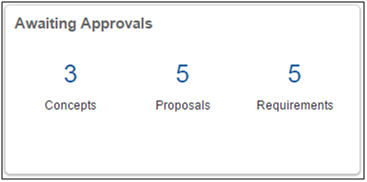
- Concepts. Summarizes the status of concepts and progression of concepts within the innovation pipeline. One click on a status provides filtered search results so that you can analyze which concepts are still in draft and might need attention, which concepts have been approved, which concepts have been converted into items, and so on.
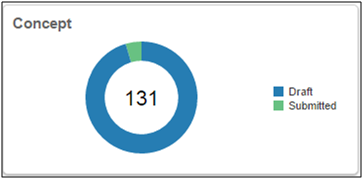
- Proposals. Similar to the Concepts infolet, this infolet summarizes the status of proposals and progression of proposals within the innovation pipeline. One click on a status provides filtered search results so that you can analyze which proposals are still in draft and might need attention, which proposals have been approved, and which proposals have been submitted (awaiting approval).
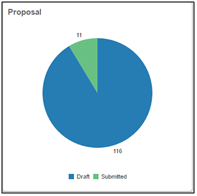
- Top Requirement Specs by Effort. Managing requirement specification scope is a top challenge for most companies. This infolet summarizes the requirements specifications that represent the highest effort to fulfillment. Seeing this information in real-time, with side-by-side analysis, enables better decisions on what to pursue or which requirement specification might need refinement to a narrower scope of what is achievable.
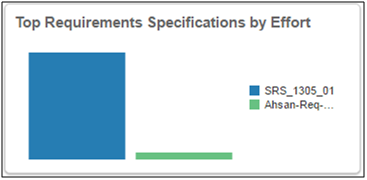
- New Proposals by Revenue. Using proposals marked as favorite, this infolet provides insight into the summarized revenue of each proposal. One click delivers the detail of the selected proposal for further analysis.
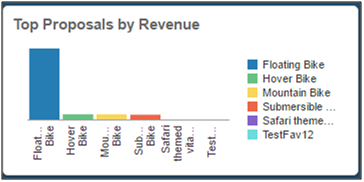
Together with the infolets on the home experience page, the Concept landing page infolets provide well-planned analyses. These pages provide a means for both business and process owners to ask and answer questions in real-time, turning insight into action and inspiring true innovation.
Steps to Enable
No steps are required to enable this feature.
Analyze Time-Phases Resource Constraints
One of the greatest hindrances to managing the innovation portfolio is having clear visibility into the demands on resource pools aggregated across a collection of potential and current business case proposals. While it’s possible to manage resources within the context of an individual project or proposal, it can be a real challenge to have time-phased visibility across a combination of investments in process and potential future proposal investments across, as an example, a product line. In this release, time-phased resource analytics provides your executives the ability to visualize head count needs by resource pools over time, with months being the lowest granularity of aggregation. You can further aggregate months into resource utilization by quarter or years. When this data is combined with actuals, you can quickly identify where there are potential bottlenecks of over-utilization of resources as well as opportunities for improved usage of under-utilized resources. With time-phased resource analytics, you’ll be better equipped to make data-driven decisions in selecting an achievable innovation portfolio.
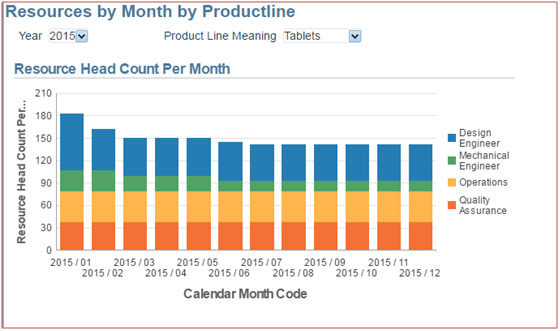
Steps to Enable
No steps are required to enable this feature.
Use Innovation-Related Links in Notifications
As requirement specifications, concepts, or portfolios are routed for approvals, approvers and observers frequently need to revert to the detailed information that might include richer, more descriptive custom attribution. In this release, embedded in the system and email notifications is a hyperlinked URL, enabling your approvers and observers to quickly navigate to a review of the details in a separate dynamic tab. Upon completion of the review, they can return to the notification (which remains open as a pop up) and take the appropriate action to approve, reject, or close the notification. By using the linked URL, you can experience seamless continuity from notifications to decisions.
Steps to Enable
No steps are required to enable this feature.
Leverage Custom Attributes in Transactional Analysis and Reporting
It is typical for companies to add additional data points to capture important decision criteria describing the “why” invest justification of a business case proposal. In this release, custom attributes reflecting important decision criteria are captured and exposed to real-time analytics for product proposals and a product portfolio. Attributes including list, multiple list, number, and text provide you with flexibility to capture a vast array of critical information which you can use for further analysis. Additionally, custom attributes are now available in the predefined proposal export capability enabling users to share more complete information with reviewers, approvals, or in-review sessions. Furthermore, these attributes are exposed to web services enabling you to update externally generated data into proposals and portfolios or extract data to feed downstream business processes and analytics.
Adding custom attribution to the transactional reporting layer ensures that you can use these attributes in the analysis of the data, thereby ensuring the best selection of proposals in alignment with both business and company strategies.
The following screen capture illustrates the feature and its benefits.
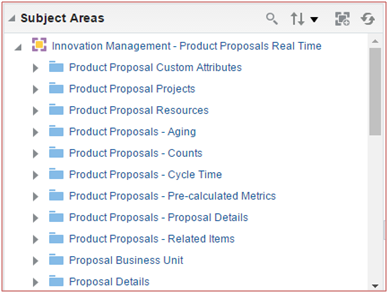
Steps to Enable
No steps are required to enable this feature.
Drill Down From Dashboard and Real-Time Reporting
Dashboards and reporting provide a vast array of information required by users to either monitor or action. Usability is significantly enhanced if these features also allow the user to drill down into the related transactional data to see more of the area of interest. In this release, you’ll be presented with embedded URLs in the title of each of the analyses results, providing direct access to the related details. Reporting and analysis become interactive allowing you to quickly drill down directly to the data results to investigate or action further.
The following screen capture illustrates the feature and its benefits.
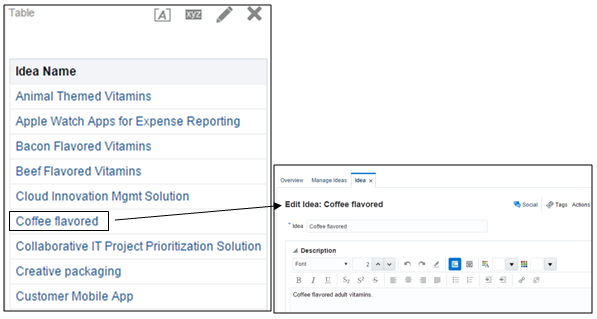
Steps to Enable
No steps are required to enable this feature.
Select and Access Favorites in Innovation Management
Keeping track of the progress of innovations that are of most interest or which you visit frequently can become a challenge when the count is more than a handful. In prior releases, setting a favorite was managed through the Favorites and Recent Items toolbar, which required a few extra clicks. In this release, you can easily establish ideas, requirements specifications, proposals, and portfolios as favorites with a click on the Star icon that appears next to the object title. One click identifies the object as a favorite (solid yellow star), and one click removes it from favorites (empty star). Establishing a favorite provides you with easy access to revisit those objects by opening your Favorites and Recent Items list and clicking on the title.
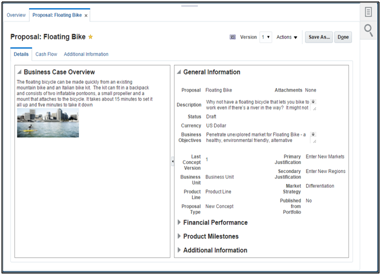
Steps to Enable
No steps are required to enable this feature.
Increase Traceability and Control Over Requirements
Convert Requirements or Requirement Nodes into Requirement Specifications
In regulated industries, requirements are often under tight control and require separate approvals for each change. Within the context of a higher level requirement specification, these conditions present many challenges towards retaining overall status visibility and full traceability as the requirement specification progresses through into development and test processes. In this release, a new convert to specification action enables you to select a specific requirement (not associated with either a concept or component), and if applicable, the children requirements, to create a new child specification. This action retains all previous relationships, attributes, attachments, and team assignments. The new child specification remains visible within the context of the original requirements specification after saving the record. Team members on the original parent requirement specification retain visibility into the requirement changes, which are flagged with a blue dot. This new capability enables you to retain previous enrichments, collaborations, and traceability while routing the change requirements revision for approval.
The following screen capture illustrates the feature and its benefits.
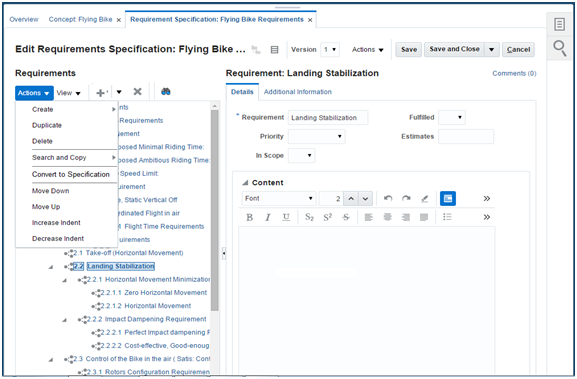
Steps to Enable
No steps are required to enable this feature.
View Requirement Fulfillment Status While Defining the Concept
When requirements specifications move forward into the concept definition phase, engineering teams begin recording their plan of action by associating requirements to the various functional blocks of the concept, components, or items. As engineers confirm the feasibility of achieving each requirement, they can check the fulfillment flag. Current behavior provides a green check mark icon confirming that an association exists between the requirement and one or more aspects of the concept, but does not provide insight into the fulfillment achievability. In this release, more intelligence has been added to this association. If the design teams have associated one or more requirements to the concept, to components or to items, and have denoted that all are fulfilled, then a green dot icon appears in the left pane requirement tree view. This green dot provides a visual cue that the requirement is achievable. If one or more of the linked requirements are not yet fulfilled, then the associated icon displays as a red dot icon to draw attention that further investigation is needed. Capturing fulfillment status through these new icons enables key stakeholders to monitor the progress of requirements as they are translated into concepts, eliminating the risk that critical requirements are left behind or forgotten.
The following screen capture illustrates the feature and its benefits.
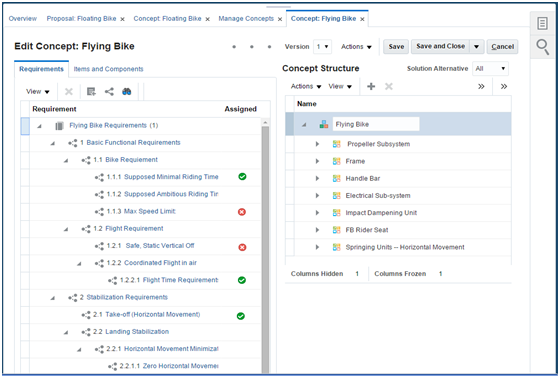
Steps to Enable
No steps are required to enable this feature.
Carry Component Requirement Associations to New Requirement Specification Revision
Requirement change is a constant challenge for both product and product design teams. As requirements change, there is a risk that prior work does not incorporate the change when taking up the new requirement specification revision. Incorporating changes can require tedious activity by the design teams to re-evaluate all prior concept definition and determine potential impact. Both scenarios result in stalled productivity or add the risk of missed requirements.
To address these challenges, Innovation Management automates the ability to carry over mappings from a prior version of the requirements specification while applying the latest version. Current behavior identifies, by the blue dot icon, that a newer version of the spec is available. This icon is now clickable, allowing the user the option of taking up a new version of the requirements specification. As the newer version is applied, all prior association between requirements and the concept, components, or items are carried forward. If all prior requirements are not present in the newer version of the requirement specification, the mappings are removed. By carrying over existing mappings, design teams are able to increase productivity and apply focus to net new requirements.
Steps to Enable
No steps are required to enable this feature.
Manage Attachments and Relationships within the Requirements Table View
The current table view of a requirement specification allows you to update all attributes easily without having to click on each requirement. Prior to this release, adding attachments or other upstream or downstream relationships required that you switch to the tree view, and then click on each requirement. In this release, the table view presents two new icon columns: attachments and relationships. Additionally, there are two new actions available, Manage Attachments and Manage Relationships that you can use to add new content. For each requirement row, columns are populated with a dot icon when either attachments or relationships exist. Clicking on the icon provides visibility into the links to each requirement’s relevant content and enables the addition of new content or the deletion of existing content. Within the table view, you can now capture and retain links to relevant information as examples, but not limited to only test specifications, test results, risk mitigation documentation, and so on.
The following screen capture illustrates the feature and its benefits.
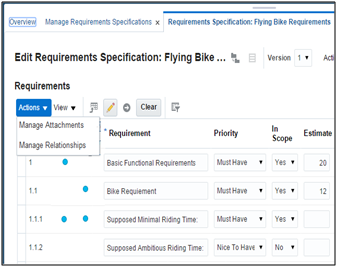
Steps to Enable
No steps are required to enable this feature.
Define Requirement Relationship Types
Managing requirements can be a complex process when there are many dependent or impacting requirements that track verification, validation, or fulfillment. To improve usability in maintaining these connections, the relationship table display now includes two new columns, Relationship Type and Relationship Subtype. The Relationship Type column displays a drop-down list of values enabling you to capture the type of relationship that exists between two requirements. These values include: fulfills, impacts, verifies, validates, and tracks. The Relationship Subtype column displays the associated subclass of the related requirement, providing greater clarity as to the relationship across two requirements (such as a test case versus a design input).
The following screen capture illustrates the feature and its benefits.
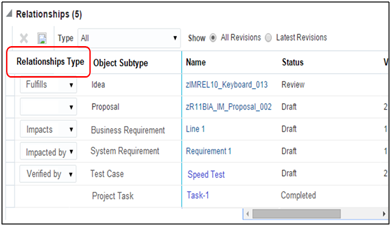
Steps to Enable
No steps are required to enable this feature.
Requirements management currently provides powerful find capabilities that allow you to easily search and identify specific requirements across what often evolves as a lengthy requirement specification. In this release, the find capability is extended to include the relationships of Innovation Management’s ideas, requirement specifications, requirements, concepts, components, and proposals. Additionally, if Oracle Product Development Cloud is linked to Innovation Management, then the find coverage extends to items, change orders, manufacturer parts, and manufacturers. If Oracle Enterprise Quality Cloud is also linked, then the find coverage also includes quality issues and actions. As you execute find, the results are identified by a pushpin associated with each affected requirement. This powerful find capability allows you to search across the entire requirement specification, including all requirements relationships, to identify data. For example, you can search for ideas linked to requirements that are not fulfilled (representing potential customer impact), or requirements linked to test requirements or quality issues that are in scope but not fulfilled (representing potential missed requirements or potential downstream quality issues).
The following screen capture illustrates the feature and its benefits.
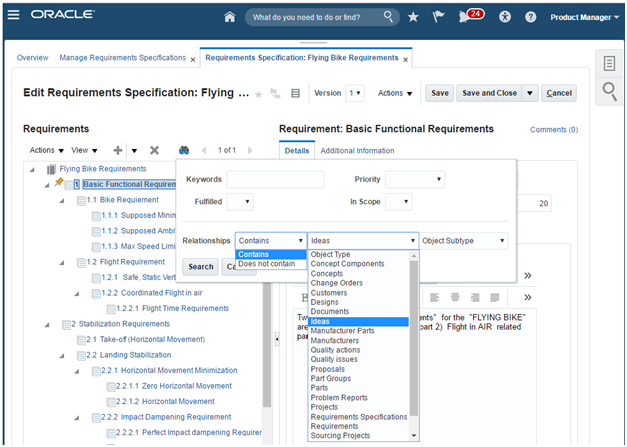
Steps to Enable
No steps are required to enable this feature.
Extend Relationships Framework to Support Change, Quality Issues, and Actions
Product changes or quality issues and actions can become a catalyst to the definition of requirements. As independent silos, you might find it difficult to track these inputs. When Oracle Product Development Cloud or Oracle Enterprise Quality Management Cloud is enabled with Innovation Management, you can search and add changes, quality issues, and quality actions, providing a more descriptive view as to how individual requirements were defined or redefined. These linkages provide greater clarity and understanding on the part of design and quality teams to deliver the right capabilities to your customers.
Steps to Enable
No steps are required to enable this feature.
Upload Legacy Data to Innovation Management
It is common to have innovation assets and data housed in many different legacy systems and files capturing prior ideas, requirements, and requirement specifications. Traditional methods to move data across to new environments might include manual entry, which is tedious and prone to error, when uploading through web services or data import. These techniques work well for a small amount of data but are impractical when datasets are larger. With Innovation Management Data Loader, you can bulk load ideas, requirements, and requirement specifications from legacy systems and files into Innovation Management using predefined templates from the Navigator’s file import and export feature. The bulk loader eliminates manual data transfer into Innovation Management, whether it’s for thousands or hundreds of thousands records, more effectively and efficiently so you can respond to your customers and markets more rapidly.
The following screen capture illustrates the feature and its benefits.
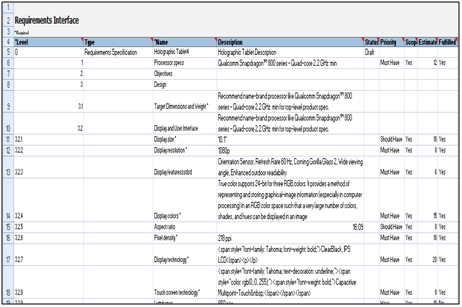
Steps to Enable
No steps are required to enable this feature.
Link Web Clients to Product Lifecycle Management Objects
Staying connected on innovation discussions can prove to be a challenge with informal methods of collaboration. Email, phone, and hallway conversations lack traceability of decisions and the reason those decisions were made.
Oracle Social Network enables a variety of collaboration methods. You can discuss innovation activities in forums, membership groups, or one-on-ones; you can review, annotate, and publish files; and you can follow the daily activities of the people and discussions you choose. You can also receive a daily digest of conversations and activities; this summary is critical to productivity.
In this release, when a conversation is initiated from within Innovation Management for either an idea or a portfolio, an embedded link allows users to navigate bi-directionally between the object of discussion and the conversation details. With Oracle Social Network, you and your teams can collaborate to use everyone's collective expertise, make informed decisions, and drive product innovation forward efficiently and quickly.
Steps to Enable
No steps are required to enable this feature.
Oracle Product Development Cloud enables design and component engineers to effectively manage the new product design, development, and release process in the context of a product’s lifecycle. The solution offers a modern cloud-based user interface optimized to create and manage items. Product Development is also optimized for associated structures (bills of material), attributes, design documents, approved manufacturers lists, and change orders. You perform all of this on the common enterprise product record that supports all aspects of the product’s lifecycle.
This release provides enhancements to Product Development by providing you the ability to specify item costs for new items as well as roll up the cost of an item bill of materials (BOM). This release also improves upon the existing search and discovery experience, allowing you to quickly find the objects you are looking for through type-ahead search for structures and change orders. The clipboard is enhanced to support cut and paste functions for affected objects on a change order.
As part of design-for-cost industry best practice, a critical function is to determine the cost of a product based on the individual components that make up an end assembly. This costing is something that companies do today in custom rollup engines, by way of spreadsheets, or through a bespoke cost management solution. This approach fragments the process and can result in errors and inaccuracies.
With this release of Product Development, you can specify the material costs for a leaf-level item. Additionally, assembly-level items can also add overhead costs for the final total cost of the assembly. For scenarios where a new end item assembly might use production components that have already been released, the existing manufacturing costs that are managed in Oracle Cost Management Cloud are used while performing the rollup. This approach ensures that there is no replication and item costs are always in sync with the downstream cost management function.
With this costing capability, you are able to do a cost roll up for your product end assemblies to ensure they are within the accepted design cost targets that you have set as part of your new product introduction and concept design process.
The following screen capture illustrates the feature and its benefits.
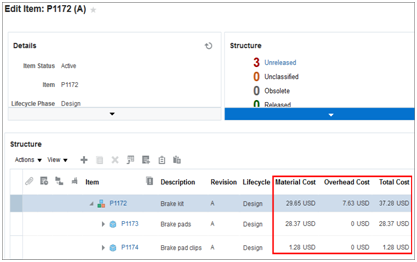
Steps to Enable
No steps are required to enable this feature.
Improve Discovery of Items for Structures and Change Orders Definition
As part of the new product development process, quickly discovering items and component parts for products, or changes affecting your products, is one of the first tasks that you perform in a product lifecycle management system. Currently, a user must enter a keyword or string as criteria, and then execute the search function in order to retrieve the result. These steps create inefficiency because the user must wait for the search results before they can decide on which object they are looking for.
To speed up discovery and search of products, an enhanced keyword search provides suggested matches as the user starts typing keywords. This real-time capability allows you to start with a simple search, and then click on a suggested match to quickly navigate directly to the object. In addition, to direct search and discovery, this type-ahead search is enabled when you want to add components to a structure or affected items on a change order.
With this capability, you can speed up discovery and search of products and are not forced to know exact search criteria before you search. You can now spend more time in defining and managing products by eliminating nonvalue-added time you spend on trying to find the right items or component parts to use in your structures.
The following screen capture illustrates the feature and its benefits.
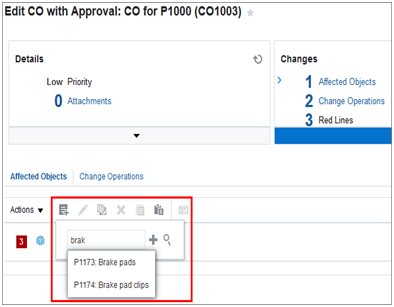
Steps to Enable
No steps are required to enable this feature.
Speed Up Change Definition Through a Clipboard
As you build a change order as part of iterating through the new product development process, you might encounter situations where you need multiple items from an existing structure to be added to a change order. Doing this operation by adding affected objects individually would make the process inefficient.
With this release, the clipboard now allows for faster creation of change orders by allowing items from an existing structure or a change order to be copied into a clipboard. These items can then be added to a change order, speeding up the process, rather than searching and selecting for the individual items. The clipboard is persisted within a session and reset when the user logs out of the application.
This enhancement provides a power user a tool for more productive management of change orders by minimizing the amount of clicks needed, saving time, and reducing errors.
The following screen capture illustrates the feature and its benefits.
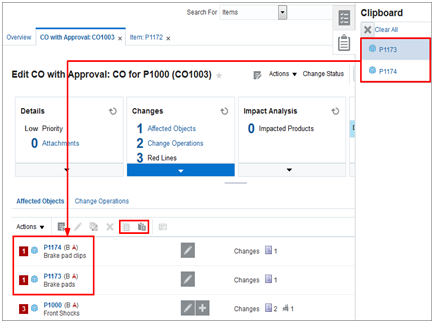
Steps to Enable
No steps are required to enable this feature.
A typical change order workflow has multiple states for defining, routing, and approving a change. At each stage, as best practice and to avoid errors at a later stage of the workflow, it’s important to validate the information required for a change before progressing to the next state.
With this release, the change audit capability has been enhanced to support the following additional consistency checks:
- Item structure lifecycle consistency check. This check ensures that all the components in a structure are at same or higher level lifecycle phase than the parent item assembly. This ensures that changes being released are consistent.
- Item status consistency check. This check is to ensure that all the components in a structure are in the appropriate status.
Additionally, the change audit now provides a hyperlink so that you can navigate directly to the screen pertaining to the validation error to correct and fix the error.
Using this new capability, you can audit and uncover in real time any validation errors while still retaining the context of your changes. This audit ensures you can be confident in promoting the change in its workflow, improves the process, and reduces the definition and approval cycle times, resulting in faster implementation cycles for your business.
The following screen capture illustrates the feature and its benefits.
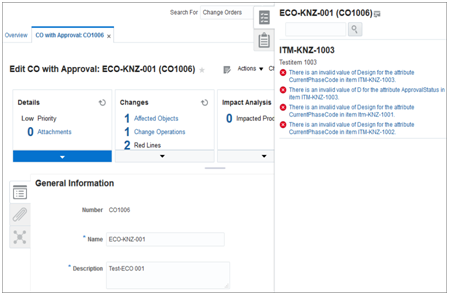
Steps to Enable
No steps are required to enable this feature.
Relate Change Orders to Other Change Orders or Items
Change management of product data is a critical function of the product development process. For change control boards and document analysts to ensure appropriate visibility, you need to capture correlations between changes that might impact each other or might be sequenced to make that changes are implemented in a certain fashion.
With this release, you can specify a relationship between two change orders or between a change order and an item. You can also designate the relationship type to qualify the relationship. For example, you might have a change order that has changes to affected items that, after implemented, can impact changes to the same or different affected items on a related change order. For such instances, you can specify an “impacted by” relationship between the change orders.
With this new capability, you can use the enhanced change management features to gain visibility into impacted change orders or items you want to flag that might be impacted by a particular change. Better visibility, in turn, provides increased productivity and speeds up the change order implementation and cycle times.
The following screen capture illustrates the feature and its benefits.
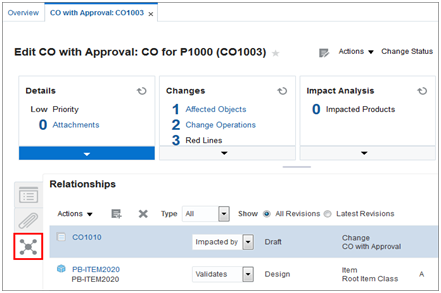
Steps to Enable
No steps are required to enable this feature.
With this release, you can use change order web services to integrate to an external Enterprise Resource Planning (ERP) or manufacturing system. Change order web services support publishing the following data elements: change order header and line level attributes, affected objects with changes specified to structure components, reference designators, substitute components and component attributes, and approved manufactures lists.
With the enhanced change order features, you can now publish changes to a downstream ERP system, thus completing the design-to-release process.
Steps to Enable
No steps are required to enable this feature.
Oracle Product Hub Cloud provides the functional layer to extend the enterprise product record into the commercialization phase, and to centralize product data across heterogeneous systems. This enables you to establish a blended product master record that is clean, standardized, accurate, and current. From products that you manufacture internally to finished goods that you source from suppliers, Product Hub enables you to aggregate, enrich, and share product data for all your manufacturing and omni-channel commerce processes. Robust business rules and workflows ensure the data that you share across the enterprise is clean, complete, and valid.
This release focuses on modernizing your user experience by providing a completely revamped landing page and enhanced search experience to simplify your tasks and make your day-to-day activities more efficient.
Increase Productivity with a Visual and Informative Work Area Landing Page
In an environment where you manage large and diverse sets of product data, it is critical to identify the high-priority tasks immediately and direct your attention to addressing them first. Without the tools to help you uncover what needs to get done quickly, you are likely to waste valuable time and energy on activities that add little value. Prior to this release, the Product work area was restricted to providing only worklist notifications and did not present an easy way to get an overall sense of the various product data management activities that might require your attention.
With this release, you now have a completely revamped and modern Product Hub work area landing page that provides you with a visual summary of the various product data management activities that you care about. These visual summaries are presented to you by way of the following infolets, along with the ones made available on the home experience page.
- Supplier Items. The front view shows the number of items uploaded by your suppliers by way of the Product Hub Portal and are either in Submitted, Request for Information, or Import in Progress status. An expanded view of this infolet provides you the ability to filter this information for a specific supplier by picking the relevant supplier from the drop-down list. When you drill down from this infolet, it takes you to the Review Supplier Uploads page. This page is where you can review the relevant set of supplier items and take action quickly and efficiently, thereby accelerating your data onboarding process.
- Imported Items. The front view shows the count of items in the In Progress, Error, or Completed status across your item batches. With this information, you can see a quick summary of the import status of items that have been onboarded from your various data sources. When you expand the infolet, you have the ability to view the import status of items for a specific item batch by selecting the corresponding item bach name from the drop-down list. You can drill down from this infolet to view the relevant item batch user interface so you can review, remediate, or import the item records accordingly.
- Items for Definition. The front view shows a summary of the items by item class that are pending your definition. You can expand the infolet to further filter the results based on the priority of the new item requests containing the items. You can drill down from this infolet to the Manage New Item Requests page that contains only a filtered set of the new item requests that are associated with the item class and priority you selected. With this infolet, you can easily identify the items that are pending your definition and take the necessary steps to enrich the items and progress them in the workflow.
- Items Pending Approval. The front view shows a summary of the items by item class that are pending your approval. You can expand the infolet to further filter the results based on the priority of the new item requests containing the items. You can drill down from this infolet to the Manage New Item Requests page that contains only a filtered set of the new item requests that are associated with the item class and priority you selected. With this infolet, you can easily identify the items that are pending your approval, take the necessary steps to review the information, and approve or reject as necessary.
- Item Category Assignments. Shows the total number of item category assignments that have occured in your favorite catalogs. A drill down from this infolet takes you to the Catalog Category page to show you the relevant items assigned to the cateogry. You can easily navigate from this page to specific details of the items or enrich the cateogry further for more efficient catalog maintenance activities.
- Item Completeness. The completeness score for an item is calculated based on an assignment rule you define in Product Hub. The front view of this infolet shows the average completeness score, as a percentage, for the items you have marked as favorites. When you expand this infolet, you are presented with a pie chart with each slice of the pie representaing a completness range (such as 0-20%) and the respective number of your favorite items in that range. In this expanded view, you can also narrow down the results for a specific item class by selecting the relevant tiem class from the drop-down list at the top left corner of the infolet. You can drill down from this infolet to the Manage Items page with only a filtered set of the items that belong in the completeness range that you have selected. From this page, you can either go to an individual item to edit it or initaite a mass update process to make your items complete.
- New Item Requests. The front view shows the count of open new item requests assigned to you by priority (high, medium, low). When you expand this infolet, you can see the count of your new item requests based on when they are due. The due dates are derived from the need by date indicated on the new item requests and have the following values: Due Today, Due This Week, Due in 2 Weeks, No Need By Date, and Past Due. In the expanded view of the infolet, you have the ability to filter the results based on the priority of the new item requests. This infolet allows you to proactively identify your open new item requests based on their need by date and progress them through the workflow in a timely manner.
- Change Orders (Commercialization). The front view shows the count of open change orders assigned to you by priority (high, medium, low). These change orders are applicable for the commercialization phase, which means they are initated from the Product Hub work area, where you can manage and govern changes in the commercialzation phase of your products. When you expand this infolet, you can see the count of your change orders based on when they are due. The due dates are derived from the need by date indicated on the change orders and have the following values: Due Today, Due This Week, Due in 2 Weeks, No Need By Date, and Past Due. In the expanded view of the infolet, you have the ability to filter the results based on the priority of the change orders. This infolet allows you to proactively identify open change orders based on their need by date and take timely action to meet the demands of your business.
- Rule Impact Analysis. The front view provides you a percentage breakdown of impacted and nonimpacted items for the rule impact analysis jobs you have run. The most recent analysis is shown by default, and you can pick other analysis names from the drop-down list. The flip view of this infolet shows for a given analysis the item rules that have impacted your items the most providing the ability to not only know that certain items are impacted, but you can pinpoint exactly which item rules have impacted the items. You can look at this information for other analysis jobs as well by selecting the relevant analysis name from the drop-down list and looking at the respective pie chart that shows the item rule impacts. Clicking on a slice of the pie chart that represents a given item rule takes you directly to the Analysis Results page with a filtered list of the items that have been impacted by the rule. From this page, you can initiate a mass update action to make your items compliant with the relevant item rule. This infolet facilitates your data governance activities by providing you a simple way to monitor your items with respect to new or changing business rules and offering a quick path for you to make them compliant.
- Publication Status. Provides a summary count of items, item classes, catalogs, and digital assets that you have published either manually or as part of a scheduled process. You have the ability to filter the results for a given target system by picking the corresponding name from the drop-down list. You can drill down from the infolet to the Manage Item Batches page with a filtered set of the publication batches that were created during the publication process.
The following screen capture illustrates the feature and its benefits.
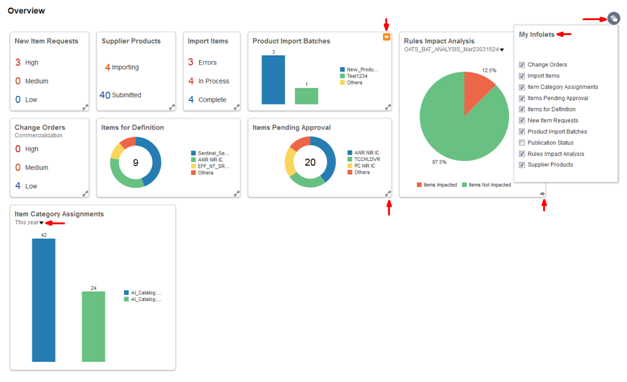
Product Work Area Landing Page
Steps to Enable
No steps are required to enable this feature.
Find Products More Quickly with Improved Search Capabilities
When managing product data, any useful improvement to the way you search and find products brings added benefit to your productivity. To this end, this release introduces the uptake of an improved autosuggest component that allows you to find products more quickly when performing a simple search from the panel drawer. When entering a value in the simple search field, you can now see a list of suggested search results grouped by category. The categories include items, item classes, attributes, relationships, and trading partner items. For suggested results in the items category, you have the ability to select an item and navigate to the edit item page in a single click. This provides you added productivity benefits by highlighting more useful information early on during search entry and allowing you to navigate to the relevant results more quickly.
The following screen capture illustrates the feature and its benefits.
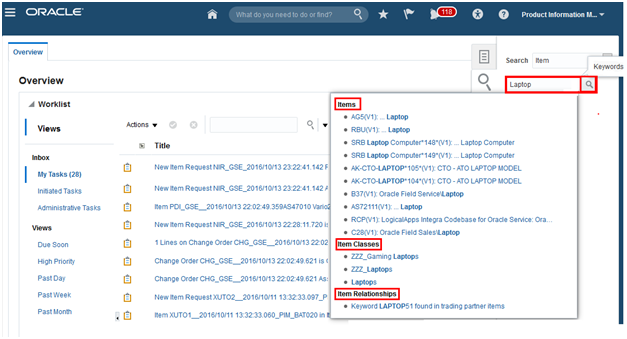
Items Work Area Showing Autosuggest Results
Steps to Enable
No steps are required to enable this feature.
Tips And Considerations
Autosuggest function initiates the search process only when you enter at least the first three characters of the matching string you are looking for.
Oracle Quality Management Cloud delivers a unified platform for enabling quality visibility, collaboration, and execution through quality control techniques and closed-loop quality management. Quality Management allows you to:
- Facilitates inspections at critical points throughout supply chain execution
- Guides users through the quality issue resolution process
NOTE: Quality inspection results are available and included with Oracle Manufacturing Cloud as well as Oracle Inventory Management Cloud. For quality inspection setups, issues, and actions, you must also add Oracle Quality Management Cloud (which you can also add to Oracle Product Development Cloud).
The following inspection capabilities are included with Oracle Manufacturing Cloud and Oracle Inventory Management Cloud:
- Inspection. Represents the measuring and testing of characteristics and the evaluation of the results collected against the inspection plan to determine quality conformance.
Additional capabilities for quality inspection setups, issues, and actions require Oracle Quality Management Cloud. They include:
- Inspection characteristic. Describes the properties, measurements, or tests that define an item, resource, or another entity.
- Inspection level. Identifies the skip lot frequency and sampling size that you can apply to a receiving inspection plan.
- Inspection plan. States the characteristics and their specification requirements or tolerances for an item or resource as well as the criteria for when and where you must enforce inspection.
- Quality issue. Manages the business process and information collection related to quality incidents. Types of issues commonly include nonconformances, problem reports, and exceptions.
- Quality action. Manages the process and information collection for proactively avoiding and reactively responding to a quality incident. Examples include Corrective and Preventative Action (CAPA) and Supplier Corrective Action Request (SCAR).
Increase Productivity with the Visual Quality Management Work Area Landing Page
In the world of quality, the need to quickly identify, react to, and resolve quality issues is constant. Therefore, quality professionals require visibility to the events impacting an organization at any given moment.
The Quality Management work area landing page is designed to highlight quality events that require the attention of a quality analyst or quality engineer and provide insight into the status of inspection plans, inspections, quality issues, and quality actions. Infolets on this landing page include the following:
- My Favorites. A quality-focused list of the current or favorite inspection plans, quality issues, and quality actions that you are working to complete.
- My Issues. A list of issues currently assigned or owned by you. In addition, the infolet identifies those issues assigned that are of a critical severity and issues that have passed the expected resolution date.
- My Actions. A quick view of the corrective actions currently assigned or owned by you. In addition, the infolet identifies the quality actions that are the highest priority and actions that have passed their expected resolution date.
- Unassigned Issues. As quality issues flow in from various areas of the enterprise, they often require a triage process, where the issue is assigned to a capable quality professional. This infolet identifies all of the new issues added in the last seven days that require a quality professional to be assigned. Items are removed from the list if they exceed seven days or if a person is assigned to manage the issue.
- Open Issues By Severity. Provides a quick view of the quality issues impacting the enterprise. Issues are organized by severity so that you can focus on resolving the critical issues first. To quickly research and action issues, you merely select a given level of severity to drill down to Quality Management‘s filtered search results, roll up your sleeves, and get to work.
- My Open Issues Aged. Many quality issues are not resolved in a given day. This infolet allows you to select issues that are very recent or issues that have taken some time to resolve. In either case, the issues require the focus and effort of the quality professional to resolve.
- Recent Activity. Provides broad visibility to any quality issue reported in the last 24 hours to all quality team members.
- Inspection Plans by Type. Shows the breakdown of approved inspection plans for receiving, work in process, resource, and inventory inspection. Drilling down on each inspection plan type provides filtered search results to quickly find an inspection plan.
- Work in Process Inspections. Indicates the percentage of the inspection quantity that is rejected in work in process for the last seven days. A single click on the rejection rate provides filtered search results to investigate which work order operations failed the quality inspection plan specifications.
- Receiving Inspections. Indicates the percentage of the inspection quantity that is rejected in receiving for the last seven days. A single click on the rejection rate provides filtered search reuslts to investigate which receipts failed the quality inspection plan specifications.
- Inspections Status. Summarizes the count of inspections completed in the last 24 hours. A single click on the count provides filtered search results of inspections for further analysis and follow-up action.
The Quality Management landing page infolets deliver quick navigation and important metrics that help you monitor enterprise quality management.
The following screen capture illustrates the feature and its benefits.
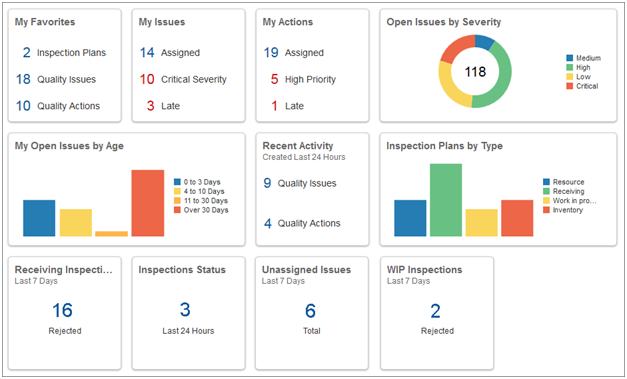
Steps to Enable
No steps are required to enable this feature.
Define Quality Inspection Requirements
Companies implement inspections to monitor whether their products or processes conform to quality standards. Without a formal quality control process, it would be difficult to gauge your company’s performance and ensure proper compliance.
In this release, you can create organization-specific inspection plans for an item, item category, or resource with the option to use integrated product and quality specifications. You define inspection characteristics and inspection levels, for acceptance sampling based on a skip lot frequency or 100% inspection, which are then associated to specific inspection plans. You can enforce an inspection plan at receiving and work in process or use the plan for ad-hoc data collection purposes against a resource or inventory. You can implement inspection plans in an inventory organization for the following scenarios:
- Receiving inspection for an item, item category, and suppliers
- Work in process inspection for an item, item category, operation, and dispatch status
- Resource inspection
- Inventory inspection for an item, item category, subinventory, and locator
As a result, quality control with a standardized inspection methodology is embedded in key business flows for the company.
The following screen capture illustrates the feature and its benefits.
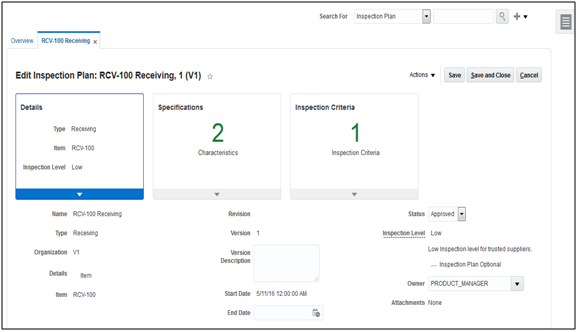
Steps to Enable
No steps are required to enable this feature.
After the inspection plan is defined, it is important that the plan can be integrated into transaction execution (be that inline or offline) so as to ensure maximum compliance and accuracy.
With this release, you can perform inline, mandatory inspection in the context of receiving and work order operation completion, and optionally, with mobile data entry. Automatic sample numbering and serial barcode scanning are built into inspection results data collection. Operators complete the receiving process or work order operation based on the automated acceptance versus rejection against the selected inspection plan specifications and inspection level. Alternatively, you can create a standalone inspection to collect data for monitoring an equipment resource or re-inspecting quarantined inventory.
Inspection failures ultimately drive immediate action by generating a nonconformance issue for further investigation. The net result is better decision making for quality holds, releases, and material or resource usage.
Steps to Enable
- In the Navigator, click Setup and Maintenance.
- Search for the Manage Receiving Parameters task and execute it.
- For each organization that you want to inspect while receiving the items, set the “Receipt Routing” value to “Inspection required” and select the “Use quality inspection plan” checkbox.
The following screen capture illustrates the feature and its benefits.
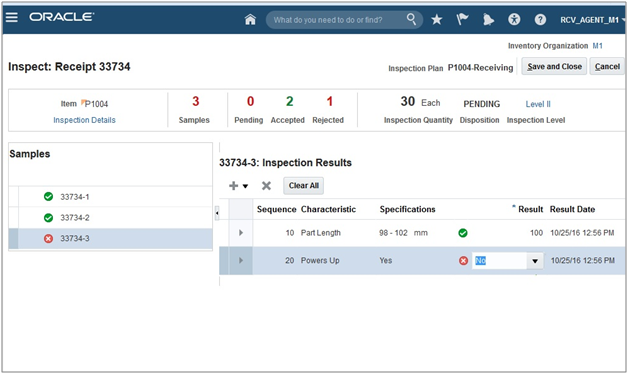
Quality engineers need real-time visibility of inspections statuses to understand receipts or work orders awaiting inspection and rejected inspections. They also need readily accessible details of inspection results for nonconforming products or processes. With this release, you can build your own ad-hoc analysis of inspection data and embed it in the Management application, or export it for further review. Real-time operational reporting helps gauge quality performance by item and supplier, so that you can adjust to the appropriate inspection level to ensure quality standards. Better business insights of quality inspections not only improve visibility of product and supplier quality but can also reduce inspection cycle time.
The following screen capture illustrates the feature and its benefits.
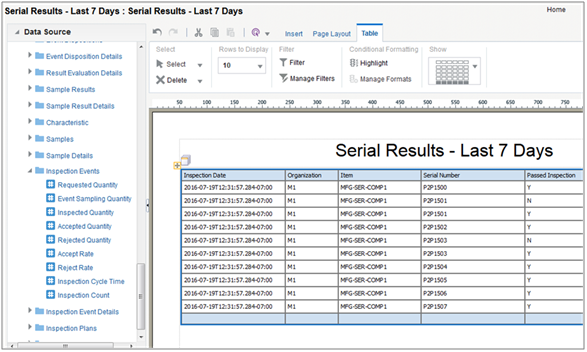
Steps to Enable
No steps are required to enable this feature.
A company’s strategic direction can be at risk due to quality issues of real or potential impact. Unfortunately, the potential impact posed by a given issue is not always clear at the moment of discovery. Therefore, organizations require effective quality tools to guide team members through quality processes and controls in order to implement safe and effective solutions.
With this release, you now have the ability to capture quality issues identified throughout the enterprise, including during design, inventory management, and manufacturing. After issues are identified, you can further describe incidents by collecting documents and images, linking directly to items or processes, and capturing findings. The quality issue combines the flexibility of social tools with the standardization of quality workflows and formal approvals to ensure issues are resolved quickly and properly.
By providing a central repository for issues to be collected, analyzed, managed, and corrected, Oracle Quality Management Cloud is an easy-to-use, yet powerful tool for you to manage your quality program.
The following screen capture illustrates the feature and its benefits.
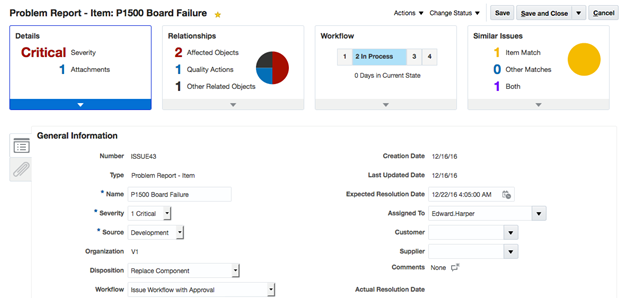
Steps to Enable
No steps are required to enable this feature.
After you identify quality issues, it is important that team members have the ability to effectively develop and implement solutions to correct and prevent similar issues from occurring in the future. Quality professionals need a closed loop, auditable process for managing the corrective and preventative action process.
In this release, you have the flexibility to resolve many quality issues using a single corrective action or to document multiple corrective actions that can stem from a single quality issue. You can connect quality actions to change orders and other processes related to the final solution, so that operations quickly get back on track. Information is captured and shared among team members using Oracle Social Network and a formal workflow and approval process.
Through the use of quality actions, you can ensure your team has followed the proper procedures, captured vital information related to forming the final solution, and communicated the information throughout the enterprise.
The following screen capture illustrates the feature and its benefits.
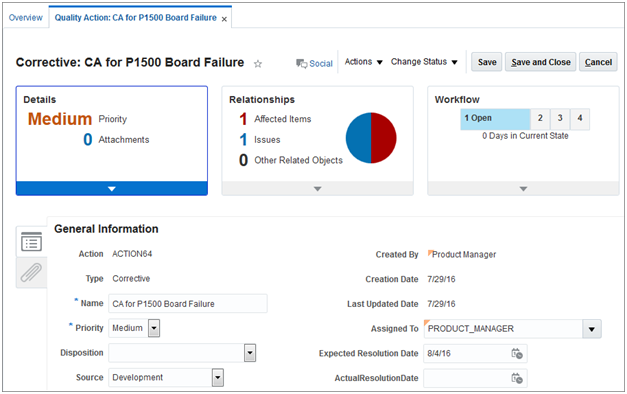
Steps to Enable
No steps are required to enable this feature.
Collaborate with Stakeholders on Quality Issues Using Oracle Social Network
Effective collaboration in resolving quality issues requires a communication platform that provides the right context, history, and tools, and connects people without introducing another standalone social networking tool. In this release, you can use Oracle Social Network to leverage the power of social collaboration that is directly built into the Quality Management application to:
- Stay connected with quality inspections, issues, and actions to get updates.
- Start a conversation and collaborate in real time and in multiple threads with key stakeholders.
- Resolve quality issues and share recommended practices through social collaboration.
All communication related to quality events are maintained with the proper business context and team engagement using Oracle Social Network, effectively closing the collaboration gap.
The following screen capture illustrates the feature and its benefits.
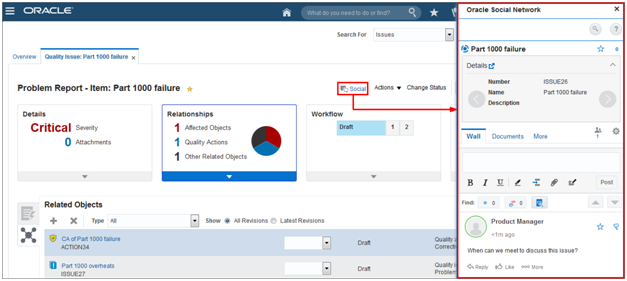
Steps to Enable
No steps are required to enable this feature.
APPENDIX A: FUNCTION SECURITY PRIVILEGES AND AGGREGATE PRIVILEGES
This release includes new roles and privileges that facilitate function security for new features. If you have created custom job roles, then you can add new privileges to those custom roles as needed.
For a full list of new roles and privileges in this release, refer to the What's New section of the Oracle Product Management Cloud: Security Reference guide, available on the Oracle Help Center.
The following table lists new security privileges for Oracle Quality Management Cloud.
Table A-1 Function Security Privileges for Quality Management
| Privilege Name and Code |
Job Role Name and Code |
|---|---|
| Edit Inspection Results QA_EDIT_INSPECTION_RESULTS |
Receiving Agent ORA_RCV_RECEIVING_AGENT |
| Edit Inspection Results QA_EDIT_INSPECTION_RESULTS |
Warehouse Manager ORA_INV_WAREHOUSE_MANAGER |
| Edit Inspection Results QA_EDIT_INSPECTION_RESULTS |
Production Operator ORA_WIE_PRODUCTION_OPERATOR |
| Review Quality Issue ENQ_REVIEW_QUALITY_ISSUE_PRIV |
Receiving Agent ORA_RCV_RECEIVING_AGENT |
| Review Quality Issue ENQ_REVIEW_QUALITY_ISSUE_PRIV |
Warehouse Manager ORA_INV_WAREHOUSE_MANAGER |
| Review Quality Issue ENQ_REVIEW_QUALITY_ISSUE_PRIV |
Production Operator ORA_WIE_PRODUCTION_OPERATOR |
| Privilege Name 3 Privilege_Code_Name_3 |
Job Role Name 2 JOB_ROLE_CODE_2 |
| Review Quality Issue ENQ_REVIEW_QUALITY_ISSUE_PRIV |
Quality Analyst ORA_ENQ_QUALITY_ANALYST_JOB |
| Manage Quality Issue ENQ_MANAGE_QUALITY_ISSUE_PRIV |
Quality Analyst ORA_ENQ_QUALITY_ANALYST_JOB |
| Review Quality Action ENQ_REVIEW_QUALITY_ACTION_PRIV |
Quality Analyst ORA_ENQ_QUALITY_ANALYST_JOB |
| Manage Quality Action ENQ_MANAGE_QUALITY_ACTION_PRIV |
Quality Analyst ORA_ENQ_QUALITY_ANALYST_JOB |
| Privilege Name 4 Privilege_Code_Name_4 |
Job Role Name 2 JOB_ROLE_CODE_2 |
---

Copyright © 2017, Oracle and/or its affiliates. All rights reserved.
This document is provided for information purposes only, and the contents hereof are subject to change without notice.This document is not warranted to be error-free, nor subject to any other warranties or conditions, whether expressed orally or implied in law, including implied warranties and conditions of merchantability or fitness for a particular purpose. We specifically disclaim any liability with respect to this document, and no contractual obligations are formed either directly or indirectly by this document. This document may not be reproduced or transmitted in any form or by any means, electronic or mechanical, for any purpose, without our prior written permission.
Oracle and Java are registered trademarks of Oracle and/or its affiliates. Other names may be trademarks of their respective owners.
Intel and Intel Xeon are trademarks or registered trademarks of Intel Corporation.All SPARC trademarks are used under license and are trademarks or registered trademarks of SPARC International, Inc. AMD, Opteron, the AMD logo, and the AMD Opteron logo are trademarks or registered trademarks of Advanced Micro Devices. UNIX is a registered trademark of The Open Group.
