
- Revision History
- Overview
- Feature Summary
- Risk Management
-
- Common Risk Management
- REST APIs for Risk Management
- Advanced Access Controls
-
- Delivered Model Content for Enterprise Resource Planning
- Ability to Add Attachments to Advanced Controls
- New Attachment Column on Result Page
- Disable Actions for Inactive Controls
- Allow Only Active Models to Be Deployed as Controls
- New Category Column in Select Business Object Page
- Import Model and Control Validation
- Active-Model Search Replaces My-Model Search
- Search Parameters Support Multiple Creators or Updaters
-
- Advanced Financial Controls
-
- Delivered Model Content for Enterprise Resource Planning
- Delivered Model Content for Oracle Fusion Applications Audit
- Changes to Business Objects
- Pre-Upgrade Impact to Controls with Obsolete Attributes
- Ability to Add Attachments to Advanced Controls
- New Attachment Column on Result Page
- Disable Actions for Inactive Controls
- Allow Only Active Models to Be Deployed as Controls
- New Category Column in Select Business Object Page
- Import Model and Control Validation
- Add State to User-Defined Objects Page
- Active-Model Search Replaces My-Model Search
- Search Parameters Support Multiple Creators or Updaters
-
- Financial Reporting Compliance
- Transactional Business Intelligence for Risk Management
- Access Certification
This document will continue to evolve as existing sections change and new information is added. All updates appear in the following table:
| Date | Feature | Notes |
|---|---|---|
| 21 JUN 2019 |
Advanced Access Controls: Active-Model Search Replaces My-Model Search |
Updated document. Delivered feature in update 19B. |
| 21 JUN 2019 |
Advanced Access Controls: Search Parameters Support Multiple Creators or Updaters |
Updated document. Delivered feature in update 19B. |
| 21 JUN 2019 |
Advanced Financial Controls: Active-Model Search Replaces My-Model Search |
Updated document. Delivered feature in update 19B. |
| 21 JUN 2019 |
Advanced Financial Controls: Search Parameters Support Multiple Creators or Updaters |
Updated document. Delivered feature in update 19B. |
| 26 APR 2019 | Assessment Plans Sorted Alphabetically | Updated document. Delivered feature in update 19B. |
| 26 APR 2019 | Import and Export Flexfield Values | Updated document. Delivered feature in update 19B. |
| 22 MAR 2019 | Created initial document. |
This guide outlines the information you need to know about new or improved functionality in this update, and describes any tasks you might need to perform for the update. Each section includes a brief description of the feature, the steps you need to take to enable or begin using the feature, any tips or considerations that you should keep in mind, and the resources available to help you.
Give Us Feedback
We welcome your comments and suggestions to improve the content. Please send us your feedback at oracle_fusion_applications_help_ww_grp@oracle.com.
Column Definitions:
Report = New or modified, Oracle-delivered, ready to run reports.
UI or Process-Based: Small Scale = These UI or process-based features are typically comprised of minor field, validation, or program changes. Therefore, the potential impact to users is minimal.
UI or Process-Based: Larger Scale* = These UI or process-based features have more complex designs. Therefore, the potential impact to users is higher.
Customer Action Required = You MUST take action before these features can be used by END USERS. These features are delivered disabled and you choose if and when to enable them. For example, a) new or expanded BI subject areas need to first be incorporated into reports, b) Integration is required to utilize new web services, or c) features must be assigned to user roles before they can be accessed.
| Ready for Use by End Users Reports plus Small Scale UI or Process-Based new features will have minimal user impact after an update. Therefore, customer acceptance testing should focus on the Larger Scale UI or Process-Based* new features. |
Customer Must Take Action before Use by End Users Not disruptive as action is required to make these features ready to use. As you selectively choose to leverage, you set your test and roll out timing. |
|||||
|---|---|---|---|---|---|---|
| Feature |
Report |
UI or |
UI or |
Customer Action Required |
||
Delivered Model Content for Oracle Fusion Applications Audit |
||||||
New Entitlement Details Dimension in Advanced Access Controls Subject Area |
||||||
Oracle Risk Management consists of three products: Oracle Fusion Financial Reporting Compliance documents your policies for identifying and resolving risk in your financial processes. Oracle Advanced Access Controls detects risk inherent in the access granted to users of business applications. Oracle Advanced Financial Controls uncovers risk exhibited by transactions completed on business applications. Advanced Financial Controls and Advanced Access Controls belong to a module called Advanced Controls Management.
Advanced Access Controls includes an Access Certification set of features. It enables an organization to perform periodic reviews to determine whether job roles are assigned appropriately to users.
Integration with Fusion Notifications
The initial set of Risk Management integrations with Fusion notifications and email is complete. For the following objects, users can read notifications by clicking a bell-shaped icon in the global header:
- Financial Reporting Compliance Processes
- Financial Reporting Compliance Risks
- Financial Reporting Compliance Controls
- Advanced Controls
- Advanced Control Incident Results
- Access Certification
Steps to Enable
No steps are required to enable this feature.
Tips And Considerations
Until all the communications within Risk Management are configured into the Fusion notifications functionality, you should continue to use the overview pages, which will continue to display required actions.
New Default Search for Monitor Jobs Page
In Monitor Jobs, the default is to show all jobs run in the last 24 hours. Previously, this was also filtered to show jobs run only by the user logged in. More often than not, the run by filter was being removed because the user was interested in seeing what other jobs were in the queue.

Monitor Jobs Default Saved Search
Steps to Enable
No steps are required to enable this feature.
The GRC_TEST_PLAN_FREQUENCY lookup type is predefined with multiple lookup codes and meanings. You cannot update the predefined values. However, you can create new lookup codes and meanings.
Steps to Enable
To create new lookup codes and meanings, navigate to the the Setup and Administration work area of Risk Management Tools, and select the Lookup Tables tab.
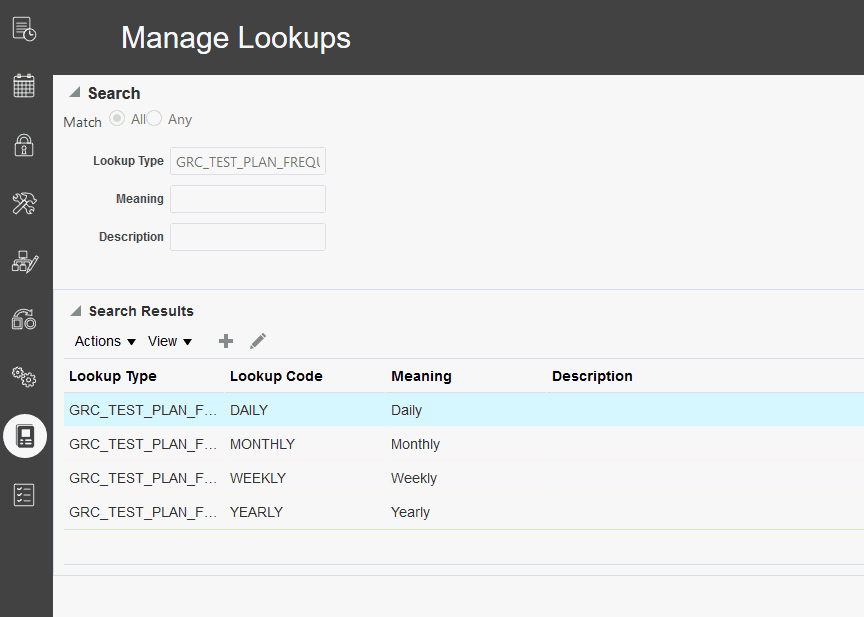
Manage Lookup UX Page and the Predefined Meanings for Lookup Type GRC_TEST_PLAN_FREQUENCY
Click the Create Lookup icon. In the Create Lookup page, populate Lookup Type with GRC_TEST_PLAN_FREQUENCY. For Lookup Code, enter a value that reflects a time period; it should be all capitals. For the the Meaning value, enter a plain-language expression of that period; this is the value users see as they assign frequencies to test plans.

Example of a New Lookup Code and Meaning
Once you have completed the definition, click Save and Close. To create additional values for this specific type, follow the same steps. When you save the new value, it appears in the LOV for test plan frequency.
Change History Reports Removed from Report Management Area
Ability to report on change history data is available in OTBI, and so the embedded Change History report has been removed from the Report Management, Administration Reports area.
Below is an example of the available attributes that can be used to create a report.

OTBI Change History Folder Example
Below shows the Change History report that has been removed from Advanced Controls. The same report has been removed from the Financial Reporting Controls reporting area.

Change History Report Removed
Steps to Enable
For details about administering, creating and editing reports, see the books available from the Oracle Help Center > your apps service area of interest > Books > Administration or User sections.
Tips And Considerations
Access to the Change History report has been available in Oracle Transactional Business Intelligence beginning in 18C. To run:
- Navigate to Reports and Analytics
- Select Catalog > Shared Folders > Risk Management
- Then select one of the product area folders > Administration
Below is an example:

Change History Report
Financial Reporting Compliance
Attributes were added to the REST API for Financial Reporting Compliance controls.
Steps to Enable
Review the REST service definition in the REST API guides to leverage (available from the Oracle Help Center > your apps service area of interest > REST API). If you are new to Oracle's REST services you may want to begin with the Quick Start section.
Role Information
You must include the Manage Financial Reporting Compliance REST Services Duty role to access this functionality.
Updated REST API for Control Assessments
Attributes were added to the REST API for Financial Reporting Compliance control assessments.
Steps to Enable
Review the REST service definition in the REST API guides to leverage (available from the Oracle Help Center > your apps service area of interest > REST API). If you are new to Oracle's REST services you may want to begin with the Quick Start section.
Role Information
You must include the Manage Financial Reporting Compliance REST Services Duty role to access this functionality.
Attributes were added to the REST API for Financial Reporting Compliance issues.
Steps to Enable
Review the REST service definition in the REST API guides to leverage (available from the Oracle Help Center > your apps service area of interest > REST API). If you are new to Oracle's REST services you may want to begin with the Quick Start section.
Role Information
You must include the Manage Financial Reporting Compliance REST Services Duty role to access this functionality.
This feature allows for the use of REST APIs to view Financial Reporting Compliance risks.
Steps to Enable
Review the REST service definition in the REST API guides to leverage (available from the Oracle Help Center > your apps service area of interest > REST API). If you are new to Oracle's REST services you may want to begin with the Quick Start section.
Role Information
You must include the Manage Financial Reporting Compliance REST Services Duty role to access this functionality.
This feature allows for the use of REST APIs to view Financial Reporting Compliance risk assessments.
Steps to Enable
Review the REST service definition in the REST API guides, which are available from the Oracle Help Center > your apps service area of interest > REST API. If you are new to Oracle's REST services, you may want to begin with the Quick Start section.
Role Information
You must include the Manage Financial Reporting Compliance REST Services Duty role to access this functionality.
This feature allows for the use of REST APIs to view Financial Reporting Compliance processes.
Steps to Enable
Review the REST service definition in the REST API guides, which are available from the Oracle Help Center > your apps service area of interest > REST API. If you are new to Oracle's REST services, you may want to begin with the Quick Start section.
Role Information
You must include the Manage Financial Reporting Compliance REST Services Duty role to access this functionality.
REST API for Process Assessments
This feature allows for the use of REST APIs to view Financial Reporting Compliance process assessments.
Steps to Enable
Review the REST service definition in the REST API guides, which are available from the Oracle Help Center > your apps service area of interest > REST API. If you are new to Oracle's REST services, you may want to begin with the Quick Start section.
Role Information
You must include the Manage Financial Reporting Compliance REST Services Duty role to access this functionality.
Updated REST API for Advanced Controls
Attributes were added to the REST API for advanced controls, and incident results were added as a child resource.
Steps to Enable
Review the REST service definition in the REST API guides to leverage (available from the Oracle Help Center > your apps service area of interest > REST API). If you are new to Oracle's REST services you may want to begin with the Quick Start section.
Role Information
You must include the Manage Advanced Controls REST Services Duty role to access this functionality.
REST API for Advanced Control Job Runs
This feature allows for the use of REST APIs to initiate the running of advanced controls.
Steps to Enable
Review the REST service definition in the REST API guides, which are available from the Oracle Help Center > your apps service area of interest > REST API. If you are new to Oracle's REST services, you may want to begin with the Quick Start section.
Role Information
You must include the Manage Advanced Controls REST Services Duty role to access this functionality.
Delivered Model Content for Enterprise Resource Planning
Oracle delivers three new models that detect sensitive access containing personally identifiable information in Enterprise Resource Planning applications:
- 9802: Sensitive Payment Privileges
- 9801: Sensitive Supplier Privileges
- 9800: Sensitive Customer Privileges
Steps to Enable
No advance setup is required for you to create access models. However, you must run a global user synchronization job, which refreshes the global users analyzed by models and controls. Moreover, an administrator must set the Access Performance Configuration option to set the number of records an access model can return. It improves performance by reducing the number of records involved.
Tips And Considerations
Before using new delivered model content, review the readme to identify models that match requirements for your organization. The readme is available with the new cumulative model import file. Once you identify models appropriate for you, import, review, and modify them in your test environment. Importing all available models is not recommended. In some cases, you may have already imported available models in a previous update.
Key Resources
To download Oracle’s delivered model content files for import into your instance, refer to My Oracle Support, Oracle Delivered Content for Advanced Access Controls (MOS ID 2350139.1). Locate and download the available Advanced Access Controls content for segregation of duties. The package for release 13, update 19B is Cumulative Advanced Access Controls-Enterprise Resource Planning Models Package 19B.xml.
For more information about importing models, see the "Importing Access Models, Controls, and Conditions: Procedure" topic in Using Advanced Access Controls.
Ability to Add Attachments to Advanced Controls
Users can now add attachments to controls created in Advanced Access Controls.
Steps to Enable
No steps are required to enable this feature.
Tips And Considerations
This feature can be used to attach more detailed explanations of how the control should be performed and by whom. It can also be used to attached detailed testing plans to supplement the test plans and steps.
New Attachment Column on Result Page
Attachments can now be accessed from the Results page. By default the Attachments column is hidden, but can be exposed by clicking View > Columns and selecting Attachments.
The value shown in the Attachments column is the title given when the attachment was created on the result definition. If the attachment is a URL, then it shows as a hyperlink. This opens a new tab to the referenced URL.

Attachments on Results Page
Steps to Enable
No steps are required to enable this feature.
Disable Actions for Inactive Controls
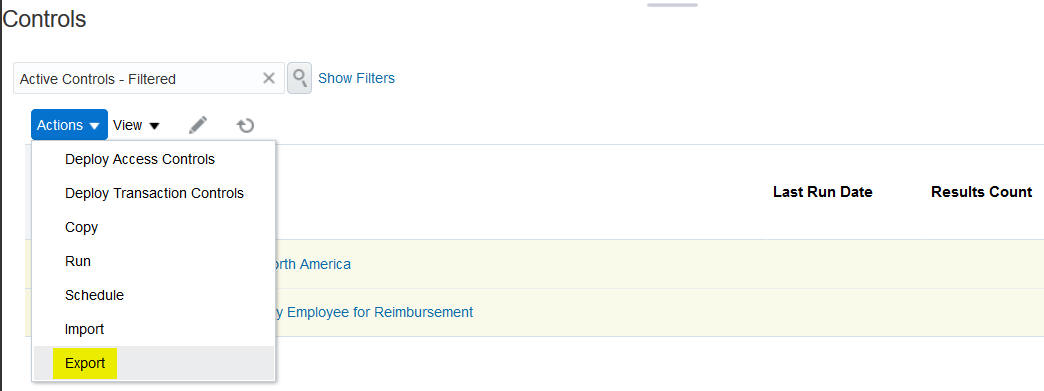
The Copy, Run, Schedule, and Export actions are now disabled for inactive controls.
Steps to Enable
No steps are required to enable this feature.
Allow Only Active Models to Be Deployed as Controls
You can now select only active models to be deployed as controls. Previously, inactive models were also available.
Steps to Enable
No steps are required to enable this feature.
New Category Column in Select Business Object Page
In the page to select business objects for a model, a new Category column identifies the categories to which business objects belong. For Advanced Access Controls, this category displays Access.

New Category Column
Steps to Enable
No steps are required to enable this feature.
Import Model and Control Validation
When you export models or controls, Advanced Controls applies a release ID to the xml file. The ID is used for validation when you import the file to another environment. You can import files from one release only in the same release or one greater.
Starting in 19B, the release ID can be found at the top of the xml file when it is opened.

Release ID Information in XML File
Steps to Enable
No steps are required to enable this feature.
Active-Model Search Replaces My-Model Search
It used to be that when you first navigate to models you would see only models you created due to the My Models saved search that is run by default. A new default saved search called Active Models replaces the My Models saved search so that you will see all active models you have access to, not just yours.

Active Models Default Saved Search
Steps to Enable
No steps are required to enable this feature.
Search Parameters Support Multiple Creators or Updaters
Various screens allow you to search for records created or most recently updated by a particular person. You can now search for records created or updated by multiple people, instead of just one.

Select Multiple Values
Steps to Enable
No steps are required to enable this feature.
Tips And Considerations
If you had created user-defined saved searches in a previous release that use the created by and/or last updated by attributes, you’ll need to delete them and create new ones to enable the ability to select more than one value.
Delivered Model Content for Enterprise Resource Planning
Oracle delivers one new model for financial application area. This model is supported by a new business object.
- 33001: Customers Missing Taxpayer Identification Number (using Customer business object)
Steps to Enable
No advance setup is required for you to create transaction models. However, you must run a data-synchronization process, which refreshes the data analyzed by models and controls. Moreover, an administrator must set the Transaction Performance Configuration date option. It improves performance by eliminating older data from data-synchronization jobs. This date is required, and the data-synchronization jobs fail if no date is set.
Tips And Considerations
Before using new delivered model content, review the readme to identify models that match requirements for your organization. The readme also provides information on new business objects introduced to support new model content. The readme is available with the new cumulative model import file. Once you identify models appropriate for you, import, review, and modify them in your test environment. Importing all available models is not recommended. In some cases, you may have already imported available models in a previous update. Or, some may source data from products you have not enabled. Moreover, models may contain user-defined objects that create data set controls that cannot be deleted, only inactivated.
Key Resources
To download Oracle’s delivered model content files for import into your instance, refer to My Oracle Support, Oracle Delivered Content for Advanced Financial Controls (MOS ID 2350138.1). Locate and download the available Patch ID for Advanced Financial Controls content for 19B. The model file name is Cumulative Advanced Financial Controls-Enterprise Resource Planning Models Package 19B.xml.
For more information about importing models, see the "Importing Transaction Models and Controls: Procedure" chapter of Using Advanced Financial Controls.
Delivered Model Content for Oracle Fusion Applications Audit
Advanced Financial Controls introduces new business objects that correspond to audit-level information you configure under Manage Audit Policies in Oracle Fusion Applications. One new model is delivered that uses business objects from the application audit areas.
- 60017: Frequent Changes to Salary (using Audit - Salary business object)
Steps to Enable
No advance setup is required for you to create transaction audit models. However:
- You must review audit-level information configured under Manage Audit Policies in Oracle Fusion Applications. Create models that use audit business objects in Advanced Financial Controls only after the corresponding information is enabled and configured under Manage Audit Policies.
- A Risk Management administrator must set the Audit Performance Configuration date option under Application Configurations in Risk Management Tools. This option improves performance by eliminating older data from data-synchronization jobs. This date is required and the data-synchronization jobs fail if no date is set.
- Finally, you must run data synchronization, which refreshes the data analyzed by models and controls.
Tips And Considerations
Before using new delivered model content, review the readme to identify models that match requirements for your organization. The readme also provides information on new business objects introduced to support new model content. The readme is available with the new cumulative model import file. Once you identify models appropriate for you, import, review, and modify them in your test environment. Importing all available models is not recommended. In some cases, you may have already imported available models in a previous update. Or, some may source audit data from products you have not enabled. Moreover, models may contain user-defined objects that create data set controls that cannot be deleted, only inactivated.
Key Resources
To download Oracle’s delivered model content files for import into your instance, refer to My Oracle Support, Oracle Delivered Content for Advanced Financial Controls (MOS ID 2350138.1). Locate and download the available Patch ID for Advanced Financial Controls content for 19B. The model file name is Cumulative Advanced Financial Controls-Application Cloud Audit Models Package 19B.xml.
For more information about importing models, see the "Importing Transaction Models and Controls: Procedure" chapter of Using Advanced Financial Controls.
Obsolete attributes have been removed from business objects used in Advanced Financial Controls. Additionally, the data type of an attribute has been modified.
If you have used any of these attributes in a filter for a model or control, that object's status is set to Inactive and its state is set to Invalid when you upgrade from 19A. You must update any such model and redeploy any such control.
OBSOLETE ATTRIBUTES
Because the language of a model or control was applied when that model or control was created, this could cause duplicate results that required filtering. Therefore, their removal significantly simplifies the process. So the following attributes, organized by business object, are removed because they are obsolete.
| Business Object Name | Attribute Name |
| Application Security User | Language Source Language |
| Assets Workbench | Language Source Language |
| Business Operating Unit | Language |
| Calculation Card Definition | Language Source Language |
| Calculation Component Definition | Language Source Language |
| Common Lookups | Lookup Type Language Lookup Code Language |
| Deduction Groups | Language Source Language |
| Deduction Types | Language |
| Item Information | Language Source Language |
| Job | Language |
| Payables Payment Term | Language |
| Payment Formats | Language |
| Payment Method | Language code |
| Position | Language |
| Purchasing Document Types | Language Source Language |
| Purchasing Expense Account Rules | Language |
| Purchasing Hazard Class | Language Source Language |
| Purchasing Line Type | Language Source Language |
| Purchasing UN (United Nations) Number | Language Source Language |
| Roles | Language |
REVISED ATTRIBUTE TYPE
The following attribute, listed with its business object, was updated from the String type to the Date type.
| Business Object Name | Attribute Name |
| Payroll Transactions | Date Earned |
Steps to Enable
To ensure you have the most current models that correspond to your controls, export the controls from your 19A instance before you upgrade. Immediately import the controls as models in the 19A instance, because controls using language attributes deprecated in 19B will cause your controls to become invalid.
After you upgrade, identify models and controls that use obsolete or modified attributes by searching on the Inactive status and the Invalid state.
- You can update models. Follow the inline guidance to do so.
- You cannot update controls. For any control that uses obsolete attributes, revise the model from which the control is developed so that it uses only valid attributes. Then redeploy the model as a control.
Tips And Considerations
Obsolete attributes impact only environments upgraded from 19A; they do not impact new implementations of 19B.
Key Resources
If you are upgrading from 19A:
- For models, refer to the 19A topic "Upgrade Impact to Models with Obsolete Attributes." When you have used an obsolete attribute in your model, additional actions may be required.
- For controls refer to the 19B topic "Pre-Upgrade Impact to Controls with Obsolete Attributes." When you have used an obsolete attribute in your control, additional actions will be required.
Pre-Upgrade Impact to Controls with Obsolete Attributes
Before you upgrade to 19B you must:
- Determine whether any of your controls use language-related attributes across business objects, in particular Business Operating Unit.
- If so, export those controls.
- Using your 19A instance, import those controls as models.
- That's because language attributes are deprecated from 19B and your existing controls will become invalid. You can edit the models you have imported to rebuild the controls.
- Consider updating any pending incidents before an upgrade. Then for those controls using obsolete attributes, it is recommended you run incident result reports to capture their status prior to your upgrade.
Once you have upgraded your environment to 19B, the impact to controls that use an obsolete business-object attribute include:
- System sets a control to invalid by updating its status to Inactive and its state to Invalid when an obsolete attribute is used in risk logic and/or part of results.
- User cannot change the status of an invalid control.
- User cannot change the status of a user-defined object if its data set control is invalid.
- Result incidents for invalid controls are updated to the Control Inactive status and the Closed state. However, closed incidents are still accessible for reporting.
- The control result count is set to 0.
Steps to Enable
BEFORE AN UPGRADE, FOLLOW THESE STEPS:
- In 19A, select your controls from the Manage Controls page, run export, and download the xml file.
- In the same instance, from the Manage Models page, import the control xml file as models.

- Edit any model to remove the use of any obsolete attribute used in the model-logic filters or results. For example, if an obsolete attribute is used in a filter, you can either delete it or modify it.

- Save your model after addressing removal of any obsolete attributes.
- Run incident result reports against these controls to capture their status prior to your upgrade.
You must perform these pre-upgrade steps within your 19A instance before an upgrade is applied.
AFTER AN UPGRADE:
- To identify controls impacted by obsolete business object attributes, search on the Inactive status or the Invalid state.
- Open the inactive control to review the inline error. For example, any control-logic filter indicates an error if it uses an obsolete attribute.

After an upgrade to 19B has been applied, any control using a deprecated language attribute in any control-logic filter or results will be invalid and cannot be updated. This is why the pre-upgrade steps must first be performed in your 19A instance, otherwise you will manually have to recreate.
Tips And Considerations
Something to consider while updating your models is to review your logic and validate it still meets your current requirements. Keep in mind that incidents closed after the upgrade may get regenerated when the control is deployed.
Obsolete attributes impact only environments upgraded from 19A; they do not impact new implementations of 19B.
Key Resources
If you are upgrading from 19A:
- For obsolete attribute impact to models and controls, refer to the 19B topic "Changes to Business Objects." This provides a list of obsolete language attributes by business object in 19B.
- For models, refer to the 19A topic "Upgrade Impact to Models with Obsolete Attributes." When you have used an obsolete attribute in your model, additional actions may be required.
Ability to Add Attachments to Advanced Controls
Users can now add attachments to controls created in Advanced Financial Controls.
Steps to Enable
No steps are required to enable this feature.
Tips And Considerations
This feature can be used to attach more detailed explanations of how the control should be performed and by whom. It can also be used to attached detailed testing plans to supplement the test plans and steps.
New Attachment Column on Result Page
Attachments can now be accessed from the Results page. By default the Attachments column is hidden, but can be exposed by clicking View > Columns and selecting Attachments.
The value shown in the Attachments column is the title given when the attachment was created on the result definition. If the attachment is a URL, then it shows as a hyperlink. This opens a new tab to the referenced URL.

Attachments on Results Page
Steps to Enable
No steps are required to enable this feature.
Disable Actions for Inactive Controls
The Copy, Run, Schedule, and Export actions are now disabled for inactive controls.
Steps to Enable
No steps are required to enable this feature.
Allow Only Active Models to Be Deployed as Controls
You can now select only active models to be deployed as controls. Previously, inactive models were also available.
Steps to Enable
No steps are required to enable this feature.
New Category Column in Select Business Object Page
In the page to select business objects for a model, a new Category column identifies the categories to which business objects belong. For Advanced Financial Controls, these categories include Transaction, Access, Configuration (Setup), Operational (Master Data), and Audit.

New Category Column
Steps to Enable
No steps are required to enable this feature.
Import Model and Control Validation
When you export models or controls, Advanced Controls applies a release ID to the xml file. The ID is used for validation when you import the file to another environment. You can import files from one release only in the same release or one greater.
Starting in 19B, the release ID can be found at the top of the xml file when it is opened.

Release ID Information in XML File
Steps to Enable
No steps are required to enable this feature.
Add State to User-Defined Objects Page
The User-Defined Objects page includes a new field called State. The state value is either Approved or Invalid. This read-only value is updated by the system when the control underlying the object becomes invalid. Below is an example of the new State field in the view.

State Field in View
Steps to Enable
No steps are required to enable this feature.
Active-Model Search Replaces My-Model Search
It used to be that when you navigated to the Models page, a saved search called My Models would present only models you created. A new default saved search called Active Models replaces the My Models search. You will now see all active models you have access to, not just yours.

Active Models Default Saved Search
Steps to Enable
No steps are required to enable this feature.
Search Parameters Support Multiple Creators or Updaters
Various screens allow you to search for records created or most recently updated by a particular person. You can now search for records created or updated by multiple people, instead of just one.

Select Multiple Values
Steps to Enable
No steps are required to enable this feature.
Tips And Considerations
If you had created user-defined saved searches in a previous release that use the created by and/or last updated by attributes, you’ll need to delete them and create new ones to enable the ability to select more than one value.
Financial Reporting Compliance
Survey Instructions Support Attachments
The creator of a survey can add attachments while composing survey instructions. The attachments are available for the responders to view while completing the survey. The attachments are applied within the General section.

Initiate Survey Page with an Attachment
The survey responder can view the attachments within active survey.

An Active Survey with an Attachment
Steps to Enable
No steps are required to enable this feature.
One Survey Response per Assessment
Assessments initiated in a batch may be associated with a survey. If so, each assessment can accept only one response to the survey. Typically, more than one assessor is eligible to complete each of the assessments. In such cases, the final survey responses are those of the person who submits the assessment, and that person's name is recorded as the respondent name.
Here's an example: For an annual certification assessment, Assessor 1 and Assessor 2 are eligible to complete the certification of Control A. Both assessors receive notifications that the assessment task requires action.
- Assessor 1 opens the assessment and enters responses in the Complete Survey page. She proceeds to the Complete Assessment page and selects the Save and Close option.
- Assessor 2 opens the same assessment and views the responses Assessor 1 has saved. Assessor 2 updates the responses in the Complete Survey page and, in the Complete Assessment page, responds to the activity question and selects the Submit option.
- The application captures only the survey responses submitted by Assessor 2.
Steps to Enable
No steps are required to enable this feature.
While completing an assessment, an assessor can view prior assessments of the process, risk, or control in question. These are available in a Review Prior Results train stop. The assessor would click the name of a prior assessment to view its results.

Example of the Review Prior Results UX Page

When an assessor clicks an assessment name in the Review Prior Results page, the application renders the assessment details.
Steps to Enable
No steps are required to enable this feature.
The Review Manager Issue Changes privilege has been removed from the predefined Review Remediation Plan Primary duty role. The removal prevents an issue created by an assessor from being sent to an unwanted review state, so issues are automatically approved.
Steps to Enable
Review the following to determine if your security needs to be updated in Security Console:
- If you are using the predefined Review Remediation Plan Primary duty, the privilege is automatically removed and no action is required.
- If you made a copy of Review Remediation Plan Primary duty, you need to update the role to remove Review Manager Issue Changes privilege.
Additional details are provided in the Role section below.
No action is required if you are a new implementation of 19B.
Role Information
The Review Manager Issue Changes privilege was removed from the predefined Review Remediation Plan Primary duty.
| Duty Role Updated | Privilege Inheritance Removed |
| Review Remediation Plan Primary ORA_GTG_REVIEW_REMEDIATION_PLAN_PRIMARY_DUTY | Review Manager Issue Changes GTG_REVIEW_MANAGER_ISSUE_CHANGES |
Import and Export Flexfield Values
Flexfields are attributes you define to expand the information records may contain. As you implement Financial Reporting Compliance, you can use its Data Migration utility to import flexfield values for controls, risks, and processes.
Steps to Enable
First, you define the flexfields you want to implement. Then, you navigate to Data Migration and create an import template. The application adds columns to the template that correspond to the flexfields you have defined.
As you define a flexfield, you create a name for it, and that name corresponds to a predefined value for "Table Column." In the following illustration, for example, the field name "Owner" corresponds to the table column value "ATTRIBUTE_CHAR1." The name value appears in an appropriate Financial Reporting Compliance page — one having to do with controls, risks, or processes. However, the corresponding table column value appears in the import template, in its Control tab, Risk tab, or Process tab.

Flexfield Values for Name and Table Column
As you complete your import template, you enter flexfield values along with other data. You don't have to enter a flexfield value for every record; the Data Migration utility doesn't validate whether a flexfield is required. Nor does it validate any rules for the flexfields you have defined. These rules are validated only after a record has been imported, when a user edits the flexfield value in that record and then submits or saves the record.

Control Tab in the Import Template
Assessment Plans Sorted Alphabetically
To initiate a batch assessment in Financial Reporting Compliance, you begin by using an Initiate Assessment: General page to name and describe the assessment, select an assessment plan, and set start and due dates. You select the assessment plan in a Plan field. That field now sorts plans alphabetically.
Steps to Enable
No steps are required to enable this feature.
Transactional Business Intelligence for Risk Management
Created By and Last Updated By Are Populated
Previously in the Advanced Controls and Financial Reporting Compliance subject areas, the Created By and Last Updated By attributes were blank. Now these are populated with the user names of users who create or update records.
Steps to Enable
For details about administering, creating and editing reports, see the books available from the Oracle Help Center > your apps service area of interest > Books > Administration or User sections).
Updated Subject Area Descriptions
Subject area descriptions have been updated to be more succinct. Below is an example.

Updated Subject Area Descriptions
Steps to Enable
For details about administering, creating and editing reports, see the books available from the Oracle Help Center > your apps service area of interest > Books > Administration or User sections.
Survey ID and Risk ID Attributes Are Added
Survey ID is added to the Risk Management Cloud Assessment Results Real Time subject area. Risk ID is added to the Risk Management Cloud Assessment Results Real Time subject area and the Risk Management Cloud Compliance Real Time subject area. Below is an example of the added Survey ID attribute:

Example New Attribute - Survey ID
Steps to Enable
For details about administering, creating and editing reports, see the books available from the Oracle Help Center > your apps service area of interest > Books > Administration or User sections.
Risk Currency and Currency Code Are Removed
References to Risk Currency and Currency Code have been removed from Advanced Controls and Financial Reporting Compliance subject areas to coincide with their being removed from the application. Below is an example of the two fields that have been removed from the Risk Details folder.

Attributes Removed
Steps to Enable
For details about administering, creating and editing reports, see the books available from the Oracle Help Center > your apps service area of interest > Books > Administration or User sections.
Attributes Added to Advanced Access Controls Subject Area
Attributes have been added to the Incident Result Details dimension in the Advanced Access Controls subject area. These include:
- Conflicts within a single role: Set this attribute to Yes to identify incidents that involve intra-role conflicts (or No to identify all incidents). For example, use this as a filter to discover which roles have inherent conflicts. Typically, you would resolve these incidents first to improve role design and avoid granting inherent conflicts to users simply by granting a role.
- Access Point Type: Use this to identify the type of access point, such as Role or Privilege.
Steps to Enable
For details about administering, creating and editing reports, see books available from the Oracle Help Center > your apps service area of interest > Books > Administration or User sections.
New Entitlement Details Dimension in Advanced Access Controls Subject Area
An entitlement is a set of related access points (privileges, duty roles, or job roles). An entitlement might, for example, contain all the privileges used to create a supplier. The Advanced Access Control subject area includes a new Entitlement Details dimension, which provides these values:
- Access Entitlement: The name of the entitlement, for example Create Supplier for an entitlement that includes the privileges to create a supplier.
- Access Entitlement ID: A unique identifier for the entitlement.
- Access Point: The display name of an individual privilege, duty role, or job role that belongs to the entitlement.
- Access Point Description: A description of the access point, such as a privilege as defined in the business system.
- Access Point ID: The technical ID associated to the privilege, such as CREATE_SUPPLIER_PRIV.
- Access Point Type: The type of access point, such as a role or privilege.
- Created By: The person who created the entitlement.
- Creation Date: The date the entitlement was created.
- Description: A detailed description of the entitlement’s purpose.
- Last Updated By: The person who most recently updated the entitlement.
- Last Updated Date: The date the entitlement was most recently updated.
- Status: Whether the entitlement is active or inactive.
Here's an example of the Entitlement Details folder in the Advanced Access Controls subject area:

Entitlement Details
Steps to Enable
For details about administering, creating and editing reports, see the books available from the Oracle Help Center > your apps service area of interest > Books > Administration or User sections.
A new certification type, named Continuous, enables your organization to poll daily for new assignments of scoped roles to users. With each new assignment, it reopens the appropriate certifier's worksheet automatically so that person can take action. It's intended to focus on the assignments of roles that provide access to sensitive data. IT managers can monitor activity through OTBI reporting, and each day remove user-role assignments that certifiers have newly marked for removal.

Access certification type selection
Steps to Enable
No steps are required to enable this feature.
Tips And Considerations
Continuous certification is not intended to be used for company-wide polling of all new access granted to users. You should consider the following when creating a new continuous certification:
- Select a minimal and specific set of job roles to be included in a continous certification.
- For example you can create a continous certification to poll access to sensitive data.
- Due dates are extended, for example 4-month or 6-month duration for a single certification.
Key Resources
For more information about continuous certification, see the Using Access Certification guide at Oracle Help Center > Cloud > Applications > Risk Management > Books.
Update to Condition Operator Labels
Among the conditions you can select as you create scoping filters, two have changed names:
- Matches one of has been updated to Matches any of.
- Does not match one of has been updated to Matches none of.

Example view of conditions
Steps to Enable
No steps are required to enable this feature.
Limit Standard Certification to 500 Job Roles
A standard certification can encompass a maximum of 500 job roles. Its scoping filters may return more, but if so, the application reduces the number to 500 as you complete the finalize-roles step. You have no control over which job roles are removed. To ensure the certification includes the roles you want, add scoping filters until the scoping job returns 500 job roles or fewer.
Steps to Enable
No steps are required to enable this feature.
Select Multiple Job Roles for Inclusion or Exclusion
The last step in the initiation of a certification is to finalize the job roles whose assignments to users are to be evaluated. As part of this process, you review roles returned by scoping filters and determine which are to be included. You can now select multiple roles at once to be either included or excluded.
Steps to Enable
No steps are required to enable this feature.
Six privileges have been removed from the predefined Access Certification Configuration and Maintenance duty role. The removal prevents access to data security changes because they do not apply.
When you have the predefined Access Certification Configuration and Maintenance duty, the privileges are automatically removed and no action is required.
Additional details are provided in the Role section below.
Steps to Enable
No steps are required to enable this feature.
Key Resources
For more information about security, see "Security for Access Certification" section in the Functional Security chapter of Securing Risk Management.
Role Information
The following privileges were removed from the predefined Access Certification Configuration and Maintenance duty (ORA_GTR_ACCESS_CERTIFICATION_CONFIGURATION_AND_MAINTENANCE_DUTY).
| Privilege Inheritance Removed |
| Create Data Security Policy GTG_CREATE_DATA_SECURITY_POLICY |
| Define Data Security Policy Mapping GTG_DEFINE_DATA_SECURITY_POLICY_MAPPING |
| Edit Data Security Policy GTG_EDIT_DATA_SECURITY_POLICY |
| Manage Security Configurations GTG_SECURITY_TAB_IN_MANAGE_APPLICATION_CONFIGURATIONS |
| View Data Security Policy GTG_VIEW_DATA_SECURITY_POLICY |
| View Data Security Policy Mapping GTG_VIEW_DATA_SECURITY_POLICY_MAPPING |
---