
This document will continue to evolve as existing sections change and new information is added. All updates appear in the following table:
| Date | Module | Feature | Notes |
|---|---|---|---|
| 16 SEP 2022 | Created initial document. |
 HAVE AN IDEA?
We’re here and we’re listening. If you have a suggestion on how to make our cloud services even better then go ahead and tell us. There are several ways to submit your ideas, for example, through the Ideas Lab on Oracle Customer Connect. Wherever you see this icon after the feature name it means we delivered one of your ideas.
GIVE US FEEDBACK
We welcome your comments and suggestions to improve the content. Please send us your feedback at oracle_fusion_applications_help_ww_grp@oracle.com.
DISCLAIMER
The information contained in this document may include statements about Oracle’s product development plans. Many factors can materially affect Oracle’s product development plans and the nature and timing of future product releases. Accordingly, this Information is provided to you solely for information only, is not a commitment to deliver any material, code, or functionality, and should not be relied upon in making purchasing decisions. The development, release, and timing of any features or functionality described remains at the sole discretion of Oracle.
This information may not be incorporated into any contractual agreement with Oracle or its subsidiaries or affiliates. Oracle specifically disclaims any liability with respect to this information. Refer to the Legal Notices and Terms of Use for further information.
Column Definitions:
Report = New or modified, Oracle-delivered, ready to run reports.
UI or Process-Based: Small Scale = These UI or process-based features are typically comprised of minor field, validation, or program changes. Therefore, the potential impact to users is minimal.
UI or Process-Based: Larger Scale* = These UI or process-based features have more complex designs. Therefore, the potential impact to users is higher.
Features Delivered Disabled = Action is needed BEFORE these features can be used by END USERS. These features are delivered disabled and you choose if and when to enable them. For example, a) new or expanded BI subject areas need to first be incorporated into reports, b) Integration is required to utilize new web services, or c) features must be assigned to user roles before they can be accessed.
| Ready for Use by End Users Reports plus Small Scale UI or Process-Based new features will have minimal user impact after an update. Therefore, customer acceptance testing should focus on the Larger Scale UI or Process-Based* new features. |
Customer Must Take Action before Use by End Users Not disruptive as action is required to make these features ready to use. As you selectively choose to leverage, you set your test and roll out timing. |
|||||
|---|---|---|---|---|---|---|
| Feature |
Report |
UI or |
UI or |
|
||
Updated Display of Related Advanced Controls Within a Documented Control, Risk and Process |
||||||
Transactional Business Intelligence for Risk Management
New Financial Control Deep Link Attributes
The Risk Management Cloud - Advanced Financial Controls Real Time subject area offers a new deep link URL to the advanced controls results page. This deep link allows you to view or edit specific sets of records by passing multiple parameters.
The following is the new action link:
| Object Type | Deep-Link URL |
|---|---|
| View Results for a Transaction Type Control | https://<server_url>/fscmUI/faces/deeplink?objType=GRC_AC_RESULTS&action=VIEW&objKey=controlId=@{1};Navigation=deepLink;resultValueA=@{2};resultDrillIdA=@{3};resultValueB=@{4};resultDrillIdB=@{5};resultValueC=@{6};resultDrillIdC=@{7};resultValueD=@{8};resultDrillIdD=@{9};resultValueE=@{10};resultDrillIdE=@{11};group=@{12};groupingValue=@{13};statusCode=@{14};stateCode=@{15} |
The subject area has a new dimension named Transaction Incident Result Headers > Result Drill IDs, with 25 new attributes. These attributes provide IDs that can be passed as action link parameters to incident results related to advanced financial controls.
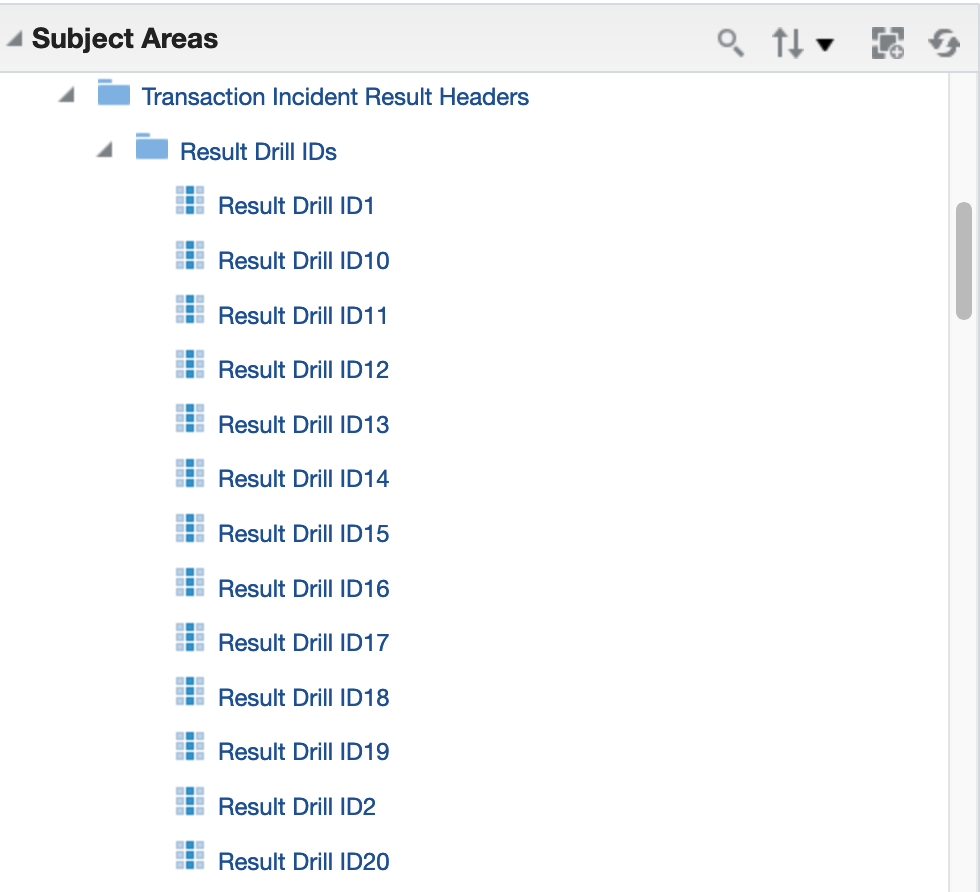
New Dimension
For example, you may be viewing duplicate invoices by supplier in OTBI, and want to accept all the incidents for supplier XYZ because they are legitimate invoices, not duplicates. You can now drill on the supplier ID and Invoice number and see only those incidents that match.
Here's an example report of duplicate supplier invoices:

Identifying Dimension Values To Pass
Let's say you want to drill to the results in order to accept all incidents for supplier ID 12 and invoice number INV_1001577. If you set up an action link on the Name column to pass those two values it would look like this:


Parameters Passed
The objKey is the Control ID. The resultValueA is the invoice number, the corresponding drill ID is 16006. The resultValueB is the supplier ID and the corresponding drill ID is 16010.
To set this up, edit the report. To make the link on the control name, edit the column properties, go to Interaction tab then create a new action link. Up to 5 result values can be passed, each with their corresponding result drill ID. In addition the group, groupingValue, statusCode and stateCode can optionally be passed. In this example, the URL is:
https://hostname/fscmUI/faces/deeplink?objType=GRC_AC_RESULTS&action=VIEW&objKey=controlId=@{1};Navigation=deepLink;resultValueA=@{2};resultDrillIdA=@{3};resultValueB=@{4};resultDrillIdB=@{5}
Not all of the parameters have to be passed. In this example, only two drill IDs are passed.

Set Up Action Link
To provide the Invoice number, pass two parameter values:
- resultValueA "Transaction Incident Result Values"."Result Value 6"
- resultDrillIdA "Result Drill IDs"."Result Drill ID6"
Result Value 6 and Result Drill ID6 are passed because Result Header 6 is the Payables Invoice.Number (see Identifying Dimension Values To Pass screenshot). These values could have been passed to any of the 5 available parameters A-E.
To provide the Supplier ID, pass two parameter values:
- resultValueB "Transaction Incident Result Values"."Result Value 10"
- resultDrillIdB "Result Drill IDs"."Result Drill ID10"
Result Value 10 and Result Drill ID10 are passed because Result Header 10 is the Payables Invoice.Supplier ID (see Identifying Dimension Values To Pass screenshot). These values could have been passed to any of the 4 available parameters left B-E (we used A for Invoice Number).
Now when Control Name link is clicked, you're brought to the incident results page where it is already filtered to show incidents related to the supplier and invoice that were passed in the action link parameters:
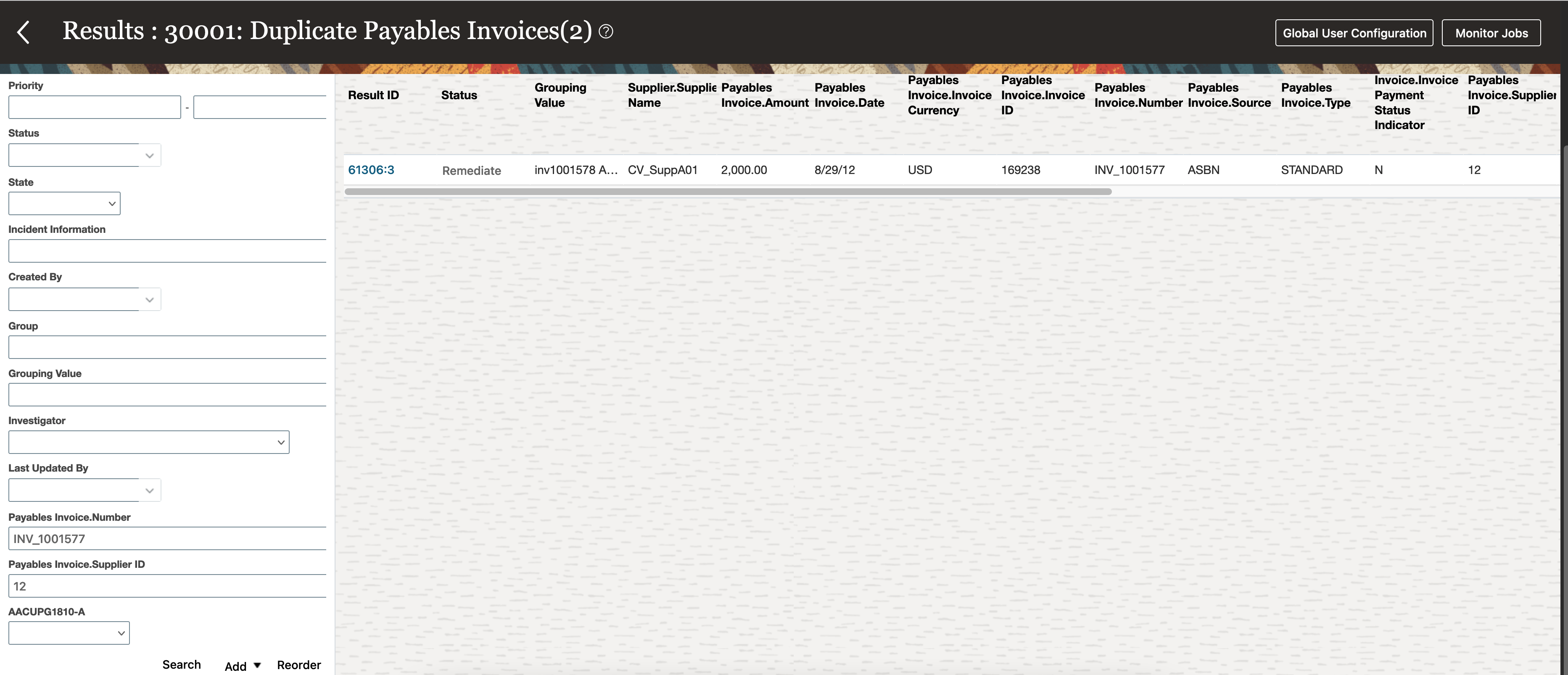
Results Filtered By Supplier and Invoice
This example demonstrates how to pass multiple values, and so one record is returned that matches the invoice number and supplier ID. Just the supplier ID could have been passed to return both records for that supplier, or the grouping value could have been passed to return the potential duplicates.
Some things to keep in mind:
- The Result Values passed will show in the filters area of the results page once you drill to it.
- If your intention is to return records that are not pending (like closed or approved results), then you'll also need to pass the state or status codes to override the default saved search which only returns pending results.
- Attributes passed will override any default saved search on the results page.
- Dates must be passed in format dd-mm-yyyy
With the ability to pass result values, more focused searches can be achieved. So, instead of only being able pass a result ID or a control ID, you can now drill to a subset of results. This is helpful in cases where you are analyzing records in OTBI, and then want to take action on that same set of records in the results page.
Steps to Enable
You don't need to do anything to enable this feature.
Key Resources
- See Creating Analytics for Risk Management, Link Analyses to Application Pages section for more information on setting up deep-link URLs.
Updates to User Group Membership
In the User Assignment Groups page, you can create filters to search for user groups easily. Click a Show Filters link to expose a Filters panel. In it, create filters based on the following attributes, then click Search. For filters based on user information (such as Department or Location), a search returns all groups with at least one member who meets the criteria you specify.
- User Group Name
- User Group Authorization
- User Group Secured Object Type
- Only Returns Groups with Ineligible Members
- Member User Name
- Direct Manager (a.k.a. Line Manager)
- Business Unit
- Department
- Location
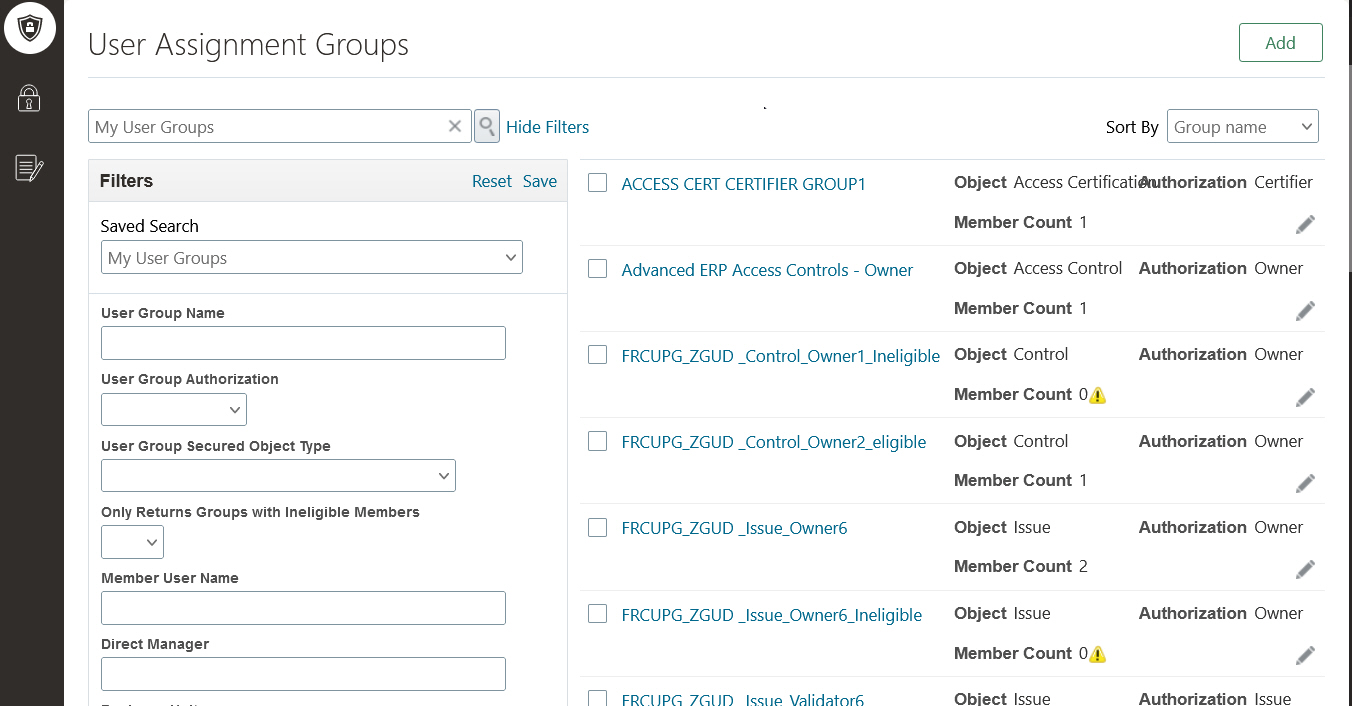
Example of the User Assignment Groups Filters
The ability to filter user groups based on the members' profile information, such as the group member's name, business unit, or direct manager, provides a streamlined approach for group owners to manage their user groups.
Steps to Enable
You don't need to do anything to enable this feature.
Financial Reporting Compliance
Financial Reporting Compliance
Updated Display of Related Advanced Controls Within a Documented Control, Risk and Process
Advanced controls may be related to a documented control, risk or process. The display of these advanced controls has been updated, providing more relevant information and offering better support when multiple advanced controls are related.
The display is consistent with information presented in Results by Control Summary page. It allows the user to drill down into information that they have access to. For example, a user with at least view access to the advanced control itself can drill into the details of that control. Likewise, a user with access to some or all of the incidents generated by a control can drill down into the count to see the individual list of incidents.
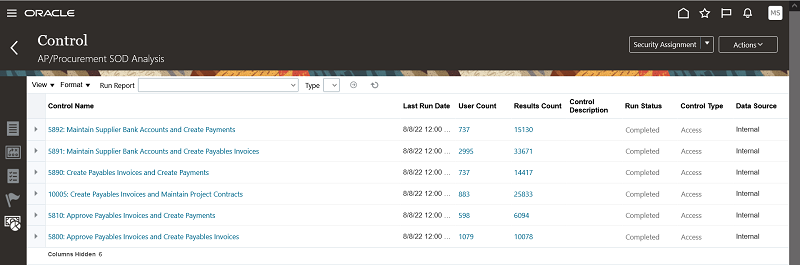
This enhancement will now give the viewer of a documented control, risk or process a more complete picture of the related advanced controls used to automate the control environment.
Steps to Enable
You don't need to do anything to enable this feature.
Tips And Considerations
Because the count of the incidents represents what the end user has at least view access to, so the user should be defined as a viewer for all newly generated incidents of the control via the control results default security definition. To do this most easily, use a security group. This will also grant the user access to previously generated incidents.
Update to Risk Treatment Plan and Related Records
Depending on the business objectives, users may need to manage treatment plans or just related controls to mitigate their documented risks. The risk object now allows treatment plans and related controls to co-exist in a single instance. To enable treatment plans, users must have the minimum privilege to view treatment plans. For these users a treatment tab will be rendered within the document risk record UX page.
The configuration options to enable treatment plans, related controls, events, and consequences have been deprecated. These risk features are now solely manage through the user’s security configuration.
Users can define and manage multiple treatment plans. However only one plan can be tagged as In-Use and one as Target. These flags can be updated when it's applicable. The risk record’s Related Records panel will display only those controls associated to the In-Use treatment plan. Users can manage these related controls in two locations, the risk's Related Records > Control tab and the corresponding treatment plan.
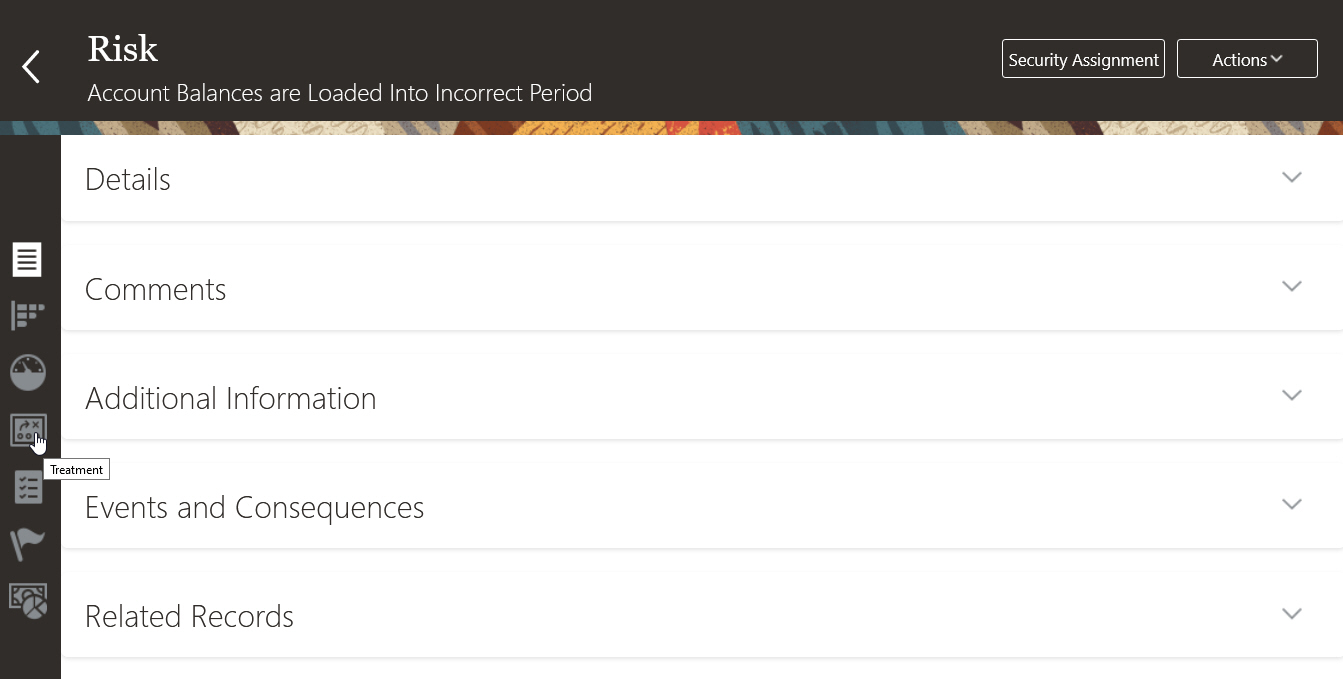
View of a Defined Risk Record Where Treatment, Event, and Consequences Are Accessible
Managing Related Control Records
If the business objective does not require the use of treatment plans, the risk owner can associate related controls by editing the risk record and navigating to the Related Records panel. The owner can add primary and subordinate control records and specify the control stratification for each related control record. The application will automatically create a default treatment plan in the event an in-use treatment plan has not been defined. However, the application does not require users to have the ability to manage treatment plans. All changes to the default treatment plan can be managed within the Controls tab of the risk's Related Records panel.
If the business objective does require the use of treatment plans, the risk owner will navigate to the risk record and click on the treatment tab. Here the owner can define the treatment plan and its target use, relate primary and subordinate control records, and specify the control stratification for each related control record. The controls that are related to the In-Use treatment plan will be rendered within the Related Records panel located in the risk definition tab. Related control changes that occur within the risk Definition tab > Related Records > Control tab will only be applied to the In-Use treatment plan.
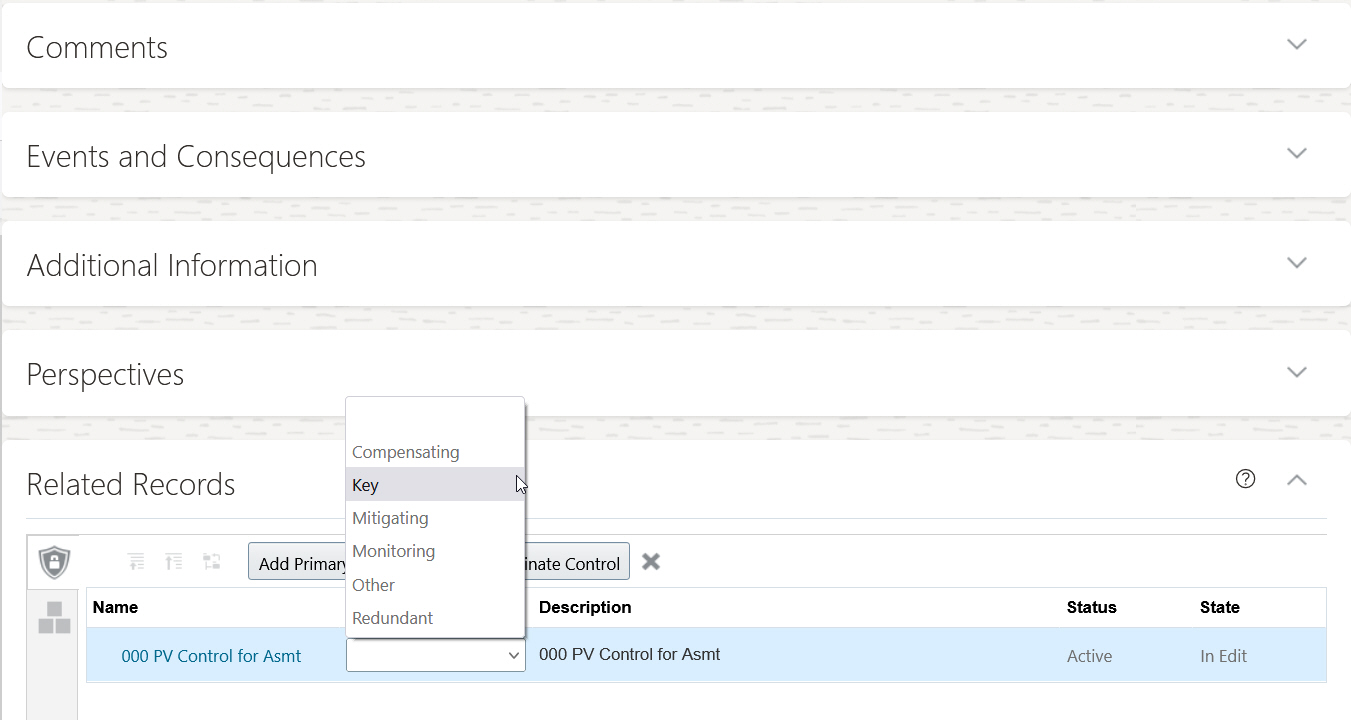
Related Records Panel Located Within the Risk Definition
The treatment plan UX page has been updated to streamline the documentation process.
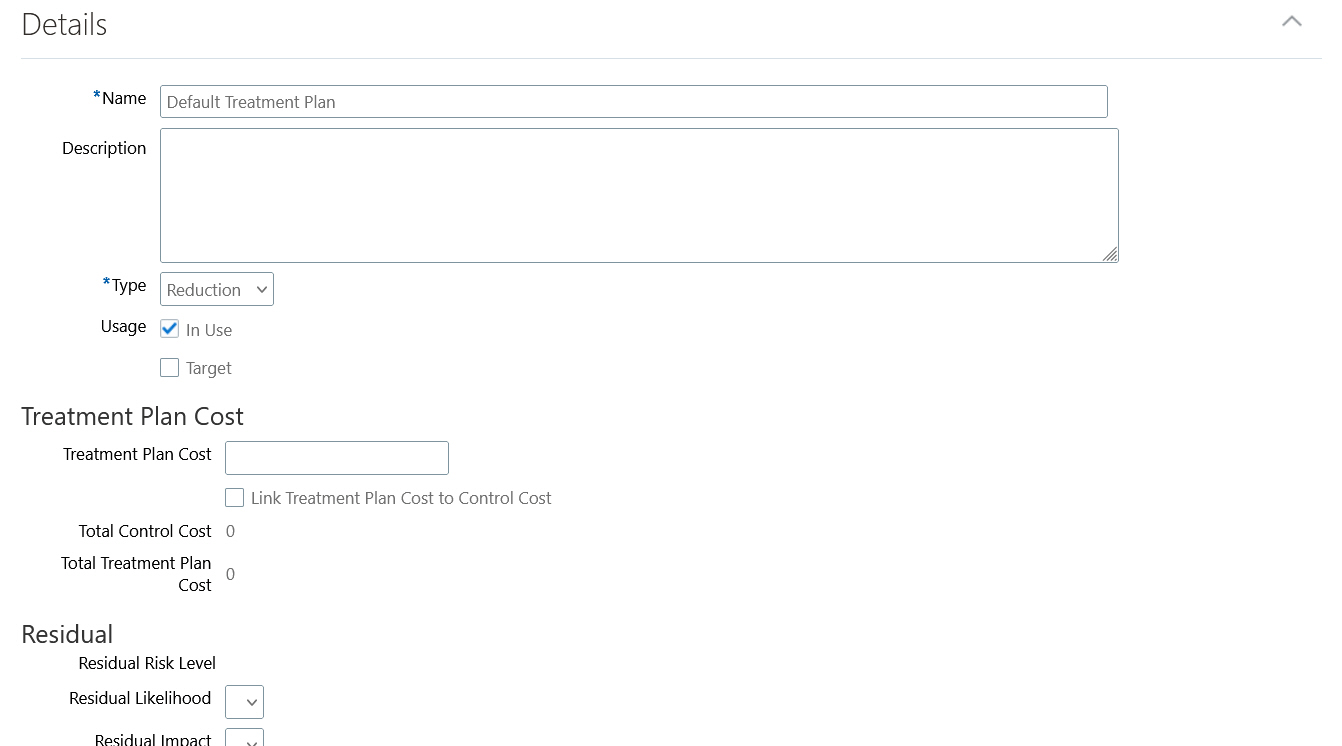
Create Treatment Plan UX Page
Beneath the Details Panel, the Related Controls Panel Enables the user to relate documented controls.
The Treatment Summary enables users to quickly view the trending activities of the inherent risk level, residual risk level, risk rating, evaluation results, and target risk level.
- Downward arrow indicates a downward trend
- Upward arrow indicates an upward trend
- Two arrows indicates no changes
- A dash indicates a value is not available

Example of the Treatment Summary Panel
Organizations now have the ability to manage their risk objectives easily as they mature over time. Initially a simple risk mitigation approach was implemented, requiring the risk owner only to relate the control records to mitigate the defined risk. However, over time the risk objective can change, requiring the risk owner to leverage the treatment plan functionality. The application allows a streamlined transition from leveraging only related controls to leveraging treatment plans. Or, a risk owner who begins by leveraging treatment plans can simply transition to only leveraging related controls.
Steps to Enable
You don't need to do anything to enable this feature.
Role And Privileges
To view treatment plans at a minimum the user needs one new privilege for the tab to be rendered within the defined risk record. The new privilege is added to two predefined duty roles. If you've customized your roles, you need to add the new privilege to it. If you use predefined duty roles, you don't need to make any changes.
| New Privilege | Updated Duty Roles | Job Role Inheriting Duties |
|---|---|---|
| View Treatment Plan for Risk (GTG_VIEW_TREATMENT_PLAN_FOR_RISK) |
|
Risk Activities Manager |
The other privileges to manage treatment plans:
- Create Issue for Risk Treatment (GTG_CREATE_MANAGER_ISSUE_FOR_RISK_TREATMENT)
- Create Treatment Plan for Risk (GTG_CREATE_TREATMENT_PLAN_FOR_RISK)
- Edit Treatment Plan for Risk (GTG_EDIT_TREATMENT_PLAN_FOR_RISK)
To view events and consequences at a minimum the user needs one of the following privileges for the tab to render within the defined risk record:
- Create Consequence (GTG_CREATE_CONSEQUENCE)
- Delete Consequence (GTG_DELETE_CONSEQUENCE)
- Edit Consequence (GTG_EDIT_CONSEQUENCE)
- View Consequence (GTG_VIEW_CONSEQUENCE)
- Create Event (GTG_CREATE_EVENT)
- Delete Event (GTG_DELETE_EVENT)
- Edit Event (GTG_EDIT_EVENT)
- View Event (GTG_VIEW_EVENT)
Enable Flexfields for Additional Risk Objects
Flexfields are currently supported for many objects. Flexfields are now enabled for additional risk objects: Risk Evaluation, Risk Analysis, Events, and Consequences. Once the flexfields are defined for a specific object, the attributes will be rendered within the Additional Information panel.
- The Additional Information panel will be rendered on the following UX pages:
- Create, edit, and view risk evaluation
- Create, edit, and view risk analysis
- Create, edit, and view events
- Create, edit, and view consequences
If you copy a specific object record, the flexfield values defined as part of the object record will be copied.
Specific business use cases require additional information to be captured as part of the record definition. User-defined flexfields enable you to create new attributes to expand the delivered form and capture specific data.
Steps to Enable
You don't need to do anything to enable this feature.
Assessment Records Now Display Issues
During the lifecycle of a control assessment, authorized users can create issues associated to the record being assessed and to the assessment record. Within the Complete Assessment train stop, you can now view the issues created during the assessment. The new Issues Created During the Assessment panel will be rendered once an issue has been created during the assessment flow.
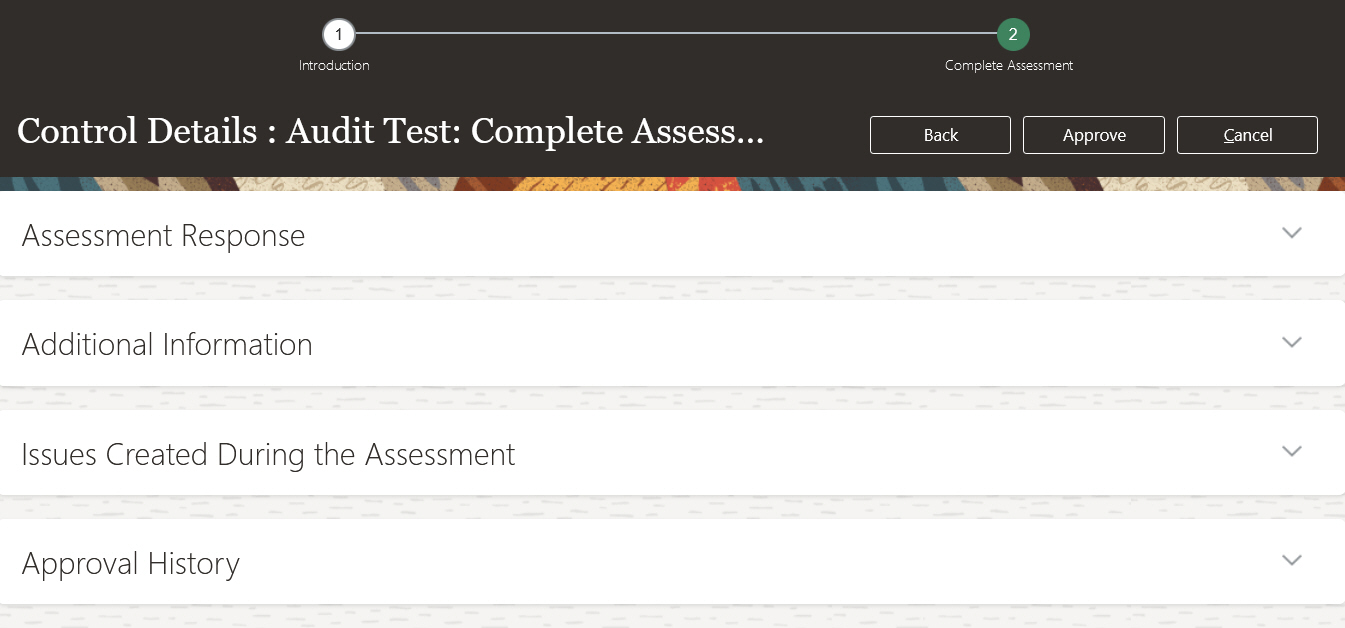
Example of the Issues Created During the Assessment Panel
The addition of the Issues Created During the Assessment panel, enables the control assessment actors to view the issues created as part of the assessment process. The new panel streamlines the relevant assessment information into a single view and no longer requires the user to navigate away from the assessment record to view if any issues had been created.
Steps to Enable
You don't need to do anything to enable this feature.
Role And Privileges
The new view assessment-related issues feature requires one new privilege. The new privilege is added to five predefined duty roles. If you've customized your roles, you need to add the new privilege to it. If you use predefined duty roles, you don't need to make any changes.
| New Privilege | Updated Duty Roles | Job Role Inheriting Duties |
|---|---|---|
| View Control Assessment Related Issues (GTG_VIEW_CONTROL_ASSESSMENT_RELATED_ISSUES) |
|
Risk Activities Manager |
Survey Responses Support Attachments
You can now configure the application to allow survey participates to attach supporting files and URLs as part of their question response. During the creation of a question you can allow for attachments by selecting the configuration option.
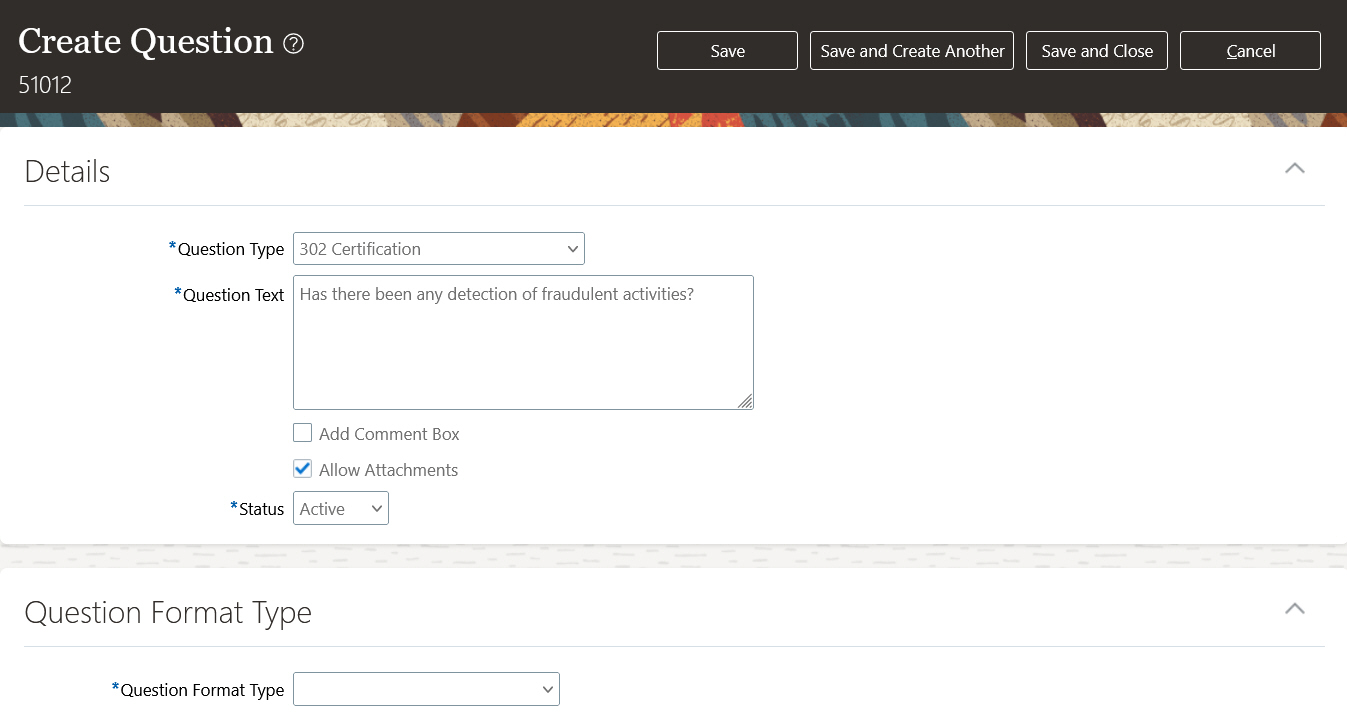
Example of Allow Attachment Configuration Option
Depending on the business objective of a survey, certain questions may need supporting documentation to justify their response. The enhancement streamlines the participants' survey responses by enabling them to attach supporting files and URLs to their responses.
Steps to Enable
You don't need to do anything to enable this feature.
New and Updated Delivered Model Content
Oracle has added 1 model, removed 1 model, and updated 4 entitlements to detect separation-of-duties conflicts and sensitive access. These updates affect 5 existing models.
NEW MODEL
8991: Create Payables Invoices and Manage Payables System Option
With this conflicting access, one could manipulate the system options before creating an invoice so that 2-way/3-way match will pass and the invoice wouldn't be put on hold as it should have been.
REVISED ENTITLEMENTS
Maintain Projects
The privilege View Project Definition Basic Information has been added to the Maintain Projects entitlement. This privilege allows management of the project details and the ability to assign funding to projects. The affected models include:
- 10000: Maintain Project Contracts and Maintain Projects
- 10008: Maintain Projects and Maintain Capital Projects
Sensitive Supplier Privileges
The following privileges have been added to the Sensitive Supplier Privileges entitlement:
- Edit Supplier Registration Bank Account
- Import Supplier Bank Accounts
- Manage Third Party Bank Account
- Manage Approved Supplier List Status
- Merge Supplier
These privileges allow access to sensitive banking data and setups.
The affected model is 9801: Sensitive Supplier Privileges.
Sensitive Purchasing Privileges
The privileges Manage Approval Task and Import Purchasing Document Bypassing Approval have been added to the Sensitive Purchasing Privileges entitlement. The Manage Approval Task privilege allows users to define requisition approval routing rules. The Import Purchasing Document Bypassing Approval allows a procurement agent to bypass approvals when importing purchase orders or purchase agreements and when creating purchase orders through the purchase order web service.
The affected model is 9804: Sensitive Purchasing Privileges.
Sensitive IT Security Privileges
The privileges Manage User Details and Reset Password have been removed from the Sensitive IT Security Privileges entitlement. There are other dependencies needed in order to get to user information or to reset a password that's not your own. The privilege Administer Sandboxes has been added to the Sensitive IT Security Privileges entitlement.
The affected model is 9361: Sensitive IT Security Privileges.
REMOVED MODEL
6682: Sensitive Access to Bypass Purchase Order Approvals
The privileges in this model have been moved to the Sensitive Purchasing Privileges entitlement referenced by model 9804: Sensitive Purchasing Privileges.
The content library is continually reviewed by experts in relevant business areas to provide the most accurate and comprehensive SoD and sensitive access control definitions. Consider uptaking these new models and entitlement changes based on your business requirements.
Steps to Enable
As a rule, when you import a model that uses entitlements, you import the entitlements automatically. But if an earlier version of an entitlement exists in your target environment, the content-import job cannot replace it with a newer version. So:
- If an entitlement has been revised, but you have not yet imported any of the models that use it, you can import one of these models now. The import operation includes the new entitlement along with the model.
- If an entitlement has been revised, and you imported a model that uses it during an earlier update, you also imported the earlier version of that entitlement. To use the new version, your only option is to edit your existing entitlement to incorporate its revisions.
Update to Global User Criteria
The list of criteria from which global users are determined has been streamlined to an optimal set of values. In addition, the most frequently used value, email, defaults in so that customers can quickly get up and running.
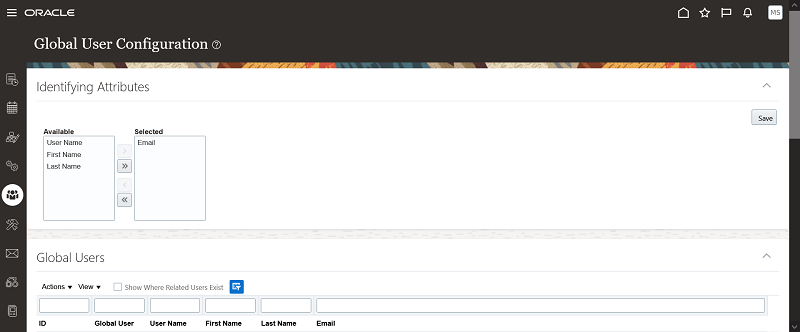
Global User Conditions
Customers will no longer have to consider values which have proven to not be viable options.
Steps to Enable
You don't need to do anything to enable this feature.
Tips And Considerations
Keep in mind that if you have been using Advanced Access Controls and want to update this value, it will remove all existing access incidents.
Changes Are Made to Business Objects
This release includes new and revised business objects, and additions, changes, and removal of attributes in objects.
Business Object Changes
The following changes have been made to journal-related business objects:
- To minimize the performance risk related to large-data business objects, for those customers who are not currently using the Journal Entry Expanded business object in either a model or control, this object will no longer be available. In its place, use the Journal Entry business object.
- Whether you have access to Journal Entry Expanded or just Journal Entry, these business objects return only primary ledger data when the data synchronization job is run. You no longer need to apply a filter in your model logic where Ledger Category Equals PRIMARY from the Ledger Setup: General business object. Only journals associated to the primary ledger are returned, and a new business object has been introduced to provide secondary ledger data should you require it.
Previously, some business objects were returning only active records during transaction synchronization jobs based on system date instead of the Transactions Created as Of date defined on the Advanced Controls Configuration page. Now the following business objects return any record that was either active or last updated since the transaction synchronization date, even if they are inactive on the date job is run.
| Business Object | Attributes Used To Identify Active Records |
|---|---|
| Business Operating Unit |
Effective End Date |
| Customer |
Profile Amount: Effective End Date, Profile: Effective End Date, and hidden attribute Line: Effective End Date |
| Customer Accounts |
Account Profile: Effective End Date |
| Person |
Effective End Date, Type Usage: Effective End Date, and hidden attribute Name: Effective End Date |
| Personal Payment Method |
Effective End Date |
| Sensitive Data Access Audit |
Viewed Person: Effective End Date |
| Department |
Effective End Date, Information Effective End Date, and Classification: Effective End Date |
| Job |
Effective End Date |
| Position |
Date To |
NOTE: Since the synchronization job now recognizes business object records that were active as of the defined transaction date, you might find newly created incidents in your control that take these records into consideration.
New Business Object
A new Secondary Journal Entry business object has been added to provide secondary ledger data should you require it to support your general ledger controls. This new business object contains the exact same attributes as Journal Entry.
Important: If you use general ledger controls that analyze journal data associated to both primary and secondary ledgers, you will need to create a new control that uses the new Secondary Journal Entry object to analyze data associated to secondary ledgers. Any existing controls without a filter against Ledger Setup: General business objects, where Ledger Category Equals PRIMARY, will analyze only revised or new ledgers of this type. If your control does not contain a filter on Ledger Setup: General business objects, incidents associated to non-primary ledger data will b3 closed when control analysis is run. Once these incident results are closed and inactive, you can use the Purge Results for incidents with that status under Setup and Administration.
Business Object Relationship Changes
There are times when business object relationships are evaluated and could be removed or changed. For this release, these changes include:
- The relationship between Supplier and Person business objects was removed because Fusion does not support linking or creating a supplier as an employee.
- A modification to the relationship between External Bank Account and External Payee business objects was updated to remove extra records.
NOTE: Controls that use the External Bank Account business object may cause incident results to be closed where false positives exist.
New Business Object Attributes
The following table lists audit business objects updated with new attributes.
| Audit Business Object | New Attributes |
|---|---|
| Audit - Document Records |
|
| Audit - Item |
|
| Audit - Participant Detail |
There are 40 new attributes with similar names, they include:
|
| Audit - Performance Measure |
|
| Audit - Person Allocated Checklist |
|
| Audit - Person Allocated Checklist Tasks |
|
| Audit - Position |
|
Attribute Type Changes
Each attribute in an object is defined as a specified type, such as date type that may or may not contain a time portion. When type changes occur, the use of the attribute in a filter or result attribute may or may not impact your existing control incidents.
The following attributes were updated from a timestamp type to a date type:
- Posting Date attribute in the Journal Entry and Journal Entry Expanded objects. The change to date type may close control incidents when you use model 32002: Manual Journals Posted After Period Close Date. Prior to the change there may have been false positive incidents where Posting Date and Period: End Date are the same.
- Date attribute in the Expense Report Details object. The change may impact your control incidents when the Date attribute is used in a filter, such as when finding duplicate expenses as in models 31004 and 31006. The time portion was not consistently available, and the analysis may have calculated an incorrect Number of Occurrences or missed a duplicate expense.
- Expense Report Date in the Expense Report Information object. The Expense Report Date attribute change to date type is the same as above Date attribute in Expense Report Details object. If you are using it as a filter it may impact your control incidents, but used only in results does not.
- Accounting Date, Exchange Date, and Cancellation Date attributes in the Payables Invoice object. For some dates, time portion was not consistently available from the source, so the attributes will no longer be treated as timestamp type. For cases where a timestamp was available and the attribute is used in control results, the incident will be closed and recreated.
The following attribute was updated from a date type to a timestamp type:
- Approved Date attribute in the Purchase Order object is now a timestamp type. If you use this Approved Date attribute in your control results, your incidents may be impacted when timestamp is available. The change may cause some to be closed and recreated.
Attribute Name Changes
Business object attributes correspond to various business areas. In an effort to align the attribute labels shown in the Advanced Financial Controls business objects to labels defined in the corresponding application pages, a few are updated.
| Business Object Name |
Old Attribute Name | New Attribute Name |
|---|---|---|
| Payables Invoice Details |
Distribution: Distribution Combination |
Distribution: Distribution Combination ID |
| Audit - Item |
PrimaryImageUrl New |
Primary Image URL New |
| Audit - Item |
PrimaryImageUrl Old |
Primary Image URL Old |
Attribute Data Type Size Changes
Each business object attribute supports a fixed character length. The following attributes from Audit - Person Allocated Checklist have been increased to 4000 characters.
- Background Image URL New
- Background Image URL Old
- Thumbnail Image URL New
- Thumbnail Image URL Old
Attributes Removed
The following attributes from Audit - Person Allocated Checklist business objects have been removed.
- BackgroundImage New
- BackgroundImage Old
- CroppedBackgroundImage New
- CroppedBackgroundImage Old
Updates to business objects provide additional attribute criteria for your controls, and those updated for audit maintain alignment to Manage Audit Policies data source.
Steps to Enable
When you use business objects that introduce new attributes or different types, or that apply simple filters like that on Journal Entry object to return primary ledger data, you must run the Transaction Data Source Synchronization job. Business objects with attribute or object changes require that the data synchronization job be run in order to return the related values. Depending upon the number of business objects you are using across models and controls, the data synchronization job may take a little longer than usual.
Tips And Considerations
For renamed attributes, you don't need to do anything to models or controls that reference these names. Just be aware they have changed.
Revised Models in Content Library
The Advanced Financial Controls content library has ten existing models that have been revised. When you have access, you will be able to select the Import action on the Models tab and select them from the Content Library.
General Ledger Models
32001: Dormant General Ledger Accounts
This model was updated to use the Journal Entry business object instead of the Journal Entry Expanded object. Any filter or result attribute referencing the removed object was also updated to use Journal Entry.
One filter was added to analyze only those account combinations that are enabled.
The attribute Financial Category was added to the results, and Account Description was removed.
32002: Manual Journals Posted After Period Close Date
This model was updated to use the Journal Entry business object instead of the Journal Entry Expanded object. Any filter or result attribute referencing the removed object was also updated to use Journal Entry.
Amount-related attributes added to results include Control Total Entered Debit, Control Total Entered Credit, and Currency Code. Additionally, Header ID and Journal Batch: Batch ID were added to provide details to support deep links from OTBI.
40010: Journals Created and Approved or Posted by the Same User
This model was updated to use the Journal Entry business object instead of the Journal Entry Expanded object. Any filter or result attribute referencing the removed object was also updated to use Journal Entry.
Amount related attributes added to results include Control Total Entered Debit, Control Total Entered Credit, and Currency Code.
40011: Journals Posted and Specify Ledger Options Managed by the Same User
This model was updated to use the Journal Entry business object instead of the Journal Entry Expanded object. Any filter or result attribute referencing the removed object was also updated to use Journal Entry.
Amount related attributes added to results include Control Total Entered Debit, Control Total Entered Credit, and Currency Code.
60018: Updates to Accounting Period Status
- This audit model was updated to provide greater contextual information about the accounting-period change. Attribute results added include Accounting Period, Context Name 1, and Context Value 1.
NOTE: If your existing general ledger controls use Journal Entry Expanded object, it is recommended you transition to the newer version using Journal Entry instead.
Account Receivable Models
33001: Customers Missing Taxpayer Identification Number
-
The attribute Organization: Created By was added to the results and Last Updated Date removed.
33002: Receivable Invoice Credit Memos Created by the Same User
- One filter was added to analyze only invoice details that are line type.
- The attributes Complete and Invoice Lines: Line Number were added to the results. Additionally, Status and Creation Date attributes are removed.
33003: Receivables Invoice Balance Exceeds Customer Credit Limit
In the model a configurable attribute called CustomerIDandCurrency was added to the Receivables Payment Schedule object. It combines the Customer ID and Currency into a single attribute. This attribute was then used to update one of the sum function filters in the model logic, and resulted in a count function filter being unnecessary and therefore removed.
A filter was added as an "or" condition to include records where the Profile: Effective End Date attribute is blank, applied next to an existing filter that analyzed future dated records.
The attribute Business Unit, and configuration attribute CustomerIDandCurrency, are added to the results. Customer ID attribute was removed due to redundancy.
40006: Customers and Receivables Invoices Managed by the Same User
One filter was added to analyze only invoice details that are line type.
Amount-related attributes added to results include Line Information: Amount and Invoice Currency Code; others added are Invoice Lines: Description and Complete. Additionally, the Creation Date was removed and replaced with Transaction Date.
40007: Receivables Invoices and Receivables Standard Receipts Managed by the Same User
One filter was added to analyze only invoice details that are line type.
Amount-related attributes added to results include Line Information: Amount and Invoice Currency Code; others added are Invoice Lines: Description, Complete, and Party Type. Additionally, the Creation Date was removed and replaced with Transaction Date.
Updates to existing model content can be made periodically, based on changes, input, or recommendations by experts.
Steps to Enable
No advance setup is required for you to import models in Advanced Controls. However, a Risk Management administrator must set the Transaction and Audit Performance Configuration date options under the Advanced Controls Configuration tab under Risk Management > Setup and Administration. The two created-as-of-date options are required, one for transactions and the other for audit events. These settings improve performance by eliminating older data from data-synchronization jobs. When these created-as-of-date options already exist, you should periodically review and change them to return only current data.
Tips And Considerations
Before using new model content, evaluate available models that match requirements for your organization under the Import action for models. The Import from Content Library page is organized by product area and model types. Once you identify models appropriate for you, import, review, and modify them in your test environment. Importing all available models is not recommended. In some cases, you may have already imported the model in a previous update. Or, some may source data from products or audit configurations you have not enabled. Moreover, models may contain user-defined or imported business objects that create data set controls or objects, respectively.
NOTE: There is no way to revise an existing control with new business objects, filters, or the attributes displayed. Uptake of any delivered-model revisions starts by importing and reviewing them as a model.
Enhanced Progress Monitoring for Data Synchronization
Improvements have been made to information about the progress of a data-synchronization job. These improvements apply both to transaction-data and audit-data synchronizations.
First, a percentage-completion value is updated more frequently as the job runs, and is more accurate.
Second, it's difficult to understand what the percentage-completion value represents, especially when a job run involves a large data set. So users can now drill into the details of the job while it's running. They can see a list of the business objects it includes, whether any data has been synchronized, and if so, what the record counts are at any given moment.
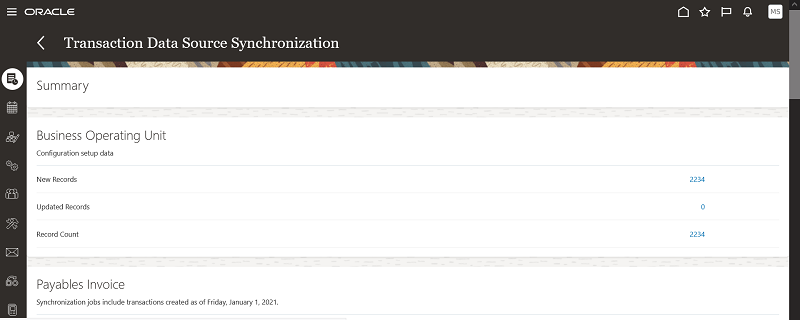
Data Synch Business Object Details
The benefit of this feature is to give users more insight into the overall progress of a data synchronization job. They can see a more accurate percentage completion, along with the actual count of new records, updated records, and the overall count.
Steps to Enable
You don't need to do anything to enable this feature.
Tips And Considerations
When business objects have large data sets, especially related to journal entries, expense reports, invoice lines, etc., you can get a sense of where a data synchronization is, related to the prior data synchronization of the same business object.
Resource Intensive Transaction Analysis Now Runs Standalone
Model and control analysis for very large data sets has been optimized to run standalone. Presently, this update is applied to any model or control that utilizes either the Journal Entry or the Journal Entry Expanded business object.
The impact of this would be if multiple models or controls are run together, those that contain either or both of the aforementioned business objects, they will not be run in parallel with any other model or control
This allows the application to properly handle the resourcing of the analysis to better enable successful completion when typically large data sets may be encountered.
Steps to Enable
You don't need to do anything to enable this feature.
IMPORTANT Actions and Considerations
FINANCIAL REPORTING COMPLIANCE
Risk Models and Survey Content Deprecated
In an upcoming release, the predefined content for survey question choice sets, 302 Certification surveys, and Financial Governance risk models delivered by Oracle will be deprecated. They will no longer be available for use. You don't need to make changes to any records you've created in past releases. Going forward, however, you'll need to create custom models, depending on the type of analysis or evaluation you need to perform, and to associate those models with risk records. The following are lists of the features to manage surveys and risk models: Depending on the type of analysis and/or evaluation you need to perform you will need to create custom models and associate them to the risk record. The following features support the creation of risk models.
- Likelihood Models
- Impact Models
- Analysis Models
- Significance Models
- Context Models
The application enables you to create and save question choice sets. It’s recommended you create choice sets used frequently for question responses. You have the option to either create questions prior to the creation of the survey template or while you are creating the survey template.
- Choice Sets
- Questions
- Survey Templates
ADVANCED FINANCIAL CONTROLS
Business Object Changes
A relationship exists between the Purchase Order and Supplier business object and the Purchase Order and Business Operating Unit business object. This relationship should not, but nevertheless does, cause data related to the Payables Invoice Details object to be retrieved. So in a future release, the relationship will be updated. The model 30003: Backdated Purchase Order is impacted, so in conjunction with this relationship update, the model will be revised in the content library. If you've deployed a control from this model or from a similar design, you'll need to recreate your control when the update is delivered.