
This document will continue to evolve as existing sections change and new information is added. All updates appear in the following table:
| Date | Module | Feature | Notes |
|---|---|---|---|
| 01 DEC 2023 | Created initial document. |
 HAVE AN IDEA?
We’re here and we’re listening. If you have a suggestion on how to make our cloud services even better then go ahead and tell us. There are several ways to submit your ideas, for example, through the Ideas Lab on Oracle Customer Connect. Wherever you see this icon after the feature name it means we delivered one of your ideas.
GIVE US FEEDBACK
We welcome your comments and suggestions to improve the content. Please send us your feedback at oracle_fusion_applications_help_ww_grp@oracle.com.
DISCLAIMER
The information contained in this document may include statements about Oracle’s product development plans. Many factors can materially affect Oracle’s product development plans and the nature and timing of future product releases. Accordingly, this Information is provided to you solely for information only, is not a commitment to deliver any material, code, or functionality, and should not be relied upon in making purchasing decisions. The development, release, and timing of any features or functionality described remains at the sole discretion of Oracle.
This information may not be incorporated into any contractual agreement with Oracle or its subsidiaries or affiliates. Oracle specifically disclaims any liability with respect to this information. Refer to the Legal Notices and Terms of Use for further information.
Column Definitions:
Report = New or modified, Oracle-delivered, ready to run reports.
UI or Process-Based: Small Scale = These UI or process-based features are typically comprised of minor field, validation, or program changes. Therefore, the potential impact to users is minimal.
UI or Process-Based: Larger Scale* = These UI or process-based features have more complex designs. Therefore, the potential impact to users is higher.
Features Delivered Disabled = Action is needed BEFORE these features can be used by END USERS. These features are delivered disabled and you choose if and when to enable them. For example, a) new or expanded BI subject areas need to first be incorporated into reports, b) Integration is required to utilize new web services, or c) features must be assigned to user roles before they can be accessed.
| Ready for Use by End Users Reports plus Small Scale UI or Process-Based new features will have minimal user impact after an update. Therefore, customer acceptance testing should focus on the Larger Scale UI or Process-Based* new features. |
Customer Must Take Action before Use by End Users Not disruptive as action is required to make these features ready to use. As you selectively choose to leverage, you set your test and roll out timing. |
|||||
|---|---|---|---|---|---|---|
| Feature |
Report |
UI or |
UI or |
|
||
Transactional Business Intelligence for Risk Management
Improvement to Survey Reporting
The OTBI survey analysis now displays questions in the same order as they appear in an initiated survey. In the Risk Management survey tool, the survey template assigns a number for the question order, which is presented to the participant. The Question Order attribute is part of the Risk Management Cloud - Assessment Result Real-Time > Survey > Survey Details dimension, which includes attributes from the Survey Details.
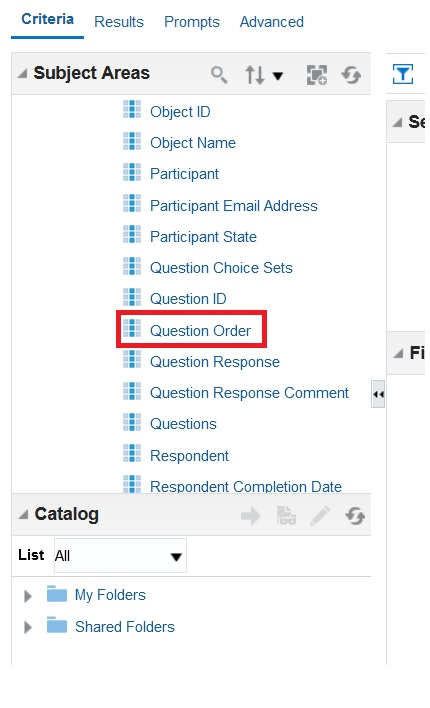
Risk Management Cloud - Assessment Result Real-Time > Survey > Survey Details > Question Order
Displaying the question order accurately in reports ensures data integrity and facilitates meaningful analysis of survey responses, leading to more informed decision-making. This coherence in report presentation enhances communication, user experience, and regulatory compliance.
Steps to Enable
You don't need to do anything to enable this feature.
REST API Supports User Assignment Groups
A new REST API has been added that supports user assignment groups. This includes the ability to use REST services to get, create, and update user assignment groups.
Customers can use their own tools to administer user assignment groups.
Steps to Enable
Review the REST service definition in the REST API guides to leverage (available from the Oracle Help Center > your apps service area of interest > APIs & Schema). If you are new to Oracle's REST services you may want to begin with the Quick Start section.
Access Requirements
The user must have the existing security privileges to perform the respective actions.
- GTG_CREATE_AND_EDIT_USER_ASSIGNMENT_GROUPS_PRIV
- GTG_EDIT_USER_ASSIGNMENT_GROUPS_PRIV
- GTG_VIEW_USER_ASSIGNMENT_GROUPS_PRIV
REST API Supports Business Object Security Management
A new REST API has been added that supports business object security management. This includes the ability to use REST services to get, create, and update security access to business objects.
Customers can use their own tools to administer business object security.
Steps to Enable
Review the REST service definition in the REST API guides to leverage (available from the Oracle Help Center > your apps service area of interest > APIs & Schema). If you are new to Oracle's REST services you may want to begin with the Quick Start section.
Access Requirements
Access must be granted to the existing privilege.
-
GTG_CREATE_AND_EDIT_BUSINESS_OBJECT_SECURITY_PRIV
Financial Reporting Compliance
Financial Reporting Compliance
Improvements to Importing Data
The data migration tool now supports the ability to import and export defined flexfield values for records of events, consequences, and treatment plans.
Flexfields allow organizations to customize data-collection fields for events, consequences, and treatment plans to meet their specific business requirements. The ability to import these flexfields offers various business benefits, including improved efficiency, data accuracy, scalability, and data governance. Additionally, it streamlines data-management processes and supports better decision-making.
Steps to Enable
You don't need to do anything to enable this feature.
Tips And Considerations
To import the corresponding flexfield values, you must create the flexfields before exporting the import template.
Access Requests Include the Data Security Context
Records of role requests include a Data Requests drawer. If data security is included in a role request, the drawer now documents both the security context and the security value for the request. In earlier releases, it showed only the security value.
A data request defines the set of data records to which a user would apply a requested role's functionality. It consists of two components: The security context may be Asset Book, Business Unit, Data Access Set, Ledger, or Reference Data Set. The security value is an item appropriate for one of these contexts, configured by your organization. For example, if a request includes the Business Unit context and the name of a business unit as its security value, the request would apply only to data pertaining to that unit.
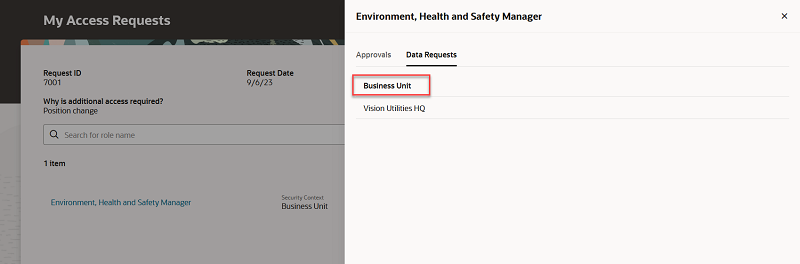
Data Security Context
This allows viewers of the request to understand the data security context to which the requested value belongs.
Steps to Enable
You don't need to do anything to enable this feature.
Search Enhancements in Access Requests
When making an access request, a user can now search for a person by user name, person first name, or person last name.
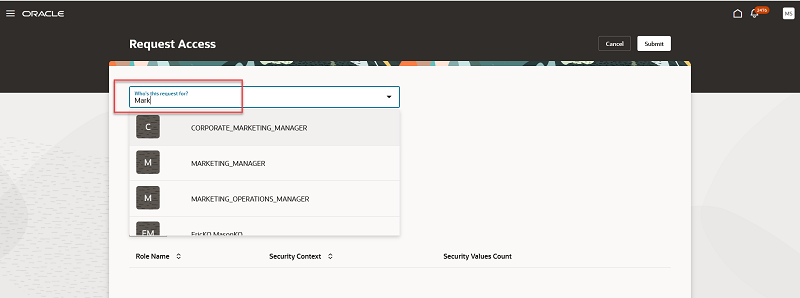
Search
The ability to search for a user is easier now with the ability to use various search criteria.
Steps to Enable
You don't need to do anything to enable this feature.
Result Investigators Now Receive Assignment Notifications
Result investigators now receive notifications not only when controls generate incidents, but also when investigators are assigned to incidents after the incidents are generated. To manage this information, you can use the Settings for Email Alerts and Notifications for the Advanced Controls business area and the Incident object.
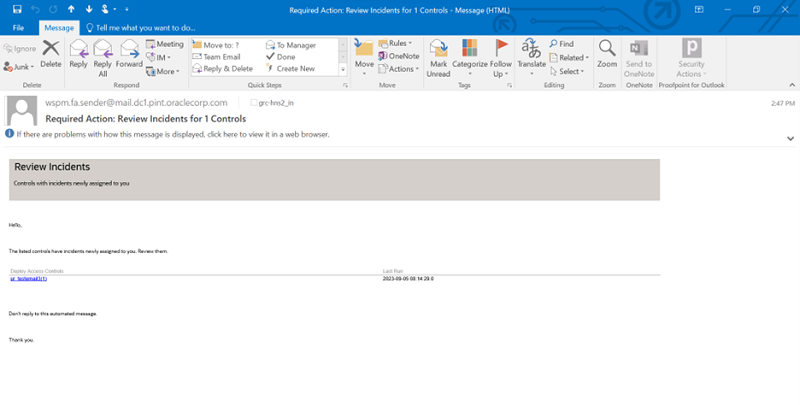
Incident investigators are expected to review and update the assigned incidents. This notification lets them know there is work for them to do.
Steps to Enable
You don't need to do anything to enable this feature.
Revised Models in Content Library
Oracle has removed 1 entitlement and made changes to 11 entitlements that are used by delivered-content models. If you're using any of the affected models, consider making the same changes. Oracle has renamed 4 existing models.
HUMAN CAPITAL MANAGEMENT
Updated Entitlement: Benefits Personal Data
The following three privileges have been removed from the Benefits Personal Data entitlement as they are obsolete:
- View Benefit Participant Enrollment Result
- Manage Participant Enrollment Result Override
- Review Benefit Participant Enrollment Result Statement
Affected model:
- 9703: Benefits Personal Data
Updated Entitlement: Manage Compensation
The following three privileges have been removed from the Manage Compensation entitlement:
- Enter Salary Details (CMP_ENTER_SALARY_DETAILS_PRIV)
- Promote Worker (PER_PROMOTE_WORKER_PRIV)
- Change Worker Working Hour (PER_CHANGE_WORKER_WORKING_HOUR_PRIV)
The following three privileges have been added to the Manage Compensation entitlement:
- Manage Salaries (ORA_CMP_MANAGE_SALARIES)
- Promote Worker (ORA_PER_WORKER_PROMOTION_DUTY)
- Change Worker Working Hour (ORA_PER_WORKER_WORKING_HOURS_CHANGE_DUTY)
The added privileges are aggregate privileges and so have the necessary dependencies built in.
Affected models:
- 4053: Manage Employee and Manage Compensation
- 4070: Manage Worker and Manage Compensation
- 4071: Manage Person and Manage Compensation
- 4072: Create User and Manage Compensation
- 4073: Manage Employee Position and Manage Compensation
- 4082: Manage Compensation and Manage Payroll
- 4083: Manage Compensation and Manage Payroll Batch Processes
- 4084: Manage Compensation and Manage Payroll Costing
Updated Entitlement: Manage Worker
The following four privileges have been removed from the Manage Worker entitlement:
- Pending Worker Quick Hire (PER_PENDING_WORKER_QUICK_HIRE_PRIV)
- Transfer Worker (PER_TRANSFER_WORKER_PRIV)
- Create Work Relationship (PER_CREATE_WORK_RELATIONSHIP_PRIV)
- Manage Absence Case (PER_MANAGE_ABSENCE_CASE_PRIV)
The following four privileges have been added to the Manage Worker entitlement:
- Pending Worker Quick Hire (ORA_PER_PENDING_WORKER_QUICK_HIRE_DUTY)
- Transfer Worker (ORA_PER_WORKER_TRANSFER_DUTY)
- Create Work Relationship (ORA_PER_WORKER_WORK_RELATIONSHIP_ADDITION_DUTY)
- Manage Absence Case (ORA_PER_ABSENCE_ANALYSIS_DUTY)
The added privileges are aggregate privileges and so have the necessary dependencies built in.
Affected models:
- 4056: Manage Worker and Manage Payroll
- 4057: Manage Worker and Manage Payroll Batch Processes
- 4058: Manage Worker and Manage Payroll Costing
- 4070: Manage Worker and Manage Compensation
- 4075: Manage Worker and Manage Time and Labor
Updated Entitlement: Manage Employee
The following privilege has been removed from the Manage Employee entitlement:
- Manage Work Terms and Assignment (PER_MANAGE_WORKTERMS_AND_ASSIGNMENT_PRIV)
The following privilege has been added to the Manage Employee entitlement:
- Manage Work Terms and Assignment
The added privilege is an aggregate privilege and so has the necessary dependencies built in.
Affected models:
- 4051: Manage Employee and Manage Payroll
- 4053: Manage Employee and Manage Compensation
- 4054: Manage Employee and Manage Payroll Batch Processes
- 4055: Manage Employee and Manage Payroll Costing
- 4065: Manage Employee Position and Manage Payroll
- 4066: Manage Employee Position and Manage Payroll Batch Processes
- 4067: Manage Employee Position and Manage Payroll Costing
- 4073: Manage Employee Position and Manage Compensation
- 4074: Manage Employee and Manage Time and Labor
- 4078: Manage Employee Position and Manage Time and Labor
Updated Entitlement: Manage Person
The following privilege has been removed from the Manage Person entitlement:
- Create Person Assignment (PER_EMPLOYMENT_CREATE_ASSIGNMENT_PRIV)
The following privilege has been added to the Manage Person entitlement:
- Create Person Assignment (ORA_PER_WORKER_ASSIGNMENT_CREATION_DUTY)
The added privilege is an aggregate privilege and so has the necessary dependencies built in.
Affected models:
- 4059: Manage Person and Manage Payroll
- 4060: Manage Person and Manage Payroll Batch Processes
- 4061: Manage Person and Manage Payroll Costing
- 4071: Manage Person and Manage Compensation
- 4076: Manage Person and Manage Time and Labor
Updated Entitlement: Manage Payroll
The following privilege has been removed from the Manage Payroll entitlement:
- Manage Payroll Relationship (PAY_MAINTAIN_PERSONAL_PAYROLL_RELATIONSHIP_PRIV)
The following privilege has been added to the Manage Payroll entitlement:
- Manage Payroll Relationship (ORA_PAY_PERSONAL_PAYROLL_RELATIONSHIP_MANAGEMENT_DUTY)
The added privilege is an aggregate privilege and so has the necessary dependencies built in.
Affected models:
- 4051: Manage Employee and Manage Payroll
- 4052: Manage Time and Labor and Manage Payroll
- 4056: Manage Worker and Manage Payroll
- 4059: Manage Person and Manage Payroll
- 4062: Create User and Manage Payroll
- 4065: Manage Employee Position and Manage Payroll
- 4082: Manage Compensation and Manage Payroll
Updated Entitlement: Manage Time and Labor
The following privilege has been removed from the Manage Time and Labor entitlement:
- Generate Time Cards (HXT_GENERATE_TIME_CARDS_PRIV)
The following privilege has been added to the Manage Time and Labor entitlement:
- Generate Time Cards (ORA_HXT_GENERATE_TIME_CARD_MANAGEMENT)
The added privilege is an aggregate privilege and so has the necessary dependencies built in.
Affected models:
- 4052: Manage Time and Labor and Manage Payroll
- 4068: Manage Time and Labor and Manage Payroll Batch Processes
- 4069: Manage Time and Labor and Manage Payroll Costing
- 4074: Manage Employee and Manage Time and Labor
- 4075: Manage Worker and Manage Time and Labor
- 4076: Manage Person and Manage Time and Labor
- 4077: Create User and Manage Time and Labor
- 4078: Manage Employee Position and Manage Time and Labor
Updated Entitlement: Payroll Personal Data (also renamed to Sensitive Payroll Personal Data)
The following privilege has been removed from the Payroll Personal Data entitlement:
- Adjust Individual Payroll Balance (PAY_PROCESS_INDIVIDUAL_PAYROLL_BALANCE_ADJUSTMENTS_PRIV)
The following privilege has been added to the Payroll Personal Data entitlement:
- Adjust Individual Payroll Balance (ORA_PAY_PAYROLL_PERSON_LEVEL_ADMINISTRATION_DUTY)
The added privilege is an aggregate privilege and so has the necessary dependencies built in.
Affected model:
- 9701: Payroll Personal Data (also renamed to 9701: Sensitive Payroll Personal Data)
Updated Entitlement: Person Data (also renamed to Sensitive Person Data)
The following eight privileges have been removed from the Person Data entitlement:
- Manage Person Citizenship (PER_MANAGE_PERSON_CITIZENSHIP_PRIV)
- Manage Person Ethnicity (PER_MANAGE_PERSON_ETHICITY_PRIV)
- Manage Person Legislative (PER_MANAGE_PERSON_LEGISLATVIVE_PRIV)
- Manage Person Name (PER_MANAGE_PERSON_NAME_PRIV)
- Manage Person Religion (PER_MANAGE_PERSON_RELIGION_PRIV)
- View Person Identifiers for External Applications
- Manage Person Identifiers for External Applications
- Access Person Extra Information by HR
The following eight privileges have been added to the Person Data entitlement:
- Manage Person Citizenship
- Manage Person Ethnicity
- Manage Person Legislative
- Manage Person Name
- Manage Person Religion
- View Person Identifiers for External Applications
- Manage Person Identifiers for External Applications
- Access Person Extra Information by HR
The added privileges are aggregate privileges and so have the necessary dependencies built in.
Affected model:
- 9700: Person Data (also renamed to 9700: Sensitive Person Data)
Updated Entitlement: Recruiting Personal Data (also renamed to Sensitive Recruiting Personal Data)
The following privilege has been removed from the Recruiting Personal Data entitlement:
- View Candidate Job Application (IRC_VIEW_CANDIDATE_JOB_APPLICATION_PRIV)
The following privilege has been added to the Recruiting Personal Data entitlement:
- View Candidate Job Application (ORA_IRC_VIEW_CANDIDATE_JOB_APPLICATION)
The added privilege is an aggregate privilege and so has the necessary dependencies built in.
Affected model:
- 9702: Recruiting Personal Data (also renamed to 9702: Sensitive Recruiting Personal Data)
Updated Entitlement: Sensitive Human Resource Privileges
The following three privileges have been removed from the Sensitive Human Resource Privileges entitlement:
- Pending Worker Quick Hire (PER_PENDING_WORKER_QUICK_HIRE_PRIV)
- Perform Worker Mass Legal Employer Change (PER_PERFORM_WORKER_MASS_LE_CHANGE_PRIV)
- Perform Worker Local and Global Transfers (PER_TRANSFER_WORKER_LOCAL_GLOBAL_PRIV)
The following three privileges have been added to the Sensitive Human Resource Privileges entitlement:
- Pending Worker Quick Hire (ORA_PER_PENDING_WORKER_QUICK_HIRE_DUTY)
- Perform Worker Mass Legal Employer Change (ORA_PER_PERFORM_WORKER_MASS_LE_CHANGE)
- Perform Worker Local and Global Transfers (ORA_PER_TRANSFER_WORKER_LOCAL_GLOBAL)
The added privileges are aggregate privileges and so have the necessary dependencies built in.
Affected model:
- 4079: Sensitive Human Resource Privileges
Updated Model: 4096: HDL Sensitive Data Loader Privileges (also renamed to 4096: Manage HSDL Spreadsheets Templates and Load Data using HSDL)
Removed Entitlement: HDL Sensitive Data Loader Privileges
The model definition had one entitlement, which had one privilege: Load Data using HCM spreadsheet Data Loader. This entitlement has been removed, and the model definition has been replaced with the following:
HRC_MANAGE_DATA_EXCHANGE_PRIV (Manage Data Exchange Work Area)
AND
ORA_HRC_MANAGE_HSDL_TEMPLATES (Manage HCM Spreadsheet Data Loader Templates) AND
Updated model name from 4096: HDL Sensitive Data Loader to 4096: Manage HSDL Spreadsheets Templates and Load Data using HSDL
The model definition has been updated to reference a combination of privileges that must exist, since a user must have both privileges to actually load data.
The content library is continually reviewed by experts in relevant business areas to provide the most accurate and comprehensive SoD and sensitive access control definitions. Consider uptaking these new and revised models based on your business requirements.
Steps to Enable
As a rule, when you import a model that uses entitlements, you import the entitlements automatically. But if an earlier version of an entitlement exists in your target environment, the content-import job cannot replace it with a newer version. So:
- If an entitlement has been revised, but you have not yet imported any of the models that use it, you can import one of these models now. The import operation includes the new entitlement along with the model.
- If an entitlement has been revised, and you imported a model that uses it during an earlier update, you also imported the earlier version of that entitlement. To use the new version, your only option is to edit your existing entitlement to incorporate its revisions.
Result Investigators Now Receive Assignment Notifications
Result investigators now receive notifications not only when controls generate incidents, but also when investigators are assigned to incidents after the incidents are generated. To manage this information, you can use the Settings for Email Alerts and Notifications for the Advanced Controls business area and the Incident object.
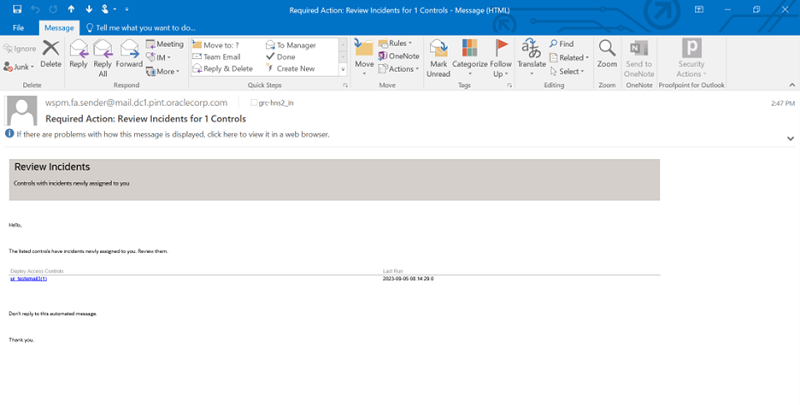
Incident investigators are expected to review and update the assigned incidents. This notification let them know there is work for them to do.
Steps to Enable
You don't need to do anything to enable this feature.
Changes Are Made to Business Objects
This release includes attribute additions as well as label and data-size changes.
New Business Object Attributes
The following business objects have been updated with new attributes.
| Business Object | New Attributes |
|---|---|
| Audit - General Payables Options |
|
| Audit - Item |
|
| Audit - Item Structure Component |
|
| Audit - Manufacturer Items |
|
| Audit - Person Allocated Checklist |
|
| Audit - RcvParametersAuditVO |
|
Attribute Name Changes
Business object attributes correspond to various business areas. In an effort to align the attribute labels shown in the Advanced Financial Controls business objects to labels defined in the corresponding application pages, some are updated.
| Business Object | Old Attribute Names |
New Attribute Names |
|---|---|---|
| Audit - Item |
|
|
| Audit - Person Contact |
|
|
Attribute Type Changes
Each attribute in an object is defined as a specified type. When type changes occur, the use of the attribute in a filter or result attribute may or may not impact your existing control incidents.
The following attributes were updated from a long type to a string type in the audit object Audit - Item:
- Created From Old
- Created From New
- Created from Revision Old
- Created from Revision New
NOTE: If you use these attributes in your control results, your incidents may be impacted. The change may cause some to be closed and recreated for those attribute values previously truncated due to character length. Two delivered library content models use the Audit - Item object, but do not include the attributes in the control logic or results. The model controls using the business object include 60012: Additions and Deletions to Item Master and 60013: Updates to Item Master.
Updates to business objects with new attributes provide additional criteria for your controls, and those updated for audit maintain alignment to Manage Audit Policies data source.
Steps to Enable
When you use business objects that introduce new attributes, you must run the Transaction Data Source Synchronization job. Business objects with attribute changes require that the data synchronization job be run in order to return the related values. Depending upon the number of business objects you are using across models and controls, the data synchronization job may take a little longer than usual.
Tips And Considerations
For renamed attributes, you don't need to do anything to models or controls that reference these names. Just be aware they have changed.
Revised Models in Content Library
Updates are made to three transaction models in Advanced Financial Controls. These models are found under the Enterprise Resource Planning Library.
Accounts Payable Models
30007: Payables Invoices for Debarred Suppliers
Two new filters are added to the end of the model logic to reduce the number of false-positive results. This was done by using equal condition filters for business unit and supplier ID attributes. These filters are labeled:
- Invoice business unit equal to debarred supplier Procurement BU ID
- Invoice supplier equal to debarred Supplier ID
40012: Payable Invoices Approved and Created by the Same User
When invoices are approved, the last user to update the transaction can be the same person who approved it. Therefore, model logic was revised to take this into consideration to prevent false-positive results.
- The model’s name and description are updated to reflect the changes. The model no longer analyzes users who last updated the invoice and approved it.
- Two filters were removed that use the Last Updated By attribute at the end of logic region:
- Same user updated a payables invoice and completed its approval
- Same user updated a payables invoice and acquired and performed the approval action for it
- A third filter was updated to use Task Assignee User Name attribute instead of Completed By.
- Result Display no longer includes the Last Updated By attribute.
40013: Payable Invoices Approved and Payment Created by the Same User
When invoices are approved, the last user to update the transaction can be the same person who approved it. Therefore, model logic was revised to take this into consideration to prevent false-positive results.
- The model’s name and description are updated to reflect the changes. The model no longer analyzes users who last updated the payment and approved the invoice.
- Two filters were removed that use the Last Updated By attribute at the end of logic:
- Same user updated a payment and completed the approval action on its invoice
- Same user updated a payment and acquired and performed the approval action on its invoice
- A third filter was updated to use Task Assignee User Name attribute instead of Completed By.
- Result Display no longer includes the Last Updated By attribute.
Updates to existing content are made periodically, based on changes, input, or recommendations by experts.
Steps to Enable
A Risk Management administrator should review the following before users import models in Advanced Controls.
- An individual importing models must be granted security access to business objects to view and use the models. Check this security under Risk Management Data Security > Business Object Security.
- On the Advanced Controls Configuration tab, the Transaction and Audit Performance Configuration date options are required. Navigate to Risk Management > Setup and Administration to review and define the two created-as-of-date options. These settings improve performance by eliminating older data from data-synchronization jobs. When these created-as-of-date options already exist, you should periodically review and change them to return only current data.
Tips And Considerations
Before using new model content, evaluate available models that match requirements for your organization under the Import action for models. The Import from Content Library page is organized by product area and model types. Once you identify models appropriate for you, import, review, and modify them in your test environment. Importing all available models is not recommended. In some cases, you may have already imported the model in a previous update. Or, some may source data from products or audit configurations you have not enabled. Moreover, models may contain user-defined or imported business objects that create data set controls or objects, respectively.
NOTE: There is no way to revise an existing control with new business objects, filters, or the attributes displayed. Uptake of any delivered-model revisions starts by importing and reviewing them as a model.