Update 24B
Revision History
This document will continue to evolve as existing sections change and new information is added. All updates appear in the following table:
| Date | Module | Feature | Notes |
|---|---|---|---|
| 29 MAR 2024 | IMPORTANT Actions and Considerations | Updated document. Added Common Risk Management topic. | |
| 01 MAR 2024 | Created initial document. |
Overview
 HAVE AN IDEA?
We’re here and we’re listening. If you have a suggestion on how to make our cloud services even better then go ahead and tell us. There are several ways to submit your ideas, for example, through the Ideas Lab on Oracle Customer Connect. Wherever you see this icon after the feature name it means we delivered one of your ideas.
GIVE US FEEDBACK
We welcome your comments and suggestions to improve the content. Please send us your feedback at oracle_fusion_applications_help_ww_grp@oracle.com.
DISCLAIMER
The information contained in this document may include statements about Oracle’s product development plans. Many factors can materially affect Oracle’s product development plans and the nature and timing of future product releases. Accordingly, this Information is provided to you solely for information only, is not a commitment to deliver any material, code, or functionality, and should not be relied upon in making purchasing decisions. The development, release, and timing of any features or functionality described remains at the sole discretion of Oracle.
This information may not be incorporated into any contractual agreement with Oracle or its subsidiaries or affiliates. Oracle specifically disclaims any liability with respect to this information. Refer to the Legal Notices and Terms of Use for further information.
Feature Summary
Column Definitions:
Features Delivered Enabled
Report = New or modified, Oracle-delivered, ready to run reports.
UI or Process-Based: Small Scale = These UI or process-based features are typically comprised of minor field, validation, or program changes. Therefore, the potential impact to users is minimal.
UI or Process-Based: Larger Scale* = These UI or process-based features have more complex designs. Therefore, the potential impact to users is higher.
Features Delivered Disabled = Action is needed BEFORE these features can be used by END USERS. These features are delivered disabled and you choose if and when to enable them. For example, a) new or expanded BI subject areas need to first be incorporated into reports, b) Integration is required to utilize new web services, or c) features must be assigned to user roles before they can be accessed.
| Ready for Use by End Users Reports plus Small Scale UI or Process-Based new features will have minimal user impact after an update. Therefore, customer acceptance testing should focus on the Larger Scale UI or Process-Based* new features. |
Action is Needed BEFORE Use by End Users Not disruptive as action is required to make these features ready to use. As you selectively choose to leverage, you set your test and roll out timing. |
|||||
|---|---|---|---|---|---|---|
| Feature |
Report |
UI or |
UI or |
|
||
Certifier Worksheet Enhancements Include Follow-Up Capability |
||||||
Access Incidents Closed Due to Inactive User Are Identified with a System Comment |
||||||
Risk Common
Transactional Business Intelligence for Risk Management
Ability to Report on Business Objects
The Risk Management Cloud - Advanced Financial Controls Real Time subject area includes a new folder called Business Objects. Its dimensions enable you to view a list of available business objects, including any user-defined or imported objects. Other related dimensions can include the object product, category, or relationships.
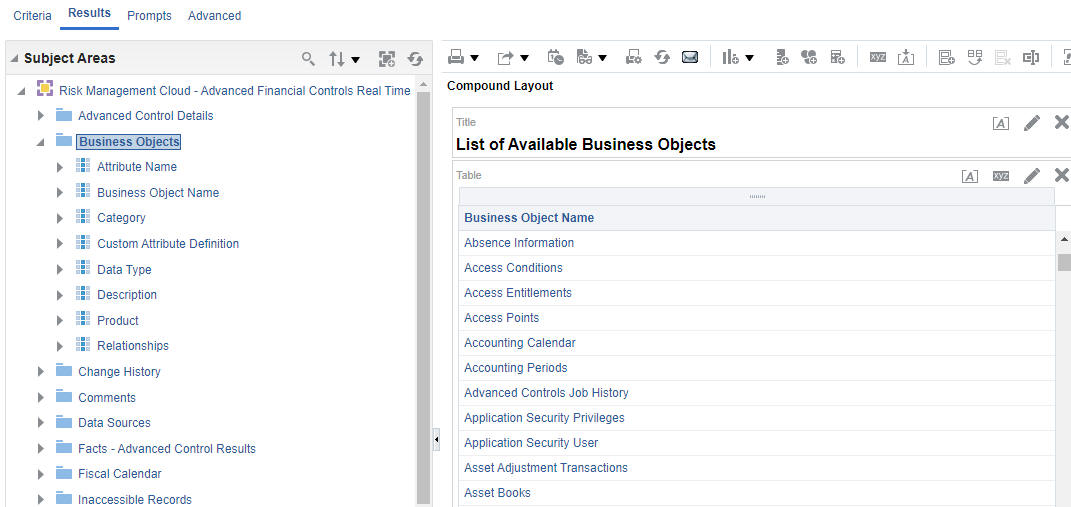
New Business Object Folder and Example of Business Object List
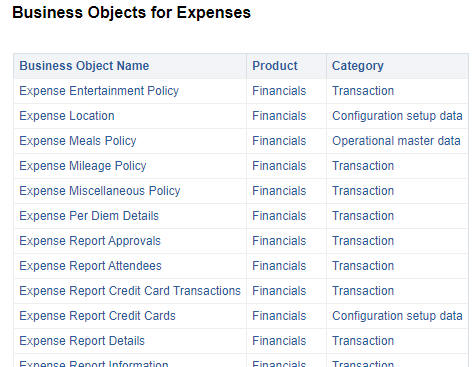
Analysis Example of Expense Business Objects with Related Product and Category Information
Additionally, you can create an analysis that lists the controls to which you've been granted access, and shows the business objects they use. Other dimensions allow you to evaluate available attributes in the object and their data types.
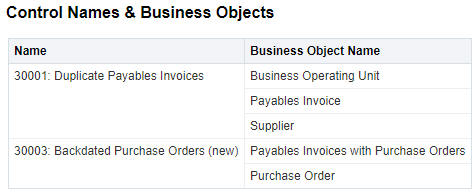
Analysis Example of Control Names and Corresponding Business Objects
The feature enables you to view and report on the business objects available in Risk Management to build models in Advanced Financials Controls. It also allows you identify other information like attributes within these objects, or objects used in your current controls.
Steps to Enable
You still need to run the Report Synchronization job required for Advanced Controls. However, a secondary job is spawned from that, called BO Report Synchronization. It's the job that populates the Business Objects subject area with data.
Key Resources
- See Creating Analytics for Risk Management, Create and Edit Analytics section for more information on creating analyses
Access Requirements
An existing privilege and duty role grant a user access to the new Business Objects folder and dimensions. These include:
- View Business Object Visualizations (GTG_VIEW_BUSINESS_OBJECT_VISUALIZATIONS_PRIV)
- Advanced Transaction Controls Analyst (FBI_ADVANCED_FINANCIAL_CONTROL_TRANSACTION_ANALYSIS_DUTY)
Both the existing privilege and OTBI security access are part of the seeded job role Advanced Transaction Controls Analyst (ORA_GTG_APPLICATION_CONTROL_MANAGER_JOB). The Business Object folder doesn't use security assignments, as controls and their incidents do. However, when you use the folder in conjunction with Control dimensions, you will see only controls available to you.
Subject Area Enhancements
The Risk Management Cloud - Compliance Real Time subject area incorporates three new dimensions: Advanced Controls Related to Processes, Advanced Controls Related to Risks, and Advanced Controls Related to Controls. These dimensions enable users to conduct analyses and unions across Risk Management subject areas for Advanced Controls and Financial Reporting Compliance object records. For example, navigate to the Related Records folder to find the new Advanced Controls Related to Processes dimension. Attributes include the Advanced Control ID, Advanced Control Name, Advanced Control Type, Advanced Control Status, Advanced Control Last Run Date, Advanced Control Pending Incident Count (Fact), and Advanced Control Closed Incident Count (Fact).
Every dimension comprises identical attributes, enabling customers to create reports rendering the relationships between object records in Financial Reporting Compliance (FRC) and Advanced Controls, using attributes within the Advanced Controls subject areas, as well as to establish deep links to specific object records in Advanced Controls and FRC.
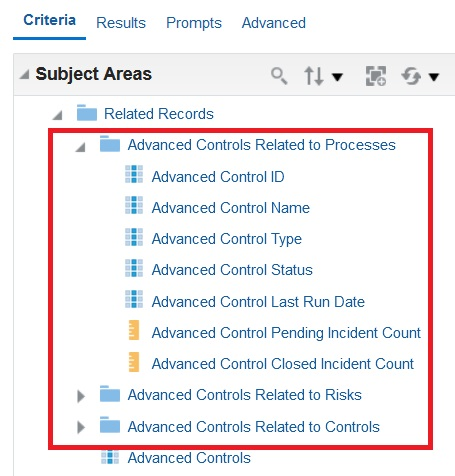
Example of the three new dimensions within Risk Management Cloud - Compliance Real Time subject area > Related Records
By incorporating the same attributes across dimensions, users gain the ability to create comprehensive reports that draw insights from diverse Advanced Controls subject areas. This flexibility enables better-informed decision-making and a deeper understanding of organizational performance. The capability to establish deep links to defined Advanced Controls and Financial Reporting Compliance object records streamlines record navigation and facilitates efficient data retrieval. This enhances user productivity and supports more effective audit and compliance processes.
Steps to Enable
You don't need to do anything to enable this feature.
Common Risk Management
Ability to Generate an XLS Report of User Groups
Users can now generate an XLS report of a user group that shows the object, authorization, members, and member eligibility. One or more user groups can be selected based on what the user has at least view access to. Then by selecting the Actions button and the Generate Report option, a User Groups for Risk Management report job will be initiated.

User Group Report Selection
Once the job is completed successfully, the report can be downloaded from the Monitor Jobs page.
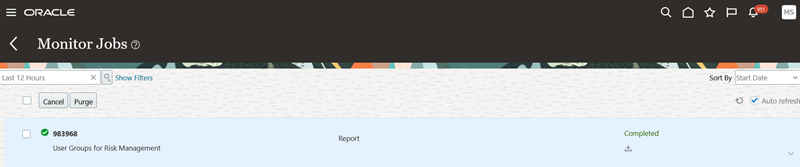
User Group Report Job
This report will allow users to quickly generate, analyze, and distribute information about a user group or groups to determine if the members are appropriate for inclusion based on the object and authorization definition of the group.
Steps to Enable
You don't need to do anything to enable this feature.
Financial Reporting Compliance
Financial Reporting Compliance
Extend Control Enforcement Type Values
A user who creates or edits a control can select an enforcement-type value for it. Default values include detective, preventive, and corrective. Your organization can now use the lookups feature to create additional enforcement-type values and modify the status of existing values.
To edit enforcement-type values, navigate to Risk Management > Setup and Administration > Lookups. In the Lookup Type field, search for GRCM_CONTROL_ENFORCEMENT_TYPE.
Extending the list of enforcement-type values provides customization and flexibility, allowing you to align the attribute values with your specific business requirements. This capability enhances data accuracy, improves user satisfaction, and can serve as a competitive advantage by offering a solution that adapts to evolving customer needs.
Steps to Enable
You don't need to do anything to enable this feature.
Risk Management
Advanced Financial Controls
Changes Are Made to Business Objects
This release includes changes and attribute additions to business objects, and two new objects.
New Business Objects
Two new business objects are available. They include Time Card Information and Audit - Role Memberships and Access.
- The first Time Card Information object is used in revised model content in this release. These updated models include 50004: Employee New Hire Created by Same User Managing Time Cards and 50011: Time Reported Fraudulently by Other Employees.
- The new Audit - Role Memberships and Access object is for security auditing. The object's data comes from audit policy Oracle Platform Security Service (OPSS) when enabled. It supports these Event Types: RoleCreation, RoleMembershipAdd, RoleMembershipRemove, PermissionSetGrant, and PermissionSetRevocation. This object is used in a new model in this release, called 60024: Application Implementation Consultant Role Events for Users.
New Business Object Attributes
The following business objects have been updated with new attributes.
| Business Object | New Attribute |
|---|---|
| Audit - Common Lookup Types |
|
| Audit - General Payables Options |
|
| Audit - Journal Source Setup |
|
| Audit - RcvParametersAuditVO |
|
| Audit - Standard Lookup Type |
|
| Payroll Time Definitions |
|
| Payroll Transactions |
|
Attribute Name Changes
Business object attributes correspond to various business areas. In an effort to align the attribute labels shown in the Advanced Financial Controls business objects to labels defined in the corresponding application pages, some are updated.
| Business Object Name | Old Attribute Name | New Attribute Name |
|---|---|---|
| Audit - Ledger Relationships |
|
|
| Payroll Transactions | Business Group ID | Legislative Data Group Identifier |
| Receivables Standard Receipt | Business Unit | Business Unit Identifier |
Attributes Removed
The EnterpriseId attribute in Audit - Talent Pool Members business object has been removed.
Attribute Value Changes
The Purchasing: Match Approval Level attribute was updated in Purchasing Setup: General business object. This is a calculated attribute and the format was updated.
NOTE: If you use this Purchasing: Match Approval Level attribute in your control results, your incidents may be impacted. The change may cause some to be closed and recreated where the value has been previously populated. Delivered library content models do not use this Purchasing Setup: General business object.
Updates to business objects provide additional attribute criteria for your controls, and those updated for audit maintain alignment to Manage Audit Policies data source. The new objects support new and revised model content included in this release.
Steps to Enable
To use the new Audit - Role Memberships and Access object for security auditing, navigate to the Setup and Maintenance > Manage Audit Policies page. On that page, locate Oracle Platform Security Service (OPSS). If Audit Level is None, select Low instead.

Manage Audit Policies Page
When you use business objects that introduce new attributes, you must run the Transaction Data Source Synchronization job. Business objects with attribute changes require that the data synchronization job be run in order to return the related values. Depending upon the number of business objects you are using across models and controls, the data synchronization job may take a little longer than usual.
Tips And Considerations
For renamed attributes, you don't need to do anything to models or controls that reference these names. Just be aware they have changed.
New and Revised Models in Content Library
Advanced Financial Controls has one new model added to the content library, and four existing models have been revised. When you have access, you will be able to select the Import action on the Models tab and select them from the Content Library.
NEW MODEL
For the new model, the following criteria provides information on the content library, library type, model name and business object associated to the model. See the Changes Are Made to Business Objects feature that describes the supported Event Types for this model; also review the Steps to Enable section on that feature.
- Model Name: 60024: Application Implementation Consultant Role Events for Users
- Business Object: Audit - Role Memberships and Access
- Content Library: Common Setup Library
- Library Type: Advanced Audit Controls
UPDATED MODELS
Updates were made to four transaction models. One of these models is found in the Enterprise Resource Planning Library, while the other three are in the Human Capital Management Library.
Accounts Payable Model
30001: Duplicate Payables Invoices
-
One equals filter on Supplier ID between business objects was added in the fourth position of model logic. The previous model may have generated false-positive results without it.
Human Capital Management Models
50004: Employee New Hire Created by Same User Entering Time Cards
- The model’s name and description are updated to reflect some of the changes.
- The previous Time Card business object for transactions was replaced with the new Time Card Information object. It represents users who are entering time instead of managing time cards afterwards. This is considered more of a replacement model, since the transactions it analyzes concern time-card entry and not the administration of time cards afterwards.
- All filters have been revised or added to incorporate the new object in this model and include:
- Two date filters applied on time cards and employee job assignments updated in the last three months
- Filters for available job assignment types and action codes that contain the word "hire"
- Only considers submitted and approved time cards
- Filters to return the person’s current record and corresponding job assignment
- Lastly, two filters to identify a user who created the job assignment and the same user who may have created or updated time card
- Result Display was updated to select attributes from the new object and provide contextual information from the others.
50009: Employees with More than One Annual Salary Change
- The model’s name and description are updated to reflect some of the changes.
- A new user-defined object (UDO) was created. It's called Employee Salary Changes, and its description is, "Identify employee salary changes in the last year." It uses Salary, Person, and Employee Job Assignment business objects. It's filters include:
- Filter on employee and contingent worker person types
- Only salary changes in the last year, excluding any future dated ones
- Filters to return the person’s current record and corresponding job assignment
- The final model was updated to use the UDO, and includes filters that:
- Include employee and contingent worker person types, and salary changes in the last year
- A grouping filter on Person ID, in which a count function is applied to identify persons with two or more salary changes
- Result Display was updated to select attributes from the new UDO.
50011: Time Reported Fraudulently by Other Employees
- In the existing User Names UDO, the person type filter was removed and a filter to return the person’s current record was added.
- Like model 50004, the previous Time Card business object for transactions was replaced with the new Time Card Information object in the model. Also consider this more of a replacement model since transactions analyzed are around time card-entry and not those who administer time cards afterwards.
- Also, in this model using the UDO, filters were added to include those with an available person ID, and only time cards that have been submitted and approved.
- Result Display was updated to select attributes from the new object and provide contextual information from the others.
The new audit model tracks changes to Application Implementation Consultant job role, a role that grants a large amount of application access, and its access should be closely monitored. Model-content updates are made periodically, based on changes, input, or recommendations by experts.
Steps to Enable
To use the new 60024 model, auditing for security needs to be enabled that corresponds to the Audit - Role Memberships and Access object. Navigate to the Setup and Maintenance > Manage Audit Policies page, set Audit Level to Low for Oracle Platform Security Service (OPSS).
No advance setup is required for you to import models in Advanced Controls. However, a Risk Management administrator must set the Transaction and Audit Performance Configuration date options under the Advanced Controls Configuration tab under Risk Management > Setup and Administration. The two created-as-of-date options are required, one for transactions and the other for audit events. These settings improve performance by eliminating older data from data-synchronization jobs. When these created-as-of-date options already exist, you should periodically review and change them to return only current data.
Tips And Considerations
Before using new model content, evaluate available models that match requirements for your organization under the Import action for models. The Import from Content Library page is organized by product area and model types. Once you identify models appropriate for you, import, review, and modify them in your test environment. Importing all available models is not recommended. In some cases, you may have already imported the model in a previous update. Or, some may source data from products or audit configurations you have not enabled. Moreover, models may contain user-defined or imported business objects that create data set controls or objects, respectively.
NOTE: There is no way to revise an existing control with new business objects, filters, or the attributes displayed. Uptake of any delivered-model revisions starts by importing and reviewing them as a model. If an existing model uses the same name as the model you import, you will need to rename the revised model during import.
Key Resources
- For more information about importing models, see a set of five topics beginning with "Import Models, Controls, or Conditions." These topics appear in Oracle Fusion Cloud Risk Management: Using Advanced Controls at Oracle Help Center > Cloud Applications > Risk Management and Compliance > All Books.
Analysis of Fusion Audit Enablement
When you perform an analysis of audit data, we perform a validation that audit has been enabled for the related business object. If the audit configuration hasn't been enabled, there won't be any data to analyze. So, we tell you if either the business object itself or selected attributes haven't yet been audit-enabled.
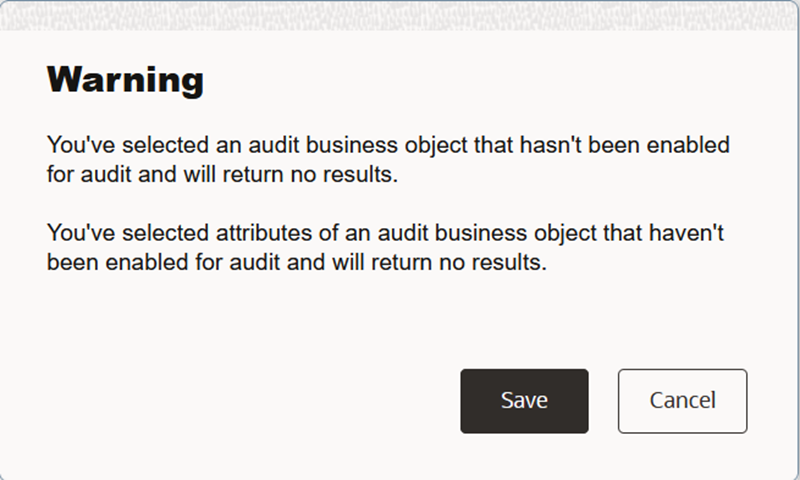
Audit Enablement Validation Message
Similar information is available as part of the Transaction Data Source Synchronization job information. If there are issues based on the enablement of business objects and attributes in a model or control, the Transaction Data Source Synchronization job will Complete with Warnings. By drilling into the details of the job and scrolling to the bottom, the respective audit enablement messages will be displayed.
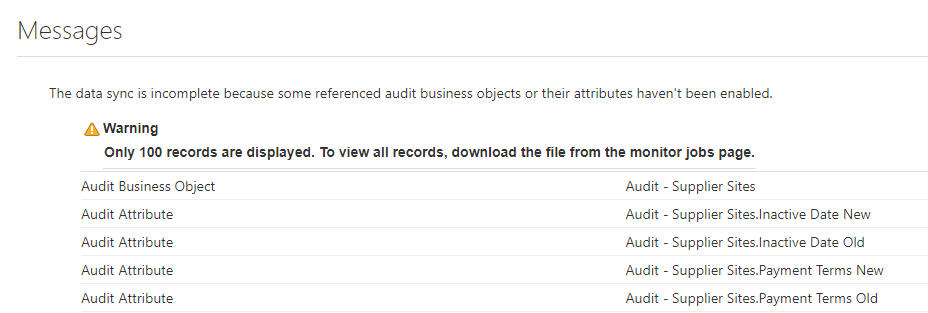
Transaction Data Sync Job Warning Message Details Regarding Audit
If the underlying audit data capture for the selected Fusion Applications business object hasn't been enabled, there won't be any data available for analysis, which could provide a false sense of security.
Steps to Enable
You don't need to do anything to enable this feature.
Access Certification
Certifier Worksheet Enhancements Include Follow-Up Capability
The certifier worksheet has been enhanced to streamline the end-user's experience. Among the enhancements, a new feature enables role managers and owners to follow up on decisions made by certifiers about user-role combinations. These updates apply to the enhanced certifier worksheet that was introduced in release 24A, but not to the original worksheet.
The worksheet header now displays the title as "Certifier Worksheet" along with the certifier's name, while the subtitle denotes the certification name. These updates align the certifier worksheet with the overview pages used by role managers and owners.
A new badge alerts users of the certification status. The badge helps certifiers immediately view the status and understand why buttons are hidden when the worksheet is read-only. The badge colors and their corresponding meanings are as follows:
- Not submitted (Blue): The worksheet is available for the certifier to judge whether role assignments are appropriate. The certifier hasn't yet forwarded the worksheet to a role manager for review.
- Submitted (Gray): The certifier has completed work, and the worksheet is under review by a role manager or owner.
- Reopened (Yellow): A role manager or owner has returned the worksheet to its certifier so that one or more user-role combinations may be reconsidered.
- Closed (Green): The worksheet belongs to a certification project that has reached either of two end statuses: Closed (work is complete) or Terminated (an owner discontinued the project before it was complete).

The Header Area of the Worksheet, Showing the Status Badge
To take actions in the worksheet, users click "action buttons" that open "panel drawers." These are areas that enable users not only to act but also to review past actions, and that remain open only while they're in use. Three buttons (and their panel drawers) enable certifiers to update the status of user-role combinations, and so are available only to certifiers. Others enable users to make comments, add attachments, review audit history or certification details, and follow up on certification decisions. They're available to certifiers, role managers, and owners. Some action buttons and panel drawer titles have been updated:
| Action Button Labels | Panel Drawer Titles | Drawer Button Labels |
|---|---|---|
| Keep Roles | Keep roles | Keep |
| Remove Roles | Remove roles | Remove |
| Investigate | Investigate | Investigate |
| Add Attachments | Add attachments | Add |
Stakeholders involved in the certification process may question why a certifier has self-certified his or her own role assignments, or has recommended keeping or removing other users' role assignments. Role managers or owners can now request follow-up on these user-role combinations by selecting them, then using actions available from a new Follow-Ups button. These include Request Follow-Up to initiate an inquiry, and Resolve Request or Remove Request to conclude it.
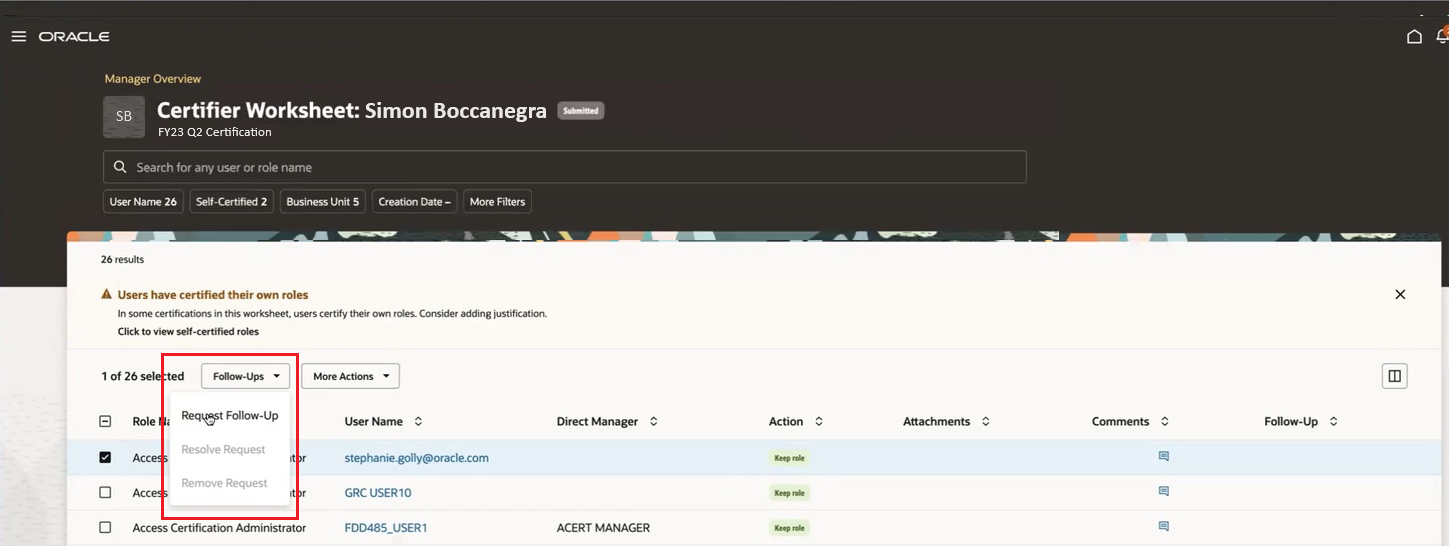
Follow-Up Options for Owners and Role Managers
Having initiated a follow-up, the role manager or owner updates the worksheet status to Reopened. The certifier receives a notification and then uses a fourth action, Address Request, to respond. It's the only action the Follow-Ups button makes available to certifiers, and it isn't available to role managers or owners. The certifier then submits the worksheet once again.
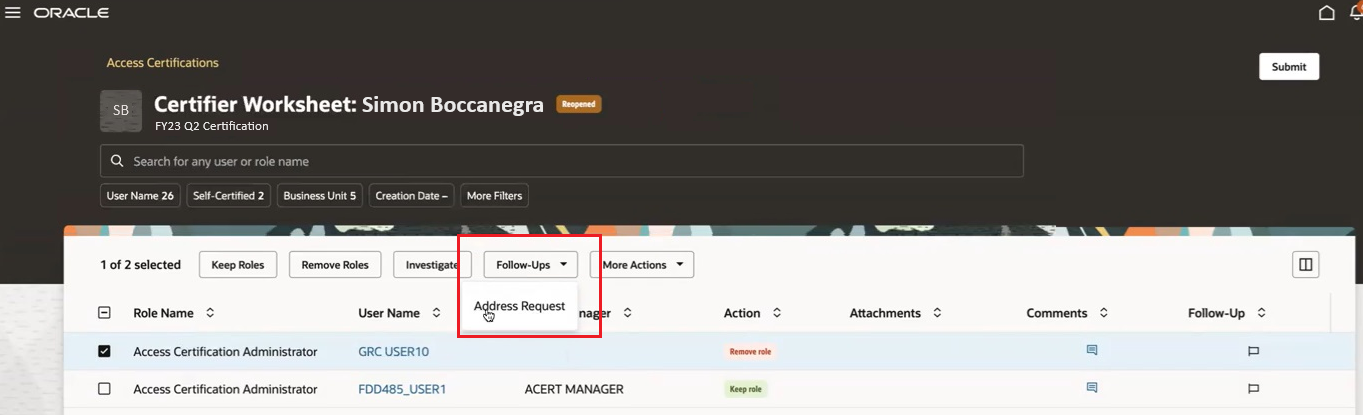
Follow-Up Option for Certifiers
When any of these actions is selected, a Follow-Up panel drawer opens. It prompts the user to provide a mandatory comment. For example, when a role manager or owner selects the Request Follow-Up action, the comment would explain why the request is being made. Or, when a certifier selects the Address Request action, the comment either acknowledges the need to change the original certification decision, or explains why it should be retained. All comments are added to the comment history.
If a user selects a Follow-Ups action that doesn't apply, the application will render a message noting none of the selected rows apply.
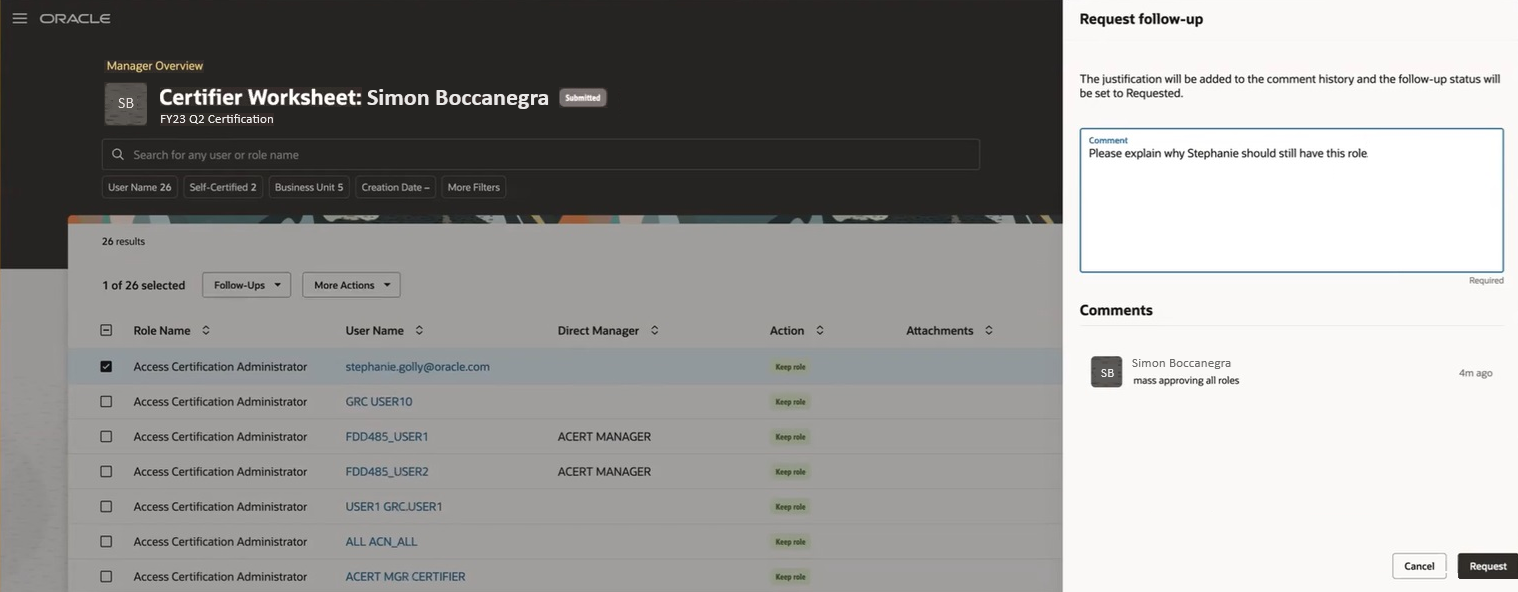
Example of the Request Follow-Up Panel Drawer
Two new columns apply to this follow-up capability. A Follow-Up column appears by default; it displays an icon for each user-role combination for which follow-up activity is in progress. You can add a Follow-Up Status column; it reports the current status of follow-up activity.
In addition an existing column, originally called "File or URL," is renamed "Attachments."
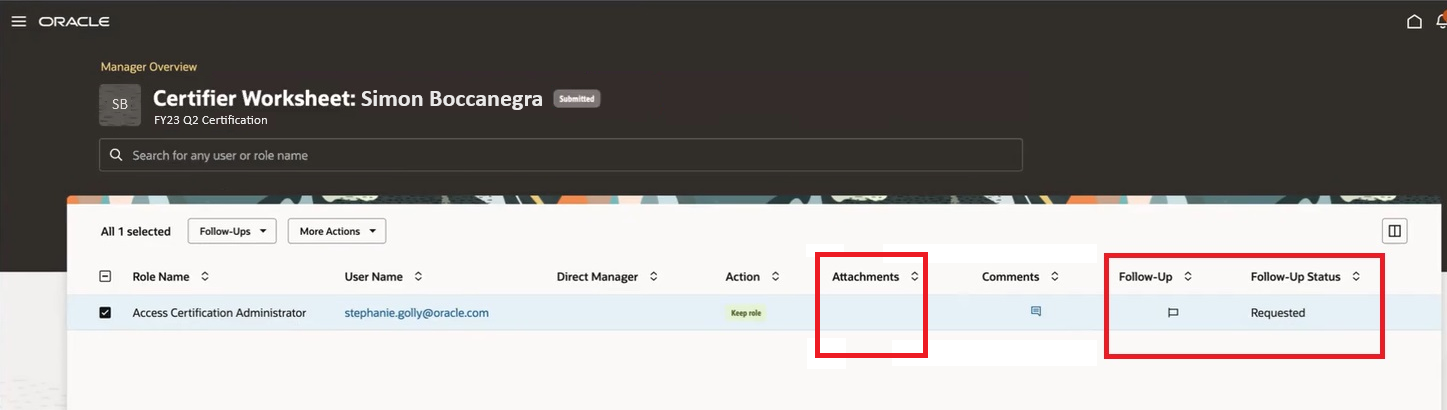
New and Updated Columns
Enhancements to the certifier worksheet enable organizations to address potential issues efficiently, ensure compliance, and maintain a secure and well-managed user access environment. They streamline the monitoring process, empowering users with a more granular and responsive approach to user-role combination oversight.
Steps to Enable
You don't need to do anything to enable this feature.
Advanced Access Controls
Revised Models in Content Library
Oracle has added one new delivered-content model, added two new entitlements, and updated one entitlement that's used by delivered-content models. If you're using any of the affected models, consider making the same changes.
GENERAL LEDGER
Updated Entitlement: Enter Journals
The following privilege has been removed from the Enter Journals entitlement as it does not allow creation of journal entries:
- Define Oracle Fusion General Ledger Revaluation
Affected models:
- 10015: Maintain Project Accounting Transactions, Reporting and Enter Journals
- 10016: Maintain Project Accounting for General Ledger and Enter Journals
- 5241: Enter Accounts Receivables Invoice and Enter Journals
- 6750: Enter Journals and Approve Payables Invoices
- 6770: Enter Journals and Assets Depreciation
- 6780: Enter Journals and Assets Workbench
- 6790: Enter Journals and Capitalizing Assets
- 6800: Enter Journals and Create Payables Invoices
- 6810: Enter Journals and Create Payments
- 6820: Enter Journals and Create Purchase Orders
- 6840: Enter Journals and Enter Customer Receipts
- 6860: Enter Journals and Physical Inventory
- 6870: Enter Journals and Post Journal Entry
- 6871: Enter Journals and Manage Financial Applications Workflow Rules
- 6880: Enter Journals and Release Sales Order
- 6890: Enter Journals and Remittances
- 6900: Enter Journals and Set Up Assets
- 6911: Enter Journals and Set Up General Ledger Chart of Accounts
- 6912: Enter Journals and Set Up General Ledger Currencies
- 6913: Enter Journals and Set Up General Ledger Daily Rates
- 6914: Enter Journals and Manage Accounting Data Security
- 6915: Enter Journals and Set Up General Ledger Sets
- 6916: Enter Journals and Set Up General Ledger Options
- 6917: Enter Journals and Set Up General Ledger Statistical Units of Measure
- 6918: Enter Journals and Manage Accounting Period Statuses for General Ledger
- 6919: Enter Journals and Define Accounting Calendars
- 6920: Enter Journals and Manage Journal Approval Rules
- 6921: Enter Journals and Set Up General Ledgers
- 6922: Enter Journals and Manage General Ledger Balances Cube
- 6925: Enter Journals and Post Journal Entry and Manage Accounting Period Statuses for General Ledger
- 6926: Enter Journals and Post Journal Entry and Manage Journal Sources
- 6927: Enter Journals and Post Journal Entry and Setup General Ledgers
- 6928: Set Up Accounting Hub and Enter Journals
- EPM ARCS Superuser and Fusion Enter Journals
HUMAN CAPITAL MANAGEMENT
New Entitlement: Recruiting Third Party Integration Partner with the following privileges:
- Use REST Service - Candidate Background Checks IRC_REST_SERVICE_ACCESS_CANDIDATE_BACKGROUND_CHECKS_PRIV
- Use REST Service - Candidate Assessments IRC_REST_SERVICE_ACCESS_CANDIDATE_ASSESSMENTS_PRIV
- Use REST Service - Candidate Tax Credits IRC_REST_SERVICE_ACCESS_CANDIDATE_TAX_CREDITS_PRIV
- Use REST Service - Job Distribution IRC_REST_SERVICE_ACCESS_JOB_DISTRIBUTION_PRIV
- Use REST Service - Job Site Applications IRC_REST_SERVICE_ACCESS_JOB_SITE_APPLICATIONS_PRIV
- Use REST Service - Job Site Candidates IRC_REST_SERVICE_ACCESS_JOB_SITE_CANDIDATES_PRIV
- Use REST Service - Job Site Postings IRC_REST_SERVICE_ACCESS_JOB_SITE_POSTINGS_PRIV
New Entitlement: HCM Applications Access with the following privilege:
- Access HCM Common Components HRC_ACCESS_HCM_COMMON_COMPONENTS_PRIV
New Control: 4100: Recruiting Third Party Integration Partner and HCM Applications Access
Control Description: A Recruiting third party integration partner who uses REST APIs for integration purposes should not have any HCM application access. In this control, the Access HCM Common Components privilege is used as a proxy for access to HCM applications since most roles have this privilege. Add additional privileges to ensure that this covers all HCM applications used by your organization.
The content library is continually reviewed by experts in relevant business areas to provide the most accurate and comprehensive SoD and sensitive-access control definitions. Consider uptaking these new and revised models based on your business requirements.
Steps to Enable
As a rule, when you import a model that uses entitlements, you import the entitlements automatically. But if an earlier version of an entitlement exists in your target environment, the content-import job cannot replace it with a newer version. So:
- If an entitlement has been revised, but you have not yet imported any of the models that use it, you can import one of these models now. The import operation includes the new entitlement along with the model.
- If an entitlement has been revised, and you imported a model that uses it during an earlier update, you also imported the earlier version of that entitlement. To use the new version, your only option is to edit your existing entitlement to incorporate its revisions.
Ability to Delete Advanced Access Entitlements
Users can now delete Advanced Control access entitlements. Prior to deletion, we check whether global conditions, models, and controls use selected entitlements. If so, a message identifies where the entitlement is, and says it has to be removed before deletion. If the entitlement isn't present in any of the entities, it gets deleted.

Delete Entitlement
This feature will now allow users to remove entitlements that are no longer being used and help maintain the hygiene of the entitlement listing.
Steps to Enable
You don't need to do anything to enable this feature.
Tips And Considerations
Periodically, a visual review of the existing entitlements is warranted to ensure that only valid items exist. This also can be useful if you need to disable a non-Fusion data source, which requires the removal of all related records.
Ability to Delete Advanced Access Global Conditions
Users can now delete Advanced Control access global conditions.

Delete Global Condition
This feature will now allow users to remove global conditions that are no longer being used and help maintain the hygiene of the global-condition listing.
Steps to Enable
You don't need to do anything to enable this feature.
Tips And Considerations
Periodically, a visual review of the existing global conditions is warranted to ensure that only valid items exist. This also can be useful if you need to disable a non-Fusion data source, which requires the removal of all related records.
Access Incidents Closed Due to Inactive User Are Identified with a System Comment
An incident generated by an access control is closed automatically if it involves a user who's no longer active. When this happens, the application inserts a comment in the incident's record explain why the incident was closed. The wording of the comment is, "Incident closed due to user inactive status."
This information helps provide more clarity on why the incident was closed since this is a system close.
Steps to Enable
You don't need to do anything to enable this feature.
Advanced Access Requests
Advanced Access Requests Can't Be Approved by the Requester
Even if you are able to approve access requests submitted by other users, you are ineligible to approve requests that you submit, either for yourself or on behalf of other users. As approver, you can view the request but can't perform any actions on it. You'll be informed of this to avoid confusion.
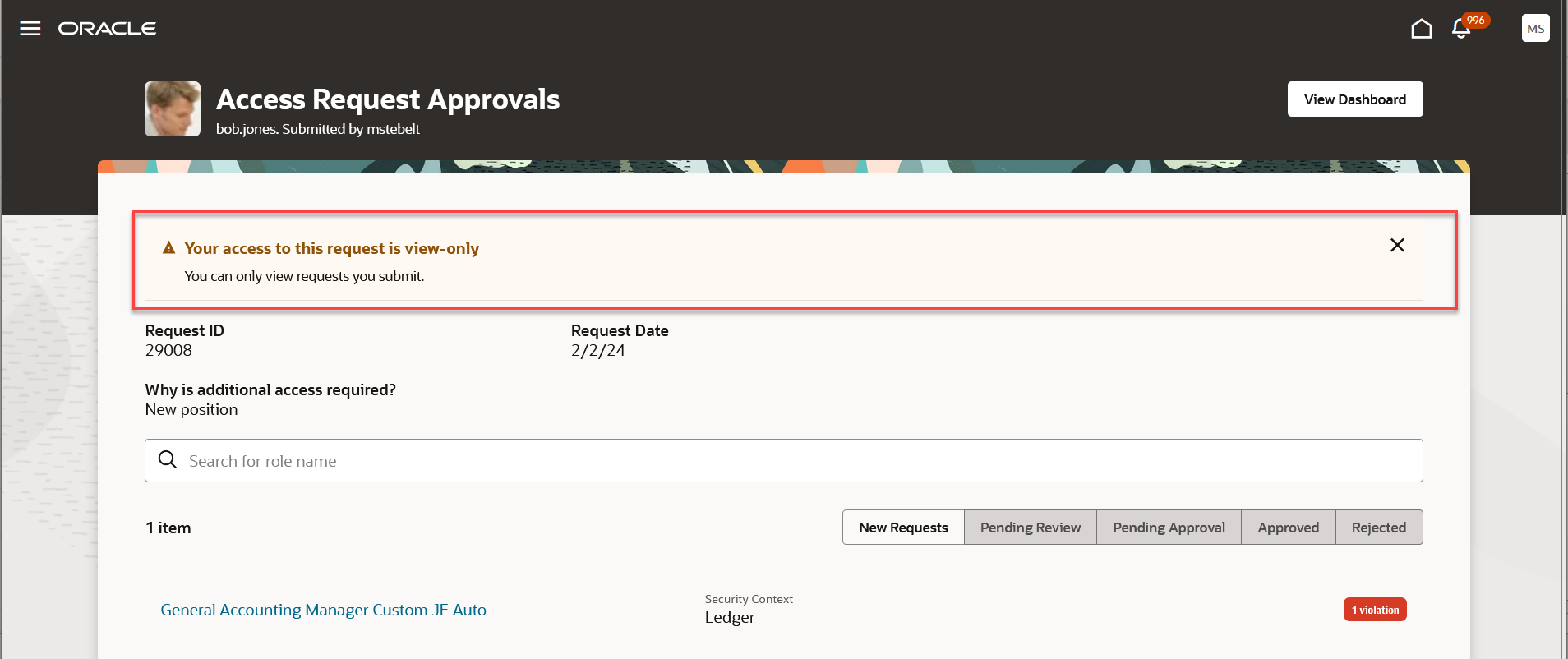
Access Request Approval of Self Request
This feature limits the risk of approvers granting excessive access by approving their own requests.
Steps to Enable
You don't need to do anything to enable this feature.
IMPORTANT Actions and Considerations
ADVANCED FINANCIAL CONTROLS
Transaction Models Using Payroll Transaction Object Generate False Positives
In an upcoming release, we’re making revisions to reduce false positives where the Payroll Transaction business object is used. The following models are impacted:
- 50001 Payroll Transactions and Personal Payment Method Managed by Same User
- 50002 Payroll Transactions and Time Cards Managed by Same User
- 50006 Employees on the Payroll a Short Time
COMMON RISK MANAGEMENT
REST API for User Assignment Groups to Be Replaced
In an upcoming release, the User Assignment Groups REST API will be replaced by another that will offer greater flexibility and efficiency. If you use the User Assignment Groups REST API, it will be necessary to transition to the replacement. Please start preparing now by opening a service request for details and guidance.