
- Revision History
- Overview
- Pre-Update and Post-Update Tasks
- Optional Uptake of New Features (Opt In)
- Feature Summary
- Sales and Operations Planning
-
- Dual Units of Measure
- Sales and Operations Planning
-
- Automatically Generate Bills of Resources
- View Collected Measure Data
- Choose Whether to Proceed When You Haven't Saved Layout Changes
- Manage New Product Introduction and Forecast Cannibalization Process
- Enforce Integrity of Forecasts in Past Time Periods
- Export to Spreadsheets Without Merging Cells Containing Level Members
- Publish, Delete, and Release Plans Using REST Services
- Other Sales and Operations Planning Changes in This Update
-
This document will continue to evolve as existing sections change and new information is added. All updates appear in the following table:
| Date | Product | Feature | Notes |
|---|---|---|---|
| 17 SEP 2021 | Created initial document. |
This guide outlines the information you need to know about new or improved functionality in this update, and describes any tasks you might need to perform for the update. Each section includes a brief description of the feature, the steps you need to take to enable or begin using the feature, any tips or considerations that you should keep in mind, and the resources available to help you.
Security and New Features
The Role section of each feature identifies the security privilege and job role required to use the feature. If feature setup is required, then the Application Implementation Consultant job role is required to perform the setup, unless otherwise indicated. (If a feature doesn't include a Role section, then no security changes are required to use the feature.)
If you have created job roles, then you can use this information to add new privileges to those roles as needed. For details about how to compare your configured job roles to predefined job roles and add security artifacts to your configured job roles, see the Security Console and Roles and Role Assignments chapters in the Oracle SCM Cloud: Securing SCM guide on the Oracle Help Center.
 HAVE AN IDEA?
We’re here and we’re listening. If you have a suggestion on how to make our cloud services even better then go ahead and tell us. There are several ways to submit your ideas, for example, through the Ideas Lab on Oracle Customer Connect. Wherever you see this icon after the feature name it means we delivered one of your ideas.
GIVE US FEEDBACK
We welcome your comments and suggestions to improve the content. Please send us your feedback at oracle_fusion_applications_help_ww_grp@oracle.com.
DISCLAIMER
The information contained in this document may include statements about Oracle’s product development plans. Many factors can materially affect Oracle’s product development plans and the nature and timing of future product releases. Accordingly, this Information is provided to you solely for information only, is not a commitment to deliver any material, code, or functionality, and should not be relied upon in making purchasing decisions. The development, release, and timing of any features or functionality described remains at the sole discretion of Oracle.
This information may not be incorporated into any contractual agreement with Oracle or its subsidiaries or affiliates. Oracle specifically disclaims any liability with respect to this information. Refer to the Legal Notices and Terms of Use for further information.
Pre-Update and Post-Update Tasks
Depending on the features you're using in your Cloud applications, you may be required to perform certain steps immediately before or after your quarterly update. For details of these pre-update and post-update steps and the product areas that are affected, refer to Oracle SCM Cloud: Performing Your Quarterly Update (doc ID 2337485.1) on My Oracle Support.
Optional Uptake of New Features (Opt In)
Oracle Cloud Applications delivers new updates every quarter. This means every three months you'll receive new functionality to help you efficiently and effectively manage your business. Some features are delivered Enabled meaning they are immediately available to end users. Other features are delivered Disabled meaning you have to take action to make available. Features delivered Disabled can be activated for end users by stepping through the following instructions using the following privileges:
- Review Applications Offering (ASM_REVIEW_APPLICATIONS_OFFERINGS_PRIV)
- Configure Oracle Fusion Applications Offering (ASM_CONFIGURE_OFFERING_PRIV)
Here’s how you opt in to new features:
- Click Navigator > My Enterprise > New Features.
- On the Features Overview page, select your offering to review new features specific to it. Or, you can leave the default selection All Enabled Offerings to review new features for all offerings.
- On the New Features tab, review the new features and check the opt-in status of the feature in the Enabled column. If a feature has already been enabled, you will see a check mark. Otherwise, you will see an icon to enable the feature.
- Click the icon in the Enabled column and complete the steps to enable the feature.
In some cases, you might want to opt in to a feature that's not listed in the New Features work area. Here's how to opt in:
- Click Navigator > My Enterprise > Offerings.
- On the Offerings page, select your offering, and then click Opt In Features.
- On the Opt In page, click the Edit Features (pencil) icon for the offering, or for the functional area that includes your feature.
- On the Edit Features page, complete the steps to enable the feature.
For more information and detailed instructions on opting in to new features for your offering, see Offering Configuration.
Opt In Expiration
Occasionally, features delivered Disabled via Opt In may be enabled automatically in a future update. This is known as an Opt In Expiration. If your cloud service has any Opt In Expirations you will see a related tab in this document. Click on that tab to see when the feature was originally delivered Disabled, and when the Opt In will expire, potentially automatically enabling the feature. You can also click here to see features with Opt In Expirations across all Oracle Cloud Applications.
Column Definitions:
Report = New or modified, Oracle-delivered, ready to run reports.
UI or Process-Based: Small Scale = These UI or process-based features are typically comprised of minor field, validation, or program changes. Therefore, the potential impact to users is minimal.
UI or Process-Based: Larger Scale* = These UI or process-based features have more complex designs. Therefore, the potential impact to users is higher.
Features Delivered Disabled = Action is needed BEFORE these features can be used by END USERS. These features are delivered disabled and you choose if and when to enable them. For example, a) new or expanded BI subject areas need to first be incorporated into reports, b) Integration is required to utilize new web services, or c) features must be assigned to user roles before they can be accessed.
| Ready for Use by End Users Reports plus Small Scale UI or Process-Based new features will have minimal user impact after an update. Therefore, customer acceptance testing should focus on the Larger Scale UI or Process-Based* new features. |
Customer Must Take Action before Use by End Users Not disruptive as action is required to make these features ready to use. As you selectively choose to leverage, you set your test and roll out timing. |
|||||
|---|---|---|---|---|---|---|
| Feature |
Report |
UI or |
UI or |
|
||
Choose Whether to Proceed When You Haven't Saved Layout Changes |
||||||
Manage New Product Introduction and Forecast Cannibalization Process |
||||||
Export to Spreadsheets Without Merging Cells Containing Level Members |
||||||
Set up your Oracle Cloud applications so you can order, price, receive, pick, pack, and ship an item that you enable with primary and secondary UOM tracking. You might need to order, transfer, outsource, or buy an item in a unit of measure that's different from the unit of measure that you use to price, invoice, and cost it.
For example, you might stock and sell meat in cases, but price it in pounds. Each case of meat has a different price because the total weight in pounds varies from one case to the next, but you need to give your buyers an estimated price for each case.
You can use the dual UOM solution to meet this requirement. It's an end-to-end, integrated solution that works across the Oracle Cloud applications and helps you:
- Simultaneously track an item in the primary UOM and secondary UOM throughout your order-to-cash process and procure-to-pay processes.
- Capture the actual weight of the item that you sell, transfer, or purchase, so you can accurately price, invoice, and cost the item.
- Provide a price estimate at the time of sale or purchase and maximize value according to the exact weight that you ship or receive.
Here's the Oracle Sales and Operations Planning Cloud enhancement to the dual UOM solution that's available in this update:
- Support Dual Unit of Measure
Dual unit of measure (UOM) considerations, such as catch weight, are important in natural resources and a variety of industries, such as food and beverage. For example, you may receive orders for a certain number of cases with a nominal weight per case, but the final pricing is based on the actual weight shipped. Oracle Cloud Supply Chain Management now comprehensively addresses the need to track two, simultaneous UOMs throughout the end-to-end supply chain business processes.
Oracle Cloud Supply Chain Planning ensures that all relevant data collected from supply chain management applications are in the primary unit of measure and the relevant measures are appropriately translated to the display unit of measure. After you release planned orders from supply planning and replenishment planning, order orchestration processes ensure that all translation to the relevant UOM occurs to support execution in dual units of measure.
Execute your supply chain considering dual UOM through the end-to-end supply chain business processes.
Steps to Enable
You don't need to do anything to enable this feature.
Tips And Considerations
- To enable an item for dual unit of measure tracking, the Manage Items task is used in the Product Information Management work area to set the Tracking Unit of Measure attribute to Primary and Secondary for the item.
- The Pricing unit of measure attribute is set as Primary or Secondary using the Manage Items task in the Product Information Management work area to ensure Order Management Cloud can appropriately price the sales order line with relevant pricing unit of measure.
- Supply Chain Planning Cloud collects and releases demand and supplies by converting from the secondary unit of measure to the primary unit of measure.
Key Resources
- The Support Dual Unit-of-Measure readiness training available on Oracle Cloud Readiness for Supply Chain Planning.
Role Information
You have a couple of options for giving people access to this feature, depending on whether you're assigning them predefined job roles or your own configured job roles.
- Users who are assigned any of these predefined job roles are automatically able to access this feature:
- Materials Planner (ORA_MSC_MATERIALS_PLANNER_JOB)
- Supply Chain Planner (ORA_MSC_SUPPLY_CHAIN_PLANNER_JOB)
- Demand Planner (ORA_MSC_DEMAND_PLANNER_JOB)
- Sales and Operations Planner (ORA_MSC_SALES_AND_OPERATIONS_PLANNER_JOB)
- Replenishment Planner (ORA_MSC_REPLENISHMENT_PLANNER_JOB)
- Order Promising Manager (ORA_MSC_ORDER_PROMISING_MANAGER_JOB)
- Backlog Manager (ORA_MSC_BACKLOG_MANAGER_JOB)
- Production Scheduler (ORA_MSC_PRODUCTION_SCHEDULER_JOB)
- Users who are assigned configured job roles that contain any of these privileges are able to access this feature:
- Monitor Supply Planning Work Area (MSC_MONITOR_SUPPLY_PLANNING_WORK_AREA_PRIV)
- Monitor Demand and Supply Planning Work Area (MSC_MONITOR_DEMAND_AND_SUPPLY_PLANNING_WORK_AREA_PRIV)
- Monitor Demand Management Work Area (MSC_MONITOR_DEMAND_MANAGEMENT_WORK_AREA_PRIV)
- Monitor Sales and Operations Planning Work Area (MSC_MONITOR_SALES_AND_OPERATIONS_PLANNING_WORK_AREA_PRIV)
- Monitor Replenishment Planning Work Area (MSC_MONITOR_REPLENISHMENT_PLANNING_WORK_AREA_PRIV)
- Monitor Order Promising Work Area (MSC_MONITOR_ORDER_PROMISING_WORK_AREA_PRIV)
- Monitor Backlog Management Work Area (MSC_MONITOR_BACKLOG_MANAGEMENT_WORK_AREA_PRIV)
- Release Production Schedule (MSC_RELEASE_PRODUCTION_SCHEDULE_PRIV)
- Run Production Schedule (MSC_RUN_PRODUCTION_SCHEDULE_PRIV)
Automatically Generate Bills of Resources
Bills of resources are comprised of critical components, subassemblies, and resources vital for aggregate sales and operations planning. Bills of resources enable both plan runs and simulations to complete quickly because the computational burden of unnecessary detail is avoided.
You can now generate bills of resources from existing manufacturing work definitions and sourcing rules through the Create Bills of Resources scheduled process instead of just through a file-based data import process.
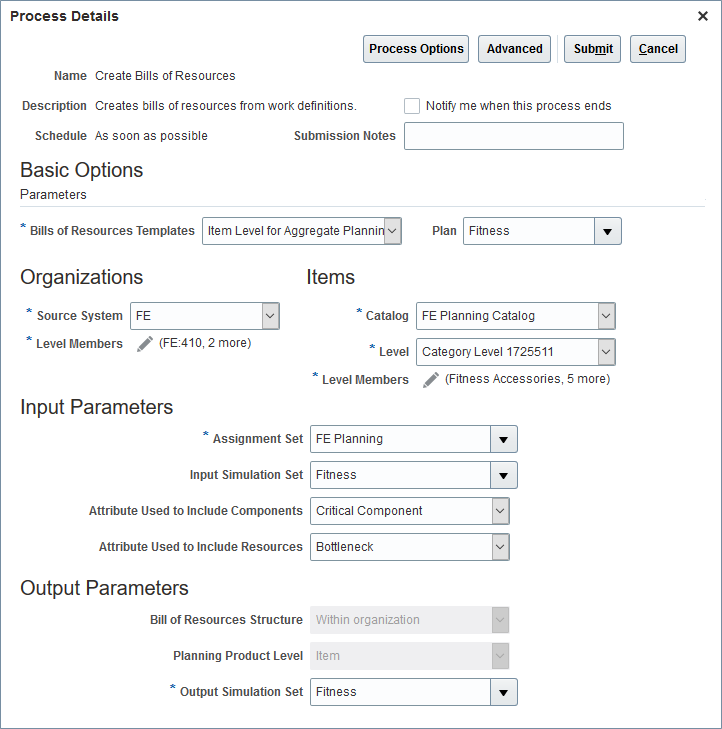
Schedule Create Bills of Resources process in Scheduled Processes (Navigation: Tools > Scheduled Processes > Schedule New Process > Create Bills of Resources)
Enhance your automation of input data for supply chain planning to improve planner productivity.
Steps to Enable
You don't need to do anything to enable this feature.
Tips And Considerations
- The Create Bills of Resources scheduled process uses collected work definition data in the form of routings and item structures as input.
- Identify critical assembly, subassembly, and component items in manufacturing organizations using the Critical Component attribute in the Items table in an input simulation set if not already set in plan inputs.
- Identify critical resources using the Bottleneck attribute in the Resources table in the input simulation set if not already set in plan inputs.
- If the Planning Product Level in your Sales and Operations Plan is set as Category, then bills of resources must still be collected through the file-based data import process.
- Bills of resources created by the process are output to a simulation set, not plan inputs.
- You can associate the output simulation set to a Sales and Operations Plan by editing plan options.
Key Resources
- The Automatically Generate Bills of Resources readiness training available on Oracle Cloud Readiness for Supply Chain Planning.
Role Information
You have a couple options for giving people access to this feature, depending on whether you're assigning them predefined job roles or your own configured job roles.
- Users who are assigned any of these predefined job roles are automatically able to access this feature:
- Sales and Operations Planner (ORA_MSC_SALES_AND_OPERATIONS_PLANNER_JOB)
- Supply Chain Planner (ORA_MSC_SUPPLY_CHAIN_PLANNER_JOB)
- Users who are assigned configured job roles that contain this privilege are able to access this feature:
- Edit Bill of Resources (MSC_EDIT_BILLS_OF_RESOURCES_PRIV)
After you load measure data, you can now review the data in the Plan Inputs work area to understand the status of the data load, such as whether the load was successful or not. Use the new Collected Measure Data page to view the records and their statuses instead of having to examine log files or run a plan to understand the status. This new page enables faster resolution of data quality problems in the data load process.
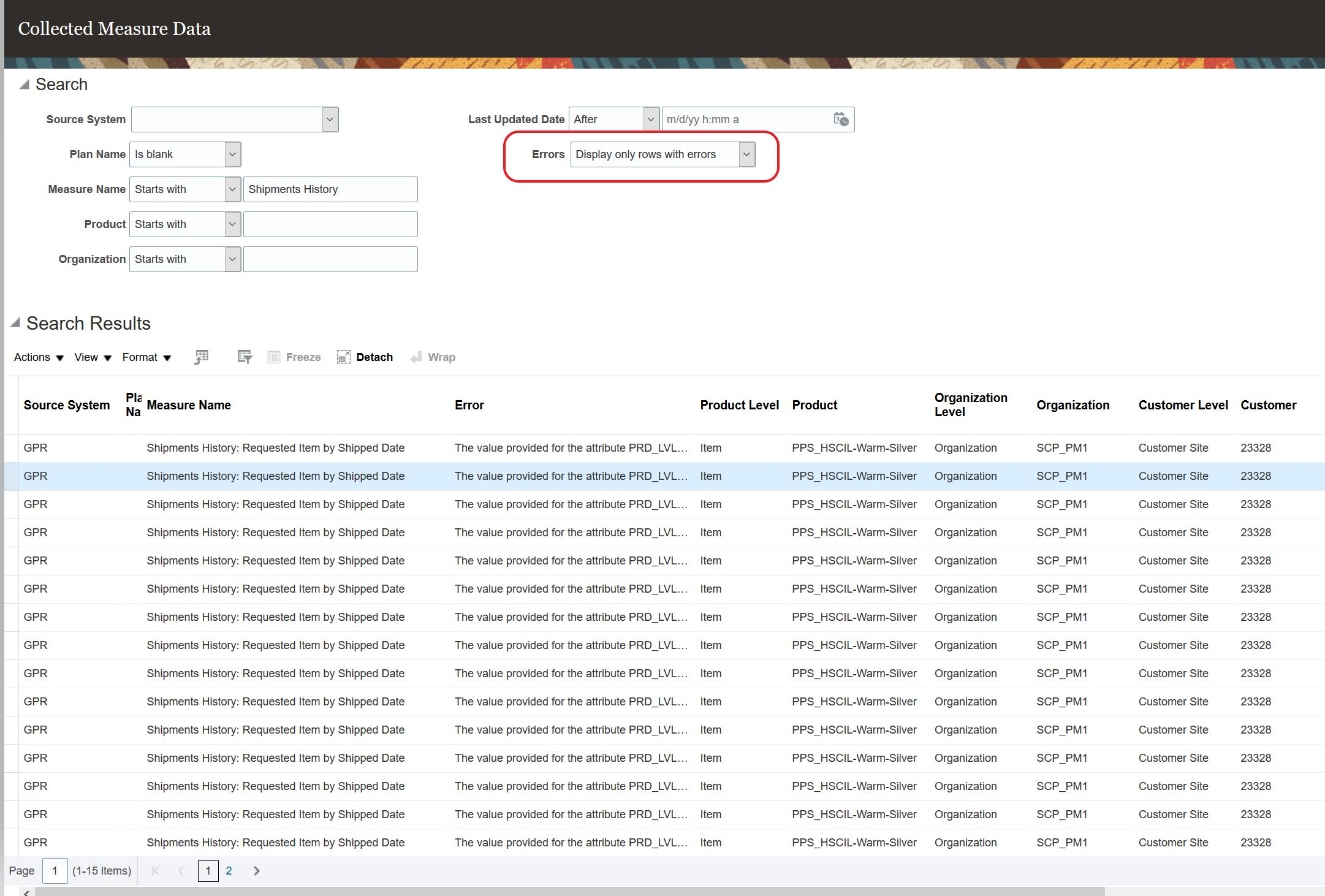
Collected Measure Data Table
Efficiently assess the quality of loaded measure data without having to run a plan.
Steps to Enable
You don't need to do anything to enable this feature.
Tips And Considerations
- To avoid performance issues, the Collected Measure Data table is limited to displaying 10,000 rows by default. If the search results exceed this quantity, then only the first 10,000 rows meeting the search criteria will be displayed.
- You can change the limit for the number or rows via the MSC_COLLECTED_MEASURE_DATA_MAX_ROWS profile option. See the readiness training video for more details on how you add and change this profile option.
- Measure data loaded via the file-based data import (FBDI) for the following objects will be available to view in the Collected Measure Data table:
- Supply Chain Planning Measures (ScpForecastMeasureImportTemplate.xlsm)
- Supply Chain Planning Bookings History (ScpBookingHistoryImportTemplate.xlsm)
- Supply Chain Planning Option Bookings History (ScpOptionBookingHistoryImportTemplate.xlsm)
- Supply Chain Planning Shipments History (ScpShipmentHistoryImportTemplate.xlsm)
- Supply Chain Planning Option Shipments History (ScpOptionShipmentHistoryImportTemplate.xlsm)
- Supply Chain Planning Causal Factors (ScpCausalFactorsImportTemplate.xlsm)
- Supply Chain Planning Forecast Measures (ScpForecastMeasureImportTemplate.xlsm)
- Measure data loaded via FBDI for the following objects has special handling and won't be available to view in the Collected Measure Data table. Instead you must continue to examine log files or run a plan to understand the status.
- Supply Chain Planning Price Lists (ScpPriceListImportTemplate.xlsm)
- Supply Chain Planning External Forecasts (ScpExternalForecastImportTemplate.xlsm)
- Data for Bookings History (including booking history for options) and Shipments History (include shipment history for options) collected from either Fusion source or EBS is also available to view in the Collected Measure Data table.
- If you're using the Non-Key Customer Aggregation feature, then depending on how you've configured it, you'll see aggregated All Other data, customer-level detail data, or both.
Key Resources
- The View Collected Measure Data readiness training is available on Oracle Cloud Readiness for Supply Chain Planning.
Role Information
You have a couple options for giving people access to this feature, depending on whether you're assigning them predefined job roles or your own configured job roles.
- Users who are assigned any of these predefined job roles are automatically able to access this feature:
- Supply Chain Planner (ORA_MSC_SUPPLY_CHAIN_PLANNER_JOB)
- Demand Planner (ORA_MSC_DEMAND_PLANNER_JOB)
- Materials Planner (ORA_MSC_MATERIALS_PLANNER_JOB)
- Sales and Operations Planner (ORA_MSC_SALES_AND_OPERATIONS_PLANNER_JOB)
- Replenishment Planner (ORA_MSC_REPLENISHMENT_PLANNER_JOB)
- Users who are assigned configured job roles that contain these privileges are able to access this feature:
- View Planning Tables (MSC_VIEW_PLANNING_TABLES_PRIV)
- Maintain Planning Tables (MSC_MAINTAIN_PLANNING_TABLES_PRIV)
Choose Whether to Proceed When You Haven't Saved Layout Changes
When you make changes to the layout of a table or graph, you might take an action that will cause the table or graph to refresh before you have saved your changes. With this update, you’ll be warned that you will lose the layout changes you haven’t saved and be asked if you want to continue.
Increase your productivity by choosing to not lose changes unless you’re wanting to do so.
Steps to Enable
You don't need to do anything to enable this feature.
Tips And Considerations
- The existing message that warned about unsaved data changes was revised as part of this feature to clearly indicate the potential loss of edits made to measure data values when taking an action that will trigger a refresh of the table.
- A new set of messages were introduced that clearly specify the potential loss of information in the table, whether it's a data change, layout change, or both.
- The warning messages aren't displayed if you close the plan using the Save and Close button. In this case, if there are unsaved data or layout changes in any of the opened tables or graphs, then they will be lost.
Key Resources
- The Choose Whether to Proceed When You Haven't Saved Layout Changes readiness training available on Oracle Cloud Readiness for Supply Chain Planning.
Role Information
There are no new roles or security privileges needed to access this enhancement. Users who currently have access to planning tables and graphs will automatically be able to use this feature.
Manage New Product Introduction and Forecast Cannibalization Process
New product introductions or end-of-life decisions often have secondary demand effects on related products that have an increase or decrease in demand due to these decisions. These effects are typically referred to as halo or cannibalization effects.
- Use the new Manage Product Launch UI to easily modify launch dates or end of life dates. Additionally, you can also enter time-phased cannibalization or halo effect factors to reduce or increase the baseline forecast.
- Use the predefined Product Lifecycle Management layout to manage product life cycle in a single UI.
- Use the Manage Product Life Cycle by Item and Date table to manage product life cycle dates.
- Use the Manage Forecast During Product Life Cycle table to adjust forecasts using the Adjusted Shipments Forecast and Change to Shipment Forecast Percentage measures.
Forecast profiles you can use:
- Forecast Bookings Including Product Life Cycle
- Forecast Shipments Including Product Life Cycle
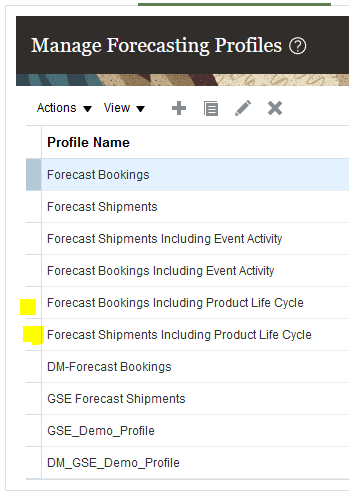
Generate forecasts considering product lifecycle dates and the impact of product cannibalization.
Steps to Enable
You don't need to do anything to enable this feature.
Tips And Considerations
Depending on what hierarchies you selected for your plan, you may need to modify the table link used in the Product Lifecycle Management layout.
Key Resources
- The Manage New Product Introduction and Forecast Cannibalization Process readiness training available on Oracle Cloud Readiness for Supply Chain Planning.
Role Information
You have a couple options for giving people access to this feature, depending on whether you're assigning them predefined job roles or own configured job roles.
- Users who are assigned any of these predefined job roles are automatically able to access this feature.
- Demand Planner (ORA_MSC_DEMAND_PLANNER_JOB)
- Replenishment Planner (ORA_MSC_REPLENISHMENT_PLANNER_JOB)
- Sales and Operations Planner (ORA_MSC_SALES_AND_OPERATIONS_PLANNER_JOB)
There are no new security privileges needed to access this enhancement. Users who currently have access to the Manage Forecasting Profiles task and plan actions will automatically be able to use this feature.
Enforce Integrity of Forecasts in Past Time Periods
You may want to enter forecast changes at aggregate time levels which may contain time periods in the past with the intent that the forecast change only impacts future time buckets. To avoid unintended changes to forecasts in past time buckets, forecast measures at an aggregate time levels containing periods in the past are now not editable. For example, if the current time period is August 2021, then you can’t edit the forecast for the year 2021, but you can individually edit the forecasts for the remaining months in the year instead.
Make forecast changes at aggregate time levels without affecting forecasts for time periods in the past.
Steps to Enable
You don't need to do anything to enable this feature.
Key Resources
- The Enforce Integrity of Forecasts in Past Time Periods readiness training available on Oracle Cloud Readiness for Supply Chain Planning.
Role Information
There are no new roles or security privileges associated with this feature. All users who currently have access to edit measure data in planning tables will automatically have access to this capability.
Export to Spreadsheets Without Merging Cells Containing Level Members
One of the typical reasons for exporting data from a planning table to a spreadsheet is to enable additional analysis, such as using a pivot table in Microsoft Excel. However, this kind of analysis requires that data is available in each row, so there can’t be merged cells. Previously, if there was repeating data, then the cells were merged and you had to unmerge data. With this update, exports with repeating data will have data in each row to enable downstream analysis to be done more easily in the spreadsheet tool.
For example, if you have a table with multiple rows for the same item, then in the table the item is displayed one time and merged across the rows. Similarly, if there are multiple columns for the same month, then the month is displayed one time and merged across the columns. Now, after you export the table to a spreadsheet, the item will be repeated in the item cell for each row instead of being merged, and the month will be repeated for each month cell for each column instead of being merged. This change enables you to do analysis, such as sorting and filtering, more easily in the spreadsheet.
Streamline ad-hoc analysis in spreadsheets.
Steps to Enable
You don't need to do anything to enable this feature.
Key Resources
- The Export to Spreadsheets Without Merging Cells Containing Level Members readiness training available on Oracle Cloud Readiness for Supply Chain Planning.
Role Information
There are no new roles or security privileges needed to access this enhancement. Users who currently have access to planning tables and graphs will automatically be able to use this feature.
Publish, Delete, and Release Plans Using REST Services
Oracle Cloud Supply Chain Planning applications may need to coexist with other enterprise applications that you have. You can use technologies, such as file-based data import (FBDI) or REST API, to enable integrations with other applications. With this update, you can publish, delete, and release supply chain plans using the child resources Publish Data, Deletes, and Releases under the REST API resource Supply Chain Plans. When using these child resources, the GET and POST operations will both be supported.
This new capability enables standards-based interoperability of Oracle Cloud Supply Chain Planning with other applications that you may have in your enterprise.
Steps to Enable
Review the REST service definition in the REST API guides, available from the Oracle Help Center > your apps service area of interest > REST API. If you're new to Oracle's REST services you may want to begin with the Quick Start section.
Tips And Considerations
- You can't delete a plan with a status that indicates another plan action is in progress.
- To delete a plan that has other plans that reference the plan being deleted, you must set the ForceDeleteFlag attribute to true. You'll need to rerun the plans that referenced the deleted plan.
Key Resources
- The Publish, Delete, and Release Plans Using REST Services readiness training available on Oracle Cloud Readiness for Supply Chain Planning.
Role Information
You have a couple options for giving people access to this feature, depending on whether you're assigning them predefined job roles or your own configured job roles.
- Users who are assigned any of these predefined job roles are automatically able to access this feature:
- Supply Chain Planner (ORA_MSC_SUPPLY_CHAIN_PLANNER_JOB)
- Materials Planner (ORA_MSC_MATERIALS_PLANNER_JOB)
- Demand Planner (ORA_MSC_DEMAND_PLANNER_JOB)
- Replenishment Planner (ORA_MSC_REPLENISHMENT_PLANNER_JOB)
- Sales and Operations Planner (ORA_MSC_SALES_AND_OPERATIONS_PLANNER_JOB)
- Users who are assigned configured job roles that contain these privileges are able to access this feature:
- Release Planning Recommendations (MSC_RELEASE_PLANNING_RECOMMENDATIONS_PRIV)
- Publish Plan Data (MSC_PUBLISH_PLAN_DATA_PRIV )
- Delete Plans (MSC_DELETE_PLANS_PRIV)
Other Sales and Operations Planning Changes in This Update
This section includes details about additional changes in this update that can change the way Oracle Sales and Operations Planning Cloud works.
Load Demand Plan Measure as the Bookings Forecast
Prior to this update, you could load a demand plan measure as the shipments forecast instead of generating a statistical forecast in your sales and operations plan. However, if the bookings forecast was generated in your demand plan, then it wasn't intuitive to map to the Shipments Forecast measure in your sales and operations plan. With this update, you can select the target forecast measure as either the Shipments Forecast or Bookings Forecast measure in your sales and operations plan.
Bug reference: 32936051