
- Revision History
- Overview
- Pre-Update and Post-Update Tasks
- Optional Uptake of New Features (Opt In)
- Feature Summary
- Sales and Operations Planning
-
- Sales and Operations Planning
-
- Link to External Systems with Context
- Include the Time Dimension in Multidimensional Filters
- Configure Preferred Date Format for the Planning Table Data REST Service
- Calculate User-Defined Planning Exceptions On Demand
- Calculate Financial Metrics Using a Price List
- Extract and Upload Data from External Systems with Improved Performance
- Selected Sales and Operations Planning Bug Fixes in This Update
-
- Sales and Operations Planning
This document will continue to evolve as existing sections change and new information is added. All updates appear in the following table:
| Date | Module | Feature | Notes |
|---|---|---|---|
| 16 SEP 2022 | Created initial document. |
 HAVE AN IDEA?
We’re here and we’re listening. If you have a suggestion on how to make our cloud services even better then go ahead and tell us. There are several ways to submit your ideas, for example, through the Ideas Lab on Oracle Customer Connect. Wherever you see this icon after the feature name it means we delivered one of your ideas.
GIVE US FEEDBACK
We welcome your comments and suggestions to improve the content. Please send us your feedback at oracle_fusion_applications_help_ww_grp@oracle.com.
DISCLAIMER
The information contained in this document may include statements about Oracle’s product development plans. Many factors can materially affect Oracle’s product development plans and the nature and timing of future product releases. Accordingly, this Information is provided to you solely for information only, is not a commitment to deliver any material, code, or functionality, and should not be relied upon in making purchasing decisions. The development, release, and timing of any features or functionality described remains at the sole discretion of Oracle.
This information may not be incorporated into any contractual agreement with Oracle or its subsidiaries or affiliates. Oracle specifically disclaims any liability with respect to this information. Refer to the Legal Notices and Terms of Use for further information.
Pre-Update and Post-Update Tasks
Depending on the features you're using in your Cloud applications, you may be required to perform certain steps immediately before or after your quarterly update. For details of these pre-update and post-update steps and the product areas that are affected, refer to Oracle SCM Cloud: Performing Your Quarterly Update (doc ID 2337485.1) on My Oracle Support.
Optional Uptake of New Features (Opt In)
Oracle Cloud Applications delivers new updates every quarter. This means every three months you'll receive new functionality to help you efficiently and effectively manage your business. Some features are delivered Enabled meaning they are immediately available to end users. Other features are delivered Disabled meaning you have to take action to make available. Features delivered Disabled can be activated for end users by stepping through the following instructions using the following privileges:
- Review Applications Offering (ASM_REVIEW_APPLICATIONS_OFFERINGS_PRIV)
- Configure Oracle Fusion Applications Offering (ASM_CONFIGURE_OFFERING_PRIV)
Here’s how you opt in to new features:
- Click Navigator > My Enterprise > New Features.
- On the Features Overview page, select your offering to review new features specific to it. Or, you can leave the default selection All Enabled Offerings to review new features for all offerings.
- On the New Features tab, review the new features and check the opt-in status of the feature in the Enabled column. If a feature has already been enabled, you will see a check mark. Otherwise, you will see an icon to enable the feature.
- Click the icon in the Enabled column and complete the steps to enable the feature.
In some cases, you might want to opt in to a feature that's not listed in the New Features work area. Here's how to opt in:
- Click Navigator > My Enterprise > Offerings.
- On the Offerings page, select your offering, and then click Opt In Features.
- On the Opt In page, click the Edit Features (pencil) icon for the offering, or for the functional area that includes your feature.
- On the Edit Features page, complete the steps to enable the feature.
For more information and detailed instructions on opting in to new features for your offering, see Offering Configuration.
Opt In Expiration
Occasionally, features delivered Disabled via Opt In may be enabled automatically in a future update. This is known as an Opt In Expiration. If your cloud service has any Opt In Expirations you will see a related tab in this document. Click on that tab to see when the feature was originally delivered Disabled, and when the Opt In will expire, potentially automatically enabling the feature. You can also click here to see features with Opt In Expirations across all Oracle Cloud Applications.
Column Definitions:
Report = New or modified, Oracle-delivered, ready to run reports.
UI or Process-Based: Small Scale = These UI or process-based features are typically comprised of minor field, validation, or program changes. Therefore, the potential impact to users is minimal.
UI or Process-Based: Larger Scale* = These UI or process-based features have more complex designs. Therefore, the potential impact to users is higher.
Features Delivered Disabled = Action is needed BEFORE these features can be used by END USERS. These features are delivered disabled and you choose if and when to enable them. For example, a) new or expanded BI subject areas need to first be incorporated into reports, b) Integration is required to utilize new web services, or c) features must be assigned to user roles before they can be accessed.
| Ready for Use by End Users Reports plus Small Scale UI or Process-Based new features will have minimal user impact after an update. Therefore, customer acceptance testing should focus on the Larger Scale UI or Process-Based* new features. |
Customer Must Take Action before Use by End Users Not disruptive as action is required to make these features ready to use. As you selectively choose to leverage, you set your test and roll out timing. |
|||||
|---|---|---|---|---|---|---|
| Feature |
Report |
UI or |
UI or |
|
||
Configure Preferred Date Format for the Planning Table Data REST Service |
||||||
Extract and Upload Data from External Systems with Improved Performance |
||||||
Selected Sales and Operations Planning Bug Fixes in This Update |
||||||
Link to External Systems with Context
When you’re analyzing data in Oracle Fusion Cloud Supply Chain Planning, you might need to understand additional aspects of the displayed information, and some of the details may not be directly in Oracle Supply Chain Planning. For some details you may need to refer to other systems, such as Oracle Fusion Cloud Analytics Warehouse. With this update, you can configure links to drill to external systems using the context of the data to gain a 360-degree understanding of your data to aid in your decision making.
For example, you’re viewing historical shipments and notice a significant spike in one month for a particular product and customer. You can configure a link to an external system for additional information about the historical shipments using industry standards to pass the product, customer, and date range.
Additionally, you can link planning cycle activities, tasks, action items, and decision items to an external system. For example, if you have a task to analyze the financial forecast in your Oracle Cloud Enterprise Performance Management (EPM), you can configure the link from Oracle Cloud Sales and Operations Planning to your EPM application.
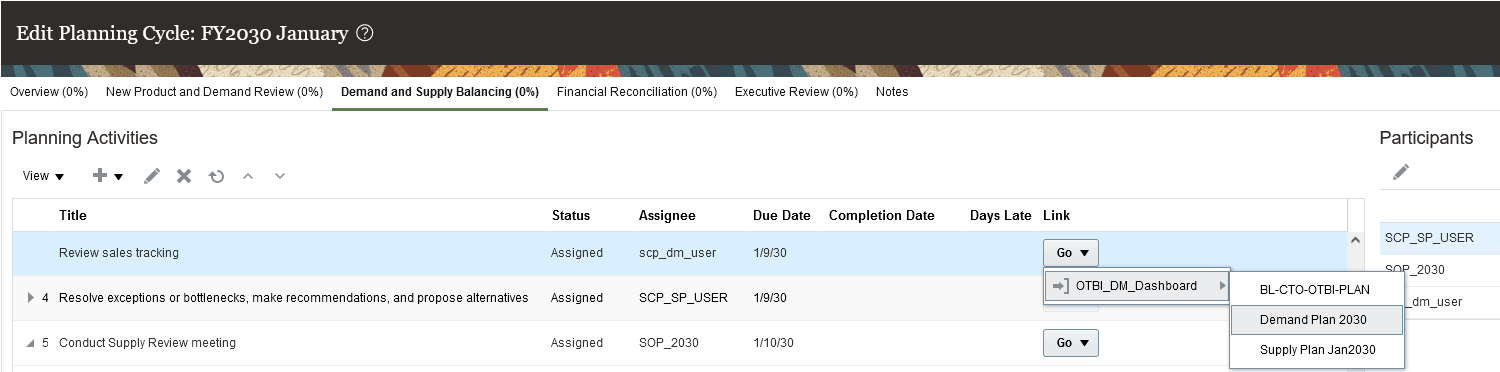
Planning Cycle Link to External System with Plan Context
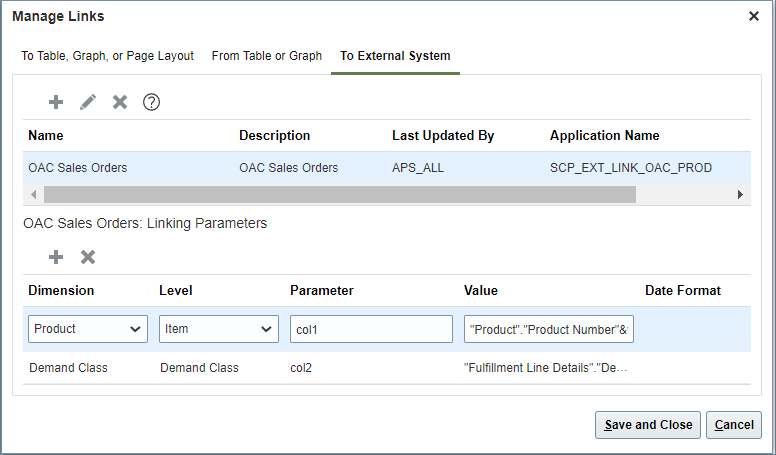
Create or edit links to external systems for planning tables and graphs using the application name defined in the Setup and Maintenance work area and context parameters.
Configure linking parameters for planning tables and graphs to pass the context for the link to the external system.
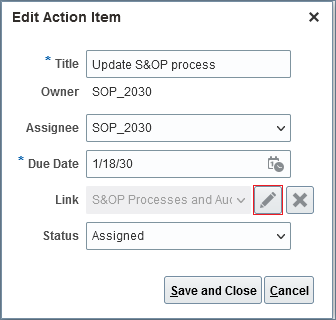
Create or edit links to external systems for a planning cycle activity or task.
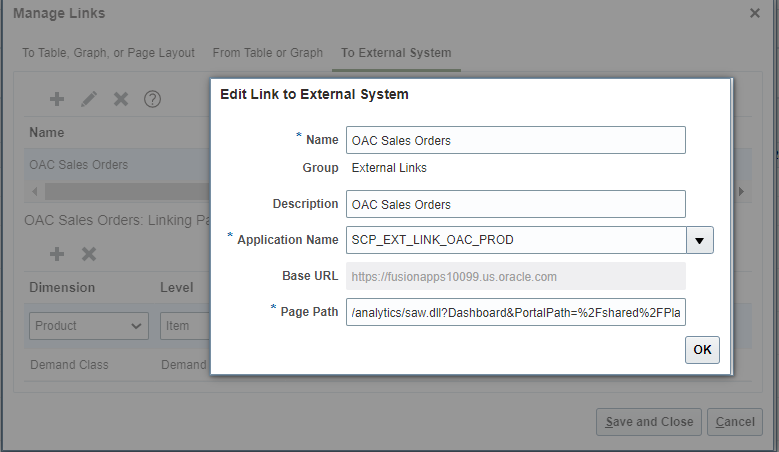
Use the application name defined in the Setup and Maintenance work area to configure a link for a planning cycle task. Page Path is combined with the Base URL to construct the complete URL to an external system.
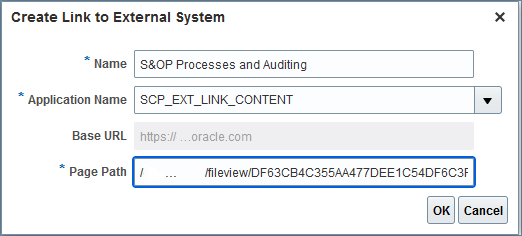
Navigate from a planning cycle task link to an external system.

Planning Cycle Link to External System without Plan Context
Steps to Enable
To make an external system available for linking, you must first define it in the Setup and Maintenance work area:
- Navigator > My Enterprise > Setup and Maintenance.
- Select Manage Setup Content from Tasks.
- Select Manage Integration for Additional Applications from Topology Definition.
- Select Create Application Integration in Manage Integration of Additional Applications:
- Application Name must start with SCP_EXT_LINK_ for the application to be available for linking.
- Full URL should be the base portion of the URL to the external system including the host and, if applicable, the port. The context to be passed will be append to this.
- Partner Name is for reference only.
- Apply, then Save and Close.
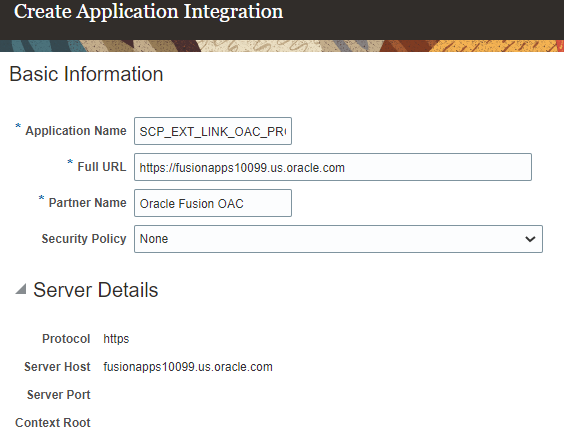
Tips And Considerations
The external page will be opened, as specified per the link configuration and contextual parameters, in a new browser tab each time the link is invoked.
The planner invoking the link must have the required security for the external system for the page to be opened.
The Page Path field in a planning cycle link to an external system can have either plan context or no plan context. For example, a URL link to a web page doesn’t require plan context. When specifying plan context in the Page Path field, use #PlanName# or #PlanId# as a plan token. The system will replace the token with a selected plan when navigating to an external system with plan context.
Role And Privileges
To configure and invoke links to external systems, no new roles or security privileges are needed. Users who currently have access to planning tables and graphs will automatically be able to use this feature.
You have a couple options for giving additional people access to this feature, depending on whether you're assigning them predefined job roles or your own configured job roles.
- Users who are assigned any of these predefined job roles are automatically able to access this feature:
- Supply Chain Planner (ORA_MSC_SUPPLY_CHAIN_PLANNER_JOB)
- Demand Planner (ORA_MSC_DEMAND_PLANNER_JOB)
- Sales and Operations Planner (ORA_MSC_SALES_AND_OPERATIONS_PLANNER_JOB)
- Replenishment Planner (ORA_MSC_REPLENISHMENT_PLANNER_JOB)
- Users who are assigned configured job roles that contain these privileges are able to access planning tables and graphs to use this feature:
- Maintain Planning Tables (MSC_MAINTAIN_PLANNING_TABLES_PRIV)
- Maintain Planning Graphs (MSC_MAINTAIN_PLANNING_GRAPHS_PRIV)
- Users who are assigned configured job roles that contain these privileges are able to access planning cycle activities and tasks to use this feature:
- Monitor Sales and Operations Planning Work Area (MSC_MONITOR_SALES_AND_OPERATIONS_PLANNING_WORK_AREA_PRIV)
- Administer Planning Cycles (MSC_MANAGE_PLANNING_CYCLES_PRIV)
- Review Planning Cycles (MSC_REVIEW_PLANNING_CYCLES_PRIV)
To perform the setup for this feature, an administrator must have access to the Manage Integration of Additional Applications task. You have a couple options for giving people access to this task, depending on whether you're assigning them predefined job roles or your own configured job roles.
- Users who are assigned any of these predefined job roles are automatically able to access this task:
- Supply Chain Application Administrator (ORA_RCS_SUPPLY_CHAIN_APPLICATION_ADMINISTRATOR_JOB)
- Application Implementation Consultant (ORA_ASM_APPLICATION_IMPLEMENTATION_CONSULTANT_JOB)
- Users who are assigned configured job roles that contain the following privilege are able to access this task:
- Manage Third Party Applications (ASM_MANAGE_THIRD_PARTY_APPLICATIONS_PRIV)
Include the Time Dimension in Multidimensional Filters
When you work with large volumes of multidimensional data, it’s important to gain visibility to the subset of data that meets data conditions you specify. Previously, you couldn’t include the time dimension in your data conditions. With this update, you can now configure data conditions to be evaluated on time-varying measures across dimensions, as well as nontime-varying measures, and you can display the resulting information in a planning table or chart to perform an effective analysis.
For example, you can filter a pivot table or chart to show the item and customer combinations where the forecast has increased or decreased for any month by more than a specified number between the latest forecast run and the previous forecast run.
Steps to Enable
You don't need to do anything to enable this feature.
Role And Privileges
There are no new roles or security privileges needed to access this enhancement. Users who currently have access to planning tables and graphs will automatically be able to use this feature.
You have a couple options for giving additional people access to this feature, depending on whether you're assigning them predefined job roles or your own configured job roles.
- Users who are assigned any of these predefined job roles are automatically able to access this feature:
- Supply Chain Planner (ORA_MSC_SUPPLY_CHAIN_PLANNER_JOB)
- Materials Planner (ORA_MSC_MATERIALS_PLANNER_JOB)
- Demand Planner (ORA_MSC_DEMAND_PLANNER_JOB)
- Sales and Operations Planner (ORA_MSC_SALES_AND_OPERATIONS_PLANNER_JOB)
- Replenishment Planner (ORA_MSC_REPLENISHMENT_PLANNER_JOB)
- Users who are assigned configured job roles that contain these privileges are able to access this feature:
- Maintain Planning Tables (MSC_MAINTAIN_PLANNING_TABLES_PRIV)
- Maintain Planning Graphs (MSC_MAINTAIN_PLANNING_GRAPHS_PRIV)
Configure Preferred Date Format for the Planning Table Data REST Service
When loading data using the Planning Table Data REST service, you may want to use your own date format to ease the transformation burden and use a consistent format. With this update, the user preference configured for date formats is honored by the REST service.
The Planning Table Data REST service is a child service of the Planning Tables service, which is part of the Supply Chain Plans parent service.

Example of Date Formats in User Settings
The preceding example shows the different date formats available in a user's general preferences settings. With this feature planning honors all of these formats.
Steps to Enable
Use the Opt In UI to enable this feature. For instructions, refer to the Optional Uptake of New Features section of this document.
Offering: Supply Chain Planning No Longer Optional From: Update 23B
Role And Privileges
- No new privileges are needed for this feature.
- Users who are assigned any of these predefined job roles are automatically able to access this feature:
- Supply Chain Planner (ORA_MSC_SUPPLY_CHAIN_PLANNER_JOB)
- Materials Planner (ORA_MSC_MATERIALS_PLANNER_JOB)
- Replenishment Planner (ORA_MSC_REPLENISHMENT_PLANNER_JOB)
Calculate User-Defined Planning Exceptions On Demand
Planning exceptions can result due to plan generation through the plan run process or data changes to a plan made by a planner. Previously, you could only get visibility to planning exceptions by running a plan. With this update, you can now run the new Calculate Measure Based Exception scheduled process on demand to get timely visibility to planning exceptions that use any user adjustments without having to run a full refresh of the plan. The process will evaluate the conditions specified in your user-defined exception criteria and generate exceptions when they’re encountered.
You can use the Scheduled Processes page in the Scheduled Processes work area to provide the process details for the Calculate Measure Based Exception process and start the process.
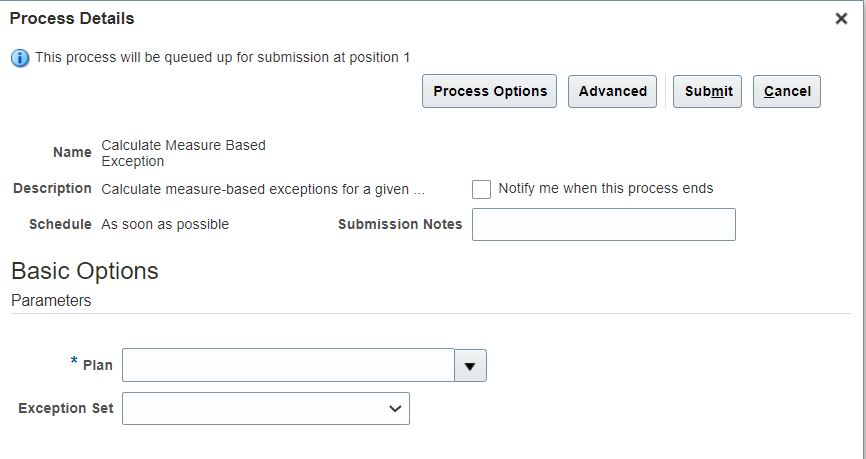
You can also start the process from:
- The Manage Plans page
- The page-level plan actions menu for plans
Steps to Enable
You don't need to do anything to enable this feature.
Tips And Considerations
Take these points into consideration when using this feature:
- The Calculate Measure Based Exception process and Plan Run process are incompatible.
- If the Exception Set parameter is left blank in the Calculate Measure Based Exception process, then it will use the exception set associated with the plan.
- The Calculate Measure Based Exception process will recalculate only the exceptions included in the exception set parameter. Any other exceptions in the plan won't be deleted or updated.
- The Calculate Measure Based Exception process doesn't recalculate predefined order based exceptions.
Role And Privileges
- No new job roles or privileges are delivered with this feature.
- The process is accessible with the existing privilege Run Plan with Snapshot. (MSC_RUN_PLAN_WITH_SNAPSHOT_PRIV)
Calculate Financial Metrics Using a Price List
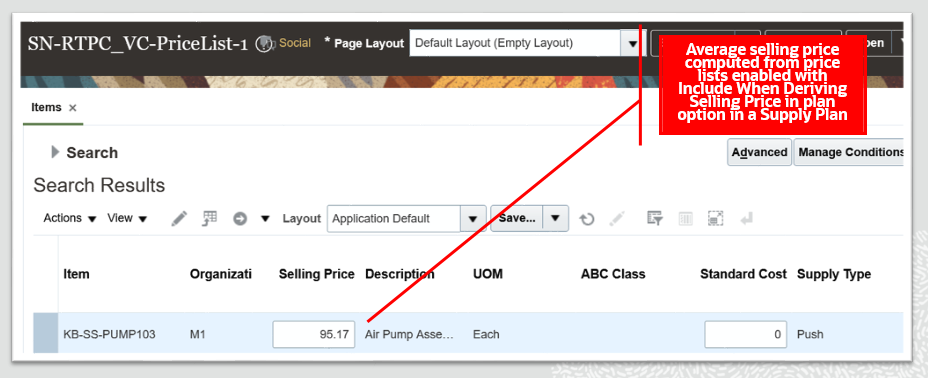
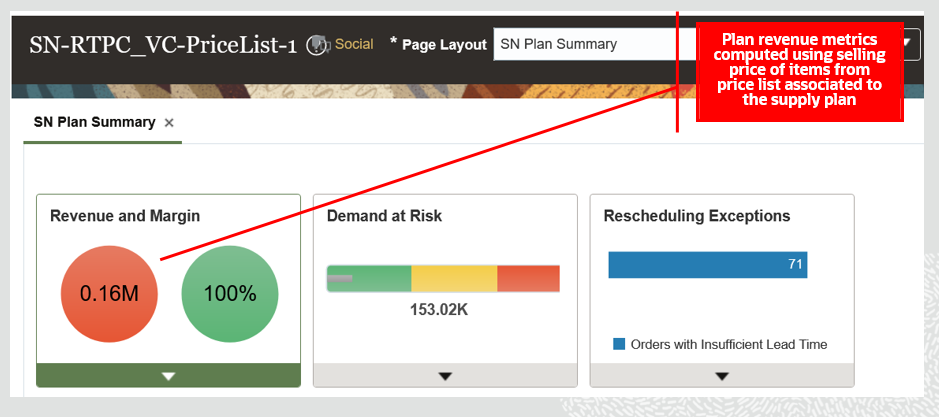
In sales and operations planning processes, as well as in tactical supply planning processes, revenue and related financial metrics need to be as close to reality as possible. Previously, the price used for revenue and financial metric calculations was what was specified as an item attribute. With this update, sales and operation planning and supply planning processes use the price lists specified in your plan options for a more desirable, forward-looking calculation for revenue and financial metrics.
Example of how you can include a price list to consider price list details of an item as selling price in Oracle Supply Planning:
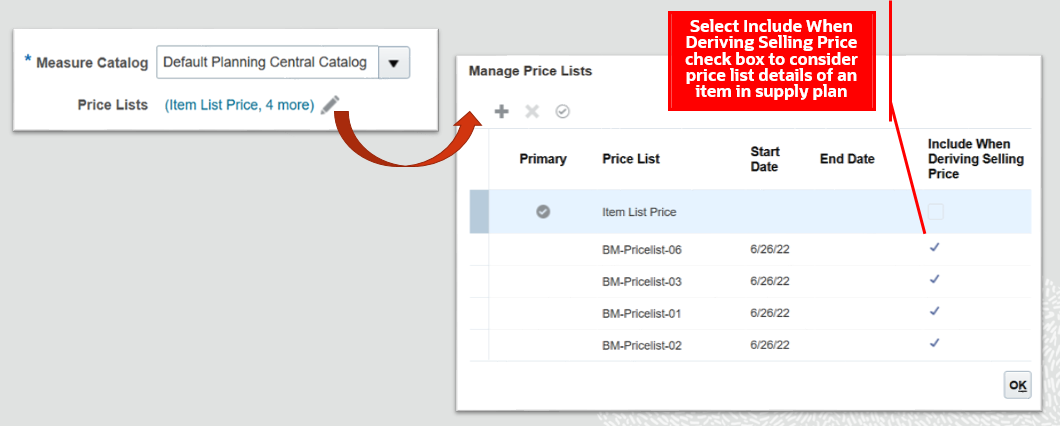
Example of an item with selling price computed from price lists associated to a plan in Oracle Supply Planning:
Example of plan revenue computed using item selling price from price lists associated to a plan in Oracle Supply Planning:
Example of how you can include a price list to consider price list details of an item as selling price in Oracle Sales and Operations Planning:

Example of how a sales and operations plan displays time phased selling price and computed average selling price for an item:
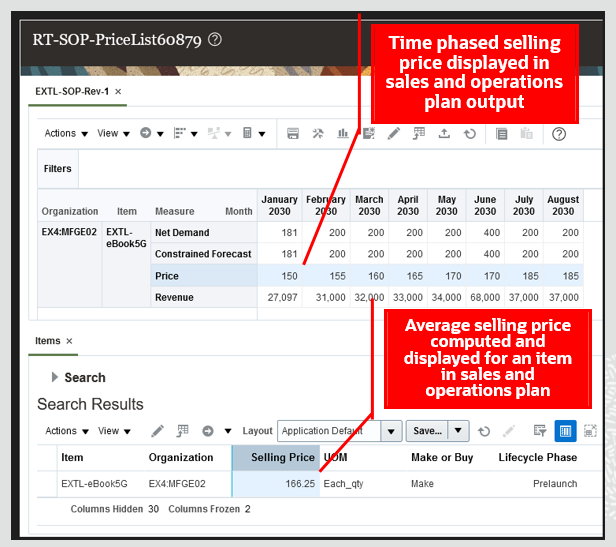
Steps to Enable
You don't need to do anything to enable this feature.
Tips And Considerations
- Item List Price price list details are included in deriving average selling price of an item in supply plan and sales and operations plan.
- A price list other than Item List Price can be selected as the primary price list and also included in deriving selling price of an item for calculation of financial metrics of a plan.
- Plans consider price list details of an item in price list that are valid on or before the horizon start date of the plan for deriving selling price of an item.
- Sales and operations plans derive time varying selling price for an item that has price list details in a price list set as primary.
- Latest collected currency conversion rates are referred to by the plan to convert price list details to organization currency for deriving selling price of an item
Key Resources
- The Calculate Financial Metrics Using a Price List readiness training available on Oracle Cloud Readiness for Supply Chain Planning
Role And Privileges
You have a couple of options for giving people access to this feature, depending on whether you're assigning them predefined job roles or your own configured job roles.
- Users who are assigned any of these predefined job roles are automatically able to access this feature:
- Materials Planner (ORA_MSC_MATERIALS_PLANNER_JOB)
- Supply Chain Planner (ORA_MSC_SUPPLY_CHAIN_PLANNER_JOB)
- Sales and Operations Planner (ORA_MSC_SALES_AND_OPERATIONS_PLANNER_JOB)
- Users who are assigned configured job roles that contain these privileges are able to access this feature:
- Monitor Supply Planning Work Area (MSC_MONITOR_SUPPLY_PLANNING_WORK_AREA_PRIV)
- Monitor Demand and Supply Planning Work Area (MSC_MONITOR_DEMAND_AND_SUPPLY_PLANNING_WORK_AREA_PRIV)
- Monitor Sales and Operations Planning Work Area (MSC_MONITOR_SALES_AND_OPERATIONS_PLANNING_WORK_AREA_PRIV)
Extract and Upload Data from External Systems with Improved Performance
A large volume of data resident in your supply chain execution systems may be required in Oracle Fusion Cloud Supply Chain Planning for effective planning. It’s imperative that this data is loaded in the most efficient manner so that the data is available for running the planning processes with the minimum of delay. With this update, the process to load data from external systems using the Load Interface File for Import scheduled process has been streamlined with an optional setup to sequentially load data into the interface tables based on predefined logical grouping of entities expected to have large volumes of data. If you have a large volume of data for entities, such as shipment history, this feature enables a more optimized usage of computing resources during the load process and can lead to improved performance.
If you're extracting data from Oracle E-Business Suite (EBS), the extraction process has additional parameters to split the extracted data into multiple files when the data file exceeds a certain size for better overall performance as well.
Steps to Enable
Steps you must take to enable sequential processing of Supply Chain Planning Cloud file-based data import (FBDI) files with predefined grouping for improved performance while using the Load Interface File for Import scheduled process:
- Navigate to Setup and Maintenance and open task Manage Standard Lookups
- Create a standard lookup with lookup type as FUN_FBDI_LOOKUP and select Financials Common Module for the Module field
- Add the lookup code as ALLOW_ORDERED_PARALLEL with meaning as 135
Example of how you can set up the standard lookup type and lookup code in Manage Standard Lookups for enabling sequential processing of Oracle Supply Chain Planning Cloud FBDI large files with a predefined logical grouping for improved performance while using Load Interface File for Import scheduled process:
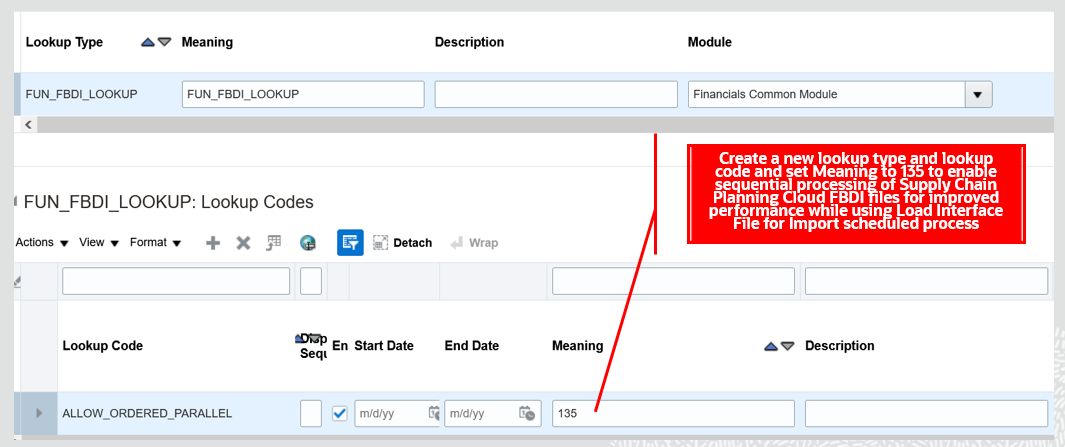
Steps to enable splitting of extracted files for an entity from E-Business Suite:
- Navigate to System Administrator responsibility in E-Business Suite
- Navigate to task Profile and subtask System
- Set value for profile MSC: Threshold Size (MB) for SCP Cloud CSV Files
- Save
Tips And Considerations
- If you haven't configured the lookup type FUN_FBDI_LOOKUP and lookup code ALLOW_ORDERED_PARALLEL, then the Load Interface File for Import scheduled process loads data for Supply Chain Planning Cloud with existing parallel processing logic.
- You must set a minimum value of 20MB for the profile MSC: Threshold Size (MB) for SCP Cloud CSV Files in E-Business suite to split extracted files for an entity into multiple files
Role And Privileges
You have a couple of options for giving people access to this feature, depending on whether you're assigning them predefined job roles or your own configured job roles.
- Users who are assigned any of these predefined job roles are automatically able to access this feature:
- Materials Planner (ORA_MSC_MATERIALS_PLANNER_JOB)
- Supply Chain Planner (ORA_MSC_SUPPLY_CHAIN_PLANNER_JOB)
- Demand and Supply Planner(ORA_MSC_DEMAND_AND_SUPPLY_PLANNER_JOB)
- Demand Planner (ORA_MSC_DEMAND_PLANNER_JOB)
- Sales and Operations Planner (ORA_MSC_SALES_AND_OPERATIONS_PLANNER_JOB)
- Replenishment Planner (ORA_MSC_REPLENISHMENT_PLANNER_JOB)
- Order Promising Manager (ORA_MSC_ORDER_PROMISING_MANAGER_JOB)
- Backlog Manager (ORA_MSC_BACKLOG_MANAGER_JOB)
- Users who are assigned configured job roles that contain these privileges are able to access this feature:
- Monitor Supply Planning Work Area (MSC_MONITOR_SUPPLY_PLANNING_WORK_AREA_PRIV)
- Monitor Demand and Supply Planning Work Area (MSC_MONITOR_DEMAND_AND_SUPPLY_PLANNING_WORK_AREA_PRIV)
- Monitor Demand Management Work Area (MSC_MONITOR_DEMAND_MANAGEMENT_WORK_AREA_PRIV)
- Monitor Sales and Operations Planning Work Area (MSC_MONITOR_SALES_AND_OPERATIONS_PLANNING_WORK_AREA_PRIV)
- Monitor Replenishment Planning Work Area (MSC_MONITOR_REPLENISHMENT_PLANNING_WORK_AREA_PRIV)
- Monitor Order Promising Work Area (MSC_MONITOR_ORDER_PROMISING_WORK_AREA_PRIV)
- Monitor Backlog Management Work Area (MSC_MONITOR_BACKLOG_MANAGEMENT_WORK_AREA_PRIV)
Selected Sales and Operations Planning Bug Fixes in This Update
This update includes some bug fixes that can change the way Oracle Sales and Operations Planning works. This isn't a full list of all the bug fixes in this update. This list includes the bug fixes that can cause a noticeable change in application behavior.
Drop Ship Validation Organizations in Sales and Operations Planning
Prior to this update, drop ship validation organizations weren't available level members for organizations in plan options. With this update, you can select a drop ship validation organization as a level member in a sales and operations plan. By including a drop ship validation organization in your plan scope, drop ship demands and supplies are planned.
Oracle reference: 34227854
Steps to Enable
You don't need to do anything to enable this feature.