
This document will continue to evolve as existing sections change and new information is added. All updates appear in the following table:
| Date | Module | Feature | Notes |
|---|---|---|---|
| 03 MAR 2023 | Created initial document. |
 HAVE AN IDEA?
We’re here and we’re listening. If you have a suggestion on how to make our cloud services even better then go ahead and tell us. There are several ways to submit your ideas, for example, through the Ideas Lab on Oracle Customer Connect. Wherever you see this icon after the feature name it means we delivered one of your ideas.
GIVE US FEEDBACK
We welcome your comments and suggestions to improve the content. Please send us your feedback at oracle_fusion_applications_help_ww_grp@oracle.com.
DISCLAIMER
The information contained in this document may include statements about Oracle’s product development plans. Many factors can materially affect Oracle’s product development plans and the nature and timing of future product releases. Accordingly, this Information is provided to you solely for information only, is not a commitment to deliver any material, code, or functionality, and should not be relied upon in making purchasing decisions. The development, release, and timing of any features or functionality described remains at the sole discretion of Oracle.
This information may not be incorporated into any contractual agreement with Oracle or its subsidiaries or affiliates. Oracle specifically disclaims any liability with respect to this information. Refer to the Legal Notices and Terms of Use for further information.
Pre-Update and Post-Update Tasks
Depending on the features you're using in your Cloud applications, you may be required to perform certain steps immediately before or after your quarterly update. For details of these pre-update and post-update steps and the product areas that are affected, refer to Oracle Fusion Cloud SCM: Performing Your Quarterly Update (doc ID 2337485.1) on My Oracle Support.
Optional Uptake of New Features (Opt In)
Oracle Cloud Applications delivers new updates every quarter. This means every three months you'll receive new functionality to help you efficiently and effectively manage your business. Some features are delivered Enabled meaning they are immediately available to end users. Other features are delivered Disabled meaning you have to take action to make available. Features delivered Disabled can be activated for end users by stepping through the following instructions using the following privileges:
- Review Applications Offering (ASM_REVIEW_APPLICATIONS_OFFERINGS_PRIV)
- Configure Oracle Fusion Applications Offering (ASM_CONFIGURE_OFFERING_PRIV)
Here’s how you opt in to new features:
- Click Navigator > My Enterprise > New Features.
- On the Features Overview page, select your offering to review new features specific to it. Or, you can leave the default selection All Enabled Offerings to review new features for all offerings.
- On the New Features tab, review the new features and check the opt-in status of the feature in the Enabled column. If a feature has already been enabled, you will see a check mark. Otherwise, you will see an icon to enable the feature.
- Click the icon in the Enabled column and complete the steps to enable the feature.
In some cases, you might want to opt in to a feature that's not listed in the New Features work area. Here's how to opt in:
- Click Navigator > My Enterprise > Offerings.
- On the Offerings page, select your offering, and then click Opt In Features.
- On the Opt In page, click the Edit Features (pencil) icon for the offering, or for the functional area that includes your feature.
- On the Edit Features page, complete the steps to enable the feature.
For more information and detailed instructions on opting in to new features for your offering, see Configure Offerings.
Opt In Expiration
Occasionally, features delivered Disabled via Opt In may be enabled automatically in a future update. This is known as an Opt In Expiration. If your cloud service has any Opt In Expirations you will see a related tab in this document. Click on that tab to see when the feature was originally delivered Disabled, and when the Opt In will expire, potentially automatically enabling the feature. You can also click here to see features with Opt In Expirations across all Oracle Cloud Applications.
Column Definitions:
Report = New or modified, Oracle-delivered, ready to run reports.
UI or Process-Based: Small Scale = These UI or process-based features are typically comprised of minor field, validation, or program changes. Therefore, the potential impact to users is minimal.
UI or Process-Based: Larger Scale* = These UI or process-based features have more complex designs. Therefore, the potential impact to users is higher.
Features Delivered Disabled = Action is needed BEFORE these features can be used by END USERS. These features are delivered disabled and you choose if and when to enable them. For example, a) new or expanded BI subject areas need to first be incorporated into reports, b) Integration is required to utilize new web services, or c) features must be assigned to user roles before they can be accessed.
| Ready for Use by End Users Reports plus Small Scale UI or Process-Based new features will have minimal user impact after an update. Therefore, customer acceptance testing should focus on the Larger Scale UI or Process-Based* new features. |
Customer Must Take Action before Use by End Users Not disruptive as action is required to make these features ready to use. As you selectively choose to leverage, you set your test and roll out timing. |
|||||
|---|---|---|---|---|---|---|
| Feature |
Report |
UI or |
UI or |
|
||
Honor the Nettable Status of the Completion Subinventory for Work orders |
||||||
Filter on Multiple Time-Varying Measures
When you work with large volumes of multidimensional data, it’s important that you gain visibility to the subset of data that meets conditions you specify using AND conditions. Previously, you could include data conditions that included the time dimension as part of the query criteria, but not AND conditions for multiple time-varying measures.
You can now include multiple time-varying measures using AND conditions, and you can also filter measures that have complex calculations using AND conditions, such as the projected available balance. You can also use these multiple AND conditions to efficiently analyze plan data by looking for exception conditions at the intersection of multiple dimensions.
Example of using measure filters that include time-varying measures and AND conditions:
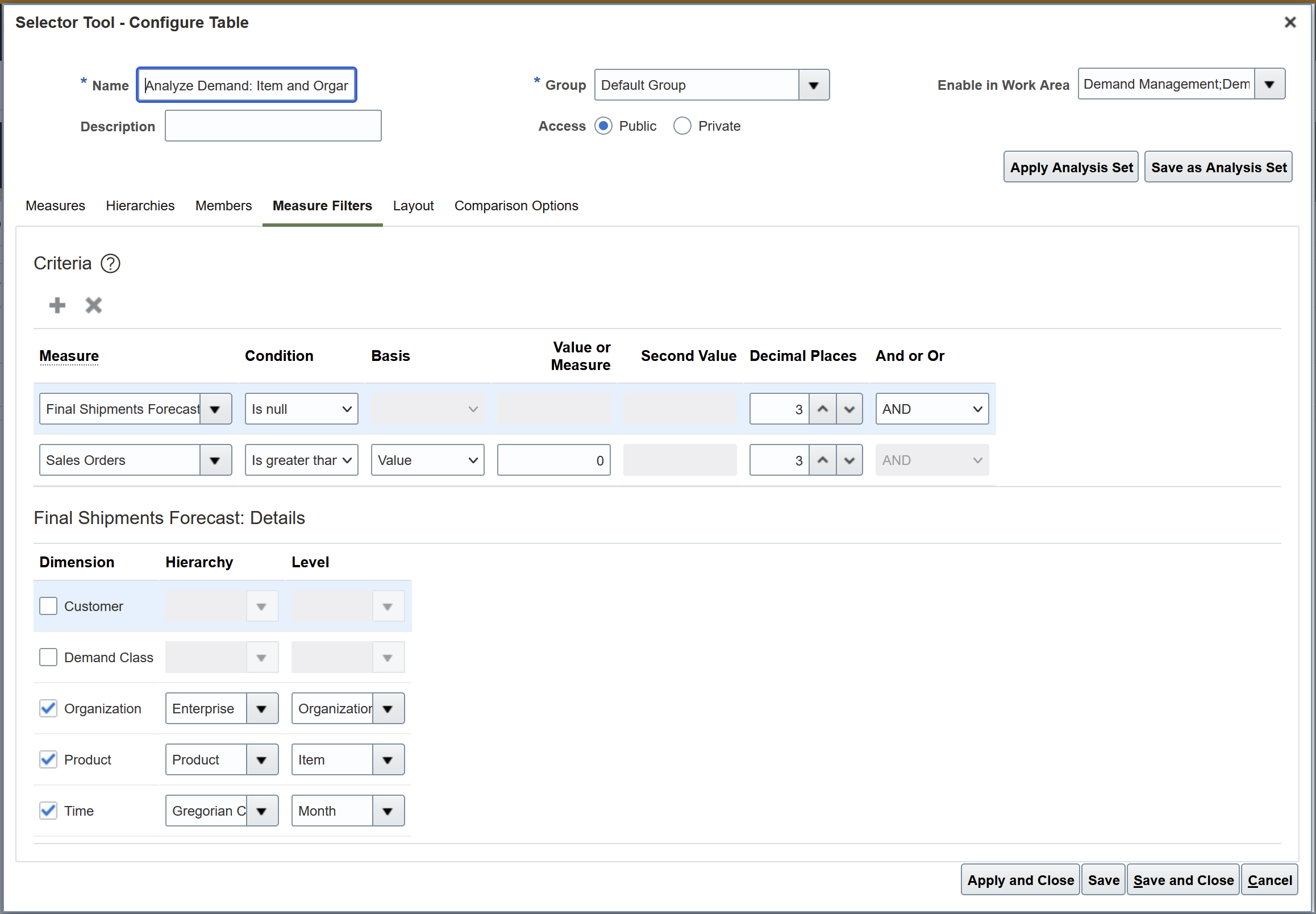
Measure Filter with AND Condition
Steps to Enable
You don't need to do anything to enable this feature.
Tips And Considerations
- You can use a specific measure only one time when you configure a measure filter with multiple time varying measures.
- You can impact performance of table and graphs when you use multiple time-varying measures.
Key Resources
- See the Include the Time Dimension in Multidimensional Filters (Update 22D) readiness training available on Oracle Cloud Application Update Readiness
Role And Privileges
There are no new roles or security privileges needed to access this enhancement. Users who currently have access to planning tables and graphs will automatically be able to use this feature.
You have a couple options for giving additional people access to this feature, depending on whether you're assigning them predefined job roles or your own configured job roles.
- Users who are assigned any of these predefined job roles are automatically able to access this feature:
- Supply Chain Planner (ORA_MSC_SUPPLY_CHAIN_PLANNER_JOB)
- Materials Planner (ORA_MSC_MATERIALS_PLANNER_JOB)
- Demand Planner (ORA_MSC_DEMAND_PLANNER_JOB)
- Sales and Operations Planner (ORA_MSC_SALES_AND_OPERATIONS_PLANNER_JOB)
- Replenishment Planner (ORA_MSC_REPLENISHMENT_PLANNER_JOB)
- Users who are assigned configured job roles that contain these privileges are able to access this feature:
- Maintain Planning Tables (MSC_MAINTAIN_PLANNING_TABLES_PRIV)
- Maintain Planning Graphs (MSC_MAINTAIN_PLANNING_GRAPHS_PRIV)
Create Your Own Exceptions for Measures of Type Date
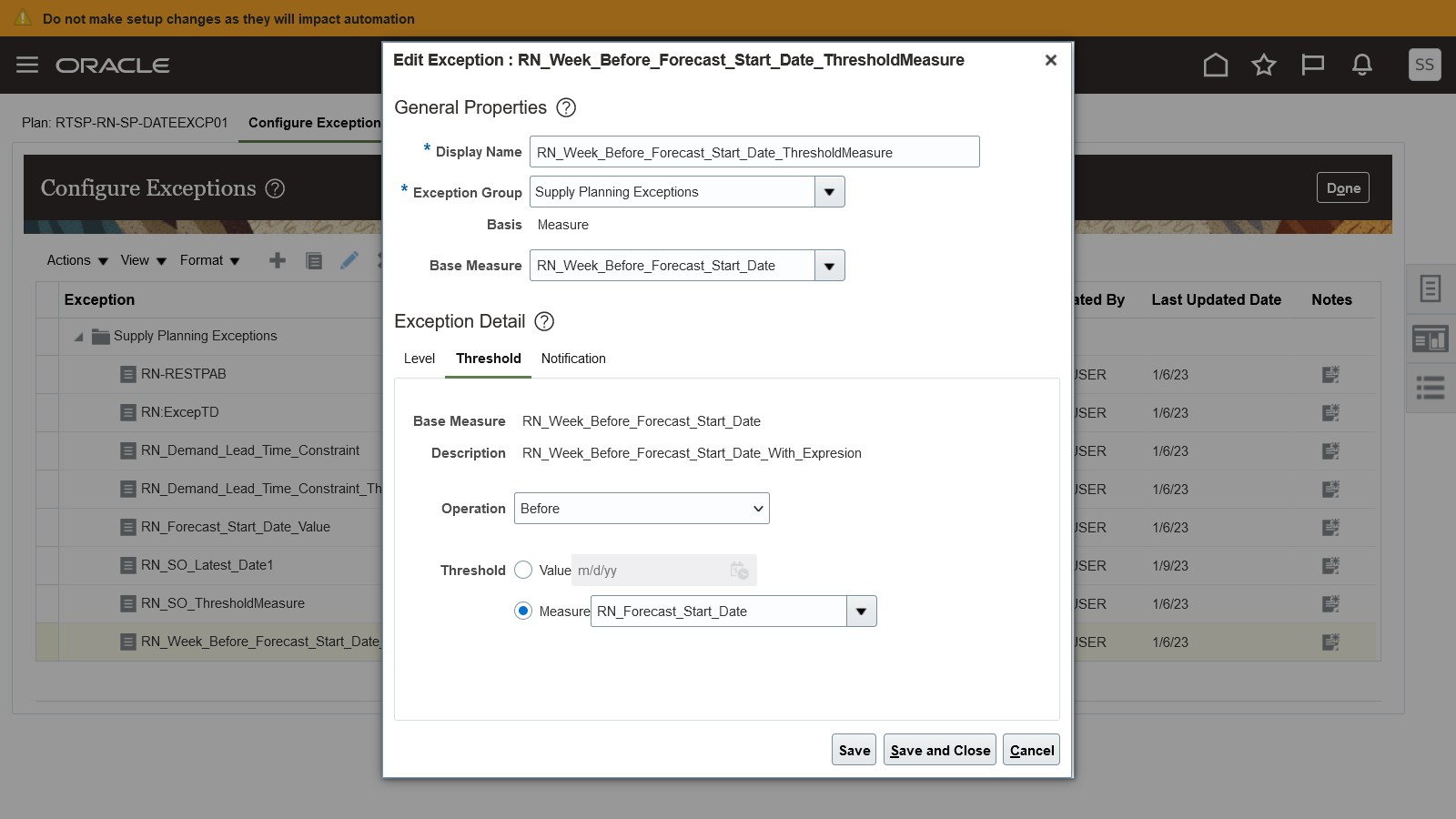
Due to the large volumes of data that are typical in the supply chain planning process, you may want to manage your plans using your own exceptions. This update enables you to add your own exceptions applicable to measures that are of the data type Date. For example, you can now create an exception where you can capture the items with an erroneously defined discontinuation date that is earlier than the launch date. With this feature, you can manage your plans by exceptions with more flexibility because you can define your own date conditions to be evaluated.
Example of an exception you can now create for measures of type date using the Configure Exceptions page:
Steps to Enable
You don't need to do anything to enable this feature.
Tips And Considerations
These 3 actions can be performed for date type measure-based exceptions:
- Create
- Edit
- Duplicate
Role And Privileges
You have a couple of options for giving people access to this feature, depending on whether you're assigning them predefined job roles or your own configured job roles.
- Users who are assigned any of these predefined job roles are automatically able to access this feature:
- Supply Chain Planner (ORA_MSC_SUPPLY_CHAIN_PLANNER_JOB)
- Demand and Supply Planner (ORA_MSC_DEMAND_AND_SUPPLY_PLANNER_JOB)
- Demand Planner (ORA_MSC_DEMAND_PLANNER_JOB)
- Replenishment Planner (ORA_MSC_REPLENISHMENT_PLANNER_JOB)
- Sales and Operations Planner (ORA_MSC_SALES_AND_OPERATIONS_PLANNER_JOB)
- Materials Planner (ORA_MSC_MATERIALS_PLANNER_JOB) role is common for all the above work area
-
There's no change to existing privileges needed to take advantage of this feature.
Use Additional Methods to Secure Your Supply Chain Plans
In some enterprises, it’s desirable to restrict the data access to plan data to a subset that a planner is authorized to handle. This restriction is possible in Oracle Fusion Cloud Supply Chain Planning when a data access set defines the data that's available to a particular role.
With this update, additional flexibility is available for defining data access sets.
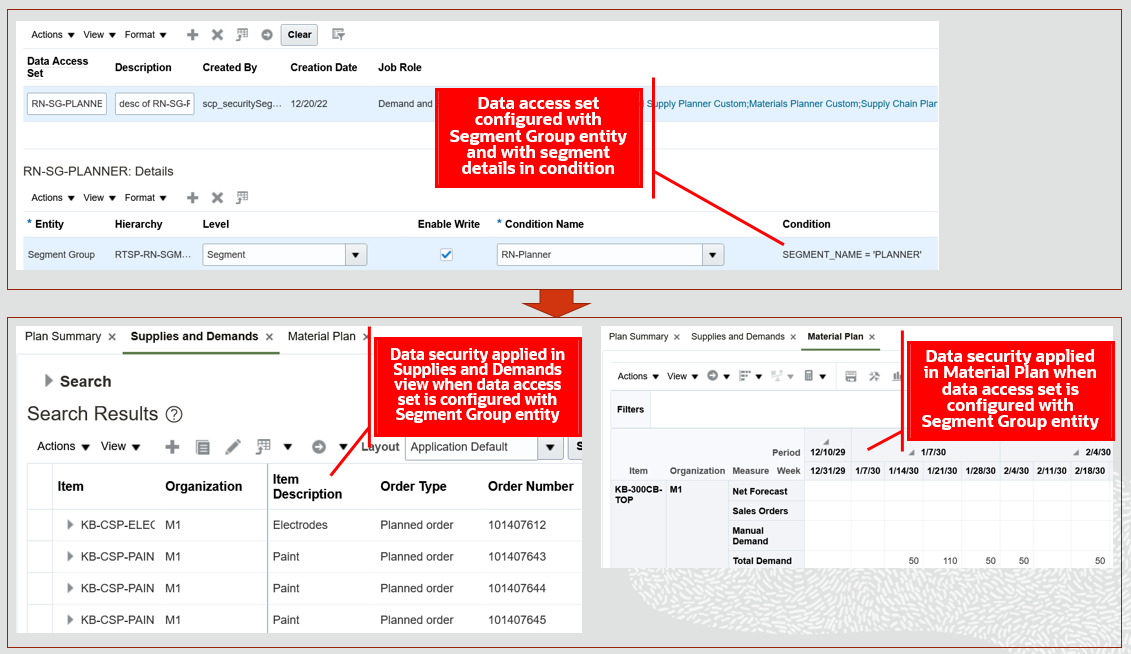
- You can configure data access set conditions by segments with the Segment Group entity selected. This selection enables you to restrict access to plan data in the Plan Inputs, Supply Planning, Demand Planning, Demand and Supply Planning, Sales and Operations Planning, and Replenishment planning work areas based on the segments criteria.
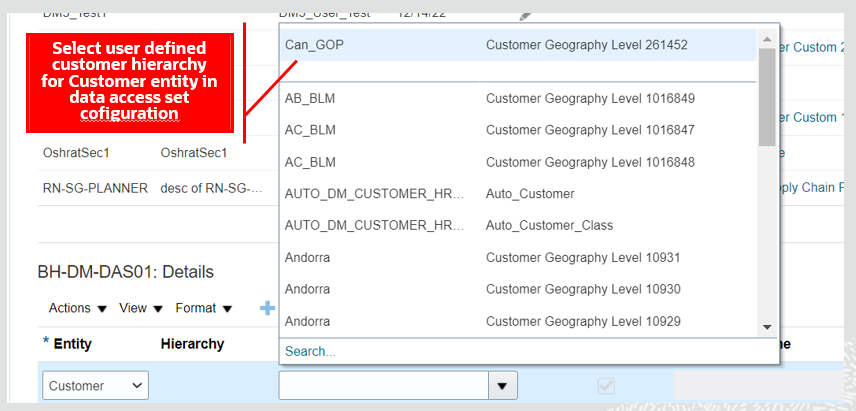
- You can also configure data access sets by selecting user-defined customer hierarchies for the Customer entity.
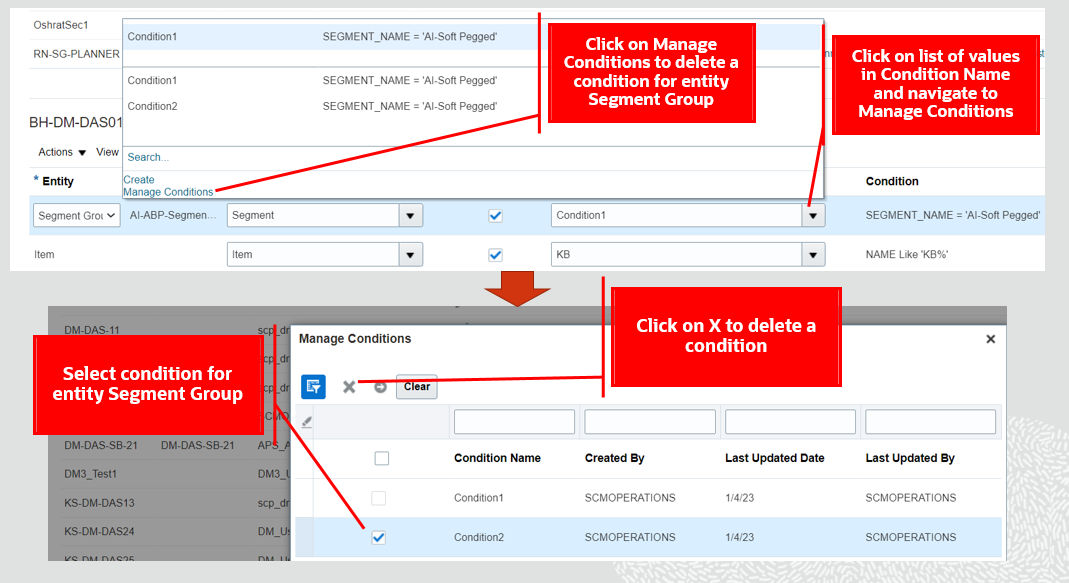
- Additionally, you can now delete data access set conditions that aren't assigned to any data access sets.
Example of how you can select the Segment Group entity and assign segments as condition while configuring data access sets:

Example of how you can restrict data access by segments in the Supply Planning work area:
Example of how you can select a user-defined customer hierarchy for the Customer entity when configuring a data access set:
Example of how you can select and delete a condition defined through the Administer Planning Security task:
Steps to Enable
You don't need to do anything to enable this feature.
Tips And Considerations
- Create segment groups and run the segmentation scheduled process before you configure data access sets with the Segment Group entity
- You can include one or more segments in a condition for a segment group in a data access set
- You can include the Segment Group entity with other entities in a data access set configuration
Key Resources
Role And Privileges
You have a couple options for giving people access to this feature, depending on whether you're assigning them predefined job roles or your own configured job roles.
- Users who are assigned any of these predefined job roles are automatically able to access this feature:
- Supply Chain Planner (ORA_MSC_SUPPLY_CHAIN_PLANNER_JOB)
- Materials Planner (ORA_MSC_MATERIALS_PLANNER_JOB)
- Demand and Supply Planner (ORA_MSC_DEMAND_AND_SUPPLY_PLANNER_JOB)
- Demand Planner (ORA_MSC_DEMAND_PLANNER_JOB)
- Sales and Operations Planner (ORA_MSC_SALES_AND_OPERATIONS_PLANNER_JOB)
- Replenishment Planner (ORA_MSC_REPLENISHMENT_PLANNER_JOB)
- Users who are assigned configured job roles that contain these privileges are able to access this feature:
- Monitor Supply Planning Work Area (MSC_MONITOR_SUPPLY_PLANNING_WORK_AREA_PRIV)
- Monitor Demand and Supply Planning Work Area (MSC_MONITOR_DEMAND_AND_SUPPLY_PLANNING_WORK_AREA_PRIV)
- Manage Demand Planning (MSC_MONITOR_DEMAND_PLANNING_WORK_AREA_PRIV)
- Manage Sales and Operations Planning (MSC_MONITOR_SALES_AND_OPERATIONS_PLANNING_WORK_AREA_PRIV)
- Manage Replenishment Planning (MSC_MONITOR_REPLENISHMENT_PLANNING_WORK_AREA_PRIV)
Honor the Nettable Status of the Completion Subinventory for Work orders
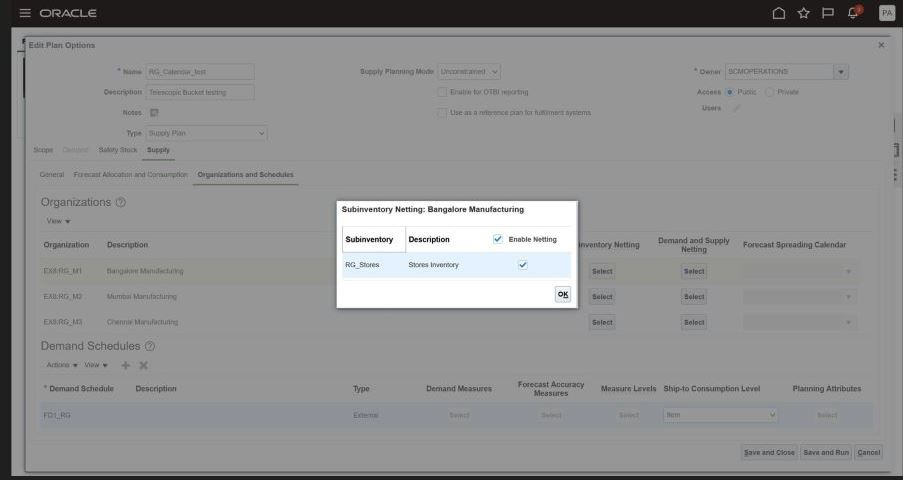
In some situations, your work-in-process (WIP) work orders may have a completion subinventory that’s nonnettable for various business reasons. With this update, work orders where the subinventory that will receive the completed work order is nonnettable are considered as unavailable supply for supply planning purposes. This consideration will ensure accurate accounting of supply status when generating plans.
For example, you can now use the Subinventory Netting option from the Organizations and Schedules tab on the Edit Plan Options page to honor the nettable status of the work order supplies against the subinventory.
Steps to Enable
You don't need to do anything to enable this feature.
Tips And Considerations
Points to take into considerations when using this feature:
- This feature is also supported for EBS-SCP integration.
- The Subinventory Code column in the source file can accept null value.
- The netting of by-product and co-product work order supplies should be based on subinventory code irrespective of child-parent relationship.
- Component demand and resource requirements work orders will get filtered out during snapshot based on the select of the parent work order subinventory code.
Role And Privileges
You have a couple of options for giving people access to this feature, depending on whether you're assigning them predefined job roles or your own configured job roles.
- Users who are assigned any of these predefined job roles are automatically able to access this feature:
- Supply Chain Planner (ORA_MSC_SUPPLY_CHAIN_PLANNER_JOB)
- Demand and Supply Planner (ORA_MSC_DEMAND_AND_SUPPLY_PLANNER_JOB)
- Demand Planner (ORA_MSC_DEMAND_PLANNER_JOB)
- Replenishment Planner (ORA_MSC_REPLENISHMENT_PLANNER_JOB)
- Sales and Operations Planner (ORA_MSC_SALES_AND_OPERATIONS_PLANNER_JOB)
- Materials Planner (ORA_MSC_MATERIALS_PLANNER_JOB) role is common for all the above work area
-
There's no change to existing privileges needed to take advantage of this feature.
IMPORTANT Actions and Considerations
Changes to File-Based Data Import (FBDI) Templates
Some Oracle Sales and Operations Planning FBDI templates have changed in this update. For details of the specific changes, refer to the Instructions tab of these FBDI templates:
- Key Customer Options (ScpKeyCustomerOptionsImportTemplate)
- Organizations (ScpOrganizationImportTemplate)
- Work Order Supplies (ScpWorkOrderSuppliesImportTemplate)
You can find the latest templates in Oracle Fusion Cloud SCM: File-Based Data Import (FBDI) for SCM, available on the Oracle Help Center.