
- Revision History
- Overview
- Pre-Update and Post-Update Tasks
- Optional Uptake of New Features (Opt In)
- Feature Summary
- Supply Planning
-
- Dual Units of Measure
- Supply Planning
-
- Manage End Item Substitution
- Publish, Delete, and Release Plans Using REST Services
- Analyze End-Pegged Demand to Supplies in a Pivot Table
- Plan Items with Only Transfer Order Demand
- Analyze Forecast Consumption Details
- View Collected Measure Data
- Choose Whether to Proceed When You Haven't Saved Layout Changes
- Enforce Integrity of Forecasts in Past Time Periods
- Export to Spreadsheets Without Merging Cells Containing Level Members
- Attribute-Based Planning
- Project-Driven Supply Chain
- Constraint-Based Planning
-
- Order Backlog Management
- Production Scheduling
- IMPORTANT Actions and Considerations
This document will continue to evolve as existing sections change and new information is added. All updates appear in the following table:
| Date | Product | Feature | Notes |
|---|---|---|---|
| 11 FEB 2022 | IMPORTANT Actions and Considerations | Updated document. Added section. | |
| 11 FEB 2022 | Order Backlog Management | Access a More General Allocation Pool If a Specified Allocation is Depleted | Updated document. Revised description. |
| 17 SEP 2021 | Created initial document. |
This guide outlines the information you need to know about new or improved functionality in this update, and describes any tasks you might need to perform for the update. Each section includes a brief description of the feature, the steps you need to take to enable or begin using the feature, any tips or considerations that you should keep in mind, and the resources available to help you.
Security and New Features
The Role section of each feature identifies the security privilege and job role required to use the feature. If feature setup is required, then the Application Implementation Consultant job role is required to perform the setup, unless otherwise indicated. (If a feature doesn't include a Role section, then no security changes are required to use the feature.)
If you have created job roles, then you can use this information to add new privileges to those roles as needed. For details about how to compare your configured job roles to predefined job roles and add security artifacts to your configured job roles, see the Security Console and Roles and Role Assignments chapters in the Oracle SCM Cloud: Securing SCM guide on the Oracle Help Center.
 HAVE AN IDEA?
We’re here and we’re listening. If you have a suggestion on how to make our cloud services even better then go ahead and tell us. There are several ways to submit your ideas, for example, through the Ideas Lab on Oracle Customer Connect. Wherever you see this icon after the feature name it means we delivered one of your ideas.
GIVE US FEEDBACK
We welcome your comments and suggestions to improve the content. Please send us your feedback at oracle_fusion_applications_help_ww_grp@oracle.com.
DISCLAIMER
The information contained in this document may include statements about Oracle’s product development plans. Many factors can materially affect Oracle’s product development plans and the nature and timing of future product releases. Accordingly, this Information is provided to you solely for information only, is not a commitment to deliver any material, code, or functionality, and should not be relied upon in making purchasing decisions. The development, release, and timing of any features or functionality described remains at the sole discretion of Oracle.
This information may not be incorporated into any contractual agreement with Oracle or its subsidiaries or affiliates. Oracle specifically disclaims any liability with respect to this information. Refer to the Legal Notices and Terms of Use for further information.
Pre-Update and Post-Update Tasks
Depending on the features you're using in your Cloud applications, you may be required to perform certain steps immediately before or after your quarterly update. For details of these pre-update and post-update steps and the product areas that are affected, refer to Oracle SCM Cloud: Performing Your Quarterly Update (doc ID 2337485.1) on My Oracle Support.
Optional Uptake of New Features (Opt In)
Oracle Cloud Applications delivers new updates every quarter. This means every three months you'll receive new functionality to help you efficiently and effectively manage your business. Some features are delivered Enabled meaning they are immediately available to end users. Other features are delivered Disabled meaning you have to take action to make available. Features delivered Disabled can be activated for end users by stepping through the following instructions using the following privileges:
- Review Applications Offering (ASM_REVIEW_APPLICATIONS_OFFERINGS_PRIV)
- Configure Oracle Fusion Applications Offering (ASM_CONFIGURE_OFFERING_PRIV)
Here’s how you opt in to new features:
- Click Navigator > My Enterprise > New Features.
- On the Features Overview page, select your offering to review new features specific to it. Or, you can leave the default selection All Enabled Offerings to review new features for all offerings.
- On the New Features tab, review the new features and check the opt-in status of the feature in the Enabled column. If a feature has already been enabled, you will see a check mark. Otherwise, you will see an icon to enable the feature.
- Click the icon in the Enabled column and complete the steps to enable the feature.
In some cases, you might want to opt in to a feature that's not listed in the New Features work area. Here's how to opt in:
- Click Navigator > My Enterprise > Offerings.
- On the Offerings page, select your offering, and then click Opt In Features.
- On the Opt In page, click the Edit Features (pencil) icon for the offering, or for the functional area that includes your feature.
- On the Edit Features page, complete the steps to enable the feature.
For more information and detailed instructions on opting in to new features for your offering, see Offering Configuration.
Opt In Expiration
Occasionally, features delivered Disabled via Opt In may be enabled automatically in a future update. This is known as an Opt In Expiration. If your cloud service has any Opt In Expirations you will see a related tab in this document. Click on that tab to see when the feature was originally delivered Disabled, and when the Opt In will expire, potentially automatically enabling the feature. You can also click here to see features with Opt In Expirations across all Oracle Cloud Applications.
Column Definitions:
Report = New or modified, Oracle-delivered, ready to run reports.
UI or Process-Based: Small Scale = These UI or process-based features are typically comprised of minor field, validation, or program changes. Therefore, the potential impact to users is minimal.
UI or Process-Based: Larger Scale* = These UI or process-based features have more complex designs. Therefore, the potential impact to users is higher.
Features Delivered Disabled = Action is needed BEFORE these features can be used by END USERS. These features are delivered disabled and you choose if and when to enable them. For example, a) new or expanded BI subject areas need to first be incorporated into reports, b) Integration is required to utilize new web services, or c) features must be assigned to user roles before they can be accessed.
Set up your Oracle Cloud applications so you can order, price, receive, pick, pack, and ship an item that you enable with primary and secondary UOM tracking. You might need to order, transfer, outsource, or buy an item in a unit of measure that's different from the unit of measure that you use to price, invoice, and cost it.
For example, you might stock and sell meat in cases, but price it in pounds. Each case of meat has a different price because the total weight in pounds varies from one case to the next, but you need to give your buyers an estimated price for each case.
You can use the dual UOM solution to meet this requirement. It's an end-to-end, integrated solution that works across the Oracle Cloud applications and helps you:
- Simultaneously track an item in the primary UOM and secondary UOM throughout your order-to-cash process and procure-to-pay processes.
- Capture the actual weight of the item that you sell, transfer, or purchase, so you can accurately price, invoice, and cost the item.
- Provide a price estimate at the time of sale or purchase and maximize value according to the exact weight that you ship or receive.
Here are the Oracle Sales and Operations Planning Cloud enhancements to the dual UOM solution that are available in this update:
- Support Dual Unit of Measure for Supply Planning
- Support Dual Unit of Measure for Order Backlog Management
- Support Dual Unit of Measure for Production Scheduling
Support Dual Unit of Measure for Supply Planning
Dual unit of measure (UOM) considerations, such as catch weight, are important in natural resources and a variety of industries, such as food and beverage. For example, you may receive orders for a certain number of cases with a nominal weight per case, but the final pricing is based on the actual weight shipped. Oracle Cloud Supply Chain Management now comprehensively addresses the need to track two, simultaneous UOMs throughout the end-to-end supply chain business processes.
Oracle Cloud Supply Chain Planning ensures that all relevant data collected from supply chain management applications are in the primary unit of measure and the relevant measures are appropriately translated to the display unit of measure. After you release planned orders from supply planning and replenishment planning, order orchestration processes ensure that all translation to the relevant UOM occurs to support execution in dual units of measure.
Execute your supply chain considering dual UOM through the end-to-end supply chain business processes.
Steps to Enable
You don't need to do anything to enable this feature.
Tips And Considerations
- To enable an item for dual unit of measure tracking, the Manage Items task is used in the Product Information Management work area to set the Tracking Unit of Measure attribute to Primary and Secondary for the item.
- The Pricing unit of measure attribute is set as Primary or Secondary using the Manage Items task in the Product Information Management work area to ensure Order Management Cloud can appropriately price the sales order line with relevant pricing unit of measure.
- Supply Chain Planning Cloud collects and releases demand and supplies by converting from the secondary unit of measure to the primary unit of measure.
Key Resources
- The Support Dual Unit-of-Measure readiness training available on Oracle Cloud Readiness for Supply Chain Planning.
Role Information
You have a couple of options for giving people access to this feature, depending on whether you're assigning them predefined job roles or your own configured job roles.
- Users who are assigned any of these predefined job roles are automatically able to access this feature:
- Materials Planner (ORA_MSC_MATERIALS_PLANNER_JOB)
- Supply Chain Planner (ORA_MSC_SUPPLY_CHAIN_PLANNER_JOB)
- Demand Planner (ORA_MSC_DEMAND_PLANNER_JOB)
- Sales and Operations Planner (ORA_MSC_SALES_AND_OPERATIONS_PLANNER_JOB)
- Replenishment Planner (ORA_MSC_REPLENISHMENT_PLANNER_JOB)
- Order Promising Manager (ORA_MSC_ORDER_PROMISING_MANAGER_JOB)
- Backlog Manager (ORA_MSC_BACKLOG_MANAGER_JOB)
- Production Scheduler (ORA_MSC_PRODUCTION_SCHEDULER_JOB)
- Users who are assigned configured job roles that contain any of these privileges are able to access this feature:
- Monitor Supply Planning Work Area (MSC_MONITOR_SUPPLY_PLANNING_WORK_AREA_PRIV)
- Monitor Demand and Supply Planning Work Area (MSC_MONITOR_DEMAND_AND_SUPPLY_PLANNING_WORK_AREA_PRIV)
- Monitor Demand Management Work Area (MSC_MONITOR_DEMAND_MANAGEMENT_WORK_AREA_PRIV)
- Monitor Sales and Operations Planning Work Area (MSC_MONITOR_SALES_AND_OPERATIONS_PLANNING_WORK_AREA_PRIV)
- Monitor Replenishment Planning Work Area (MSC_MONITOR_REPLENISHMENT_PLANNING_WORK_AREA_PRIV)
- Monitor Order Promising Work Area (MSC_MONITOR_ORDER_PROMISING_WORK_AREA_PRIV)
- Monitor Backlog Management Work Area (MSC_MONITOR_BACKLOG_MANAGEMENT_WORK_AREA_PRIV)
- Release Production Schedule (MSC_RELEASE_PRODUCTION_SCHEDULE_PRIV)
- Run Production Schedule (MSC_RUN_PRODUCTION_SCHEDULE_PRIV)
Support Dual Unit of Measure for Order Backlog Management
Dual unit of measure (UOM) considerations, such as catch weight, are important in natural resources and a variety of industries, such as food and beverage. For example, you may receive orders for a certain number of cases with a nominal weight per case, but the final pricing is based on the actual weight shipped. Oracle Cloud Supply Chain Management now comprehensively addresses the need to track two, simultaneous UOMs throughout the end-to-end supply chain business processes.
Oracle Cloud Supply Chain Planning ensures that all relevant data collected from supply chain management applications are in the primary unit of measure and the relevant measures are appropriately translated to the display unit of measure. After you release planned orders from supply planning and replenishment planning, order orchestration processes ensure that all translation to the relevant UOM occurs to support execution in dual units of measure.
Execute your supply chain considering dual UOM through the end-to-end supply chain business processes.
Steps to Enable
Use the Opt In UI to enable this feature. For instructions, refer to the Optional Uptake of New Features section of this document.
Offering: Supply Chain Planning
Tips And Considerations
When you opt in to use this feature, you must opt in to the feature named: Order Backlog Management. Opting in to the Order Backlog Management feature also enables the feature described here. If you previously opted in to the Order Backlog Management feature, then this feature is automatically enabled.
Other tips and considerations:
- To enable an item for dual unit of measure tracking, the Manage Items task is used in the Product Information Management work area to set the Tracking Unit of Measure attribute to Primary and Secondary for the item.
- The Pricing unit of measure attribute is set as Primary or Secondary using the Manage Items task in the Product Information Management work area to ensure Order Management Cloud can appropriately price the sales order line with relevant pricing unit of measure.
- Supply Chain Planning Cloud collects and releases demand and supplies by converting from the secondary unit of measure to the primary unit of measure.
Key Resources
- The Support Dual Unit-of-Measure readiness training available on Oracle Cloud Readiness for Supply Chain Planning.
Role Information
You have a couple of options for giving people access to this feature, depending on whether you're assigning them predefined job roles or your own configured job roles.
- Users who are assigned any of these predefined job roles are automatically able to access this feature:
- Materials Planner (ORA_MSC_MATERIALS_PLANNER_JOB)
- Supply Chain Planner (ORA_MSC_SUPPLY_CHAIN_PLANNER_JOB)
- Demand Planner (ORA_MSC_DEMAND_PLANNER_JOB)
- Sales and Operations Planner (ORA_MSC_SALES_AND_OPERATIONS_PLANNER_JOB)
- Replenishment Planner (ORA_MSC_REPLENISHMENT_PLANNER_JOB)
- Order Promising Manager (ORA_MSC_ORDER_PROMISING_MANAGER_JOB)
- Backlog Manager (ORA_MSC_BACKLOG_MANAGER_JOB)
- Production Scheduler (ORA_MSC_PRODUCTION_SCHEDULER_JOB)
- Users who are assigned configured job roles that contain any of these privileges are able to access this feature:
- Monitor Supply Planning Work Area (MSC_MONITOR_SUPPLY_PLANNING_WORK_AREA_PRIV)
- Monitor Demand and Supply Planning Work Area (MSC_MONITOR_DEMAND_AND_SUPPLY_PLANNING_WORK_AREA_PRIV)
- Monitor Demand Management Work Area (MSC_MONITOR_DEMAND_MANAGEMENT_WORK_AREA_PRIV)
- Monitor Sales and Operations Planning Work Area (MSC_MONITOR_SALES_AND_OPERATIONS_PLANNING_WORK_AREA_PRIV)
- Monitor Replenishment Planning Work Area (MSC_MONITOR_REPLENISHMENT_PLANNING_WORK_AREA_PRIV)
- Monitor Order Promising Work Area (MSC_MONITOR_ORDER_PROMISING_WORK_AREA_PRIV)
- Monitor Backlog Management Work Area (MSC_MONITOR_BACKLOG_MANAGEMENT_WORK_AREA_PRIV)
- Release Production Schedule (MSC_RELEASE_PRODUCTION_SCHEDULE_PRIV)
- Run Production Schedule (MSC_RUN_PRODUCTION_SCHEDULE_PRIV)
Support Dual Unit of Measure for Production Scheduling
Dual unit of measure (UOM) considerations, such as catch weight, are important in natural resources and a variety of industries, such as food and beverage. For example, you may receive orders for a certain number of cases with a nominal weight per case, but the final pricing is based on the actual weight shipped. Oracle Cloud Supply Chain Management now comprehensively addresses the need to track two, simultaneous UOMs throughout the end-to-end supply chain business processes.
Oracle Cloud Supply Chain Planning ensures that all relevant data collected from supply chain management applications are in the primary unit of measure and the relevant measures are appropriately translated to the display unit of measure. After you release planned orders from supply planning and replenishment planning, order orchestration processes ensure that all translation to the relevant UOM occurs to support execution in dual units of measure.
Execute your supply chain considering dual UOM through the end-to-end supply chain business processes.
Steps to Enable
Use the Opt In UI to enable this feature. For instructions, refer to the Optional Uptake of New Features section of this document.
Offering: Supply Chain Planning
Tips And Considerations
When you opt in to use this feature, you must opt in to the feature named: Production Scheduling. Opting in to the Production Scheduling feature also enables the feature described here. If you previously opted in to the Production Scheduling feature, then this feature is automatically enabled.
Other tips and consideration:
- To enable an item for dual unit of measure tracking, the Manage Items task is used in the Product Information Management work area to set the Tracking Unit of Measure attribute to Primary and Secondary for the item.
- The Pricing unit of measure attribute is set as Primary or Secondary using the Manage Items task in the Product Information Management work area to ensure Order Management Cloud can appropriately price the sales order line with relevant pricing unit of measure.
- Supply Chain Planning Cloud collects and releases demand and supplies by converting from the secondary unit of measure to the primary unit of measure.
Key Resources
- The Support Dual Unit-of-Measure readiness training available on Oracle Cloud Readiness for Supply Chain Planning.
Role Information
You have a couple of options for giving people access to this feature, depending on whether you're assigning them predefined job roles or your own configured job roles.
- Users who are assigned any of these predefined job roles are automatically able to access this feature:
- Materials Planner (ORA_MSC_MATERIALS_PLANNER_JOB)
- Supply Chain Planner (ORA_MSC_SUPPLY_CHAIN_PLANNER_JOB)
- Demand Planner (ORA_MSC_DEMAND_PLANNER_JOB)
- Sales and Operations Planner (ORA_MSC_SALES_AND_OPERATIONS_PLANNER_JOB)
- Replenishment Planner (ORA_MSC_REPLENISHMENT_PLANNER_JOB)
- Order Promising Manager (ORA_MSC_ORDER_PROMISING_MANAGER_JOB)
- Backlog Manager (ORA_MSC_BACKLOG_MANAGER_JOB)
- Production Scheduler (ORA_MSC_PRODUCTION_SCHEDULER_JOB)
- Users who are assigned configured job roles that contain any of these privileges are able to access this feature:
- Monitor Supply Planning Work Area (MSC_MONITOR_SUPPLY_PLANNING_WORK_AREA_PRIV)
- Monitor Demand and Supply Planning Work Area (MSC_MONITOR_DEMAND_AND_SUPPLY_PLANNING_WORK_AREA_PRIV)
- Monitor Demand Management Work Area (MSC_MONITOR_DEMAND_MANAGEMENT_WORK_AREA_PRIV)
- Monitor Sales and Operations Planning Work Area (MSC_MONITOR_SALES_AND_OPERATIONS_PLANNING_WORK_AREA_PRIV)
- Monitor Replenishment Planning Work Area (MSC_MONITOR_REPLENISHMENT_PLANNING_WORK_AREA_PRIV)
- Monitor Order Promising Work Area (MSC_MONITOR_ORDER_PROMISING_WORK_AREA_PRIV)
- Monitor Backlog Management Work Area (MSC_MONITOR_BACKLOG_MANAGEMENT_WORK_AREA_PRIV)
- Release Production Schedule (MSC_RELEASE_PRODUCTION_SCHEDULE_PRIV)
- Run Production Schedule (MSC_RUN_PRODUCTION_SCHEDULE_PRIV)
End item substitution is sometimes required for a variety of reasons after an order is captured. For example, you may want to honor the promise date to the customer by substituting a higher quality item for a lower quality item. You can now define substitution relationships and provide them to planning. If an order is at risk of being fulfilled late due to supply constraints, Oracle Cloud Supply Planning, in the constrained mode will evaluate the substitution relationship and recommend a substitute end item if it will alleviate the risk.
Increase customer service levels and minimize excess and obsolete inventory by using substitute items to meet demand on time.
Steps to Enable
- In the Product Information Management work area, define item relationships in the Manage Item Relationships table
- In the Supply Planning work area, select the Use end items substitutes check box in the Constraints and Decision Rules tab of the Plan Options page
Tips And Considerations
Consider the following points when you're planning your primary and substitute end items:
- All sourcing rules of substitute items of an end item should be defined in the same sourcing rule.
- Planning excludes item relationships that are not set to Planning Enabled.
- Supply planning minimizes substitution when there is a similar delay with substitute item comparing to primary item.
- Supply planning allows End Item Substitution for items that are also components in a bill of material (BOM).
- When a supply is reserved for a portion of an end item demand, the remaining balance of the demand can be satisfied using supply of a substitute item.
Key Resources
- The Manage End Item Substitution readiness training available on Oracle Cloud Readiness for Supply Chain Planning.
Role Information
You have a couple options for giving people access to this feature, depending on whether you're assigning them predefined job roles or your own configured job roles.
- Users who are assigned any of these predefined job roles are automatically able to access this feature:
- Supply Chain Planner (ORA_MSC_SUPPLY_CHAIN_PLANNER_JOB)
- Materials Planner (ORA_MSC_MATERIALS_PLANNER_JOB)
- Users who are assigned configured job roles that contain these privileges are able to access this feature:
- Edit Demands and Supplies (MSC_EDIT_DEMANDS_AND_SUPPLIES_PRIV)
- View Demands and Supplies (MSC_VIEW_DEMANDS_AND_SUPPLIES_PRIV)
Publish, Delete, and Release Plans Using REST Services
Oracle Cloud Supply Chain Planning applications may need to coexist with other enterprise applications that you have. You can use technologies, such as file-based data import (FBDI) or REST API, to enable integrations with other applications. With this update, you can publish, delete, and release supply chain plans using the child resource Publish Data, Deletes, and Releases under the REST API resource Supply Chain Plans. When using these child resources, the GET and POST operations will both be supported.
This new capability enables standards-based interoperability of Oracle Cloud Supply Chain Planning with other applications that you may have in your enterprise.
Steps to Enable
Review the REST service definition in the REST API guides, available from the Oracle Help Center > your apps service area of interest > REST API. If you're new to Oracle's REST services you may want to begin with the Quick Start section.
Tips And Considerations
- You can't delete a plan with a status that indicates another plan action is in progress.
- To delete a plan that has other plans that reference the plan being deleted, you must set the ForceDeleteFlag attribute to true. You'll need to rerun the plans that referenced the deleted plan.
Key Resources
- The Publish, Delete, and Release Plans Using REST Services readiness training available on Oracle Cloud Readiness for Supply Chain Planning.
Role Information
You have a couple options for giving people access to this feature, depending on whether you're assigning them predefined job roles or your own configured job roles.
- Users who are assigned any of these predefined job roles are automatically able to access this feature:
- Supply Chain Planner (ORA_MSC_SUPPLY_CHAIN_PLANNER_JOB)
- Materials Planner (ORA_MSC_MATERIALS_PLANNER_JOB)
- Demand Planner (ORA_MSC_DEMAND_PLANNER_JOB)
- Replenishment Planner (ORA_MSC_REPLENISHMENT_PLANNER_JOB)
- Sales and Operations Planner (ORA_MSC_SALES_AND_OPERATIONS_PLANNER_JOB)
- Users who are assigned configured job roles that contain these privileges are able to access this feature:
- Release Planning Recommendations (MSC_RELEASE_PLANNING_RECOMMENDATIONS_PRIV)
- Publish Plan Data (MSC_PUBLISH_PLAN_DATA_PRIV )
- Delete Plans (MSC_DELETE_PLANS_PRIV)
Analyze End-Pegged Demand to Supplies in a Pivot Table
As part of plan analysis, you may want to understand the aggregate quantities of a supply that is pegged to a end demand of your supply chain. Examples of what you might want to analyze:
- A component supply by key attributes, such as order type or project code, pegged to end-demand attributes
- Supplies allocated to a particular project pegged to a different project
With this update, you can configure planning tables that consist of the end item demand, and you can drill from the components at any level of the supply chain required to fulfill the demand to make this type of analysis possible. The following new dimensions are now available: End Demand Product, End Demand Organization, End Demand Order Type, and End Demand Attribute (where Attribute is one of 15 attributes available if you opt in to Project-Driven Supply Chain or Attribute-Based Planning capabilities.)
Here's an example of a pivot table with end-pegged demands for an item with planning attributes in an attribute-based plan.
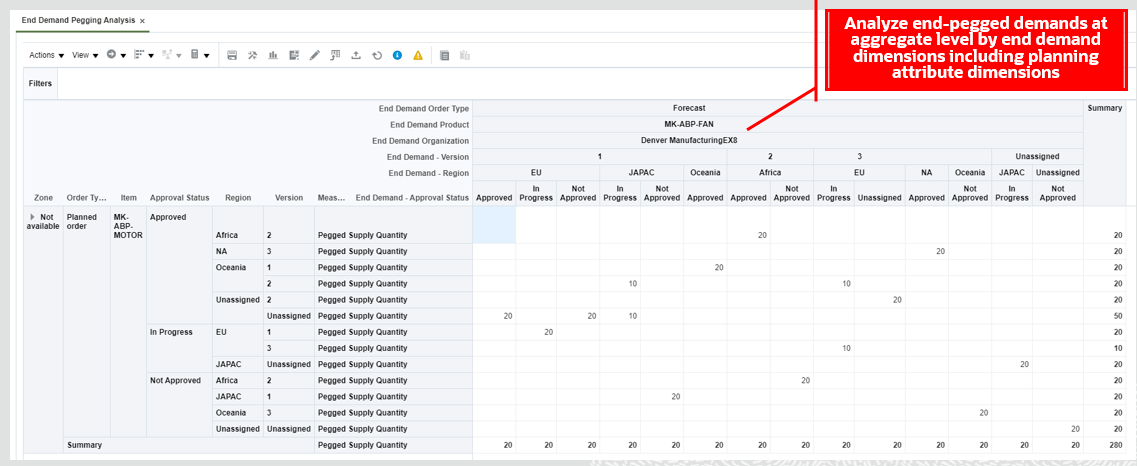
Solve planning issues faster through analysis of aggregate supply to end-pegged demand.
Steps to Enable
- You must assign the Pegged Supply Quantity measure to plan's measure catalog to analyze end-demand pegged supplies.
- For a project or planning-attribute plan you must also select a project or planning-attribute measure context to review and analyze end-demand pegged supplies by planning attributes.
Key Resources
- The Analyze End-Pegged Demand to Supplies in a Pivot Table readiness training available on Oracle Cloud Readiness for Supply Chain Planning.
Role Information
You have a couple of options for giving people access to this feature, depending on whether you're assigning them predefined job roles or your own configured job roles.
- Users who are assigned any of these predefined job roles are automatically able to access this feature:
- Materials Planner (ORA_MSC_MATERIALS_PLANNER_JOB)
- Supply Chain Planner (ORA_MSC_SUPPLY_CHAIN_PLANNER_JOB)
- Users who are assigned configured job roles that contain these privileges are able to access this feature:
- Monitor Supply Planning Work Area (MSC_MONITOR_SUPPLY_PLANNING_WORK_AREA_PRIV)
- Monitor Demand and Supply Planning Work Area (MSC_MONITOR_DEMAND_AND_SUPPLY_PLANNING_WORK_AREA_PRIV)
Plan Items with Only Transfer Order Demand
You might have situations where you want to plan for a supply chain in which the only source of demand for an item in a specific inventory organization is transfer order demand from downstream supply chain nodes, such as distribution centers. Oracle Cloud Supply Planning can now plan for item and organization combinations that have no other demand other than transfer order demand from a downstream organization, even when the plan scope is set to something other than All planned items.
Plan for your supply chain considering unique business circumstances.
Steps to Enable
To plan items with only transfer order demand, set the Supply Planned Items plan option to one of the following:
- Demand plan items and all sales orders
- Demand plan items, WIP components, and all sales orders
- All planned items
Navigation: Supply Planning work area > Manage Plans > Create Plan/Edit Plan Options > Scope tab
Key Resources
- TOI will be prepared.
Role Information
You have a couple options for giving people access to this feature, depending on whether you're assigning them predefined job roles or your own configured job roles.
- Users who are assigned the following job role are automatically able to access this feature:
- Supply Chain Planner (ORA_MSC_SUPPLY_CHAIN_PLANNER_JOB)
- Materials Planner (ORA_MSC_MATERIALS_PLANNER_JOB)
- Users who are assigned configured job roles that contain following privilege are able to access this feature:
- Monitor Supply Planning Work Area (MSC_MONITOR_SUPPLY_PLANNING_WORK_AREA_PRIV)
- View Demands and Supplies (MSC_VIEW_DEMANDS_AND_SUPPLIES_PRIV)
Analyze Forecast Consumption Details
To validate plan results, it’s often important for you to analyze the sales orders that consumed a particular forecast entry. This analysis helps you ensure that the business intent behind a particular configuration of forecast consumption rules is achieved in a plan. You can now use the new Forecast Consumption UI to analyze these forecast consumption details.
The following screenshots illustrate an example of forecast consumption details displayed for a sales order. The example starts in the Supplies and Demands UI with a selection of a sales order to pass the context to view the forecast details in the Forecast Consumption UI.

Streamline validation of forecast consumption plan results.
Steps to Enable
To view forecast consumption details in the Forecast Consumption user interface, you must set a positive value for the Consumption Detail Cutoff Days plan option in the Supply tab, Forecast Allocation and Consumption subtab for a Supply Plan or Demand and Supply Plan.
Key Resources
- The Analyze Forecast Consumption Details readiness training available on Oracle Cloud Readiness for Supply Chain Planning.
Role Information
You have a couple of options for giving people access to this feature, depending on whether you're assigning them predefined job roles or your own configured job roles.
- Users who are assigned any of these predefined job roles are automatically able to access this feature:
- Materials Planner (ORA_MSC_MATERIALS_PLANNER_JOB)
- Supply Chain Planner (ORA_MSC_SUPPLY_CHAIN_PLANNER_JOB)
- Users who are assigned configured job roles that contain these privileges are able to access this feature:
- Monitor Supply Planning Work Area (MSC_MONITOR_SUPPLY_PLANNING_WORK_AREA_PRIV)
- Monitor Demand and Supply Planning Work Area (MSC_MONITOR_DEMAND_AND_SUPPLY_PLANNING_WORK_AREA_PRIV)
After you load measure data, you can now review the data in the Plan Inputs work area to understand the status of the data load, such as whether the load was successful or not. Use the new Collected Measure Data page to view the records and their statuses instead of having to examine log files or run a plan to understand the status. This new page enables faster resolution of data quality problems in the data load process.

Collected Measure Data Table
Efficiently assess the quality of loaded measure data without having to run a plan.
Steps to Enable
You don't need to do anything to enable this feature.
Tips And Considerations
- To avoid performance issues, the Collected Measure Data table is limited to displaying 10,000 rows by default. If the search results exceed this quantity, then only the first 10,000 rows meeting the search criteria will be displayed.
- You can change the limit for the number or rows via the MSC_COLLECTED_MEASURE_DATA_MAX_ROWS profile option. See the readiness training video for more details on how you add and change this profile option.
- Measure data loaded via the file-based data import (FBDI) for the following objects will be available to view in the Collected Measure Data table:
- Supply Chain Planning Measures (ScpForecastMeasureImportTemplate.xlsm)
- Supply Chain Planning Bookings History (ScpBookingHistoryImportTemplate.xlsm)
- Supply Chain Planning Option Bookings History (ScpOptionBookingHistoryImportTemplate.xlsm)
- Supply Chain Planning Shipments History (ScpShipmentHistoryImportTemplate.xlsm)
- Supply Chain Planning Option Shipments History (ScpOptionShipmentHistoryImportTemplate.xlsm)
- Supply Chain Planning Causal Factors (ScpCausalFactorsImportTemplate.xlsm)
- Supply Chain Planning Forecast Measures (ScpForecastMeasureImportTemplate.xlsm)
- Measure data loaded via FBDI for the following objects has special handling and won't be available to view in the Collected Measure Data table. Instead you must continue to examine log files or run a plan to understand the status.
- Supply Chain Planning Price Lists (ScpPriceListImportTemplate.xlsm)
- Supply Chain Planning External Forecasts (ScpExternalForecastImportTemplate.xlsm)
- Data for Bookings History (including booking history for options) and Shipments History (include shipment history for options) collected from either Fusion source or EBS is also available to view in the Collected Measure Data table.
- If you're using the Non-Key Customer Aggregation feature, then depending on how you've configured it, you'll see aggregated All Other data, customer-level detail data, or both.
Key Resources
- The View Collected Measure Data readiness training available on Oracle Cloud Readiness for Supply Chain Planning.
Role Information
You have a couple options for giving people access to this feature, depending on whether you're assigning them predefined job roles or your own configured job roles.
- Users who are assigned any of these predefined job roles are automatically able to access this feature:
- Supply Chain Planner (ORA_MSC_SUPPLY_CHAIN_PLANNER_JOB)
- Demand Planner (ORA_MSC_DEMAND_PLANNER_JOB)
- Materials Planner (ORA_MSC_MATERIALS_PLANNER_JOB)
- Sales and Operations Planner (ORA_MSC_SALES_AND_OPERATIONS_PLANNER_JOB)
- Replenishment Planner (ORA_MSC_REPLENISHMENT_PLANNER_JOB)
- Users who are assigned configured job roles that contain these privileges are able to access this feature:
- View Planning Tables (MSC_VIEW_PLANNING_TABLES_PRIV)
- Maintain Planning Tables (MSC_MAINTAIN_PLANNING_TABLES_PRIV)
Choose Whether to Proceed When You Haven't Saved Layout Changes
When you make changes to the layout of a table or graph, you might take an action that will cause the table or graph to refresh before you have saved your changes. With this update, you’ll be warned that you will lose the layout changes you haven’t saved and be asked if you want to continue.
Increase your productivity by choosing to not lose changes unless you’re wanting to do so.
Steps to Enable
You don't need to do anything to enable this feature.
Tips And Considerations
- The existing message that warned about unsaved data changes was revised as part of this feature to clearly indicate the potential loss of edits made to measure data values when taking an action that will trigger a refresh of the table.
- A new set of messages were introduced that clearly specify the potential loss of information in the table, whether it's a data change, layout change, or both.
- The warning messages aren't displayed if you close the plan using the Save and Close button. In this case, if there are unsaved data or layout changes in any of the opened tables or graphs, then they will be lost.
Key Resources
- The Choose Whether to Proceed When You Haven't Saved Layout Changes readiness training is available on Oracle Cloud Readiness for Supply Chain Planning.
Role Information
There are no new roles or security privileges needed to access this enhancement. Users who currently have access to planning tables and graphs will automatically be able to use this feature.
Enforce Integrity of Forecasts in Past Time Periods
You may want to enter forecast changes at aggregate time levels which may contain time periods in the past with the intent that the forecast change only impacts future time buckets. To avoid unintended changes to forecasts in past time buckets, forecast measures at an aggregate time levels containing periods in the past are now not editable. For example, if the current time period is August 2021, then you can’t edit the forecast for the year 2021, but you can individually edit the forecasts for the remaining months in the year instead.
Make forecast changes at aggregate time levels without affecting forecasts for time periods in the past.
Steps to Enable
You don't need to do anything to enable this feature.
Key Resources
- The Enforce Integrity of Forecasts in Past Time Periods readiness training available on Oracle Cloud Readiness for Supply Chain Planning.
Role Information
There are no new roles or security privileges associated with this feature. All users who currently have access to edit measure data in planning tables will automatically have access to this capability.
Export to Spreadsheets Without Merging Cells Containing Level Members
One of the typical reasons for exporting data from a planning table to a spreadsheet is to enable additional analysis, such as using a pivot table in Microsoft Excel. However, this kind of analysis requires that data is available in each row, so there can’t be merged cells. Previously, if there was repeating data, then the cells were merged and you had to unmerge data. With this update, exports with repeating data will have data in each row to enable downstream analysis to be done more easily in the spreadsheet tool.
For example, if you have a table with multiple rows for the same item, then in the table the item is displayed one time and merged across the rows. Similarly, if there are multiple columns for the same month, then the month is displayed one time and merged across the columns. Now, after you export the table to a spreadsheet, the item will be repeated in the item cell for each row instead of being merged, and the month will be repeated for each month cell for each column instead of being merged. This change enables you to do analysis, such as sorting and filtering, more easily in the spreadsheet.
Streamline ad-hoc analysis in spreadsheets.
Steps to Enable
You don't need to do anything to enable this feature.
Key Resources
- The Export to Spreadsheets Without Merging Cells Containing Level Members readiness training available on Oracle Cloud Readiness for Supply Chain Planning.
Role Information
There are no new roles or security privileges needed to access this enhancement. Users who currently have access to planning tables and graphs will automatically be able to use this feature.
Plan and analyze your supply chain using configured attributes specific to your business needs, such as country of origin. Forecast for demand qualified by these attributes. Configure attributes and attribute netting rules in a supply plan so that only qualified supply, based on attributes of inventory, purchase orders, transfer orders, or work order supplies, is used to satisfy demand. Generate planned orders for these attributes at any level of your supply chain.
After you opt in to the feature named Attribute-Based Planning, you can use the features in this section.
Release Orders with Configured Attributes to Oracle Supply Chain & Manufacturing Cloud
At the end of the supply planning cycle, you need to put the plan to action. You can release planned orders and reschedule recommendations from a plan that utilizes the planning attributes. The released orders will carry the planning attribute information in the extensible flexfield, descriptive flexfield, or standard attributes as specified in the mapping table. With this update, the following additional capabilities for the attributes released to execution are now available:
- Collection and release of context segments for work order descriptive flexfields for make planned orders.
- Collection and release of context segments for distribution descriptive flexfields for buy planned orders and collection and release of context segments for line descriptive flexfields for buy planned orders.
- Collection and release of context segments for line descriptive flexfields for transfer planned orders.
NOTE: These capabilities for context segments are in addition to the capabilities provided for global segments collection and release provided in the 21C update.
This screenshot illustrates how you can map context segments of descriptive flexfields to a planning attribute to collect and release supplies with context segments from and to Oracle Supply Chain and Manufacturing Cloud.
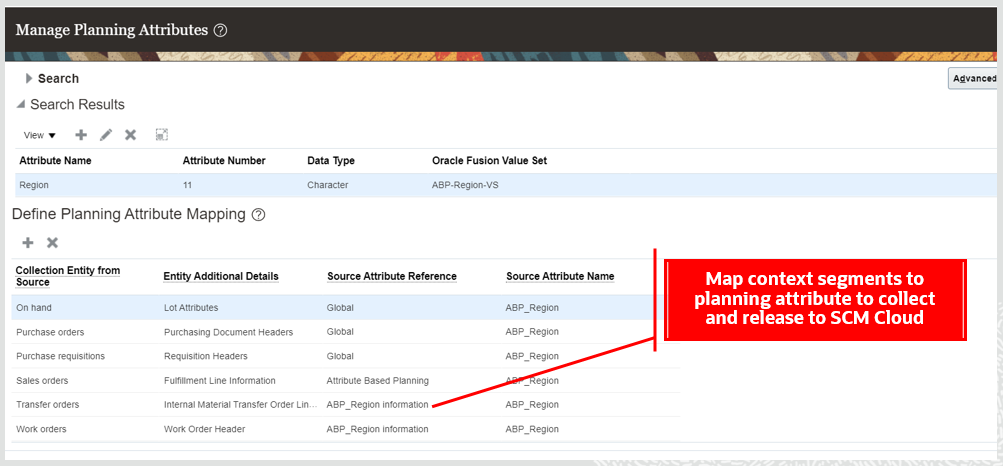
Release planned orders containing the right attribute information on the orders.
Steps to Enable
Use the Opt In UI to enable this feature. For instructions, refer to the Optional Uptake of New Features section of this document.
Offering: Supply Chain Planning
Feature: Attribute-Based Planning
When you opt in to use this feature, you must opt in to the feature named: Attribute-Based Planning. Opting in to the Attribute-Based Planning feature also enables the feature described here. If you previously opted in to the Attribute-Based Planning feature, then this feature is automatically enabled.
After this feature is enabled, perform these steps to begin planning supplies and demands:
- Create and map context flexfield segments for collection entities
- Collect supplies and demands with planning attributes having context segments from Oracle Cloud Supply Chain Management
- Create an unconstrained supply plan or demand and supply plan
- Assign a planning-attribute-based netting rule to the plan
- Run the plan
- Release planning attributes mapped to context segments to Oracle Cloud Supply Chain Management to create work orders, purchase requisitions, or transfer orders with planning attributes in the context segments of flexfields
Tips And Considerations
A context segment name and code must be the same and must be less than or equal to 30 characters
Key Resources
- The Release Orders with Configured Attributes to Oracle Cloud Supply Chain Management readiness training available on Oracle Cloud Readiness for Supply Chain Planning.
Role Information
You have a couple of options for giving people access to this feature, depending on whether you're assigning them predefined job roles or your own configured job roles.
- Users who are assigned any of these predefined job roles are automatically able to access this feature:
- Materials Planner (ORA_MSC_MATERIALS_PLANNER_JOB)
- Supply Chain Planner (ORA_MSC_SUPPLY_CHAIN_PLANNER_JOB)
- Users who are assigned configured job roles that contain these privileges are able to access this feature:
- Monitor Supply Planning Work Area (MSC_MONITOR_SUPPLY_PLANNING_WORK_AREA_PRIV)
- Monitor Demand and Supply Planning Work Area (MSC_MONITOR_DEMAND_AND_SUPPLY_PLANNING_WORK_AREA_PRIV)
Project-Driven Supply Chain is an end-to-end, integrated solution across the Oracle Supply Chain Management and Project Management Cloud applications. This solution is designed to support various business processes of manufacturing and asset-intensive companies.
You can use the Project-Driven Supply Chain solution to manage your supply chain processes in the context of projects without creating separate organizations for each project. You can also capture supply chain costs as project expenditures.
After you opt in to the feature named Project-Driven Supply Chain, you can use the feature described in this section.
Net Project Supply Using Attribute-Based Netting Rules
Use attribute-based netting rules instead of project netting rules. The attribute-based planning capabilities are a superset of the planning capabilities released earlier to support a project-driven supply chain. Because all of the rule definition capabilities available for the Manage Project Netting Rules task can now be achieved using the Attribute-Based Netting Rules task, the Manage Project Netting Rules task won’t be visible if you’re just now opting in to project driven supply chain planning capabilities. If you already created a project netting rule, then the Manage Project Netting Rules task will continue to be available.
Configure your attribute-based netting rules using the Manage Attribute-Based Netting Rules task by selecting the Project Group, Project, and Task planning attributes in the Attributes for Planned Orders dialog, Demand Grouping tab and Striping tab.
The following screenshot illustrates how you can configure netting of project and common supplies to a project demand using attribute-based netting rules.

The following screenshot illustrates how you can configure attribute-based netting rules to create planned orders with project and task to satisfy unmet project demands.
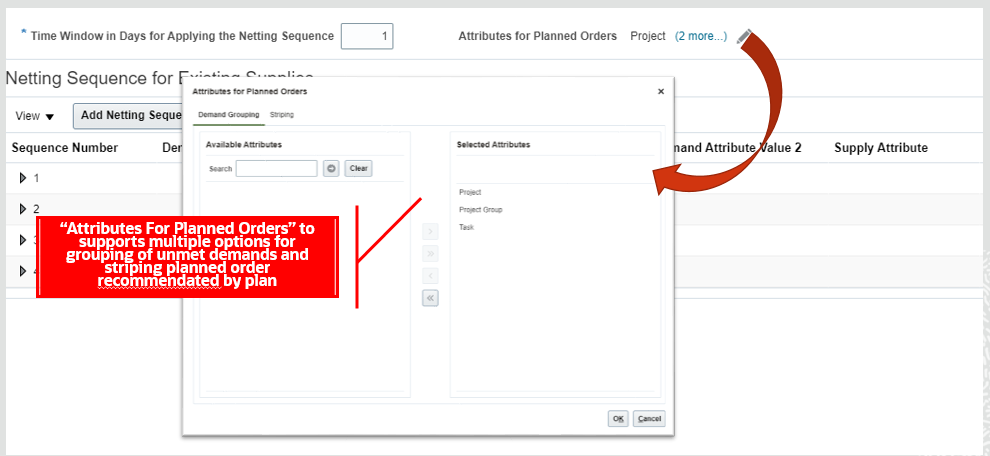
Take advantage of more complex rule definition capabilities available with attribute-based planning for your project-driven supply chain.
Steps to Enable
Use the Opt In UI to enable this feature. For instructions, refer to the Optional Uptake of New Features section of this document.
Offering: Supply Chain Planning
Feature: Plan Project-Specific Supply
Enable the Plan Project-Specific Supply feature as follows:
- If your enterprise doesn’t use Oracle Supply Chain Execution Cloud:
- In the Offerings work area, select the Supply Chain Planning offering. Click Opt In Features.
- On the Opt In: Supply Chain Planning page, click the Features icon for the Supply Chain Planning offering.
- Enable the Project-Driven Supply Chain feature, and then enable the Plan Project-Specific Supply feature.
- If your enterprise uses Oracle Supply Chain Execution Cloud and has already opted in to the Project-Driven Supply Chain feature:
- In the Offerings work area, select either the Manufacturing and Supply Chain Materials Management offering or the Supply Chain Planning offering. Click Opt In Features.
- On the Opt In page, click the Features icon for the offering.
- Enable the Plan Project-Specific Supply feature.
- If your enterprise uses Oracle Supply Chain Execution Cloud and hasn't already opted in to the Project-Driven Supply Chain feature:
- In the Offerings work area, select either the Manufacturing and Supply Chain Materials Management offering or the Supply Chain Planning offering. Click Opt In Features.
- On the Opt In page, click the Features icon for the offering.
- Enable the Project-Driven Supply Chain feature, and then enable the Plan Project-Specific Supply feature.
- Perform the required setup for the Project-Driven Supply Chain feature. For details, refer to the Project-Driven Supply Chain chapter in the Implementing Manufacturing and Supply Chain Materials Management guide on the Oracle Help Center.
Tips And Considerations
- Create netting sequence equivalent to project netting rules that were created using the Manage Project Netting Rules task by using the Manage Attribute-Based Netting Rules task instead.
Key Resources
- The Net Project Supply Using Attribute-Based Netting Rules readiness training available on Oracle Cloud Readiness for Supply Chain Planning.
Role Information
You have a couple of options for giving people access to this feature, depending on whether you're assigning them predefined job roles or your own configured job roles.
- Users who are assigned any of these predefined job roles are automatically able to access this feature:
- Materials Planner (ORA_MSC_MATERIALS_PLANNER_JOB)
- Supply Chain Planner (ORA_MSC_SUPPLY_CHAIN_PLANNER_JOB)
- Users who are assigned configured job roles that contain these privileges are able to access this feature:
- Monitor Supply Planning Work Area (MSC_MONITOR_SUPPLY_PLANNING_WORK_AREA_PRIV)
- Monitor Demand and Supply Planning Work Area (MSC_MONITOR_DEMAND_AND_SUPPLY_PLANNING_WORK_AREA_PRIV)
Create and run supply plans that consider material and capacity constraints. Focus on meeting demand on time by evaluating all possible alternatives, such as using different sources, substitute components, or alternative work definitions.
After you opt in to the feature named Constraint-Based Planning, you can use the features described in this section.
Use Constrained Dependent Demand to Calculate Supply Quantity for Fixed Days of Supply
The planned order quantity that is calculated by Oracle Cloud Supply Planning depends on order modifiers such as fixed days of supply. Previously, the order quantities for components and subassemblies using the fixed days of supply order modifier used the unconstrained dependent demand. This approach might not be ideal in situations where the supply constraints may result in a different dependent demand picture. With this update, the calculations are based on the results of the constrained planning calculations. This basis will better align the quantities of the orders with the expected demand after considering supply constraints.
Increase planning accuracy when using the fixed days of supply order modifier by aligning the quantities of the orders with the expected demand after considering supply constraints.
Steps to Enable
Use the Opt In UI to enable this feature. For instructions, refer to the Optional Uptake of New Features section of this document.
Offering: Supply Chain Planning
Tips And Considerations
- When you opt in to use this feature, you must opt in to the feature named: Constraint-Based Planning. Opting in to the Constraint-Based Planning feature also enables the feature described here. If you previously opted in to the Constraint-Based Planning feature, then this feature is automatically enabled.
- You need to set an appropriate duration for fixed days of supply to achieve a higher fill rate for orders and higher customer satisfaction as a result of more accurate supply orders aligned with constrained demand.
Key Resources
- The Use Constrained Dependent Demand to Calculate Supply Quantity for Fixed Days of Supply readiness training available on Oracle Cloud Readiness for Supply Chain Planning.
Role Information
You have a couple options for giving people access to this feature, depending on whether you're assigning them predefined job roles or your own configured job roles.
- Users who are assigned any of these predefined job roles are automatically able to access this feature:
- Supply Chain Planner (ORA_MSC_SUPPLY_CHAIN_PLANNER_JOB)
- Materials Planner (ORA_MSC_MATERIALS_PLANNER_JOB)
- Users who are assigned configured job roles that contain these privileges are able to access this feature:
- Edit Demands and Supplies (MSC_EDIT_DEMANDS_AND_SUPPLIES_PRIV)
- View Demands and Supplies (MSC_VIEW_DEMANDS_AND_SUPPLIES_PRIV)
Reschedule your order backlog by prioritizing orders based on flexible demand priority rules. You can simulate the effect of different rules to find the best combination of scheduled dates and sources based upon the latest supply information, and release the updated orders to order management systems for execution.
After you opt in to the feature named Order Backlog Management, you can use the feature described in this section.
Allocate Supply Based on Plan Attributes
By default, Backlog Management reschedules order lines by demand priority, which can result in a few orders consuming all of the available supply. To distribute high-demand items more fairly to lower-priority customers, regions, or channels, you can now allocate a percentage or specified quantity of supply each week to order lines based upon plan attributes. Order lines that match the allocation attribute’s value will have access to the allocated supply, but this supply won’t be visible to order lines that don’t share the allocation attribute’s value.
Honor commitments and distribute high-demand items more fairly by ensuring that a quantity or percentage of supply is allocated to sales orders with specific attribute values.
Steps to Enable
Use the Opt In UI to enable this feature. For instructions, refer to the Optional Uptake of New Features section of this document.
Offering: Supply Chain Planning
When you opt in to use this feature, you must opt in to one of the following features:
- Attribute-Based Planning
- Project-Driven Supply Chain
Opting in to the Attribute-Based Planning feature or Project-Driven Supply Chain feature also enables the feature described here. If you previously opted in to the Attribute-Based Planning feature or Project-Driven Supply Chain feature, then this feature is automatically enabled.
Enable the Attribute-Based Planning feature as follows:
- In the Offerings work area, select the Supply Chain Planning offering. Click Opt In Features.
- On the Opt In: Supply Chain Planning page, click the Features icon for the Supply Chain Planning offering.
- Enable the Attribute-Based Planning feature.
Enable the Project-Driven Supply Chain feature as follows:
- In the Offerings work area, select the Supply Chain Planning offering. Click Opt In Features.
- On the Opt In: Supply Chain Planning page, click the Features icon for the Supply Chain Planning offering.
- Enable the Project-Driven Supply Chain feature.
After opt in is enabled, perform these steps to begin Allocate Supply Based on Plan Attributes
- Define value sets and flexfield segments for user-defined planning attributes in SCM Cloud if collecting planning attributes from a SCM cloud source system.
- Define planning attributes in Manage Planning Attributes and define planning attributes mapping.
- Specify planning attributes mapping with the Allocation Tier in Manage Backlog Planning Options page in the Backlog Management work area.
- Prepare file-based data import csv files for planning attribute values and supplies and demands with planning attribute values if collecting data from an external source system.
- Run data collections.
Tips And Considerations
- At least one level allocation hierarchy is required for allocation.
- You need to decide the hierarchy as an up front setup task.
- If there's a change in your allocation hierarchy, it means a data model change in Backlog Management therefore all of the previous sales orders that had different attributes mapped won't be usable anymore.
- The allocation feature isn't applicable to components, resources, and subassemblies, but it is applicable to those subassemblies that are sold as a spare parts and have sales orders.
- For number type allocation rules, allocations must be uploaded via REST, you can't import using csv files.
- Only the Item and Organization assignment basis is supported for allocation rules.
- You must run the plan with refresh after modifying allocation rules parameters, such as Allocation Percentage.
- The sales order should have all the allocation tier attributes specified. For example, in the case of a three-level allocation hierarchy, all of the three level attributes need to be specified on the sales order.
- For orders that have no attributes stamped on them, the supply at the top level node is used.
- This feature doesn't support the predefined planning attributes Project and Task.
- The reservation of demands to supply for items under allocation isn't supported.
Key Resources
- The Allocate Supply Based on Plan Attributes readiness training available on Oracle Cloud Readiness for Supply Chain Planning.
Role Information
You have a couple options for giving people access to this feature, depending on whether you're assigning them predefined job roles or your own configured job roles.
- Users who are assigned following predefined job roles are automatically able to access this feature:
- Backlog Manager (ORA_MSC_BACKLOG_MANAGER_JOB)
- Users who are assigned configured job roles that contain these privileges are able to access this feature:
- Manage Allocation Attributes (MSC_MANAGE_ALLOCATION_ATTRIBUTES_PRIV)
- Manage Allocation Data (MSC_MANAGE_ALLOCATION_DATA_PRIV)
- Create Backlog Plan (MSC_CREATE_BACKLOG_PLAN_PRIV)
Access a More General Allocation Pool If a Specified Allocation is Depleted
You can arrange allocation rules in a hierarchy in which child allocations can share supply allocated to the parent node when needed. For example, you could use stock allocated for the European region if what was allocated to the country of Spain runs out to better balance the use of supply to meet regional demand.
The allocation hierarchy can be up to three tiers:
- Supply is first consumed from the lowest-level node in the hierarchy in a given week.
- When that supply is depleted, then supply allocated to the parent node for that same week is consumed.
Better balance the allocation of supply across your network by creating general pools of allocated supply that more-specific allocations can tap when they are depleted.
Steps to Enable
Use the Opt In UI to enable this feature. For instructions, refer to the Optional Uptake of New Features section of this document.
Offering: Supply Chain Planning
When you opt in to use this feature, you must opt in to one of the following features:
- Attribute-Based Planning
- Project-Driven Supply Chain
Opting in to the Attribute-Based Planning feature or Project-Driven Supply Chain feature also enables the feature described here. If you previously opted in to the Attribute-Based Planning feature or Project-Driven Supply Chain feature, then this feature is automatically enabled.
Enable the Attribute-Based Planning feature as follows:
- In the Offerings work area, select the Supply Chain Planning offering.
- Click Opt In Features.
- On the Opt In: Supply Chain Planning page, click the Features icon for the Supply Chain Planning offering.
- Enable the Attribute-Based Planning feature.
Enable the Project-Driven Supply Chain feature as follows:
- In the Offerings work area, select the Supply Chain Planning offering.
- Click Opt In Features.
- On the Opt In: Supply Chain Planning page, click the Features icon for the Supply Chain Planning offering.
- Enable the Project-Driven Supply Chain feature.
After opt in is enabled, perform these steps to begin using the Access a More General Allocation Pool if a Specified Allocation is Depleted feature
- Define value sets and flexfield segments for user-defined planning attributes in SCM Cloud if collecting planning attributes from a SCM cloud source system.
- Define planning attributes using the Manage Planning Attributes task and define planning attributes mapping.
- Specify planning attributes mapping on the Allocation Tier in Manage Backlog Planning Options page in the Backlog Management work area.
- Prepare file-based data import csv files for planning attribute values and supplies and demands with planning attribute values if collecting data from an external source system.
- Run data collections.
Tips And Considerations
- You can set up to three levels of allocation hierarchy.
- If the total allocated supply is less than the available supply, then the remaining supply will be allocated to level 1 or top level node.
- If the total allocated supply is more than the available supply, then the allocations will be reduced at the nodes proportionately.
Key Resources
- The Access a more General Allocation Pool if a Specified Allocation is Depleted readiness training available on Oracle Cloud Readiness for Supply Chain Planning.
Role Information
You have a couple options for giving people access to this feature, depending on whether you're assigning them predefined job roles or your own configured job roles.
- Users who are assigned the following predefined job role are automatically able to access this feature:
- Backlog Manager (ORA_MSC_BACKLOG_MANAGER_JOB)
- Users who are assigned configured job roles that contain these privileges are able to access this feature:
- Manage Allocation Attributes (MSC_MANAGE_ALLOCATION_ATTRIBUTES_PRIV)
- Manage Allocation Data (MSC_MANAGE_ALLOCATION_DATA_PRIV)
- Create Backlog Plan (MSC_CREATE_BACKLOG_PLAN_PRIV)
Redeploy Unused Supply from Lower-to-Higher-Priority Allocations If Needed
Some nodes in your allocation hierarchy may be lower priority than others. In this case, rather than delay demand for a higher-priority allocation that has been depleted (including its parent allocations), it’s better to take some of the supply from one or more lower-priority allocations.
You can assign a relative priority to each node to determine which nodes are eligible for redeployment. Consumption begins with the lowest priority sibling node in the hierarchy, and proceeds from there if needed to higher priority sibling nodes until supply from all those with a lower priority than the original is consumed. From there, allocations from lower priority parent nodes in the hierarchy may also be accessed.
You can also specify a minimum percentage or quantity of an allocation that is not available for this redeployment (sometimes also called stealing) to preserve at least some of the allocation for demands that are specific to that allocation node.
Use lower priority allocations to fulfill orders after higher-priority allocations have been consumed to meet high-priority demand whenever possible.
Steps to Enable
Use the Opt In UI to enable this feature. For instructions, refer to the Optional Uptake of New Features section of this document.
Offering: Supply Chain Planning
When you opt in to use this feature, you must opt in to one of the following features:
- Attribute-Based Planning
- Project-Driven Supply Chain
Opting in to the Attribute-Based Planning feature or Project-Driven Supply Chain feature also enables the feature described here. If you previously opted in to the Attribute-Based Planning feature or Project-Driven Supply Chain feature, then this feature is automatically enabled.
Enable the Attribute-Based Planning feature as follows:
- In the Offerings work area, select the Supply Chain Planning offering.
- Click Opt In Features.
- On the Opt In: Supply Chain Planning page, click the Features icon for the Supply Chain Planning offering.
- Enable the Attribute-Based Planning feature.
Enable the Project-Driven Supply Chain feature as follows:
- In the Offerings work area, select the Supply Chain Planning offering.
- Click Opt In Features.
- On the Opt In: Supply Chain Planning page, click the Features icon for the Supply Chain Planning offering.
- Enable the Project-Driven Supply Chain feature.
After opt in is enabled, perform these steps to begin Redeploy Unused Supply from Lower-to-Higher-Priority Allocations if Needed
- Define Value sets and flexfield segments for user-defined planning attributes in SCM Cloud if collecting planning attributes from a SCM cloud source system.
- Define planning attributes in Manage Planning Attributes and define planning attributes mapping.
- Specify planning attributes mapping with the Allocation Tier in Manage Backlog Planning Options page in Backlog Management workarea.
- Prepare file-based data import csv files for planning attribute values and supplies and demands with planning attribute values if collecting data from an external source system.
- Run data collections.
Tips And Considerations
- You must provide a value for the Rank and Stealing Protection Percentage attributes to enable stealing functionality.
- If you set the Stealing Protection Percentage attribute to 40%, this value means that 40% is reserved or protected and can't be stolen by other nodes so only 60% is available for stealing.
- The values provided for the Rank and Stealing Protection Percentage attributes should be same across the weekly buckets. Time varying value isn't supported for these attributes.
- The lower the number, the higher the rank.
- Allocation nodes with a rank of 0 or null aren't available for stealing, which means no other allocation nodes can steal from them. but they can steal from other allocation nodes with lower ranks .
- After modifying the Rank and Stealing Protection Percentage attributes, you must run the plan with refresh.
Key Resources
- The Redeploy Unused Supply from Lower-To-Higher-Priority Allocations if Needed readiness training available on Oracle Cloud Readiness for Supply Chain Planning.
Role Information
You have a couple options for giving people access to this feature, depending on whether you're assigning them predefined job roles or your own configured job roles.
- Users who are assigned following predefined job roles are automatically able to access this feature:
- Backlog Manager (ORA_MSC_BACKLOG_MANAGER_JOB)
- Users who are assigned configured job roles that contain these privileges are able to access this feature:
- Manage Allocation Attributes (MSC_MANAGE_ALLOCATION_ATTRIBUTES_PRIV)
- Manage Allocation Data (MSC_MANAGE_ALLOCATION_DATA_PRIV)
- Create Backlog Plan (MSC_CREATE_BACKLOG_PLAN_PRIV)
Collect Ship-To Party and Party Sites Not Associated with a Customer Account
Some businesses need to promise orders for goods to be shipped to locations that are part of a different organization than the customer’s bill-to account. For example, one university may be paying for tests to be performed on its behalf by another university’s lab. Sometimes, the other university may also be a customer, so the same site could be a ship-to location for two different customers. Previously the collections process for Global Order Promising and other supply chain planning products validated that ship-to parties and party sites belonged to the customer’s bill-to account, which prevented order scheduling for these types of arrangements.
You can now use a new setting to filter data for collections to relax these specific validation checks. When set, the collections process will include party and party site details associated with other accounts to enable sourcing rule assignments, transit mode selection, and lead time calculations for demands that reference them.
You can configure these independent ship-to customers and customer sites by linking them to a common Trading Community Architecture customer account. You can also collect ship-to customer sites that are linked to the same customer account, but may be associated with different ship-to customers.
Serve customers with outside processing requirements by scheduling orders for delivery to another customer’s site, or some other outside site that’s not part of the bill-to customer’s organization.
Steps to Enable
Use the Opt In UI to enable this feature. For instructions, refer to the Optional Uptake of New Features section of this document.
Offering: Supply Chain Planning
When you opt in to use this feature, you must opt in to the feature named: Order Backlog Management. Opting in to the Order Backlog Management feature also enables the feature described here. If you previously opted in to the Order Backlog Management feature, then this feature is automatically enabled.
After the feature is enabled, perform these steps to collect ship-to party and party sites not associated with a customer account:
- Navigate to the Plan Inputs work area, a work area that is available for multiple supply chain planning products
- In the Plan Inputs work area, select the Collect Planning Data task
- On the Collect Planning Data page, select the source system and collection mode
- Click the Select Collections Filters button
- In the Select Collection Filters dialog, set Include Parties Without a Customer Account to Yes and click OK
- Select the Customer entity for collection and submit
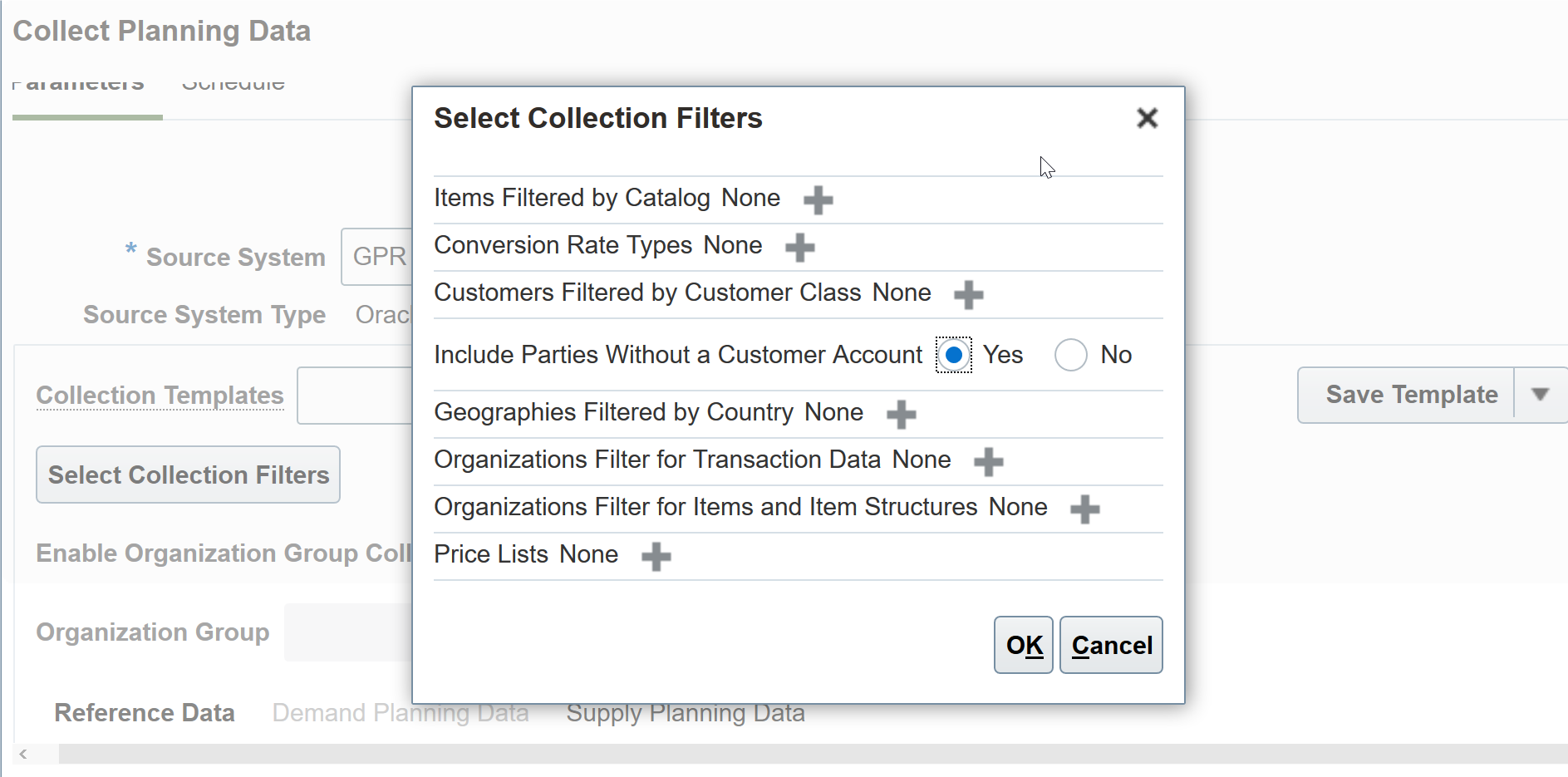
Enable Collection of Party Without Account
Tips And Considerations
- Collection volumes may increase significantly if there is a high number of customers without a Trading Community Architecture account association
- Collection performance may be impacted in cases of high customer volumes
- Run collections in targeted mode the first time, and then in net change mode for subsequent incremental changes to process new or updated customer records
Key Resources
- The Collect Ship-to Party and Party Sites not Associated with a Customer Account readiness training available on Oracle Cloud Readiness for Supply Chain Planning
Role Information
- Users who are assigned these predefined job roles are automatically able to access this feature:
- Order Promising Manager (ORA_MSC_ORDER_PROMISING_MANAGER_JOB)
- Backlog Manager (ORA_MSC_BACKLOG_MANAGER_JOB)
- Supply Chain Planner (ORA_MSC_SUPPLY_CHAIN_PLANNER_JOB)
- Materials Planner (ORA_MSC_MATERIALS_PLANNER_JOB)
- Demand Planner (ORA_MSC_DEMAND_PLANNER_JOB)
- Replenishment Planner (ORA_MSC_REPLENISHMENT_PLANNER_JOB)
- Sales and Operations Planner (ORA_MSC_SALES_AND_OPERATIONS_PLANNER_JOB)
- Users who are assigned configured job roles that contain these privileges are able to access this feature:
- Manage Order Promising Data Collection (MSC_MANAGE_ORDER_PROMISING_DATA_COLLECTION_PRIV)
- Collect Planning Reference Data (MSC_COLLECT_PLANNING_REFERENCE_DATA_PRIV)
Generate feasible factory schedules that maximize shop floor throughput and return on investment in resources and labor. You can calculate, manage, and monitor realistic schedules that the shop floor can execute on, while optimizing the usage of critical resources and meeting customer demand on time as best as possible.
After you opt in to the feature named Production Scheduling, you can use the features in this section.
Configure User-Defined Sequence Setups for Production Scheduling
You can now directly manage attribute sequences in UIs in Oracle Cloud Production Scheduling instead of using REST services.
You often know the preferred production sequence that you would like to impose on a key resource. Use the Manage Resource Parameters and Attribute Sequence UIs to specify your preferred sequence by attribute. For example, you can define an attribute sequence, such as blue, green, white, for processing on a resource. Production scheduling will consider the user-defined attribute sequence as a guideline when generating the schedule.
In the Manage Resource Parameters UI, select the relevant resource and set the Apply User-Defined Sequence option to Yes. Then you can navigate to the Attribute Sequence UI using the action menu for that resource.
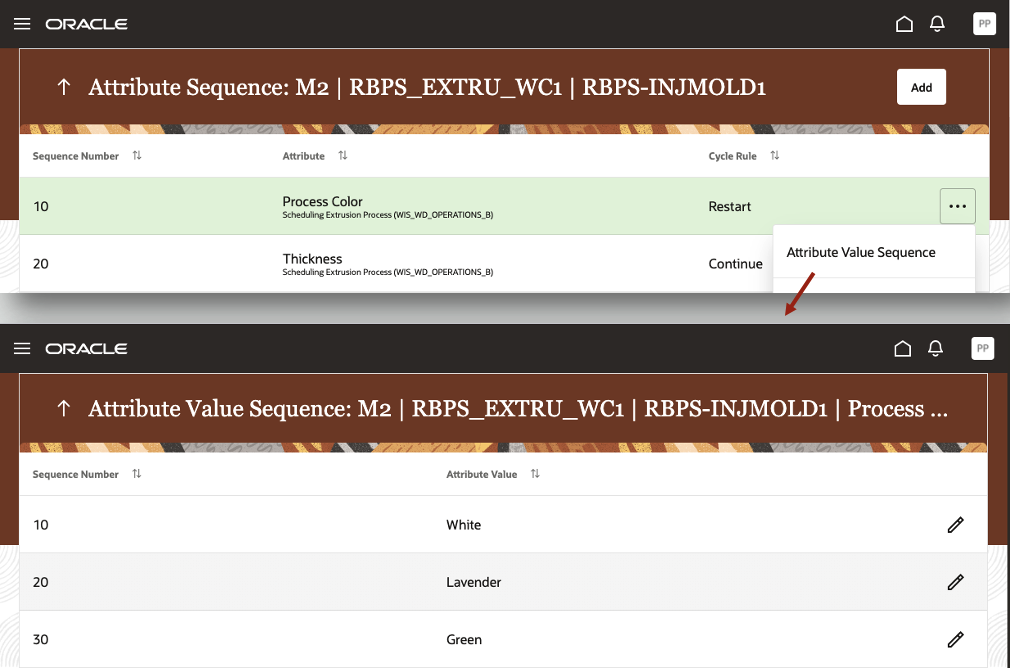
Maintain the attribute and attribute value sequences
Develop the best schedule to control production lines while maximizing throughput and minimizing changeover times.
Steps to Enable
Use the Opt In UI to enable this feature. For instructions, refer to the Optional Uptake of New Features section of this document.
Offering: Supply Chain Planning
Tips And Considerations
When you opt in to use this feature, you must opt in to the feature named: Production Scheduling. Opting in to the Production Scheduling feature also enables the feature described here. If you previously opted in to the Production Scheduling feature, then this feature is automatically enabled.
Oracle Cloud Production Scheduling considers the user-defined attribute and attribute value sequences as guidance in its decision making. It's important to ensure that the defined attribute and attribute value sequences are set up in a consistent manner and aren't conflicting with one another. To avoid possibly providing contradictory guidance to Oracle Cloud Production Scheduling, adhere to following best practices:
- Multistage production: Define attribute sequences on one production stage only
- Alternate resources: For resources that can be alternates to one another, the attribute sequence, the attribute cycle rule, and the attribute value sequences must be defined in an identical manner
Key Resources
- The Configure User-Defined Sequence Setups for Production Scheduling readiness training available on Oracle Cloud Readiness for Supply Chain Planning.
Role Information
You have a couple of options for giving people access to this feature, depending on whether you're assigning them predefined job roles or your own configured job roles.
- Users who are assigned this predefined job role are automatically able to access this feature:
- Production Scheduler (ORA_MSC_PRODUCTION_SCHEDULER_JOB)
- Users who are assigned configured job roles that contain these privileges are able to access this feature:
- Edit Production Scheduling Organizations (MSC_EDIT_PRODUCTION_SCHEDULING_ORGANIZATION_PRIV)
Use Fewer Steps to Manually Schedule Orders
As part of refining schedules manually in Oracle Cloud Production Scheduling, you may want to select multiple operations to move to other time slots or add capacity for multiple downtime periods. You can now select multiple operations or downtime calendar events with a single click and mouse-drag, instead of having to select each operation or downtime event with individually.
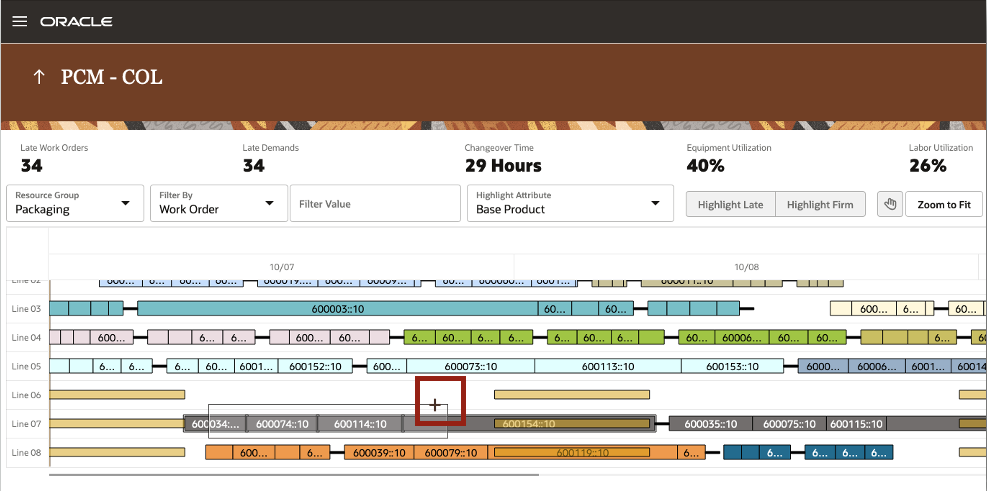
Select multiple operations via mouse-drag
By default, the Gantt chart opens in the mode in which multiselect via mouse drag is enabled. You can switch to the panning mode by clicking on the Panning Mode icon, which then disables the multiselect mode.
Further, when using drag & drop manual scheduling actions, you can now set the new operation start time to be adjacent to other operations or calendar events on a resource using the left and right arrows in the drop dialog.
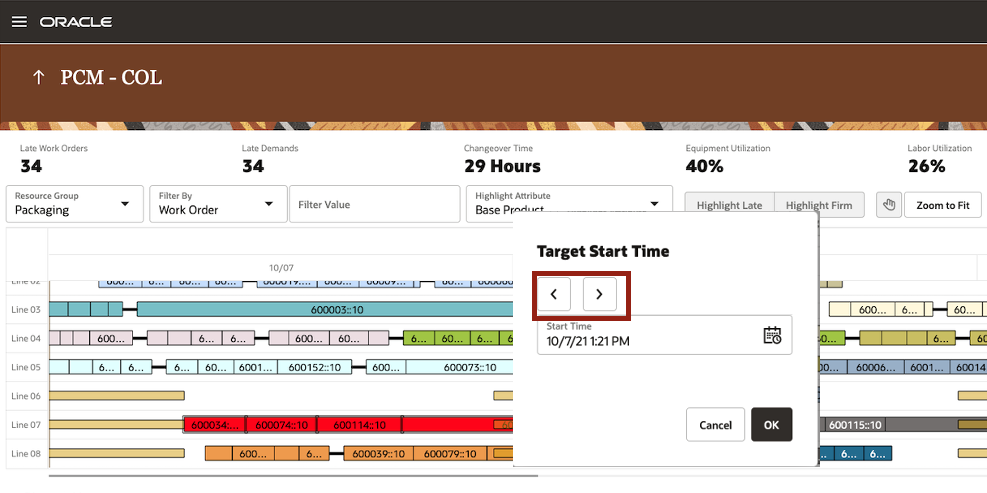
Specify new operation start time more easily
Make adjustments nimbly for running what-if inline simulations or fine tuning and readying your schedule for execution.
Steps to Enable
Use the Opt In UI to enable this feature. For instructions, refer to the Optional Uptake of New Features section of this document.
Offering: Supply Chain Planning
Tips And Considerations
When you opt in to use this feature, you must opt in to the feature named: Production Scheduling. Opting in to the Production Scheduling feature also enables the feature described here. If you previously opted in to the Production Scheduling feature, then this feature is automatically enabled.
Key Resources
- The Use Fewer Steps to Manually Schedule Orders readiness training available on Oracle Cloud Readiness for Supply Chain Planning.
Role Information
You have a couple of options for giving people access to this feature, depending on whether you're assigning them predefined job roles or your own configured job roles.
- Users who are assigned this predefined job role are automatically able to access this feature:
- Production Scheduler (ORA_MSC_PRODUCTION_SCHEDULER_JOB)
- Users who are assigned configured job roles that contain these privileges are able to access this feature:
- Edit Production Schedule (MSC_EDIT_PRODUCTION_SCHEDULE_PRIV)
Reserve Material for Production Scheduling
Making sure material is available for factory production is a crucial aspect of maintaining production schedule adherence and on time delivery. To ensure this availability, production scheduling now respects the reservation of a work order to a sales order, a purchase order, on hand inventory, another work order, or an internal transfer order.
The types of reservations that are supported are described in this table.
| Demand | Supply |
|---|---|
| Sales Order | Work Order |
| Sales Order | On Hand |
| Sales Order | Purchase Order |
| Sales Order | Transfer Order |
| Work Order | Work Order |
| Work Order | Purchase Order |
| Work Order | On Hand |
| Work Order | Transfer Order |
| Transfer Order | Work Order |
| Transfer Order | Transfer Order |
| Transfer Order | Purchase Order |
| Transfer Order | On Hand |
The consideration of reservations within production scheduling is summarized as follows:
- Work orders components can be reserved to supplies. Work orders in turn can also be reserved to demands such as sales orders.
- Non-work order reservations are considered so the appropriate supplies are netted out of the schedule.
Production Scheduling will honor the reservations that are defined in Inventory. Reservations are considered during the refresh process and can't be modified or removed in Production Scheduling. The management of reservations remains in Inventory.
Material availability for production is a crucial aspect of maintaining production schedule adherence and on time delivery. By reserving the supplies to work order component demands, you ensure that material is available for production to enable uninterrupted manufacturing. Likewise, important sales orders can be reserved to specific work orders to ensure the demand can be met by a specific time.
Even with the best planning, production schedulers often need to guarantee material availability for a specific work order to ensure on time delivery. Using this feature, schedulers can now pre-reserve components to specific work orders before the actual commencement of production guaranteeing the availability for production. This capability will result in:
- Increased schedule quality by honoring defined supply and demand allocations via reservations
- Increased customer service levels by enduring critical work orders have the necessary supply to start production
Steps to Enable
Use the Opt In UI to enable this feature. For instructions, refer to the Optional Uptake of New Features section of this document.
Offering: Supply Chain Planning
Tips And Considerations
When you opt in to use this feature, you must opt in to the feature named: Production Scheduling. Opting in to the Production Scheduling feature also enables the feature described here. If you previously opted in to the Production Scheduling feature, then this feature is automatically enabled.
Key Resources
- The Reserve Material for Production Scheduling readiness training available on Oracle Cloud Readiness for Supply Chain Planning
Role Information
You have a couple options for giving people access to this feature, depending on whether you're assigning them predefined job roles or own configured job roles.
- Users who are assigned any of this predefined job role are automatically able to access this feature.
- Production Scheduler (ORA_MSC_PRODUCTION_SCHEDULER_JOB)
- Users who are assigned configured job roles that contain this privilege are able to access this feature:
- Edit Production Scheduling Organizations (MSC_EDIT_PRODUCTION_SCHEDULING_ORGANIZATION_PRIV)
Anchor the Start of the Schedule Horizon
In some situations, it’s beneficial to view schedules starting at a particular date rather than at the current date, such as at the beginning of a month or after a planned outage. You can now specify the start date of the schedule, in addition to the schedule horizon.
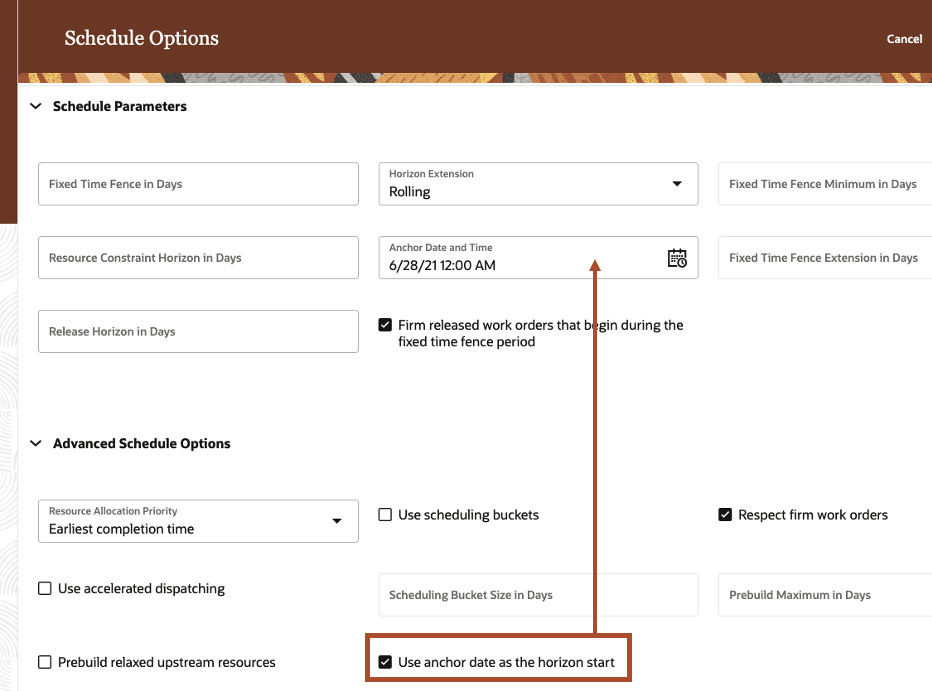
Schedule Options: Specify usage of anchor date and time as schedule horizon start
Inspect your factory schedules easily with flexible schedule horizons.
This feature also accelerates system integration testing activities generally performed during the implementation of Oracle Cloud Production Scheduling. A constant, future start date eliminates the schedule data variations typically expected with rolling schedule start dates and enables easier schedule output comparison of multiple schedule runs.
Steps to Enable
Use the Opt In UI to enable this feature. For instructions, refer to the Optional Uptake of New Features section of this document.
Offering: Supply Chain Planning
Tips And Considerations
When you opt in to use this feature, you must opt in to the feature named: Production Scheduling. Opting in to the Production Scheduling feature also enables the feature described here. If you previously opted in to the Production Scheduling feature, then this feature is automatically enabled.
Key Resources
- The Anchor the Start of the Schedule Horizon readiness training available on Oracle Cloud Readiness for Supply Chain Planning.
Role Information
You have a couple of options for giving people access to this feature, depending on whether you're assigning them predefined job roles or your own configured job roles.
- Users who are assigned this predefined job role are automatically able to access this feature:
- Production Scheduler (ORA_MSC_PRODUCTION_SCHEDULER_JOB)
- Users who are assigned configured job roles that contain these privileges are able to access this feature:
- Edit Production Schedule (MSC_EDIT_PRODUCTION_SCHEDULE_PRIV)
Access Work Order Details in Oracle Manufacturing Cloud
Access data associated with a manufacturing or maintenance work order directly from the Dispatch List of the Oracle Production Scheduling Cloud user interface. You no longer have to navigate to work areas outside of Oracle Production Scheduling Cloud to get this information. Instead, you can simply click the link provided for each work order. The work order details will be shown in a separate browser tab in view mode.

Easily access work order details via the provided link
Improve your productivity with easier access to information that exists on a work order, such as reservations, and use this information to support your scheduling decisions.
Steps to Enable
Use the Opt In UI to enable this feature. For instructions, refer to the Optional Uptake of New Features section of this document.
Offering: Supply Chain Planning
Tips And Considerations
When you opt in to use this feature, you must opt in to the feature named: Production Scheduling. Opting in to the Production Scheduling feature also enables the feature described here. If you previously opted in to the Production Scheduling feature, then this feature is automatically enabled.
Key Resources
- The Access Work Order Details in Oracle Cloud Manufacturing readiness training available on Oracle Cloud Readiness for Supply Chain Planning.
Role Information
You have a couple of options for giving people access to this feature, depending on whether you're assigning them predefined job roles or your own configured job roles.
- Users who are assigned this predefined job role are automatically able to access this feature:
- Production Scheduler (ORA_MSC_PRODUCTION_SCHEDULER_JOB)
- Users who are assigned configured job roles that contain these privileges are able to access this feature:
- View Work Orders (WIP_VIEW_WORK_ORDERS_PRIV)
- View Maintenance Work Orders (MNT_VIEW_MAINTENANCE_WORK_ORDERS_PRIV)
IMPORTANT Actions and Considerations
From time to time, Oracle replaces existing Cloud service features with new features, or removes existing features. Replaced features may be put on a path to removal. As a best practice, you should use the newer version of a replaced feature as soon as the newer version is available.
This section identifies the features in this Cloud service that have been replaced or will be removed.
| Product | Removed Feature | Target Removal | Replacement Feature | Replaced In | Additional Information |
|---|---|---|---|---|---|
| Supply Planning | Project Netting Rules (part of the Plan Project-Specific Supply feature) | 22B | Net Project Supply Using Attribute-Based Netting Rules | 21D | Enhance Your Project-Driven Plans with Next Generation Attribute-Based Planning on Cloud Customer Connect Readiness training for Net Project Supply Using Attribute-Based Netting Rules |