
This document will continue to evolve as existing sections change and new information is added. All updates appear in the following table:
| Date | Product | Feature | Notes |
|---|---|---|---|
| 25 JAN 2022 | Financials Common | Service Excellence Continuing Investments | Updated document. Revised feature information. |
| 13 JAN 2022 | Oracle Digital Assistant | Oracle Enterprise Performance Management Financial Consolidation and Close Skill in Digital Assistant for Fusion Applications | Updated document. Delivered feature in update 22A. |
| 10 DEC 2021 | Created initial document. |
 HAVE AN IDEA?
We’re here and we’re listening. If you have a suggestion on how to make our cloud services even better then go ahead and tell us. There are several ways to submit your ideas, for example, through the Ideas Lab on Oracle Customer Connect. Wherever you see this icon after the feature name it means we delivered one of your ideas.
GIVE US FEEDBACK
We welcome your comments and suggestions to improve the content. Please send us your feedback at oracle_fusion_applications_help_ww_grp@oracle.com.
DISCLAIMER
The information contained in this document may include statements about Oracle’s product development plans. Many factors can materially affect Oracle’s product development plans and the nature and timing of future product releases. Accordingly, this Information is provided to you solely for information only, is not a commitment to deliver any material, code, or functionality, and should not be relied upon in making purchasing decisions. The development, release, and timing of any features or functionality described remains at the sole discretion of Oracle.
This information may not be incorporated into any contractual agreement with Oracle or its subsidiaries or affiliates. Oracle specifically disclaims any liability with respect to this information. Refer to the Legal Notices and Terms of Use for further information.
Optional Uptake of New Features (Opt In)
Oracle Cloud Applications delivers new updates every quarter. This means every three months you'll receive new functionality to help you efficiently and effectively manage your business. Some features are delivered Enabled meaning they are immediately available to end users. Other features are delivered Disabled meaning you have to take action to make available. Features delivered Disabled can be activated for end users by stepping through the following instructions using the following privileges:
- Review Applications Offering (ASM_REVIEW_APPLICATIONS_OFFERINGS_PRIV)
- Configure Oracle Fusion Applications Offering (ASM_CONFIGURE_OFFERING_PRIV)
Here’s how you opt in to new features:
- Click Navigator > My Enterprise > New Features.
- On the Features Overview page, select your offering to review new features specific to it. Or, you can leave the default selection All Enabled Offerings to review new features for all offerings.
- On the New Features tab, review the new features and check the opt-in status of the feature in the Enabled column. If a feature has already been enabled, you will see a check mark. Otherwise, you will see an icon to enable the feature.
- Click the icon in the Enabled column and complete the steps to enable the feature.
For more information and detailed instructions on opting in to new features for your offering, see Offering Configuration.
Opt In Expiration
Occasionally, features delivered Disabled via Opt In may be enabled automatically in a future update. This is known as an Opt In Expiration. If your cloud service has any Opt In Expirations in this update, you will see a related tab in this document. Click on that tab to see when the feature was originally delivered Disabled, and when the Opt In will expire, potentially automatically enabling the feature. You can also click here to see features with current Opt In Expirations across all Oracle Cloud Applications. Beyond the current update, the Financials forums on Cloud Customer Connect have details of Opt In Expirations upcoming in future updates.
Column Definitions:
Report = New or modified, Oracle-delivered, ready to run reports.
UI or Process-Based: Small Scale = These UI or process-based features are typically comprised of minor field, validation, or program changes. Therefore, the potential impact to users is minimal.
UI or Process-Based: Larger Scale* = These UI or process-based features have more complex designs. Therefore, the potential impact to users is higher.
Features Delivered Disabled = Action is needed BEFORE these features can be used by END USERS. These features are delivered disabled and you choose if and when to enable them. For example, a) new or expanded BI subject areas need to first be incorporated into reports, b) Integration is required to utilize new web services, or c) features must be assigned to user roles before they can be accessed.
| Ready for Use by End Users Reports plus Small Scale UI or Process-Based new features will have minimal user impact after an update. Therefore, customer acceptance testing should focus on the Larger Scale UI or Process-Based* new features. |
Customer Must Take Action before Use by End Users Not disruptive as action is required to make these features ready to use. As you selectively choose to leverage, you set your test and roll out timing. |
|||||
|---|---|---|---|---|---|---|
| Feature |
Report |
UI or |
UI or |
|
||
Customer Dispute Submission for Transaction Header Sections Using a REST API |
||||||
Enhancements to Receivables Transaction Interface Lines REST API |
||||||
Display of Fields by Expense Type in Oracle Expenses Mobile Application |
||||||
Service Excellence Continuing Investments
Our ongoing investment in service excellence has a focus on overall usability, resiliency, performance, and security.
This work is based on monitoring performance trends, reviewing common use patterns, analyzing service requests, and participating in many discussions with customers.
In this update, our ongoing investment in service excellence includes improvements in the following areas:
- Resiliency and diagnostic improvements to the collection documents process for Brazil, including:
- standardization of FBDI column descriptions to align with UI labels
- diagnostic enhancements for FBDI import processes
- improved troubleshooting and resolution of errors through improved error messages
- Resiliency and diagnostic improvements to the fiscal document generation process for Brazil, including:
- automatic resolution of certain error statuses
- inclusion of the Receivables transaction type in the fiscal document extract for partners
- improved customer experience
-
Payables invoice attachments added through IPM are available to approvers in workflow notifications by default.
-
Manually created withholding invoices are routed for approvals.
Steps to Enable
You don't need to do anything to enable this feature.
Oracle Enterprise Performance Management Financial Consolidation and Close Skill in Digital Assistant for Fusion Applications
You can now use the Oracle Enterprise Performance Management Financial Consolidation and Close skill from within Fusion to do these tasks:
- View and update consolidation data.
- Start consolidation jobs directly within the digital assistant.
- View task summary and status.
The integrated Financial Consolidation and Close skill can be used in Oracle Web channel or Microsoft Teams.
NOTE: The Financial Consolidation and Close skill is supported only when the EPM instance is deployed on an Oracle Cloud Infrastructure second-generation (Gen 2) cloud environment.
You can now quickly view the EPM close status along with pending tasks and consolidate data directly within the digital assistant configured for Fusion Applications. This enables faster coordination among teams managing the Financial Consolidation and Close process, without needing to access the EPM business processes directly.
Steps to Enable
- Configure authentication parameters for Financial Consolidation and Close Skill in the Oracle Digital Assistant instance.
- Extend your configured digital assistant and the Financial Consolidation and Close skill.
- Configure the entities and train the extended skill to reflect your data.
- Replace the default skill with the extended skill and train the digital assistant.
- Integrate the digital assistant with Oracle Web channel or Microsoft Teams.
Key Resources
Role Information
- To set the Financial Consolidation and Close skill in the digital assistant platform, you need a role that provides administrator access to the platform.
- To use the Financial Consolidation and Close skill in your digital assistant, you need a role that provides access to Oracle Enterprise Performance Management Financial Consolidation and Close.
Collections Strategy Change Using a REST API
Change collections strategies assigned to customers using the Collections Strategies REST API.
Use the Collections Strategies REST API to replace the existing strategy assigned to a customer with a new strategy:
- Use POST operation to update the attribute "Change Strategy" to the value 'Y' using the Collections Strategy REST API. When Change Strategy value 'Y' is passed then the value of "Allow Strategy Change" is ignored in the exiting strategy group setup and replace with new strategy .
You can view details about these services in the REST API for Oracle Financials Cloud guide.
Business Benefits include:
- Change the existing strategy for a customer at any time, according to you business requirements.
Steps to Enable
Review the REST service definition in the REST API guides, available from the Oracle Help Center > your apps service area of interest > REST API. If you're new to Oracle's REST services you may want to begin with the Quick Start section.
Key Resources
- For an overview of REST APIs and the technical details, see the REST API for Oracle Financials Cloud guide in the Oracle Help Center.
Customer Dispute Submission for Transaction Header Sections Using a REST API
Submit customer disputes for any part of a transaction using the Receivables Dispute REST API. Specify the sections of the transaction to dispute: total percentage; lines subtotal; freight; tax. Add related comments about the dispute. The REST API also initiates the delivery of dispute confirmation to the customer after the credit memo approval workflow is approved.
You can use this service to register disputes in Receivables Cloud from external sources, and initiate the approval workflow to track them.
Steps to Enable
Review the REST service definition in the REST API guides, available from the Oracle Help Center > your apps service area of interest > REST API. If you're new to Oracle's REST services you may want to begin with the Quick Start section.
Tips And Considerations
This service also supports creation of disputes on one or more transaction lines against the quantity and/or line amount, which was delivered as part of the 21D update.
Key Resources
- For an overview of REST APIs and the technical details, see the REST API for Oracle Financials Cloud guide in the Oracle Help Center.
Enhancements to Receivables Transaction Interface Lines REST API
Review and update interface line attributes using the Receivables Transaction Interface Lines REST API.
You can review and update the following interface line attributes:
- Line Type
- Authorization Number
- Interface Line Status
You can audit any updates to interface lines that are made using the Receivables Transaction Interface Lines REST API. In the Manage Audit Policies page, enable the Interface Line Audit option to capture audit data.
You can view details about these services in the REST API for Oracle Financials Cloud guide."
Business Benefits include:
- Update AutoInvoice Interface data before importing invoices and other transactions.
- Create an audit trail to find the data mismatches between upstream and downstream products.
Steps to Enable
Review the REST service definition in the REST API guides, available from the Oracle Help Center > your apps service area of interest > REST API. If you're new to Oracle's REST services you may want to begin with the Quick Start section.
Key Resources
- For an overview of REST APIs and the technical details, see the REST API for Oracle Financials Cloud guide in the Oracle Help Center.
Role Information
- You must create a new privilege access to use this feature:
- Create a new privilege for the Interface service
- Add the privilege to the user
Name: Manage Receivables AutoInvoice Interface Line via Rest Service
Code: AR_MANAGE_AUTOINVOICE_INTERFACE_LINE_REST_PRIV
Description: Retrieve and Update Auto Invoice Interface Lines via Rest Service.
Unpaid Reason Code Update Using a REST API
Update the unpaid reason code on collections delinquencies using the Collections Delinquencies REST API.
You can perform these activities using the Collections Delinquencies REST API:
- Get details of collections delinquencies
- Update the Unpaid Reason Code on collections delinquencies
- Create a collections delinquency record for an invoice to capture the unpaid reason code of the invoice.
By using the Collections Delinquencies REST API, you can update the unpaid reason code in bulk resulting in time and resource savings.
Steps to Enable
Review the REST service definition in the REST API guides, available from the Oracle Help Center > your apps service area of interest > REST API. If you're new to Oracle's REST services you may want to begin with the Quick Start section.
Key Resources
- For an overview of REST APIs and the technical details, see the REST API for Oracle Financials Cloud guide in the Oracle Help Center.
Simplified Workflow Rules Configuration
Use the Simplified Workflow Rules Configuration feature to create workflow rules using spreadsheets for Payables Invoice Approval and General Ledger Journal Approval workflows. This feature was introduced in update 18C. In update 22A, you can define rules to send FYI notifications to members of a Supervisory or Job Level hierarchy.
Use the FYI option in the Approval Routing column to define rules to send information-only notifications that do not require user action to approvers. Administrators can use this option to define rules to send FYI notifications to members of a Supervisory Hierarchy or Job Level Hierarchy.

FYI Rules in Simplified Workflow Rules Configuration Template
Steps to Enable
You don't need to do anything to enable this feature.
Tips And Considerations
- Select the 'FYI' option in Approval Routing to configure rules to send information-only notifications to any of the following:
- Supervisory Hierarchy
- Job Level Hierarchy
- Approval Group
- User
- Role
- Enter details in the Approvers section as below:
Rout To Required Information in Approvers Section Supervisory Hierarchy Approval Level, Start Approver & Top Approver Job Level Hierarchy Job Level Range, Start Approver & Top Approver Approval Group Group/ User/ Role Name User Group/ User/ Role Name Role Group/ User/ Role Name
Key Resources
- For an overview of the Simplified Workflow Rules Configuration feature, refer to the Manage Workflow Rules Using a Spreadsheet topic on the Oracle Help Center.
Access to Digest Notification for Expense Delegates
Send expense digest notifications to delegates to allow them to fix expense items requiring expense owner attention.
Expense delegates receive a digest notification for each employee they are a delegate for. The outstanding corporate card charges shown in the digest notification now include corporate card expenses in expense reports that are in Saved, Withdrawn, Rejected, or Returned statuses. The digest notification also shows the expense report number for these charges. Previously, outstanding corporate card charges included only expenses that were not in any reports.
The digest notification enhancements allow expense delegates to quickly identify and fix expense items for the expense owners and give employees a more accurate overview of their outstanding corporate card charges.
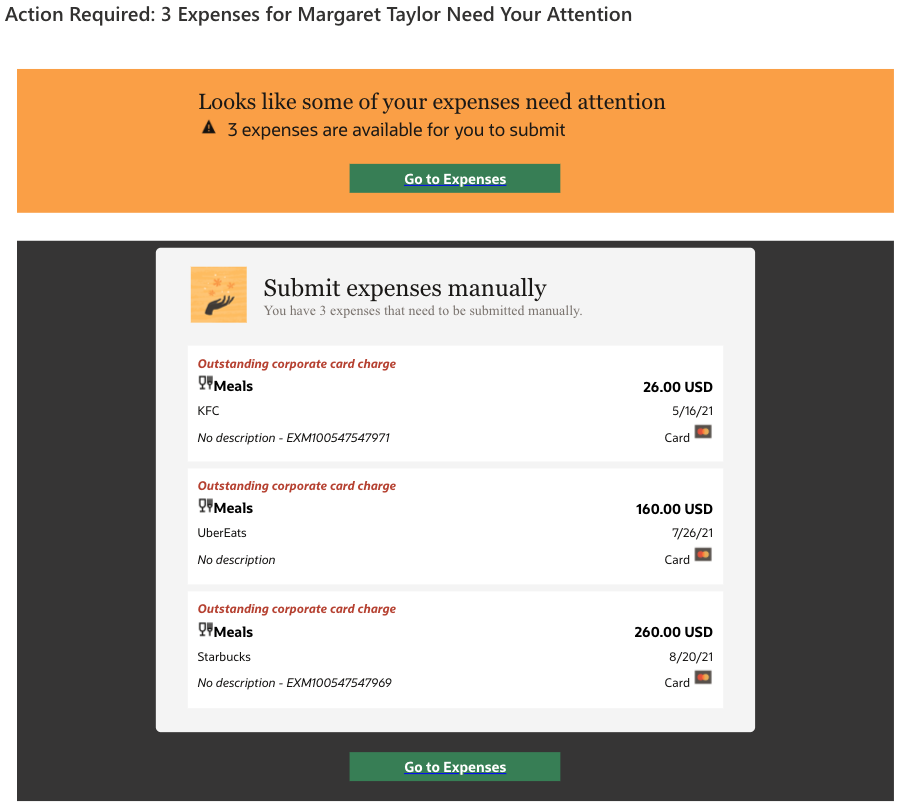
Digest Notification
Steps to Enable
You don't need to do anything to enable this feature.
Role Information
You don't need a new role or privilege access to use this feature.
Display of Fields by Expense Type in Oracle Expenses Mobile Application
Simplify expense entry in the Expenses mobile application by only enabling the applicable fields for each expense type. The Description, Merchant, Expense Location, and Number of Days fields are exposed based on the field behavior defined for expense type and the template.
Previously, the mobile application displayed these fields based on profile options, expense category field setup, and policies. With this update, the field behavior defined for the expense type and the expense template takes precedence. Using the fields configuration at the expense type and expense template level, expense managers can set these fields to required, optional, or hidden.
The field behavior in the Expenses mobile application now matches the Expenses web application. This helps reduce delays in expense report submission due to inconsistent behavior in the two applications.
Steps to Enable
You don't need to do anything to enable this feature.
Tips And Considerations
The tax-related field setup under Oracle Tax is not reflected in the Merchant and Location fields in the Expenses mobile application.
Key Resources
- Refer to the Options for Controlling the Behavior of Expense Fields topic in the Oracle Financials Cloud Implementing Expenses guide to learn how to set up these fields.
Role Information
You don't need a new role or privilege access to use this feature.
Receipt Attachment After Expense Report Approval
Allow employees to attach receipts and supporting documents to an approved expense report, even after expenses are paid. This helps employees comply with government regulations about providing adequate proof of employee expenses.
Receipt attachment after expense report approval provides these business benefits.
- Provides additional information to approved employee expense reports for post-accounting audits.
- Improves the organization of related expenses data.
- Reduces expense management manual updates.
- Enhances audit compliance.
Steps to Enable
Use the Opt In UI to enable this feature. For instructions, refer to the Optional Uptake of New Features section of this document.
Offering: Financials No Longer Optional From: Update 22C
Role Information
To set up receipt rules, you need one of these roles:
- Expense Manager
- Application Implementation Consultant