
- Revision History
- Overview
- Optional Uptake of New Features (Opt In)
- Feature Summary
- Supply Chain Orchestration
- Procurement Common
- Self Service Procurement
-
- Self Service Procurement
- Responsive Self Service Procurement Application
-
- Manage Requisition Preferences Through the Responsive Self Service Procurement Application
- Shop for Master Items and Items Available on Blanket Agreements from a Punchout Site through the Responsive Self Service Procurement Application
- Capture Notes to Supplier in the Responsive Self Service Procurement Application
- Selected Bug Fixes in this Update for the Responsive Self Service Procurement Application
-
- Project-Driven Supply Chain
This document will continue to evolve as existing sections change and new information is added. All updates appear in the following table:
| Date | Module | Feature | Notes |
|---|---|---|---|
| 25 JAN 2022 | Common Procurement | Integrate and Extend Procurement Using REST Services | Updated document. Updated feature description with two new, backported resources. |
| 15 DEC 2022 | Common Procurement | Get News Feed Suggestions On Your Next Likely Actions | Updated document. Revised feature description. |
| 02 DEC 2022 | Created initial document. |
 HAVE AN IDEA?
We’re here and we’re listening. If you have a suggestion on how to make our cloud services even better then go ahead and tell us. There are several ways to submit your ideas, for example, through the Ideas Lab on Oracle Customer Connect. Wherever you see this icon after the feature name it means we delivered one of your ideas.
GIVE US FEEDBACK
We welcome your comments and suggestions to improve the content. Please send us your feedback at oracle_fusion_applications_help_ww_grp@oracle.com.
DISCLAIMER
The information contained in this document may include statements about Oracle’s product development plans. Many factors can materially affect Oracle’s product development plans and the nature and timing of future product releases. Accordingly, this Information is provided to you solely for information only, is not a commitment to deliver any material, code, or functionality, and should not be relied upon in making purchasing decisions. The development, release, and timing of any features or functionality described remains at the sole discretion of Oracle.
This information may not be incorporated into any contractual agreement with Oracle or its subsidiaries or affiliates. Oracle specifically disclaims any liability with respect to this information. Refer to the Legal Notices and Terms of Use for further information.
Optional Uptake of New Features (Opt In)
Oracle Cloud Applications delivers new updates every quarter. This means every three months you'll receive new functionality to help you efficiently and effectively manage your business. Some features are delivered Enabled meaning they are immediately available to end users. Other features are delivered Disabled meaning you have to take action to make available. Features delivered Disabled can be activated for end users by stepping through the following instructions using the following privileges:
- Review Applications Offering (ASM_REVIEW_APPLICATIONS_OFFERINGS_PRIV)
- Configure Oracle Fusion Applications Offering (ASM_CONFIGURE_OFFERING_PRIV)
Here’s how you opt in to new features:
- Click Navigator > My Enterprise > New Features.
- On the Features Overview page, select your offering to review new features specific to it. Or, you can leave the default selection All Enabled Offerings to review new features for all offerings.
- On the New Features tab, review the new features and check the opt-in status of the feature in the Enabled column. If a feature has already been enabled, you will see a check mark. Otherwise, you will see an icon to enable the feature.
- Click the icon in the Enabled column and complete the steps to enable the feature.
In some cases, you might want to opt in to a feature that's not listed in the New Features work area. Here's how to opt in:
- Click Navigator > My Enterprise > Offerings.
- On the Offerings page, select your offering, and then click Opt In Features.
- On the Opt In page, click the Edit Features (pencil) icon for the offering, or for the functional area that includes your feature.
- On the Edit Features page, complete the steps to enable the feature.
For more information and detailed instructions on opting in to new features for your offering, see Offering Configuration.
Opt In Expiration
Occasionally, features delivered Disabled via Opt In may be enabled automatically in a future update. This is known as an Opt In Expiration. If your cloud service has any Opt In Expirations you will see a related tab in this document. Click on that tab to see when the feature was originally delivered Disabled, and when the Opt In will expire, potentially automatically enabling the feature. You can also click here to see features with Opt In Expirations across all Oracle Cloud Applications.
Column Definitions:
Report = New or modified, Oracle-delivered, ready to run reports.
UI or Process-Based: Small Scale = These UI or process-based features are typically comprised of minor field, validation, or program changes. Therefore, the potential impact to users is minimal.
UI or Process-Based: Larger Scale* = These UI or process-based features have more complex designs. Therefore, the potential impact to users is higher.
Features Delivered Disabled = Action is needed BEFORE these features can be used by END USERS. These features are delivered disabled and you choose if and when to enable them. For example, a) new or expanded BI subject areas need to first be incorporated into reports, b) Integration is required to utilize new web services, or c) features must be assigned to user roles before they can be accessed.
| Ready for Use by End Users Reports plus Small Scale UI or Process-Based new features will have minimal user impact after an update. Therefore, customer acceptance testing should focus on the Larger Scale UI or Process-Based* new features. |
Customer Must Take Action before Use by End Users Not disruptive as action is required to make these features ready to use. As you selectively choose to leverage, you set your test and roll out timing. |
|||||
|---|---|---|---|---|---|---|
| Feature |
Report |
UI or |
UI or |
|
||
Improve Supply Tracking for Sales Orders in Your Back-to-Back Flows |
||||||
Selected Supply Chain Orchestration Bug Fixes in This Update |
||||||
Diagnostic Log Availability and Attachments in Transaction Console |
||||||
Manage Requisition Preferences Through the Responsive Self Service Procurement Application |
||||||
Capture Notes to Supplier in the Responsive Self Service Procurement Application |
||||||
Selected Bug Fixes in this Update for the Responsive Self Service Procurement Application |
||||||
Apply Budgetary Control on Internally Sourced Requisitions Expensed to Projects |
||||||
Improve Supply Tracking for Sales Orders in Your Back-to-Back Flows
Keep up-to-date with the latest changes in supply and manage supply requests in your back-to-back flow even when you ship only part of the order line.
Assume only some of the quantity for your order line is available to ship, so Order Management splits the order line into two fulfillment lines, fulfillment line x and fulfillment line y. Line x has the quantity that is available to ship. Line y has the quantity that isn't yet available to ship.
If you enable this feature, then Supply Chain Orchestration doesn't close the supply order when Oracle Shipping ships line x. Instead, Orchestration keeps the supply order open until Shipping also ships line y, or until Oracle Order Management cancels the request. Orchestration continues to orchestrate changes in demand and supply for line y as long as the supply order remains open.
Realize these benefits:
- Save time and work more efficiently. You don't have to manually create a new line for supply that isn't yet available. Supply Chain Orchestration will automatically create new supply for you.
- Track how much supply you have used even when Shipping has shipped only line x.
- Get timely updates so you can accurately track the progress that Orchestration is making to create supply for line y.
- Reduce or eliminate supply disruptions for line y. Orchestration will automatically update supply so it has the latest details for your line.
- Modify line y, and Orchestration will manage that change in your purchasing, inventory, or manufacturing organization.
- Manage an interruption to supply on line y in the same way that you do when you haven't partially shipped the line.
- Manage supply recommendations even when you have partially shipped one or more of them.
- Manage any number of shipments.
- Track each partial or full cancellation.
Watch a Demo.
Steps to Enable
Use the Opt In UI to enable this feature. For instructions, refer to the Optional Uptake of New Features section of this document.
Offering: Order Management No Longer Optional From: Update 23C
Tips And Considerations
Consider these guidelines:
- If you need to take action on line y, then you must first use the Unschedule action on line y, and then use the Schedule action on line y. Orchestration will then create a new a supply order for the quantity on line y. For details, see Schedule Fulfillment Lines Manually.
- If you modify the warehouse or the item on line y, then Orchestration will cancel the supply order and make that supply available to other demand. It will also cancel any new supply that it's currently creating for line y. Orchestration will do this even if you enable the Defer Online Processing of Inventory Updates shipping parameter for the warehouse.
- If you enable the Defer Online Processing of Inventory Updates shipping parameter for the warehouse, then Supply Chain Orchestration won't use the Improve Supply Tracking for Sales Orders in Your Back-to-Back Flows feature for that warehouse.
- The split behavior in Order Management doesn't affect your purchase orders, work orders, or transfer orders.
Use This Feature with Other Features
You can enable only the Improve Supply Tracking for Sales Orders in Your Back-to-Back Flows feature, or you can also enable the Order Management's Update Attributes On Split Order Lines For Partial Shipments feature.
| Features That You Enable | Description |
|---|---|
| Enable only the Improve Supply Tracking for Sales Orders in Your Back-to-Back Flows feature. |
Orchestration keeps the supply order open, and it will track supply for line y until Shipping ships line y. You can modify the scheduled ship date or warehouse on line y, and Orchestration will automatically update supply so it has the latest details for line y. You can't modify the quantity on line y after Shipping ships line x. |
| Enable both features. | You can modify the quantity, scheduled ship date, or warehouse on line y even after Shipping ships line x. Order Management will use your revised values to fulfill the line and Orchestration will automatically update supply so it has the latest details for the line. If you enable the Update Attributes on Split Order Lines for Partial Shipments feature, then you also automatically enable the Improve Supply Tracking for Sales Orders in Your Back-to-Back Flows feature. For details, see Update Attributes on Split Order Lines for Partial Shipments. |
| Don't enable either feature. |
Orchestration will close the supply order as soon as Shipping ships any part of the order line, and Orchestration won't track any other modifications that you make on the line. You can't modify the quantity on line y after Shipping ships line x. |
Key Resources
- Watch Improve Supply Tracking for Sales Orders in your Back-to-Back Flows Readiness Training
- Implementing Order Management
- Using Supply Chain Orchestration
Role And Privileges
- Supply Chain Operations Manager (ORA_DOS_SUPPLY_CHAIN_OPERATIONS_MANAGER_JOB)
Selected Supply Chain Orchestration Bug Fixes in This Update
This update includes some bug fixes that can change the way Oracle Supply Chain Orchestration works. This isn't a full list of all the bug fixes in this update. This list includes the bug fixes that can cause a noticeable change in application behavior.
Display Your Own Work Order Status
The Supply Chain Orchestration work area displayed only predefined statuses prior to update 23A. For example, assume you created your own status named MyStatus. The work area displayed one of the predefined statuses even if the work order's run time status was MyStatus. With this update, the work area will display MyStatus.
Oracle reference: 34543645
Steps to Enable
You don't need to do anything to enable this feature.
Integrate and Extend Procurement Using REST Services
In this update, Oracle Fusion Cloud Procurement and Oracle Fusion Cloud Self Service Procurement deliver new and modified REST APIs to enable and simplify integration with external systems.
The new REST APIs introduced in this update are:
- Shopping Lists
- Draft Supplier Negotiation Responses
- Procurement Approved Supplier List Entries (available in the January monthly update of 23A)
- Approved Supplier List Source Documents (available in the January monthly update of 23A)
These REST APIs are enhanced:
- Requisition Preferences
- POST and PATCH are supported with the following restrictions:
- Requester has to be the same as the Preparer.
- Destination type can only be Expense.
- Preference type can only be SSP.
- Users who are assigned the Procurement REST Service duty role and its aggregate privileges can POST preferences for all users, while users with the Manage Requisition privilege can post their own preferences only.
- DELETE is supported for integration user roles.
- POST and PATCH are supported with the following restrictions:
- Draft Purchase Orders
- PATCH is supported for Note to Supplier on the order line, and Note to Receiver on the order schedule.
- POST is supported for the Distribute Project Costs action.
- Purchase Orders
- GET is supported for these attributes: Credit and Ordered Before Adjustments.
You can use these new and modified REST services to simplify integrations and support standards-based interoperability with your other applications and external systems.
Steps to Enable
Review the REST service definition in the REST API guides, available from the Oracle Help Center > your apps service area of interest > REST API. If you're new to Oracle's REST services you may want to begin with the Quick Start section.
Key Resources
- Refer to the REST API for Oracle Fusion Cloud Procurement documentation available on the Oracle Help Center.
Role And Privileges
- Refer to the Job Roles and Privileges section in the REST API for Oracle Fusion Cloud Procurement documentation, available on the Oracle Help Center.
Get News Feed Suggestions On Your Next Likely Actions
Get suggestions on your next likely actions in your news feed layout. This feature is currently in Controlled Availability and is available in Oracle Fusion Cloud Procurement. Artificial intelligence and machine learning algorithms predict and suggest the actions each user is most likely to take during a session. The algorithms use historic navigation behavior and patterns of each user and users like them to determine which navigation target they’re most likely to visit.
Oracle Fusion Cloud Applications have a wide range of functionality and it can sometimes be difficult to know how to navigate to a task. With news feed suggestions, you can get to the tasks that matter faster. For example, if reviewing and approving expense reports is a task commonly performed by managers in your organization, new managers will receive a suggestion in their news feed to perform that task. Or if a few team members are entering performance goals, other members of that team see this task as a suggestion in their news feed.
These are some of the business benefits of this feature:
- Receive recommendations in your news feed on your next likely actions during that session
- Discover actions that other users like you have taken within Fusion
- As an administrator, you can pin specific task flow pages as a suggestion to raise the visibility of the task

Suggestions Tab in the News Feed Layout Showing Six Recommendations
Steps to Enable
To enable this feature, you need to log a Service Request (SR) through My Oracle Support and request for a promotion code. This feature is currently in Controlled Availability and requires a promotion code. For details, see PRC:PO: How to Apply for News Feed Suggestions Under Controlled Availability (Doc ID 2915145.1).
Project Cost Distribution Using Award Funding Patterns
Define funding patterns to distribute project costs to awards and funding source combinations. Specify an expenditure item date range and task level to apply distribution rules that automatically split sponsored project costs. Automating the distribution ensures charging accuracy and removes the need to manually enter the award charging instructions. Grant administrators manage the funding patterns to ensure proper cost distribution throughout the duration of the sponsored project.
This new functionality, commonly referred to as “Award Distribution”, is set up and managed in the Grant Management offering and enables more efficient project cost capture across the procure to pay lifecycle and during import of costs from third party systems.
Funding patterns are created and maintained by Grant Administrators and are the core object of the functionality. The funding patterns are created once the project is funded by one or more award and funding sources.
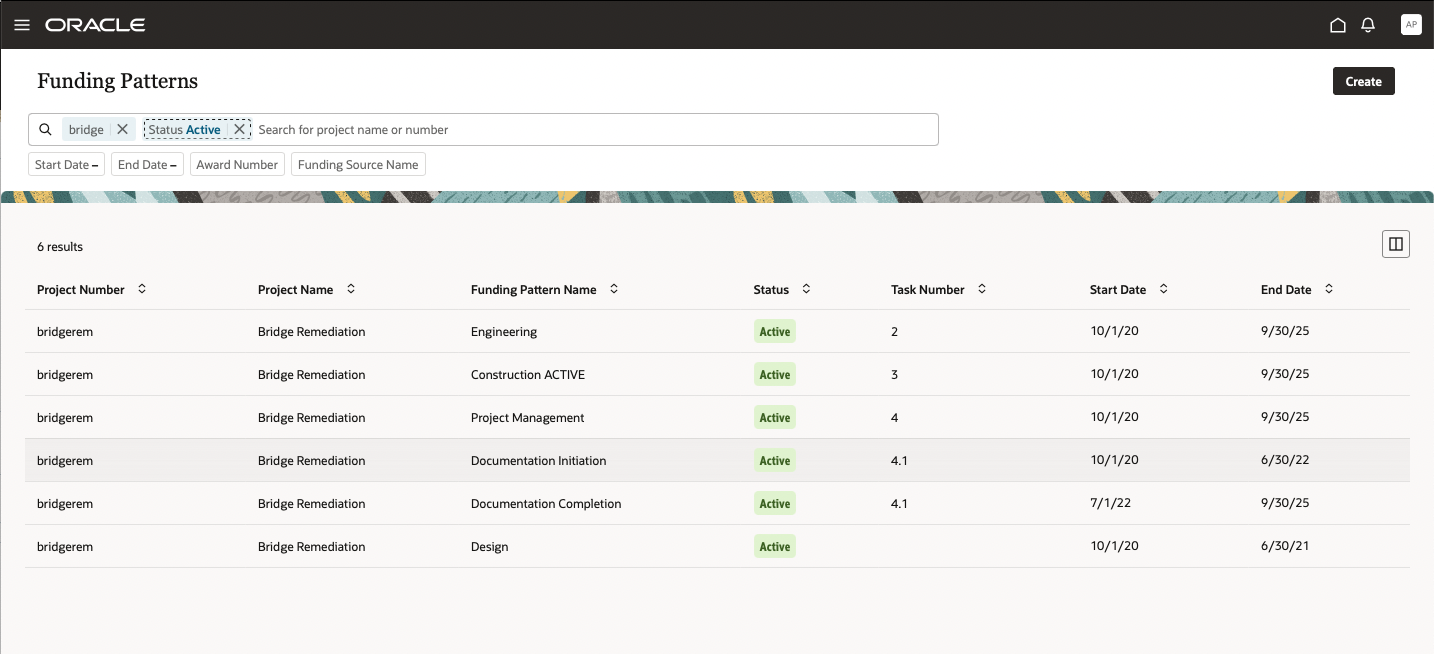
Funding Pattern Search
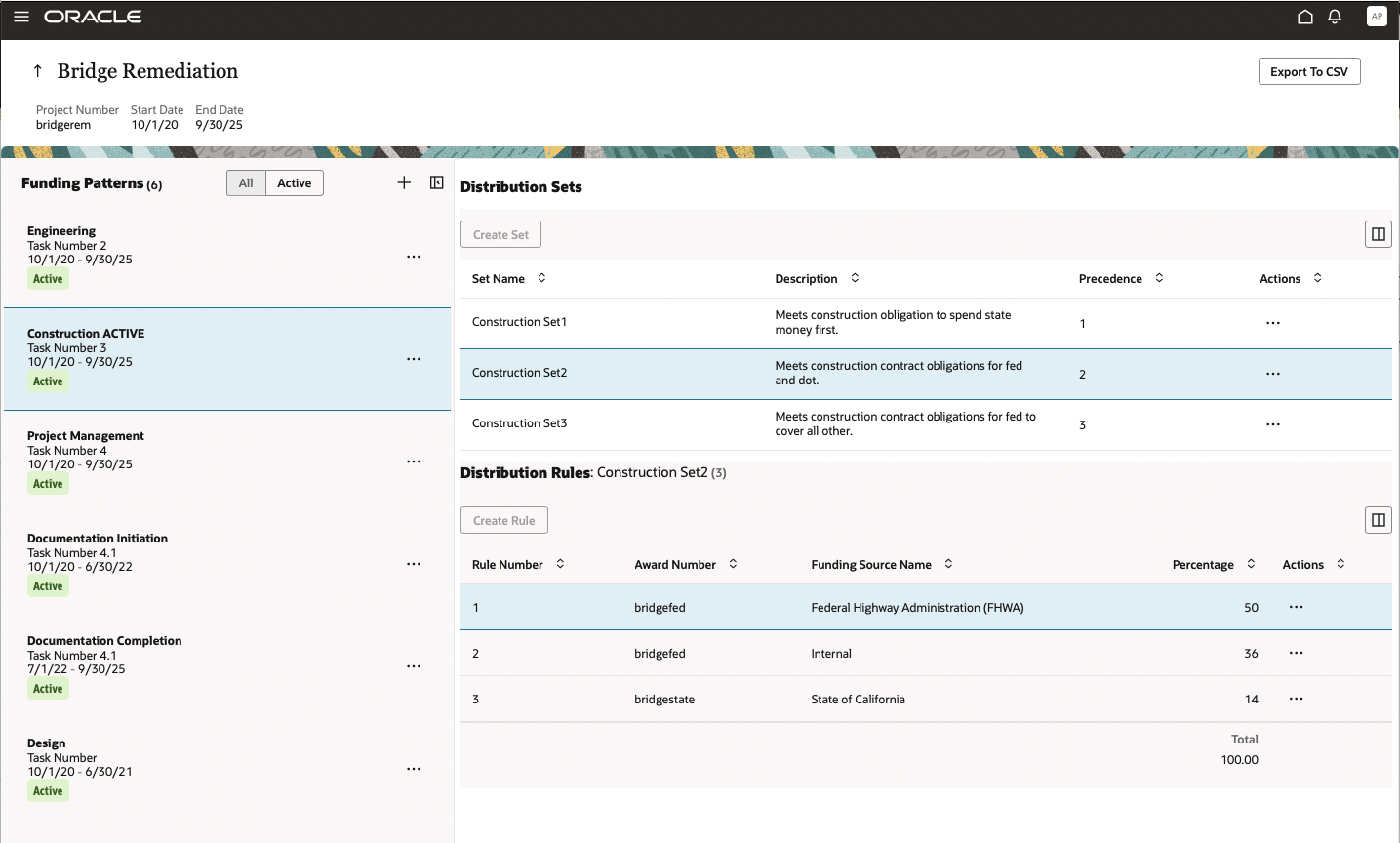
Funding Pattern Maintenance
Project costs captured on requisitions, purchase orders, and accounts payable invoices can be distributed using applicable funding patterns by leaving the Contract Number and Funding Source fields blank.

Requisition with Blank Contract and Funding Source
When ready, you can use the new Distribute Project Costs action to distribute the costs entered using the funding pattern sets and rules to ensure accurate charging.

Requisition Distributed by Funding Pattern
Grant Accountants and Administrators can resolve errors by viewing failed distributions in the Project Cost Distribution Results page in real time with procurement staff, or simulating the same action in the Manage Project Costs work area, with the new Test Award Distribution functionality. The cause of the error can be viewed and resolved accordingly. In the Manage Project Costs work area, the Test Award Distribution function will also display successful distributions to simulate the results of error resolution. This is only a simulation. The Import Project Costs action continues to be the function that creates costs on a project.

Manage Project Costs Simulation
If you chose to view the results, the list of costs, funding patterns, distribution sets, and rules used will be presented with a simulated successful or failed distribution.
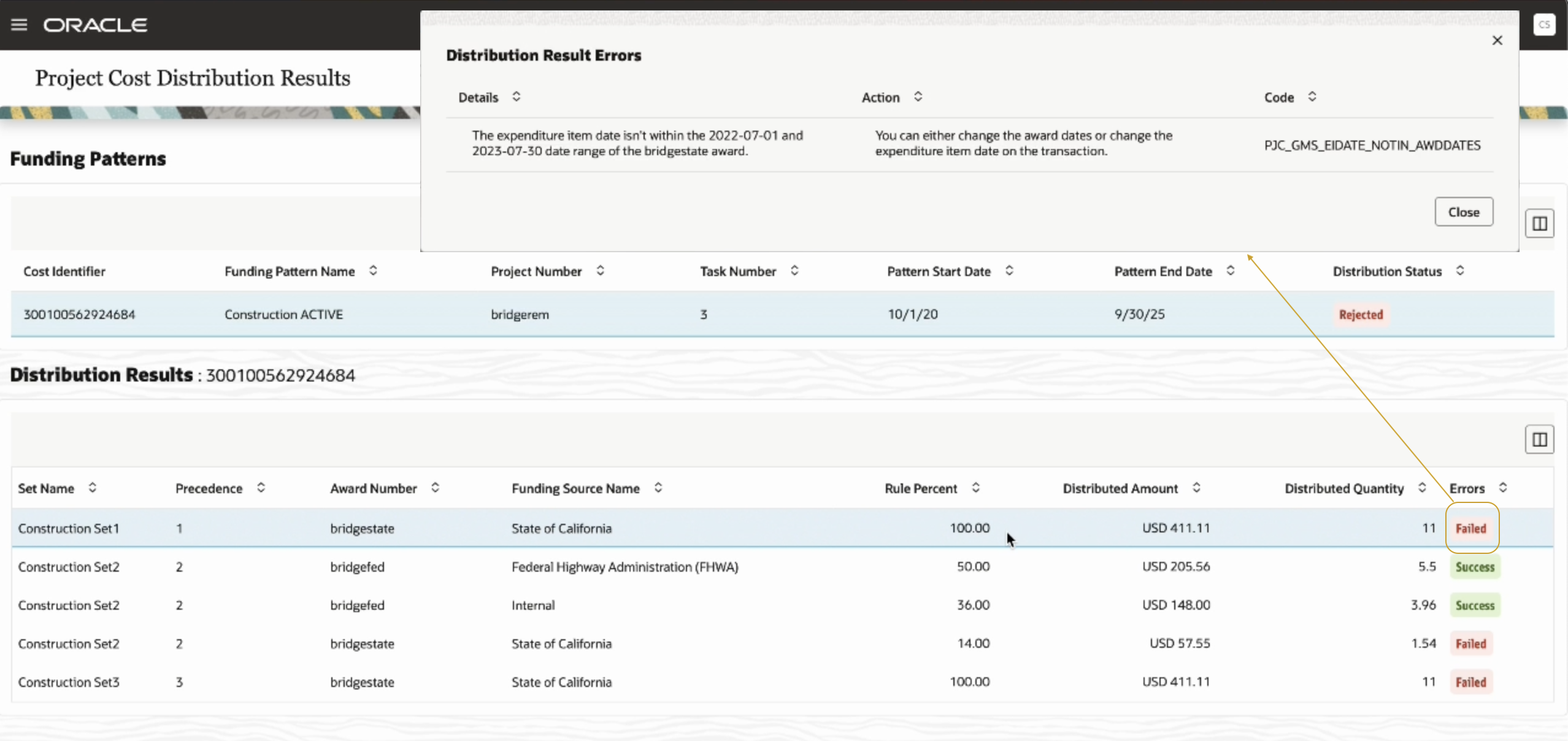
View Project Cost Distribution Results
Grant accountants can also manage third party cost integrations that will leverage the funding patterns on costs imported with blank contract / award and funding patterns. If active funding patterns exist, the costs will be distributed using the associated sets and rules and any errors can be managed and tested as illustrated above.

Manage Third Party Cost import
Watch a demo.
The business benefit of this new feature is that it reduces the complexity associated with manually splitting distributions at cost capture and increases the accuracy of meeting the obligations associated with awards from both external and internal funding sources.
Watch a Demo.
Steps to Enable
Use the Opt In UI to enable this feature. For instructions, refer to the Optional Uptake of New Features section of this document.
Offering: Grants Management No Longer Optional From: Update 23C
You will need to opt-in to this feature in the Setup and Maintenance work area. The feature will always be enabled from update 23C onwards.
- The feature is at the highest level of Feature Opt-in for the Grants Management Offering
- Once you enable this feature, the following activities are required to enable the functionality:
- Create Funding Patterns
- Use the newly created awardFundingPatterns REST object to automate the creation and update of funding patterns
- Set Funding Patterns to Active to enable:
- Ability to leave Contract / Award and Funding Source values blank on sponsored projects in procurement and accounts payable distributions
- Action to Test Award Distribution in Manage Project Costs work area
- Create Funding Patterns
Tips And Considerations
You can use funding patterns to distribute project costs only if the funding patterns are in Active status.
Key Resources
- Watch Project Cost Distribution Using Award Funding Patterns Readiness Training
- Related help:
- Using Grants Management
- Based on Idea 517345 from the Project Management Idea Labs on Oracle Cloud Customer Connect
Role And Privileges
To use this feature, you need these privileges and roles:
- Privilege Name and Code:
- Manage Award Funding Patterns (GMS_MANAGE_AWARD_FUNDING_PATTERNS_PRIV)
- Allows users to manage award funding patterns assigned to a sponsored project.
- Rolled up to Duty Role - Award Management (ORA_GMS_AWARD_MANAGEMENT_DUTY)
- Distribute Award Project Costs and Quantities (PJC_DISTRIBUTE_AWARD_PROJECT_COSTS_AND_QUANTITIES_PRIV)
- Allows users to initiate the Award Distribution process, which matches the costs and quantities provided to available award funding patterns, distributes costs as appropriate, and displays the results.
- Rolled up to Job Roles:
- Grant Management
- Grants Accountant (ORA_PJF_GRANTS_ACCOUNTANT_JOB)
- Procurement
- Buyer (ORA_PO_BUYER_JOB)
- Purchase Order Authoring (ORA_PO_SPO_CREATION_DUTY)
- Category Manager (ORA_PON_CATEGORY_MANAGER_JOB)
- Procurement Contract Administrator (ORA_PO_PROCUREMENT_CONTRACT_ADMIN_JOB)
- Advanced Procurement Requester (ORA_POR_ADVANCED_PROCUREMENT_REQUESTER_ABSTRACT)
- Procurement Preparer (ORA_POR_PROCUREMENT_PREPARER_ABSTRACT)
- Procurement Requester (ORA_POR_PROCUREMENT_REQUESTER_ABSTRACT )
- Contingent Worker (ORA_PER_CONTINGENT_WORKER_ABSTRACT)
- Employee (ORA_PER_EMPLOYEE_ABSTRACT)
- Requisition Self Service User (ORA_POR_REQUISITION_SELF_SERVICE_USER_DUTY)
- Grant Management
- Manage Award Funding Patterns (GMS_MANAGE_AWARD_FUNDING_PATTERNS_PRIV)
Resend Approval Email Notifications
You can now resend approval email notifications for in-progress transactions. You can select one or more transactions in the Transaction Console page or drill-down to the Transaction details page for a transaction and use Resend Email Notification in the Actions menu to notify assignees.

Resend Email Notification in Actions Menu on the Details Page
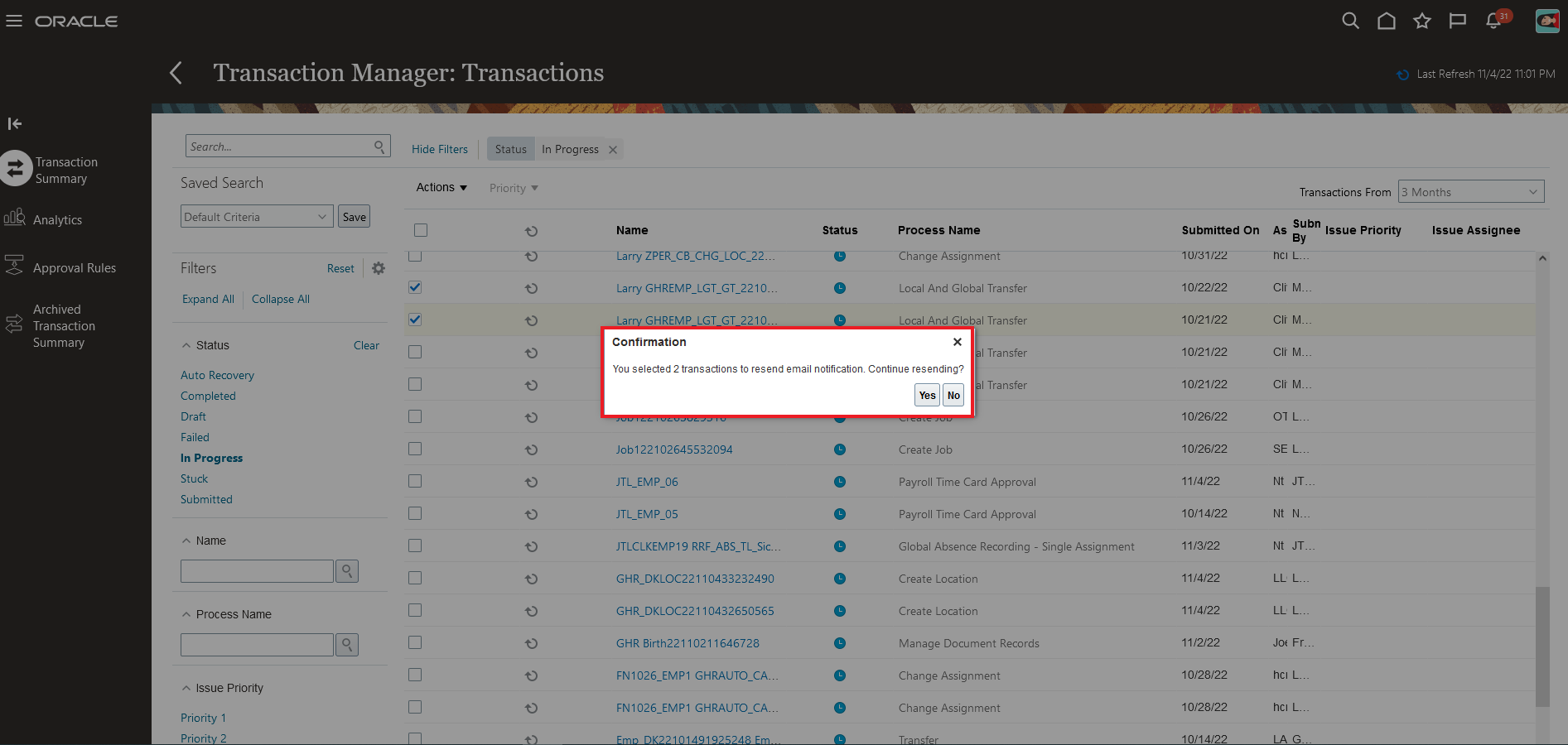
Confirmation Message Displays for Selected Transactions
When you click Resend Email Notification, if there are multiple tasks and assignees in the transaction then those tasks and assignees display in a dialog box. You can select the assignees to whom you want to send the notification. By default, all the assignees are selected in the dialog box.
After the notification is sent, the appropriate status displays in the Status dialog box.

Status Dialog Box for Submitted Process
This feature provides the ability to resend email notifications in the event of any email deletions or loss of email data.
Steps to Enable
You don't need to do anything to enable this feature.
Tips And Considerations
- This action is available only to administrators and for in-progress assigned transactions.
- If there’s a change in the email ID after the first notification then on the resend the new email ID is automatically used.
Key Resources
Role And Privileges
You need to grant administrators the Perform HCM Approval Transaction Actions (PER_PERFORM_APPROVAL_TRANSACTION_ACTIONS_PRIV) privilege.
Diagnostic Log Availability and Attachments in Transaction Console
The Transaction Console work area now lets you do the following:
- Download the diagnostic log for healthy pending transactions.
- View details of all the attachments added at any stage of the transaction in the diagnostic log.
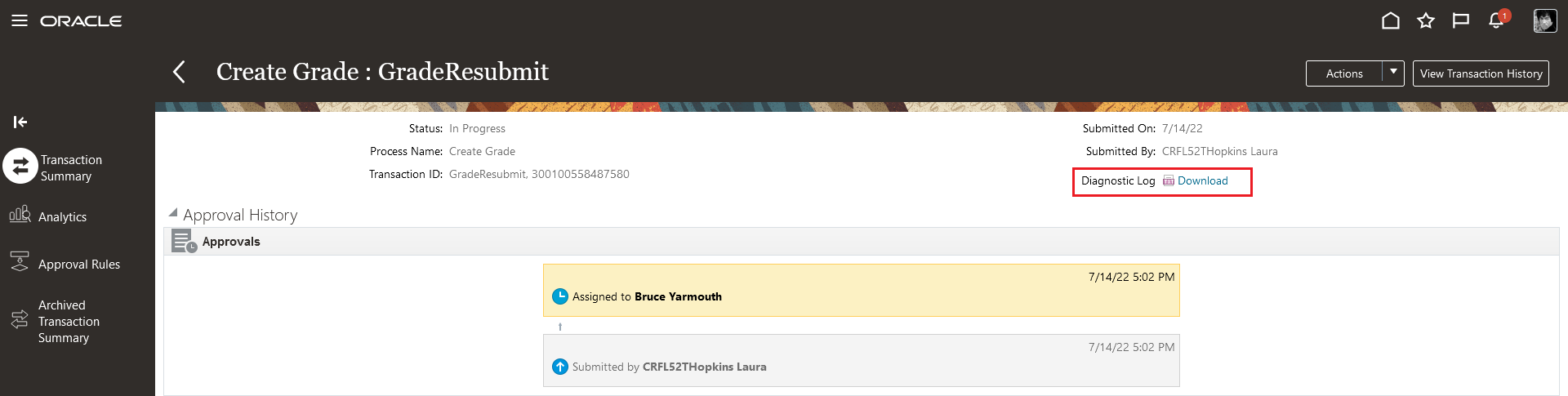
Select an in-progress transaction, open the transaction details page, and use the Download link. This downloads the details of the transaction in .html format.
Any attachments that you add as part of the transaction are listed in the Attachments section in the .html file.
With this feature, you now have the ability to review the diagnostic log for more transactions, with more information in the log.
Steps to Enable
You don't need to do anything to enable this feature.
Key Resources
Role And Privileges
To access the Transaction Console work area, users need the Perform HCM Approval Transaction Actions (PER_PERFORM_APPROVAL_TRANSACTION_ACTIONS_PRIV) privilege.
Archive Reminder in Transaction Console
The Transaction Console work area now displays a yellow banner that reminds users to archive completed transactions. The banner displays when the archive process hasn't been run in the past 3 months.

You can use Archive Now to immediately archive the transactions. When you click Archive Now, a confirmation displays. If you click Dismiss, the notification is snoozed for 24 hours, after which the message displays again.
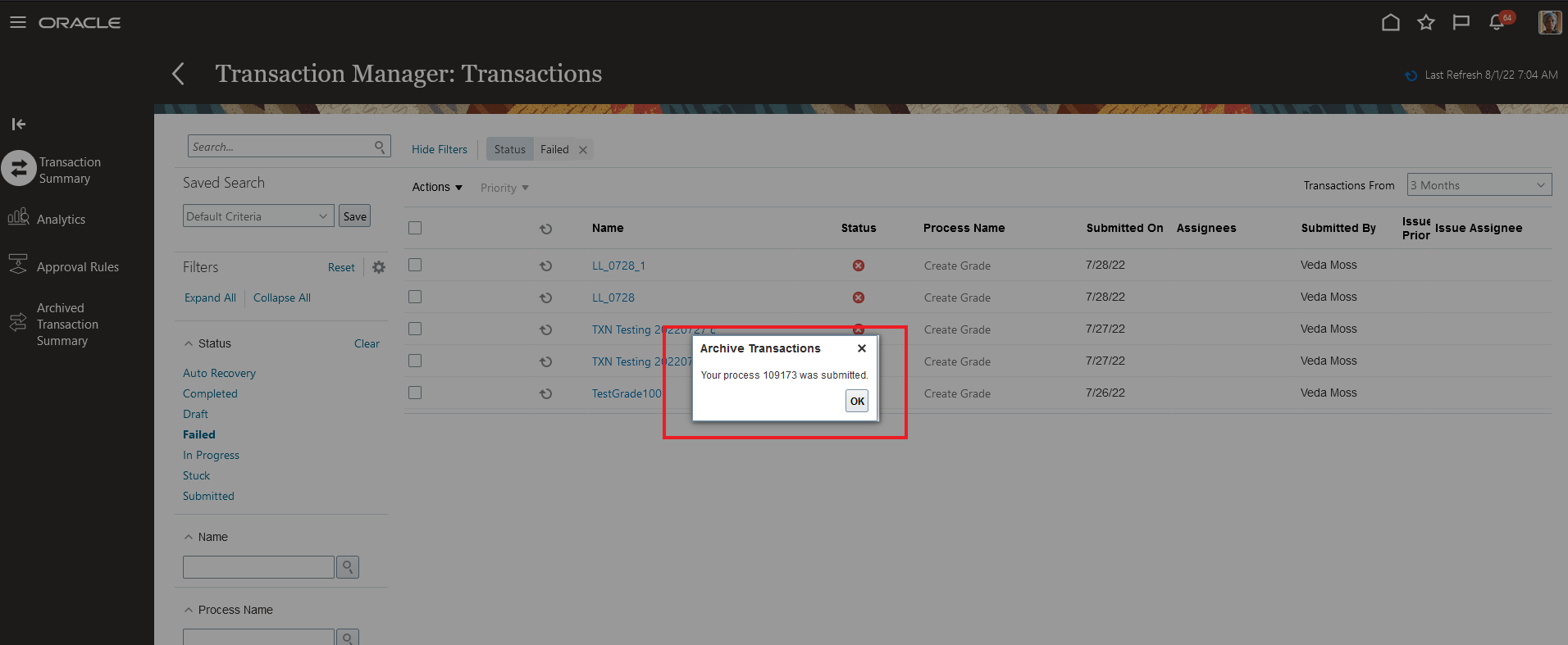
This feature improves the performance of the Transaction Console work area.
Steps to Enable
You don't need to do anything to enable this feature.
Key Resources
Role And Privileges
To access the Transaction Console work area, users need the Perform HCM Approval Transaction Actions (PER_PERFORM_APPROVAL_TRANSACTION_ACTIONS_PRIV) privilege.
Selected Bug Fixes in This Update
This update includes some bug fixes that can change the way Oracle Fusion Cloud Self Service Procurement works. This isn't a full list of all the bug fixes in this update. This list includes the bug fixes that can cause a noticeable change in application behavior.
Retrieve the Latest Inventory Item Category in Requisition Import
Before update 23A, the requisition import program (FBDI or Purchase Request Web Service) would retrieve the inventory item category from the blanket purchase agreement, which wouldn't necessarily be the latest category. In this update, the requisition import program retrieves the inventory item category from the item definition for the destination organization. The requisition line will still maintain the blanket agreement reference even if the agreement has the item with an old category. And the purchase order for the requisition line will also have the latest category from the item definition.
Oracle reference: 34377437
Allow Blanket Purchase Agreement Item (BPA) to Be Added to Cart When BPA Item Category Is Different from the Product Information Management Item Category
Before update 23A, you would receive an error when you try to add a blanket purchase agreement (BPA) item to the cart using the UI, and the BPA item doesn't have the latest category from the destination organization item definition in Product Information Management (PIM). In this update, you can add the BPA item to the cart and submit the requisition for approval. The requisition line will continue to have the category of the BPA, but the purchase order will be created with the latest category from the item definition in PIM.
Oracle reference: 34400661
Steps to Enable
You don't need to do anything to enable this feature.
Responsive Self Service Procurement Application
Manage Requisition Preferences Through the Responsive Self Service Procurement Application
You can now use the Responsive Self Service Procurement application to set up and update requisition preferences. These preferences include requisitioning business unit (BU), delivery location (internal and one-time address), projects, and favorite charge accounts. On the Self Service Procurement Responsive Home page, you can use the Preferences button to review or edit your preferences.

Preferences Option on Self Service Procurement Home in the Desktop Mode
You can update the preferences by making changes to the required fields or configure preferences for a different requisitioning BU. You can use the Delivery section to select an internal location or provide a one-time external address to deliver goods and services. By changing location in preferences, you can view and shop for accessible catalog content in search results and featured categories drill down for that location.
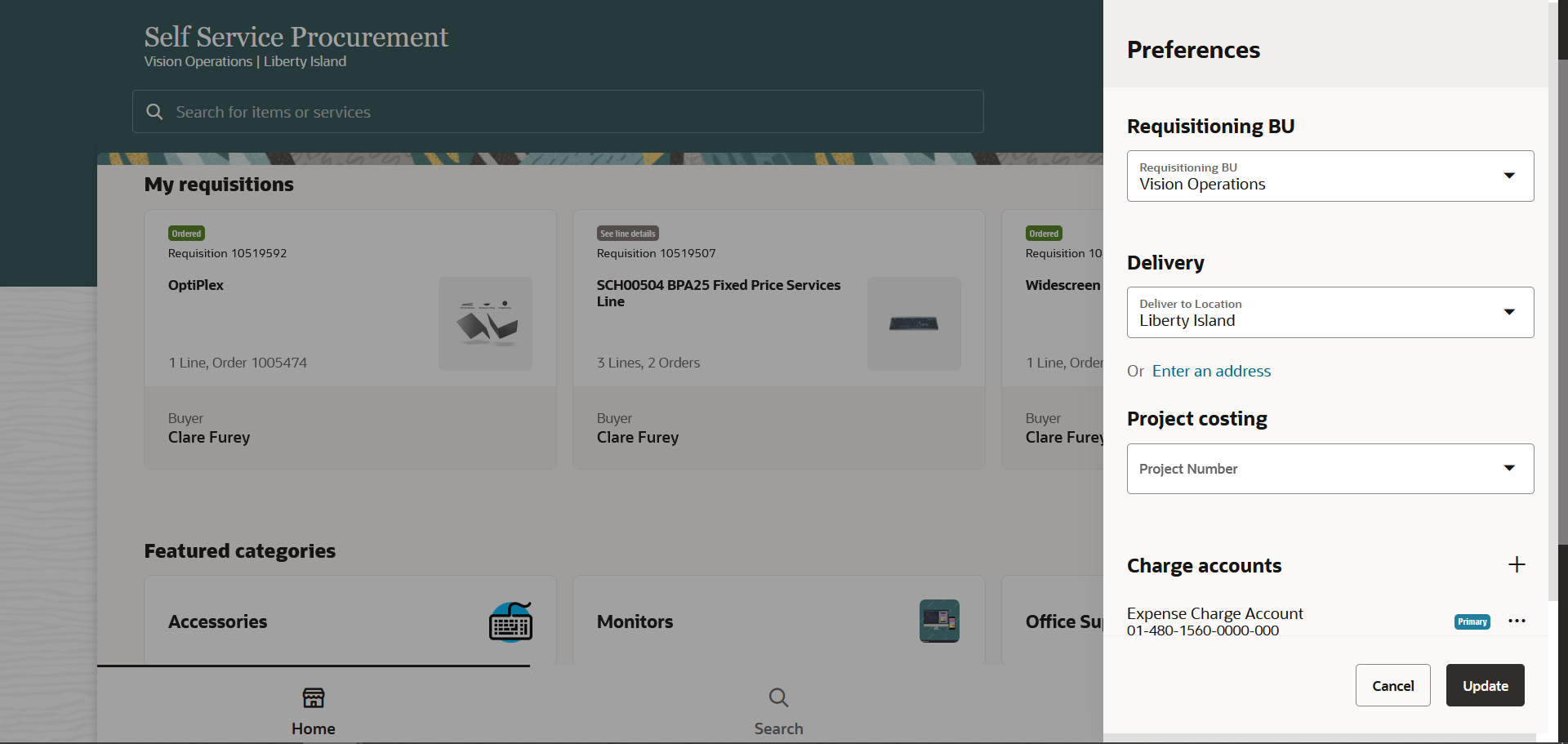
User's Current Preferences
You can use the Charge accounts section to add a nickname for a charge account and set it as your primary charge account.
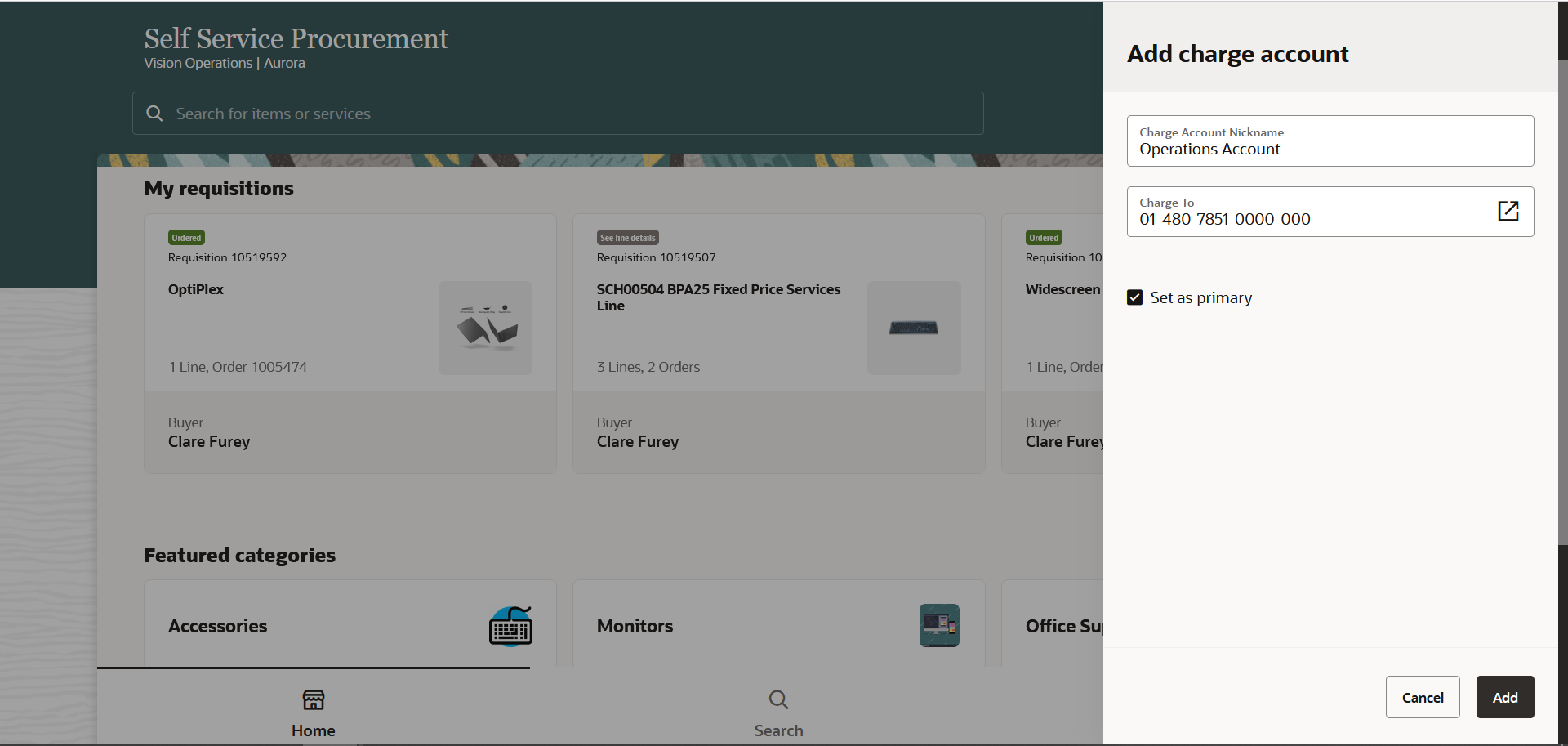
Add Charge Accounts
Using the feature, you can:
- Easily procure goods and services because you can now manage and update preferences in the application. Your preferences can then be used across all requisitions and requisition lines, making shopping easier and faster.
- You can request goods and services for more than one business units.
Steps to Enable
Use the Opt In UI to enable this feature. For instructions, refer to the Optional Uptake of New Features section of this document.
Offering: Procurement
If you want to use the Manage Requisition Preferences through the Responsive Self Service Procurement Application feature, then you must opt in to its parent feature: Procure Goods and Services Using the Responsive Self Service Procurement Application. If you’ve already opted in to this parent feature, then you don’t have to opt in again.
Tips And Considerations
- New employees who are accessing the Responsive Self Service Procurement application for the first time can now set up their preferences and use the application. Before this update, they were redirected to the Fusion Cloud Self Service Procurement application to complete this set up.
- The preferences configuration has these limitations:
- You can only create or update preferences for Expense destination type.
- The requester is automatically set to the Signed in user and can't be changed.
Key Resources
- To know more about how to use the Responsive Self Service Procurement application, refer to the Procure Goods and Services Using the Responsive Self Service Procurement Application readiness training.
- To know how to provide the required privileges to your requesters to use your own configured role instead of the Requisition Self Service User role, refer to the How You Configure Roles for the Responsive Self Service Procurement Application topic.
Role And Privileges
- Users who are assigned to this duty role can access the Responsive Self Service Procurement application:
- Requisition Self Service Responsive Application User Duty (ORA_POR_REQUISITION_SELF_SERVICE_PWA_USER_DUTY)
Shop for Master Items and Items Available on Blanket Agreements from a Punchout Site through the Responsive Self Service Procurement Application
Requesters can navigate to marketplace vendor sites to procure master items and services on the Responsive Self Service Procurement application.
Here are snapshots of the tags you can use to provide a master item and agreement reference:

Tag for a Master Item

Tag for Agreement Reference (Agreement Number and Line Number)
Similar to the existing cloud application, the Marketplace Punchout feature is only available for cXML based Punchout Catalogs in the responsive application.
You can use the feature to add master items and agreement-based lines seamlessly via Punchout in the Responsive Self Service Procurement application.
Steps to Enable
Use the Opt In UI to enable this feature. For instructions, refer to the Optional Uptake of New Features section of this document.
Offering: Procurement
Tips And Considerations
- Items that are both internally transferable and purchasable will be added as purchasable. Pure internal items can't be processed through this flow at this time.
- The Capture Additional Information Sent from Punchout into Line Descriptive Flexfields feature, introduced in Update 22D in the Cloud application, is also now available in the Responsive application for both marketplace and nonmarketplace-based punchout flows.
- You can only process requisitions for the Expense destination type using the Responsive application.
- If you want to use the Shop for Master Items and Items Available on Blanket Agreements from a Punchout Site through the Responsive Self Service Procurement Application feature, then you must opt in to its parent feature: Procure Goods and Services Using the Responsive Self Service Procurement Application. If you’ve already opted in to this parent feature, then you don’t have to opt in again.
Key Resources
- To know more about how to use the Responsive Self Service Procurement application, refer to the Procure Goods and Services Using the Responsive Self Service Procurement Application readiness training.
- To know how to provide the required privileges to your requesters to use your own configured role instead of the Requisition Self Service User role, refer to the How You Configure Roles for the Responsive Self Service Procurement Application topic.
- For more details about the feature, see the Punchout Catalogs topic in the Manage Procurement Catalog chapter of the Oracle Fusion Cloud Procurement: Using Procurement guide. In the topic, refer specifically to the Considerations for Integrating a Punchout Catalog with a Market Place section.
Role And Privileges
- Users who are assigned to this duty role can access the Responsive Self Service Procurement application:
- Requisition Self Service Responsive Application User Duty (ORA_POR_REQUISITION_SELF_SERVICE_PWA_USER_DUTY)
Capture Notes to Supplier in the Responsive Self Service Procurement Application
As a requester, you can now add additional information or instructions to your supplier that helps process a requisition more efficiently. The notes you add are visible to the Suppliers as part of the procurement process.
You can add Notes at a header level or for each specific requisition line in the Responsive Self Service Procurement application. To create, edit, or view these details, you must navigate to the edit requisition line or the edit header from the Shopping Cart page. Any notes you add at the header level overwrite notes that may exist on individual lines. Before this update, you couldn't add notes to a requisition created in the Responsive Self Service Procurement application.
These screenshots illustrate how Notes are captured at a line or header level in the application:
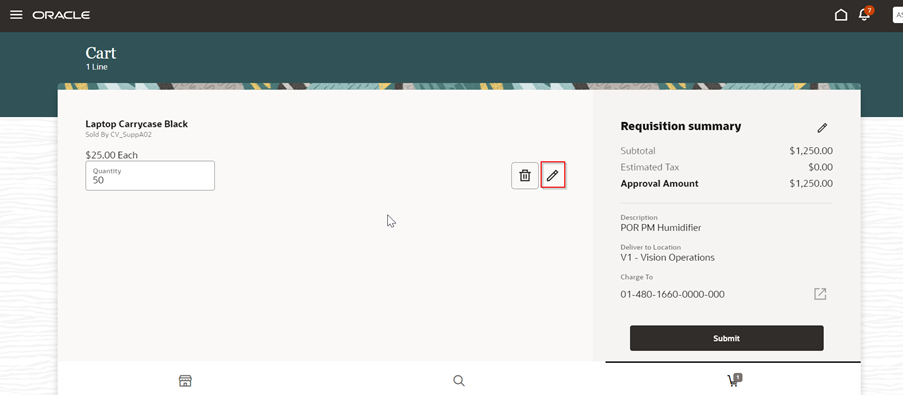
Edit Line to Add Notes on a Line
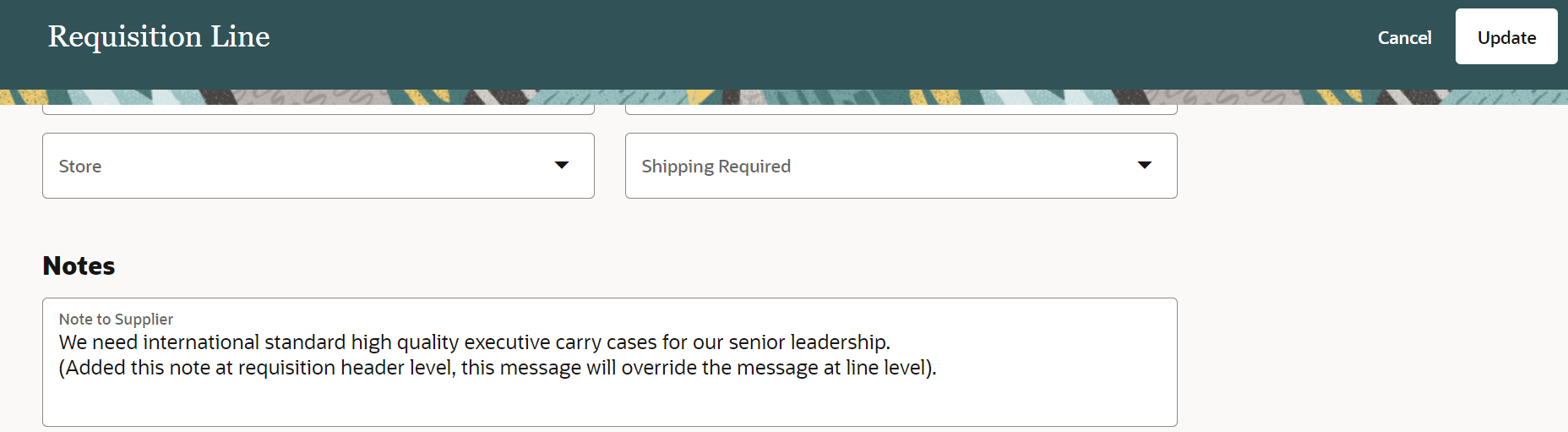
Add Line Level Notes
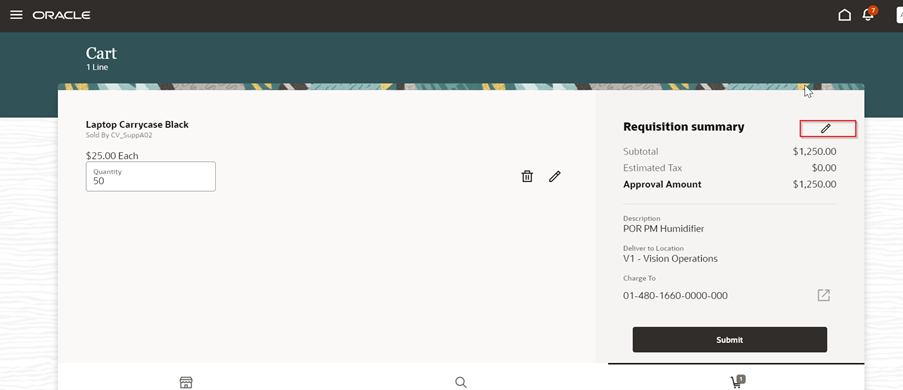
Edit Summary to Add Header Level Notes
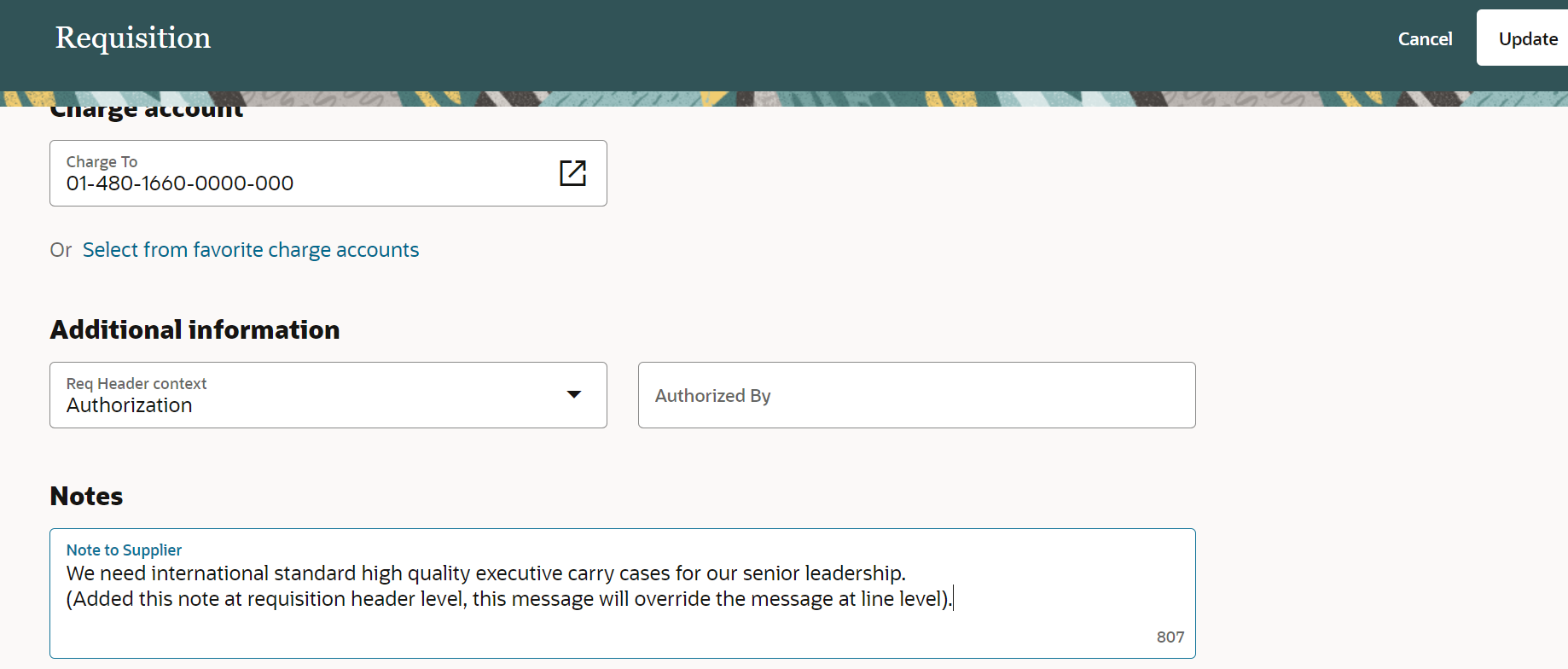
Add Notes on the Header
Using this feature, you can provide additional instructions or information to the suppliers involved in fulfilling the requisition.
Steps to Enable
Use the Opt In UI to enable this feature. For instructions, refer to the Optional Uptake of New Features section of this document.
Offering: Procurement
Tips And Considerations
If you want to use the Capture Notes to Supplier in the Responsive Self Service Procurement Application feature, then you must opt in to its parent feature: Procure Goods and Services Using the Responsive Self Service Procurement Application. If you’ve already opted in to this parent feature, then you don’t have to opt in again.
Key Resources
- To know more about how to use the Responsive Self Service Procurement application, refer to the Procure Goods and Services Using the Responsive Self Service Procurement Application readiness training.
- To know how to provide the required privileges to your requesters to use your own configured role instead of the Requisition Self Service User role, refer to the How You Configure Roles for the Responsive Self Service Procurement Application topic.
Role And Privileges
- Users who are assigned to this duty role can access the Responsive Self Service Procurement application:
- Requisition Self Service Responsive Application User Duty (ORA_POR_REQUISITION_SELF_SERVICE_PWA_USER_DUTY)
Selected Bug Fixes in this Update for the Responsive Self Service Procurement Application
This update includes some bug fixes that can change the way the Oracle Responsive Self Service Procurement application works. This isn't a full list of all the bug fixes in this update. This list includes the bug fixes that can cause a noticeable change in application behavior.
Optimize Shopping Cart Display
In this update, the Shopping Cart page is optimized, keeping in mind key information to be displayed and performance. The Deliver-to Location (where the deliver-to location is different on lines) continue to be displayed for each requisition line in the Shopping Cart. To view other line-level details such as Delivery Date, Charge Account or Notes and Attachments, you can edit individual lines where these details are available.
Steps to Enable
You don't need to do anything to enable this feature.
Project-Driven Supply Chain is an end-to-end, integrated solution across the Oracle Fusion Cloud SCM and Oracle Fusion Cloud Project Management applications. This solution is designed to support various business processes of manufacturing and asset-intensive companies.
You can use the Project-Driven Supply Chain solution to manage your supply chain processes in the context of projects without creating separate organizations for each project. You can also capture supply chain costs as project expenditures.
Apply Budgetary Control on Internally Sourced Requisitions Expensed to Projects
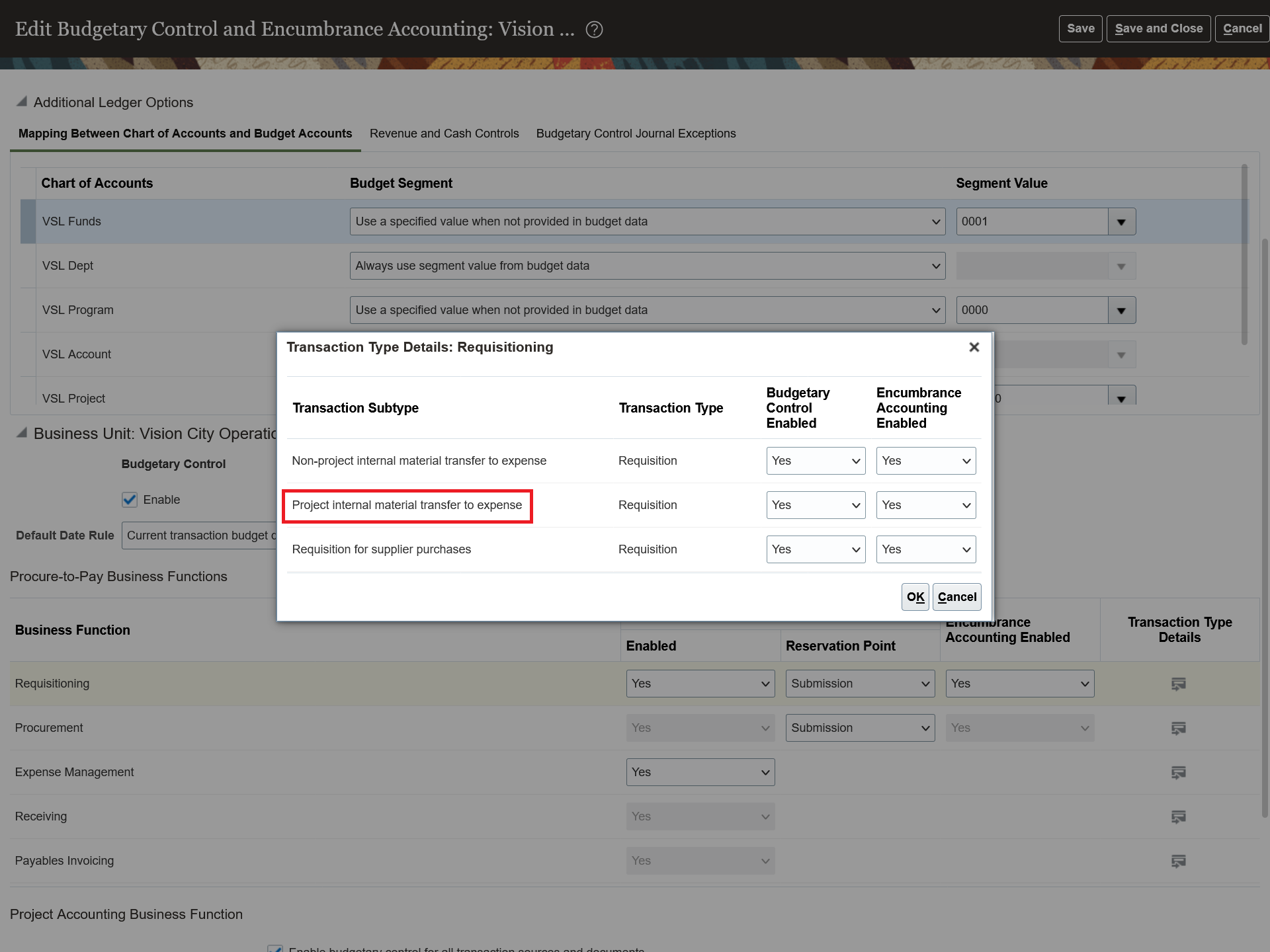
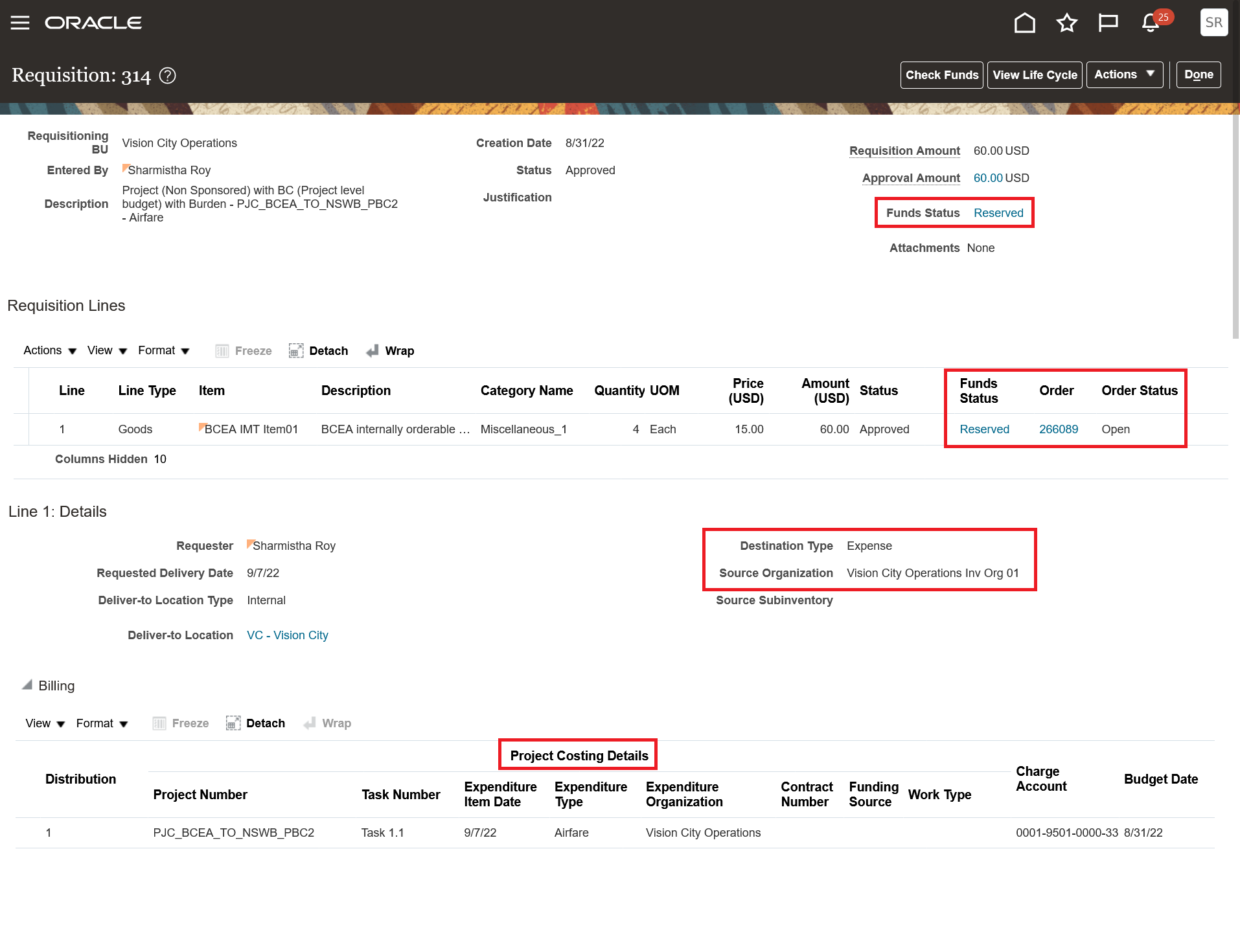
Check for funds availability, reserve funds against project control budgets, and account encumbrances, if applicable, when you raise internally sourced requisitions that are expensed to sponsored and nonsponsored projects. You can create internal requisitions for expense destination items and charge the transfer cost to the project by including project costing details in the distribution, but you must check funds availability before submitting the requisition. If budgetary control applies to your transaction, funds are reserved as a commitment either on approval or submission, based on the reservation point of the ledger and business unit budgetary control options. On receipt of the transfer order, the Create Receipt Accounting Distribution process reserves the receipt cost and liquidates the commitments. The Import cost process liquidates the receipt reservation and reserve funds, and imports the transfer order costs from the Supply Chain Inventory Receipts application as project costs. For sponsored projects, you can view control budget balances on the Manage Awards page, and for nonsponsored projects, you can use the Budgetary Control Analysis Report.
These screenshots illustrate the feature.
- For the Requisition transaction type, Project internal material transfer to expense subtype transaction type, enable the Budgetary Control and Encumbrance Accounting option.
- Create requisition for expense destination with project costing details.
- After the transfer order is shipped and received, and the transfer order receipts are accounted in Oracle Supply Chain Receipt Accounting, import and review transfer order costs as project costs.
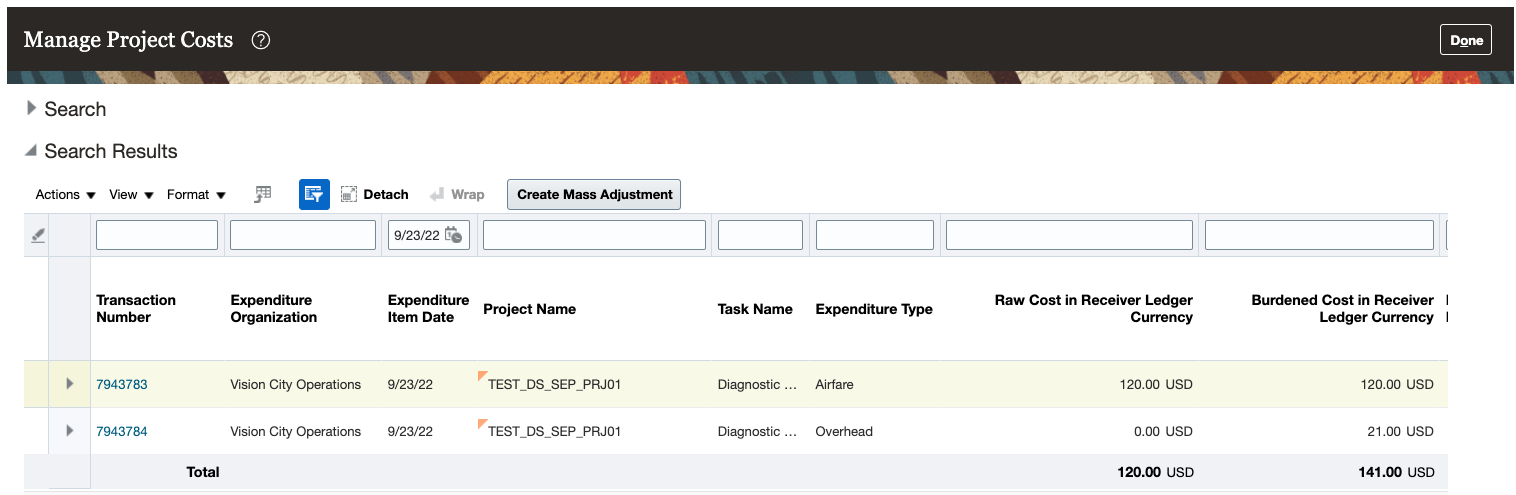
Transfer Order Delivery Costs Imported as Project Costs and Viewed on the Manage Project Costs Page

Funds Reservation Details for Project Costs

View Project Control Budget Balances for Sponsored Projects
You can enable budgetary control and encumbrance accounting for the project internal material transfer to expense transaction subtype to:
- Track funds availability and funds consumption on critical project control budgets.
- Check for funds availability for internal material transfer requisitions that are expensed to projects.
- Track and account encumbrances on internal material transfer requisitions expensed to projects.
Steps to Enable
Use the Opt In UI to enable this feature. For instructions, refer to the Optional Uptake of New Features section of this document.
Offering: Manufacturing and Supply Chain Materials Management
Feature: Project-Driven Supply Chain
After you opt in, you must perform additional steps to enable project-driven supply chain. For instructions, refer to the Steps to Enable section in the Segregate and Manage Project-Specific Inventory feature, available in the Oracle Inventory Management Cloud What's New, update 20A.
Below are the additional steps needed to apply budgetary control on internally sourced requisitions expensed to projects:
- Enable budgetary control for the ledger, business units assigned to the ledger, and the project accounting business function.
- Enable the Project internal material transfer to expense transaction subtype in Manage Budgetary Control for the business function Requisitioning.
- Additionally, ensure budgetary control is enabled for the receiving business function and the Receiving for internal expense transfer transaction type. This is also required for projects to perform the necessary budgetary control functions for these costs at the time of import to projects.
- Two new journal line rules are added for the Project Costing subledger application. These are the new rules:
- Same Line Project Encumbered Burden Cost Liquidation for Requisition for same line burdening enabled projects.
- Separate Line Project Encumbered Burden Cost Liquidation for Requisition for separate line burdening enabled projects.
These new rules ensure relieving of burden encumbrances for the requisition, since receipt accounting only relieves the encumbrance for the raw costs. If your ledger is assigned with a user-defined subledger accounting method, add these new journal line rules to your Burden and Inventory journal rule sets and recompile your subledger accounting method for encumbrances to be accounted successfully for internal material requisitions expensed to projects.
Tips And Considerations
- You can use this feature only for internal material transfer requisitions for expense destinations, with project costing details at the distribution level created in Self Service Procurement UIs.
- You can’t use this feature with requisition import (FBDI and Purchase Request Web Service) as requisition import doesn’t support internal material transfers.
- You can use this feature in REST resources, and Responsive Self Service Procurement application. But notice that, when applicable, funds are reserved only after approvals are completed.
- The requisition costs will be available as committed costs on the Manage Committed Costs page until the transfer order is received. After receipt of the transfer order is complete, the Manage Committed Costs page stops displaying these costs as commitments in projects and will also not be available as actual costs until these costs are imported into projects.
- Budgetary control can be set for a project, project and top resource, or award and funding source segments. When a resource-level budgetary control is being used, resources for a project that are used in the internal material transfer requisitions can be defined in the resource hierarchy and budgeted to prevent fund reservation failures.
- If you enable budgetary control for the transaction ledger and business unit, then budgetary control validation is performed against project control budgets existing within the same ledger.
- Any changes to the budgetary control enablement for the Project internal material transfer to expense transaction subtype impact the budgetary control for existing transactions of this subtype.
- Any adjustments to existing project costs that are internal material transfer to expense destination, and weren't originally budgetary controlled, become eligible for budgetary control in projects after budgetary control is enabled as outlined in the Steps to Enable section. Adjustments made to previously nonbudgeted project costs related to internal material transfers to expense destinations will only have newly adjusted amounts budgeted.
Key Resources
For more information on budgetary control and encumbrance accounting, refer to these topics:
- Overview of Budgetary Control and Encumbrance Accounting
- Overview of Project-Driven Supply Chain
- Overview of Budgetary Control
Role And Privileges
- Users with any of the following predefined job roles are automatically able to participate in the project-driven supply chain process:
- Warehouse Operator (ORA_INV_WAREHOUSE_OPERATOR)
- Shipping Manager (ORA_WSH_SHIPPING_MANAGER)
- Shipping Agent (ORA_WSH_SHIPPING_AGENT)
- Receiving Agent (ORA_RCV_RECEIVING_AGENT_JOB)
- Cost Accountant (ORA_CST_COST_ACCOUNTANT_JOB)
- Project Manager (ORA_PJF_PROJECT_MANAGER_JOB)
- Project Administrator (ORA_PJF_PROJECT_ADMINISTRATOR_JOB)
- Project Accountant (ORA_PJF_PROJECT_ACCOUNTANT_JOB)
- Project Billing Specialist (ORA_PJF_PROJECT_BILLING_SPECIALIST)
- Supply Chain Application Administrator (ORA_RCS_SUPPLY_CHAIN_APPLICATION_ADMINISTRATOR)
- If you're maintaining your own configured job roles: no new privileges were introduced to support the Apply Budgetary Control on Internally Sourced Requisitions Expensed to Projects feature.