
November Maintenance Pack for 23D
This document will continue to evolve as existing sections change and new information is added. All updates appear in the following table:
| Date | Module | Feature | Notes |
|---|---|---|---|
| 27 OCT 2023 | Created initial document. |
 HAVE AN IDEA?
We’re here and we’re listening. If you have a suggestion on how to make our cloud services even better then go ahead and tell us. There are several ways to submit your ideas, for example, through the Ideas Lab on Oracle Customer Connect. Wherever you see this icon after the feature name it means we delivered one of your ideas.
GIVE US FEEDBACK
We welcome your comments and suggestions to improve the content. Please send us your feedback at oracle_fusion_applications_help_ww_grp@oracle.com.
DISCLAIMER
The information contained in this document may include statements about Oracle’s product development plans. Many factors can materially affect Oracle’s product development plans and the nature and timing of future product releases. Accordingly, this Information is provided to you solely for information only, is not a commitment to deliver any material, code, or functionality, and should not be relied upon in making purchasing decisions. The development, release, and timing of any features or functionality described remains at the sole discretion of Oracle.
This information may not be incorporated into any contractual agreement with Oracle or its subsidiaries or affiliates. Oracle specifically disclaims any liability with respect to this information. Refer to the Legal Notices and Terms of Use for further information.
Column Definitions:
Report = New or modified, Oracle-delivered, ready to run reports.
UI or Process-Based: Small Scale = These UI or process-based features are typically comprised of minor field, validation, or program changes. Therefore, the potential impact to users is minimal.
UI or Process-Based: Larger Scale* = These UI or process-based features have more complex designs. Therefore, the potential impact to users is higher.
Features Delivered Disabled = Action is needed BEFORE these features can be used by END USERS. These features are delivered disabled and you choose if and when to enable them. For example, a) new or expanded BI subject areas need to first be incorporated into reports, b) Integration is required to utilize new web services, or c) features must be assigned to user roles before they can be accessed.
| Ready for Use by End Users Reports plus Small Scale UI or Process-Based new features will have minimal user impact after an update. Therefore, customer acceptance testing should focus on the Larger Scale UI or Process-Based* new features. |
Customer Must Take Action before Use by End Users Not disruptive as action is required to make these features ready to use. As you selectively choose to leverage, you set your test and roll out timing. |
|||||
|---|---|---|---|---|---|---|
| Feature |
Report |
UI or |
UI or |
|
||
SUPPORTING DOCUMENTS
You can download additional documents and attachments to update and maintain your Student Financial Planning implementation. To view and download these documents, see Oracle Fusion Cloud Student Financial Planning: Release Notes 23D (Doc ID 2974672.1) on My Oracle Support. The supporting documents can include:
- Release preview slides and video
- Resolved defects
- Configuration for new and updated baseline fields
- API updates
- Reporting subject documentation
- Product report updates
- Operation report updates
- Known issues
Enhanced Usability for OAS Auditing Reporting
Enhance your Auditing Reporting experience with built in audit reporting available directly in your Product Report Folder on Oracle Analytics Server (OAS).
With the 23C Release we upgraded our BI Publisher reporting tool to the latest version called Oracle Analytics Server (OAS) allowing you to gain access to a set of predefined auditing reports that were available to download and install at anytime. With this release, you will now have access to a new product folder that will house these audit reports making it available without the need to download and install on your own.
These reports give you access to valuable data for user and report activity within your OAS instance:
- User information for Updating, Creating, Downloading, Copying, Deleting, Renaming, and Uploading of Folders, Data Models, and Reports
- Report Statistics including Users, Run Success, Start and End Times, Duration of Report run, Report Size, Query execution time, Summary visuals, Execution metrics
Navigation to the Folder:
- OAS > Catalog > Shared Folders > SFP Reports > Product Reports > OAS Audit
Navigation to Reports
- OAS > Catalog > Shared Folders > SFP Reports > Product Reports > OAS Audit > BIPCatalogObjectAuditTrail
- OAS > Catalog > Shared Folders > SFP Reports > Product Reports > OAS Audit > BIPReportAuditTrail
- OAS > Catalog > Shared Folders > SFP Reports > Product Reports > OAS Audit > HourlyConcurrencyReport
- OAS > Catalog > Shared Folders > SFP Reports > Product Reports > OAS Audit > ReportExecutionTimeMetrics
- OAS > Catalog > Shared Folders > SFP Reports > Product Reports > OAS Audit > ReportPerformanceByReportType
- OAS > Catalog > Shared Folders > SFP Reports > Product Reports > OAS Audit > ReportRuntimeStatistics
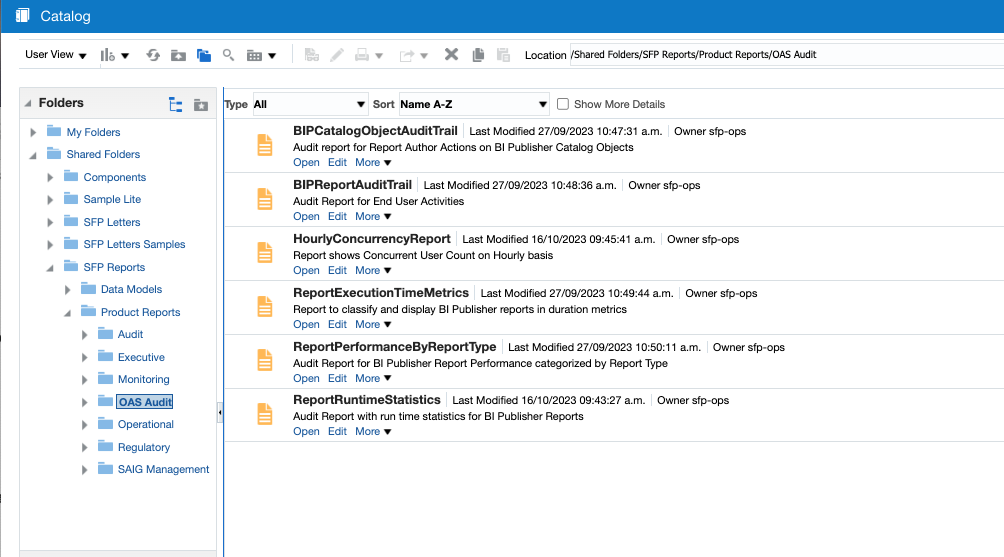
Enhanced Usability for OAS Auditing Reporting
Steps to Enable
OAS will start to capture audit activities when the server is updated to enable monitoring and auditing. To turn this feature on:
- Navigate to the following screen within OAS
- OAS > Administration > System Maintenance > Server Configuration > Monitor And Audit
- Click "Enable Monitor and Audit"
- Audit Level should remain at "Medium"
- OAS > Administration > System Maintenance > Server Configuration > Monitor And Audit
Tips And Considerations
- Review Upgrade of BI publisher to OAS What's New in 23C
Key Resources
- For more information on OAS, see these resources: