
This document will continue to evolve as existing sections change and new information is added. All updates appear in the following table:
| Date | Module | Feature | Notes |
|---|---|---|---|
| 06 APR 2023 | Campus Community | User Name and Constituent ID Search in Person Profile | Updated document. Revised feature information. |
| 17 MAR 2023 | Created initial document. |
 HAVE AN IDEA?
We’re here and we’re listening. If you have a suggestion on how to make our cloud services even better then go ahead and tell us. There are several ways to submit your ideas, for example, through the Ideas Lab on Oracle Customer Connect. Wherever you see this icon after the feature name it means we delivered one of your ideas.
GIVE US FEEDBACK
We welcome your comments and suggestions to improve the content. Please send us your feedback at oracle_fusion_applications_help_ww_grp@oracle.com.
DISCLAIMER
The information contained in this document may include statements about Oracle’s product development plans. Many factors can materially affect Oracle’s product development plans and the nature and timing of future product releases. Accordingly, this Information is provided to you solely for information only, is not a commitment to deliver any material, code, or functionality, and should not be relied upon in making purchasing decisions. The development, release, and timing of any features or functionality described remains at the sole discretion of Oracle.
This information may not be incorporated into any contractual agreement with Oracle or its subsidiaries or affiliates. Oracle specifically disclaims any liability with respect to this information. Refer to the Legal Notices and Terms of Use for further information.
Column Definitions:
Report = New or modified, Oracle-delivered, ready to run reports.
UI or Process-Based: Small Scale = These UI or process-based features are typically comprised of minor field, validation, or program changes. Therefore, the potential impact to users is minimal.
UI or Process-Based: Larger Scale* = These UI or process-based features have more complex designs. Therefore, the potential impact to users is higher.
Features Delivered Disabled = Action is needed BEFORE these features can be used by END USERS. These features are delivered disabled and you choose if and when to enable them. For example, a) new or expanded BI subject areas need to first be incorporated into reports, b) Integration is required to utilize new web services, or c) features must be assigned to user roles before they can be accessed.
| Ready for Use by End Users Reports plus Small Scale UI or Process-Based new features will have minimal user impact after an update. Therefore, customer acceptance testing should focus on the Larger Scale UI or Process-Based* new features. |
Customer Must Take Action before Use by End Users Not disruptive as action is required to make these features ready to use. As you selectively choose to leverage, you set your test and roll out timing. |
|||||
|---|---|---|---|---|---|---|
| Feature |
Report |
UI or |
UI or |
|
||
Removal of Subject Area: Higher Education - Person Tags Real Time |
||||||
New Subject Area: Higher Education - Person Attributes Real Time |
||||||
User Name and Constituent ID Search in Person Profile
Search for higher education person records using the person name, user name, email, or constituent ID.
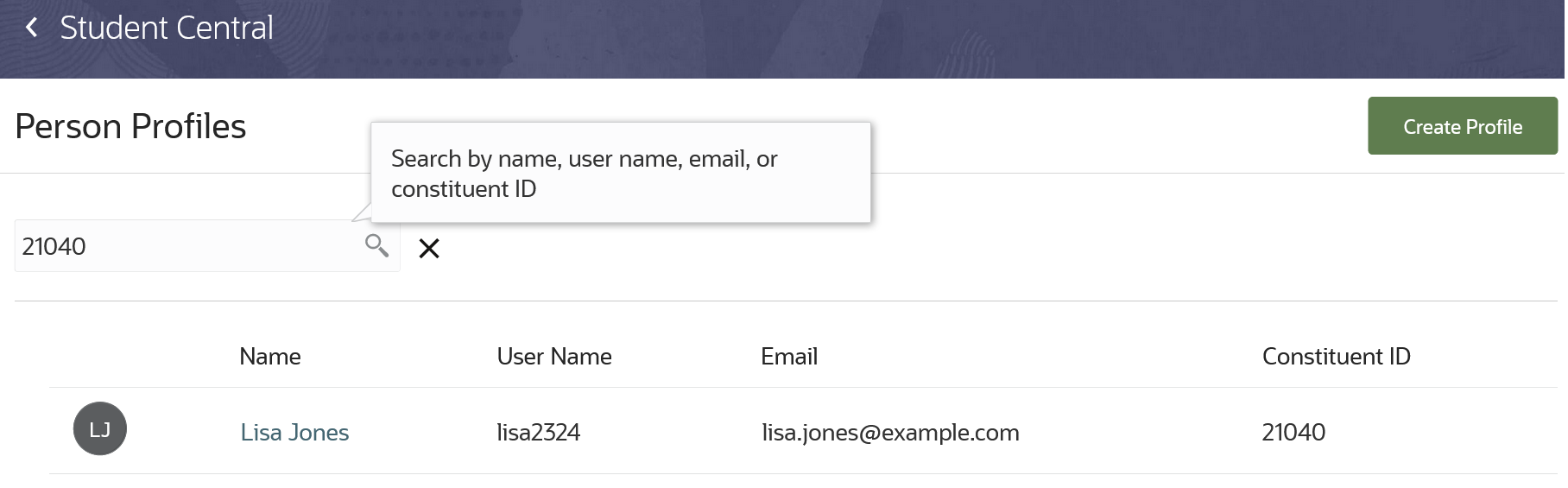
Person Search
Academic level and program filters have been removed from person search.
This feature allows you to find the profile of a person more easily.
Steps to Enable
You don't need to do anything to enable this feature.
Create, update, and delete general or service hold tags to assign to people. For example, you can create an attribute tag named Athlete and add it to a person profile. Also, group tags by adding tags to tag groups.
From Student Central, click Search and search for Tags to manage tags and tag groups.
Here's an example of a general tag being created.
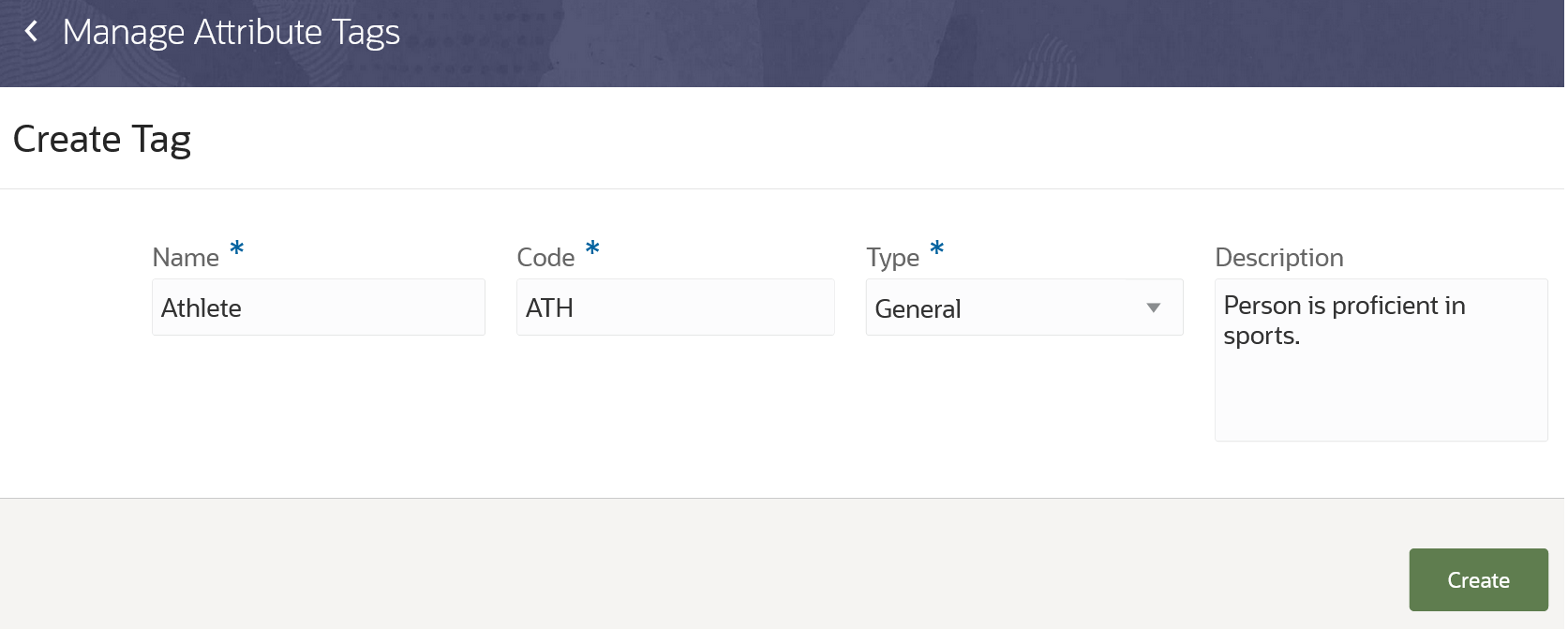
Creating a General Tag
After creating the general tag, associate the tag with one or more tag groups. Associate a general tag with the Person Attribute tag group, so that you can assign the tag to person records.
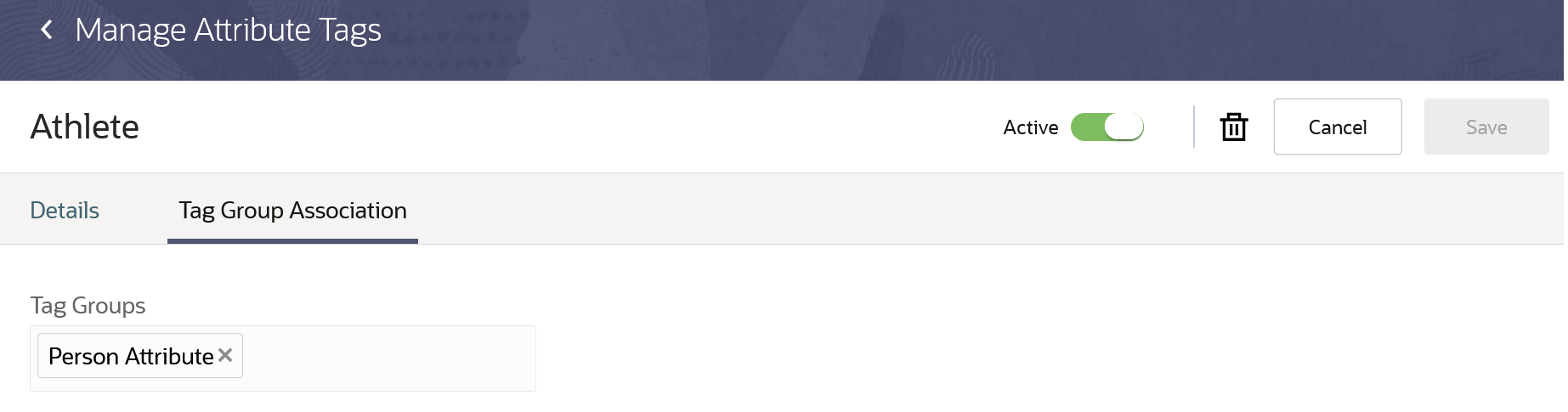
Associating a Tag with a Tag Group
Select Service Hold as the type to create a service hold tag. For service hold tags, you can provide this information:
- Steps on how to resolve the hold.
- Indicate whether the resolution can be done internally within the institution.
- If internal, the page destination where the end user can resolve the hold and the contact who can help the end user.
- If external, use the detailed mitigation steps to specify the contact who isn't part of your institution.
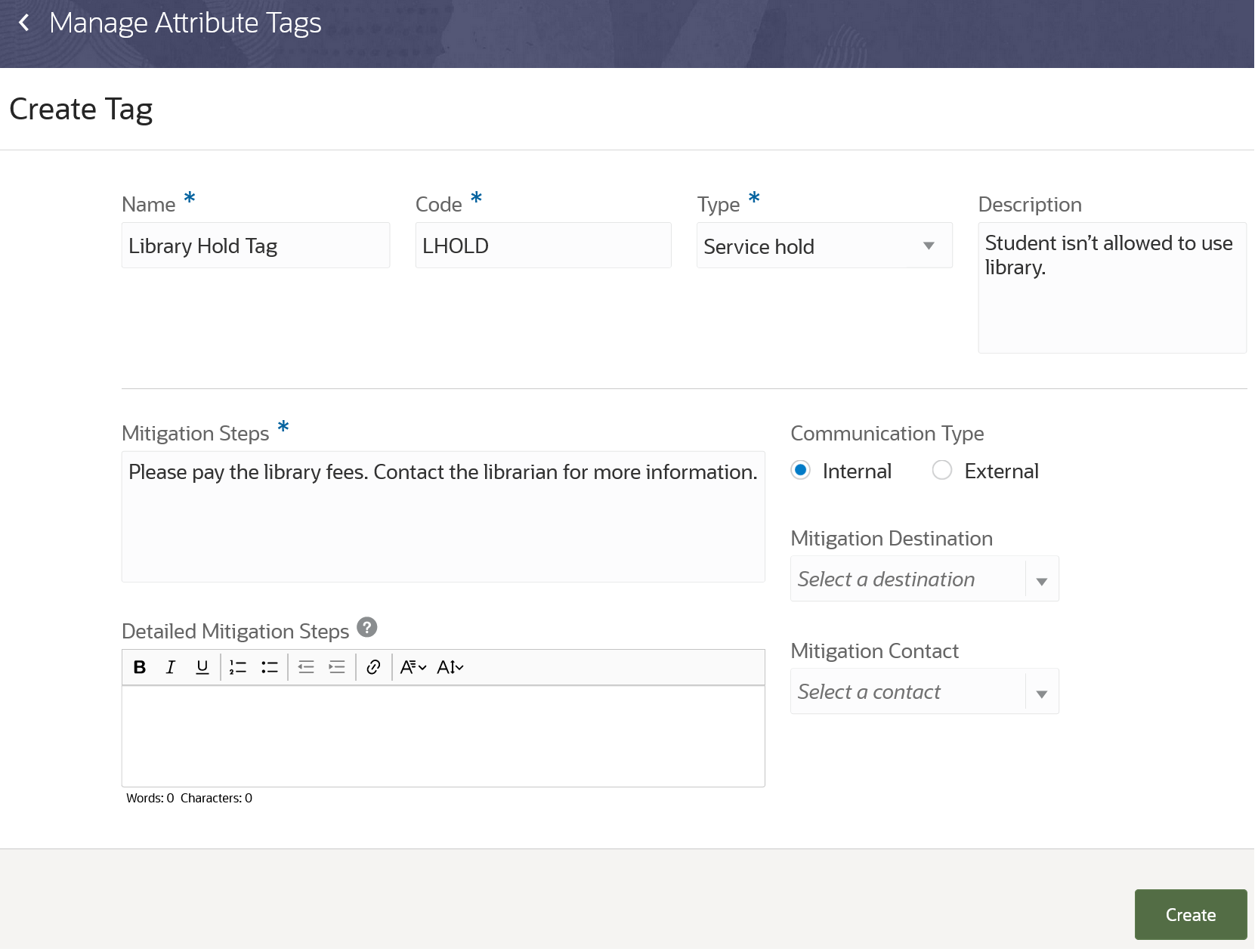
Creating a Service Hold Tag
This feature allows you to keep all the tags organized in one place so later they can be assigned to people.
Steps to Enable
You don't need to do anything to enable this feature.
Tips And Considerations
You can now use this feature instead of the person tags feature to manage tags. These person tags tasks are no longer available in the Setup and Maintenance work area:
- Create Person Tags in Spreadsheet
- Upload Person Tags in Spreadsheet
- Manage Person Tags
In addition, for this new feature, you can import and export the data from one environment to another in the Functional Setup Manager. The import and export of data for person tags is no longer available.
Once assigned, a tag can’t be deleted or inactivated.
Person Attribute Tag Assignment
Assign attribute tags to people to identify them in reports, for example, assign an attribute tag named Military to a student.
Click Attributes on the person profile page to assign general type tags.
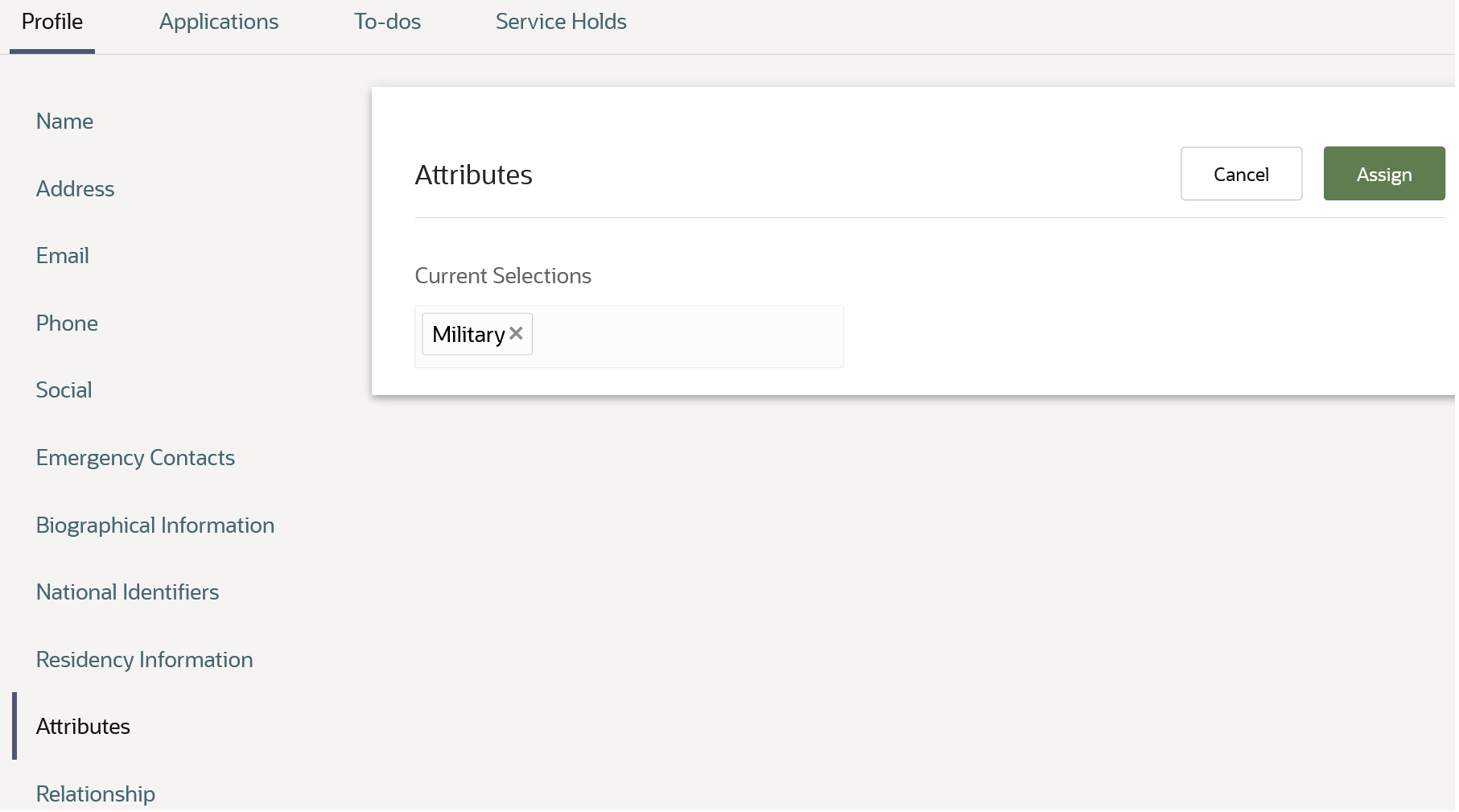
Assigning a General Tag to a Person Profile
Click the Service Holds tab to assign service hold type tags. When assigning a service hold tag, you can:
- Indicate whether the end user, to whom the hold is assigned, can view the hold on their My Account page.
- Specify the duration of the hold.
- Edit information on how to resolve the hold, such as mitigation steps, mitigation contact, and so on.
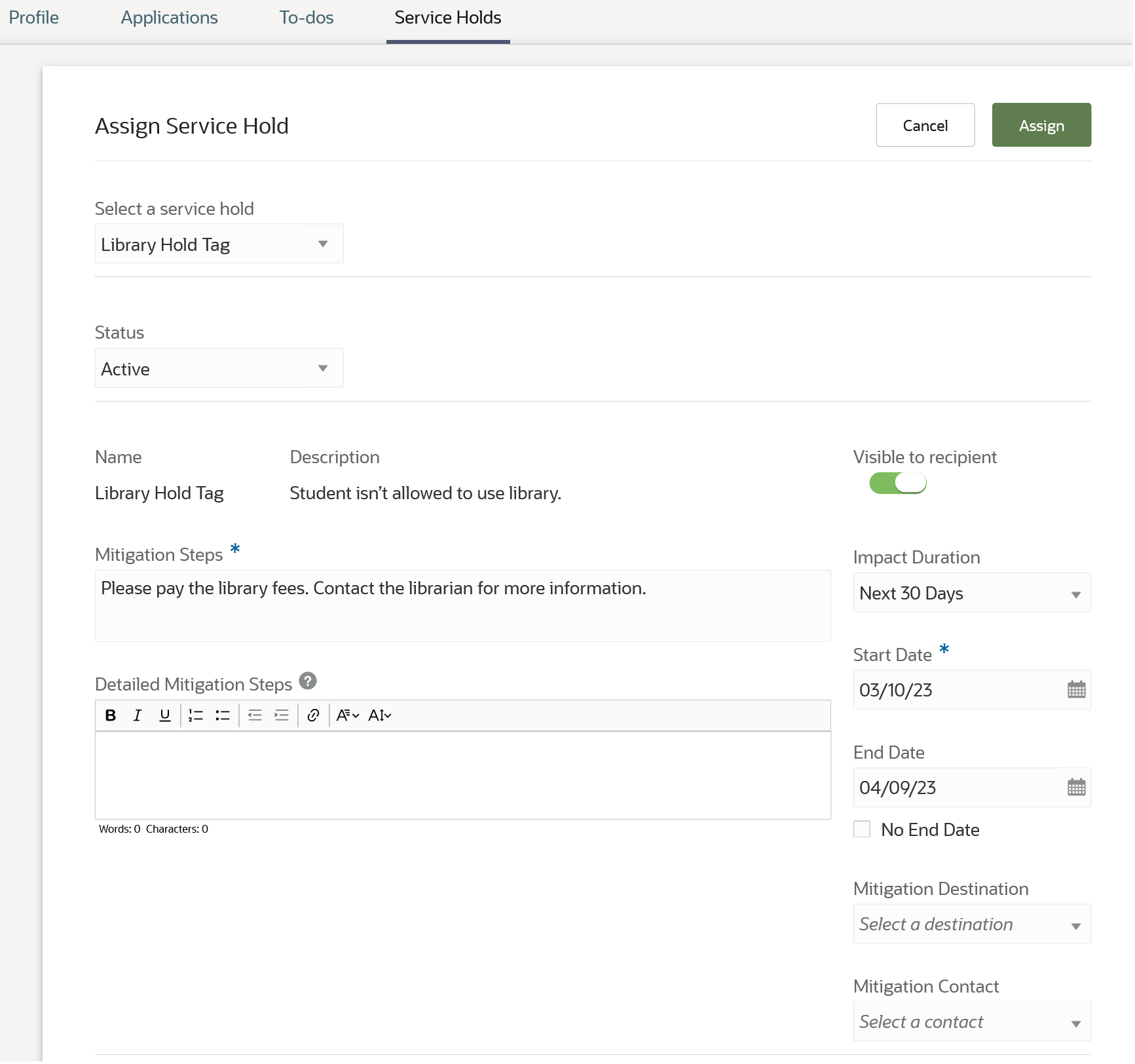
Assigning a Service Hold Tag to a Person Profile
This feature allows you to assign general and service hold tags to end users.
Steps to Enable
You don't need to do anything to enable this feature.
Tips And Considerations
Manage Person Profile (Navigator > Academics > Person Profiles) is no longer available. Use Person Profiles (From Student Central, click Search and search for Person Profile Search) to assign general and service hold tags.
Oracle Fusion Cloud Student Management delivers new pages, page elements, and page permissions assigned to the predefined job roles in each release.
Here are the newly added pages, page elements, and page permissions for the mentioned predefined job roles.
| Page Name | New/Existing | Page Elements | New/Existing | Page Permission | New/Existing | Predefined Job Roles |
|---|---|---|---|---|---|---|
| Event Management |
New | Event Details |
New | View, Create, Update, and Delete |
New | Higher Education Application Administrator |
| Event Management |
New | Event Subscriber Details |
New | View, Create, Update, and Delete |
New | Higher Education Application Administrator |
| Tags and Tag Groups |
New |
Tag Groups |
New | View and Manage | New | Higher Education Application Administrator |
| Tags and Tag Groups |
New |
Tags |
New | View and Manage | New | Higher Education Application Administrator |
Steps to Enable
You don't need to do anything to enable this feature.
Tips And Considerations
If you created user-defined roles and assigned page access to them using the Manage Application Access task in the Setup and Maintenance work area, you must review your user-defined roles to see if you need to assign them access to the new pages, page elements, and page permissions.
Access Requirements
You need an IT Security Manager role to use this feature.
Create refunds for all of the refundable receipts for an account in one action.
To process all outstanding refunds through the Issue Refunds process, schools previously had to create a transaction for each refundable receipt.
With this feature, schools can now use a single action and create multiple refund transactions and work more efficiently with an account that has multiple receipts or refundable credits.
Steps to Enable
You don't need to do anything to enable this feature.
Post Enrollment Prerequisite Verification
Evaluate student requisites to potentially drop students from course sections when they haven't satisfied required prerequisite courses. Run a process when course sections from preceding academic periods are completed to identify students who failed to satisfy prerequisites and drop them from course sections in the current academic period.
Use the new Evaluate Student Requisites process instead of manually managing student records with unmet prerequisites.
The process uses course outcomes only, not result set values.
Here’s what the process does for courses in a particular academic period:
- Evaluates the records of students enrolled in the course to check if students have met the course prerequisites.
- Identifies which students haven’t met the perquisites.
- Removes students from the course.
Here’s how you run the process:
- Click Navigator and in the Tools area, click Scheduled Processes.
- Click Schedule New Process.
- Select Evaluate Student Requisites and click OK.
- Select your parameters.
- Click Submit.
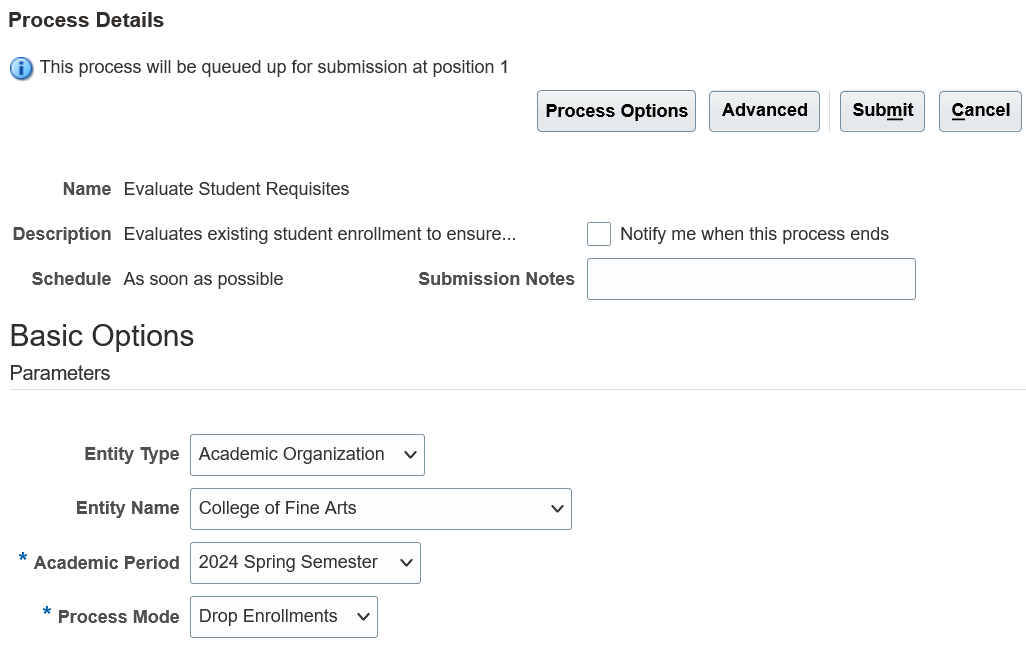
Evaluate Student Requisites Process
Drop Enrollments Process Mode
To notify students that they have been dropped from a course, create a communication category for the delivered Enrollment Drop event. Then create the email communication.
Notify Only Process Mode
If you want to warn students that they will be dropped from a course, select the Notify Only process mode. To notify students, create a communication category for the delivered Process Student Requisites Warnings event. Then create the email communication.
As you can see, the automation of this previously manual process for evaluating student requisites will save you time and effort.
Steps to Enable
Do this Communications setup for the new Evaluate Student Requisites process:
- Create communication categories for delivered events.
- Create communications.
Key Resources
- Refer to these Communications topics:
Academic Periods and Period Attribute Date Migration
Migrate academic period and period attribute date configurations from another environment or using a rapid implementation spreadsheet.
This means you can more efficiently load and configure data for academic periods and period attribute dates and maintain that data.
Steps to Enable
You don't need to do anything to enable this feature.
Migrate drop schemes and related institution and academic levels from another environment or using a rapid implementation spreadsheet.
This means that you can more efficiently load and configure data for drop schemes and maintain that data.
Steps to Enable
You don't need to do anything to enable this feature.
Migrate courses and related entity records, person contacts, identifiers, and additional attributes from another environment or using a rapid implementation spreadsheet.
This means that you can more efficiently load and configure data for courses and maintain that data.
Steps to Enable
You don't need to do anything to enable this feature.
Migrate course sections and related entity records from another environment or using a rapid implementation spreadsheet.
This means that you can more efficiently load and configure data for course sections and maintain that data.
Steps to Enable
You don't need to do anything to enable this feature.
Course Results Based Requisite Scheme Migration
Migrate requisite schemes configured using the (new in 22D) course results mapping option from another environment or using a rapid implementation spreadsheet.
This means you can more efficiently load and configure data for requisite schemes and maintain that data.
Steps to Enable
You don't need to do anything to enable this feature.
Transactional Business Intelligence for Student Management
Oracle Transactional Business Intelligence is a real time, self-service reporting solution offered to all Oracle Cloud application users to create ad hoc reports and analyze them for daily decision-making. Oracle Transactional Business Intelligence provides admissions coordinators, academic coordinators, registrars, bursars, academic advisors, and student services managers the critical information to analyze admissions, enrollment, course capacity planning, and student tuition billing accounts.
Removal of Subject Area: Higher Education - Person Tags Real Time
The Higher Education - Person Tags Real Time subject area is no longer supported starting with Update 23B.
Any reports you created for this subject area will still be available but can't be modified starting with Update 23B.
Steps to Enable
You don't need to do anything to enable this feature.
New Subject Area: Higher Education - Person Attributes Real Time
Enhance your Student Management reporting with this new subject area. You can use this subject area to report on the attributes assigned to individuals.
Details such as the number of attributes assigned to individuals as well as other information like name, phone number, email address, biographical information, and so on are available for reporting.
Steps to Enable
You don't need to do anything to enable this feature.