
- Revision History
- Overview
- Feature Summary
-
- Subscription Management
-
- Create Coverage Template Using REST APIs
- Enable Periodic Billing for One-Time Charges
- Update Standard Coverage Template in Subscription
- Configure Renewal Consolidation Grouping Rules
- Add First Full Period Adjustments
- Edit Custom Attributes in Subscription Header
- Copy Charges, Charge Adjustments, and Custom Child Objects During Amendment
-
- Subscription Management
This document will continue to evolve as existing sections change and new information is added. All updates appear in the following table:
| Date | Product | Feature | Notes |
|---|---|---|---|
| 18 DEC 2020 | Created initial document. |
This guide outlines the information you need to know about new or improved functionality in this update.
GIVE US FEEDBACK
We welcome your comments and suggestions to improve the content. Please send us your feedback at oracle_fusion_applications_help_ww_grp@oracle.com.
Column Definitions:
Features Delivered Enabled
Report = New or modified, Oracle-delivered, ready to run reports.
UI or Process-Based: Small Scale = These UI or process-based features are typically comprised of minor field, validation, or program changes. Therefore, the potential impact to users is minimal.
UI or Process-Based: Larger Scale* = These UI or process-based features have more complex designs. Therefore, the potential impact to users is higher.
Features Delivered Disabled = Action is needed BEFORE these features can be used by END USERS. These features are delivered disabled and you choose if and when to enable them. For example, a) new or expanded BI subject areas need to first be incorporated into reports, b) Integration is required to utilize new web services, or c) features must be assigned to user roles before they can be accessed.
| Ready for Use by End Users Reports plus Small Scale UI or Process-Based new features will have minimal user impact after an update. Therefore, customer acceptance testing should focus on the Larger Scale UI or Process-Based* new features. |
Action is Needed BEFORE Use by End Users Not disruptive as action is required to make these features ready to use. As you selectively choose to leverage, you set your test and roll out timing. |
|||||
|---|---|---|---|---|---|---|
| Feature |
Report |
UI or |
UI or |
|
||
Copy Charges, Charge Adjustments, and Custom Child Objects During Amendment |
||||||
Create Coverage Template Using REST APIs
You can use Subscription REST services to create a coverage template.
You must use Pricing REST services to create the entitlements matrix and rules.
Steps to Enable
Review the REST service definition in the REST API guides, available from the Oracle Help Center > your apps service area of interest > REST API. If you're new to Oracle's REST services you may want to begin with the Quick Start section.
Enable Periodic Billing for One-Time Charges
You can bill your one-time charges periodically so that the application bills the one-time charges throughout the subscription duration based on the billing frequency.

You can use this feature to periodically bill one-time charges and enable your customer to flexibly pay for one-time charges over the duration of the subscription.
Steps to Enable
You don't need to do anything to enable this feature.
Key Resources
See the "Create and Update Subscriptions" chapter in the Using Subscription Management guide.
Update Standard Coverage Template in Subscription
You can edit a standard coverage template directly from the Coverage tab of a subscription or coverage product. When you edit a standard coverage template, the application converts it into a nonstandard template.
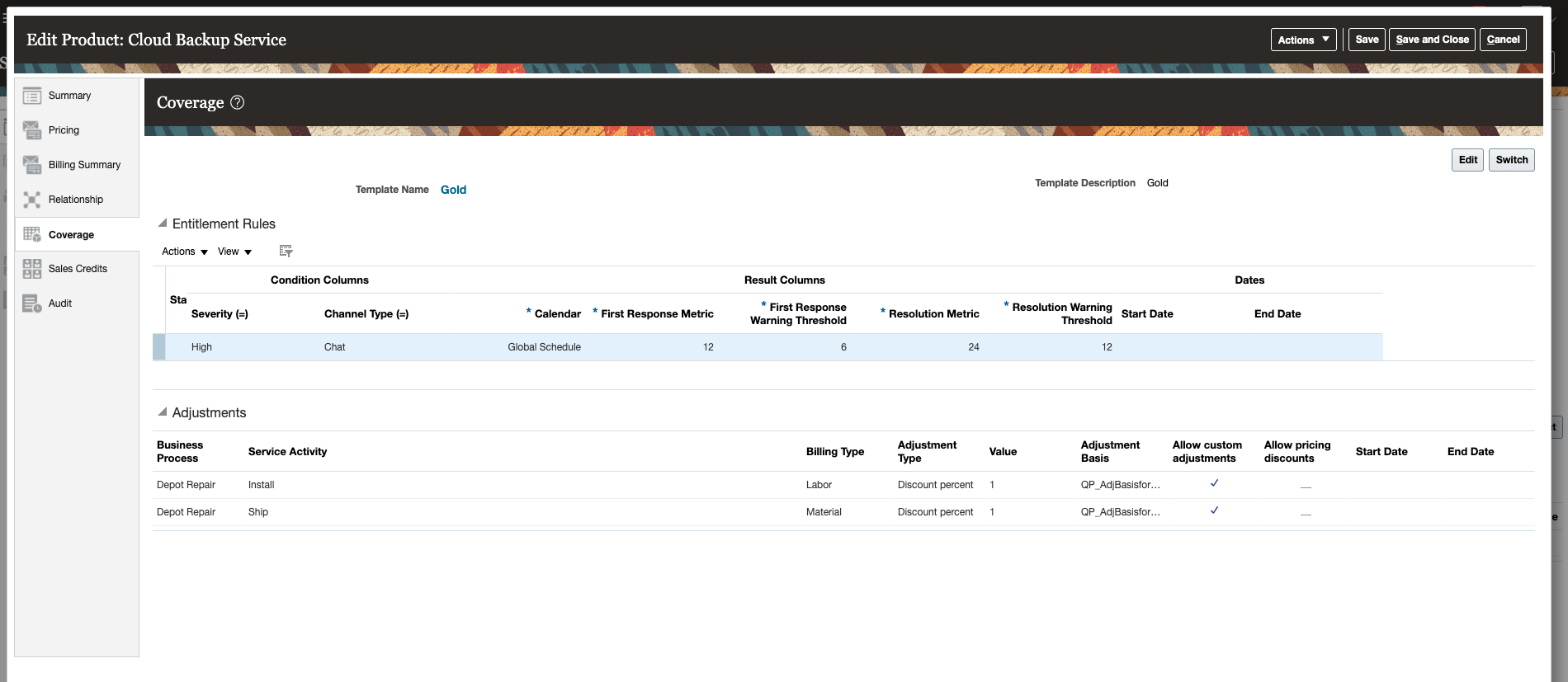
Coverage Template
In the Coverage tab, click Edit to create a copy of a standard coverage. As the new template is just a copy of an initial standard template, you can't search this nonstandard template in the Manage Standard Coverage page. The application assigns the name for this nonstandard template at the time of creation, which you can rename along with other attributes.
After creating a nonstandard template, if you want to use the standard template instead of your edited template, you can click Revert to Standard to apply your standard template.

Edit Coverage Template
This feature lets you edit the coverage template values to create a nonstandard template specific to the subscription or coverage product you're selling. You can also access the template details directly from the subscription by clicking on the template name.
Steps to Enable
You don't need to do anything to enable this feature.
Key Resources
See the "Create and Update Subscriptions" chapter in the Using Subscription Management guide.
Configure Renewal Consolidation Grouping Rules
You can use the renewal consolidation grouping feature to select criteria for merging two or more renewal subscriptions. The application performs subscription consolidation based on the default grouping rules and the rules selected by you.
Here are the grouping rules that the application uses by default:
- Business Unit
- Primary Party
- Legal Entity
- Currency
- Pricing System
- Renewal Process
Here are the grouping rules that you can select:
- Billing Account
- Bill-to Site
- Ship-to Party
- Ship-to Site
- Price Adjustment Type
- Payment Method
You can set the grouping rules in the Create Renewal Rules Template or Edit Renewal Rules Template page.

Create Renewal Rules Template

Edit Renewal Rules Template
This feature lets you configure the consolidation grouping rules.
Steps to Enable
You don't need to do anything to enable this feature.
Key Resources
See the "Configure Subscriptions" chapter in the Implementing Subscription Management guide.
Add First Full Period Adjustments
You can use the First Full Period charge adjustment to ensure that the billing schedule reflects adjustments correctly when a subscription starts mid-period and uses Calendar month as the period start value.
You can use First Full Period adjustments to ensure that charge adjustments are applied correctly when you use Calendar month as the period start.
Steps to Enable
You don't need to do anything to enable this feature.
Key Resources
See the "Create and Update Subscriptions" chapter in the Using Subscription Management guide.
Edit Custom Attributes in Subscription Header
Along with the other subscription statuses, you can edit the custom attributes, including custom child attributes, of the subscription header when a subscription is in Active status.

Editable Custom Attribute Post Subscription Activation
With this feature, you can easily and conveniently edit the subscription header's custom attributes directly from the subscription details page.
Steps to Enable
You don't need to do anything to enable this feature.
Copy Charges, Charge Adjustments, and Custom Child Objects During Amendment
When you amend a subscription product, you have the option to copy charges, charge adjustments, and custom child objects from the existing subscription product to the new subscription product.

Amend Product
In a situation where you have negotiated the price and an amendment is required, you can use this feature to copy the charges and adjustments to retain the original price on your new subscription product. Also, this feature lets you copy the original price and adjustments to a new subscription product when:
- A customer requests for a subscription product extension.
- You decide to provide an additional coverage to a customer with the same price.
Steps to Enable
You don't need to do anything to enable this feature.
Key Resources
See the "Manage Subscriptions" chapter in the Using Subscription Management guide.