
This document will continue to evolve as existing sections change and new information is added. All updates appear in the following table:
| Date | Feature | Notes |
|---|---|---|
| 29 MAY 2020 | Field Service Cloud Parts and Debrief Integration | Updated document. Revised feature information. |
| 22 MAR 2019 | Created initial document. |
This guide outlines the information you need to know about new or improved functionality in this update, and describes any tasks you might need to perform for the update. Each section includes a brief description of the feature, the steps you need to take to enable or begin using the feature, any tips or considerations that you should keep in mind, and the resources available to help you.
Security and New Features
The Role section of each feature identifies the security privilege and job role required to use the feature. If feature setup is required, then the Application Implementation Consultant job role is required to perform the setup, unless otherwise indicated. (If a feature doesn't include a Role section, then no security changes are required to use the feature.)
If you have created job roles, then you can use this information to add new privileges to those roles as needed.
Give Us Feedback
We welcome your comments and suggestions to improve the content. Please send us your feedback at oracle_fusion_applications_help_ww_grp@oracle.com.
Optional Uptake of New Features (Opt In)
We continue to add many new features to the Oracle Cloud Applications, and for some features, you can take advantage of new functionality at a pace that suits you by “opting in” to the feature when you’re ready. You can opt-in to a feature in two ways: by using the New Features work area, or by using the Setup and Maintenance work area.
To opt-in using the New Features work area:
- Click the Navigator, and then click New Features (under the My Enterprise heading).
- On the New Features page, select the offering that includes new features you’d like to review.
- Click Opt-In for any feature that you want to opt-in to.
- On the Edit Features page, select the Enable option for the feature, and then click Done.
To opt-in using the Setup and Maintenance work area:
- Click the Navigator, and then click Setup and Maintenance.
- On the Setup page, select your offering, and then click Change Feature Opt-In.
- On the Opt-In page, click the Edit Features icon.
- On the Edit Features page, select the Enable option for any feature you want to opt-in to. If the Enable column includes an Edit icon instead of a check box, then click the icon, select your feature options, and click Save and Close.
- Click Done.
OPT-IN EXPIRATION
Some features include an opt-in expiration update, after which they are no longer optional. If you have not opted in to the feature by the expiration update, it will automatically be enabled for you in that update.
Click here to review details of all Oracle Applications Cloud features with an upcoming opt-in expiration update.
Column Definitions:
Report = New or modified, Oracle-delivered, ready to run reports.
UI or Process-Based: Small Scale = These UI or process-based features are typically comprised of minor field, validation, or program changes. Therefore, the potential impact to users is minimal.
UI or Process-Based: Larger Scale* = These UI or process-based features have more complex designs. Therefore, the potential impact to users is higher.
Features Delivered Disabled = Action is needed BEFORE these features can be used by END USERS. These features are delivered disabled and you choose if and when to enable them. For example, a) new or expanded BI subject areas need to first be incorporated into reports, b) Integration is required to utilize new web services, or c) features must be assigned to user roles before they can be accessed.
| Ready for Use by End Users Reports plus Small Scale UI or Process-Based new features will have minimal user impact after an update. Therefore, customer acceptance testing should focus on the Larger Scale UI or Process-Based* new features. |
Customer Must Take Action before Use by End Users Not disruptive as action is required to make these features ready to use. As you selectively choose to leverage, you set your test and roll out timing. |
|||||
|---|---|---|---|---|---|---|
| Feature |
Report |
UI or |
UI or |
|
||
Manual Service Charge Adjustments
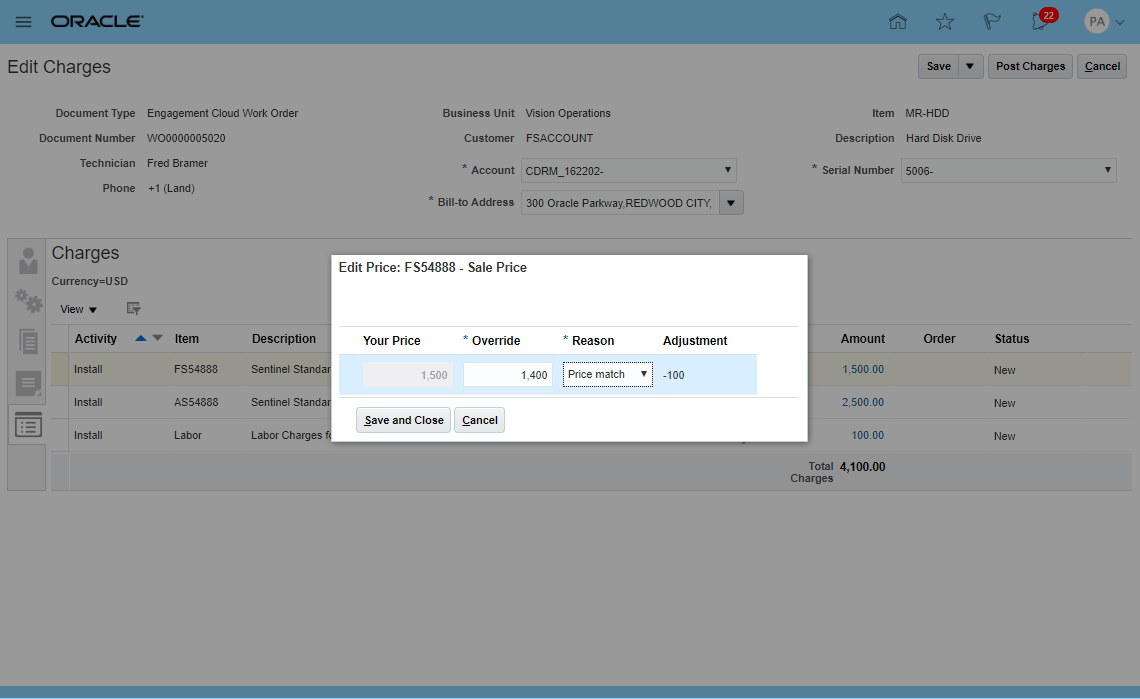
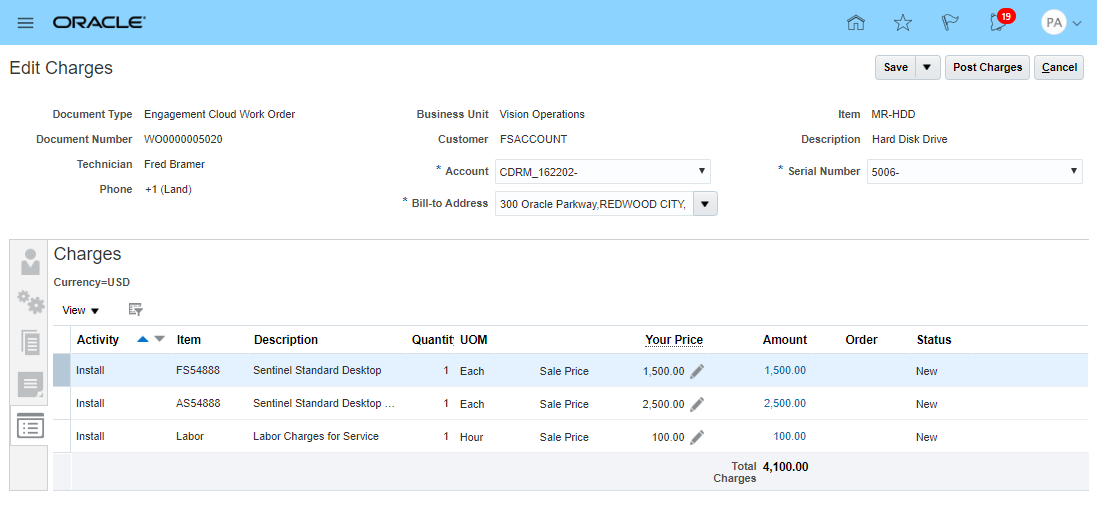
The Edit Charges UI allows Field Service Administrators (FS Admins) to review part, labor, and expense debrief transactions that are recorded by Field Service Technicians. The price of the parts used and labor hours spent are derived from a price list setup in Oracle Pricing Cloud. In case there is discrepancy between the price that the customer was promised and the price setup in Oracle Pricing Cloud, Field Service Administrators can adjust the price to match the promised price. This ensures that when these debrief transactions are posted, accurate amounts show up in the customer's invoice.
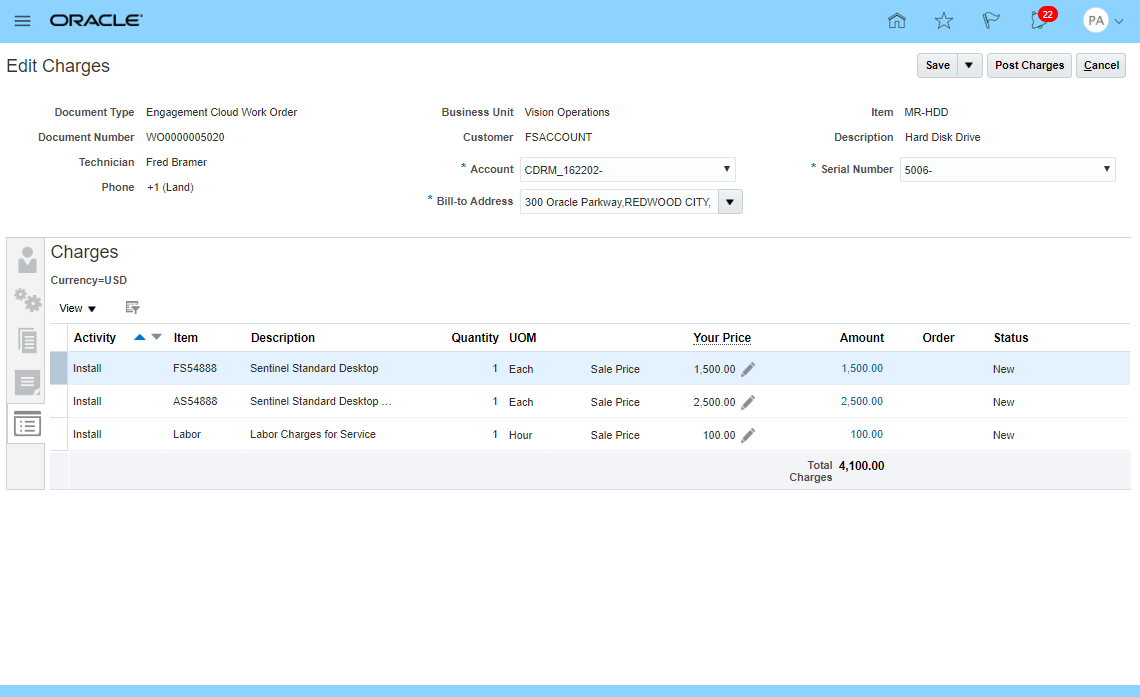
Clicking on the pencil icon next to the Your Price value displays a popup where the FS Admin can make any adjustments and also select a reason for the adjustment.
Steps to Enable
You don't need to do anything to enable this feature.
Tips And Considerations
No additional setups are required to make price adjustments in the Edit Charges page.
Role Information
- Job Role Name and Code
- Field Service Administrator (ORA_RCL_FIELD_SERVICE_ADMINISTRATOR)
- Privilege Names and Codes
- Access Service Logistics Landing Page (RCL_PORTAL_ACCESS_LANDING_PAGE_PRIV)
- Access Debrief Page (RCL_PORTAL_VIEW_DEBRIEF)
Field Service Cloud Parts and Debrief Integration
OVERVIEW
The Field Service Cloud Parts and Debrief Integration feature provides integration between Oracle Supply Chain Cloud and Oracle Field Service Cloud so that you can leverage Field Service Cloud’s scheduling and mobile field service to provide world-class field service. This integration enables field technicians to use Oracle Field Service Cloud to upload parts, labor, and expense debrief transactions to Supply Chain Cloud for billing costing, and updating inventory in the Installed Base asset configuration.
DOWNLOAD PARTS ITEM MASTER
Field technicians need parts information to determine the parts needed to fix the problem and order replacement parts. An Oracle Integration Cloud batch program has been creaed to download part Item Numbers from Oracle Product Information Cloud to Oracle Field Service Cloud.
DOWNLOAD TRUNK STOCK INVENTORY
Field technicians need their trunk stock inventory so they can debrief parts usage and recovery. An Oracle Integration Cloud batch program has been creaed to download technician trunk stock inventory balances and serial numbers from Oracle Product Information Cloud to Oracle Field Service Cloud.
CREATE DEBRIEF TRANSACTIONS
Field technicians need to upload their debrief transactions (parts, labor and expenses) from Oracle Field Service Cloud to Service Logistics Cloud to drive billing and costing as well as updating inventory and installed base. An Oracle Integration Cloud program has been created to upload debrief transactions when the Oracle Field Servcie Activity is closed. Field Service Administrators can review these debrief transactions, make adjustments and any corrections and post them in the Service Logistics Charges UI.
Steps to Enable
In Setup Manager, Service Logistics Cloud is an optional functional area under the Manufacturing and Supply Chain Offering. It can be enabled by navigating to the Change Feature Opt-In page. After it is enabled, the Service Logistics Functional Area will appear in the Offering's Task List . Users can then begin the setup process.
Oracle Field Service Cloud Integration is enabled in Oracle Integration Cloud.
Tips And Considerations
This integration requires a subscription to the Oracle Integration Cloud as well as Oracle Field Service Cloud. See My Oracle Support document 2247612.1 for instruction on how to download this integration code.
Role Information
- Job Role Name and Code:
- Role will be created by team setting up Oracle Integration Cloud
- Privilege Name and Code:
- Manage Part Requirements using Web Service (RCL_MANAGE_PART_REQUIREMENTS_BY_SERVICE_PRIV)
- Create Debrief Transactions using Web Service (RCL_PORTAL_CREATE_DEBRIEF_TRANSACTIONS_BY_SERVICE_PRIV)
Part Requirements and Ordering UI
The Manage Parts Requirements UI enables you to create part requirements and then source and order them for Engagement Cloud service requests and work orders in the same way that you can directly perform these actions in the Engagement Cloud. The Manage Parts Requirements page also enables you to create part requirements and orders for non-Engagement Cloud objects, such as a service request from a legacy customer service application.
FEATURES
- Order and Return Customer Replaceable Parts
- Order Technician Replaceable Parts
- Create Backorders
- Order Parts for Engagement Cloud and Third Party Objects
SEARCH AND MANAGE PART REQUIREMENTS
This UI allow you to search and view part requirements for the following:
- Engagement Cloud Service Requests
- Engagement Cloud Work Orders
- Third Party Service Requests and Work Orders
- Field Stock Replenishment
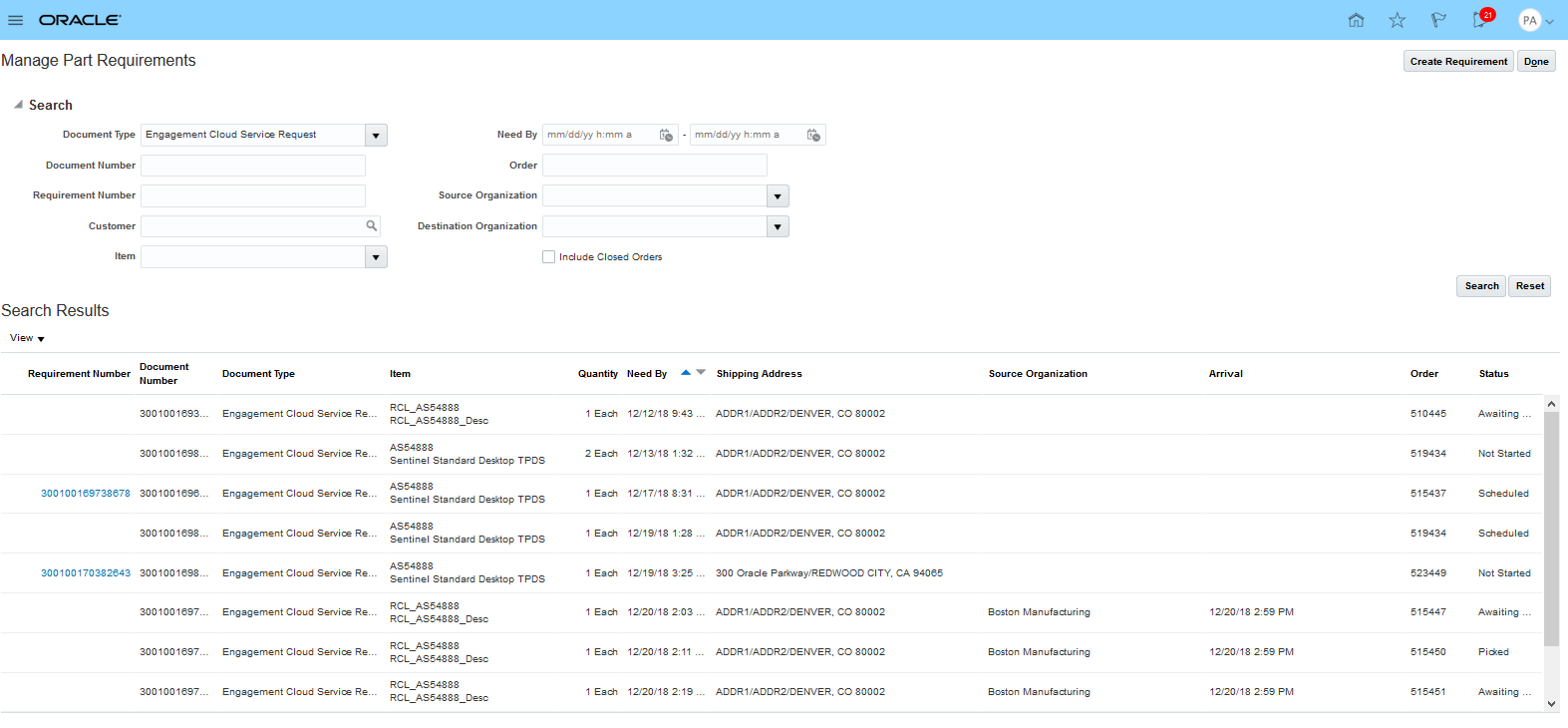
Manage Part Requirements UI
ORDER TECHNICIAN REQUIRED PARTS
Service agents can add the parts required to perform field service against an Engagement Cloud field service work order or a work orders from a third party application.
- A transfer order is created to fulfill the part requirements. Parts and can be shipped to a technician or customer address.
- Parts are received into the technician's trunk stock subinventory and then later reported using debrief process.
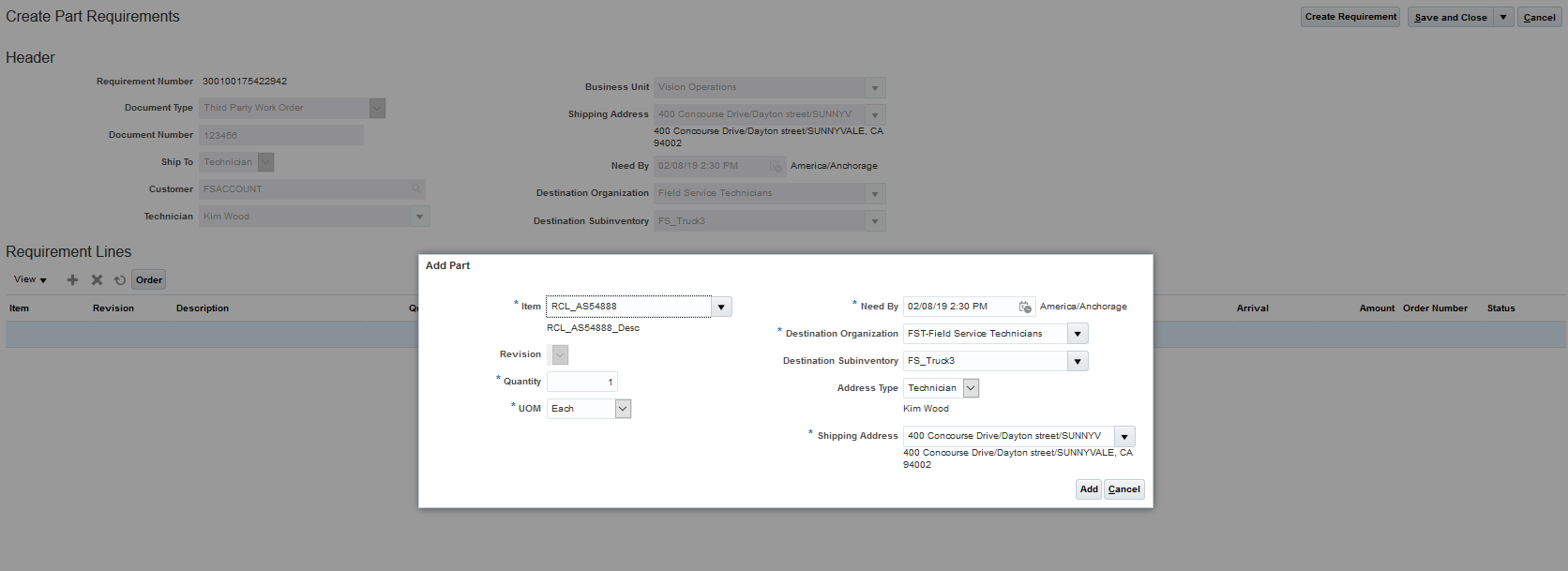
Create Part Requirements UI
When a part requirement is created, it is automatically sourced from the Global Order Processing Cloud. In addition, the estimated arrival date and price of the part are calculated.
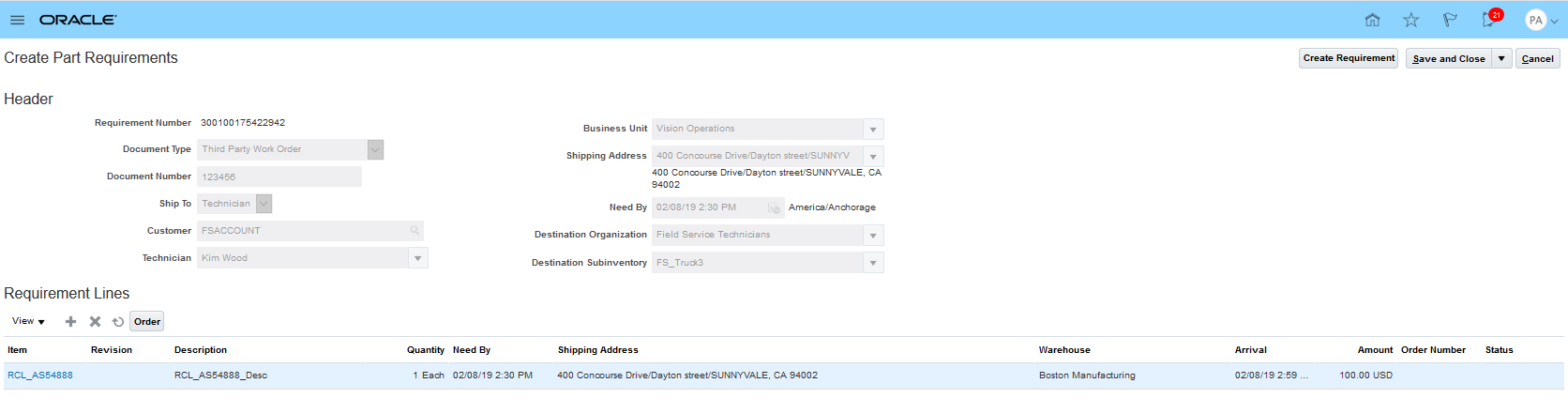
Source and Price Required Parts
After all of the required parts are entered, sourced, and priced, you choose the Order button to create the parts transfer order.
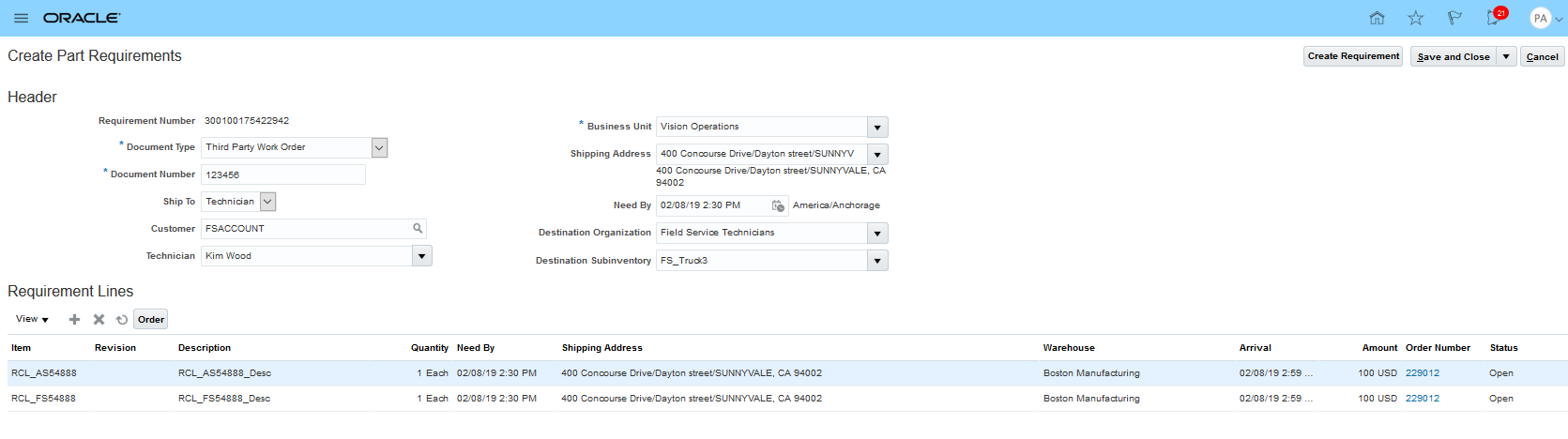
Order Required Parts
ORDER AND RETURN CUSTOMER REPLACEABLE PARTS
Sales orders can be created when damaged parts can be replaced by the customer without the help of a field technician.
Service agents can add the new parts to be shipped and the damaged parts to be returned as part requirements against an Engagement Cloud or third party service request. In this case, use the same process as described above to order field service parts with the exception that you will not enter a technician or destination inventory location.
Watch a Demo
Steps to Enable
You don't need to do anything to enable this feature.
Tips And Considerations
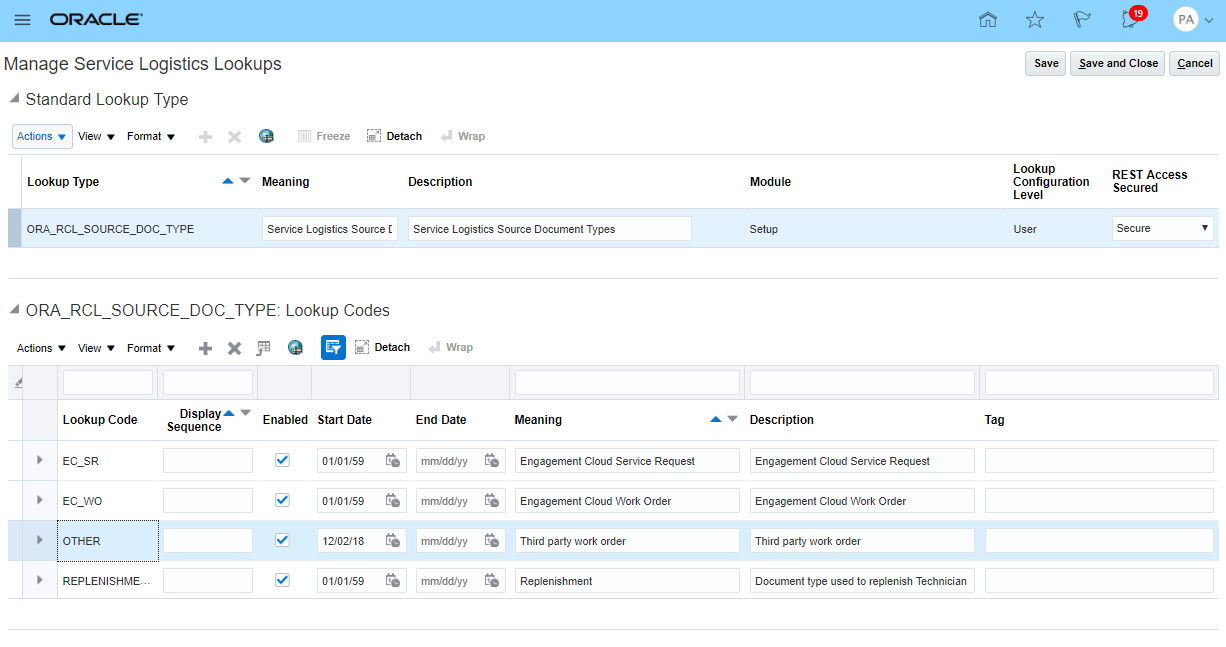
No additional setups are required to use the Manage Parts UI unless you are going to use it order parts for non-Engagement Cloud objects, such as a work order from a legacy service application. To order parts for third party objects, you must define their document type in a Service Logistics lookup.

Source Document Type Lookup
Key Resources
Role Information
- Job Role Name and Code:
- Field Service Administrator (ORA_RCL_FIELD_SERVICE_ADMINISTRATOR)
- Privilege Name and Code:
- View Requirement Lines (RCL_PARTS_REQ_VIEW)
Review Service Charges and Initiate Billing
The Review Service Charges and Initiate Billing feature enables Field Service Administrators (FS Admins) to review and post part, labor, and expense debrief transactions. Debrief transactions are recorded by Field Service Technicians (FS Techs) against Engagement Cloud work orders or third party work orders.
- For Engagement Cloud work orders, FS Techs use Oracle Field Service Cloud to schedule their visit, execute the repair work, and create debrief transactions. In this case debrief transactions are automatically transferred to Oracle Service Logistics through REST APIs and are visible in the Edit Charges page.
- For third party work orders using third party Field Service solutions, FS Admins can manually create and edit debrief transactions in the Create/Edit Charges pages.
FS Admins can review these debrief transactions, make any adjustments or corrections and post these transactions. Posting debrief transactions generates a customer invoice for billing, adjusts inventory balances, updates customer's asset configuration, and captures the cost of service.
The Review Service Charges and Initiate Billing feature consists of the following pages:
- Service Logistics landing page: Displays key metrics that guide FS Admins to urgent work
- Manage Work Orders and Charges page: Displays a list of Engagement Cloud work orders and charges for third party work orders
- Create Charges page
- Edit Charges page
SERVICE LOGISTICS LANDING PAGE
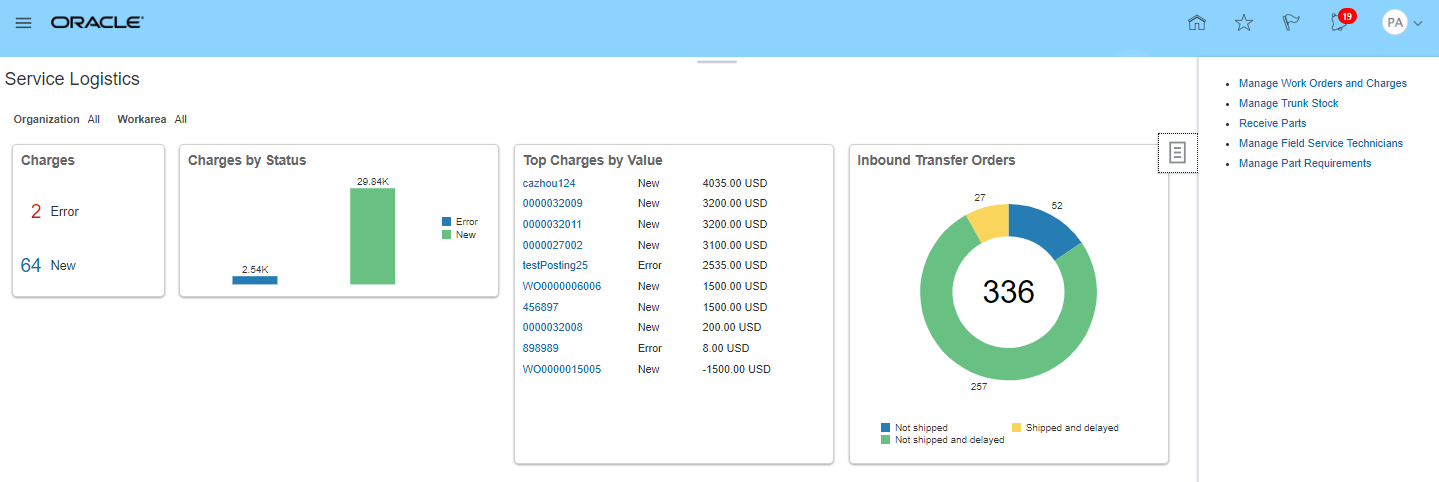
The landing page is structured into two main regions.
- The main region of the page displays actionable insights about charges and parts logistics, such as the number of new charges, the number of charges with errors, charges by top value, and the breakdown of transfer orders by different statuses. This information highlights to FS Admins the areas to focus on to ensure on-time delivery of parts to FS technicians and on-time accurate billing to customers.
- A slide out panel allows easy access to frequently performed activities.
MANAGE WORK ORDERS AND CHARGES PAGE
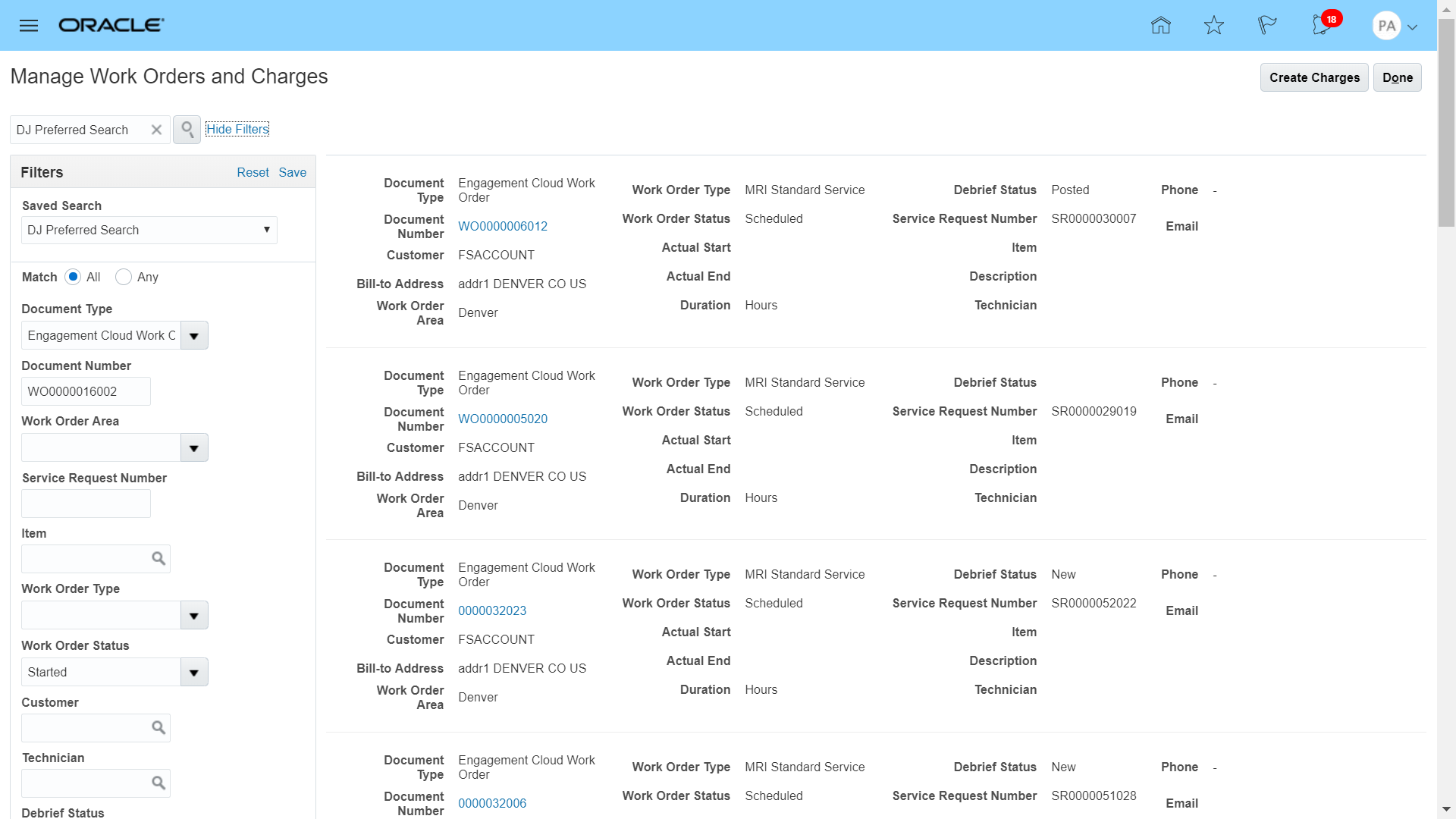
The Manage Work Orders and Charges page provides FS Admins an overview of the work orders that have or will be debriefed. FS Admins can access this page from the Service Logistics landing page from the Manage Work Orders and Charges option in the slide out panel or by clicking one of the values in the Charges metric box from the Service Logistics landing page. The following information is displayed on this page:
- All work orders created from Oracle Engagement Cloud.
- All debrief transactions created for third party work orders.
- Filter region to narrow the list of work orders and debrief transactions. FS Admins can hide or show this region on demand.
- Create Charges button to access the page to create debrief transactions for third party work orders.
CREATE CHARGES PAGE
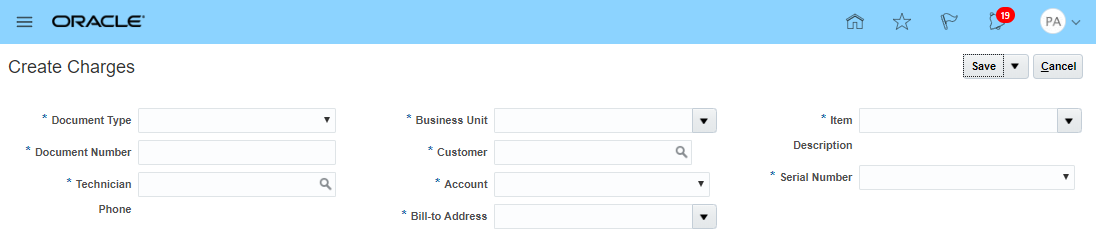
The Create Charges page supports creating debrief transactions for third party work orders or for Engagement Cloud work orders that have been debriefed using third party field service solutions. FS Admins can access the Create Charges page in two ways:
- The Create Charges button on the Manage Work Orders and Charges page
- The Document Number hyperlink on the Manage Work Orders and Charges page. In cases where debrief transactions are not yet created for an Engagement Cloud Work Order, clicking on the Document Number displays the Create Charges page.
EDIT CHARGES PAGE
The Edit Charges page enables FS Admins make adjustments, corrections, add or remove debrief transactions, and post them. Posting debrief transactions does the following:
- Adjusts inventory balances
- Updates customer's asset configuration
- Captures the cost of service
- Generates the customer invoice
Debrief transactions created in Oracle Field Service Cloud for Engagement Cloud work orders are automatically visible in the Edit Charges page. The Edit Charges page can be accessed by clicking the Document Number hyperlink on the Manage Work Orders and Charges page.
Watch a Demo
Steps to Enable
The following setups are recommended:
MANAGE BILLING TYPES
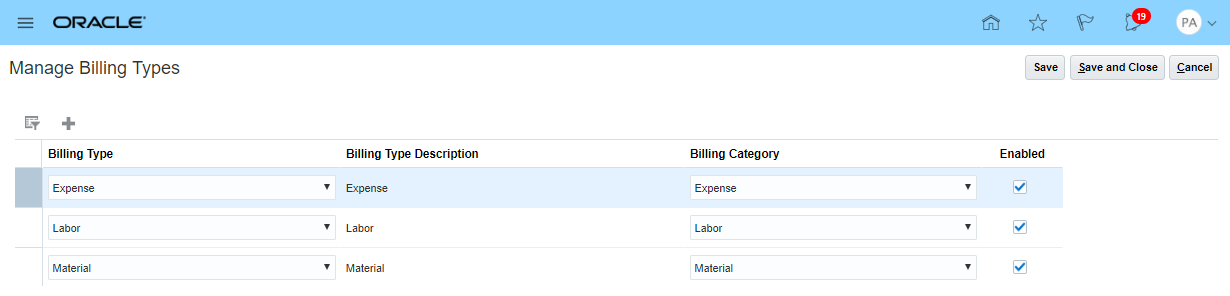
Billing Types determine the list of service activities that are displayed when creating part, labor, and expense debrief transactions. Billing Types also filter the list of items that are displayed when creating debrief transactions. Billing Types must be assigned in the Item Master to all service parts and consumables, labor, and expense items that are used when creating debrief transactions.
MANAGE SERVICE ACTIVITIES
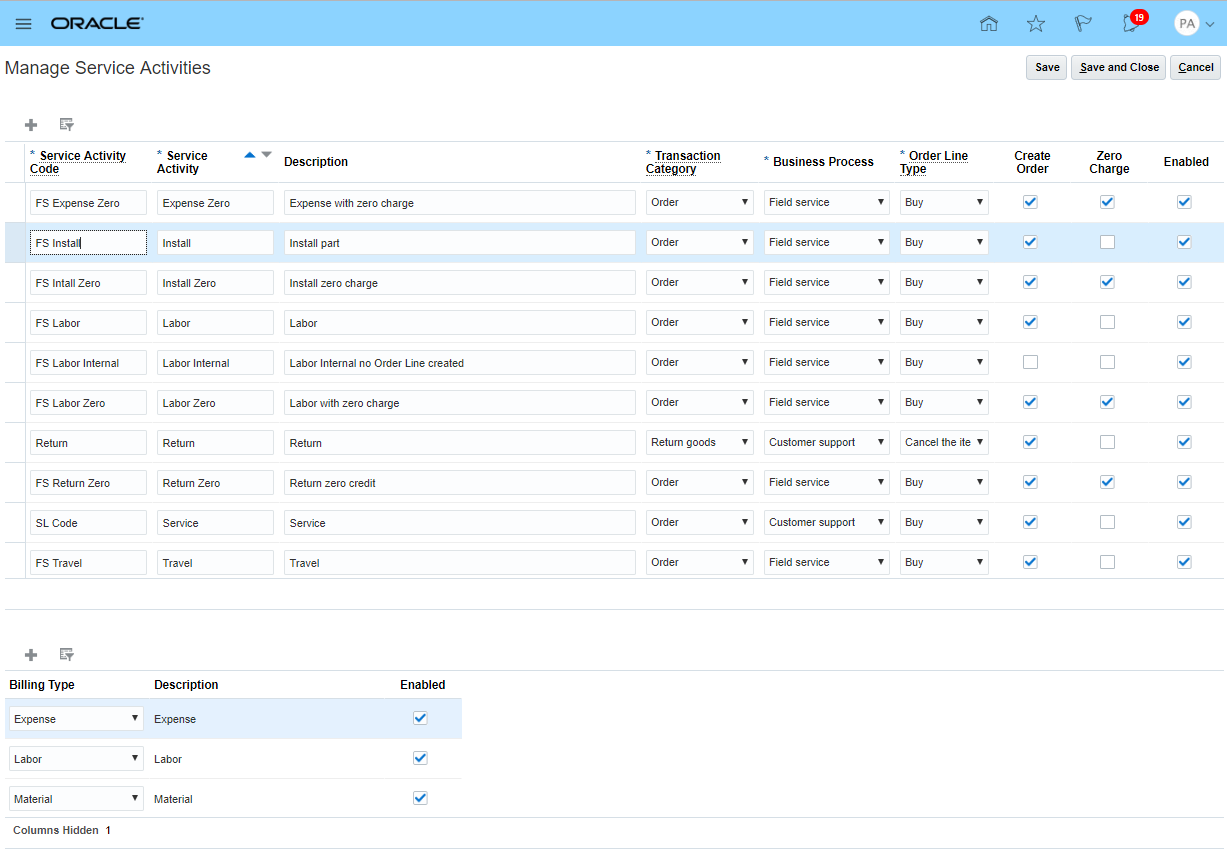
Service Activity Codes define the action performed or to be executed. For field service, service providers will set up codes like Installation, Calibration, Cleaning, Install Part, Remove Part, Travel Expenses, etc.
- Service activities defined in the Manage Service Activities UI are displayed when adding part, labor, and expense debrief transactions
- It is mandatory to associate a billing type with the service activity
NOTE: Service activities filter the list of items when creating part, labor, and expense debrief transactions via the Billing Types associated to the Service Activity
SET UP INVENTORY
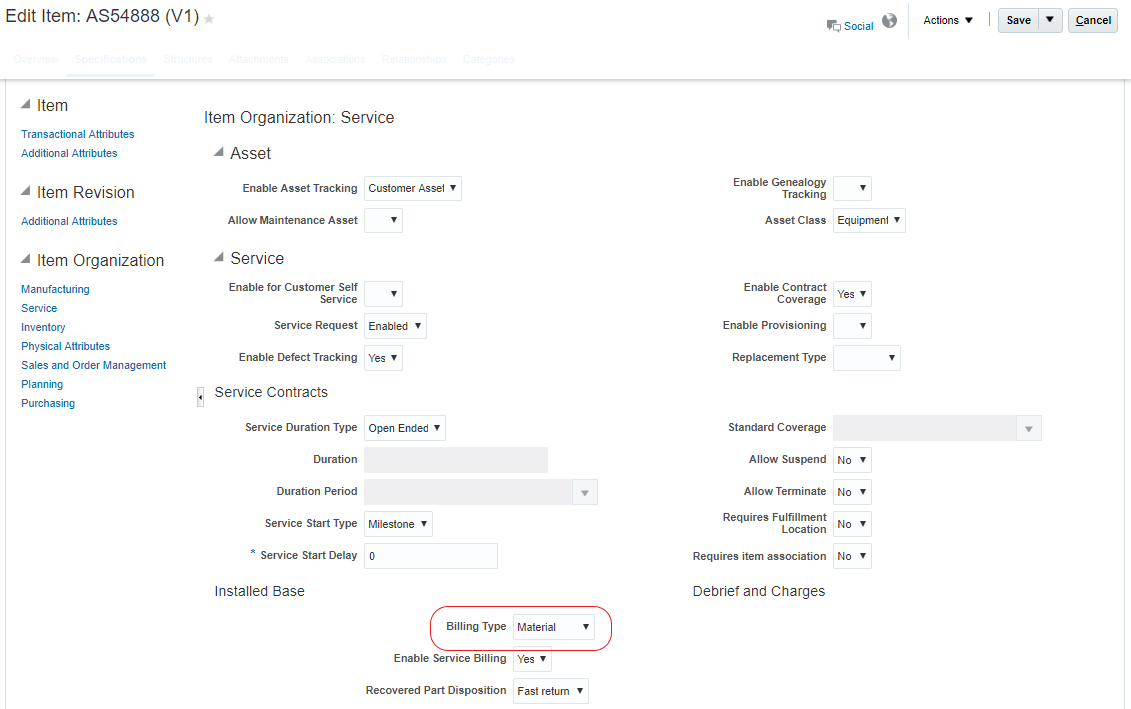
Serviceable parts, expense, and labor are set up as items in the Item Master. All serviceable parts and consumables that technicians use to fix defective asset must be set up in the Item Master and associated with a Material Billing Type. Labor and expense items must also be set up in the Item Mater and associated with Labor and Expense Billing Types, respectively.
SET UP PRICING
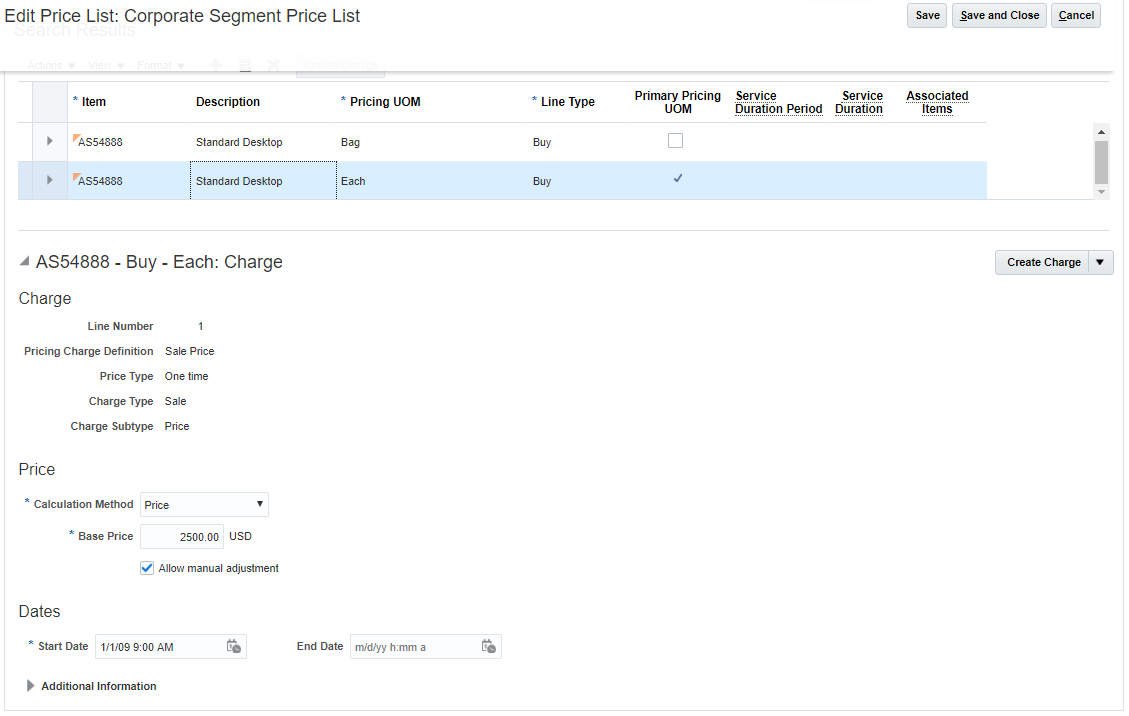
Set up price lists, pricing strategies, pricing segments, etc. so that part, labor, and expense prices can be derived when creating and updating debrief transactions.
SET UP A SOURCE DOCUMENT TYPE FOR THIRD PARTY WORK ORDER SUPPORT
To support debrief transactions for third party work orders, set up a Document Type to correctly identify the type of work order that appears in debrief pages.
Tips And Considerations
When using the Review Service and Initiate Billing feature to support third party work orders, ensure the following master data is available in Fusion:
- Business Units
- Customers set up in Oracle Trading Community Architecture Cloud
- Customers
- Bill-to Accounts
- Bill-to Addresses
- Person parties with Field Service Technician usage
- Asset configuration set up in Installed Base Cloud
- Items set up in Inventory Cloud
- Items with correct Billing Types for parts, labor, and expenses
- Pricing set up in Pricing Cloud
- Pricing for parts, labor, and expense items
Key Resources
- Watch Review Service Charges and Initiate Billing Readiness Training
- Service Logistics User Guide: https://docs.oracle.com/en/cloud/saas/service-logistics/19a/index.html
Role Information
- Job Role Name and Code
- Field Service Administrator (ORA_RCL_FIELD_SERVICE_ADMINISTRATOR)
- Privilege Names and Codes
- Access Service Logistics Landing Page (RCL_PORTAL_ACCESS_LANDING_PAGE_PRIV)
- Access Debrief Page (RCL_PORTAL_VIEW_DEBRIEF)