
This document will continue to evolve as existing sections change and new information is added. All updates appear in the following table:
| Date | Feature | Notes |
|---|---|---|
| 21 JUN 2019 | Created initial document. |
This guide outlines the information you need to know about new or improved functionality in this update, and describes any tasks you might need to perform for the update. Each section includes a brief description of the feature, the steps you need to take to enable or begin using the feature, any tips or considerations that you should keep in mind, and the resources available to help you.
Security and New Features
The Role section of each feature identifies the security privilege and job role required to use the feature. If feature setup is required, then the Application Implementation Consultant job role is required to perform the setup, unless otherwise indicated. (If a feature doesn't include a Role section, then no security changes are required to use the feature.)
If you have created job roles, then you can use this information to add new privileges to those roles as needed.
Give Us Feedback
We welcome your comments and suggestions to improve the content. Please send us your feedback at oracle_fusion_applications_help_ww_grp@oracle.com.
Column Definitions:
Report = New or modified, Oracle-delivered, ready to run reports.
UI or Process-Based: Small Scale = These UI or process-based features are typically comprised of minor field, validation, or program changes. Therefore, the potential impact to users is minimal.
UI or Process-Based: Larger Scale* = These UI or process-based features have more complex designs. Therefore, the potential impact to users is higher.
Customer Action Required = You MUST take action before these features can be used by END USERS. These features are delivered disabled and you choose if and when to enable them. For example, a) new or expanded BI subject areas need to first be incorporated into reports, b) Integration is required to utilize new web services, or c) features must be assigned to user roles before they can be accessed.
| Ready for Use by End Users Reports plus Small Scale UI or Process-Based new features will have minimal user impact after an update. Therefore, customer acceptance testing should focus on the Larger Scale UI or Process-Based* new features. |
Customer Must Take Action before Use by End Users Not disruptive as action is required to make these features ready to use. As you selectively choose to leverage, you set your test and roll out timing. |
|||||
|---|---|---|---|---|---|---|
| Feature |
Report |
UI or |
UI or |
Customer Action Required |
||
Create Parts Analyses and Reports Using OTBI
This first release of Service Logistics business intelligence solution provides you the ability to analyze and report on your service parts business. The solution delivers an Oracle Transactional Business Intelligence layer over Service Logistics, Inventory and Order Management data to enable operational reporting on an easy to use platform.
This release includes two subject areas:
- Service Parts Profitability: Provides profitability reporting and analysis for parts sales, returns, exchanges, and replacements created in the Engagement Cloud Service Request UI or in the Service Logistics Manage Parts Requirements UI
-
Parts Delivery Performance: Provides parts delivery performance or both customer service sales orders (part sales, exchanges, returns, and so on) and field service part transfer orders.
You can create analyses and reports with data from the subject areas to answer the following key business questions:
- How profitable is the parts business?
- How profitable were parts sales?
- Did we make or lose money on part exchanges?
- How profitable is each part category?
- How much core credit was issued?
- How often did customer ordered parts arrive on-time?
- How often did field service ordered parts arrive on-time?
Steps to Enable
Leverage new subject area(s) by adding to existing reports or using in new reports. For details about creating and editing reports, see the Creating and Administering Analytics and Reports book (available from the Oracle Help Center > your apps service area of interest > Books > Administration).
You can add the new Parts Delivery Performance and Parts Profitability subject areas to your existing reports, or create new reports that use the new subject area.
Role Information
- Job Role Name and Code:
- Field Service Administrator (ORA_RCL_FIELD_SERVICE_ADMINISTRATOR) - Job Role to access all Service Logistics functionality
- Duty Role Name and Code:
- Field Service Administrator (FBI_SERVICE_LOGISTICS_TRANSACTION_ANALYSIS_DUTY) - BI duty role to administer analysis of all key areas in Service logistics.
- Associated to Field Service Administrator Job Role
Return Routing automates the routing of parts and products being returned from customers, field service technicians, and field parts stockrooms. Service Logistics implementers can set up Return Routing Rules to define the warehouse to which the parts and products should be shipped. These rules can be defined by zone, stocking location (inventory organization and subinventory), item category, and item number. Automated return routing has been added to the Add Part UI in the Engagement Cloud Service Request Parts tab and to the Service Logistics Trunk Stock Management UI.
FEATURES
- Define return routing rules for parts and products
- Automatically determine the destination warehouse for customer returns
- Automatically determine the destination warehouse for parts recovered by field service technicians
- Automatically determine the destination warehouse for excess parts in field stocking locations and technician trunk stock
AUTOMATICALLY ROUTE CUSTOMER RETURNS
The destination warehouse (inventory organization and subinventory) for the item being returned is automatically determined and displayed in the Engagement Cloud Service Request Add Part UI when the user selects a Service Activity of type 'Return' and the item. You can override the detsination warehouse if needed. Here's an example of the return routing process:
- In the Service Request Add Part UI, agent enters the part or product the customer is returning
- The Return Routing process determines the destination warehouse and defaults the warehouse name into the Add Part UI
- The agent creates a sales order that includes a return line
- The agent then provides the customer with the return-to address and the Return Material Authorization (RMA) number
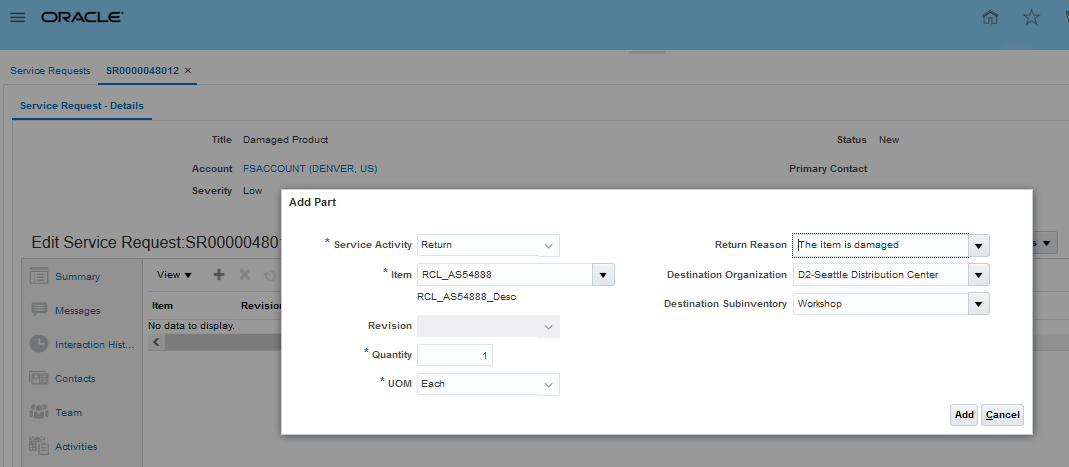
Service Request Return Parts UI
AUTOMATICALLY ROUTE FIELD SERVICE RETURNS
A new Return Part UI has been added to the Manage Trunk Stock UI so you can transfer excess and defective parts to the appropriate returns warehouse. This UI is accessed from the Actions drop down. In addition, the Transfer button has been removed and the menu option 'Transfer' has been added to the Actions drop-down menu to allow the user to go to the Transfer Part UI. Here’s how field service returns are automatically routed:
- The field technician or administrator queries field stockroom or technician trunk stock inventory balances
- The field technician or administrator then selects the part or product to be returned and selects Return from the Actions drop down
- The Return Routing program determines the return destination warehouse and defaults the warehouse name into the Return Part UI. For defective parts inventory locations, the quantity defaults to the quantity on-hand. For usable inventory locations, the quantity defaults to the excess amount (current on-hand less maximum).
- When you click the Return button, a direct transfer transaction is created to move the parts from the field inventory location to the destination warehouse
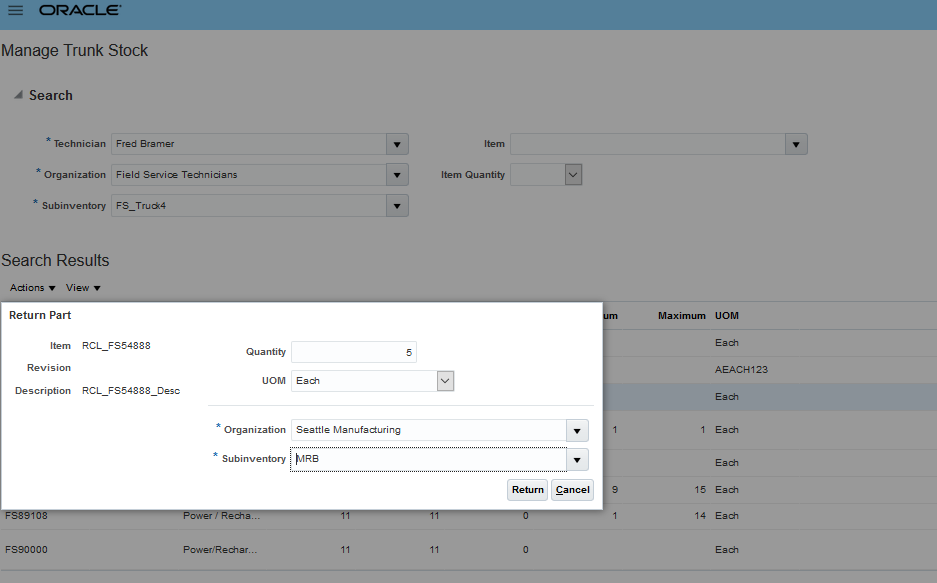
Return Transfers UI
Watch a Demo
Steps to Enable
In order to use this feature, you must set up Return Routing Rules in the new Manage Return Routing Rules setup UI. Rules can be setup for customer returns and returns from field warehouses.
Source Type 'Zone' is used to define customer return routing rules whereas Source Type 'Organization and Subinventory' is used to define return routing rules for field stocking locations.
Return Type defines whether the items being returned are defective or excess. For field stocking locations, the Stocking Location Type defines whether the parts are defective or excess. For customer returns, the Return Type will be captured when creating returns in the Add Part UI.
Item Category and Item Number can also be used to define more fine grain Return Routing Rules.
Zones are setup in TCA Geographies UI using a Zone Type defined in a Service Logistics Profile (Return Routing Zone Type). A TCA API is used to determine the applicable Return Routing Zone from the customer's address.
Please note that prior to this release, the profile option Default Return Organization was used to identify the destination warehouse for parts being returned in the Add Part UI. If Return Routing Rules are not set up or cannot be found, the default organization defined under this profile option will be displayed in the Add Part UI and in the new Return Parts UI.
Please note that prior to this release, the profile option Default Return Organization was used to default the Return to Warehouse in the Add Parts UI. This profile still works if Return Routing Rules are not setup or one cannot be found.
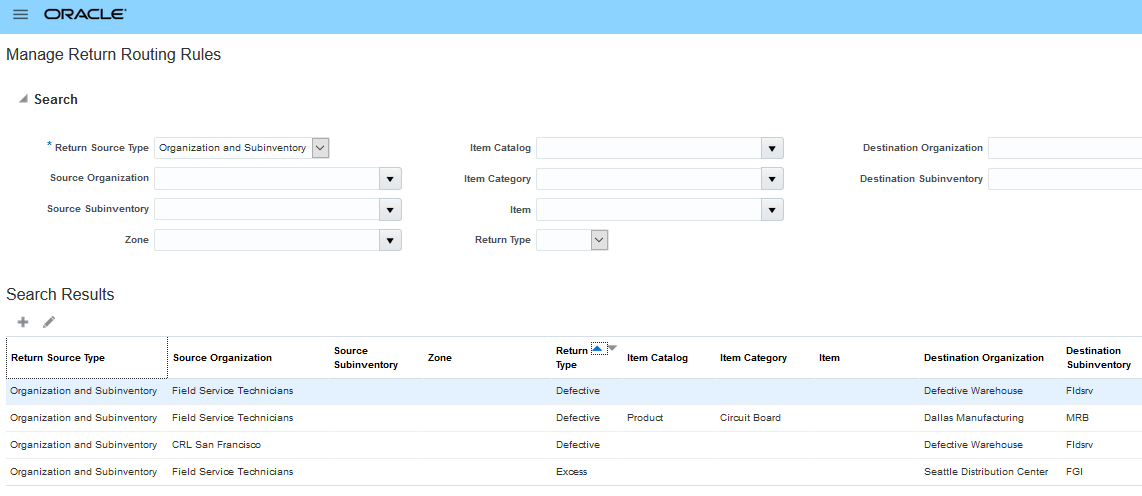
Inventory Location Return Routing Rules
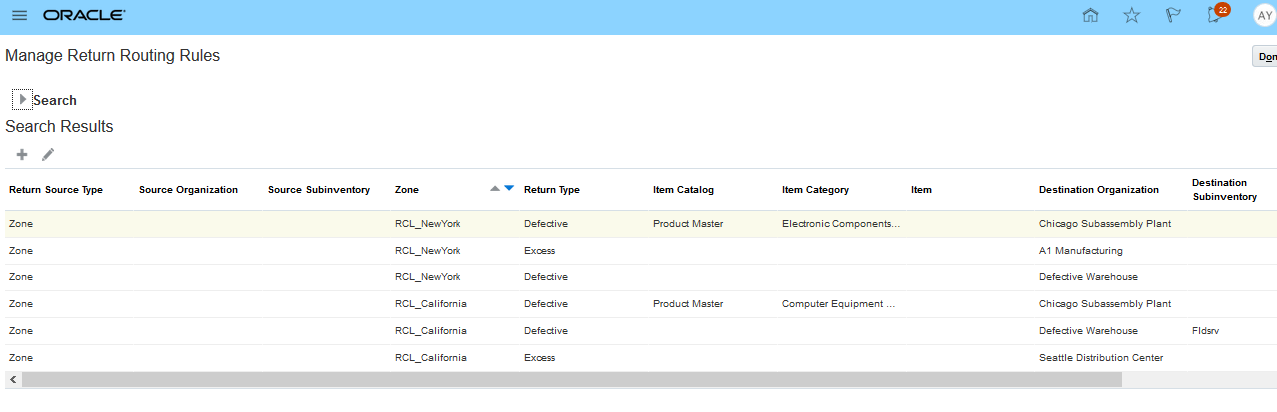
Zone Return Routing Rules
Watch a Setup Demo
Key Resources
Watch Return Routing Readiness Training
Role Information
- Job Role Name and Code:
- Field Service Administrator (ORA_RCL_FIELD_SERVICE_ADMINISTRATOR)
- Privilege Name and Code:
- Manage Return Routing Rules using Web Service (RCL_MANAGE_RETURN_RULES_BY_SERVICE_PRIV)
- Manage Return Routing Rules (RCL_MANAGE_RETURN_RULES_PRIV)
---