
This document will continue to evolve as existing sections change and new information is added. All updates appear in the following table:
| Date | Feature | Notes |
|---|---|---|
| 20 SEP 2019 | Created initial document. |
This guide outlines the information you need to know about new or improved functionality in this update, and describes any tasks you might need to perform for the update. Each section includes a brief description of the feature, the steps you need to take to enable or begin using the feature, any tips or considerations that you should keep in mind, and the resources available to help you.
Security and New Features
The Role section of each feature identifies the security privilege and job role required to use the feature. If feature setup is required, then the Application Implementation Consultant job role is required to perform the setup, unless otherwise indicated. (If a feature doesn't include a Role section, then no security changes are required to use the feature.)
If you have created job roles, then you can use this information to add new privileges to those roles as needed.
Give Us Feedback
We welcome your comments and suggestions to improve the content. Please send us your feedback at oracle_fusion_applications_help_ww_grp@oracle.com.
Column Definitions:
Report = New or modified, Oracle-delivered, ready to run reports.
UI or Process-Based: Small Scale = These UI or process-based features are typically comprised of minor field, validation, or program changes. Therefore, the potential impact to users is minimal.
UI or Process-Based: Larger Scale* = These UI or process-based features have more complex designs. Therefore, the potential impact to users is higher.
Features Delivered Disabled = Action is needed BEFORE these features can be used by END USERS. These features are delivered disabled and you choose if and when to enable them. For example, a) new or expanded BI subject areas need to first be incorporated into reports, b) Integration is required to utilize new web services, or c) features must be assigned to user roles before they can be accessed.
| Ready for Use by End Users Reports plus Small Scale UI or Process-Based new features will have minimal user impact after an update. Therefore, customer acceptance testing should focus on the Larger Scale UI or Process-Based* new features. |
Customer Must Take Action before Use by End Users Not disruptive as action is required to make these features ready to use. As you selectively choose to leverage, you set your test and roll out timing. |
|||||
|---|---|---|---|---|---|---|
| Feature |
Report |
UI or |
UI or |
|
||
Manage Debrief Transactions and Stocking Locations Using REST Services |
||||||
Manage Debrief Transactions and Stocking Locations Using REST Services
We are providing two public REST Services in 19D:
- Manage Service Logistics Stocking Locations (stockingLocations_RESTful_Service)
- Manage Service Logistics Debrief Transactions (debriefs_RESTful_Service)
SERVICE LOGISTICS STOCKING LOCATIONS
This REST Service provides the ability to query, create, and delete Service Logistics stocking locations by adding Service Logistics details to existing inventory organization subinventories. Details include Stocking Location Type (technician trunk stock, manned, unmanned and site dedicated) and Condition (usable, defective).
SERVICE LOGISTICS DEBRIEF TRANSACTIONS
This REST Service provides the ability to query, create, update and delete Service Logistics debrief transactions for parts, labor and expenses.
Steps to Enable
Review the REST service definition in the REST API guides, available from the Oracle Help Center > your apps service area of interest > REST API. If you're new to Oracle's REST services you may want to begin with the Quick Start section.
Here is the Oracle Help Center path to the REST API guide for Supply Chain Management: Oracle Help Center > Supply Chain Management (Cloud Applications Saas) > Left side of the page, select the Supply Chain Management option under the REST API heading
Role Information
To use this feature, the following privileges or roles are required:
- Job Role Name and Code:
- Field Service Administrator (ORA_RCL_FIELD_SERVICE_ADMINISTRATOR)
- Privilege Name and Code:
- Create Debrief Transactions using Web Service (RCL_PORTAL_CREATE_DEBRIEF_TRANSACTIONS_BY_SERVICE)
- Access Stocking Location Details Using Web Service (RCL_ACCESS_STOCK_LOC_DETAILS_BY_SERVICE_PRIV)
Complete Field Parts Stocking Location Management
OVERVIEW
In addition to field technician trunk stocking locations, we’ve added support for all types of field service parts stocking locations. This includes manned warehouses, unmanned parts lockers, and site dedicated stockrooms. We’ve also renamed the Manage Trunk Stock UI to Manage Field Parts Inventory. This new name reflects a broader scope that now supports all types of field service part stocking locations. We’ve also made similar enhancements to the Manage Parts Requirements, Receive Parts, and Manage Stocking Locations UIs.
FEATURES
- Assign new stocking location types to inventory organizations and subinventories
- Receive transfer orders into all types of field service parts stocking locations
- Transfer parts into and out of all types of field service parts stocking locations
- Return parts from all types of field service parts stocking locations
- Order Parts to replenish all types of field service parts stocking locations
ASSIGN NEW STOCKING LOCATION TYPES
You can now setup the following types of field service parts stocking locations:
- unmanned
- manned
- site dedicated
- technician (supported since 19A)
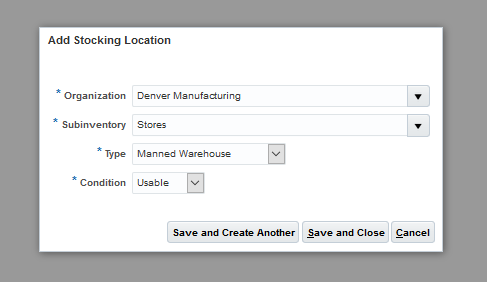
Manned Stocking Location
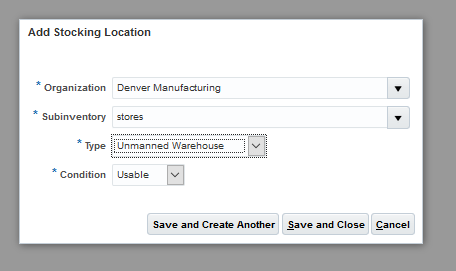
Unmanned Stocking Location
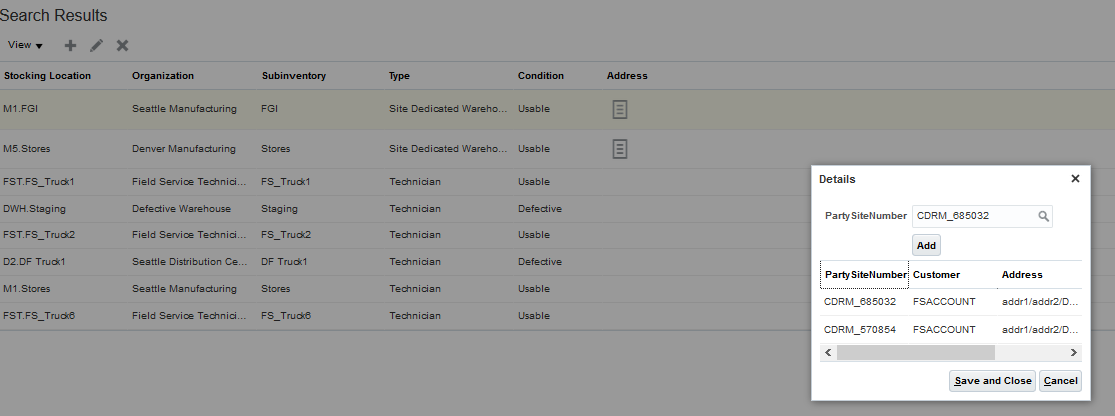
Site Dedicated Stocking Location
Watch a Demo
Steps to Enable
Field Parts Stocking Locations need to be setup in the Service Logistics Manage Stocking Locations UI where you must specify the locations condition (usable or defective) and type (technician, manned, unmanned and site dedicated). For site dedicated stocking locations, you must also assign its covered customer sites..
Key Resources
Role Information
To use this feature, the following privileges or roles are required:
- Job Role Name and Code
- Field Service Administrator (ORA_RCL_FIELD_SERVICE_ADMINISTRATOR)
- Privilege Names and Codes
- Access Service Logistics Landing Page (RCL_PORTAL_ACCESS_LANDING_PAGE_PRIV)
- Access Debrief Page (RCL_PORTAL_VIEW_DEBRIEF)
- Manage Estimates (RCL_MANAGE_ESTIMATES_PRIV)
Many customers want know how much service will cost before the actual work is performed. The new Estimate Charges feature enables service agents and administrators to estimate variable and fixed charges (material, labor, and expenses) for Engagement Cloud work orders, as well as for work orders from legacy applications.
FEATURES
- Create estimates for variable and fixed charges (labor, parts and expenses)
- Calculate prices for variable charges from estimated work (debrief transactions)
- Manage estimate process and approval
CREATE ESTIMATED CHARGES
To estimate variable charges, you need to create an estimate of the work to be done by creating estimated debrief transactions for parts, labor, and expenses. Estimates for fixed charges (for example, a $50 cleaning feed) can also be created. You can create estimates for Engagement Cloud work orders or for third party work orders. To create estimates for Engagement Cloud work orders, click the Manage Estimates icon next to the Estimate Status field in the Manage Work Orders and Charges page. To create estimates for third party work orders, click the Create Estimates button at the top of Manage Work Orders and Charges page.
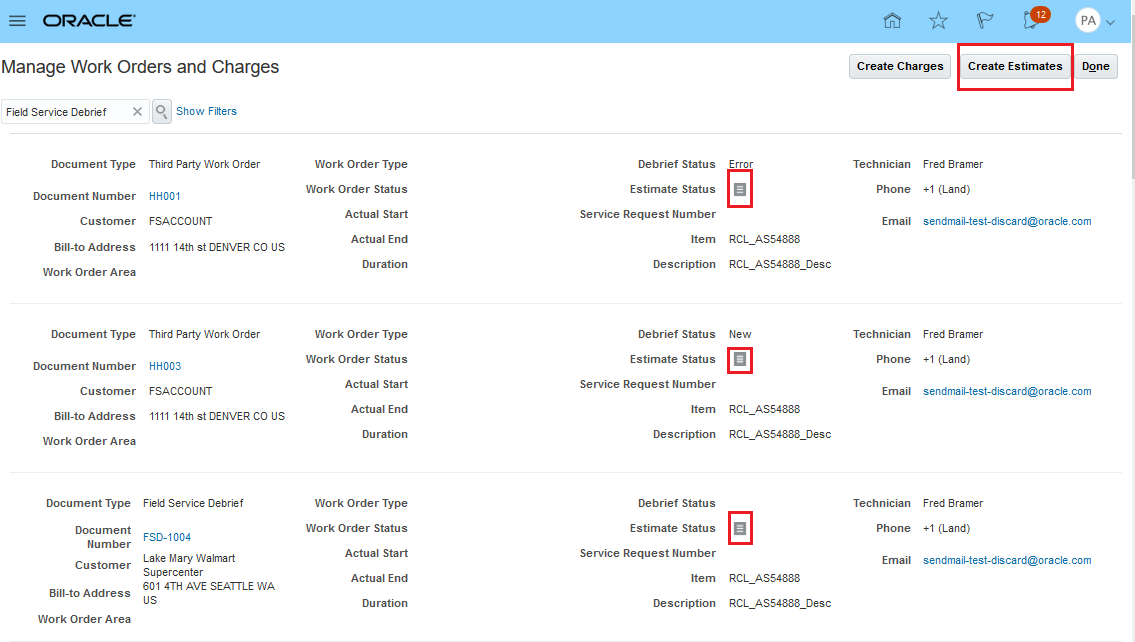
Manage Work Orders and Charges UI
A new tab has been added to the Debrief and Charges UI for creating estimated charges. When you click the Create Estimates button or icon, the Manage Estimates page appears with focus on the new Estimates tab. Oracle Pricing is used to price these estimate charges just like it is done for actual charges.
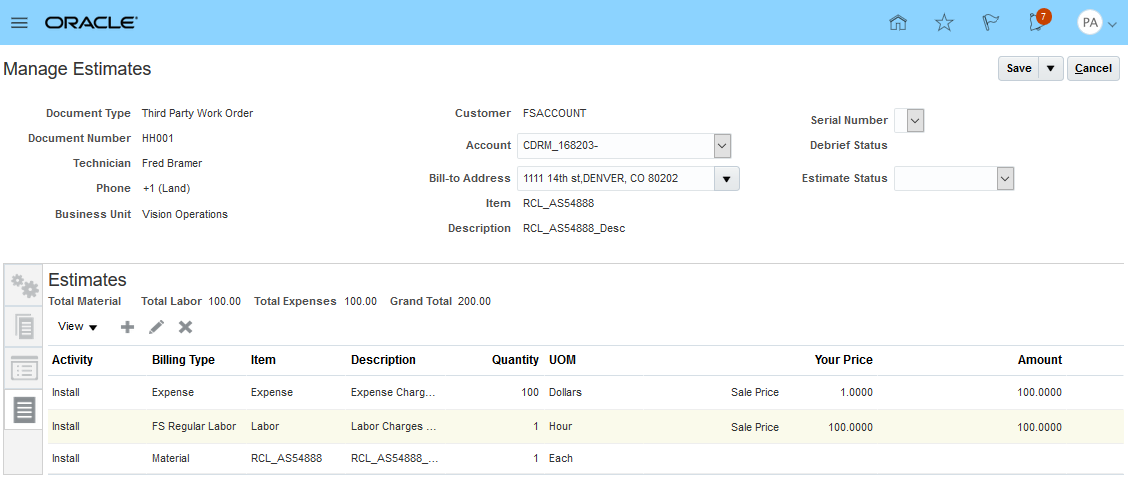
Manage Estimates
In order to create an estimate line, click the plus icon to displays a popup where an estimate line can be created.
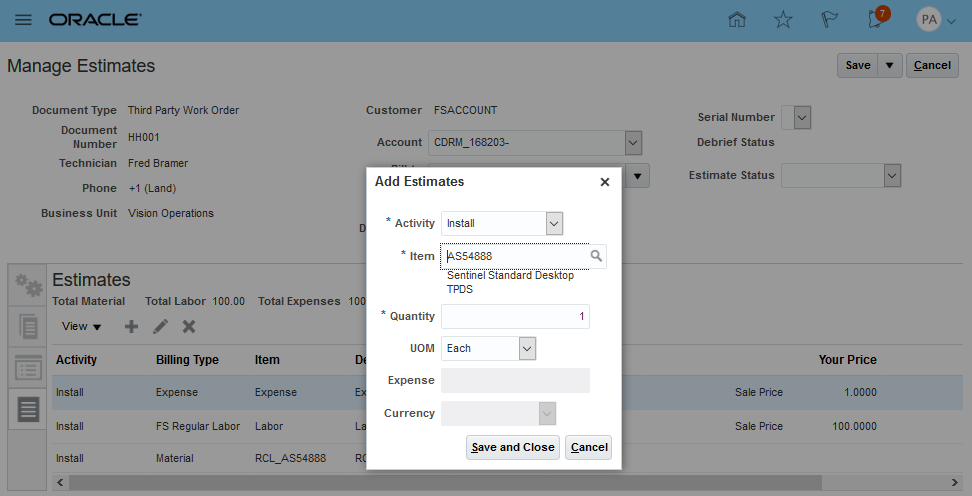
Add Estimate
In order to edit an estimate line, click the plus icon to displays a popup where an estimate line can be created.
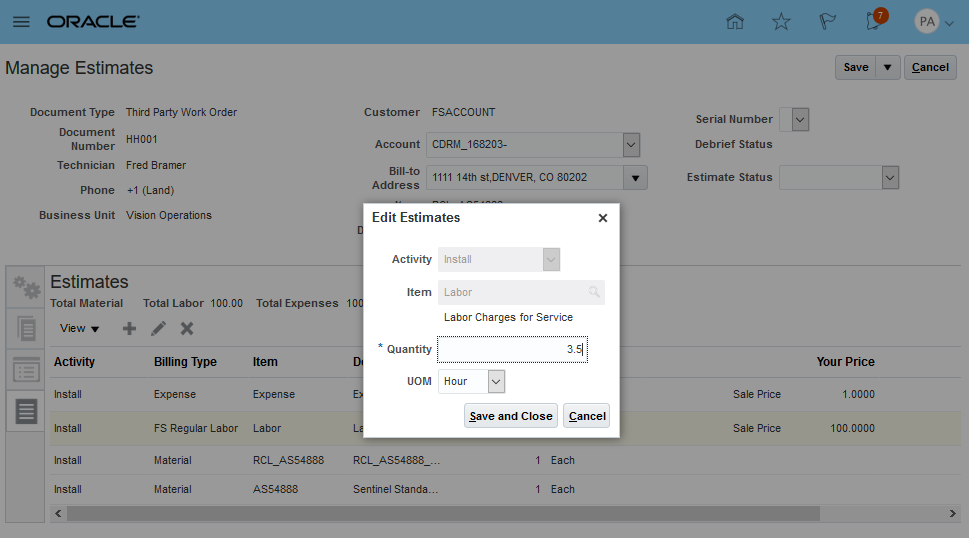
Edit Estimate
MANAGE ESTIMATE PROCESS AND APPROVAL
The estimate process can be manged through the Estimate Status which has values New, Rejected, Canceled, Awaiting Approval, and Approved.
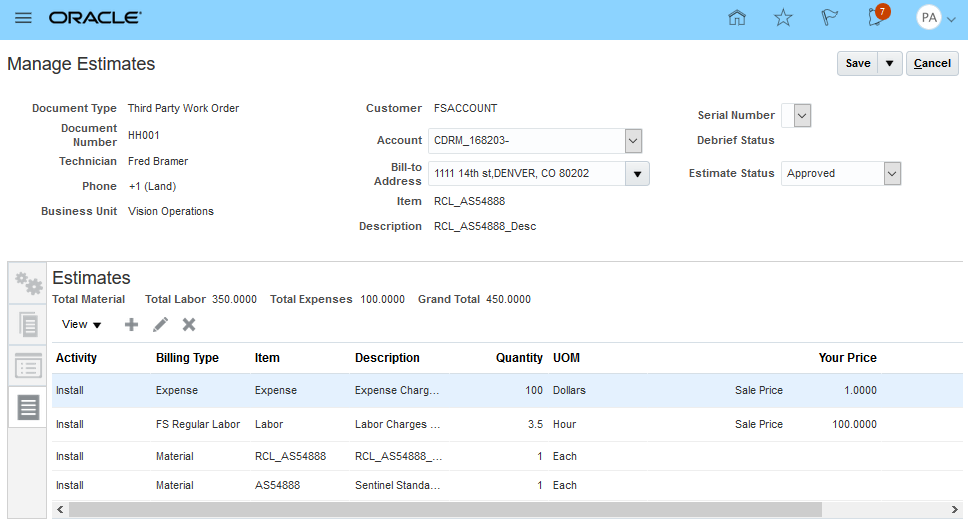
Approved Estimate
Watch a Demo
Steps to Enable
For users to access the create/edit estimates UI, grant the following privileges:
Manage Estimates:
- Access Service Logistics Landing Page (RCL_PORTAL_ACCESS_LANDING_PAGE_PRIV)
- Access Debrief Page (RCL_PORTAL_VIEW_DEBRIEF)
- Manage Estimates (RCL_MANAGE_ESTIMATES_PRIV)
Key Resources
Role Information
To use this feature, the following privileges or roles are required:
- Job Role Name and Code
- Field Service Administrator (ORA_RCL_FIELD_SERVICE_ADMINISTRATOR)
- Privilege Names and Codes
- Access Service Logistics Landing Page (RCL_PORTAL_ACCESS_LANDING_PAGE_PRIV)
- Access Debrief Page (RCL_PORTAL_VIEW_DEBRIEF)
- Manage Estimates (RCL_MANAGE_ESTIMATES_PRIV)