
This document will continue to evolve as existing sections change and new information is added. All updates appear in the following table:
| Date | Feature | Notes |
|---|---|---|
| 20 DEC 2019 | Created initial document. |
This guide outlines the information you need to know about new or improved functionality in this update, and describes any tasks you might need to perform for the update. Each section includes a brief description of the feature, the steps you need to take to enable or begin using the feature, any tips or considerations that you should keep in mind, and the resources available to help you.
Security and New Features
The Role section of each feature identifies the security privilege and job role required to use the feature. If feature setup is required, then the Application Implementation Consultant job role is required to perform the setup, unless otherwise indicated. (If a feature doesn't include a Role section, then no security changes are required to use the feature.)
If you have created job roles, then you can use this information to add new privileges to those roles as needed.
Give Us Feedback
We welcome your comments and suggestions to improve the content. Please send us your feedback at oracle_fusion_applications_help_ww_grp@oracle.com.
Column Definitions:
Features Delivered Enabled
Report = New or modified, Oracle-delivered, ready to run reports.
UI or Process-Based: Small Scale = These UI or process-based features are typically comprised of minor field, validation, or program changes. Therefore, the potential impact to users is minimal.
UI or Process-Based: Larger Scale* = These UI or process-based features have more complex designs. Therefore, the potential impact to users is higher.
Features Delivered Disabled = Action is needed BEFORE these features can be used by END USERS. These features are delivered disabled and you choose if and when to enable them. For example, a) new or expanded BI subject areas need to first be incorporated into reports, b) Integration is required to utilize new web services, or c) features must be assigned to user roles before they can be accessed.
| Ready for Use by End Users Reports plus Small Scale UI or Process-Based new features will have minimal user impact after an update. Therefore, customer acceptance testing should focus on the Larger Scale UI or Process-Based* new features. |
Action is Needed BEFORE Use by End Users Not disruptive as action is required to make these features ready to use. As you selectively choose to leverage, you set your test and roll out timing. |
|||||
|---|---|---|---|---|---|---|
| Feature |
Report |
UI or |
UI or |
|
||
Create Work Order Profitability Analyses and Reports Using OTBI |
||||||
Create Work Order Profitability Analyses and Reports Using OTBI
This release of Service Logistics Business Intelligence enables you to analyze and report on your organization’s field service profitability and billing backlog. This new OTBI Subject Area is built on Engagement Cloud field service work orders and Service Logistics debrief and dharges transactions.
This release includes one new subject area:
- Debrief and Charges Profitability: Provides profitability reporting and analysis for Engagement Cloud field service work orders. You can analyze profitabiltiy by work area, product line, product,, asset/serial number and individual field technician. You can also easily identify work orders that are completed and ready for invoicing, as well as work orders with billing errors that need attention.
You can create analyses and reports with data from the subject areas to answer the following key business questions:
- How profitable are field service work orders?
- How profitable is each type of field service work orders?
- Which work areas were most profitable?
- Find work orders completed but not Invoiced?
- How many work orders have Debrief Errors?
- How profitable is each product category?
- How many manual adjustments were made to field service charges?
Steps to Enable
Leverage new subject area(s) by adding to existing reports or using in new reports. For details about creating and editing reports, see the Creating and Administering Analytics and Reports book (available from the Oracle Help Center > your apps service area of interest > Books > Administration).
You can add the new Debrief and Charges Profitability Subject Area to your existing reports, or create new reports that use the new subject area.
Role Information
To use this feature, the following roles are required:
- Job Role Name and Code:
- Field Service Administrator (ORA_RCL_FIELD_SERVICE_ADMINISTRATOR) - Job Role to access all Service Logistics functionality
- Duty Role Name and Code:
- Field Service Administrator (FBI_SERVICE_LOGISTICS_TRANSACTION_ANALYSIS_DUTY) - BI duty role to administer analysis of all key areas in Service logistics.
- Associated to Field Service Administrator Job Role
Depot Repair and Return is a new process being delivered in this release. It enables you to manage the entire repair and return process from service request and RMA creation through repair execution to shipping and billing. The diagram below explains how the depot repair solution leverages existing Engagement Cloud, SCM Cloud and Service Logistics functionality to provide a complete solution. Two new UIs are provided. The Manage Depot Repair UI supports managing the complete end-to-end work flow of a repair depot. While the Depot Repair Workbench enables you to manage the repair and return of a single RMA or broken product. It includes service history, asset, repair order and service request information, as well as full debrief and billing functionality. These UI’s also provide the ability to create repair orders to initiate execution and to create charges for parts and labor used to make the repair.
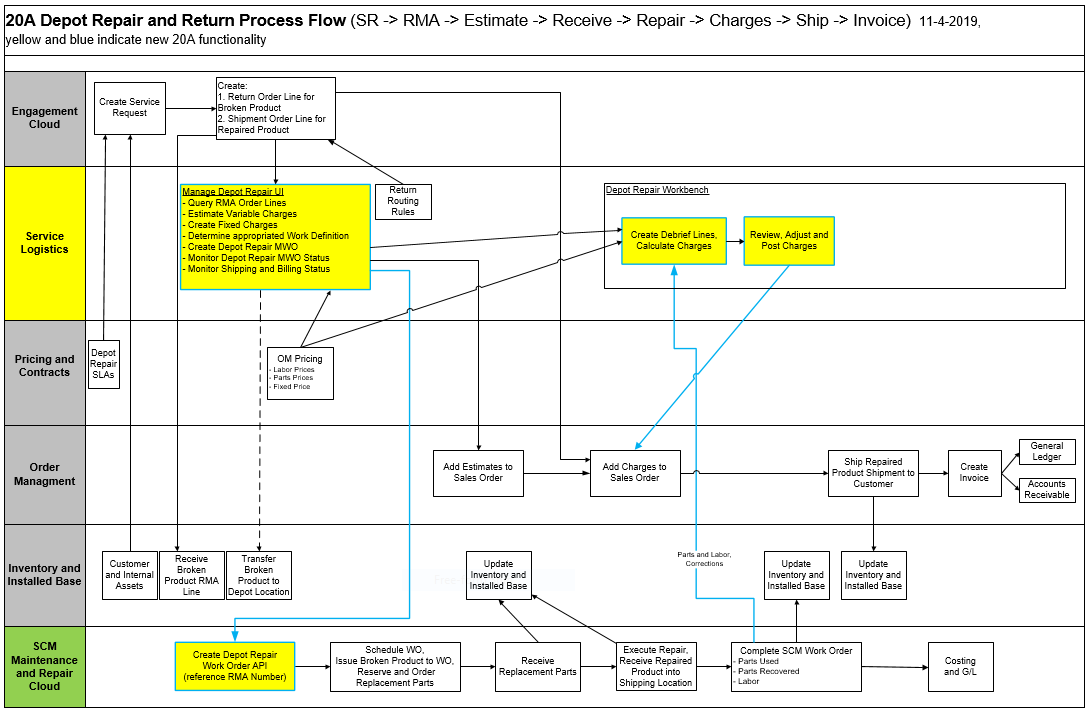
20A Depot Repair Flowchart
PROCESS OVERVIEW
- Engagement Cloud
- Create service request
- Create RMA/return sales order line for broken product (profile or automated return routing defaults destination)
- Create shipment sale order line for repaired product
- Inventory
- Receive broken product on RMA/return sales order line
- Manage Depot Repair
- Query RMA/return sales order lines
- Select RMA/return line and create repair order
- Maintenance Cloud
- Schedule repair order
- Execute repair
- Report parts used and recovered
- Report labor time
- Depot Repair Work Bench
- Create charges for parts and labor (use button to create charges from Repair Order parts and labor)
- Enter billable expenses
- Review and adjust charges
- Post charges to sales order
- Order Management and Shipping
- Ship repaired product back to customer
- Generate invoice and post to A/R
MANAGE DEPOT REPAIR
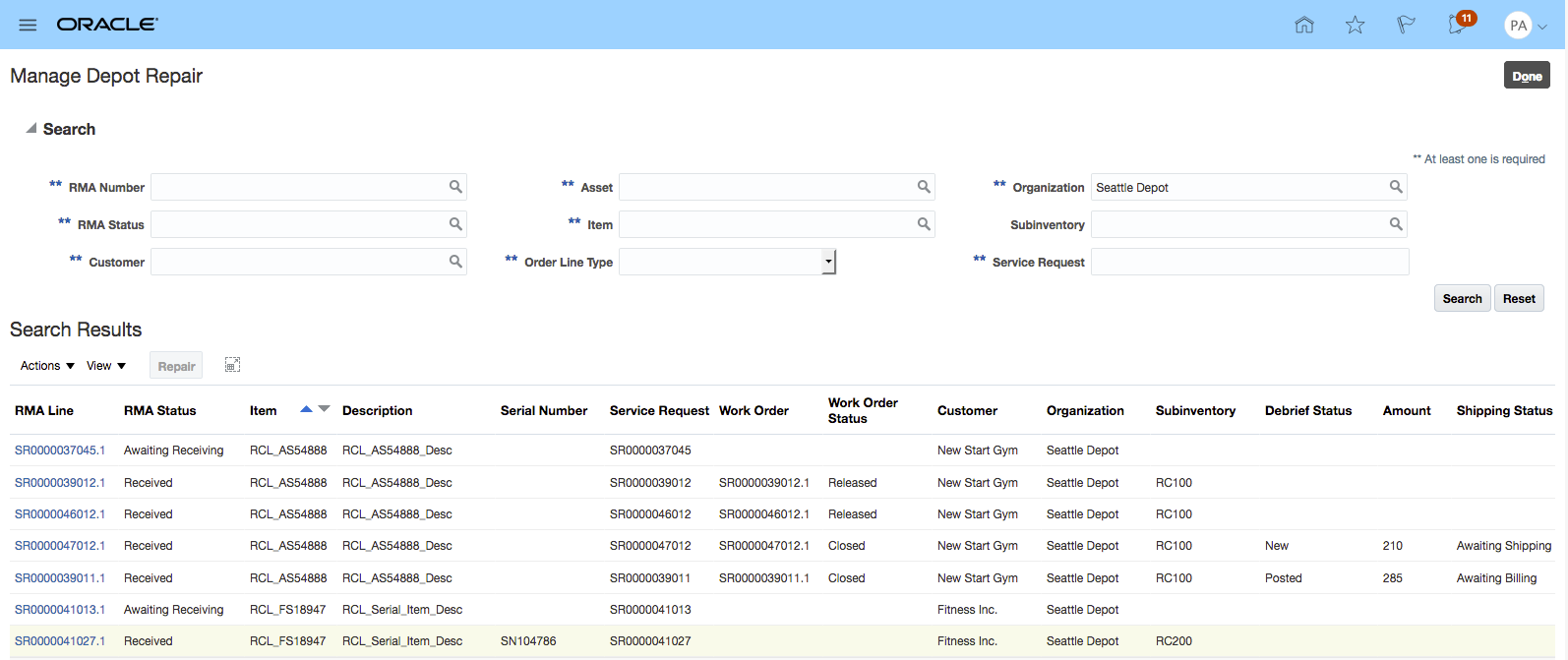
Manage Depot Repair UI
DEPOT REPAIR WORKBENCH
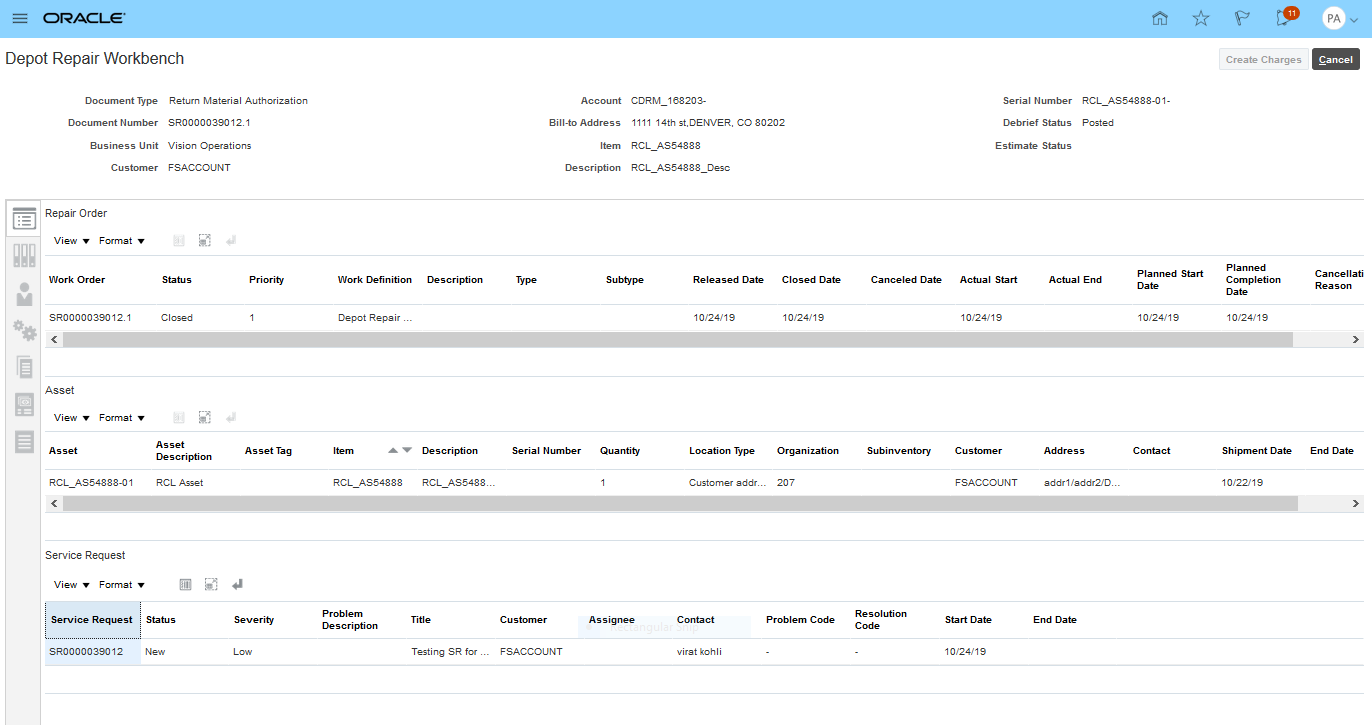
Depot Repair Workbench - Top Tab
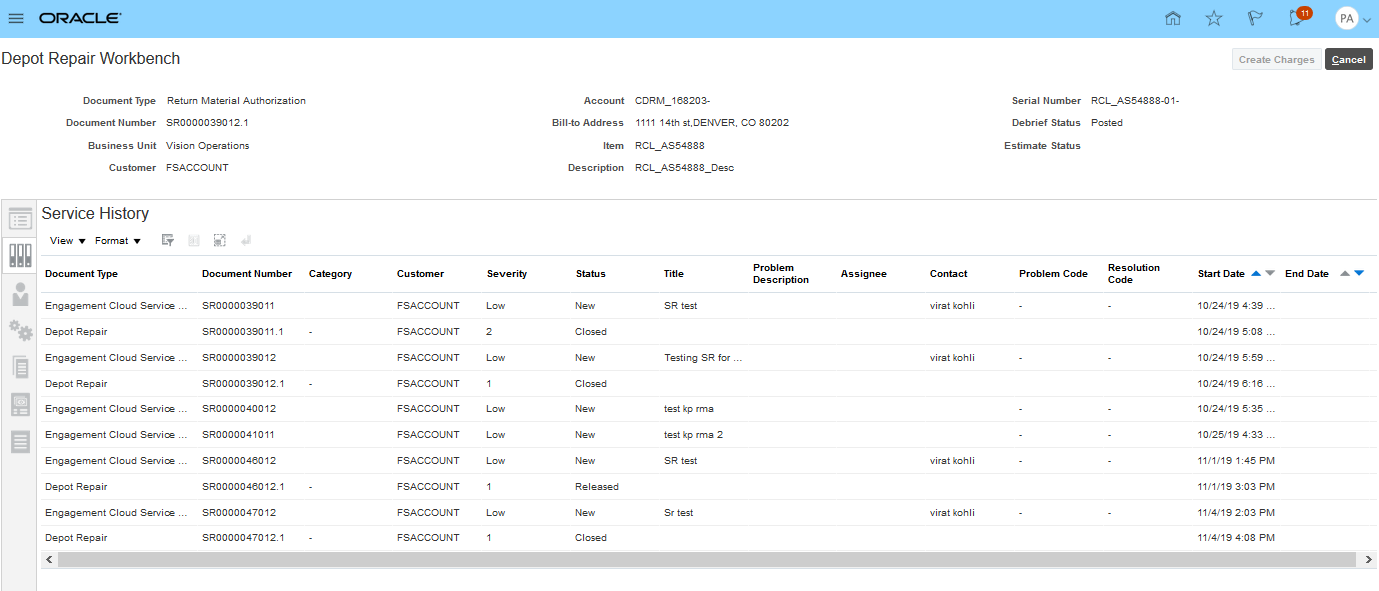
Depot Repair Workbench - Service History
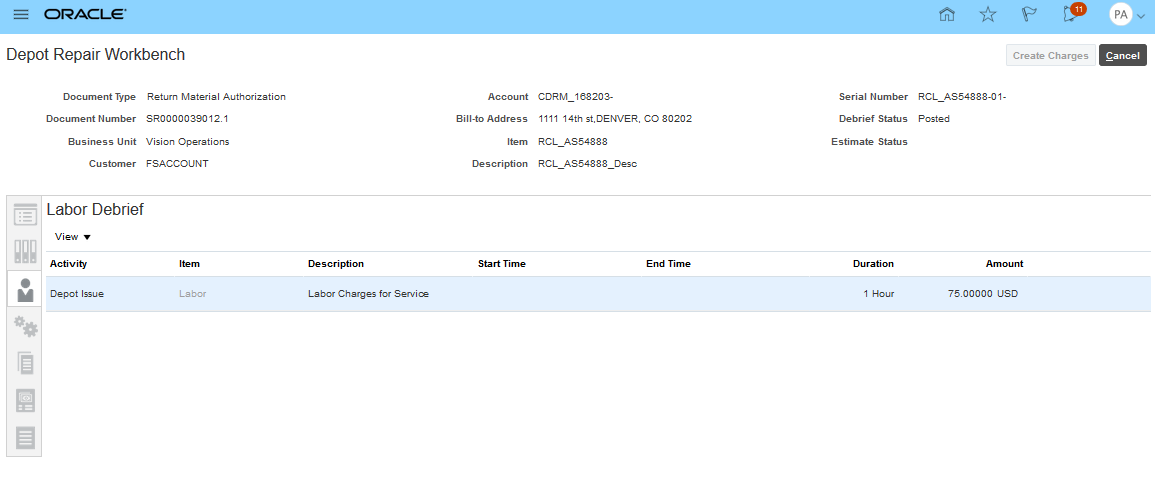
Depot Repair Workbench - Labor Debrief
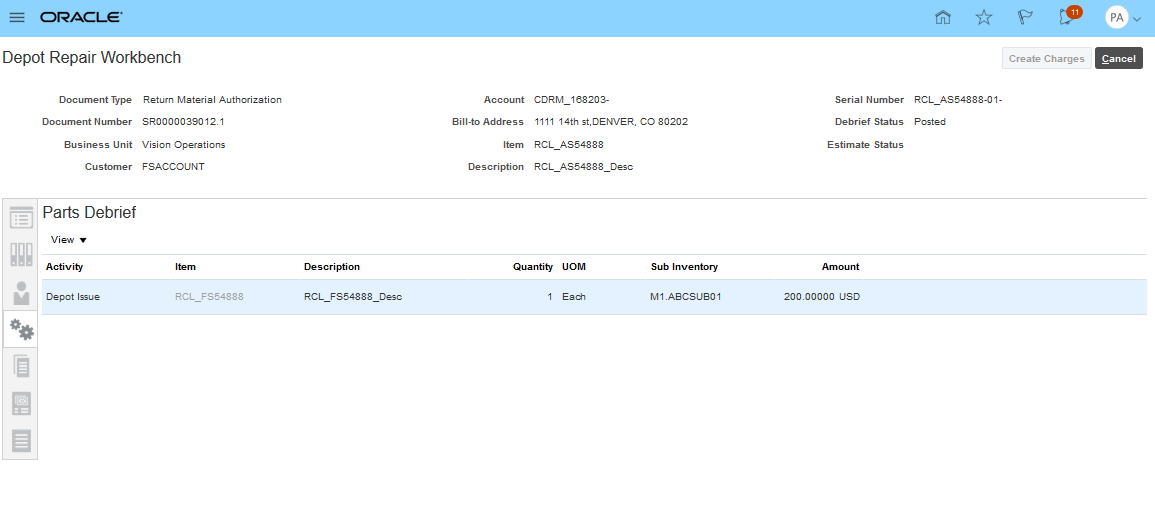
Depot Repair Workbench - Parts Debrief
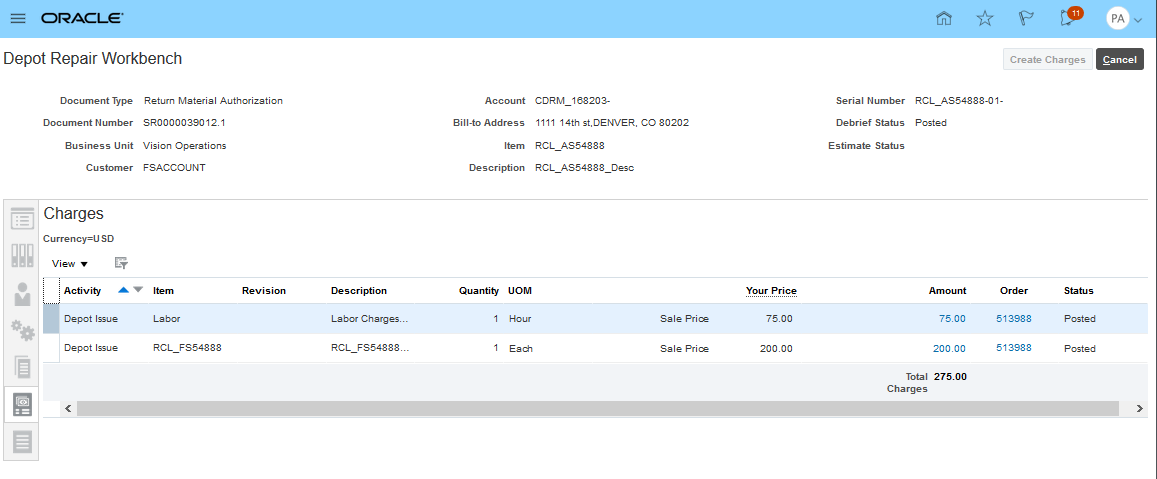
Depot Repair Workbench - Charges
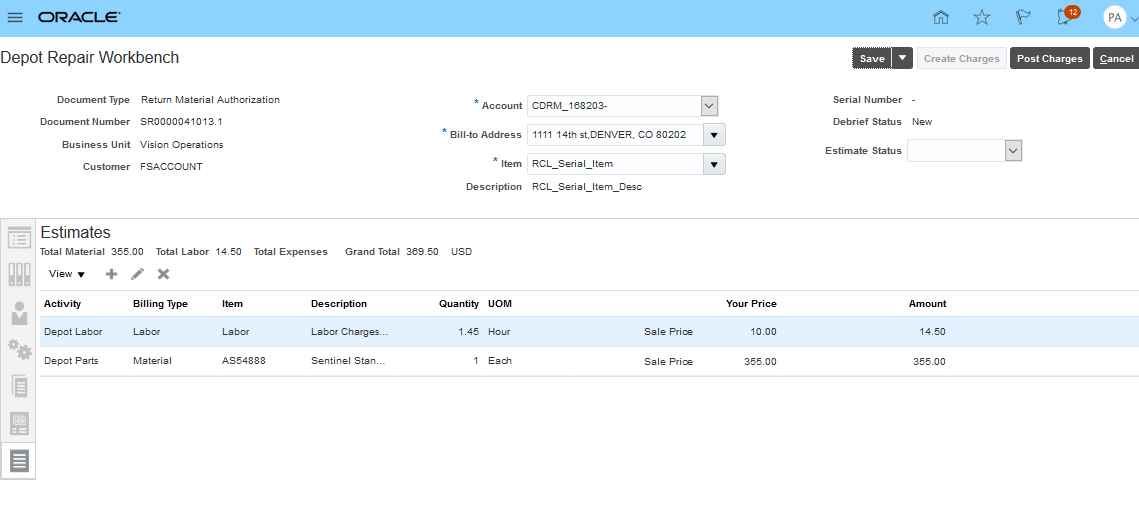
Depot Repair Workbench - Estimates
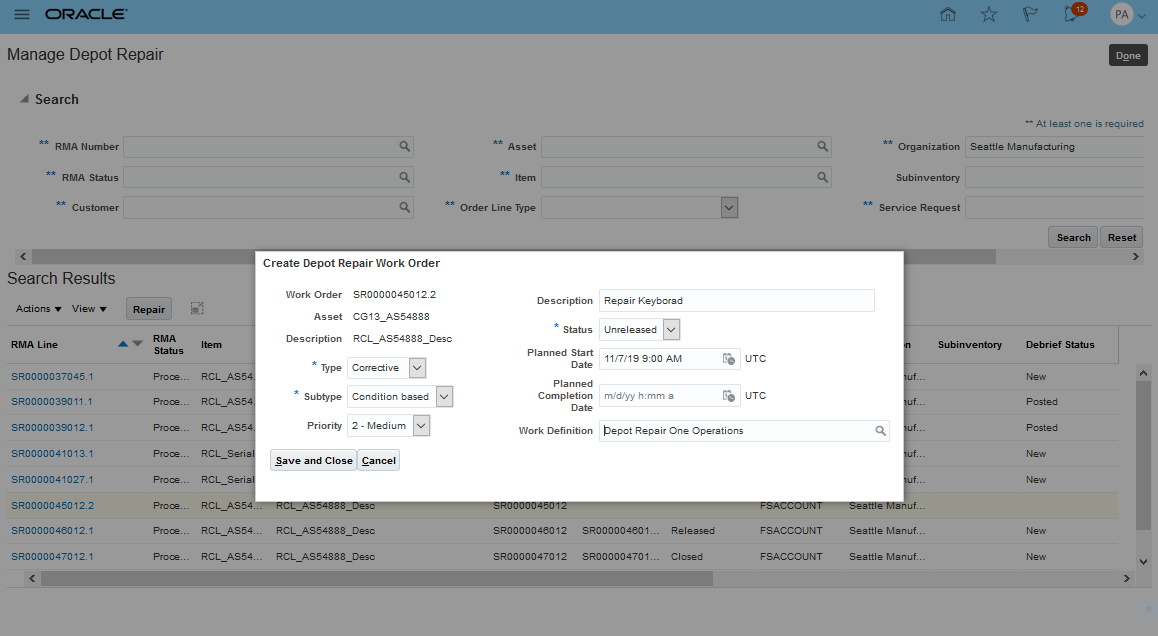
Depot Repair - Create Repair Work Order
Watch Demos:
Steps to Enable
- Setup Depot Repair Service Activity Codes (SACs) and Order Line Types (OLTs)
- Business Process - Customer Support: Set up SACs for return of broken product and shipment of repaired product. Create OLTs and DOO processes to execute order lines created with these SACs.
- Business Process - Depot Repiar: Set up SACs for the labor and parts used during repair execution in Maintenance Cloud.
- Set the Service Logistics profile for the parts used in repair SAC (default service activity for depot repair material install). Note, the parts recovered SAC (service activity for depot repair material return) profie is not used in 20A as the Maintenance Cloud Repair Work Order does not support part recovery in 20A.
- Set up the Default Return Organization profile or return routing rules. Return Routing was released in 19C.
- Setup the Service Logistics Labor SAC lookup codes to match the maintenance work order (MWO) Labor Activity lookup codes. This code is required when creating RCL Labor Debrief Records from MWO labor transactions.
- Setup Labor Item numbers to match the name of the MWO resource type that will be used to capture repair labor time. This code is required when creating RCL Labor Debrief Records from MWO labor transactions.
- Setup an Inventory Organization for each repair depot. Depot repair organizations must be separate from the inventory organizations used to maintain assets in Maintenance Cloud.
Watch Setup Demo
Key Resources
Role Information
To use this feature, the following privileges or roles are required:
- Job Role Name and Code:
- Depot Repair Manager (ORA_RCL_DEPOT_REPAIR_MANAGER_JOB) - - This role gives the user access to the Manage Depot Repair UI and the Depot Repair Workbench UI
- Privilege Names and Code:
- Manage Depot Repair ()
Provide Parts Logistics and Debrief for Generic Work Orders
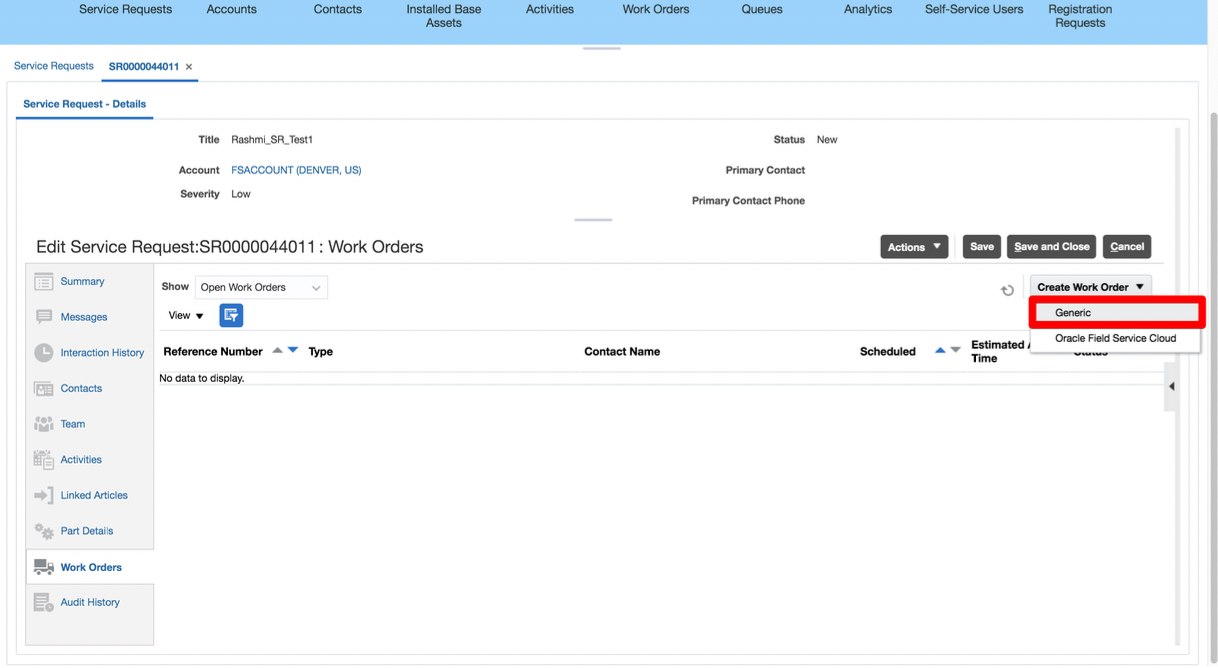
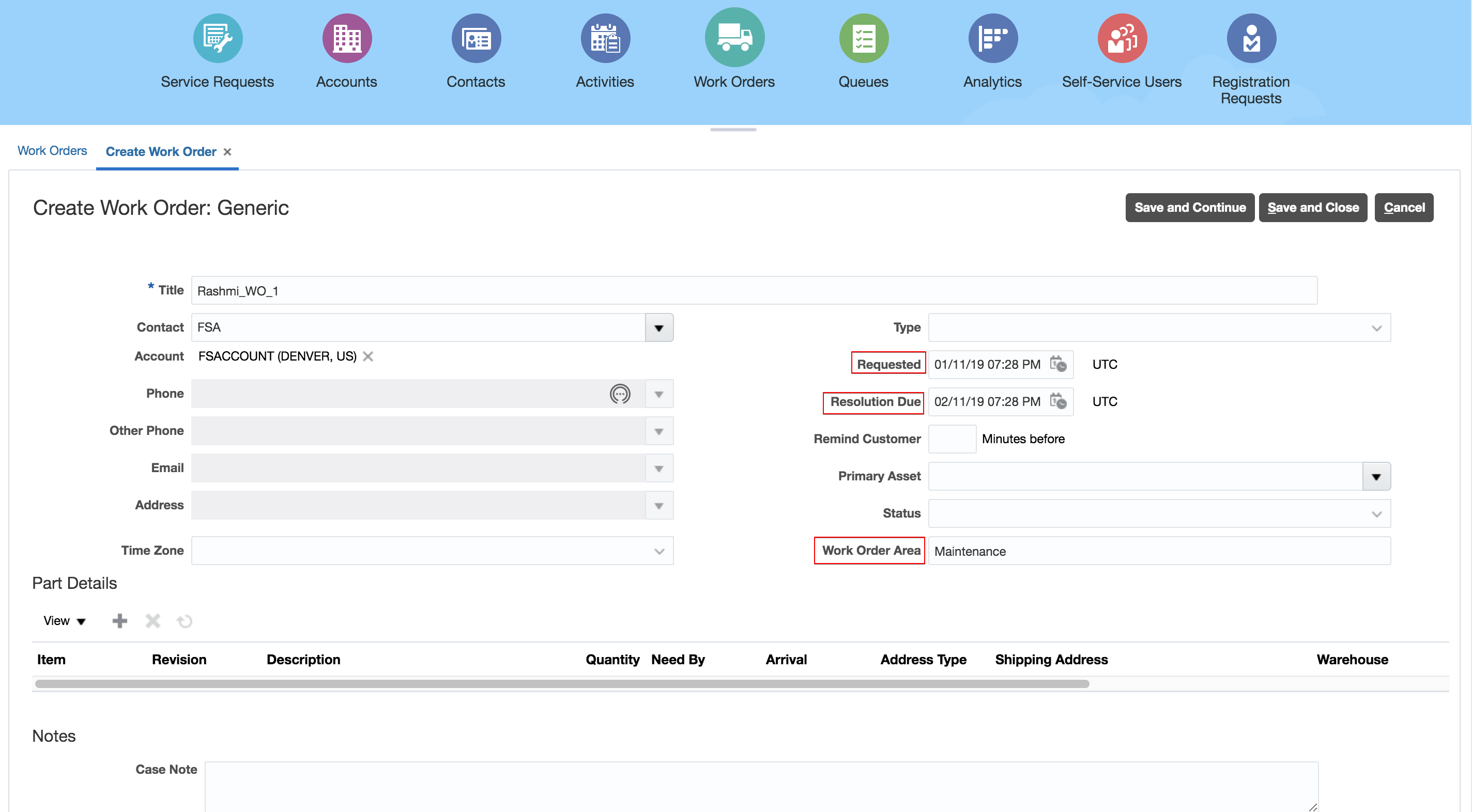
Engagement Cloud now supports Generic work orders so customer who don't need automated field service scheduling or offline mobile field service can still run their complete field service operation from work order creation through parts ordering, receiving, debrief and billing. Generic work orders are enabled in the Engagement Cloud Setups. There are no setups required in Service Logistics to support Generic work orders. Engagement Cloud Generic work orders can be created in the Service Request UI or in the standalone Work Order UI. These UI behave differently for Generic work orders. When setting up Generic work orders, you must manually enter the Work Order Area instead of it being determined by an integration between Engagement Cloud and Field Service Cloud. In addition, with Generic work orders, you can enter the Resolution and Requested dates.
The rest of this section shows how Generic Work Orders are created and processed in Service Logistics (order parts, receive parts, debrief, charges, etc.)
- Open Service Request
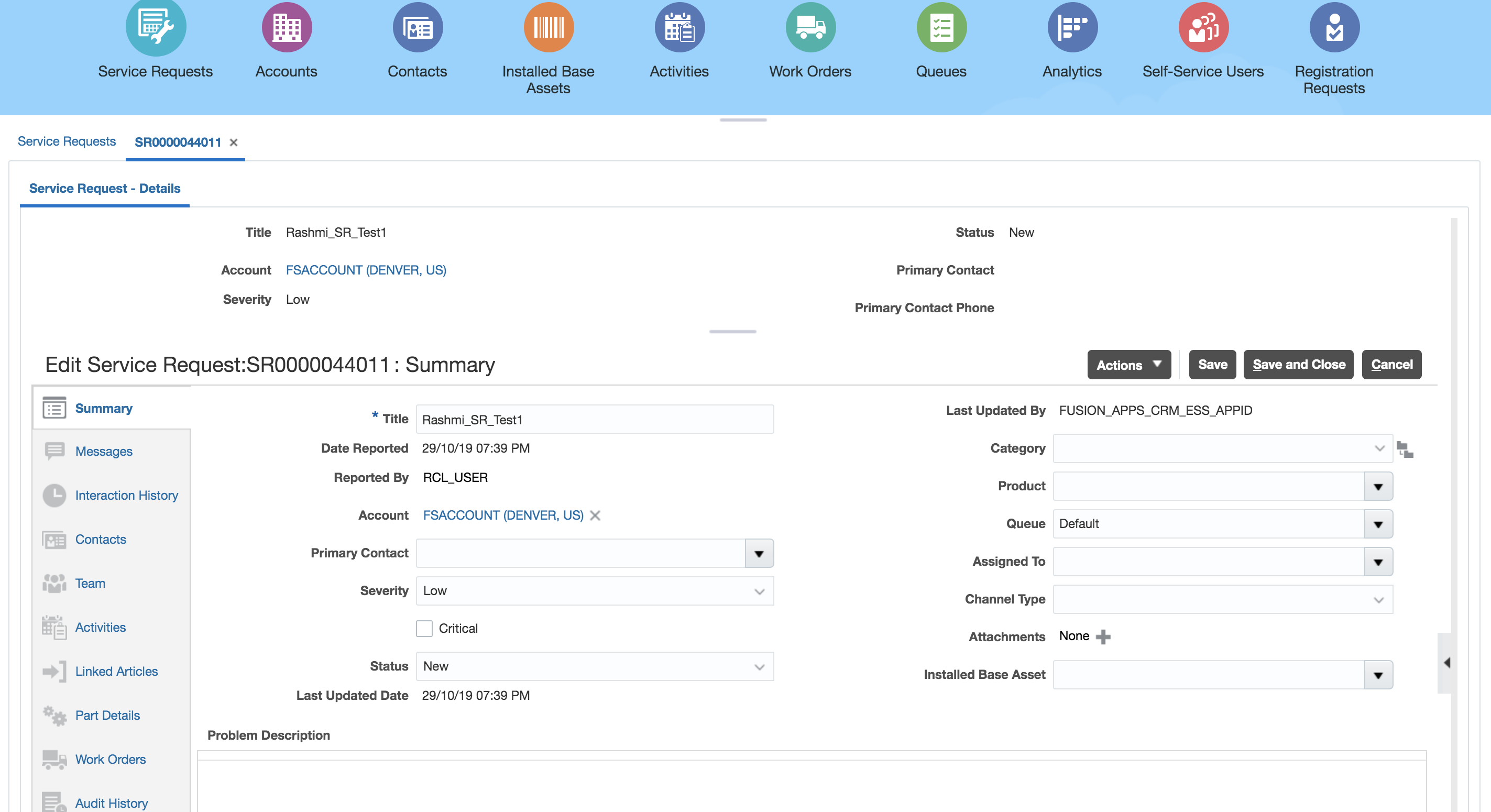
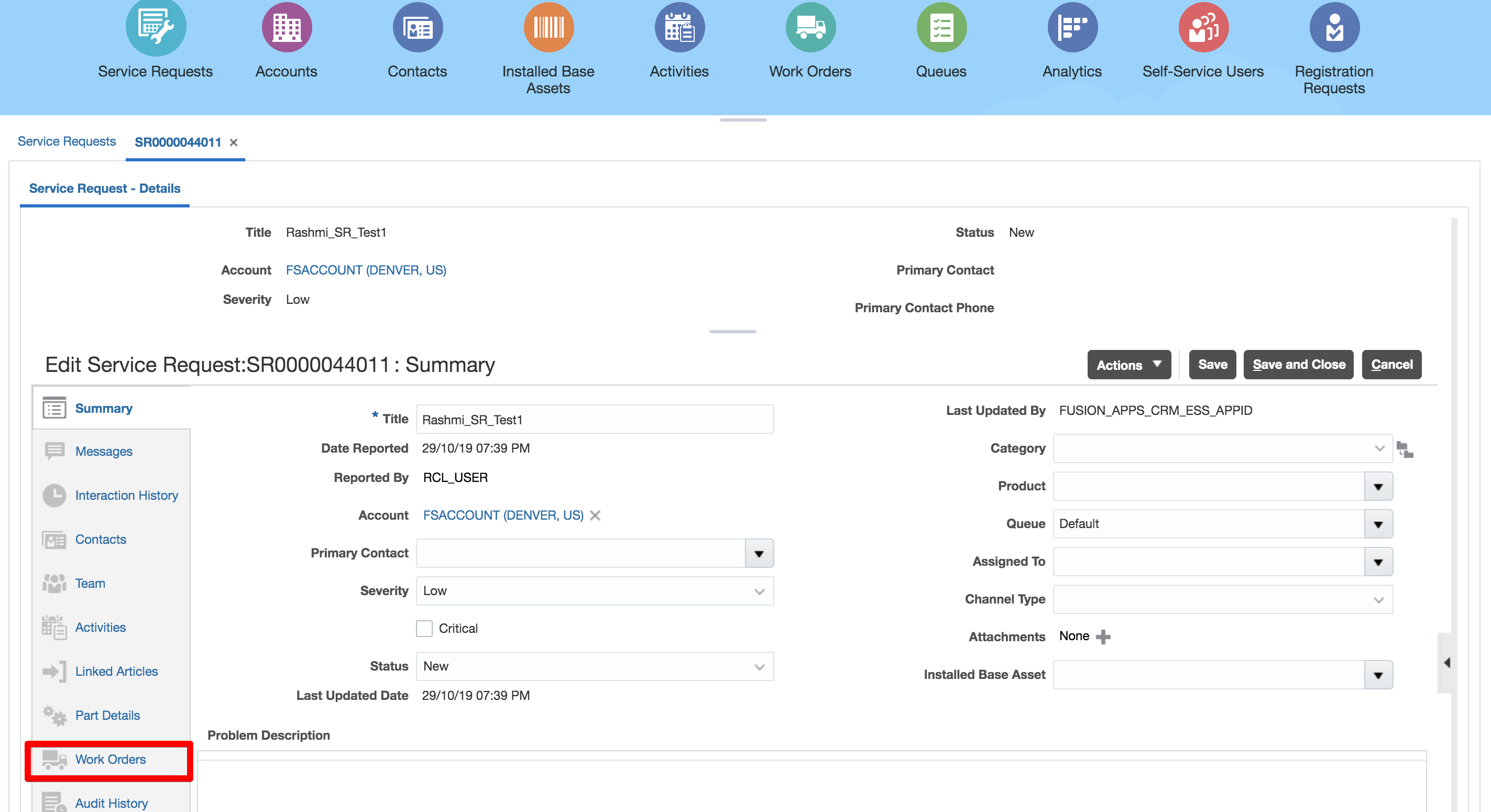
- Navigate to Work Orders tab
- Click the Create Work Order button and choose 'Generic'
- Three additional fields 'Work Order Area','Requested Date' and 'Resolution Date' are entered for Generic work order which aren't available in Oracle Field Service Work Order
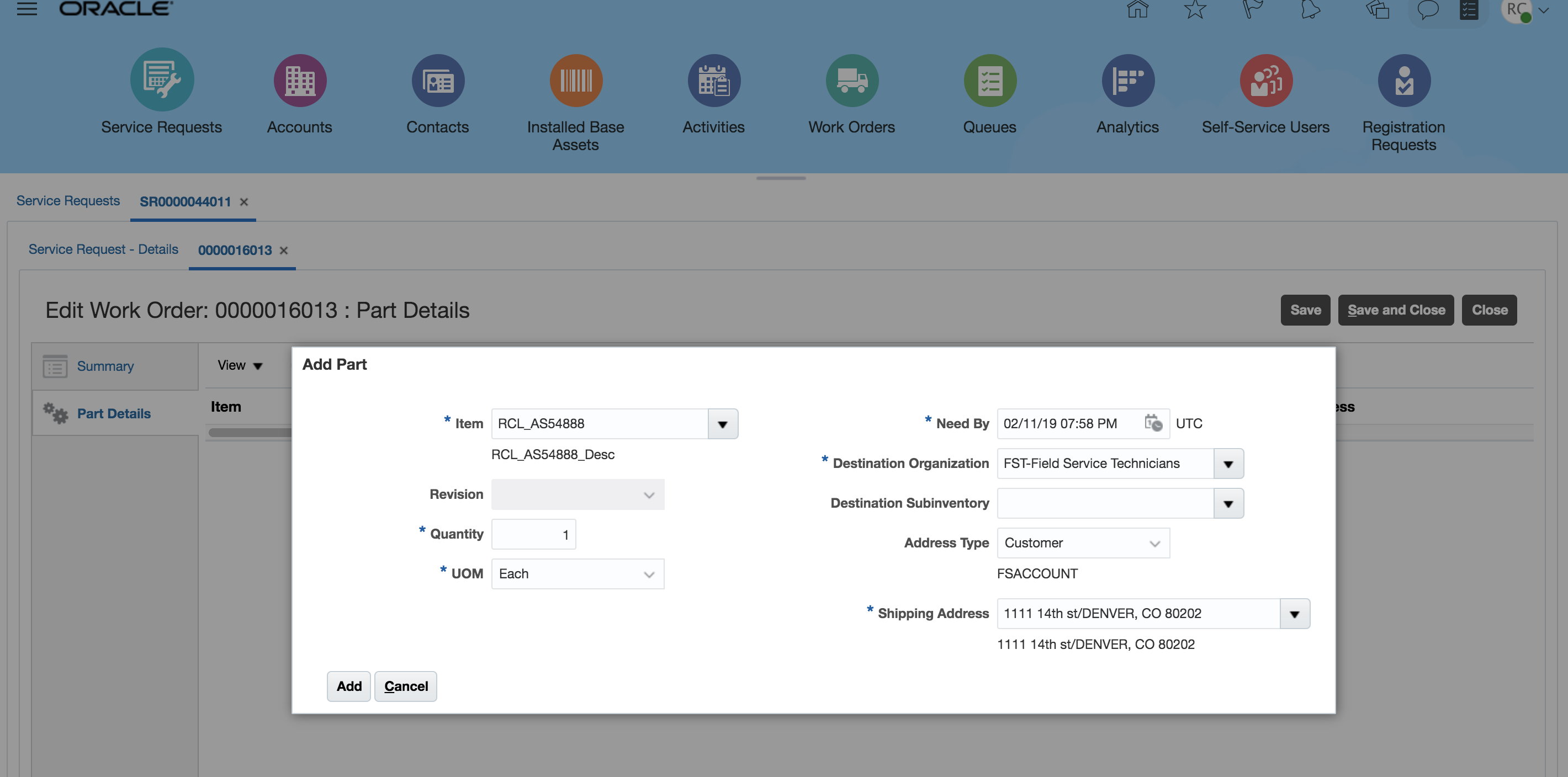
- Add the Parts
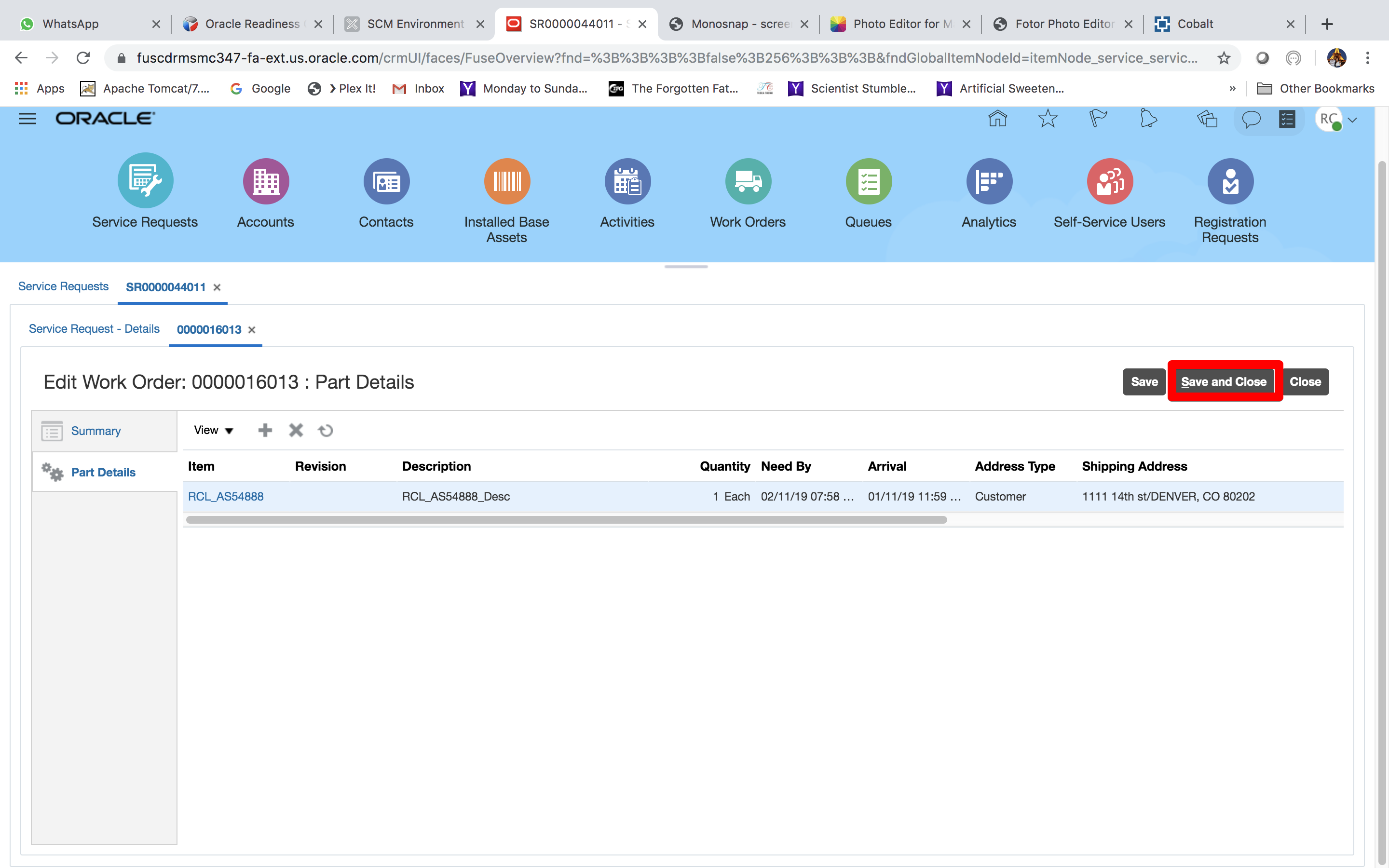
- Click Save and Close
- Once the Transfer Order Number, is created it goes through the normal shipping fulfillment and receiving processes
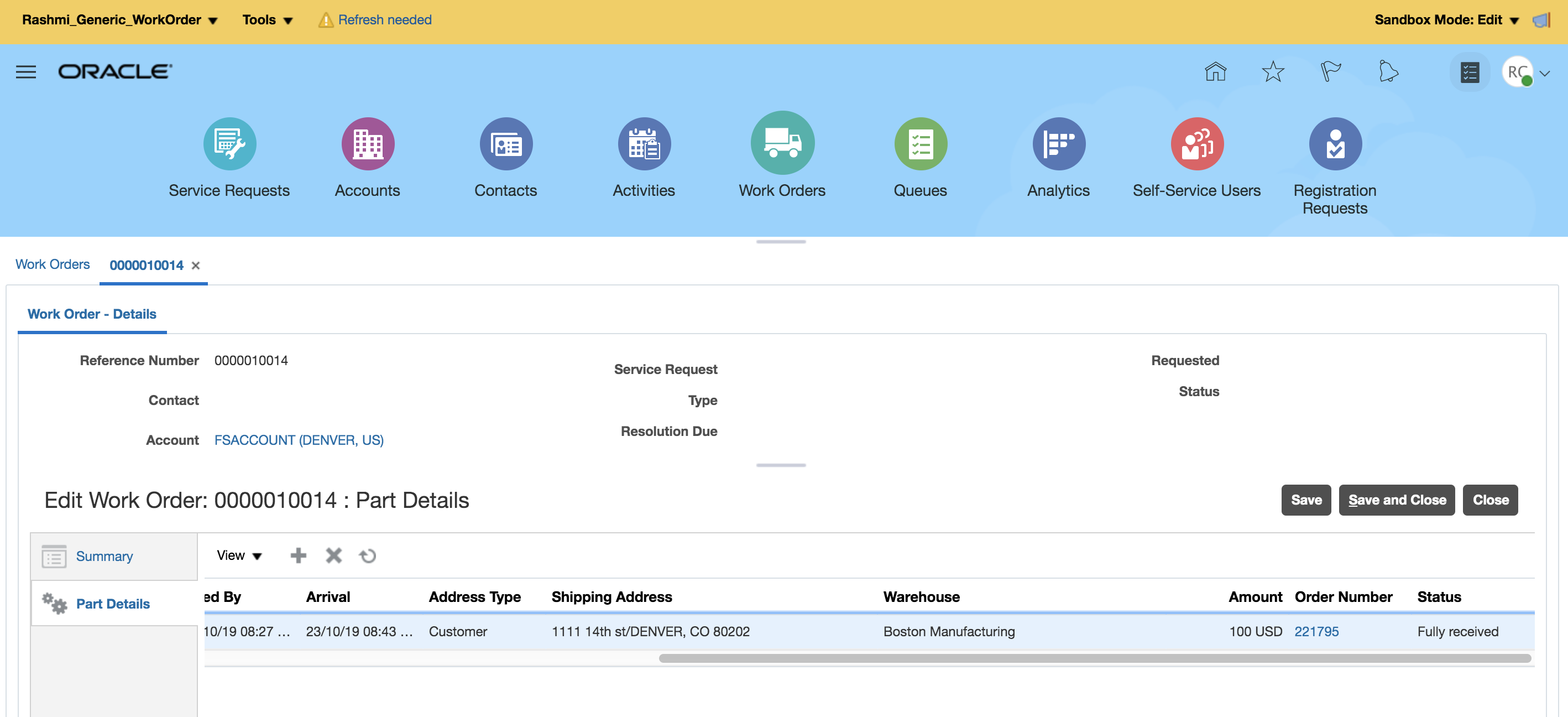
- Generic Work Order can be viewed in Manage Work Order and Charges UI
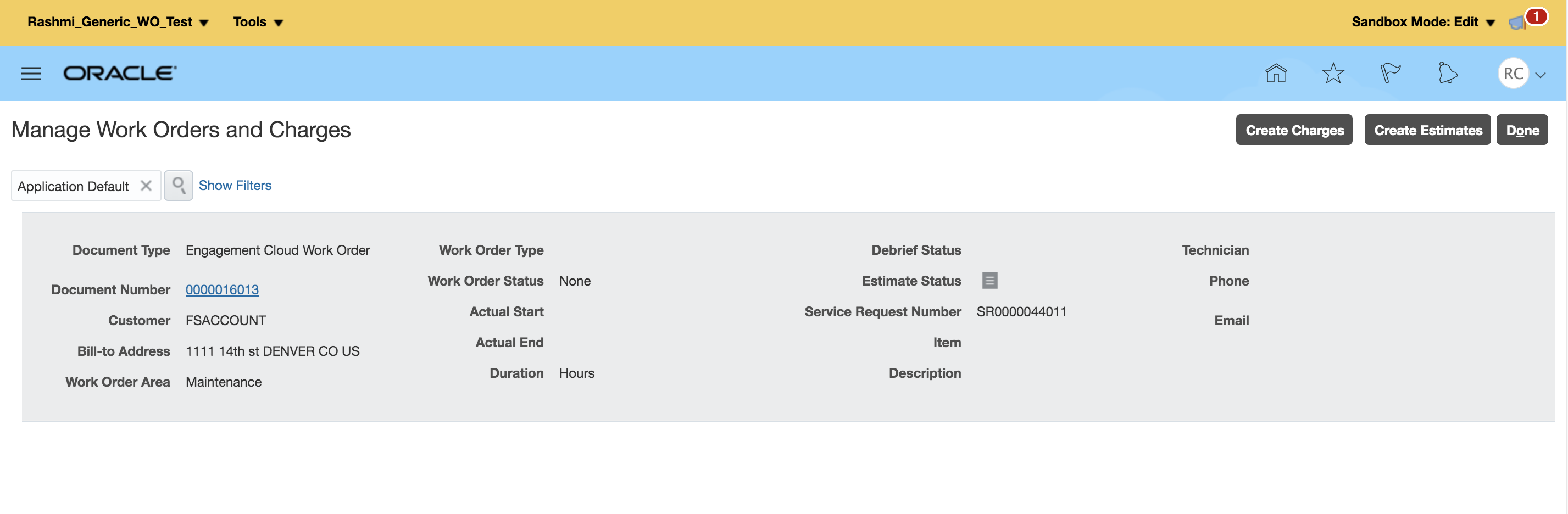
- Once the Work Order has been completed the Field Service administrator can debrief the work completed and bill the customer
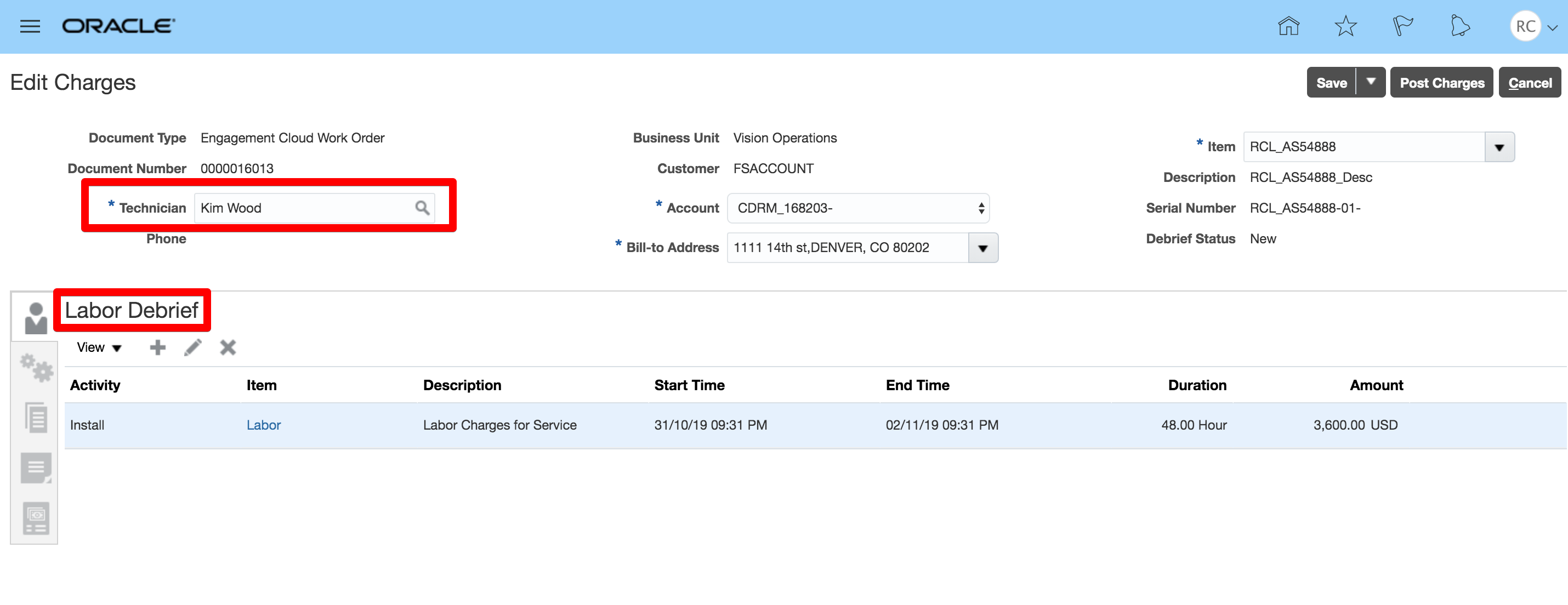
Steps to Enable
You don't need to do anything to enable this feature.
Role Information
To use this feature, the following role is required:
- Job Role Name and Code:
- Field Service Administrator (ORA_RCL_FIELD_SERVICE_ADMINISTRATOR)