
This document will continue to evolve as existing sections change and new information is added. All updates appear in the following table:
| Date | Feature | Notes |
|---|---|---|
| 31 MAR 2021 | Use Service Contract Discounts to Calculate Charges | Updated document. Revised feature information. |
| 10 APR 2020 | Use Service Contract Discounts to Calculate Charges | Updated document. Revised feature information. |
| 20 MAR 2020 | Created initial document. |
This guide outlines the information you need to know about new or improved functionality in this update, and describes any tasks you might need to perform for the update. Each section includes a brief description of the feature, the steps you need to take to enable or begin using the feature, any tips or considerations that you should keep in mind, and the resources available to help you.
Security and New Features
The Role section of each feature identifies the security privilege and job role required to use the feature. If feature setup is required, then the Application Implementation Consultant job role is required to perform the setup, unless otherwise indicated. (If a feature doesn't include a Role section, then no security changes are required to use the feature.)
If you have created job roles, then you can use this information to add new privileges to those roles as needed.
Give Us Feedback
We welcome your comments and suggestions to improve the content. Please send us your feedback at oracle_fusion_applications_help_ww_grp@oracle.com.
Column Definitions:
Features Delivered Enabled
Report = New or modified, Oracle-delivered, ready to run reports.
UI or Process-Based: Small Scale = These UI or process-based features are typically comprised of minor field, validation, or program changes. Therefore, the potential impact to users is minimal.
UI or Process-Based: Larger Scale* = These UI or process-based features have more complex designs. Therefore, the potential impact to users is higher.
Features Delivered Disabled = Action is needed BEFORE these features can be used by END USERS. These features are delivered disabled and you choose if and when to enable them. For example, a) new or expanded BI subject areas need to first be incorporated into reports, b) Integration is required to utilize new web services, or c) features must be assigned to user roles before they can be accessed.
| Ready for Use by End Users Reports plus Small Scale UI or Process-Based new features will have minimal user impact after an update. Therefore, customer acceptance testing should focus on the Larger Scale UI or Process-Based* new features. |
Action is Needed BEFORE Use by End Users Not disruptive as action is required to make these features ready to use. As you selectively choose to leverage, you set your test and roll out timing. |
|||||
|---|---|---|---|---|---|---|
| Feature |
Report |
UI or |
UI or |
|
||
Achieve Greater Business Insight with Landing Page Enhancements |
||||||
Access Service Requests and Work Orders Directly from Service Logistics |
||||||
Use Service Contract Discounts to Calculate Charges
The calculate service charges functionality has been enhanced to include warranty and contract subscription discounts and adjustments. Before pricing occurs, Service Logistics retrieves all applicable discounts and adjustments for the customer and asset from Subscription Management Cloud. The system then passes these discounts and adjustments to Pricing Cloud, which performs the actual calculations. If the customer and asset is covered by multiple subscriptions, they will all be applied to the list price to get the final charge amount.
- Discounts and adjustments set up in the Edit Standard Coverage UI
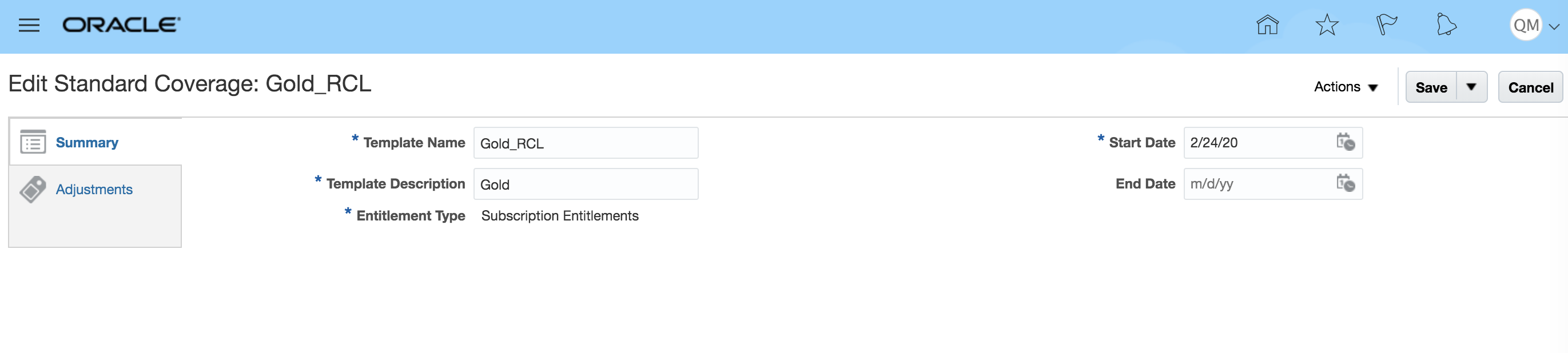
Creating Standard Coverage
When a subscription contract is created, it references standard coverages.
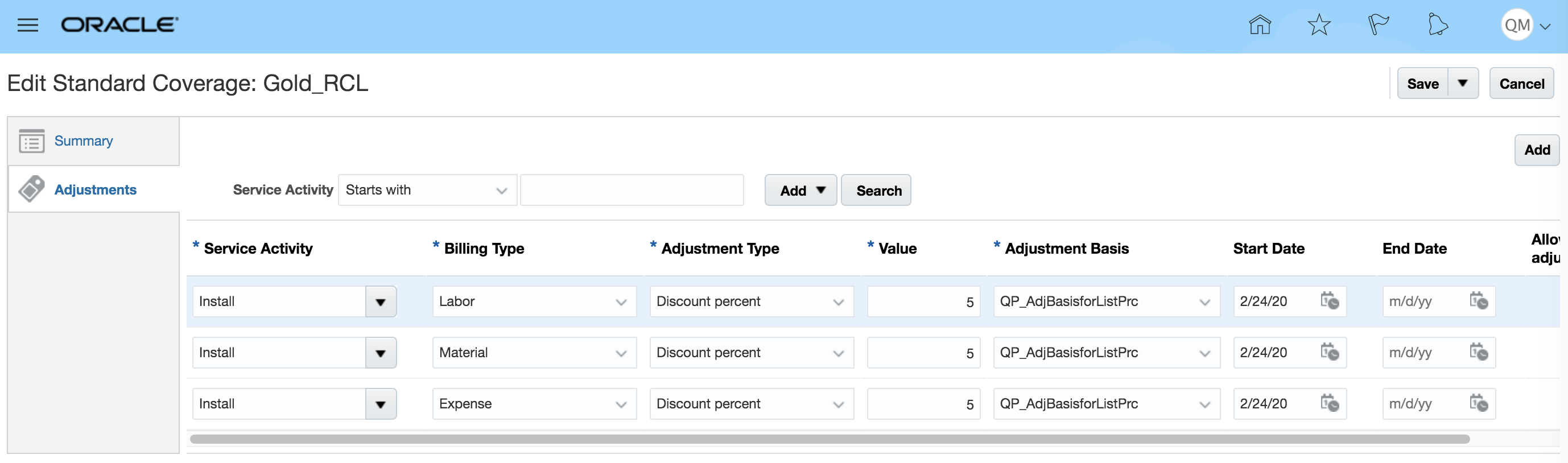
Entering Discounts and Adjustments
Use the Edit Standard Coverage page to add adjustments and discounts to the standard coverages in a subscription contract. On this page, you can define, for a given service activity code (SAC) and billing type (labor, expense, material, and so on), the adjustment type (discount or markup), adjustment percent, and adjustment basis (only list price is currently supported). Note, when an adjustment is added to standard coverages, a pricing term is created in Oracle Pricing Cloud and then stored in the Coverage Adjustment table. This pricing term will be passed to Pricing when calculating service charges.
- Charges Calculation with Discounts and Adjustments
Here is the logic used to find the applicable Subscription Coverage discounts and adjustments:
- The Asset on the Service Logistics Debrief Header must be listed in the subscription on the Coverage Levels tab. If not, no coverage adjustments or discounts will be applied.
- If the asset has a Standard Coverage assigned in the subscription, it will be used to retrieve the coverage adjustment and discount.
- If this asset has a Standard Coverage listed in its Item Master record, it will be used to retrieve the coverage adjustments and discounts.
- If the subscription has a Standard Coverage defined for its coverage item (for example, Company ABC’s extended warranty), then this coverage amount will be used.
- If the subscription has a Standard Coverage defined for its coverage item (for example, gold extended warranty), it will be used to retrieve the coverage adjustments and discounts.
- If none of the above Standard Coverages are found then the Standard Coverage on the asset’s item master record will be used to retrieve the coverage adjustments and discounts
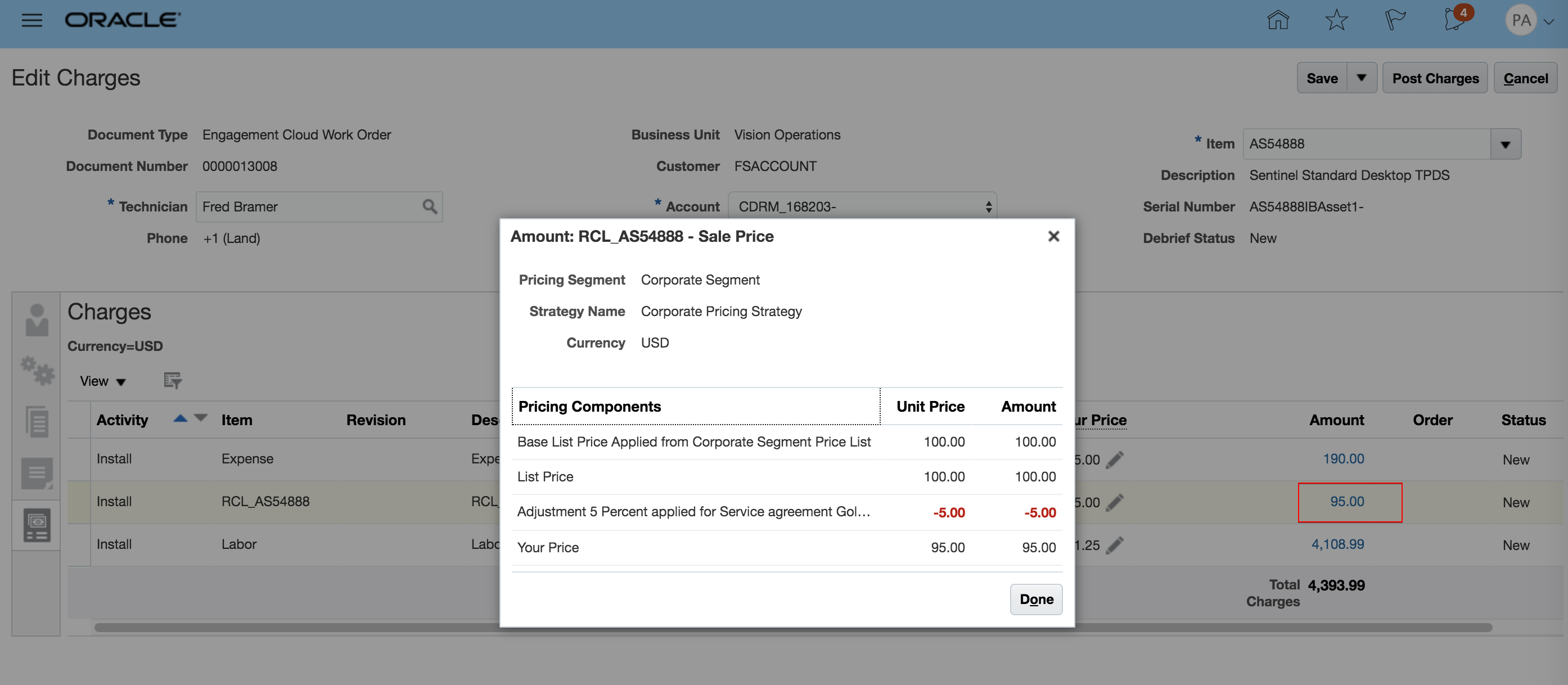
The Edit Charges UI displays all of the charges for expenses, parts, and labor. The Edit Charges UI can be accessed from the Manage Work Orders and Charges UI and from the Manage Depot Repair UI.
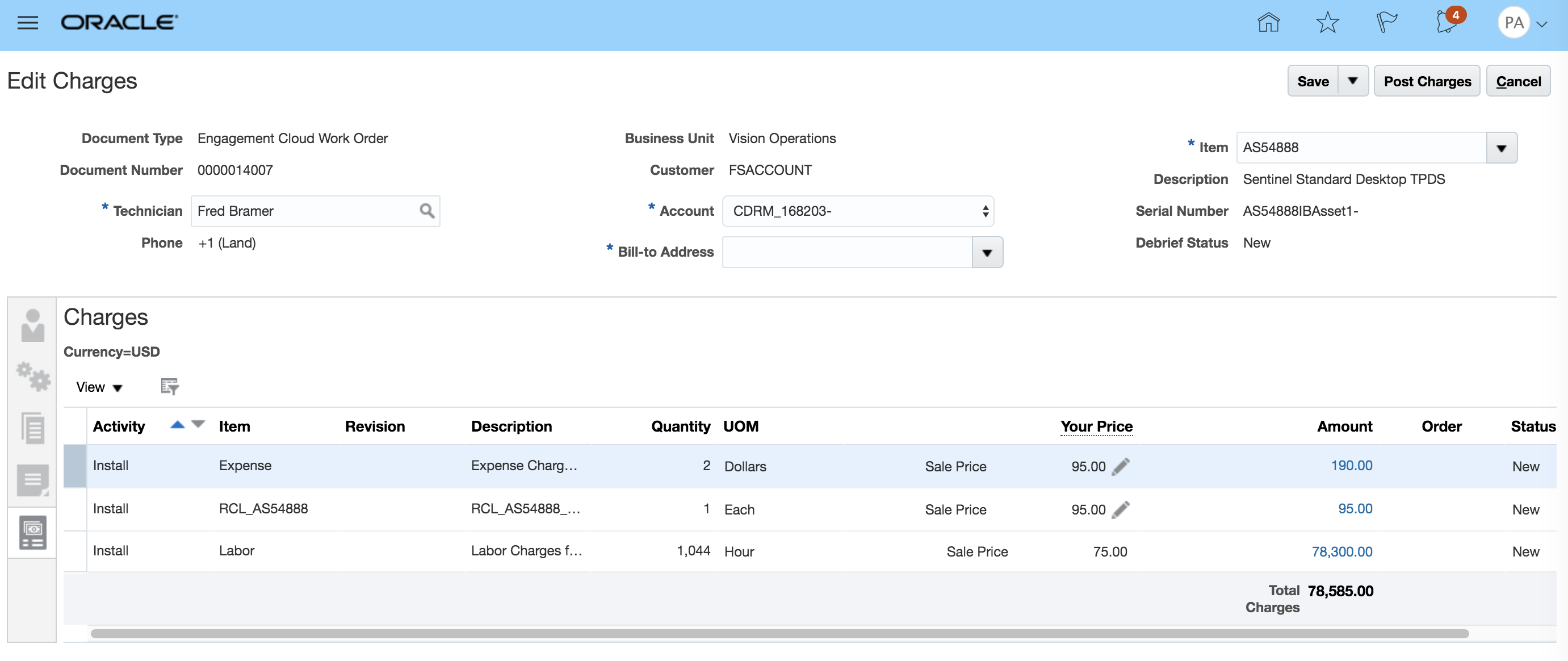
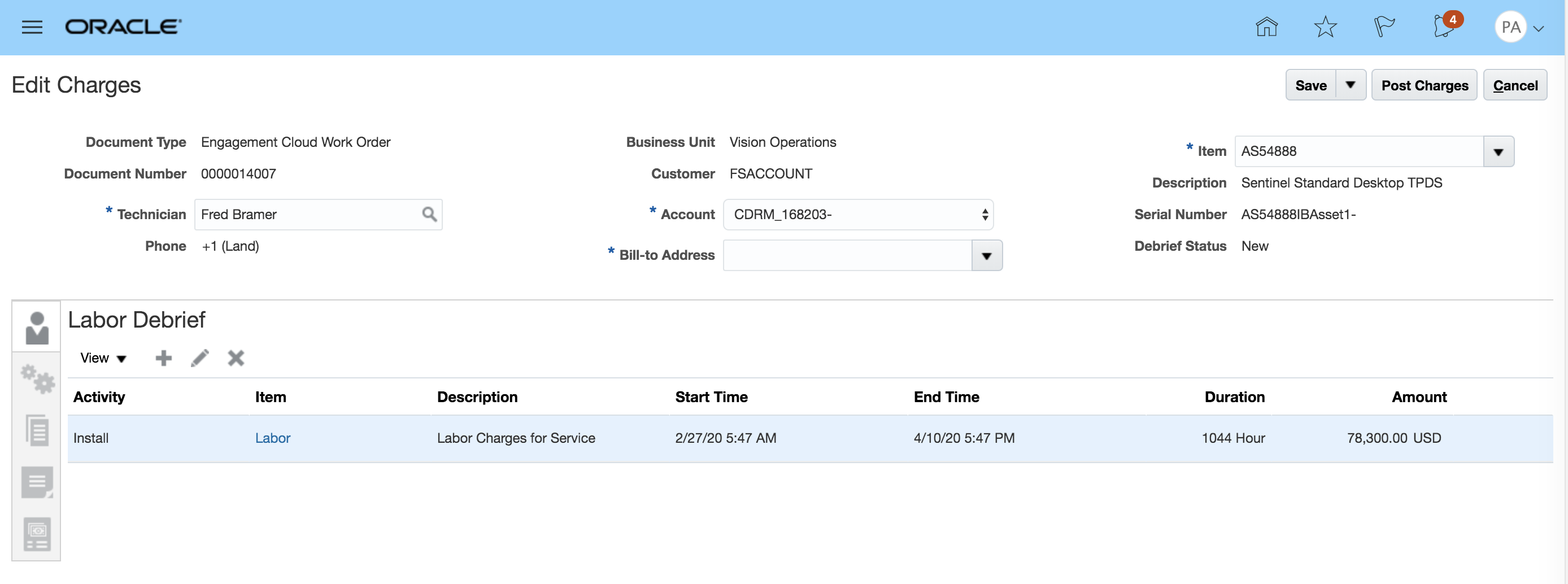
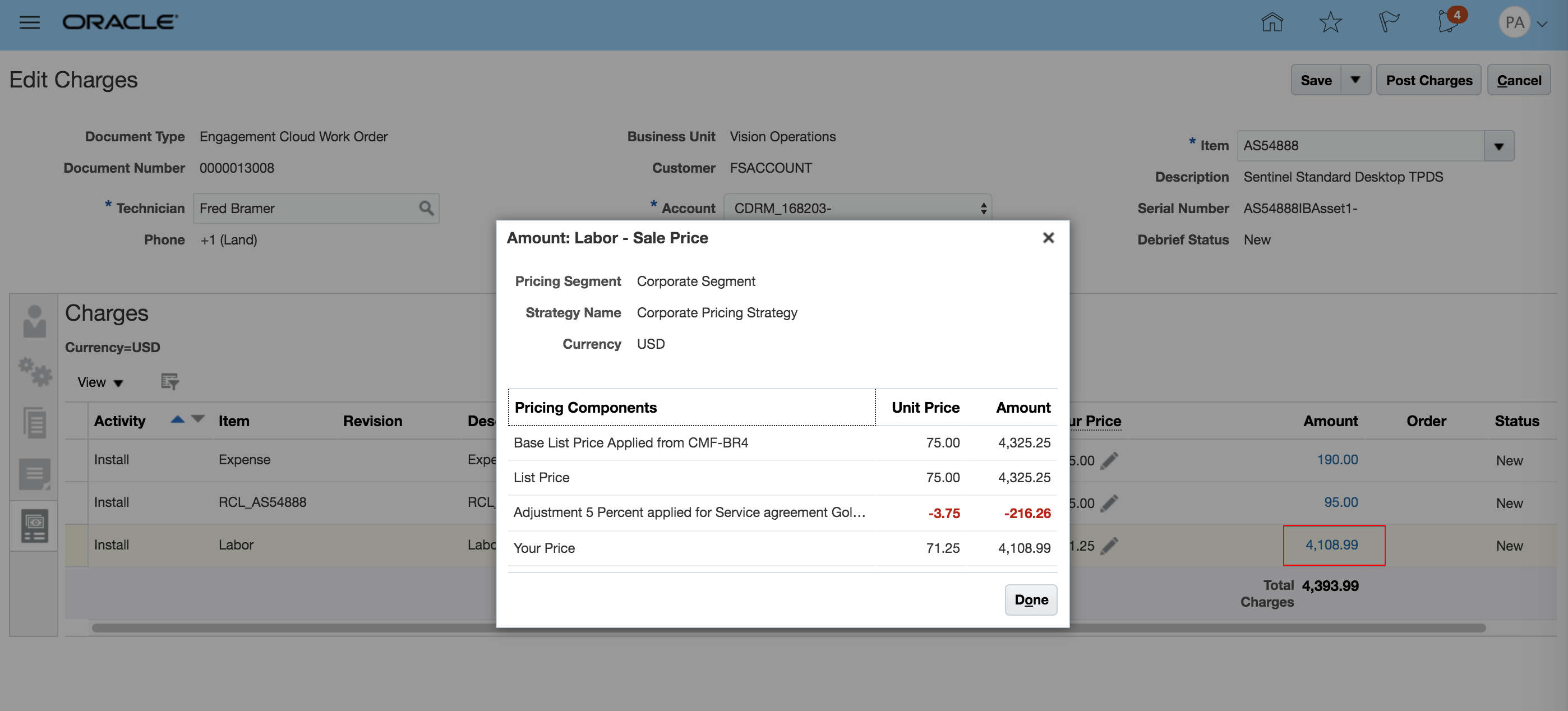
Labor Debrief
To display the discount applied to labor, click the highlighted labor amount.
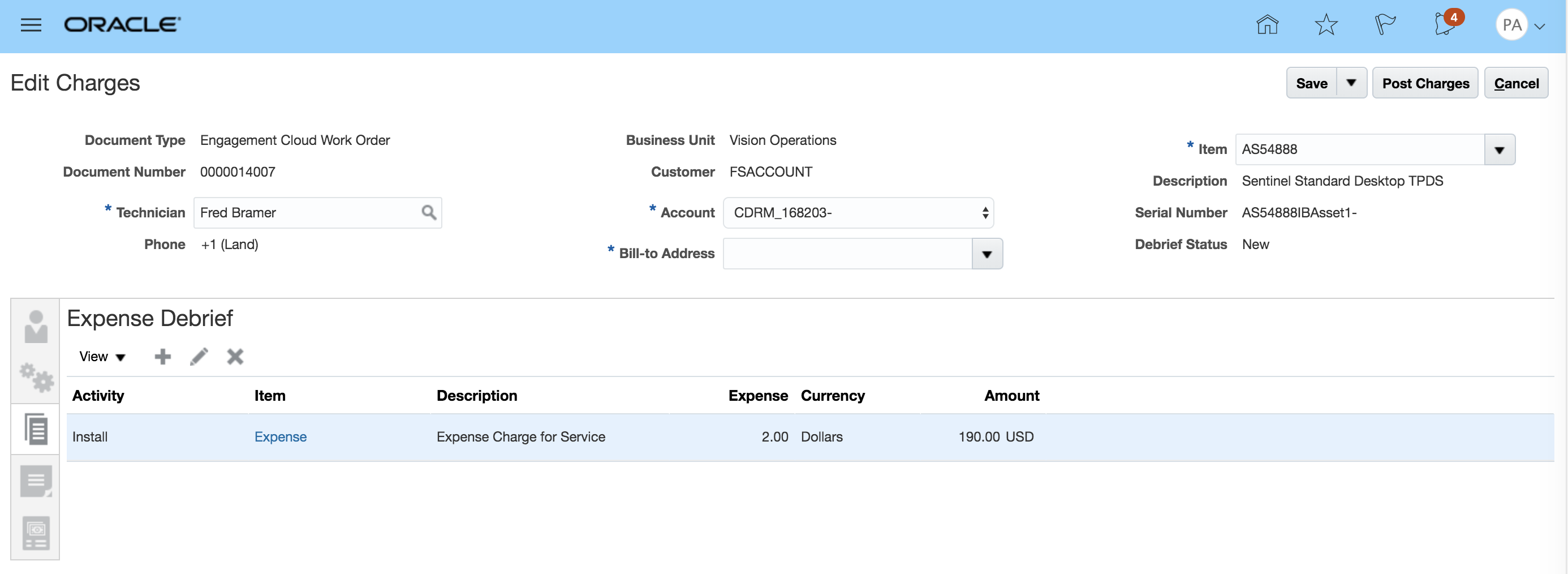
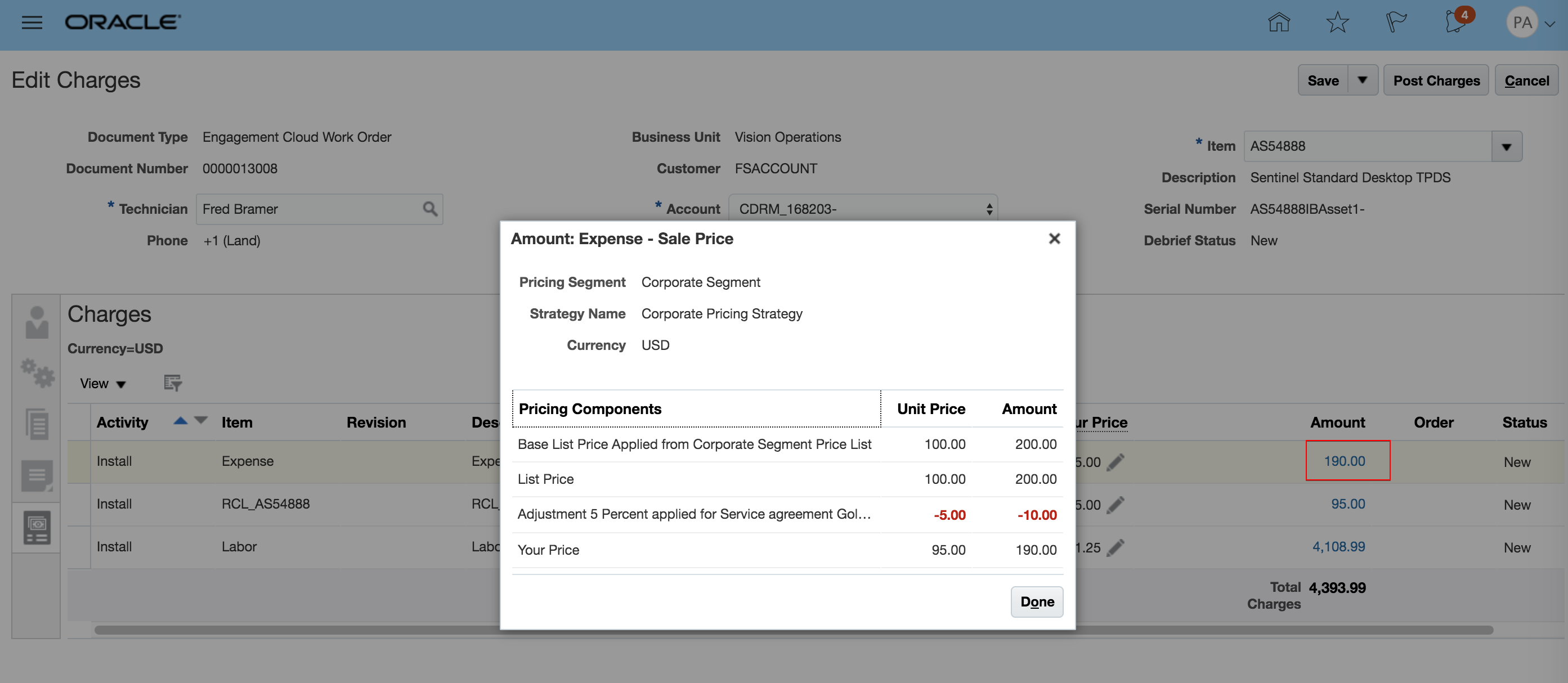
Expense Debrief
To display the discount applied to expense, click the highlighted expense amount.
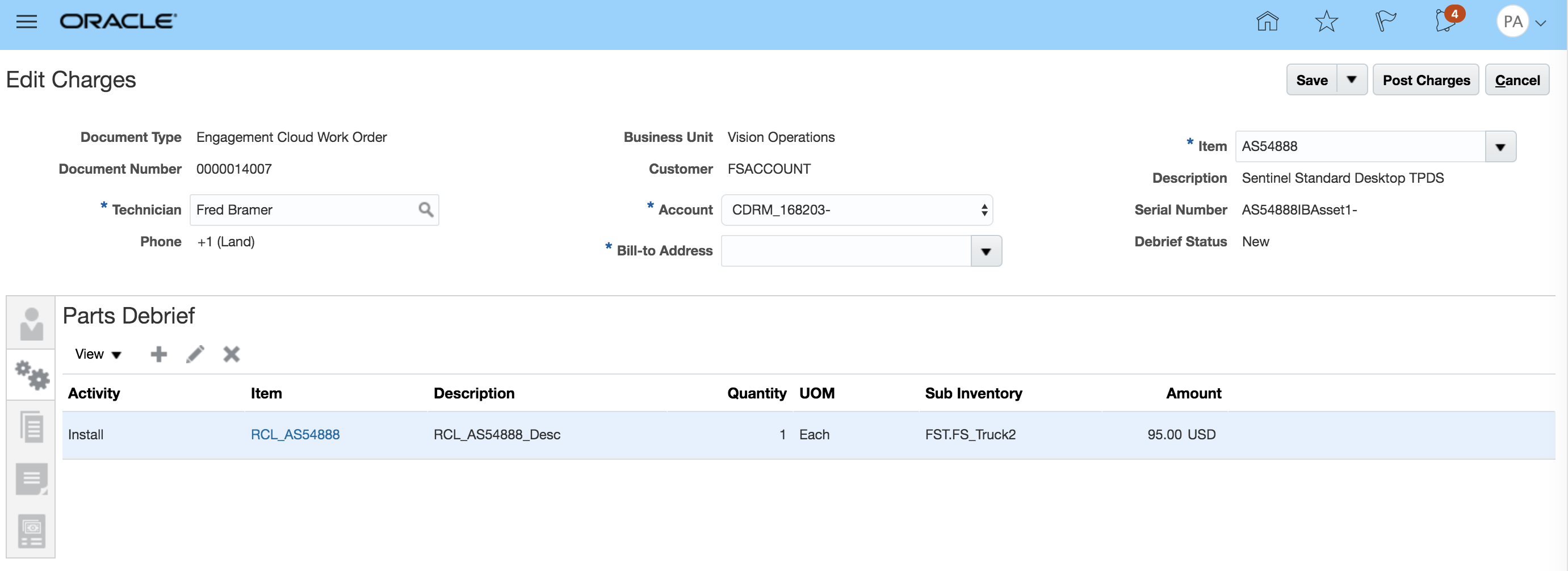
Material and Parts Debrief
To display the discount applied to the Material/Part Item, click the highlighted material/parts amount.
Watch a Demo
Steps to Enable
- Set up the standard coverages in the Subscription Management UI under Entitlements Management option.
- Enter the adjustments for specific service activities and billing types, such as labor, expense, and parts.
Key Resources
Role Information
To use this feature, the following privileges or roles are required:
- Job Role Name and Code
- Field Service Administrator (ORA_RCL_FIELD_SERVICE_ADMINISTRATOR)
- OSS_SUBSCRIPTION_SPECIALIST(To access contracts service)
- Privilege Names and Codes
- Access Service Logistics Landing Page (RCL_PORTAL_ACCESS_LANDING_PAGE_PRIV)
- Access Debrief Page (RCL_PORTAL_VIEW_DEBRIEF)
- Manage Estimates (RCL_MANAGE_ESTIMATES_PRIV)
Achieve Greater Business Insight with Landing Page Enhancements
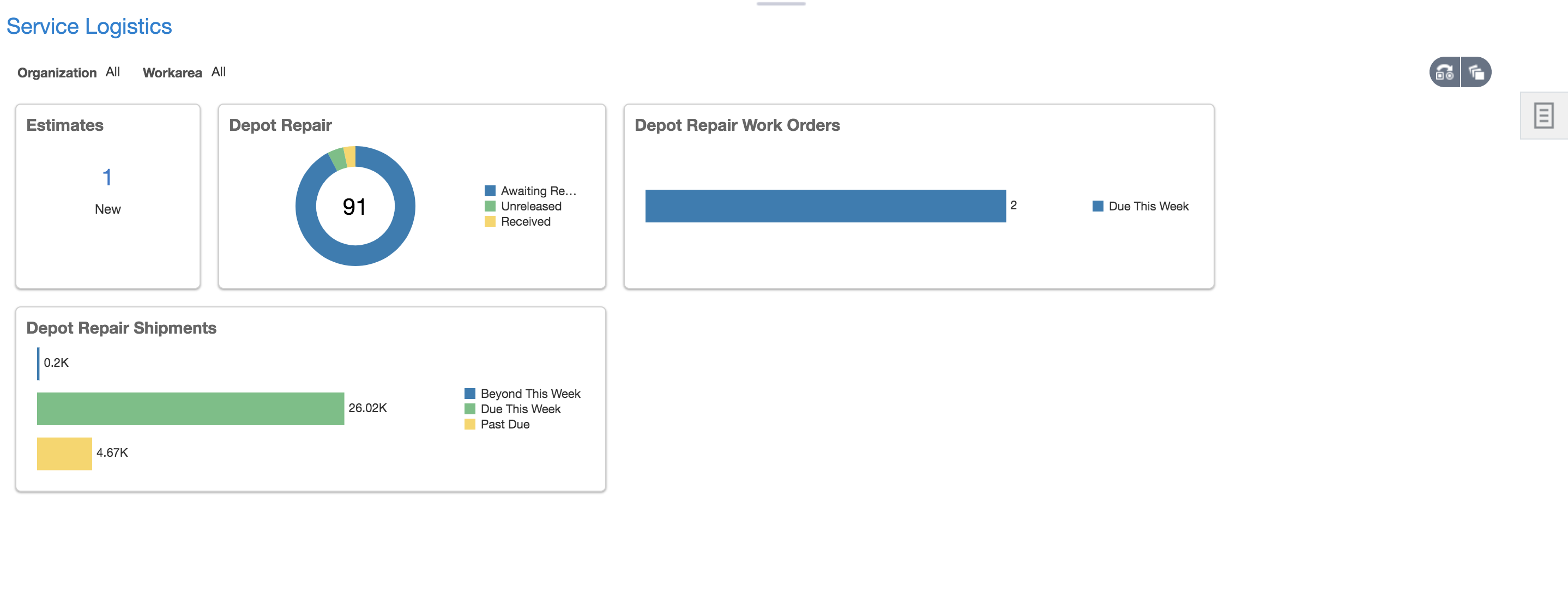
On the Service Logistics Landing Page, four new infolets have been added to support the management of depot repair. Those infolets include: Estimates, Depot Repair, Depot Repair Work Orders, and Depot Repair Shipments
- The Estimates Infolet includes Depot Repair and Field Service estimates.
- The Depot Repair Infolet displays the number of depot repair orders for:
- Incoming RMAs with 'AWAIT_RECEIVING' fulfillment status
- Broken products being repaired system_status_code either 'UNRELEASED', 'RELEASED', or 'ON_HOLD'
- Broken products being repaired but not shipped where system_status_code is either CANCELED, CLOSED, or COMPLETED and fulfillment status for the shipment line is not SHIPPED
- Repaired products repaired, but charges are not posted system_status_code is either CANCELED, CLOSED, or COMPLETED and debrief header status is not POSTED
- Repaired Products Shipped, but not billed where system_status_code is either CANCELED, CLOSED, or COMPLETED and fulfillment line status is AWAIT_BILLING.
- The Depot Repair Work Order Infolet displays the count of depot repair work orders where the system_status_code is either UNRELEASED, RELEASED, or ON_HOLD grouped by the order's planned completion date. The three groups are Past Due, Due this Week and Due beyond this week.
- The Depot Repair Shipments infolet displays the count of open shipment lines of repaired products grouped by the shipment line's required fulfillment date. The three groups are Past Due, Due this Week and Due beyond this week.
Service Logistics Landing Page:
Steps to Enable
You don't need to do anything to enable this feature.
Role Information
To use this feature, the following privileges or roles are required:
- Job Role Name and Code:
- Depot Repair Manager (ORA_RCL_DEPOT_REPAIR_MANAGER_JOB) - - This role gives the user access to the Manage Depot Repair UI and the Depot Repair Workbench UI
- Field Service Administrator (ORA_RCL_FIELD_SERVICE_ADMINISTRATOR)
Streamline Shipping for Depot Repair
This feature streamlines creation of depot repair and part exchange shipment order lines. When creating returns/RMAs for parts exchanges and depot repair, the user can also easily create the corresponding shipment order line. This process will also link the return and shipment lines so that Installed Base and Subscription Contracts can be updated when the broken product or part is received and when the repair or replacement is shipped. This functionality is available in the Add Part UI, which you can access from the Service Request Parts tab and from the Create Part Requirement UI.
When the user hits the Save button, both a return and shipment part requirement are created and linked for downstream processing. The three existing business processes will still be used for parts sales (Customer Support), field service debrief (Field Service) and depot repair debrief (Depot Repair).
Two new business processes have been seeded to control this functionality (Depot Repair Logistics and Parts Exchanges). In the Add Part UI, when you select a service activity code tied to one of these new business processes, you can easily enter all of the information required to create the corresponding shipment line. The system will automatically default most of the information, but you can still override key values, such as the item number. When you click the Save button, the system will create both a return and shipment part requirement, which will both be linked for downstream processing. Note: You’ll still use the three existing business processes for part sales (Customer Support), field service debrief (Field Service), and depot repair debrief (Depot Repair).
PARTS EXCHANGE
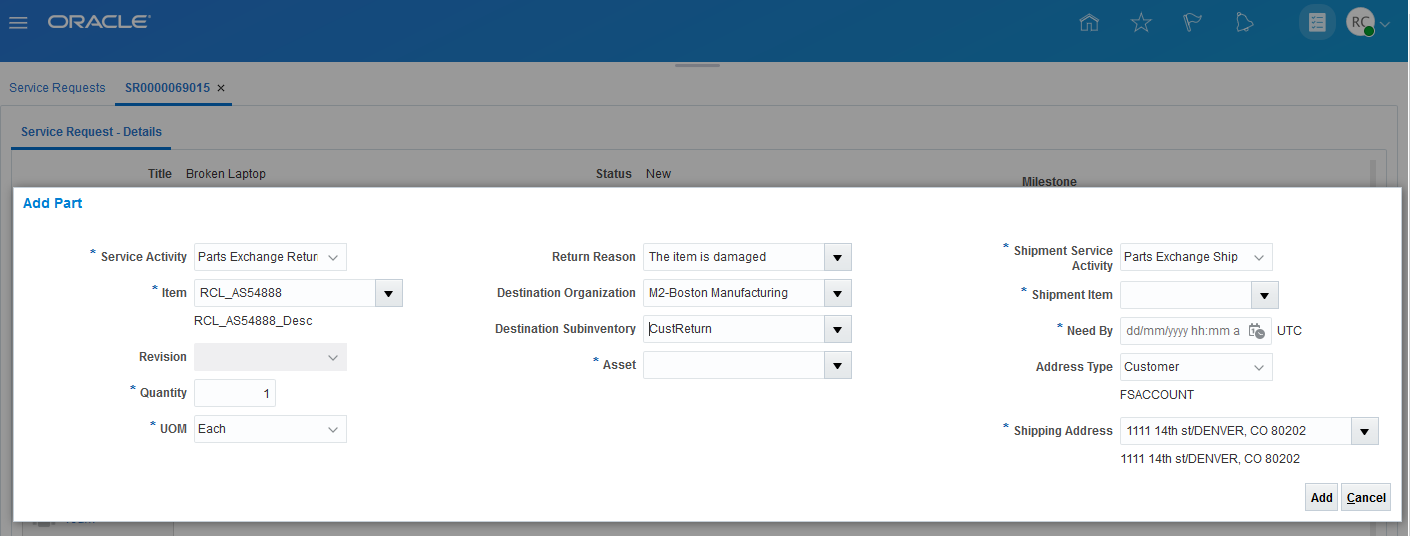
Service Request Add Part UI After User Selects the Part Exchange Return Service Activity Code and Enters Other Return Information
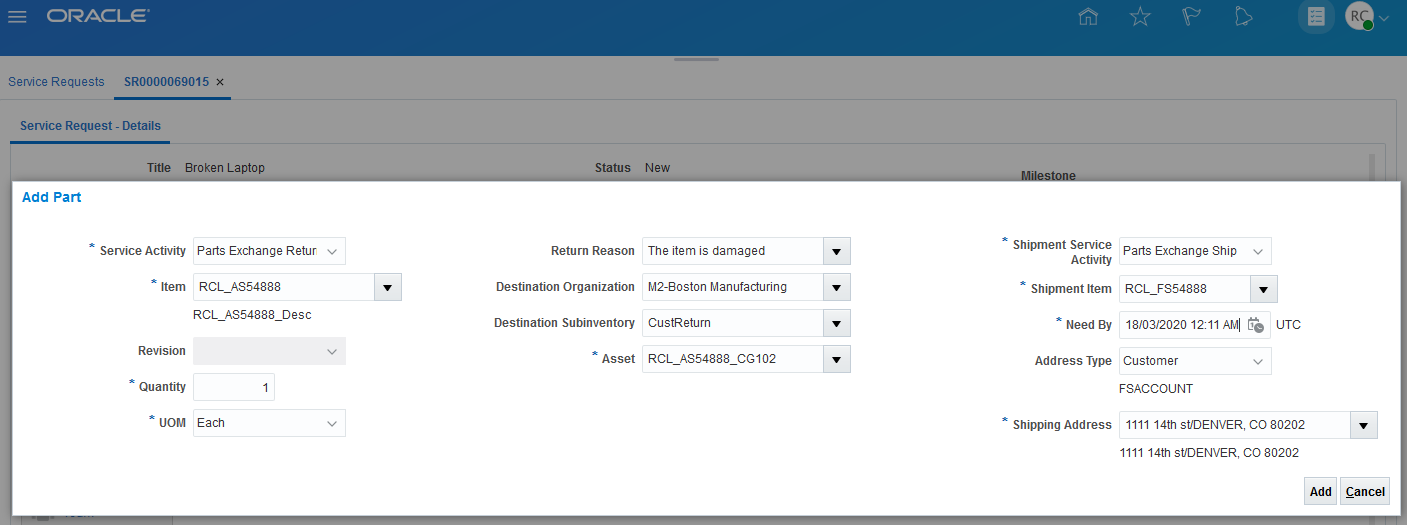
Service Request Add Parts UI After You Enter Shipment Information
When you select a return service activity code for the Part Exchanges or for Depot Repair Logistics business processes, the Add Part UI displays additional fields that you need to complete to create the corresponding shipment part requirement line. In addition to the shipment service activity code, item, need-by date, and ship-to address, you must also select the asset or serial number of the broken part or product being returned so the Installed Base can be updated when it is received and when the replacement part is shipped. Note that, in this case, the Destination Organization and Sub-inventory are for the return-to warehouse.
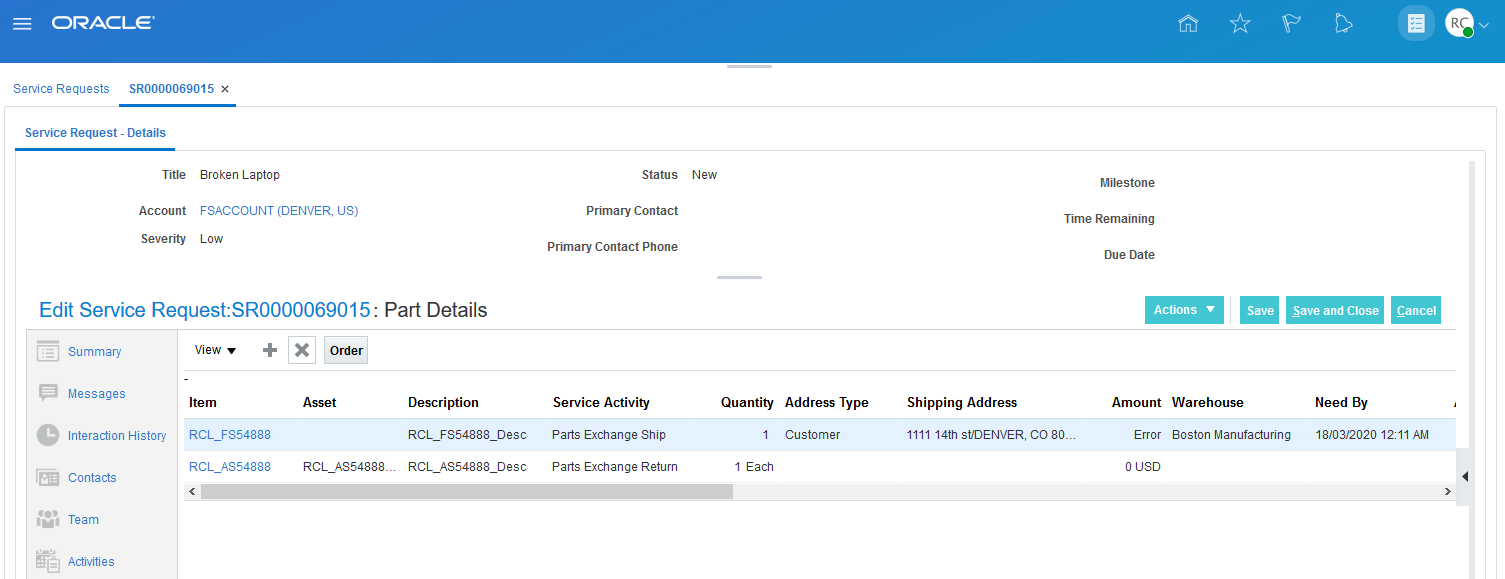
Service Request Parts Tab with Part Exchange Return and Shipment Lines
When you click the Add button in the Add Part UI, two part requirement lines are created, and the shipment line is automatically sourced. In this example, the required part will be shipped from the Boston warehouse. In this example, the prices are set to zero because this part exchange is covered under a warranty.
DEPOT REPAIR AND RETURN
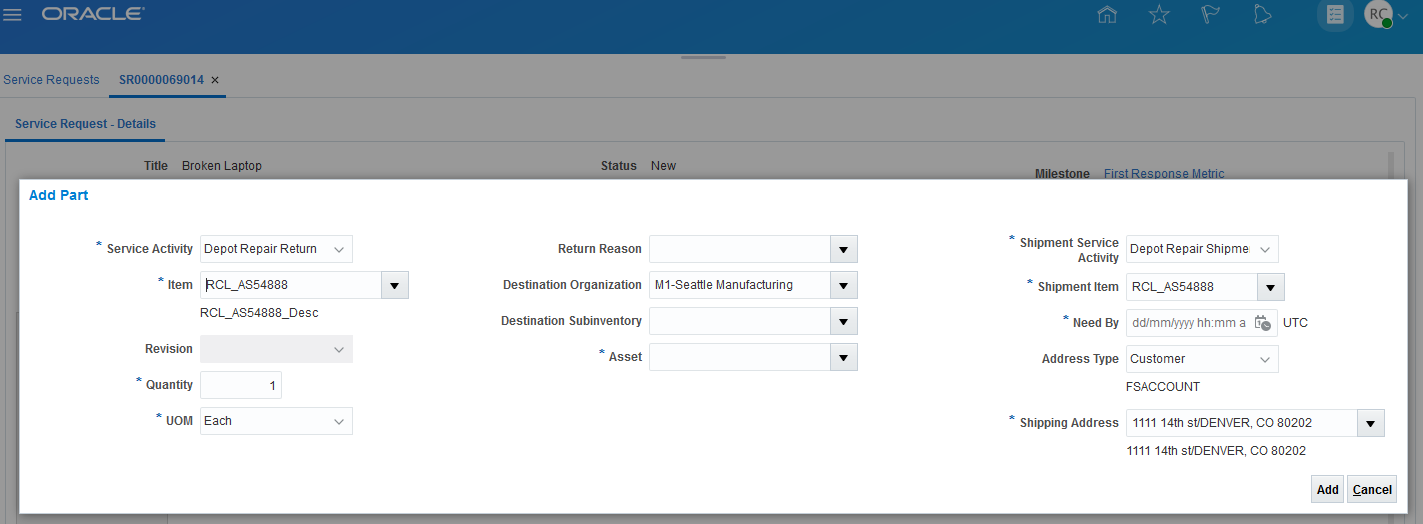
Service Request Add Parts UI After You Select a Depot Repair Logistics Return Service Activity Code
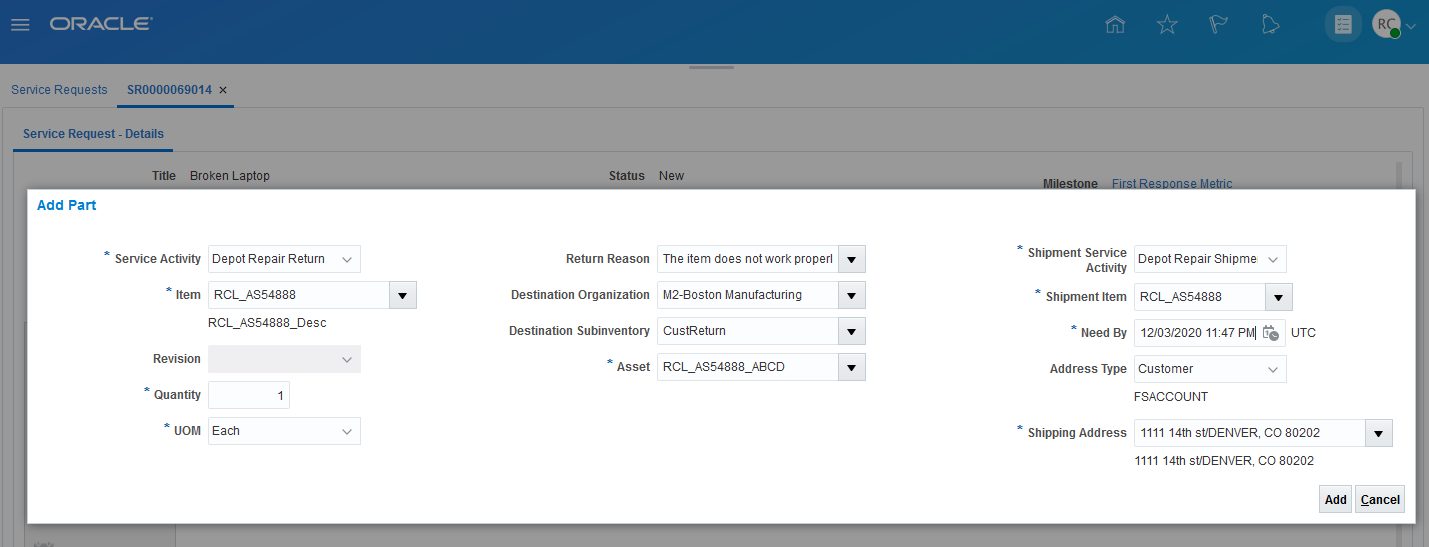
Service Request Add Parts UI After You Enter Return and Shipment Information
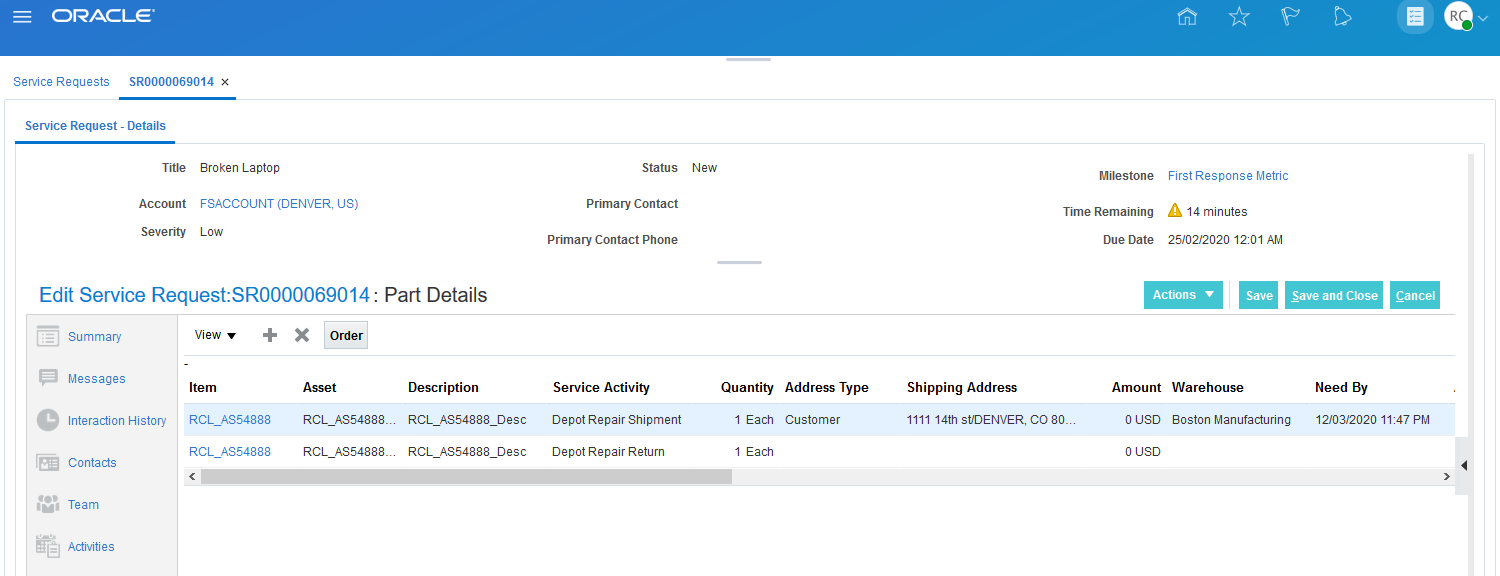
SR Part Tab with Depot Repair Return and Shipment Lines
When you click the Add button in the Add Part UI, two part requirement lines are created. The shipment line is sourced from the warehouse where the broken part will be returned (in this case, the Boston warehouse). The charge amounts are set to zero as these lines are for the return and shipment of a customer owned product or part. When you click the Order button, a sales order will be created to initiate the return. After the broken product or part is repaired and debriefed, charges will be added to this sales order for the labor and parts used in the repair.
Watch a Demo
Steps to Enable
Set up service activity codes (SACs) for the new seeded business processes (Parts Exchange and Depot Repair Logistics). Depot Repair Logistics SACs should be set up with a Zero Charge flag for the return and shipment of the customer asset. Part Exchange SACs can be set up without the Zero Charge flag if you want prices calculated in the Add Part UI (and then passed to Order Management).
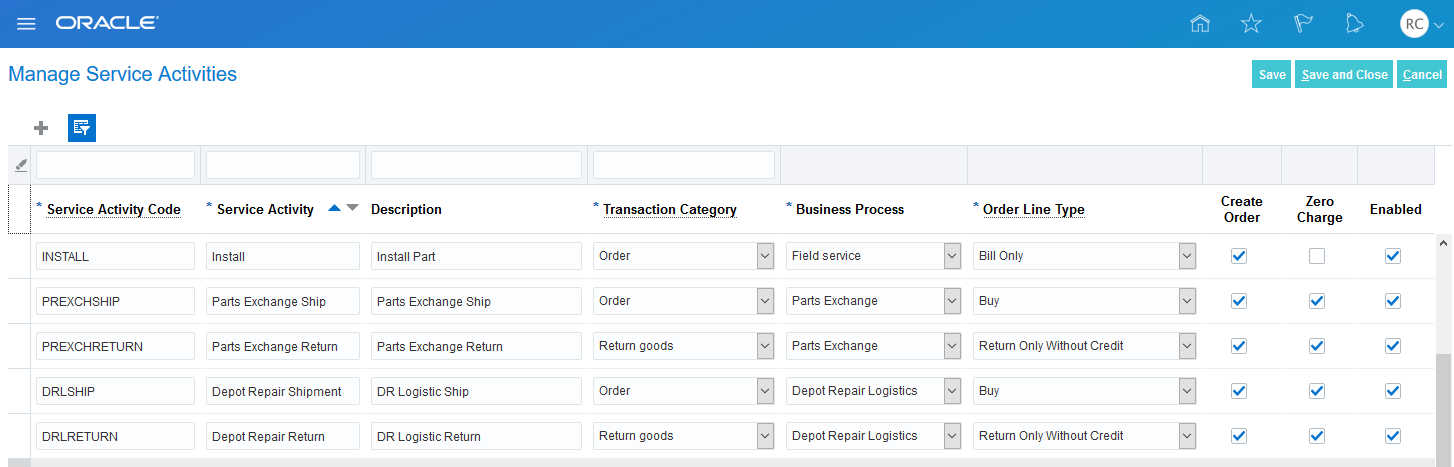
Part Exchange and Depot Repair Logistics SACs
Key Resources
Role Information
- Job Role Name and Code:
- Field Service Administrator (ORA_RCL_FIELD_SERVICE_ADMINISTRATOR)
- Privilege Name and Code:
- View Requirement Lines (RCL_PARTS_REQ_VIEW)
- Manage Part Orders (SVC_MANAGE_PART_ORDERS). In CRM you must have this privilege to create a part requirement line and order parts.
Access Service Requests and Work Orders Directly from Service Logistics
You can now drill down on the service request and work order numbers to open their corresponding B2B Service UIs.

Work Order and Charges UI with Service Request Link
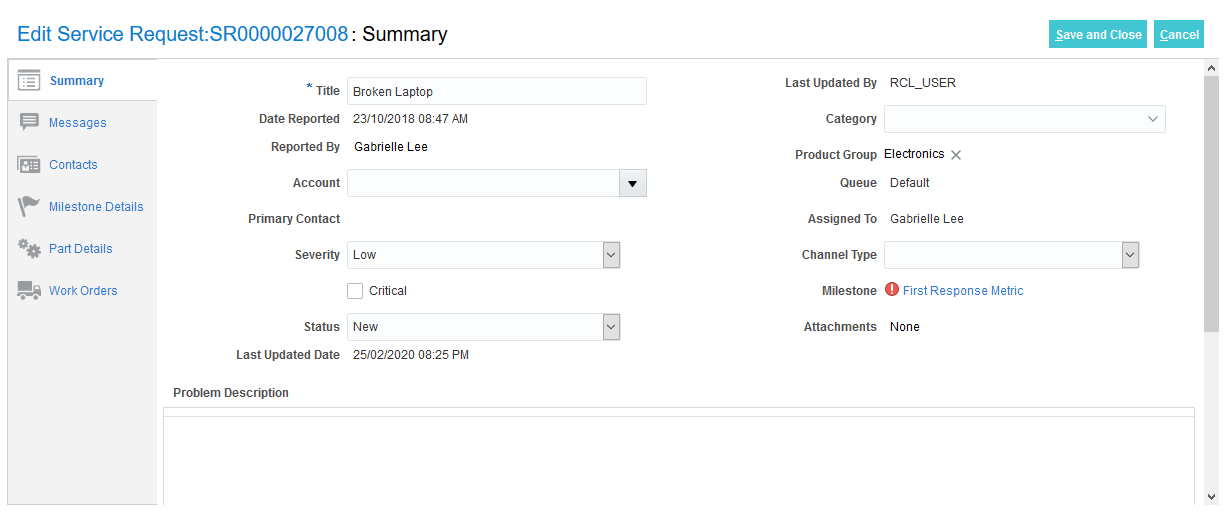
Service Request UI accessed from Work Order and Charges UI
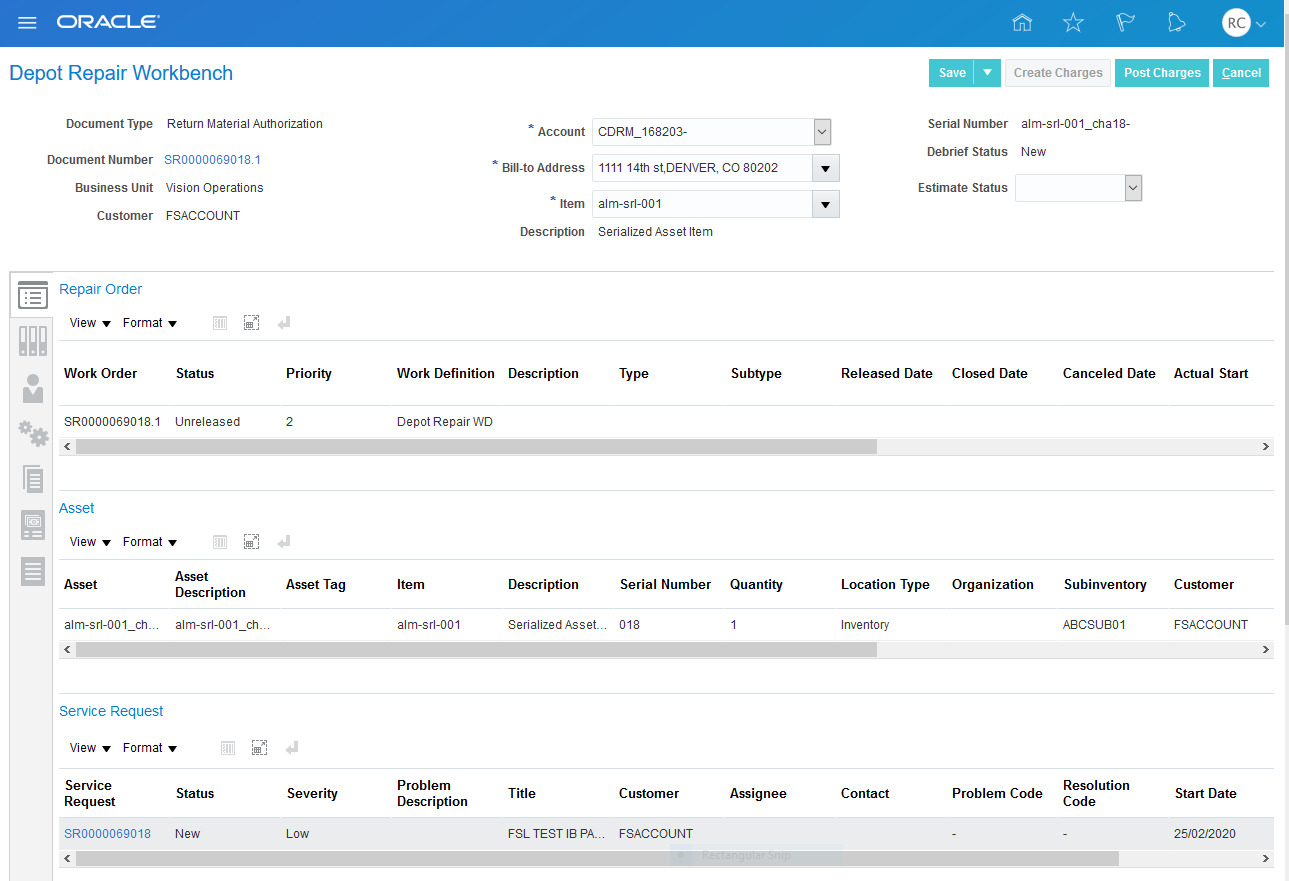
Depot Repair Workbench Overview with Service Request Link
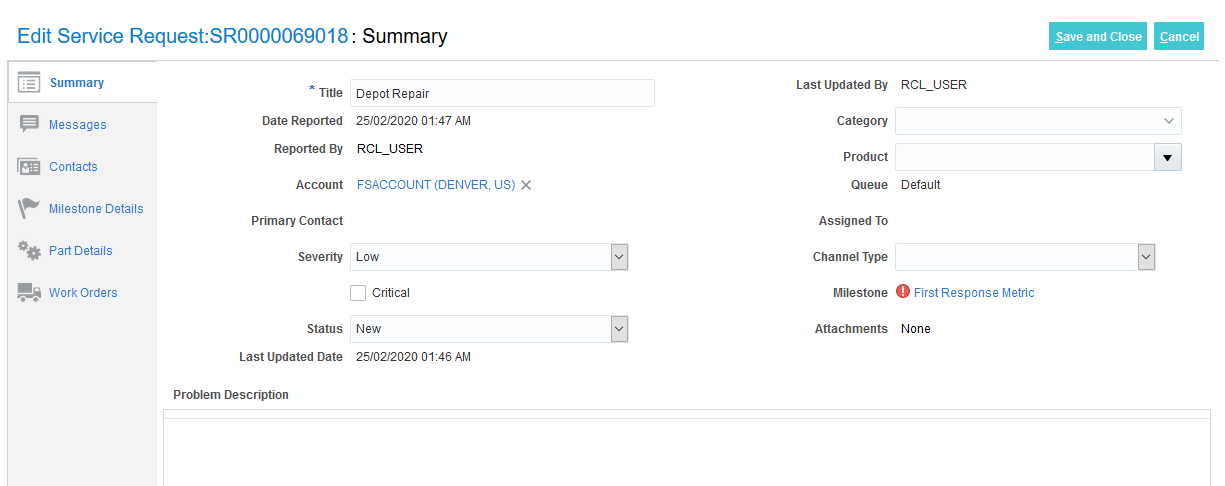
Service Request UI Opened from Depot Repair Workbench Overview Tab
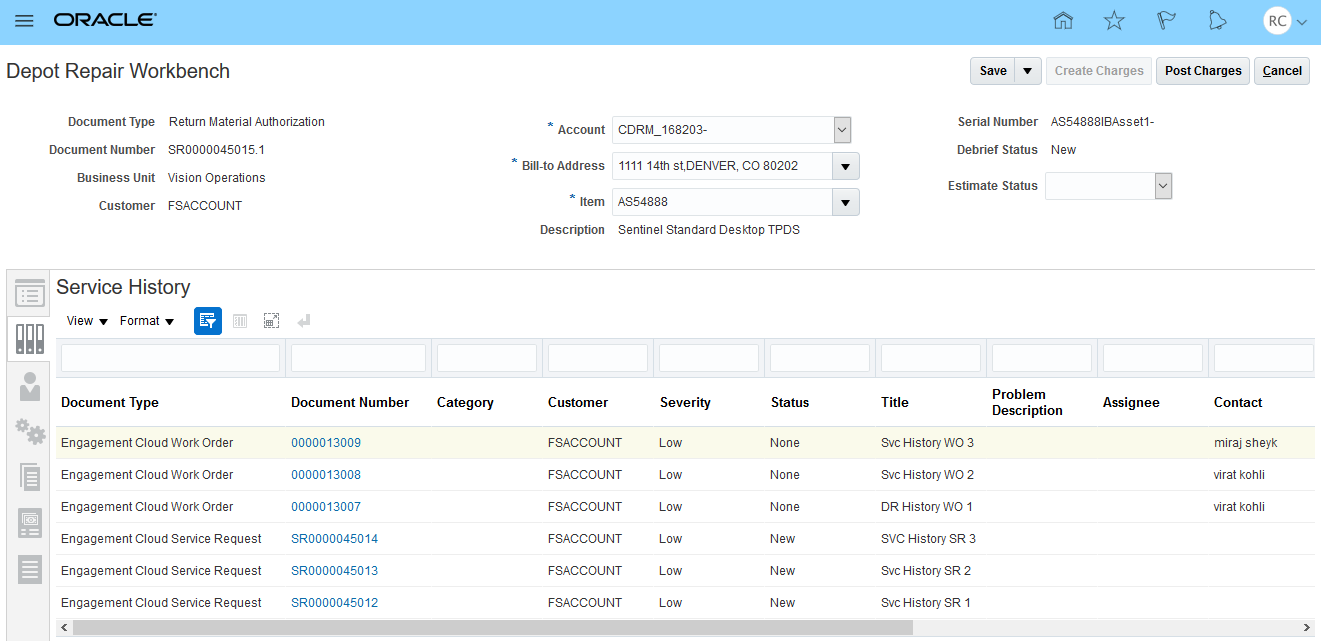
Depot Repair Workbench Service History Tab with Links to Service Request and Work Order UIs
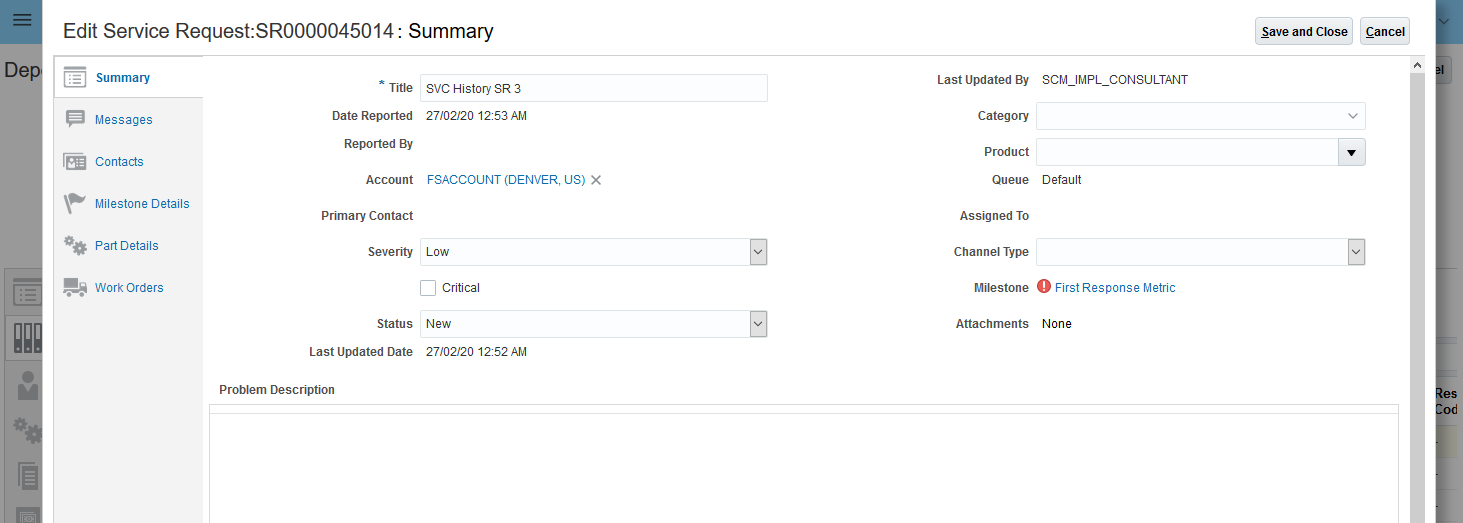
Service Request UI Opened from Depot Repair Workbench History Tab
Steps to Enable
You don't need to do anything to enable this feature.
Role Information
- Job Role Name and Code:
- Field Service Administrator (ORA_RCL_FIELD_SERVICE_ADMINISTRATOR)
- Privilege Name and Code:
- View Requirement Lines (RCL_PARTS_REQ_VIEW)
- Manage Part Orders (SVC_MANAGE_PART_ORDERS). In CRM you must have this privilege to create a part requirement line and order parts.