
This document will continue to evolve as existing sections change and new information is added. All updates appear in the following table:
| Date | Product | Feature | Notes |
|---|---|---|---|
| 18 JUN 2021 | Created initial document. |
This guide outlines the information you need to know about new or improved functionality in this update, and describes any tasks you might need to perform for the update. Each section includes a brief description of the feature, the steps you need to take to enable or begin using the feature, any tips or considerations that you should keep in mind, and the resources available to help you.
Security and New Features
The Role section of each feature identifies the security privilege and job role required to use the feature. If feature setup is required, then the Application Implementation Consultant job role is required to perform the setup, unless otherwise indicated. (If a feature doesn't include a Role section, then no security changes are required to use the feature.)
If you have created job roles, then you can use this information to add new privileges to those roles as needed. For details about how to compare your configured job roles to predefined job roles and add security artifacts to your configured job roles, see the Security Console and Roles and Role Assignments chapters in the Oracle SCM Cloud: Securing SCM guide on the Oracle Help Center.
Give Us Feedback
We welcome your comments and suggestions to improve the content. Please send us your feedback at oracle_fusion_applications_help_ww_grp@oracle.com.
Optional Uptake of New Features (Opt In)
Oracle Cloud Applications delivers new updates every quarter. This means every three months you'll receive new functionality to help you efficiently and effectively manage your business. Some features are delivered Enabled meaning they are immediately available to end users. Other features are delivered Disabled meaning you have to take action to make available. Features delivered Disabled can be activated for end users by stepping through the following instructions using the following privileges:
- Review Applications Offering (ASM_REVIEW_APPLICATIONS_OFFERINGS_PRIV)
- Configure Oracle Fusion Applications Offering (ASM_CONFIGURE_OFFERING_PRIV)
Here’s how you opt in to new features:
- Click Navigator > My Enterprise > New Features.
- On the Features Overview page, select your offering to review new features specific to it. Or, you can leave the default selection All Enabled Offerings to review new features for all offerings.
- On the New Features tab, review the new features and check the opt-in status of the feature in the Enabled column. If a feature has already been enabled, you will see a check mark. Otherwise, you will see an icon to enable the feature.
- Click the icon in the Enabled column and complete the steps to enable the feature.
In some cases, you might want to opt in to a feature that's not listed in the New Features work area. Here's how to opt in:
- Click Navigator > My Enterprise > Offerings.
- On the Offerings page, select your offering, and then click Opt In Features.
- On the Opt In page, click the Edit Features (pencil) icon for the offering, or for the functional area that includes your feature.
- On the Edit Features page, complete the steps to enable the feature.
For more information and detailed instructions on opting in to new features for your offering, see Offering Configuration.
Opt In Expiration
Occasionally, features delivered Disabled via Opt In may be enabled automatically in a future update. This is known as an Opt In Expiration. If your cloud service has any Opt In Expirations you will see a related tab in this document. Click on that tab to see when the feature was originally delivered Disabled, and when the Opt In will expire, potentially automatically enabling the feature. You can also click here to see features with Opt In Expirations across all Oracle Cloud Applications.
Column Definitions:
Report = New or modified, Oracle-delivered, ready to run reports.
UI or Process-Based: Small Scale = These UI or process-based features are typically comprised of minor field, validation, or program changes. Therefore, the potential impact to users is minimal.
UI or Process-Based: Larger Scale* = These UI or process-based features have more complex designs. Therefore, the potential impact to users is higher.
Features Delivered Disabled = Action is needed BEFORE these features can be used by END USERS. These features are delivered disabled and you choose if and when to enable them. For example, a) new or expanded BI subject areas need to first be incorporated into reports, b) Integration is required to utilize new web services, or c) features must be assigned to user roles before they can be accessed.
| Ready for Use by End Users Reports plus Small Scale UI or Process-Based new features will have minimal user impact after an update. Therefore, customer acceptance testing should focus on the Larger Scale UI or Process-Based* new features. |
Customer Must Take Action before Use by End Users Not disruptive as action is required to make these features ready to use. As you selectively choose to leverage, you set your test and roll out timing. |
|||||
|---|---|---|---|---|---|---|
| Feature |
Report |
UI or |
UI or |
|
||
Capture Additional Shipping Information for Depot Repair Transfer Orders |
||||||
Capture Additional Shipping Information for Depot Repair Transfer Orders
SHIPPING METHOD AND REQUESTED SHIP DATE
Requested Ship Date and Shipping Method have been added to the Depot Repair Create Transfer Orders UI. This gives the depot repair manager more control over the creation of depot repair transfer orders. Before this enhancement, the requested ship date always defaulted to the current day and time and the shipping method defaulted from the transit times setup form source to destination inventory organizations. In the example below, the depot repair manager has requested that the broken product be shipped to the repair depot on May 28, 2021 using shipping method John's Transportation-Air-Next day air.
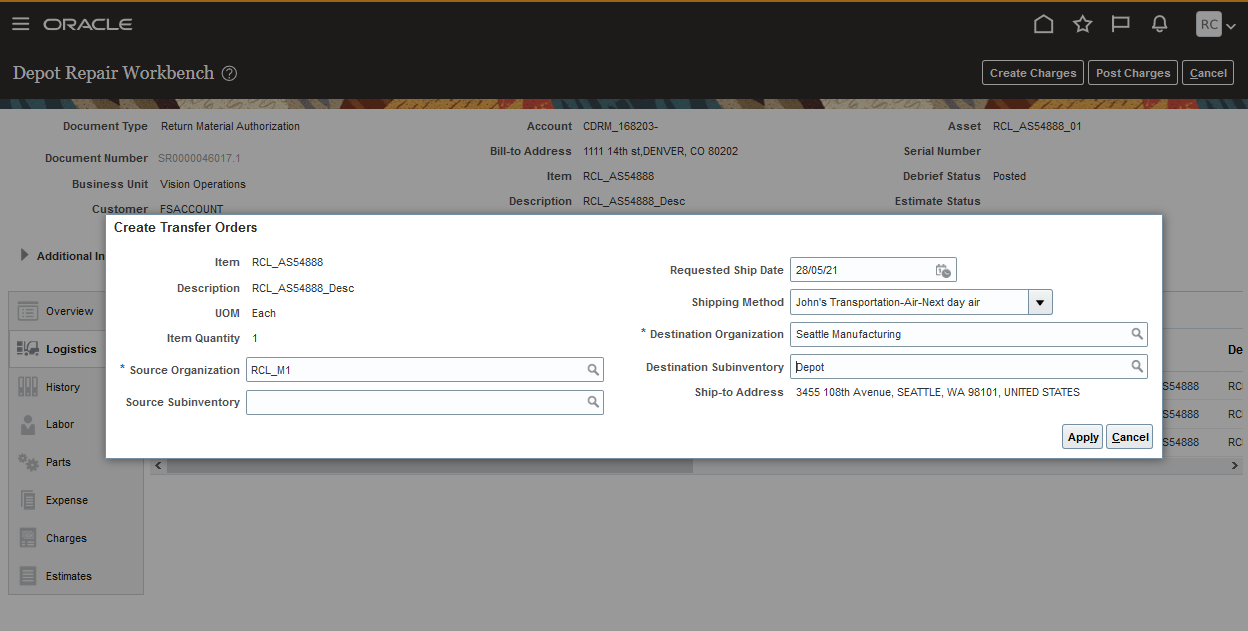
Create Depot Repair Transfer Order UI
REDESIGNED SALES ORDER DETAILS UI
The Order Details UI has been redesigned to display sales orders as shown in the example below. The redesigned UI will display multiple rows if the order line includes multiple shipments. The Order Details UI will retain its current layout when displaying transfer orders.
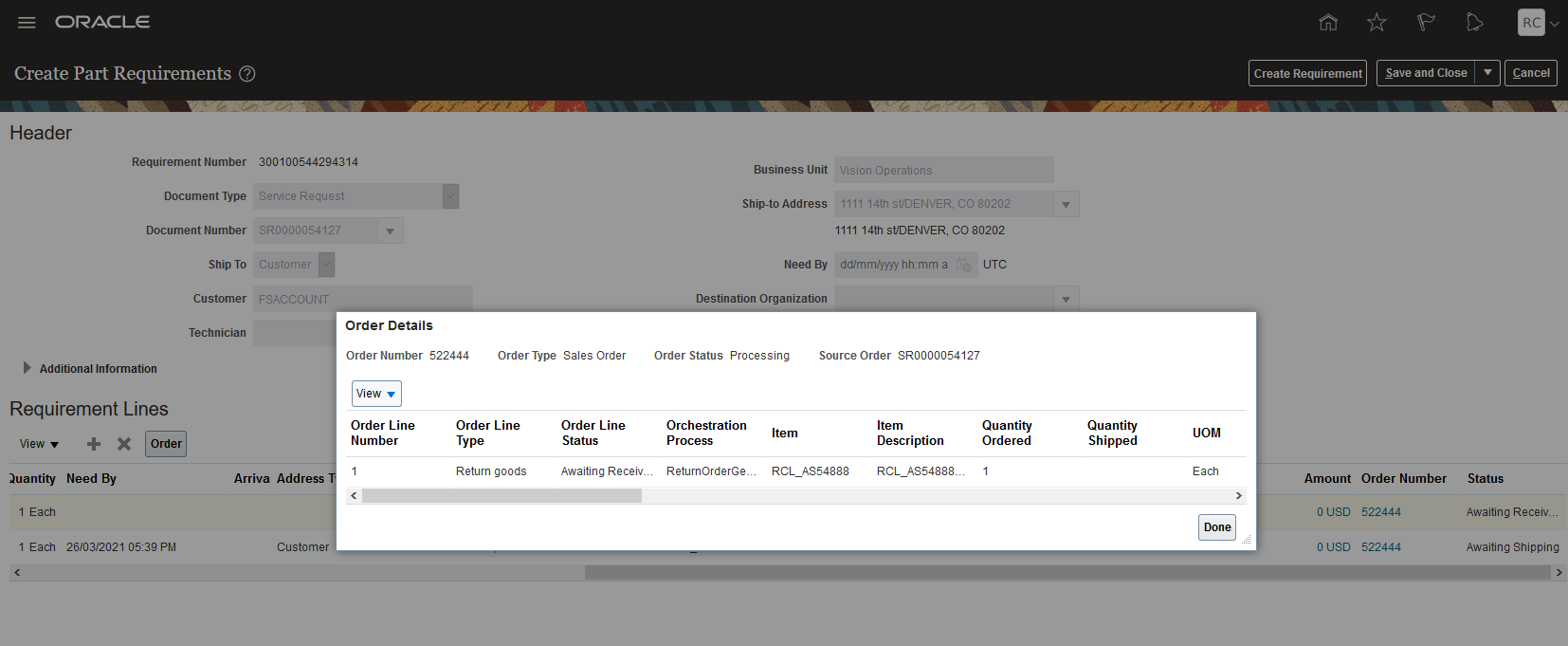
Service Request Parts Tab - Sales Order Details UI - Depot Repair Return
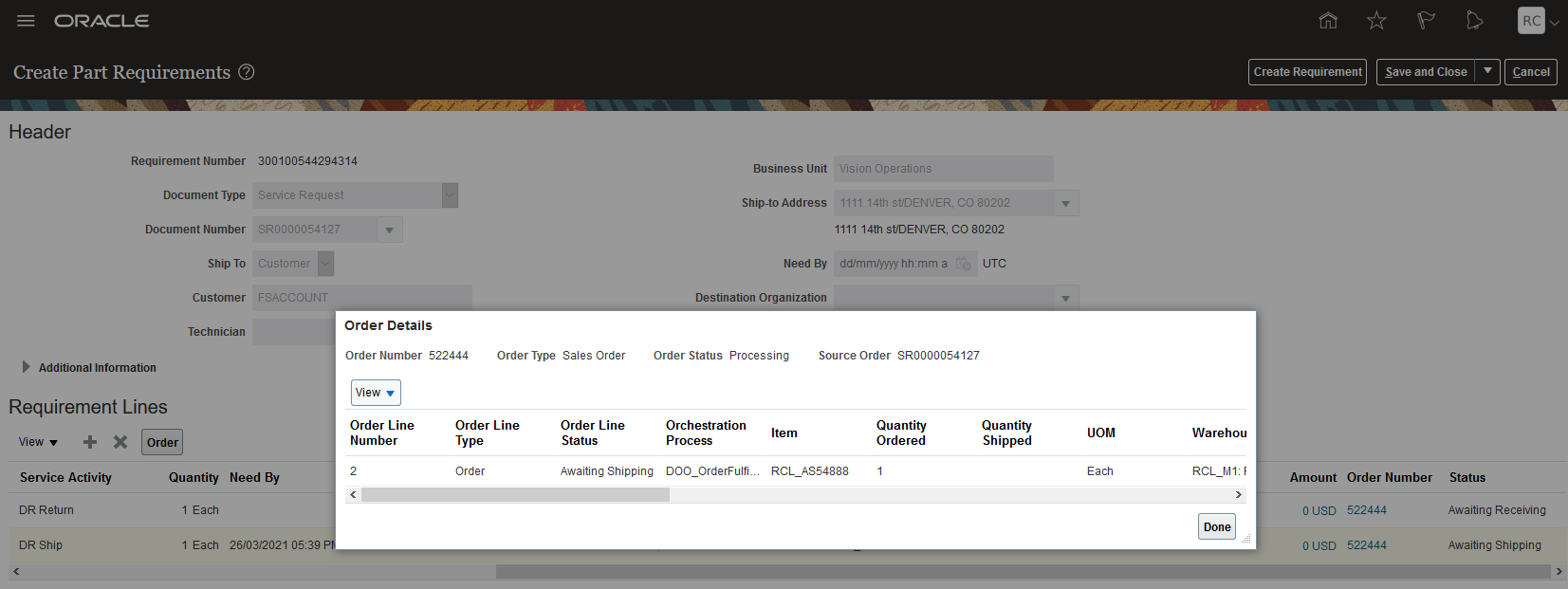
Service Request Part Requirement - Sales Order Details UI - Depot Repair Shipment
PARTS SEARCH NEED BY DATE
A Need By date field has been added to the Parts Search UI. You can now set need-by dates further out into the future and then search for the required parts when they are not available by the original need-by date set in the Add Part UI.
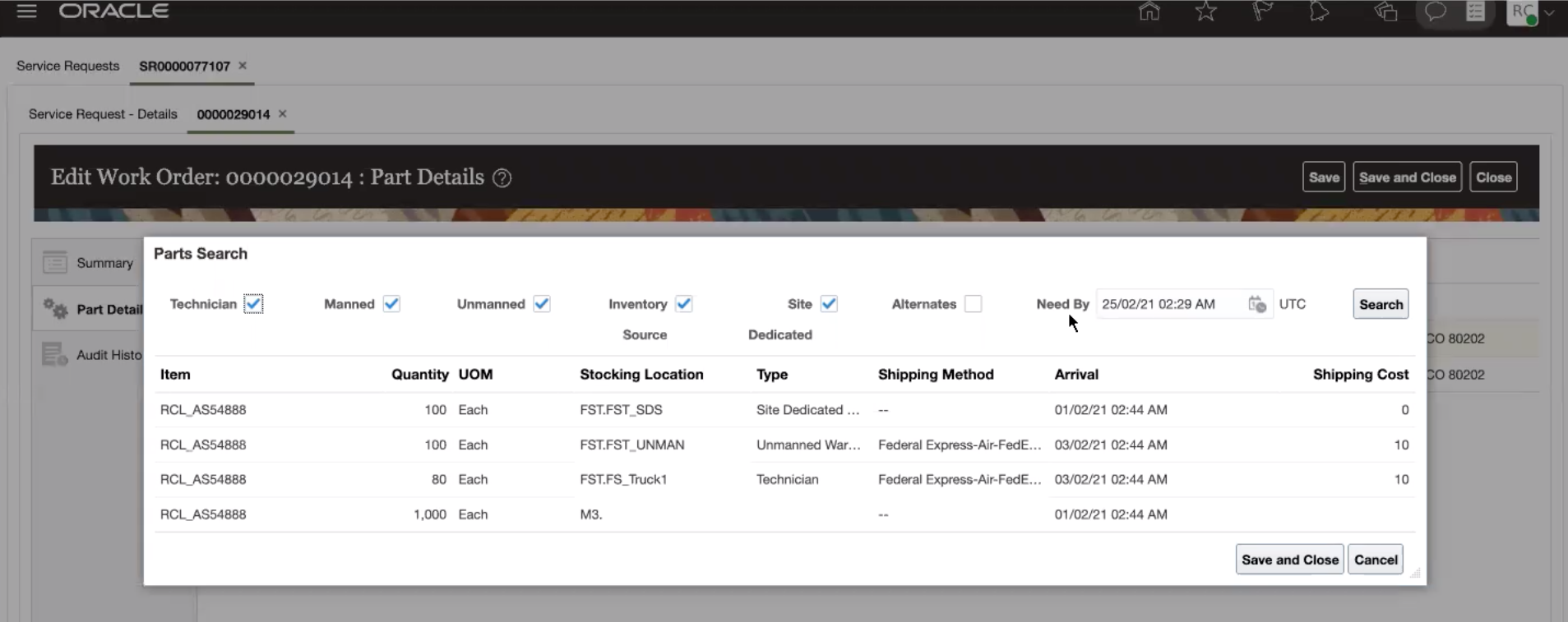
Parts Search UI Which Need by Date
The ability to select the shipping method and enter the ship date gives you greater control of your depot repair supply chain.
The ability to enter the need by date on the part search UI allow you to expand your parts search when no parts are found or are only found in non-optimal locations.
The redesigned Sales Order Detail UI gives you much clearer view of the sales order created to fulfill your service request part requirements.
Steps to Enable
Before you can select shipping methods in the Create Depot Repair Transfer Orders UI, they must be set up in the Manage Carriers UI and assigned to your source inventory organizations.
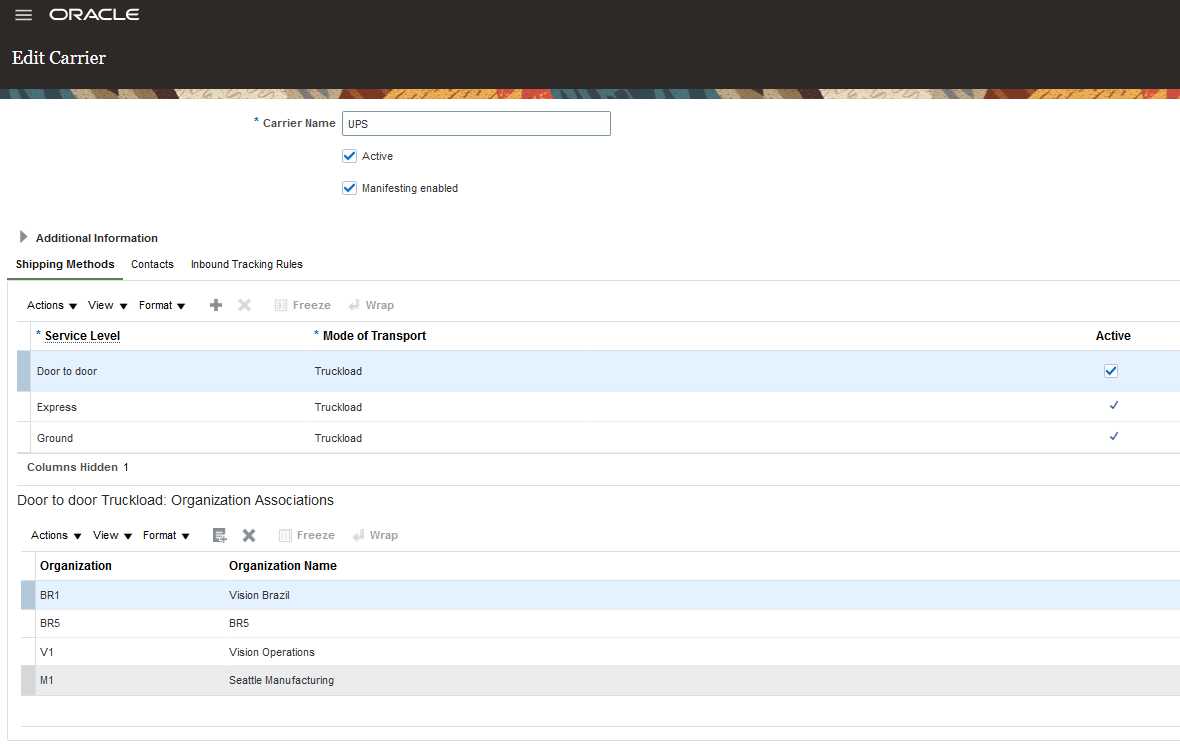
Manage Carriers UI
Role Information
To use this feature, the following privileges or roles are required:
- Job Role Name and Code:
- Depot Repair Manager (ORA_RCL_DEPOT_REPAIR_MANAGER_JOB) - - This role gives the user access to the Manage Depot Repair UI and the Depot Repair Workbench UI
Generate Project Expenditures for Service Debrief
In the Maintenance Cloud application, field service and depot repair work order charges are currently posted as costs to maintenance work orders. In project-based scenarios, debrief repair charges should be transferred their associated projects. To achieve Service Logistics to Projects integration, the Service Logistics application has been enhanced to support the enable project association for repair work orders.This enhancement leverages the existing integration between Maintenance Cloud and Projects for posting charges to projects.
FEATURES
- Projects association for field service work orders
- Projects association for depot repair work orders
Projects association for field service work orders
From the Manage Charges and Estimates UI, you can now associate project details for document types such as service work orders and third party work orders.
The following projects attributes can be associated to the selected field service work order (Document Type).
- Project Number
- Task Number
- Expenditure Item Date
- Expenditure Type
- Expenditure Organization (read-only attribute, will default to the debrief maintenance work order organization)
Apart from these key attributes, if there are other attributes defined based on projects setup, they can also be entered.
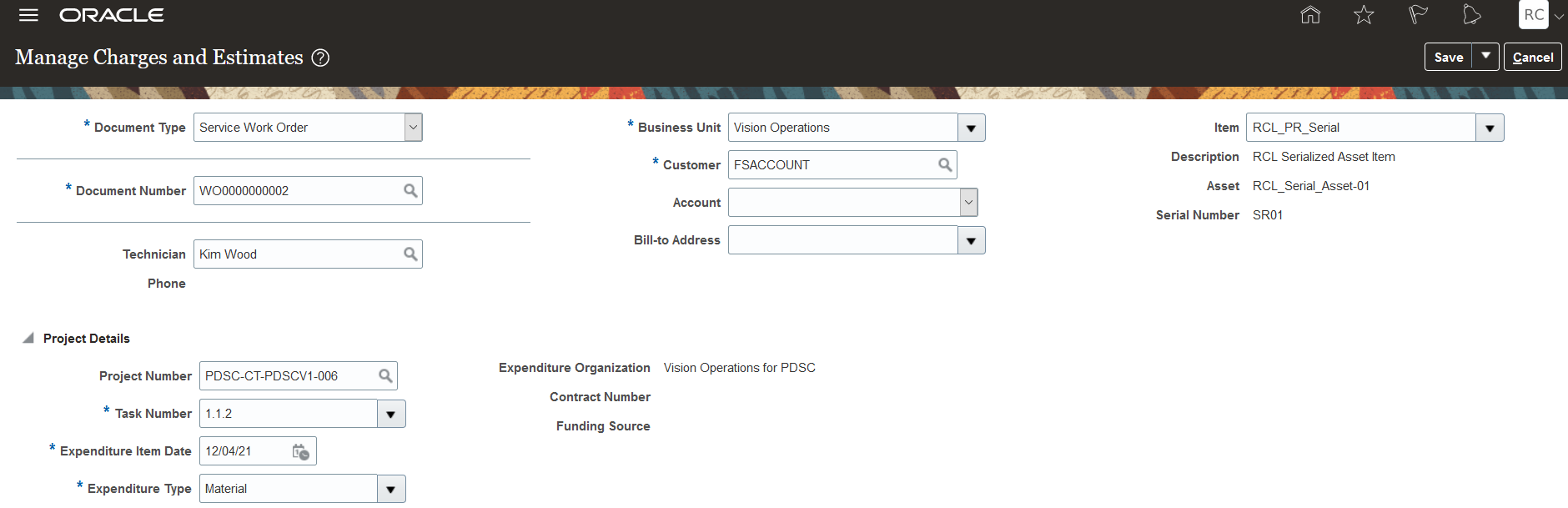
Note: For the preventive maintenance work orders that were created in Maintenance Cloud and then converted to field service work orders, the project details association will be retrieved automatically from Maintenance Cloud. For such work orders, the Service Logistics Manage Charges and Estimates page will display the project details in the Project Details region as read-only.
Projects association for depot repair work orders
The Create Depot Repair Work Order UI has been enhanced to support the association of project details to the repair maintenance work order being created.
The Project Details region for the repair maintenance work order will display the project attributes as follows:
- Project Number
- Task Number
- Expenditure Item Date
- Expenditure Type
- Expenditure Organization (read-only attribute, will default to the repair maintenance work order organization)
Apart from these key attributes, if there are other attributes defined based on projects setup, they can also be entered.
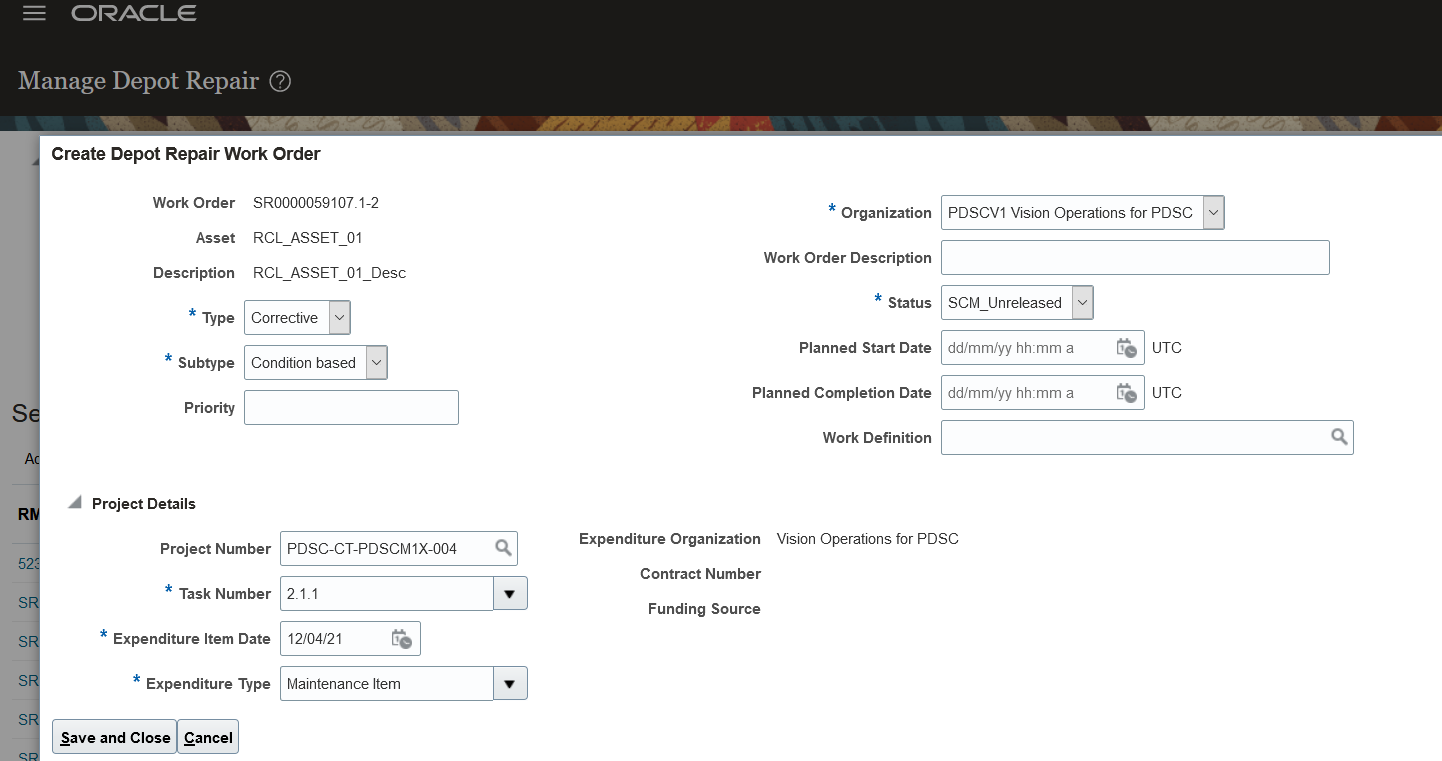
Integrating information from Oracle Projects for debrief and repair work order charges enables organizations and business units to leverage the cost collection process, including any associated charges from Service Logistics.
Steps to Enable
Use the Opt In UI to enable this feature. For instructions, refer to the Optional Uptake of New Features section of this document.
Offering: Manufacturing and Supply Chain Materials Management
Perform the following steps to enable the Oracle Projects integration functionality in Service Logistics.
- Choose opt-in for the Project Driven Supply Chain feature in Manufacturing and Supply Chain Materials Management offering.
- Choose the Enable Inventory Tracking by Project inventory organization parameter for the desired inventory organization or plant.
- Classify the inventory organizations or plants enabled for inventory tracking as Project Expenditure Organizations and also include them in the project hierarchy in Oracle Project Portfolio Management.
- If project-specific debrief or depot repair maintenance costs will be sent to Oracle Project Financials, then you must classify the inventory organizations that are enabled for inventory tracking as Project Expenditure Organizations in Oracle Project Portfolio Management.
- If project-specific debrief or depot repair maintenance costs are not to be sent to Oracle Project Financials, then you should setup Project Types in Project Portfolio Management for exclusion from cost collections in Supply Chain Management. Refer to the Execute Project-Specific Supply Chain Without Oracle Project Financials release readiness training to know more about this capability.
Role Information
Users who are assigned these predefined job roles are able to access this feature in Service Logistics
NOTE: The feature should have been opted in and the requisite setups are done in Projects application as mentioned in the Steps to Enable section above.
- Field Service Administrator (ORA_RCL_FIELD_SERVICE_ADMINISTRATORS)
- Field Service Technician Duty (ORA_RCL_FIELD_SERVICE_TECHNICIAN_DUTY)
- Depot Manager (ORA_RCL_DEPOT_REPAIR_MANAGER_JOB)
Support Standalone B2B Service Work Orders
Service Logistics now fully supports B2B Service Standalone Field Service Work Orders. Standalone work orders are work orders that are not associated with service requests. This support includes creating parts requirements, ordering parts, debriefing field service activities and calculating service charges.
Typically, a field service work order is created to fulfill a customer service request. However, there are cases where field service is needed but does not require a service request. Common use cases include installations, preventive maintenance, and field change orders.
The following enhancements were made to the Service Logistics Parts UIs to support standalone B2B service work orders (WOs).
- Manage Parts Requirements UI search has been enhanced to retrieve and display part requirements associated to standalone WOs.
- B2B Service Work Order Add Part UI:
- The ship-to address now defaults from the work order customer party instead of the service request customer.
- The WO asset is now used to calculate part charges instead of the service request asset.
- The WO asset is now used to to filter item LOV by service BOM instead of the service request asset.
- Create Part Requirement UI (accessed from button on Manage Part Requirements UI):
- The document number field LOV now includes standalone WOs.
- When a WO document type is selected, all of the part requirement header fields now default from the WO instead of the service request.
The Create Debrief and Charges REST service has been enhanced to support standalone WOs.
The following enhancements were made to the Manage Work Orders and Charges UI to support standalone B2B service work orders (WOs).
- All of the WO Queries have been enhanced to retrieve and display standalone WOs.
- The default query has been enhanced to include standalone WOs.
- The document number LOV has been enhanced to include standalone WOs.
The following enhancements were made to the Manage Charges and Estimates UI to support standalone B2B service work orders (WOs).
- The debrief header asset is now used to get subscription coverage when calculating estimates and charges instead of the service request asset.
- The parent asset on part install debrief transactions now defaults from the asset on the WO instead of the service request asset.
The following enhancements were made to the Create Charges and Estimates UI to support standalone B2B service work orders (WOs).
- The document number LOV has been enhanced to display standalone WOs.
- When a WO document is selected, all of the debrief header fields now default from the WO instead of the service request. These attributes include technician, business unit, and customer asset.
- Subscription coverage information is now retrieved from the debrief header WO asset instead of from the asset associated with the service request.
Better support for field service processes that don’t require the overhead of a service request. Examples include installations, upgrades, field change orders, and preventive maintenance.
Steps to Enable
You don't need to do anything to enable this feature.