
This document will continue to evolve as existing sections change and new information is added. All updates appear in the following table:
| Date | Module | Feature | Notes |
|---|---|---|---|
| 26 MAY 2023 | Time & Labor |
Enhancement to Time Card Approvals | Updated document. Revised feature information. |
| 24 JUN 2022 | Time & Labor | Integration with the Cancel Work Relationship Process in Global Human Resources | Updated document. Revised feature information. |
| 03 JUN 2022 | Created initial document. |
HCM Cloud applications have two types of patches you can receive that are documented in this What’s New:
- Release Updates (22A, 22B, 22C, and 22D)
- Optional Monthly Maintenance Packs to each update
It is important for you to know what Release Update your environment is on. You can find this in your Cloud Portal.
 HAVE AN IDEA?
We’re here and we’re listening. If you have a suggestion on how to make our products better, please let us know. To enter an idea go to the Ideas Lab on Oracle Customer Connect. In this document wherever you see the light bulb icon after the feature name it means we delivered one of your ideas.
Suggested Reading for all HCM Products
Human Resources What’s New – In the Global Human Resources section you will find features on the base application in which other application are built upon.
NOTE: Not all Global Human Resource features are available for Talent and Compensation products
Oracle Human Capital Management Cloud Functional Known Issues and Maintenance Packs (Document ID 1554838.1). These documents identify bug fixes and possible known issues. You will also need to review these documents based in the release update version you are currently on or will be moving to.
- Oracle Help Center – Here you will find guides, videos and searchable help.
- Release Readiness – New Feature Summary, What’s New, Feature Listing Spreadsheet, Spotlights and Release Training
GIVE US FEEDBACK
We welcome your comments and suggestions to improve the content. Please send us your feedback at oracle_fusion_applications_help_ww_grp@oracle.com. Indicate you are inquiring or providing feedback regarding the HCM Cloud What’s New in the body or title of the email.
DISCLAIMER
The information contained in this document may include statements about Oracle’s product development plans. Many factors can materially affect Oracle’s product development plans and the nature and timing of future product release updates. Accordingly, this Information is provided to you solely for information only, is not a commitment to deliver any material, code, or functionality, and should not be relied upon in making purchasing decisions. The development, release update, and timing of any features or functionality described remains at the sole discretion of Oracle.
This information may not be incorporated into any contractual agreement with Oracle or its subsidiaries or affiliates. Oracle specifically disclaims any liability with respect to this information. Refer to the Legal Notices and Terms of Use for further information.
Column Definitions:
Report = New or modified, Oracle-delivered, ready to run reports.
UI or Process-Based: Small Scale = These UI or process-based features are typically comprised of minor field, validation, or program changes. Therefore, the potential impact to users is minimal.
UI or Process-Based: Larger Scale* = These UI or process-based features have more complex designs. Therefore, the potential impact to users is higher.
Features Delivered Disabled = Action is needed BEFORE these features can be used by END USERS. These features are delivered disabled and you choose if and when to enable them. For example, a) new or expanded BI subject areas need to first be incorporated into reports, b) Integration is required to utilize new web services, or c) features must be assigned to user roles before they can be accessed.
| Ready for Use by End Users Reports plus Small Scale UI or Process-Based new features will have minimal user impact after an update. Therefore, customer acceptance testing should focus on the Larger Scale UI or Process-Based* new features. |
Customer Must Take Action before Use by End Users Not disruptive as action is required to make these features ready to use. As you selectively choose to leverage, you set your test and roll out timing. |
|||||
|---|---|---|---|---|---|---|
| Feature |
Report |
UI or |
UI or |
|
||
Integration with the Cancel Work Relationship Process in Global Human Resources |
||||||
Oracle Time and Labor is a comprehensive, easy to use, rule-based time recording and management application. The calendar-based time entry interface and fully configurable time card layout easily address simple and complex time recording needs. Rule templates and the real-time rules engine provide an extensible and robust method to validate time entries and automatically apply pay rules, such as overtime calculations. Time and Labor now integrates completely with the following Oracle Cloud Human Capital Management applications: Global Human Resources, Absence Management, Global Payroll, and Project Costing. This integration insures accurate and consistent data for payroll processing and costing as well as project management billing.
The valid compensatory time card values for an individual can change depending on the corresponding assignment value. You can now show only valid values for the selected assignment by selecting the Assignment based List of Compensatory Time Absence Plan for User new filtered data source for time card fields that include the Compensatory Time Absence Plan time attribute.
This enhancement reduces inadvertent time reporting errors.
Steps to Enable
You don't need to do anything to enable this feature.
Tips And Considerations
You don't need to change your existing time entry configurations unless people have multiple compensatory time plans assigned to them. If they do, we recommend that you do this instead of editing existing time card fields:
- Create additional fields that use the new filtered data source.
- Duplicate the existing layout sets that include the original compensatory time card field.
- In the applicable layouts, replace the original field with the new field.
- Distribute the changes by editing the relevant worker time entry profiles using the Update option. Replace the existing layout set with the new layout set.
Key Resources
For information about configuring compensatory time for use in time cards, see these topics in the Implementing Time and Labor guide:
Enhancement to Payroll Time Transfer
You can now transfer time card data to Global Payroll using the Transfer Time Cards from Time and Labor payroll flow. The new payroll flow lets you use optional transfer parameters for the selected legislative data group, such as time card from and to dates, HCM group, payroll relationship, person, or payroll.
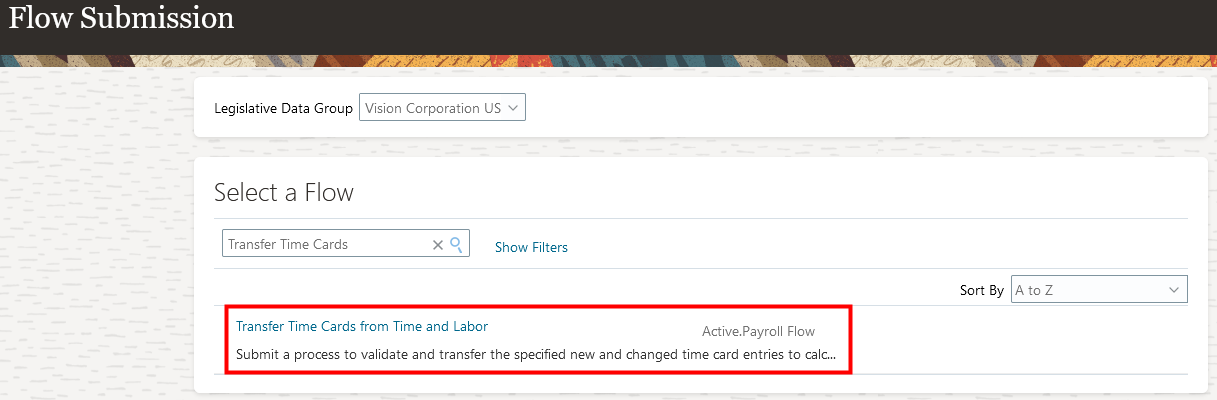
Flow Submission Page with the Transfer Time Cards from Time and Labor Flow Selected
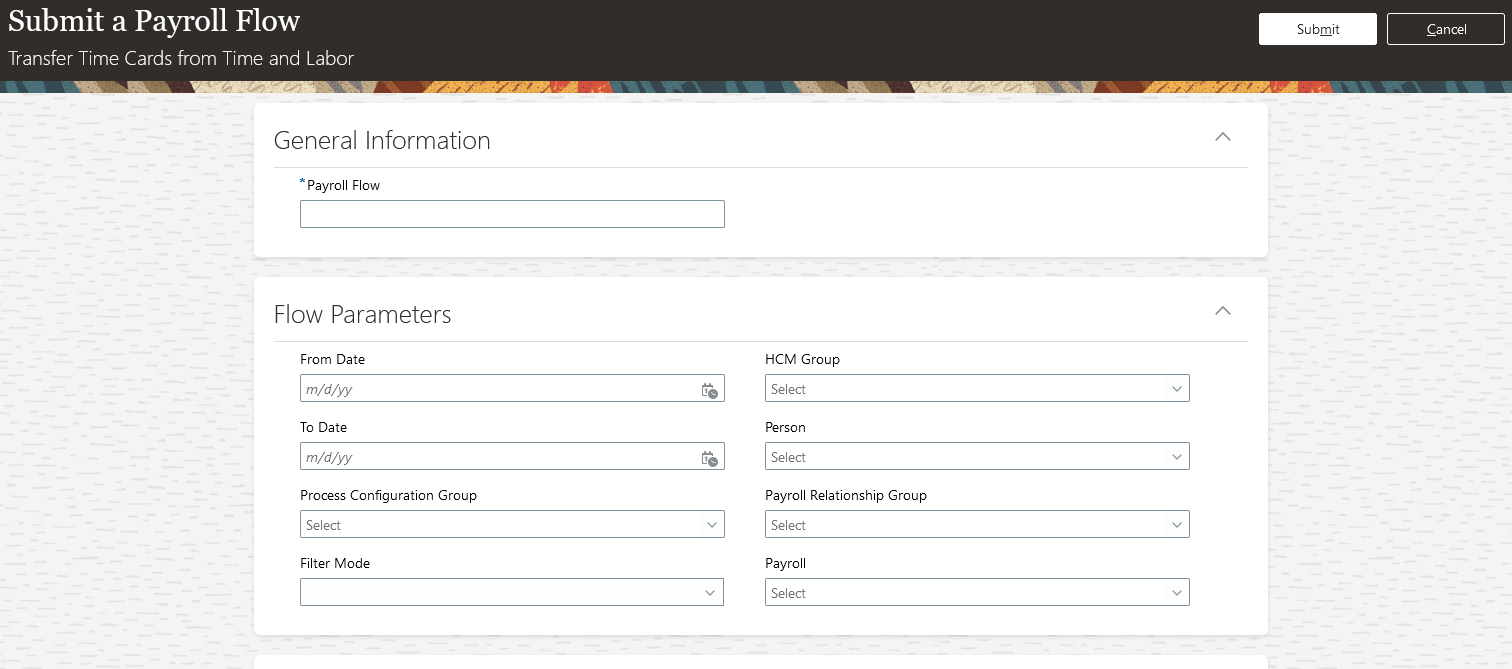
Submit a Payroll Flow Page Showing all of the Time Card Transfer Parameters
The optional transfer from and to date parameters apply to only the end dates of the time card periods. All time card periods that end in the specified range get included in the transfer. For example, if the from date is June 1, 2022 and the to date is June 30, 2022, the transfer includes all time cards with periods that end in June. A time card period that starts in May 2022 and ends June 1, 2022 would also get included.
The optional filter mode indicates the corresponding parameter choice list to populate. For example, if you select the HCM Group filter mode, in the HCM Group choice list, you see all active HCM groups. If you open the Person choice list, you don't see any options. If you change the filter mode to Person, the Person choice list gets populated and you don't see any groups in the HCM Groups choice list.
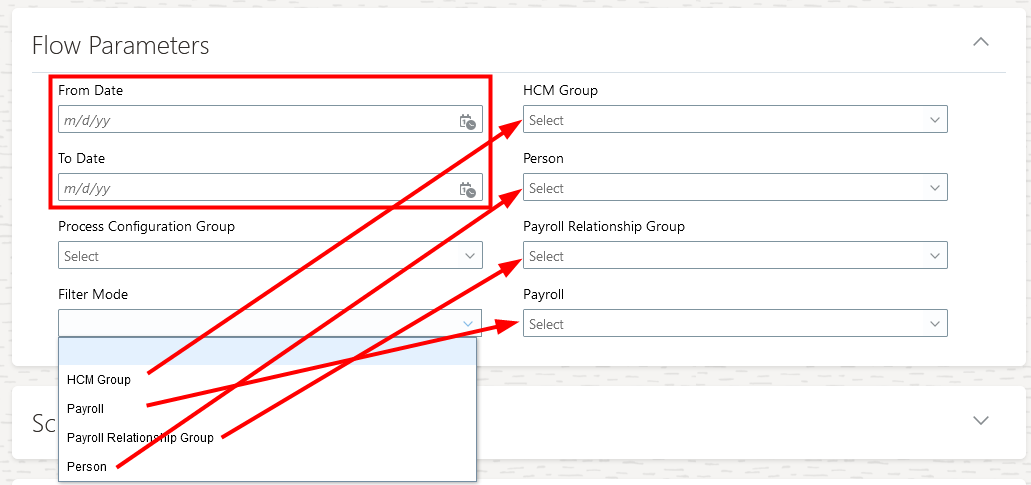
Filter Mode Choice List for the Transfer Time Cards from Time and Labor Flow
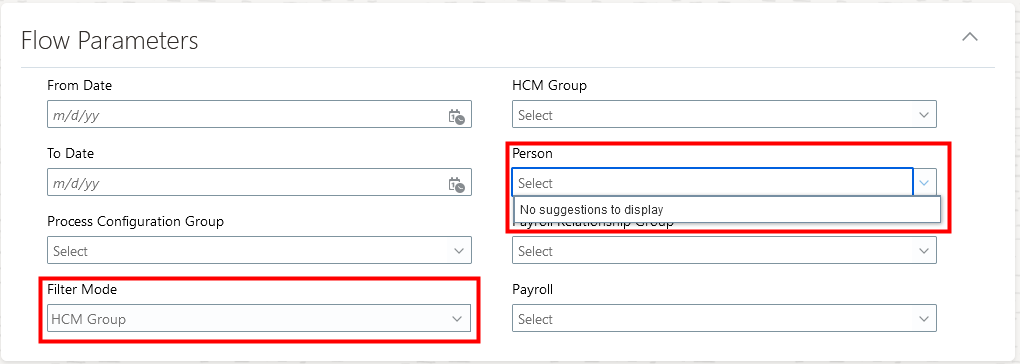
Filter Mode is HCM Group and the Person Choice List Has No Selections
This enhancement gives you greater control over the time cards to transfer to Global Payroll.
Steps to Enable
You don't need to do anything to enable this feature.
Tips And Considerations
Unlike with the Load Time Card Batches flow, you don't have to mark the Upload File task as complete.
Key Resources
For more information about transferring time data to Global Payroll, see this topic in the Using Time and Labor guide:
Enhancement to Time Card Processing
Reference the delivered ORA_WFM_TCR_THRESHOLD_WITH_EVENT_CHANGES_MSR_AP sample time calculation rule fast formula to access event monitored assignment record changes. The formula can use different assignment values over the time card period to get appropriate data on different days.
This enhancement lets you create time calculation rules with more accurate results for individuals who have an assignment change during the time card period.
Steps to Enable
- Create a time calculation rule template.
- Create time calculation rules using the rule template.
- Create time calculation rule sets that include the new time calculation rules, or add them to existing rule sets.
Key Resources
For information now creating time calculation rule templates, rules, and rule sets, see these topics in the Implementing Time and Labor guide:
-
Create a Rule Template That Calculates the Threshold for Expenditure and Payroll Time Types
-
Create a Rule That Calculates the Daily 8h Threshold for Expenditure and Payroll Time Types
Enhancement to Time Card Approvals
You can now route project costing time cards using additional attributes available in the ProjectTimecardApproval and ProjectTimecardApprovalELA approval task rules. Here's the complete list of additional project costing attributes:
- Project Organization Name
- Project Owning Business Unit Name
- Legal Entity Name
- Sponsored Flag
- Work Type Name
- Project Type Name
- Project Currency Code
- Project Ledger Currency Code
- Task Organization Name
- Task Manager
- Award Owning BU Name
- Principal Investigator
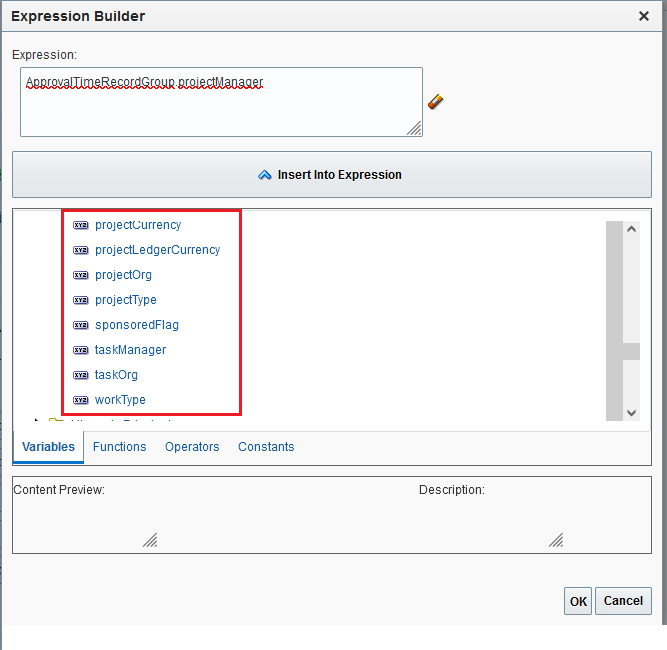
BPM Workflow Expression Builder Showing Some of the Additional Project Costing Attributes
This enhancement lets you configure project approval rules that more closely support your project policies and contracts.
Steps to Enable
You don't need to do anything to enable this feature.
Key Resources
For more information about project approvals of time cards and time card entries, see these topics in the Implementing Time and Labor guide:
Time Change Requests Enhancements
You can let individuals and their managers know about errors that occurred when the manager approved a change request. For example, the change request included a stop time before the start time, or there was an issue with the environment. You do this with the delivered HWM Time Change Request In Error alert. The alert includes two alert templates, both of which are enabled by default:
- Notify Individuals of In Error Change Request
- Notify Managers of a Subordinate's In Error Change Request
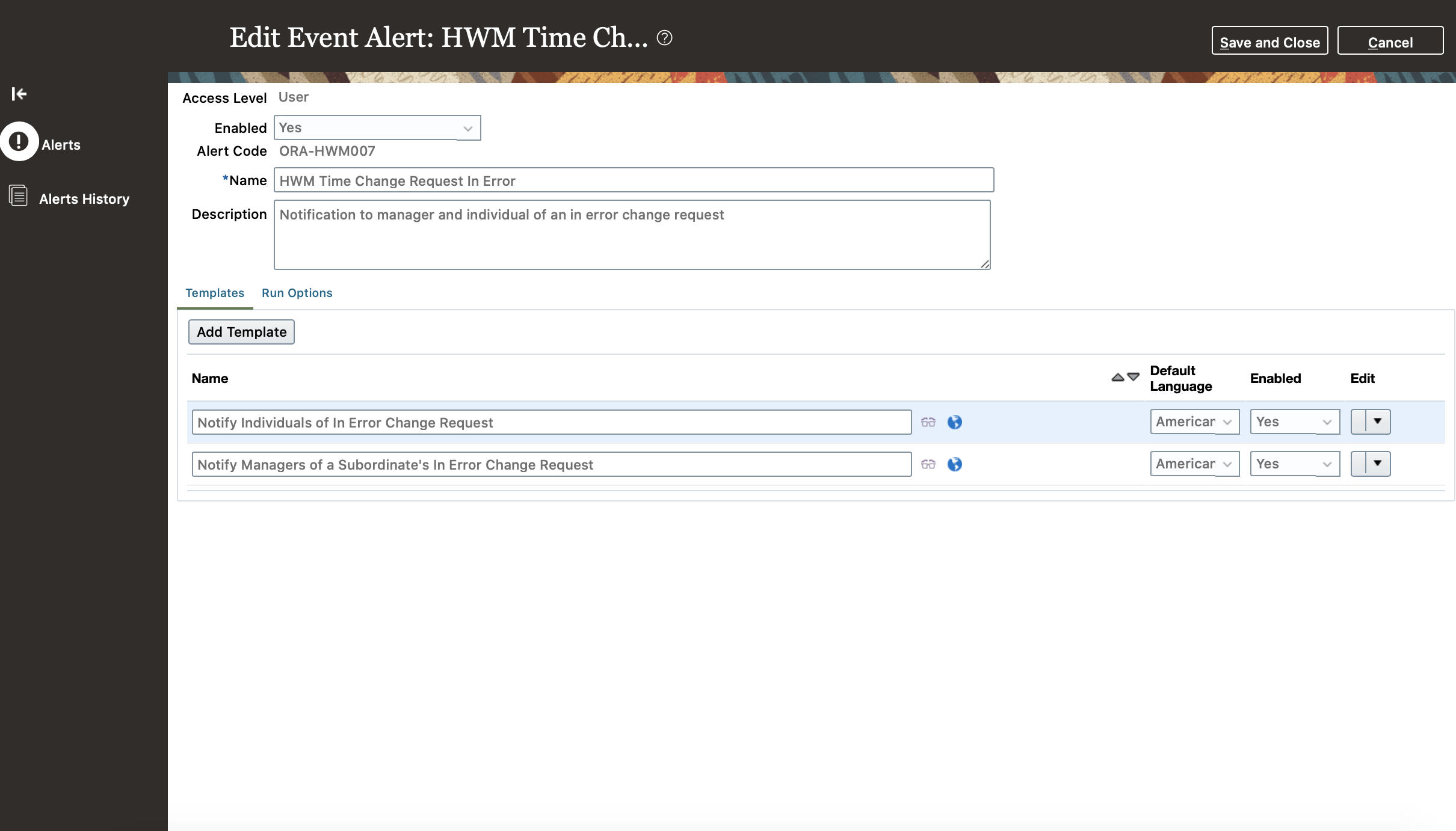
Alert Configuration for HWM Time Change Request In Error
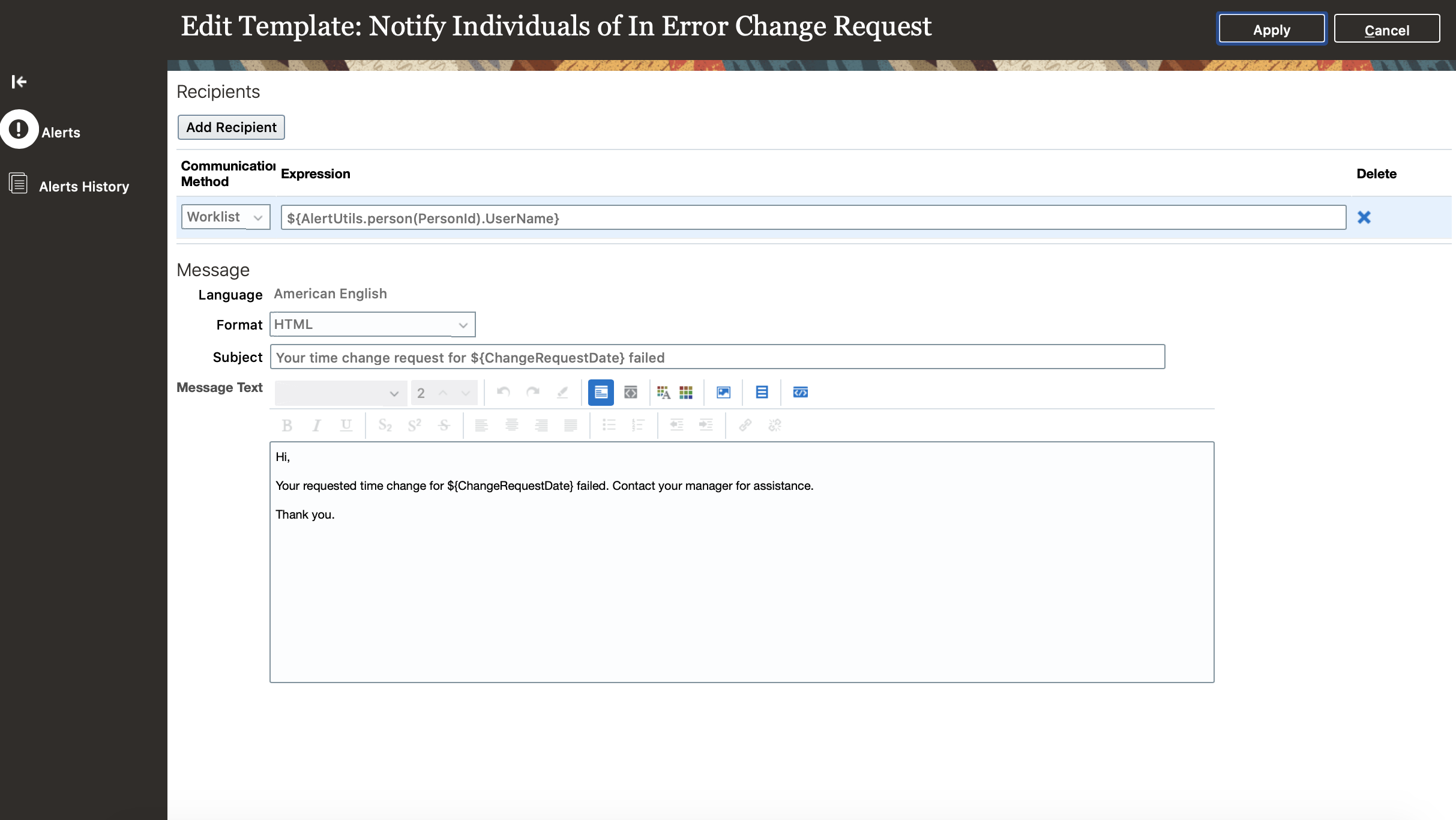
Alert Template for the Individual's Notification
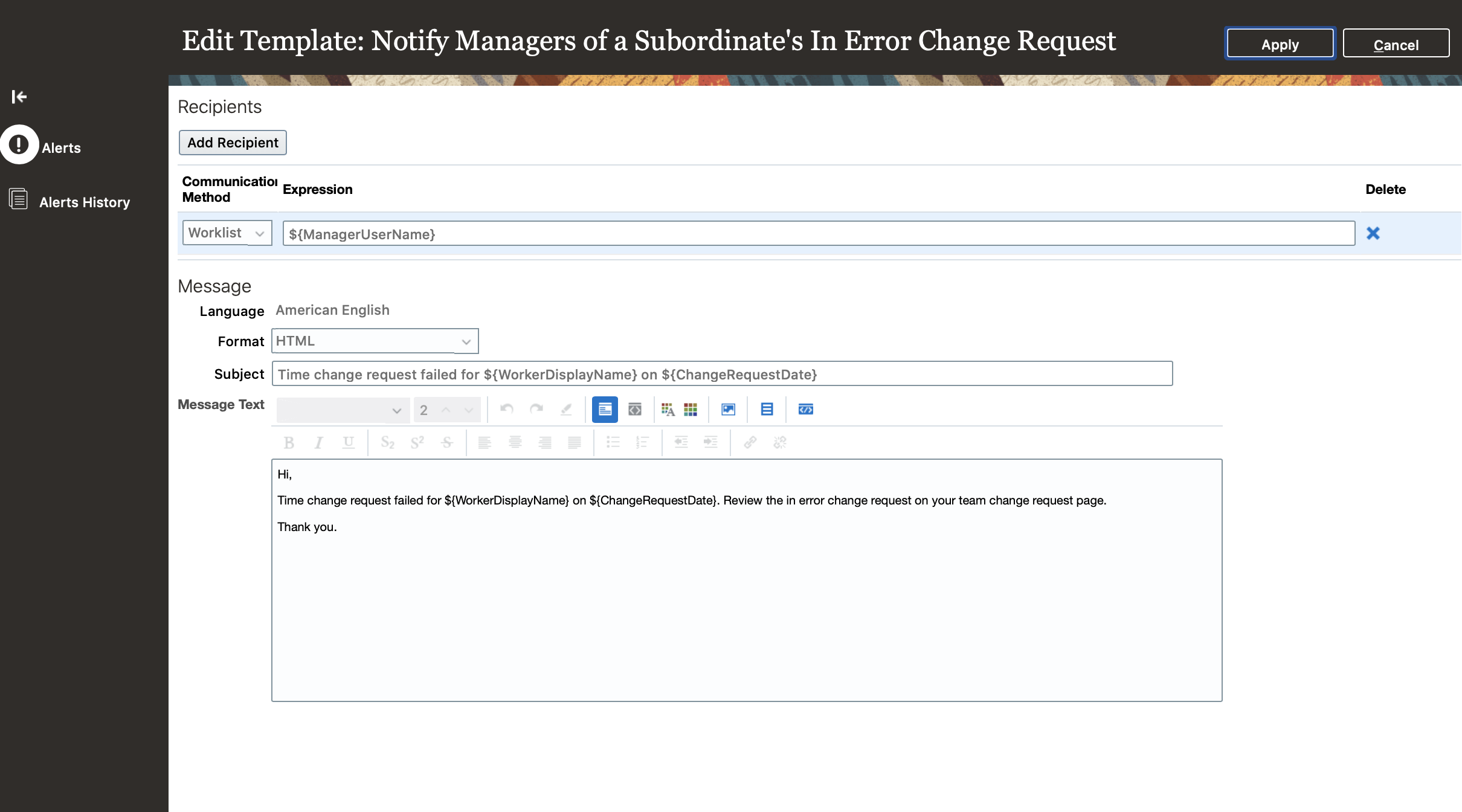
Alert Template for the Manager's Notification
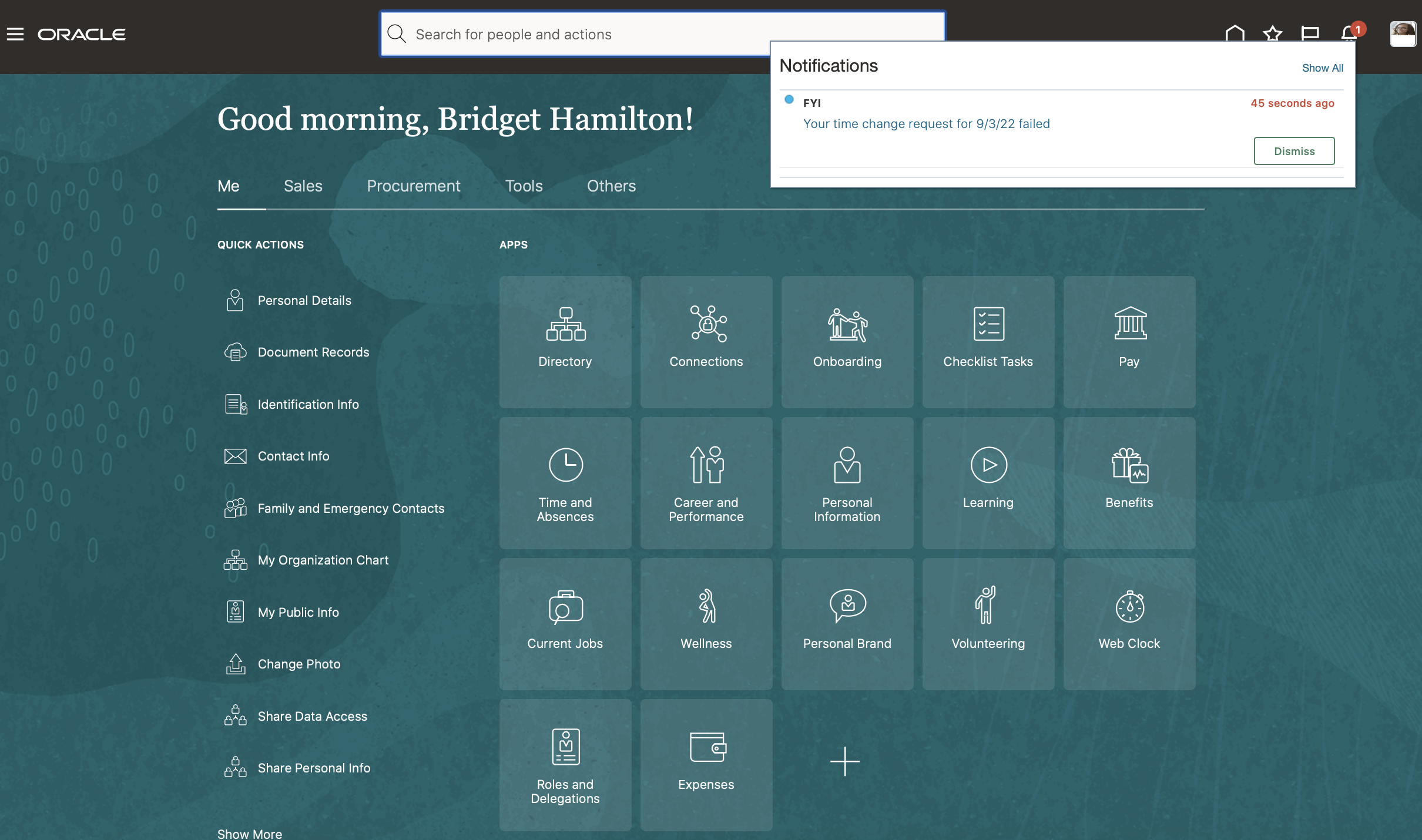
Alert That the Individual Gets about Their Failed Time Change Request
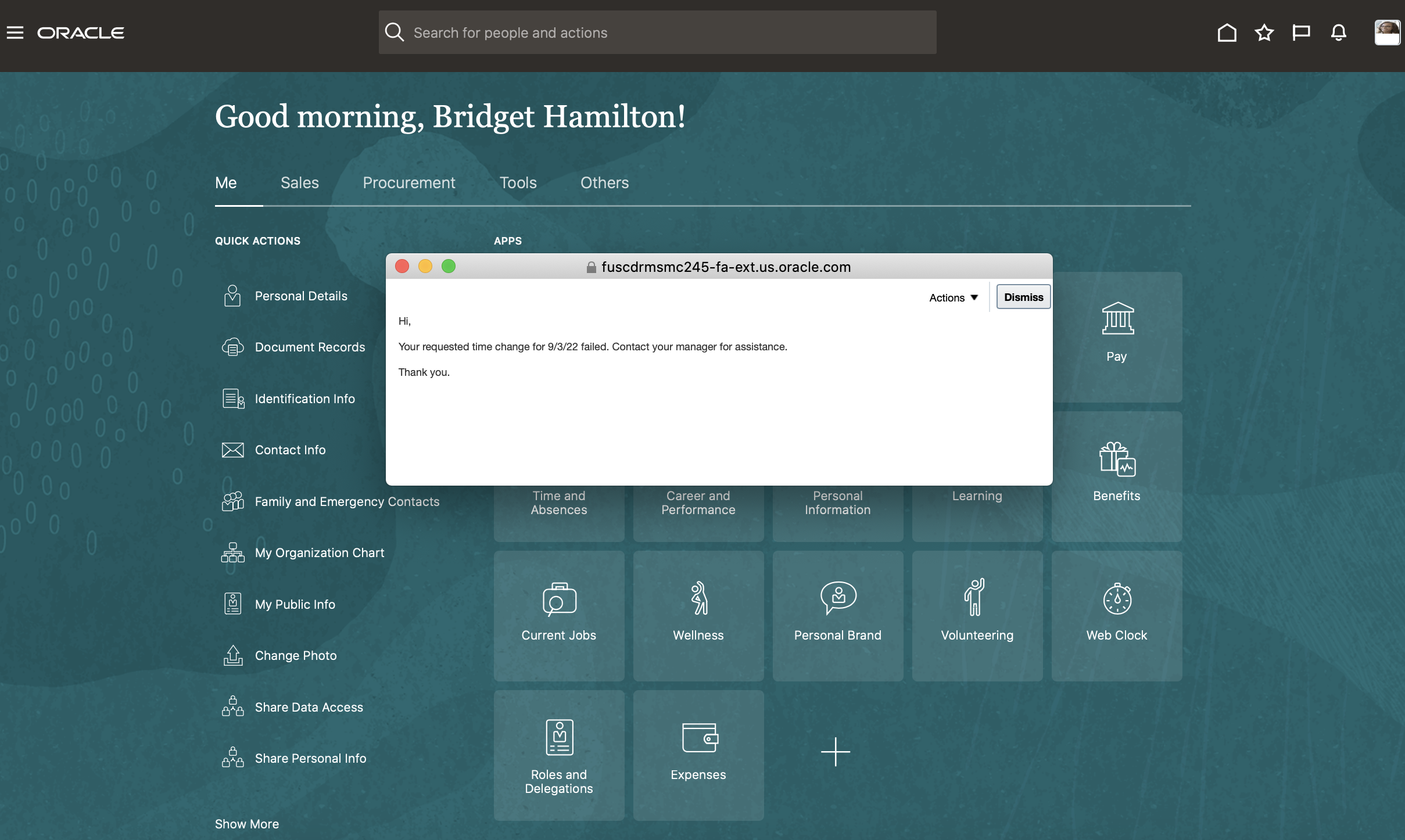
Alert Details for the Individual Notification
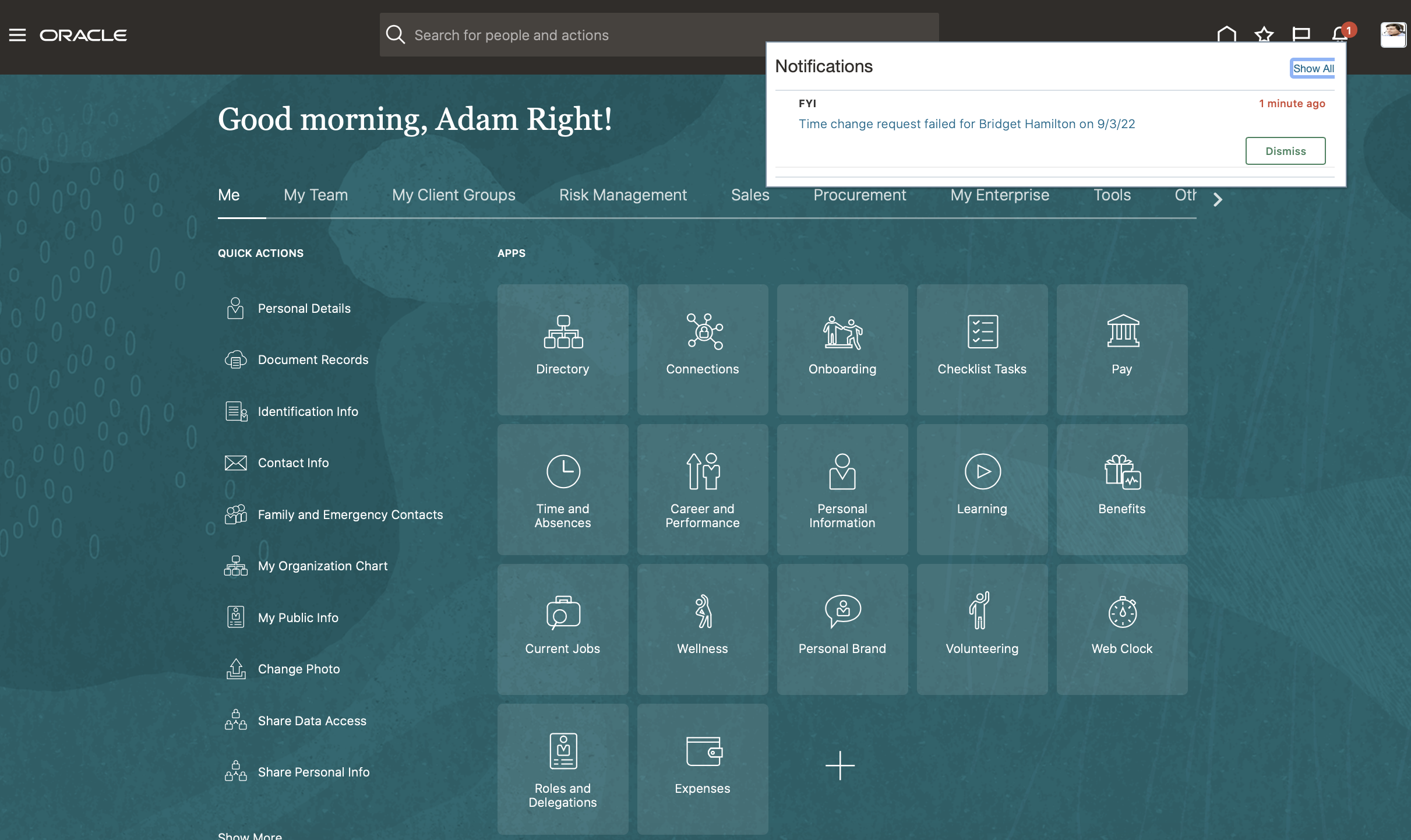
Alert That the Manager Gets about Their Subordinate's Failed Time Change Request
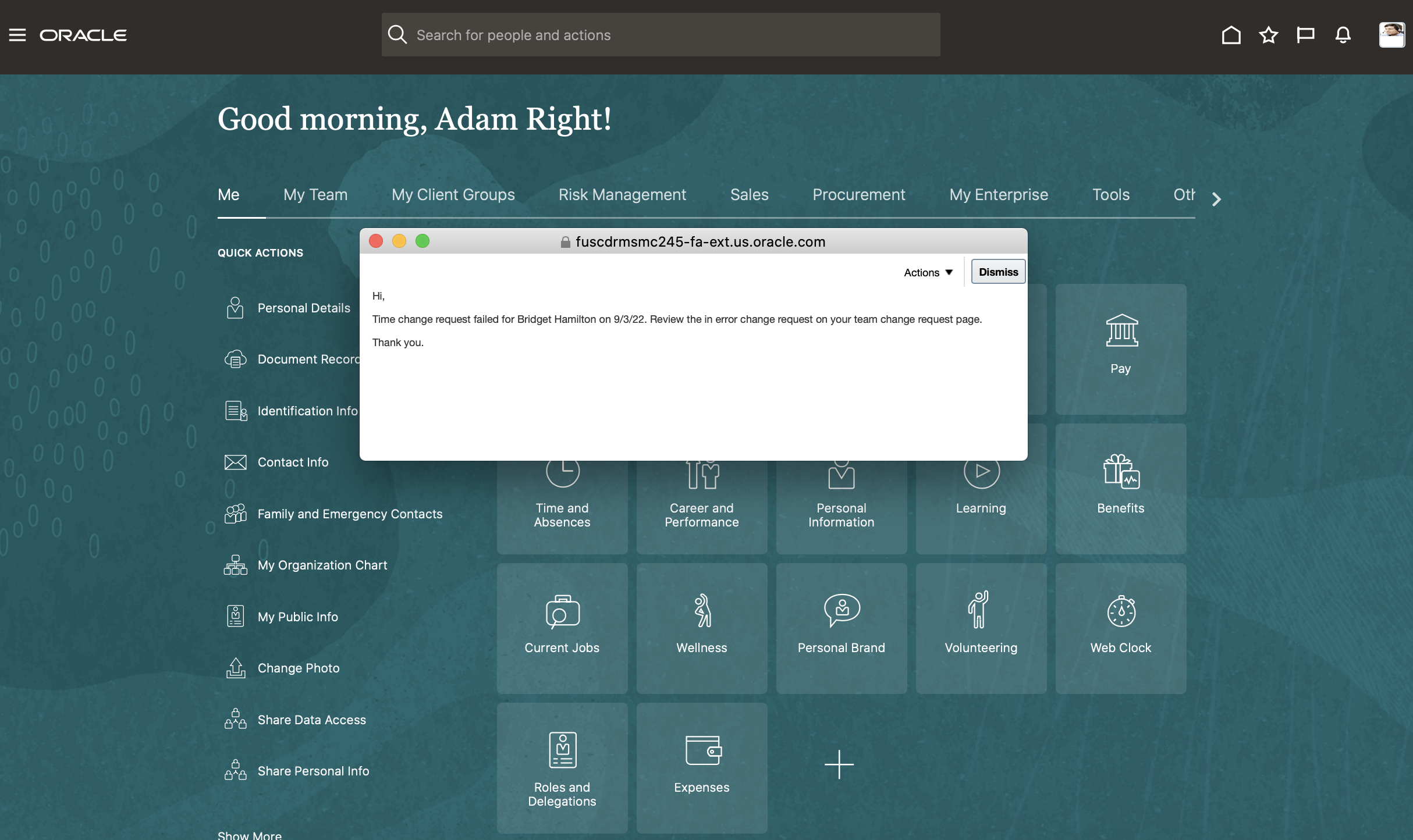
Alert Details for the Manager Notification
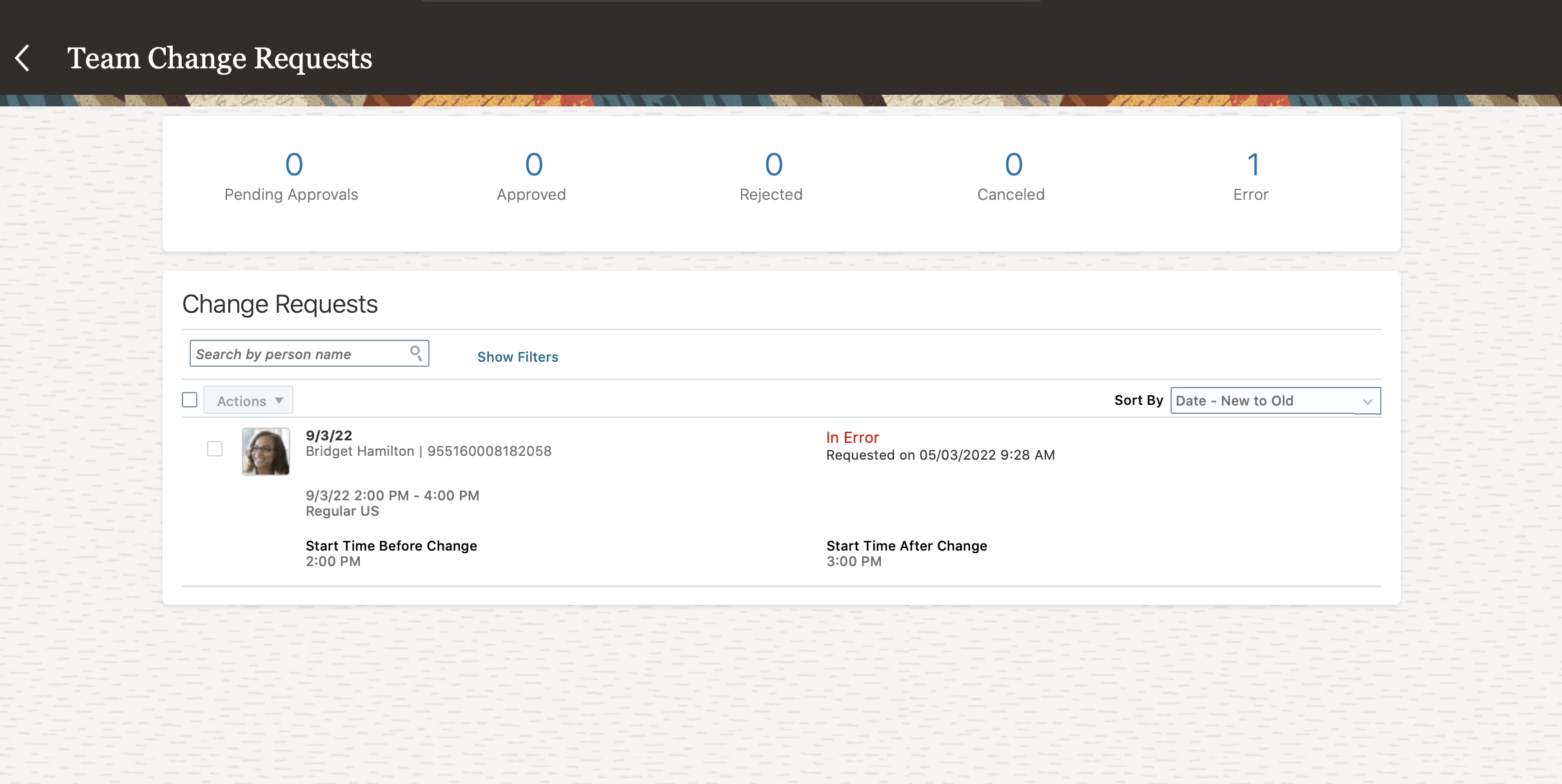
Team Change Requests Page Where the Manager Can Access the In Error Change Request
This enhancement proactively notifies the affected individual and manager of time change request issues that need their attention.
Steps to Enable
You don't need to do anything to enable this feature.
Semimonthly Time Cards Introduction
Individual can now submit semimonthly time cards that you then manage and approve.
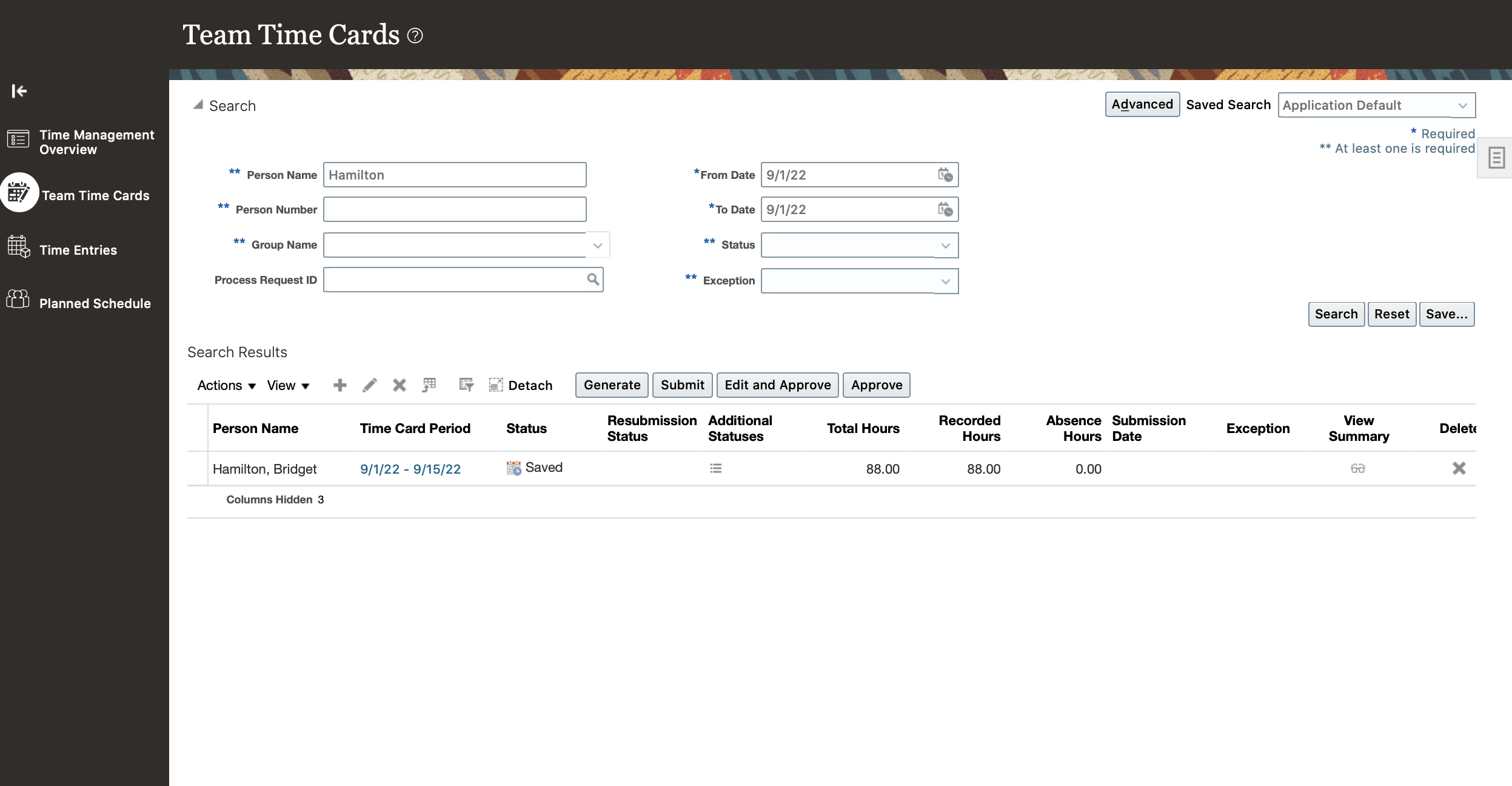
Classic Team Time Cards Page with a Semimonthly Time Card

Classic Create Time Card Page for a Semimonthly Time Card Period
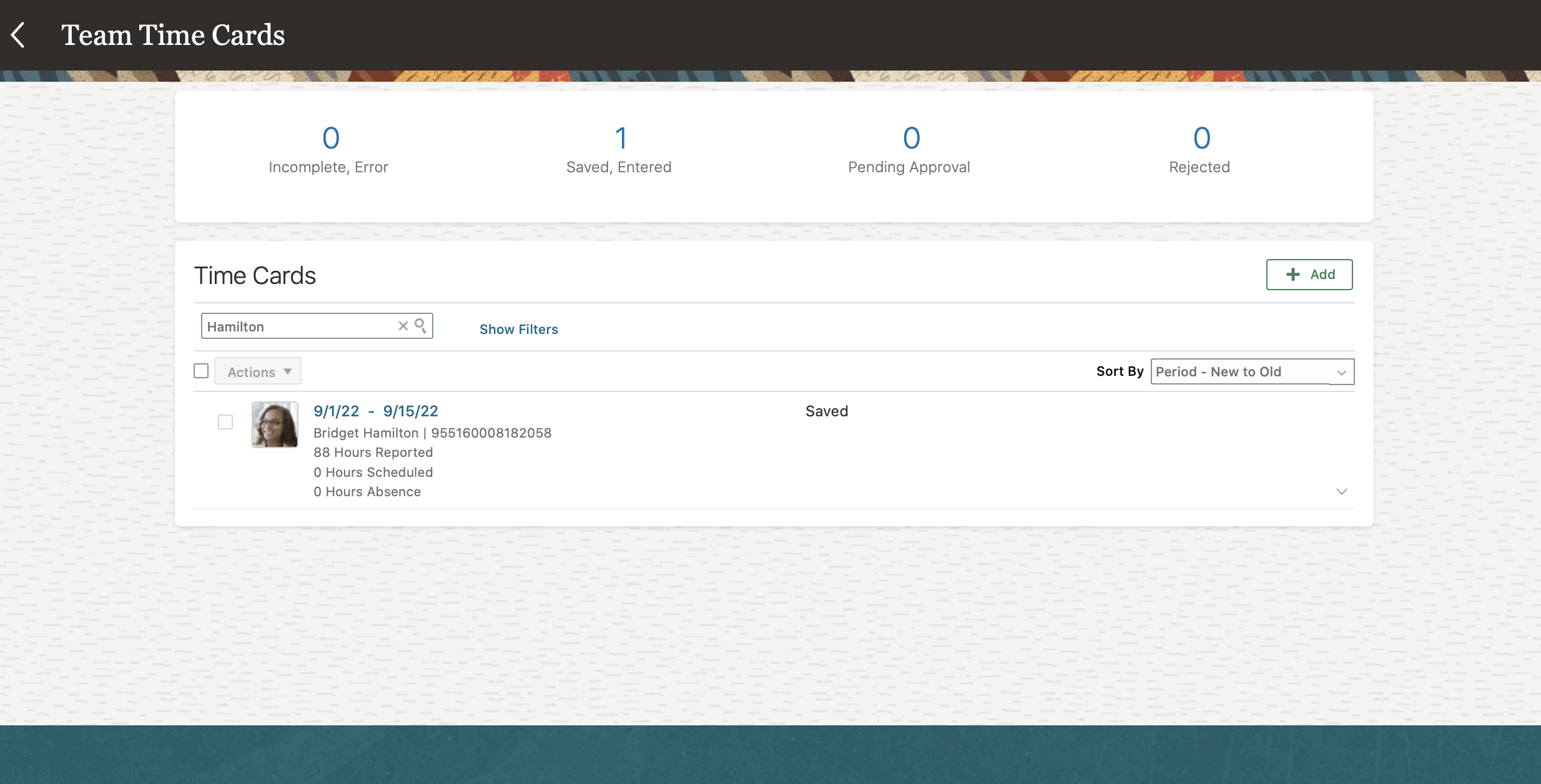
Responsive Team Time Cards Page with a Semimonthly Time Card
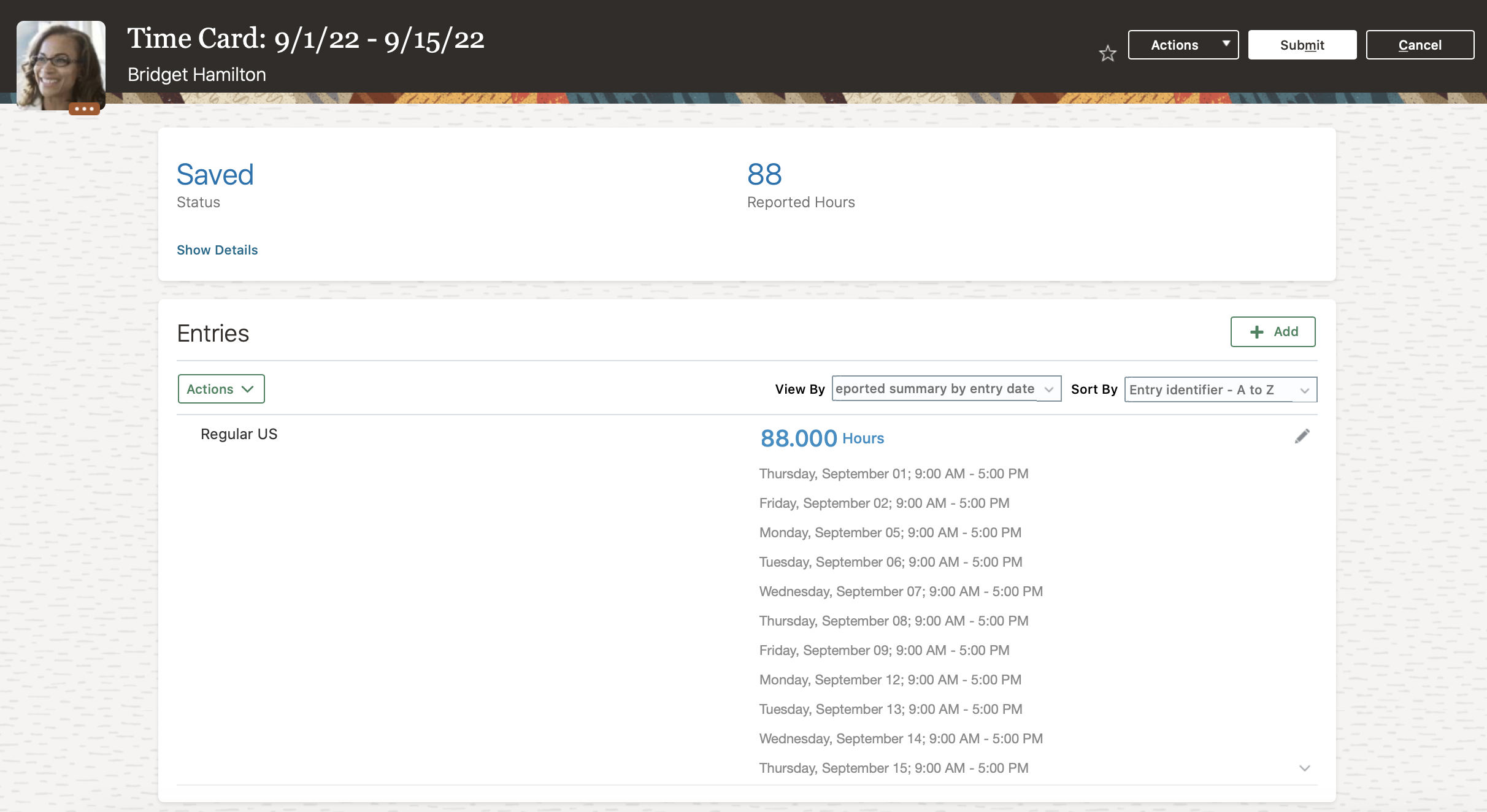
Responsive Time Card for a Semimonthly Time Card Period
This enhancement supports your policies for reporting time in semimonthly periods.
Steps to Enable
You don't need to do anything to enable this feature.
Key Resources
For more information, see these topics in the Implementing Time and Labor guide:
- Repeating Time Periods
- Delivered Repeating Time Periods
- How Time Processing Profile Components Work Together
Integration with the Cancel Work Relationship Process in Global Human Resources
Oracle Fusion Global Human Resources prevents a cancel work relationship process from completing with success if the process would delete a related assignment that has time cards. More precisely, the process calls a time and labor API that identifies any existing time card for an assignment that the process would otherwise delete. This call happens regardless of whether the process was started from an HR page, the REST API, or HCM Data Loader. To move forward, a time and labor manager needs to manually delete the time cards, or time entries in case of secondary assignment. When they finish, run the cancel work relationship process again.
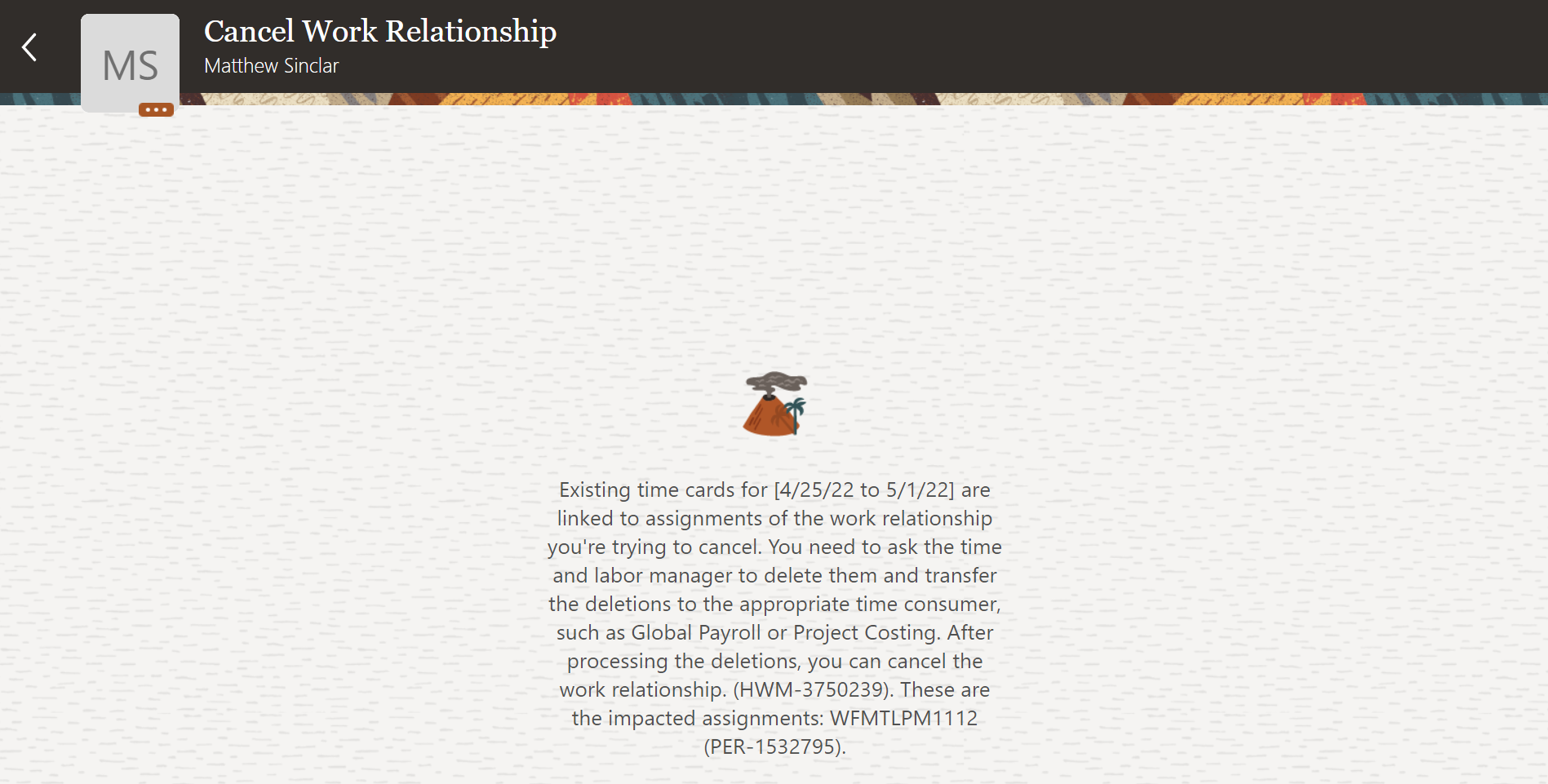
Message Shown on the Cancel Work Relationship Page When Processing a Primary Work Relationship with Only a Primary Assignment That Has Time Cards
This enhancement helps keep the database clean and prevent data corruption.
Steps to Enable
By default, this profile option is set to N. If you don't want the application to prevent cancellation of the work relationship when a time card exists, set the profile value to Y.
| Profile Option Code | Profile Display Name | Default Profile Value |
|---|---|---|
| ORA_PER_EMPL_DISABLE_TIME_CARD_CHK_CANCEL_WR |
Time Card Check Disabled for Cancel Work Relationship and Delete Assignment |
N |
To change the default profile option value and enable the feature, follow these steps:
-
In the Setup and Maintenance work area, on the Tasks panel tab, click Search.
-
On the Search page, search for and click the Manage Administrator Profile Values task.
-
Search for and select the ORA_PER_EMPL_DISABLE_TIME_CARD_CHK_CANCEL_WR profile option.
-
In the Profile Values section, Site level row, enter Y.
-
Click Save and Close.
Key Resources
- For more details, see the 22C Global Human Resources What's New Under the Employment heading for the feature Check Time Cards while Cancelling a Work Relationship.
Time and Labor Replaced or Removed Features
From time to time, Oracle replaces existing features with new features, or removes existing features. Replaced features may be put on a path of removal, the features below will let you know what update you will have to have moved to the newer feature. As a best practice, you should move to the newer feature as soon as possible for full support and to stay up with the latest updates that the product offers. Any feature that is removed, will have an Update in which that feature is no longer available. Please make necessary plans to move off the feature by the Update indicated, as it will no longer be available.
Removal of Expediting Time for Payroll Reprocessing
Due to a lack of uptakes by customers and known issues, the expediting time for payroll reprocessing feature was removed starting from the 22C update. You can no longer mark time card entry updates to expedite to payroll.

Classic time card with the expedite options being removed
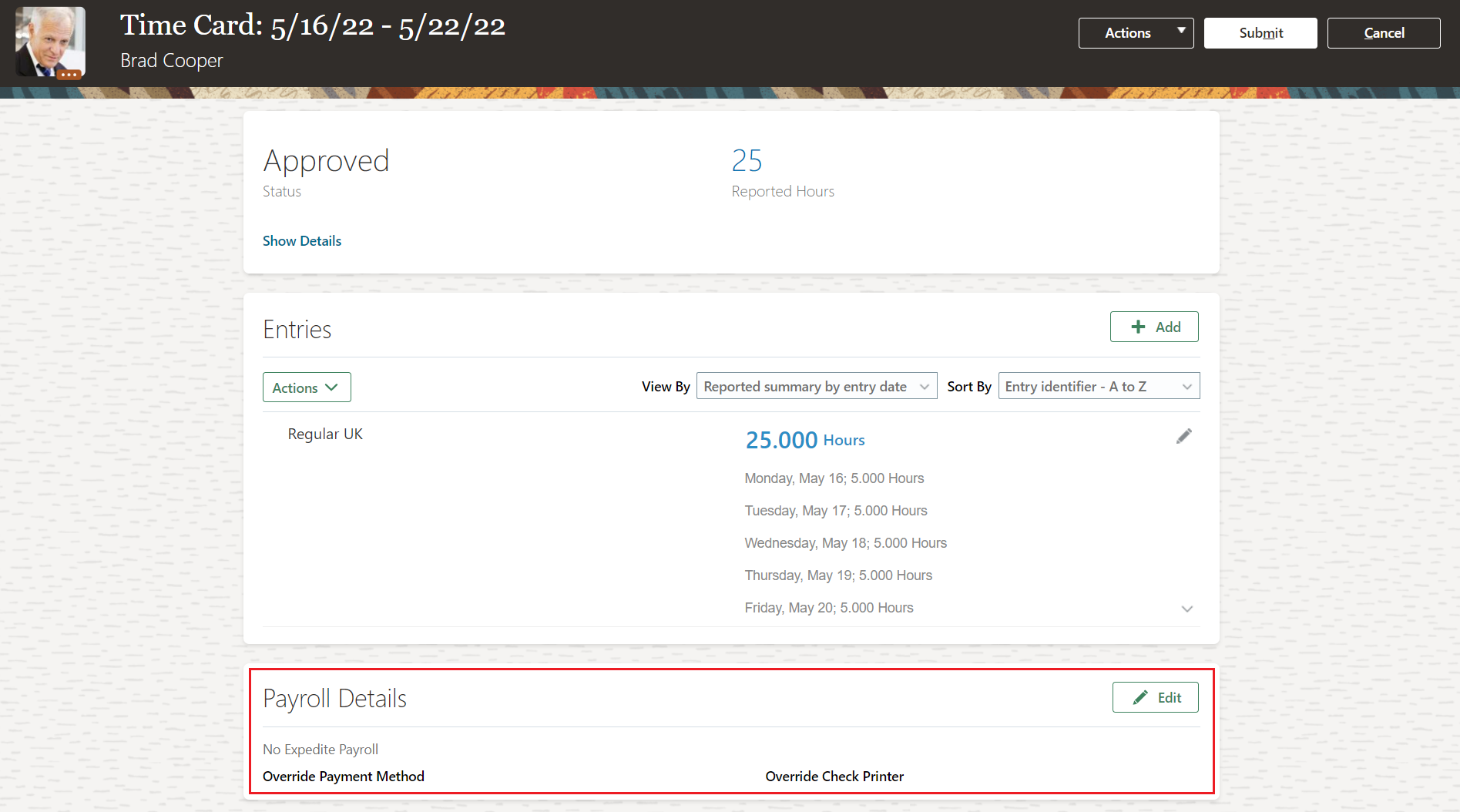
Responsive time card with the expedite options being removed
This removal enhances time card management by preventing issues related to retroactive changes to expedite.
Steps to Enable
You don't need to do anything to enable this feature.
IMPORTANT Actions and Considerations for Time and Labor
REPLACED OR REMOVED FEATURES
From time to time, Oracle replaces existing Cloud service features with new features or removes existing features. When a feature is replaced the older version may be removed immediately or at a future time. As a best practice, you should use the newer version of a replaced feature as soon as the newer version is available.
| Product |
Removed Feature |
Target Removal |
Replacement Feature |
Replaced In |
Additional Information |
|---|---|---|---|---|---|
| Time & Labor | Removal of Expediting Time for Payroll Reprocessing | 22C | None |
_________________________
KNOWN ISSUES / MAINTENANCE PACK SPREADSHEETS
Oracle publishes a Known Issues document for every Update to make customers are aware of potential problems they could run into and the document provides workarounds if they are available.
Oracle also publishes Maintenance Pack and Statutory Maintenance Pack documentation of bugs that are fixed in the monthly or statutory patching.
To review these documents you must have access to My Oracle Support:
Oracle Human Capital Management Cloud Functional Known Issues and Maintenance Packs (Document ID 1554838.1)