
This document will continue to evolve as existing sections change and new information is added. All updates appear in the following table:
| Date | Product | Feature | Notes |
|---|---|---|---|
| 02 SEP 2022 | Created initial document. |
HCM Cloud applications have two types of patches you can receive that are documented in this What’s New:
- Release Updates (22A, 22B, 22C, and 22D)
- Optional Monthly Maintenance Packs to each update
It is important for you to know what Release Update your environment is on. You can find this in your Cloud Portal.
 HAVE AN IDEA?
We’re here and we’re listening. If you have a suggestion on how to make our products better, please let us know. To enter an idea go to the Ideas Lab on Oracle Customer Connect. In this document wherever you see the light bulb icon after the feature name it means we delivered one of your ideas.
SUGGESTED READING FOR ALL HCM PRODUCTS
- HCM Common What's New - In this What's New you will find feature that are used across applications.
- Human Resources What’s New – In the Global Human Resources section you will find features on the base application in which other application are built upon.
NOTE: Not all Global Human Resource features are available for Talent and Compensation products.
- Oracle Human Capital Management Cloud Functional Known Issues and Maintenance Packs (Document ID 1554838.1). These documents identify bug fixes and possible known issues. You will also need to review these documents based in the release update version you are currently on or will be moving to.
- Oracle Help Center – Here you will find guides, videos and searchable help.
- Release Readiness – New Feature Summary, What’s New, Feature Listing Spreadsheet, Spotlights and Release Training
GIVE US FEEDBACK
We welcome your comments and suggestions to improve the content. Please send us your feedback at oracle_fusion_applications_help_ww_grp@oracle.com. Indicate you are inquiring or providing feedback regarding the HCM Cloud What’s New in the body or title of the email.
Column Definitions:
Report = New or modified, Oracle-delivered, ready to run reports.
UI or Process-Based: Small Scale = These UI or process-based features are typically comprised of minor field, validation, or program changes. Therefore, the potential impact to users is minimal.
UI or Process-Based: Larger Scale* = These UI or process-based features have more complex designs. Therefore, the potential impact to users is higher.
Features Delivered Disabled = Action is needed BEFORE these features can be used by END USERS. These features are delivered disabled and you choose if and when to enable them. For example, a) new or expanded BI subject areas need to first be incorporated into reports, b) Integration is required to utilize new web services, or c) features must be assigned to user roles before they can be accessed.
| Ready for Use by End Users Reports plus Small Scale UI or Process-Based new features will have minimal user impact after an update. Therefore, customer acceptance testing should focus on the Larger Scale UI or Process-Based* new features. |
Customer Must Take Action before Use by End Users Not disruptive as action is required to make these features ready to use. As you selectively choose to leverage, you set your test and roll out timing. |
|||||
|---|---|---|---|---|---|---|
| Feature |
Report |
UI or |
UI or |
|
||
Integration with the Delete Assignment Process in Global Human Resources |
||||||
Oracle Time and Labor is a comprehensive, easy to use, rule-based time recording and management application. The calendar-based time entry interface and fully configurable time card layout easily address simple and complex time recording needs. Rule templates and the real-time rules engine provide an extensible and robust method to validate time entries and automatically apply pay rules, such as overtime calculations. Time and Labor now integrates completely with the following Oracle Cloud Human Capital Management applications: Global Human Resources, Absence Management, Global Payroll, and Project Costing. This integration insures accurate and consistent data for payroll processing and costing as well as project management billing.
Standardization of Button Logic in Responsive Time Cards
Time card Actions buttons now show all actions the person can do, both available or unavailable based on their time entry profile, their security setup, and the time card status. Here's a list of all available and unavailable Actions menu options for workers, line managers, and time and labor managers. The worker time entry profiles, security grants, and time card status determine whether the actions are available or unavailable.
| Actions Menu Option | Comments |
|---|---|
| Delete |
|
| Save and Close |
|
| Submit |
|
| Submit Now |
|
| Approve |
|
| Reject |
|
|
Workers, line managers, and time and labor managers also see these actions as buttons in the page header: Cancel and Save and Close, Submit, Approve or Print. The actual buttons that people see in the page header depend on their role, the worker time entry profile, and the current time card status. For example, when a worker, line manager, or time and labor manager creates a time card, they can use the page header button to submit it. Or they can use the Actions menu to save their changes and close the time card. The Actions menu for the worker doesn't include the Approve or Reject options. Also, the Actions menu for the time and labor manager doesn't include the Reject option, since they can't ever reject time cards.

Time Card Getting Created by a Worker

Time Card Getting Created by a Line Manager
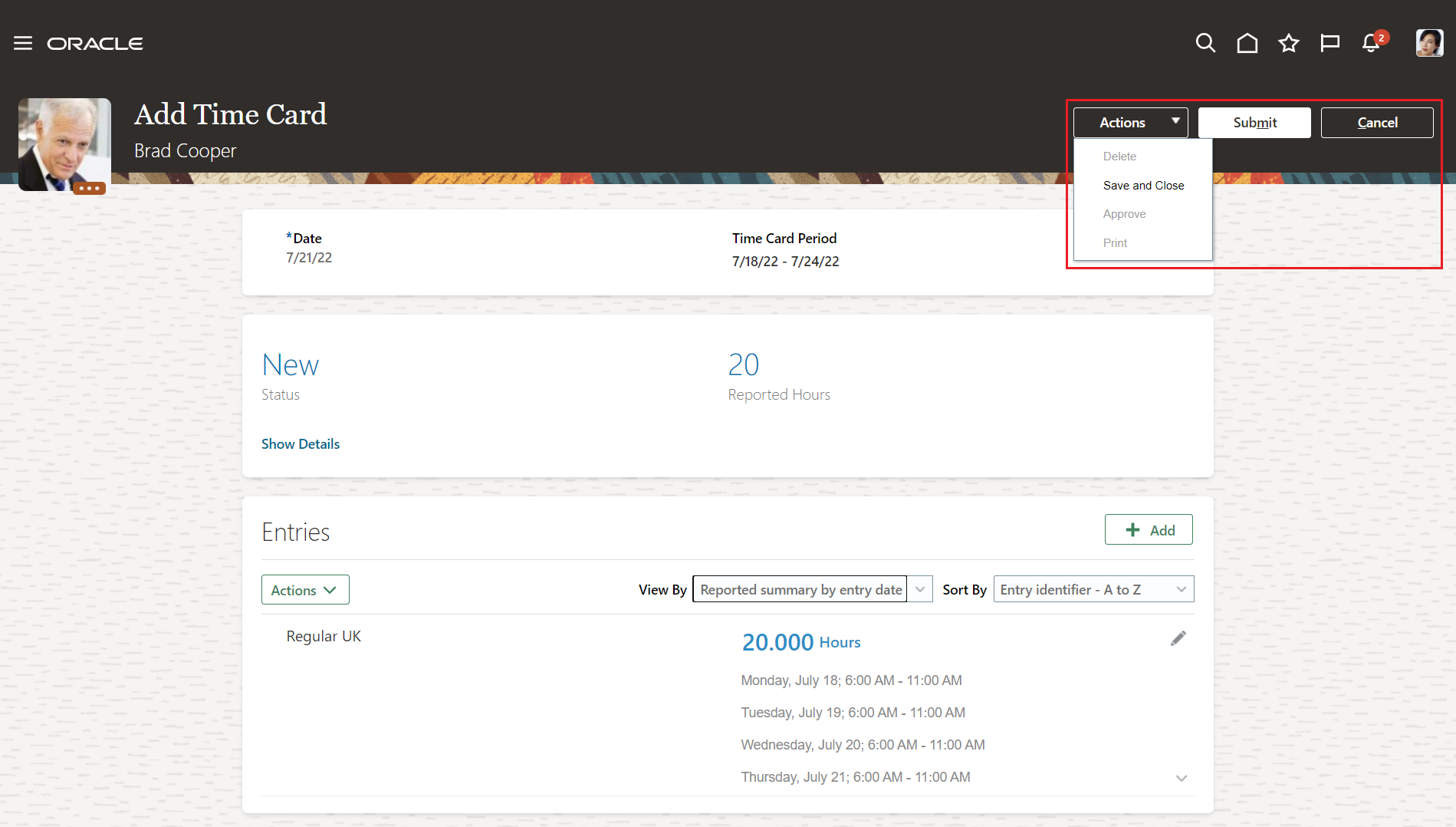
Time Card Getting Created by a Time and Labor Manager
When a line manager who's a time card approver opens a Submitted time card, page header has the Approve button instead of the Submit button. Their Actions menu has the Reject option available. When a time and labor manager with the appropriate security privileges opens a Submitted time card, they too have the Approve button instead of the Submit button, but their Actions menu doesn't include the Reject option.
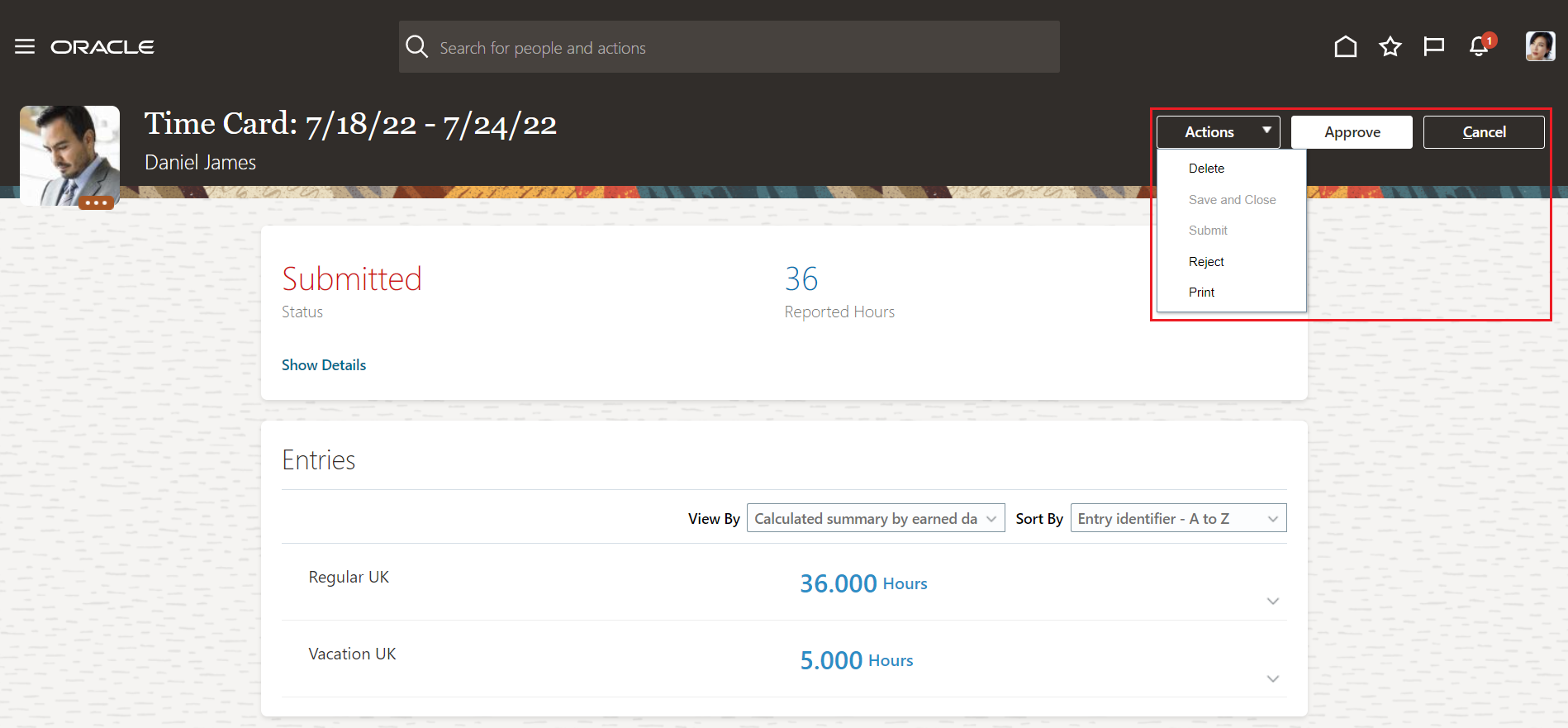
The Line Manager Can Approve or Reject a Submitted Time Card
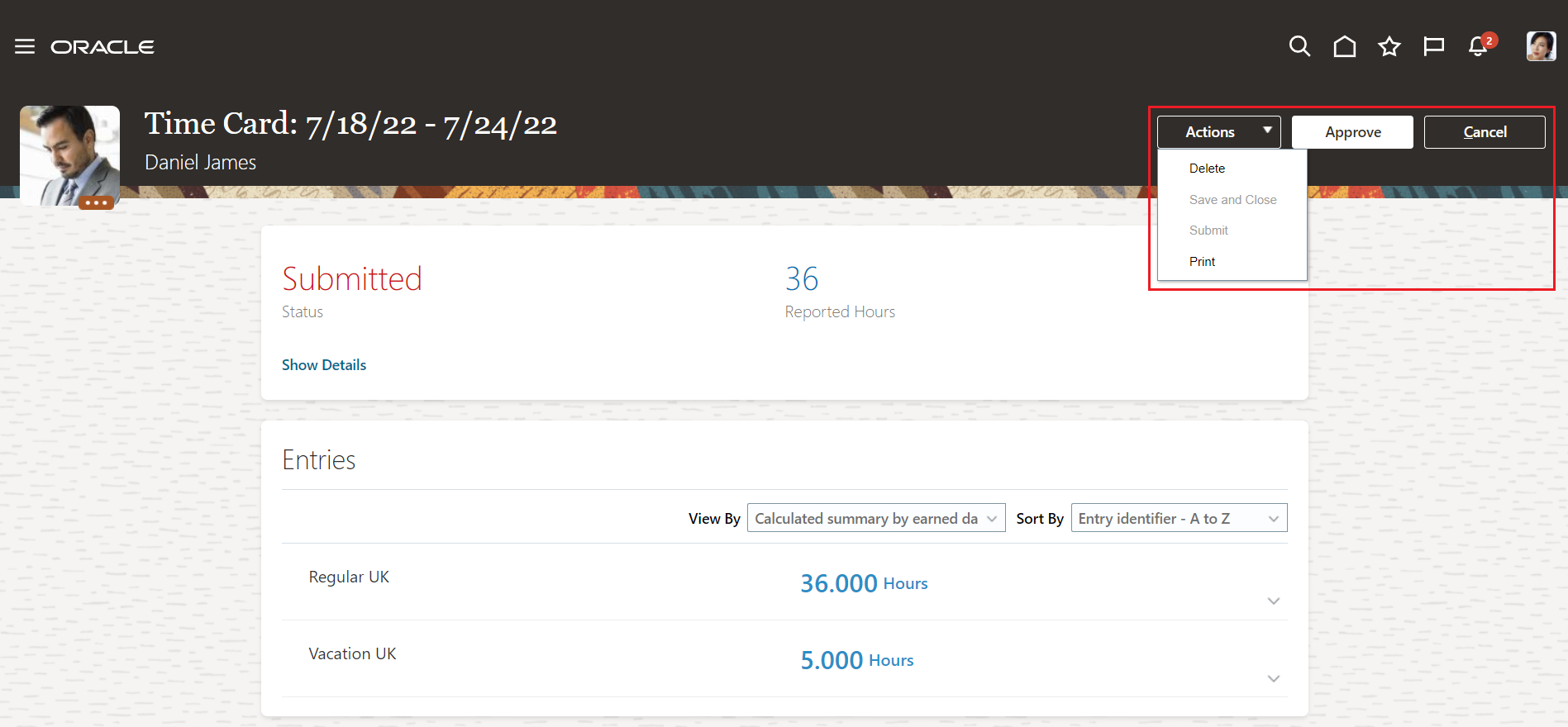
The Time and Labor Manager Can Only Approve a Submitted Time Card
When a line manager or time and labor manager opens an In error or Incomplete time card, the page header has the Save and Close button because they need to fix the identified issues. For a time card generated from time collection device events, if the applicable worker time device processing profile includes a time submission rule, when the manager saves fixes, they initiate the submission rule. The rule then enters, saves or submits the time card, as appropriate.
When the worker opens an In error or Incomplete time card, the page header has the Save and Close button if their time entry profile configuration lets them make edits. They can only edit danglers.
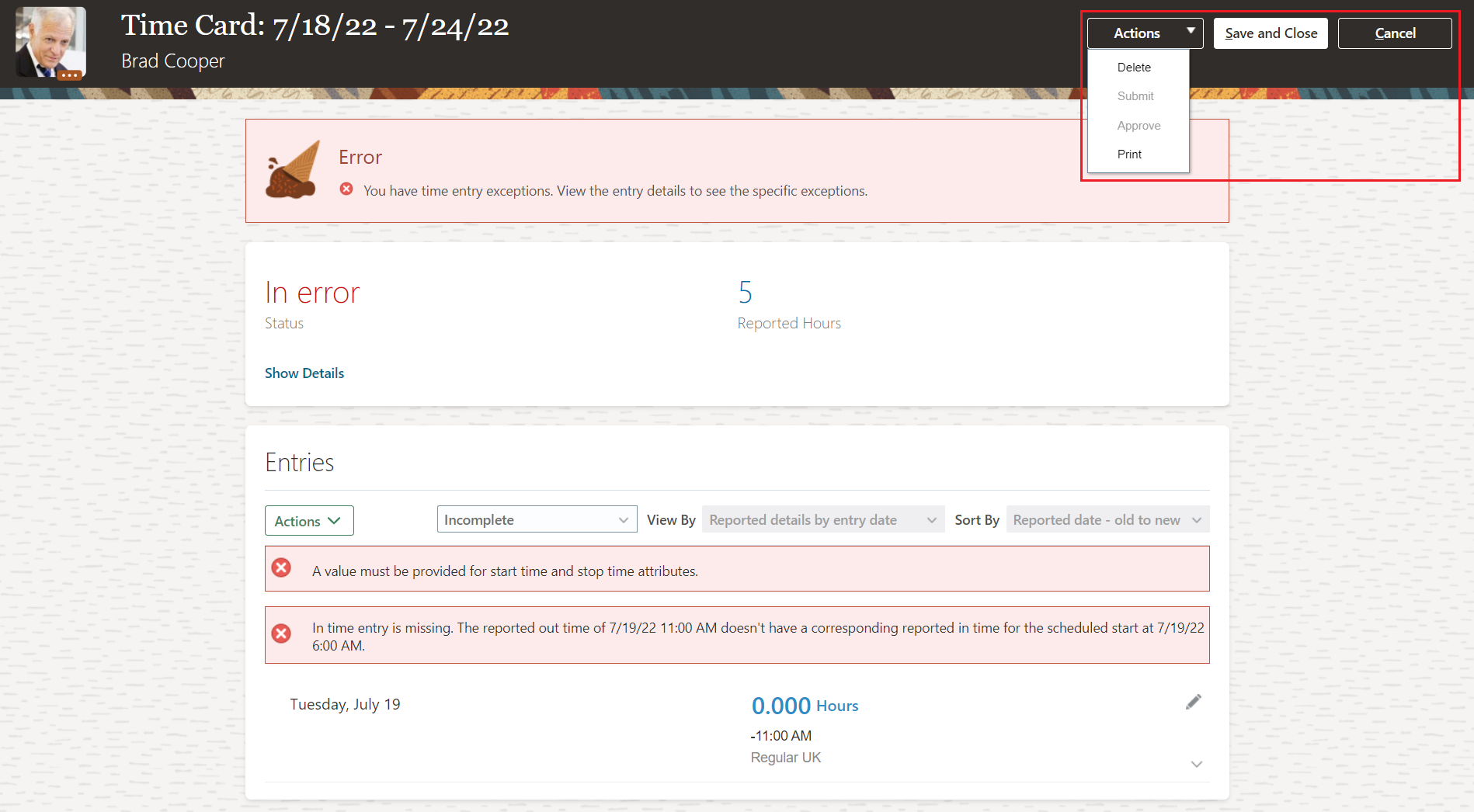
The Time and Labor Manager Can Only Save and Close an In Error Time Card
For read-only time cards, the page header button is Print and all of the Actions menu options are unavailable.

The Worker, Line Manager, and Time and Labor Manager Can Only Print a Read-Only Time Card
This enhancement ensures that everyone involved with time cards knows what actions the can do, including actions not enabled by their profiles, their security privileges, and the time card status.
Steps to Enable
You don't need to do anything to enable this feature.
Integration with the Delete Assignment Process in Global Human Resources
Oracle Fusion Global Human Resources prevents a delete assignment process from completing with success if the assignment has time cards. More precisely, the process calls a time and labor API that identifies any existing time card for an assignment that the process should delete. This call happens when the process was started from an HR page. To move forward, a time and labor manager needs to manually delete the time cards, or time entries reported against the assignment. When they finish, run the delete assignment process again.

Error Message to Delete Time Cards Before Deleting the Assignment
It also applies to the following processes when a future assignment exists with time cards that need to be deleted:
- Local and Global Transfer
- Mass Legal Employer Change
This enhancement helps keep the database clean and prevent data corruption.
Steps to Enable
You don't need to do anything to enable this feature.
Key Resources
- For more details, see the 22D Global Human Resources What's New Under the Employment heading for the feature Check Time Cards While Deleting an Assignment.
Enhanced Oracle Time and Payroll Reconciliation Extract
We enhanced the Time and Payroll Info for Reconciliation extract with the new Include reconciled rows? parameter. Use this parameter to exclude or include information with no differences between Time and Labor and Global Payroll in the extract.

Submit Extract Instance for Time and Payroll Info for Reconciliation Showing the New Include Reconciled Rows Parameter
In addition to the new parameter the extract results are now available in the .xls format. To view the .xls format:
- On the My Client Groups > Data Exchange page, click View Extract Results.
- On the View Extract Results page, search for the instance name.
- Expand the Instance Details section.
- Click the Download icon.
The .xls output shows the selected extract parameters in a separate region at the top of the file. It also shows each worker's assignment status in the main section.
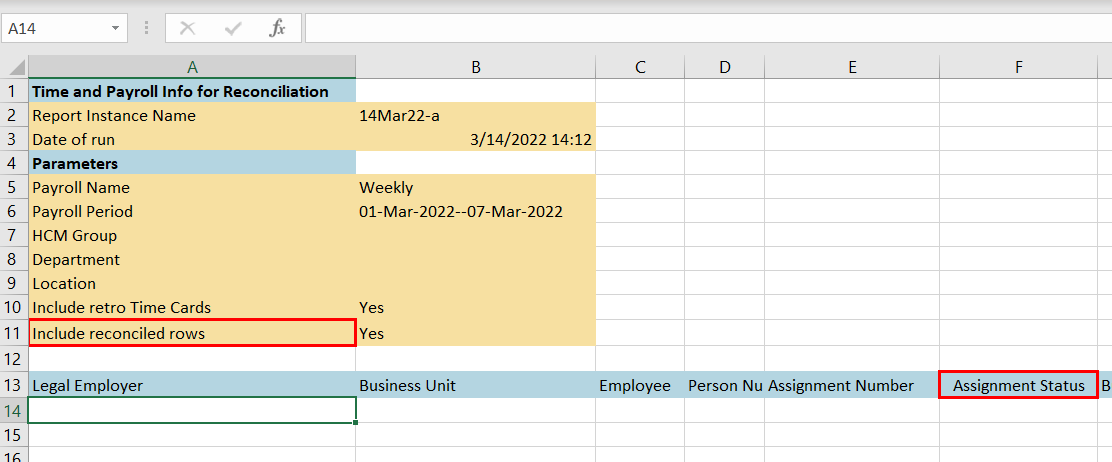
.XLS Output Showing the Include Reconciled Rows Setting and the New Assignment Status Column
This enhancement lets people include or exclude time and payroll data when there aren't any difference, as appropriate to their reconciliation task.
Steps to Enable
You don't need to do anything to enable this feature.
Team Schedule Self-Service Pages Enhancements
When you enable multiple assignments, line managers and time and labor managers can filter their team schedules by offer and pending worker assignments. By default, they see contingent workers and employees. Individuals can't see the schedules for their peers' offer and pending assignments.
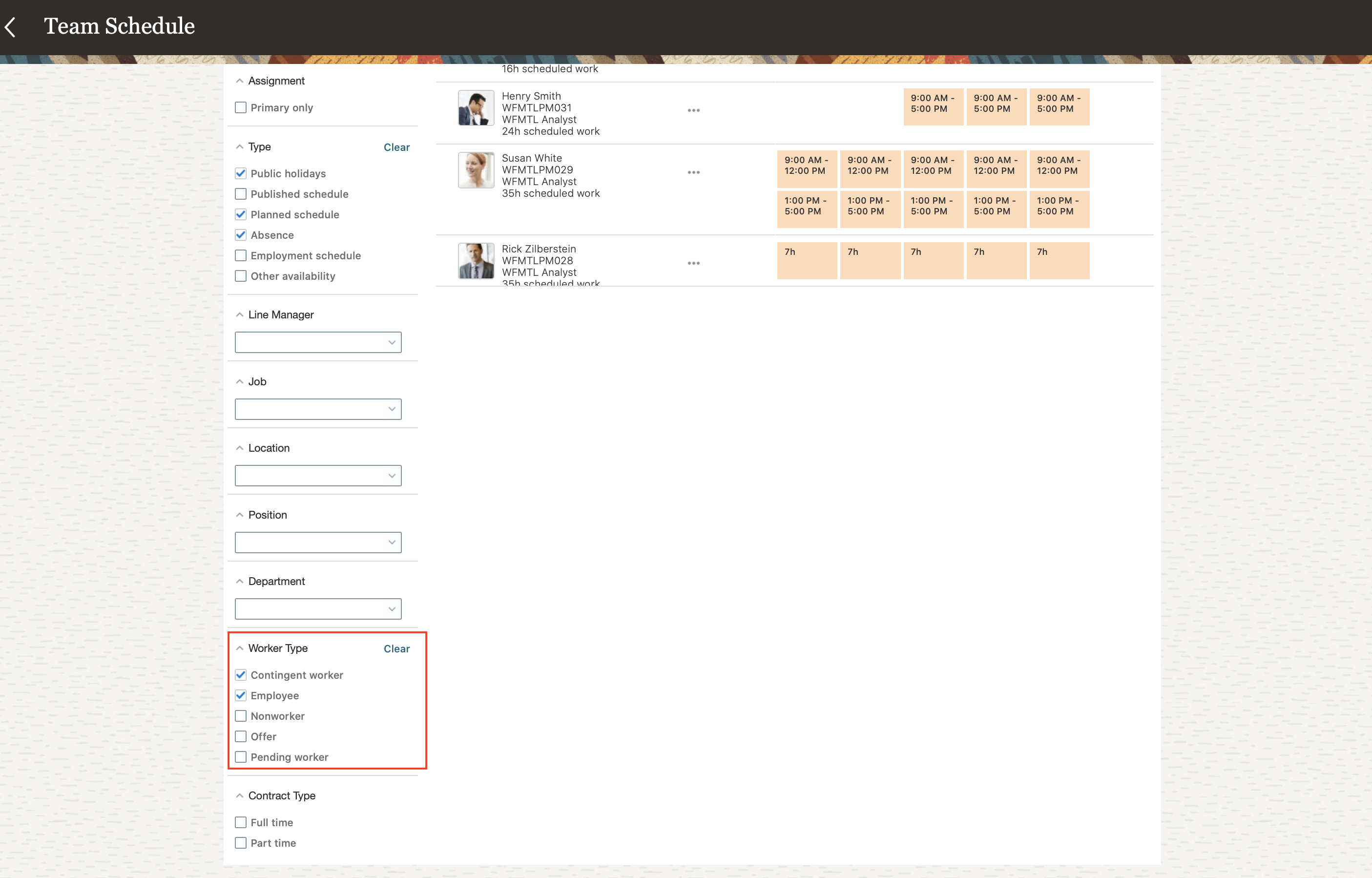
Team Schedule Filters, Including the New Offer and Pending Worker Filters Under Worker Type
This enhancement lets line managers and time and labor managers manage all of the schedules for their people.
Steps to Enable
For managers to see their people's multiple assignments on classic planned and published schedules, and responsive team schedules, you need to enable this profile option:
| Field | Value |
|---|---|
| Profile Option Code |
ORA_HTS_MULTIPLE_ASSIGNMENTS_ENABLED |
To enable the profile option, go to the Setup and Maintenance work area:
- Search for and click the Manage Administrator Profile Values task.
- Search for and select the profile option.
- In the Profile Value section, click the Add icon.
- Set the Level to Site.
- In the Profile Value field, enter Y.
- Click Save and Close.
Generate Time Cards Enhancement
Time and Labor managers can now directly access the Generate Time Cards task from the Tasks panel tab of the Time Management area or using the new quick action.

Time Management Work Area Tasks Panel with the New Generate Time Cards Task Link
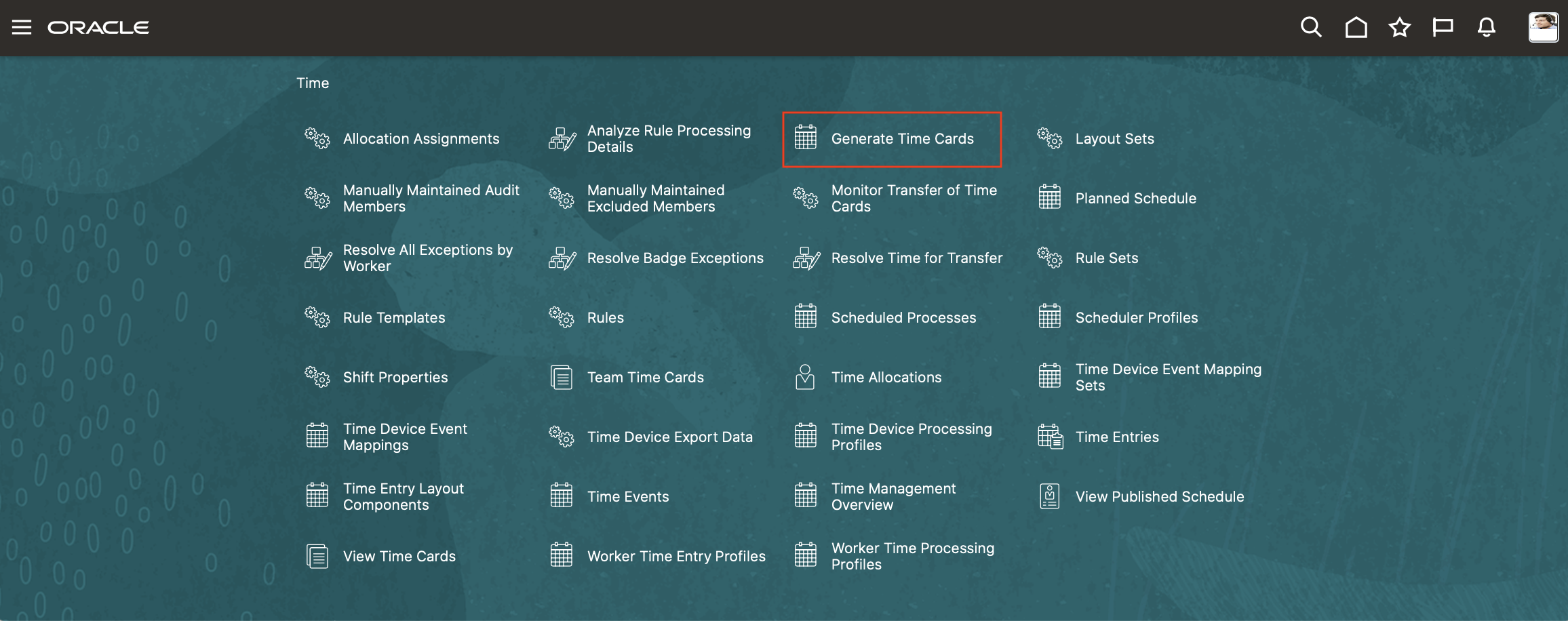
New Generate Time Cards Quick Action
This enhancement lets time and labor managers more quickly access the Generate Time Cards task.
Steps to Enable
You don't need to do anything to enable this feature.
IMPORTANT Actions and Considerations for Time and Labor
REPLACED OR REMOVED FEATURES
From time to time, Oracle replaces existing Cloud service features with new features or removes existing features. When a feature is replaced the older version may be removed immediately or at a future time. As a best practice, you should use the newer version of a replaced feature as soon as the newer version is available.
| Product | Removed Feature | Target Removal | Replacement Feature | Replaced In | Additional Information |
|---|---|---|---|---|---|
| Time & Labor | Removal of Expediting Time for Payroll Reprocessing | 22C | None |
_________________________
KNOWN ISSUES / MAINTENANCE PACK SPREADSHEETS
Oracle publishes a Known Issues document for every Update to make customers are aware of potential problems they could run into and the document provides workarounds if they are available.
Oracle also publishes Maintenance Pack and Statutory Maintenance Pack documentation of bugs that are fixed in the monthly or statutory patching.
To review these documents you must have access to My Oracle Support:
Oracle Human Capital Management Cloud Functional Known Issues and Maintenance Packs (Document ID 1554838.1)