
This document will continue to evolve as existing sections change and new information is added. All updates appear in the following table:
| Date | Module | Feature | Notes |
|---|---|---|---|
| 31 MAR 2023 | Time & Labor / Controlled Availability Features | Time and Labor and Absence Management Integration Enhancements | Updated document. Revised feature information. |
| 27 JAN 2023 | Time & Labor | Controlled Availability for Time and Labor | Updated document. Feature delivered in update 23A. |
| 02 DEC 2022 | Created initial document. |
HCM Cloud applications have two types of patches you can receive that are documented in this What’s New:
- Release Updates (23A, 23B, 23C, and 23D)
- Optional Monthly Maintenance Packs to each update
It is important for you to know what Release Update your environment is on. You can find this in your Cloud Portal.
____________________
 HAVE AN IDEA?
We’re here and we’re listening. If you have a suggestion on how to make our products better, please let us know. To enter an idea go to the Ideas Lab on Oracle Customer Connect. In this document wherever you see the light bulb icon after the feature name it means we delivered one of your ideas.
____________________
Suggested Reading for all HCM Products
- HCM Common What's New - In this What's New you will find feature that are used across applications.
- Human Resources What’s New – In the Global Human Resources section you will find features on the base application in which other application are built upon.
NOTE: Not all Global Human Resource features are available for Talent and Compensation products.
- Oracle Human Capital Management Cloud Functional Known Issues and Maintenance Packs (Document ID 1554838.1). These documents identify bug fixes and possible known issues. You will also need to review these documents based in the release update version you are currently on or will be moving to.
- Oracle Help Center – Here you will find guides, videos and searchable help.
- Release Readiness – New Feature Summary, What’s New, Feature Listing Spreadsheet, Spotlights and Release Training
GIVE US FEEDBACK
We welcome your comments and suggestions to improve the content. Please send us your feedback at oracle_fusion_applications_help_ww_grp@oracle.com. Indicate you are inquiring or providing feedback regarding the HCM Cloud What’s New in the body or title of the email.
Column Definitions:
Report = New or modified, Oracle-delivered, ready to run reports.
UI or Process-Based: Small Scale = These UI or process-based features are typically comprised of minor field, validation, or program changes. Therefore, the potential impact to users is minimal.
UI or Process-Based: Larger Scale* = These UI or process-based features have more complex designs. Therefore, the potential impact to users is higher.
Features Delivered Disabled = Action is needed BEFORE these features can be used by END USERS. These features are delivered disabled and you choose if and when to enable them. For example, a) new or expanded BI subject areas need to first be incorporated into reports, b) Integration is required to utilize new web services, or c) features must be assigned to user roles before they can be accessed.
| Ready for Use by End Users Reports plus Small Scale UI or Process-Based new features will have minimal user impact after an update. Therefore, customer acceptance testing should focus on the Larger Scale UI or Process-Based* new features. |
Customer Must Take Action before Use by End Users Not disruptive as action is required to make these features ready to use. As you selectively choose to leverage, you set your test and roll out timing. |
|||||
|---|---|---|---|---|---|---|
| Feature |
Report |
UI or |
UI or |
|
||
New HSDL Template for Loading Public Holiday Calendar Events |
||||||
Time and Labor and Absence Management Integration Enhancements |
||||||
Oracle Time and Labor is a comprehensive, easy to use, rule-based time recording and management application. The calendar-based time entry interface and fully configurable time card layout easily address simple and complex time recording needs. Rule templates and the real-time rules engine provide an extensible and robust method to validate time entries and automatically apply pay rules, such as overtime calculations. Time and Labor now integrates completely with the following Oracle Cloud Human Capital Management applications: Global Human Resources, Absence Management, Global Payroll, and Project Costing. This integration insures accurate and consistent data for payroll processing and costing as well as project management billing.
Time Change Requests Enhancements
As a time and labor manager, you can now review and approve time change requests for the people you manage using the dedicated Team Change Requests page.

Team Change Request with Default Filters Showing Submitted Change Requests
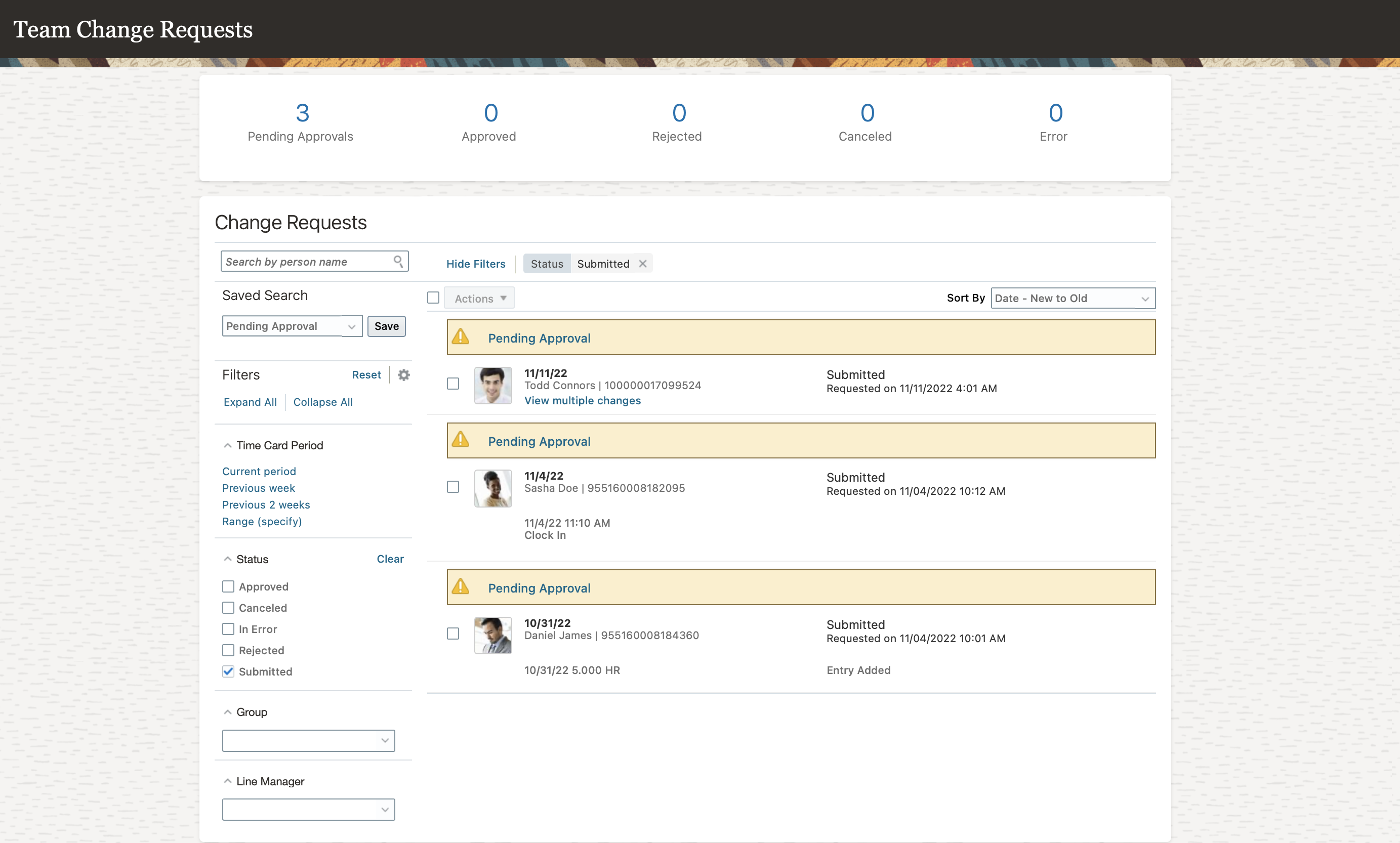
Filters Available on the Team Change Requests Page for Time and Labor Managers
You can approve and reject change requests one at a time or select multiple change requests and approve or reject them using the Actions menu options. You can approve and reject change requests one at a time or select multiple change requests and approve or reject them using the Actions menu options.

Actions Menu on the Team Change Requests Page for Time and Labor Managers with Approve and Reject options
This enhancement lets time and labor managers review and approve time change requests from a dedicated page.
Steps to Enable
You don't need to do anything to enable this feature.
New HSDL Template for Loading Public Holiday Calendar Events
You can now bulk load public holidays using a new optimized HSDL template. The HSDL template for this feature is named Public Holiday Calendar Events and has the following columns. An asterisk in front of the column name indicates that a value must be provided. Other columns are optional.
| HSDL Template Column Name | Purpose |
|---|---|
| *Calendar Event Name | The name of the public holiday, for example New Year's Day, Diwali, or Labor Day. |
| Calendar Event Description | An optional description of the calendar event. |
| *Calendar Event Date | The start date of the calendar event. The start time is assumed to be midnight on this date, and the event will span 24 hours. |
| Holiday Type | The Holiday Type corresponds to the Calendar Event Category and its value must be Public holiday. |
| *Short Code | A unique code for the public holiday event. A maximum of 48 characters can be entered. If no value is entered then a short code with the following format will be generated automatically when uploading the data: GNRTD_<first 10 characters of Calendar Event Name>_<Calendar Event Date>_<7-digit random number>. |
| *Country | The country for which the public holiday is defined. This value can be picked from a list of values that contains the country names that are created in the geography tree that is defined for the public holiday events. |
| Territory Code | The territory code for the territory in the geography tree. This code will be populated automatically after selecting the country value in the Country column. Making changes to the Territory Code can result in upload issues, so it's recommended not to make any changes to this value. |
| Location | The location within the selected country for which the public holiday is defined. Leave this blank if the public holiday is for the entire country, otherwise select the relevant state, province, or other location from the list of values. Location values are based on the geography tree that is defined for the public holiday events. |
| Tree Code | The code for the geography hierarchy tree. This value is automatically derived. Making changes to the Tree Code can result in upload issues, so it's recommended not to make any changes to this value. |
| Tree Version Name | The name of the geography tree version. This value is automatically derived. Making changes to the Tree Version Name can result in uploaded issues, so it's recommended not to make any changes to this value. |
| Tree Note ID | The unique identifier for the geography tree note. This value is automatically derived. Making changes to the Tree Note ID can result in upload issues, so it's recommended not to make any changes to this value. |
| Key | A unique key for the row of data. This value is generated automatically. |
Data can be created one row at a time in the HSDL template. To further increase the efficiency of loading public holiday events data you can prepare data in a csv file format and use the Import File option in the HSDL loader. The columns of the csv file are as follows:
| Column Name | Maps to HSDL Column |
|---|---|
| CalendarEvent_Name | Calendar Event Name |
| CalendarEvent_Desciption | Calendar Event Description |
| CalendarEvent_CalendarEventDate | Calendar Event Date |
| CalendarEvent_Category | Holiday Type |
| CalendarEvent_ShortCode | Short Code |
| Note_0 | Country |
| CalendarEventCoverage_TerritoryCode | Territory Code |
| Note_1 | Location |
| CalendarEvent_TreeCode | Tree Code |
| CalendarEvent_TreeVersionName | Tree Version Name |
| CalendarEventCoverage_TreeNoteId | Tree Note ID |
Use the new HSDL template to load public holiday events efficiently in bulk.
Steps to Enable
You don't need to do anything to enable this feature.
Tips And Considerations
When loading data using the HSDL template, you need to be mindful of the following:
- The combination of Calendar Event Name, Calendar Event Description, Calendar Event Date, and Country must be unique.
- When attempting to load multiple rows containing the same Calendar Event Name, Calendar Event Date, and Country, only the data on the last row with duplicate data will be loaded.
- The Location value in the HSDL template is not automatically updated when the Country value is changed. You must select the appropriate Location value after changing the Country value.
NOTE: If you have defined multiple trees for the same country, make sure to select values from the Country and Location lists of values in the HSDL template. Copying and pasting these values from other rows in the template, or entering them manually is not supported.
- To correct data that has been previously uploaded, correct the data in the HSDL template and re-upload the data, or correct the data manually using the Manage Calendar Events task.
- Oracle has pre-configured public holiday geography trees and tree versions for the following countries and, where relevant, their states, provinces, or equivalent territories: Australia, Brazil, Canada, France, India, Indonesia, Malaysia, Mexico, Philippines, Qatar, Romania, Saudi Arabia, United Arab Emirates, United Kingdom, and United States of America. If you want to leverage these trees and tree versions, you have to complete the geography tree setup by creating the tree nodes for these countries.
NOTE: The names of the tree nodes that you create must match the location lookup values that are seeded by Oracle in the HSDL template. If these values don't match the data will be loaded at the country level and the location will be ignored.
- If you want to load public holiday events for other countries or at a level below the state, province, or equivalent, then you have to create the relevant geography tree entries using the Manage Trees & Versions task.
- When sourcing public holiday calendar events data from a third party you may want to consider leveraging the Short Code in the HSDL template to match the unique identifier in the third party's public holidays data (if available).
NOTE: When importing public holiday calendar events data from a source file, make sure the date format selected in the import dialog is the same as the date format in the source file. If these date formats don't match, the import process will generate an error and the data won't be loaded.
Key Resources
- For more information, see the following resource: HCM Data Loading Business Objects.
Role And Privileges
See the Configure HCM Spreadsheet Data Loader Security help topic on the Oracle Help Center for information about HSDL role and privileges configuration.
Web Clock Geolocation Introduction
You can now view applicable geolocation information for web clock events using the Time Events task in the My Client Groups > Time Management work area. > This information includes the Web Clock device used to report the time, such as Desktop, Mobile Offline, or Mobile Online. It also includes the latitude and longitude accuracy in meters as well as any exceptions, such as rejected location requests.
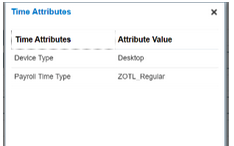
Time Attributes for a Web Clock Event Reported with a Desktop Browser
This enhancement lets mobile time reporters confirm their location when they clock time.
Steps to Enable
Edit existing worker time entry profiles or create them and select Enable geolocation for Web Clock.
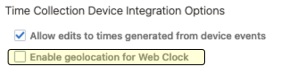
Time Collection Device Integration Options Section of a Worker Time Entry Profile Showing the New Geolocation Option
People with these time entry profiles are prompted to grant Location access when they use Web Clock on mobile devices or in browsers on any supported device.
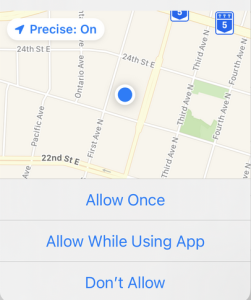
Location Request for Mobile Web Clock on an iPhone
Tips And Considerations
GPS is a country-specific service. A time reporter's location, device, and other factors determine the accuracy and availability of their geolocation information. For most accurate information, we recommend that you enable this functionality for people who use Web Clock on mobile devices because they have dedicated GPS sensors.
Because desktop devices don't have GPS sensors, their location is derived from the network and its likely to be less accurate. Desktops that use VPN connections are most likely to provide incorrect location information.
Oracle HCM Cloud app versions that support geolocation are 11.13.23.01.01 or later.
Web Clock Missing Out Enhancement
People using Web Clock to clock in will now see a warning if they're missing an out event for the previous day. This way they know to fix any incomplete or in error time entries before submitting their time cards.

Web Clock with the Missing Out Warning Message
This enhancement lets people who report time with Web Clock learn about issues in a timely manner so that they can fix them quickly.
Steps to Enable
You don't need to do anything to enable this feature.
Web Clock Button Logic Enhancements
If you enable button logic rule in your web clock layouts, you can now also specify to restart the logic after people click the last button in their sequence. This might reduce the number of buttons you need to configure for layouts.
This enhancement lets you reduce the number of web clock buttons on your web clock layouts.
Steps to Enable
Generate a layout set or open an existing layout set and edit the web clock layout properties.
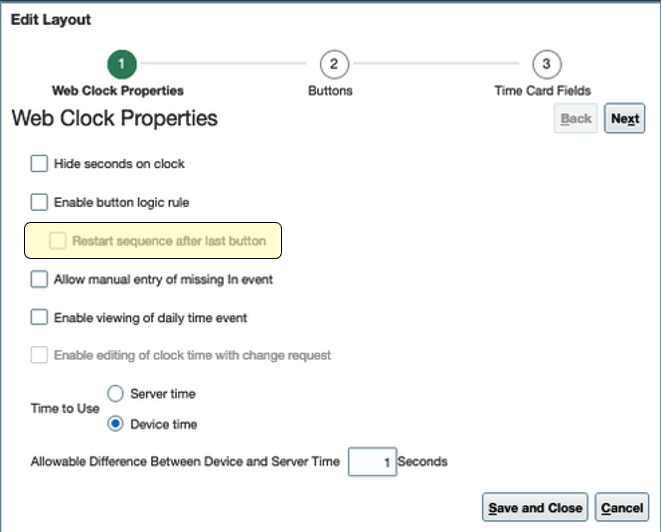
Edit Layout Dialog Box Showing the Web Clock Properties, Including the New Restart Sequence Option
Web Clock Missing In Enhancement
You can now let people reporting time with Web Clock manually add missing In events. The next time that they clock out and Web Clock determines that a corresponding In event doesn't already exist, the person gets a warning. The warning gives them the option to record the current clock out and open a dialog box where they can manually add the missing In event. They also have the option to only record the current clock out or cancel this Web Clock session entirely.
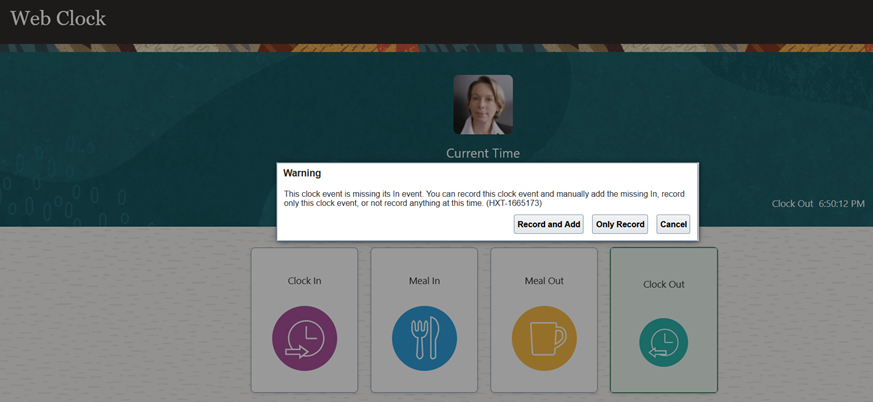
Web Clock with the Warning Message about the Missing Clock In
If they manually add the missing In event, we automatically generate the appropriate time change request when the person clicks Submit.

Web Clock with the Dialog Box Where People Manually Report Their Missing Clock In
Let individuals correct issues with their reported time in a timely manner.
Steps to Enable
Configure existing and newly generated web clock layouts to allow the manual entry of missing In events.
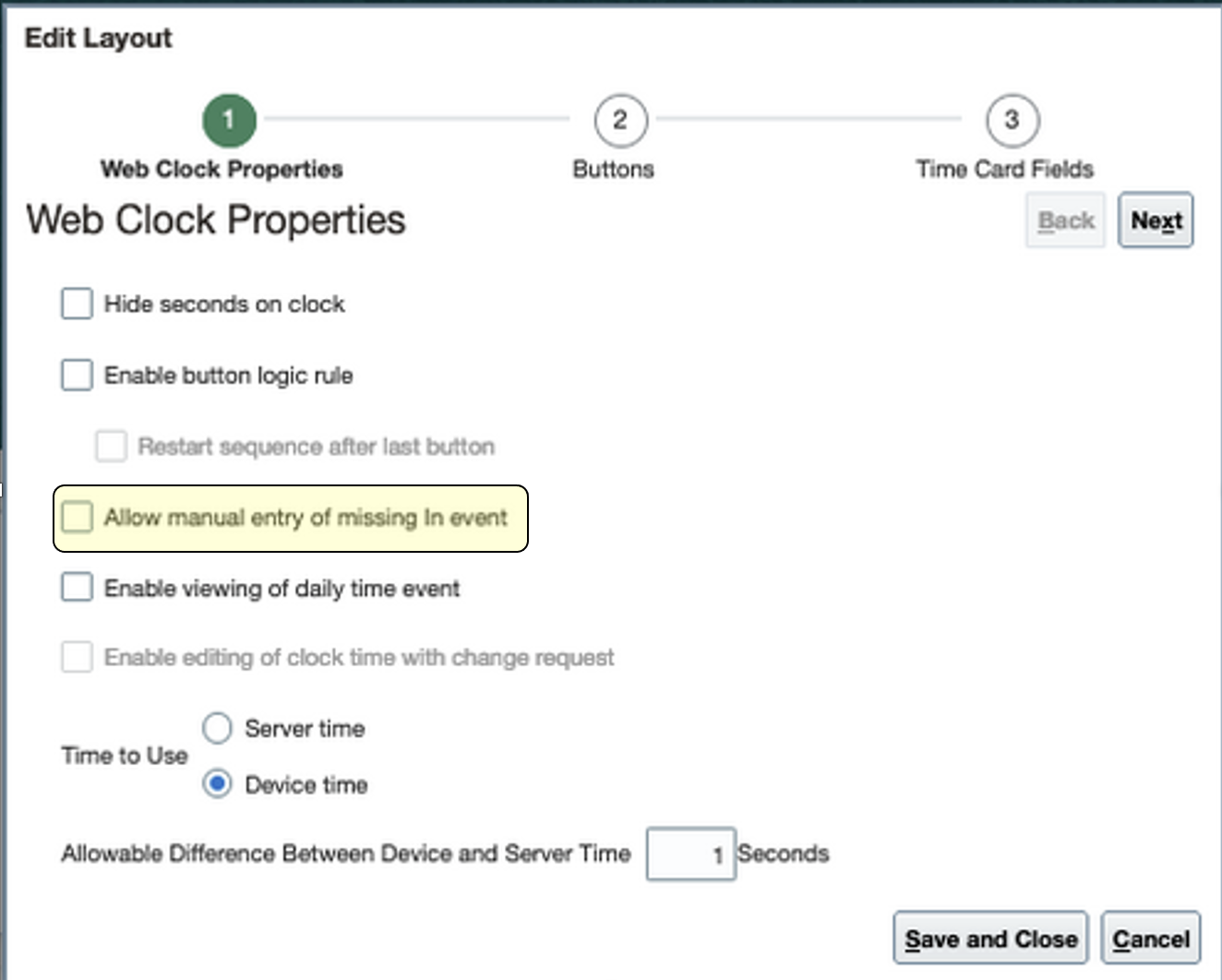
Edit Layout Dialog Box Showing the Web Clock Properties
Key Resources
For details about configuring layouts, see these topics in the Implementing Time and Labor guide in Oracle Help Center:
IMPORTANT Actions and Considerations for Time and Labor
REPLACED OR REMOVED FEATURES
From time to time, Oracle replaces existing Cloud service features with new features or removes existing features. When a feature is replaced the older version may be removed immediately or at a future time. As a best practice, you should use the newer version of a replaced feature as soon as the newer version is available.
| Product |
Removed Feature |
Target Removal |
Replacement Feature |
Replaced In |
Additional Information |
|---|---|---|---|---|---|
| None at this time. |
_________________________
KNOWN ISSUES / MAINTENANCE PACK SPREADSHEETS
Oracle publishes a Known Issues document for every Update to make customers are aware of potential problems they could run into and the document provides workarounds if they are available.
Oracle also publishes Maintenance Pack and Statutory Maintenance Pack documentation of bugs that are fixed in the monthly or statutory patching.
To review these documents you must have access to My Oracle Support:
Oracle Human Capital Management Cloud Functional Known Issues and Maintenance Packs (Document ID 1554838.1)
Controlled Availability for Time and Labor
The following is a list of Controlled Availability features that are being offered by our Controlled Availability Program.
NOTE: These features are not generally available for all customers at this time. These are only available through the Controlled Availability Program and will require approval to become a part of the features program. To be a part of these programs you will be required to participate in testing and providing feedback. Some programs may require other participation as well.
Not to worry if you don't have to time to be a part of these early stage programs. You can uptake this feature when it is generally available for all customers. When these features are available for all customers you will see the features under their product headings as usual.
We invite you all to browse through the list of features to see if there are any features you are interested in implementing in advance of the features scheduled release. The table below will provide information on signing up for features. Please sign up soon, as these programs have limited availability and some are designed for specific types of customers.
The table below gives you a brief description of the features available and how to sign up. Some features are bigger than others, so for more information there may be a What's New describing the feature in more detail below this table.
We look forward to hearing your thoughts and ideas as you participate the Controlled Availability programs!
| Product |
Feature Name |
Feature Description |
Type of Customer Needed to Test |
How to Sign Up |
Controlled Availability Release |
Is the Program Still Open? |
|---|---|---|---|---|---|---|
| Time and Labor |
Absences Measured in Days Included on Time Cards | Time card allows display and edit of absences with Days UoM. The absence type setup now includes options to enable the time card integration as a Display only or edit on time card. Time totals for absence days can now be setup by creating a time category with UOM ‘Days’. |
This feature is dependent on the uptake of the new absence and time integration architecture listed below. |
Raise an SR in My Oracle Support to be approved. | 23A | Yes |
| Time and Labor |
Time and Labor and Absence Management Integration Enhancements | View open-ended absences and edit open-ended absences after they're end dated on time cards. Also manage absences for nonwork days on time cards. When the absence start or end date changes for an absence that spans time cards, only the time card with the absence date change gets reprocessed. |
All new customers will get this functionality by default with 23A. For existing customers you will need to raise an SR in My Oracle Support to be approved. |
23A |
Yes |
Time and Labor Controlled Availability
The following is a list of Controlled Availability features that are being offered by our Controlled Availability Program.
NOTE: These features are not generally available for all customers at this time. These are only available through the Controlled Availability Program and will require approval to become a part of the features program. To be a part of these programs you will be required to participate in testing and providing feedback. Some programs may require other participation as well.
Absences Measured in Days Included on Time Cards
With the new integration architecture between Oracle Fusion Cloud Time and Labor and Oracle Fusion Cloud Absence Management, individuals can now manage absences measured in days using their time cards. They can create the absences using the Add Absences task, or by adding them on their time cards. And they can edit the absences on their time card.
This enhancement lets individuals more effectively manage absences from their time card.
Steps to Enable
To enable this feature you need to log a Service Request (SR).
- If you have existing Oracle Fusion Cloud Absence Management and Oracle Fusion Cloud Time and Labor implementations, you need to migrate to the new integration architecture. To do this, log an SR against the WFM product requesting the documentation and guidance needed to the uptake of the new architecture.
- For new and existing implementations, you need to configure the applicable absence types so that Enable for time card entry is Editable on time card. Use the Absence Types task on the My Client Groups > Absences page. The field is on the Type Attributes tab.
- Create an single-attribute time card field with the Absence Management Type time attribute, or include the time attribute in a multiple-attribute time card field. Use the Time Entry Layout Components setup task.
- To show time totals for entries measured in days, create a time category to identify time entries measured in days. Use the Time Categories setup task.
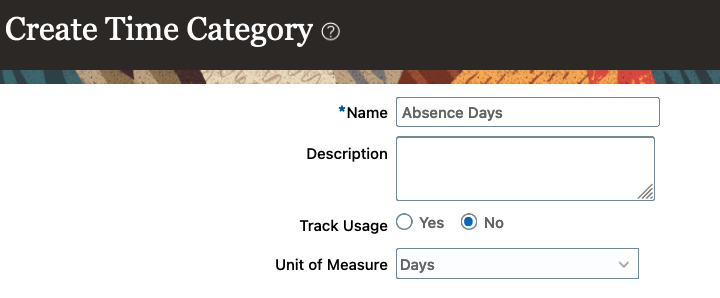
- Add the time card field to the appropriate time layouts. Use the Time Layout Sets setup task.
- Add the time category that identifies time entries measure in days to the time totals area of the appropriate time layouts.
- Add the time layout set to the appropriate time entry profiles. Use the Worker Time Entry Profiles setup task.
Key Resources
For more details about configuring time entry objects, see these topics on Oracle Help Center:
- Configure the Single-Attribute Time Card Field Properties
- Configure the Time Attributes for the Multiple-Attribute Time Card Field
- Add and Configure Values for the Multiple-Attribute Time Card Field
- Time Categories
- How Time Categories Work in Time Layouts
- Time Layout Sets
- Time Layouts
- Time Entry, Review, View, Approval Notification, and Calendar Entry Layout Configurations
- Time Totals Layout Configurations
- Top Section Configuration of the Responsive UI Layout
- Entries Section Configuration of the Responsive UI Layout
- How Time Entry Profile Components Work Together
Time and Labor and Absence Management Integration Enhancements
With the new integration architecture between Oracle Fusion Cloud Time and Labor and Oracle Fusion Cloud Absence Management, individual can only view open-ended absences on their time cards. The absence entries get continuously generated on the time cards for as long as the absence remains open, even for time card periods outside of the open-ended absence evaluation period. When the absence is end-dated, it becomes editable on the relevant time cards.
Time cards can now include absences on nonwork days. The quantity for these absences is 0. Previously, people couldn't add absences to time cards on their nonwork days. And time cards wouldn't show any nonwork day absences created with the Add Absence task.
Previously when people edited either the start or end date of an absence that spanned two time cards, both time cards got reprocessed. With the new Oracle Fusion Cloud Time and Labor and Oracle Fusion Cloud Absence Management integration, only the time card with the changed absence date gets reprocessed.
These enhancements let individuals more effectively manage absences from their time card.
Steps to Enable
To enable this feature you need to log a Service Request (SR).
If you have existing Oracle Fusion Cloud Absence Management and Oracle Fusion Cloud Time and Labor implementations, you need to migrate to the new integration architecture. To do this, log an SR against the WFM product requesting the documentation and guidance needed to the uptake of the new architecture.
Key Resources
For more details about reprocessing time cards, see the Resubmit Time Cards Process topic on Oracle Help Center.