
This document will continue to evolve as existing sections change and new information is added. All updates appear in the following table:
| Date | Module | Feature | Notes |
|---|---|---|---|
| 02 DEC 2022 | Created initial document. |
HCM Cloud applications have two types of patches you can receive that are documented in this New Feature Summary:
- Release Updates (23A, 23B, 23C, and 23D)
- Optional Monthly Maintenance Packs to each update
It is important for you to know what Release Update your environment is on. You can find this in your Cloud Portal.
____________________
 HAVE AN IDEA?
We’re here and we’re listening. If you have a suggestion on how to make our products better, please let us know. To enter an idea go to the Ideas Lab on Oracle Customer Connect. In this document wherever you see the light bulb icon after the feature name it means we delivered one of your ideas.
____________________
SUGGESTED READING FOR ALL HCM PRODUCTS
- HCM Common What's New - In this What's New you will find feature that are used across applications.
- Human Resources What’s New – In the Global Human Resources section you will find features on the base application in which other application are built upon.
NOTE: Not all Global Human Resource features are available for Talent and Compensation products.
- Oracle Human Capital Management Cloud Functional Known Issues and Maintenance Packs (Document ID 1554838.1). These documents identify bug fixes and possible known issues. You will also need to review these documents based in the release update version you are currently on or will be moving to.
- Oracle Help Center – Here you will find guides, videos and searchable help.
- Release Readiness – New Feature Summary, What’s New, Feature Listing Spreadsheet, Spotlights and Release Training
GIVE US FEEDBACK
We welcome your comments and suggestions to improve the content. Please send us your feedback at oracle_fusion_applications_help_ww_grp@oracle.com. Indicate you are inquiring or providing feedback regarding the HCM Cloud What’s New in the body or title of the email.
Column Definitions:
Report = New or modified, Oracle-delivered, ready to run reports.
UI or Process-Based: Small Scale = These UI or process-based features are typically comprised of minor field, validation, or program changes. Therefore, the potential impact to users is minimal.
UI or Process-Based: Larger Scale* = These UI or process-based features have more complex designs. Therefore, the potential impact to users is higher.
Features Delivered Disabled = Action is needed BEFORE these features can be used by END USERS. These features are delivered disabled and you choose if and when to enable them. For example, a) new or expanded BI subject areas need to first be incorporated into reports, b) Integration is required to utilize new web services, or c) features must be assigned to user roles before they can be accessed.
| Ready for Use by End Users Reports plus Small Scale UI or Process-Based new features will have minimal user impact after an update. Therefore, customer acceptance testing should focus on the Larger Scale UI or Process-Based* new features. |
Customer Must Take Action before Use by End Users Not disruptive as action is required to make these features ready to use. As you selectively choose to leverage, you set your test and roll out timing. |
|||||
|---|---|---|---|---|---|---|
| Feature |
Report |
UI or |
UI or |
|
||
Workforce Modeling & Prediction
Oracle Workforce Modeling provides an integrated solution supporting Oracle Global Human Resources and provides an easy to use, drag and drop interface that allows you to create reorganization proposals and assess their impact before they are even sent for approval. The intuitive interface and integration with Oracle Global Human Resources ensure that changes are accurately reflected and validated in the transactional system. Oracle Workforce Modeling provides an integrated solution supporting Oracle Global Human Resources and provides an easy to use, drag and drop interface that allows you to create reorganization proposals and assess their impact before they are even sent for approval. The intuitive interface and integration with Oracle Global Human Resources ensure that changes are accurately reflected and validated in the transactional system. Oracle Workforce Modeling provides an integrated solution supporting Oracle Global Human Resources and provides an easy to use, drag and drop interface that allows you to create reorganization proposals and assess their impact before they are even sent for approval. The intuitive interface and integration with Oracle Global Human Resources ensure that changes are accurately reflected and validated in the transactional system.
Bypass Approvals in Workforce Modeling
Avoid the approval process to save time when creating a workforce model by enabling the bypass option for Workforce Modeling. You select an option against the workforce modeling approval rule in the Transaction Console to enable this feature. When selected, any new model you create will avoid the approval process. You can go ahead and complete your model and then commit the changes with no approval required.
Quickly create and submit workforce changes by avoiding any approvals.
Steps to Enable
Enable the Bypass Approvals option for the Workforce Modeling Approval rule using the Transaction Console.
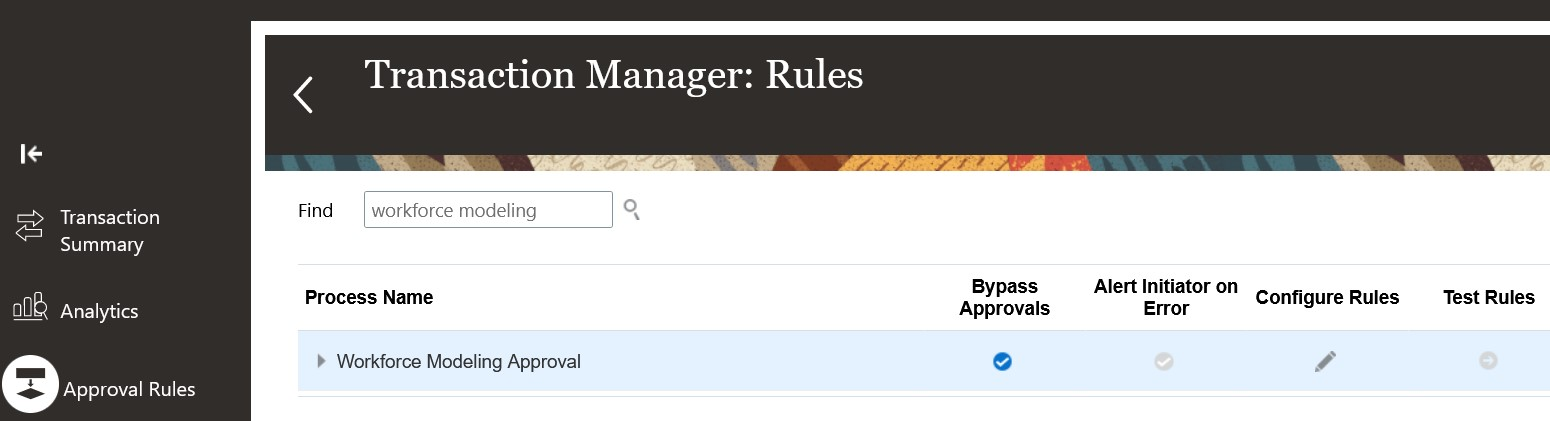
Bypass Approvals Option in Transaction Console
- In the Navigator menu, select Tools and then Transaction Console.
- Select the Approval Rules tab and search for workforce modeling.
- Select the Bypass Approvals option for the Workforce Modeling Approval process name.