
This document will continue to evolve as existing sections change and new information is added. All updates appear in the following table:
| Date | Product | Feature | Notes |
|---|---|---|---|
| 03 SEP 2021 | Created initial document. |
HCM Cloud applications have two types of patches you can receive that are documented in this What’s New:
- Release Updates (21A, 21B, 21C, and 21D)
- Optional Monthly Maintenance Packs to each update
It is important for you to know what Release Update your environment is on. You can find this in your Cloud Portal.
____________________
 HAVE AN IDEA?
We’re here and we’re listening. If you have a suggestion on how to make our products better, please let us know. To enter an idea go to the Ideas Lab on Oracle Customer Connect. In this document wherever you see the light bulb icon after the feature name it means we delivered one of your ideas.
____________________
Suggested Reading for all HCM Products:
- Human Resources What’s New – In the Global Human Resources section you will find features on the base application in which other application are built upon.
NOTE: Not all Global Human Resource features are available for Talent and Compensation products.
- Oracle Human Capital Management Cloud Functional Known Issues and Maintenance Packs (Document ID 1554838.1). These documents identify bug fixes and possible known issues. You will also need to review these documents based in the release update version you are currently on or will be moving to.
- Oracle Help Center – Here you will find guides, videos and searchable help.
- Release Readiness – New Feature Summary, What’s New, Feature Listing Spreadsheet, Spotlights and Release Training
GIVE US FEEDBACK
We welcome your comments and suggestions to improve the content. Please send us your feedback at oracle_fusion_applications_help_ww_grp@oracle.com. Indicate you are inquiring or providing feedback regarding the HCM Cloud What’s New in the body or title of the email.
Column Definitions:
Report = New or modified, Oracle-delivered, ready to run reports.
UI or Process-Based: Small Scale = These UI or process-based features are typically comprised of minor field, validation, or program changes. Therefore, the potential impact to users is minimal.
UI or Process-Based: Larger Scale* = These UI or process-based features have more complex designs. Therefore, the potential impact to users is higher.
Features Delivered Disabled = Action is needed BEFORE these features can be used by END USERS. These features are delivered disabled and you choose if and when to enable them. For example, a) new or expanded BI subject areas need to first be incorporated into reports, b) Integration is required to utilize new web services, or c) features must be assigned to user roles before they can be accessed.
| Ready for Use by End Users Reports plus Small Scale UI or Process-Based new features will have minimal user impact after an update. Therefore, customer acceptance testing should focus on the Larger Scale UI or Process-Based* new features. |
Customer Must Take Action before Use by End Users Not disruptive as action is required to make these features ready to use. As you selectively choose to leverage, you set your test and roll out timing. |
|||||
|---|---|---|---|---|---|---|
| Feature |
Report |
UI or |
UI or |
|
||
Oracle My Brand harnesses social networks to help organizations discover, mobilize, and retain talent. This functionality provides insight into workers' social reputation and influence while also monitoring workers' social media usage compliance and mitigating social media risk.
You can now streamline the mentoring process by using the default mentoring plan that's available to you both as a mentor or mentee. The mentoring plan becomes active when a mentor accepts a mentoring request. This plan includes a recommended checklist intended to capture the milestones during the mentorship and consists of goals and tasks that the mentor and mentee can add based on the skill being developed.
Some things to note:
- Only 1 mentoring plan can be active at a time. You can add goals and tasks or edit a checklist item as long as the plan is active.
- Once a mentoring plan is completed it can't be edited and can be viewed in read-only mode.
- Mentor plans expire after 6 months from the date of creation.
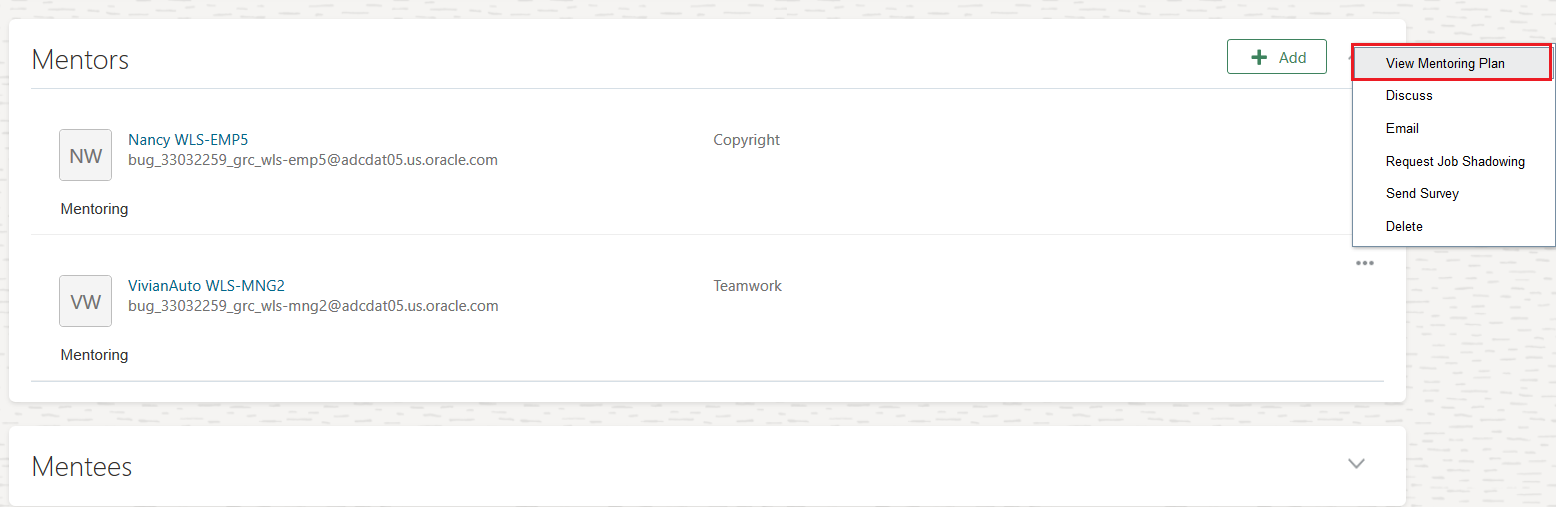
View Mentoring Plan

Recommended Checklist to Track Milestones

Complete Plan at the End of the Mentorship

Add Goals and Tasks
This feature enables you to track the mentoring process and provides visibility into the progress being made.
Steps to Enable
You don't need to do anything to enable this feature.
Tips And Considerations
- The recommended checklist items can be enabled or disabled by administrators in Personal Brand Administration > Mentorship Settings tab.
- Administrators can also create new checklist items in Personal Brand Administration > Mentorship Settings tab.
- If an administrator disables a checklist item, the item is removed from existing mentor plans only if it hasn't been marked complete. Items that have already been marked as completed before they were disabled by the administrator continue to remain as-is in the mentor plan.
- If the administrator enables a checklist item, the item is automatically available in all existing mentoring plans.
Mentors can now enhance their profiles by providing more details in the Areas of Learning section. Mentees can view and use the mentor's profile to understand and decide on the best fit for their mentorship requirements.
Go to Me > Personal Brand > Preferences to create or edit your mentorship profile.
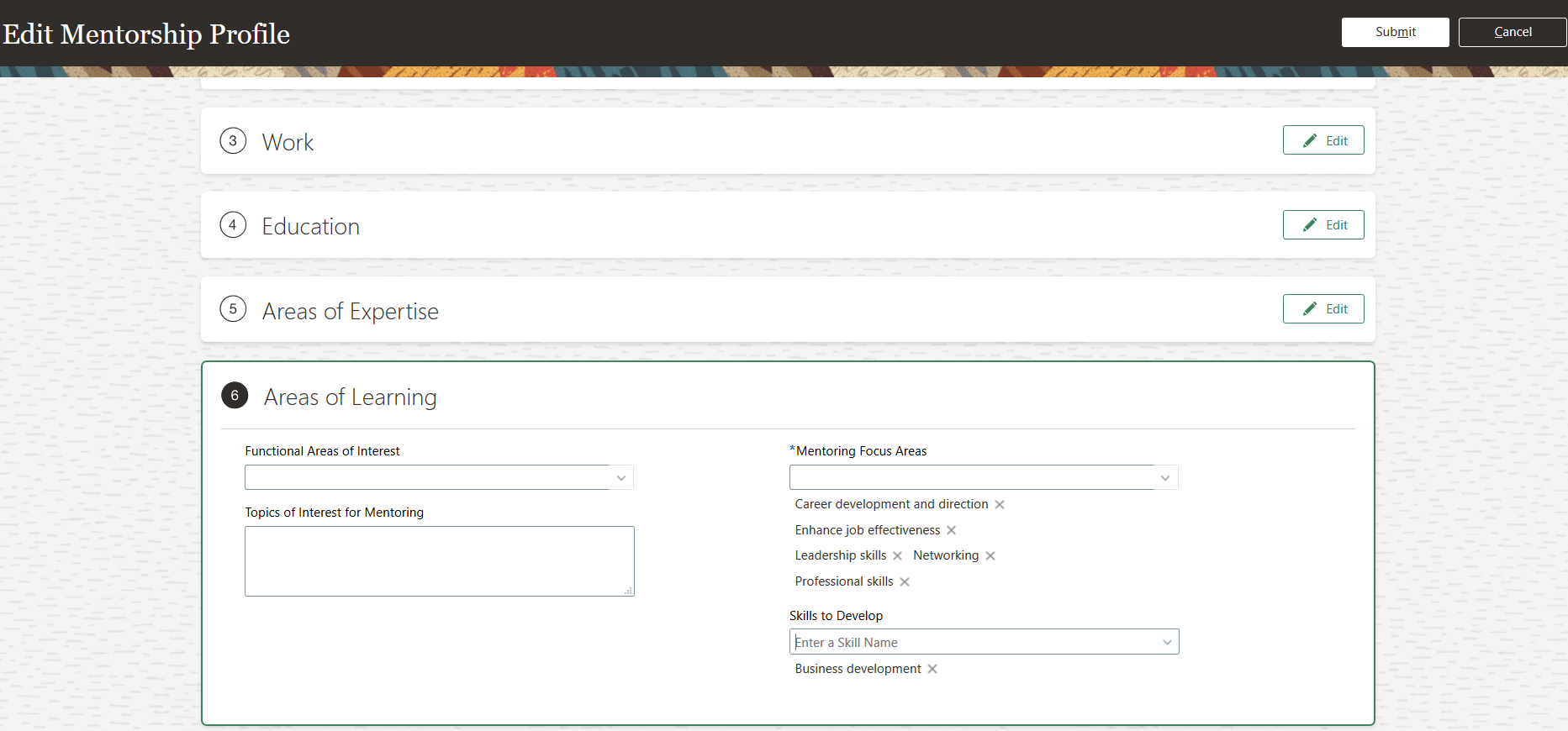
This feature makes it easier to find the right mentor.
Steps to Enable
You don't need to do anything to enable this feature.
IMPORTANT Actions and Considerations for Worklife
REPLACED OR REMOVED FEATURES
From time to time, Oracle replaces existing Cloud service features with new features or removes existing features. When a feature is replaced the older version may be removed immediately or at a future time. As a best practice, you should use the newer version of a replaced feature as soon as the newer version is available.
| Product | Removed Feature | Target Removal | Replacement Feature | Replaced In | Additional Information |
|---|---|---|---|---|---|
| Nothing at this time. |
_________________________
ORACLE DECOMMISSIONED THE HCM CLASSIC SIMPLIFIED USER INTERFACE IN UPDATE 20B
The HCM Responsive User Experience has been available and promoted as our standard since Update 18B. If you are still using the older HCM Classic Simplified User Interface, you must transition to the HCM Responsive User Experience, as these older pages will no longer be supported.
For consolidated information on generic setup information you can refer to My Oracle Support Document ID 2399671.1 - HCM Responsive User Experience Setup Information.
_________________________
KNOWN ISSUES / MONTHLY AND STATUTORY MAINTENANCE PACK
Oracle publishes a Known Issues document for every Update to make customers are aware of potential problems they could run into and the document provides workarounds if they are available.
Oracle also publishes Maintenance Pack and Statutory Maintenance Pack documentation of bugs that are fixed in the monthly or statutory patching.
To review these documents you must have access to My Oracle Support:
Oracle Human Capital Management Cloud Functional Known Issues and Maintenance Packs (Document ID 1554838.1)