
This document will continue to evolve as existing sections change and new information is added. All updates appear in the following table:
| Date | Product | Feature | Notes |
|---|---|---|---|
| 04 MAR 2022 | Created initial document. |
IMPORTANT NOTE: If you are being updated directly from 21D to 22B you should review the content of both 22A and 22B sections to ensure you see all the changes included in the update.
HCM Cloud applications have two types of patches you can receive that are documented in this What’s New:
- Release Updates (22A, 22B, 22C, and 22D)
- Optional Monthly Maintenance Packs to each update
It is important for you to know what Release Update your environment is on. You can find this in your Cloud Portal.
____________________
 HAVE AN IDEA?
We’re here and we’re listening. If you have a suggestion on how to make our products better, please let us know. To enter an idea go to the Ideas Lab on Oracle Customer Connect. In this document wherever you see the light bulb icon after the feature name it means we delivered one of your ideas.
____________________
Suggested Reading for all HCM Products:
- Human Resources What’s New – In the Global Human Resources section you will find features on the base application in which other application are built upon.
NOTE: Not all Global Human Resource features are available for Talent and Compensation products.
- Oracle Human Capital Management Cloud Functional Known Issues and Maintenance Packs (Document ID 1554838.1). These documents identify bug fixes and possible known issues. You will also need to review these documents based in the release update version you are currently on or will be moving to.
- Oracle Help Center – Here you will find guides, videos and searchable help.
- Release Readiness – New Feature Summary, What’s New, Feature Listing Spreadsheet, Spotlights and Release Training
GIVE US FEEDBACK
We welcome your comments and suggestions to improve the content. Please send us your feedback at oracle_fusion_applications_help_ww_grp@oracle.com. Indicate you are inquiring or providing feedback regarding the HCM Cloud What’s New in the body or title of the email.
Column Definitions:
Report = New or modified, Oracle-delivered, ready to run reports.
UI or Process-Based: Small Scale = These UI or process-based features are typically comprised of minor field, validation, or program changes. Therefore, the potential impact to users is minimal.
UI or Process-Based: Larger Scale* = These UI or process-based features have more complex designs. Therefore, the potential impact to users is higher.
Features Delivered Disabled = Action is needed BEFORE these features can be used by END USERS. These features are delivered disabled and you choose if and when to enable them. For example, a) new or expanded BI subject areas need to first be incorporated into reports, b) Integration is required to utilize new web services, or c) features must be assigned to user roles before they can be accessed.
| Ready for Use by End Users Reports plus Small Scale UI or Process-Based new features will have minimal user impact after an update. Therefore, customer acceptance testing should focus on the Larger Scale UI or Process-Based* new features. |
Customer Must Take Action before Use by End Users Not disruptive as action is required to make these features ready to use. As you selectively choose to leverage, you set your test and roll out timing. |
|||||
|---|---|---|---|---|---|---|
| Feature |
Report |
UI or |
UI or |
|
||
Oracle Wellness supports corporate initiatives to improve employee fitness and health through the use of opt-in wellness features. This application integrates with popular fitness tracking services to simplify and automate the acquisition of exercise data from a wide range of devices. Oracle Wellness supports corporate initiatives to improve employee fitness and health through the use of opt-in wellness features. This application integrates with popular fitness tracking services to simplify and automate the acquisition of exercise data from a wide range of devices.
You can now use the Data Integration tool in the Employee Wellness work area to create and manage connectors. These connectors help you sync data between a third-party application and Wellness. The Data Integration tool simplifies the connector configuration process.
To access this tool, click the Data Integration button in the Tracking Services tab.
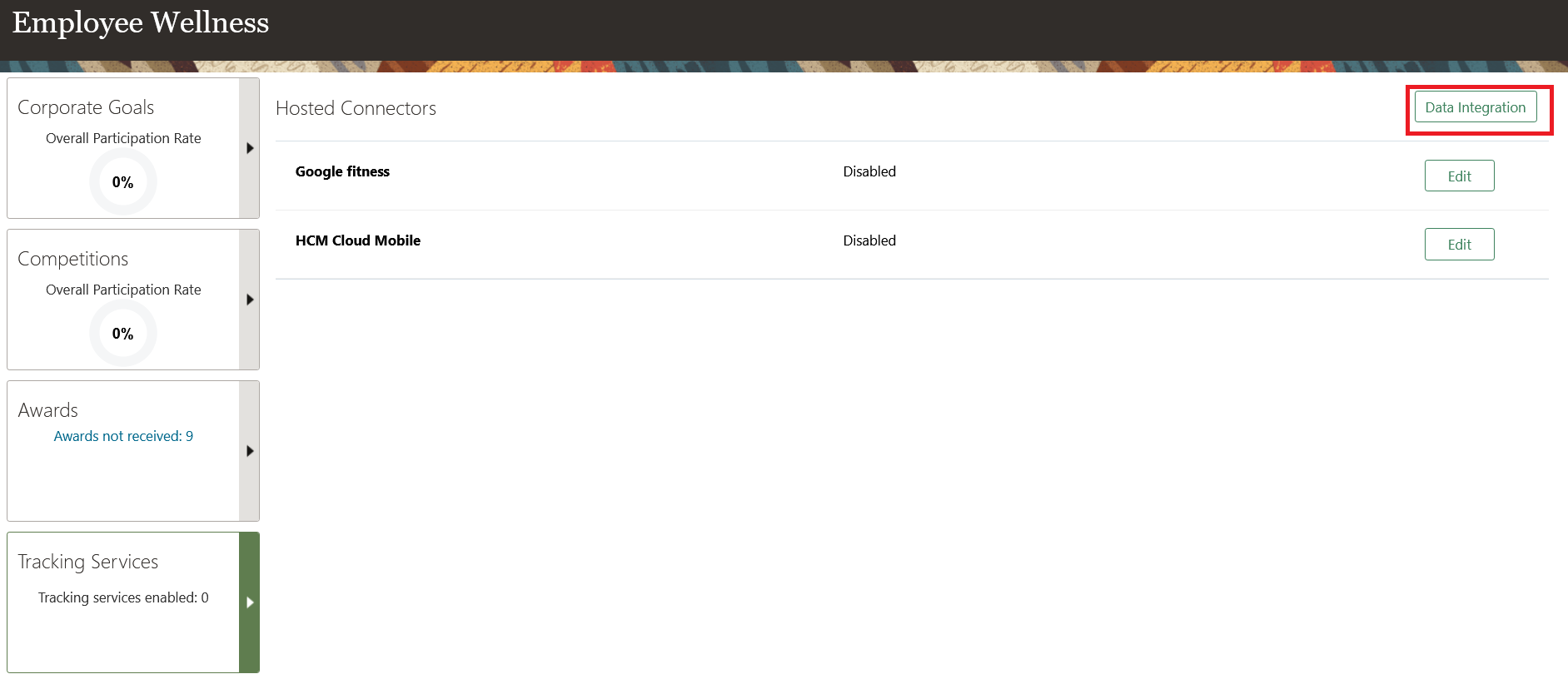
Tracking Services tab in the Employee Wellness page
In the Data Integrator page, you can edit the existing connectors, or click Add to add a new connector.
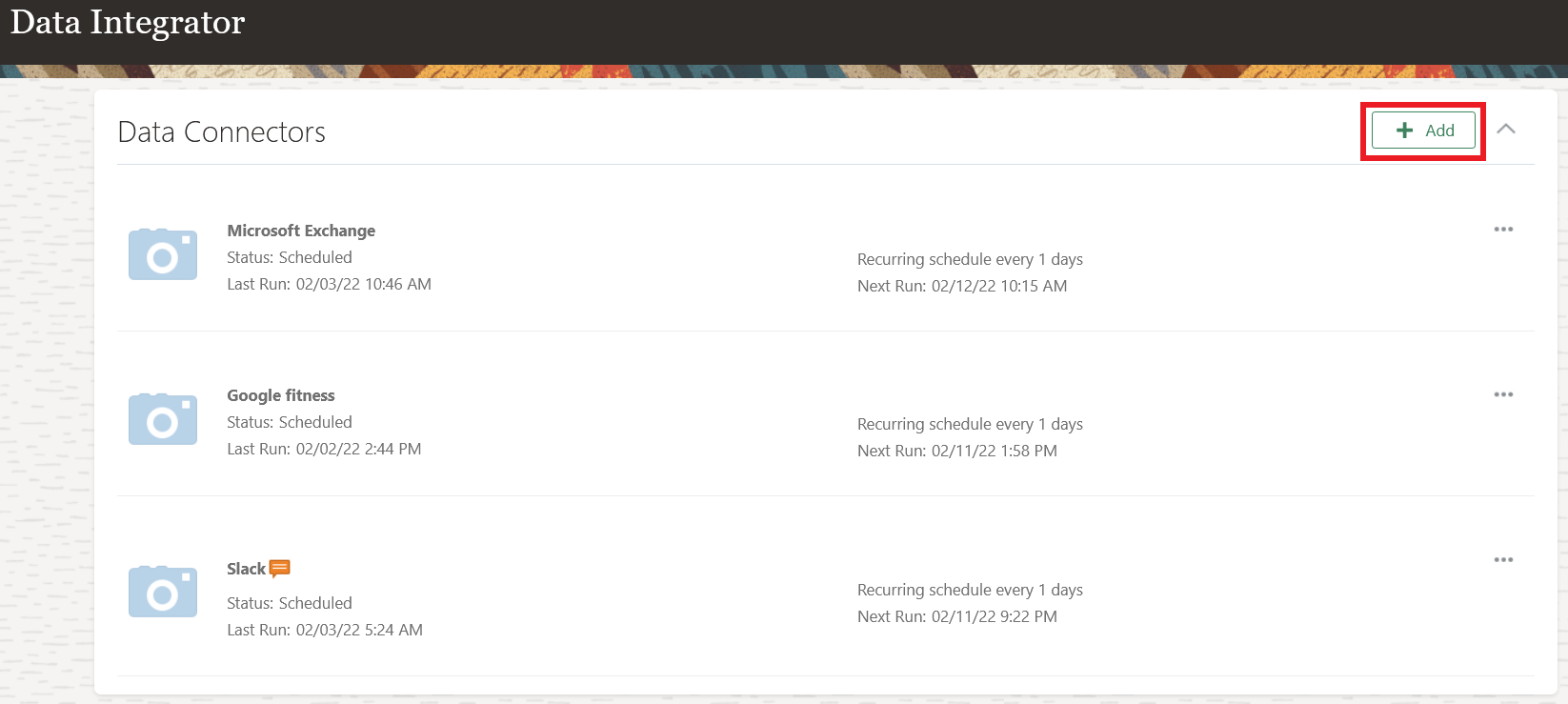
Creating a new connector on the Data Integration page
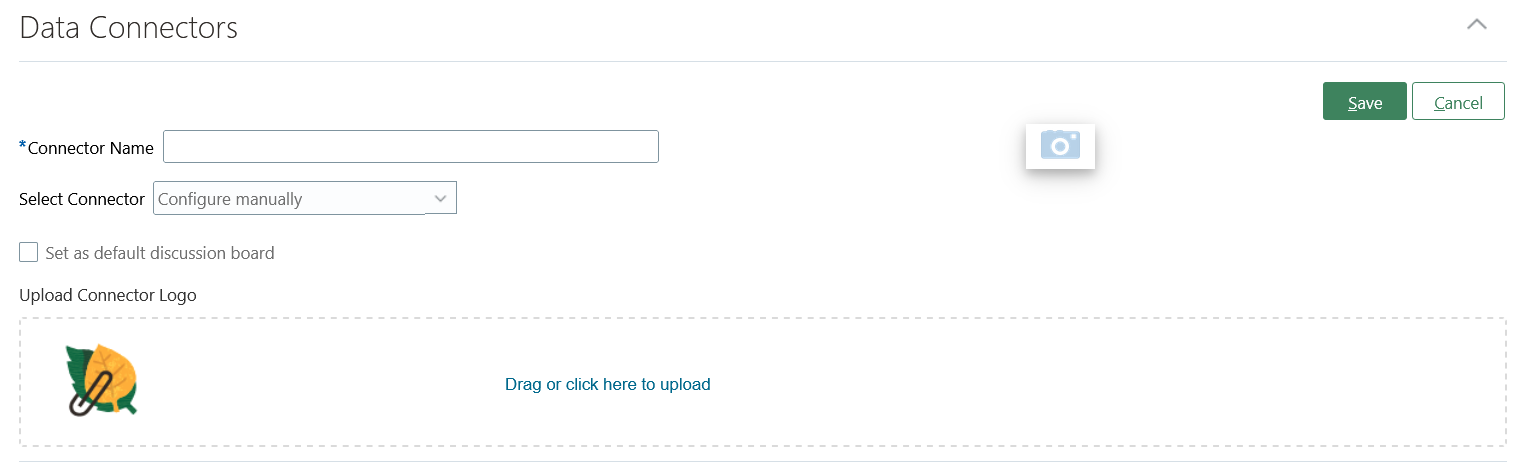
Add a new a Data Connector
The configuration steps for adding a new or editing an existing connector are the same. Here’s how you do it:
-
Click Edit connector on an existing connector you added in the Data Integrator page.

Edit Connector action in the Data Integrator page
-
Select the Open API source file for the connector you wish to add and click Continue.
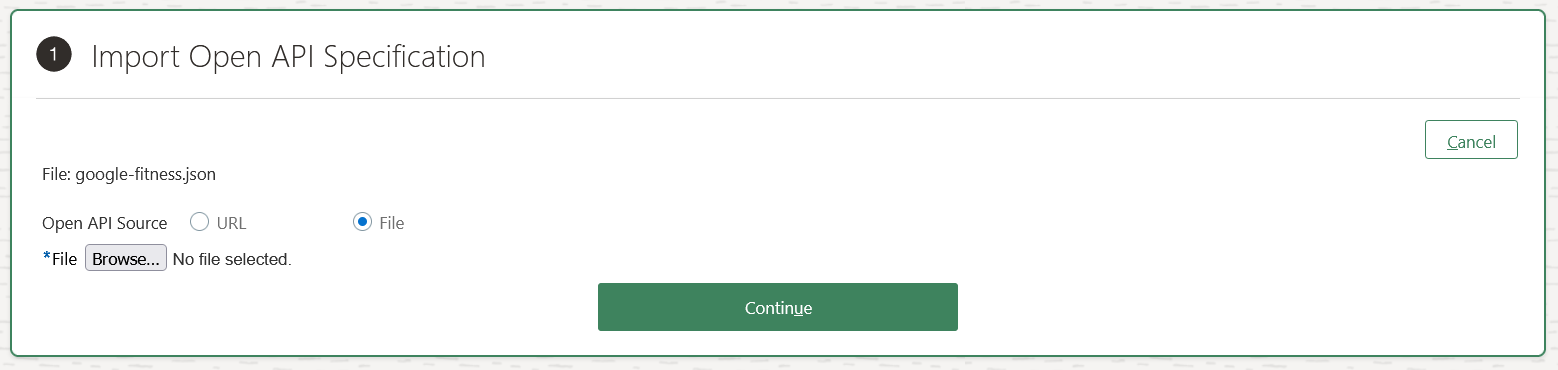
Import Open API Specification section
-
Select the Open API operations used by the connector and click Continue.
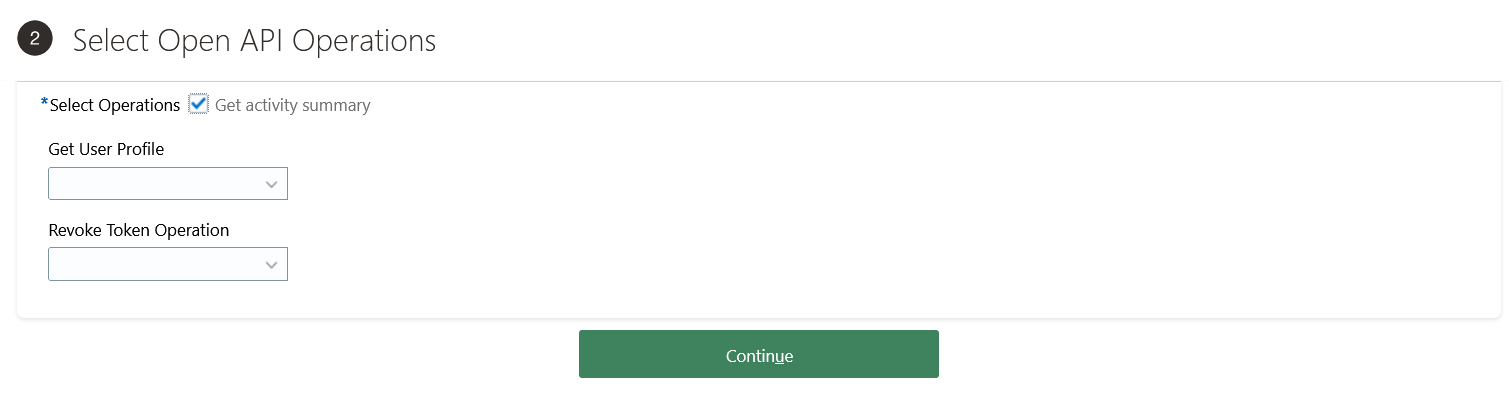
Select Open API Operations section
-
Map API data to HCM data. Click Add. Enter name and description, and then click Create Mapping. Repeat this step to create additional mappings.

Map API Data to HCM Data section
-
Confirm the data mappings. Click Continue.
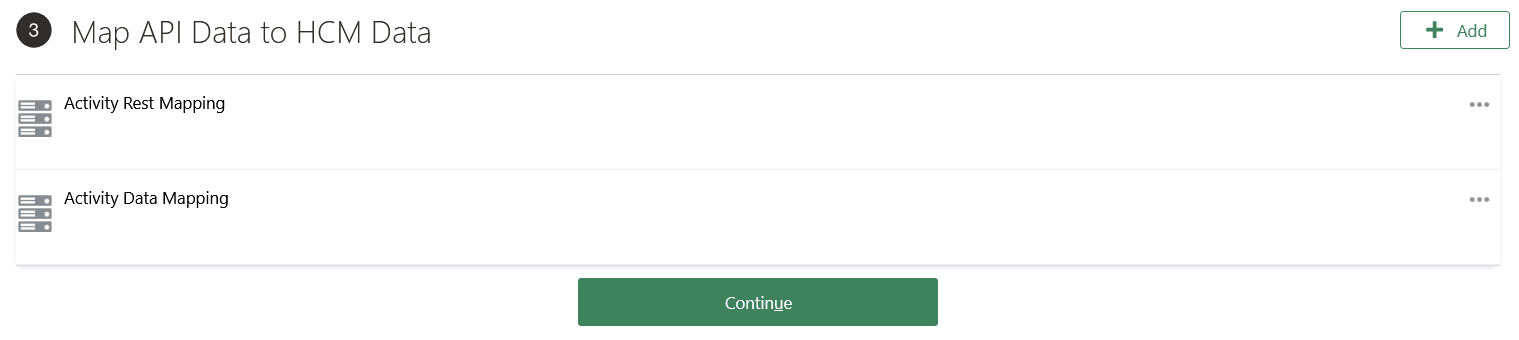
Map API Data to HCM Data section
-
Create a data flow. Click Add. Enter name and description, and then click Create Flow. Repeat this step to create additional data flows.

Create Data Flow section
-
Confirm the data flows. Click Continue.

Create Data Flow section
-
Enter the appropriate authorization details.
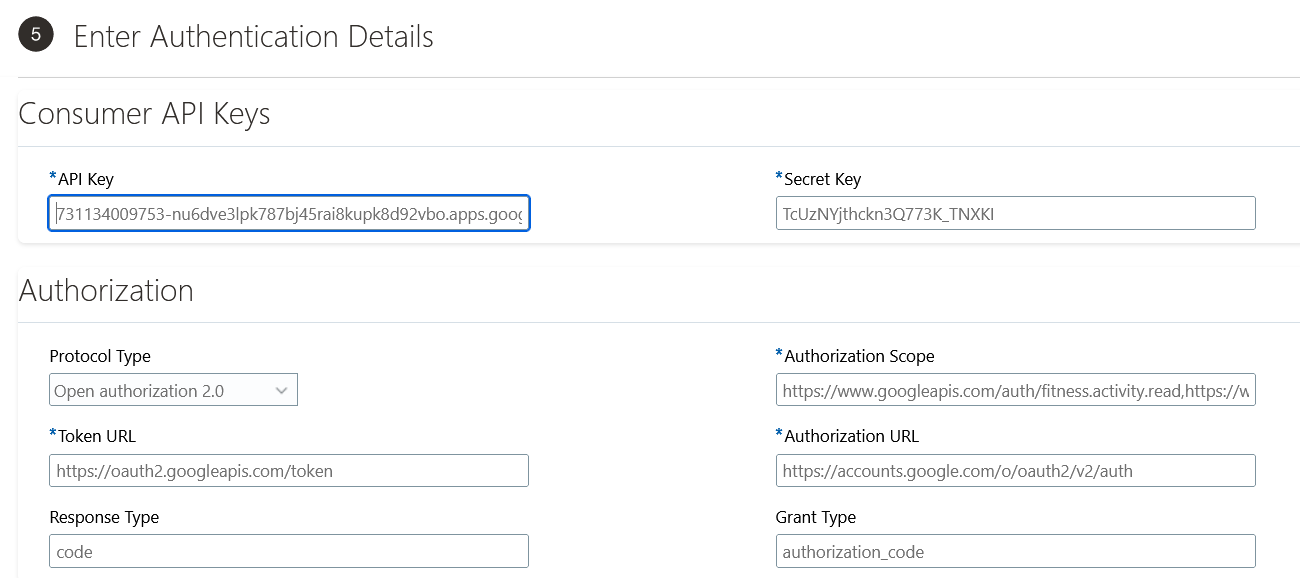
Enter Authorization Details section
-
Click Submit.
Once the administrator configures the connector, employees can use it to sync activity data from their devices. Employees can configure the connector from Me > Wellness > My Profile. The Activity Tracking section of the My Profile page shows all the connectors available to the employee. Click Connect on the connector to successfully link the wearable device with HCM Wellness.
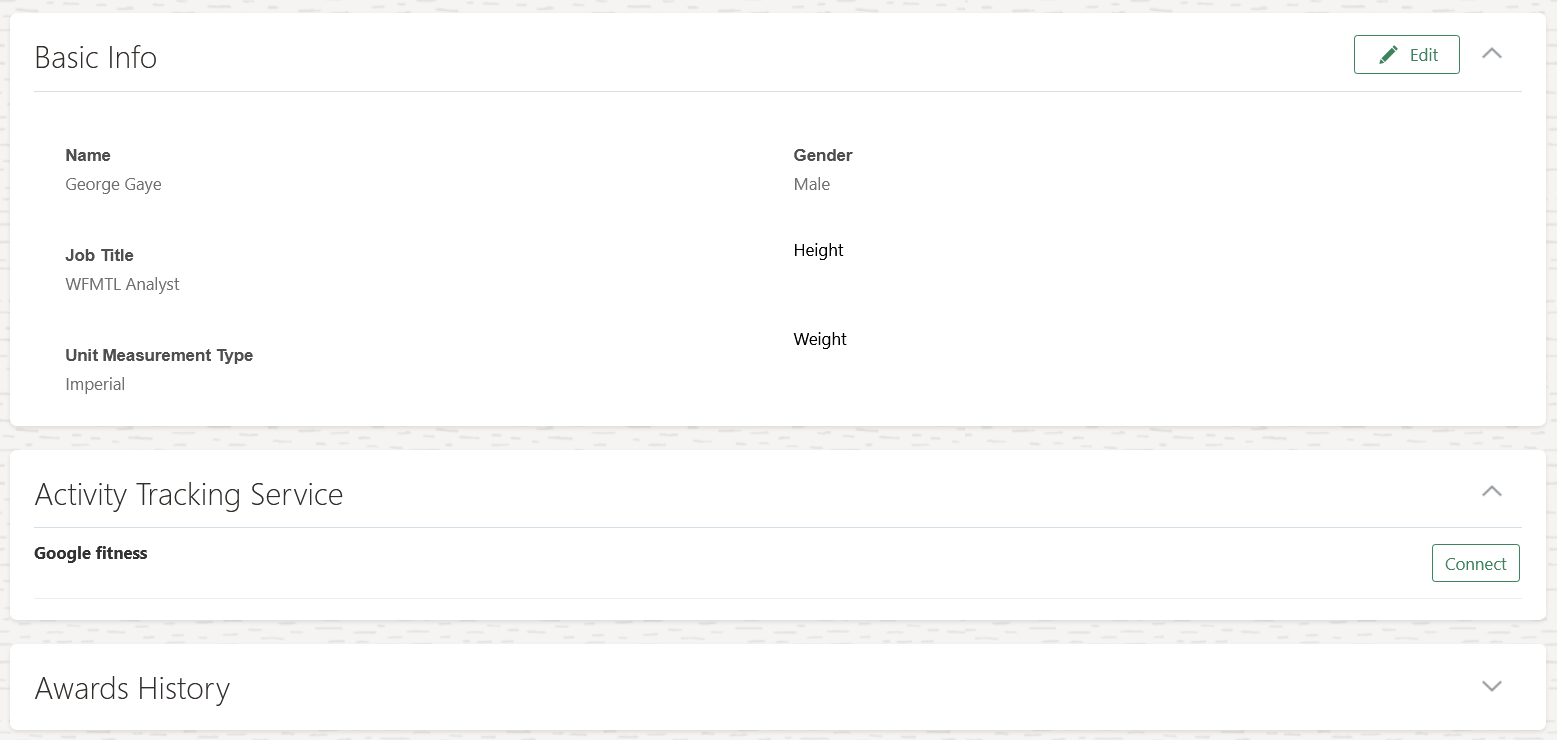
Activity Tracking Service listing out the available connectors in My Profile page
Make tracking activity data easier by syncing the data of your wearable device with HCM Wellness using connectors.
Steps to Enable
You don't need to do anything to enable this feature.
Transactional Business Intelligence for Work Life
Oracle Transactional Business Intelligence is a real time, self-service reporting solution offered to all Oracle Cloud application users to create ad hoc reports and analyze them for daily decision-making. Oracle Transactional Business Intelligence provides human resources managers and specialists, business executives, and line managers the critical workforce information to analyze workforce costs, staffing, compensation, performance management, talent management, succession planning, and employee benefits.
Don’t want to start from scratch building a report or analytics? Check out the library of sample reports for all products on Customer Connect on the Report Sharing Center.
New Subject Area - Wellness Competitions
Take advantage of the new Employee Wellness - Competitions Real Time subject area that allows you to report on the users that are participating in Wellness competitions. You can also report on the progress and rank of users participating in the competitions. Key details of the competition like competition type, name, start and end dates, and award are available for reporting. Important metrics like numbers of competitions, number of participants, and number of awardees are seeded in the subject area for reporting.
The primary assignment information of the workers are also available for reporting along with the Wellness competition details.
Steps to Enable
Leverage new subject area(s) by adding to existing reports or using in new reports. For details about creating and editing reports, see the Creating and Administering Analytics and Reports book (available from the Oracle Help Center > your apps service area of interest > Books > Administration).
Role Information
| Job Role |
Subject Area |
Duty Role |
|---|---|---|
| Employee Wellness Manager | Wellness - Competition Progress Real Time |
Employee Wellness Transaction Analysis Duty |
New Subject Area - Employee Wellness Goals
Improve your reporting on Wellness with the new subject area Employee Wellness - Wellness Goals Real Time that allows you to report on workers' participation in Wellness goals. You can report on personal, corporate, and team goals. Key details of the Wellness goals include goal category, type, name, start and end dates, completed date, required achievement rate to complete the goal, actual achievement rate, and awards are available for reporting. Important metrics like numbers of wellness goals, number of workers with wellness goals, number of completed wellness corporate goals, and number of workers with completed wellness corporate goals are seeded in the subject area for reporting. The primary assignment information of the workers are also available for reporting along with the wellness task details.
The primary assignment information of the workers are also available for reporting along with the wellness task details.
Steps to Enable
Leverage new subject area(s) by adding to existing reports or using in new reports. For details about creating and editing reports, see the Creating and Administering Analytics and Reports book (available from the Oracle Help Center > your apps service area of interest > Books > Administration).
Role Information
| Job Role |
Subject Area |
Duty Role |
|---|---|---|
| Employee Wellness Manager |
Employee Wellness - Wellness Goals Real Time |
Employee Wellness Transaction Analysis Duty |
IMPORTANT Actions and Considerations for Worklife
REPLACED OR REMOVED FEATURES
From time to time, Oracle replaces existing Cloud service features with new features or removes existing features. When a feature is replaced the older version may be removed immediately or at a future time. As a best practice, you should use the newer version of a replaced feature as soon as the newer version is available.
| Product | Removed Feature | Target Removal | Replacement Feature | Replaced In | Additional Information |
|---|---|---|---|---|---|
| Nothing at this time. |
_________________________
KNOWN ISSUES / MAINTENANCE PACK SPREADSHEETS
Oracle publishes a Known Issues document for every Update to make customers are aware of potential problems they could run into and the document provides workarounds if they are available.
Oracle also publishes Maintenance Pack and Statutory Maintenance Pack documentation of bugs that are fixed in the monthly or statutory patching.
To review these documents you must have access to My Oracle Support:
Oracle Human Capital Management Cloud Functional Known Issues and Maintenance Packs (Document ID 1554838.1)