
This document will continue to evolve as existing sections change and new information is added. All updates appear in the following table:
| Date | Product | Feature | Notes |
|---|---|---|---|
| 01 NOV 2021 | Created initial document. |
 HAVE AN IDEA?
We’re here and we’re listening. If you have a suggestion on how to make our cloud services even better then go ahead and tell us. There are several ways to submit your ideas, for example, through the Ideas Lab on Oracle Customer Connect. Wherever you see this icon after the feature name it means we delivered one of your ideas.
GIVE US FEEDBACK
We welcome your comments and suggestions to improve the content. Please send us your feedback at omcdocumentation_ca@oracle.com.
DISCLAIMER
The information contained in this document may include statements about Oracle’s product development plans. Many factors can materially affect Oracle’s product development plans and the nature and timing of future product releases. Accordingly, this Information is provided to you solely for information only, is not a commitment to deliver any material, code, or functionality, and should not be relied upon in making purchasing decisions. The development, release, and timing of any features or functionality described remains at the sole discretion of Oracle.
This information may not be incorporated into any contractual agreement with Oracle or its subsidiaries or affiliates. Oracle specifically disclaims any liability with respect to this information. Refer to the Legal Notices and Terms of Use for further information.
Column Definitions:
Report = New or modified, Oracle-delivered, ready to run reports.
UI or Process-Based: Small Scale = These UI or process-based features are typically comprised of minor field, validation, or program changes. Therefore, the potential impact to users is minimal.
UI or Process-Based: Larger Scale* = These UI or process-based features have more complex designs. Therefore, the potential impact to users is higher.
Features Delivered Disabled = Action is needed BEFORE these features can be used by END USERS. These features are delivered disabled and you choose if and when to enable them. For example, a) new or expanded BI subject areas need to first be incorporated into reports, b) Integration is required to utilize new web services, or c) features must be assigned to user roles before they can be accessed.
| Ready for Use by End Users Reports plus Small Scale UI or Process-Based new features will have minimal user impact after an update. Therefore, customer acceptance testing should focus on the Larger Scale UI or Process-Based* new features. |
Customer Must Take Action before Use by End Users Not disruptive as action is required to make these features ready to use. As you selectively choose to leverage, you set your test and roll out timing. |
|||||
|---|---|---|---|---|---|---|
| Feature |
Report |
UI or |
UI or |
|
||
Administration comprises all features accessible through Settings. All users can access Settings to administer their own user profiles. Instance Administrators can use Settings to view and manage their organization's configurations.
Oracle Responsys Express provides an unbranded (standard) domain for initial testing purposes. However, you will need to set up a branded domain for your corporate entity as soon as possible. Brand management enables you to convert to a branded domain and manage its settings.
Domain branding gives you the ability to use a domain or sub-domain branded for your corporate entity. Your branded domain appears in all your From Addresses, Responsys-hosted Reply To Address, image links, and redirection links (Response Handler URL).
Responsys Express requires you to purchase SSL certificates for your branded domain, and you’ll need to upload the SSL certificates into the system. Responsys Express provides a page for managing and uploading SSL certificates.
Using a secure branded domain enhances your marketing efforts by reinforcing your brand and building trust with customers.
Steps to Enable
You don't need to do anything to enable this feature.
Tips And Considerations
-
From the Ask Oracle menu page, click Settings. From the Settings page, choose Configurations, and then choose Brands to manage your domain branding.
-
After the conversion to a branded domain is complete, you can use the SSL Certificates page to add your SSL certificates for your branded domain. To access the upload page, go to the Ask Oracle menu page and click Settings. From the Settings page, choose Configurations, and then choose SSL Certificates.
Key Resources
Role Information
This feature is intended for Instance Administrators who will be setting up Responsys Express for their organization.
Using the email channel settings, you can configure Responsys Express to track email opens and clicks. These settings will serve as the default tracking settings for any newly created message, but you can override these settings when creating messages. You can also set up external tracking if you want to use a third-party web analytics service that uses tracking parameters that must be appended to the links used in the messages.
Tracking and analyzing customer engagement helps you gauge the effectiveness of your marketing messages and campaigns.
Steps to Enable
You don't need to do anything to enable this feature.
Tips And Considerations
-
To set the email tracking defaults: From the Ask Oracle menu page, click Settings. On the Settings page, choose Channels, then Email. Use the Tracking and External Tracking sections to set your defaults.
-
To override email tracking defaults in a message: When editing your message, choose Actions, then Settings. Scroll to the Tracking section to change your tracking options.
Key Resources
The Instance Summary page displays details about the Oracle Responsys Express instance. You can view the instance's name, time zone, locale, and so on.
This information can help Instance Administrators answer questions about the instance, for example, if they are communicating with Oracle Support.
Steps to Enable
You don't need to do anything to enable this feature.
Tips And Considerations
- From the Ask Oracle menu page, click Settings. On the Settings page, locate Instance, and then click Summary.
Key Resources
Role Information
This feature is intended for Instance Administrators.
User management in Oracle Responsys Express is powered by Oracle Identity Cloud Service (IDCS).
- As a user, you can change your password and view and edit your user profile.
- As an administrator, you can add and manage Responsys Express users.
This feature enables your organization to securely manage user access and entitlements for Responsys Express.
Steps to Enable
You don't need to do anything to enable this feature.
Tips And Considerations
- From the Ask Oracle menu page, click Settings to access the user management pages.
Key Resources
Role Information
- All users of Responsys Express can manage their profiles in IDCS and can change their passwords.
- Instance Administrators can view users in Responsys Express and manage and add users through IDCS.
Assets are the image content that you use to create more compelling marketing messages for your customers.
Oracle Responsys Express includes Oracle Content Management (OCM) Starter Edition as its asset management platform. OCM offers ready-to-use digital asset management capabilities and enables you to create, manage, and distribute assets. You can:
- Reuse assets across emails and sites.
- Publish assets immediately or schedule them to be published at a later time and date.
- Tag images automatically, making them easier to find and use in your blocks and messages.
- Insert published assets into blocks and messages.
- Reuse assets across blocks and messages.
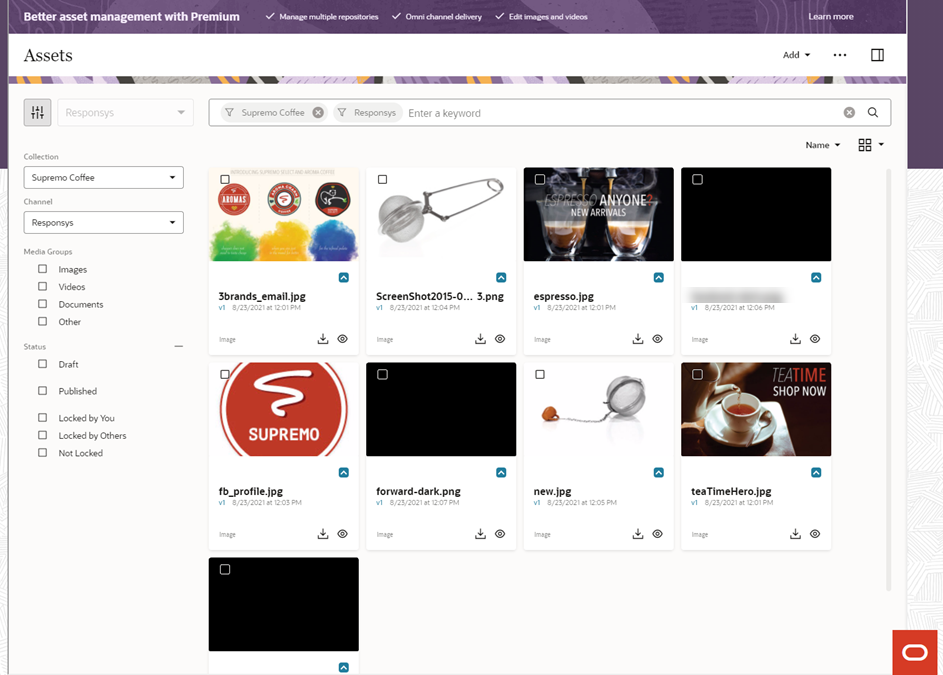
Managing Assets
Managing and reusing assets across marketing teams helps make your marketing efforts more consistent and efficient.
Steps to Enable
You don't need to do anything to enable this feature.
Tips And Considerations
-
From the Ask Oracle menu page, click Assets to upload and manage assets.
-
Responsys Express also works with Oracle Content Management Premium Edition, should you choose to purchase an upgrade.
-
Before Responsys Express users can use this feature, an Instance Administrator must configure the integration between Responsys Express and Oracle Content Management.
Key Resources
- Assets
- Activate product subscriptions (instructions for Instance Administrators)
- Overview of Oracle Content Management
Campaigns enable you to create orchestrated, end-to-end workflows for your contacts. They include all the essential elements you need to bring targeted contacts into a campaign, send messages, and pause or route contacts through the best paths.
Using Campaign Designer, you can create and manage your marketing campaigns. You can:
- Target a campaign based on a segment.
- Use timer stages to hold contacts for a certain amount of time at different points in the campaign.
- Use email stages to choose which message to send at different points in the campaign.
- Use segment membership stages to conditionally route contacts down different pathways in the campaign.
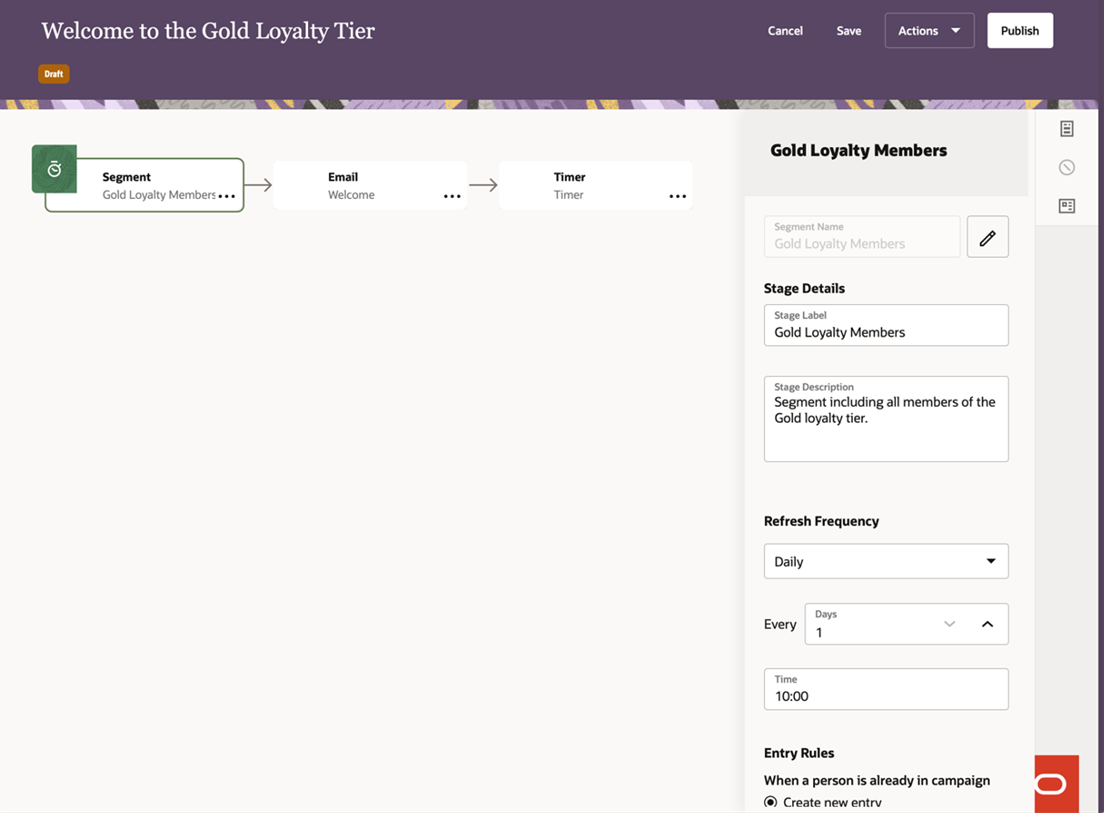
Creating a Campaign
Campaigns improve marketing efficiency by enabling you to set up a flow of personalized messages to the right customers at the right time across your customer base.
Steps to Enable
You don't need to do anything to enable this feature.
Key Resources
Connect allows you to set up jobs that automate data transfers to and from attribute groups, segments, and event data feeds. You can run jobs one at a time or collect them into groups and run them sequentially. Connect uses Secure File Transfer Protocol (SFTP) to safely transfer the data.
The Export Contact Event Data feature lets you extract behavioral and other raw data about events from instance-wide and message-specific response activities. For example, logs can tell you – on a row-by-row basis – who was sent message X and when it was sent.
With this information, you can keep your system of record up to date with compliance data or load data into your reporting system or other third party applications. Once you have exported the data, you can use it for:
- Audit tracking
- Scrubbing data
- Downloading to external programs
- Analyzing campaigns using your analytics or other software
Each selected event data feed type is exported as an individual flat file to the file server you specify.
This feature gives you more flexibility in how you can use the data collected by Oracle Responsys Express.
Steps to Enable
You don't need to do anything to enable this feature.
Tips And Considerations
-
From the Ask Oracle menu page, click Connect to create jobs that export contact event data.
Key Resources
Import and Export Customer Contact and Lookup Data
Using Connect, you can:
-
Automate importing data from third-party systems into customer contact and lookup data attributes.
-
Automate exporting customer contact and lookup data to third-party systems.
-
Run jobs one time, on demand, or set them up to run on a weekly or monthly schedule.
-
Easily view job details and access job logs.
-
Use the job wizard to create import or export jobs. The simplified user interface provides only the configuration options you need based on the type of job you are creating, and it lets you navigate the steps in any order. When you save the job, validation helps you navigate directly to errors and fix them.
-
Create groups of jobs, define the order in which they are to be run, and then run the group either on demand or according to a schedule. For example, import multiple sets of data in the correct order to make sure customer contacts are imported from one system before bringing in customer loyalty data from another system.
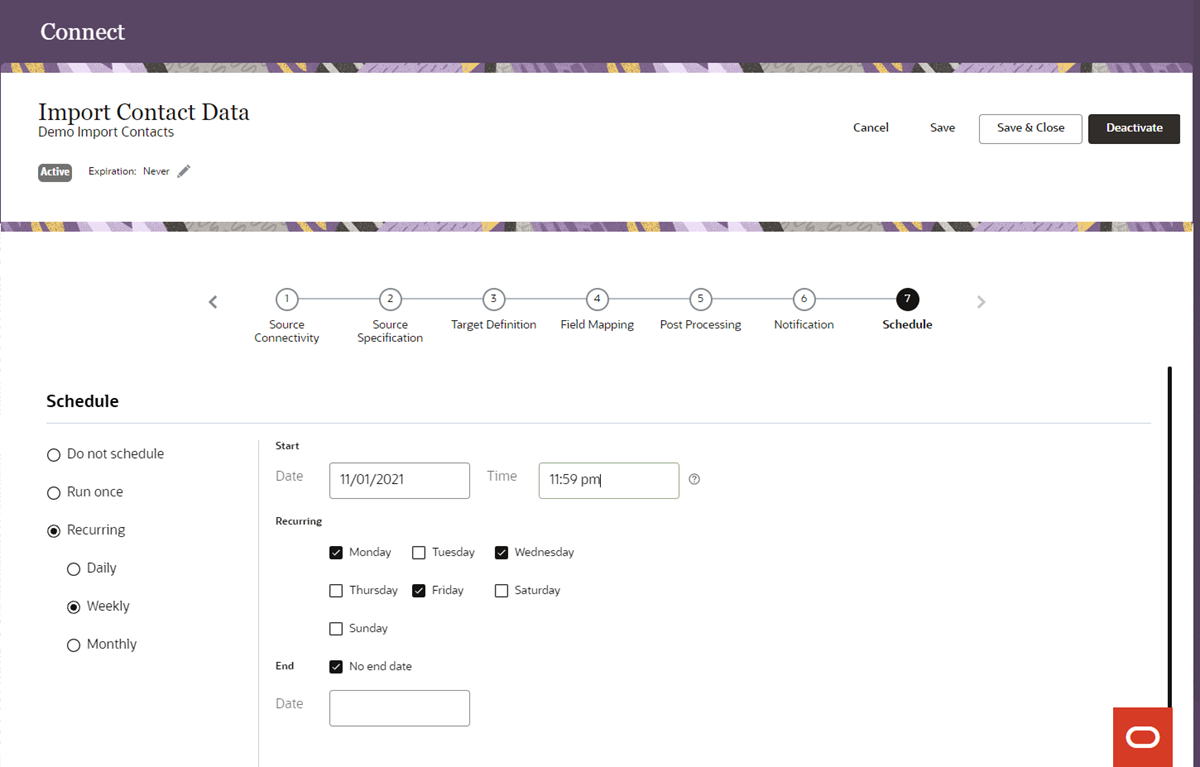
Connect - Scheduling an Import Job
Connect enables you to easily keep Responsys Express in sync with other systems in your company, ensuring that you have the up-to-date data you need to support your marketing efforts.
Steps to Enable
You don't need to do anything to enable this feature.
Tips And Considerations
- From the Ask Oracle menu page, click Connect to create and manage import and export jobs.
Key Resources
With Data Management, you can review, manage, and update your data model as needed. Use the Data Explorer to upload customer contacts and view customer contact data.
With the Data Explorer, you can easily query and view contact data across attribute groups. You can also manually upload contact data.
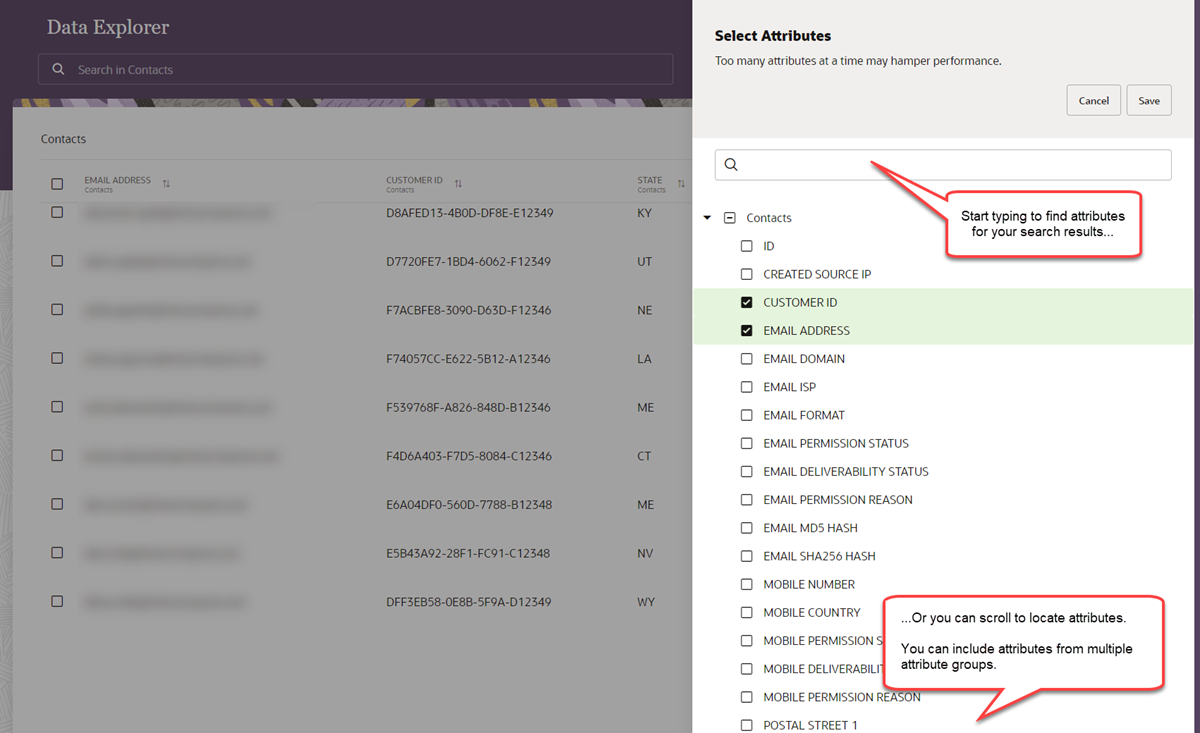
Data Explorer - Setting Up Search Results
Exploring data across attribute groups can help you identify which areas will improve your marketing efforts.
Steps to Enable
You don't need to do anything to enable this feature.
Tips And Considerations
- From the Ask Oracle menu page, click Data Explorer to query and view your data and manually upload customer contacts.
Key Resources
You can create a data model in Oracle Responsys Express using Data Management. You can:
- Add attributes to store customer data and lookup data.
- Group your related attributes using attribute groups.
- Add new attributes and attributes without any IT intervention.
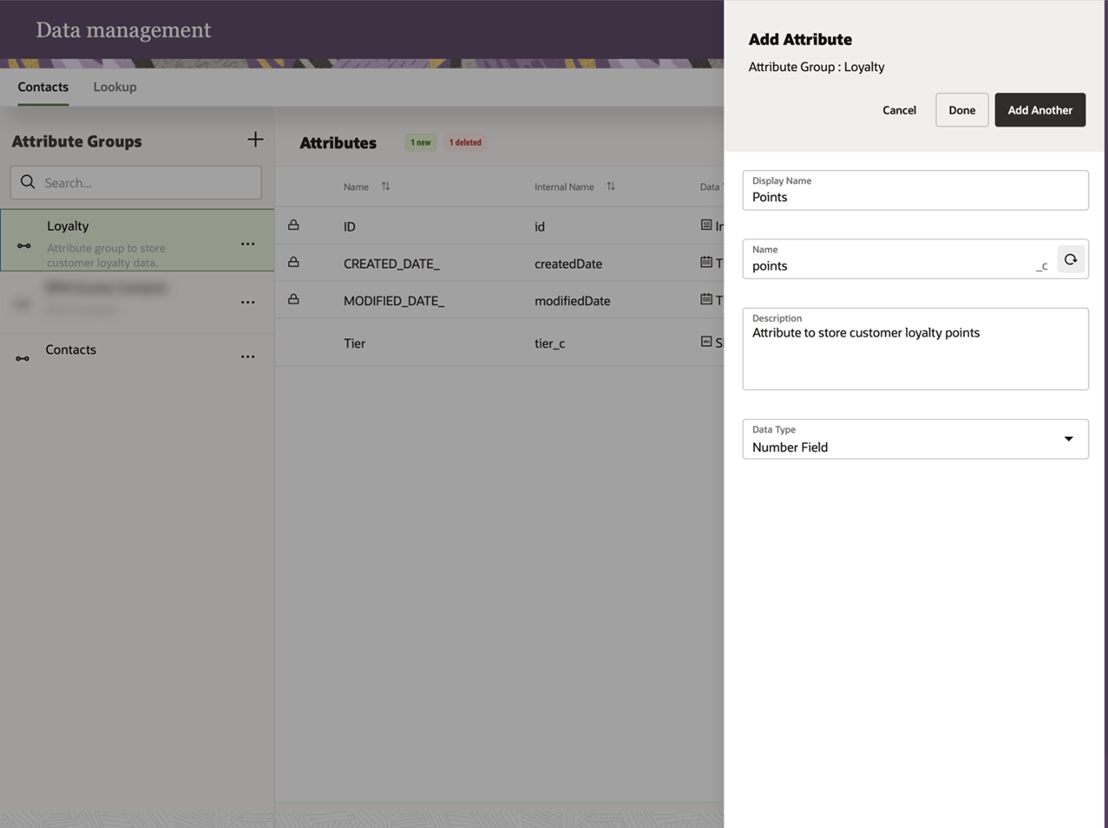
Data Management - Adding Attributes
Having more direct access and control of your data model enables you to more easily manage your data to fit your business needs.
Steps to Enable
You don't need to do anything to enable this feature.
Tips And Considerations
- From the Ask Oracle menu page, click Data Management to manage your data model.
Key Resources
Upload Contact Data with CSV Files
In Data Explorer, you can use comma-separated values (CSV) files to upload customer contact data.
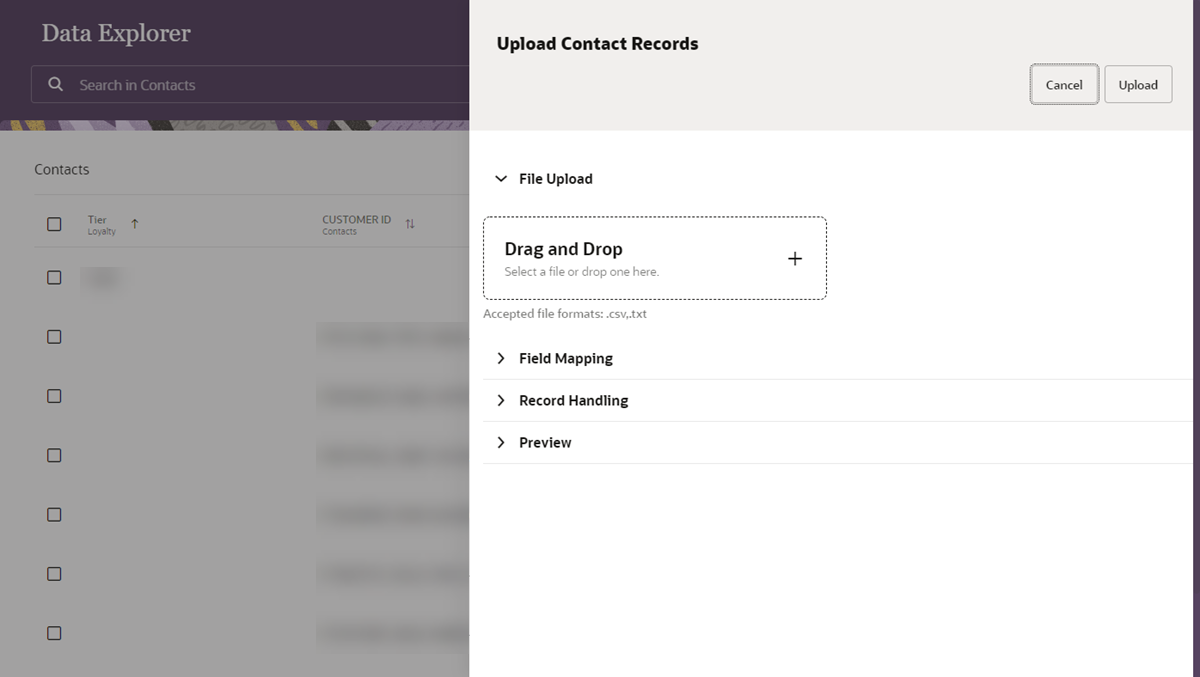
Uploading Contacts in Data Explorer
This enables you to get started with Responsys Express quickly. For example, you can upload sample data for testing purposes before your Connect import jobs are running.
Steps to Enable
You don't need to do anything to enable this feature.
Tips And Considerations
-
From the Ask Oracle menu page, click Data Explorer to access the contacts upload task.
Key Resources
Using Forms, you can add fields from Oracle Responsys Express to a form on your web site, which will then automatically send new contact data and updated subscription data to Responsys Express.
Responsys Express Forms allow you to choose the data you will capture on your form submission, define the rules for importing contact data, and specify which web pages your contacts will be redirected to when form submissions are successful or when form validation fails. It then generates the HTML for you to copy and paste into your web sites.
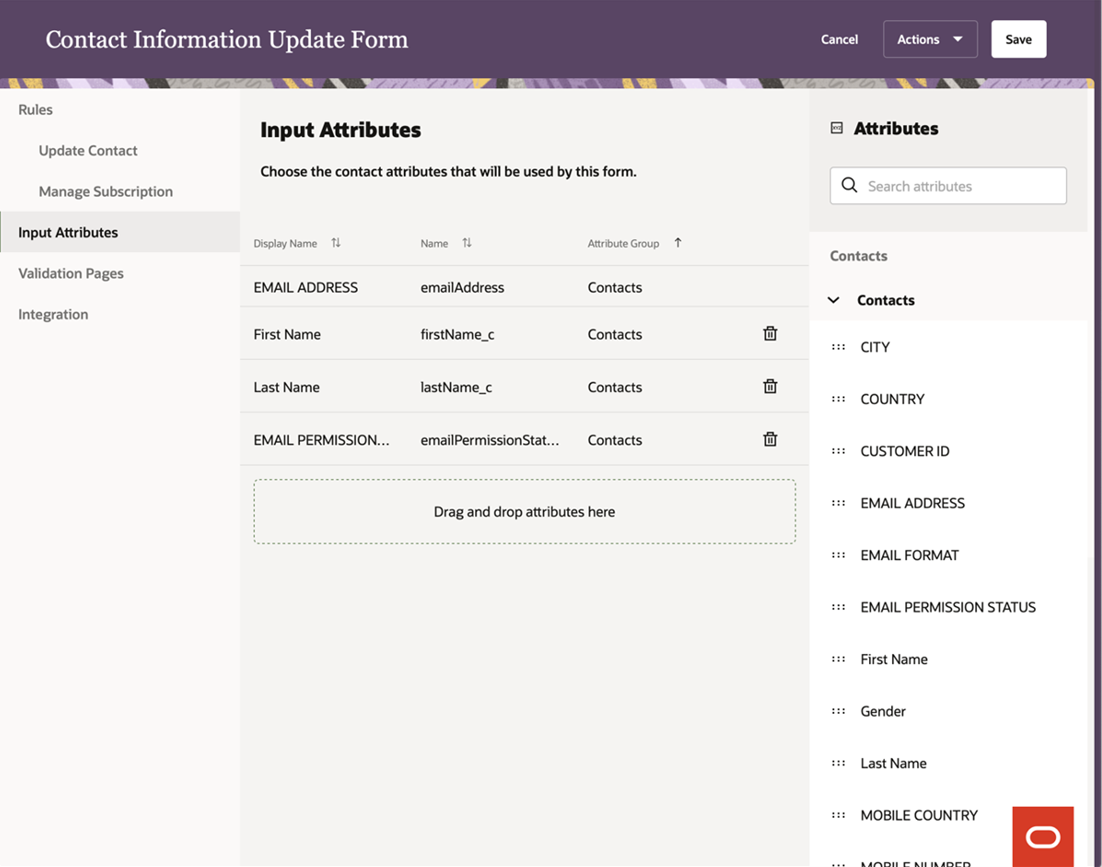
Creating a Form
This feature enables your customers to manage their subscriptions for marketing communications more easily, ensuring that you reach only those customers who want to be contacted.
Steps to Enable
You don't need to do anything to enable this feature.
Tips And Considerations
- From the Ask Oracle menu page, click Forms to create and manage forms.
Key Resources
Insights consists of dashboards that help you analyze your organization's marketing activities in Responsys Express.
You can view Interactive Dashboards to analyze the performance of campaigns, messages, and contact lists. The Insights feature is powered by Oracle Business Intelligence Enterprise Edition.
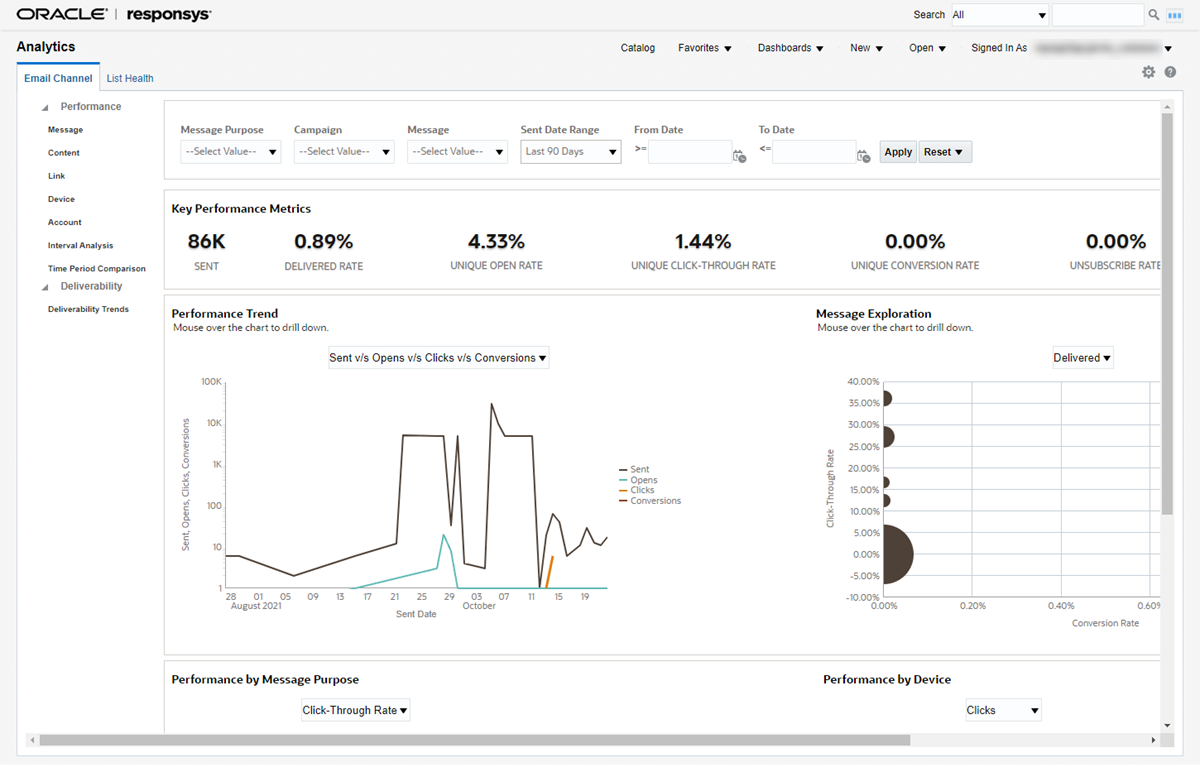
Viewing Interactive Dashboards
Understanding the performance of your messages and campaigns, as well as the health of your contacts list, helps you make better decisions about your marketing efforts and demonstrate their effectiveness to key stakeholders.
Steps to Enable
You don't need to do anything to enable this feature.
Tips And Considerations
-
From the Ask Oracle menu page, click Insights to view Interactive Dashboards.
Key Resources
Integrations provide connections between Oracle Responsys Express and other software, such as Oracle products or third-party systems. Use Applications to install, configure, and manage recommended apps. Use Settings to configure and manage other supported integrations.
The CX Apps platform enables app developers to extend the capabilities of Oracle CX products. The Applications page lets you manage the apps you have installed, and the Recommended apps section provides easy access for you to install apps that work with Responsys Express.
Using these apps enables you to extend the capabilities of Responsys Express.
Steps to Enable
You don't need to do anything to enable this feature.
Tips And Considerations
-
From the Ask Oracle menu page, click Apps to install and manage CX Apps.
- You can only install apps shown in the Recommended apps section of the Applications page.
Key Resources
Messages are the promotional and transactional content that you create to communicate with your customers.
IMPORTANT: Transactional messaging is available as an add-on that you can order for your instance. Please contact your account representative or Oracle Sales.
Blocks are reusable snippets of HTML code that you can copy into your messages. When you add a block to a message, the HTML code is copied to the message and can then be customized.
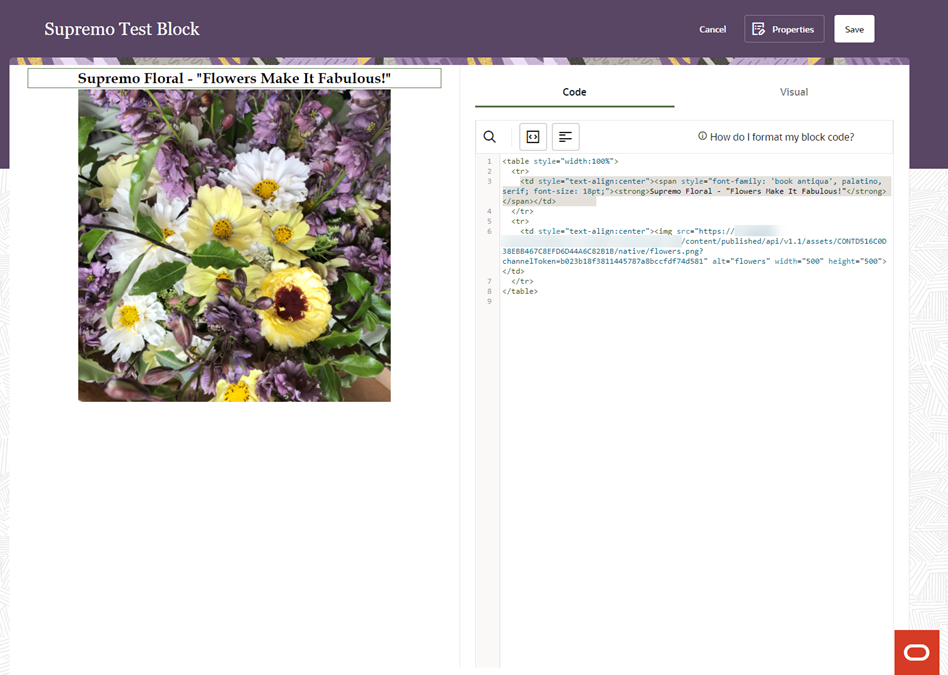
Creating a Reusable Block for Messages
With blocks you can:
- Create consistent email headers and footers that can be added to messages.
- Create consistent "call to action" buttons or other common elements for your messages.
- Copy entire message bodies to other messages.
Steps to Enable
You don't need to do anything to enable this feature.
Tips And Considerations
- From the Ask Oracle menu page, click Messages, and then click the Blocks tab at the bottom of the page to access blocks.
Key Resources
Use the Message Designer to view, edit, and delete existing messages, or create new messages. To better organize your existing messages, you can sort messages by alphabetical order, when they were last modified, or when they were created.
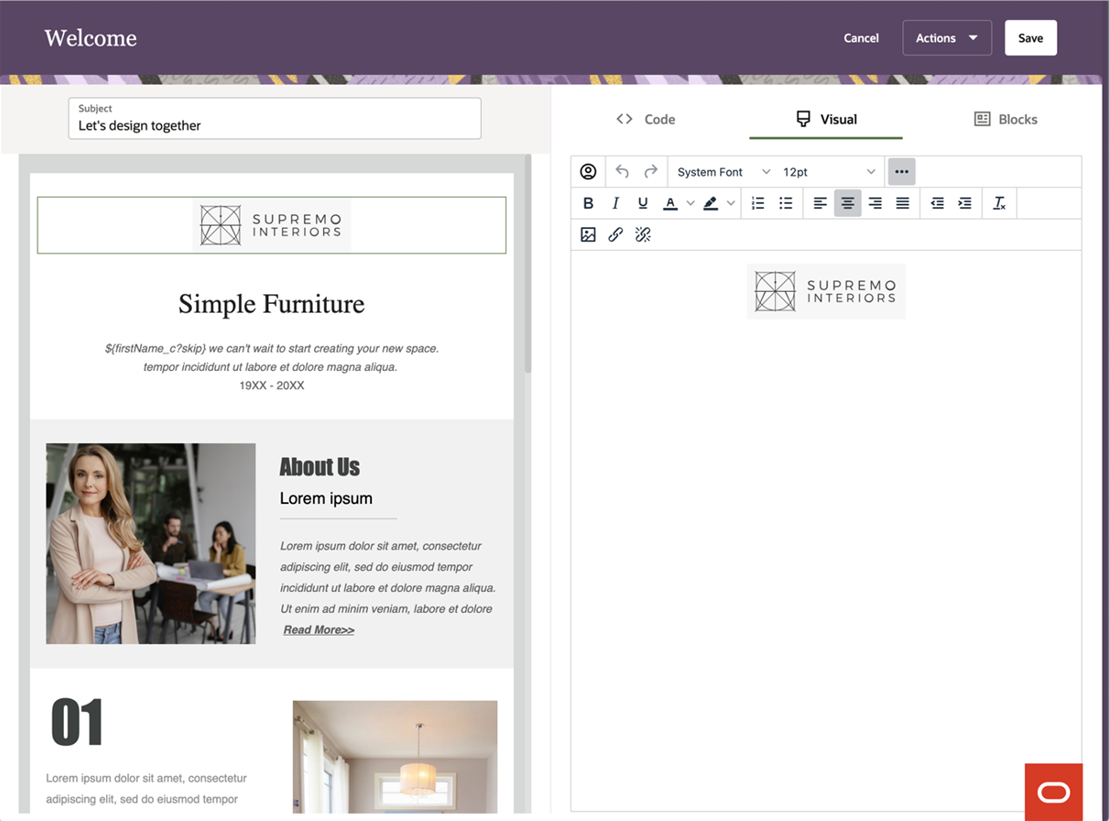
Designing a Message
Create messages to engage your customers by sharing your latest news, promoting products, or announcing events.
Steps to Enable
You don't need to do anything to enable this feature.
Tips And Considerations
- From the Ask Oracle menu page, click Messages to manage and create messages.
Key Resources
You can personalize an email's subject line or message using an attribute. For example, add a subscriber's first name, last name, membership status, customer number, and so on.
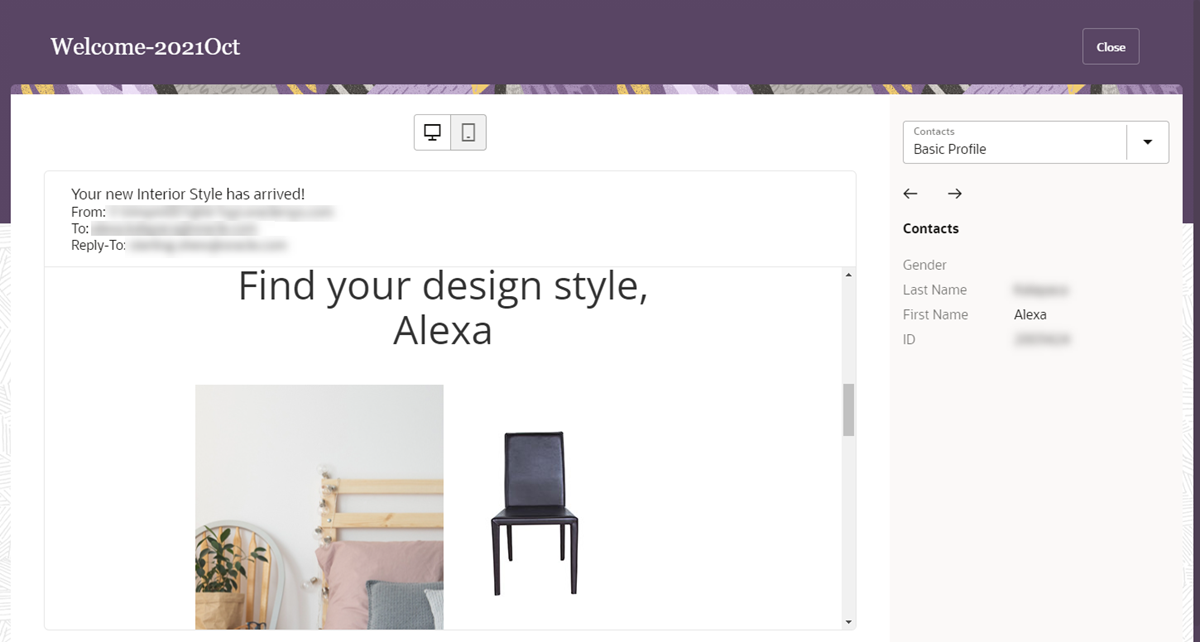
Previewing a Personalized Message
Personalization helps you create customized messages at scale, increasing customer engagement.
Steps to Enable
You don't need to do anything to enable this feature.
Tips And Considerations
- In Message Designer, preview your personalized content by clicking Actions, and then choosing Preview.
Key Resources
Upload Templates and Assets with ZIP Files
You can also upload a message and assets from a ZIP file. The message designer code and visual tabs make it easy to customize the content and source code of your message.
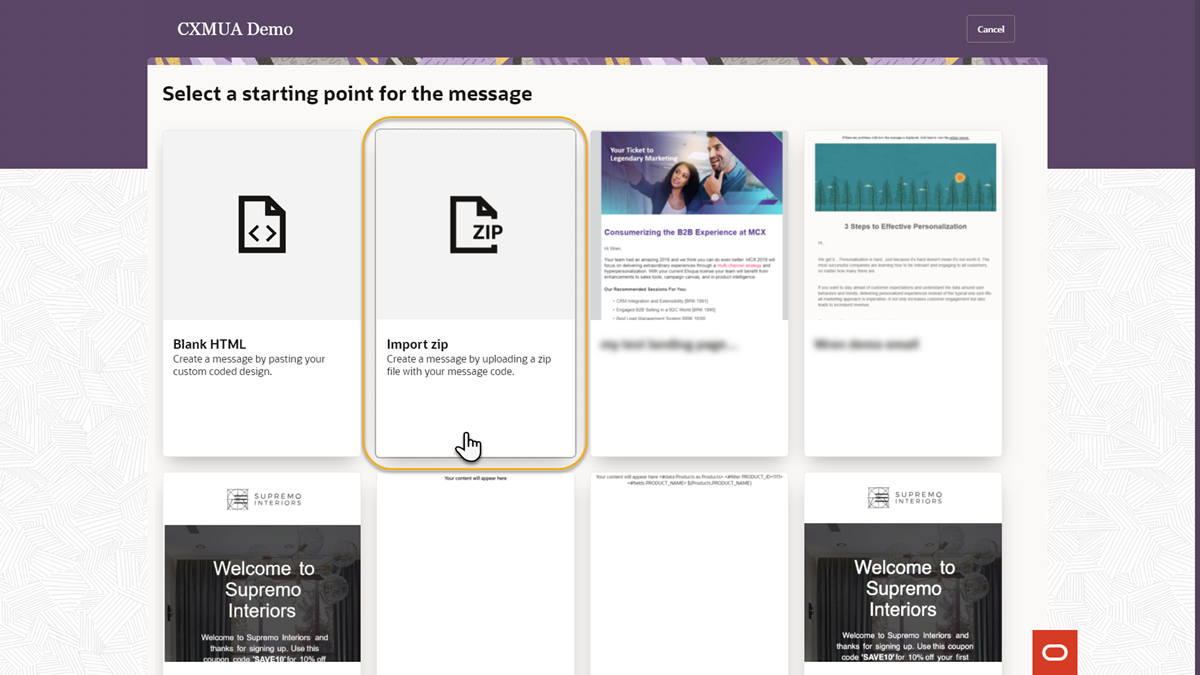
Uploading a ZIP File to Create a Message
Uploading a ZIP file enables you to get started with creating messages in Oracle Responsys Express quickly.
Steps to Enable
You don't need to do anything to enable this feature.
Tips And Considerations
- ZIP files must be less than 1 MB and can contain image files and one HTML file.
- Ensure that image references use the absolute file path. That means <root folder>/<path to image>/<image name>.<image extension>.
- After the upload, asset references in the new message are updated to reference the new location in the asset library.
Key Resources
Segments are targeted groups of contacts to whom you send marketing messages. You can segment using contact attributes or behavioral data. Contact attributes are attributes specific to each contact, such as city and gender, whereas email behavioral data include events or actions taken by your contacts, such as clicks and opens.
In Oracle Responsys Express, you can use segments as the target for email messages sent through a campaign. Using the Segment Designer, you specify the condition for the attributes that qualify certain contacts from your contact database. You can:
- Build segments by dragging and dropping attributes onto the canvas.
- Group rules within a segment for additional control and manageability.
- Get a count of contacts that meet the segment's criteria.
- Manage and use segments created across your marketing team using Responsys Express.
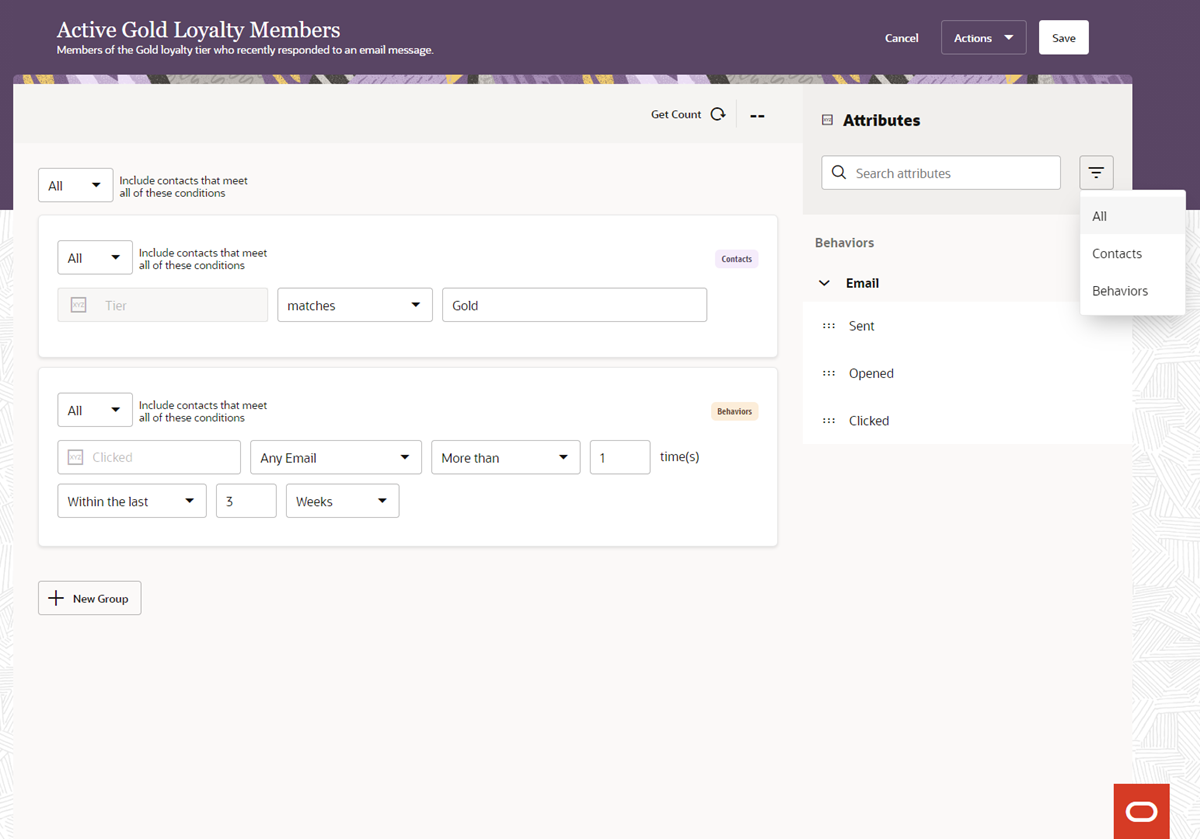
Designing a Segment
Segments enable you to target your marketing campaigns more effectively.
Steps to Enable
You don't need to do anything to enable this feature.
Tips And Considerations
-
From the Ask Oracle menu page, click Segments to create and manage segments.
Key Resources
All interfaces in Oracle Responsys Express feature the latest in Oracle user experience design.
After you sign in to Responsys Express, the Dashboard home page shows summaries of contacts, messages, and recent activity, as well as announcements.
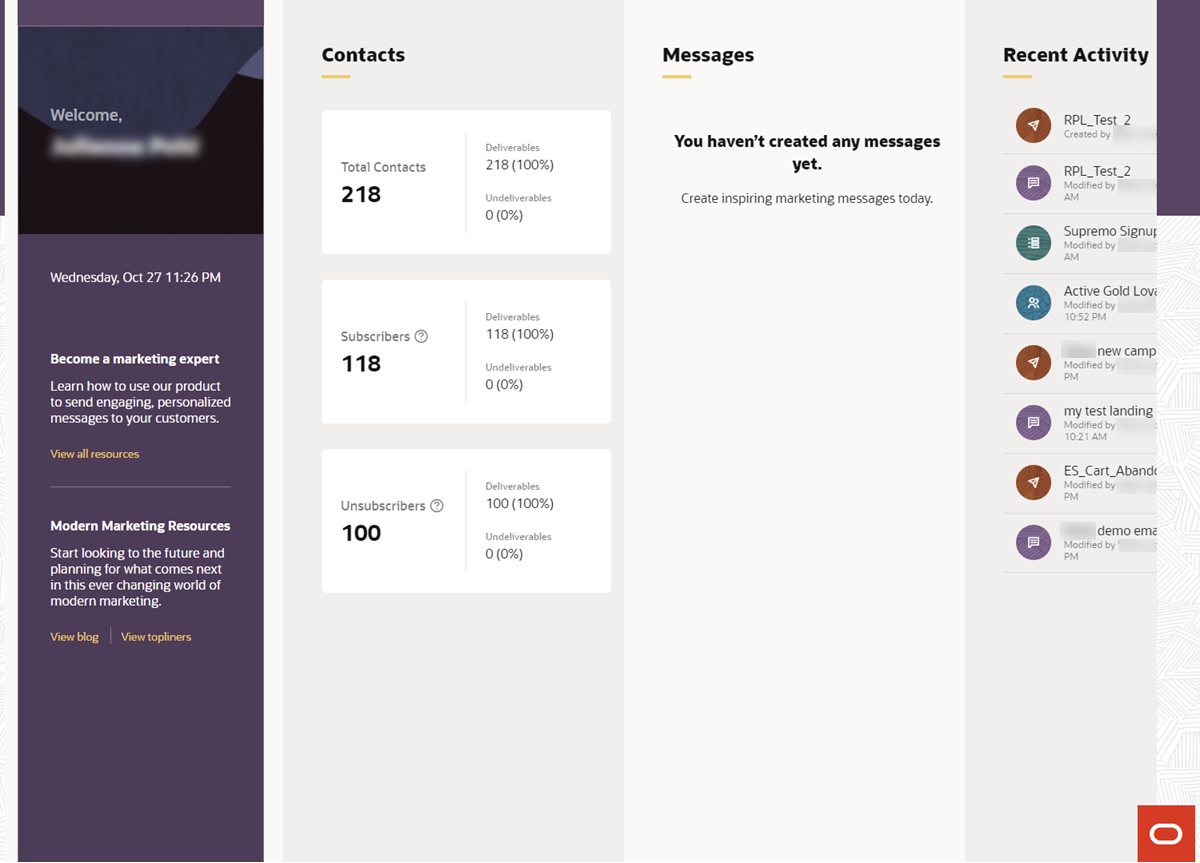
Viewing the Dashboard Page
You can access all application areas and online help from the central, intuitive Ask Oracle menu page.
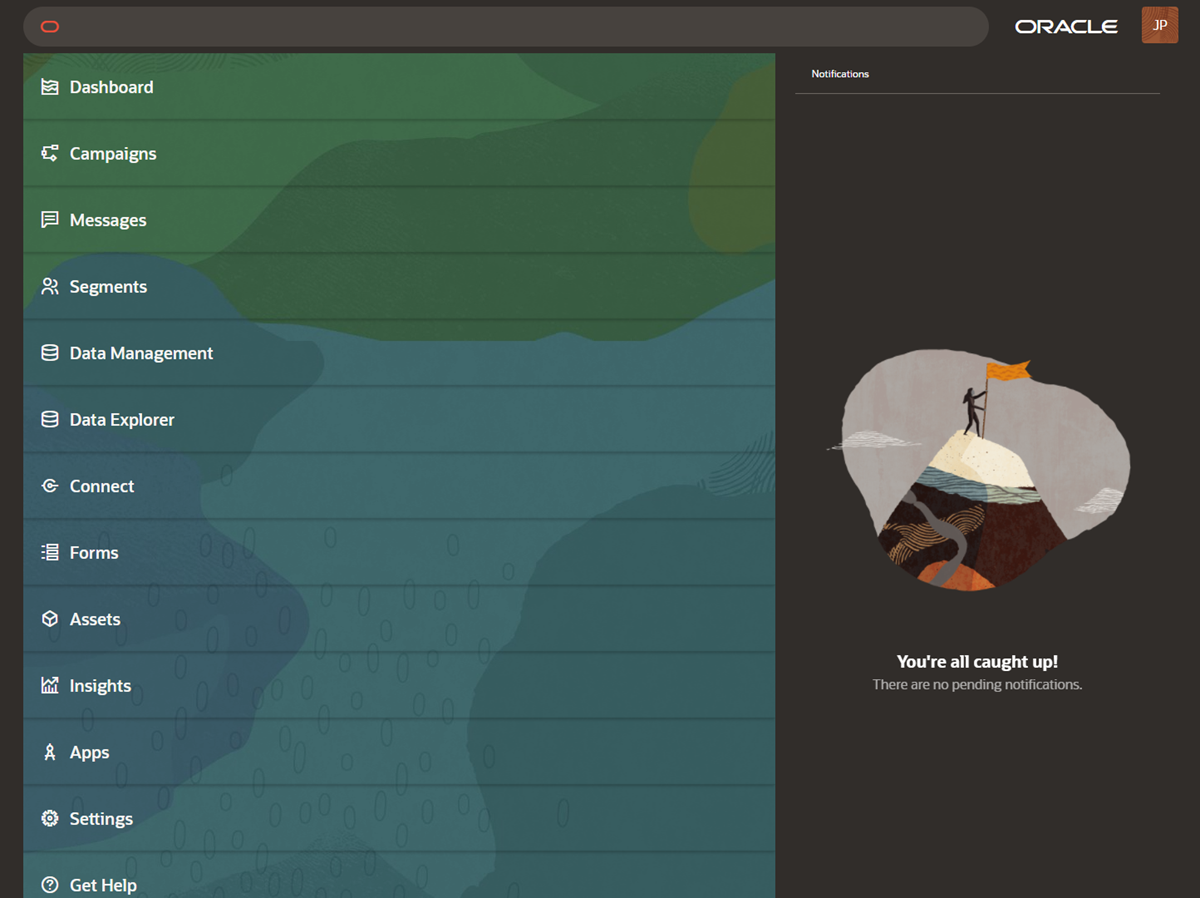
Using the Ask Oracle Menu Page
The design provides a modern look and feel, useful information, and consistency with other Oracle Marketing products.
Steps to Enable
You don't need to do anything to enable this feature.
Tips And Considerations
-
You can access the main menu by clicking the Ask Oracle button in the lower right portion of all Responsys Express pages.
-
Dashboard contents are arranged left to right. Scrolling down with your mouse or pressing the Tab key will reveal more page content.
Key Resources