
This document will continue to evolve as existing sections change and new information is added. All updates appear in the following table:
| Date | Feature | Notes |
|---|---|---|
| 18 JUN 2019 | Multichannel | Updated document. Revised feature information. |
| 18 JUN 2019 | CED for BlueKai (Program DMP) Integration | Updated document. Revised feature information. |
| 14 MAY 2019 | AI Switch for Best Sent Time |
Updated document. The AI Switch for Best Sent Time feature was originally targeted for delivery in 19B, but it is currently postponed. |
| 08 MAY 2019 | Created initial document. |
This guide outlines the information you need to know about new or improved functionality in this update. All Oracle Responsys updates are conducted without disruption to service, meaning no downtime. Refer to the Oracle Responsys Update Resource Center in the Responsys Insiders customer community for additional details about update dates.
Each section includes a brief description of the feature, the steps you need to take to enable or begin using the feature, any tips or considerations that you should keep in mind, and the resources available to help you. We frequently update this document so don’t forget to check back and get the latest information.
GIVE US FEEDBACK
We welcome your comments and suggestions to improve the content. Please send us your feedback at omcdocumentation_ca@oracle.com.
Column Definitions:
Report = New or modified, Oracle-delivered, ready to run reports.
UI or Process-Based: Small Scale = These UI or process-based features are typically comprised of minor field, validation, or program changes. Therefore, the potential impact to users is minimal.
UI or Process-Based: Larger Scale* = These UI or process-based features have more complex designs. Therefore, the potential impact to users is higher.
Features Delivered Disabled = Action is needed BEFORE these features can be used by END USERS. These features are delivered disabled and you choose if and when to enable them. For example, a) new or expanded BI subject areas need to first be incorporated into reports, b) Integration is required to utilize new web services, or c) features must be assigned to user roles before they can be accessed.
| Ready for Use by End Users Reports plus Small Scale UI or Process-Based new features will have minimal user impact after an update. Therefore, customer acceptance testing should focus on the Larger Scale UI or Process-Based* new features. |
Customer Must Take Action before Use by End Users Not disruptive as action is required to make these features ready to use. As you selectively choose to leverage, you set your test and roll out timing. |
|||||
|---|---|---|---|---|---|---|
| Feature |
Report |
UI or |
UI or |
|
||
Generating Thumbnails for Email Campaigns in the Manage Campaigns Page |
||||||
Interactive Dashboards now offers an asynchronous API to pull aggregated campaign performance metrics for the Email, SMS and Mobile App channels. This enables you to create custom dashboards on your preferred analytics tool and analyze Responsys campaign performance metrics along with metrics for other third party tools.
The aggregated data available via the asynchronous API will match with what you see on Interactive Dashboards for the same filter conditions.
Steps to Enable
Review the REST service definition in the REST API guide to leverage. If you are new to Oracle's REST services you may want to begin with the Quick Start section.
Role Information
You must have the Analytics Web Services Manager role to see this feature.
Users can now access the following three new APIs:
- A new API to update and retrieve organizational access for campaigns and programs.
- A new API to fetch an existing EMD Email campaign object.
- Enhancement to fetch all programs: A new query parameter, status, was added. This new query parameter enables you to filter programs by program status.
Steps to Enable
Review the REST service definition in the REST API guide to leverage. If you are new to Oracle's REST services you may want to begin with the Quick Start section.
Key Resources
Visit our Help Center to learn more.
SQL View Support in SMS Workbook
In SMS Workbook, SQL view is now supported as a targeting criteria. The selected SQL view gets applied in the SMS campaign during launch.
Steps to Enable
You don't need to do anything to enable this feature.
Key Resources
Visit our Help Center to learn more.
Previewing Thumbnails in Express App Message Designer
In the Express App Message Designer, you now have the option of previewing thumbnail images while replacing image content. Previewing the thumbnail image will open the image in its original size.
Steps to Enable
Make the feature accessible by assigning or updating privileges and/or job roles. Details are provided in the Role Information section below.
Key Resources
Visit our Help Center to learn more.
Role Information
You must have the Express Email Content Contributor role or the Express Email Content Manager role to see the Express App Message Designer.
Spell Check in Express App Message Designer
Enhancements have been made to the Express App Message Designer to support spell check functionality. The feature leverages browser spell check capability and locale. If there is a typo in your content, the text will be underlined in red. Right-clicking the text will provide suggested corrections.
Steps to Enable
Make the feature accessible by assigning or updating privileges and/or job roles. Details are provided in the Role Information section below.
Key Resources
Visit our Help Center to learn more.
Role Information
You must have the Express Email Content Contributor role or the Express Email Content Manager role to see the Express App Message Designer.
CED for BlueKai (Program DMP) Integration
Accounts integrating Oracle Responsys with Oracle DMP via the Program DMP stage may now export integration Sent, Skipped, and Failed events via the Contact Event Data (CED) export. The data subject is categorized by Program DMP. Sent events are successful categorizations. Skips are data subjects not correctly matched or categorized in the DMP, most likely because of an unknown email Ohash value on the DMP side.
This is only available within the new Connect UI, and only for accounts enabled with the Program DMP feature.
Note that the output files are named Custom rather than BlueKai.
Steps to Enable
You must have Program DMP enabled for your account as well as the BlueKai integration to see this feature.
Key Resources
To learn more see the File Layouts for Oracle DMP integration events section in the Exporting Contact Event Data Guide.
There is no longer a default expiration date for Connect jobs. When creating a Connect job, the expiration date is now a mandatory field. Users will receive email reminders prior to the expiration date. Only CED export jobs will have an expiration date set to never expire by default.
Steps to Enable
You don't need to do anything to enable this feature.
Key Resources
Visit our Help Center to learn more.
RFM (Recency, Frequency, Monetary) Analysis
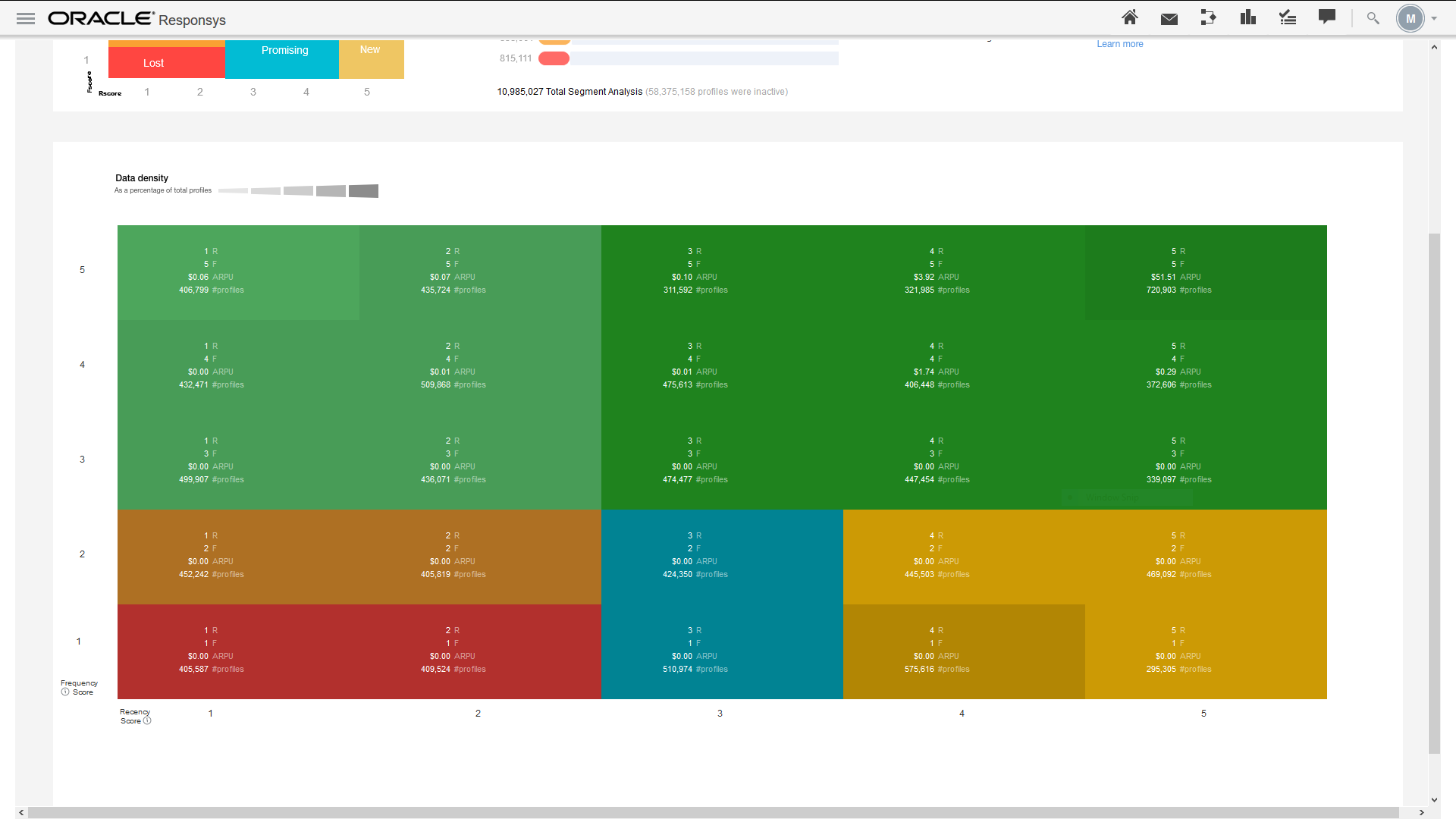
RFM is a unique machine learning-driven take on the traditional purchase-based RFM (Recency, Frequency, Monetary) analysis. This new feature combines email engagement and purchase behavior to create personas that you can use to analyze, target, or personalize messages. These personas - which are generated by smartly scoring each recipient in your profile list based on their relative recency and frequency of email opens, clicks, conversions, and purchases - help you identify distinct groups of customers ranging from the most valuable to those at risk.
Using RFM to tailor messages will significantly increase your customer engagement and retention rates.
Steps to Enable
To enable this feature you need to log a Service Request (SR).
The RFM feature is currently released under our Controlled Availability program. To request access to these features, please log in to My Oracle Support and create a service request.
Key Resources
Visit our Help Center or watch our videos to learn more.
Skipped events now have CUSTOMER_ID populated for all the channels if the CUSTOMER_ID is defined in the profile list.
Steps to Enable
You don't need to do anything to enable this feature.
Key Resources
Visit our Help Center to learn more.
When uploading data to a profile list, PET, or supplemental table using Connect or a file upload, any emojis included in the data will now display in the Responsys data viewer.
Steps to Enable
You don't need to do anything to enable this feature.
Key Resources
Visit our Help Center to learn more.
Cloud Provisioning Enhancements
With these latest Cloud Provisioning enhancements, if AFTM set-up is not fully completed and requires action from the account admin, then an email will be sent every 10 days to the account admin to notify her or him that the AFTM setup is not complete and requires action.
Steps to Enable
You don't need to do anything to enable this feature.
Key Resources
Learn more about AFTM on Topliners.
App Icon Badging for Message Center
Responsys now supports App Icon Badging on end user devices through Message Center messaging campaigns. Marketers will be able to display a badge count on the app icon on an end user's device in order to indicate to the app user the number of new Message Center messages that are available for the app. Marketers could choose to increment the badge count for every Message Center message sent to an end user's device. Marketers can use App Icon Badging, along with Message Center Messaging, to drive a lift in their app’s user engagement rates.
Steps to Enable
To enable this feature you need to log a Service Request (SR).
This feature is currently released under our Controlled Availability program. The Mobile App Message Center must be enabled. To request access to this feature, please log in to My Oracle Support and create a service request.
Key Resources
Visit our Help Center to learn more.
Configure a Mobile App Across Multiple Responsys Accounts
Several businesses use a single app across multiple brands or geographic regions. If you have multiple accounts in Responsys (each corresponding to a separate brand / organization / geographic region) but have a single app that is used for each of these brands / organizations / geographic regions, you will now be able to configure and use the same app in each of your Responsys accounts. At any given time an app user will be associated with only one of your Responsys accounts. When an app user switches brands / organizations / geographic regions on the app, they will be disassociated from the current Responsys account and associated with another of your other Responsys accounts.
Steps to Enable
To enable this feature you need to log a Service Request (SR).
This feature is currently released under our Controlled Availability program. To request access to this feature, please log in to My Oracle Support and create a service request.
Responsys now supports Mobile Wallet Marketing through an integration with Popwallet. You will be able to run a range of Mobile Wallet Marketing use cases (Loyalty Passes, Gift Cards, Offers / Deals, etc.) through the Popwallet AppCloud app. For each member of your Mobile Wallet Marketing program, you will be able to:
- Generate and distribute passes that can be installed by an end user on Apple Wallet / Google Pay Apps on their devices
- Update pass content on the recipient’s device
- Determine the install count for a pass distributed to a recipient
Steps to Enable
To enable this feature you need to log a Service Request (SR).
This feature is currently released under our Controlled Availability program. To request access to this feature, please log in to My Oracle Support and create a service request.
Users need to sign a contract with Popwallet in order to run Mobile Wallet Marketing campaigns through Responsys.
Support for Rapid Retargeter Use Cases for Mobile Apps
Responsys now supports Rapid Retargeter use cases for mobile apps through the Responsys with Infinity SDK and Infinity Streams. Responsys with Infinity SDK supports all the current functionality of the Responsys Push SDK and also supports Rapid Retargeter use cases for mobile apps through Infinity Streams.You will be able to retarget your known mobile app users with follow-up promotional messages for the following mobile app behavioral events: Searched Item, Browsed Item, Added Item to Cart, Removed Item from Cart, Cleared Cart, Updated Stage of Cart, and Purchased Cart. Currently, this Rapid Retargeter capability is not available for unknown mobile app users.
Steps to Enable
To enable this feature you need to log a Service Request (SR).
This feature is currently released under our Controlled Availability program. To request access to this feature, please log in to My Oracle Support and create a service request.
Customers need to purchase the Infinity Streams Cloud Service SKU (Number B88842) and integrate the Responsys with Infinity SDK within their App.
Support for Authentication Key Credentials for iOS Apps
Responsys now supports Authentication Key credentials for iOS apps in addition to .PEM Files. The key advantage of using Authentication Key credentials over .PEM Files is that, unlike .PEM Files, the authentication keys do not expire every year.
Steps to Enable
You don't need to do anything to enable this feature.
With the new multichannel feature, you can orchestrate messages on all supported channels within a program both for known and unknown users, provided the user has an identifier.
Steps to Enable
To enable this feature you need to log a Service Request (SR).
This feature is currently released under our Controlled Availability program. To request access to this feature, please log in to My Oracle Support and create a service request.
Key Resources
Visit our Help Center to learn more.
Reporting for Mobile Apps Message Center
You can now find the Message Center dashboard under Mobile Apps in Interactive Dashboards. This new dashboard provides visibility on the number of messages sent to the message center, and shows whether those messages were launched as a push campaign or as a message center campaign. Push campaigns can be extended to send the push notification to a message center as well. Users who have Interactive Dashboards Plus enabled for their account can now also include data from the Message Center in custom reports for the Mobile App channel.
Steps to Enable
Make the feature accessible by assigning or updating privileges and/or job roles. Details are provided in the Role Information section below.
Key Resources
Visit our Help Center to learn more.
Role Information
You must have Push campaigns, Interactive Dashboards, and Message Center enabled for your account to see this feature.
RFM (Recency, Frequency, Monetary) Analysis
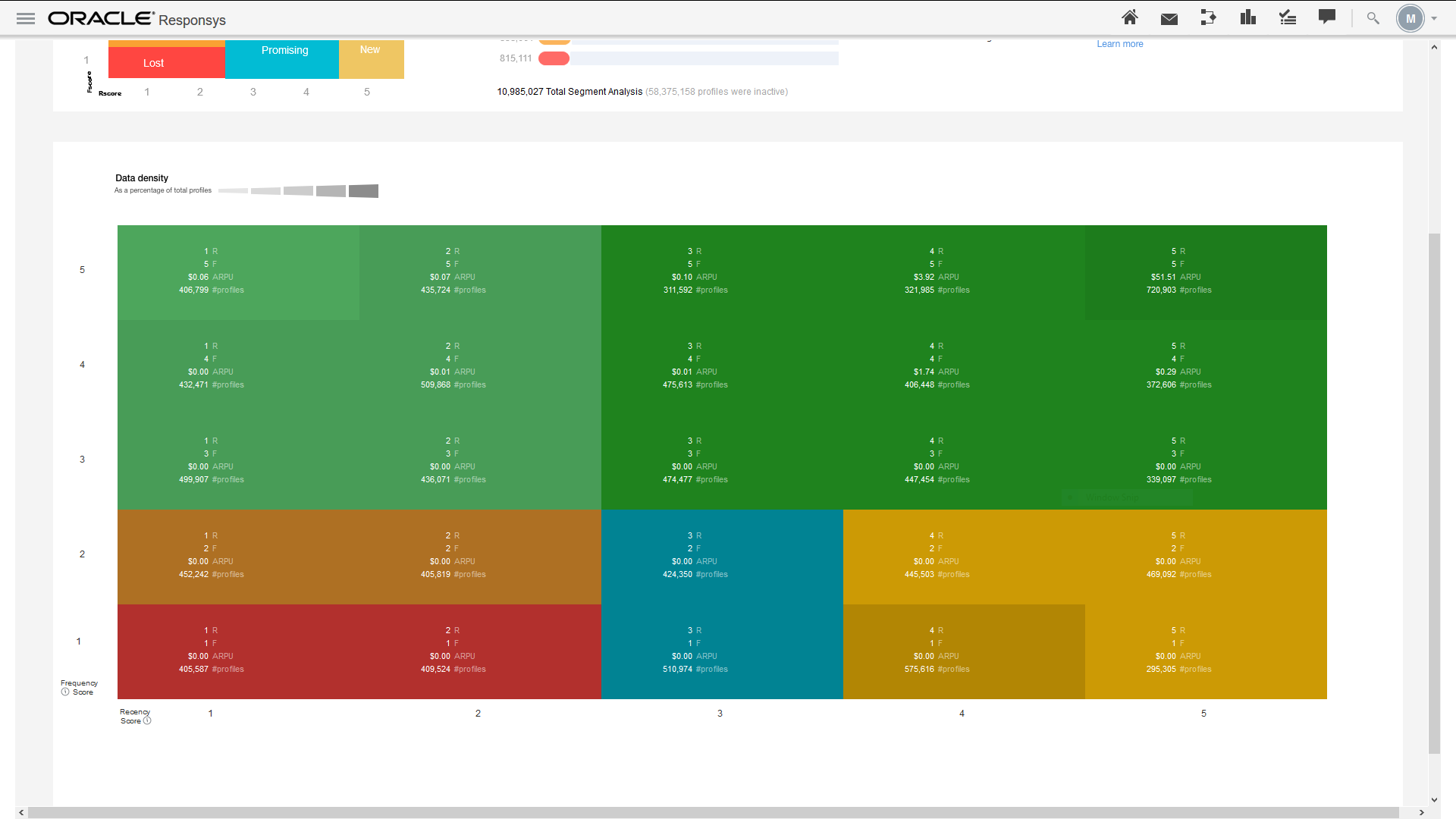
RFM is a unique machine learning-driven take on the traditional purchase-based RFM (Recency, Frequency, Monetary) analysis. This new feature combines email engagement and purchase behavior to create personas that you can use to analyze, target, or personalize messages. These personas - which are generated by smartly scoring each recipient in your profile list based on their relative recency and frequency of email opens, clicks, conversions, and purchases - help you identify distinct groups of customers ranging from the most valuable to those at risk.
Using RFM to tailor messages will significantly increase your customer engagement and retention rates.
Steps to Enable
To enable this feature you need to log a Service Request (SR).
The RFM feature is currently released under our Controlled Availability program. To request access to these features, please log in to My Oracle Support and create a service request.
Key Resources
Visit our Help Center or watch our videos to learn more.
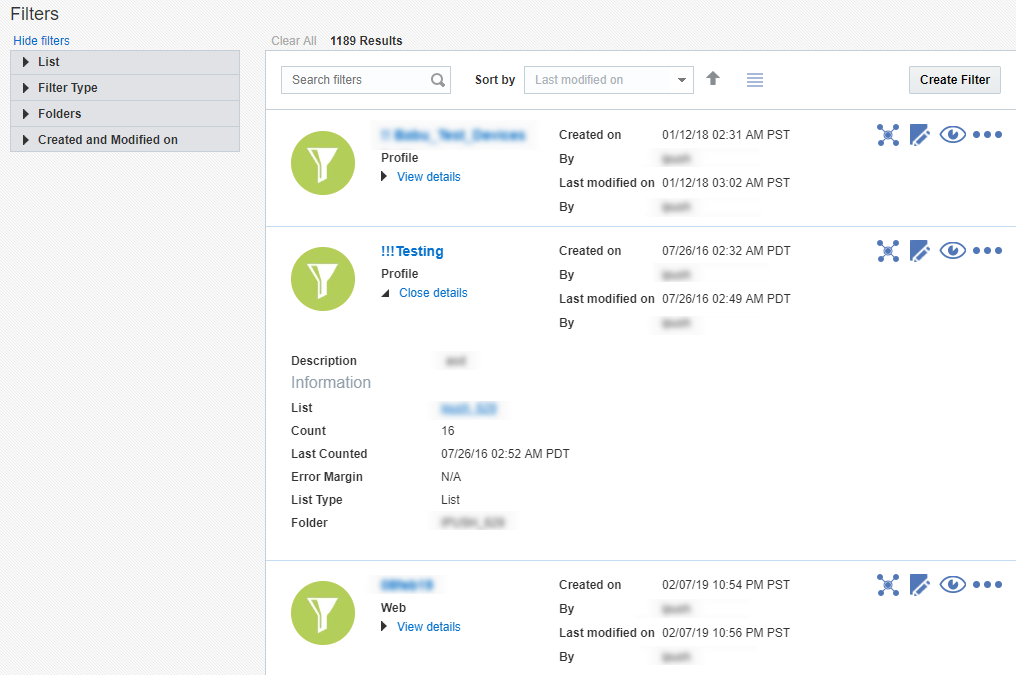
Filter management has moved from its tab on the Manage Lists page to its own filter management page. You can access the new filter management page from the Audience menu item in the Responsys navigation menu.
This change improves marketers' ability to easily access and manage filters. The user-centric design focuses on key usability aspects such as search, filter, sort, and load additional filters upon scroll. In addition, the page supports two views: a detail view and a tabular list.
Steps to Enable
You don't need to do anything to enable this feature.
Key Resources
Visit our Help Center to learn more.
Generating Thumbnails for Email Campaigns in the Manage Campaigns Page
In the Manage Campaigns page, you will now see thumbnails for email campaigns, enabling you to get a quick glance of the email.
The thumbnails are generated only for campaigns designed in the Email Message Designer. In the event that an Email Message Designer campaign's thumbnail is not visible in the Manage Campaigns page, you can re-generate the thumbnail image by saving your campaign again in the Email Message Designer.
Steps to Enable
You don't need to do anything to enable this feature.
Key Resources
Visit our Help Center to learn more.
New Header Format for Page Titles
Page headers in the Workbook for all channels have been updated such that, instead of seeing Campaign Workbook at the top of the page, the header now includes the campaign's name and status, as well as links to bring you back to the Manage Campaigns page and the Home page.
Additionally, the breadcrumb in the Manage Campaign page shows: Manage campaigns/Campaigns/Home
Steps to Enable
You don't need to do anything to enable this feature.
Key Resources
Visit our Help Center to learn more.
The icons in the Folders landing page have been redesigned with a fresh look. Additionally, the Program icon now comes in three colors to alert you to your programs' status: Draft, Published, or Blocked.
Steps to Enable
You don't need to do anything to enable this feature.
Key Resources
Visit our Help Center to learn more.
Scheduled Objects on Home Page
You can now see 15 scheduled objects on the home page. You can take a quick glance at the scheduled objects by clicking on the ellipsis under the Upcoming Schedule section.
Steps to Enable
You don't need to do anything to enable this feature.
Key Resources
Visit our Help Center to learn more.
Updates to Navigation Menu Options
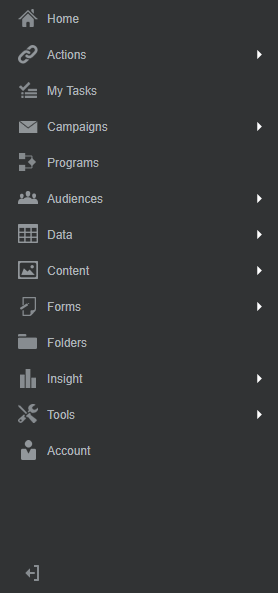
The menu items in the Responsys navigation menu (also known as the "hamburger menu") have been reorganized so that all Create options now exist under the Actions menu item. Additionally, users can access the new filter management page via the Audience menu item. The filter management page will enable users to manage and search for filters that exist in the account.
Steps to Enable
You don't need to do anything to enable this feature.
Tips And Considerations
The updates to navigation menu options are currently under measured deployment and will be rolled out over time.
Key Resources
Visit our Help Center to learn more.