
This document will continue to evolve as existing sections change and new information is added. All updates appear in the following table:
| Date | Product | Feature | Notes |
|---|---|---|---|
| 04 MAR 2022 | Data | Multiple Selections Allowed for Marketing Strategy and Marketing Program in Classic Filter Designer UI | Updated document. Feature delivered in update 22A. |
| 24 JAN 2022 | Created initial document. |
 HAVE AN IDEA?
We’re here and we’re listening. If you have a suggestion on how to make our cloud services even better then go ahead and tell us. There are several ways to submit your ideas, for example, through the Ideas Lab on Oracle Customer Connect. Wherever you see this icon after the feature name it means we delivered one of your ideas.
GIVE US FEEDBACK
We welcome your comments and suggestions to improve the content. Please send us your feedback at omcdocumentation_ca@oracle.com.
DISCLAIMER
The information contained in this document may include statements about Oracle’s product development plans. Many factors can materially affect Oracle’s product development plans and the nature and timing of future product releases. Accordingly, this Information is provided to you solely for information only, is not a commitment to deliver any material, code, or functionality, and should not be relied upon in making purchasing decisions. The development, release, and timing of any features or functionality described remains at the sole discretion of Oracle.
This information may not be incorporated into any contractual agreement with Oracle or its subsidiaries or affiliates. Oracle specifically disclaims any liability with respect to this information. Refer to the Legal Notices and Terms of Use for further information.
Column Definitions:
Report = New or modified, Oracle-delivered, ready to run reports.
UI or Process-Based: Small Scale = These UI or process-based features are typically comprised of minor field, validation, or program changes. Therefore, the potential impact to users is minimal.
UI or Process-Based: Larger Scale* = These UI or process-based features have more complex designs. Therefore, the potential impact to users is higher.
Features Delivered Disabled = Action is needed BEFORE these features can be used by END USERS. These features are delivered disabled and you choose if and when to enable them. For example, a) new or expanded BI subject areas need to first be incorporated into reports, b) Integration is required to utilize new web services, or c) features must be assigned to user roles before they can be accessed.
| Ready for Use by End Users Reports plus Small Scale UI or Process-Based new features will have minimal user impact after an update. Therefore, customer acceptance testing should focus on the Larger Scale UI or Process-Based* new features. |
Customer Must Take Action before Use by End Users Not disruptive as action is required to make these features ready to use. As you selectively choose to leverage, you set your test and roll out timing. |
|||||
|---|---|---|---|---|---|---|
| Feature |
Report |
UI or |
UI or |
|
||
DLT Template ID Added to the SMS Sent Contact Event Data Feed |
||||||
Relative Time Supported for In-app Campaign Scheduled End Time |
||||||
RFM (Recency, Frequency, Monetary) Analysis for Mobile App and SMS Channels |
||||||
Program Settings Improvement for Recipient Opt Outs and Undeliverables |
||||||
Push Campaign Fatigue Analysis Enhancements
Fatigue Analysis for Push Campaigns helps you understand which mobile app users are more versus less receptive to receiving promotional push messaging. In 22A, we have made important enhancements to the feature.
- Recipients analyzed for Fatigue Analysis are mobile app users that meet the following criteria:
- Are opted-in and deliverable, and
- Were sent at least one promotional message in last 180 days.
- On the Fatigue Analysis dashboard:
- The Inactive persona is now included in the persona distribution.
- You will see a new "Dormant alert" when most of the analyzed users belong to the Inactive persona.
- You can access the Segment / Persona member count.
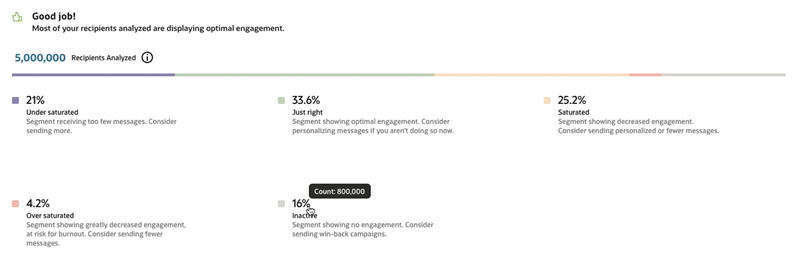
Fatigue Analysis Dashboard - Persona Distribution Includes Inactive Persona

Fatigue Analysis Dashboard - Dormant Alert Shown When Most Mobile App Users Inactive
The Fatigue Analysis feature provides insights on subscriber fatigue levels so you can spend your marketing resources more effectively.
- You can use the out-of-the-box fatigue personas to ensure optimal messaging and to prevent a decrease in user engagement and user churn.
- Dashboards help you see how your mobile app user base is distributed across the fatigue personas, and view recent performance of the fatigue persona segments.
Steps to Enable
These enhancements are available to all accounts that have the Advanced Intelligence Package and are enabled for Mobile App Channel and Fatigue Analysis.
- Fatigue Analysis is available as part of the Advanced Intelligence Package add-on that must be ordered for your account. Please contact your account representative or Oracle sales.
- If your account has the Advanced Intelligence Package add-on provisioned and you have not yet enabled the Fatigue Analysis feature, use the Intelligence Feature Management page to enable it.
- If your account has the Fatigue Analysis feature enabled already and if your account has Push enabled, then the Fatigue Analysis Push profile extension tables (PETs) and filters will be added to your account automatically. You do not need to switch the Fatigue Analysis feature OFF and ON again to get the Push-specific PETs and filters.
- Please note that if the Fatigue Analysis feature switch is switched ON or OFF, then the feature's Email, SMS, and Push channel functionality will be enabled or disabled together.
Tips And Considerations
- Prerequisite features: Mobile App channel, Push Notification campaigns (including Rich Push), Fatigue Analysis
- Ensure that the relevant campaigns are tagged as "promotional" (transactional campaigns are not considered for fatigue analysis).
- "Recommended Send Frequency" is not supported for Push Fatigue Analysis.
Key Resources
- Fatigue Analysis Overview
- Fatigue Analysis Dashboard for Push Messages
- Enabling and Disabling Intelligence Features
Role Information
This feature is available to users with the following roles:
- Push Marketing Manager
- Push Marketing Director
- Super User
- Account Administrator
Advanced REST API Generally Available
The Oracle Responsys Advanced REST API is now generally available (GA). It is enabled for you to use without having to contact Oracle Support.
The Responsys Advanced REST API gives your organization's developers access to 34 APIs across 12 categories.
Steps to Enable
Review the REST service definition in the REST API guides, available from the Oracle Help Center > your apps service area of interest > REST API. If you're new to Oracle's REST services you may want to begin with the Quick Start section.
IMPORTANT: If your account explicitly has the Oracle Responsys Advanced REST API disabled, you must create a service request (SR) in My Oracle Support to enable the feature.
Key Resources
Role Information
Client applications that use Responsys REST APIs must authenticate using an API user with the applicable Web Services Manager roles enabled.
Asynchronous Reporting REST API Generally Available
The Oracle Responsys Asynchronous Reporting REST API is now generally available (GA). It is enabled for you to use without having to contact Support.
This API enables you to obtain campaign performance metrics for Email, SMS, and Mobile App channels.
Steps to Enable
Review the REST service definition in the REST API guides, available from the Oracle Help Center > your apps service area of interest > REST API. If you're new to Oracle's REST services you may want to begin with the Quick Start section.
IMPORTANT: If your account explicitly has the Oracle Responsys Asynchronous Reporting REST API disabled, you must create a service request (SR) in My Oracle Support to enable the feature.
Key Resources
Role Information
Client applications that use Responsys REST APIs must authenticate using an API user with the applicable Web Services Manager roles enabled.
New Limits on Async SMS Trigger API
We have enhanced the API limits for the Oracle Responsys Async Trigger SMS API. You can use the Get Throttling Limits API to obtain a list of API throttling limits for key interfaces for your Responsys account. Contact Oracle Support if you require a higher limit for this API.
This feature helps improve performance for your client applications using the Async Trigger SMS API.
Steps to Enable
Review the REST service definition in the REST API guides, available from the Oracle Help Center > your apps service area of interest > REST API. If you're new to Oracle's REST services you may want to begin with the Quick Start section.
IMPORTANT: Accounts that explicitly have the Advanced REST API disabled must submit a Service Request (SR) to have Oracle Support enable the feature.
Key Resources
Role Information
Client applications that use Responsys REST APIs must authenticate using an API user with the applicable Web Services Manager roles enabled.
Connect-based Event Export for Auto Opened Events
Using Connect, you can create an Export Feed Data job that includes Auto Opened events. The Auto Opened events feed tracks campaign-message opens that Responsys attributes to privacy protection-enabled mail applications, such as iOS 15 native mail clients. Responsys classifies all Opened events with only "Mozilla/5.0" in the user-agent string as Auto Opened events, and these events are not included in the Opened events feed.
By separating Auto Opened events from Opened events, Responsys enables you to analyze and make decisions based on Open events where the individual opened an email.
Steps to Enable
You don't need to do anything to enable this feature.
Tips And Considerations
To export the new data, you must create a new feed job or edit an existing job to add these feeds.
Key Resources
Role Information
This feature is available for Data Directors and Super Users.
Connect-based Event Export for Message Center
Using Connect, you can create an Export Feed Data job that includes Message Center campaign launch and engagement events data. This includes Message Center events generated for Message Center messages launched as part of Push campaigns and those launched as Message Center campaigns.
You can include the following events when you export the Message Center contact event data (CED):
- Message Center Sent
- Message Center Skipped
- Message Center Failed
- Message Center Displayed
- Message Center Opened
- Message Center Clicked
You can import the Message Center event data into your internal analytics data warehouse for analysis.
Steps to Enable
You don't need to do anything to enable this feature.
Tips And Considerations
- This feature is available to all accounts that are enabled for Mobile App Channel and Message Center.
-
To export the new data, you must create a new feed job or edit an existing job to add these feeds.
Key Resources
Role Information
This feature is available for Data Directors and Super Users.
DLT Template ID Added to the SMS Sent Contact Event Data Feed
The Distributed Ledger Technology (DLT) template ID is a parameter in the MT payloads for SMS messages that use India country codes. You can now see the DLT Template ID values in the SMS Sent, Skipped, and Failed Contact Event Data (CED) feed files when the SMS message uses India country codes.
When you import the SMS event data into your internal analytics data warehouse for analysis, you will now have the additional DLT Template ID data.
Steps to Enable
To enable this feature you need to log a Service Request (SR).
Contact Oracle Support for assistance in adding columns to your CED output.
NOTE: You must update your ingestion processes before requesting that Oracle updates the output configuration with the new columns. Otherwise, it may cause your CED ingestion processes to break.
Tips And Considerations
- Your account must have SMS enabled to use this enhancement.
- The DLT Template ID field will not have a value when the SMS messages use other country codes.
Key Resources
Role Information
This feature is available for Data Directors and Super Users.
Multiple Selections Allowed for Marketing Strategy and Marketing Program in Classic Filter Designer UI
When using the Campaign Categorized condition in a Classic Filter, you can now select multiple values for marketing Strategy and marketing Program. The user interface now displays check boxes for selecting these values.
- By default, the "Any" option will be selected for both Program and Strategy when you add these attributes to your filter. You must deselect the "Any" option if it is not needed for your filter criteria.
- For existing filters that have Strategy or Program set, they will continue to work the same.
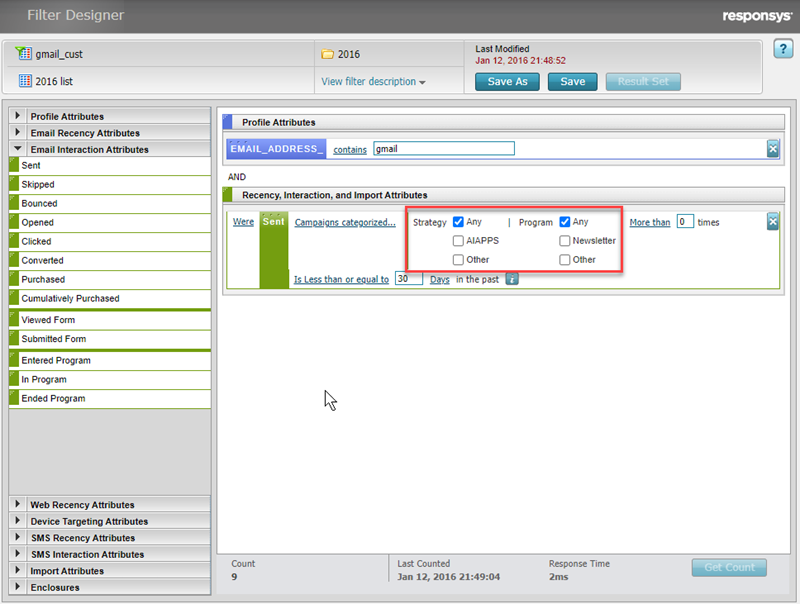
Classic Filter with Strategy and Program Check Boxes
With the ability to select multiple values for the Programs and Strategy options the Classic Filter Designer, you can create filters with fewer conditions, reducing the time it takes to run them.
Steps to Enable
You don't need to do anything to enable this feature.
Key Resources
Role Information
This feature is available for Data Directors, Super Users, and Account Administrators.
Profile Delete Will Delete Associated Supplemental Tables
The asynchronous profile record hard-delete process now performs a cascade hard delete of associated data from Supplemental Data tables, based on mappings and associations that you provide.
This feature ensures that when you delete a profile list record for a contact, associated personal supplemental data are also removed from the system. This helps you meet your data privacy compliance requirements.
Steps to Enable
To enable this feature you need to log a Service Request (SR).
Tips And Considerations
The profile record deletion process now supports removing personal data from associated supplemental data tables. The supplemental personal data are removed during the asynchronous deletion process, roughly five (5) days after the deletion request, and the profile record is in accessible in the application.
The supplemental data table cascading delete supports up to two (2) levels deep, starting from a profile list, app channel list, or web push list. For example, the delete would remove data in Orders and OrderDetails in the following hierarchy List > Orders > OrderDetails.
The relationship between a supplemental data table and its parent list must be entered into the ~System/GDPR_SUP_DEL_MAPPING table. The process will remove personal data only from those supplemental data tables properly mapped in this mapping table.
You must also configure the process using the administration page. You can access it from Accounts > Data settings > Supplemental Data Management.
Role Information
The administration page for this feature is available to Data Directors, Super Users, and Account Administrators.
The mapping table for this feature is available to Data Directors and Super Users.
Relative Time Supported for In-app Campaign Scheduled End Time
You can now set an In-app campaign scheduled end time that is relative to the campaign launch time.
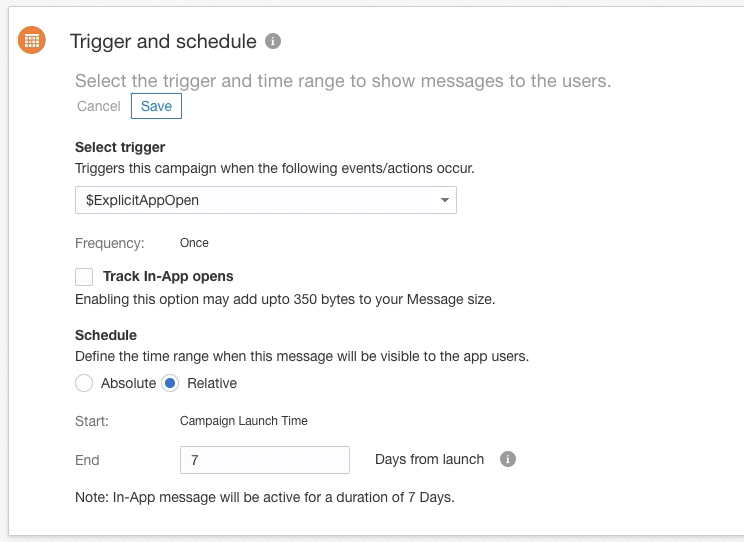
In-app Campaign - Scheduled for Relative Display Time
This gives you more flexibility when designing campaigns, particularly for use cases when you want the in-app message display end time to occur relative to the In-app message send time. For example, you can design a campaign that shows a "Happy Birthday" coupon to all mobile app users who have a birthday today, that is valid only for the next seven days.
Steps to Enable
You don't need to do anything to enable this feature.
Tips And Considerations
This feature is available to all accounts that have both Mobile App channel and In-app Messaging enabled.
In-app message schedule times can be set to Absolute or Relative. Absolute will let you set specific start and end times. Relative sets the start time to the campaign launch time and lets you set the end time ("days from launch").
Using RPL to Set the Relative Scheduled End Time
You can use RPL to set the relative scheduled end time. The RPL expression must resolve to an integer between 1 and 365 days.
If an RPL expression is provided for the Scheduled End time setting, and the RPL results in disallowed values, then the In-app message is not launched. The system logs an In-app campaign Skipped event, with the reason, "Personalization resulted in an invalid value for attribute 'Schedule End' time."
Backward Compatibility
All existing In-app campaigns that already have an absolute value set for their scheduled end time will have the Schedule field set to "Absolute". The start and end will be set to the campaign's Schedule Start and Schedule End values.
Key Resources
Role Information
This feature is available for the following roles:
- Push Marketing Manager
- Push Marketing Director
- Super User
- Account Administrator
Relative Time Supported for Message Center Expiration Time
You can now set a Message Center message expiration time that is relative to the campaign launch time. This capability is supported for both Message Center messages launched as part of Push campaigns, and those launched as Message Center campaigns.
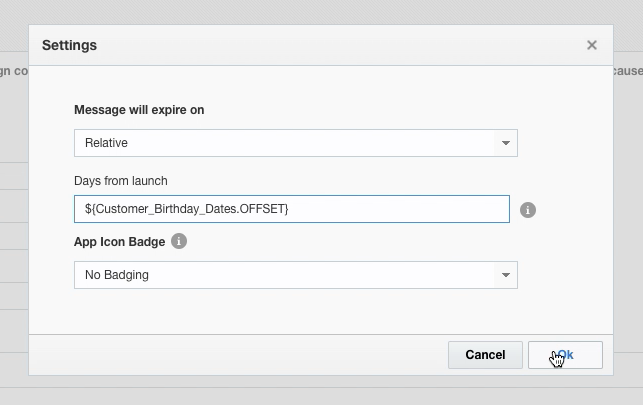
Message Center Message Settings - Relative Expiration Date Selected
- You can now schedule recurring Message Center campaigns or Push with Message Center campaigns that have an expiration time set.
- This gives you more flexibility when designing campaigns, particularly for use cases when you want the expiration to occur relative to the message send time. For example, you can design a campaign that sends a "Happy Birthday" coupon to the mobile app Message Center of all users who have a birthday today, that is valid only for the next seven days.
Steps to Enable
You don't need to do anything to enable this feature.
Tips And Considerations
This feature is available to all accounts that have both Mobile App channel and Message Center enabled.
Message Center message expiration times can be set to None, Absolute, or Relative. Absolute expiration time will let you set a specific time. Relative expiration time will let you set an expiration time that is relative to the campaign launch time ("days from launch").
Using RPL to Set the Relative Expiration Time
You can use RPL to set the relative expiration time. The RPL expression must resolve to an integer between 1 and 365 days.
If an RPL expression is provided for the "Message will expire on: Relative" time setting, and the RPL results in disallowed values, both Push (when Push campaign is launched) and Message Center messages are skipped.
- The system logs a Push Skipped event (when Push campaign is launched)
Reason: Personalization resulted in an invalid value for attribute "Message will expire on"
- The system logs a Message Center Skipped event
Reason: Personalization resulted in an invalid value for attribute "Message will expire on"
Backward Compatibility
For all existing Push or Message Center campaigns that already have an absolute value set for the "Message will expire on" setting:
- The "Message will expire on" option will be set to "Absolute" time
- The value will be set to the date and time currently specified in the campaign
For all existing Push or Message Center Campaigns that do not have a value set for "Message will expire on", the option will be set to "None".
Key Resources
Role Information
This feature is available for the following roles:
- Push Marketing Manager
- Push Marketing Director
- Super User
- Account Administrator
RFM (Recency, Frequency, Monetary) Analysis for Mobile App and SMS Channels
RFM (Recency, Frequency, Monetary) Analysis is now available for the Mobile App and SMS channels.
RFM uniquely applies machine-learning elements to traditional purchase-based RFM (Recency, Frequency, Monetary) analysis. This feature combines engagement and purchase behavior to create personas you can use to analyze, target, or personalize messages. Personas help you identify distinct groups of customers ranging from the most valuable to those at risk. They are generated by smartly scoring each recipient in your Mobile App channel list (Mobile App channel) or profile list (SMS channel). Recipients' scores are based on their relative recency and frequency of message opens, clicks, conversions, and purchases.
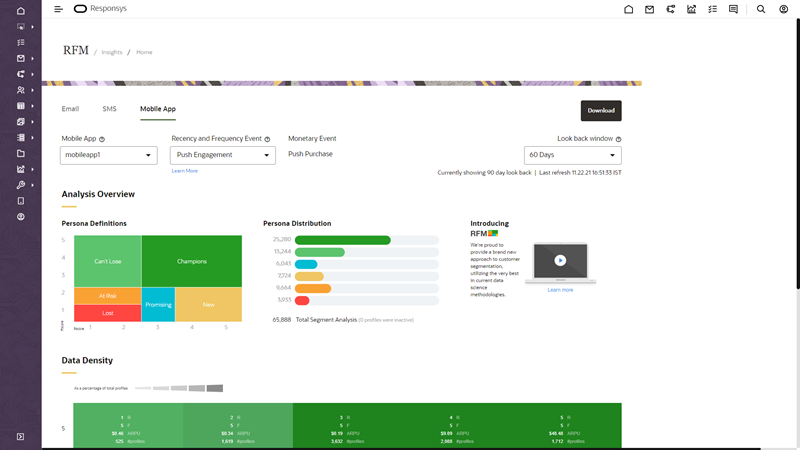
RFM Analysis
Using RFM to tailor your messages can significantly increase your customer engagement and retention rates.
Steps to Enable
- RFM for Mobile App is available to all accounts that are enabled for the Mobile App channel and for RFM. Your mobile app development team must implement and validate campaign engagement event tracking in mobile apps integrated with Oracle Responsys.
- RFM for SMS is available to all accounts that are enabled for the SMS channel and for RFM.
Tips And Considerations
RFM Analysis for each use case relies on campaign engagement events data. Ensure that your mobile apps record Push, In-app, and Message Center campaign engagement events consistently and thoroughly. Review the Key Resources below to learn more about implementing and validating campaign engagement event tracking in your mobile apps.
Key Resources
Program Settings Improvement for Recipient Opt Outs and Undeliverables
The Program Settings user interface has been improved so you no longer need to explicitly choose to keep enactments in the program if the recipient opts out or becomes undeliverable. The enactments will remain in the program until you explicitly exit the enactment based on a data switch or event switch orchestration to an End event.
For your new programs, enactments will continue to flow through unless you design the program orchestration to remove enactments because of an opt out or undeliverable event.
Steps to Enable
You don't need to do anything to enable this feature.
Tips And Considerations
- This change affects customers who want to create new programs that want enactments to exit programs after opt out.
- Although the user interface has changed, this does not affect existing programs.
- This change doesn't affect customer activated/customer deactivated entry stages.
Key Resources
Role Information
This feature is available to users with the following roles:
- Program Director
- Program Manager
- Super User
- Account Administrator
Email Live Report Updated with Auto Opened Count
Email Live Report now shows the Auto Opened count for Email campaigns. Auto Opens are the open signals from privacy-protected email clients, where the User Agent String is purposely generic (for example, "Mozilla/5.0"). Examples of such email clients are Apple's native mail clients in iOS 15, iPadOS 15, and macOS Monterey.
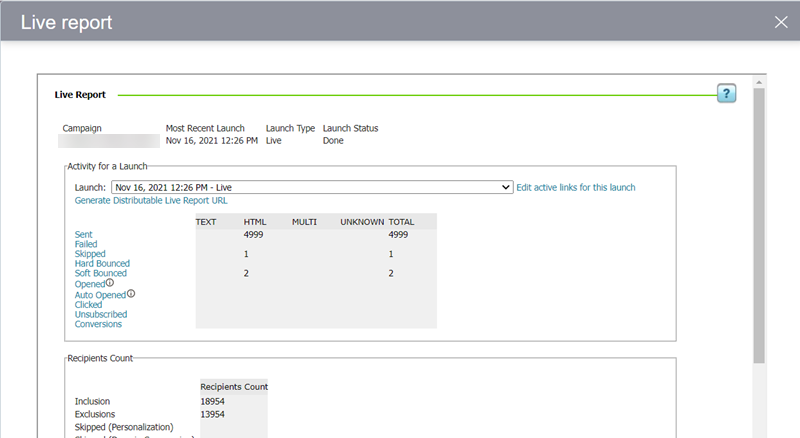
Live Report with Auto Opened Count
By separating Auto Opened count from the Opened count, Live Reports shows a more accurate view of activity on your Email campaigns.
Steps to Enable
You don't need to do anything to enable this feature.
Key Resources
IMPORTANT Actions and Considerations
ACTION REQUIRED: UPDATE THE RESPONSYS SERVER CERTIFICATE FOR API ACCESS BY FEBRUARY 7, 2022
On February 7, 2022, the Responsys Server Certificate that allows you to access the Oracle Responsys APIs will expire.
If your client applications authenticate using the Log in with username and certificate option, you must update your Responsys Server Certificate as soon as possible to avoid any service disruption. (Client applications that authenticate using the Log in with username and password option are not affected by this change.)
Steps to Enable
A new certificate is now available within your Responsys Account settings. To update, Account Administrators should complete the following:
- Download the new certificate from Responsys Account settings, using the steps below.
- Replace the old certificate with the new certificate within your respective folder location.
- Test by logging in to the Responsys API using the Log in with username and certificate option.
To download the new certificate:
- Log in to Responsys (you must log in as a user with the Account Administrator role).
- From the navigation menu, choose Account.
- Locate User identity management, and then choose User authentication management.
- Select an API user (that is, a user with one or more Web Services roles enabled), and then click Edit.
- Click Download Responsys Interact Certificate (for server authentication).
- Save the certificate (ResponsysServerCertificate.cer) on your computer.
Tips and Considerations
- Client applications that log in with username and certificates can begin using the new certificate before February 7, 2022.
- The new certificate will be valid until February 9, 2023.
- Client applications using the log in with username and password option are not affected.
- No other API endpoints are affected.
- If you encounter problems logging in with username and certificate after you download the new certificate, verify the following:
- Ensure the API endpoint is valid.
- Ensure that the API user has the necessary Web Services roles enabled.
- Ensure the API syntax is valid.
- If you are not able to debug further, contact Oracle Support and share the API payload details.
Key Resources
- Log in with Username and Certificates
- Editing User Authentication Options
- Creating API Users in Responsys