
This document will continue to evolve as existing sections change and new information is added. All updates appear in the following table:
| Date | Product | Feature | Notes |
|---|---|---|---|
| 03 JUN 2022 |
Asynchronous REST API Updates | APIs | Updated document. Revised feature information. |
| 03 JUN 2022 |
New "Privacy Protected Mail Client" Profile Extension Table | Data | Updated document. Feature delivered in June monthly patch for update 22B. |
| 03 JUN 2022 |
New Reporting Measures in Insight Interactive Dashboards | Reporting | Updated document. Feature delivered in June monthly patch for update 22B. |
| 03 JUN 2022 | Update to Get Count for Filters | User Experience | Updated document. Feature delivered in update 22B. |
| 18 APR 2022 | Created initial document. |
 HAVE AN IDEA?
We’re here and we’re listening. If you have a suggestion on how to make our cloud services even better then go ahead and tell us. There are several ways to submit your ideas, for example, through the Ideas Lab on Oracle Customer Connect. Wherever you see this icon after the feature name it means we delivered one of your ideas.
GIVE US FEEDBACK
We welcome your comments and suggestions to improve the content. Please send us your feedback at omcdocumentation_ca@oracle.com.
DISCLAIMER
The information contained in this document may include statements about Oracle’s product development plans. Many factors can materially affect Oracle’s product development plans and the nature and timing of future product releases. Accordingly, this Information is provided to you solely for information only, is not a commitment to deliver any material, code, or functionality, and should not be relied upon in making purchasing decisions. The development, release, and timing of any features or functionality described remains at the sole discretion of Oracle.
This information may not be incorporated into any contractual agreement with Oracle or its subsidiaries or affiliates. Oracle specifically disclaims any liability with respect to this information. Refer to the Legal Notices and Terms of Use for further information.
Column Definitions:
Report = New or modified, Oracle-delivered, ready to run reports.
UI or Process-Based: Small Scale = These UI or process-based features are typically comprised of minor field, validation, or program changes. Therefore, the potential impact to users is minimal.
UI or Process-Based: Larger Scale* = These UI or process-based features have more complex designs. Therefore, the potential impact to users is higher.
Features Delivered Disabled = Action is needed BEFORE these features can be used by END USERS. These features are delivered disabled and you choose if and when to enable them. For example, a) new or expanded BI subject areas need to first be incorporated into reports, b) Integration is required to utilize new web services, or c) features must be assigned to user roles before they can be accessed.
| Ready for Use by End Users Reports plus Small Scale UI or Process-Based new features will have minimal user impact after an update. Therefore, customer acceptance testing should focus on the Larger Scale UI or Process-Based* new features. |
Customer Must Take Action before Use by End Users Not disruptive as action is required to make these features ready to use. As you selectively choose to leverage, you set your test and roll out timing. |
|||||
|---|---|---|---|---|---|---|
| Feature |
Report |
UI or |
UI or |
|
||
Predictive Customer Lifetime Value Includes a User's Purchases on Mobile Apps |
||||||
Mobile Applications Notified When New Message Center Messages Received |
||||||
Support for iOS 15 Features: Interruption Level and Relevance Score |
||||||
New Look and Feel for Campaign Designers and Message Designers |
||||||
New Customer Lifetime Value Personas
The Predictive Customer Lifetime Value (CLV) Dashboards has two new personas:
- Non-Spenders: Have zero predicted transactions in the future
- Unlikely to Spend Again: Have close to zero predicted transactions in the future
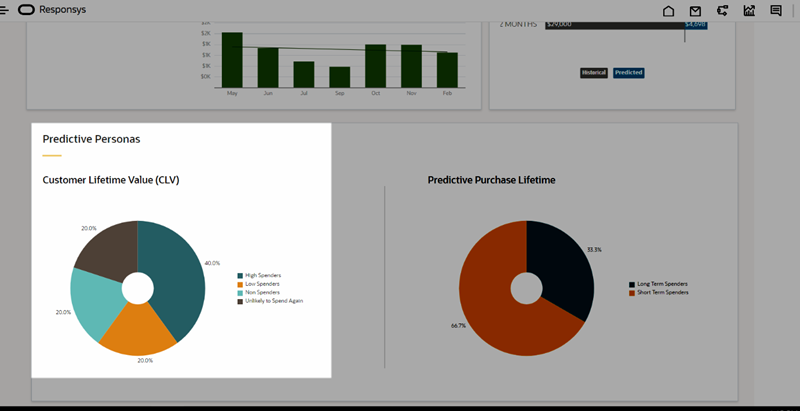
New Predictive CLV Personas
This provides you with more useful and accurate CLV data.
Steps to Enable
These enhancements are available to all accounts that have the Advanced Intelligence Package and are enabled for Predictive CLV.
- Predictive CLV is available as part of the Advanced Intelligence Package add-on that must be ordered for your account. Please contact your account representative or Oracle sales.
- If your account has the Advanced Intelligence Package add-on provisioned and you have not yet enabled the Predictive CLV feature, use the Intelligence Feature Management page to enable it.
Key Resources
Predictive Customer Lifetime Value Includes a User's Purchases on Mobile Apps
Starting with the 22B update, Predictive Customer Lifetime Value (CLV) includes a user's purchases on mobile apps. Any purchase made by a user that is attributed to Push campaigns is included in Predictive CLV.
By including mobile app purchases attributed to Push campaigns, you will see a more complete view of the Predictive CLV for your customers.
Steps to Enable
- Your mobile apps must be enabled with the Oracle Responsys SDK version 6.53.0 (22B) or later, and your apps must raise Push purchase events with a revenue amount.
-
Predictive CLV is available as part of the Advanced Intelligence Package add-on that you can order for your account. Please contact your account representative or Oracle sales.
Key Resources
Program Simulation now incorporates Program metrics from similar audiences. Your simulation results will include scoring/matching from simulated program and historic audiences using:
- Filters and SQL criteria for both inclusions and exclusions
- Audiences and criteria for both inclusions and exclusions
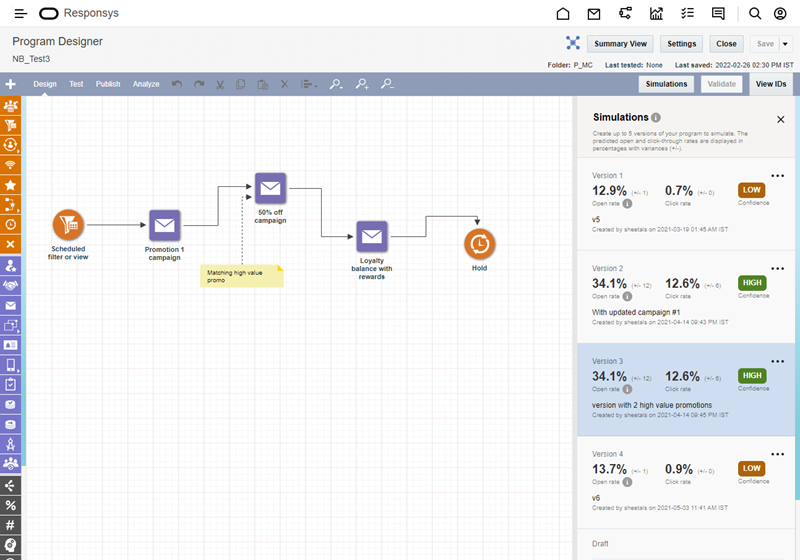
Program Simulation
This update provides more accurate predictions for your simulations.
Steps to Enable
These enhancements are available to all accounts that have the Advanced Intelligence Package and are enabled for Program Simulation.
- Program Simulation is available as part of the Advanced Intelligence Package add-on that must be ordered for your account. Please contact your account representative or Oracle sales.
- If your account has the Advanced Intelligence Package add-on provisioned and you have not yet enabled the Program Simulation feature, use the Intelligence Feature Management page to enable it.
Tips And Considerations
This enhancement is only applicable for program orchestrations that start with Scheduled Filter or Get Audience.
Key Resources
Role Information
This feature is available to users with the following roles:
- Program Director
- Program Manager
- Super User
- Account Administrator
Advanced REST API Updates for SMS Invalid Keyword Responses
You can now use the Oracle Responsys Advanced REST API to update and delete SMS invalid keyword response messages for codes present in the account.
Client applications will be able to update and delete SMS invalid keyword response messages programmatically.
Steps to Enable
Review the REST service definition in the REST API guides, available from the Oracle Help Center > your apps service area of interest > REST API. If you're new to Oracle's REST services you may want to begin with the Quick Start section.
Key Resources
Role Information
Client applications that use Responsys REST APIs must authenticate using an API user with the applicable Web Services Manager roles enabled.
You can now use the following new Asynchronous (Async) REST API endpoints:
- Trigger Push (part of the Async High Availability (HA) API that supports AFTM)
- Trigger REI Event
- Delete Multiple PET Records
Also, the 22B update includes new API limits for asyncMergeTriggerSMS and support for Bulk APIs.
Asynchronous APIs allow client applications to poll for API request status, rather than having to wait for a synchronous API's response to occur before the client application's timeout settings. This improves client application efficiency.
Steps to Enable
Review the REST service definition in the REST API guides, available from the Oracle Help Center > your apps service area of interest > REST API. If you're new to Oracle's REST services you may want to begin with the Quick Start section.
Key Resources
Role Information
Client applications that use Responsys REST APIs must authenticate using an API user with the applicable Web Services Manager roles enabled.
CRUD REST APIs for Message Center Campaigns
Oracle Responsys REST APIs are now enhanced to provide full create, retrieve, update, and delete (CRUD) functionality for Mobile App Message Center direct campaigns.
You can use the following Advanced REST API endpoints for managing Mobile App Message Center direct campaigns:
- Create Message Center Direct Campaign
- Retrieve Message Center Direct Campaign
- Retrieve All Message Center Direct Campaigns
- Update Message Center Direct Campaign
- Delete Message Center Direct Campaign
This provides your organization's application developers more functionality when developing client applications that use the Oracle Responsys REST APIs.
Steps to Enable
Review the REST service definition in the REST API guides, available from the Oracle Help Center > your apps service area of interest > REST API. If you're new to Oracle's REST services you may want to begin with the Quick Start section.
To use the CRUD REST APIs for Message Center campaigns, your account must be enabled for Mobile App Message Center, which is currently released under our Controlled Availability program. To request access to Mobile App Message Center, please log in to My Oracle Support and create a service request.
Key Resources
Role Information
Client applications that use Responsys REST APIs must authenticate using an API user with the applicable Web Services Manager roles enabled.
New "Privacy Protected Mail Client" Profile Extension Table
A new profile extension table (PET) called "Privacy Protected Mail Client" will be available by default for all profile lists as of the 22B June monthly patch.
This PET contains recipients that have only generated open signals in the past week using a privacy protected mail client (Auto Open events). They will stay in the PET until they generate an Open event. Note that recipients may remain in this PET if they stop generating open signals.
You can use this PET for fine-tuning your targeting and segmentation.
Steps to Enable
You don't need to do anything to enable this feature.
Tips And Considerations
Oracle Responsys categorizes email open signals into two event types: Auto Opens and Opens. Auto Opens are those open signals generated by privacy-protected email clients where the open signal's User Agent String is "Mozilla/5.0".
By continuously monitoring Open event data and Auto Open event data, we can regularly refresh the new "Privacy Protected Mail Client" profile extension table (PET). The Privacy Protected Mail Client PET is refreshed daily. Contacts in the PET have exclusively generated Auto Open events for at least the past seven (7) days without generating an Open event during this time. Contacts who have at least one email Open event during this time will not have a record in this PET.
Each profile list will have a Privacy Protected Mail Client PET, where each PET has the following naming convention:
Privacy Protected Mail Client <profile_list_name>
Example: For a profile list named CONTACTS_LIST, the PET name will be Privacy Protected Mail Client CONTACTS_LIST
Key Resources
Role Information
This feature is available to Data Directors, Super Users, and Account Administrators.
Custom Key-Value Pairs for Message Center Messages
You can now add up to ten key-value pairs for sending data in Message Center campaign messages. These key-value pairs have a specific prefix (RSYS_MSG_CTR_) and must be added as dynamic variables to your campaign data sources.
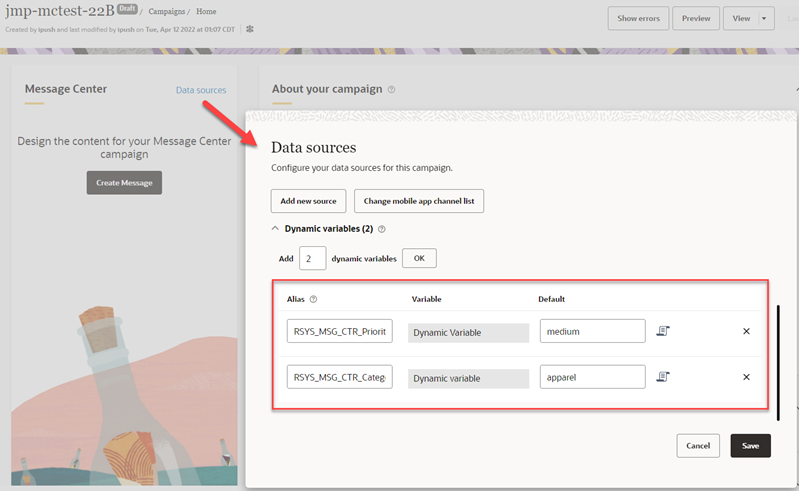
Using Message Center Campaign Data Sources to Add Custom Key-Value Pairs
This capability allows marketers and mobile app developers to extend the standard attributes of Message Center messages. For example, marketers and mobile app developers could include support for two new attributes called Priority and Category as part of their Message Center messages, and then build experiences based on Message Priority and Message Category.
Steps to Enable
- Oracle Responsys SDK version 6.53.0 (22B) is required to use this feature. This feature will be visible for Oracle Responsys accounts enabled for the Mobile App channel, but it will not be fully available until the SDK is released and your mobile app development team has updated your mobile apps to use it.
- This feature also requires that your account be enabled for Mobile App Message Center, which is currently released under our Controlled Availability program. To request access to Mobile App Message Center, please log in to My Oracle Support and create a service request.
Tips And Considerations
- This feature applies to Message Center direct campaigns and to Push campaigns that also send to Message Centers in mobile apps.
- You must add your reserved dynamic variable to your campaign data sources as a dynamic variable with the RSYS_MSG_CTR_ prefix. For example, if you want to specify a custom key name of Priority, you must add a dynamic variable called RSYS_MSG_CTR_Priority to your campaign data sources.
Key Resources
Role Information
This feature is available for the following roles:
- Push Marketing Manager
- Push Marketing Director
- Super User
- Account Administrator
Mobile Applications Notified When New Message Center Messages Received
The Responsys SDK issues an asynchronous notification to mobile apps when new Message Center messages are received.
Mobile app developers using the Responsys SDK can then refresh their Message Center message list with newly received messages.
Steps to Enable
- Oracle Responsys SDK version 6.52.0 (22A) or later is required to use this feature.
- This feature is enabled for all accounts with Message Center enabled. If your account doesn't have the Message Center feature enabled, you can request it by logging in to My Oracle Support and creating a service request.
Key Resources
Role Information
This feature is intended for mobile app developers.
Support for Additional In-app Campaign Message Styles
When creating In-app campaign messages, you have three new options when choosing a message style:
- Interstitial: Displays the in-app message from edge-to-edge of the display, providing a completely immersive user experience.
- Banner-header: Displays the in-app message at the header of the mobile app, allowing the app to remain visible below the message.
- Banner-footer: Displays the in-app message at the footer of the mobile app, allowing the app to remain visible above the message.
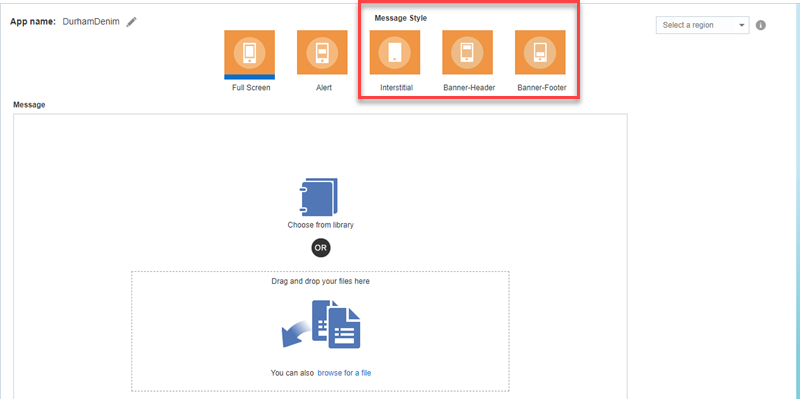
In-app Message Styles
These new styles, along with the original Full Screen and Alert message styles, give you more options for displaying in-app messages to mobile app users.
Steps to Enable
Oracle Responsys SDK version 6.52.0 (22A) or later is required to use this feature.
Key Resources
Role Information
This feature is available for the following roles:
- Push Marketing Manager
- Push Marketing Director
- Super User
- Account Administrator
Support for iOS 15 Features: Interruption Level and Relevance Score
You can now use two new priority settings for your Push campaign messages: Interruption Level and Relevance Score. These settings are supported for mobile app users using iOS 15 and later.
- Interruption Level: You can set your Push message to have an interruption level of Passive, Active (Default), Time Sensitive, or Critical. Push messages set to one of these interruption levels follows the iOS 15-defined behaviors for the interruption level you select.
- Relevance Score: You can set your Push message to have a relevance score of 0 (Low Priority), .25, .5 (Medium Priority), .75, or 1 (High Priority). This setting determines the order of Push notifications in the Notification Summary, so that device users see your app's higher priority messages before your app's lower priority messages.

Interruption Level and Relevance Score Settings for Push Messages
These settings give you more control over Push message priority for mobile app users with iOS 15 devices.
Steps to Enable
You don't need to do anything to enable this feature.
Tips And Considerations
-
Marketers can use these Push campaign settings when they are available in your Oracle Responsys environment, and client application developers can use them through the Push campaign CRUD REST API endpoints.
-
These settings will affect Push campaigns sent to your existing mobile apps running on devices with iOS 15 and later. You do not need to rebuild your mobile apps with the latest SDK to use this feature.
- These settings are only supported for devices running iOS 15 and later.
- Mobile app marketers should review Apple's Human Interface Guidelines for Notifications before using these settings.
-
Be cautious about using Critical interruption level. Apple must provide your mobile app with an entitlement before you can use this level. Using this level without the right entitlement could affect notification delivery.
Key Resources
- Push Message Settings - Interruption Level
- Push Message Settings - Relevance Score
- Push Campaigns - Advanced API Resources - Responsys Developer Help Center
Role Information
This feature is available for the following roles:
- Push Marketing Manager
- Push Marketing Director
- Super User
- Account Administrator
Interactive Dashboards Plus Generally Available
Interactive Dashboards Plus (ID+) is now generally available for all accounts. It is a feature within Insight Interactive Dashboards that helps you create and publish your own reports to other users within your company.
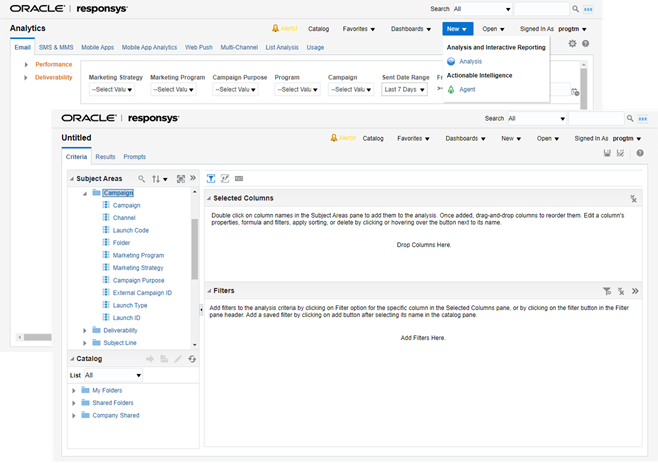
Interactive Dashboards Plus
This provides greater flexibility for you to meet your reporting needs.
Steps to Enable
You don't need to do anything to enable this feature.
Key Resources
- Custom Reports in Dashboards Overview
- Emailing an Analysis from Interactive Dashboards
- Insight Interactive Dashboards
Role Information
Users who create custom reports must have one or more of the following roles assigned:
- Email Analytics Author
- SMS Analytics Author
- Mobile Apps Analytics Author
- Web Push Analytics Author
Users who view custom reports or schedule analyses for email delivery must have one or more of the following roles assigned:
- Email Analytics Manager
- SMS Analytics Manager
- Mobile Apps Analytics Manager
- Web Push Analytics Manager
New Reporting Measures in Insight Interactive Dashboards
As of the 22B June monthly patch, Insight Interactive Dashboards provides you with new measures related to email Sent and Bounced events.
- Sent (Estimated): Sent to privacy-protected mail clients. Example: iOS 15 native mail clients.
- Sent (Adjusted): Sent to non-privacy protected mail clients.
- Bounced (Estimated): Bounces from privacy-protected mail clients. Example: iOS 15 native mail clients.
- Bounced (Adjusted): Bounces from non-privacy protected mail clients.
- Bounce Rate (Adjusted): (Bounced (Adjusted) / Sent (Adjusted)) * 100%. Bounce Rate from non-privacy protected mail clients.
- Delivered (Adjusted): Sent (Adjusted) - Bounced (Adjusted). Successfully delivered messages to non-privacy protected mail clients.
- Delivered (Estimated): Sent (Estimated) - Bounced (Estimated). Successfully delivered messages to privacy-protected mail clients.
- Delivered Rate (Adjusted): (Delivered (Adjusted) / Sent (Adjusted)) * 100%. Delivery rate of messages to non-privacy protected mail clients.
- Open Rate (Adjusted): (Opens / Delivered (Adjusted)) *100%. Adjusted open rate to indicate performance of non-privacy protected mail clients.
These measures are available for the Campaign, Link, and Deliverability Trends dashboards.
- Open Rate (Adjusted) is the only metric that is displayed by default on Campaign and Link Dashboards.
- The other eight measures are available for explicit inclusion by customers from available columns.
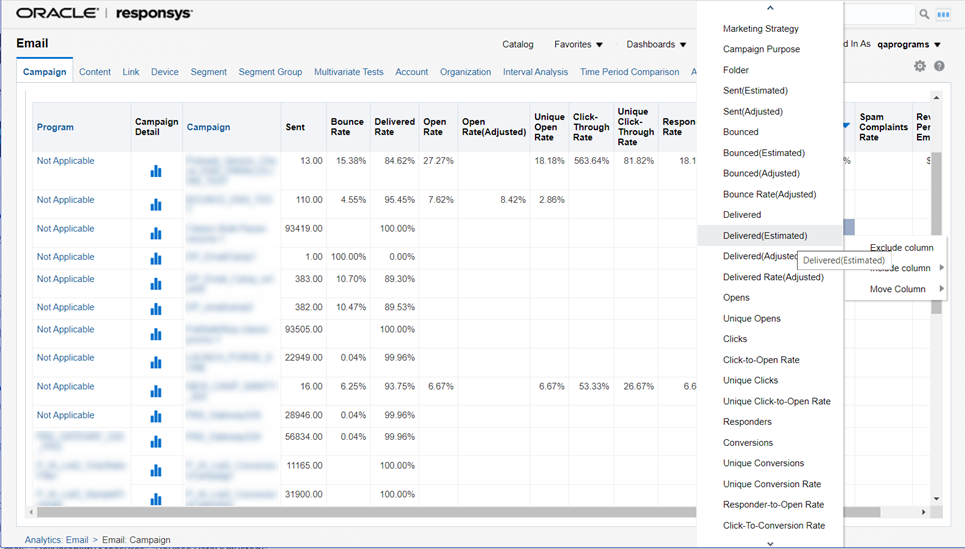
New Reporting Measures in Insight Interactive Dashboards
These newly-defined measures will give you more accurate information.
Steps to Enable
You don't need to do anything to enable this feature.
Tips And Considerations
The Opens measure and Open Rate measure continue to have the same definition. These measures do not include open signals classified as Auto Opens. As a result, these aggregates will be lower than historical values since they do not include Auto Opens.
- Opens: Contains all Open events (does not contain open signals classified as Auto Opens)
- Open Rate: (Opens / Delivered) * 100%.
Key Resources
Role Information
This feature is available for users with Email Analytics Manager and Email Analytics Author roles.
New Accounts Provisioned with 50 User Seats
New Oracle Responsys accounts will be provisioned with an allowance of 50 users.
If you are the Account Administrator for a new Oracle Responsys account, you can get more users access to the system more quickly.
Steps to Enable
You don't need to do anything to enable this feature.
Tips And Considerations
Requesting additional capacity (new and existing accounts): If you are unable to add more users due to an error in capacity, you can request more user seats for your account. Create a Service Request (SR) with Oracle Support and provide the following information, replacing the bracketed prompts with your information:
- Account / (include shortname): <account name/shortname as they appear in Oracle Responsys>
- Login URL: <web address that you use to access the Oracle Responsys login page>
- Request to increase user limit to <#users> for <accountname>.
Key Resources
Role Information
This feature is available for Account Administrators.
Update to Get Count for Filters
The Get Count button is removed from the Oracle Responsys newer Filter Designer user interfaces. You can start a filter count using the Get Actual Count button, which obtains the real filter count. In classic Filter Designer, the Get Count button starts the real filter count.
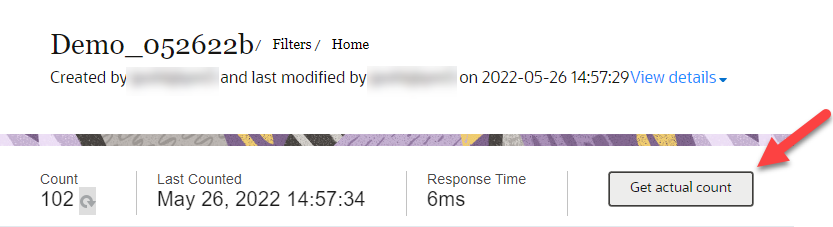
Simple filter designer with "Get actual count" button
This provides you with more accurate results when obtaining filter counts.
Steps to Enable
You don't need to do anything to enable this feature.
Tips And Considerations
- You can run only one filter count at a time for your Responsys account.
- If the actual count query does not finish during your session, you can see it on the Filters tab the next time you open the Profile Lists page.
- The calculation does not account for any exclusions you have specified for a campaign.
Key Resources
Role Information
This feature is available to Data Directors, Super Users, and Account Administrators.
Dedupe Contact List Page Enhancements
If your account is enabled for Automatic Failover for Transactional Messages (AFTM), you can now view all of the selections you made on the Dedupe Contact List page. The page now shows the following new fields:
- Field to Match for Duplicate Entries: Shows the field name used for the unique constraint key.
- Notification Email Address: Shows the email address that will receive notifications pertaining to the process.
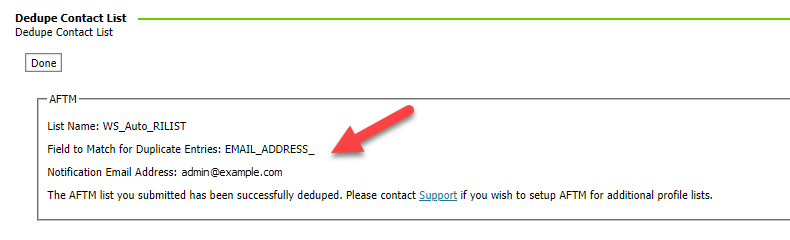
Dedupe Contact List Page with New Fields
This change enhances the self-service experience for Responsys Account Administrators.
Steps to Enable
- This feature is part of the Automatic Failover for Transactional Messages (AFTM) add-on that you can order for your account. Please contact your account representative or Oracle sales.
- If your account is already enabled for AFTM, this feature is ready to use after the 22B update is available in your environment.
Key Resources
New Look and Feel for Campaign Designers and Message Designers
The Oracle Responsys user interface has an exciting new look and feel. You'll notice a design refresh applied to different areas of the platform, that will continue in subsequent releases.
The following product areas have been updated in 22B:
- Campaign Designer interfaces for all channels
- Message Designer interfaces for all channels
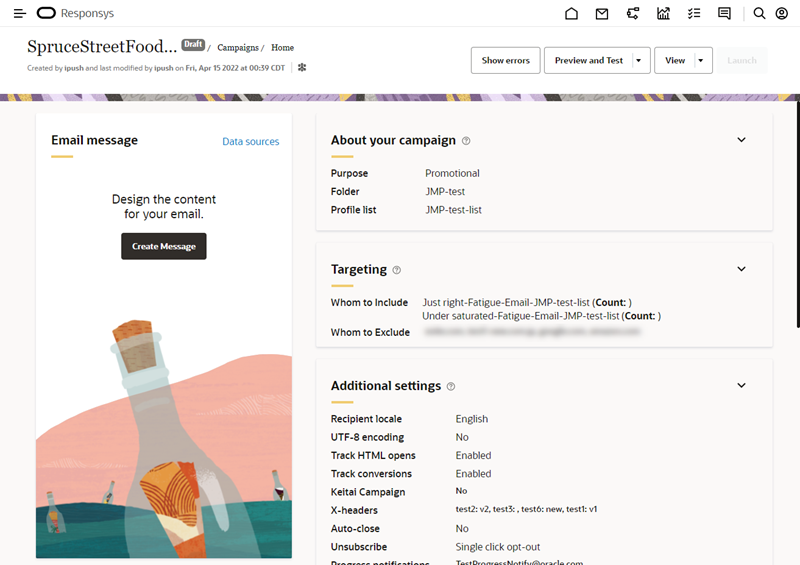
New Look and Feel for Campaign Designers
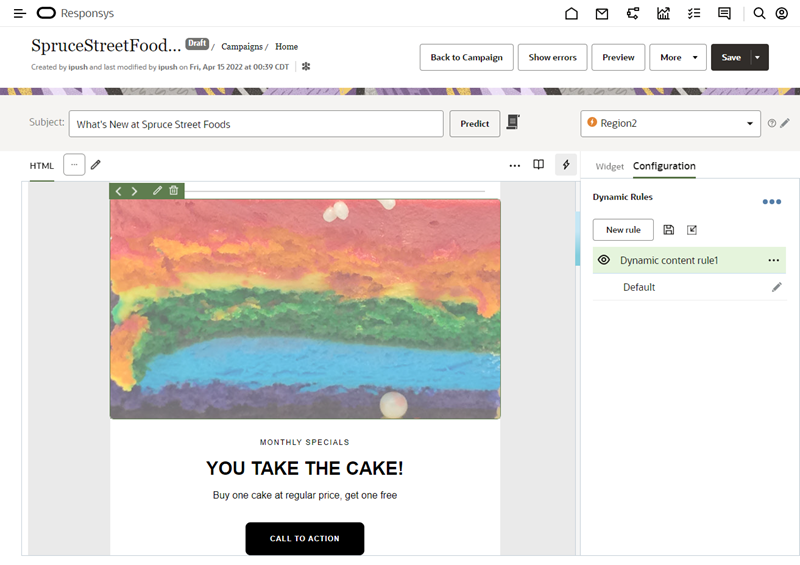
New Look and Feel for Message Designers
This design refresh provides a more modern look and feel and is a consistent design with other Oracle Marketing products.
Steps to Enable
You don't need to do anything to enable this feature.
Key Resources
Role Information
These changes are available to all users who create and manage campaigns in Oracle Responsys.