
- Revision History
- Overview
- Feature Summary
- Sales Planning Cloud
-
- Features
-
- New Videos
- New Topics in EPM Cloud Operations Guide
- EPM Automate Updates
- Server-Side Execution of EPM Automate Commands
- Update to REST API Syntax for User Access Report and User Audit Report
- Update to Add Users REST API
- Update to Send Email REST API
- Updates to the Clone Environment Feature
- Activity Report Enhancements
- Redwood Look and Feel Enhancements
- Ability to Change Dynamic User Variables in Dashboard 2.0 POV Bars
- Smart View Ad Hoc Behavior Application Setting Now Defaults to Standard
- Integration with the Oracle Autonomous Database
- Reports System Level Option to Set Default Chart Colors
- Upgraded PDF Viewer for Reports and Books
-
- IMPORTANT Actions and Considerations
This document will continue to evolve as existing sections change and new information is added. All updates appear in the following table:
| Date | Product | Feature | Notes |
|---|---|---|---|
| 30 JUL 2021 | Created initial document. |
This document outlines the upcoming Sales Planning Cloud update.
Column Definitions:
Report = New or modified, Oracle-delivered, ready to run reports.
UI or Process-Based: Small Scale = These UI or process-based features are typically comprised of minor field, validation, or program changes. Therefore, the potential impact to users is minimal.
UI or Process-Based: Larger Scale* = These UI or process-based features have more complex designs. Therefore, the potential impact to users is higher.
Features Delivered Disabled = Action is needed BEFORE these features can be used by END USERS. These features are delivered disabled and you choose if and when to enable them. For example, a) new or expanded BI subject areas need to first be incorporated into reports, b) Integration is required to utilize new web services, or c) features must be assigned to user roles before they can be accessed.
| Ready for Use by End Users Reports plus Small Scale UI or Process-Based new features will have minimal user impact after an update. Therefore, customer acceptance testing should focus on the Larger Scale UI or Process-Based* new features. |
Customer Must Take Action before Use by End Users Not disruptive as action is required to make these features ready to use. As you selectively choose to leverage, you set your test and roll out timing. |
|||||
|---|---|---|---|---|---|---|
| Feature |
Report |
UI or |
UI or |
|
||
Update to REST API Syntax for User Access Report and User Audit Report |
||||||
Ability to Change Dynamic User Variables in Dashboard 2.0 POV Bars |
||||||
Smart View Ad Hoc Behavior Application Setting Now Defaults to Standard |
||||||
Test Environments: Oracle will apply this monthly update during the first daily maintenance that occurs at or after 22:00 UTC on Friday, August 6, 2021.
Production Environments: Oracle will apply this monthly update during the first daily maintenance that occurs at or after 22:00 UTC on Friday, August 20, 2021.
NOTE: Backing up the daily maintenance snapshot and restoring the environment as needed are self-service operations. Oracle strongly recommends that you download the maintenance snapshot every day to a local server.
The Oracle Help Center provides access to updated documentation. The updates will be available in the Help Center on Friday, August 6, 2021.
NOTE: Some of the links to new feature documentation included in this readiness document will not work until after the Oracle Help Center update is complete.
Fixed Issues and Considerations
Software issues addressed each month and considerations will be posted to My Oracle Support.
NOTE: Starting with this update, fixed issues for EPM Cloud Common components (Smart View for Office, EPM Automate, REST API, Migration, Access Control, Data Management/Data Integration, Reports, Financial Reporting, and Calculation Manager) are available in a separate document on the My Oracle Support “Release Highlights” page.
This provides visibility into EPM Cloud release contents.
Please Join Oracle Cloud Customer Connect
Please take a moment to join the Cloud Customer Connect forums for EPM Cloud services. Oracle Cloud Customer Connect is a community gathering place for members to interact and collaborate on common goals and objectives. This is where you will find the latest release information, upcoming events, or answers to use-case questions. Joining takes just a few minutes. Join now!
https://cloud.oracle.com/community
NOTE: The Settings and Actions menu now contains a link to Cloud Customer Connect. To access this link, from the Home page, click the down arrow next to the user name (in the upper right-hand corner of the screen), and select Cloud Customer Connect.
Give Us Documentation Feedback
We welcome your comments and suggestions to improve the content of the What's New document and the product documentation.
Please send us your feedback at EPMdoc_ww@oracle.com. In the body or title of the email, state that you are inquiring or providing feedback, and indicate for which EPM Cloud service and the monthly update cycle.
Follow EPM Cloud on YouTube, Twitter, Facebook, and LinkedIn.
These are great resources for the latest updates and information about EPM Cloud.
A new video tutorial is available.
Designing Forms in EPM Planning
Learn best practices in designing forms. After setting up dimensions, you can start building forms to support data entry, summary reporting, and review.
Business Benefit: Videos provide 3-5 minute overviews and step-by step instructions to perform tasks and achieve an outcome.
New Topics in EPM Cloud Operations Guide
The EPM Cloud Operations Guide has been enhanced with additional sections.
Newly added sections include:
- Resolving Clone Environment Issues
- Fixing Strategic Modeling Issues
- Using Control to-Date Storage with very large applications
- Managing Patching Issues
- Requesting an Increase in Planning Governor Limits
- Requesting Infrastructure Maintenance Delay
- Requesting Additional Environments for Oracle Enterprise Cloud Service Subscriptions
Business Benefit: These new topics help customers fix issues, optimize performance, and make requests to Oracle more efficiently.
Key Resources
A new version of EPM Automate is now available. This version introduces the cloneEnvironment, invalidLoginReport, and roleAssignmentAuditReport commands. Additionally, the addUsers and sendMail commands have been modified.
cloneEnvironment Command
Clones the current environment and, optionally, identity domain artifacts (users and roles). This command is an alternative to using the Clone Environment feature in Migration.
invalidLoginReport Command
In OCI (Gen 2) environments, creates the Invalid Login Report, which lists the failed attempts to sign into the environment over a specified period of time (maximum last 90 days).
roleAssignmentAuditReport Command
In OCI (Gen 2) environments, creates an audit report that lists the changes made to predefined and application role assignments over a period of time (maximum last 90 days). This report lists the user name for which a role change was made, the role that was assigned or unassigned, the user who performed the role change, and the timestamp when the action was completed.
addUsers Command
The addUsers command has been modified to not send out emails to the newly added users if the value of the resetPassword parameter is set to false.
sendMail Command
The sendMail command has been modified to allow you to attach any file up to 10 MB in size, other than snapshots, available in Sales Planning Cloud environments.
Business Benefit: The new and updated commands facilitate the remote administration of Sales Planning Cloud environments.
Key Resources
- Working with EPM Automate for Oracle Enterprise Performance Management Cloud:
Server-Side Execution of EPM Automate Commands
Some EPM Automate commands can be run directly in Sales Planning Cloud using Groovy. You do not need to install EPM Automate client to run commands using Groovy scripts. Note that server-side execution of commands is not the same as running Groovy scripts on a client computer to execute EPM Automate commands.
These commands can be run through server-side Groovy scripts:
- copyFileFromInstance
- copyFromObjectStorage
- copySnapshotFromInstance
- copyToObjectStorage
- encrypt
- feedback
- importSnapshot
- login
- logout
- recreate
- sendMail
Business Benefit: Server-side execution of EPM Automate commands using Groovy scripts enables you to run commands without installing EPM Automate on client computers.
Steps to Enable
You don't need to do anything to enable this feature.
Key Resources
- Running Commands without Installing EPM Automate in Working with EPM Automate for Oracle Enterprise Performance Management Cloud
- Designing with Calculation Manager for Oracle Enterprise Performance Management Cloud:
Update to REST API Syntax for User Access Report and User Audit Report
The syntax has been updated for the REST APIs for User Access Report and User Audit Report to conform to the JSON standard. This change occurred beginning in June 2021.
For the updated syntax to use, see User Access Report and User Audit Report in REST API for Oracle Enterprise Performance Management Cloud.
Business Benefit: This allows you to conform to the JSON standard.
Key Resources
- User Access Report and User Audit Report in REST API for Oracle Enterprise Performance Management Cloud
The Add Users REST API has been modified to not send out emails to the newly added users if the value of the resetpassword parameter is set to false.
Business Benefit: This gives you the option to avoid sending email messages when adding users.
Key Resources
- Add Users to an Identity Domain in REST API for Oracle Enterprise Performance Management Cloud
Role Information
- Service Administrators
The Send Email REST API has been modified to allow you to attach any file up to 10 MB in size, other than snapshots, that is available in Sales Planning Cloud environments.
Business Benefit: This update gives you more flexibility when sending email.
Key Resources
- Send Email in REST API for Oracle Enterprise Performance Management Cloud
Role Information
- Service Administrators
Updates to the Clone Environment Feature
The Clone Environment feature has been updated so that it does not downgrade the Essbase version in the target environment during the cloning process. For example, if the source environment has non-Hybrid Essbase and the target has Hybrid-enabled Essbase, the clone feature will not downgrade the Essbase in the target environment to non-Hybrid Essbase. Instead, the cloning process will fail.
Business Benefit: This update addresses customer concerns with downgrading the Essbase version during the clone process.
Key Resources
- Cloning EPM Cloud Environments in Administering Migration for Oracle Enterprise Performance Management Cloud
The Activity Report has been enhanced by adding the outline order to the Dimensions table and a new table that shows details of BSO Restructure types.
These updates are available in the Activity Report:
-
Outline order to the Dimensions information.
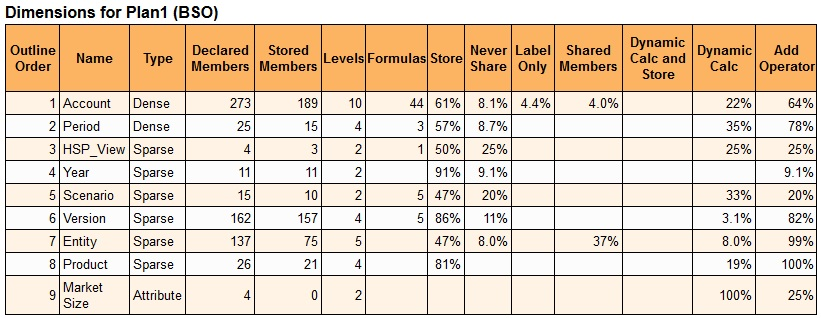
Sample Outline Order Information in the Activity Report
- Details of BSO Restructure.
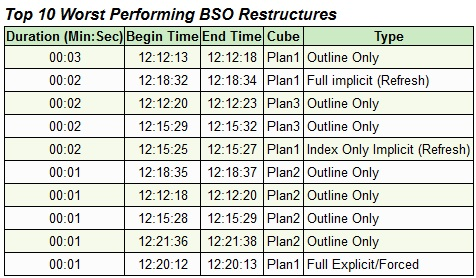
Updated BSO Restructure Information in the Activity Report
Business Benefit: These changes help you identify the order in which dimensions are calculated and the types of restructures that were performed on cubes.
Key Resources
- About the Activity Report in Getting Started with Oracle Enterprise Performance Management Cloud for Administrators
Redwood Look and Feel Enhancements
The Redwood Experience is the default theme for new instances, and Sales Planning Cloud has enhanced the look and feel of the user experience with Redwood-style icons, fonts, and colors.
This update includes the following Redwood-style look and feel enhancements:
- Icons and fonts for all pages and themes
- Page title font for all pages and themes
- Navigator Menu icons and colors (Redwood Experience only)
- Horizontal tab icons and colors (Redwood Experience only)
- Data visualization colors (Redwood Experience only)
NOTE: For data visualizations in Dashboard 2.0, the custom color palette now supports only 12 colors instead of 15. If you created a dashboard in 21.07 or earlier and you used 15 colors in your visualization, you will continue to see 15 colors at runtime. However when you try to change the custom colors, the dashboard designer will only display 12 colors from which you can select and save.
To enable Redwood, click Tools, then Appearance, and then select Enable Redwood Experience.
Business Benefit: The Redwood Experience provides an enhanced look and feel and brings consistency across Oracle Cloud.
Key Resources
- Customizing Your Display in Administering Planning
Ability to Change Dynamic User Variables in Dashboard 2.0 POV Bars
In Dashboard 2.0, you now have the ability to change dynamic user variables directly from the POV bar.
User variables are supported in both global and local POVs in dashboards, and you can now change dynamic user variables directly from the POV bar.
Business Benefit: Improved usability for Dashboard 2.0 POVs.
Key Resources
- About Global and Local POVs in 2.0 Dashboards in Administering Planning
Smart View Ad Hoc Behavior Application Setting Now Defaults to Standard
All new applications and all recreated applications now only use the Standard setting for the Smart View Ad Hoc Behavior option.
The Standard setting offers you these enhanced ad hoc features:
-
In-grid POV—POV members are placed on the grid instead of in the POV toolbar.
-
Submit Data—Using the default Submit Data button in the Smart View ribbon, all cells in a grid are submitted, including Smart List values, Text values, and all data cells that have been explicitly modified (made dirty). Once the submit operation is complete, the entire grid will be refreshed.
-
Free-form support—Supports empty columns and rows anywhere in a grid and changing the alias table. Additionally, supports member auto-refresh where deleted members are returned to the grid upon refresh.
-
Saving ad hoc grids—The Save Ad Hoc Grid command is enabled and you can save ad hoc grids; however, the Submit Formatting option is not yet available.
-
Multiple-grid ad hoc—Supports multiple ad hoc grids on the same Excel worksheet. With multiple-grid ad hoc, you can submit data from any grid on the sheet. Grids based on aggregate storage cubes and block storage cubes are supported on the same sheet. Each grid is independent; for example, if required, you can change the alias table for only one grid on the sheet.
-
Additional Zoom In options—These additional commands are available from the drop-down menu on the Zoom In button in the provider ad hoc ribbon: Sibling Level, Same Level, Same Generation (requires Smart View 21.100).
-
Multiple-cell select for ad hoc operations—Select multiple row or column member cells and then perform any of the following actions: Zoom In, including any of the zoom options, such as Bottom Level or Same Generation; Zoom Out; and Keep Only and Remove Only (requires Smart View 21.100).
When the Smart View Ad Hoc Behavior option is set to Standard, the following features and functionality are not supported:
- Create Smart Forms
- Open a native mode grid in standard mode; open a standard mode grid in native mode.
- Zoom In on Formulas
- HSACTIVE is supported on multiple-grid sheets only when using a private connection; HSACTIVE on a multiple-grid sheet using a shared connection is not supported
- Preserve Formula is disabled in multiple-grid sheets
Existing and migrated applications will not experience any change in behavior, and Native will remain as the default Smart View Ad Hoc Behavior option, with Standard being an option.
Note that the Native mode Smart View Ad Hoc Behavior setting will eventually be phased out (timeline is yet to be determined). If you are using the Native mode option, we recommend that you plan on switching your Smart View Ad Hoc Behavior application setting to Standard mode soon.
Business Benefit: With the Smart View Ad Hoc Behavior application setting defaulting to Standard, Smart View users have access to several useful ad hoc features, including in-grid POV; multiple-grid ad hoc, enhanced data submit, ability to save ad hoc grids, enhanced free-form support, additional zoom-in options, and multiple-cell select for Zoom In, Zoom Out, Keep Only, and Remove Only.
Steps to Enable
For all new applications and all recreated application, there are no steps required to set the Smart View Ad Hoc Behavior option to Standard.
If you are working with an existing or migrated application, to set the Smart View Ad Hoc Behavior option to Standard:
- In your web application, click Application, and then click Settings.
- In System Settings, set the Smart View Ad Hoc Behavior option to Standard.
- Click Save.
Key Resources
- Smart View Behavior Options in EPM Cloud in Working with Oracle Smart View for Office
- See the applications settings documentation for your business process; for example, see What Application and System Settings Can I Specify? in Administering Planning
Integration with the Oracle Autonomous Database
Starting in this update, you can use the EPM Integration Agent to integrate data from the Oracle Autonomous Database.
You can use EPM Integration Agent to:
- source data from staging or other source applications running on the Oracle Autonomous Database
-
export data from Sales Planning Cloud to selected reporting data warehouses in the Oracle Autonomous Database, such as the Oracle Autonomous Data Warehouse and Oracle Autonomous Transaction Processing
The Oracle Autonomous Database is a comprehensive cloud experience with fully automated data warehousing and transaction processing workloads optimized on high-end Oracle hardware systems. The Oracle Autonomous Database provides an easy-to-use, fully autonomous database that scales elastically and delivers fast query performance.
As a service, the Oracle Autonomous Database does not require database administration. You do not need to configure or manage any hardware or install any software. The Oracle Autonomous Database handles provisioning the database, backing up the database, patching and upgrading the database, and growing or shrinking the database.
When loading or writing back data from and to the Oracle Autonomous Database, the EPM Integration Agent is used to establish the connectivity between the Oracle Autonomous Database and Sales Planning Cloud. Customers can either install the agent on a local computer (similar to the way customers currently use the agent to extract data from on-premises data sources) or install the agent in a Oracle Cloud Infrastructure (OCI) compute node and then configure the database connectivity. The compute node provides the processing power and memory capacity for the virtual servers they host. This approach provides customers with scalability and flexibility for their solutions.
Business Benefit: Sales Planning Cloud customers now have a set of easy-to-use, no-code tools to load and write-back to data stores on the Oracle Autonomous Database.
Key Resources
- Integrating Oracle Autonomous Database Data in the EPM Cloud in Administering Data Integration for Oracle Enterprise Performance Management Cloud
- FAQs For Autonomous Database
Reports System Level Option to Set Default Chart Colors
With the introduction of the Redwood Experience as the default theme in Sales Planning Cloud, the Redwood theme colors will be the default chart colors in existing reports, unless the colors were modified in the charts during report design via the Series chart property.
In the report designer, while editing a report, you can Set Default Chart Colors in the Actions menu to set the default chart color for the first 12 chart data sets, which are used in all charts.
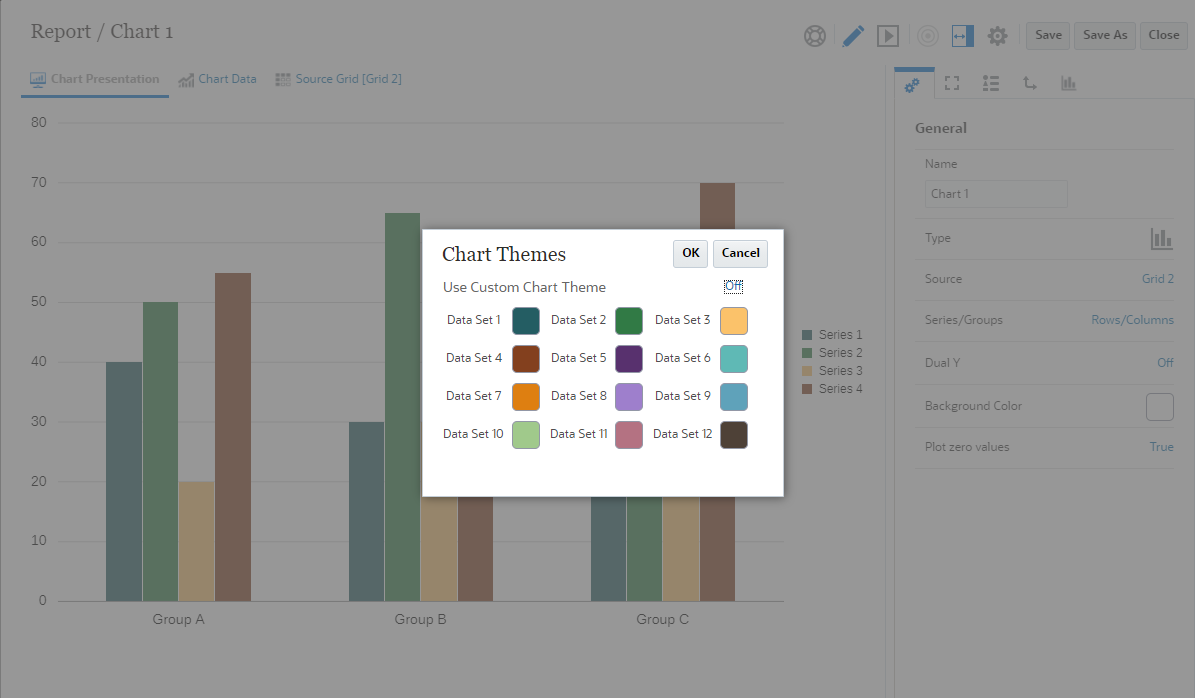
NOTE: Using the Action menu, you can Set Default Chart Colors.
You can also adjust the chart colors for individual charts within a report via the chart’s Series Property, which will override the default values defined in the Action menu.
Business Benefit: This option provides the ability to customize the chart theme outside of the Redwood Experience chart colors and provide default chart colors when creating new charts.
Key Resources
- About Chart Designer in Designing with Reports for Oracle Enterprise Performance Management Cloud
- Report Designer Toolbar in Designing with Reports for Oracle Enterprise Performance Management Cloud
- Chart Properties in Designing with Reports for Oracle Enterprise Performance Management Cloud
Upgraded PDF Viewer for Reports and Books
An upgraded PDF Viewer, which includes many advanced viewer features, is available for reports and books.
The Viewer provides the following functionality:
- Toggle thumbnail sidebar
- Find text within the document
- Go to the previous/next page
- Go to an entered page number
- Zoom in/out buttons
- Select a zoom level (For example %s, Automatic, Page Width, and so on.)
- Switch to Presentation Mode
- Print the document
- Download the document
- Other Navigation and Viewing Tools
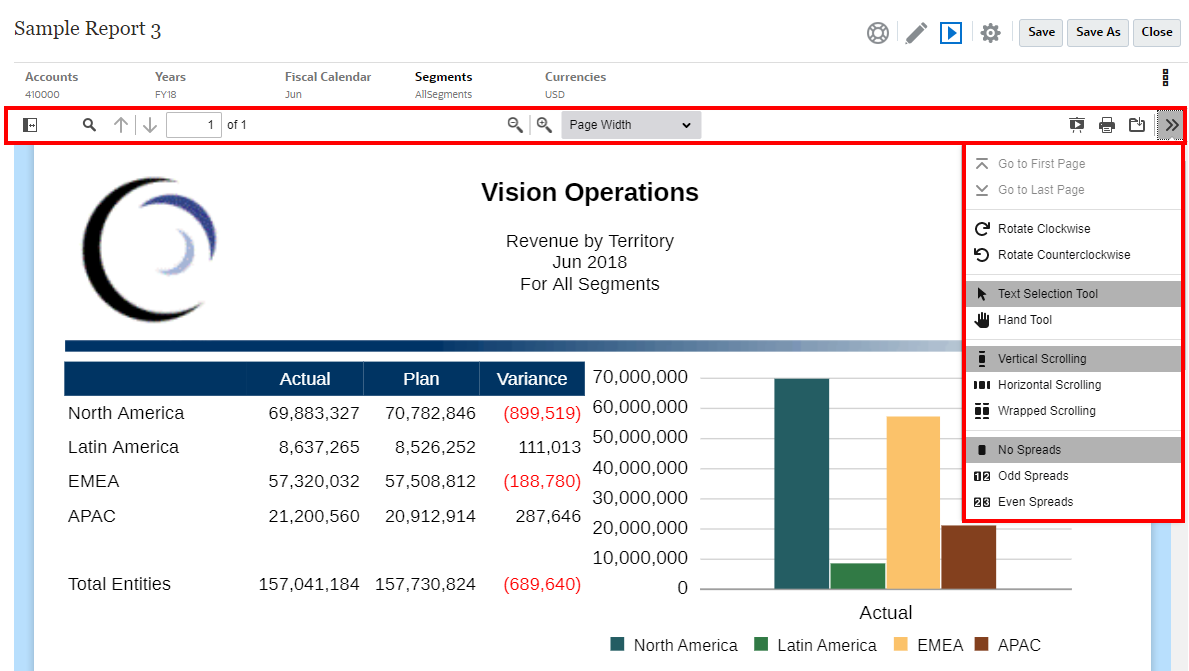
PDF Preview Options
Business Benefit: The upgraded PDF Viewer provides consistent and expanded display features across reports and books.
Key Resources
- Report Designer Toolbar in Designing with Reports for Oracle Enterprise Performance Management Cloud
- About the Book Designer Toolbar in Designing with Reports for Oracle Enterprise Performance Management Cloud
- Viewing Reports in Working with Reports for Oracle Enterprise Performance Management Cloud
IMPORTANT Actions and Considerations
One-Week Lag Between Readiness Documents Live and Help Center Live
Because Oracle readiness documents (What's New and New Feature Summary) are live one week before the monthly update is applied to Test environments, some links to documentation included in the readiness documents will not work until after the Oracle Help Center update is complete when the monthly update is applied to Test environments.
Secured URLs Only in Logo and Background Images
Starting with the November 2021 update (21.11), only secured URLs will be supported within the Logo Image and Background Image settings in the Appearance page in Sales Planning Cloud.
Use the Export URLs Feature to Replace Direct URLs
In the 21.03 update, Oracle released a feature called Export URLs that exports Sales Planning Cloud URLs to a CSV file which then provides the unique URLs for each card, tab, or sub-tab within a connected Sales Planning Cloud business process. The Export URLs feature should be used in place of any direct URL pointers that customers might be using to link to Sales Planning forms, dashboards, or infolets. The direct URL feature to forms, dashboards, or infolets will no longer be supported starting with the 21.11 update. See Using Direct URLs to Integrate Connected Environments in Administering Planning.
Restrictions to Copy Version Functionality
Based on feedback from several customers due to its inherent data corruption risks, we plan to restrict the ‘Copy Version’ functionality to be exposed only to administrators. Starting in October 2021, ‘Copy Version’ functionality will not be available to Power Users and Users.
Support for Composite Forms in Sales Planning Cloud
As of the May update (21.05), Oracle Sales Planning Cloud no longer officially supports composite forms. As has been announced for several months, customers are required to use Sales Planning Cloud dashboards instead. Customers can continue to use their composite forms without support.
Loaner Program for Cloud Infrastructure Generation 2 Testing
Oracle Sales Planning Cloud is now live on Oracle Cloud Infrastructure (OCI) Gen 2 environments. If you are interested in testing your application performance on an OCI Gen 2 environment, open a service request following the process at https://docs.oracle.com/en/cloud/saas/enterprise-performance-management-common/tsepm/op_procs_loaner_envs.html and request for a loaner environment in an OCI Gen 2 data center for a duration of 30 days with the business justification as “Want to test application performance in an OCI Gen 2 data center”.
After you have performed the testing, submit Provide Feedback from the loaner environment. Create a service request using the normal support process, if you have any issues or feedback for the OCI Gen 2 environment.
For more information, see What is a Gen 2 Cloud?