
- Revision History
- Overview
- Feature Summary
- Sales Planning Cloud
-
- Features
-
- New Videos
- New Tutorials
- EPM Automate Updates
- REST APIs to Copy Files To and From the Oracle Object Storage Cloud
- REST API to Rename Application Snapshot
- Instance Name Removed from Predefined Role Names in Access Control
- Activity Report Enhancements
- Import Users' Group Assignments from File
- Business Rules in Data Integration Are Now Available
- Terminal Release of EPM Mobile
- New Data Import Options for Essbase Source Types - Delimiter and Abort on Error
-
- IMPORTANT Actions and Considerations
This document will continue to evolve as existing sections change and new information is added. All updates appear in the following table:
| Date | Product | Feature | Notes |
|---|---|---|---|
| 25 SEP 2020 | Created initial document. |
This document outlines the upcoming Sales Planning Cloud update.
Column Definitions:
Features Delivered Enabled
Report = New or modified, Oracle-delivered, ready to run reports.
UI or Process-Based: Small Scale = These UI or process-based features are typically comprised of minor field, validation, or program changes. Therefore, the potential impact to users is minimal.
UI or Process-Based: Larger Scale* = These UI or process-based features have more complex designs. Therefore, the potential impact to users is higher.
Features Delivered Disabled = Action is needed BEFORE these features can be used by END USERS. These features are delivered disabled and you choose if and when to enable them. For example, a) new or expanded BI subject areas need to first be incorporated into reports, b) Integration is required to utilize new web services, or c) features must be assigned to user roles before they can be accessed.
| Ready for Use by End Users Reports plus Small Scale UI or Process-Based new features will have minimal user impact after an update. Therefore, customer acceptance testing should focus on the Larger Scale UI or Process-Based* new features. |
Action is Needed BEFORE Use by End Users Not disruptive as action is required to make these features ready to use. As you selectively choose to leverage, you set your test and roll out timing. |
|||||
|---|---|---|---|---|---|---|
| Feature |
Report |
UI or |
UI or |
|
||
REST APIs to Copy Files To and From the Oracle Object Storage Cloud |
||||||
Instance Name Removed from Predefined Role Names in Access Control |
||||||
New Data Import Options for Essbase Source Types - Delimiter and Abort on Error |
||||||
Test Environments: Oracle will apply this monthly update during the first daily maintenance that occurs at or after 22:00 UTC on Friday, October 2, 2020.
Production Environments: Oracle will apply this monthly update during the first daily maintenance that occurs at or after 22:00 UTC on Friday, October 16, 2020.
NOTE: Backing up the daily maintenance snapshot and restoring the environment as needed are self-service operations. Oracle strongly recommends that you download the maintenance snapshot every day to a local server.
The Oracle Help Center provides access to updated documentation. The updates will be available in the Help Center on Friday, October 2, 2020.
NOTE: Some of the links to new feature documentation included in this readiness document will not work until after the Oracle Help Center update is complete.
Please Join Oracle Cloud Customer Connect
Please take a moment to join the Cloud Customer Connect forums for EPM Cloud services. Oracle Cloud Customer Connect is a community gathering place for members to interact and collaborate on common goals and objectives. This is where you will find the latest release information, upcoming events, or answers to use-case questions. Joining takes just a few minutes. Join now!
https://cloud.oracle.com/community
NOTE: The Settings and Actions menu now contains a link to Cloud Customer Connect. To access this link, from the Home page, click the down arrow next to the user name (in the upper right-hand corner of the screen), and select Cloud Customer Connect.
Give Us Documentation Feedback
We welcome your comments and suggestions to improve the content of the What's New document and the product documentation.
Please send us your feedback at EPMdoc_ww@oracle.com. In the body or title of the email, state that you are inquiring or providing feedback, and indicate for which EPM Cloud service and the monthly update cycle.
Follow EPM Cloud on YouTube, Twitter, Facebook, and LinkedIn.
These are great resources for the latest updates and information about EPM Cloud.
Defects Fixed and Considerations
Software issues addressed each month and considerations will be posted to My Oracle Support.
This provides visibility into EPM Cloud release contents.
Several videos are now available for Dashboards 2.0.
Creating Dashboards in Dashboards 2.0
See how to create a dashboard with multiple components in the Dashboard Designer for Dashboards 2.0. You create a bar chart, a combination chart, a pyramid chart, a ring gauge with traffic-lighting, and a radar chart with bars. You also move and resize components and set general dashboard properties.
Creating Waterfall Charts in Dashboards 2.0
Learn how to create waterfall charts to track the changes in a single account over time and to track how multiple accounts interact to produce a final total.
Creating Quick Analyses in Dashboards 2.0
Discover how to add quick analysis components to dashboards without having a prebuilt form. You learn how to create an ad hoc query in the Dashboard Designer and format the results by changing the dimension layout and applying visualizations.
Business Benefit: These videos provide step-by-step instructions to help you perform your related business activities.
Designing Navigation Flows in Sales Planning
See how to customize navigation flows in Oracle Sales Planning Cloud. Learn how to modify the clusters and cards in the interface and control how various roles or groups interact with the business process.
Predicting, Forecasting, and Analyzing with Sales Planning
Learn how to make forecast predictions, and analyze forecast data using Advanced Sales Forecasting. You also review the pipeline coverage, and the forecast summary to see the target, predicted revenue, forecast commitment, and forecast adjustments and you adjust forecast commitments.
Setting and Analyzing Quotas in Sales Planning with Smart View
Learn how to set overall quota targets, and set targets by product in Smart View for Sales Planning. After allocating target quota, you review and adjust quota by product in Smart View, and then you review quota in PowerPoint.
Setting and Analyzing Data-Driven Quotas in Sales Planning
See how to set quota targets, make forecast predictions, perform what-if analysis, and adjust quota by product using Quota Planning. You also allocate quota by region, apply seasonal adjustments, and set overlay targets.
Designing Forms in Sales Planning
See how to create forms that allow planners to collect data, perform reviews, analysis, and reporting. Learn more about form components, access permissions, and best practice design considerations.
Learn how to design a new report in Reporting Web Studio to report on Sales Planning data. You add components such as grids, charts, and headers into a report and you set up those components to define how they are displayed.
Adding Measures in Sales Planning
See how you can enhance the planning process in your organization by adding measures. Learn how you can add custom measures in the dimension hierarchy and include them in dashboards.
Tutorials provide instructions with sequenced videos and documentation to help you learn a topic.
A new version of EPM Automate is available. This version introduces these new commands: copyFromObjectStorage and copyToObjectStorage.
- copyFromObjectStorage: This command copies a file or a backup snapshot from Oracle Object Storage Cloud to the current Cloud environment.
- copyToObjectStorage: This command copies a file or a backup snapshot directly from the current environment to Oracle Object Storage Cloud.
Business Benefit: These commands facilitate the remote administration of EPM Cloud environments.
Key Resources
- Working with EPM Automate for Oracle Enterprise Performance Management Cloud
REST APIs to Copy Files To and From the Oracle Object Storage Cloud
You can use the Copy to Object Store REST API to copy a file or a backup snapshot from the outbox of the current cloud environment (the source) to the Oracle Object Storage Cloud (the target). In addition, you can use the Copy from Object Store REST API to copy a file from the Oracle Object Storage Cloud (the source) to the cloud environment (the target).
Business Benefit: The ability to perform these tasks with REST APIs allows you to schedule and automate these tasks.
Key Resources
- Migration REST APIs in REST API for Oracle Enterprise Performance Management Cloud
Role Information
- Service Administrators
REST API to Rename Application Snapshot
Use the Rename Snapshot REST API to rename snapshots in Sales Planning Cloud instances to a desired name.
Business Benefit: This feature gives you flexibility in naming your snapshots.
Key Resources
- Use the Application Snapshot Service in REST API for Oracle Enterprise Performance Management Cloud
- About Snapshots in Administering Migration in Oracle Enterprise Performance Management Cloud
Role Information
- Service Administrators
Instance Name Removed from Predefined Role Names in Access Control
The Access Control screens of Sales Planning Cloud environments no longer display the instance name prefix with predefined role names. Instead, predefined role names are displayed as Service Administrator, Power User, User, and Viewer. This change is applicable to all screens and reports that list predefined role names.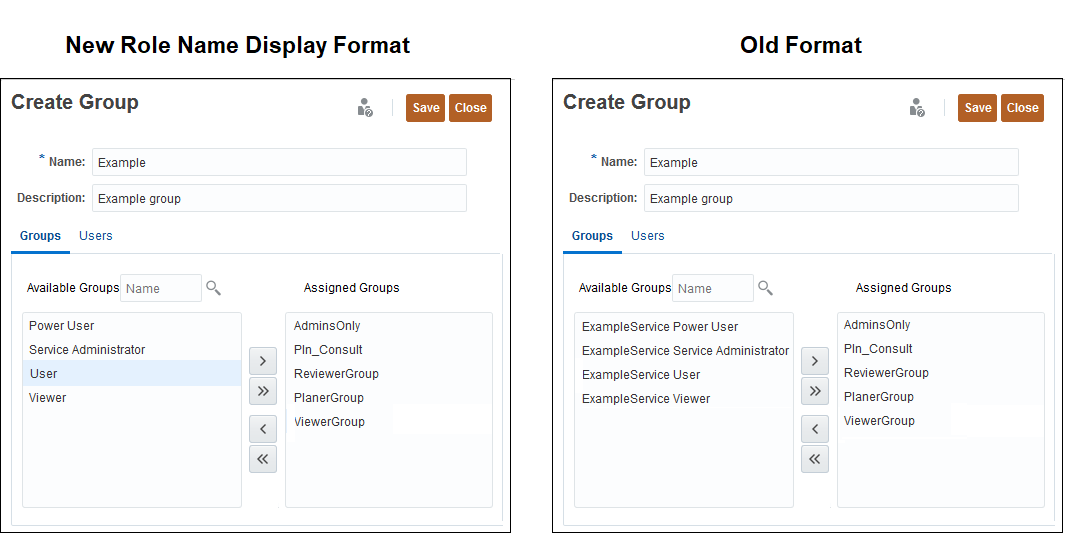
Changed Predefined Role Name Display in Sales Planning Cloud
NOTE: This change does not affect how the role names are displayed in the MyServices customer portal.
This change does not impact customers who currently use predefined roles for assigning application-level roles and access to artifacts. All such assignments are automatically updated for you. However, if you manually migrate older snapshots to 20.10 environments, the process will generate errors for the artifacts that have references to predefined roles that use the role names prefixed with the instance name.
Business Benefit: Removal of instance name prefixes from predefined role name display facilitates the migration of snapshots across Sales Planning Cloud environments.
The Activity Report has been enhanced by adding a number of tables that provide additional information on business rules, calculation scripts, Essbase data load, data extraction, restructure, and performance of Essbase queries. Additionally, the tables now use a standard set of column labels to group information.
The following tables have been added:
- Top 10 Business Rules by Execution
- Top 10 Calc Script Commands By Number of Blocks Created
- Top 5 Worst Performing Calc Scripts Commands over 1 Min
- Top 10 Worst Performing Essbase Data Extraction Operations
- Top 10 Worst Performing Essbase Data Load Operations
- Top 10 Worst Performing Essbase Restructure Operations
- Top 10 Essbase Queries by Total Duration
- Top 10 Essbase Queries by Execution
The following existing tables were updated or renamed:
- Top 10 Worst Performing Essbase Queries over 15 seconds (updated with additional information)
- Top 10 Calc Scripts by Average Duration (previous title: Top 10 Calc Scripts by Duration)
- Top 10 Worst Performing Calc Scripts Executions (previous title: Top 10 Calc Scripts by Executions)
Business Benefit: These updates provide you a deeper insight into the performance of Sales Planning Cloud components to help you troubleshoot issues.
Key Resources
- Using Activity Reports and Access Logs to Monitor Usage in Getting Started with Oracle Enterprise Performance Management Cloud for Administrators
Import Users' Group Assignments from File
Service Administrators can now import group assignments of users from a Comma Separated Value (CSV) file to create new assignments in existing Access Control groups. After the import is complete, Sales Planning Cloud enforces appropriate application-level and artifact-level security assignments based on the new group assignments.
Business Benefit: Importing users' group assignments facilitates the administration of access security, especially while migrating applications across environments.
Key Resources
- Importing Group Assignments of Users from a File in Administering Access Control for Oracle Enterprise Performance Management Cloud
Business Rules in Data Integration Are Now Available
Business rules are now available in Data Integration that enable you to launch and manage sophisticated rules when loading data to Sales Planning applications. This feature empowers you to invoke rule logic without programmer assistance and without interrupting business processes. You can run an individual business rule or deploy a set of two or more related rules (or rule sets) that you can launch simultaneously or sequentially. For example, run a business rule to clear data before a data load, perform calculations, aggregate data, or copy data to one slice of a cube.
The business rules available in Data Integration are defined in Sales Planning. If you want a business rule to be executed for specific integration, then register the business rule on the Integration Options page. If you want the business rule to be executed for all integration loading data to the application, then register the business rule on the Application page. If a given Event has a business rule registered at both the integration and application levels, only the business rule registered on the Integration Options page is executed.
Use the Independent tab to register rules that can be run in response to system events in the Data Integration workflow. The registration includes the system event, rule or rule set name, scope of applicability (either at application or specific integration level), any runtime parameters and run sequences.
Events are shipped out of the box and include:
- Before Import
- After Import
- Before Load
- After Load
- Before Check
- After Check
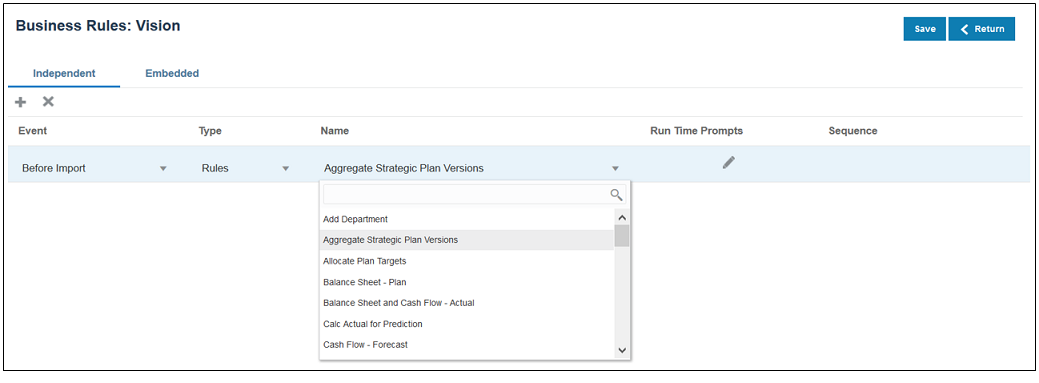
Business Rules Page in Independent Mode
The Embedded tab is used to register business rules that are passed as parameters to the Outline Line Utility (OLU) and are run after the data load process has completed. Embedded mode does not support runtime parameters.
Prior to this update, business rules were only available in Data Management, could only be run after the data load, and did not accept any run time parameters.
Business Benefit: Business rules enable you to load data that meets your enterprise requirements and use cases successfully. For example, you can set up a business rule that lets you allocate costs among plan targets before importing data. Business rules improve the response time to changing business application needs, shorten application development cycles, increase business user productivity, improve reuse of application components, and increase the return on analytic application investments.
Tips And Considerations
Registration is only available for the Planning, Financial Consolidation and Close, and Tax Reporting business processes. Registration is not supported for the following business processes:
- Account Reconciliation
- Profitability and Cost Management
Key Resources
- Registering and Using Business Rules in Administering Data Integration for Oracle Enterprise Performance Management Cloud
Terminal Release of EPM Mobile
This update is the terminal release of the EPM Mobile App. Oracle recommends that users using Oracle EPM Mobile App prepare to instead use the approval functionality using supported mobile browser in tablet devices.
Business Benefit: Oracle’s strategic direction is to have customers use the Approval and Workflow capabilities using the mobile browser interface on mobile devices.
New Data Import Options for Essbase Source Types - Delimiter and Abort on Error
New data import options for Essbase source types (Delimiter and Abort on Error) enable you to configure Essbase data imports similar to the way you configure Sales Planning data imports.
For Delimiter, you can choose Space or Tab delimiters for Essbase data. Abort on Error is selected by default and the import stops when an error is encountered. Clear the Abort on Error option to enable the import to continue regardless of errors.
To view these new Essbase data import options, from the Home page, click Application, then Overview, then Actions, and then click Import Data. Click Create to create a data import job. For Source Type, select Essbase.
Business Benefit: New data import options for Essbase source types enable you to configure data imports in the same way as Sales Planning source types. In addition, you can now choose to continue the data import when error records are encountered in the data file. Instead of ending the full data import for a select few error records, clearing the Abort on Error option lets you continue the data import through to completion and then setup a subsequent data import with just the fixed-up error records. In summary, instead of the system always deciding to end data import on encountering error records, you can now make the decision which best fits your use case.
Key Resources
- Importing Data in Administering Planning
IMPORTANT Actions and Considerations
FUTURE AVAILABILITY OF THE REDWOOD THEME
In the November (20.11) update, Sales Planning Cloud will offer a new Redwood appearance theme, in addition to the existing 13 themes available. The Redwood theme gives an enhanced look and feel in terms of colors and icons and brings consistency across Oracle Cloud.
Redwood will be the default theme for new instances, while existing instances will continue to see the current theme by default. You can switch to the Redwood theme from Tools > Appearance.
NEW KEY ACCOUNT PLANNING MODULE IN SALES PLANNING CLOUD
In an upcoming release in the short term roadmap, Sales Planning Cloud will deliver a new module, Key Account Planning.
The Key Account Planning module will cover baseline sales planning and incremental uplifts on account of running trade promotions. It’s relevant for Consumer Products, Automobile, Life Sciences, and other manufacturing industries. This module will help companies plan trade promotion strategies in order to optimize their trade spends and collaborative sales planning.
CHROME 85 AND CHROMIUM EDGE 85 BROWSERS
Due to recent changes in the Chrome 85 and Chromium Edge 85 browsers, you may see some input/output components on user interface stretched apart and tend to align right. Oracle is aware of this behavior change in these browsers and is working to resolve these issues.
USABILITY ENHANCEMENTS FOR HORIZONTAL TABS IN NAVIGATION FLOWS
In an update within the next few months, we are introducing a feature within navigation flows to open additional horizontal tabs on the fly to perform related actions; for example, view drill through from a form in a new temporary tab. As part of this new ‘on the fly tab’ feature; the horizontal tabs will move to the bottom of the page instead of at the top of the page where they are currently located. These changes will be the default for all customer environments where horizontal tabs are being used within navigation flows.
With tabs at the bottom of the page instead, customers will benefit from a clear separation of the Sales Planning Cloud horizontal tabs from their browser tabs at the top of the window. Another benefit of this change will be to keep the navigation flow tab names distinct from the name of the artifacts (such as forms and dashboards) rendered within the horizontal tabs. The vertical tabs will stay where they are.
The effective date of the update will be announced in the month prior to the update. It is expected in the next 2-4 months’ timeframe.
NEW SETTING TO ENABLE INCREMENTAL IMPORT OF DATA USING MIGRATION FOR SALES PLANNING CLOUD APPLICATIONS
In an upcoming update, Oracle will create a new application setting for Sales Planning Cloud applications to enable incremental import of data using Migration. The default setting will be set to disable incremental import of data using Migration. As a result, you cannot use the daily maintenance snapshot or any extract created using Migration for incremental import of data if this new setting remains in the default configuration; you must import a full snapshot to load data using Migration as a full Clone where the target environment does not have an existing application.
Service Administrators will be able to change this setting with warnings prompting that doing so may lead to data corruption if subsequent incremental import of data using Migration are not done properly. Examples of potential data corruption include, but are not limited to, incremental data migration from a different source other than the target application where underlying Smart List values may be different.
Existing Sales Planning Cloud subscriptions who have already upgraded to the newer version of Essbase will not be impacted by this upcoming change since incremental data loads are not allowed on this version of Essbase. Thus, this new application setting will not appear for those subscriptions already using the newer version of Essbase.
This change is being implemented to address customer feedback. If you have any concerns about this change, please contact Oracle Support.