

This document will continue to evolve as existing sections change and new information is added. All updates appear in the following table:
| Date | Feature | Notes |
|---|---|---|
| 20 APR 2018 | Created initial document. |
This guide outlines the information you need to know about new or improved functionality in Oracle Field Service Cloud, 18B Release. Each section includes a brief description of the feature, the steps you need to take to enable or begin using the feature, any tips or considerations that you should keep in mind, and the resources available to help you. For a listing of browsers supported by Oracle Field Service Cloud, log in to our support site and access Answer ID 8215.
Give Us Feedback
We welcome your comments and suggestions to improve the content. Please send us your feedback at http://documentation.custhelp.com/ci/documents/detail/5/4/12.
| Action Required to Enable Feature |
||||
|---|---|---|---|---|
| Feature |
Automatically Available |
End User Action Required |
Administrator Action Required |
Oracle Service Request Required |
 |
||||
|
||||
Bulk Operations Performance and Booking Improvements for Capacity API |
|
|||
|
||||
|
||||
|
||||
|
||||
|
||||
|
||||
|
||||
Trigger Immediate Routing When Multi-Day Activities are Moved to Bucket |
|
|||
Highlight Selected Part of a Resource Track
There is another way to analyze the resource track in the Map View. Hovering over a breadcrumb on the map highlights the part of the track that contains the selected breadcrumb. When hovered over any activity marker on the map, the track between the previous and selected activities is highlighted and the non-related tracks are muted. This lets you see the track between two locations.
The tracks are highlighted as described below:
- When hovering over any activity marker on the map at least half-a-second, or clicking the activity icon on the right panel:
- The part of the track between the previous and selected activities is highlighted.
- The selected and previous activity markers are highlighted.
- The remaining activity markers and breadcrumbs are greyed out.
- When hovering over a point from the track for at least half-a-second:
- The part of the track and the activity markers from the previous activity to the next one are highlighted.
- The remaining activity markers and breadcrumbs are greyed out.
The following figure shows a highlighted track between points B and C highlighted in red:
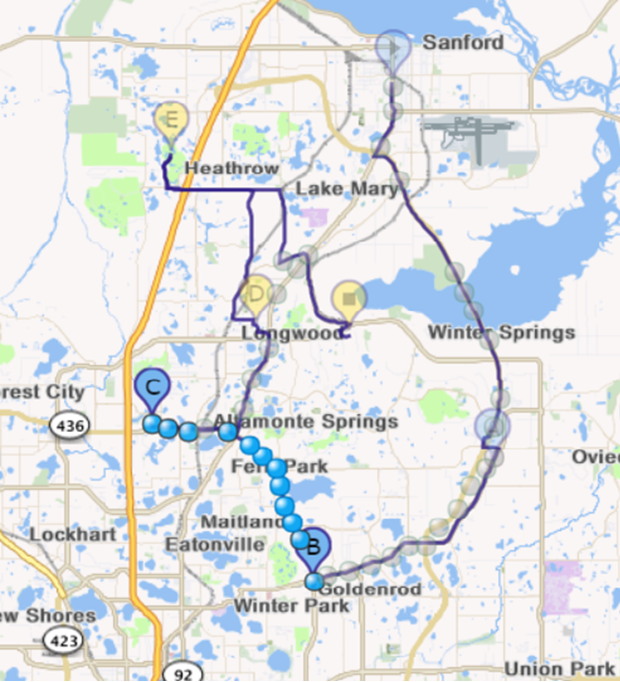
Highlighted Track
The following rules are followed while highlighting:
- The highlighting described in the earlier bullet points are applied only for non-clustered points.
- Both resolved and unresolved activities are considered when highlighting the route. For example: If Activity B is highlighted and there is an unresolved activity (for example Lunch) before it, the track is rendered from Lunch to Activity B.
- Breadcrumbs between the selected part of the route are highlighted gradually, one after another. The order of highlighting is based on the timestamp, starting from the earliest one.
HINT FOR A CLUSTERED POINT
When you click a clustered breadcrumb (resource track point) the hint 'Zoom in' appears near it. Upon clicking Zoom in, the map is zoomed in to the area with breadcrumbs.
If the clustered point contains 5 and more points, they are represented in the following way:
1st point timestamp
2nd point timestamp
3rd point timestamp
...
n point timestamp
The following figure shows a clustered breadcrumb with the hint:
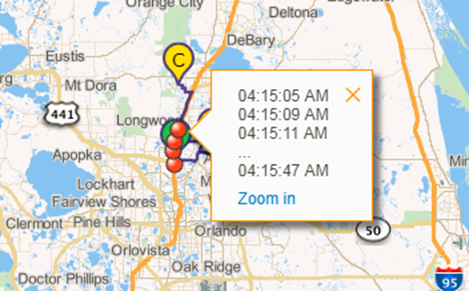
Clustered Point
Steps to Enable
No steps are required to enable this feature.
Key Resources
Now you can use Norwegian as a language in Manage, Mobility, Mobile, and APIs. For now the application supports Bokmål (literally "book tongue"), as it is an official written standard for the Norwegian language. The two-digit language code is ‘no’ and the five-digit code is ‘nb-NO’.
Steps to Enable
Steps to enable the language:
- Click Configure, Display and navigate to the Company language section.
- Click the pencil icon. The Languages dialog appears.
- Click the plus icon.
- Select Norwegian from the list and click Add.
- Click OK.
- To use Norwegian on the Login screen, select Norwegian in the Login Screen Language field.
- Click Save on the Display screen.
Key Resources
Bulk Operations Performance and Booking Improvements for Capacity API
The following enhancements have been made to improve the performance of Capacity and Quota Management REST APIs:
- The GET Activity Booking Options operation now processes the partially intersecting capacity categories.
- API operations now include data for past days.
- In API operations, performance of bulk operations have been improved for operations that return a huge amount of data.
REST API IMPROVEMENTS
A new parameter has been added to the GET Activity Booking Options operation. The includePartiallyDefinedCategories parameter when set to true and if more than one category is defined, the operation returns capacity areas for which at least one category is defined. By default, the option is set to false.
The returned response contains the following fields:
- Categories: It is an array of assigned capacity categories for determined area. Returned only if "includePartiallyDefinedCategories" parameter in request is true. Every item in this array indicates a capacity category label. Not returned in case of booking is not allowed due to a reason.
- OriginalQuota: Only returned for time slot based quota. Minimum Quota value that is defined according to activity fields/capacity categories for time slot level.
Request Examples
- GET rest/ofscCapacity/v1/activityBookingOptions/
- ?dates=2018-02-10
- &activityType=33
- &postalCode=12345
- &city=LONGWOOD
- &determineAreaByWorkZone=true
- &determineCategory=true
- &WO_TYPE=1
- &estimateDuration=true
- &defaultDuration=30
- &estimateTravelTime=true
- &minTimeBeforeArrival=120
- &includePartiallyDefinedCategories=true
Response Example
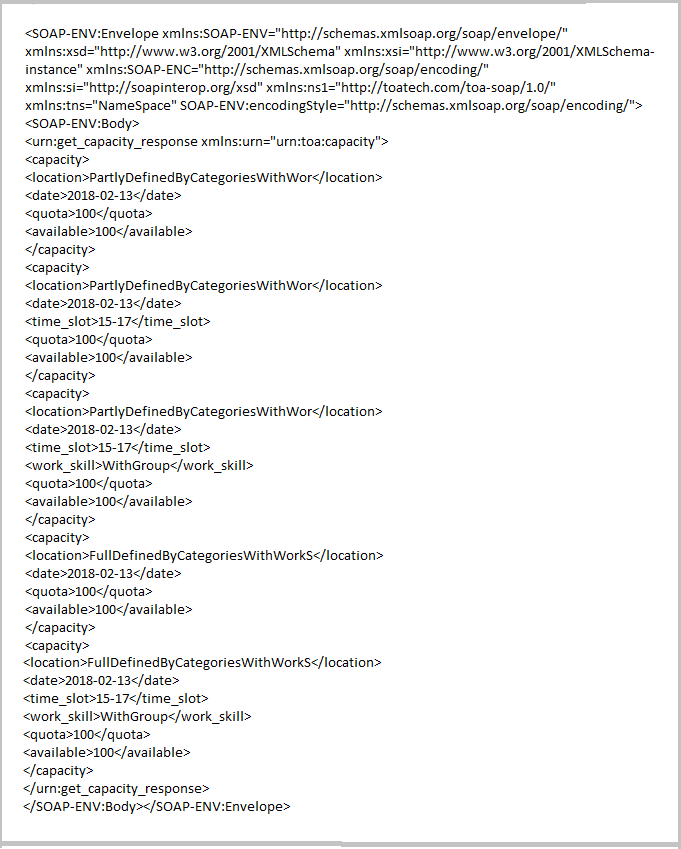
Response Example
SOAP get_capacity IMPROVEMENT
The following request parameter has been added to the get_capacity function:
include_partially_defined_categories (bool): If this option is set to true and more than one category is defined, the function returns capacity areas for which at least one category is defined. By default, the option is set to false.
Request Example
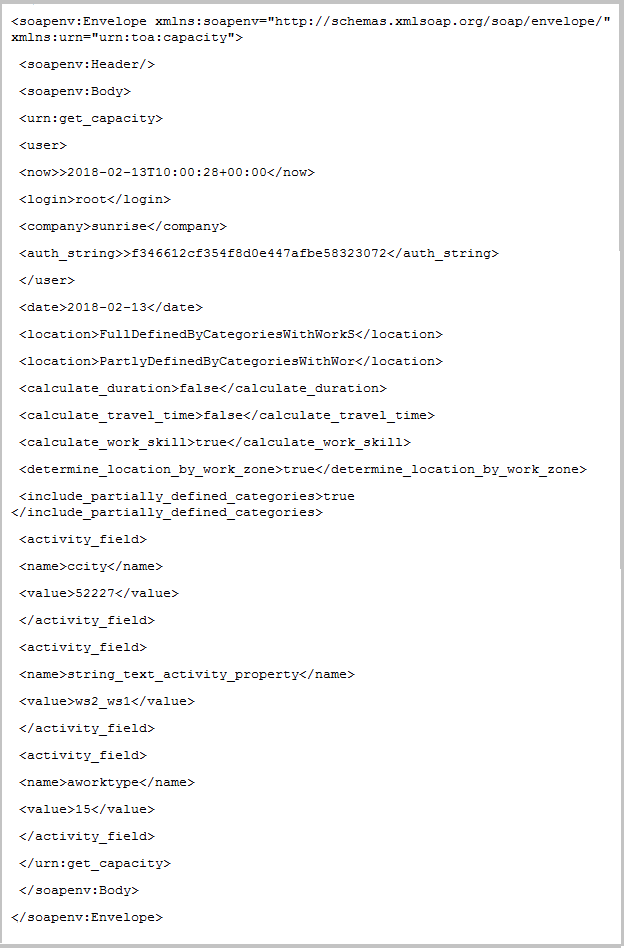
SOAP Request Example
Response Example
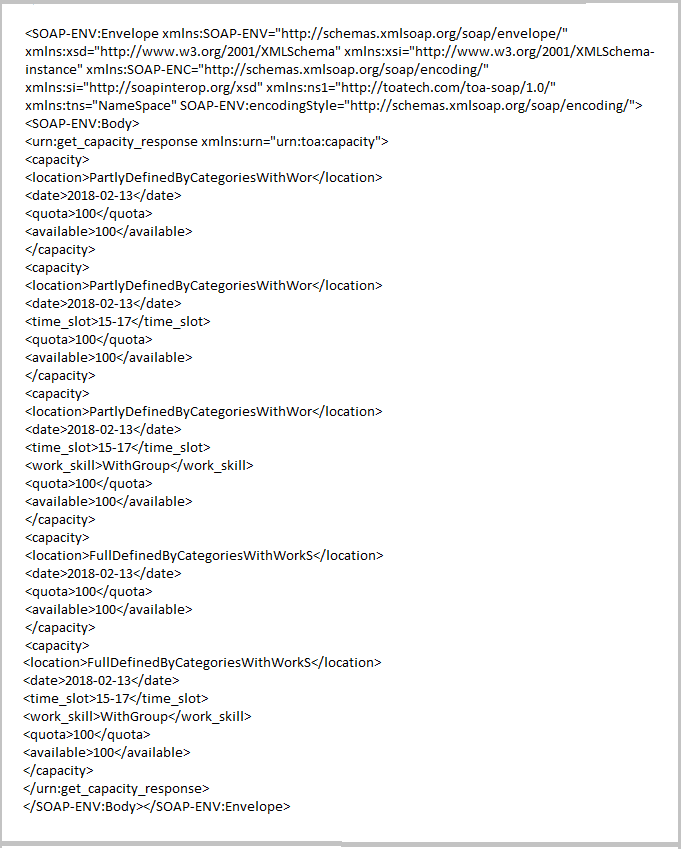
SOAP Response Example
Steps to Enable
No steps are required to enable this feature.
Key Resources
Dynamic Scope Support for API Calls
Oracle Field Service Cloud customers may need to grant Oracle Field Service Cloud Public API access to their own customers (end-customers) without creating specific accounts in Oracle Field Service Cloud or in other Oracle applications. In such cases, the scope of the end-customer's access must be restricted to a particular claim so that it prevents the end-customer from viewing data related to other Oracle Field Service Cloud customers.
Example Use Case
- Sunrise Company Inc. is a company using Oracle Field Service Cloud to manage and optimization their field operation.
- Sunrise Company Inc. provides their customers (end-customers) with a web/mobile "Where is my tech?" which polls the Oracle Field Service Cloud API directly from a browser.
- The "Where is my tech?" web/mobile app needs to be able query the Oracle Field Service Cloud API only for the specific end-customer's data.
- End-customers have no User Account at Oracle Field Service Cloud or other Oracle apps.
- End-customers need to be restricted to seeing only the data related to them.
You can restrict the end-customer's access by using the 'ofsc_dynamic_scope' parameter on the 'Get access token' function to specify a custom claim. The 'ofsc_dynamic_scope' claim has the format of a URL with optional query parameters. It allows you to specify several URLs at once using the space character as a separator, for example, different API function URLs or same function URL with different set of parameters.
In the following cURL command example, the 'ofsc_dynamic_scope' is set to 'https://api.etadirect.com/rest/ofscCore/v1/whereIsMyTech?activityId=12345' (value is URL-encoded in the command):
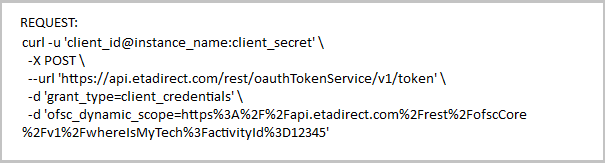
Request for Dynamic Scope Support
The response contains the OAuth2 access token as follows:
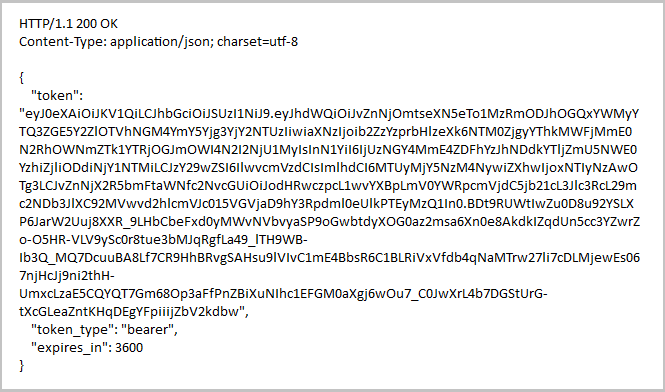
Response with OAuth2 Token
The following is a sample of the decoded OAuth2 token containing the 'ofsc_dynamic_scope' claim:

Sample of the Decoded OAuth2 Token
If 'ofsc_dynamic_scope' claim is present in OAuth2 access token, then the following restrictions apply to the token:
- endpoint: Oracle Field Service Cloud Public API will reject the token with HTTP 401 status code, if it is used to call a different endpoint than the one specified in 'ofsc_dynamic_scope' claim.
- query fields: Oracle Field Service Cloud Public API will reject the token with HTTP 401 status code, if the request URL does not contain all the query parameters specified in the 'ofsc_dynamic_scope' claim.
- query values: Oracle Field Service Cloud Public API will reject the token with HTTP 401 status code, if all the query parameter values specified in the request URL do not exactly match the query parameter values of the 'ofsc_dynamic_scope' claim.
Oracle Field Service Cloud customers can use the Oracle Field Service Cloud token service or any external token service for implementing dynamic scope support for API calls.
Following is the flow when the customer uses the Oracle Field Service Cloud token service:
- Customer's backend uses its application credentials with broad restrictions to get an access token for specific request(s).
- Customer's backend transfers the restricted access token to insecure web/mobile app of the end-customer.
- The web/mobile app can only query Oracle Field Service Cloud for the specific request(s). All other requests will be rejected by Oracle Field Service Cloud.
Following is the flow when the customer uses an external token service:
Prerequisites:
- Oracle Field Service Cloud is registered as a resource server with dynamic custom claim enabled.
- The signing key certificate is available to Oracle Field Service Cloud so that it can accept the tokens issued by the external token service.
- Customer has registered an OAuth client with access to Oracle Field Service Cloud resource server and saved the credentials to the backend.
- Customer's backend uses its OAuth client credentials to request an access token with external token service, specifying the custom claim in request.
- The token service returns the access token with custom claim.
- Customer's backend passes the token to insecure web/mobile app of the end-customer.
- The web/mobile app may call Oracle Field Service Cloud REST API using this token, but will only be able to access the request(s) specified in the custom claim. All other requests will be rejected.
Steps to Enable
No steps are required to enable this feature.
Find Matching Resources Improvements
The Core API operation, findMatchingResources has been enhanced with the ability to return additional information that is useful for booking activities using a new parameter. The additional information includes:
- List of positions inside the route, where an activity can be inserted without violating other constraints of other activities.
- Ability to book mid-route and move subsequent activities to a later position in the route.
- Indication that the activity adjacent to the one being added is in the same work zone.
schedulesFields PARAMETER
The new request parameter allows to control the information required within the response. This parameter must be specified with the existing parameter schedulesToReturn since that parameter determines if the schedules object should be returned in the response. Only those fields/sub-objects specified in the schedulesFields parameter are returned in the schedules object for each date in the response.
The schedulesFields parameter has the following properties:
- Type: Specifies an array of strings
- Possible values:
- fitness
- workShift
- freeTimeWindows
- arrivalTimeOptions
- Default values:
- fitness
- workShift
- freeTimeWindows
arrivalTimeOptions OBJECT
If the value of schedulesFields parameter is set to 'arrivalTimeOptions' then the arrivalTimeOptions object is included in the response. The arrivalTimeOptions object contains the following fields:
- minStartTime - Indicates the time when a new activity can be started. This field is calculated as the sum of the time of previous activity ending and the travel time to the new activity)
- maxStartTime - Indicates the last possible option when new activity can be started. This field is calculated based on the activity duration and the travel to the following activity
- setPositionInRoute - Specifies the object to provide information about a previous activity (used for assigning activity to particular technician at particular place in the route)
- workZoneMatch - Indicates that the work zone of the activity matches the work zone of either the previous activity or the next activity.
REQUEST/RESPONSE EXAMPLE
Here is an example of a request:

Example - Request for Find Matching Resources
Here is the example of a response:
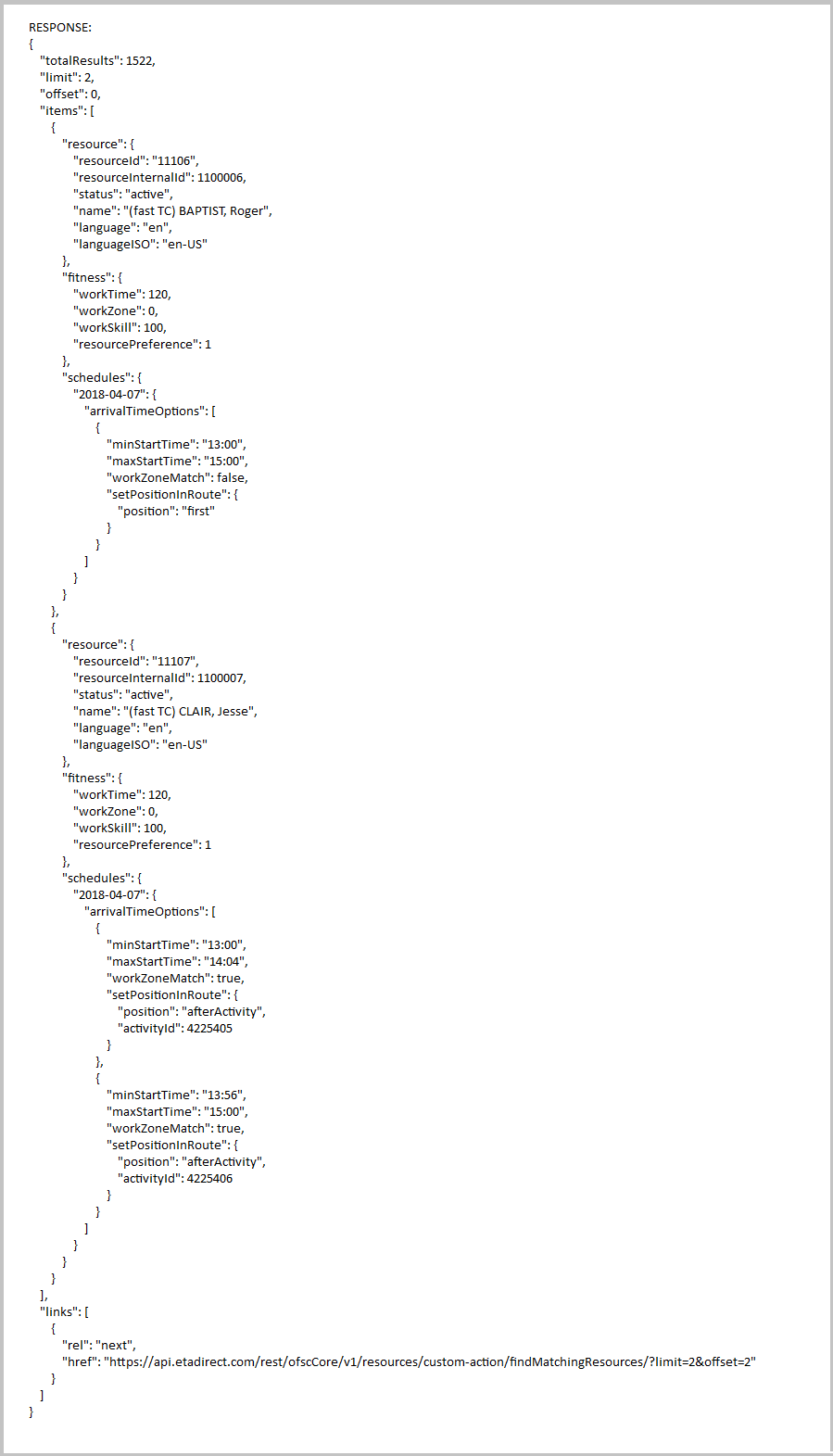
Example - Response for Find Matching Resources
Steps to Enable
No steps are required to enable this feature.
Find Resources for Urgent Assignment
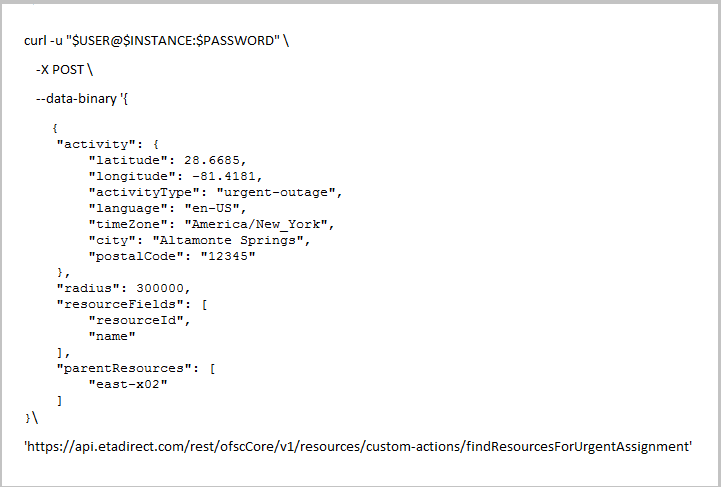
The new operation, findResourcesForUrgentAssignment in Core API allows you to retrieve a list of resources that can perform an activity based on distance. You must provide the required activity fields in the request, but only those resources that match the work skills and work zones of the activity are considered. The response contains a list of resources that can perform the activity.
The following query parameters are supported:
- Activity - The properties of an activity. This is a required parameter.
- parentResources - This parameter is a list of resource IDs. If this parameter is specified, then the operation evaluates only the children of the specified resources and their descendants. If this parameter is not specified then all resources will be evaluated and returned in the response.
- Radius - The radius of area in meters where the search is performed. It is an optional parameter. If this parameter is not specified in request, then it defaults to 100000 meters.
- resourceFields - This parameter is used to specify which resource fields are to be returned in the response. If this parameter is not specified in the request, then the default resource fields are returned: 'resourceId', 'resourceInternalId', 'name', 'resourceType'. Using this parameter, it is possible to specify the list of fields that are needed for the integration flow to increase the performance and reduce the traffic. When the resource fields are specified, only the 'resourceId' field and the requested fields are returned. If incorrect resource fields are specified, then the 400 error code is returned.
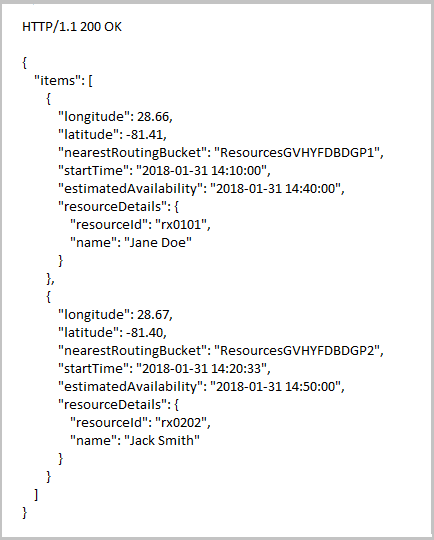
The following information is displayed in the response:
- Items - The resources that match the specified request criteria for urgent assignment.
- estimatedAvailability - The estimated time when the technician has completed the activity in YYYY-MM-DD HH:MM:SS" format. The time is returned in UTC time zone.
- Latitude - The last known latitude of the resource.
- Longitude - The last known longitude of the resource.
- nearestRoutingBucket: The closest parent bucket that has the ‘routing bucket’ flag enabled.
- startTime - The estimated time of arrival for the activity in YYYY-MM-DD HH:MM:SS" format. The time is returned in UTC time zone.
- resourceDetails - The data structure that contains the resource information.
- resourceInternalId - The internal ID of a resource in Field Service Cloud.
EXAMPLES
The following example shows how to find resources for urgent activity assignments by submitting a POST request on the REST resource:
cURL Command Example
cURL Command Example
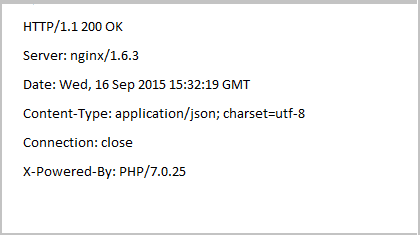
Example for the Response Header
The following shows an example of the response header.
Response Header Example 1
Example of Response Body in JSON Format
The following shows an example of the response body in JSON format.
Response Body Example
Steps to Enable
No steps are required to enable this feature.
The Get activity types and Get Non-working Reasons resources have been added to the Metadata API.GET
GET ACTIVITY TYPES
This is a new operation in Metadata API that allows you to obtain collection of activity types.
The following query parameters are supported:
- Language: Specifies the translation language code. See Supported Language codes to view the values that are supported.
Based on this value, the translation for the name of the activity type is returned in the ‘name’ field. If the parameter is specified then the translated value is returned in the ‘name’ field and the ‘translations’ field is not returned.
If translation to the specified language does not exist, then the value in the ‘name’ field is returned in English. If the 'language' parameter is not specified, then the 'translations' field is returned in response, and contains the translations to every language in the system.
- Limit: Specifies the number of activity type records to be returned in the response. The minimum value that can be provided is 1. The maximum value that can be provided is 100. If value is greater than 100, then it defaults to 100. If no value or zero is provided then also it defaults to 100.
- Offset: Specifies the record number from which to start retrieval. The default value is zero. If no value is specified, then it defaults to zero. The value zero indicates that the retrieval will start from the beginning of the collection.
The following information is displayed in the response:
- Limit: The limit value specified in the request, or 100if the limit was not specified or not accepted.
- Offset: The offset value specified in the request.
- totalResults: The total number of the activity type records in the collection.
- Items: Collection of activity types. It is not returned for an empty collection.
- Active: Indicates the status of activity type.
- Default Duration: The default duration of the activity type, that is used when creating an activity, and when no statistics are available for the activity.
- Group Label: The label of the activity type group.
- Label: The unique label assigned to the activity type. For example, IN (Install).
- Name: The translation for the name of the activity type.
- If the language parameter is specified, then the name is provided in that language.
- If the language parameter is not specified, then the name is provided in English, unless the request is performed using an OFSC user account which is linked to an API application, in which case the name is provided in the language of the user making the request.
- Translations: The list of associated translations that is returned for the name of the activity type. It is only returned if the language parameter is not specified in request.
- Language: The language code of the translated text. The code in the response is two characters long (for example, 'en', 'es').
- LanguageISO: The ISO language code (for example, 'en-US').
- Name: The name of the activity type translated to the requested language.
EXAMPLES
Following are some examples to understand this feature in a better way:
Example 1
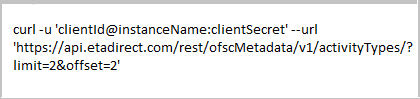
The following example shows how to obtain a collection of activity types by submitting a GET request on the REST resource using cURL.
Use the cURL command with the following syntax:
cURL Command Example
The following shows an example of the response header:
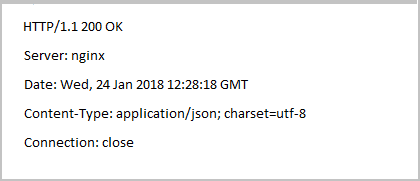
Response Header Example
Response Body Example
The following shows an example of the response body in JSON format:

Example Response Body
Example 2
The following example shows how to obtain a collection of activity types by using the language parameter with the GET request on the REST resource.
Use the cURL command with the following syntax:

cURL Command Example -2
Response Header Example

Example for Response Header
Response Body Example
The following shows an example of the response body in JSON format:

Example of Response Body
GET NON WORKING REASONS
This is a new operation in Metadata API that allows you to obtain collection of non-working reasons.
The following query parameters are supported:
- Language: Specifies the translation language code. See Supported Language codes to view the values that are supported.
Based on this value, the translation for the name of the non-working reason is returned in the ‘name’ field. If the parameter is specified then the translated value is returned in the ‘name’ field and the ‘translations’ field is not returned.
If translation to the specified language does not exist, then the value in the ‘name’ field is returned in English. If the 'language' parameter is not specified, then the 'translations' field is returned in response, and contains the translations to every language in the system.
- Limit: Specifies the number of non-working reason records to be returned in the response. The minimum value that can be provided is 1. The maximum value that can be provided is 100. If value is greater than 100, then it defaults to 100. If no value or zero is provided then also it defaults to 100.
- Offset: Specifies the record number from which to start retrieval. The default value is zero. If no value is specified, then it defaults to zero. The value zero indicates that the retrieval will start from the beginning of the collection.
The following information is displayed in the response:
- Limit: The limit value specified in the request, or 100if the limit was not specified or not accepted.
- Offset: The offset value specified in the request.
- totalResults: The total number of the non-working reason records in the collection.
- Items: Collection of non-working reasons. It is not returned for an empty collection.
- Active: Indicates the status of activity type.
- Label: The unique label assigned to the non-working reason. For example, Illness.
- Name: The translation for the name of the non-working reason.
- If the language parameter is specified, then the name is provided in that language.
- If the language parameter is not specified, then the name is provided in English, unless the request is performed using an OFSC user account which is linked to an API application, in which case the name is provided in the language of the user making the request.
- Translations: The list of associated translations that is returned for the name of the non-working reason. It is only returned if the language parameter is not specified in request.
- Language: The language code of the translated text. The code in the response is two characters long (for example, 'en', 'es').
- LanguageISO: The ISO language code (for example, 'en-US').
- Name: The name of the non-working reason translated to the requested language.
EXAMPLES
Use the cURL command with the following syntax to obtain the collection of non-working reasons:
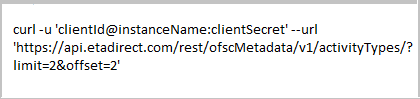
cURL Command Example
Response Header Example
The following shows an example of the response header:

Response Header Example
Response Body Example
The following shows an example of the response body in JSON format:
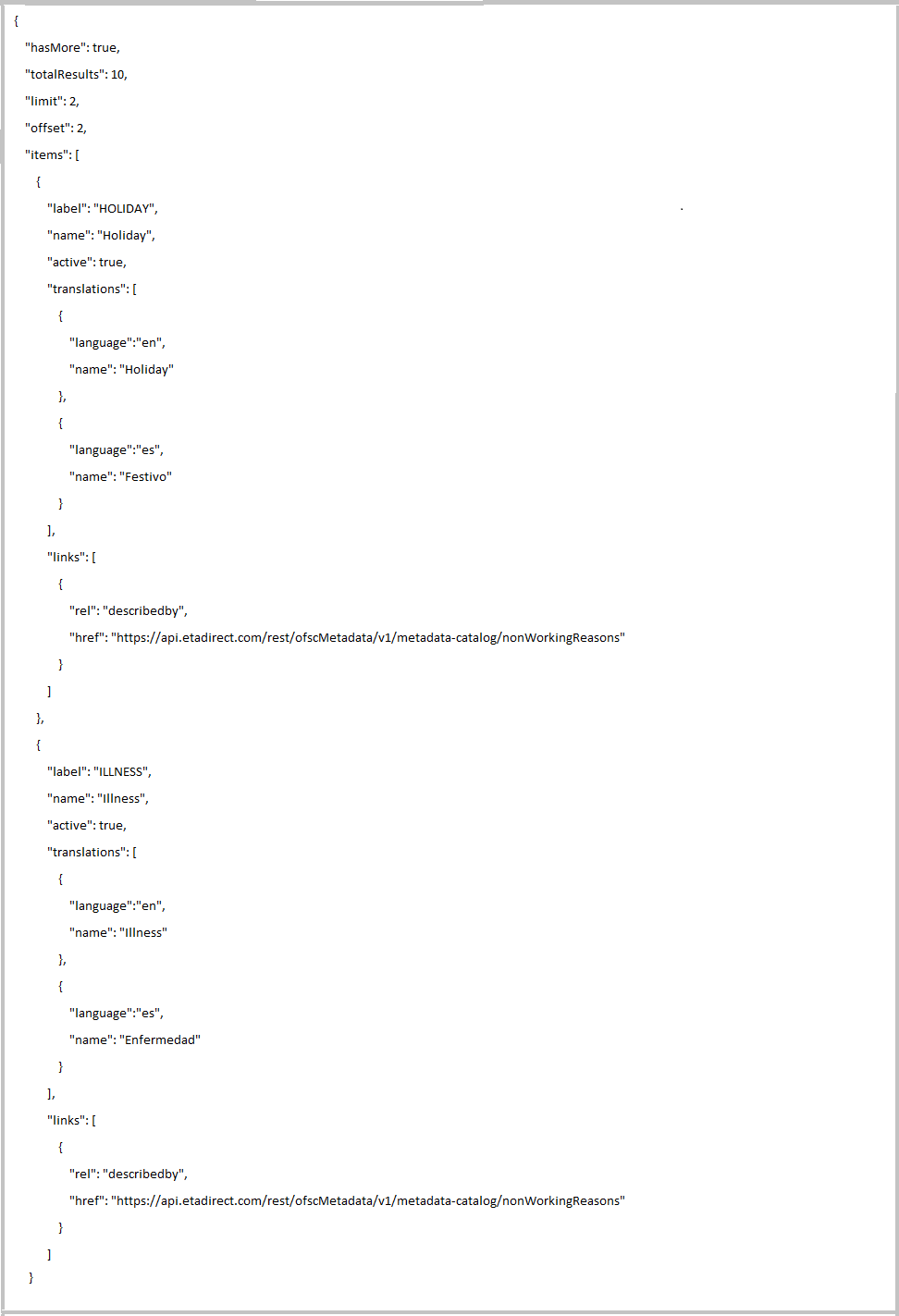
Response Body Example
Steps to Enable
No steps are required to enable this feature.
Usability improvements have been made to the following Collaboration features:
- Field Collaboration User Info page.
- Collaboration Permission Settings page in context layout.
- Reason for Transfer window in Helpdesk chats.
COLLABORATION EVENTS
The Events API in Collaboration is updated with automatic broadcasting and the reason for transfer in helpdesk chats. You can use the user interface to obtain the routing execution details. The following events have been updated:
- ChatMessageSent
- applicationId - Specifies the name/ID of the internal or external application which performed the action that triggered this event. This field is present only when the chat is triggered from an internal or external application (string). When the message is triggered from routing, the value will be 'ROUTING'.
- user- Specifies the user who triggered this event (string). The field is empty if a user is not triggering the event.
- startedBy- Specifies the user who started the chat or broadcast (string). This field will be present only for chats started by a user.
- endedTime- Indicates the time displayed in UTC time zone (string) when the clean up for chats/broadcasts in the system is completed. For expired broadcasts the value will be populated in 'YYYY-MM-DD HH:MM:SS' format.
- invitedBy- Specifies the login of the user who invited this participant to chat (string). This field will be present only when user is invited by another user.
- transactionUpdated
- applicationID- Specifies the name/ID of the internal or external application which performed the action that triggered this event. This field is present only when the chat is triggered from an internal or external application (string). When the message is triggered from routing, the value will be 'ROUTING'.
- user- Specifies the user who triggered this event (string). This will be empty if a user is not triggering the event.
- startedBy- Specifies the user who started the chat or broadcast (string). This field will be present only for chats started by a user.
- chatUpdated
- updateType - Indicates what is updated in the chat.
- updateInfo - Provides additional information about what is updated in the chat.
- movedFromHelpdesk: Indicates the name of the helpdesk from which the chat was moved.
- moveReason: Indicates the reason for moving the chat.
- startedBy- Specifies the user who started the chat or broadcast (string). This field will be present only for chats started by a user.
- invitedBy- Specifies the user login of the user who invited this participant to chat or broadcast (string). This field will be present only for chats started by a user.
NOTE: The 'chatUpdated' event is triggered for chats from automatic broadcasting only when the chats are automatically cleaned up by the system. The user does not have an option to leave and end the chat.
- Transaction field
- author- Specifies the user login of the user who started this transaction (string). This field will be present only for transactions started by a user.
Steps to Enable
No steps are required to enable this feature.
Key Resources
Events API for Routing Execution
The new 'routingRun' event type allows integrators to build flows depending on the routing execution stages and reduces the necessity to watch and monitor routing execution processes in the Manage interface. An external system can subscribe to the new event type using the 'Create subscription' function. Additionally, the subscribing application can use the 'filterExpression' field to narrow the event scope depending on the flow.
NOTE: The 'fields' parameter for the 'Create subscription' function for this event type will not affect the response of the 'Get events' function.
The routing event contains the following fields:
- eventType (string): The type of the event. For this event, the value is 'routingRun'.
- time (string): The time of the event in UTC time zone. The time format is YYYY-MM-DD HH:MM:SS.
- user (string):
- When routing is started manually by the user, the value is the login value of the user who started it.
- When routing is started automatically, the value is an empty string.
- applicationId (string):
- When routing is started manually by the user, the value is an empty string.
- When routing is started automatically, the value is the string constant 'AUTOMATIC_ROUTING'.
- routingRunDetails: This object contains the following fields:
- targetDate (string): The date for which the activities are routed. The format is 'YYYY-MM-DD'.
- numberOfDays (int): For a single day routing, the value is 1. For multi-day routing, the value is the number of days routed, starting from 'targetDate' and going into the future.
- resourceId (string): The external ID of the routing bucket.
- startType (string): Can contain one of the following values:
- When routing is started automatically on schedule, the value is 'automatic'.
- When routing is started manually from the GUI by the user, the value is 'manual'.
- result (string): The result of the routing execution. Can contain one of the following values:
- When the routing is executed successfully, and some activities are moved as a result, the value is 'succeeded'.
- When the routing execution is stopped by the user, the value is 'stopped'.
- When the routing execution fails, the value is 'failed'.
- message (string): The field contains the error message.
- When 'result' is 'succeeded' and 'activitiesRouted' is 0, it contains the explanation of why no activities were routed.
- When 'result' is 'failed', it contains the error description.
- In all other cases it contains an empty string.
- routingRunId (int): The unique ID of the specific routing execution.
- routingPlan (string): The name of the routing plan that was executed. It is not unique.
- routingPlanId (int): The unique ID of the routing plan that was executed.
- routingProfile (string): The name of the routing profile that the routing plan belongs to. It is not unique.
- routingProfileId (int): The unique ID of the routing profile that the routing plan belongs to.
- routingRunDuration (int): The duration (in seconds) of the routing run.
- activitiesMatched (int): The number of activities that matched the routing plan filters.
- activitiesRouted (int): The number of activities scheduled and assigned by the routing run.
- activitiesNotRouted (int): The number of activities that matched the routing plan filters but were not routed.
- resourcesMatched (int): The number of resources that matched the routing plan filters.
- resourcesUsed (int): The number of resource that were assigned activities by the routing run.
- averageWorkingTime (int): The average working time of the resources.
- averageOvertime (int): The average overtime time of the resources.
- averageTravelTime (int): The average travel time of the resources.
- averageDowntime (int): The average downtime time of the resources.
EXAMPLES
The following is an example for creating subscription with event type 'routingRun' using a cURL command:
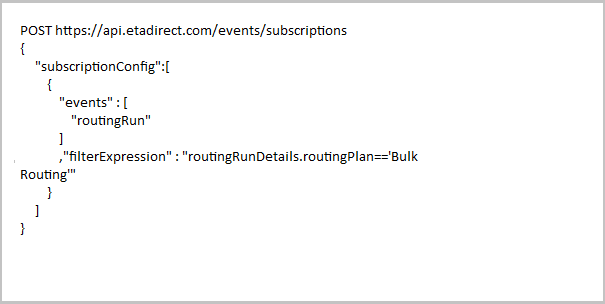
Create a Subscription with Routing Run
Response to Create a Subscription with routingRun Event Type
The response of the cURL command is as follows:

Response to Create a Subscription with routingRun Event Type
get events Call Example
The following is an example of 'Get events' call for an event subscription that has event type as 'routingRun':
GET https://api.etadirect.com/rest/ofscCore/v1/events/?subscriptionId=50bb8eb8f0cf12145f325a31b40cc15906a67bd2&page=180404-706,0
The response is as follows:

Response to Get Events Event Call
Steps to Enable
No steps are required to enable this feature.
Key Resources
Bulk Routing Bundling Improvements
With 18B release, bulk routing supports visits and bundling the activities having the same visit key in the similar way as Immediate routing.
Steps to Enable
No steps are required to enable this feature.
Trigger Immediate Routing When Multi-Day Activities are Moved to Bucket
Multi-day activities are available for Immediate Routing both at the time of creating an activity and when a multi-day activity is moved to the bucket.
For the multi-day activities, immediate routing is triggered both when the activity is created on bucket or moved to it. When created, multi-day activities are divided into segments. Immediate routing will process only those activities when all the segments are not yet finished.
EXAMPLES
Following are some examples that discuss how Immediate Routing processes multi-day activities.
Example 1:
- Multi-day Activity = 20 hours over 10 segments
- Immediate Routing assigned to Technician A
- Technician A completed 10 hours of work (5 segments)
- Technician A is not going to be available so Dispatcher (or API) moves the remaining activity to the bucket (when prompted all segments are moved)
- Result: Immediate Routing will assign the remain activity based on the filter conditions
Example 2:
- Multi-day Activity = 20 hours over 10 segments
- Immediate Routing assigned to Technician A
- Technician A completed 10 hours of work (5 segments)
- Technician A is not going to be available so Dispatcher (or API) moves any activity segment to the bucket (when prompted move only current segment)
- Result: Immediate Routing will assign only this activity segments based on the filter conditions
Steps to Enable
No steps are required to enable this feature.
Key Resources
---

Copyright © 2018, Oracle and/or its affiliates. All rights reserved.
This document is provided for information purposes only, and the contents hereof are subject to change without notice.This document is not warranted to be error-free, nor subject to any other warranties or conditions, whether expressed orally or implied in law, including implied warranties and conditions of merchantability or fitness for a particular purpose. We specifically disclaim any liability with respect to this document, and no contractual obligations are formed either directly or indirectly by this document. This document may not be reproduced or transmitted in any form or by any means, electronic or mechanical, for any purpose, without our prior written permission.
Oracle and Java are registered trademarks of Oracle and/or its affiliates. Other names may be trademarks of their respective owners.
Intel and Intel Xeon are trademarks or registered trademarks of Intel Corporation.All SPARC trademarks are used under license and are trademarks or registered trademarks of SPARC International, Inc. AMD, Opteron, the AMD logo, and the AMD Opteron logo are trademarks or registered trademarks of Advanced Micro Devices. UNIX is a registered trademark of The Open Group.
