

This document will continue to evolve as existing sections change and new information is added. All updates appear in the following table:
| Date | Feature | Notes |
|---|---|---|
| 28 AUG 2018 | Created initial document. |
This guide outlines the information you need to know about new or improved functionality in Oracle Service Cloud Agent Browser UI July 2018 and describes any tasks you might need to perform for the update. Each section includes a brief description of the feature, the steps you need to take to enable to begin using the feature, any tips or considerations that you should keep in mind, and the resources available to help you.
For a listing of hardware and software requirements for Oracle products, log in to our support site and access Answer ID 31.
Give Us Feedback
We welcome your comments and suggestions to improve the content. Please send us your feedback.
| Action Required to Enable Feature |
||||
|---|---|---|---|---|
| Feature |
Automatically Available |
End User Action Required |
Administrator Action Required |
Oracle Service Request Required |
 |
||||
|
||||
New functionality has been added to the Agent's Chat experience within the Browser User Interface, where transferring chats to queues and agents has become easier to navigate. Agents can easily perform a search for Queues & Agents when transferring or conferencing a chat session. The search results are filtered & alphabetical for both menus. Tooltips will appear for long names within the menus, as well. These updates should lead to less scrolling for Agents when handling a chat session.
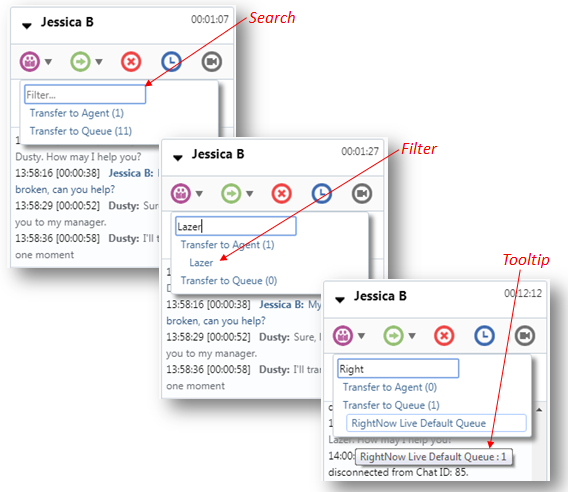
New Transfer Functionality in the Browser UI
Steps to Enable
These updates are automatically available for Agents handling Chat sessions within the Browser User Interface.
Role Information
Roles that will utilize this feature:
- Chat Agent
- Supervisor Agent
Link and Unlink Icon on Incident Thread CKEditor Toolbar
An agent has the ability to link and unlink text to a URL in the CKEditor Toolbar when composing a message.
On the Incident Thread CKEditor toolbar, there are two icons to Link and Unlink text with a specific URL.
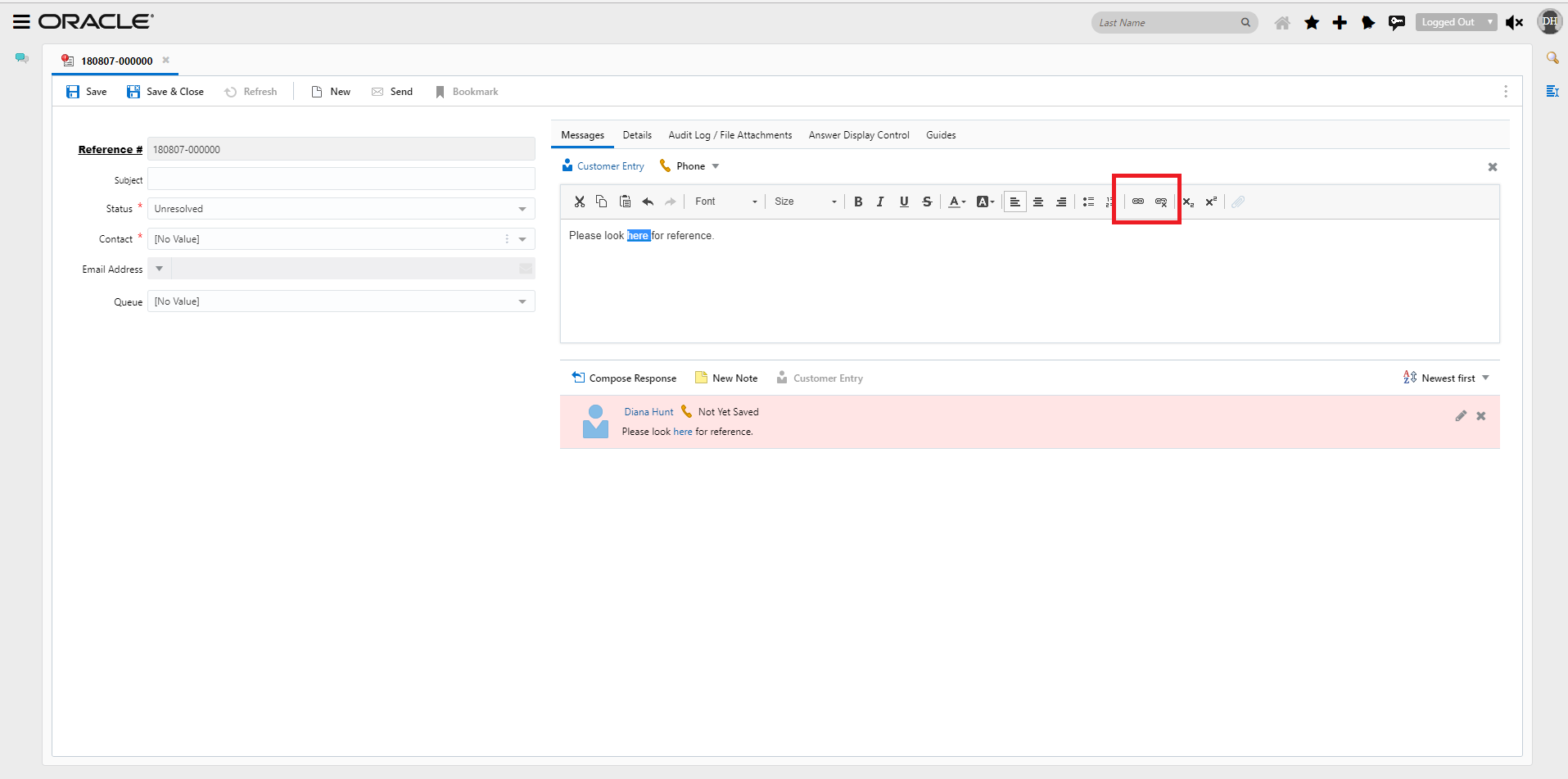
Add link and Unlink CKEditor Toolbar Icons
To execute, select the Link Icon and a dialog will open with the following fields:
- Text
- Protocol
- URL
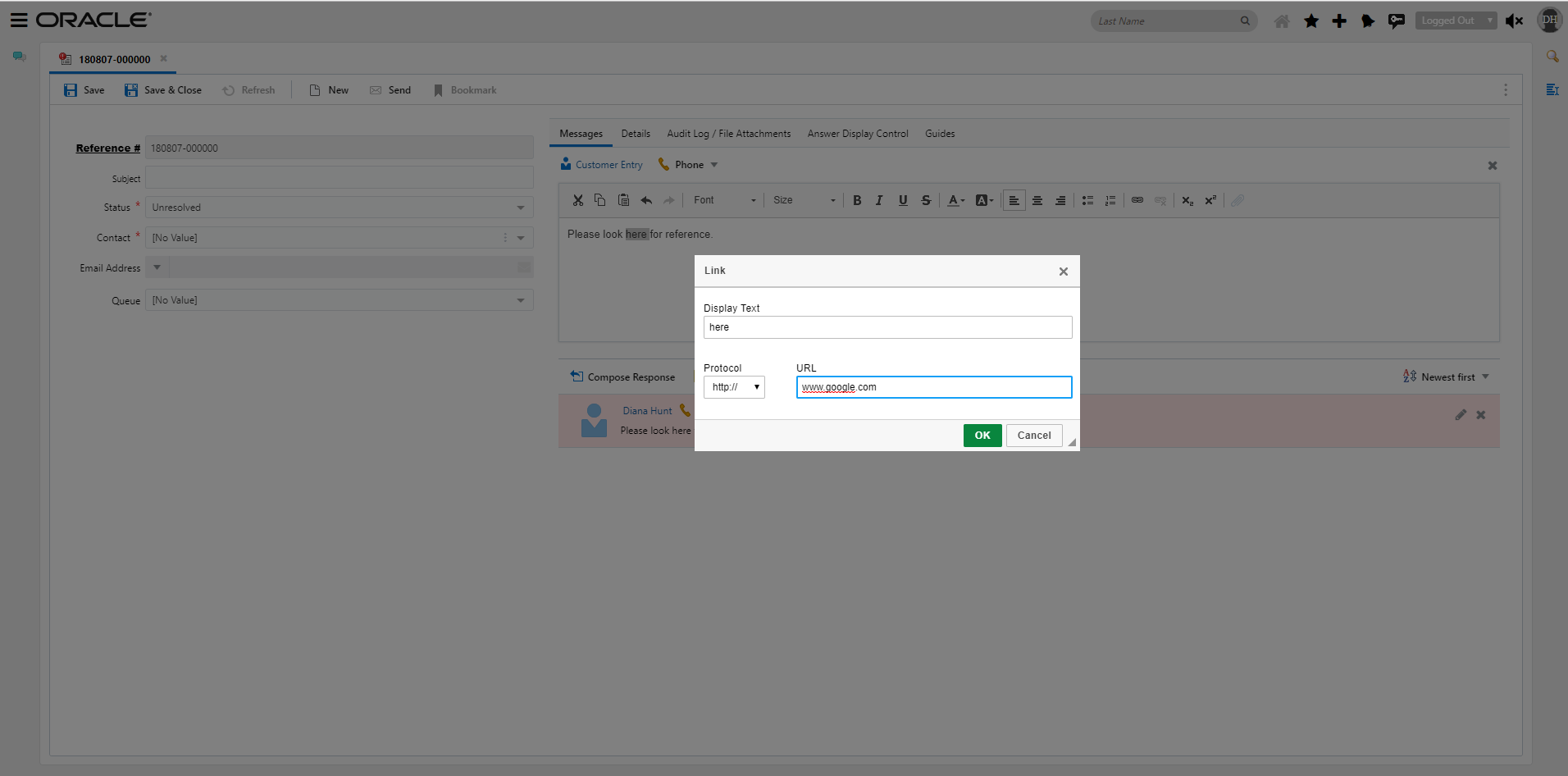
Add Link Dialog
If the text is highlighted it will automatically display in the Text field of the dialog. The user can also edit text in the text field.
Once the user selects OK; the dialog will close and the link will be added to the text.
To Unlink, select the linked text and select the Unlink Icon from the toolbar. The link will then be deleted.
Steps to Enable
No set up is required. The link and unlink icon will display on the incident thread editor toolbar to all agents with appropriate permissions on the Incident WS.
Role Information
- Any user of the Incident Thread Editor can access the Link and Unlink icons
---

Copyright © 2018, Oracle and/or its affiliates. All rights reserved.
This document is provided for information purposes only, and the contents hereof are subject to change without notice.This document is not warranted to be error-free, nor subject to any other warranties or conditions, whether expressed orally or implied in law, including implied warranties and conditions of merchantability or fitness for a particular purpose. We specifically disclaim any liability with respect to this document, and no contractual obligations are formed either directly or indirectly by this document. This document may not be reproduced or transmitted in any form or by any means, electronic or mechanical, for any purpose, without our prior written permission.
Oracle and Java are registered trademarks of Oracle and/or its affiliates. Other names may be trademarks of their respective owners.
Intel and Intel Xeon are trademarks or registered trademarks of Intel Corporation.All SPARC trademarks are used under license and are trademarks or registered trademarks of SPARC International, Inc. AMD, Opteron, the AMD logo, and the AMD Opteron logo are trademarks or registered trademarks of Advanced Micro Devices. UNIX is a registered trademark of The Open Group.
