

This document will continue to evolve as existing sections change and new information is added. All updates appear in the following table:
| Date | Feature | Notes |
|---|---|---|
| 30 APR 2018 | Created initial document. |
This guide outlines the information you need to know about new or improved functionality in Oracle Service Cloud Agent Browser UI March 2018 and describes any tasks you might need to perform for the update. Each section includes a brief description of the feature, the steps you need to take to enable to begin using the feature, any tips or considerations that you should keep in mind, and the resources available to help you.
For a listing of hardware and software requirements for Oracle products, log in to our support site and access Answer ID 31.
Give Us Feedback
We welcome your comments and suggestions to improve the content. Please send us your feedback.
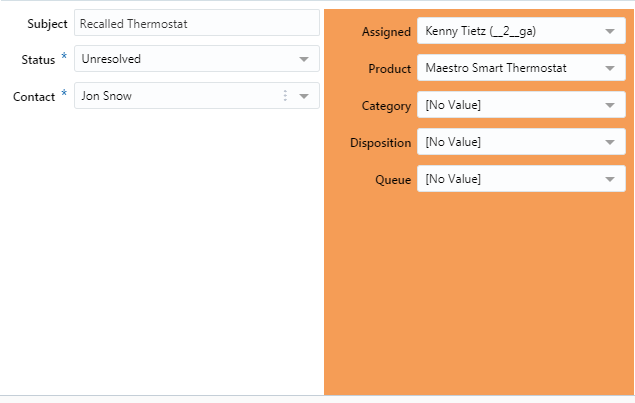
The workspace panel control is now supported in Agent Browser User Interface. A panel is a special workspace control that provides grouping for fields and controls and lets you create scrolling subsections of the workspace.
When you add more fields than the panel control can accommodate, a scroll bar appears automatically. This lets you add multiple fields to a panel even though the panel size is controlled.
You can customize each panel on your workspace to use different background colors, font colors, padding, and margins. This is helpful if you want to create distinct groupings of data on your workspace.
The following figure shows a panel control on the right. The panel has been defined to span three rows. The single panel contains the Assigned, Product, Category, Disposition, and Queue fields.
Panel Control
Steps to Enable
No steps are required to enable this feature.
Delete Multiple Records from Report
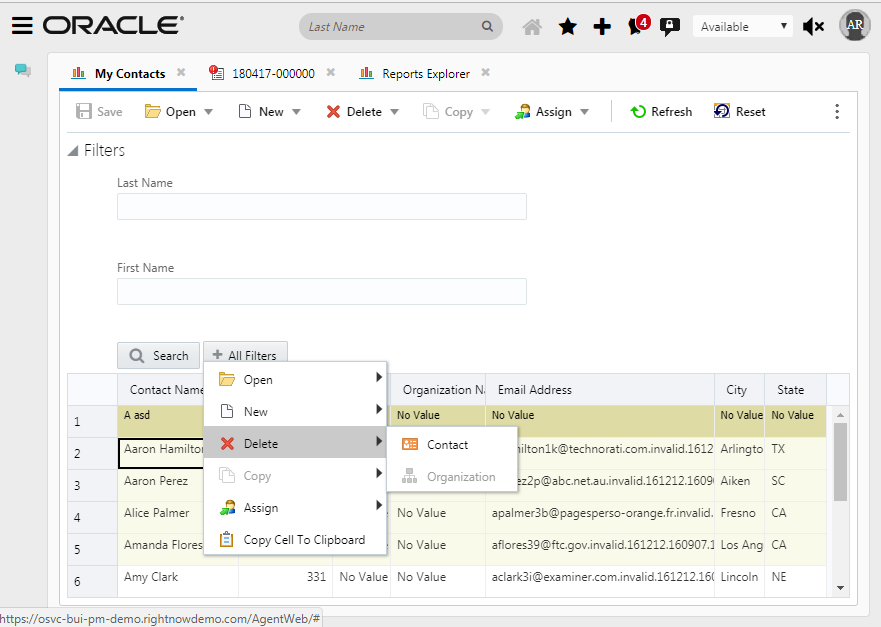
You can select multiple records in a report and delete them simultaneously. There are a couple of ways that the delete process can be initiated. The first is to use the Delete action located in the report toolbar. The second is to use the right click contextual menu which is shown in the image below.
Multiple Contacts Delete
Steps to Enable
No steps are required to enable this feature.
Row Numbers in Report Record Layout
Reports can be displayed using a record or tabular layout.
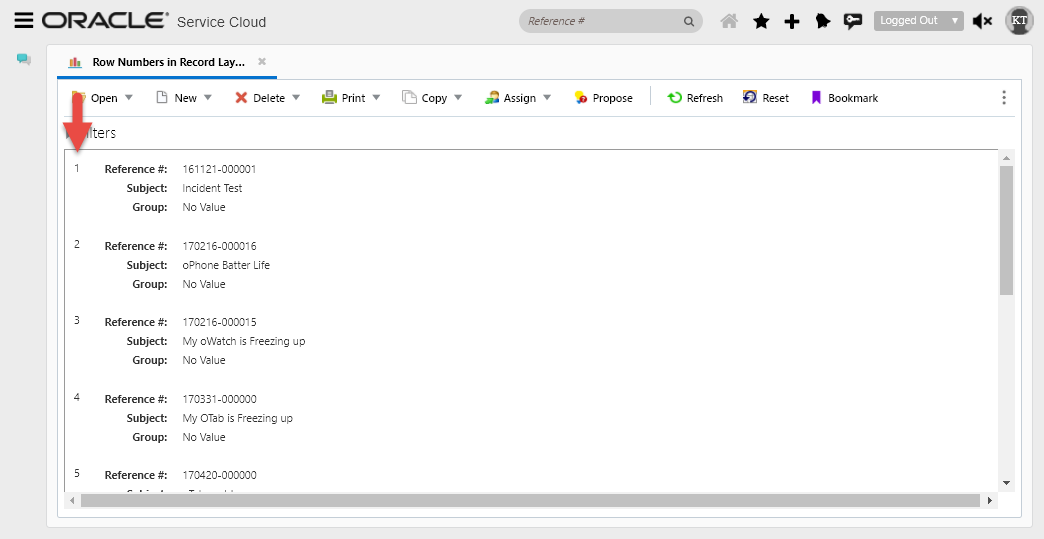
Most reports use tabular layouts with column headers across the top of the report and data listed in rows beneath the column headers. However, you can use a record layout to reformat the report to remove the column headers and instead display the field names inline with the field’s values from each record returned in the report. Although record layouts were already supported in Agent Browser User Interface, the ability to render the row numbers on the record layout was not.
Previously, row numbers were supported for the traditional data grid reports. In this release we have added support for the display of row numbers for reports using the record layout orientation..
Steps to Enable
No steps are required to enable this feature.
Workflow Clear Association Element
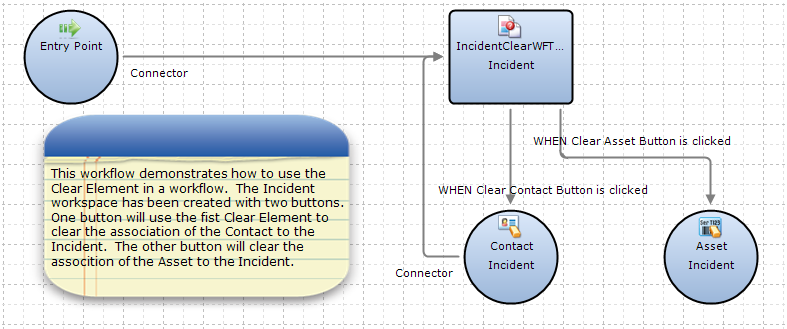
The workflow Clear element is now supported in the Agent Browser User Interface. The Clear element is used to clear the working record’s association with any organization, contact, answer, or incident. After you add a Clear element to your flow diagram, you must edit its attributes to select the working record you want to disassociate.
You can also clear a record association by using a Set Fields element to set the value to No Value, but using the Clear element can make the flow diagram easier to understand.
Workflow Example with Clear Elements
Steps to Enable
No steps are required to enable this feature.
The workflow Copy element is now supported in the Agent Browser User Interface. The Copy element is used to create a new record in the workflow. After you add this element to your flow diagram, you can edit its attributes to specify the field values, a confirmation message, and a name for the record you are creating.
When a new record is created with the Copy element, it is not automatically saved to the database or displayed to staff members. To ensure the new record is saved, be sure to open the working record in a workspace that has the Save button enabled or follow the Copy element with a Save element.
To display the copied record to staff members, you will need to follow the Copy element with a workspace or workflow of the same record type and specify the copy as the working record you want to display.
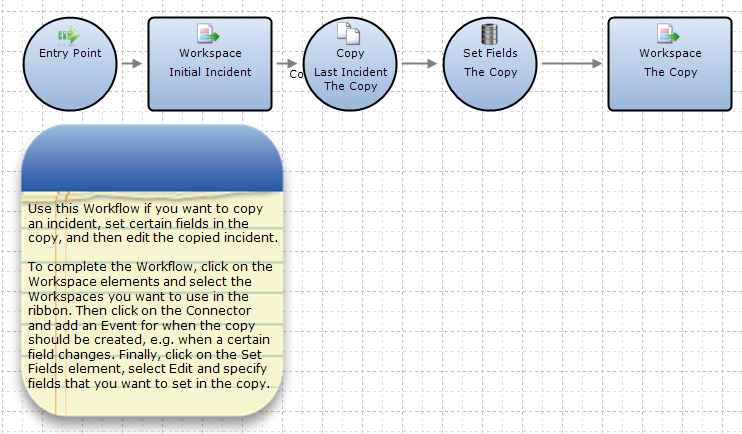
Copy Incident Workflow Template
Steps to Enable
No steps are required to enable this feature.
Display Recent Searches in Knowlege Advanced Search Component
The capability allows agents to view and access their last 5 searches. The searches are tied to user profile and therefore retained across sessions and interfaces.
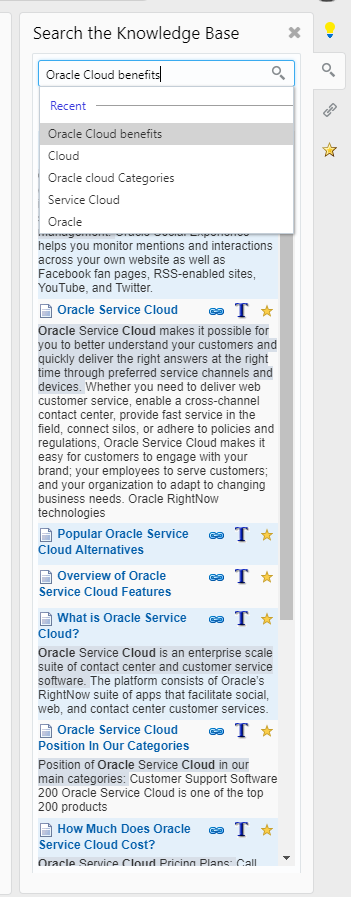
Recent Searches Drop Down on Knowledge Advanced Search Component
Steps to Enable
No steps are required to enable this feature.
---

Copyright © 2018, Oracle and/or its affiliates. All rights reserved.
This document is provided for information purposes only, and the contents hereof are subject to change without notice.This document is not warranted to be error-free, nor subject to any other warranties or conditions, whether expressed orally or implied in law, including implied warranties and conditions of merchantability or fitness for a particular purpose. We specifically disclaim any liability with respect to this document, and no contractual obligations are formed either directly or indirectly by this document. This document may not be reproduced or transmitted in any form or by any means, electronic or mechanical, for any purpose, without our prior written permission.
Oracle and Java are registered trademarks of Oracle and/or its affiliates. Other names may be trademarks of their respective owners.
Intel and Intel Xeon are trademarks or registered trademarks of Intel Corporation.All SPARC trademarks are used under license and are trademarks or registered trademarks of SPARC International, Inc. AMD, Opteron, the AMD logo, and the AMD Opteron logo are trademarks or registered trademarks of Advanced Micro Devices. UNIX is a registered trademark of The Open Group.
