
- Revision History
- Overview
- Feature Summary
- Strategic Workforce Planning Cloud
-
- Features
-
- New Videos
- New Topics in EPM Cloud Operations Guide
- EPM Automate Updates
- REST API to Import Cell-Level Security
- REST API to Export Cell-Level Security
- REST API to Import Valid Intersections
- REST API to Export Valid Intersections
- Updates to the Clone Environment Feature
- New Web Ad Hoc Experience
- Ability to Display Colored Circle Icons on Horizontal Tab Labels in Navigation Flows
- Enhanced Business Rules Dialog in Smart View (Mac and Browser)
- Improved Data Extract in Data Integration
- New Idle Time Setting for Agents During Automated Maintenance Window (AMW) Downtime
-
- IMPORTANT Actions and Considerations
This document will continue to evolve as existing sections change and new information is added. All updates appear in the following table:
| Date | Product | Feature | Notes |
|---|---|---|---|
| 26 MAR 2021 | Created initial document. |
This document outlines the upcoming Strategic Workforce Planning Cloud update.
Column Definitions:
Report = New or modified, Oracle-delivered, ready to run reports.
UI or Process-Based: Small Scale = These UI or process-based features are typically comprised of minor field, validation, or program changes. Therefore, the potential impact to users is minimal.
UI or Process-Based: Larger Scale* = These UI or process-based features have more complex designs. Therefore, the potential impact to users is higher.
Features Delivered Disabled = Action is needed BEFORE these features can be used by END USERS. These features are delivered disabled and you choose if and when to enable them. For example, a) new or expanded BI subject areas need to first be incorporated into reports, b) Integration is required to utilize new web services, or c) features must be assigned to user roles before they can be accessed.
| Ready for Use by End Users Reports plus Small Scale UI or Process-Based new features will have minimal user impact after an update. Therefore, customer acceptance testing should focus on the Larger Scale UI or Process-Based* new features. |
Customer Must Take Action before Use by End Users Not disruptive as action is required to make these features ready to use. As you selectively choose to leverage, you set your test and roll out timing. |
|||||
|---|---|---|---|---|---|---|
| Feature |
Report |
UI or |
UI or |
|
||
Ability to Display Colored Circle Icons on Horizontal Tab Labels in Navigation Flows |
||||||
Enhanced Business Rules Dialog in Smart View (Mac and Browser) |
||||||
New Idle Time Setting for Agents During Automated Maintenance Window (AMW) Downtime |
||||||
Strategic Workforce Planning Cloud
Test Environments: Oracle will apply this monthly update during the first daily maintenance that occurs at or after 22:00 UTC on Friday, April 2, 2021.
Production Environments: Oracle will apply this monthly update during the first daily maintenance that occurs at or after 22:00 UTC on Friday, April 16, 2021.
NOTE: Backing up the daily maintenance snapshot and restoring the environment as needed are self-service operations. Oracle strongly recommends that you download the maintenance snapshot every day to a local server.
The Oracle Help Center provides access to updated documentation. The updates will be available in the Help Center on Friday, April 2, 2021.
NOTE: Some of the links to new feature documentation included in this readiness document will not work until after the Oracle Help Center update is complete.
Fixed Issues and Considerations
Software issues addressed each month and considerations will be posted to My Oracle Support.
This provides visibility into EPM Cloud release contents.
Please Join Oracle Cloud Customer Connect
Please take a moment to join the Cloud Customer Connect forums for EPM Cloud services. Oracle Cloud Customer Connect is a community gathering place for members to interact and collaborate on common goals and objectives. This is where you will find the latest release information, upcoming events, or answers to use-case questions. Joining takes just a few minutes. Join now!
https://cloud.oracle.com/community
NOTE: The Settings and Actions menu now contains a link to Cloud Customer Connect. To access this link, from the Home page, click the down arrow next to the user name (in the upper right-hand corner of the screen), and select Cloud Customer Connect.
Give Us Documentation Feedback
We welcome your comments and suggestions to improve the content of the What's New document and the product documentation.
Please send us your feedback at EPMdoc_ww@oracle.com. In the body or title of the email, state that you are inquiring or providing feedback, and indicate for which EPM Cloud service and the monthly update cycle.
Follow EPM Cloud on YouTube, Twitter, Facebook, and LinkedIn.
These are great resources for the latest updates and information about EPM Cloud.
An existing video for Workforce has been updated.
Configuring Workforce in Planning
Learn how to enable Workforce, then configure drivers, and load metadata to your application. Workforce provides integrated drivers that help you link financial plans with workforce plans that include headcount and compensation planning.
A new video is available about embedded direct links and appearance optimization.
Overview: Embedded Direct Links and Appearance Optimization in EPM Cloud
This video introduces two new features: direct links to embed Strategic Workforce Planning Cloud content in other systems such as ERP Cloud, and new appearance customization options. Use direct links to represent most business process artifacts alongside your other source system pages, enhancing your processes with functionally-tailored forms, grids, reports, and dashboards for seamless cross-system navigation. Use the new appearance options to enjoy the highly efficient Redwood experience, apply custom logos and watermarks, and remove business processes names from pages.
Business Benefit: Videos provide overviews and step-by-step instructions to help you perform your related business activities.
New Topics in EPM Cloud Operations Guide
The Oracle Enterprise Performance Management Cloud Operations Guide has been enhanced with topics that help you troubleshoot additional EPM Cloud-related issues, especially, issues related to EPM Automate. Additionally, a section on creating business rules using a unit testing has been added to help facilitate the creation of business rules.
Newly added topics include:
- Creating a Business Rule Using a Unit Test
- Resolving EPMAT-7: Session is Not Authenticated. Please Execute the Login Command Before Executing Any Other Command Error
- Correcting EPMAT-9: Invalid Credentials and EPMAT-7: Invalid Parameter Errors
- Resolving EPMAT-7: Unable to Modify Access Permission of Password File: .prefs Error
- Resolving EPMAT-7: Unable to Parse Password File: .prefs Error
- Resolving EPMAT-7: Unable to Delete Password File: .prefs Error
- Resolving EPMAT-7: Unable to Connect, Unsupported Protocol: https Error
- Resolving EPMAT-7: Invalid Command Upgrade Error
- Correcting EPMAT-9: Insufficient Privileges To Perform the Operation Error
- Resolving EPMAT-7: Invalid TempServiceType Error
- Resolving EPMAT-1: Invalid Snapshot Error
- Resolving EPMAT-1: Command Failed To Execute. The Parameter Location Is Invalid Error While Running the ImportMetadata Command
- Handling EPMAT-1: A Job with Name <rulename> and Type RULES was not Found Error
- Resolving EPMAT-6: Service Unavailable Error While Running Business Rules
Business Benefit: The Oracle Enterprise Performance Management Cloud Operations Guide helps you self-diagnose and fix EPM Cloud issues.
Key Resources
A new version of EPM Automate is now available. This version introduces the exportCellLevelSecurity, exportValidIntersections, importCellLevelSecurity, importValidIntersections, and sendMail commands.
exportCellLevelSecurity Command
This command exports cell-level security settings from Strategic Workforce Planning into a ZIP file.
exportValidIntersections Command
This command exports valid intersection groups from a Strategic Workforce Planning into a ZIP file. Valid intersections are cell interactions that are filtered based on rules you define, called valid intersection rules, which filter certain cell intersections to users when they enter data or select runtime prompts.
importCellLevelSecurity Command
This command imports cell-level security settings from a ZIP file that contains an Excel file with cell-level security definitions into Strategic Workforce Planning.
importReconciliationAttributes Command
This command imports reconciliations attributes from a file into existing reconciliations.
importValidIntersections Command
This command imports valid intersection groups from a ZIP file that contains an Excel file with valid intersection definitions into Strategic Workforce Planning.
sendMail Command
This command sends an email to specified recipients with the option to attach files from Strategic Workforce Planning Cloud. This command can be incorporated into EPM Automate scripts to notify users of various conditions or to send reports.
Business Benefit: The newly added commands facilitate the management of complex Strategic Workforce Planning Cloud operations.
Key Resources
- Working with EPM Automate for Oracle Enterprise Performance Management Cloud:
REST API to Import Cell-Level Security
You can now use REST APIs to import cell-level security settings from a ZIP file that contains an Excel file with cell-level security definitions into Strategic Workforce Planning.
The file must be present in the Inbox. You can use the Upload REST API to upload the file. Any rejected records are generated in an Excel file that is zipped and copied to the Outbox. The best method to get the import file format template is to export cell-level security from the application.
Business Benefit: Using REST APIs gives you flexibility when working with security.
Key Resources
- Managing Jobs in REST API for Oracle Enterprise Performance Management Cloud
Role Information
- Service Administrators
REST API to Export Cell-Level Security
You can now use REST APIs to export cell-level security settings from Strategic Workforce Planning into a ZIP file that contains an Excel file. The file is added to the Outbox. You can download the file using the Download REST API.
Business Benefit: Using REST APIs gives you flexibility when working with security.
Key Resources
- Managing Jobs in REST API for Oracle Enterprise Performance Management Cloud
Role Information
- Service Administrators
REST API to Import Valid Intersections
You can now use REST APIs to import valid intersections groups from a ZIP file that contains an Excel file with valid intersection definitions into Strategic Workforce Planning. The file must be present in the Inbox. You can use the Upload REST API to upload the file. Any rejected records are generated in an Excel file that is zipped and copied to the Outbox.
Business Benefit: Using REST APIs gives you flexibility when working with valid intersections.
Key Resources
- Managing Jobs in REST API for Oracle Enterprise Performance Management Cloud
Role Information
- Service Administrators
REST API to Export Valid Intersections
You can now use REST APIs to export valid intersection groups (certain cell intersections filtered by rules when users enter data or select runtime prompts) from Strategic Workforce Planning. The output is a ZIP file that is added to the Outbox. You can download the file using the Download REST API.
Business Benefit: Using REST APIs gives you flexibility when working with valid intersections.
Key Resources
- Managing Jobs in REST API for Oracle Enterprise Performance Management Cloud
Role Information
- Service Administrators
Updates to the Clone Environment Feature
The Clone Environment feature provides a screen-based method to clone environments. It is an alternative to writing EPM Automate scripts to clone an environment.
NOTE: This feature supports the cloning of both Classic and OCI (Gen2) Strategic Workforce Planning Cloud environments. For Classic Strategic Workforce Planning Cloud environments, security (users and their predefined and application role assignments, and group assignments) cannot be cloned using this feature.
Cloning of environments is useful in migration scenarios, including the following:
- Production to test cloning
- Test to production cloning
When you clone an environment, Strategic Workforce Planning Cloud automatically completes all the actions required to create an exact copy of the current application in the target environment. Because this process recreates the target environment, be sure to backup data and artifacts from the target environment before using this feature.
Business Benefit: Using the Clone Environment feature allows you to clone Strategic Workforce Planning Cloud environments without writing EPM Automate scripts.
Key Resources
- Cloning EPM Cloud Environments in Administering Migration for Oracle Enterprise Performance Management Cloud
In this update we are introducing the new Web ad hoc experience across all themes.
New Web ad hoc replaces the existing Web ad hoc with a new user experience when using ad hoc over the Web. Users can start with a cube slice from scratch or traverse from their Web forms or dashboards into these new ad hoc sheets for a whole new ad hoc experience. Users using the Redwood Experience can leverage the benefit of the dynamic tabs to work in tandem with form or dashboards or reports alongside these new ad hoc grids. This solves many multi-tasking use cases.
Business Benefit: The new Web ad hoc experience will provide the benefit of fast, snappy grids, all within a newly defined interface.
Key Resources
- Perform Powerful Analysis with Ad Hoc Grids in Working with Planning
Ability to Display Colored Circle Icons on Horizontal Tab Labels in Navigation Flows
You can now design navigation flows that display colored circle icons on labels for horizontal tabs.
To view the new icons, click Tools, and then click Navigation Flows to open the navigation flow you want to edit (note that to edit a navigation flow, it must be set to Inactive). Add a new card or edit an existing card in the navigation flow. Ensure that Tabular Page is selected for Page Type, and then select Horizontal for Orientation. Add a new tab or edit an existing tab, and while defining the tab details, click Icon to view the new colored circle icon options.
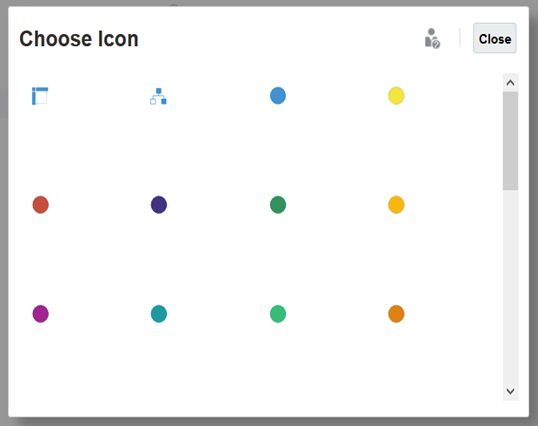
Horizontal Tabs Icon Selector with Colored Circles
The navigation flow will display the horizontal tabs with colored icons as shown in the example below...
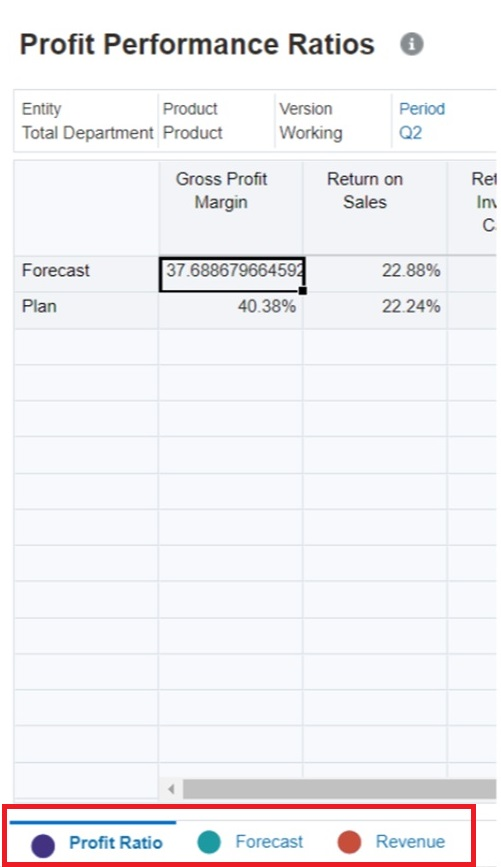
Navigation Flow Showing Horizontal Tabs with Colored Circles
Business Benefit: Colored icons let you more easily differentiate the horizontal tabs on a card.
Key Resources
- Adding Tabs to a Tabular Page in Administering Planning
Enhanced Business Rules Dialog in Smart View (Mac and Browser)
When there are business rules associated with a form to "Run on Save," Smart View (Mac and Browser) users were required to select the Submit and Calc button from the Smart View ribbon to complete this task. With this enhancement, business rules are triggered automatically. Smart View (Mac and Browser) detects whether there are business rules associated with the form, and then runs them with prompts being displayed in the new Business Rules dialog. Similarly, when submitting supporting details, if the form is associated with rules set to "Run on Save," the Business Rules dialog will display. The new Business Rules dialog makes working with forms easier and more intuitive.
Business Benefit: A previous limitation of Office 365 was that you could not automatically launch the task pane where business rules were implemented, and you were required to use the Submit and Calc button on the ribbon. With this enhancement, that limitation is eliminated, and you can run the business rules from a dialog. This provides a better user interface and more intuitive workflow to improve your experience with Smart View (Mac and Browser).
Steps to Enable
To use the new Business Rules dialog in Smart View (Mac and Browser), Service Administrators must create and deploy a new manifest file:
- Create a new manifest file and customize it per your requirements, ensuring that you include the Business Rules and Supporting Details option.
- Deploy the manifest file to Smart View (Mac and Browser) users.
Key Resources
- Deploying and Administering Oracle Smart View for Office (Mac and Browser):
- Working with Oracle Smart View for Office (Mac and Browser):
Improved Data Extract in Data Integration
In this update, the data extract feature now supports the extract of dynamically calculated members for both dense and spare dimensions.
Additional options enable you to select the type of member to extract under the Data Extract Option field on the Options page including:
- Stored Data Only—Extracts stored data only. Dynamically calculated values are excluded in this type of extract.
- Stored and Dynamic Calculated Data—Extracts stored dynamic calculated values for the Dense dimension only and not Spare dimensions.
- All Data—Extracts stored values and dynamically calculated values for both the Dense and Spare dimension.
Note that the Data Extract Option field has been renamed from the “Extract Dynamic Calculated Data” field on the Options page.
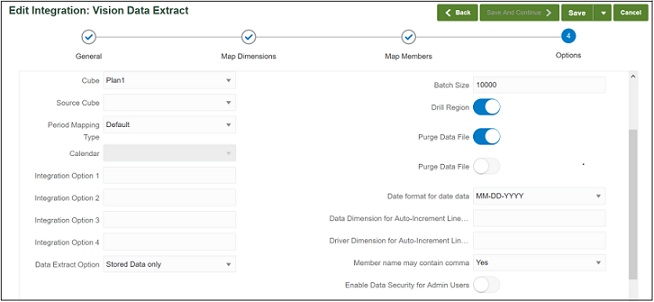
Options Page
Business Benefit: Customers can export all data whether it is stored or dynamically calculated.
Key Resources
- Defining Direct Integration Options in Administering Data Integration for Oracle Enterprise Performance Management Cloud
New Idle Time Setting for Agents During Automated Maintenance Window (AMW) Downtime
In Data Integration, a new AMW_IDLE_TIME parameter in agentparamas.ini enables you to specify the idle time value for agents running in asynchronous mode during an Automated Maintenance Window (AMW) downtime or an unscheduled maintenance.
The AMW_IDLE_TIME parameter value is set in minutes and the default setting is 15 minutes. Customers can define a longer idle time but should not specify an idle time value less than 15 minutes. The AMW downtime is a contiguous time interval during in which automated maintenance tasks are run for a business process. Prior to this update agents often could not to reconnect to the Strategic Workforce Planning Cloud during an AMW, or scheduled/unscheduled maintenance.
Business Benefit: EPM agents can be reconnected to the Strategic Workforce Planning Cloud automatically during schedule and unscheduled maintenance based on a idle time value.
Steps to Enable
- Select the Download Agent option on the Actions menu in Data Integration.
- Unzip the EPMAgent.zip and overwrite your existing agent folder.
Key Resources
- Configuring the EPM Integration Agent Startup Parameters in Administering Data Integration for Oracle Enterprise Performance Management Cloud
IMPORTANT Actions and Considerations
UPCOMING CHANGE TO SMART VIEW AD HOC BEHAVIOR SETTING
Within the next few months, all customers will be defaulted to "Standard" mode instead of "Native" mode for the Smart View Ad Hoc Behavior option in Application Settings. "Standard" mode provides additional features like multiple-grid support, in-sheet POV, submit without refresh, and other features. Since this will cause a change in user interaction expectations, customers who wish to continue with "Native" ad hoc behavior can, at that time, change their application setting for Smart View Ad Hoc Behavior to "Native" mode.
Please note that "Native" mode in Smart View Ad Hoc Behavior will eventually be phased out. We recommend that all customers switch their applications to "Standard" mode ad hoc behavior soon.
LOANER PROGRAM FOR CLOUD INFRASTRUCTURE GENERATION 2 TESTING
Oracle Strategic Workforce Planning Cloud is now live on Oracle Cloud Infrastructure (OCI) Gen 2 environments. If you are interested in testing your application performance on an OCI Gen 2 environment, open a service request following the process at https://docs.oracle.com/en/cloud/saas/enterprise-performance-management-common/tsepm/op_procs_loaner_envs.html and request for a loaner environment in an OCI Gen 2 data center for a duration of 30 days with the business justification as “Want to test application performance in an OCI Gen 2 data center”.
After you have performed the testing, submit Provide Feedback from the loaner environment. Create a service request using the normal support process, if you have any issues or feedback for the OCI Gen 2 environment.
For more information, see What is a Gen 2 Cloud?
IMPORT SNAPSHOT - CHANGE OF BEHAVIOR
Importing snapshot will no longer reset the daily maintenance start time of the target environment to that of the environment from which the snapshot was taken. The import process will honor the maintenance start time set for the target environment.
Starting with the 21.02 update the behavior of the import process was changed to update the daily maintenance start time of the target environment to that of the source environment. Oracle is reverting this behavior based on customer feedback.
See these information sources if you need to change the daily maintenance start time:
- Setting Service Maintenance Time in Getting Started with Oracle Enterprise Performance Management Cloud for Administrators
- setDailyMaintenanceStartTime EPM Automate command
RUNBUSINESSRULE EPM AUTOMATE COMMAND - CHANGE OF BEHAVIOR
Starting with the 21.05 update, the runBusinessRule EPM Automate command will no longer let you run a ruleset against Strategic Workforce Planning applications. Instead, you should use the runRuleSet command to launch business rulesets using EPM Automate.
If you currently use scripts that use the runBusinessRule command to launch rulesets, you must modify them to use the runRuleSet command.
REMOVAL OF SOME UNUSED MIGRATION OPTIONS
In an upcoming update, Oracle plans to remove some unused or rarely used options from the Import Options screen in Migration. Because Strategic Workforce Planning Cloud implicitly handles Essbase cube restructure and overwriting of artifacts, the Essbase Application - Overwrite Artifacts and Essbase Application - Restructure Cube options had no effect in Strategic Workforce Planning Cloud. These options will no longer be displayed. The Data Management - Skip Validation option will use the default value of false while the Groups and Membership - Max Error Threshold option will use 100 as the default value.
The removal of these options is not expected to have any impact on customers. Tentative plans call for this change to be introduced with the 21.05 update. If you have any concerns about this change, please contact Oracle Support.
SUPPORT FOR COMPOSITE FORMS
Starting in May 2021, Strategic Workforce Planning plans to stop official support for composite forms. Customers are advised to convert existing composite forms to Strategic Workforce Planning dashboards and log any issues with Support.