
- Revision History
- Overview
- Feature Summary
- Strategic Workforce Planning Cloud
-
- Features
-
- New Topics in EPM Cloud Operations Guide
- EPM Automate Updates
- IDENTITY_DOMAIN As a Required Parameter No Longer Needed for the EPM Automate Login Command
- REST API to Review Rejected Data After Import
- Updates to REST API for Importing Data Slices
- Data Integration: New Replace Methods Available for Non-Administrator Users
- Data Integration: New Round Function Available for Amount Dimension in Import Expressions
- Support for Adding Links to Web Pages in Navigation Flow Cards and Tabs
- New Server Settings in Financial Reporting Web Studio
- Ability to Delete All Batch Job Output from the Repository That Is Not Stored in an Internal Folder
- Activity Report Highlights Slow User Interface Request Characteristics
- Predictive Planning Now Supports Full POV Selection for Historical Data and Alternate Cubes for Historical Data and Prediction Data
- New Valid Intersection Rules Pagination Bar
- Reviewing Rejected Data Records After Import
- New Refresh Option on the Approval Unit Hierarchy Listing Page
- Retrieve Substitution Variables and Update Values Using Groovy
- Data Map Enhancements
- Ability to Clear an Allocation Range Before the Allocation Process
-
- IMPORTANT Actions and Considerations
This document will continue to evolve as existing sections change and new information is added. All updates appear in the following table:
| Date | Product | Feature | Notes |
|---|---|---|---|
| 31 JUL 2020 | Created initial document. |
This document outlines the upcoming Strategic Workforce Planning Cloud update.
Column Definitions:
Features Delivered Enabled
Report = New or modified, Oracle-delivered, ready to run reports.
UI or Process-Based: Small Scale = These UI or process-based features are typically comprised of minor field, validation, or program changes. Therefore, the potential impact to users is minimal.
UI or Process-Based: Larger Scale* = These UI or process-based features have more complex designs. Therefore, the potential impact to users is higher.
Features Delivered Disabled = Action is needed BEFORE these features can be used by END USERS. These features are delivered disabled and you choose if and when to enable them. For example, a) new or expanded BI subject areas need to first be incorporated into reports, b) Integration is required to utilize new web services, or c) features must be assigned to user roles before they can be accessed.
Strategic Workforce Planning Cloud
Test Environments: Oracle will apply this monthly update during the first daily maintenance that occurs at or after 22:00 UTC on Friday, August 7, 2020.
Production Environments: Oracle will apply this monthly update during the first daily maintenance that occurs at or after 22:00 UTC on Friday, August 21, 2020.
The Oracle Help Center provides access to updated documentation. The updates will be available in the Help Center on Friday, August 7, 2020. Some of the links to new feature documentation included in this readiness document will not work until after the Oracle Help Center update is complete.
NOTE: Backing up the daily maintenance snapshot and restoring the environment as needed are self-service operations. Oracle strongly recommends that you download the maintenance snapshot every day to a local server.
Please Join Oracle Cloud Customer Connect
Please take a moment to join the Cloud Customer Connect forums for EPM Cloud services. Oracle Cloud Customer Connect is a community gathering place for members to interact and collaborate on common goals and objectives. This is where you will find the latest release information, upcoming events, or answers to use-case questions. Joining takes just a few minutes. Join now!
https://cloud.oracle.com/community
NOTE: The Settings and Actions menu now contains a link to Cloud Customer Connect. To access this link, from the Home page, click the down arrow next to the user name (in the upper right-hand corner of the screen), and select Cloud Customer Connect.
Give Us Documentation Feedback
We welcome your comments and suggestions to improve the content of the What's New document and the product documentation. Please send us your feedback at EPMdoc_ww@oracle.com. In the body or title of the email, state that you are inquiring or providing feedback, and indicate for which EPM Cloud service and the monthly update cycle.
For the latest updates and information about EPM Cloud, follow us on YouTube, Twitter, Facebook, and LinkedIn.
Defects Fixed and Considerations
Software issues addressed each month and considerations will be posted to My Oracle Support.
New Topics in EPM Cloud Operations Guide
The Oracle Enterprise Performance Management Cloud Operations Guide has been enhanced with additional topics.
New topics include:
- Enrolling in the Implementation Success Program
- Requesting Performance Validation
- Requesting Automated Regression Testing
- Fixing Smart View Issues
Key Resources
A new version of EPM Automate is available. It includes support for encrypting the passwords used in the replay command.
Additionally, Working with EPM Automate for Oracle Enterprise Performance Management Cloud has been enhanced with Windows and Linux/UNIX scripts to replicate users and predefined role assignments across identity domains.
Key Resources
- Working with EPM Automate for Oracle Enterprise Performance Management Cloud:
IDENTITY_DOMAIN As a Required Parameter No Longer Needed for the EPM Automate Login Command
EPM Automate login command no longer requires the use of IDENTITY_DOMAIN as a required parameter. Instead of obtaining the identity domain name from the IDENTITY_DOMAIN parameter, EPM Automate calculates it automatically from the URL parameter. Any value you set for this optional parameter is ignored. Existing scripts that contain this value are not affected.
REST API to Review Rejected Data After Import
When using a REST API to import data, you can now review the records that have errors. To do this, you specify an error file that captures the data records that are not imported for each dimension. If an error file is specified, a separate error file is created for each dimension. The error files are then zipped together and the ZIP file is stored in the Outbox where you can download the file, for example, with the Download REST API.
This helps you import data more effectively when using REST APIs.
Tips And Considerations
In April, 2020, we introduced the ability for you to review rejected metadata after import. With this update, you can also review rejected data.
Key Resources
- Import Data in REST API for Oracle Enterprise Performance Management Cloud
Role Information
- Service Administrators
Updates to REST API for Importing Data Slices
The importdataslice REST API has been enhanced to include cells with invalid data in the list of rejected cells. Previously, invalid data in a cell was not imported but it was not reported as rejected.
This feature makes the import process more efficient and helps you optimize your data slice imports.
Key Resources
- Import Data Slices in REST API for Oracle Enterprise Performance Management Cloud
Role Information
- Service Administrators
Data Integration: New Replace Methods Available for Non-Administrator Users
A new Replace for Non Admin Load Method setting in Application Details enables you to select how non-administrators can load data in Replace mode.
Available methods now include:
- None—Perform no replace.
- Numeric Data Only—Perform replace when the load method is numeric data only.
- All Load Methods—Perform replace for all load methods.
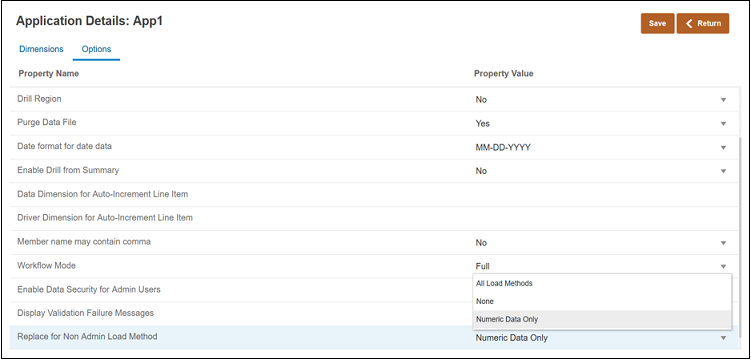
Application Details Page
The Replace for Non Admin Load Method setting extends the options for non-administrators when the load method is all data types with security. Prior to this update, non-administrators could only load numeric data with the Replace mode.
Key Resources
- Defining Target Options in Oracle® Cloud Administering Data Integration for Oracle Enterprise Performance Management Cloud
Data Integration: New Round Function Available for Amount Dimension in Import Expressions
The new Round function enables you to round a source value to a fixed number of decimals. You specify its parameters by selecting the Round function for the Amount dimensions in target expressions. A precision value from -12 to 12 can be specified in the Round function.
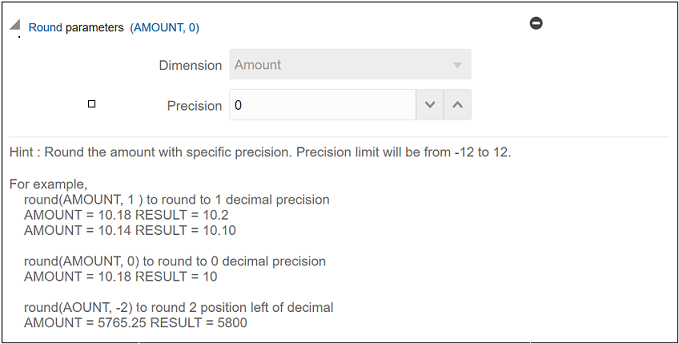
Round Parameters Page
Rounding numbers makes them simpler to represent when an approximation suffices and an exact representation is not required.
Key Resources
- Round in Administering Data Integration for Oracle Enterprise Performance Management Cloud
Support for Adding Links to Web Pages in Navigation Flow Cards and Tabs
Business process designers can now customize navigation flows to link cards and tabs to a web page; for example, you can add a URL to embed an Oracle Analytics Cloud dashboard in a card or tab.
You can edit navigation flow cards, tabs, and sub tabs, to provide the URL for a web page. The URL can then be validated in a popup window before the update is saved.
The new URL option is visible when specifying content for navigation flow cards, tabs, and sub tabs on the Add Card, Add New Tab, and Add New Sub Tab pages. To view the navigation flows for your business process, click Tools, and then click Navigation Flows.
Key Resources
In your EPM Cloud Administering guide:
New Server Settings in Financial Reporting Web Studio
Two new server settings are now available in Financial Reporting Web Studio.
- Cleanup Batch Jobs Older Than: Defines how long a batch job and its files are retained in the repository, before its deletion.
- Batch Cleanup Process Interval: Defines the interval between batch cleanup.
These server settings automate batch cleaning after a certain period of time so that you don't have to have to clean up batches manually.
Key Resources
- Managing Server Settings in Working with Financial Reporting for Oracle Enterprise Performance Management Cloud
Ability to Delete All Batch Job Output from the Repository That Is Not Stored in an Internal Folder
A new menu option, Delete Batch Jobs Results (From Internal Folder), is now available on the Edit menu in the Batch Scheduler. This option deletes all batch job output that is stored in an internal folder from the repository (including PDF and HTML files).
Over time, the HRInternal directory becomes very large, and old batch job output data causes the database response time to slow down. The Delete Batch Jobs Results (From Internal Folder) option helps remedy this issue.
Key Resources
- Deleting Batches from the Batch Scheduler in Working with Financial Reporting for Oracle Enterprise Performance Management Cloud.
Activity Report Highlights Slow User Interface Request Characteristics
The Activity Report has been enhanced to provide better information on the user interface requests that may be performing slow in an environment. Oracle has replaced the Average Duration, Min Duration, and Max Duration columns in the Percentage of UI Requests over 2 Seconds table with columns that identify the percentage of requests that ran for a ranges of time periods (0-2 Sec %, 2-10 Sec %, 11-30 Sec %, and 31+ Sec %).
Current User Interface Request by Duration Metrics
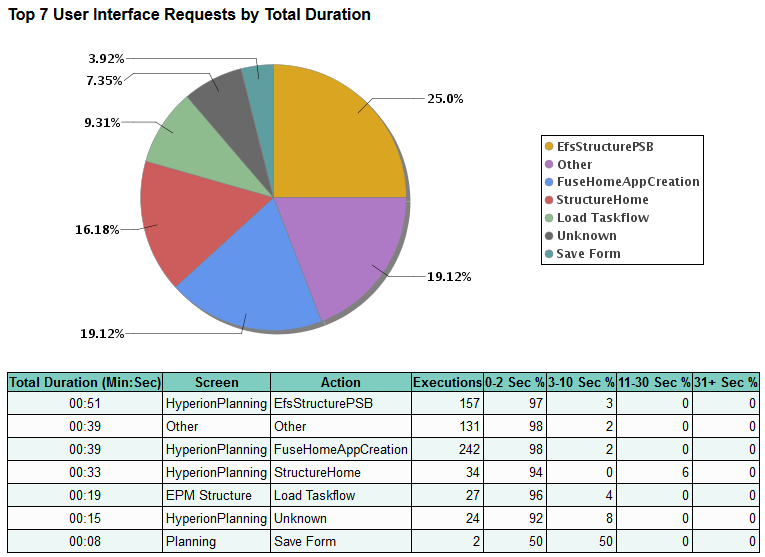
New User Interface Request by Total Duration Metrics
Additionally, to maintain consistency, the Top 7 User Interface Requests by Duration table has been renamed as Top 7 User Interface Requests by Total Duration.
Predictive Planning Now Supports Full POV Selection for Historical Data and Alternate Cubes for Historical Data and Prediction Data
When working with Predictive Planning, you can now select members from all dimensions when defining the POV for the historical data source. Previously you could select members only for Scenario and Version. You can select the POV for each cube in the application.
Additionally, you can select different cubes for source data (where historical actuals are stored) and predictions (the cube the forms are associated with where you want to perform predictions).
Select Predictive Planning options in Application Settings:
From the Home page, click Application and then click Settings.
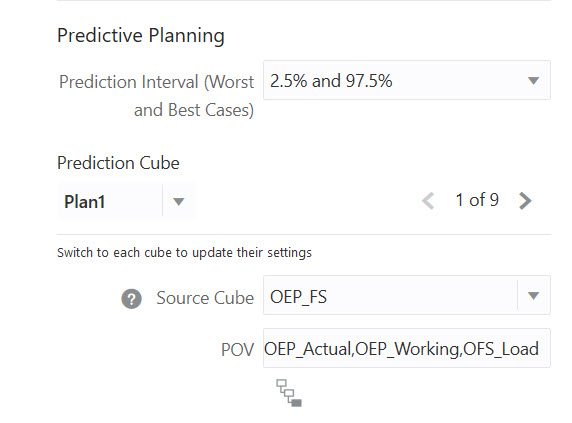
Predictive Planning Application Settings
This enhancement ensures that you can do the same predictions in Predictive Planning and in Auto Predict.
Tips And Considerations
- After applying the update, if you had previously selected members for Scenario and Version, those members are selected in the POV for the relevant cube.
-
If you are using different cubes for source data and predictions, they must be in the same application.
- For each prediction cube, you can specify a source cube (which can be the same as the prediction cube or a different cube) and the POV for the source cube.You can select the POV for each cube in the application.
Key Resources
-
What Application and System Settings Can I Specify? in Administering Planning
New Valid Intersection Rules Pagination Bar
To improve the user experience for users having valid intersections with a large number of rules, a pagination bar now displays at the bottom of the valid intersection details page.
Use the pagination bar to navigate between the pages and to jump to a specific page. The page size options (number of rules per page) ) that you can select on the pagination bar are 25, 50, 100, and All. (Note that the All option isn't available if you have more than 300 rules.)
To view or edit valid intersection details, click Application, and then click Valid Intersections. If it isn't already selected, click Setup, and then select the name of the valid intersection group you want to view.
Key Resources
- Editing Details for a Valid Intersection Group in Administering Planning
Reviewing Rejected Data Records After Import
While defining the data import job, you now have the option to specify an error file which captures the data records that are not imported.
If an error file is specified, the zip file is stored in the Outbox where you can download the file using Inbox/Outbox Explorer or tools like EPM Automate or REST APIs.
Key Resources
- Importing Data in Administering Planning
New Refresh Option on the Approval Unit Hierarchy Listing Page
To streamline the process for refreshing the approval unit hierarchy listing, there is now a Refresh option on the Approval Unit hierarchy listing page.
Clicking Refresh retrieves the most recent approval unit hierarchy content from the database without leaving the page; for example, if you're waiting for a hierarchy to be synchronized you can click Refresh rather than relaunching the page.
To view and refresh the content of the approval unit hierarchy listing page, click the Navigator icon, and then under Workflow, click Approval Unit. On the listing page, click Actions, and then click Refresh.
Key Resources
- Viewing Approval Unit Hierarchies in Administering Planning
Retrieve Substitution Variables and Update Values Using Groovy
You can now use Groovy to retrieve substitution variables at the plan type and application level. You can also update substitution variable values.
Substitution variables allow you to create global placeholders for information that changes regularly. For example, you could set the current month member to a substitution variable so that when the month changes you don't need to update the month value manually in a form.
Steps to Enable
Follow the steps to create a Groovy business rule in Creating a Groovy Business Rule in Designing with Calculation Manager. For a step-by-step tutorial on creating Groovy business rules, see Introduction to Groovy Business Rules and the other Groovy tutorials. For the technical specification of the new features, see the EPM Cloud Groovy Rules Java API Reference.
Tips And Considerations
- Learn about the benefits of substitution variables in Administering Planning
Key Resources
-
Learn about Groovy with these resources:
- Learning Groovy in Oracle EPM Cloud video
- Creating a Groovy Business Rule in Designing with Calculation Manager for Oracle Enterprise Performance Management Cloud
- Introduction to Groovy Business Rules tutorial
- Groovy Tutorials
- EPM Cloud Groovy Rules Java API Reference
Role Information
- Calculation Manager Business Rule Designer
Data maps are enhanced with several performance improvements to benefit inter-module integration.
- Data maps now automatically synchronize after the reporting cube is modified. You no longer need to manually synchronize data maps when you add members to the application. Prior to this enhancement, if there were any changes to the outline of the target cube, you had to perform a synchronize action on data maps for the data maps to be executed successfully. With this enhancement, you no longer need to perform this step.
- New validation check for empty member set dimensions in data maps. Validations have been added to check for empty member set dimensions. These validations are performed during data map creation and data push execution.
- While defining data maps, you can now select dynamic parents with level 0 children without including the dynamic parent. Dynamic calc members in sparse dimensions are ignored during the data push operation.
- Exclusion of a base member now also excludes any shared members. The same is true if you exclude a shared member; the base member is now also excluded.
Key Resources
- Defining Data Maps in Administering Planning
Ability to Clear an Allocation Range Before the Allocation Process
When creating an allocation component for an ASO cube in Calculation Manager, you can now define a range to clear before the allocation process.
The ability to clear a range ensures that old allocations are removed so that only the current allocation data exists.
Key Resources
- Creating an Allocation Component in Designing with Calculation Manager for Oracle Enterprise Performance Management Cloud
IMPORTANT Actions and Considerations
FUTURE AVAILABILITY OF THE REDWOOD THEME
In a future update, Strategic Workforce Planning Cloud will offer a new Redwood appearance theme, in addition to the existing 13 themes available. The Redwood theme gives an enhanced look and feel in terms of colors and icons and brings consistency across Oracle Cloud.
Redwood will be the default theme for new instances, while existing instances will continue to see the current theme by default. You can switch to the Redwood theme from Tools > Appearance.
IDENTITY_DOMAIN AS A REQUIRED PARAMETER NO LONGER NEEDED FOR THE EPM AUTOMATE LOGIN COMMAND
In an upcoming release, Oracle will remove the IDENTITY_DOMAIN parameter from the EPM Automate login command documentation. However, you can still set a value for this parameter and it will be ignored. Existing scripts that contain this value will not be affected.This documentation change is expected to be implemented in the 20.10 update.
WORKFORCE MODULE FORM NAME CHANGES – JOB ONLY MODELS
In the October 2020 (20.10) update, Oracle will fix a defect for certain forms in the Workforce module of Strategic Workforce Planning with the Job Only level of granularity configuration. These forms currently are not tracked for customer modifications, so they do not appear in the Restore Modified Artifacts lists even if modified. The fix for this and related issues for these specific forms in the Job Only configuration will lead to an overwrite of any customer customizations on these forms with the 20.10 update.
The following four forms in the Workforce module Job Only configuration are impacted by this upcoming change:
- Set Workforce Assumptions
- Identify Invalid Data
- Process Data and Synchronize Defaults
- Process Data and Synchronize Definition
Customers who have enabled the Workforce module with Job Only level of granularity who have modified any of these four forms are advised to create a backup of only the modified forms from this list prior to the 20.10 update to preserve the customizations. After the 20.10 update, customers may import this backup of forms to restore their customizations. These forms will now appear in the Modified Artifacts lists for potential restoration, if desired in the future.
For information on exporting forms, see Backing up Artifacts and Application.
ACCOUNT ALIAS CHANGES
In the October 2020 (20.10) release, the alias for two Accounts will be modified to clarify the intended usage for these accounts as assumptions.
| Account |
Current Alias |
New Alias |
| OWP_FTE |
FTE |
FTE Assumption |
| OWP_Headcount |
Headcount |
Headcount Assumption |
These two accounts are used to drive calculations and should not be used for reporting. There are corresponding, calculated account hierarchies, i.e. Total FTE and Total Headcount, which should be used for reporting instead of these input accounts. Customers who have not modified the alias for these two accounts will have the aliases automatically updated with the 20.10 update. Such customers are advised to change any hard-coded references to the current alias in Calculation Manager rules, Data Management mappings, or other direct references. As a reminder, the best practice is to refer to member names not aliases in rules, mappings, etc. as they are less likely to change than aliases. Customers who have modified the alias for either of these two accounts will not see any change with the 20.10 update for the account they have modified.
USABILITY ENHANCEMENTS FOR HORIZONTAL TABS IN NAVIGATION FLOWS
In an update within the next few months, we are introducing a feature within navigation flows to open additional horizontal tabs on the fly to perform related actions; for example, view drill through from a form in a new temporary tab. As part of this new ‘on the fly tab’ feature; the horizontal tabs will move to the bottom of the page instead of at the top of the page where they are currently located. These changes will be the default for all customer environments where horizontal tabs are being used within navigation flows.
With tabs at the bottom of the page instead, customers will benefit from a clear separation of the Strategic Workforce Planning Cloud horizontal tabs from their browser tabs at the top of the window. Another benefit of this change will be to keep the navigation flow tab names distinct from the name of the artifacts (such as forms and dashboards) rendered within the horizontal tabs. The vertical tabs will stay where they are.
The effective date of the update will be announced in the month prior to the update. It is expected in the next 2-4 months’ timeframe.
NEW SETTING TO ENABLE INCREMENTAL IMPORT OF DATA USING MIGRATION FOR STRATEGIC WORKFORCE PLANNING APPLICATIONS
In an upcoming update, Oracle will create a new application setting for Strategic Workforce Planning Cloud applications to enable incremental import of data using Migration. The default setting will be set to disable incremental import of data using Migration. As a result, you cannot use the daily maintenance snapshot or any extract created using Migration for incremental import of data if this new setting remains in the default configuration; you must import a full snapshot to load data using Migration as a full Clone where the target environment does not have an existing application.
Service Administrators will be able to change this setting with warnings prompting that doing so may lead to data corruption if subsequent incremental import of data using Migration are not done properly. Examples of potential data corruption include, but are not limited to, incremental data migration from a different source other than the target application where underlying Smart List values may be different.
Existing Strategic Workforce Planning Cloud subscriptions who have already upgraded to the newer version of Essbase will not be impacted by this upcoming change since incremental data loads are not allowed on this version of Essbase. Thus, this new application setting will not appear for those subscriptions already using the newer version of Essbase.
This change is being implemented to address customer feedback. If you have any concerns about this change, please contact Oracle Support.
INTERNET EXPLORER BROWSER SUPPORT
For Internet Explorer browser users, Microsoft recommends using the new Microsoft Edge as your default browser. With this guidance in mind, the 20.08 update will be the last update to support Internet Explorer. Strategic Workforce Planning Cloud will no longer support Internet Explorer starting with the 20.09 update.
We continue to upgrade the underlying technologies that support Strategic Workforce Planning Cloud but we are no longer testing our products using Internet Explorer starting with the 20.09 release. Thus, existing functionality that currently works and is supported using Internet Explorer may no longer work beginning with the 20.09 or subsequent updates. Only supported browsers are tested and supported for existing and new functionality.
All customers should have plans in place for all users to discontinue the usage of Internet Explorer beginning with the 20.09 update. If you have any questions regarding de-support, please create a Service Request. For additional guidance on Internet Explorer Lifecycle, please reach out to Microsoft.
CALCULATION MANAGER DE-SUPPORT FOR FLASH
By the end of 2020, Oracle will disable Flash in Calculation Manager, and options to enable it will be removed. This change is in response to Adobe’s decision to stop updating and distributing Flash at the end of 2020. See https://theblog.adobe.com/adobe-flash-update/.
REMOVAL OF INSTANCE NAME FROM PREDEFINED ROLE NAMES
Currently, the predefined role names displayed in the Access Control screens of Strategic Workforce Planning Cloud environments prefix the instance name to the role name in INSTANCE_NAME ROLE_NAME format. They are also stored in this format in the snapshots, making it difficult to migrate snapshots from one instance to another.
To facilitate the migration of security across Strategic Workforce Planning Cloud environments, Oracle plans to rename predefined role names displayed within EPM Cloud applications by removing the instance name prefix. For example, if the instance name is Planning1, predefined role names are Planning1 Service Administrator, Planning1 Power User, Planning1 User, and Planning1 Viewer, the new role names will be Service Administrator, Power User, User, and Viewer.
NOTE: This change does not affect how the role names are displayed in the MyServices customer portal.
This change won't impact customers who currently use predefined roles for managing application-level provisioning and access to artifacts. Oracle will ensure that all application role assignments and artifact security assignments are automatically updated after the roles are renamed. This change makes it easy to migrate Strategic Workforce Planning Cloud artifacts across environments.
This change is being implemented to address customer feedback. If you have any concerns about this change, please contact Oracle Support.
EPM MOBILE APP STATEMENT OF DIRECTION
EPM Mobile App is a downloadable application for the phone that is purpose built to perform approval actions for iOS and Android based phone devices. It was purpose built to help users perform Approval and Workflow activities.
The terminal release of EPM Mobile App is September 2020. EPM Mobile App will not be available for download in the Apple and iOS App Stores effective October 2020. Oracle’s strategic direction is to have customers use the Approval and workflow capabilities using the mobile browser interface on mobile devices.
Oracle will continue to support Oracle EPM Mobile App in its current supported versions until September 2020. Oracle recommends that users using Oracle EPM Mobile App prepare to instead use the approval functionality using supported mobile browser in tablet devices.